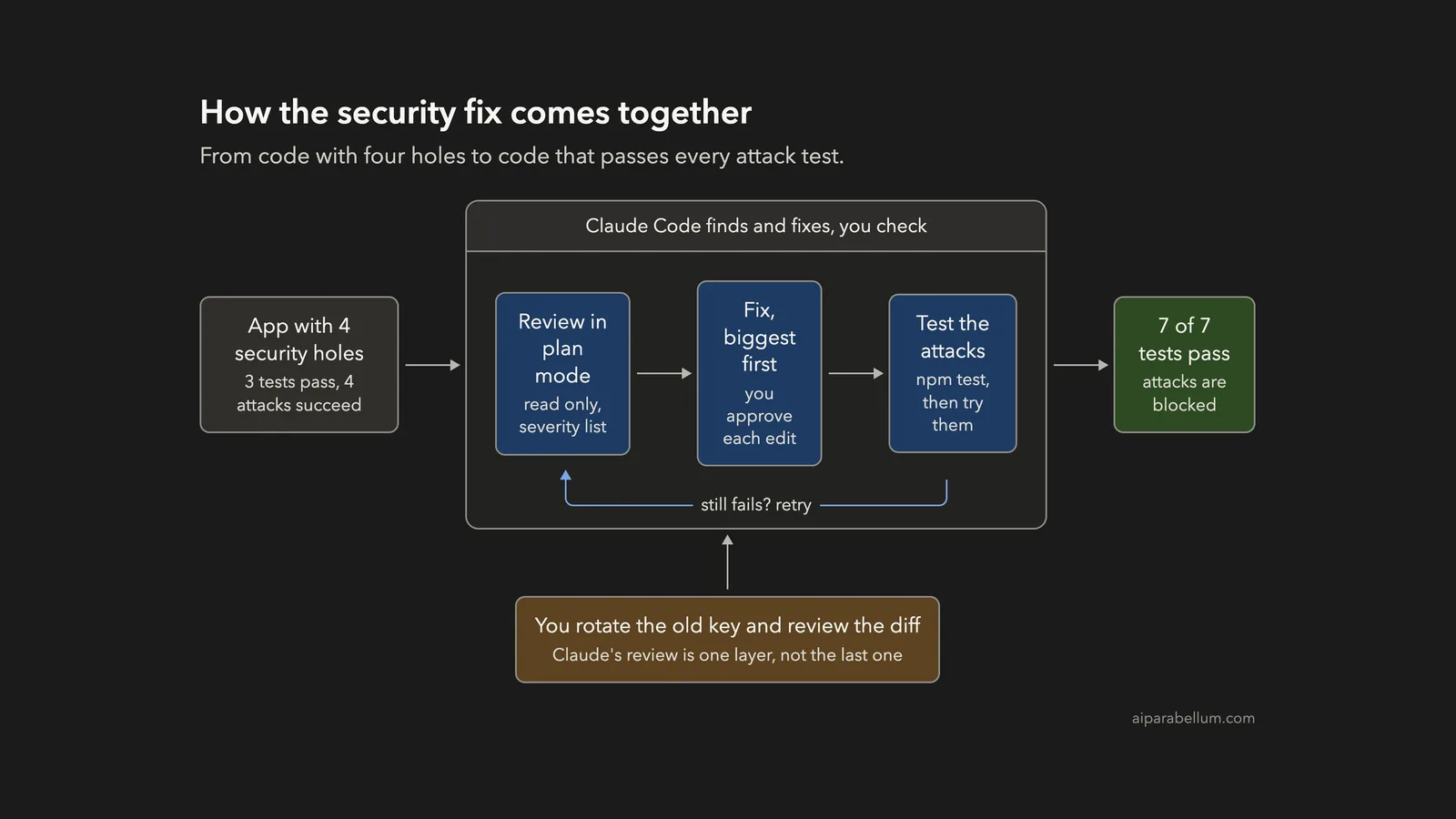
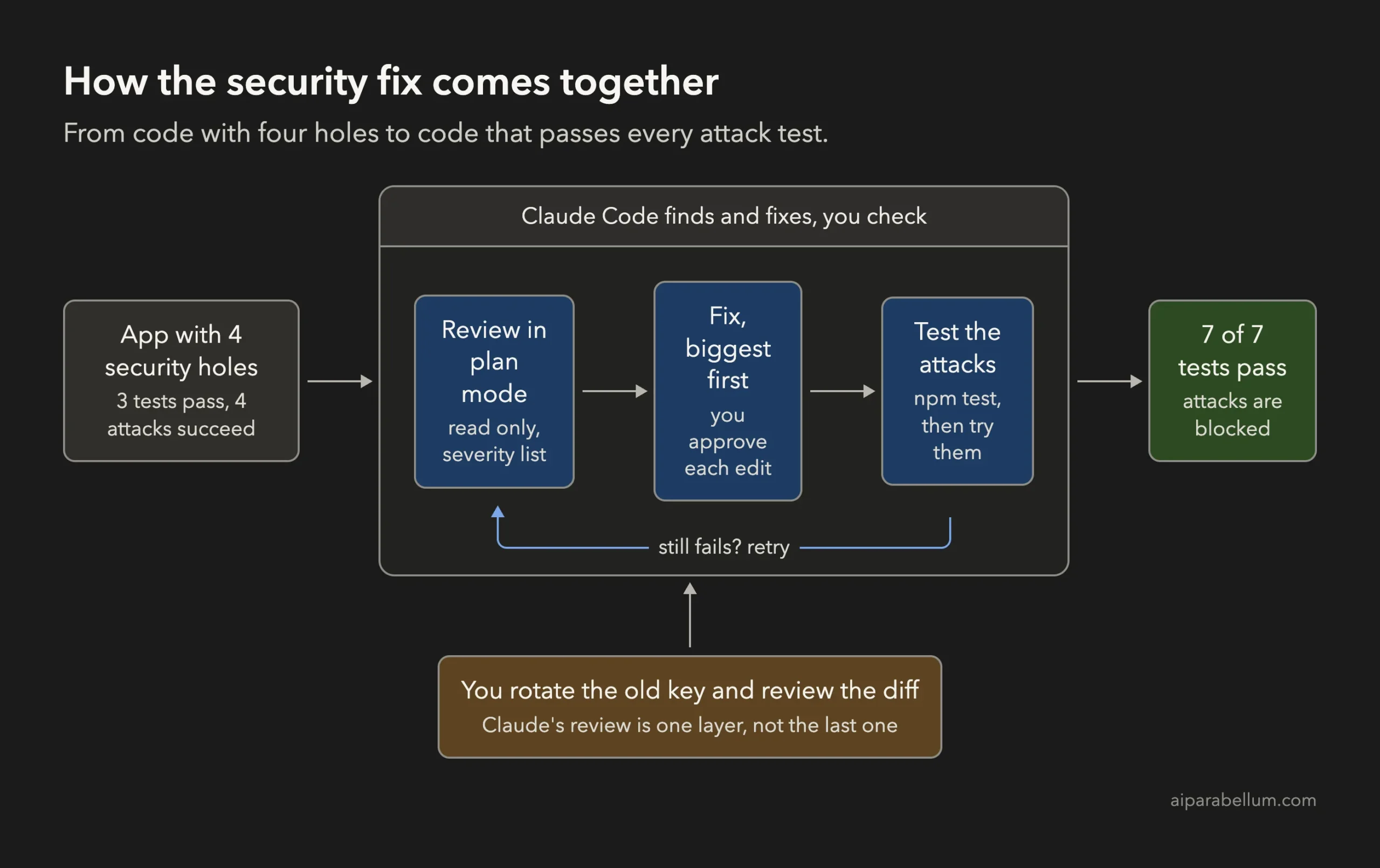
Can an AI coding tool find the holes in your code before an attacker does? You can fix security issues with Claude Code in three small steps: ask for a read-only review, fix the worst problems first, and prove each fix with a test. In this project we took a tiny notes app with four planted security holes and ended with all seven tests passing.
This is Project 18 of 20 in our Build with Claude Code series, part of our Claude Code tutorials. In Project 17 we learned to GitHub Actions workflow. Here we use the same habits again: plan first, small prompts, and a check at the end.
Tested with Claude Code v2.1.310 on October 27, 2026, on macOS. We tested on macOS; the Windows and Linux steps follow Anthropic’s official instructions.
What We Built
A security fix is only finished when an attack that worked before now fails. Claude Code can write the fix, but a test is what proves it.
| Item | Details |
|---|---|
| Project | Find and fix four security problems in a small notes library |
| Input | A made-up app with 4 source files, 3 normal tests and 4 attack tests |
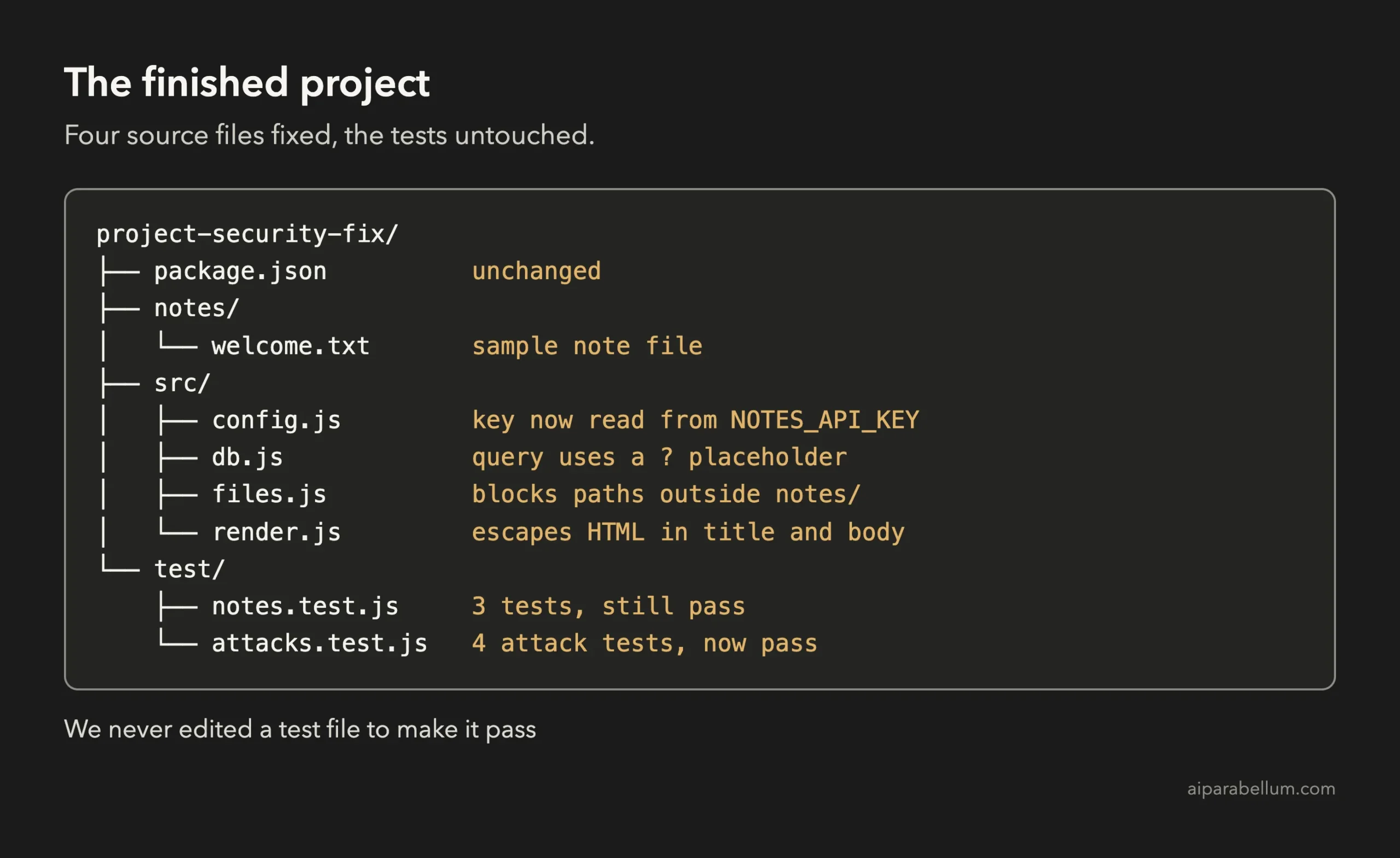
| Output | The same app with all four holes closed and no test file edited |
| Tools | Node.js with its built-in test runner and built-in SQLite module |
| Result | 7 of 7 tests pass; before the fixes only 3 of 7 passed |
| Prompts used | 3 short prompts |
Why Fix Security Issues With Claude Code?
Most security bugs are small and boring. A string gets glued into a database query, or a file name is trusted, or a password sits in a source file. They are easy to write by accident and easy to miss in a quick read.
Claude Code is good at reading every file and naming the pattern. It can also write the fix and run your tests in the same session. If you want the bigger picture of how Anthropic handles your data, see our guide to privacy and security.
There is one big rule. A model can miss problems, and it can also call something safe that is not. Treat Claude as a fast second pair of eyes, never as the final judge.
The Project We Started With
Everything here is made up. The app stores notes for different owners in a tiny in-memory database, shows a note as HTML, and reads note files from a folder.
| File | What it does | The planted hole |
|---|---|---|
| src/db.js | Finds the notes of one owner | SQL injection |
| src/files.js | Reads a note file by name | Path traversal |
| src/render.js | Turns a note into HTML | Cross-site scripting (XSS) |
| src/config.js | Holds settings | A hard-coded key |
We wrote the holes ourselves, so we know the right answer. We also wrote a test file named attacks.test.js with four tests, one for each hole. Before the fixes, the test run showed 3 passing and 4 failing.
The key in config.js is a made-up string, not a real secret. Never paste a real key into a demo.
Step 1: Review the Code in Plan Mode
We started Claude Code in plan mode. In this mode Claude can read files but cannot change anything, which is exactly what you want for a first look.
claude --permission-mode planThe prompt asked for a short list, one line per problem, with a severity and a way an attacker could use it.
Do a security review of this project. Read every file in src/ and test/attacks.test.js. Do not change any file. Keep the answer short: list each security problem as one line with a severity (high, medium or low), the file, and how an attacker could use it.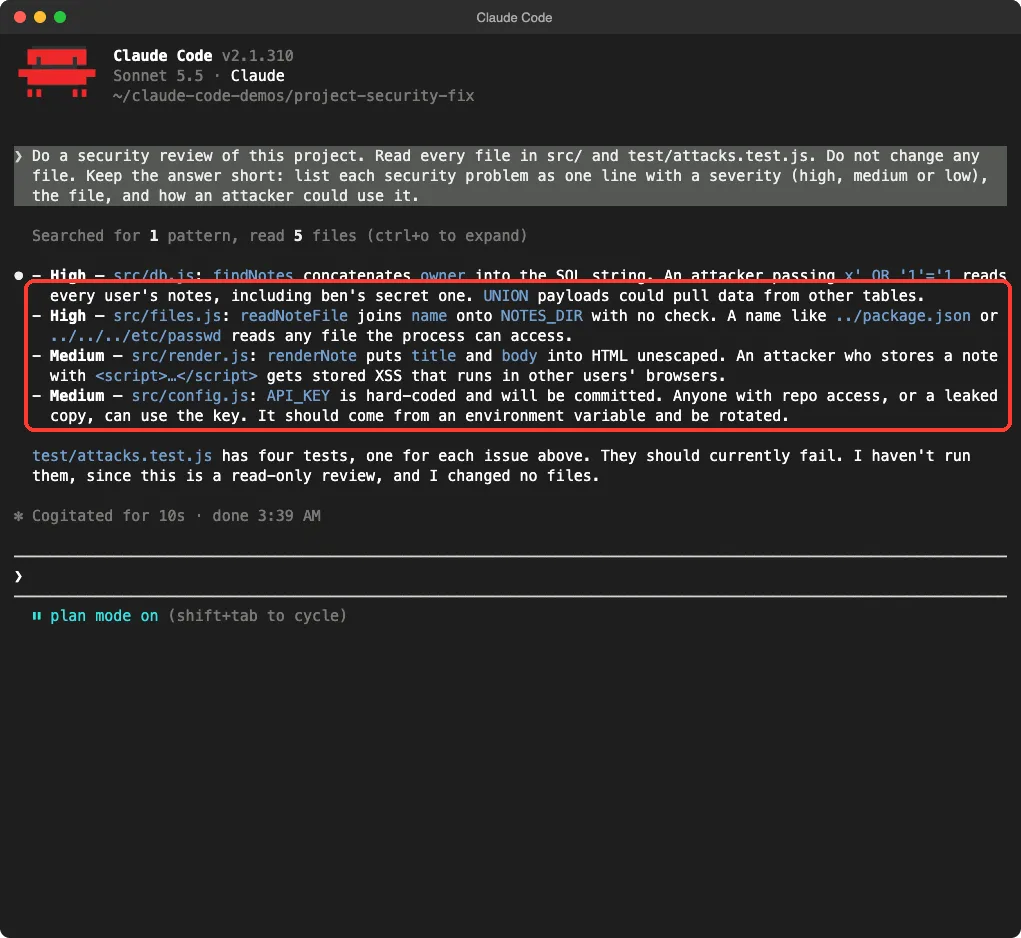
Claude found all four holes and gave each a sensible severity. It also noticed that attacks.test.js had one test for each issue and said it had not run them. That is an honest answer, since plan mode is read only.
How to Read the Review
Look at the severity words first. High means an attacker can read data or files they should not see. Medium means the harm needs another step, such as a victim opening a page.
| Problem | Severity | What an attacker could do |
|---|---|---|
| SQL injection in db.js | High | Read every user’s notes, including ben’s secret one |
| Path traversal in files.js | High | Read files outside the notes folder |
| Unescaped HTML in render.js | Medium | Run a script in another user’s browser |
| Hard-coded key in config.js | Medium | Reuse the key if the code leaks |
Step 2: Fix the High Severity Problems First
Now we continued the session in the normal mode, where Claude asks before it changes a file. We fixed the two high problems first and told Claude exactly how, so we knew what to expect in the diff.
Fix the two high severity problems first, db.js and files.js. Use a prepared statement with a ? placeholder for the SQL query. For the file reader, resolve the full path and throw an error if it is not inside NOTES_DIR. Do not edit any test file.The last sentence matters. If you do not say it, a tool that wants green tests can be tempted to change the tests instead of the code.
Fix 1: SQL Injection
The old code built the query by adding the owner name into a string. An owner name like x’ OR ‘1’=’1 turned the question into “give me everything”. The fix keeps the query and the data apart.
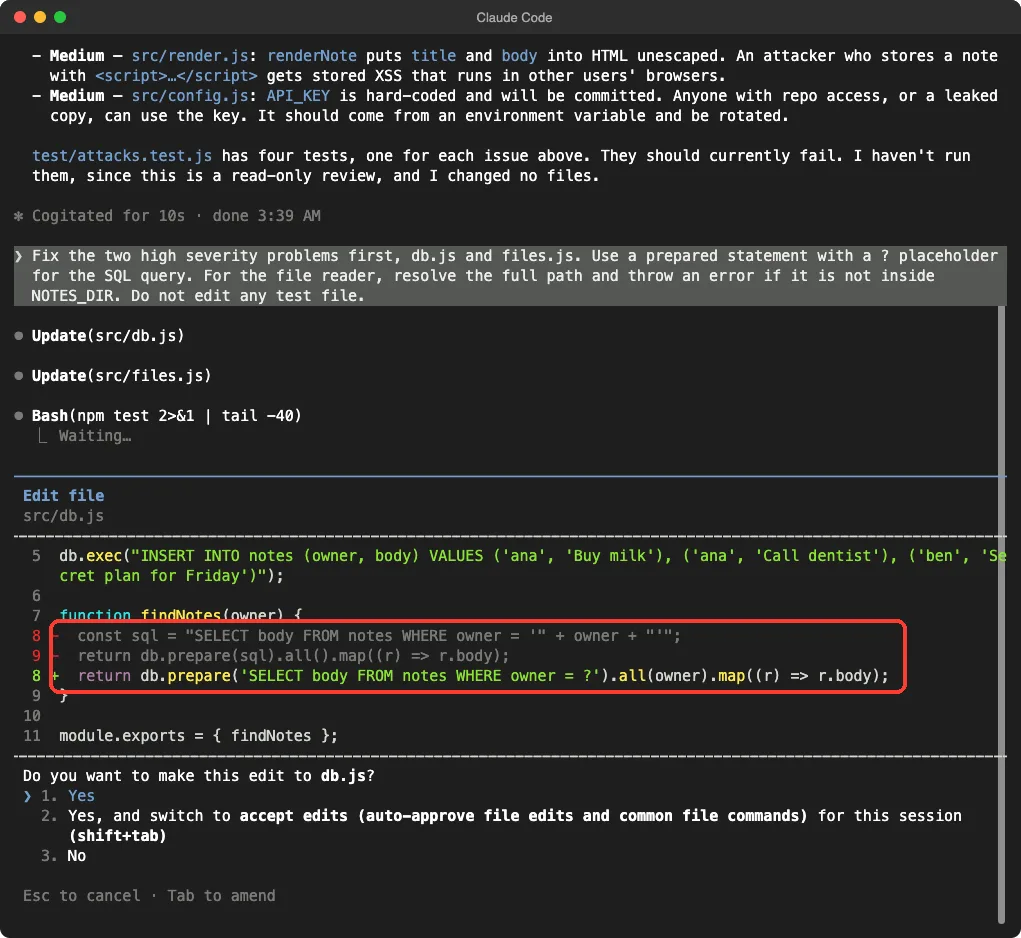
Here is the finished function.
function findNotes(owner) {
  return db.prepare('SELECT body FROM notes WHERE owner = ?').all(owner).map((r) => r.body);
}
The question mark tells the database that whatever comes next is data, never part of the command. No matter what an attacker types, it is looked up as an owner name.
Fix 2: Path Traversal
A file name such as ../package.json walks up out of the notes folder. The fix turns the name into a full path and checks that the result still lives inside the folder.
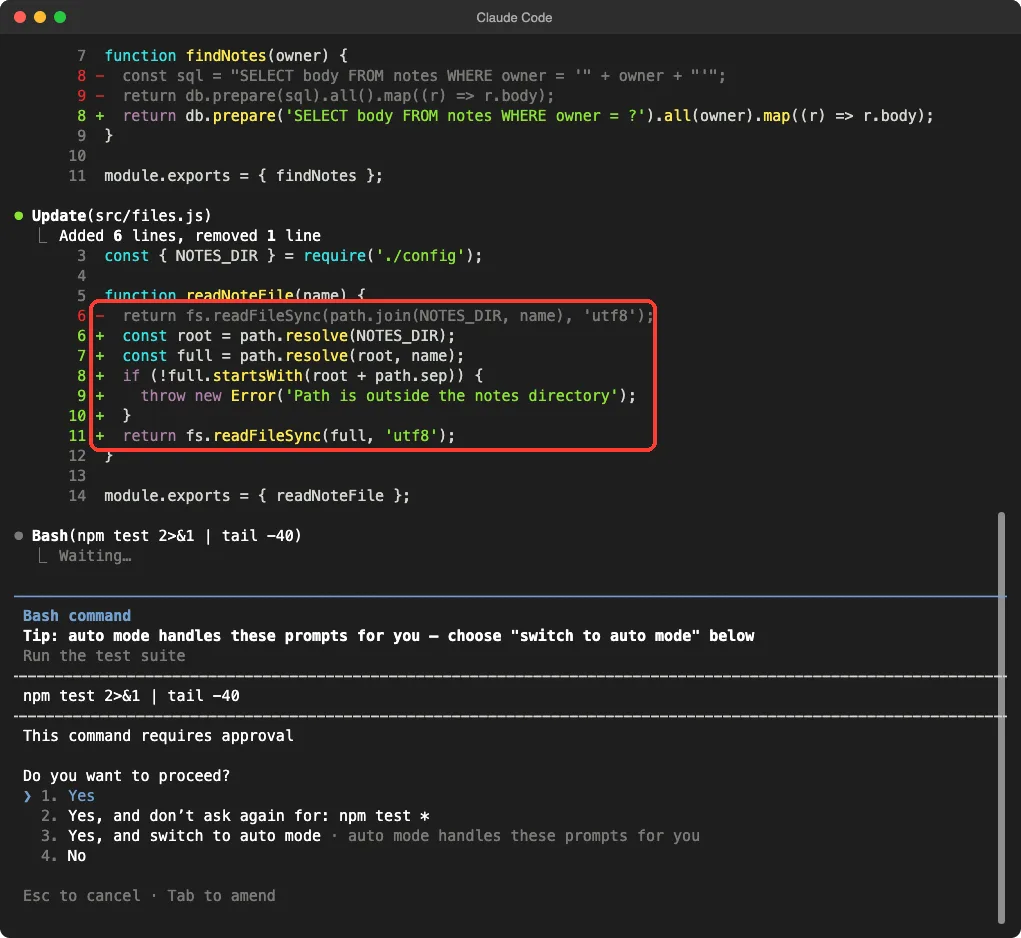
function readNoteFile(name) {
  const root = path.resolve(NOTES_DIR);
  const full = path.resolve(root, name);
  if (!full.startsWith(root + path.sep)) {
    throw new Error('Path is outside the notes directory');
  }
  return fs.readFileSync(full, 'utf8');
}
Notice that the check adds path.sep to the folder name. Without it, a sibling folder named notes-private would also pass a plain startsWith check. We did not ask for this detail, and it is the kind of thing worth looking for when you read a diff.
Step 3: Fix the Medium Security Issues With Claude Code
The third prompt handled the last two holes and ran the tests. During the second step one test command was interrupted in our recorded session, so Claude printed both files again and ran the tests to confirm. We mention it because real sessions are not always tidy.
Now fix the two medium problems. In render.js escape the characters & < > double quote and single quote in both title and body. In config.js remove the hard-coded key and read it from the environment variable NOTES_API_KEY instead. Then run npm test. Do not edit any test file.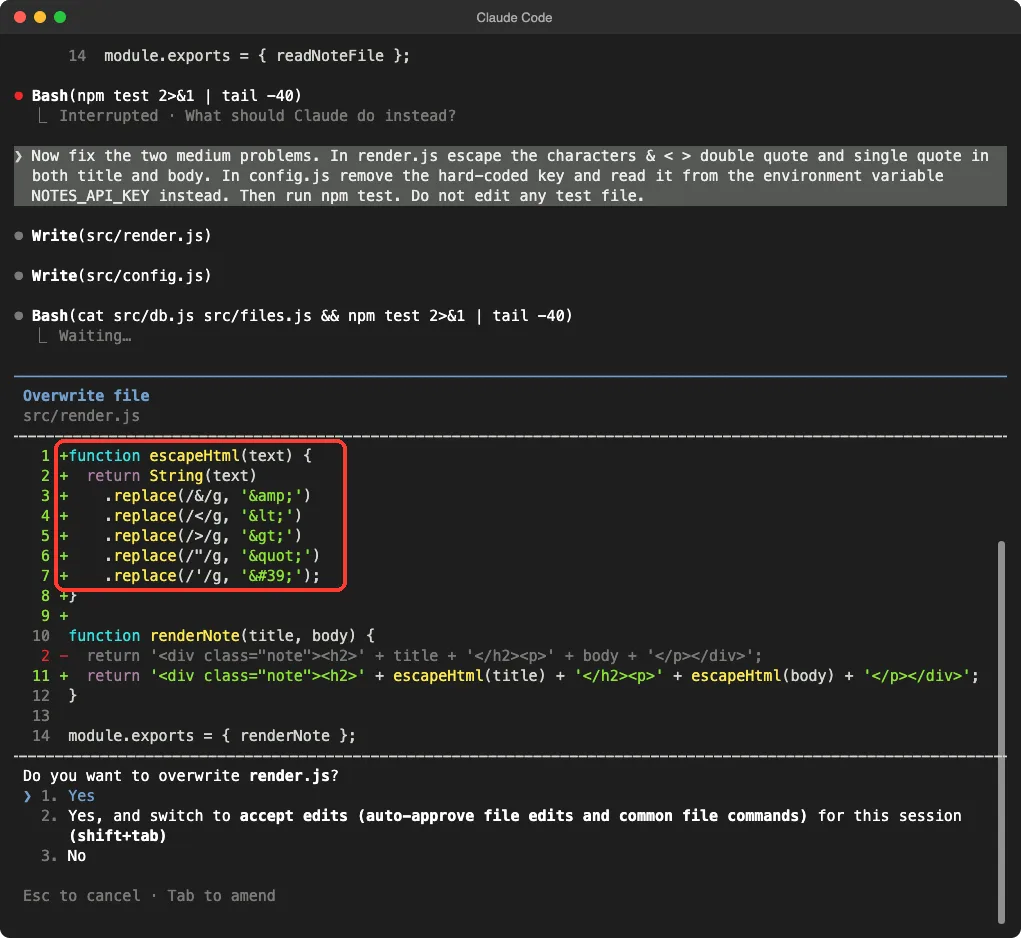
Fix 3: Cross-Site Scripting
Cross-site scripting happens when text from a user is placed into a page as real HTML. If the title is a script tag, a visitor’s browser would run it. Escaping turns the angle brackets into harmless text.
function escapeHtml(text) {
return String(text)
.replace(/&/g, '&')
.replace(/</g, '<')
.replace(/>/g, '>')
.replace(/"/g, '"')
.replace(/'/g, ''');
}The ampersand comes first on purpose, because it would otherwise break the codes made by the other lines. This helper is fine for text placed between tags. If you put user text inside an attribute or a script block, you need a more careful tool, so use a trusted library for real apps.
Fix 4: The Hard-Coded Key
The key line now reads the value from an environment variable. The code no longer contains any secret at all.
const API_KEY = process.env.NOTES_API_KEY;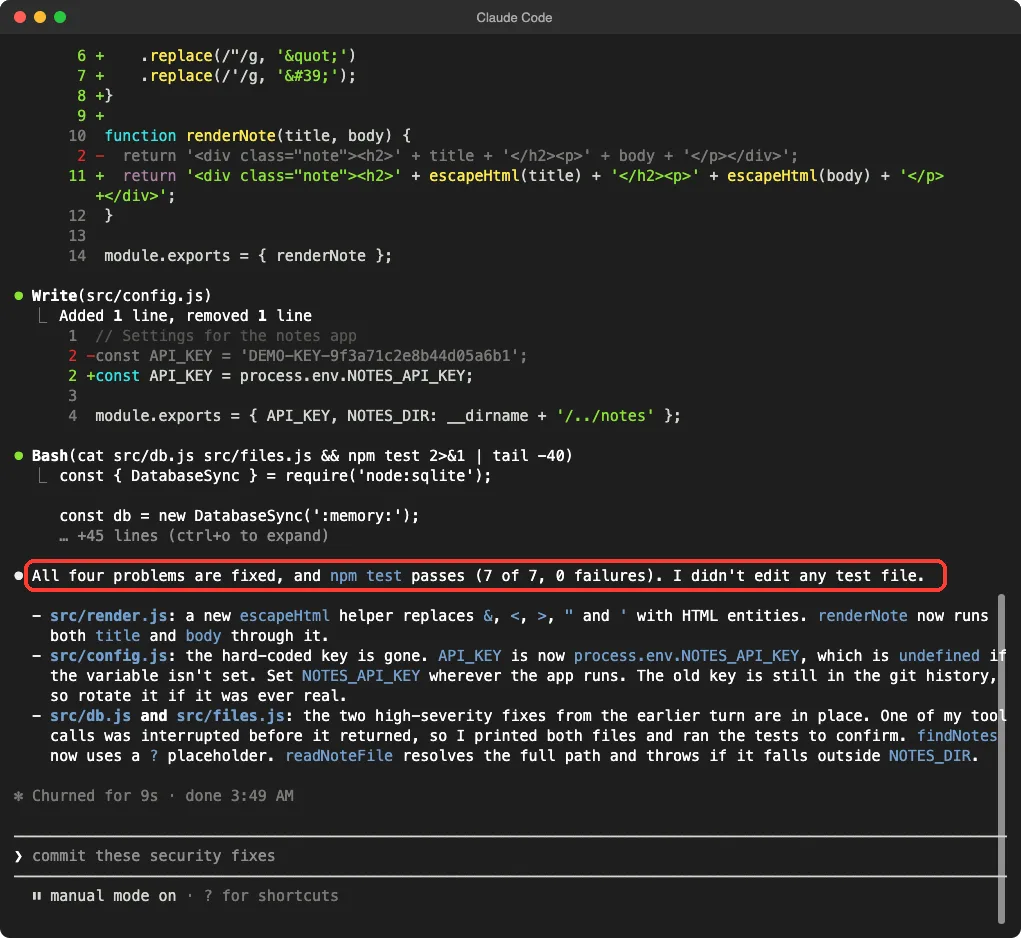
Claude also gave a warning we want to repeat. Removing a key from the code does not make it safe if the old key was ever committed or shared.
Treat that old key as burned and replace it at the service that issued it. Our demo folder had no commits, so there was nothing to clean here, but in your own project you should check.
Step 4: Check the Fixes Yourself
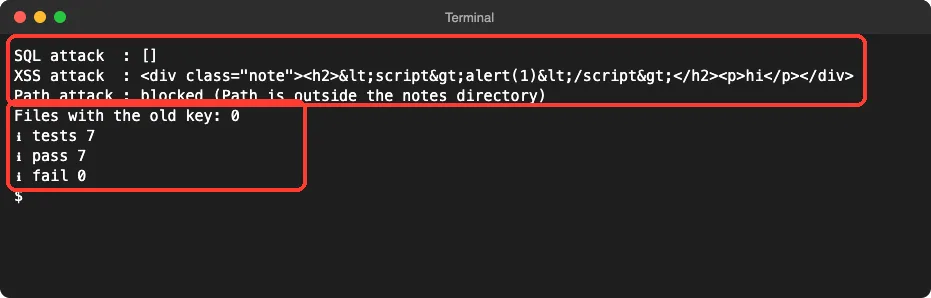
We did not stop at Claude’s own summary. We ran one more check in a plain terminal, outside Claude Code. It tries all three attacks directly, searches the source for the old key and runs the test suite.
| Attack | Before | After |
|---|---|---|
| SQL: x’ OR ‘1’=’1 | Test failed, other users’ notes leaked | Returns an empty list |
| XSS: a script tag in the title | Test failed, tag passed through | Shown as harmless text |
| Path: ../package.json | Test failed, file was readable | Throws an error |
| Hard-coded key | Test failed, key in config.js | Zero files contain it |
This shows the fixes work against these exact attacks on our Mac. It does not prove the app is safe. A real attacker can try many other inputs, and our four tests cover only the four holes we planted.
The Finished Project
What About Automatic Security Checks?
Anthropic also offers a security guidance plugin that reviews Claude’s own changes as it works. We did not use it in this demo, so everything below comes from Anthropic’s documentation. Our own walkthrough of it is in Claude Code Security.
The docs say the plugin checks at three points, each at a different depth: on each file edit, at the end of each turn, and on each commit or push Claude makes.
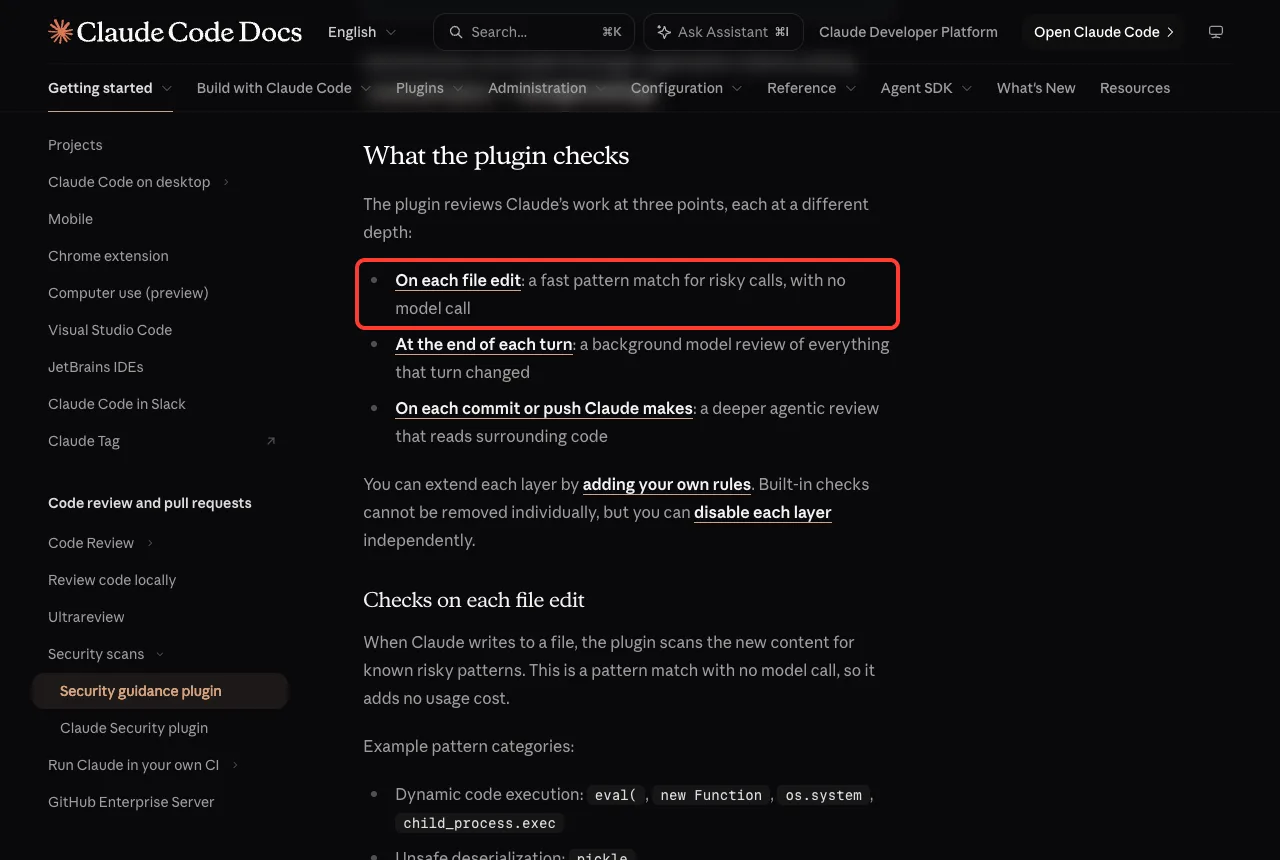
The first check is a fast pattern match with no model call. The other two use a separate model review that starts from the diff with fresh context.
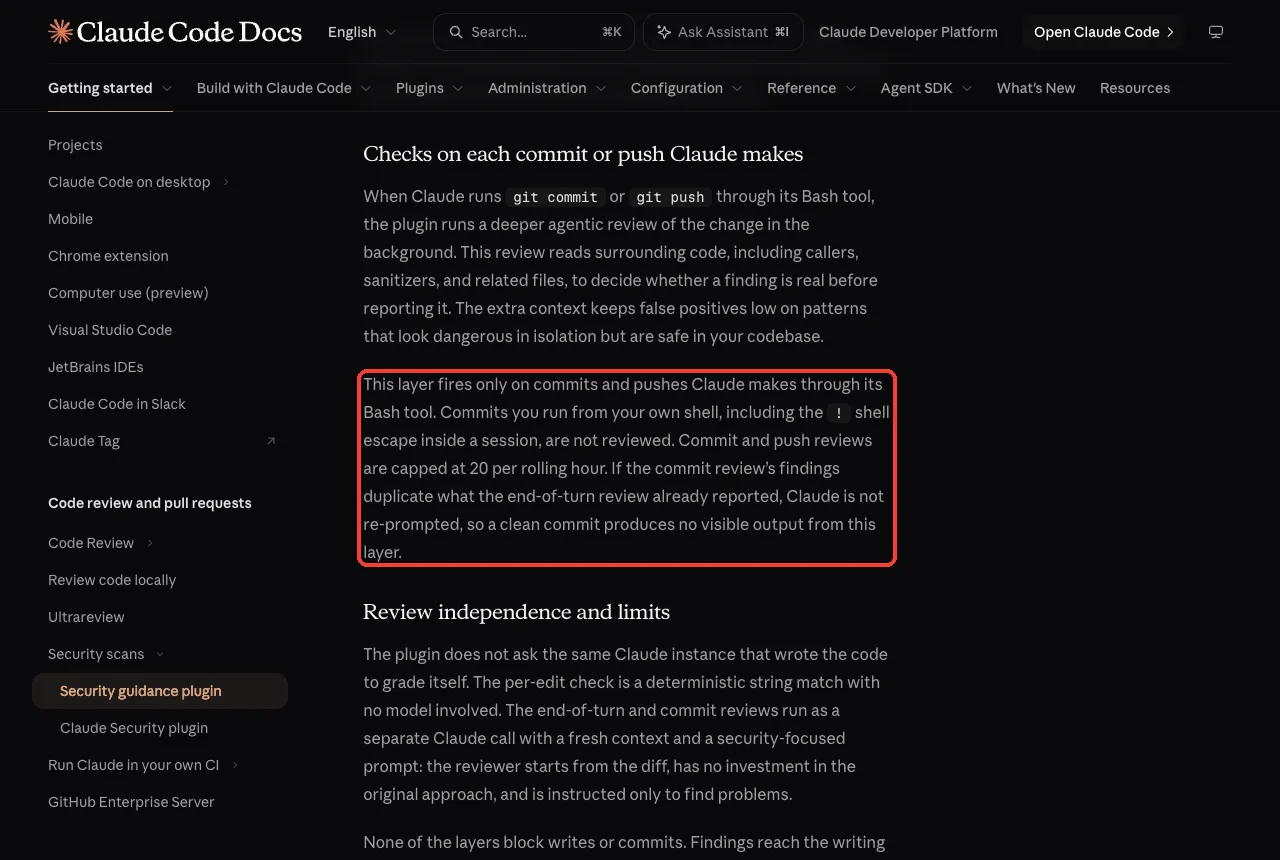
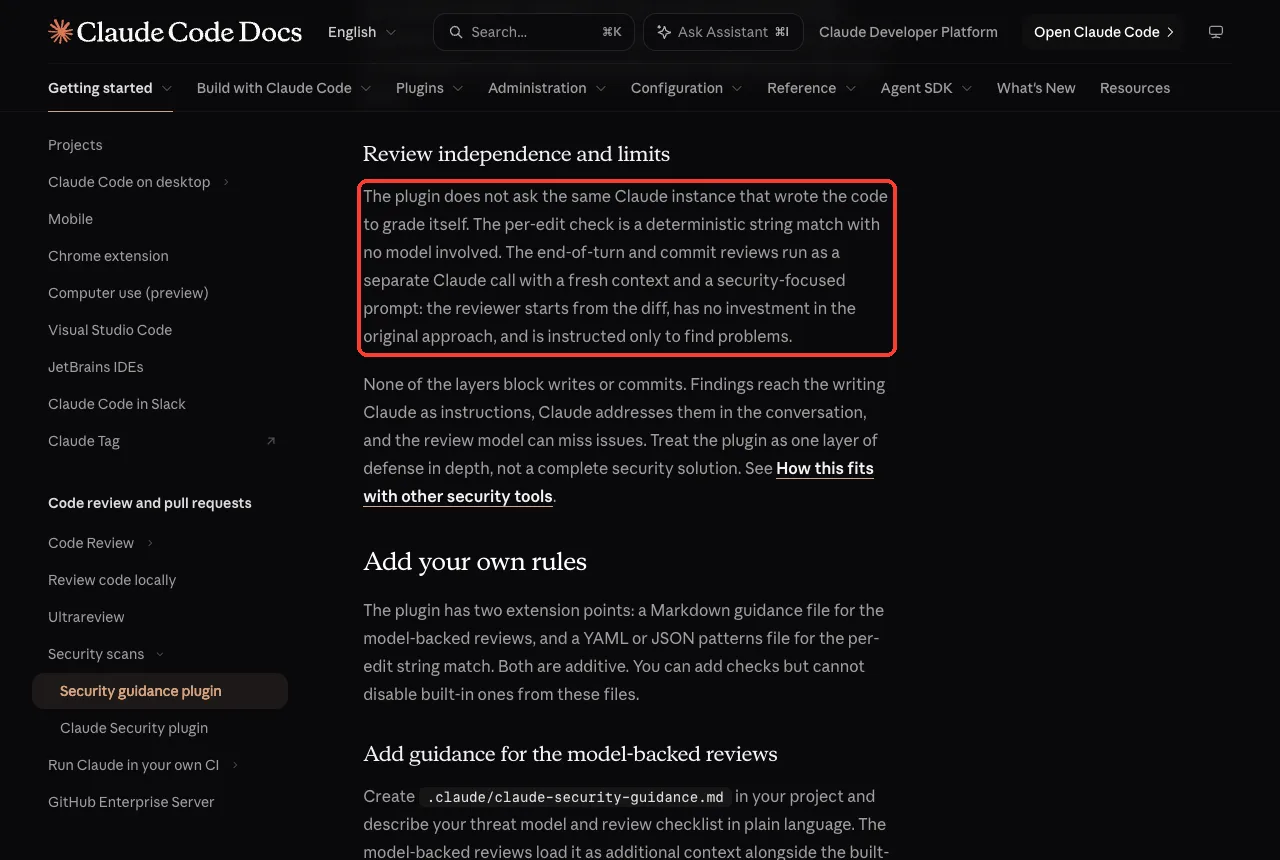
Read the limits closely. Commits you run from your own shell are not reviewed. The docs also say the layers do not block writes or commits, and that the review model can miss issues.
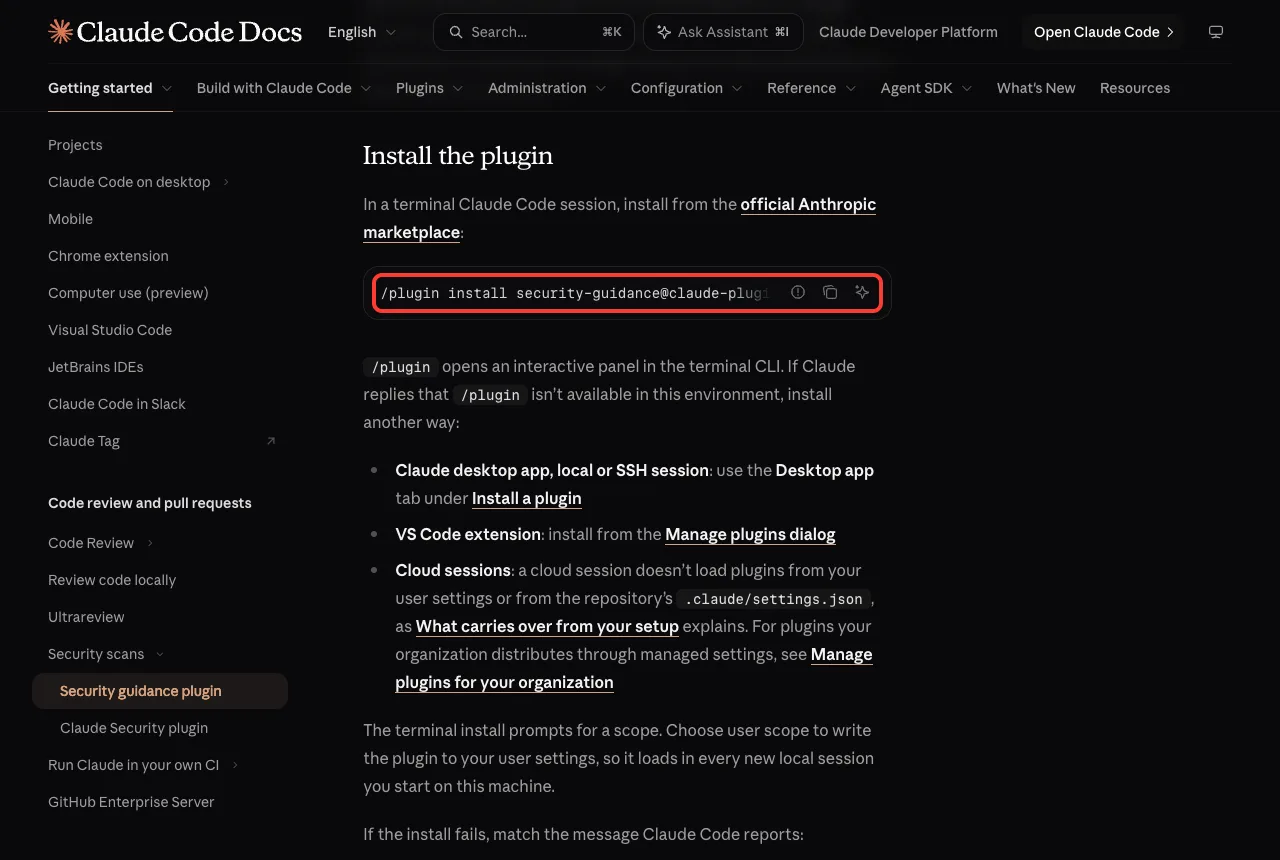
To install it, the docs show a command you run inside Claude Code.
The docs also list what it needs: Python 3.7 or later, and a git repository for the end-of-turn and commit reviews. For more ways to ask Claude about code in everyday work, see Anthropic’s common workflows page.
Try It Yourself
Practice on a throwaway folder, never on a real project. Make three small files, plant one obvious hole in each, and write one failing test per hole. Then ask Claude for a read-only review first.
Do a security review of this project. Do not change any file. List each problem as one line with a severity, the file, and how an attacker could use it. Then wait.Here are some variations to try next.
- Ask Claude to explain each problem in plain English before fixing it.
- Plant a different hole, such as a missing login check or a password stored as plain text.
- Ask for a second review after the fixes and see if Claude finds anything new.
- Add a rule to your CLAUDE.md file, such as “never write keys into files”.
Common Mistakes
- Letting Claude edit the tests. Say clearly that test files are off limits.
- Fixing everything in one prompt. Small prompts make each diff easy to read.
- Trusting a green test run alone. Your tests only cover what you thought of.
- Forgetting to rotate a key that was ever in your code. Deleting the line is not enough.
- Pasting real secrets or customer data into the session to “make it realistic”.
Pro Tips
- Start in plan mode so the first look can never change a file. Our guide on permission modes explains the options.
- Ask for severity and an attack story. A one-line attack makes it easy to write a test.
- Write the attack test before the fix. It turns a vague worry into a clear pass or fail.
- Read every diff. The path.sep detail above is easy to miss if you click yes without reading.
- Pair this with our project on writing tests to grow your safety net.
Cheat Sheet
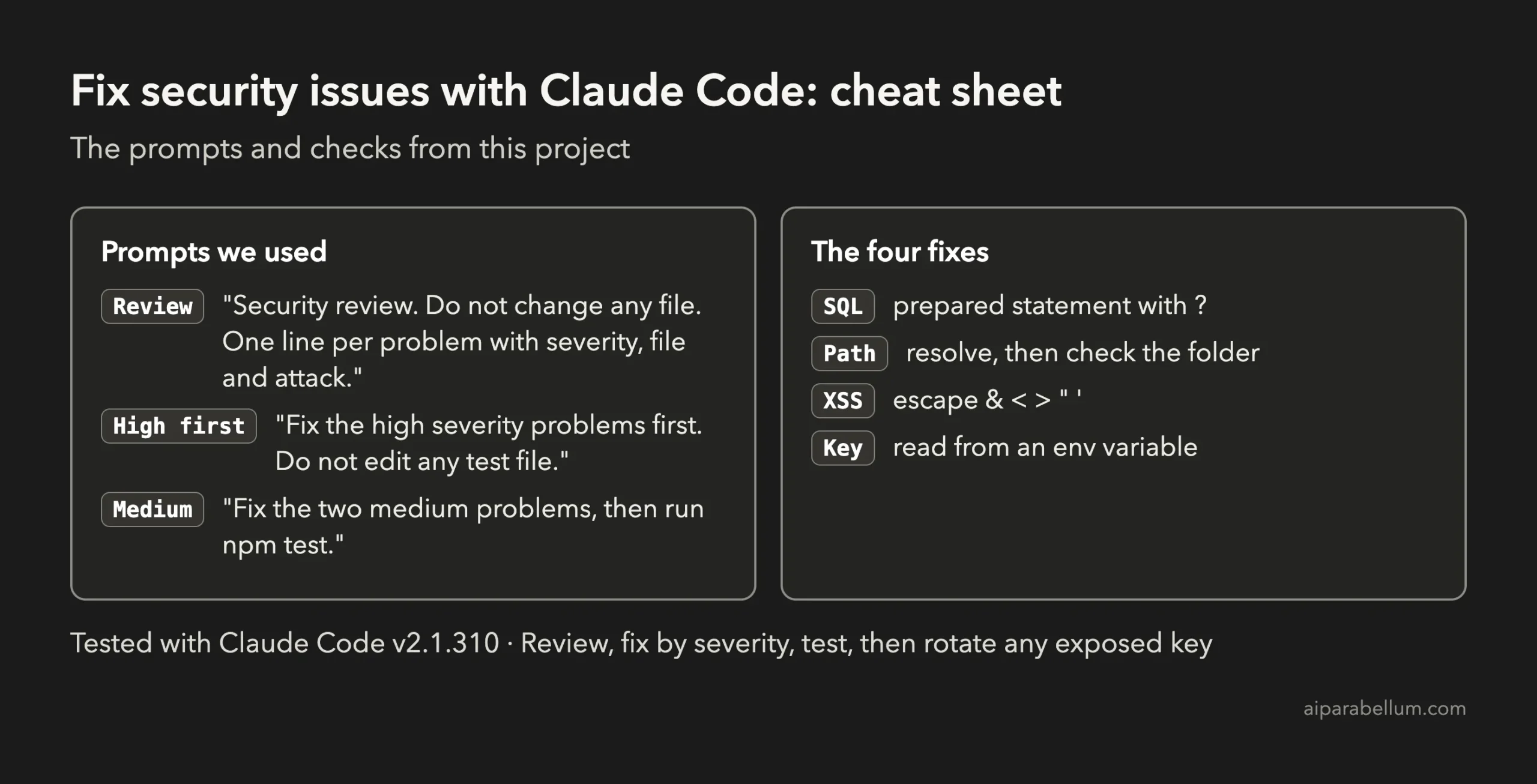
Frequently Asked Questions
Can Claude Code find security vulnerabilities in my code?
Yes, it can read your files and point out common problems such as SQL injection, unsafe file paths, unescaped HTML and hard-coded keys. In our test it found all four planted holes. It can still miss things, so treat its list as a starting point.
Is it safe to let Claude Code fix security bugs automatically?
It is safer when you stay in control. Review the problem in plan mode, approve each edit, and run tests after every fix. Never skip reading the diff.
Will fixing the code remove a leaked API key problem?
No. If a real key was ever committed, shared or pasted somewhere, replace it with a new one at the service that issued it. Removing the line from your code only stops new leaks.
Do I need the security guidance plugin for this?
No. This project used only plain prompts. According to Anthropic’s docs, the plugin adds automatic checks as Claude edits and commits, but it is one layer and not a complete security solution.
Should I use this on a real production app?
You can, but add real safeguards: code review by a person, dependency scanning and your normal security process. Run Claude on a branch first and never give it real secrets.
Conclusion
You just saw how to fix security issues with Claude Code on a small project: review in plan mode, fix the high problems first, run attack tests, and then check the results yourself. We went from 3 of 7 passing tests to 7 of 7, without editing a single test. Use Claude as a fast second pair of eyes, keep your own judgment in the loop, and rotate any key that ever leaked. Browse the full list of Claude AI overview when you want to go further.
Previous in the series: Project 17: Set Up a GitHub Actions Workflow With Claude Code
Next in the series: Project 19: Upgrade a Project to a New Framework Version With Claude Code.