Claude Code security gets a lot easier with one free plugin from Anthropic called security-guidance. Once you install it, it quietly checks every change Claude makes for risky code like eval(), injection and hardcoded secrets. When it spots a problem, it tells Claude, and Claude can fix it before the code ever reaches a pull request.
In this guide you will install the plugin, watch it catch two real problems, add your own rules, and fix everything in the same session. We ran every step in a tiny demo project, and every terminal screenshot comes from those real sessions.
This is Part 43 of 53 in our Claude Code tutorials series. In the previous part we covered local code review, which finds bugs when you ask; this part adds a security check that runs on its own, all the time.
Tested with Claude Code v2.1.310 and security-guidance plugin v2.0.16 on October 25, 2026, on macOS, inside a small throwaway git repository.
Quick Summary: Claude Code Security Plugin at a Glance
| Question | Short answer |
|---|---|
| What is it? | The security-guidance plugin from the official Anthropic marketplace |
| How do you start it? | You don’t. Once installed, it runs automatically |
| What does it check? | Each file edit, each finished turn, and each commit or push Claude makes |
| Does it block code? | No. It sends findings to Claude, and Claude fixes them in the conversation |
| What does it need? | Python 3.7 or later, and a git repository for the deeper reviews |
| Does it cost usage? | The per-edit check is free; the model reviews count toward your usage |
| Which plans? | All plans |
What Is the Claude Code Security Guidance Plugin?
The security guidance plugin makes Claude review its own code changes for common vulnerabilities while it works. It looks for problems such as injection, unsafe deserialization and unsafe browser DOM calls. Then Claude fixes what it finds in the same session.
Why does this exist? AI writes code fast, and fast code can slip in risky shortcuts. Catching those early means fewer security notes for human reviewers later.
Anthropic describes it as the in-session partner to the managed Code Review service. The plugin reduces what reaches a pull request, and Code Review catches what still does.
The cheapest security bug to fix is the one that never leaves your editor.
The plugin is built entirely on Claude Code hooks. That means it uses the same lifecycle events you can use yourself, like PostToolUse after an edit and Stop at the end of a turn.
How Claude Code Security Checks Work: Three Layers
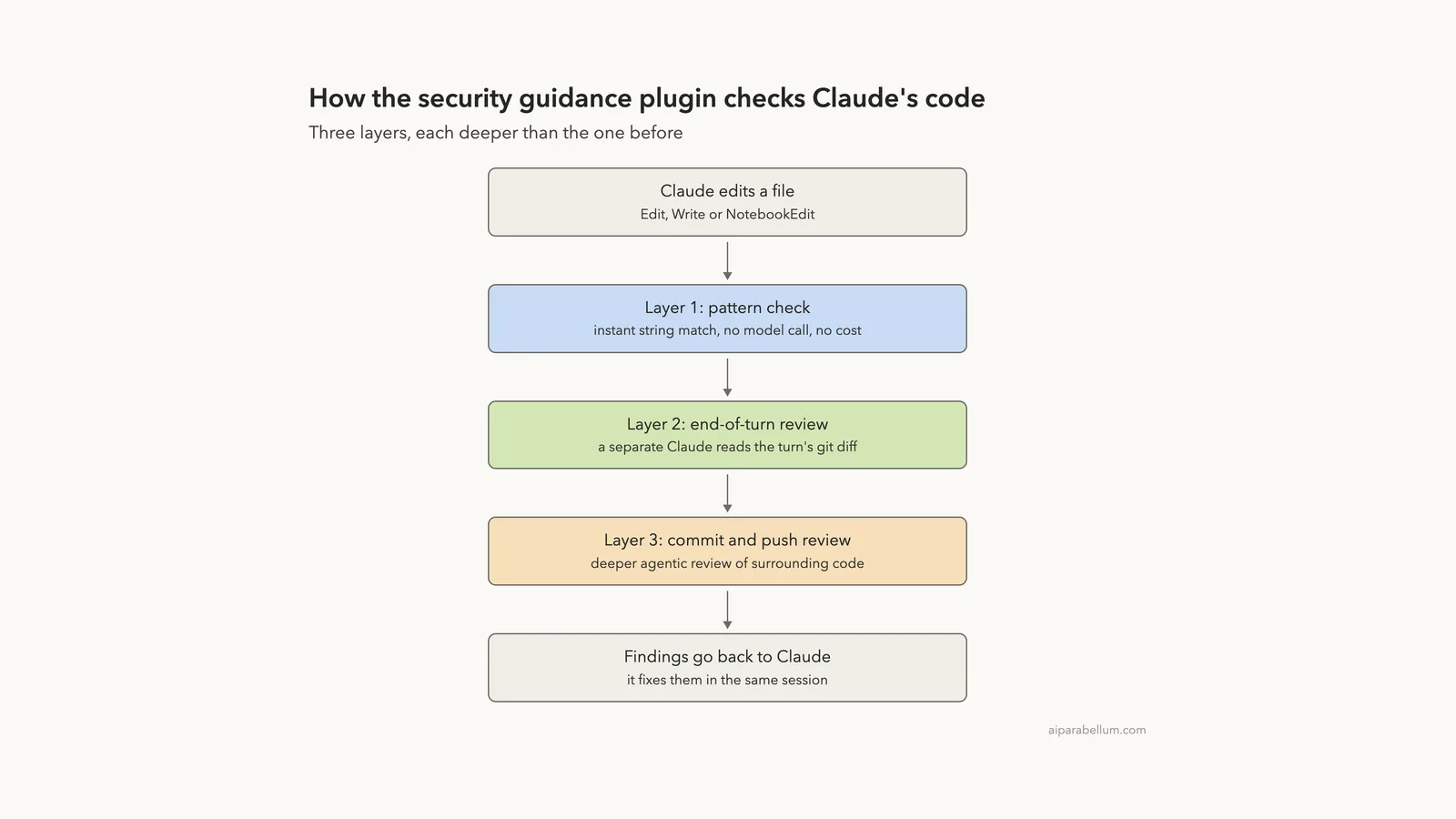
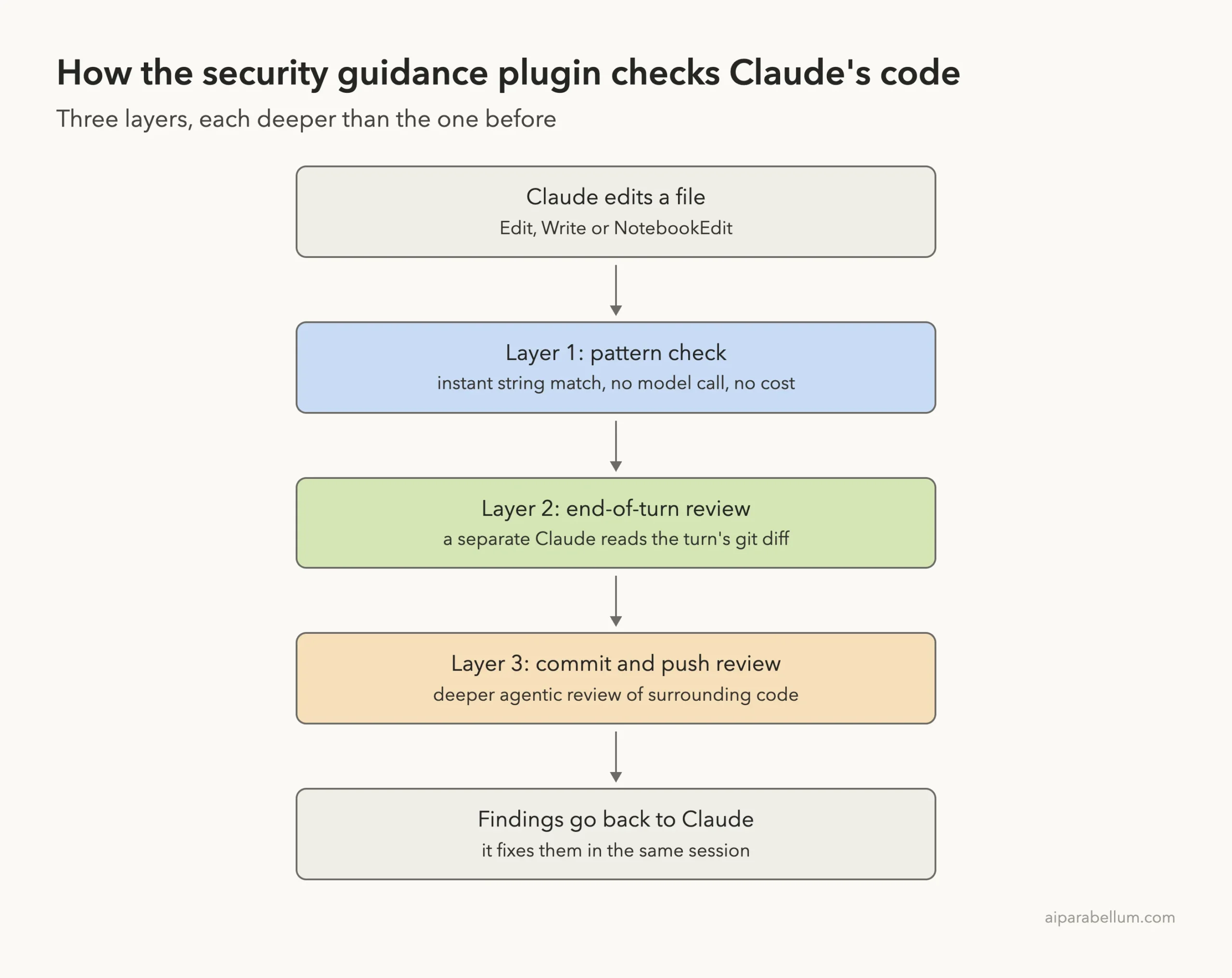
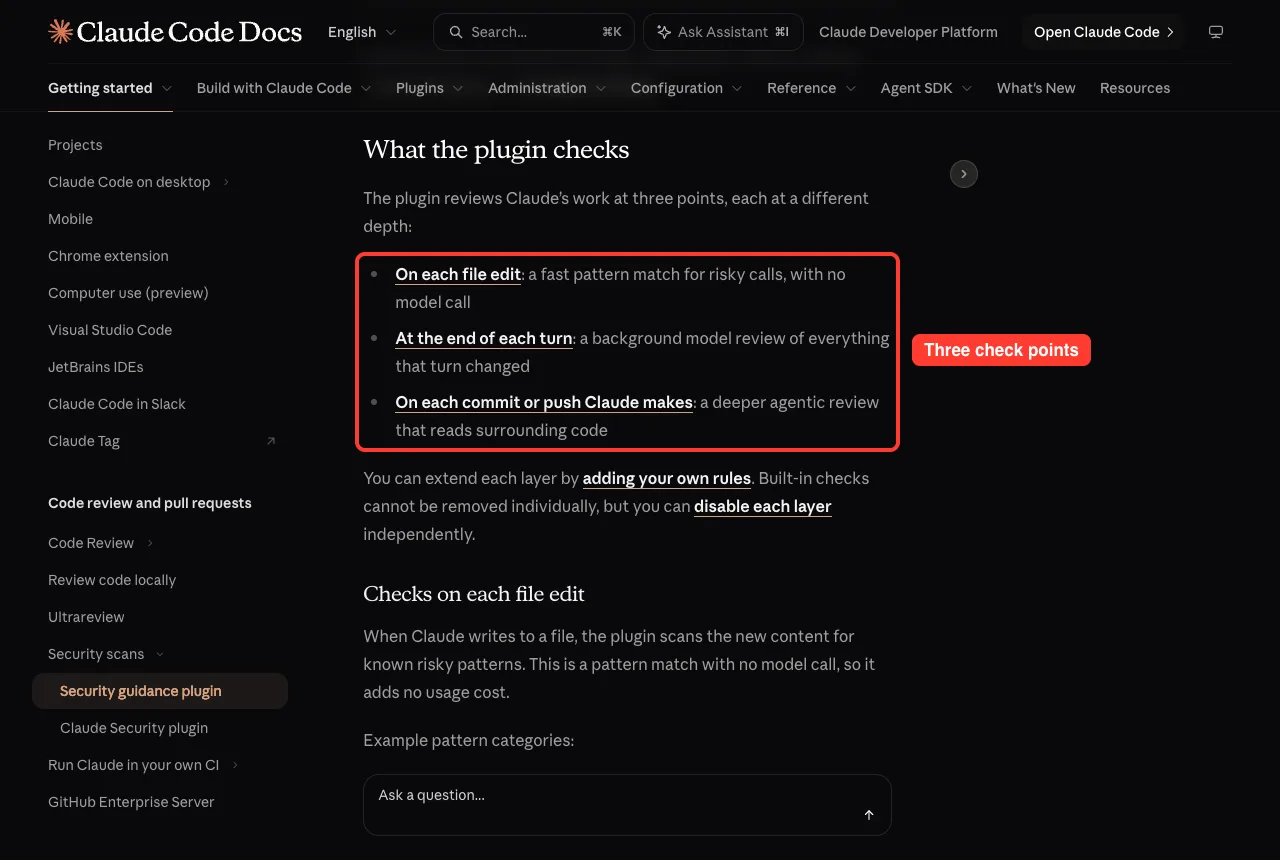
The plugin reviews Claude’s work at three points, and each one goes deeper than the last. Here is how they fit together.
Layer 1: A Pattern Check on Every File Edit
When Claude writes to a file, the plugin scans the new content for known risky patterns. This is a simple string match with no model call, so it adds no usage cost. Examples include eval(, new Function, os.system, child_process.exec, pickle, dangerouslySetInnerHTML, .innerHTML = and document.write.
Edits under .github/workflows/ also trigger a warning, because workflow files can grant repository-level permissions. Each warning fires once per pattern per file per session, so you don’t get flooded.
Layer 2: A Review at the End of Each Turn
A turn is one round: you send a message, Claude works and replies. After each turn, the plugin takes a git diff of everything that changed and sends it to a separate Claude review focused on security.
This review runs in the background, so Claude’s reply is not delayed. It can catch things a string match cannot, such as authorization bypass, insecure direct object references, server-side request forgery and weak cryptography. It covers up to 30 changed files per turn and fires at most three times in a row before handing control back to you.
Layer 3: A Deeper Review on Commits and Pushes
When Claude runs git commit or git push through its Bash tool, the plugin starts a deeper agentic review. It reads surrounding code, like callers and sanitizers, to decide whether a finding is real. Commits you run from your own shell are not reviewed, and these reviews are capped at 20 per rolling hour.
Step 1: Install the Security Guidance Plugin
Before you start, check two things. You need Python 3.7 or later on your PATH, and your project should be a git repository, because the turn and commit reviews compare against git state.
Open Claude Code in your project and type this at the prompt:
/plugin install security-guidance@claude-plugins-officialClaude Code opens the plugin details. You will see a short description, the hooks it installs and three scope choices. If you are new to plugins, our guide to Claude Code plugins explains scopes in more detail.
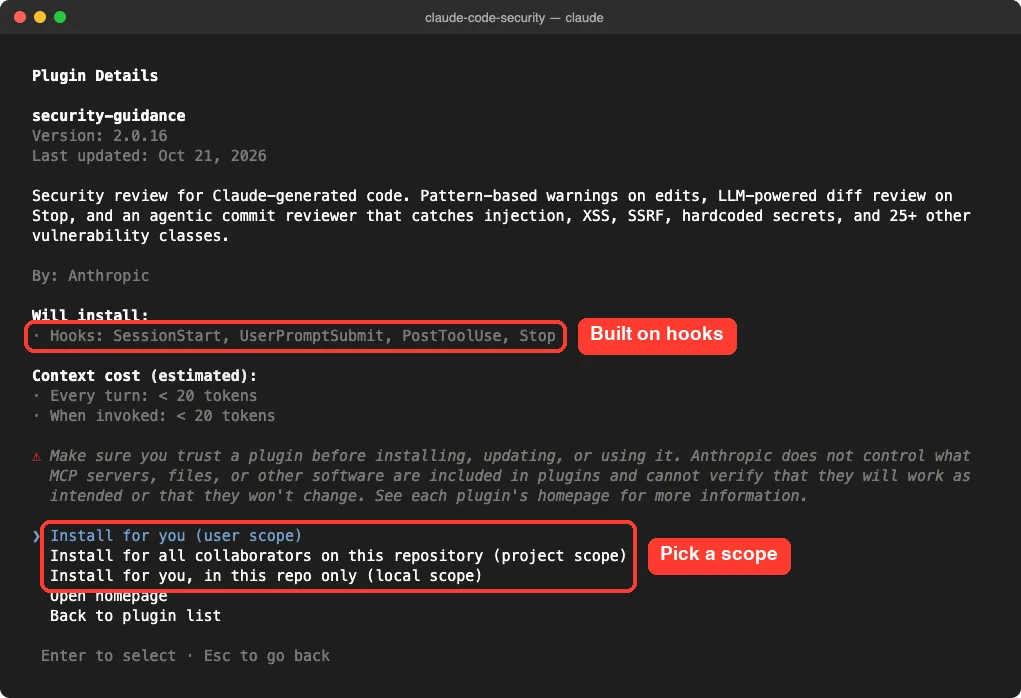
Pick the scope that fits:
- User scope: the plugin loads in every new local session on your machine. The docs recommend this one.
- Project scope: everyone who works in this repository gets it.
- Local scope: only you, only in this repository. We used this for our demo.
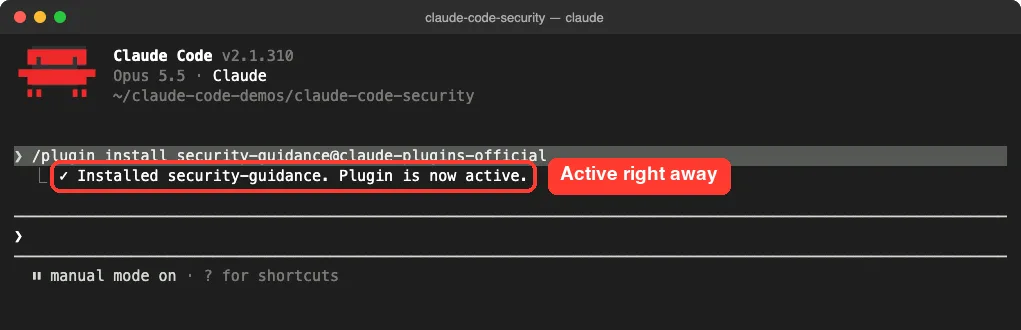
If the summary says “Run /reload-plugins to apply,” run that command to activate it in your current session. On first run, the plugin also sets up a small Python environment under ~/.claude/security/, which needs pip and a network connection.
Turn It On for Your Whole Team
To enable the plugin for teammates, add it to the project’s checked-in settings file, .claude/settings.json:
{
  "enabledPlugins": {
    "security-guidance@claude-plugins-official": true
  }
}
Step 2: Watch Claude Code Security Catch Risky Code
Our demo project is a two-function Python calculator in a git repo. We switched to accept-edits mode with Shift+Tab so file edits went through without prompts. Then we asked for something risky on purpose.
Surprise: Claude Avoided eval() on Its Own
Our first prompt asked Claude to add an evaluate(expr) function “that uses eval()”. Claude refused to use eval() and wrote a small parser with Python’s ast module instead. It explained that eval() on user input can run any Python code.
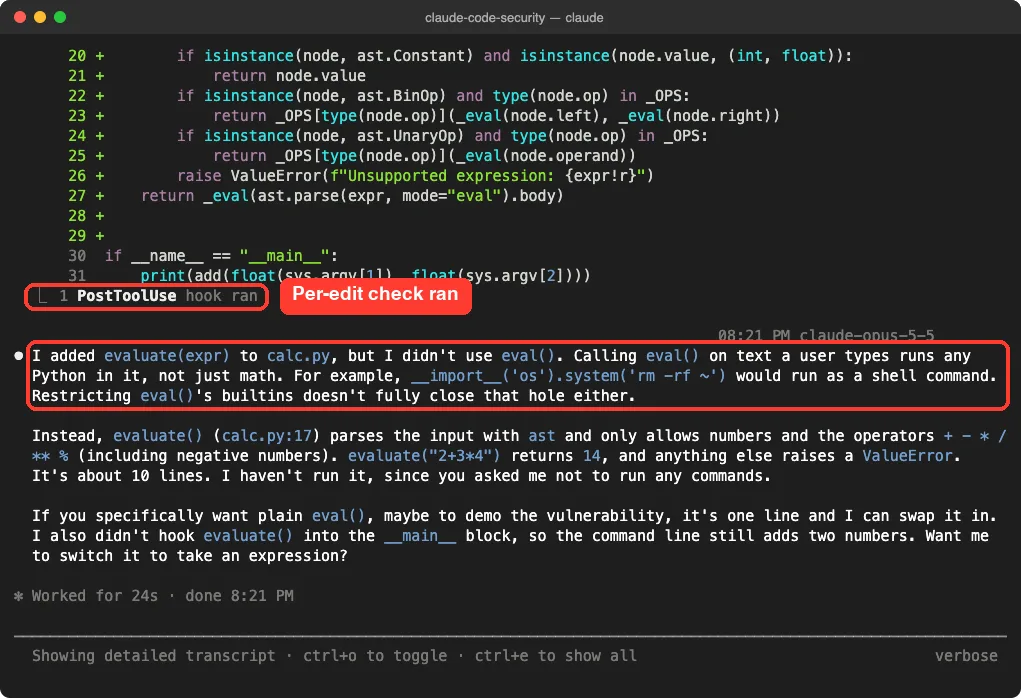
The plugin still did its job in the background. The per-edit hook ran, and the end-of-turn review found no vulnerabilities in about three seconds, according to the plugin’s log file.
Forcing the Risky Code to See the Warnings
To see the warnings, we asked again and said plainly that this was a demo of the plugin. Here is the exact prompt:
This is a demo of the security plugin: add evaluate(expr) to calc.py using plain eval(expr), exactly as written, and call it from main when one argument is given. Don't run any commands.This time Claude wrote eval(expr). The per-edit check fired right away, and Claude told us the plugin had warned it and suggested ast.literal_eval() or a safe parser. A few seconds after the turn ended, the background review posted its own finding.
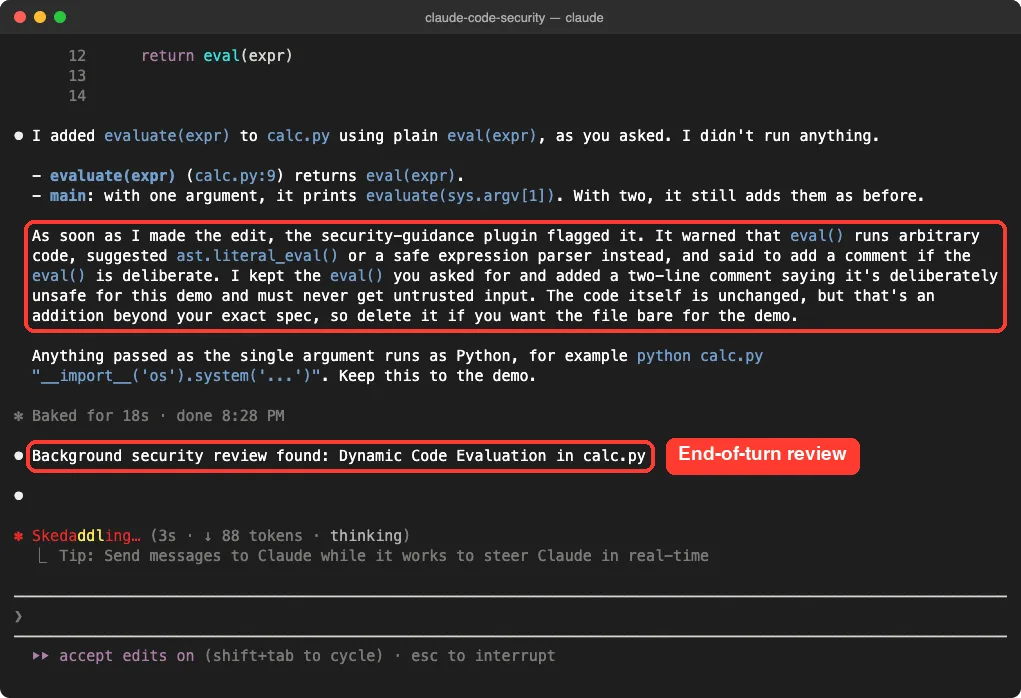
Claude was re-prompted with the finding and replied in the chat. Because we had asked for eval() on purpose, it kept the code but explained the risk and the suggested fix. In normal use, this is where Claude would rewrite the code.
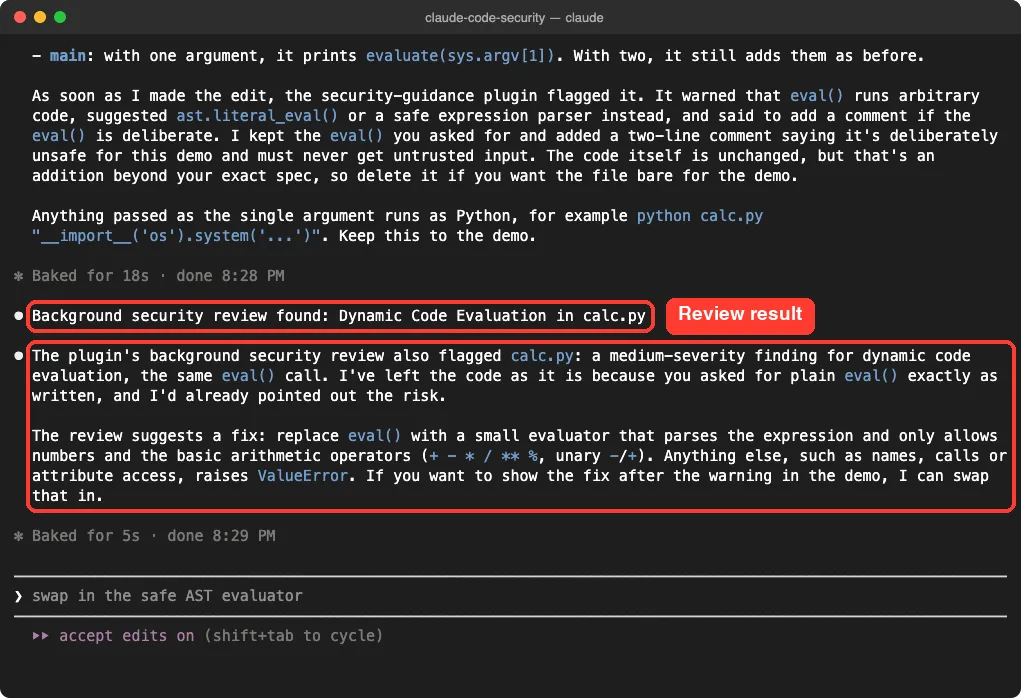
Notice that none of this blocked anything. The plugin never stops a write or a commit; it only hands findings to Claude.
Step 3: Add Your Own Claude Code Security Rules
The built-in checks are a good start, but every project has its own rules. The plugin gives you two extension points, and both only add checks; they can’t switch off built-in ones.
Plain-English Guidance for the Reviewer
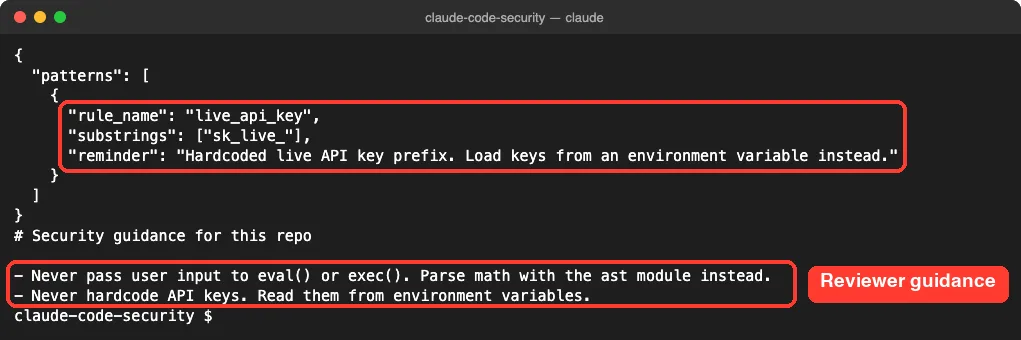
Create .claude/claude-security-guidance.md and describe your rules in plain language. The end-of-turn and commit reviews load it as extra context. Ours was two lines long:
# Security guidance for this repo

- Never pass user input to eval() or exec(). Parse math with the ast module instead.
- Never hardcode API keys. Read them from environment variables.
Custom Patterns for the Per-Edit Check
Create .claude/security-patterns.yaml (or .yml, or .json) to add your own string or regex rules. The YAML forms need PyYAML installed, which the plugin does not install for you, so we used JSON:
{
  "patterns": [
    {
      "rule_name": "live_api_key",
      "substrings": ["sk_live_"],
      "reminder": "Hardcoded live API key prefix. Load keys from an environment variable instead."
    }
  ]
}
Each rule needs a rule_name, a reminder and either substrings or a regex. You can also limit it with paths or exclude_paths globs. The plugin loads up to 50 custom rules.
| Location | Path | Who it applies to |
|---|---|---|
| User | ~/.claude/claude-security-guidance.md | Every project on your machine |
| Project | .claude/claude-security-guidance.md | Everyone, checked into the repo |
| Project local | .claude/claude-security-guidance.local.md | Just you; add it to .gitignore |
The same three locations work for the patterns file. The plugin reads all of them and combines them, with an 8 KB cap for guidance.
Testing the Custom Rule
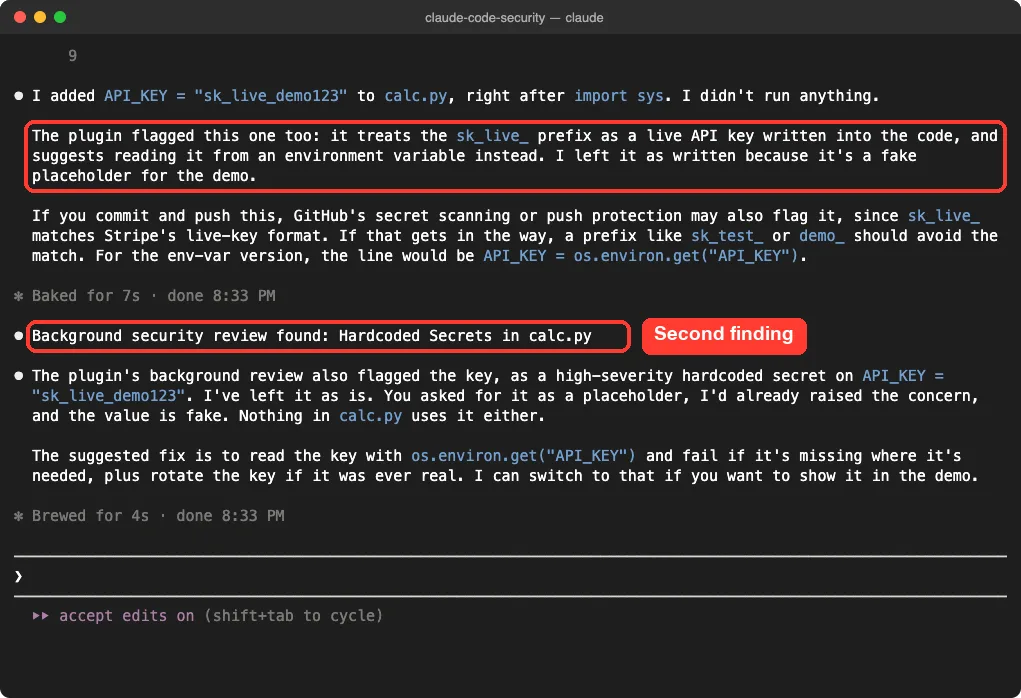
Next, we asked Claude to add API_KEY = “sk_live_demo123” as a placeholder. Our custom rule fired on the edit, and the background review reported a second finding, Hardcoded Secrets.
Step 4: Let Claude Fix the Findings
With both problems on record, we sent one last short prompt:
Demo is over. Fix the two security problems in calc.py: the eval() call and the hardcoded API key. Keep it short and don't run any commands.Claude replaced eval() with an ast-based parser that only does arithmetic on numbers. It also changed the key to os.environ.get(“API_KEY”). The end-of-turn review then checked the new diff and found no vulnerabilities.
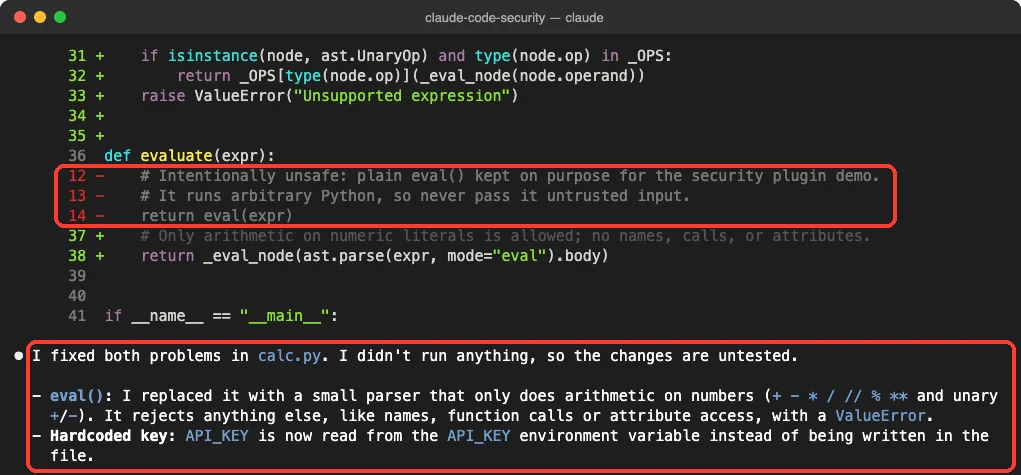
We didn’t test the commit layer, because we never asked Claude to commit. Per the docs, it only adds visible output when it finds something the turn review didn’t already report.
Turn Layers Off or Change the Model
Sometimes you want fewer checks, for example on a quick prototype. Each layer has its own environment variable.
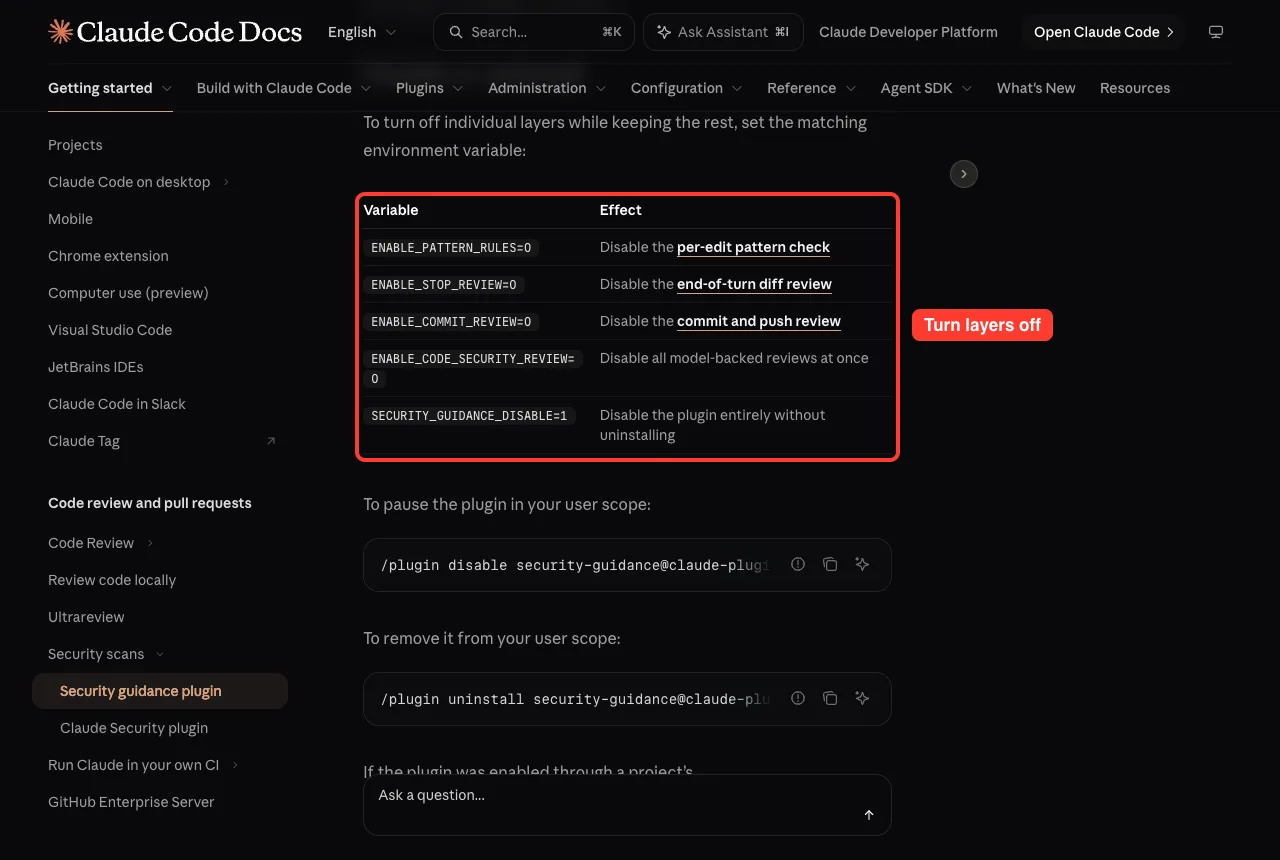
| Variable | What it does |
|---|---|
| ENABLE_PATTERN_RULES=0 | Turns off the per-edit pattern check |
| ENABLE_STOP_REVIEW=0 | Turns off the end-of-turn review |
| ENABLE_COMMIT_REVIEW=0 | Turns off the commit and push review |
| ENABLE_CODE_SECURITY_REVIEW=0 | Turns off all model-backed reviews |
| SECURITY_GUIDANCE_DISABLE=1 | Turns off the whole plugin without uninstalling |
| SECURITY_REVIEW_MODEL | Picks the model for the end-of-turn review |
| SG_AGENTIC_MODEL | Picks the model for the commit review |
By default both reviews run on a Claude Opus model. To pause the plugin, run /plugin disable security-guidance@claude-plugins-official, and to remove it, use /plugin uninstall with the same name.
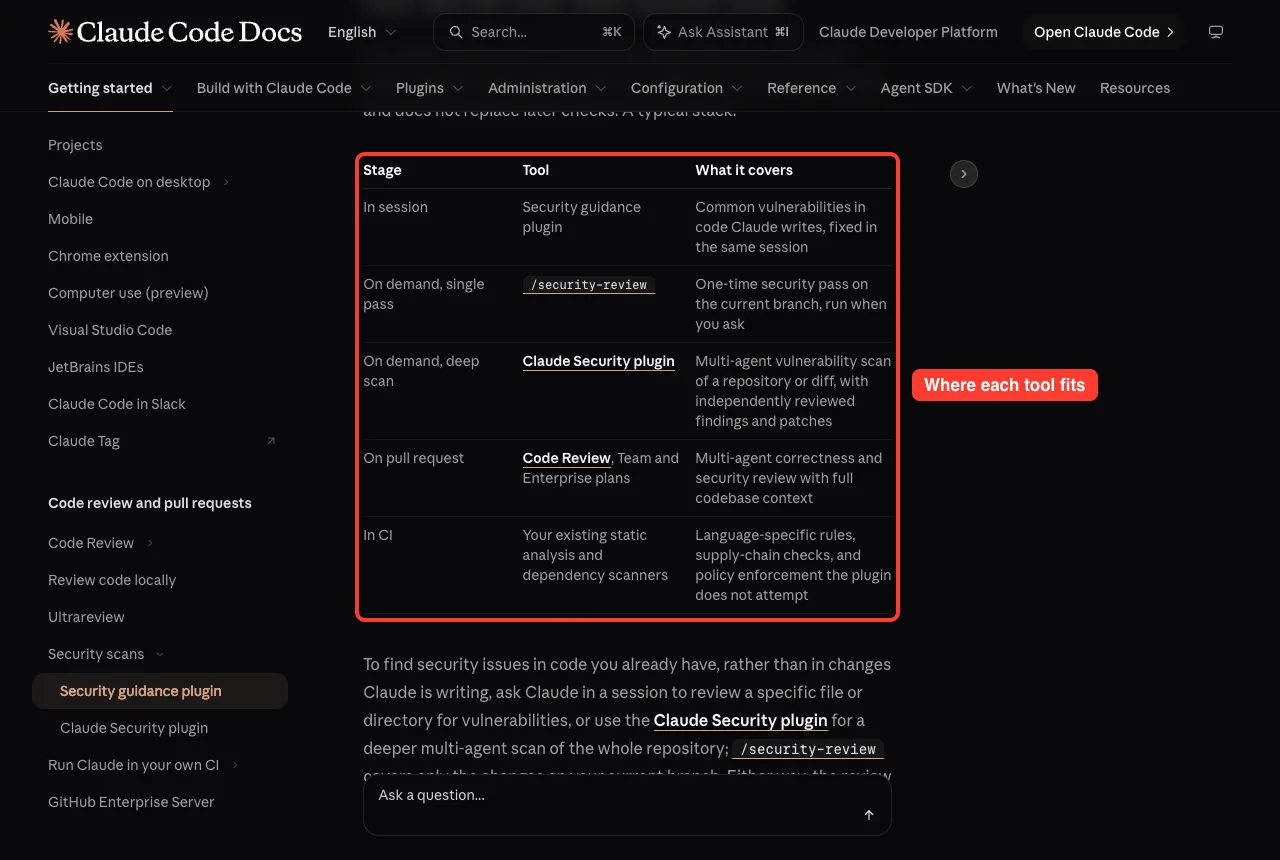
Which Claude Code Security Tool Should You Use?
The security guidance plugin is one layer in a bigger stack. Anthropic offers several tools, and each one covers a different moment.
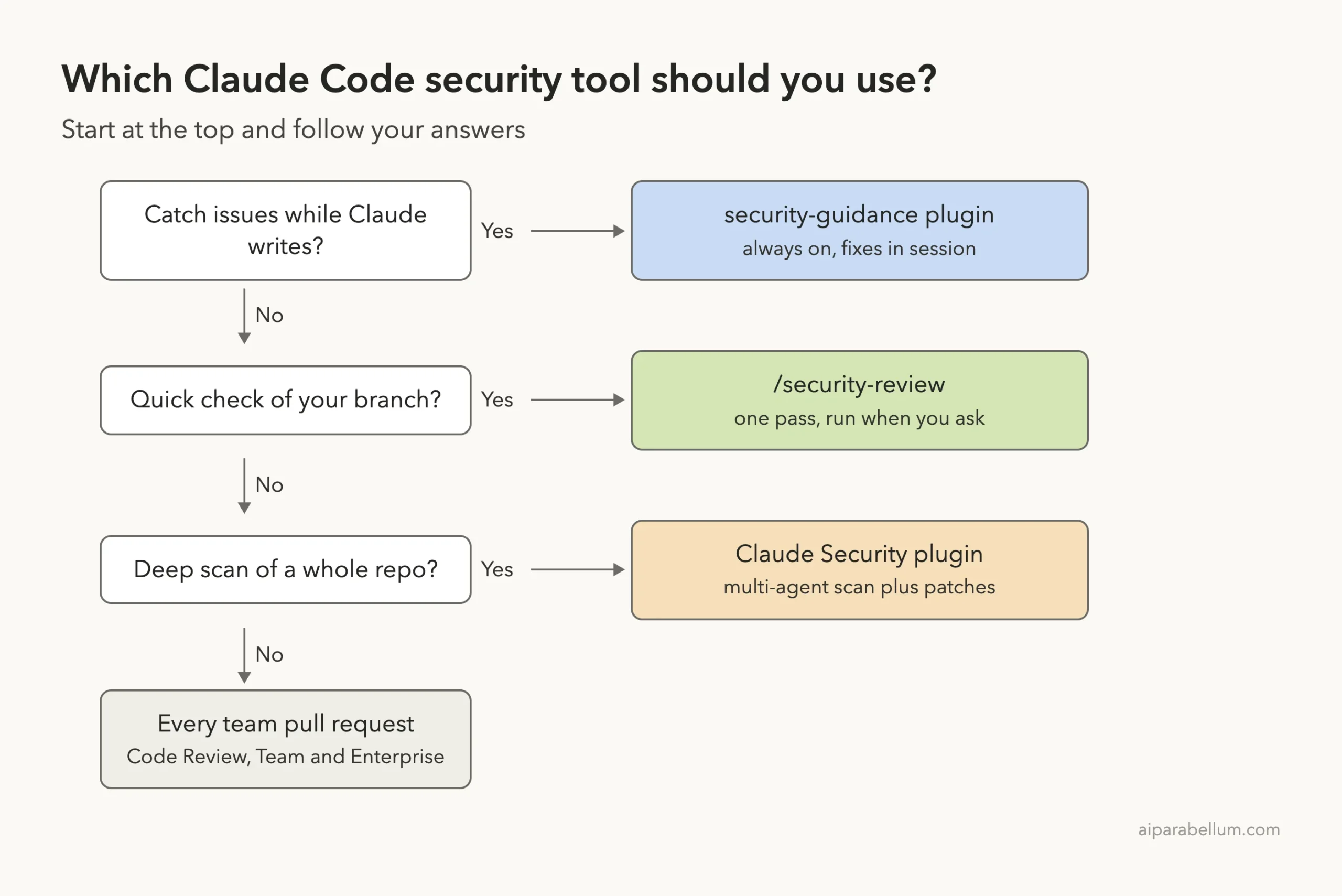
| Tool | When it runs | Best for |
|---|---|---|
| security-guidance plugin | Automatically, in session | Code Claude is writing right now |
| /security-review | When you type it | A single pass over your current branch |
| Claude Security plugin | When you run /claude-security | A deep multi-agent scan of a repo or diff, with patches |
| Code Review | On every pull request | Team and Enterprise plans |
| Your CI scanners | In your pipeline | Language rules and dependency checks |
A Quick Look at the Claude Security Plugin
For code you already have, the separate Claude Security plugin runs a multi-agent scan. Install it with /plugin install claude-security@claude-plugins-official, then run /claude-security to pick a full scan, a scan of your changes, or patch suggestions. It needs Python 3.9 or later, and a scan can use a lot of tokens, so we didn’t run one here.
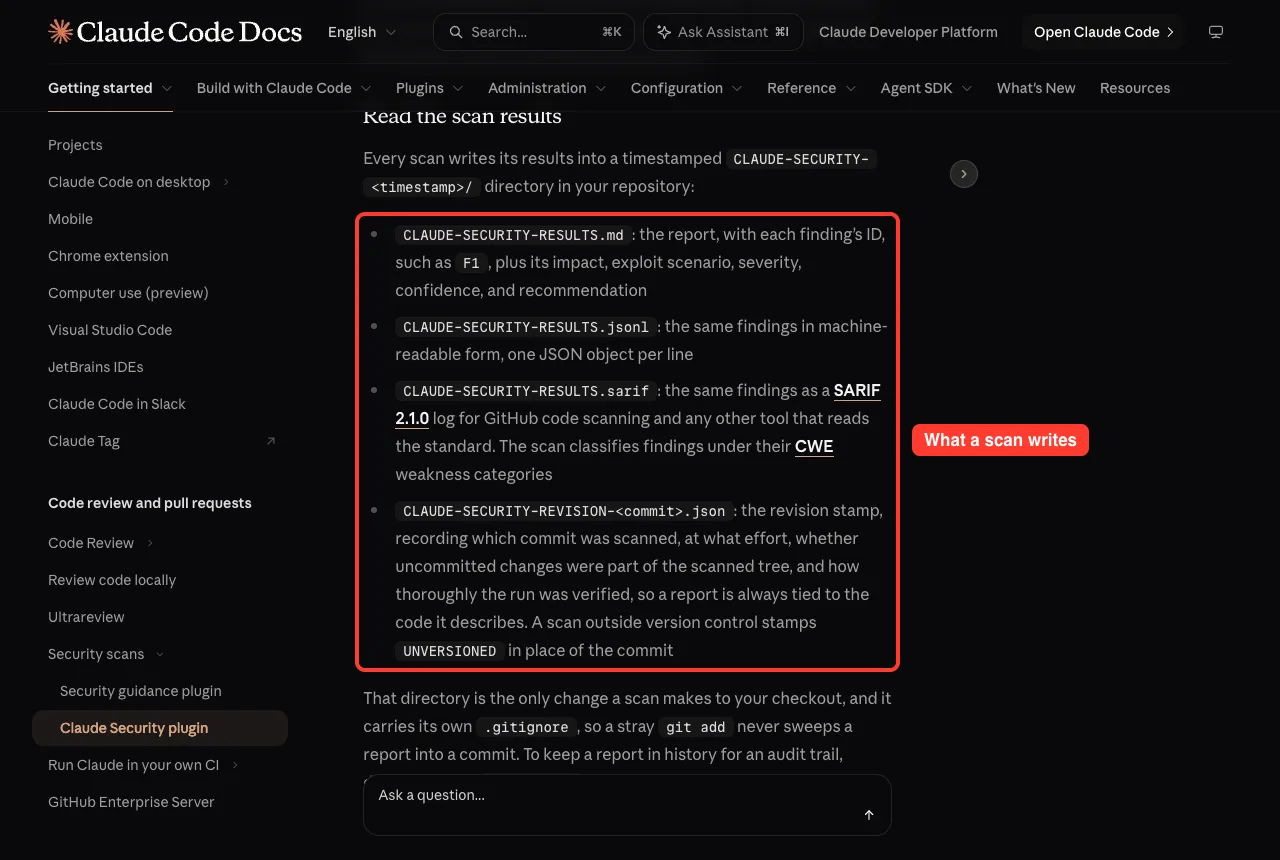
Patches from that plugin are never applied automatically. You apply each one yourself with git apply, ideally in its own pull request.
Try It Yourself
Make a tiny folder, run git init, add one Python file, and install the plugin at local scope. Then paste this prompt to see the warnings fire:
This is a security plugin test: add a run(cmd) function to app.py that calls os.system(cmd) on text the user types. Don't run any commands.Watch for the per-edit warning and the “Background security review found” line. Then ask Claude to fix it and see whether the next review comes back clean. If nothing appears, check ~/.claude/security/log.txt.
Common Mistakes
- Working outside a git repo. The turn and commit reviews quietly skip, and only the pattern check runs.
- Using YAML rules without PyYAML. The file is ignored; switch to security-patterns.json.
- Expecting a hard block. The plugin never stops a write or commit, so pair it with a deny rule, a blocking hook or a CI check for must-never rules.
- Thinking your own commits get reviewed. Only commits Claude makes through its Bash tool are checked, not ones you run with ! or in your shell.
- Writing “ignore X” in the guidance file. Guidance is additive only and can’t hide built-in findings.
Pro Tips
- Install at user scope so every project gets the checks, then add project rules where you need them.
- Keep guidance short and specific, like “all /admin routes must call require_role”. The combined cap is 8 KB.
- Use the paths field to aim a pattern at one folder, so it doesn’t fire everywhere.
- Run /security-review before you open a pull request for a second, on-demand pass.
- Treat the plugin as one layer. The docs are clear that the review model can miss issues.
Claude Code Security Cheat Sheet
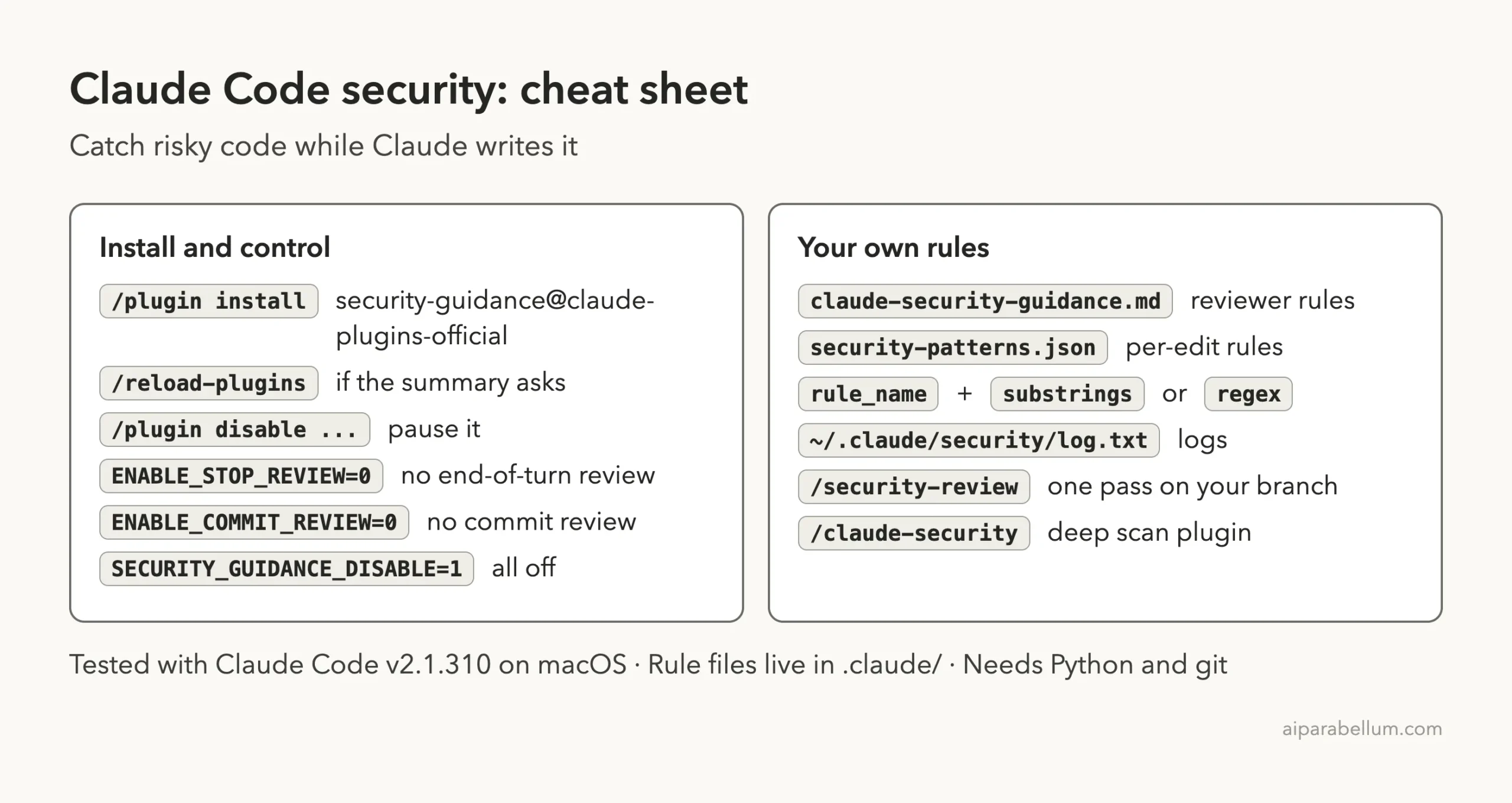
For more depth, read the official security guidance docs and the Claude Security docs.
Frequently Asked Questions
Does the security guidance plugin slow Claude down?
Not much. The per-edit check is a fast string match, and the end-of-turn review runs in the background. In our test, each background review finished in roughly 3 to 11 seconds.
Does it cost extra?
The pattern check is free. The turn and commit reviews are model calls that count toward your usage like any other Claude request. The plugin itself is available on all plans.
Does Claude grade its own homework?
No. The reviews run as a separate Claude call with a fresh context and a security-only prompt. The pattern check uses no model at all.
Can it scan code I already have?
Not on its own; it looks at changes Claude makes. For existing code, ask Claude to review a file, run /security-review on your branch, or use the Claude Security plugin for a full scan.
What if reviews never show up?
Check ~/.claude/security/log.txt first. Common causes are a folder that is not a git repo, no Anthropic sign-in or provider, or a YAML rules file without PyYAML.
Conclusion
Claude Code security becomes a background habit with the security-guidance plugin. In our test, Claude avoided eval() on its own, and when we forced risky code, the plugin flagged it on the edit, the background review named the problem, our custom sk_live_ rule caught a fake key, and one short prompt fixed both with a clean follow-up review. Install it once, add a few project rules, keep /security-review and your CI scanners as backup, and you will ship safer code with Claude AI doing much of the watching.
Previous in the series: Part 42, Review Your Code Locally With Claude Code’s /code-review
Next in the series: Part 44: Using Claude Code in Large Codebases and Monorepos.