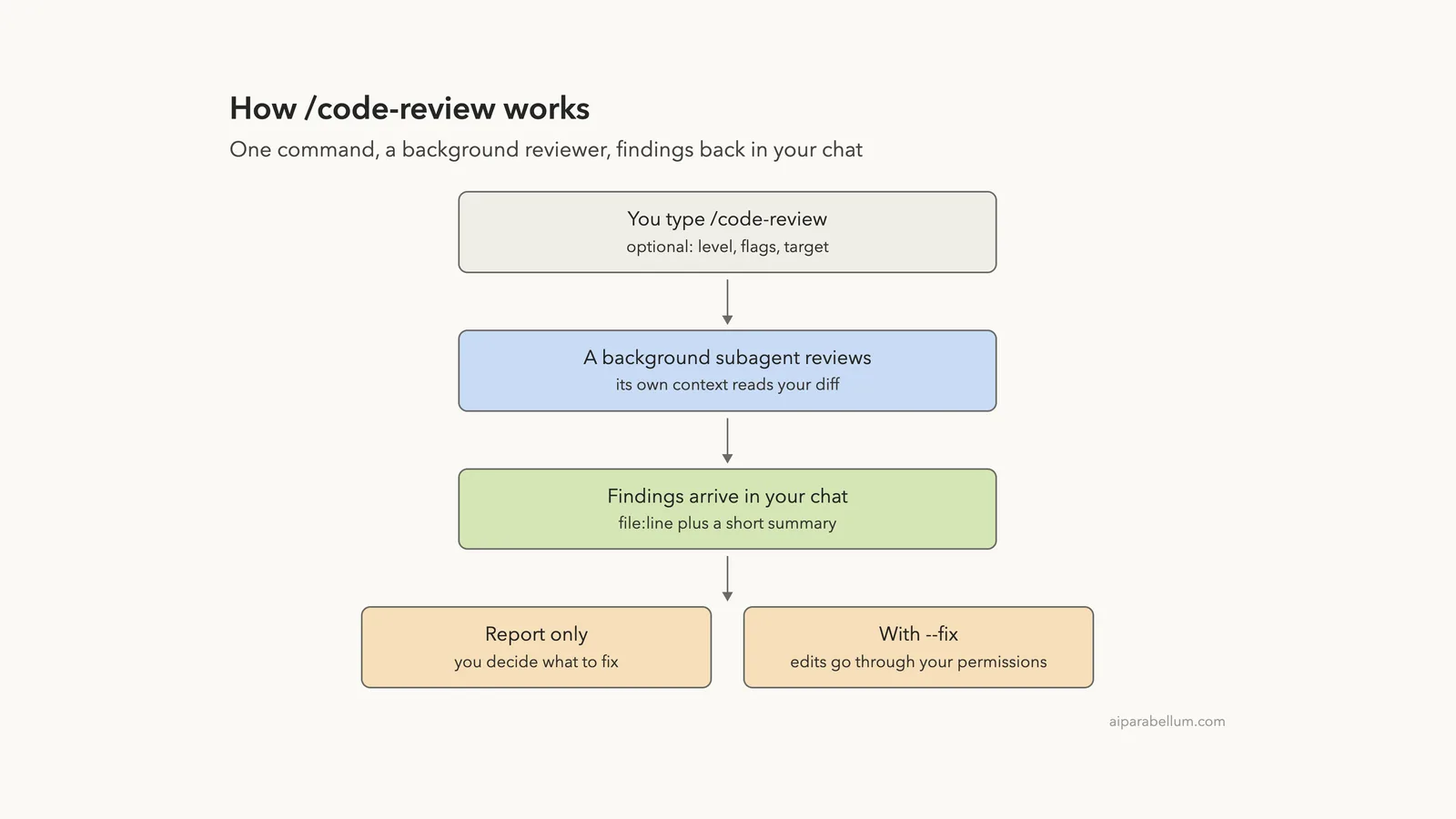
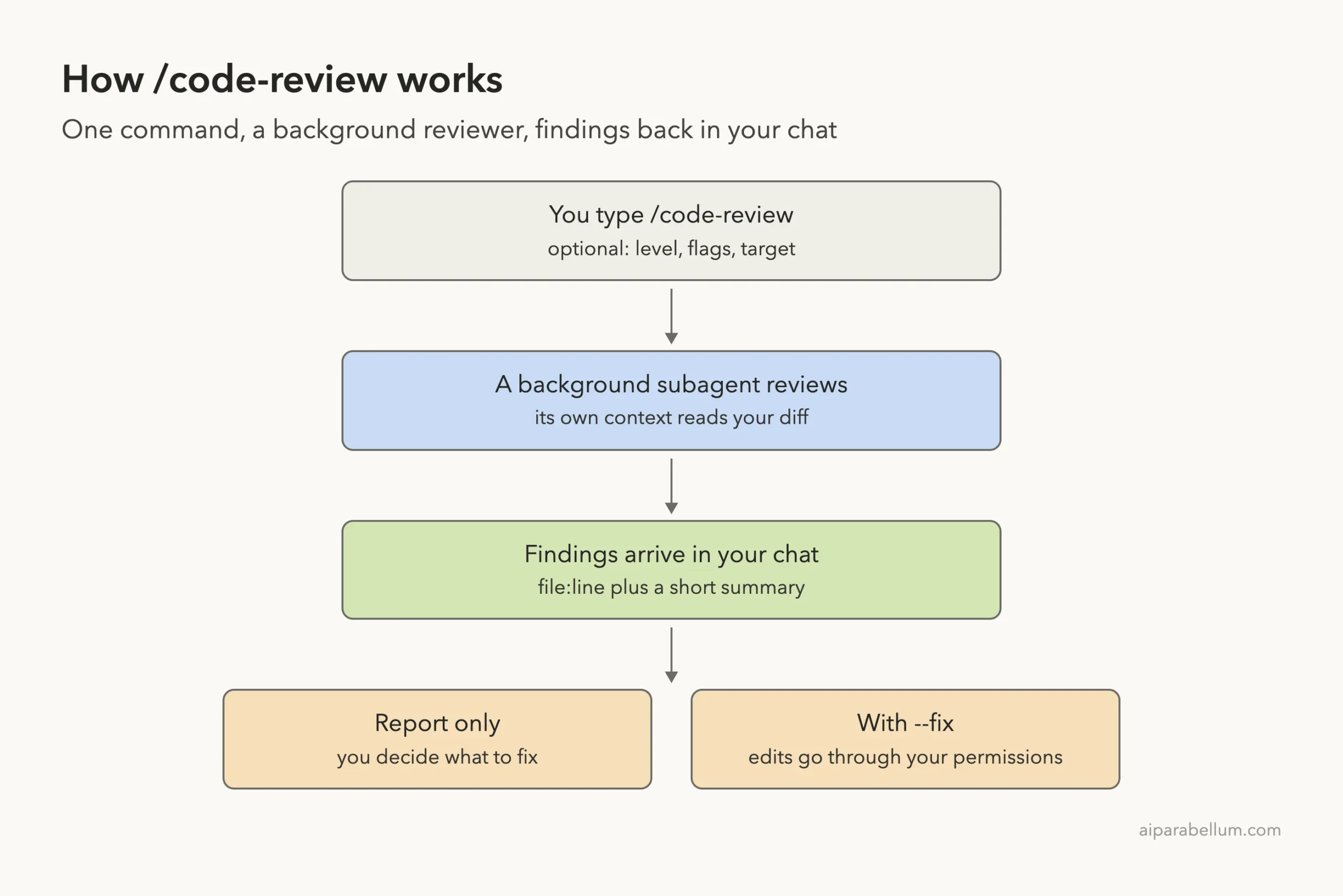
Claude Code code review is one command, /code-review, that checks the changes on your branch for bugs before anyone else sees them. You type it in the session where you are already working, a background reviewer reads your diff, and a list of findings lands back in your chat. Add –fix and Claude applies the fixes too, with every edit still going through your permission mode.
In this guide you will run /code-review on a real branch, read the findings, let it fix the bugs, point it at a single commit, and learn how effort levels change what it reports. We tried every step in a tiny demo project, and every screenshot comes from those sessions.
This is Part 42 of 53 in our Claude Code tutorials series. In the previous part we covered the Bash sandbox, which fences in shell commands; this part is about catching mistakes in the code itself.
Tested with Claude Code v2.1.310 on October 25, 2026, on macOS, inside a small throwaway git repository.
Quick Summary: /code-review at a Glance
| Question | Short answer |
|---|---|
| What does it look for? | Correctness bugs, plus reuse, simplification and efficiency cleanups depending on model and effort |
| What does it review by default? | Your branch’s commits ahead of upstream plus uncommitted changes |
| Where does it run? | As a background subagent with its own context window |
| Does it edit files? | Not by default. With –fix it applies the findings, through your permission mode |
| Alias | /review runs the same command |
| Plans | Works on any plan; it counts toward your usage like the rest of the session |
| Rules it follows | Your CLAUDE.md (not REVIEW.md, which is for the managed GitHub service) |
What Is Claude Code Code Review?
/code-review is a bundled skill that ships with Claude Code. Its instructions are built in, so there is no SKILL.md file on disk to open. When you run it, Claude reviews the changes on your branch, looks for correctness bugs and reports what it found in your conversation.
It exists because the person who wrote the code is the worst person to spot its bugs. A second pass from a fresh context, one that only sees the diff, catches the off-by-one or the missing division you read past three times. You get that second pass in seconds, before you open a pull request.
Do not confuse it with Code Review, the managed service an organization Owner can turn on to review every pull request on GitHub. The local command runs in your own session on your own machine, and you decide when to run it.
Set Up a Branch to Review
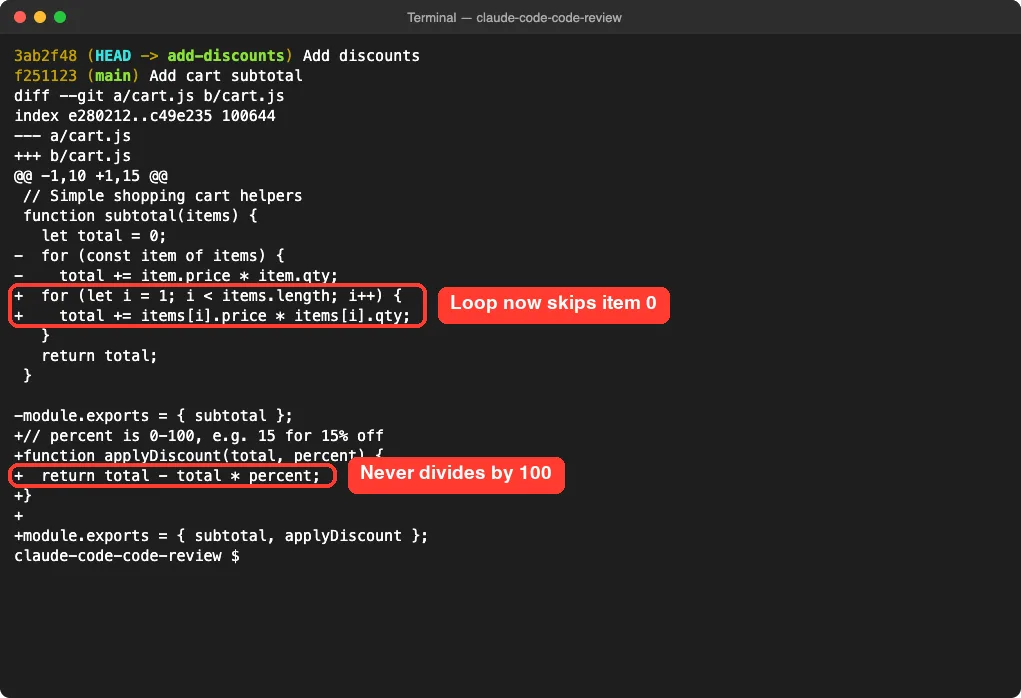
The review needs changes to look at, so it works best inside a git repository. For our test we made a tiny shop project with one file, cart.js, and a CLAUDE.md that says prices are whole cents. The main branch had a working subtotal function.
Then we created a branch called add-discounts and planted two bugs on purpose. The loop now starts at 1 instead of 0, so it skips the first item. A new applyDiscount function takes a percent from 0 to 100 but never divides by 100.
You do not need planted bugs, of course. In real work you would run the review on whatever you just finished, right before you commit or open a pull request. If you are new to branches, our guide to git worktrees shows another handy way to keep work separate.
How to Run /code-review in Claude Code
Step 1: Type the command
Start Claude Code in your project folder and type /code-rev. The command menu shows /code-review with a short description, right above /simplify. Press Enter to pick it, or finish typing the name.
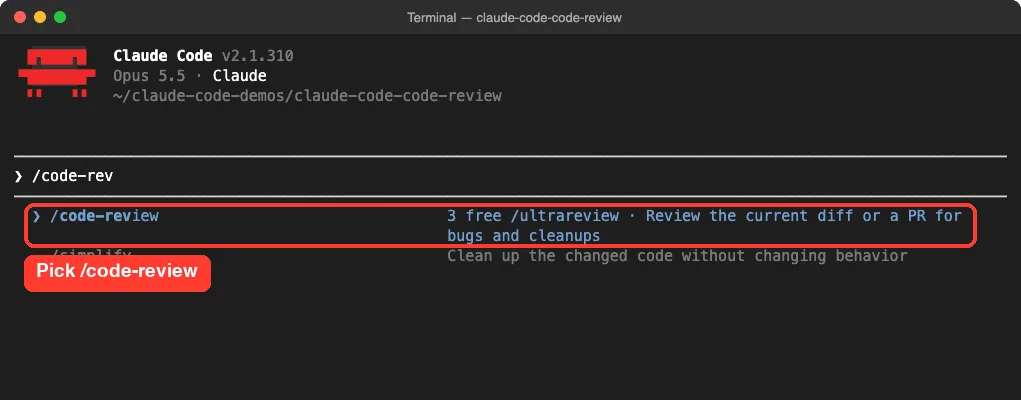
With no target, the review covers your current branch: its commits ahead of the upstream branch plus any uncommitted changes. If the branch has no upstream, Claude compares against main, or against the previous commit.
Step 2: Keep working while it runs
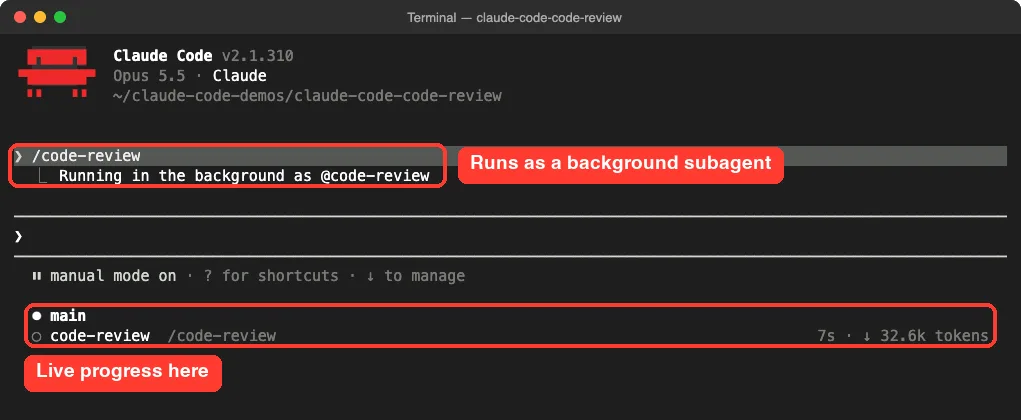
The review runs as a background subagent with its own context window. Your prompt stays free, and the reviewer’s reading does not fill your conversation. A small status row under the prompt shows it working, with elapsed time and tokens.
Step 3: Read the findings
On our tiny diff the findings arrived in well under half a minute. The report was grouped into Bugs, Should fix and Cleanup, and each item started with a file and line number. It caught both planted bugs and explained them with real numbers.
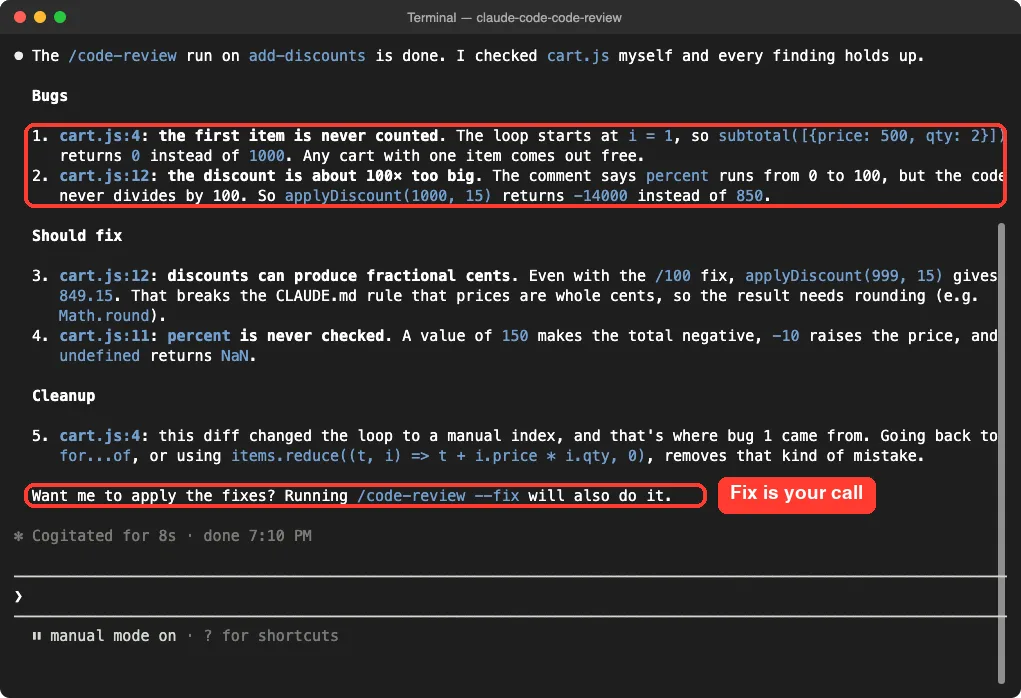
It also found things we did not plant. It noticed that a discount could produce fractional cents, which breaks the whole-cents rule in our CLAUDE.md. That shows the review really does read your CLAUDE.md file and checks the code against it.
A good review does not just say “this is wrong.” It shows the input, the wrong output and the right output.
Let /code-review Fix the Bugs With –fix
Without –fix, the review only reports. You can then ask Claude to fix what it found, in plain words. If you want the review and the fixes in one go, add the flag.
In a fresh session we ran /code-review low –fix. A few seconds in, an approval prompt appeared, marked as coming from the code-review agent. It wanted to run a one-line command that edits cart.js, and it waited for us.
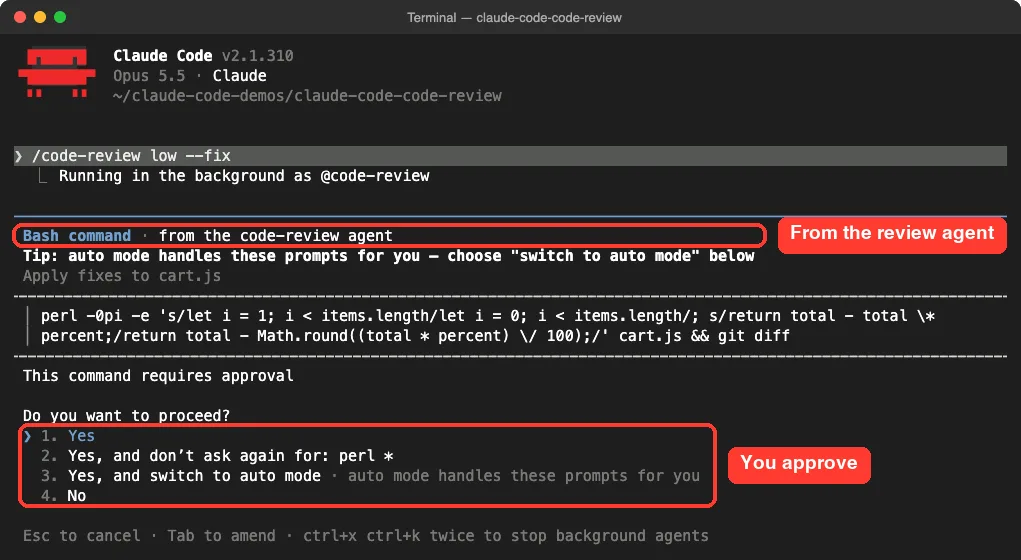
That matters. The fix step goes through your permission mode, so in the default mode nothing changes until you say yes. After we approved, the agent finished in 2 minutes 46 seconds, most of it time the prompt sat waiting for us.
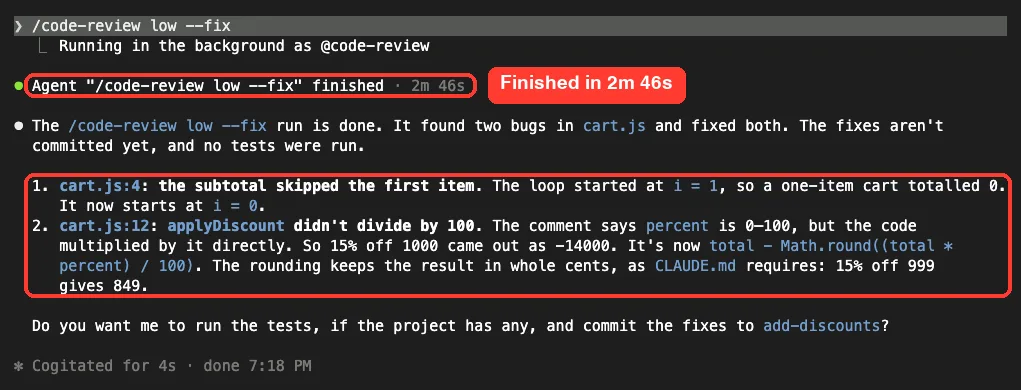
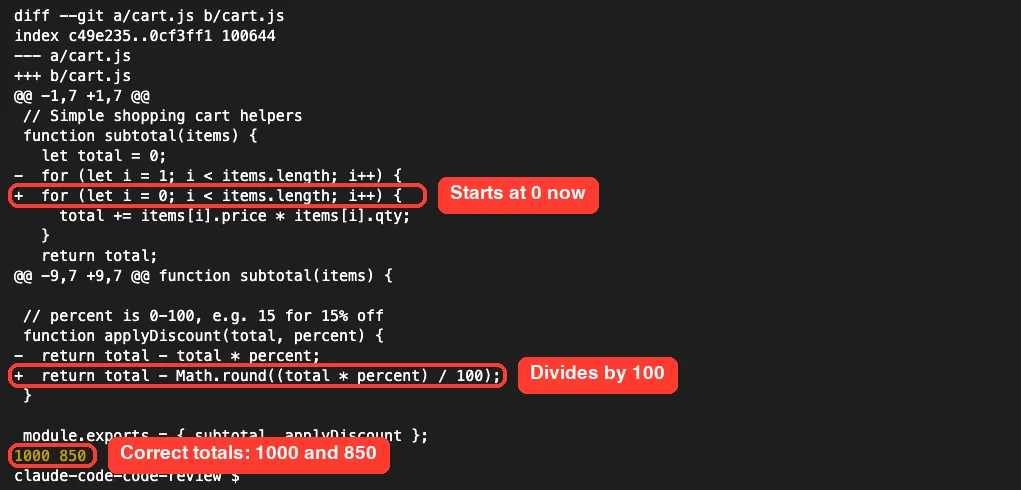
We checked the result ourselves with git diff and a quick Node test. The loop now starts at 0, and the discount divides by 100 and rounds to whole cents. A two-item cart worth 1000 cents now totals 1000, and 15 percent off 1000 gives 850.
A note about undo
A background review applies its –fix edits outside your session’s checkpoints. After one, /rewind only restores files Claude had already edited in your conversation. For the review’s other edits, use git.
That is one more reason to run reviews inside a git repo. Our guide to checkpoints and rewind explains the difference.
Choose What to Review
Type a target after the effort level and any flags, and Claude reviews that instead of your current branch. Here is the full list from the official docs.
| To review | Type |
|---|---|
| Your current branch and uncommitted changes | /code-review |
| Your last 15 commits | /code-review HEAD~15..HEAD |
| One branch against another | /code-review main…my-feature |
| A single commit (abc1234 is its hash) | /code-review abc1234^..abc1234 |
| A pull request by number | /code-review 1234 |
| A file or folder | /code-review src/auth |
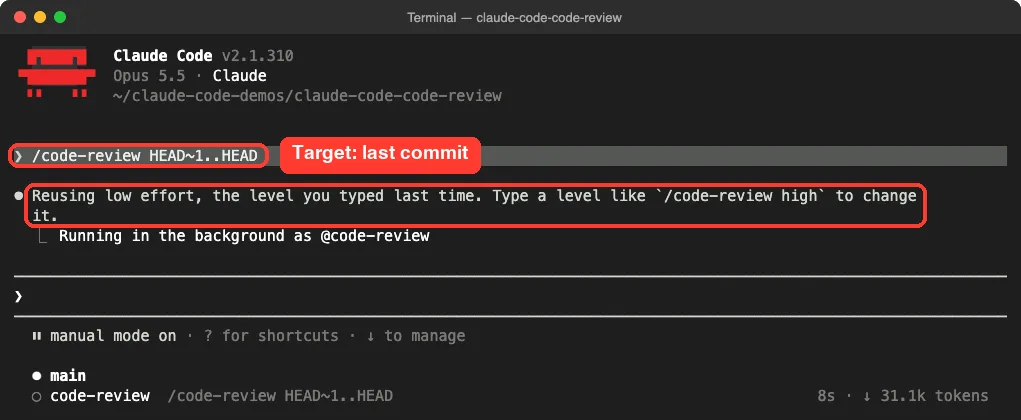
We tried /code-review HEAD~1..HEAD to review only the last commit, the one with the bugs. Notice the line right under the command: Claude Code said it was reusing low effort, because low was the level we typed last time.
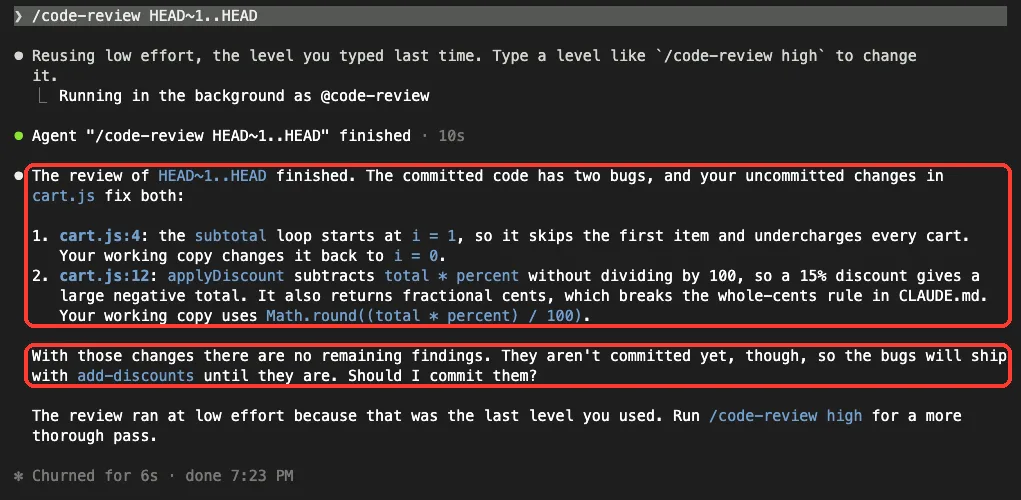
The result was smart. It reported both bugs in that commit, then noticed that our uncommitted changes already fixed them. It also warned that the bugs would still ship with the branch until we committed the fix.
Effort Levels and Other Flags
Pass an effort level to trade coverage for confidence. At low, the review reports only the findings it is most confident in, so you see fewer false positives. From medium through max, it widens coverage.
We saw that difference ourselves. Our first review, at the session’s normal effort, listed five items, including validation and cleanup ideas. The low effort run reported just the two real bugs.
How the remembered level works
- A level you type, like /code-review high, becomes what later runs reuse, even in a later session.
- A level passed in a non-interactive -p run does not change the remembered level.
- The ultra option neither uses nor updates it.
- If you never typed a level, the review uses the session’s current effort.
The other flags
| Flag | What it does |
|---|---|
| –fix | Applies the findings to your working tree after the review |
| –comment | Posts findings as inline comments on a GitHub PR, or as one note on a GitLab merge request (needs the glab CLI) |
| –max-findings n / all / default | Reports up to n findings, or every finding, instead of the usual limit (v2.1.288 or later) |
| –post | On an ultra review of a github.com PR, preselects posting the findings in the launch dialog |
For a bigger pre-merge check, /code-review ultra runs the deeper ultrareview in the cloud. It needs a claude.ai account and is not available in some setups, such as Bedrock or Zero Data Retention organizations, where it falls back to a local review. The ultrareview docs cover its limits and cost.
Which Review Command Should You Use?
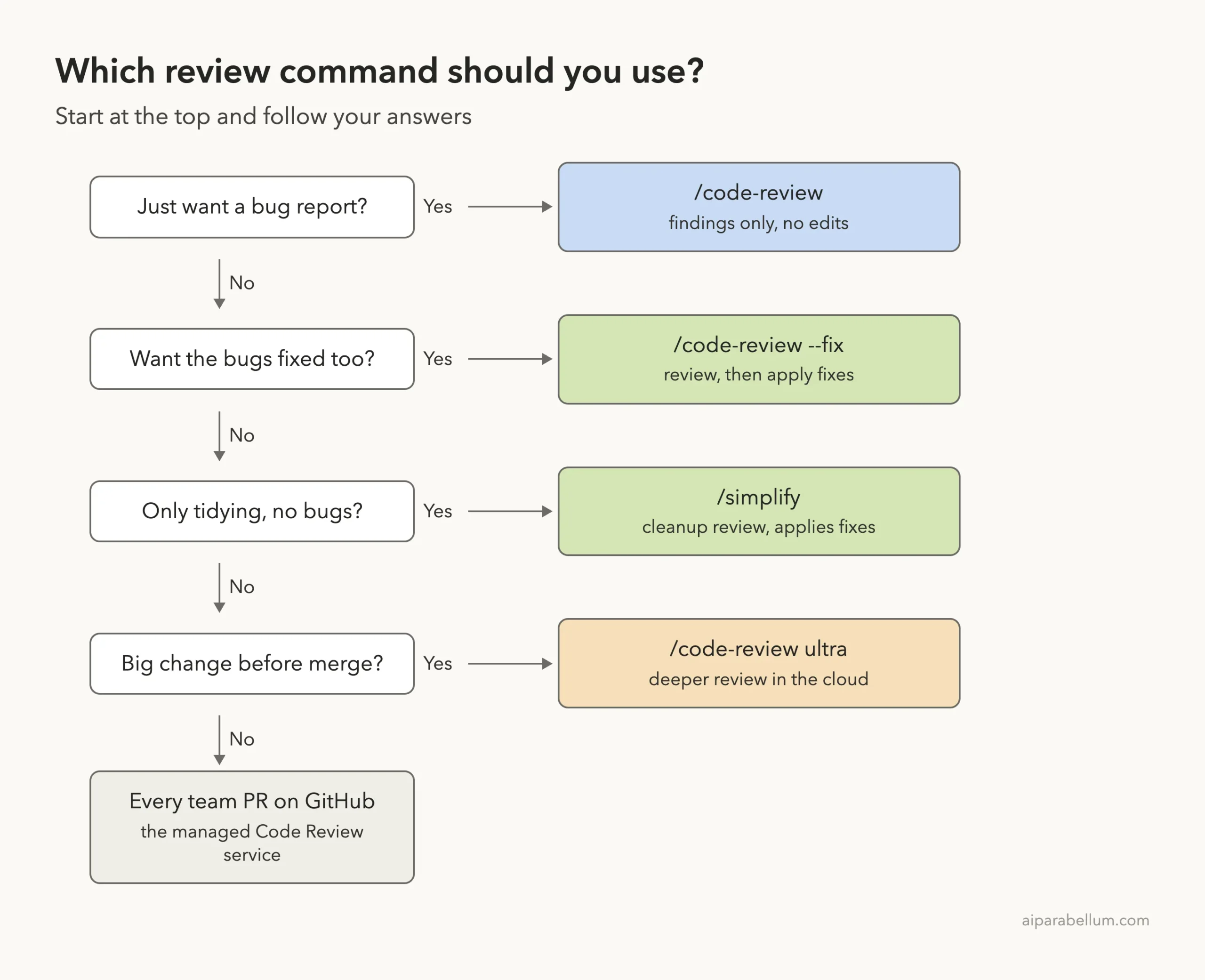
Claude Code has a few neighboring commands, and it is easy to mix them up. /simplify reviews for cleanup only and applies its fixes, while /code-review hunts for bugs. Use the ladder below to pick.
Real Examples of Claude Code Code Review in Daily Work
- Before a pull request: run /code-review on your branch, fix what it finds, then push.
- After a long session: review the last few commits with /code-review HEAD~5..HEAD.
- For one risky area: point it at a folder, like /code-review src/auth.
- In scripts and CI: run it non-interactively with claude -p, and Claude waits for the findings and includes them in the response. Our headless mode guide shows the basics.
- On a schedule: a session-scoped scheduled task with /code-review as its prompt runs the review, as our /loop guide explains for repeated prompts.
You can also just ask Claude, in plain words, to review your changes, and it can start the skill itself. If you would rather it never starts on its own, add a skillOverrides entry that sets code-review to “user-invocable-only” in a settings file, as the official /code-review docs show.
Try It Yourself
Make a throwaway folder, run git init, commit a small working file, then create a branch and add a function with an obvious bug. Start Claude Code in that folder and run /code-review. When the findings arrive, try this follow-up prompt:
Fix only the bugs from the review, keep everything else the same,
then show me the git diff and run a quick test that proves each fix works.
Then run /code-review low on the same branch and compare how many findings each level reports. That one comparison teaches you more about effort levels than any table.
Common Mistakes
- Running it outside a git repo. The review compares changes, so without git there is little to compare, and you lose an easy way to undo –fix edits.
- Expecting /rewind to undo a background –fix. Use git for the review’s edits.
- Writing review rules in REVIEW.md. The local command ignores it; put rules in CLAUDE.md.
- Forgetting the remembered level. If you once typed low, later runs stay at low until you type another level.
- Scheduling /code-review ultra. A session-scoped scheduled task never launches the cloud review, so schedule the plain command.
- Treating every finding as a must-fix. Cleanup ideas are suggestions; you decide.
Pro Tips
- Add your team’s rules to CLAUDE.md, such as “money is in whole cents”, and the review checks code against them.
- Use low before a quick commit and high before a big merge.
- Use –max-findings all when you want the full list on a large diff.
- Want your own reviewer? A project or personal skill named code-review runs in place of the bundled one, and /review keeps running the bundled review. See our skills guide.
- Set CLAUDE_CODE_DISABLE_BACKGROUND_TASKS to 1 if you want the review in the foreground, though it also turns off other background features.
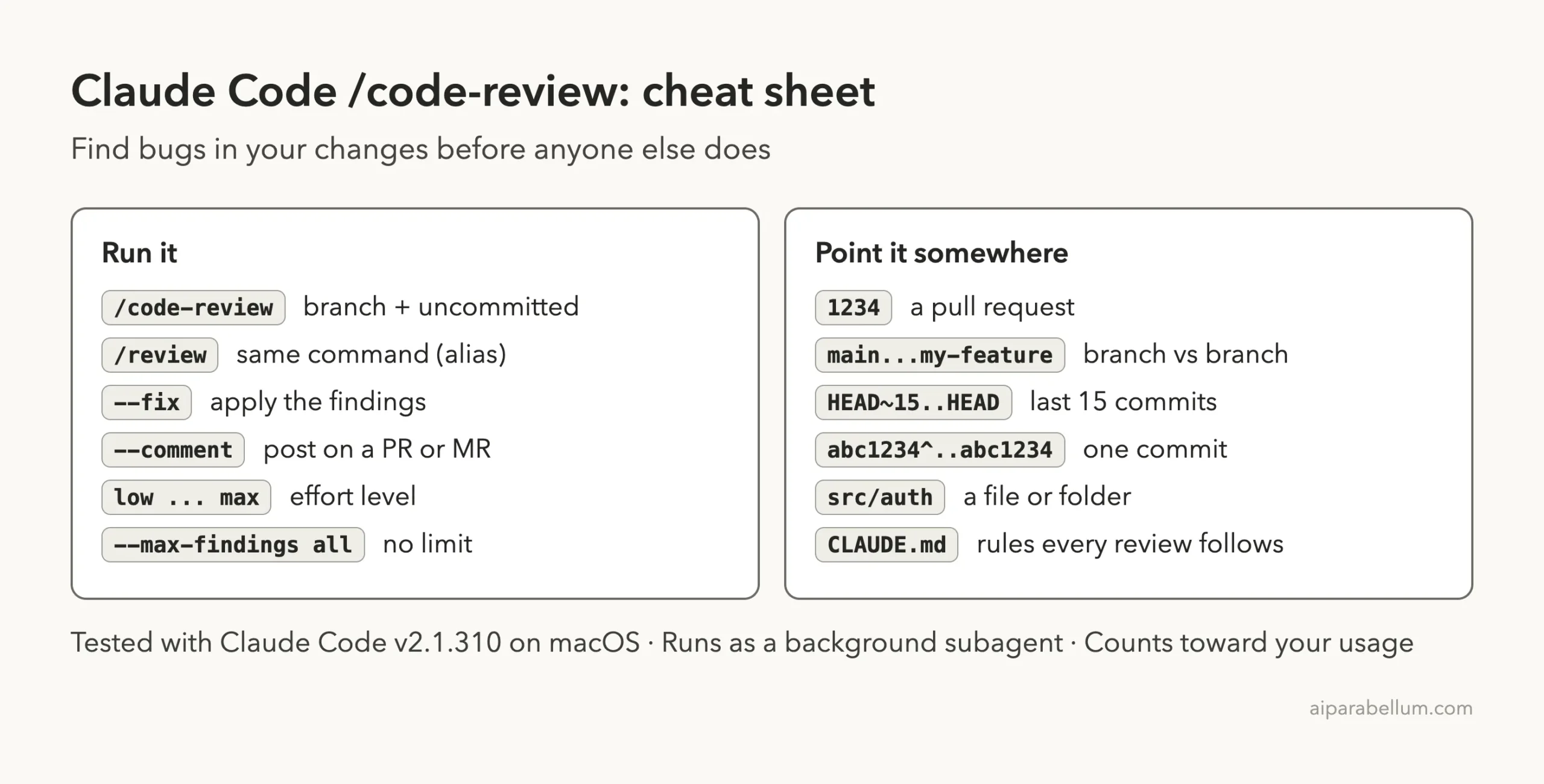
Claude Code Code Review Cheat Sheet
Frequently Asked Questions
Does /code-review change my files?
Not by default. Without –fix it only reports. With –fix it applies the findings, and every edit goes through your permission mode.
Is /review different from /code-review?
No. /review is an alias of /code-review. Before v2.1.223 it was a separate, read-only review of a GitHub pull request.
Does it cost extra?
The local command works on any plan and counts toward your plan’s usage or API billing like the rest of the session. The cloud ultra review has its own limits and cost.
Can it review a pull request?
Yes. Type the PR number, like /code-review 1234, and add –comment to post the findings as inline comments on GitHub.
How long does a review take?
It depends on the size of the change and the effort level. Our one-file demo took well under a minute, and the review runs in the background so you can keep working.
Conclusion
Claude Code code review gives you a fresh pair of eyes on every change with a single command. In our test, /code-review found both planted bugs with clear examples, caught a broken CLAUDE.md rule we never mentioned, fixed everything with –fix after we approved the edit, and reviewed a single commit when we gave it a range. Run it before every commit or pull request, pick low or high effort to match the stakes, keep your rules in CLAUDE.md, and you will ship fewer bugs with Claude AI at your side.
Previous in the series: Part 41, The Claude Code Sandboxed Bash Tool Explained
Next in the series: Part 43: Claude Code Security: Catch Issues as Claude Writes Code.