A Claude Code large codebase setup is mostly about one idea: show Claude only the part of the repo your task touches. Claude Code works at any size, but in a big monorepo the small-project defaults can fill the context window with instructions and file reads that have nothing to do with your task. That costs tokens and makes answers less sharp.
In this guide you will learn where to start Claude, how to split CLAUDE.md files by folder, how to block build output, how to reach a sibling package, and how to check out only the folders you need in a worktree. We built a tiny three-package monorepo and tested each step for real.
This is Part 44 of 53 in our Claude Code tutorials series. In the previous part we covered Claude Code security; this part is about keeping Claude focused when the repo gets huge.
Tested with Claude Code v2.1.310 on October 25, 2026, on macOS, inside a small throwaway git monorepo with packages named api, web and shared.
Quick Summary: Claude Code in a Large Codebase
| I want to | Use this | Committed or personal? |
|---|---|---|
| Load only the rules for the code I touch | A CLAUDE.md in each package or subsystem | Committed |
| Skip other teams’ CLAUDE.md files | claudeMdExcludes | Either (local is common) |
| Stop Claude opening build output or vendored code | Read deny rules in permissions.deny | Either |
| Find definitions without scanning files | A code intelligence plugin | Personal or enabledPlugins |
| Make worktrees check out fewer folders | worktree.sparsePaths | Either |
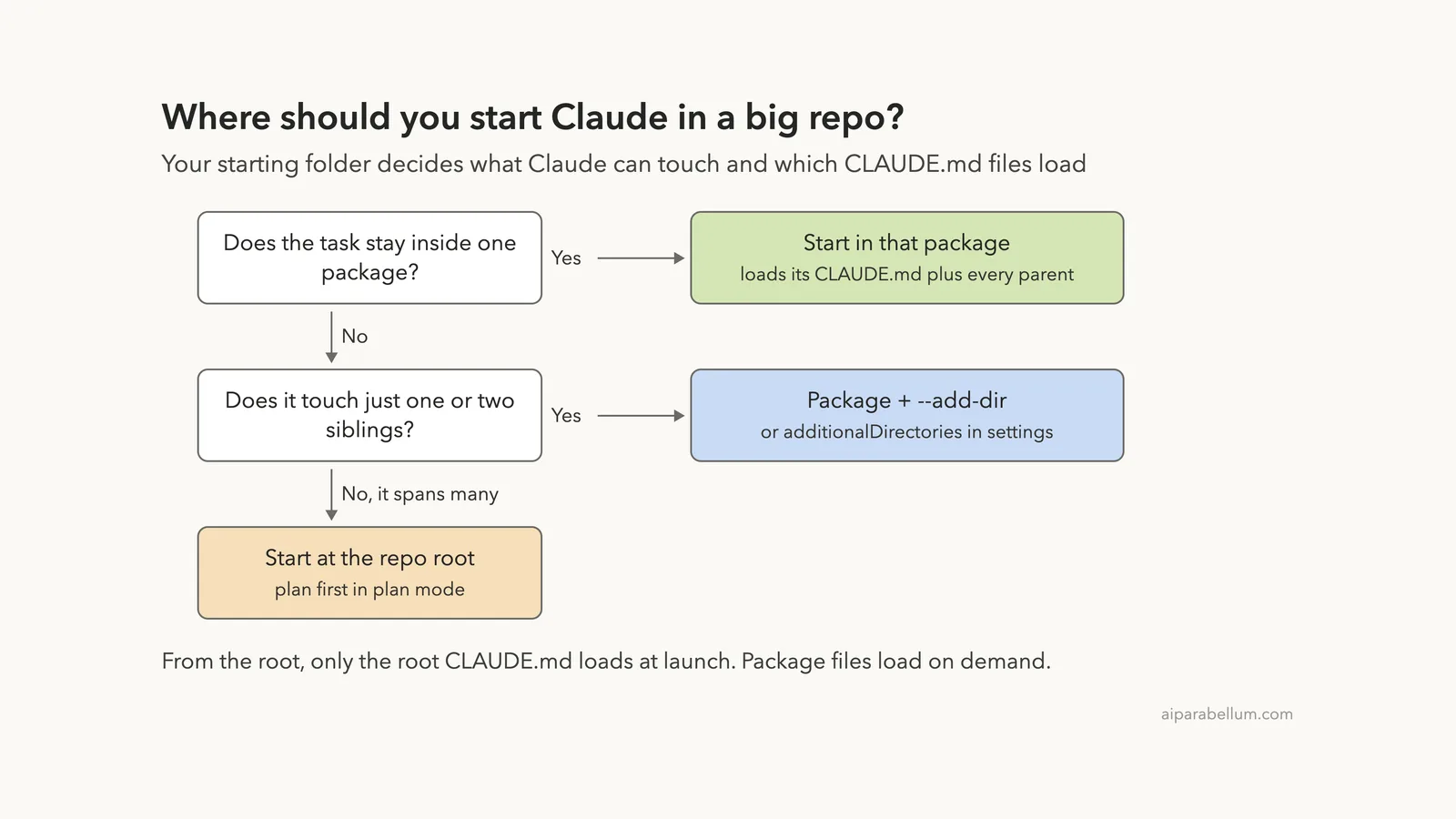
| Edit a sibling package from my package | –add-dir or additionalDirectories | Either |
| Give each package its own procedures | Skills in that folder’s .claude/skills/ | Committed |
Why Large Codebases Need a Different Setup
In a small project, one CLAUDE.md and a quick look around the folder are enough. In a repo with dozens of packages or millions of lines, that same approach gets expensive. A single root CLAUDE.md either grows to cover every team’s rules or stays too vague to help.
File reads are the other cost. If Claude has to grep through generated code or a vendored SDK to find one function, it spends your context on noise. The settings in this guide all do one job: they trim what Claude sees down to what the task needs.
In a big repo, less context usually means better answers, not worse ones.
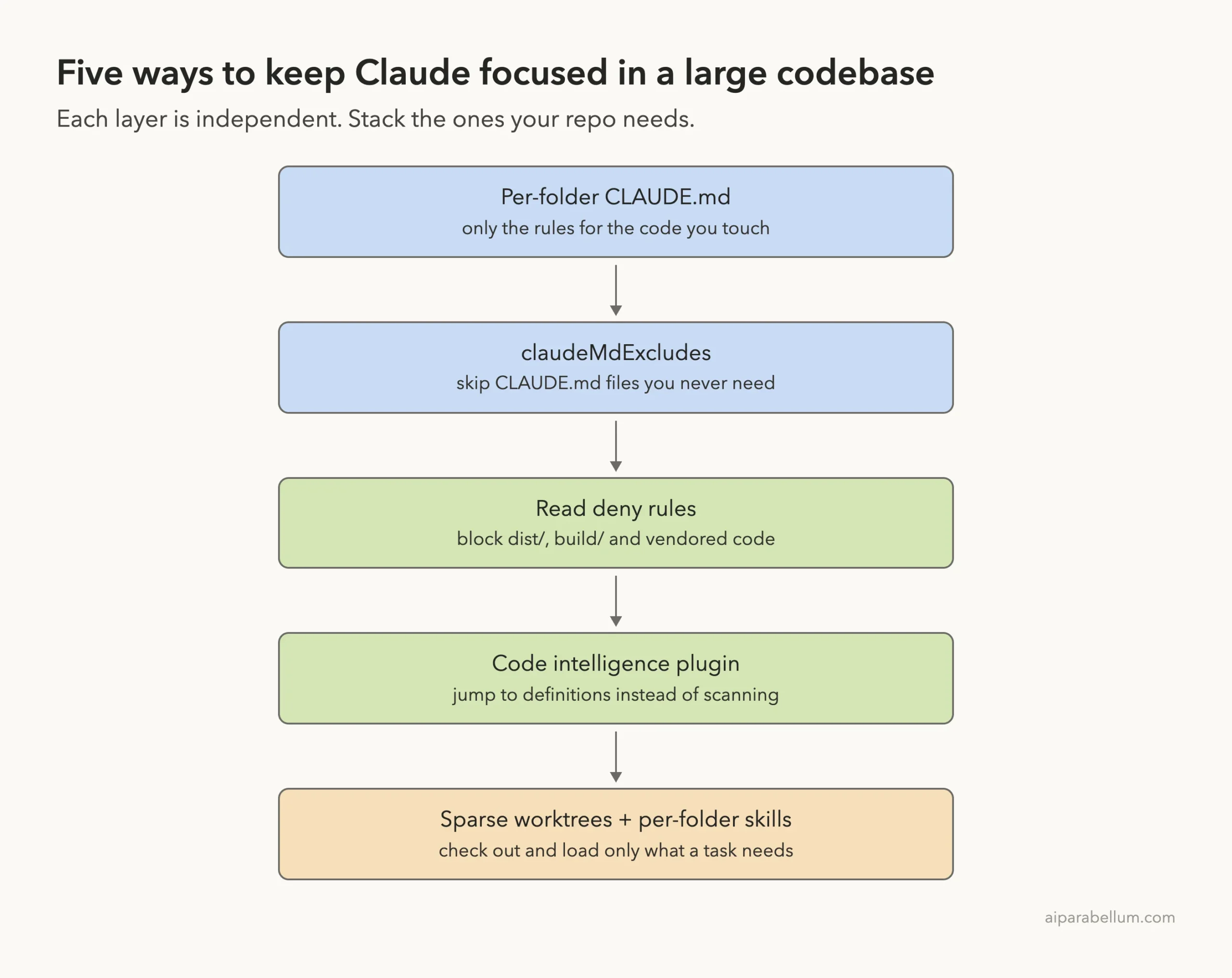
Each setting is independent, so you can stack only the ones your repo needs. If you are new to how context works, our guide to the context window explains /context and /compact first.
Step 1: Choose Where to Start Claude
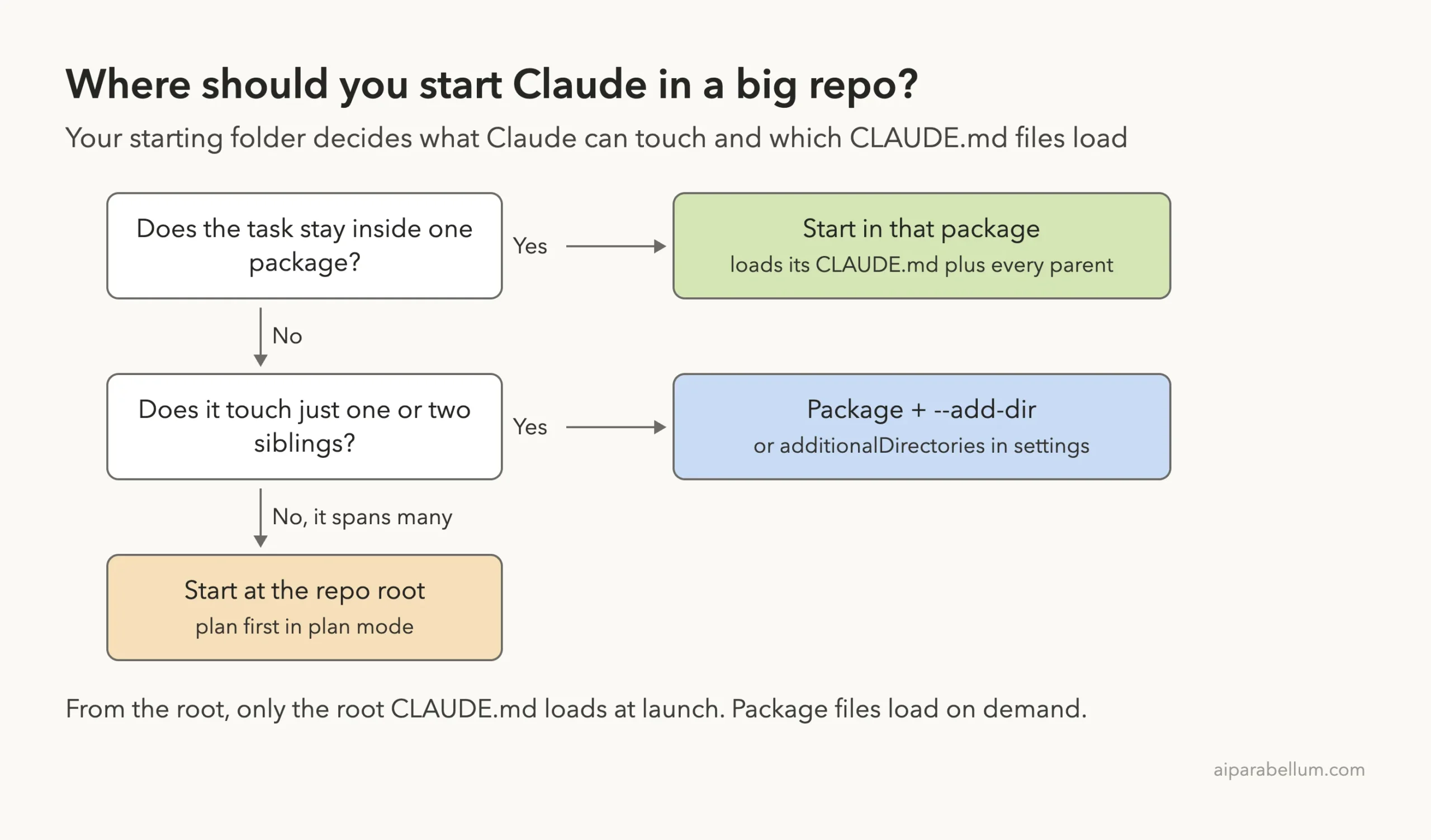
Where you run the claude command matters more than any setting. It decides which files Claude can edit without asking, which CLAUDE.md files load at launch, and which project settings apply.
| Start from | File access | CLAUDE.md loaded at launch | Best for |
|---|---|---|---|
| Repository root | Every file | Root only; package files load on demand | Tasks that span many packages |
| A package or subfolder | That folder only, until you grant more | That folder’s file plus every parent’s | Work inside one package |
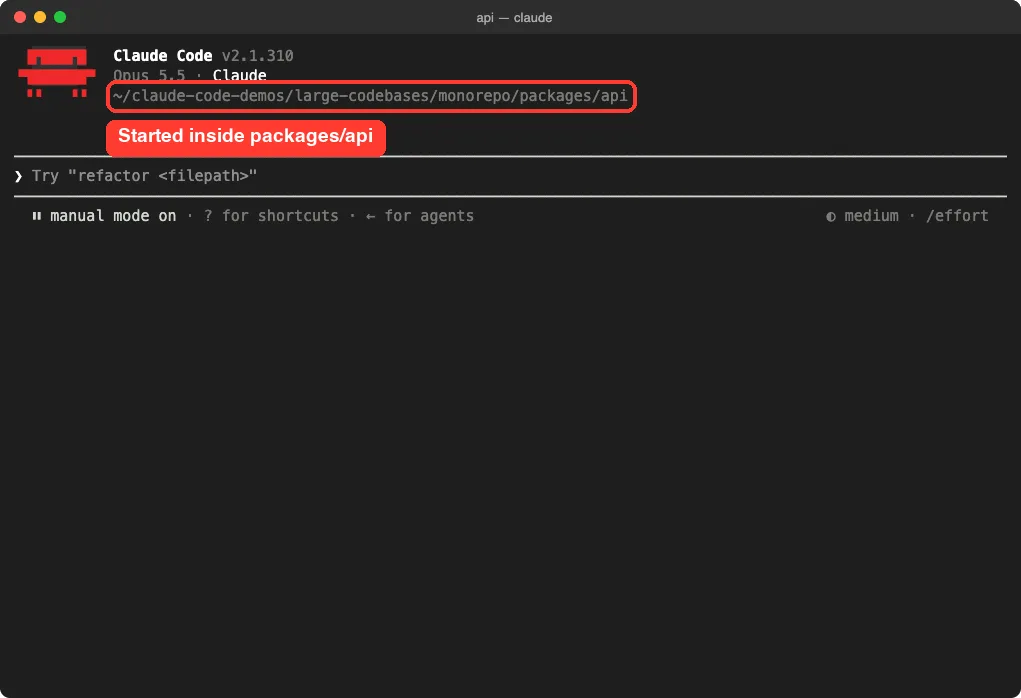
Our demo monorepo has a root CLAUDE.md plus one in each package. We started Claude inside packages/api, and the header confirms the working folder.
One catch: project settings in .claude/settings.json are not inherited from parent folders the way CLAUDE.md files are. If you start from packages/api, Claude reads packages/api/.claude/settings.json, not the root one.
Step 2: Layer CLAUDE.md Files by Folder
The common split is two levels. The root CLAUDE.md file holds rules for everyone, like commit style. Each package or subsystem gets its own CLAUDE.md for its stack.
Here are the two files from our demo:
# CLAUDE.md (repo root)
Run package scripts from the package directory, not the monorepo root.
Prefix commit subjects with the package name, for example `api: add rate limiting`.

# packages/api/CLAUDE.md
Route handlers live in src/routes.js. Keep them small and return JSON.
Never edit files in dist/. It is build output.
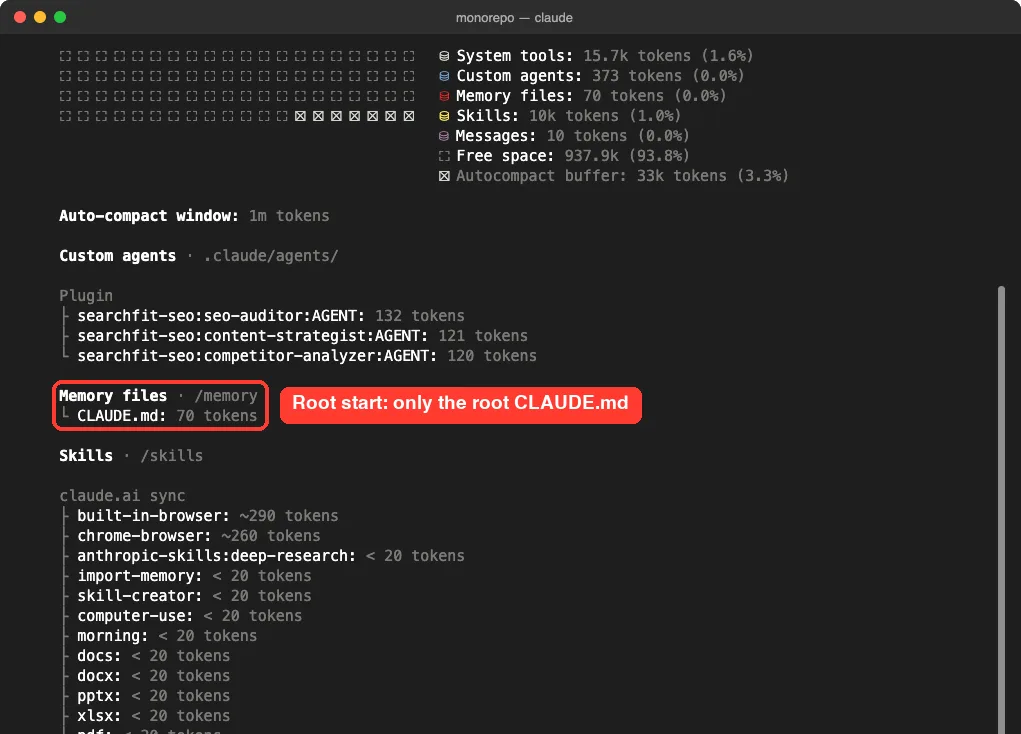
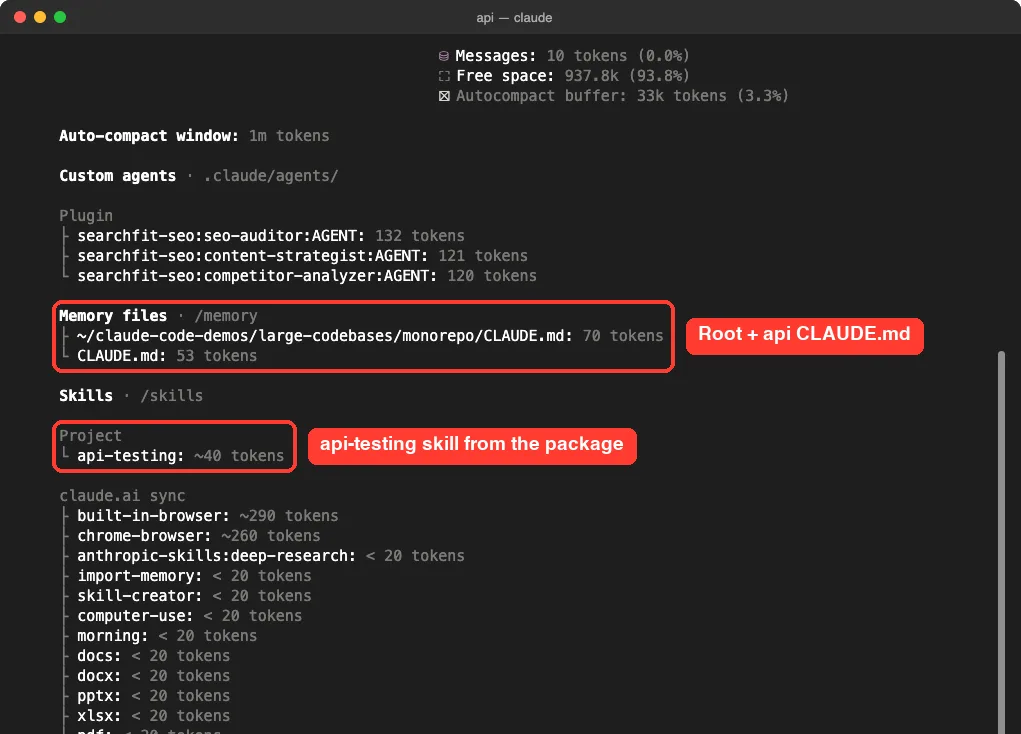
To check which files actually loaded, run /context and look under Memory files. When we started from the repo root, only the root file was listed.
Then we started from packages/api. This time /context listed the root CLAUDE.md and the api CLAUDE.md, with nothing from packages/web. It also showed the api-testing skill we placed in that package.
Per-folder CLAUDE.md vs path-scoped rules
You can also target rules with files in .claude/rules/ that have a paths: glob. A per-folder CLAUDE.md lives next to its code and is easy for each team to own. A path-scoped rule lives in one central place and loads when Claude works on matching files, which suits rules that apply to scattered paths.
Keep the files current
- Review CLAUDE.md edits in pull requests, like any other docs change.
- Revisit them after major model releases, since old workarounds can become dead weight.
- Try a Stop hook that reviews the session transcript and proposes CLAUDE.md updates.
- Run /doctor to trim a file that has grown too large.
Step 3: Exclude CLAUDE.md Files You Never Need
When you start from the root, package CLAUDE.md files can still load on demand as Claude moves around. The claudeMdExcludes setting skips specific files by path or glob so they never load. It is meant for folders you never touch, like another team’s package or legacy code.
{
  "claudeMdExcludes": [
    "**/packages/web/**"
  ]
}
Put that in .claude/settings.local.json if it is just for you, and add the file to your gitignore yourself. Patterns match absolute paths, so start relative-style patterns with **/. A few more useful patterns from the docs:
- “**/packages/*/CLAUDE.md” skips every package file but keeps the root one.
- “**/packages/legacy-*/**” skips every legacy package, rules included.
- An absolute path skips one exact file.
The list is static. To focus on a different package tomorrow, start Claude from that package instead of editing exclusions. The arrays merge across user, project, local and managed settings, and an organization’s managed CLAUDE.md can’t be excluded.
Step 4: Block Reads of Build Output and Vendored Code
Claude’s searches already respect .gitignore, so node_modules/, dist/ and build/ stay out of search results if they are ignored. For folders that are checked in, like a vendored SDK or committed generated code, add Read deny rules. We put these in packages/api/.claude/settings.json:
{
  "permissions": {
    "additionalDirectories": [
      "../shared"
    ],
    "deny": [
      "Read(./**/dist/**/*)",
      "Read(./**/build/**/*)"
    ]
  }
}
The patterns end in /**/* on purpose. That blocks everything inside the folder but not the folder itself, so Claude can still list it. Then we asked Claude to show the first line of dist/bundle.js.
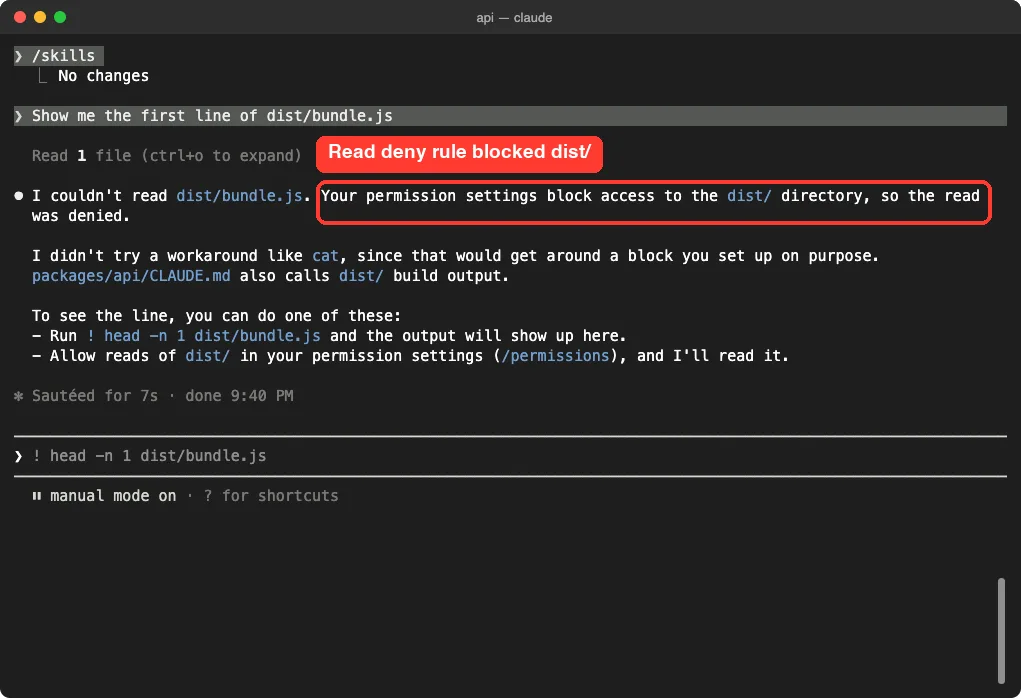
Claude reported that the read was denied and did not try to sneak around it with cat.
Deny rules cover the built-in file tools and common Bash file commands like cat, head, grep and find when the denied path is an argument. They do not cover programs that open files on their own, and a broad grep -r over a folder can still show denied files. Our guide to deny rules covers the full syntax.
Which settings file should hold the deny rules?
| Who should get the rules | Where to put them |
|---|---|
| Everyone in the repo | .claude/settings.json at the root, or in each package you start from |
| Only you | .claude/settings.local.json at the repo root (use //-absolute paths if you start in subfolders) |
| Everyone, enforced | Managed settings, which other scopes cannot override |
Step 5: Reach a Sibling Package Safely
Starting in packages/api keeps Claude inside that folder. But real work often touches a shared package too. The additionalDirectories setting above granted access to ../shared, so we asked Claude what that package exports.
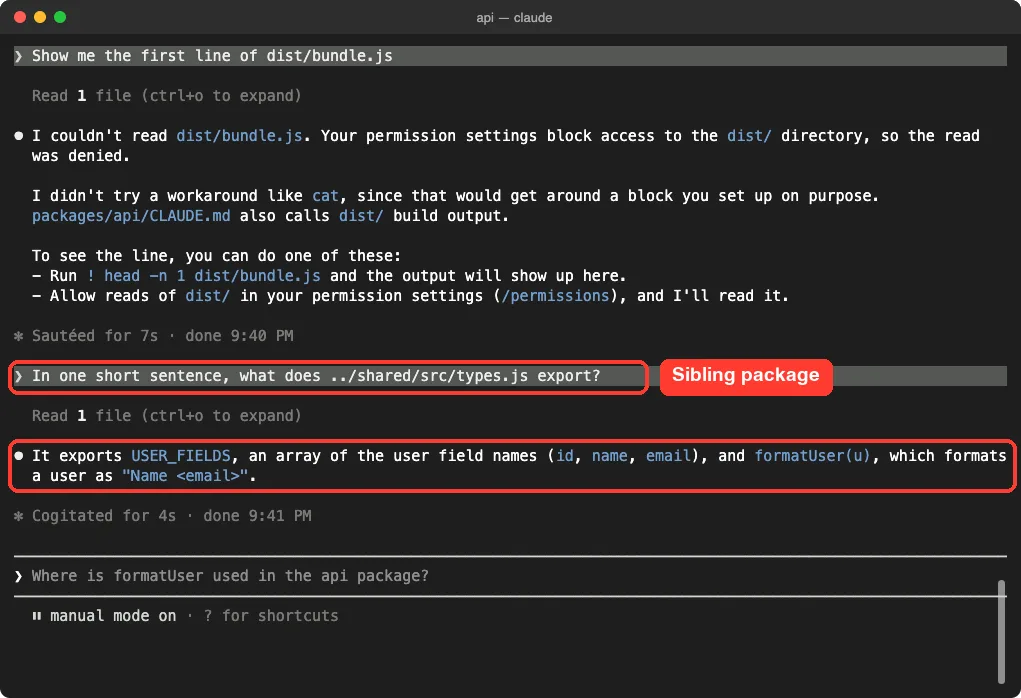
Claude read the file and answered in one sentence. You can also grant access just for one session with a flag:
claude --add-dir ../sharedThe two methods differ in what else loads. This table is worth remembering:
| Added with | Loads that folder’s CLAUDE.md and rules | Loads its skills |
|---|---|---|
| additionalDirectories setting | Never | Never |
| –add-dir flag or /add-dir command | Only with CLAUDE_CODE_ADDITIONAL_DIRECTORIES_CLAUDE_MD=1 | Yes |
Step 6: Use Sparse Worktrees for Big Repos
The –worktree flag starts Claude in a separate git worktree so changes stay away from your main checkout. By default that copies the whole repo, which is slow in a giant monorepo. The worktree.sparsePaths setting uses git sparse-checkout to write only the folders you list, plus root-level files.
We added this to the root .claude/settings.json and ran claude –worktree sparse-demo from the repo root:
{
  "worktree": {
    "sparsePaths": [
      ".claude",
      "packages/api",
      "packages/shared"
    ]
  }
}
Inside the session we ran ls packages and git sparse-checkout list with the ! shell prefix.
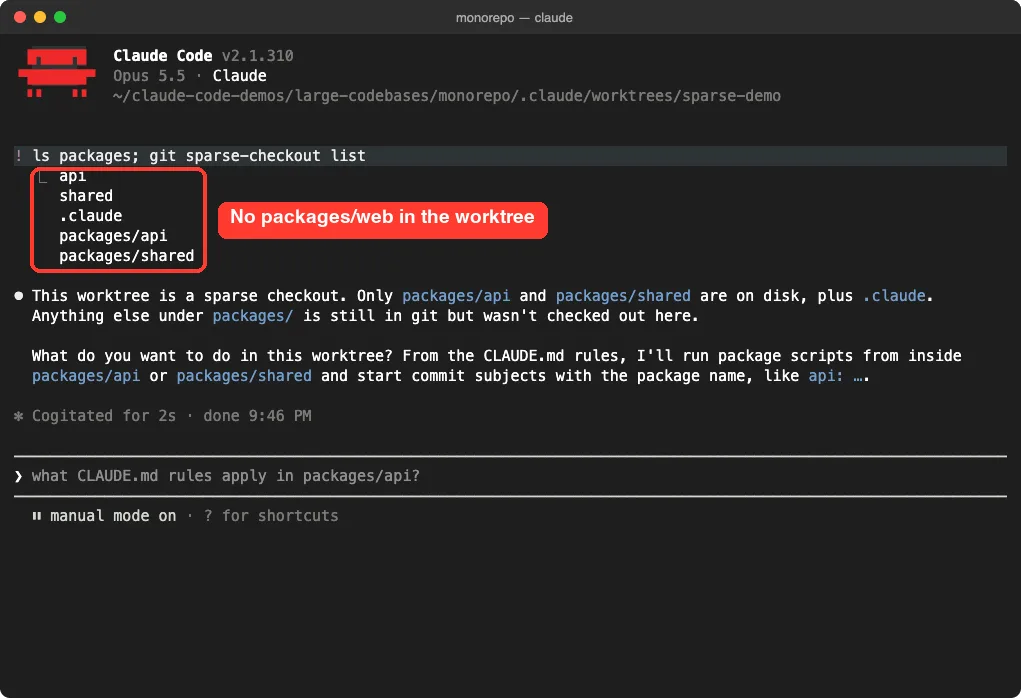
Only api and shared were on disk. A few rules from the docs to keep in mind:
- List folders, not single files. Root files like package.json always come along.
- Include .claude if you want the root settings and rules inside the worktree.
- Add “symlinkDirectories”: [“node_modules”] to link node_modules instead of copying it.
- All worktrees in a session share the same sparsePaths, including subagent worktrees.
One subtle point: inside a worktree, settings load from the worktree root, not the package you launched from. So put deny rules you need there in the root .claude/settings.json. Our full git worktrees guide covers the basics.
Step 7: Add Per-Package Skills and Code Intelligence
Any folder can hold its own Claude Code skills in .claude/skills/. Our demo had an api-testing skill in packages/api, and it showed up in /context only when we started from that package. A skill loads its full content only when Claude decides it is relevant.
---
name: api-testing
description: Testing patterns for the API package. Use when writing or modifying tests in packages/api/.
---
With many skills, descriptions can get cut short, so keep them brief and lead with words a request would contain. Skills that every package shares belong in the root .claude/skills/, or in a plugin if they need version history.
For finding code, a code intelligence plugin connects Claude to a language server. It can then jump to definitions and find references instead of grepping through the tree. Install the TypeScript one from the official marketplace with:
/plugin install typescript-lsp@claude-plugins-officialEach developer also needs the language server binary installed. You can turn the plugin on for the whole repo with the enabledPlugins project setting; see our plugins guide for how installs work.
Real Examples: Changes That Span Packages
When one change touches several packages, like renaming a shared type and every call site, how you run the task matters as much as the setup. The docs recommend two habits.
- Give Claude the whole change in one session, so every edit follows the same decisions.
- Plan first in plan mode. Claude writes the plan to a file and re-injects it after each compaction, so a long session does not lose the plan.
When per-folder files stop scaling, a platform team can move conventions into skills, plugins, or an MCP server that exposes an existing code search index. A SessionStart hook can even tell Claude which plugin a folder’s owners recommend.
Try It Yourself
Make a tiny monorepo with packages/api, packages/web and packages/shared, each with a one-line CLAUDE.md. Add a dist/ folder with a fake file in packages/api, plus the settings.json from Step 4. Start Claude inside packages/api, run /context, then paste this prompt:
Without editing anything, tell me which CLAUDE.md files you loaded, then try to show the first line of dist/bundle.js, and finally summarize in one sentence what ../shared exports.You should see the root and api rules, a denied read on dist/, and a working read of the shared package.
Common Mistakes
- Expecting the root .claude/settings.json to apply when you start inside a package. It doesn’t; settings are not inherited.
- Writing deny patterns as dist/** when you still want Claude to list the folder. Use /**/* instead.
- Using additionalDirectories and wondering why the sibling’s skills never appear. Only –add-dir loads skills.
- Forgetting .claude in sparsePaths, then finding no project settings inside the worktree.
- Editing claudeMdExcludes every day to switch focus. Start Claude in the right folder instead.
Pro Tips
- Run /context in each package once to confirm exactly what loads. It costs nothing.
- Keep the root CLAUDE.md short and push stack details down into package files.
- Pair claudeMdExcludes and Read deny rules with a code intelligence plugin for the biggest savings.
- Run long investigations in subagents so their file reads stay out of your main conversation.
- Check how each scope merges in our settings files guide before committing team rules.
Cheat Sheet
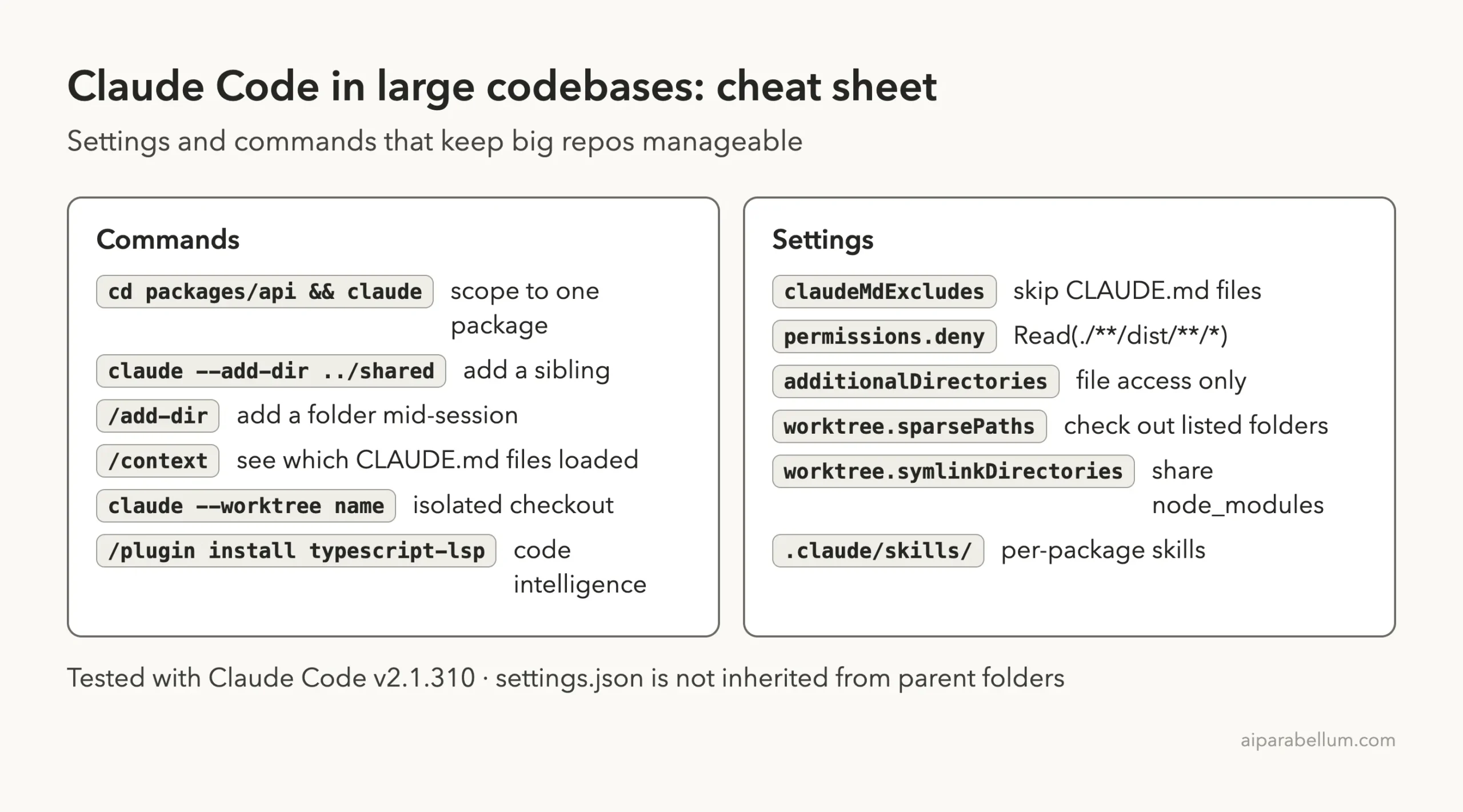
For every option and edge case, read Anthropic’s large codebases guide and the settings reference.
Frequently Asked Questions
Can Claude Code handle a repo with millions of lines?
Yes. Claude Code works at any size; the setup in this guide just keeps unrelated instructions and file reads out of its context, which saves tokens and keeps answers focused.
Should I start Claude at the repo root or in a package?
Start in the package when the task stays there. Start at the root when a change spans many packages, and plan first.
How do I see which CLAUDE.md files loaded?
Run /context and look at the Memory files list. In our test it showed one file from the root and two from packages/api.
Do Read deny rules make files fully invisible?
Not completely. They block Claude’s file tools and common Bash file commands, but a broad grep -r or a program that opens files itself can still see them.
Does worktree.sparsePaths work with subagents?
Yes. Each subagent that runs in a worktree gets the same lightweight checkout, so list every folder any of them needs.
Conclusion
A Claude Code large codebase setup comes down to scope: start Claude in the folder your task lives in, split CLAUDE.md by package, exclude what you never need, block build output, add siblings only when a task needs them, and keep worktrees sparse. In our demo monorepo, starting in packages/api loaded only the right rules and skill, a deny rule kept Claude out of dist/, the shared package was one setting away, and the worktree held just two packages. Stack the layers your repo needs and Claude AI will spend its context on your code, not on everyone else’s.
Previous in the series: Part 43, Claude Code Security: Catch Issues as Claude Writes Code
Next in the series: Part 45: How to Fix Claude Code Install and Login Problems.