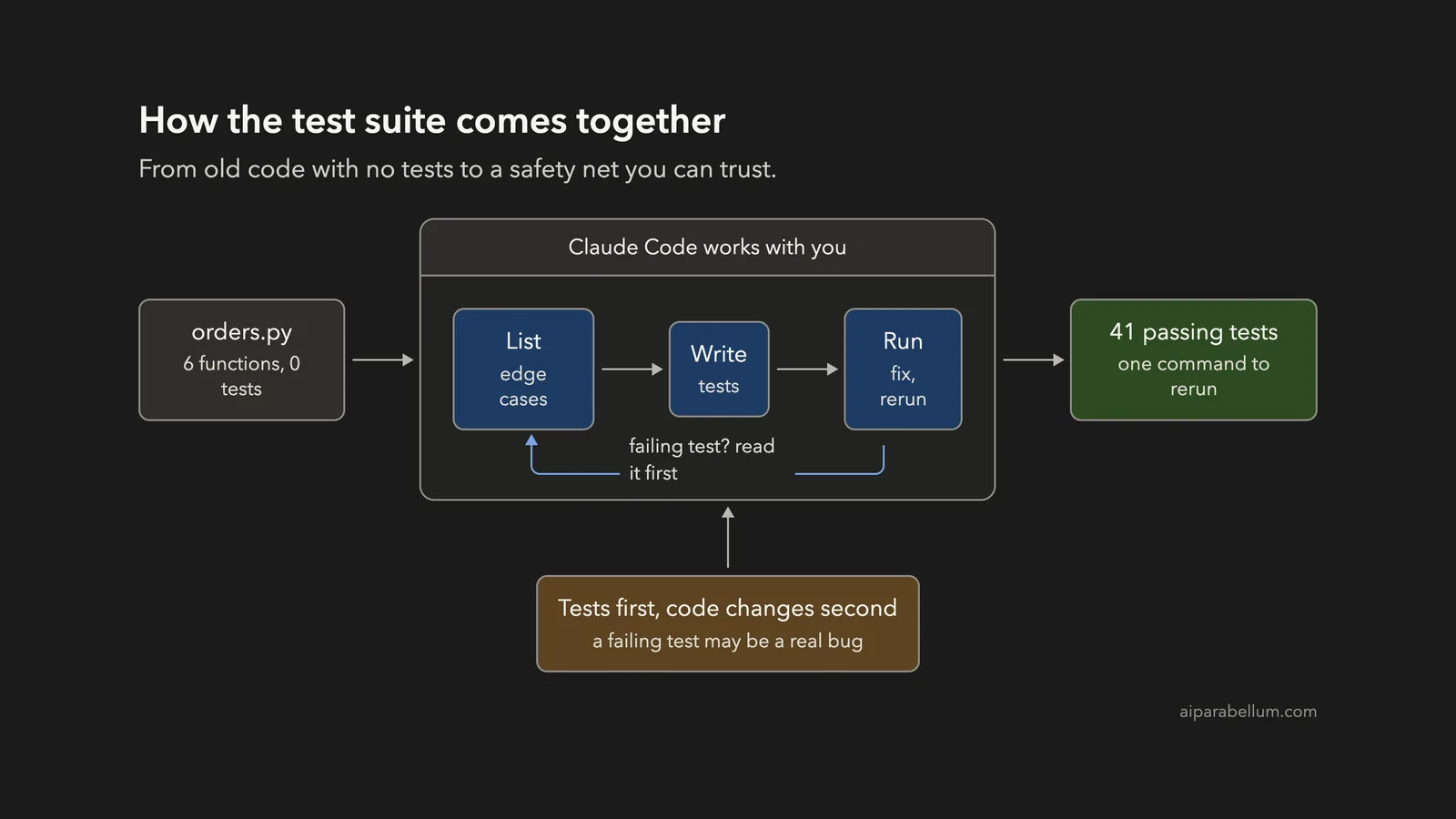
Do you have old code that nobody dares to touch because it has no tests? You can write tests with Claude Code in a single afternoon: let it list the risky spots, write the checks, run them, and then tell you which ones the old code fails. In this project we took a small, untested Python file and ended with 41 passing tests and one real bug fixed.
This is Project 13 of 20 in our Build with Claude Code series, part of our Claude Code tutorials. In Project 12 we made spreadsheet charts. This time the starting point is code instead of data.
Tested with Claude Code v2.1.310 on October 26, 2026, on macOS. We tested on macOS; the Windows and Linux steps follow Anthropic’s official instructions.
What We Built
Ask what is untested first, write tests before you change code, and treat every failing test as a question, not as an error to silence.
| Item | Details |
|---|---|
| Project | A test suite for an old, untested Python file |
| Input | orders.py, a made-up order helper with 6 functions and no tests |
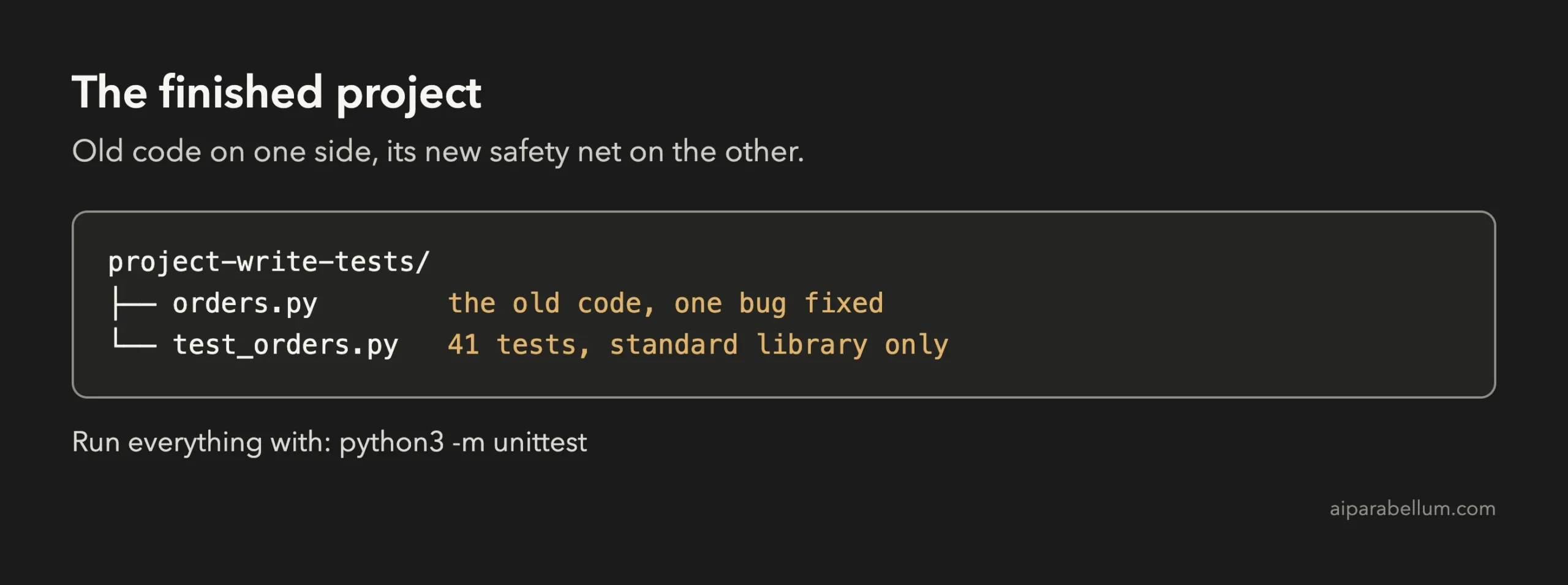
| Output | test_orders.py with 41 tests, and one bug fixed in orders.py |
| Tools | Python 3 and its built-in unittest module. No installs. |
| Prompts used | 4 short prompts, plus the approvals |
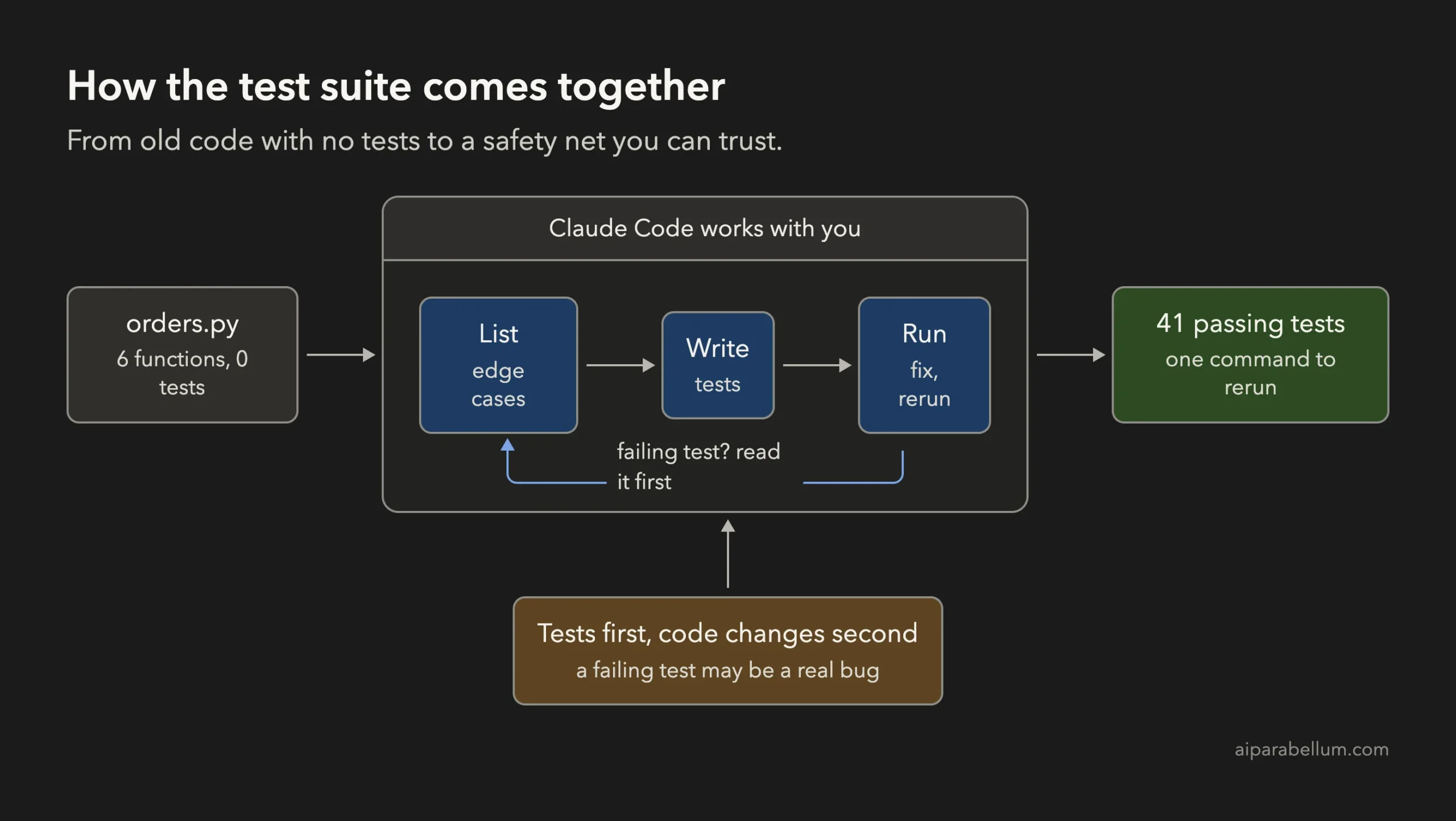
Why Write Tests for Old Code?
Old code without tests is risky to change. You fix one thing, and something else breaks quietly three weeks later.
Tests are a safety net. Each one is a tiny program that says “when I give this function this input, I expect this answer”. Run them all with one command, and you know in a second whether a change broke anything.
The hard part is that nobody enjoys writing them for code that already works. That is where an assistant helps. Claude Code can read the file, spot the awkward inputs, and write dozens of small checks faster than you can type the names.
What Anthropic Recommends
Anthropic’s common workflows page describes a four-step way to add tests for uncovered code: identify untested code, generate test scaffolding, add meaningful test cases, then run and verify the tests. It also says Claude looks at your existing tests so new ones follow the same style.
The best practices page adds two ideas we follow in this project. First, give Claude a check it can run, such as a test suite, so it can see whether its work is right. Second, be specific: name the file, the scenario and your testing preferences instead of just saying “add tests”.
If you are new to the tool, start with our first session guide, and read about permission modes so the approval screens below make sense.
The Old Code We Used
Every line here is made up. The file is called orders.py, and it belongs to an imaginary web shop. It has six small functions.
| Function | What it does |
|---|---|
| parse_price | Turns text such as “$1,234.50” into a number |
| apply_discount | Takes a percent off a price |
| shipping_cost | Free at a certain amount, otherwise $5 in the US and $12 elsewhere |
| tax_for | Sales tax for the US, Canada and the UK |
| invoice_total | Adds items, applies the discount, then shipping and tax |
| format_receipt | Prints one line per item |
We wrote it with two weak spots on purpose, and we did not tell Claude where.
One function has no check on the discount percent. Another says “orders over $50 ship free” in its description, but the code gives free shipping at exactly $50. We wanted to see what a good test run would reveal.
Before we began, we ran the built-in test command in the folder. It said “NO TESTS RAN”, which is exactly the situation of a lot of real projects.
Step 1: Start Claude Code in the Folder
Put orders.py in a new folder and start Claude Code there. The first time, it asks if you trust the folder. Say yes only for folders you created or trust.
cd my-old-code
claude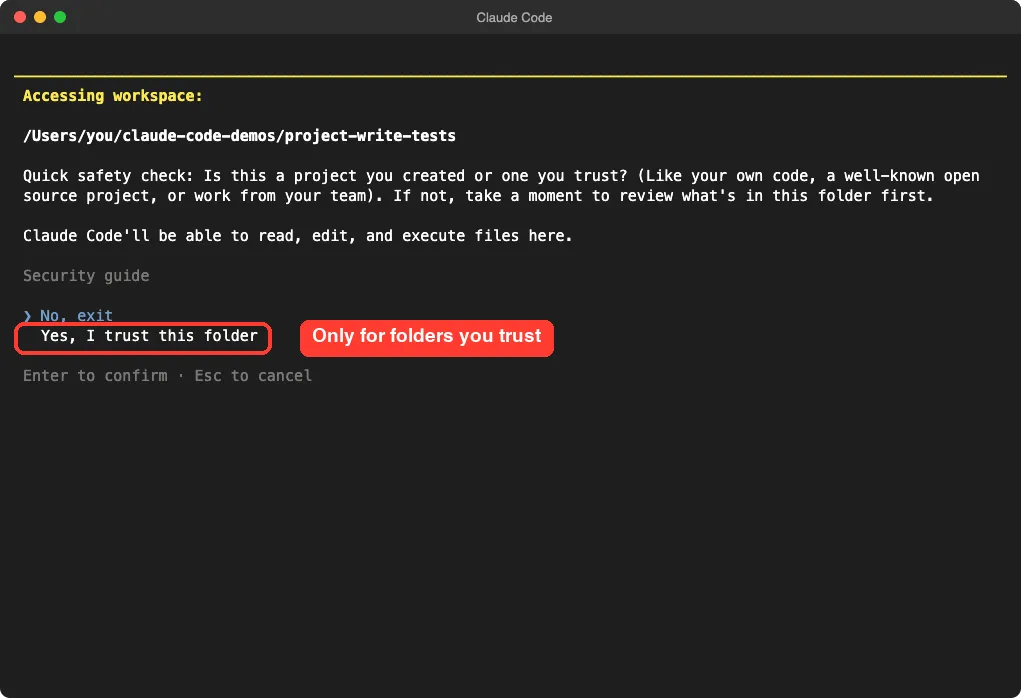
Step 2: Ask What Is Untested, Without Changing Anything
Do not say “write tests” yet.
First ask Claude to look at the file and tell you which functions lack tests and what is worth checking. Say clearly that no file should change. Use the at sign to point at the file.
Look at @orders.py. Which functions have no tests? For each one, give one short line on the edge cases worth testing. Do not create or change any file yet.Claude read the file and found that all six functions were untested. For each one it listed the cases that usually break, such as an empty list, the exact boundary of $50 and a discount over 100 percent.
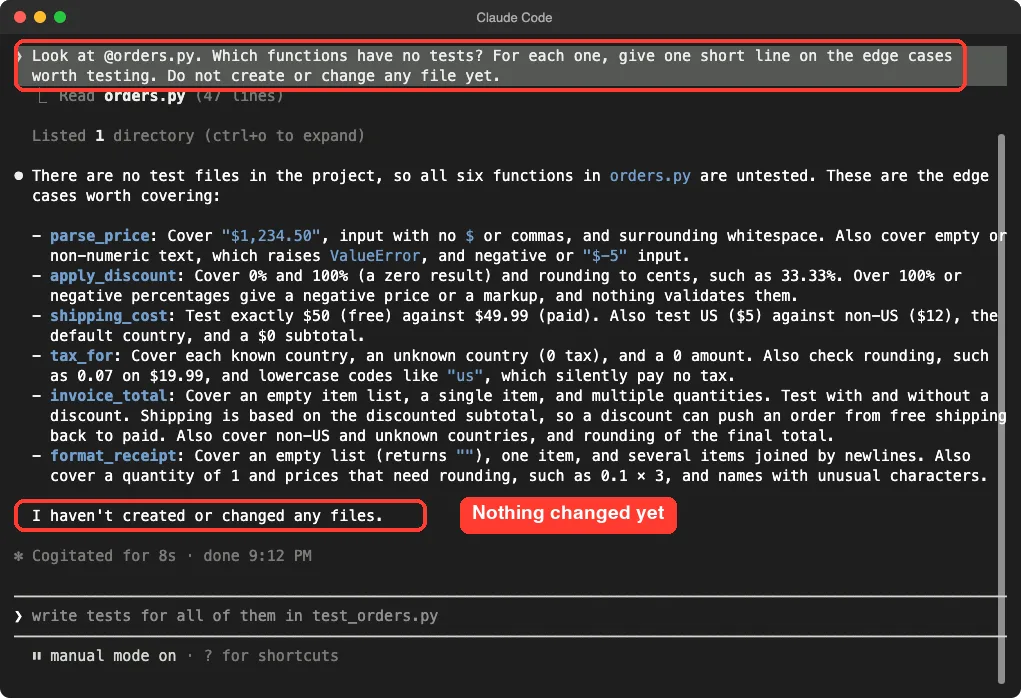
This step is cheap and it is a good habit. You read the plan, and you can add cases of your own before any code exists.
Step 3: Write the Tests and Do Not Touch the Code
Now we asked for the tests. The prompt makes three decisions for Claude: use the built-in unittest module so nothing needs installing, never change orders.py, and keep a failing test as the correct behavior instead of bending it to pass.
Write test_orders.py with Python's built-in unittest (no installs). Test parse_price, apply_discount, shipping_cost and tax_for, including the edge cases you listed. Never change orders.py. If a test fails because the code looks wrong, keep the test as the correct behavior and tell me. Then run python3 -m unittest -v.That last rule matters. A common trap is that an assistant makes a failing test pass by changing the test. Telling Claude to keep the test and report keeps you in charge of what is right.
We started this session with accept edits turned on, so writing the test file was automatic. Running a command still needed our approval.
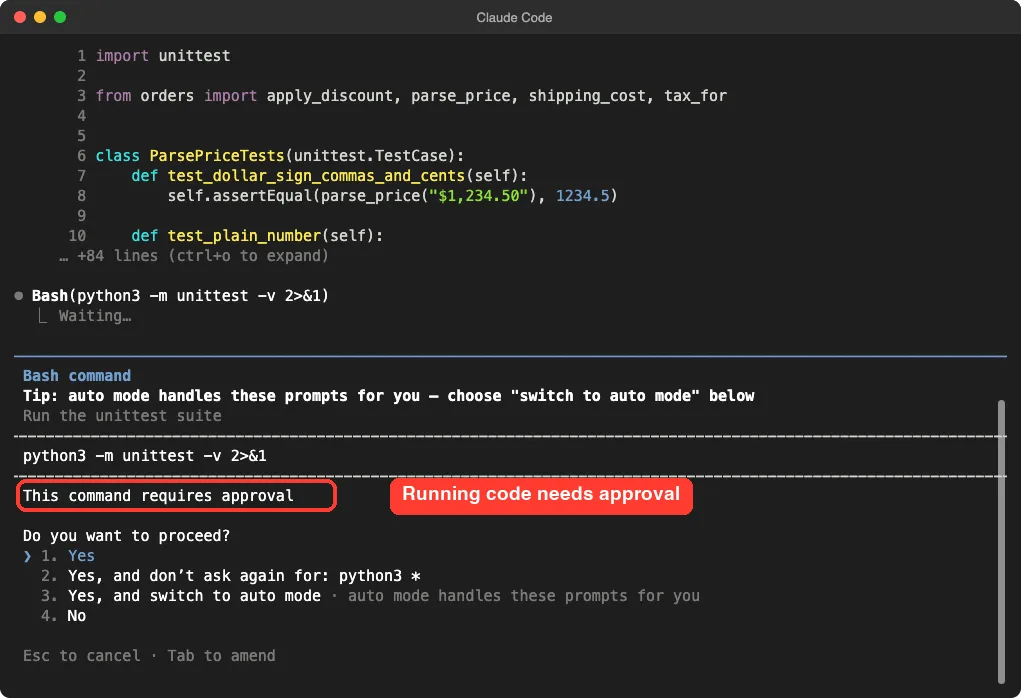
Read the command before you say yes. This one only runs the tests. It cannot change the code.
Step 4: Read the Failures Before You Fix Anything
Claude wrote 24 tests. 22 passed and 2 failed, and the file orders.py was untouched. Both failures were in apply_discount, the function we left without a check.
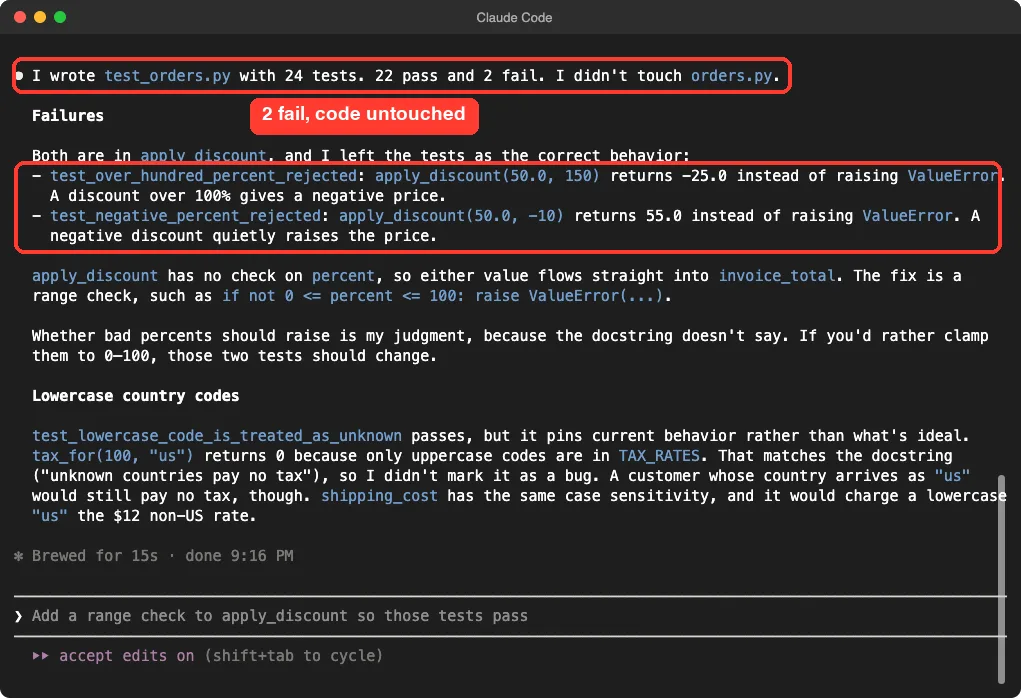
Here is what the failures mean in plain words.
| Call | Old result | Why it is a problem |
|---|---|---|
| apply_discount(50, 150) | -25.0 | A 150 percent discount gives a negative price |
| apply_discount(50, -10) | 55.0 | A negative discount quietly raises the price |
Claude was also honest about its own judgment. It said the description of the function does not say what should happen with a bad percent, so raising an error was its choice, and that clamping the number to 0 to 100 would be a fair alternative. That is the kind of decision you, as the owner, should make.
It also pointed out something we had not asked about.
The tax function gives no tax to a lowercase country code like “us”, because only uppercase codes are in the table. Claude wrote that test to record today’s behavior and did not call it a bug, because the description says unknown countries pay no tax. It still warned that a real customer typing “us” would pay no tax.
Step 5: Fix the Bug With the Tests as Your Guide
Now that the tests describe the right behavior, the fix is small. We asked for the exact change and nothing more.
Fix apply_discount so the two failing tests pass: raise ValueError when percent is below 0 or above 100, with a clear message. Change nothing else in orders.py. Then run python3 -m unittest and show me the last lines.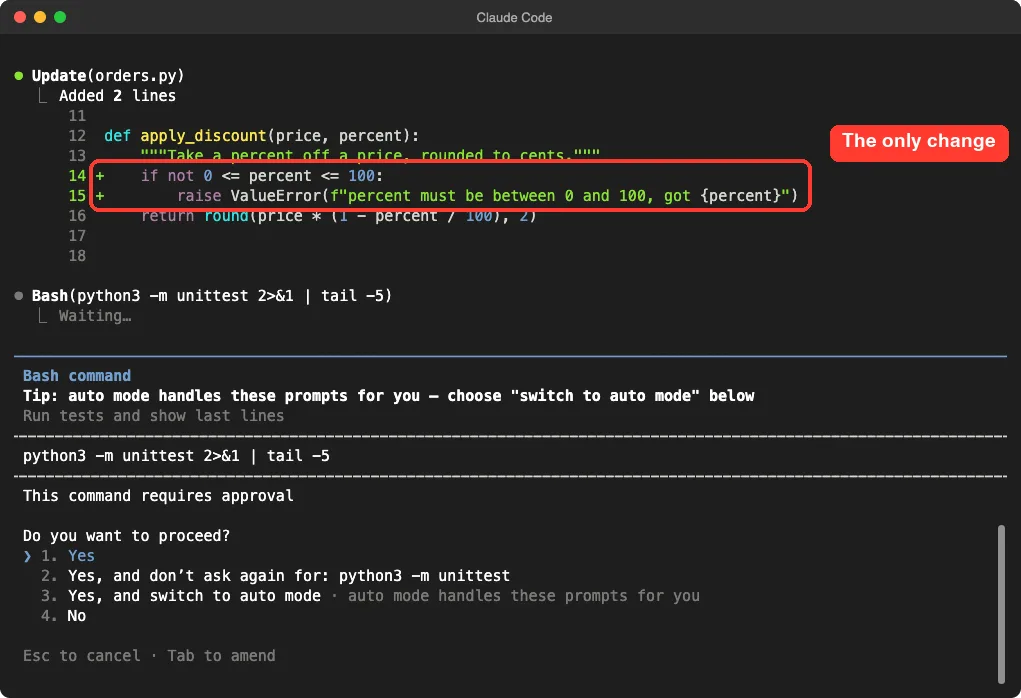
We approved the test run, and all 24 tests passed.
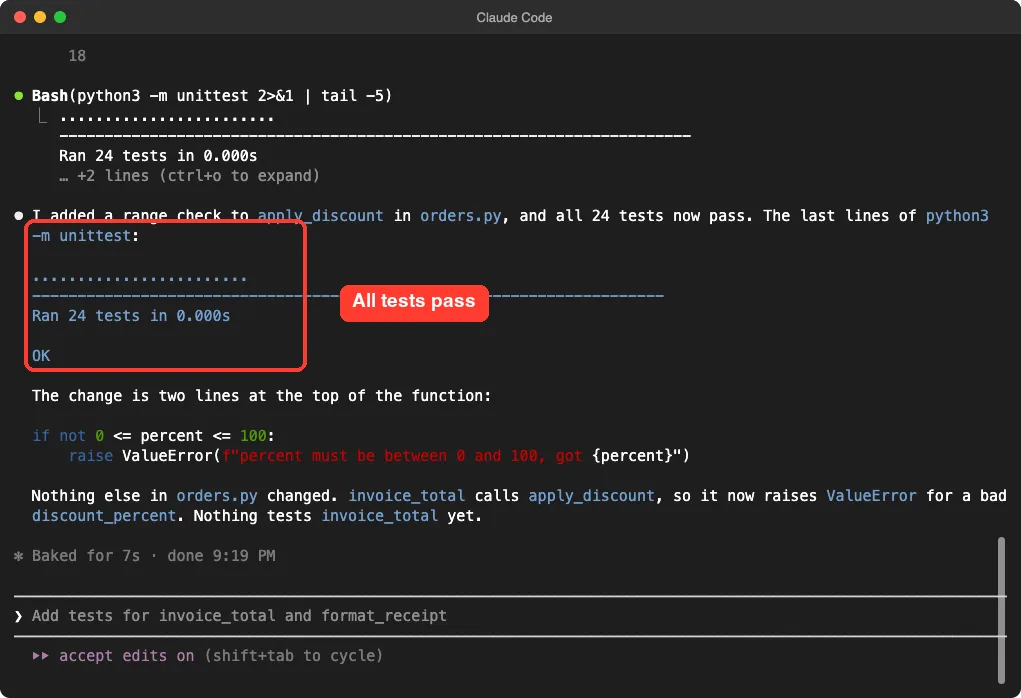
Look at what Claude added at the end: invoice_total calls apply_discount, so it now raises an error for a bad discount, and nothing tested invoice_total yet. That was our next prompt.
Step 6: Test the Functions That Depend on Others
The last two functions are the ones that combine everything. This is where bugs hide, because a small mistake in one function shows up in the total of another.
Now add tests for invoice_total and format_receipt to test_orders.py. Include a discount that pushes an order under the 50 dollar free shipping line, and work out every expected total by hand. Also tell me in 2 lines if test_exactly_fifty_is_free matches the shipping_cost docstring. Then run python3 -m unittest.The phrase “work out every expected total by hand” is important. If a test just copies whatever the code returns, it proves nothing. Claude wrote the arithmetic in a comment on each test, so you can check the maths yourself.
The best example is the jacket test.
A $60 jacket ships free. But with 20 percent off it costs $48, which is under the line, so shipping of $5 applies. With 7 percent tax of $3.36, the total is $56.36.
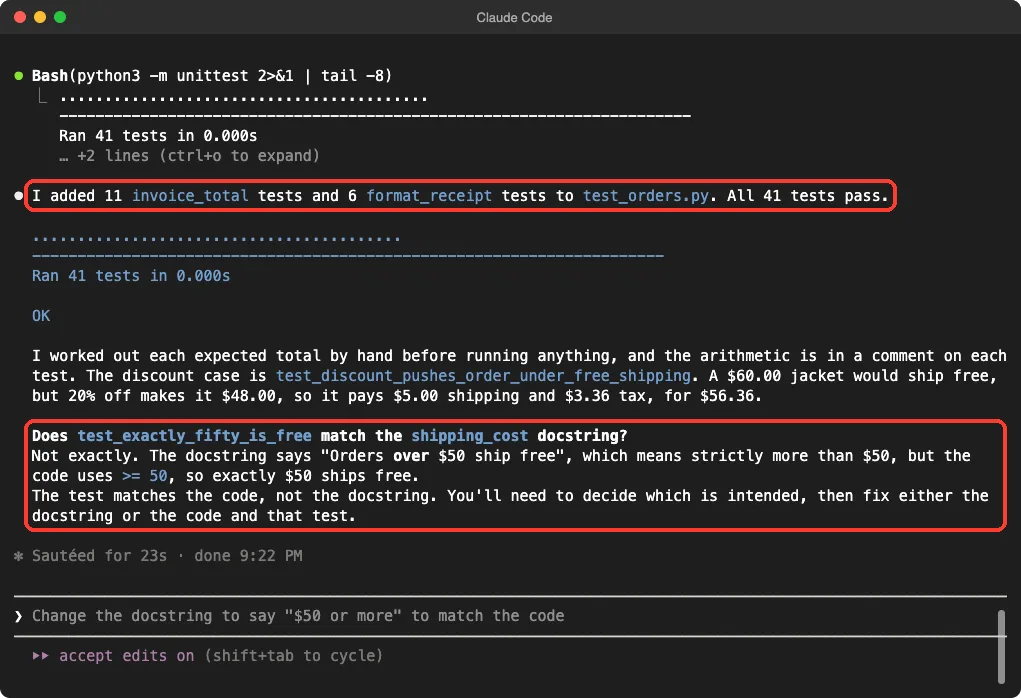
Claude also answered our extra question.
The description says orders over $50 ship free, which means more than $50. The code uses greater than or equal to, so exactly $50 ships free. The test matches the code, not the description, and Claude said you need to decide which is intended.
We did not choose for the shop. In a real project this is a question for whoever owns the business rule. Our two choices are to change the description to say “$50 or more”, or to change the code and that one test.
Step 7: Prove the Tests Can Fail
A test suite that always passes might not be testing anything. The classic check is to break the code on purpose and see if a test notices. We did this in our own terminal, not through Claude, in a copy of the project.
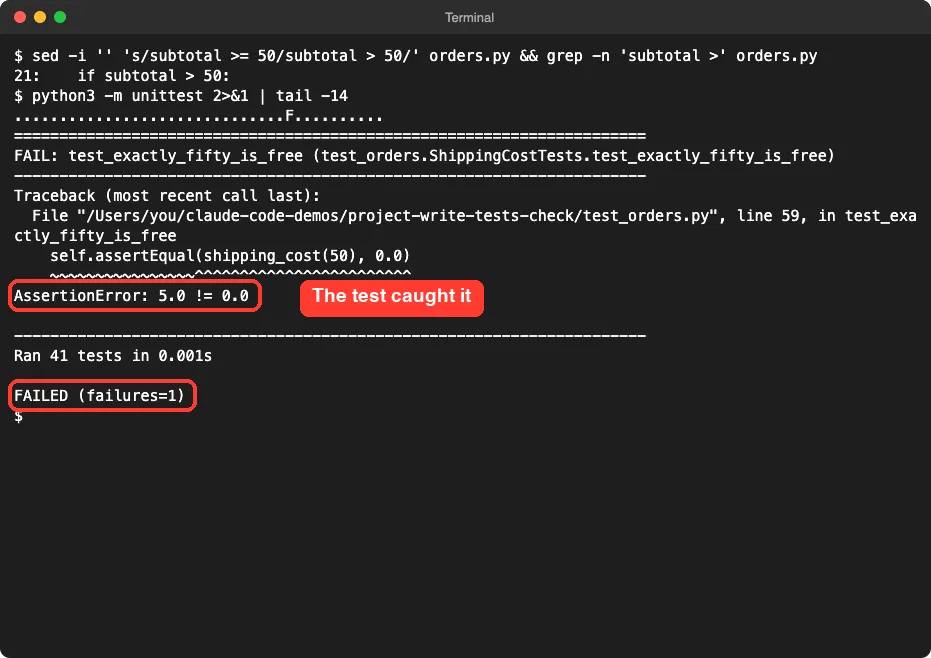
We changed the greater than or equal sign to a plain greater than, so $50 no longer ships free. One test failed straight away and named the exact line, with the message that 5.0 is not equal to 0.0.
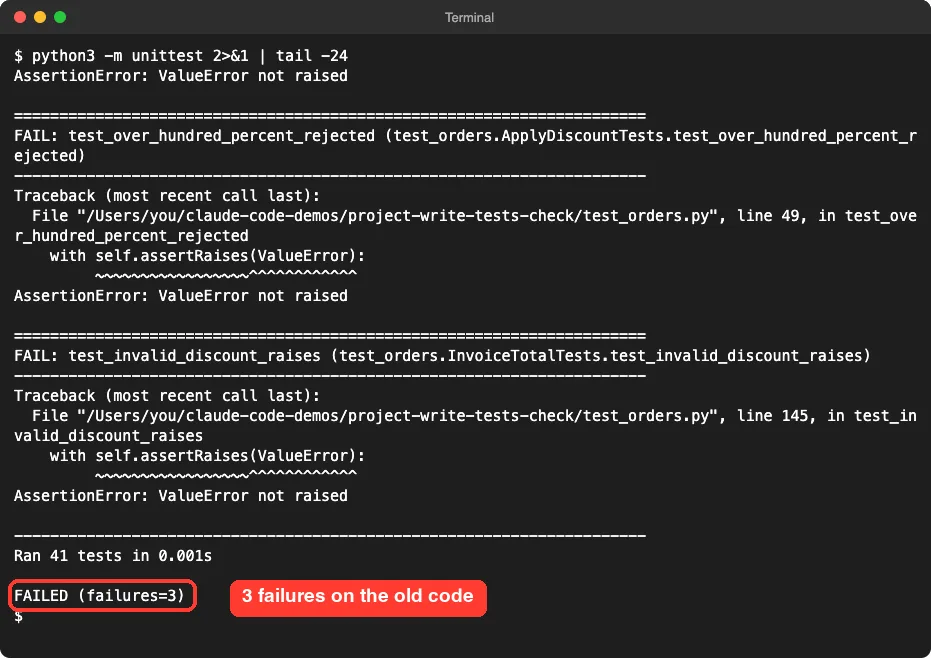
We also ran the final tests against the original, unfixed orders.py in another copy. Three tests failed: the two discount tests and the invoice test that expects an error for a discount of 101 percent. That is the proof that the suite would have caught the bug.
The Final Project Files
The test file is about 170 lines, so we show only the key parts. The first test checks the main text-to-number case:
class ParsePriceTests(unittest.TestCase):
    def test_dollar_sign_commas_and_cents(self):
        self.assertEqual(parse_price("$1,234.50"), 1234.5)

    def test_empty_string_raises(self):
        with self.assertRaises(ValueError):
            parse_price("")
The second one is the boundary test that matched the code and not its description:
class ShippingCostTests(unittest.TestCase):
    def test_exactly_fifty_is_free(self):
        self.assertEqual(shipping_cost(50), 0.0)

    def test_just_under_fifty_pays_us_rate(self):
        self.assertEqual(shipping_cost(49.99), 5.0)
The third is the jacket test, with its hand-made arithmetic in a comment:
    def test_discount_pushes_order_under_free_shipping(self):
        # 60.00 qualifies for free shipping on its own, but 20% off -> 48.00,
        # so shipping 5.00 applies; tax 48 * 0.07 = 3.36 -> 56.36
        self.assertEqual(invoice_total([("Jacket", 60.0, 1)], 20), 56.36)
And here is the only change Claude made to the old code:
def apply_discount(price, percent):
    """Take a percent off a price, rounded to cents."""
    if not 0 <= percent <= 100:
        raise ValueError(f"percent must be between 0 and 100, got {percent}")
    return round(price * (1 - percent / 100), 2)
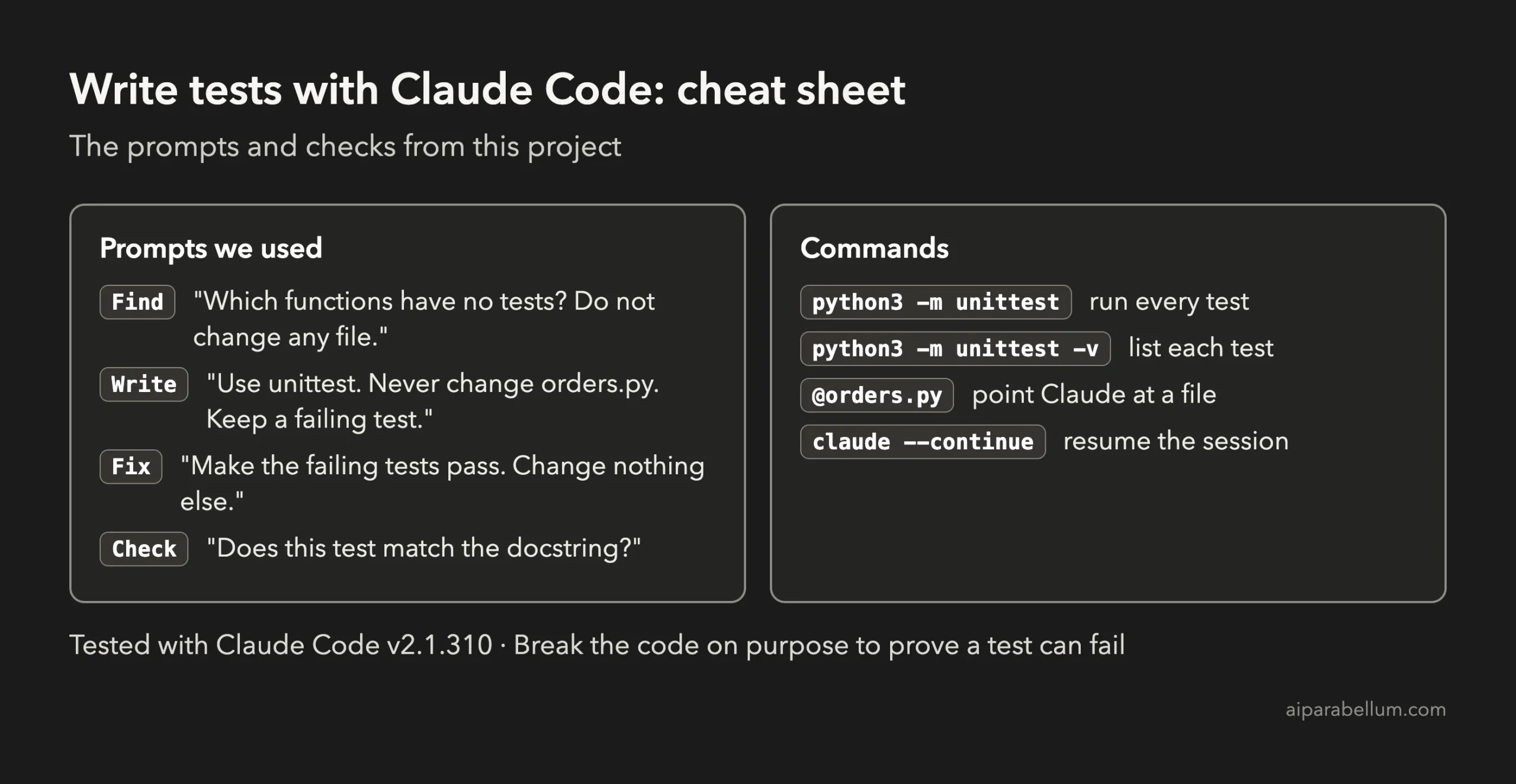
To run everything, use one command in the folder. Add the verbose flag when you want to see every test name:
python3 -m unittest
python3 -m unittest -v
Try It Yourself
Pick one small file of your own, or ask Claude to write a short untested one first. Start with the read-only prompt, then adapt this one:
Write tests for @yourfile.py using the testing tool this project already uses (if none, Python's built-in unittest). Never change yourfile.py. Work out each expected result by hand and put the arithmetic in a comment. If a test fails because the code looks wrong, keep the test and tell me why. Then run the tests.Then try these variations, one at a time:
- Ask Claude to decide the $50 question for you by reading the docstring and then show you both options.
- Ask for a test that uses a lowercase country code, and decide if the code should accept it.
- Ask Claude to find a function with too little coverage and add three tests for it.
- Break the code on purpose in a copy, like we did, and check that a test fails.
- Ask Claude to list every test name in plain English so you can review what is covered.
Common Mistakes
- Saying "add tests" with no file or scenario. Anthropic's best practices recommend naming the file, the case and your preferences.
- Letting the assistant edit the test until it passes. Say that failing tests stay and get reported.
- Trusting expected values copied from the code. Ask for the arithmetic by hand.
- Fixing code and tests in the same prompt. Write tests, read the failures, then fix.
- Never proving a test can fail. Break the code on purpose once.
- Treating a passing test as proof the behavior is right. Our boundary test passed while disagreeing with the description.
Pro Tips
- Ask for edge cases first. It costs one short answer and shapes everything after.
- Tell Claude which tool to use. If your project already has tests, it follows their style, as the common workflows page explains.
- Run a single test file while you work, and the whole suite before you finish.
- Use plan mode when a file is large, and the rewind feature to undo a change you do not like.
- Keep the numbers small and made up while you learn. Read our guide to privacy and security before using real company code.
- Watch your usage with our costs guide. Our whole project used four short prompts.
Cheat Sheet
To learn more about the assistant behind the tool, read our Claude AI overview. If you want another project that ships with its own tests, see our expense tracker project.
Frequently Asked Questions
Can Claude Code write tests for existing code?
Yes. In our project it read a file with six functions, listed the edge cases, wrote 41 tests and ran them. You still need to read the failures and decide what the correct behavior is.
Do I need to install a testing library?
Not for Python. We used unittest, which comes with Python. For other languages, tell Claude which test tool your project already uses.
What if a test fails?
Read it before you change anything. In our run, two failures pointed to a real bug and one mismatch showed that the description and the code disagreed. Decide which side is right, then fix the code or the test.
Will Claude Code change my code while writing tests?
Only if you let it. We told it never to change orders.py, and it did not until we asked for the fix. You can also review every edit before it is accepted if you do not use accept edits mode.
How do I know the tests are any good?
Check that the expected values were worked out by hand, then break the code on purpose in a copy and make sure a test fails. We did both. We did not measure code coverage with a tool in this project.
Conclusion
You now know how to write tests with Claude Code for code that never had any: ask what is untested, write tests that never touch the code, read every failure as a question and prove that the tests can fail. Four short prompts took our six-function file to 41 passing tests, fixed one real bug and exposed one rule that needs a human decision. Try the starter prompt on a small file of your own, and come back for the next project in the series.
Previous in the series: Project 12: Turn a Spreadsheet Into Charts With Claude Code
Next in the series: Project 14: Refactor Messy Code Safely With Claude Code.