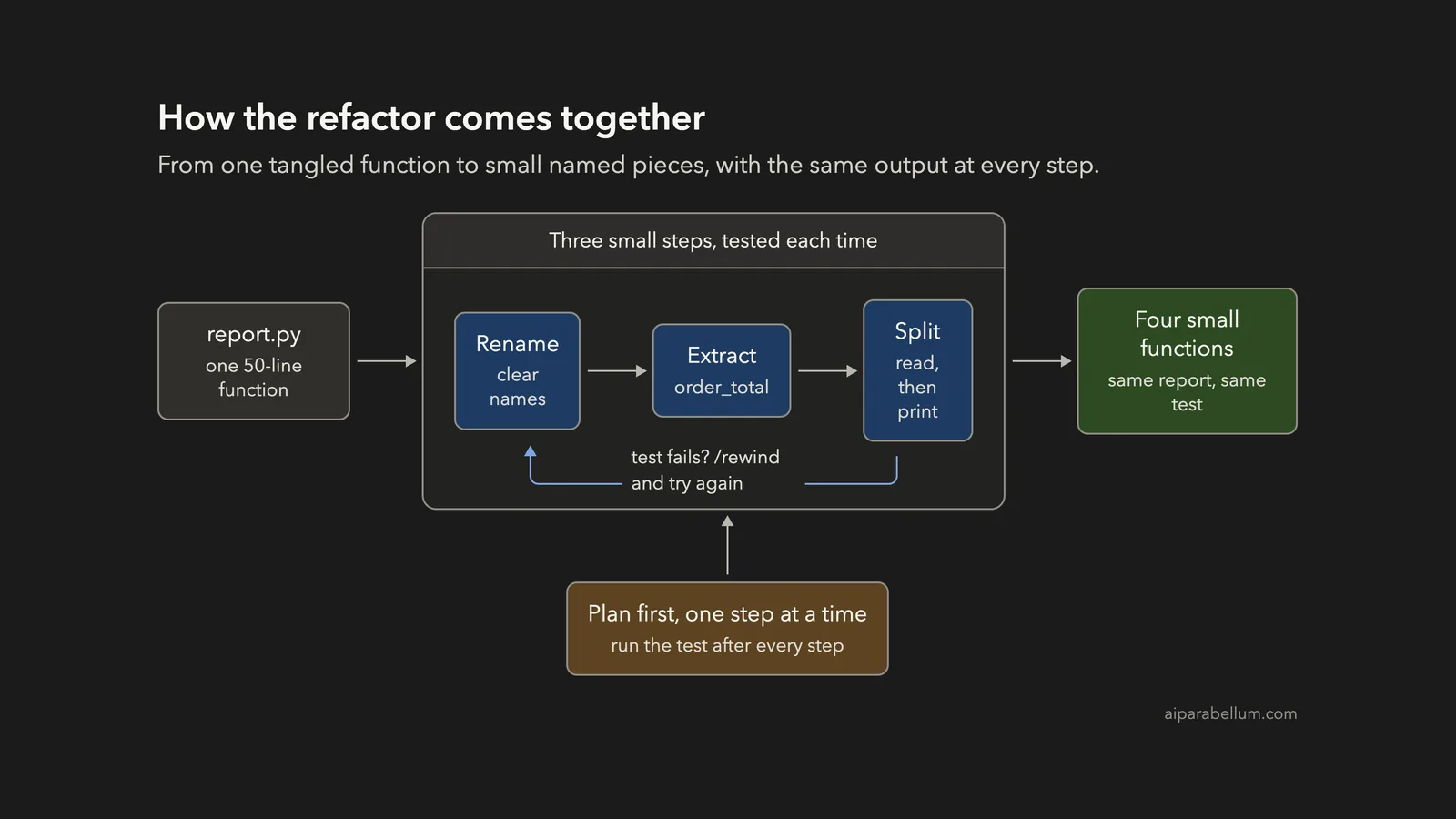
Have you ever opened an old script and found one giant function full of single-letter names? You can refactor code with Claude Code in small, checked steps: plan first, change one thing at a time, run a test after every step, and undo anything you do not like. In this project we took a messy 56-line report script and ended with four small, readable functions that print exactly the same report.
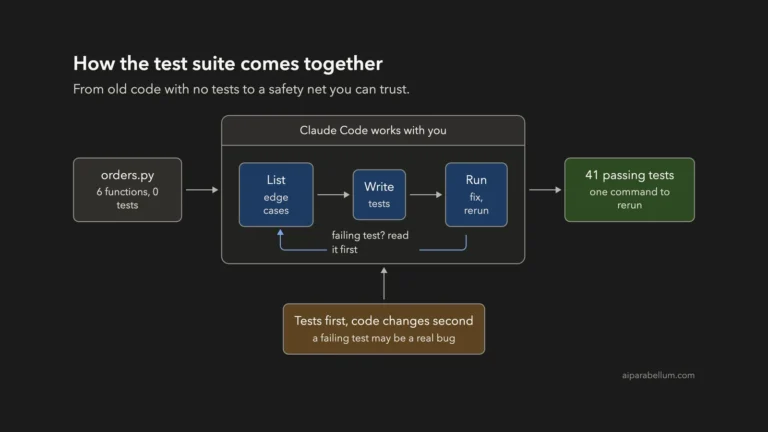
This is Project 14 of 20 in our Build with Claude Code series, part of our Claude Code tutorials. In Project 13 we added a safety net with untested code tests. Here we use that same idea to change code without breaking it.
Tested with Claude Code v2.1.310 on October 26, 2026, on macOS. We tested on macOS; the Windows and Linux steps follow Anthropic’s official instructions.
What We Built
Refactoring means changing how code looks, not what it does. If you can prove the output did not change, you can change the look as boldly as you like.
| Item | Details |
|---|---|
| Project | A safe, step-by-step cleanup of a messy Python script |
| Input | report.py, a made-up order report with one 50-line function, plus orders.csv with 12 orders |
| Safety net | test_report.py, which compares the report to a saved copy of the old output |
| Output | report.py with named constants and four small functions, and the same report |
| Tools | Python 3 and its built-in unittest module. No installs. |
| Prompts used | 5 short prompts, plus one rewind |
Why Refactor Code in Small Steps?
Messy code works, which is why people leave it alone. But every change in it is risky, because you cannot tell which line does what.
Refactoring fixes the readability without adding features. The danger is that a big rewrite changes behavior by accident. A rounding rule, a sort order or a forgotten edge case can slip away while everything looks cleaner.
The cure is boring and effective: small steps and a check after each one. If the check fails, you know the last step is the cause, and you only have one step to look at.
What Anthropic Recommends
Anthropic’s common workflows page has a section on refactoring code. Its tips match what we did here: ask Claude to explain the benefits of the modern approach, ask it to keep backward compatibility when you need that, and refactor in small, testable increments.
The checkpointing page explains the safety button we use at the end. Every prompt you send creates a checkpoint, and the rewind menu can restore the code, the conversation or both. The same page warns that rewinding does not cover files changed by bash commands, so it does not replace version control such as Git.
If this is your first project, start with our first session guide. You will also want to know how permission modes work, because we use two of them below.
The Messy Code We Started With
Every line is made up. The script reads a list of orders from a CSV file and prints a report: totals by country, totals by customer with a VIP mark above $200, the number of paid orders and the grand total.
It works, but it is hard to read. We wrote it on purpose with the problems you see in real old code.
| Problem | Where you see it |
|---|---|
| Names with no meaning | go, t, d, c, n, q, p, s, x, sh, tot |
| One function does everything | Reads the file, prices orders, adds them up and prints, in about 50 lines |
| Magic numbers | 0.07, 0.05, 0.2, 100, 5 and 12 are buried in if chains |
| Old habits | A global total, manual “if key not in dict” setup, and a file that is never closed |
Before touching it, we saved a safety net. We ran the script once, saved its output as expected_report.txt, and wrote a tiny test in test_report.py that runs the report and compares it to that file.
The test is not clever. It only says “the report must look exactly like it did before”, which is exactly what a refactor must guarantee. We also kept a copy of the original in a separate folder so we could compare behavior at the end.
Step 1: Ask for a Plan Before Any Change
We started Claude Code in plan mode, where it can read but cannot edit. Our plan mode guide explains it in detail.
claude --permission-mode planOur first prompt asked for a short answer: the biggest problems, then a three-step plan, with two rules written in. The output must stay byte for byte the same, and the test must pass after every step.
Read @report.py and @test_report.py. Do not change any file. Keep the answer short: list the 4 biggest readability problems in report.py (one line each), then a refactor plan in 3 small steps (two lines each). The saved report output must stay byte-for-byte the same, and python3 -m unittest must pass after every step.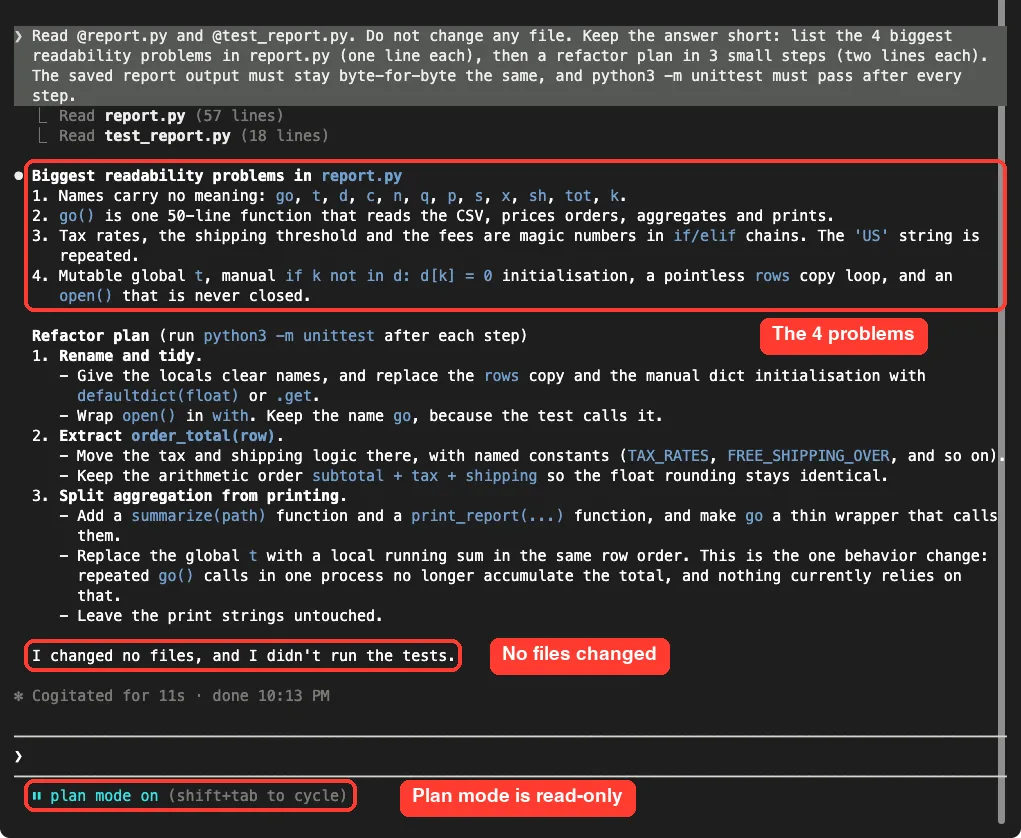
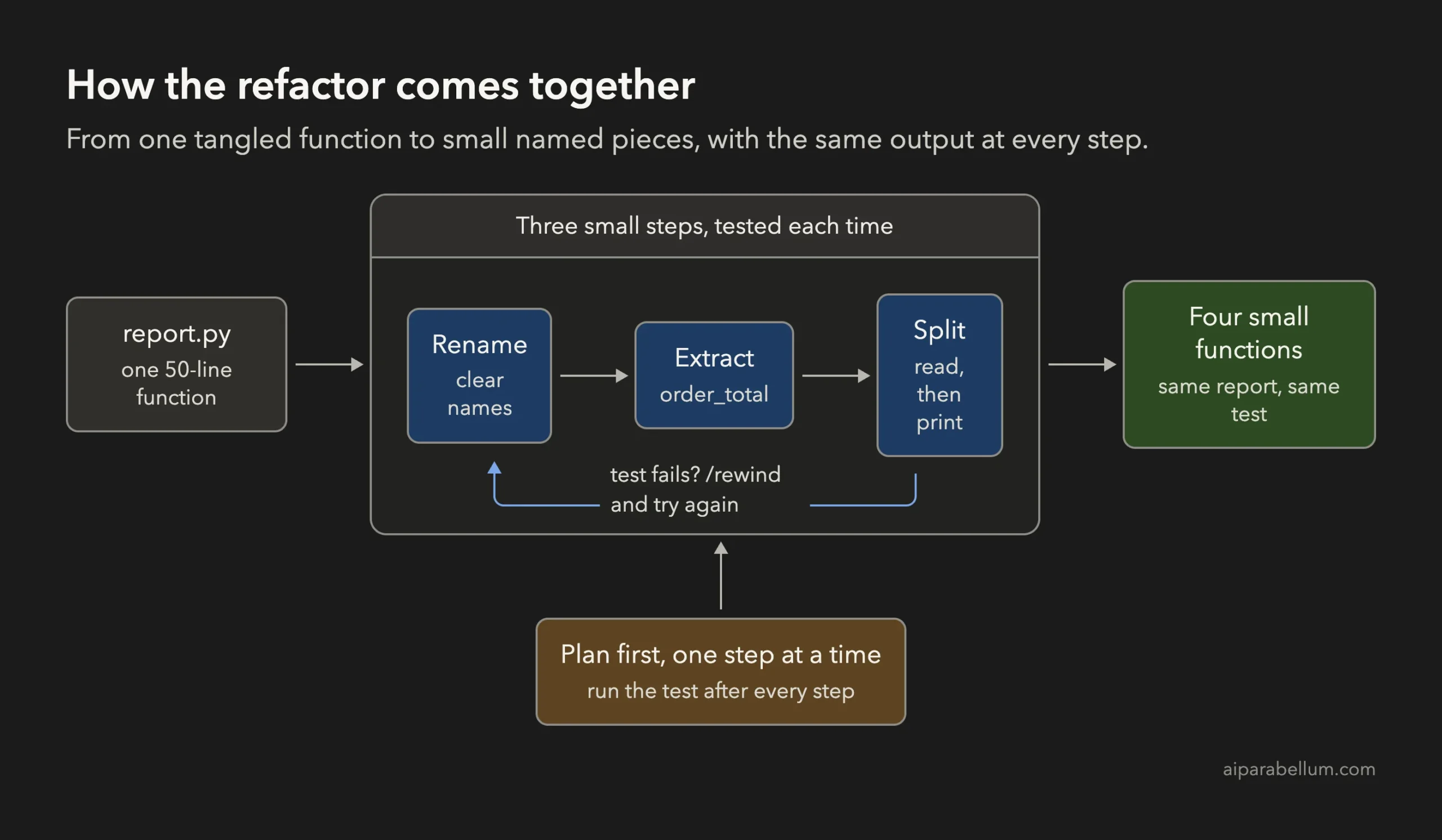
Claude found the same four problems we planted: meaningless names, one 50-line function, magic numbers and old habits. Its plan was rename and tidy, extract an order_total function, then split the reading from the printing.
One line in the plan deserves attention. Claude warned that replacing the global total would be the one behavior change, because repeated calls in one process would no longer pile up. We come back to that at the end, because it is a great example of why you read the plan.
Step 2: Rename and Tidy
We left plan mode and started a normal session with our edits under review. We told Claude to do step one only, and to leave the tax and shipping logic alone.
Do step 1 of your plan only (rename and tidy). Keep the function name go. Do not touch the tax and shipping logic yet. Then run python3 -m unittest and tell me the result in one line.Keeping the name go matters. Our test calls report.go, so renaming it would break the safety net and tell us nothing about the real code.
Claude showed the edit as a diff and asked before writing. We read the removed and added lines, then approved.
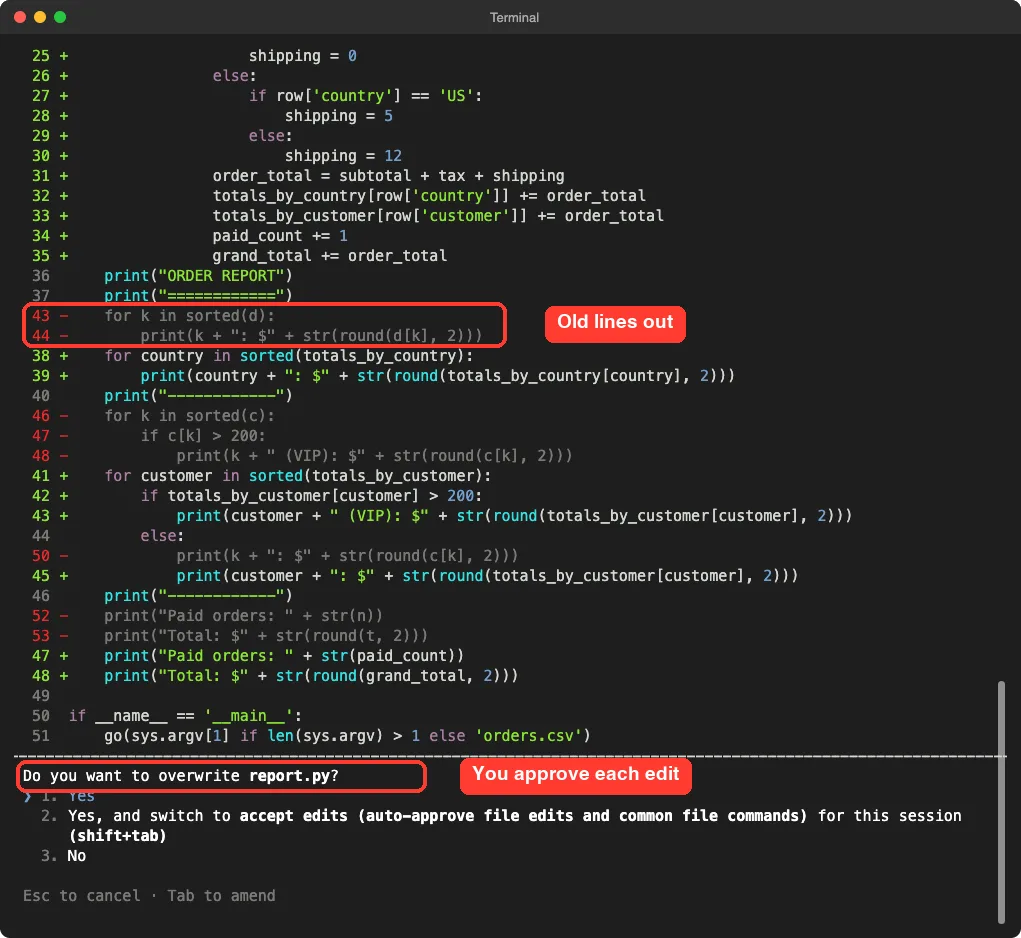
After the edit, Claude ran the test on its own. It passed.
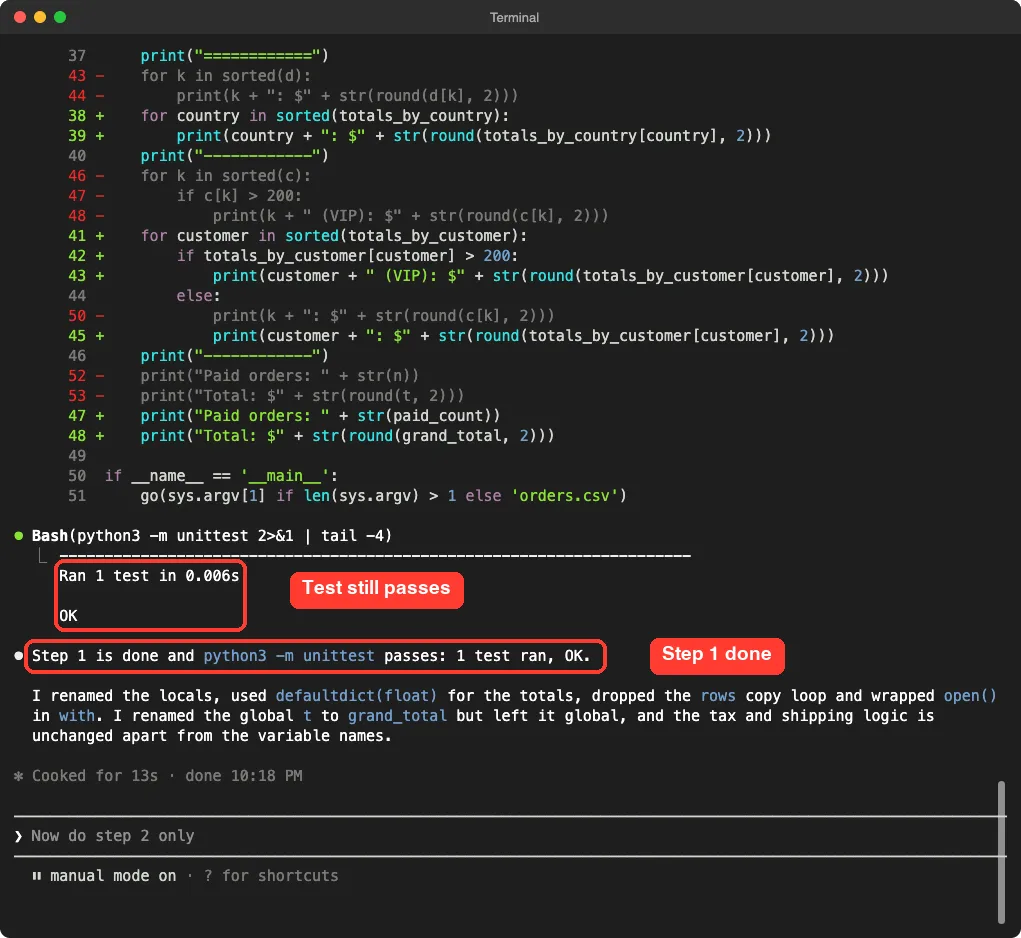
Claude also told us what it had not done: it renamed the global total but left it global, and the tax and shipping logic was unchanged. That kind of honest list is what you want after a small step.
Step 3: Extract a Function and Name the Numbers
Step two is the heart of the cleanup. The tax and shipping rules move into their own function, and every magic number gets a name.
Do step 2 only: extract the tax and shipping logic into order_total(row) with named constants at the top of the file. Keep subtotal + tax + shipping in that order. Then run python3 -m unittest and tell me the result in one line.The phrase “keep subtotal plus tax plus shipping in that order” looks fussy. It is there because computers add decimals in a way that can change the last cent when you reorder the sum. Telling Claude to keep the order protects the rounded output.
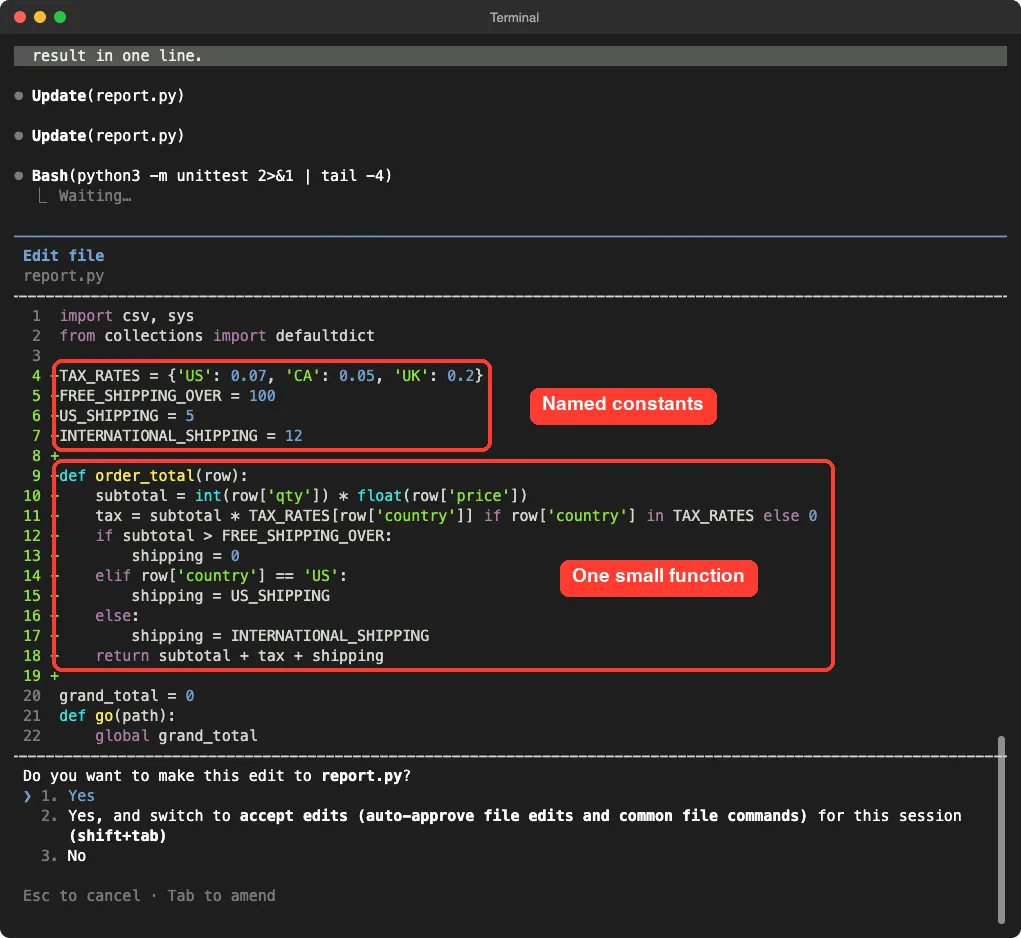
Now a new reader can answer a business question in seconds. What is the free shipping line? Look at FREE_SHIPPING_OVER at the top, instead of hunting for a bare 100 inside an if.
The test passed again after this step.
Step 4: Split Reading From Printing
The last planned step separates three jobs that were tangled together: calculating, collecting and printing.
Now do step 3 only: split the code into summarize(path) and print_report(...), and make go a thin wrapper. Replace the global total with a local one in the same row order. Then run python3 -m unittest and python3 report.py orders.csv | diff - expected_report.txt, and tell me the result in two lines.This prompt adds a second proof. The unittest run checks the test, and the diff command checks the real command-line output against the saved copy. If diff prints nothing, the two files are identical.
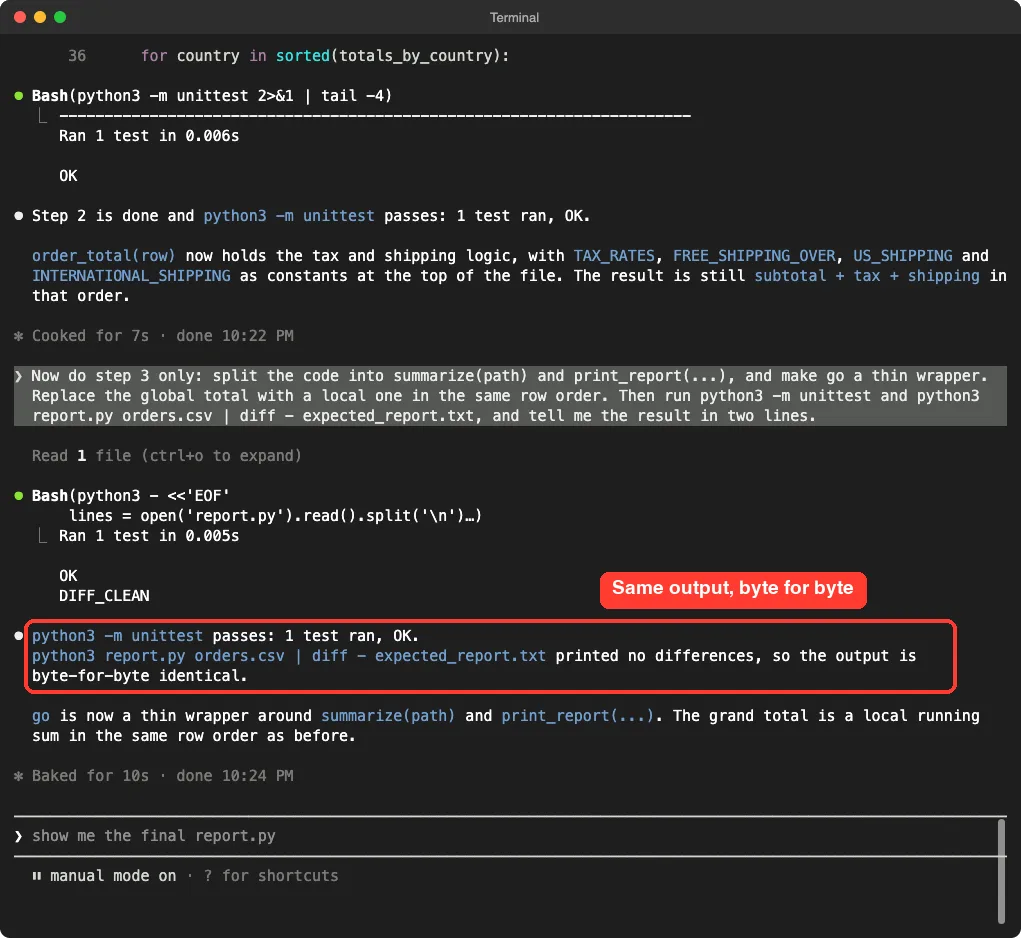
One detail is worth knowing. For this step Claude wrote a short Python script to rewrite the file and showed it to us before running it. We read it, saw that it only rearranged report.py, and said yes, because you should always read a command before you approve it.
Step 5: Refactor Code With Claude Code, Then Rewind a Bold Idea
Refactoring is also about trying ideas. We wondered what the code would look like as a class, so we asked for it.
Try a bolder step 4: rewrite report.py as a class OrderReport with methods load, total_for and print. Keep go(path) working and the output identical. Then run python3 -m unittest.Claude did it. The test passed and the diff was clean, so the change was valid. We simply preferred the four small functions for a script this size, so we used the rewind feature to go back.
We typed /rewind and the menu listed every prompt of the session, with the lines each one added and removed in report.py. Our fourth prompt showed 43 added lines and 38 removed.
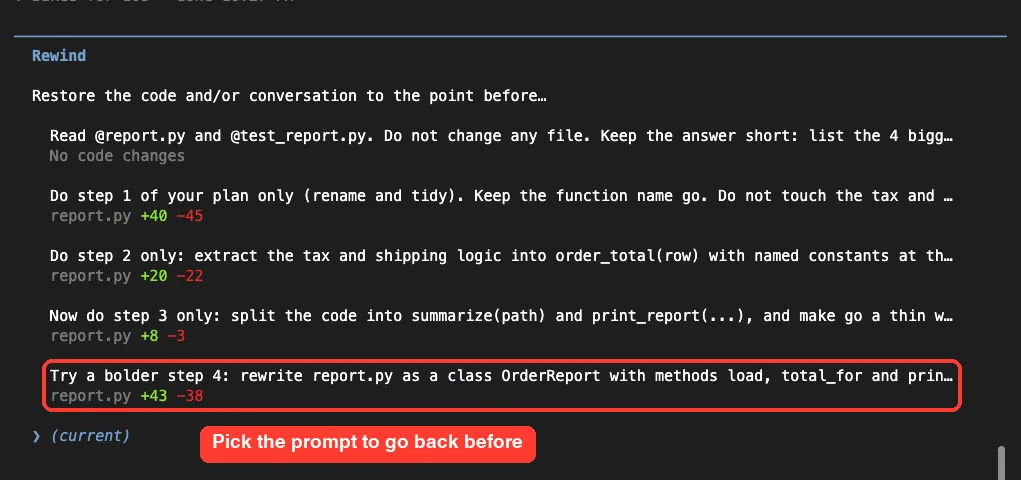
We picked the step 4 prompt, which means “go back to just before I sent this”. The next screen offered five choices, and we took the first one, restore code and conversation.
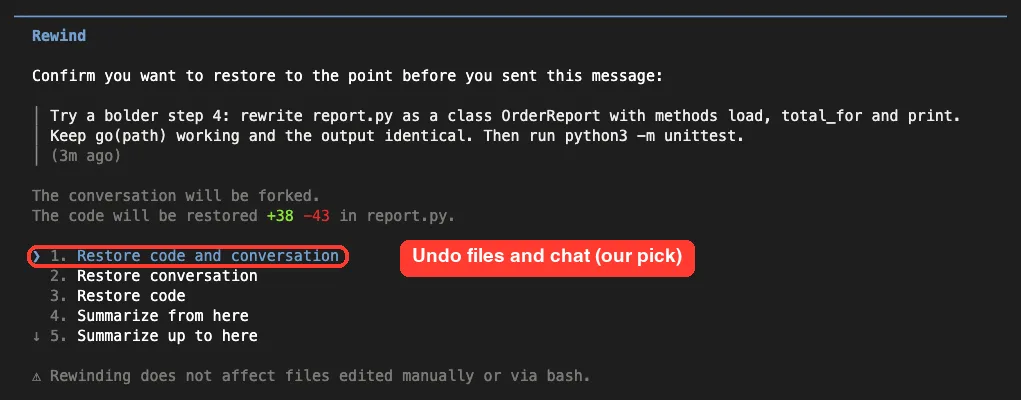
Afterward we compared report.py with the copy we had saved after step three. They were identical. The class version was gone, and the four-function version was back.
Remember the warning from the docs: rewind does not undo files changed through bash commands. Our edits went through Claude’s file editing, so it worked. For anything bigger, commit to Git before each step.
Step 6: Prove Nothing Changed
Claude saying “identical” is useful, but a second check you run yourself is better. We opened a plain terminal in the project folder and ran the test and the diff again, then listed the top-level pieces of the file.
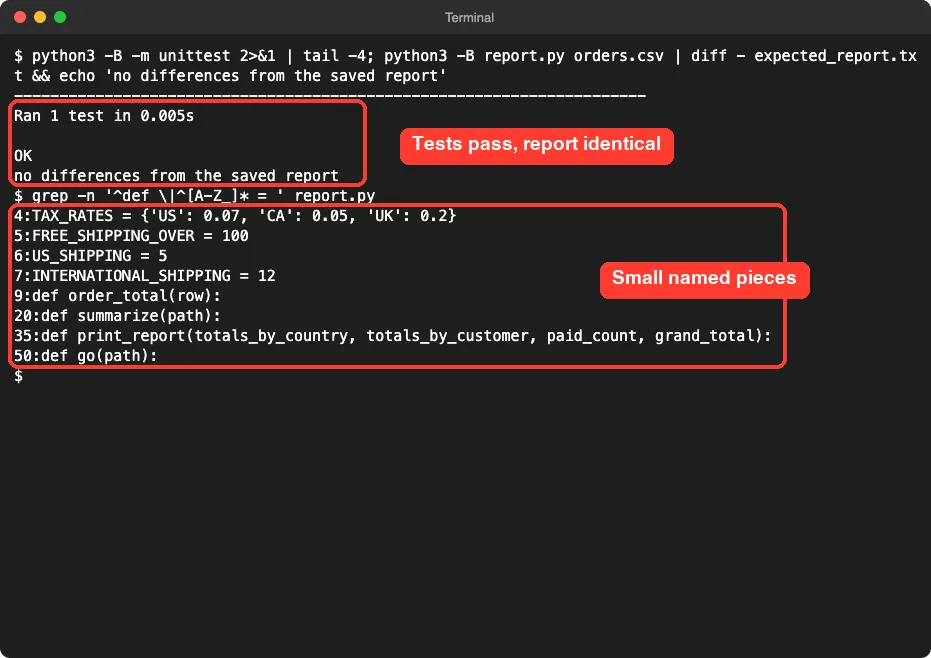
The file went from one big function to four small ones: order_total, summarize, print_report and go. It also went from 56 lines to 54, so refactoring is not about shorter code. It is about code you can read.
The One Behavior We Changed on Purpose
Remember the warning in the plan? The old script kept its total in a global variable that never reset. That means calling go twice in one program doubled the total, which is almost certainly a bug.
We checked it for real. We ran the old and new versions, calling the report twice, and printed only the total line.
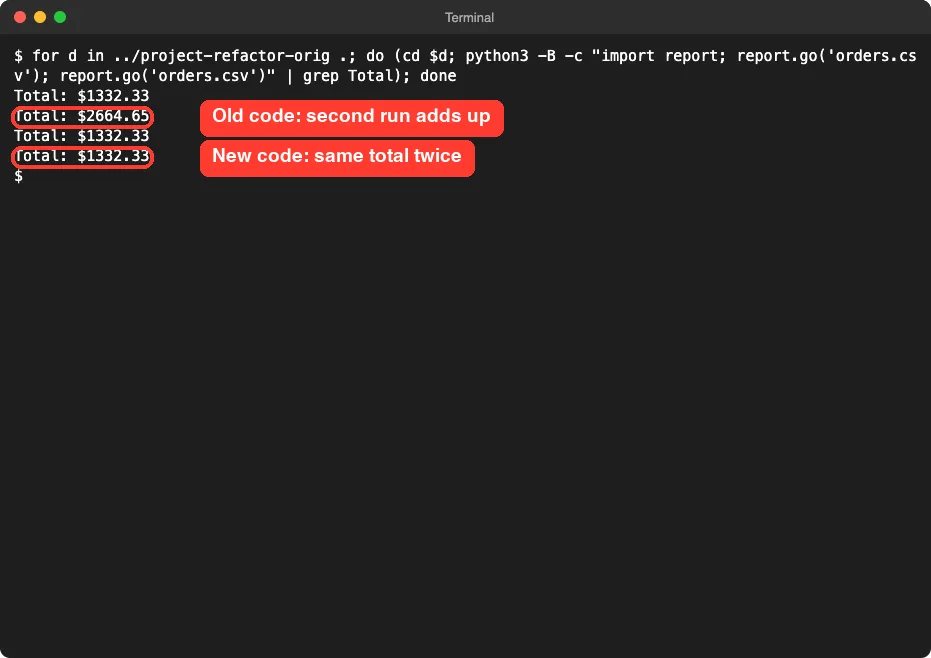
This is an important lesson. A strict refactor changes no behavior, but cleaning up can show a hidden bug. Claude told us in the plan and the fix came from removing the global, so say in your first prompt if you want no such change.
The Final Project Files
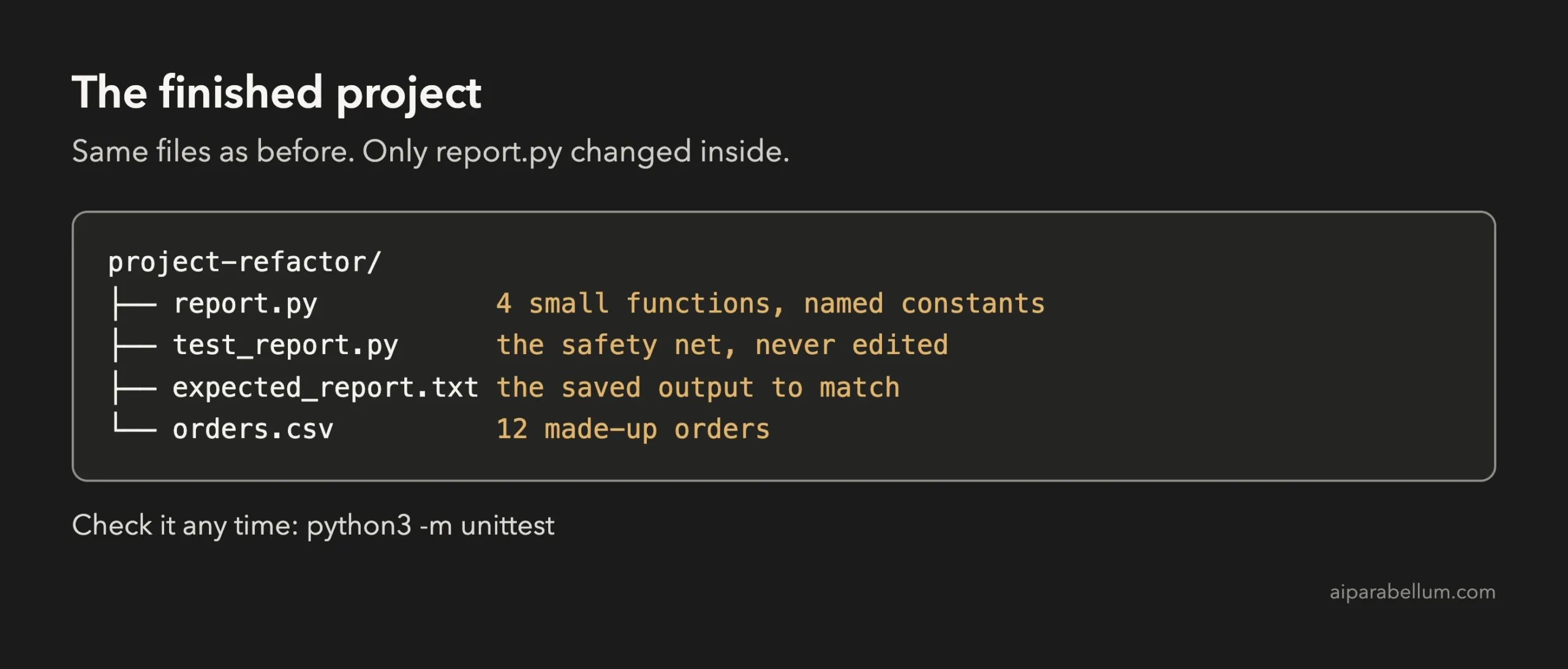
Here is the finished report.py in full. It is short enough to read in one go:
import csv, sys
from collections import defaultdict

TAX_RATES = {'US': 0.07, 'CA': 0.05, 'UK': 0.2}
FREE_SHIPPING_OVER = 100
US_SHIPPING = 5
INTERNATIONAL_SHIPPING = 12

def order_total(row):
    subtotal = int(row['qty']) * float(row['price'])
    tax = subtotal * TAX_RATES[row['country']] if row['country'] in TAX_RATES else 0
    if subtotal > FREE_SHIPPING_OVER:
        shipping = 0
    elif row['country'] == 'US':
        shipping = US_SHIPPING
    else:
        shipping = INTERNATIONAL_SHIPPING
    return subtotal + tax + shipping

def summarize(path):
    totals_by_country = defaultdict(float)
    totals_by_customer = defaultdict(float)
    paid_count = 0
    grand_total = 0
    with open(path) as f:
        for row in csv.DictReader(f):
            if row['status'] == 'paid':
                total = order_total(row)
                totals_by_country[row['country']] += total
                totals_by_customer[row['customer']] += total
                paid_count += 1
                grand_total += total
    return totals_by_country, totals_by_customer, paid_count, grand_total

def print_report(totals_by_country, totals_by_customer, paid_count, grand_total):
    print("ORDER REPORT")
    print("============")
    for country in sorted(totals_by_country):
        print(country + ": $" + str(round(totals_by_country[country], 2)))
    print("------------")
    for customer in sorted(totals_by_customer):
        if totals_by_customer[customer] > 200:
            print(customer + " (VIP): $" + str(round(totals_by_customer[customer], 2)))
        else:
            print(customer + ": $" + str(round(totals_by_customer[customer], 2)))
    print("------------")
    print("Paid orders: " + str(paid_count))
    print("Total: $" + str(round(grand_total, 2)))

def go(path):
    print_report(*summarize(path))

if __name__ == '__main__':
    go(sys.argv[1] if len(sys.argv) > 1 else 'orders.csv')
And here is the safety net that guarded every step:
import io, unittest
from contextlib import redirect_stdout

import report


class ReportOutputTests(unittest.TestCase):
    def test_report_matches_saved_output(self):
        buf = io.StringIO()
        with redirect_stdout(buf):
            report.go('orders.csv')
        expected = open('expected_report.txt').read()
        self.assertEqual(buf.getvalue(), expected)


if __name__ == '__main__':
    unittest.main()
We left a few things alone on purpose. The report still builds text with plus signs, and the file still has only one test. We did not measure code coverage, and a single comparison test cannot catch every kind of mistake, only changes to this one report.
Try It Yourself
Pick a small script of your own, ideally one you know well. First save its output as a golden copy, then start in plan mode and use this prompt:
Read @yourfile. Do not change any file. List the 4 biggest readability problems, then a refactor plan in 3 small steps. The output must stay byte-for-byte the same. Tell me if any step would change behavior, and name a test or command I can run after every step.Then run the steps one at a time with the do-step-one-only prompt from above. Try these variations:
- Ask Claude to find duplicated code and propose a single helper for it.
- Ask for type hints or docstrings as a separate, final step.
- Ask Claude to explain why each new function name was chosen.
- Make a Git commit between steps so you can undo with Git as well as rewind.
- Ask for a second, bolder idea, compare the two, and rewind the one you do not want.
Common Mistakes
- Refactoring with no test. Without a check, “looks the same” is a guess.
- Asking for everything at once. A single huge prompt gives you a huge diff that is hard to review.
- Letting names in the test change. If the test calls go, keep go, or the safety net breaks for the wrong reason.
- Changing behavior and structure together. Fix the bugs in a separate step, so you can tell them apart.
- Approving a command without reading it. Even a rewrite script should be read before you say yes.
- Treating rewind as version control. It does not cover files changed through bash commands.
Pro Tips
- Start in plan mode. A plan costs one short answer and shows the risks before anything changes.
- Put your rules in the first prompt: same output, small steps, tests after each step.
- Run a second check yourself, such as a diff against saved output, instead of trusting a summary.
- Use our rewind guide to learn the other restore options, and our permissions guide to control what Claude may run.
- Read our guide to privacy and security before using real company code.
- Watch your usage with our costs guide. This whole project used five short prompts.
Cheat Sheet
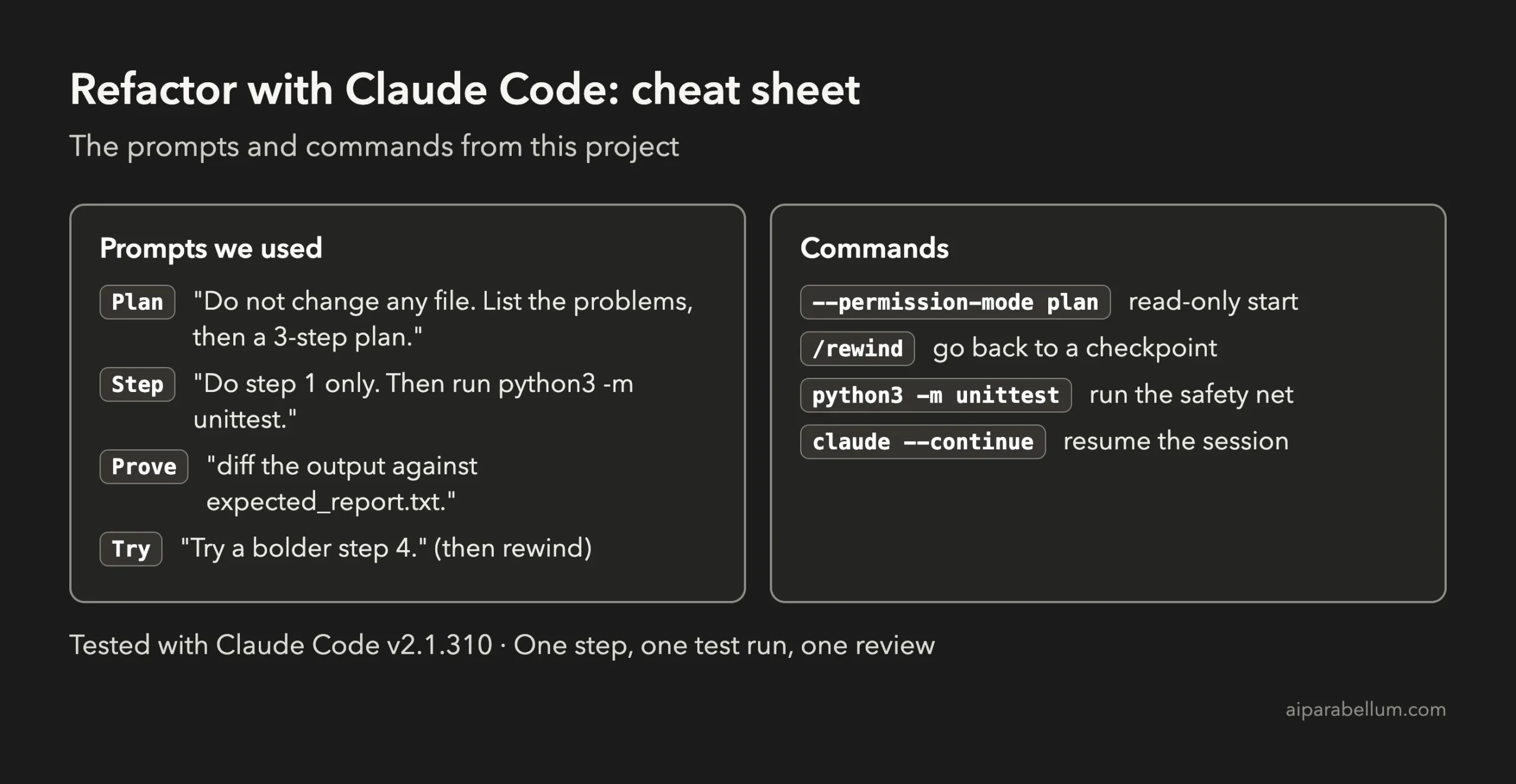
To learn more about the assistant behind the tool, read our Claude AI overview. If you have untested code first, see our writing tests guide.
Frequently Asked Questions
Can Claude Code refactor my code safely?
It can, if you give it a check to run. In our project, a single test plus a diff against saved output proved that three steps changed the structure and not the report. Without a check, you are trusting appearances.
What is the safest way to refactor with Claude Code?
Plan first in plan mode, do one step per prompt, run a test after each step and read every diff before approving. Keep a Git commit between steps if your project uses Git.
Do I need tests before I refactor?
Yes, at least one. Even a single test that compares the output to a saved copy is enough for a small script. For bigger code, write more tests first, as we did in the previous project.
Can I undo a refactor that went wrong?
Yes. Type /rewind, choose the prompt to go back before, and restore the code, the conversation or both. Anthropic’s docs warn that it does not undo changes made by bash commands, so use Git as well for important work.
Will refactoring change what my code does?
It should not, but it can reveal hidden bugs. In our project the old global total doubled on a second call, and removing the global fixed it. Ask Claude in the plan to tell you if any step changes behavior.
Conclusion
You now know how to refactor code with Claude Code without fear: save the current output, ask for a plan, change one thing per prompt, run a test and a diff after each step, and rewind any idea you do not like. Five short prompts took our tangled report script to four small, named functions with an identical report, and showed us a hidden bug on the way. Try the starter prompt on a small file of your own, and come back for the next project in the series.
Previous in the series: Project 13: Write Tests for Old, Untested Code With Claude Code
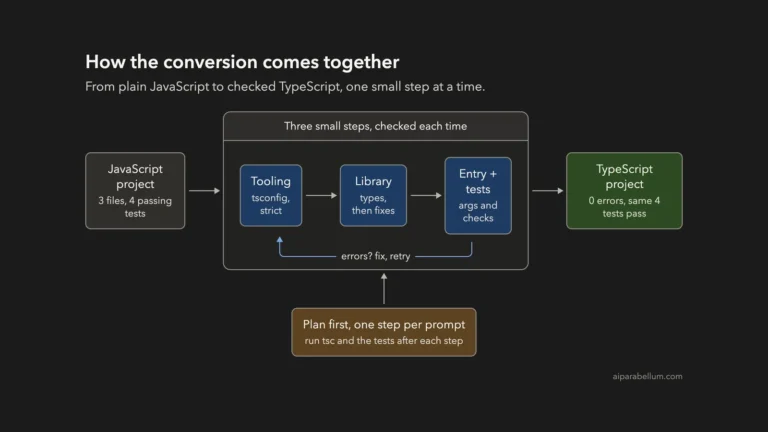
Next in the series: Project 15: Convert a JavaScript Project to TypeScript With Claude Code.