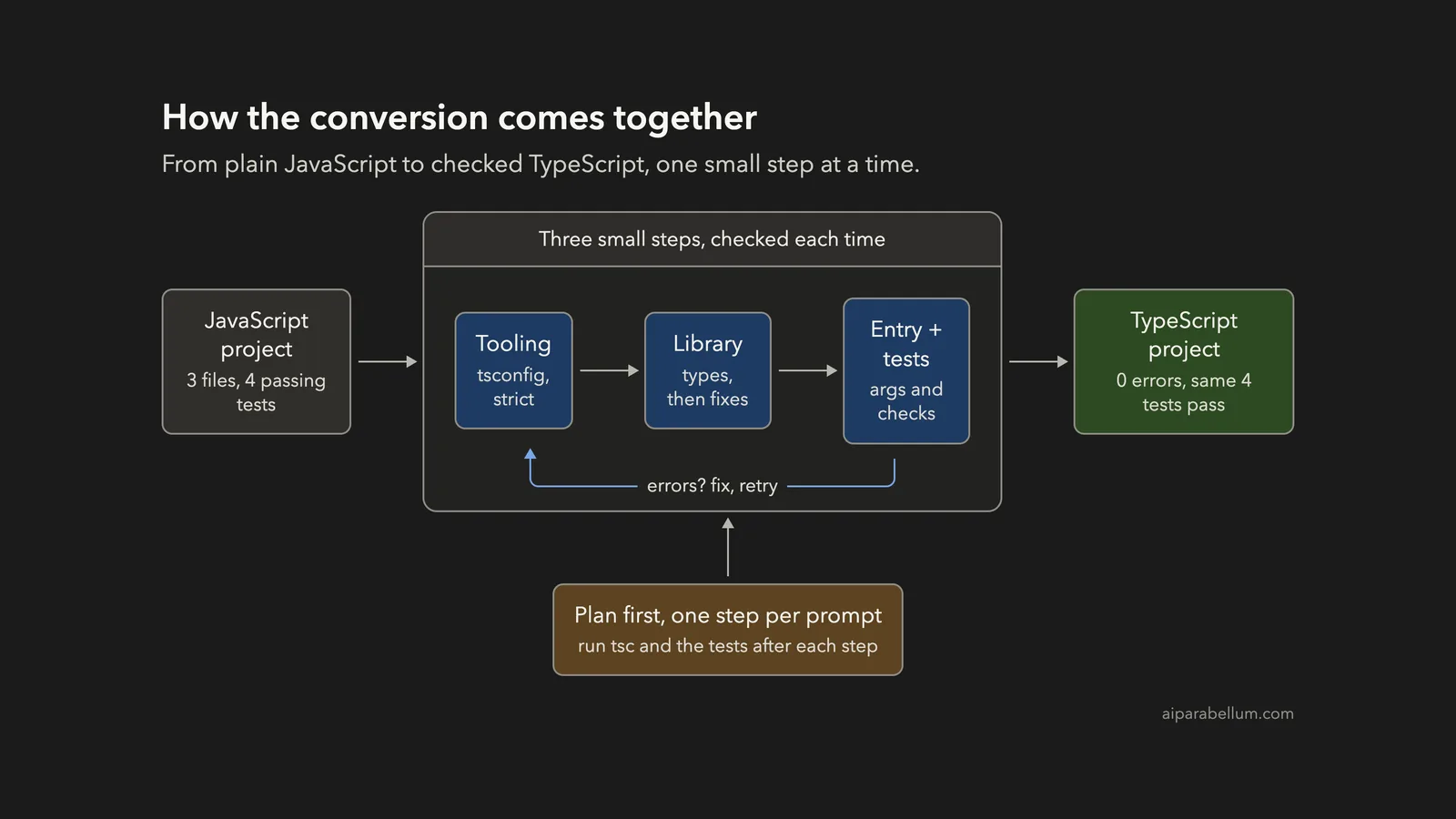
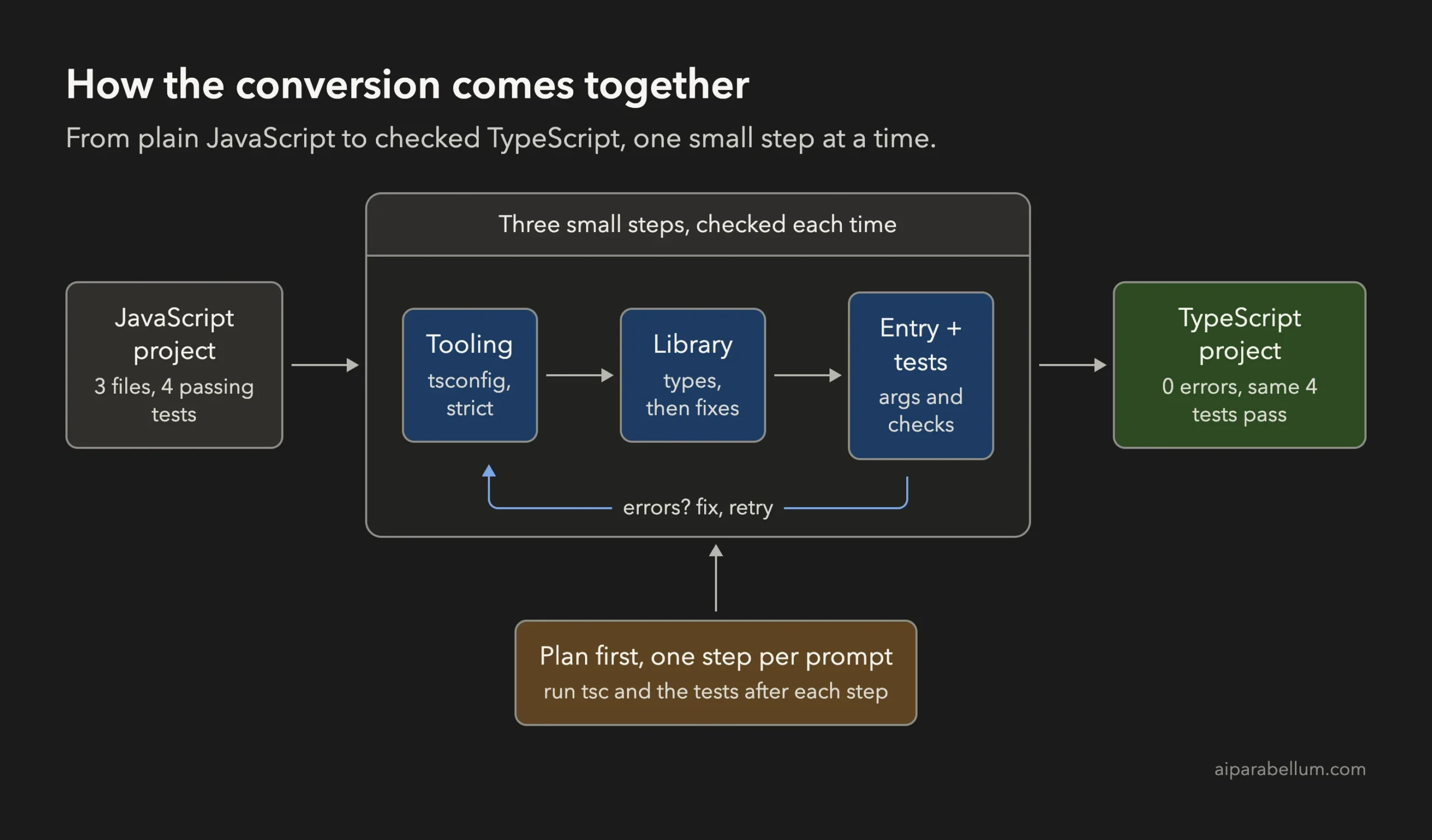
Have you ever wanted to move a JavaScript project to TypeScript but did not know where to begin? You can convert JavaScript to TypeScript with Claude Code in three small, checked steps: set up the tools, convert one file at a time, and let the compiler show you what is wrong. In this project we took a tiny book-lending app and ended with typed code, zero compiler errors, the same four passing tests, and two real bugs found along the way.
This is Project 15 of 20 in our Build with Claude Code series, part of our Claude Code tutorials. In Project 14 we learned to refactor messy code safely. Here we use the same habits: plan first, one step per prompt, a check after each step.
Tested with Claude Code v2.1.310 on October 26, 2026, on macOS. We tested on macOS; the Windows and Linux steps follow Anthropic’s official instructions.
What We Built
TypeScript is JavaScript with labels on your data. The compiler reads the labels and warns you about mistakes before your code ever runs.
| Item | Details |
|---|---|
| Project | Convert a small JavaScript command-line app to strict TypeScript |
| Input | A made-up book-loans app: library.js, index.js and 4 tests that use Node’s built-in test runner |
| Output | library.ts, index.ts and library.test.ts, compiled by tsc into a dist folder |
| Tools | Node.js, plus typescript and @types/node installed as dev dependencies |
| Result | Typecheck clean, 4 of 4 tests passing, and two hidden bugs fixed |
| Prompts used | 8 short prompts |
Why Convert JavaScript to TypeScript?
JavaScript lets you pass anything anywhere. That is fast to write, but it means a typo or a missing value only shows up when someone runs the code.
TypeScript adds types: small labels that say a book has a number for an id and a string for a title. When you use a value in a way that does not match its label, the compiler tells you at once. In strict mode it also reminds you that a search may find nothing.
The hard part of a conversion is the long list of small decisions: which settings to use, which file to go first, and what to do when the compiler complains. That is a good job for an assistant that reads the whole project, if you keep it on a short leash.
What Anthropic Recommends
Anthropic’s common workflows page gives a few tips for changing existing code. They include asking Claude to explain the benefits of the modern approach, asking it to keep backward compatibility when needed, and refactoring in small, testable increments. The page does not have a TypeScript-specific recipe, so the plan below is our own, built on those tips and checked in a real session.
If you are new to the tool, read our first session guide first. We also rely on plan mode for the opening step, and on permission modes so we approve every edit and command.
The JavaScript We Started With
Everything here is made up. The app tracks book loans for a tiny library. It has a list of three books, a checkOut function, a late-fee calculator, a summary function and a small command-line entry point.
| File | What it does |
|---|---|
| src/library.js | The books, the loans, findBook, checkOut, lateFee and summary (43 lines) |
| src/index.js | Reads the command-line arguments and prints a loan summary (9 lines) |
| test/library.test.js | Four tests: late fees and checking out a book (24 lines) |
The four tests pass, so the app looks healthy. But we planted two problems on purpose, the kind real old code has. We tried them before the conversion so you can see the starting point.
Running the app with a loan length of 10 days printed “102 days” instead of 12, because the command line gives you text and “10” plus 2 is “102” in JavaScript. Asking for a book id that does not exist crashed with “Cannot read properties of undefined”. We come back to both at the end.
Step 1: Ask for a Plan Before Any Change
We started Claude Code in plan mode, where it can read files but cannot change them.
claude --permission-mode planThe first prompt asked for a short answer: what to know before converting, a three-step plan, and a prediction of which bugs strict TypeScript would reveal.
Read @src/library.js, @src/index.js and @test/library.test.js. Do not change any file. Keep the answer short: list the 4 most important things to know before converting this project to TypeScript (one line each), then a migration plan in 3 small steps (two lines each). Say which bugs a strict TypeScript check is likely to reveal.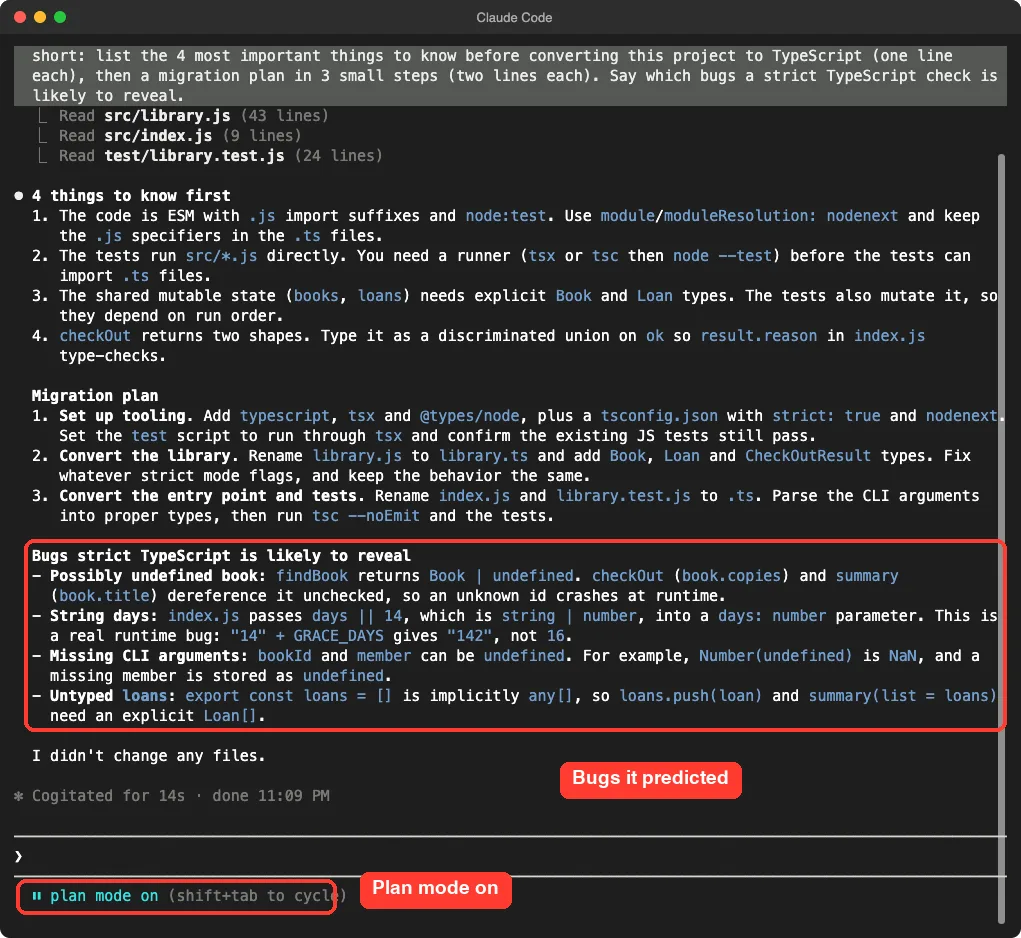
Claude’s four notes were useful. The project uses modern ES modules with .js endings in its imports, so the settings must match. The tests need compiling, and the shared lists need real types.
It also noted that checkOut returns two shapes of answer, which TypeScript can describe as a union.
The plan was tooling first, then the library, then the entry point and tests. The predicted bugs were an unchecked missing book, the string days value, missing command-line arguments and an untyped list. It also warned that “14” plus 2 gives “142”, which matches what we had just seen.
One note: the plan suggested a helper tool called tsx. We wanted the fewest moving parts, so we told Claude to skip it in the next prompt.
Step 2: Set Up TypeScript With Strict Mode
Now we left plan mode and started a normal session where Claude asks before it acts. The first step only prepares the tools. No file is renamed yet.
Do step 1 of your plan only (tooling), but use only typescript and @types/node as dev dependencies, no tsx. Create tsconfig.json with strict true, nodenext, outDir dist and allowJs false. Add scripts typecheck (tsc --noEmit) and build (tsc). Do not rename any file yet. Then run npm test and tell me the result in one line.Claude wanted to run npm install, which downloads packages, so it stopped and asked. This is the kind of command you should read before you say yes. It installs only the two packages we named, inside our demo folder.
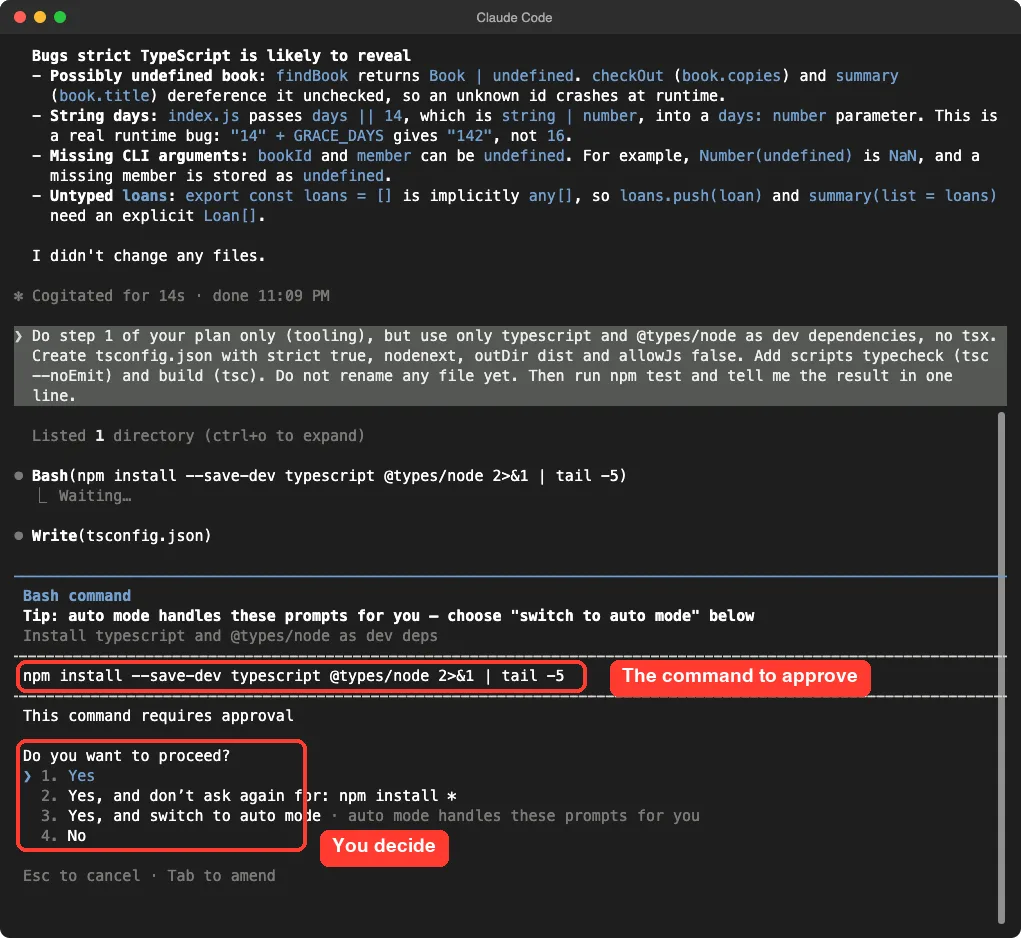
Claude then wrote tsconfig.json. The important setting is strict, which turns on all of TypeScript’s safety checks. The nodenext settings tell the compiler to follow the same module rules that Node uses.
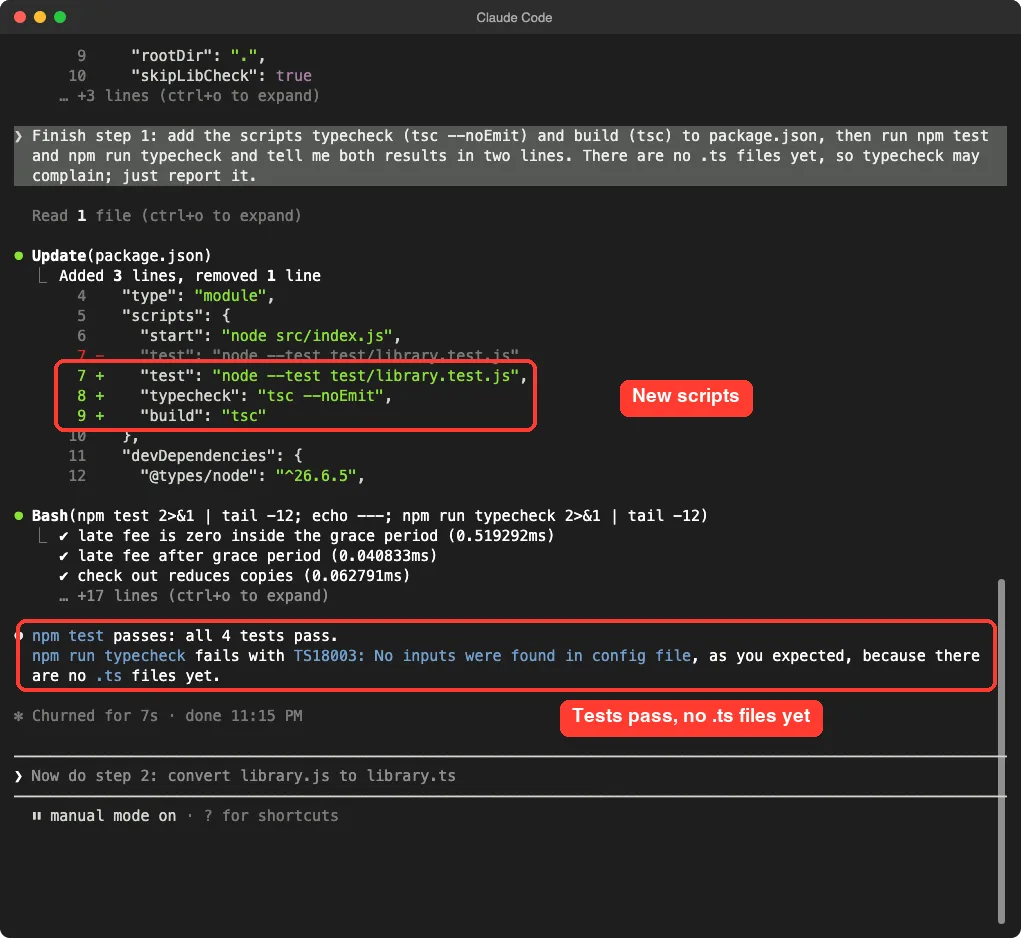
Our first prompt left one edit waiting for approval when we stopped, so we sent a short follow-up asking Claude to finish adding the two scripts. After that, the old JavaScript tests still passed, and the typecheck reported that it found no TypeScript files yet. That is the expected result at this point.
Step 3: Convert the Library to TypeScript and Read the Errors
This is the heart of the conversion. We split it into two prompts on purpose. The first renames the file and adds types, and tells Claude not to fix anything yet.
Now step 2, first half only: rename src/library.js to src/library.ts and add the types Book, Loan and CheckOutResult (a union on ok). Do not fix any error yet. Run npm run typecheck and show me the errors it reports, then stop.Why show the errors first? The list is the most valuable thing the compiler gives you. Each error points at an assumption the old code made.
Claude added three types. A Book has an id, title, author and copies, and a Loan has the book id, the member, the days due and a returned flag.
CheckOutResult is a union: either ok is true and there is a loan, or ok is false and there is a reason.
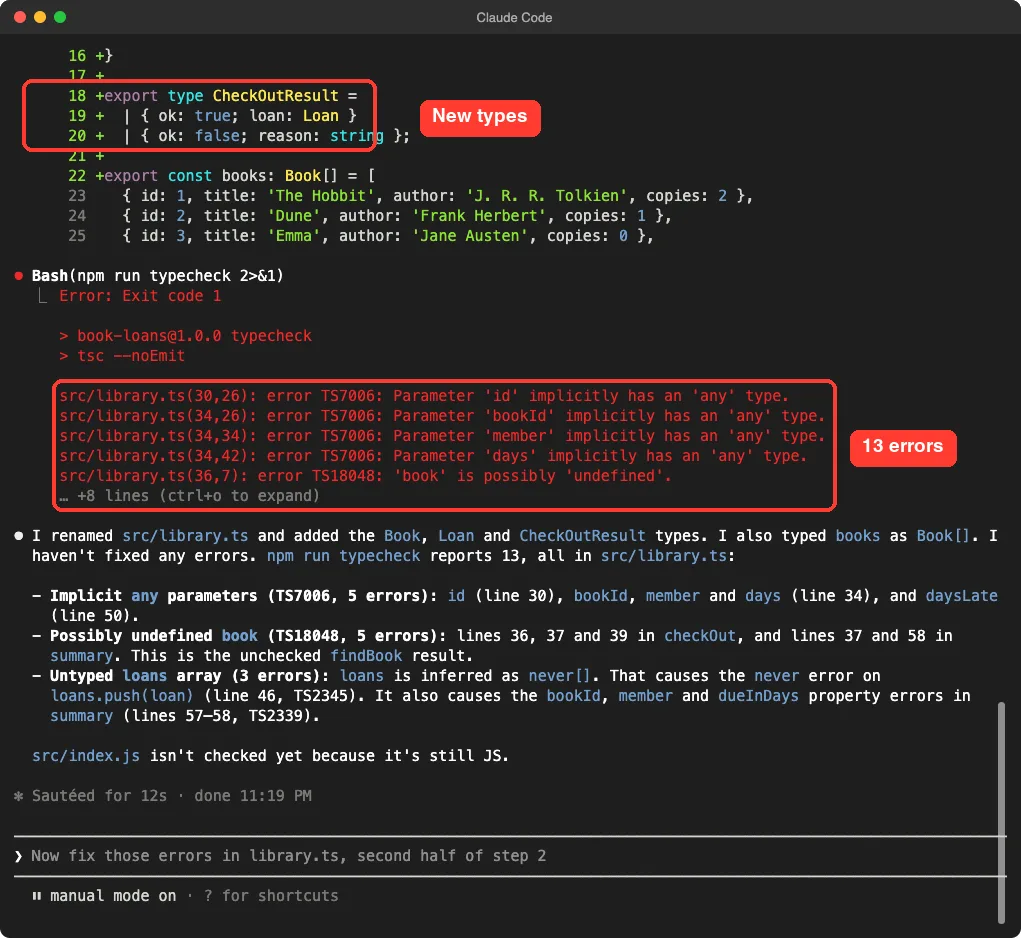
Thirteen errors, all in library.ts. Claude grouped them for us:
- Five parameters had no type, so TypeScript treated them as “any” and strict mode refused.
- Five places used a book that might be undefined, because findBook can come back empty.
- Three errors came from the loans list, which had no type, so TypeScript guessed it was an empty list that could hold nothing.
The index file was not checked yet, because it was still JavaScript. That is a nice property of going file by file: you only face the errors of the file you chose.
Step 4: Fix the Errors and Keep Track of Behavior
Now we asked for the fixes. We gave Claude a clear rule for the missing book, and asked it to list every runtime change so none would slip through unnoticed.
Now the second half of step 2: fix those errors in library.ts. If a book id is not found, checkOut must return ok false with the reason Book not found, and summary must skip loans whose book is missing, instead of crashing. Then run npm run typecheck and list in two lines every runtime behavior you changed.Claude showed each edit as a diff first. Read these. In the screenshot you can see findBook now says it returns a Book or undefined, and checkOut has a new guard that returns a clean “Book not found” result.
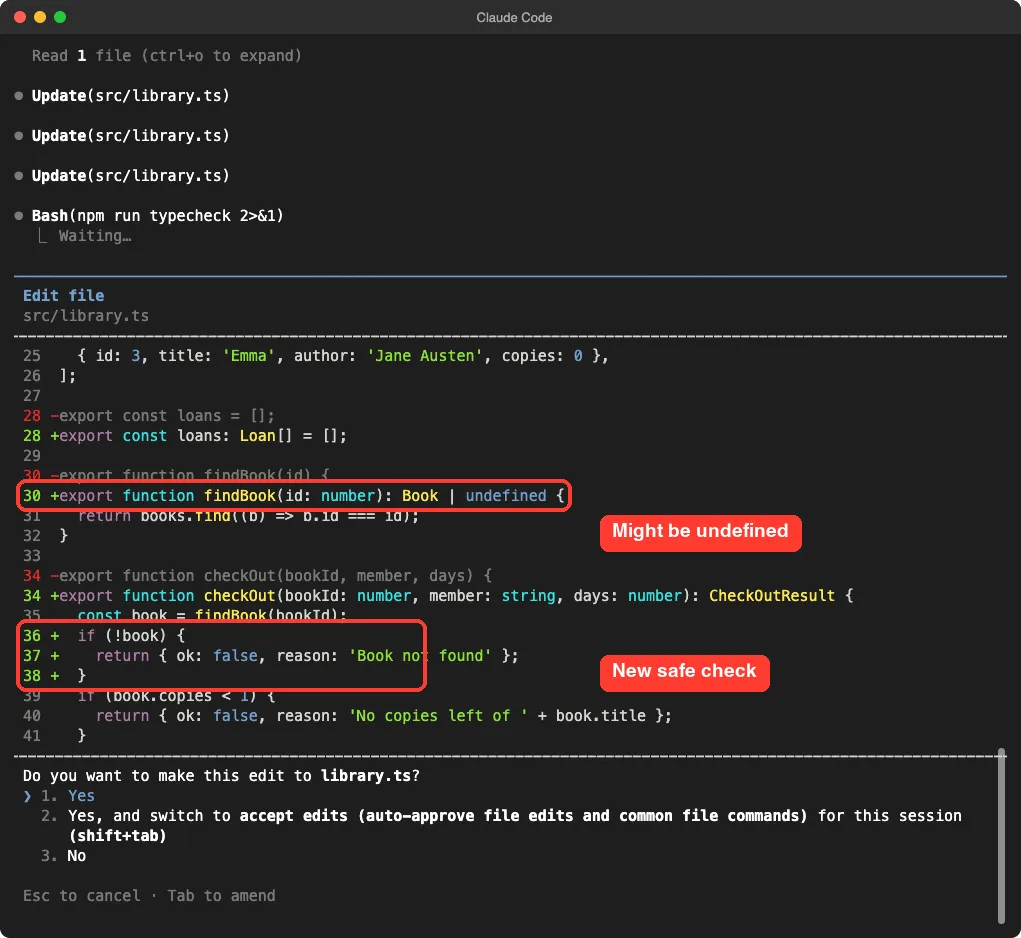
This is the moment where TypeScript earns its keep. The old code would have crashed on a missing book. The new code has to decide what to do, and the compiler will not let anyone forget.
One summary edit was still waiting when our script stopped, so a short follow-up prompt finished it. The summary function now skips any loan whose book is missing. After that, both the typecheck and the build finished with no errors.
Step 5: Convert the Entry Point and the Tests
The last step converts the two remaining files and fixes the days bug at its source: the command line.
Now step 3: rename src/index.js to src/index.ts and test/library.test.js to test/library.test.ts. In index.ts parse the command line properly: bookId and days must be numbers (days defaults to 14), member is required, and if arguments are missing or not numbers print a usage line and exit with code 1. Update the scripts so that npm test builds first and runs the compiled tests from dist, and npm start runs the compiled index. Then run npm run typecheck, npm test, and npm start -- 1 Mia 10 and tell me the results in three lines.This prompt is longer, but it still asks for one job. Claude had to make a few choices on its own, and it told us about them afterward. It added a types setting to tsconfig.json because Node’s built-in names such as process were not found, and it added a check in one test.
That test change is worth a look. The test fetched a book with findBook and read its copies, but under strict rules the book might be undefined.
Claude added an assert.ok line that proves the book exists. The test checks the same thing, and now the compiler is happy.
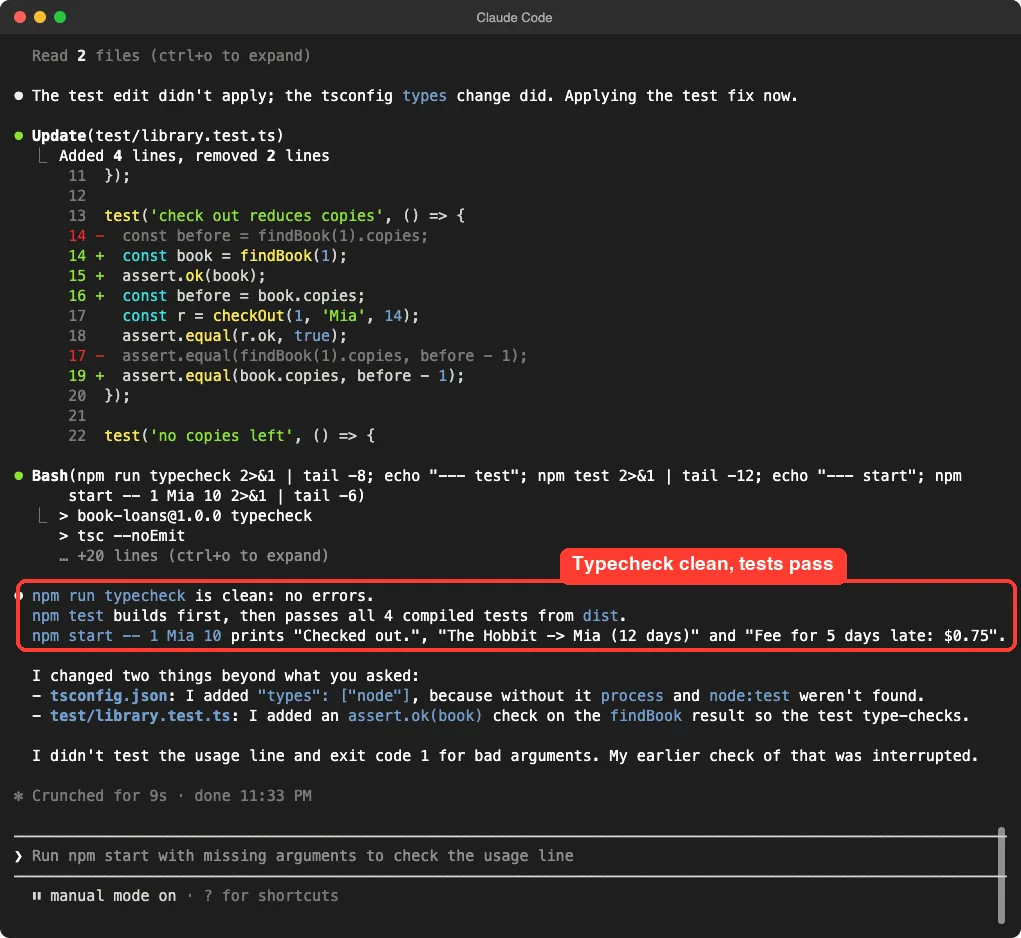
Claude was also honest about a gap. It said it had not tested the usage line for bad arguments, because its earlier check was interrupted. So we tested it ourselves in the next section.
Step 6: Check It Yourself and Compare With the Old Code
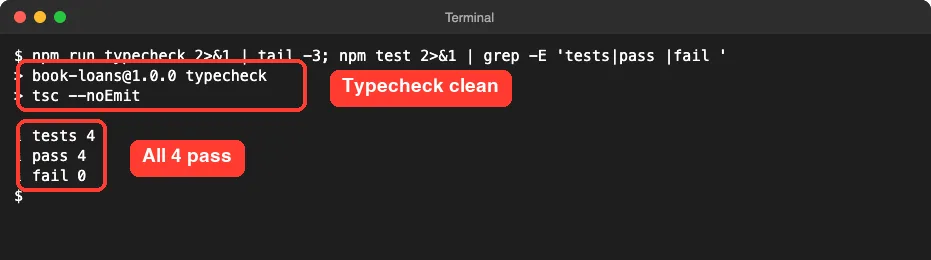
Claude saying “clean” is useful. Running the check yourself is better. We opened a plain terminal in the project folder and ran the typecheck and the tests.
Then we ran the old JavaScript copy and the new TypeScript build side by side, with the same arguments.
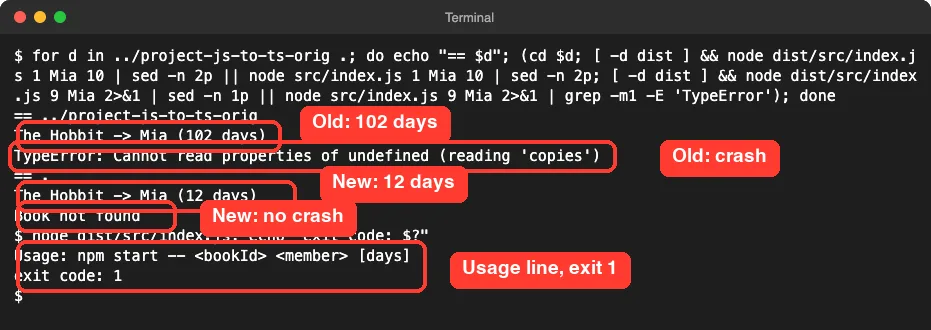
| Case | Old JavaScript | New TypeScript |
|---|---|---|
| Loan of 10 days | Printed 102 days | Prints 12 days (10 plus 2 grace days) |
| Unknown book id | Crashed with a TypeError | Prints Book not found |
| No arguments | Ran with NaN and an empty member | Prints a usage line, exit code 1 |
Be careful with one thing here. A pure conversion adds types and changes no behavior, but we chose to fix these problems because the compiler pointed straight at them.
In your own project, you may prefer to log them and fix them in a separate step, so the diff stays easy to review.
The Final Project Files
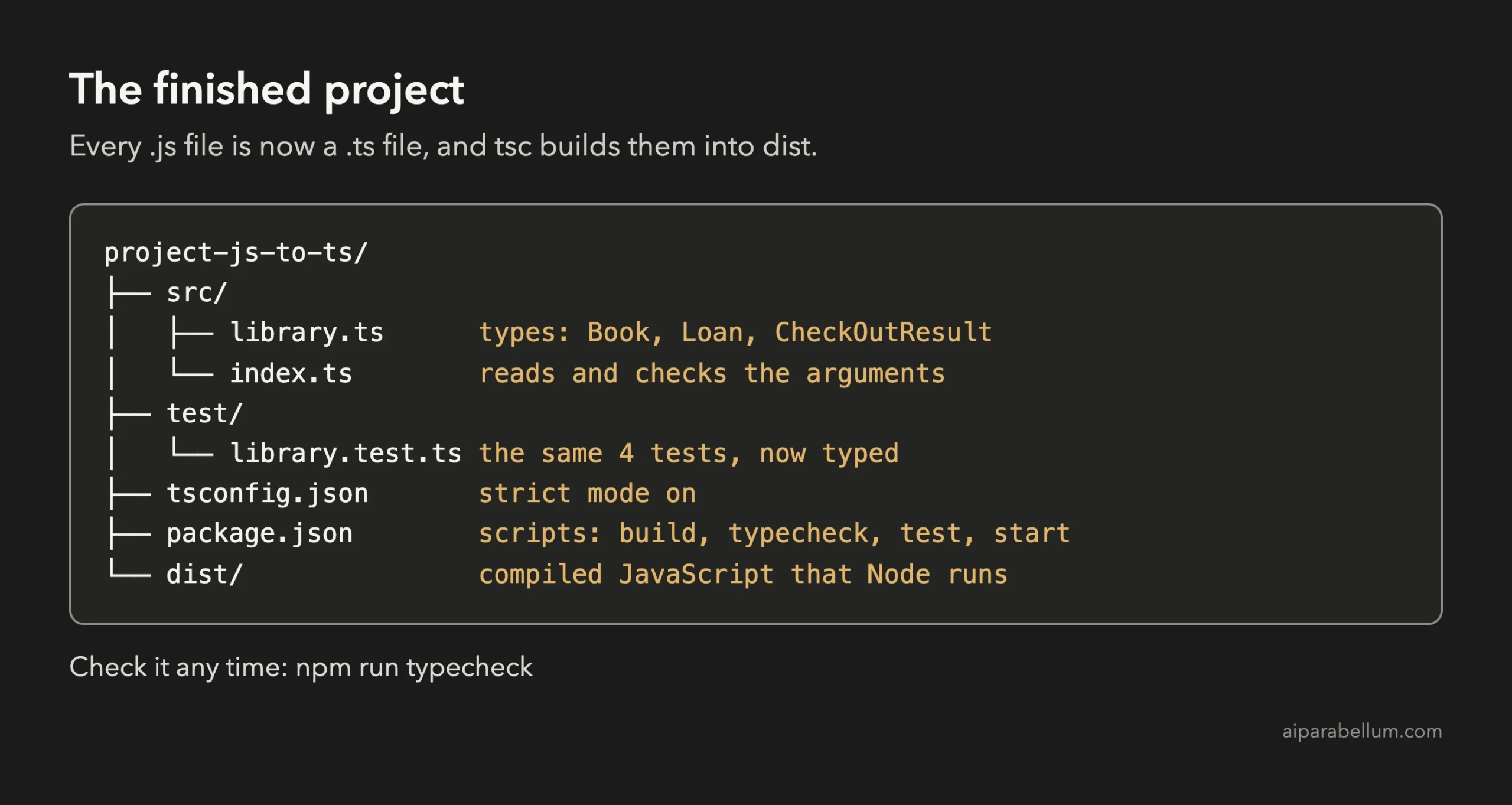
Here is the core of the finished src/library.ts, with the three types and the safe findBook, checkOut and summary:
export interface Book {
  id: number;
  title: string;
  author: string;
  copies: number;
}

export interface Loan {
  bookId: number;
  member: string;
  dueInDays: number;
  returned: boolean;
}

export type CheckOutResult =
  | { ok: true; loan: Loan }
  | { ok: false; reason: string };

export const loans: Loan[] = [];

export function findBook(id: number): Book | undefined {
  return books.find((b) => b.id === id);
}

export function checkOut(bookId: number, member: string, days: number): CheckOutResult {
  const book = findBook(bookId);
  if (!book) {
    return { ok: false, reason: 'Book not found' };
  }
  if (book.copies < 1) {
    return { ok: false, reason: 'No copies left of ' + book.title };
  }
  book.copies -= 1;
  const loan = { bookId, member, dueInDays: days + GRACE_DAYS, returned: false };
  loans.push(loan);
  return { ok: true, loan };
}

export function summary(list: Loan[] = loans): string[] {
  return list.flatMap((l) => {
    const book = findBook(l.bookId);
    if (!book) return [];
    return [book.title + ' -> ' + l.member + ' (' + l.dueInDays + ' days)'];
  });
}
The books list, the constants and lateFee are unchanged apart from a type on lateFee, so we left them out. And here is the heart of the new src/index.ts:
import { checkOut, lateFee, summary } from './library.js';

const [bookIdArg, member, daysArg = '14'] = process.argv.slice(2);
const bookId = Number(bookIdArg);
const days = Number(daysArg);

if (!bookIdArg || !member || Number.isNaN(bookId) || Number.isNaN(days)) {
  console.error('Usage: npm start -- <bookId> <member> [days]');
  process.exit(1);
}

const result = checkOut(bookId, member, days);
console.log(result.ok ? 'Checked out.' : result.reason);
Notice that the import still ends in .js even though the file is .ts. That is how Node’s module rules work, and Claude’s plan flagged it in the first answer.
We left a few things alone on purpose: the data stays in memory, the tests are the original four, and there is no linting or bundler. Strict mode catches type mistakes, not wrong business rules.
Try It Yourself
Pick a small JavaScript project that has at least one test, ideally something you know well. Copy it first, then start in plan mode and use this prompt:
Read the main files of this project. Do not change any file. List the 4 most important things to know before converting it to TypeScript, then a migration plan in 3 small steps. Say which bugs a strict TypeScript check is likely to reveal, and which test or command I can run after every step.Then run the steps one at a time. For each file, ask for the rename and the types first, look at the errors, and only then ask for the fixes. Try these variations:
- Turn off strict at first, then turn it on in a separate step and read the new errors.
- Convert one file per prompt, and run the tests between files.
- Ask for a short list of every runtime behavior change after each step.
Common Mistakes
- Converting every file at once. A huge list of errors is hard to read. One file at a time keeps it calm.
- Fixing errors before reading them. The list teaches you what your code was assuming.
- Turning strict off to make errors go away. That hides the exact bugs you came to find.
- Forgetting that the tests must be compiled too. If Node cannot run .ts files directly, build first.
- Approving an install command without reading it. Check which packages it adds.
- Mixing behavior fixes with type changes unannounced. Ask Claude to list every behavior it changed.
Pro Tips
- Start in plan mode. The first answer already predicted our two real bugs.
- Name the tools you want and the ones you do not, such as “only typescript and @types/node”.
- Keep a copy of the old project so you can compare behavior, as we did in step six.
- Use our rewind guide to undo a step that went too far, and our privacy guide before you use real company code.
- Our guide to Claude Code costs helps you watch usage. This project used eight short prompts.
- If you have untested code first, read our project on writing tests.
Cheat Sheet
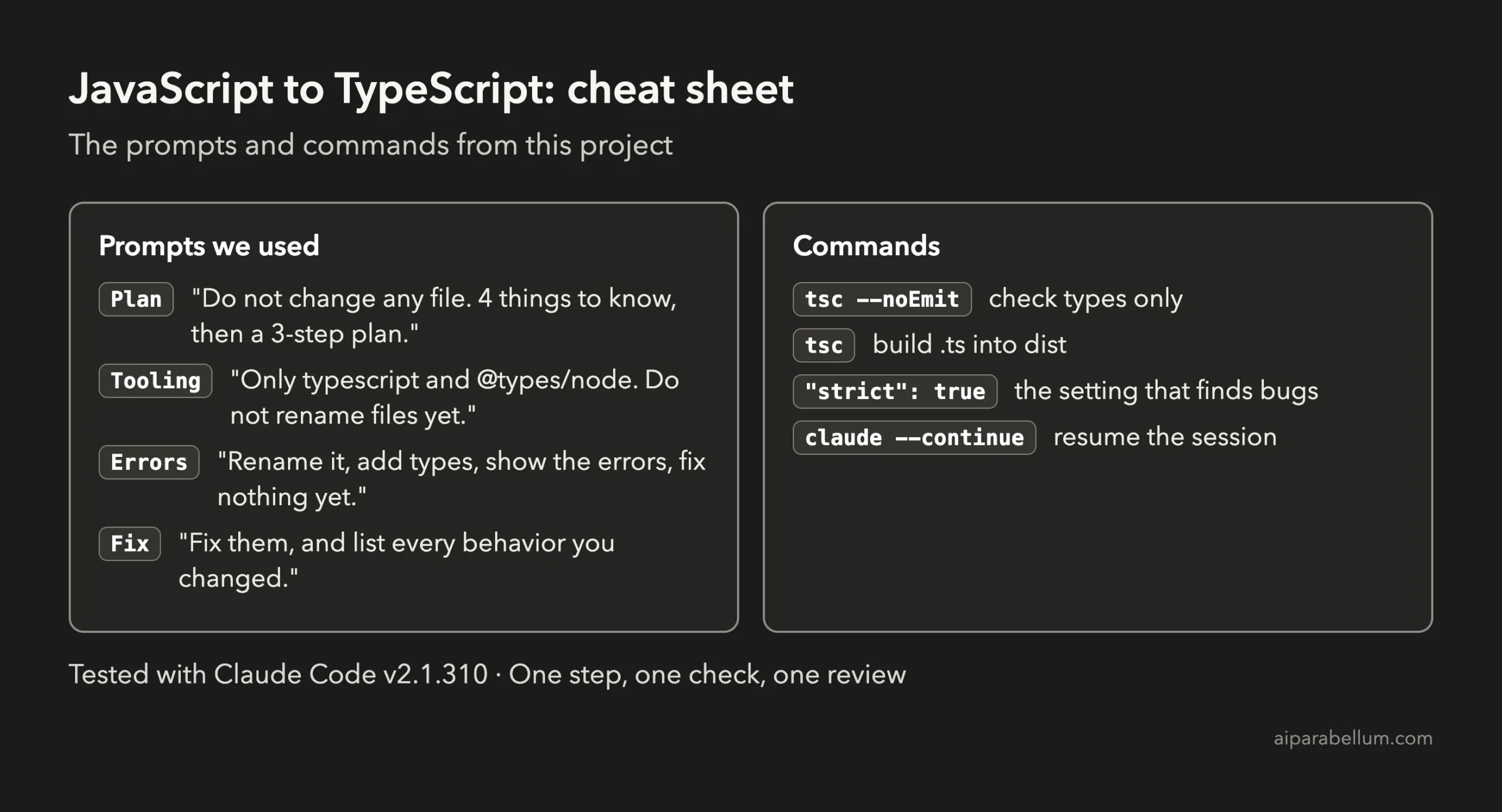
To learn more about the assistant behind the tool, read our Claude AI overview.
Frequently Asked Questions
Can Claude Code convert a JavaScript project to TypeScript?
Yes. In our project it set up the tools, added types, listed the compiler errors, fixed them and updated the tests. You still choose the steps and approve each change, which is what keeps the conversion safe.
Should I convert the whole project in one prompt?
For anything beyond a toy project, no. Convert one file at a time and run the typecheck and tests after each step. A smaller diff is easier to read, and a failing check points at one cause.
What does strict mode do?
Strict mode turns on TypeScript’s full set of safety checks. In our project it flagged untyped parameters and values that might be undefined, which is where our two bugs were hiding.
Will converting to TypeScript change how my code behaves?
A pure conversion should not. But the compiler can show bugs that you then choose to fix. Ask Claude to list every runtime behavior it changed, as we did, so the changes are visible.
Do I need to install anything extra?
You need Node.js and two dev dependencies: typescript and @types/node. Claude installs them for you after you approve the command, and everything stays inside your project folder.
Conclusion
You can now convert JavaScript to TypeScript with Claude Code without a big-bang rewrite: plan first, set up strict tooling, convert one file at a time, read the compiler errors before fixing them, and prove the result with the tests and your own terminal. Eight short prompts took our book-loans app to typed code with a clean check, four passing tests, and fixes for a wrong loan length and a crash on a missing book. Try the starter prompt on a small project of your own, and come back for the next project in the series.
Previous in the series: Project 14: Refactor Messy Code Safely With Claude Code
Next in the series: Project 16, Write Docs and a README Automatically With Claude Code, is coming soon.