Running Claude Code without a screen is easy, but claude code headless auth trips up a lot of people. Which sign-in does a script use, and what happens when a stray API key is sitting in your shell? In this guide you will see exactly how each option behaves, with real runs from a throwaway demo folder.
This is Part 40 of 45 in our Claude Code Deep Dives, part of our Claude Code tutorials. Last time we compared routines and /loop.
Tested with Claude Code v2.1.322 on November 13, 2026, on macOS. Everything ran in a throwaway demo folder. We did not use any Windows or Linux machine, and we did not generate a new token with claude setup-token, so that part comes from Anthropic’s official docs.
Claude Code Headless Auth: The Quick Answer
When you run claude -p "your prompt" on a machine where you are already signed in, it reuses that sign-in. Your Claude subscription login works with no extra setup.
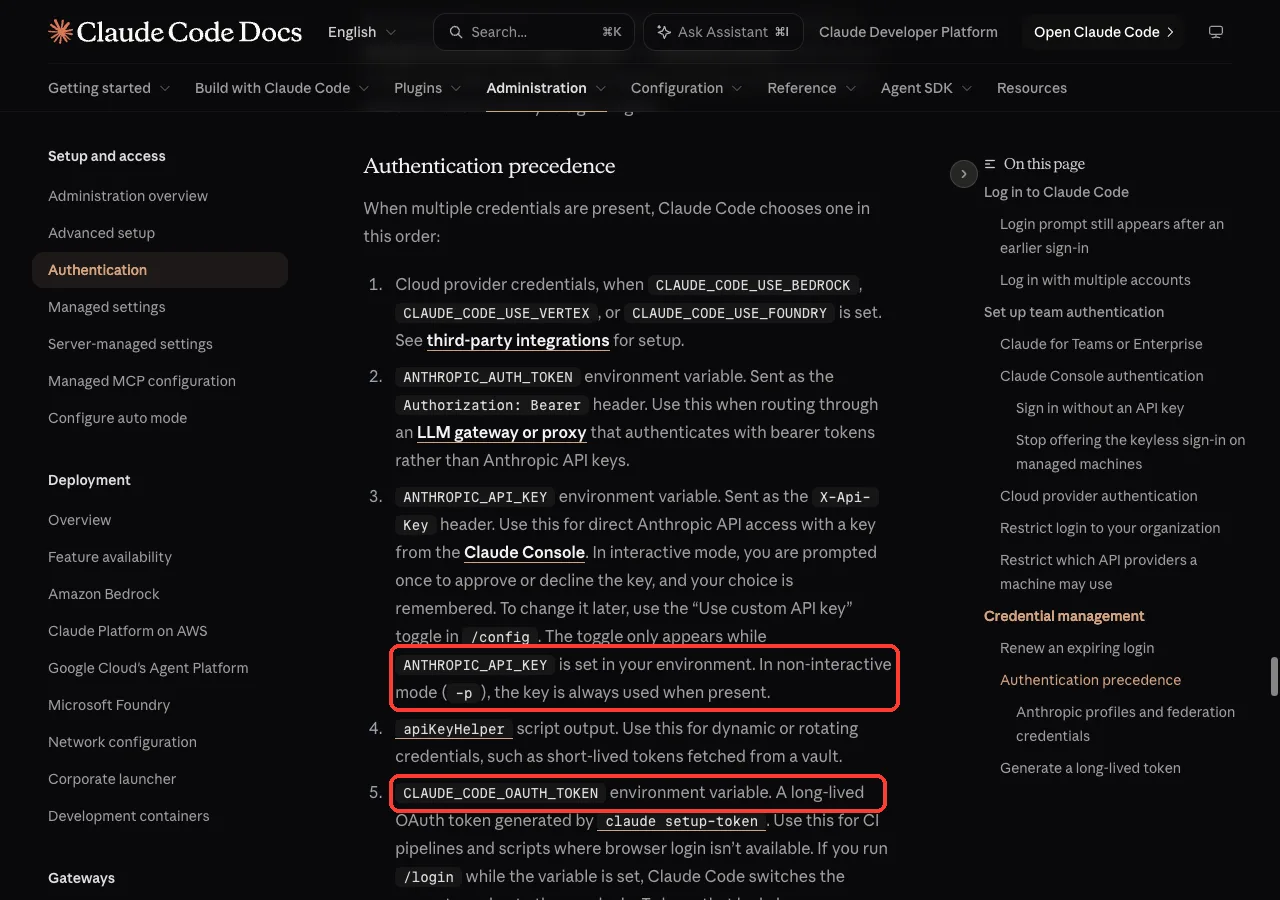
The catch is that an ANTHROPIC_API_KEY environment variable beats your login. In -p mode, Anthropic’s docs say the key is always used when it is present. We proved it: a fake key made a run fail with “Invalid API key” even though the subscription login was fine.
| Situation | What to use | Where it comes from |
|---|---|---|
| Your own laptop, already signed in | Your normal login | You signed in once with claude |
| CI or a server, using your Claude account | CLAUDE_CODE_OAUTH_TOKEN | Created with claude setup-token |
| Pay-per-use billing | ANTHROPIC_API_KEY | A key from the Claude Console |
| Amazon Bedrock, Vertex or Foundry | CLAUDE_CODE_USE_BEDROCK, _VERTEX or _FOUNDRY | Your cloud provider setup |
What Headless Mode Means
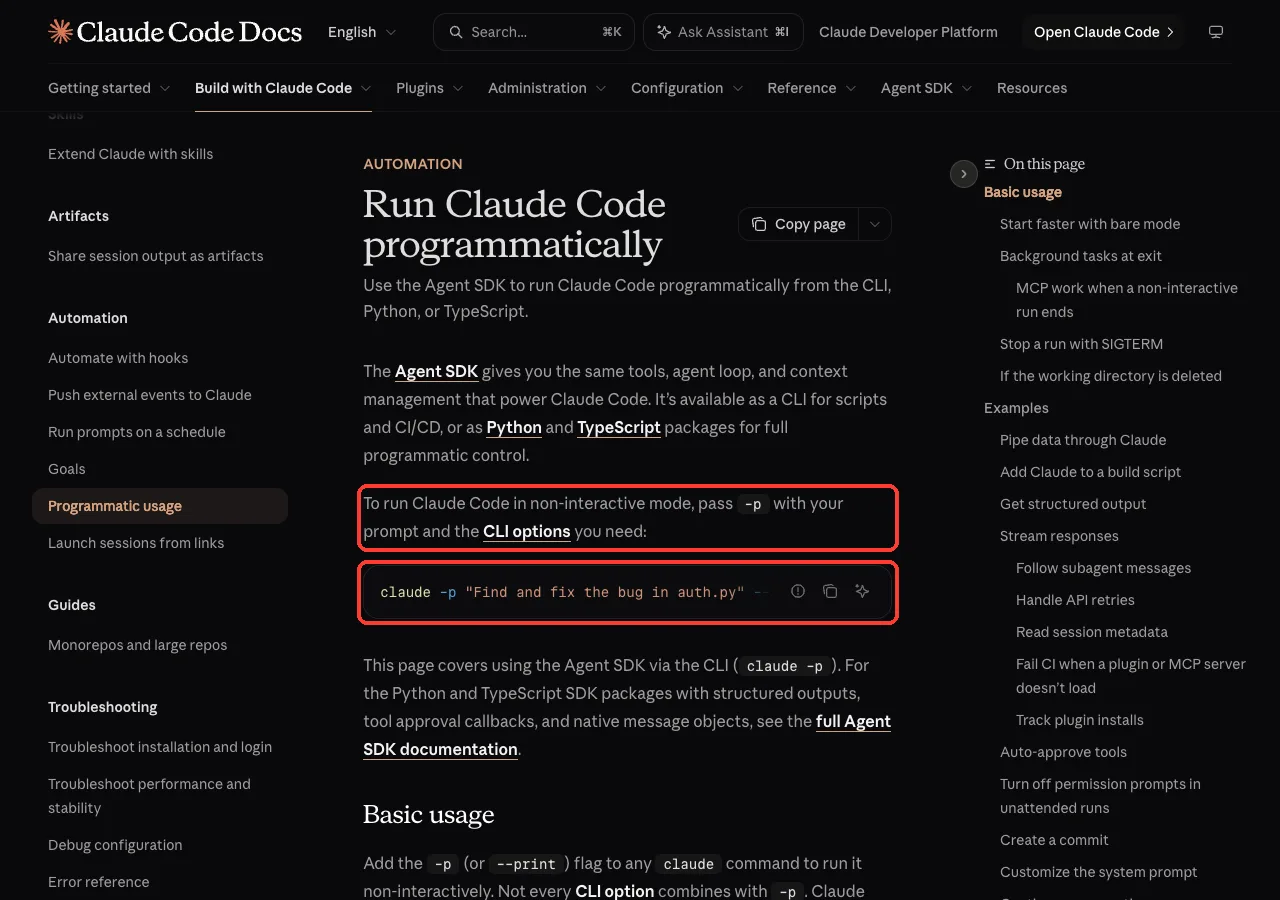
Headless means Claude Code runs with no interactive screen. You add -p (also written --print) to a normal claude command, it answers once, and it exits. Anthropic’s docs describe this as running Claude Code programmatically, and it is the same engine that powers the interactive app.
That makes it perfect for scripts, scheduled jobs and CI pipelines. If you want the full tour of the flags, read our guide to headless mode. This post focuses on one question: who are you signed in as when nobody is there to type a password?
Option 1: Use Your Existing Subscription Login
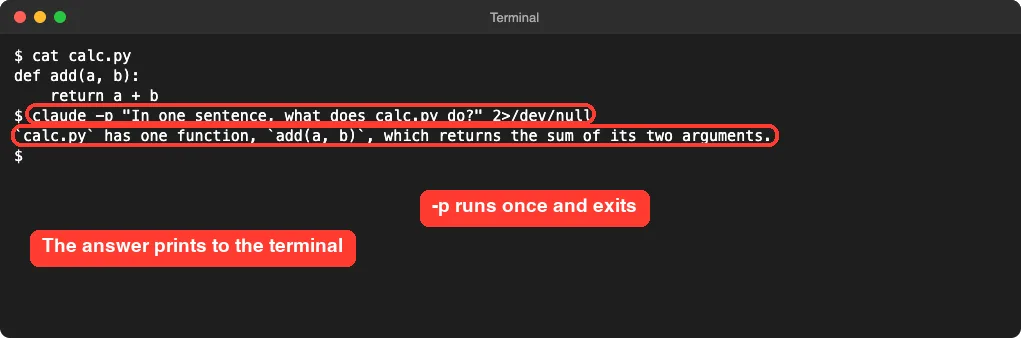
This is the simplest path, and it is what we used first. We made a tiny folder with one file, calc.py, that holds an add function. Then we asked Claude one question from the shell.
claude -p "In one sentence, what does calc.py do?"It printed one sentence saying the file has a single function that returns the sum of two arguments, then exited. No login prompt appeared, because -p reused the sign-in already stored on the machine.
One important rule from the docs: built-in commands that only work in the terminal interface, such as /login, are not available in -p runs. So you cannot fix a missing sign-in from inside a headless run. You must sign in first, in a normal session or with claude auth login.
Check Before You Script
Run claude auth status in the same shell your script will use. It tells you whether Claude Code is signed in and how. We do not show our output here, because it lists account details, but it is the fastest way to catch a “not logged in” surprise before a job fails at 2 a.m.
Get Machine-Readable Output
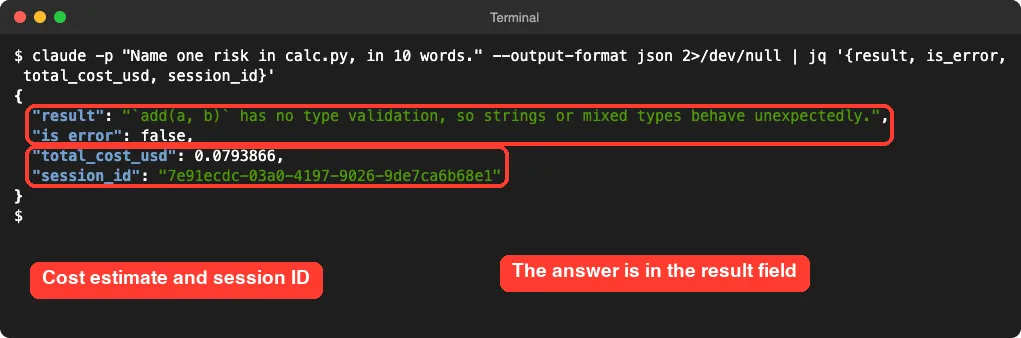
Scripts need more than a sentence. Add --output-format json and Claude Code returns a JSON object with the answer and metadata. We piped it through jq to keep only the fields we cared about.
claude -p "Name one risk in calc.py, in 10 words." --output-format json | jq '{result, is_error, total_cost_usd, session_id}'The result field holds the answer, is_error tells your script whether the run failed, and session_id lets you resume the conversation later. The total_cost_usd value is a cost estimate that Claude Code reports for the run. Treat it as an estimate, not a bill, especially on a subscription.
Option 2: Use an API Key
In headless mode, an API key in your environment always beats your login.
If you pay per use through the Claude Console, set ANTHROPIC_API_KEY in the environment. Claude Code sends it as the X-Api-Key header. In interactive mode you are asked once to approve the key.
In -p mode there is no such question: the docs say the key is always used when present.
That sounds harmless until you have both a key and a subscription on the same machine. To see the effect safely, we set a clearly fake key for a single command.
ANTHROPIC_API_KEY=sk-ant-fake-demo-key claude -p "say hi"The result was “Invalid API key”. The same prompt without the variable worked a moment earlier. The key took priority over the login, and because the key was wrong, the run failed instead of quietly falling back.
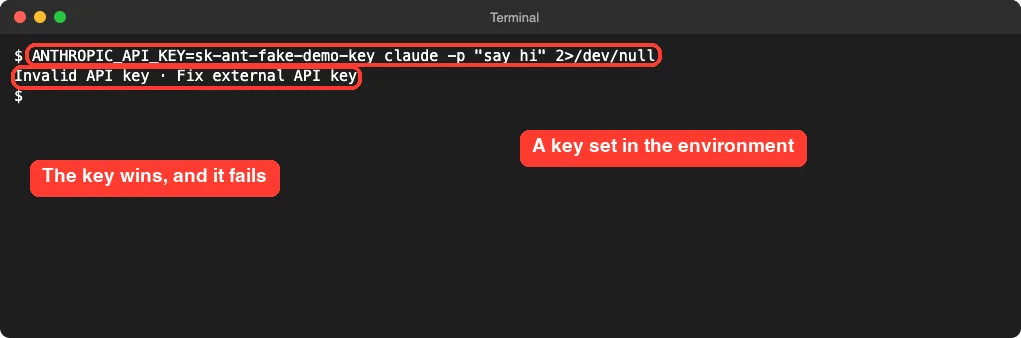
This is the number one cause of “it worked yesterday” in scripts. An old key exported in a shell profile, a .env file or a CI variable silently outranks your sign-in. If a headless run fails with an authentication error, run env | grep ANTHROPIC first.
Option 3: A Long-Lived Token for CI
CI servers have no browser, so a normal login is awkward. Anthropic’s docs describe CLAUDE_CODE_OAUTH_TOKEN for exactly this: a long-lived OAuth token generated by claude setup-token, meant for CI pipelines and scripts where browser login is not available.
The flow is simple. You run claude setup-token once on a machine where a browser works, copy the token it prints into your CI provider’s secret storage, and expose it as CLAUDE_CODE_OAUTH_TOKEN in the job. We did not run setup-token here, because it would mint a real credential on a real account, so follow Anthropic’s authentication page for the exact prompts.
The docs add one detail worth remembering. If you run /login while the variable is set, Claude Code switches the current session to the new login, but new sessions go back to the variable unless you remove it from your shell profile and settings files.
Option 4: Cloud Providers
If your company uses Amazon Bedrock, Google Cloud’s Agent Platform or Microsoft Foundry, you set CLAUDE_CODE_USE_BEDROCK, CLAUDE_CODE_USE_VERTEX or CLAUDE_CODE_USE_FOUNDRY plus the provider’s own credentials. No browser login is needed. These sit at the very top of the precedence list, so they win over everything else.
We did not run a cloud provider session, because it needs an outside account. The setup details live in Anthropic’s third-party integration docs.
The Full Precedence Order
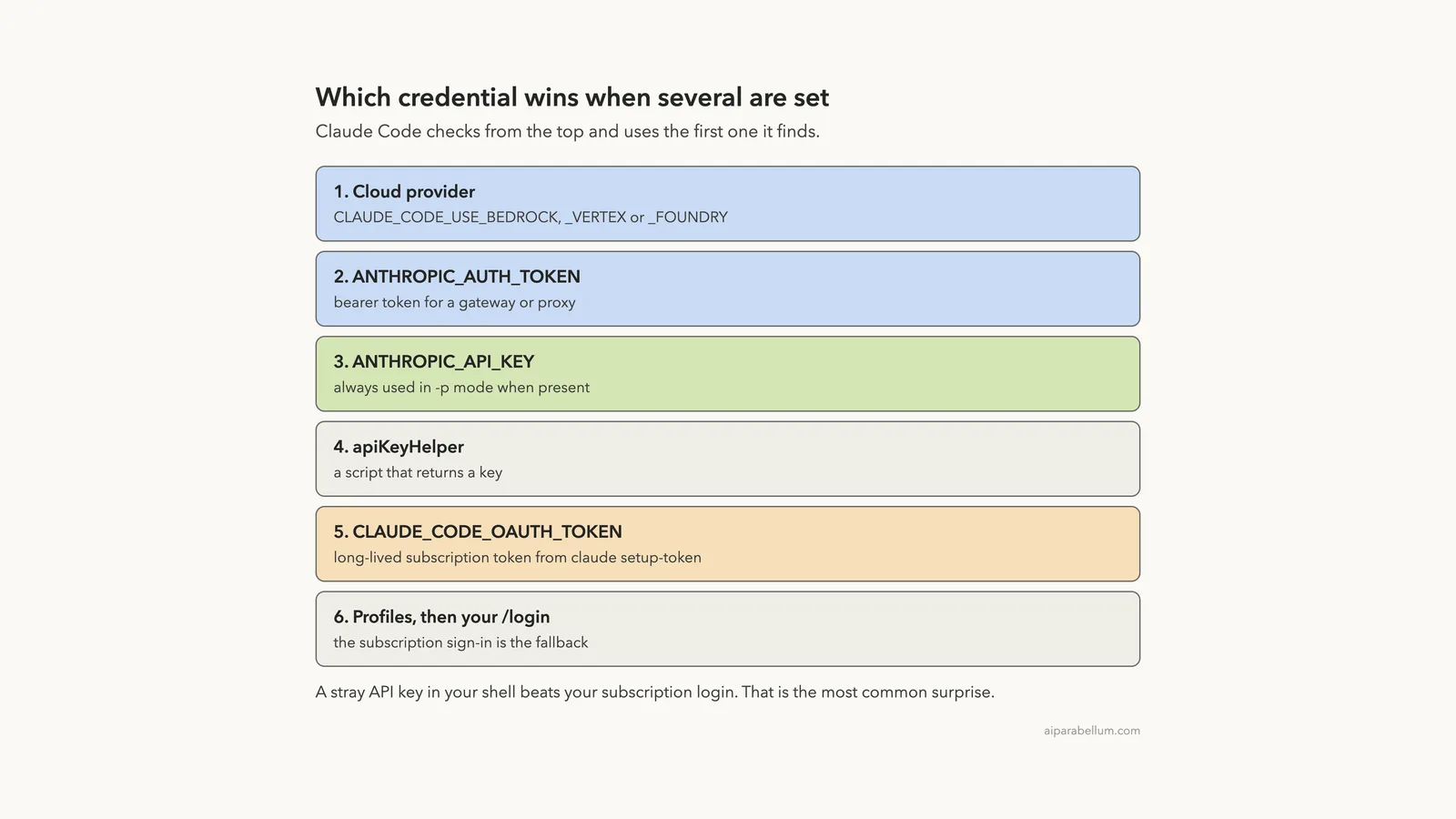
When several credentials are present, Claude Code picks one in a fixed order. Here is the list from the docs, top wins.
- Cloud provider credentials, when one of the
CLAUDE_CODE_USE_*variables is set ANTHROPIC_AUTH_TOKEN, sent as a bearer token, for gateways and proxiesANTHROPIC_API_KEY, sent as theX-Api-Keyheader- The output of your
apiKeyHelperscript CLAUDE_CODE_OAUTH_TOKENfromclaude setup-token- Anthropic profile and federation credentials
- Your subscription login from
/login
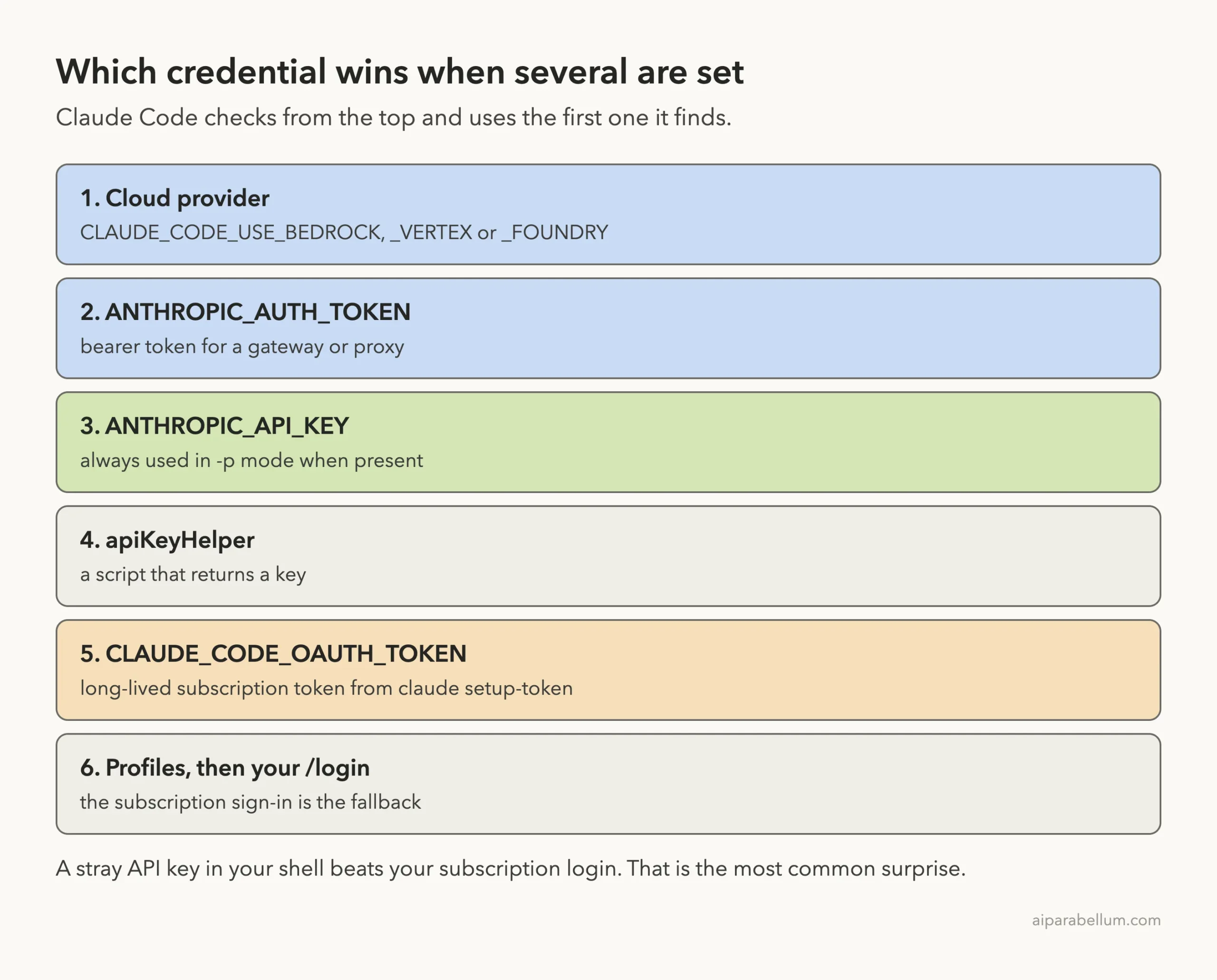
Your subscription login is at the bottom. That is why it feels invisible: it is the fallback, and any variable above it can take over without a warning.
Which Claude Code Headless Auth Option Should You Pick?
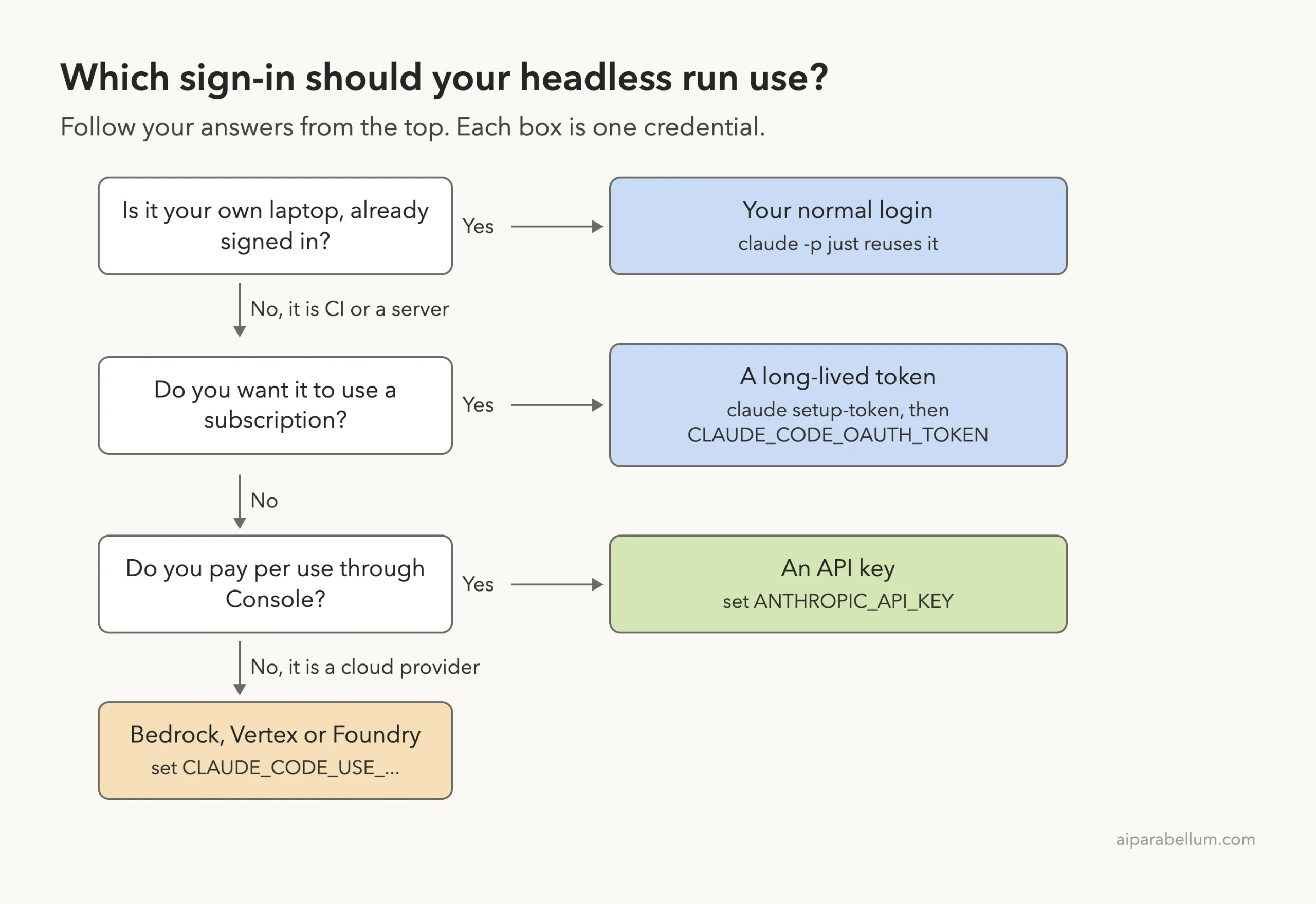
Use the ladder below. Start at the top and stop at the first “yes”.
| Option | Good for | Watch out for |
|---|---|---|
| Existing login | Scripts on your own machine | An old API key in your shell can override it |
CLAUDE_CODE_OAUTH_TOKEN | CI and servers with no browser | Treat it like a password; store it as a secret |
ANTHROPIC_API_KEY | Pay-per-use automation | Always used in -p mode when present |
| Cloud provider variables | Teams already on Bedrock, Vertex or Foundry | Needs your provider’s credentials |
Cost is part of the choice, too. A subscription has plan limits, while an API key is billed by usage. Our guide to costs and usage explains how to keep an eye on both.
Permissions in Unattended Runs
Authentication gets Claude in the door. Permissions decide what it may do once inside. Nobody is there to click “allow”, so a headless run needs its rules set up front.
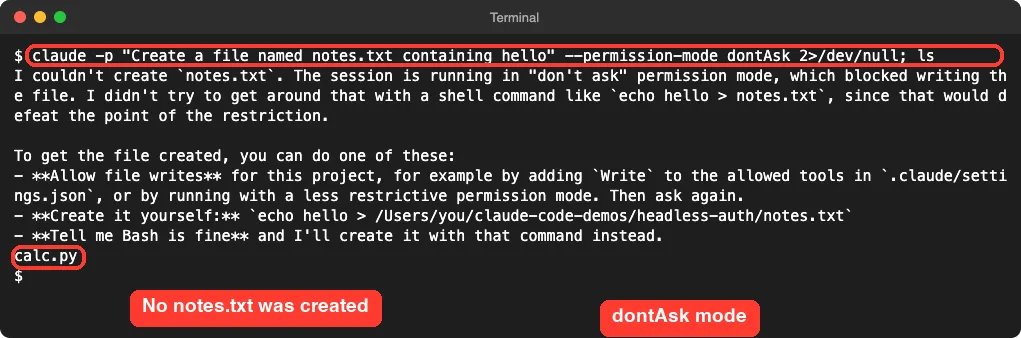
The docs list --permission-mode dontAsk as a good fit for locked-down CI runs: Claude Code denies every call that would otherwise prompt. We tested it by asking for a file to be created.
claude -p "Create a file named notes.txt containing hello" --permission-mode dontAsk; lsClaude explained that the write was blocked and suggested ways to allow it. The ls afterward showed only calc.py, so no file was created. Claude also said it did not try to sneak around the block with a shell command.
Then we allowed exactly one tool. Reading a file works, because --allowedTools "Read" covers it.
claude -p "Read calc.py and list the function names" --permission-mode dontAsk --allowedTools "Read"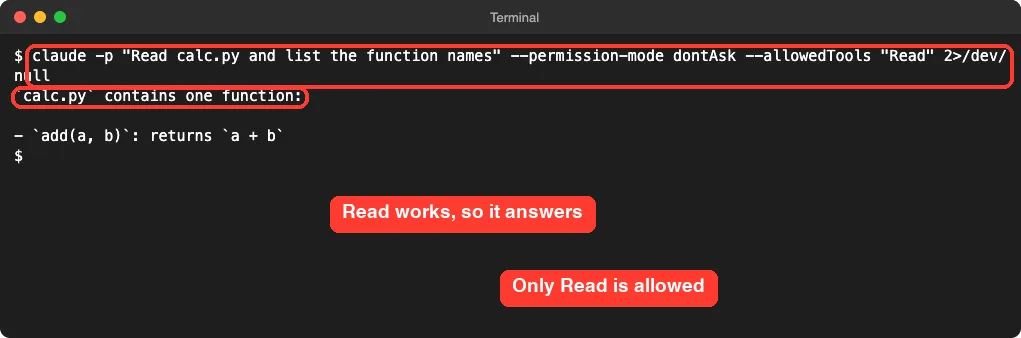
This pairing, a restrictive mode plus a short allow list, is the safest default for any job that runs alone. For a deeper look at the modes, see our guide to permission modes.
Keep Your Credentials Safe
A headless job is only as safe as its secrets. A few habits go a long way.
- Store tokens and keys in your CI provider’s secret storage, never in the repository.
- Use one credential per job, so you can revoke one without breaking the rest.
- Do not print environment variables in logs. A bad
envcall can leak a key. - Remember where logins live. On macOS they sit in the Keychain, and on Linux in
~/.claude/.credentials.json, according to the docs. - Keep project settings tidy. See our guide to settings files for where each file lives.
Try It Yourself
Here is a safe practice task. Make an empty folder, add one small file, and run three headless commands. Do not use a real project.
mkdir headless-demo && cd headless-demo
printf 'def add(a, b):\n    return a + b\n' > calc.py
claude auth status
claude -p "What does calc.py do?" --output-format json | jq '.result'
ANTHROPIC_API_KEY=not-a-real-key claude -p "say hi"
The first run should answer. The last should fail with an invalid key message, which proves that an environment key outranks your login. Then you know exactly what to look for the next time a script misbehaves.
Common Mistakes
- Leaving an old
ANTHROPIC_API_KEYin a shell profile, so every-prun uses it. - Expecting
/loginto work inside a headless run. It does not. - Pasting a token into a repository file instead of secret storage.
- Running a job with no permission rules and wondering why it stalls or fails.
- Trusting
total_cost_usdas a bill. It is an estimate.
Pro Tips
- Run
claude auth statusat the top of any new script, as a preflight check. - Use
--output-format jsonand checkis_errorso your script reacts to failures. - Combine
--permission-mode dontAskwith a small--allowedToolslist. - When two credentials seem to fight, use the precedence list above to find the winner.
- Read the official authentication page and the programmatic usage page before you ship a pipeline.
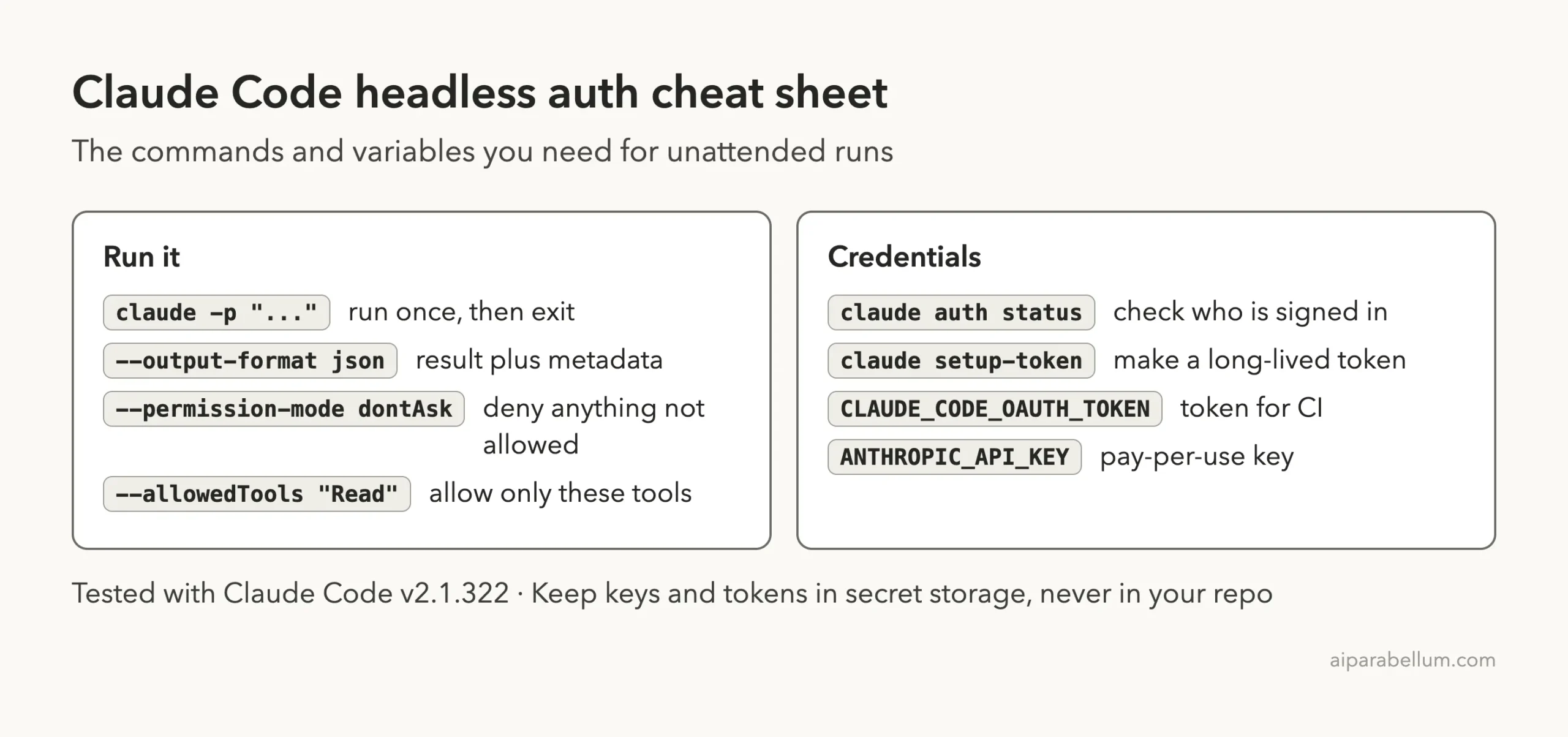
Cheat Sheet
Frequently Asked Questions
Can I use my Claude subscription with claude -p?
Yes, if you are already signed in on that machine. In our test, claude -p answered with no extra setup. For CI, Anthropic’s docs point to a token from claude setup-token.
Why does my headless run say Invalid API key?
Most likely an ANTHROPIC_API_KEY is set in your environment. In -p mode it is always used when present, even if your login is fine. Unset it or replace it with a valid key.
Can I run /login inside a headless run?
No. The docs say built-in commands that only run in the terminal interface, such as /login, are not available in -p runs. Sign in beforehand.
Which is better for CI, a token or an API key?
It depends on how you pay. A token from claude setup-token uses your Claude account, and an API key bills by usage through the Console. Pick the one that matches your plan, and store it as a secret.
Is total_cost_usd my real charge?
Treat it as an estimate reported by Claude Code. Check your plan or Console for what you are actually charged.
Conclusion
Claude Code headless auth comes down to one idea: Claude Code picks the first credential it finds, from cloud providers at the top to your subscription login at the bottom. Your own laptop works with your normal login, CI works with a long-lived token or an API key, and a stray key can quietly override everything. Check claude auth status, set permissions with dontAsk and a short allow list, keep secrets in secret storage, and your unattended runs will behave. You can also browse more guides in our Claude tools section.
Previous in the series: Part 39: Claude Code Routines vs /loop: Which to Use
Next in the series: Part 41: Claude Agent SDK in Python: Build a Small Agent.