Claude Code can run a prompt for you again and again, but it gives you more than one way to do it. The big question in the claude code routines vs loop debate is simple: should the job run in the cloud, or inside your open terminal? This guide tests /loop for real, compares it with routines, and gives you a clear rule for choosing.
This is Part 39 of 45 in our Claude Code Deep Dives, part of our Claude Code tutorials. Last time we covered routines and limits.
Tested with Claude Code v2.1.322 on November 13, 2026, on macOS. We ran a real /loop in a throwaway demo folder and read Anthropic’s scheduling docs line by line.
We did not create a live cloud routine, because that needs a GitHub repository and writes to a real account. The routine facts below come from the official docs. We tested on macOS; routines run in Anthropic’s cloud, so the steps are the same on Windows and Linux.
Routines vs /loop at a Glance
| Question | Cloud routine | /loop |
|---|---|---|
| Runs on | Anthropic’s cloud | Your machine |
| Needs your computer on | No | Yes |
| Needs an open session | No | Yes |
| Local files | No, it works on a fresh clone | Yes |
| Shortest interval | 1 hour | 1 minute |
| Permission prompts | Auto mode by default | Inherited from your session |
| Created with | The web, the Desktop app, or /schedule | /loop |
What Each Option Is For
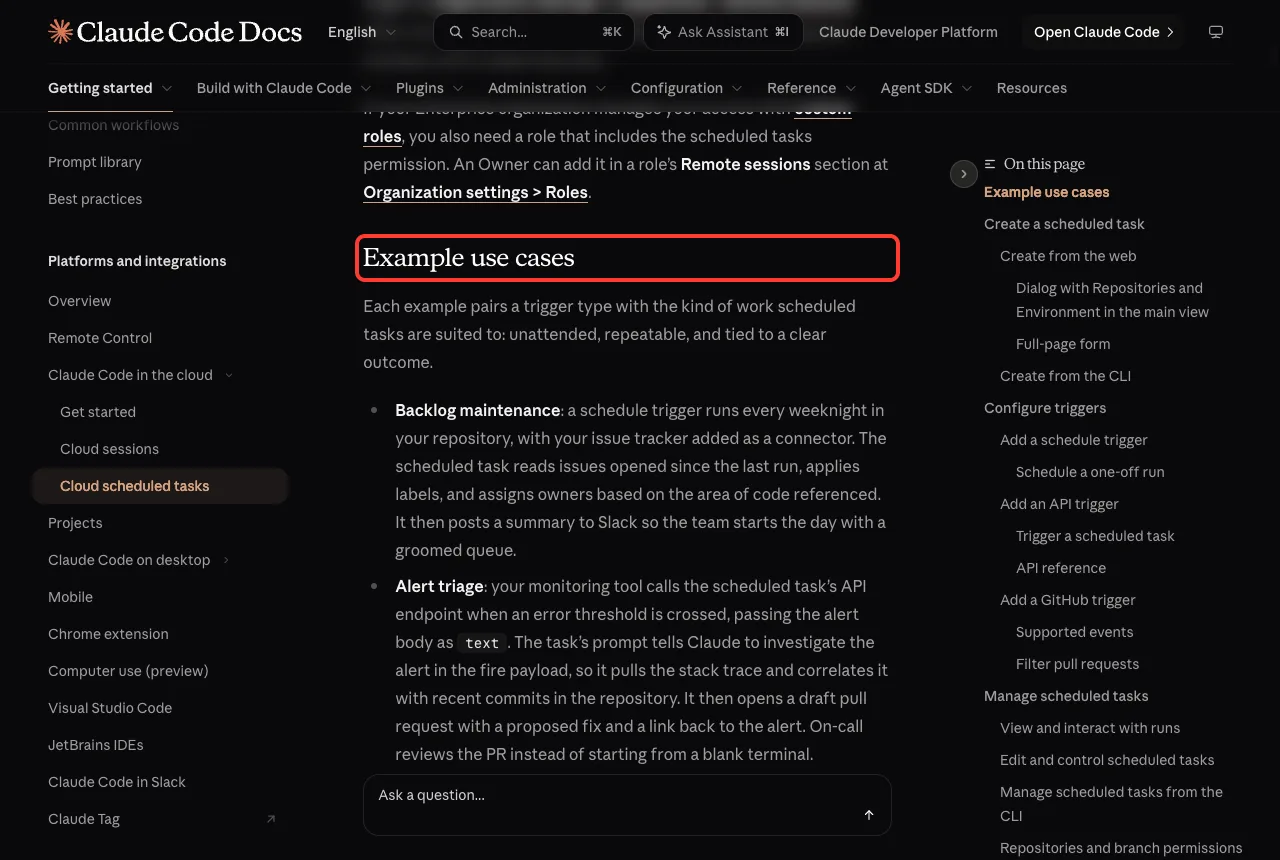
A routine is a saved prompt with a trigger. It can start on a schedule, on an API call, or on a GitHub event, and each run is a full cloud session that works even when your laptop is closed.
The /loop command is a bundled skill. It repeats a prompt inside the Claude Code session you already have open, so it is built for quick polling such as “is the deploy finished yet?”
Anthropic’s docs list a third option, Desktop scheduled tasks. They run on your own machine, can use your local files, and do not need an open session.
Use a routine when the job must happen without you, and use /loop when you are sitting right there.
Routines vs Loop in the Official Docs
Anthropic puts all three options side by side on the scheduled tasks page. It is the best single reference, so it is worth knowing where to find it.
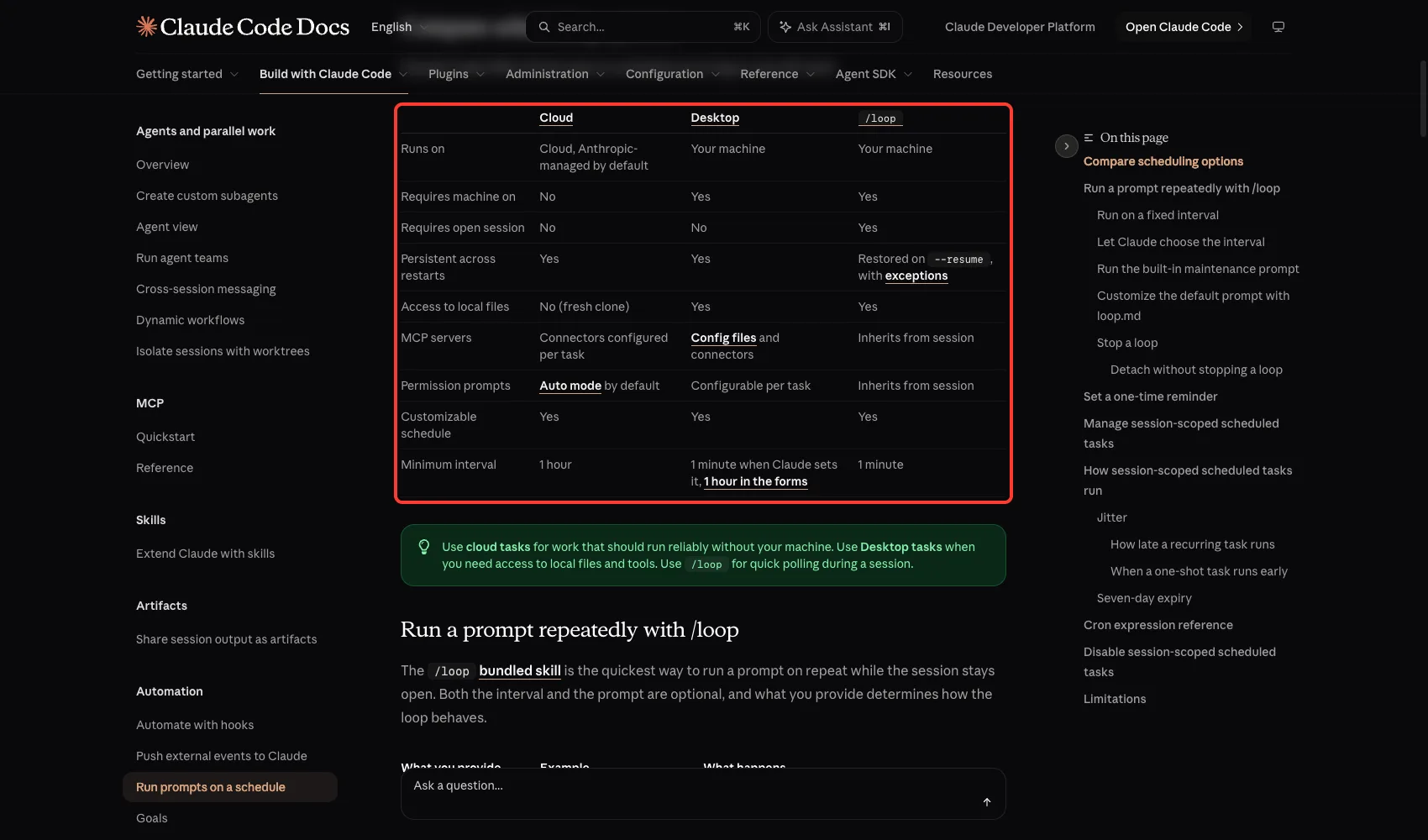
Two rows decide most choices. “Requires machine on” is No only for cloud routines, and “Access to local files” is No only for cloud routines too, because they start from a fresh clone of your repository.
That tradeoff is the heart of the whole comparison. You get reliability in the cloud, and you give up your local files.
Test 1: Start a /loop
We made a demo folder with one file, status.txt, that says “build: running”. Then we typed one prompt in Claude Code:
/loop 5m check whether status.txt says done and tell me in one lineClaude turned 5m into a cron job, ran the first check right away, and reported that the file did not say done yet. The screen shows the exact tool call it used.
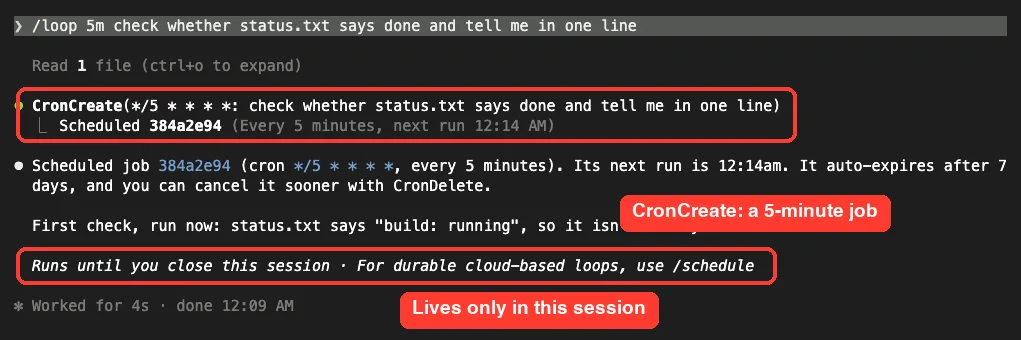
Notice the line “Runs until you close this session”. It also mentions /schedule for durable cloud-based loops. That one line is the main difference between the two tools.
The interval can lead the prompt like 30m, or trail it as a clause like every 2 hours. The units are s, m, h, and d, and seconds are rounded up to a minute.
Two other ways to use /loop
If you leave out the interval, Claude picks one for you each time. It waits between one minute and one hour, shorter while something is changing and longer when things are quiet.
If you leave out the prompt, a built-in maintenance prompt runs. It continues unfinished work, tends to your branch’s pull request, and does cleanup passes.
You can replace it with your own .claude/loop.md file. For a deeper look, see our loop command guide.
Test 2: List and Cancel the Loop
You manage loops by talking to Claude. We asked “what scheduled tasks do I have?” and Claude called CronList.
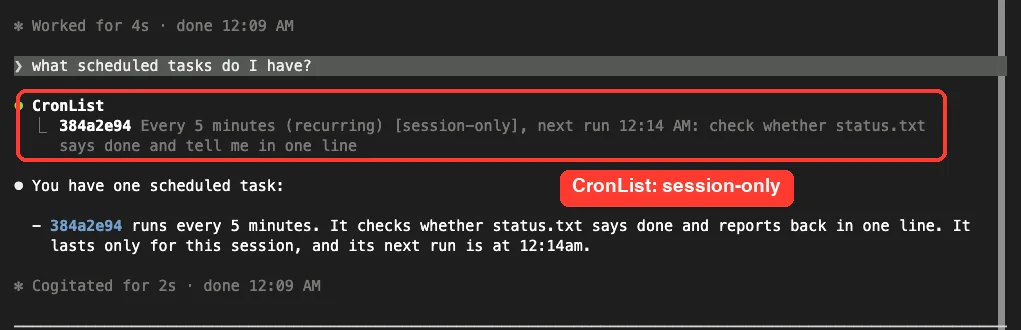
The row says “[session-only]” and shows the next run time. Those next run times need Claude Code v2.1.299 or later, and we were on v2.1.322.
Then we asked Claude to cancel the loop. It called CronDelete with the job ID and confirmed that no tasks were left.
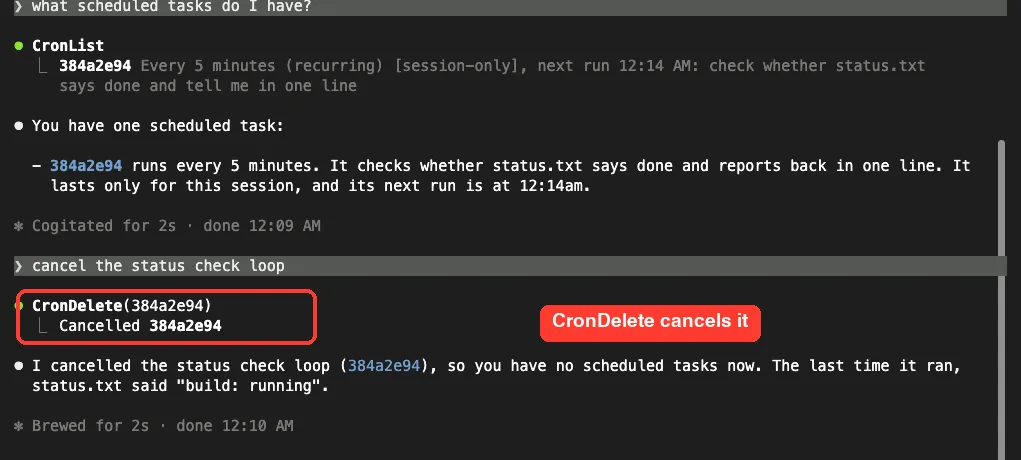
The docs explain why you ask in words. A fixed-interval loop like /loop 5m is not stopped by Esc or Ctrl+C. A self-paced loop, the kind with no interval, is the one you can stop with Esc.
The Limits of /loop
Because /loop lives in your session, it has limits that routines do not. Here are the ones the docs call out.
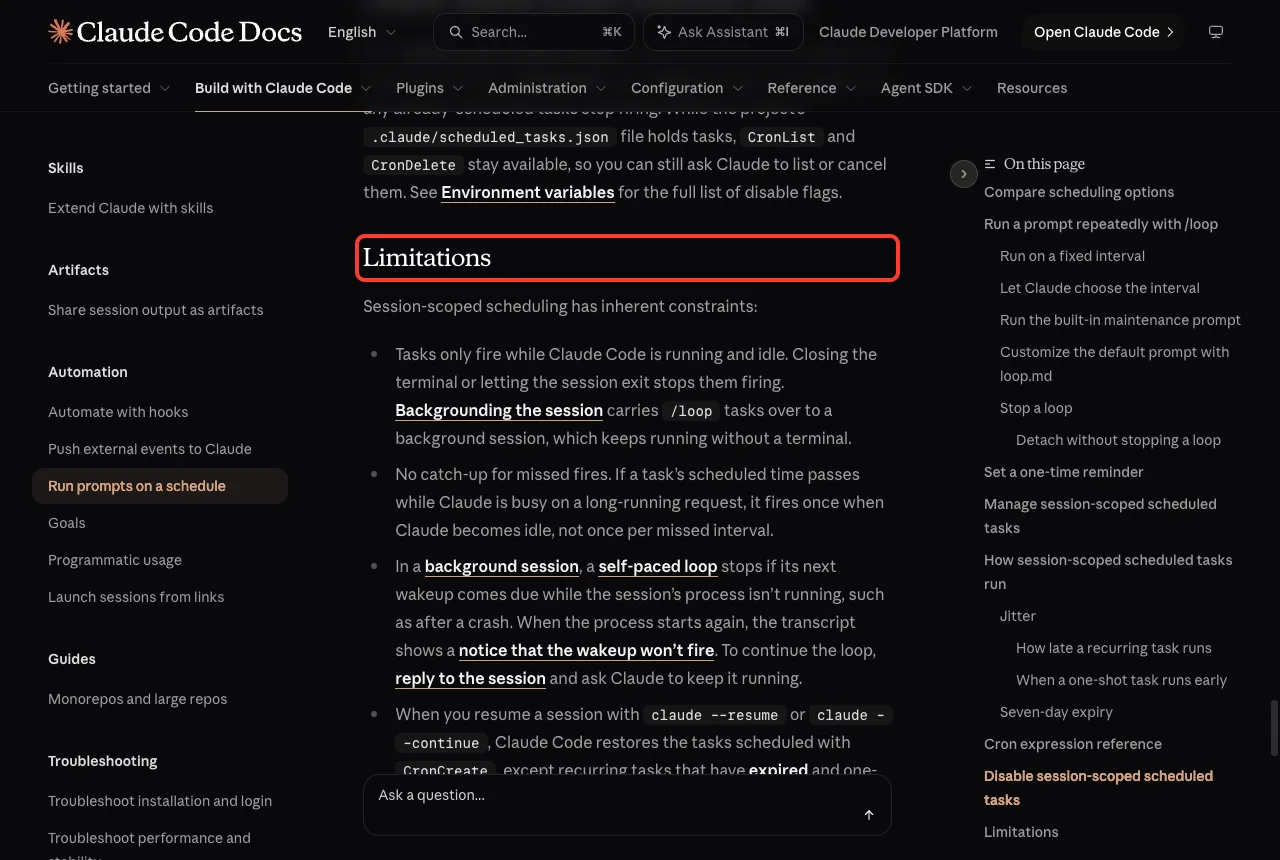
- Tasks fire only while Claude Code is running and idle. Closing the terminal stops them.
- There is no catch-up. If a run comes due while Claude is busy, it fires once when Claude is idle, not once per missed interval.
- A session holds up to 50 scheduled tasks at once.
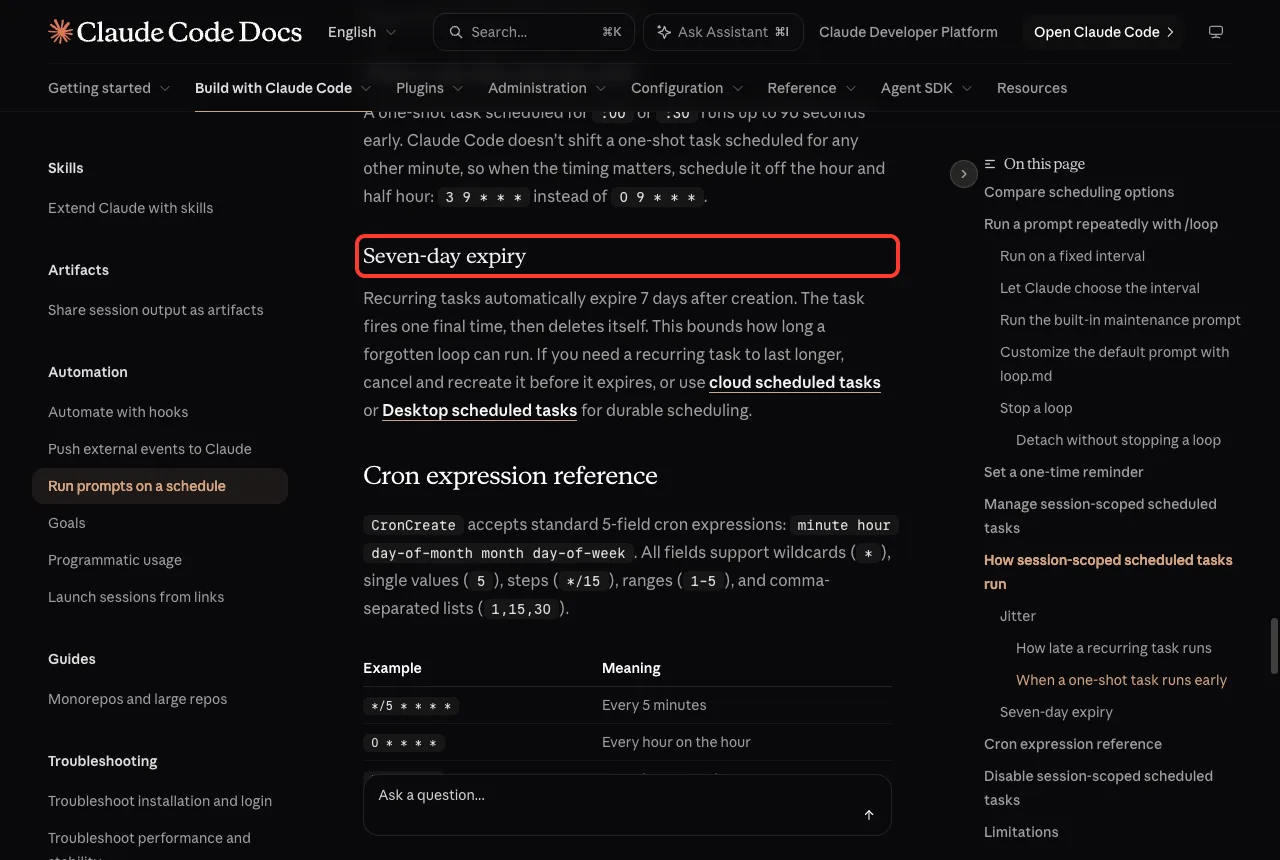
- Recurring tasks expire 7 days after you create them. The task fires one last time and then deletes itself.
- A self-paced
/loopis not restored when you resume withclaude --resume, so you run it again.
Timing is not exact
Claude Code adds a small delay, called jitter, so many sessions do not hit the API at the same second. A recurring task can start late by up to half the gap to its next run, and by at most 30 minutes.
The one exception is a task that runs every five minutes, written */5 * * * *. It is not delayed, and each run starts 4 minutes 45 seconds after the last one, which is exactly what /loop 5m creates.
If you need an exact time, pick an off-the-hour minute. The docs suggest 3 9 * * * instead of 0 9 * * *.
The Limits of Routines
Routines fix those problems, but they bring their own rules. In our previous part we covered them in full, so here is the short version from the docs.
- The shortest schedule is once per hour. Cron expressions that run more often are rejected.
- Runs start in a fresh clone of your repository, so they cannot see files that only exist on your machine.
- Runs use auto mode, and a few actions still stop and wait for you.
- A run set exactly on the hour can start several minutes late, so choose a minute like 9:07.
- Every run counts against your usage.
Routines also need a claude.ai login for /schedule. If you use an API key or a cloud provider such as Amazon Bedrock, the command is not available and you manage tasks on the web instead.
Claude Code Routines vs Loop: Which One Should You Use?
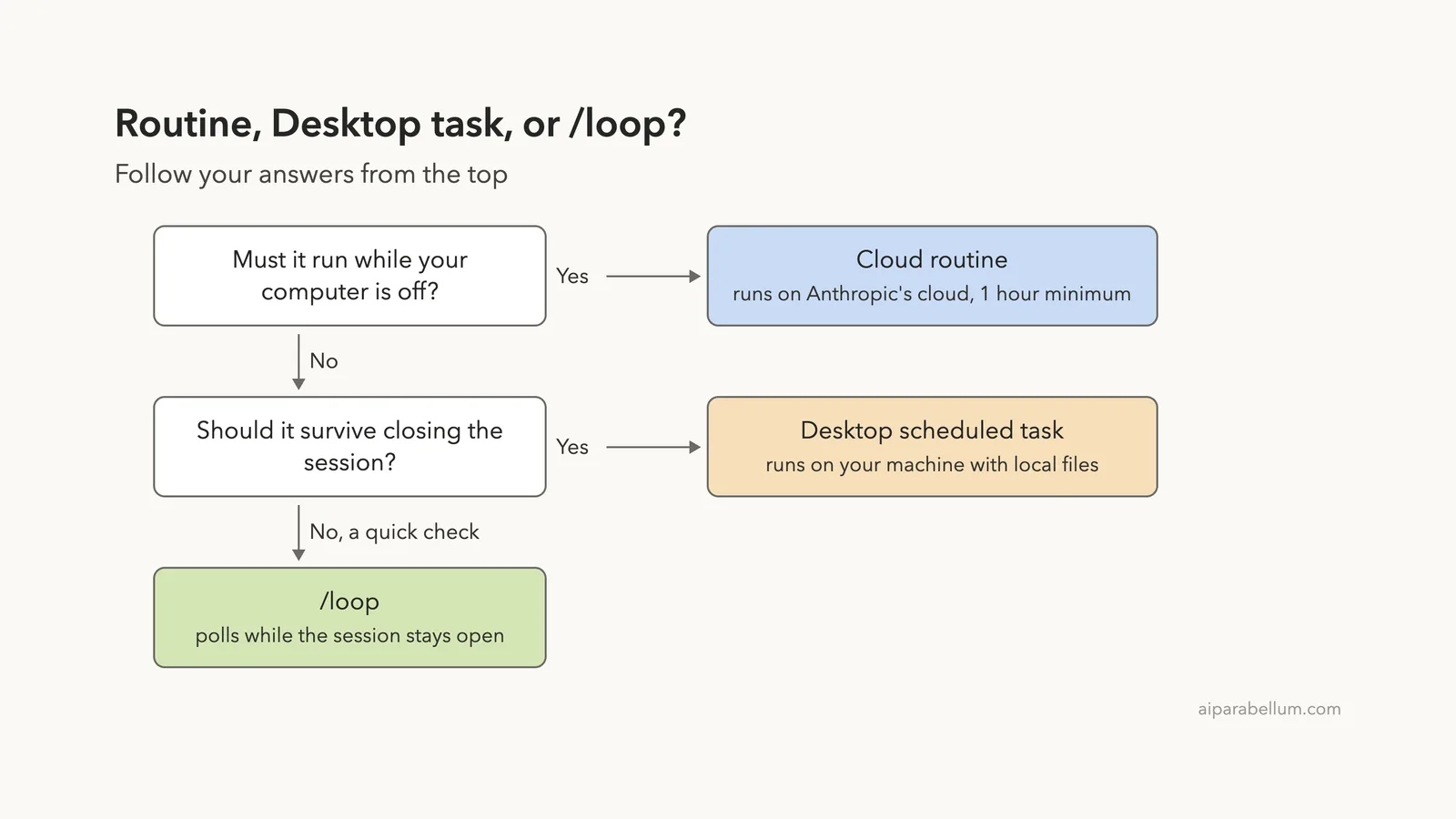
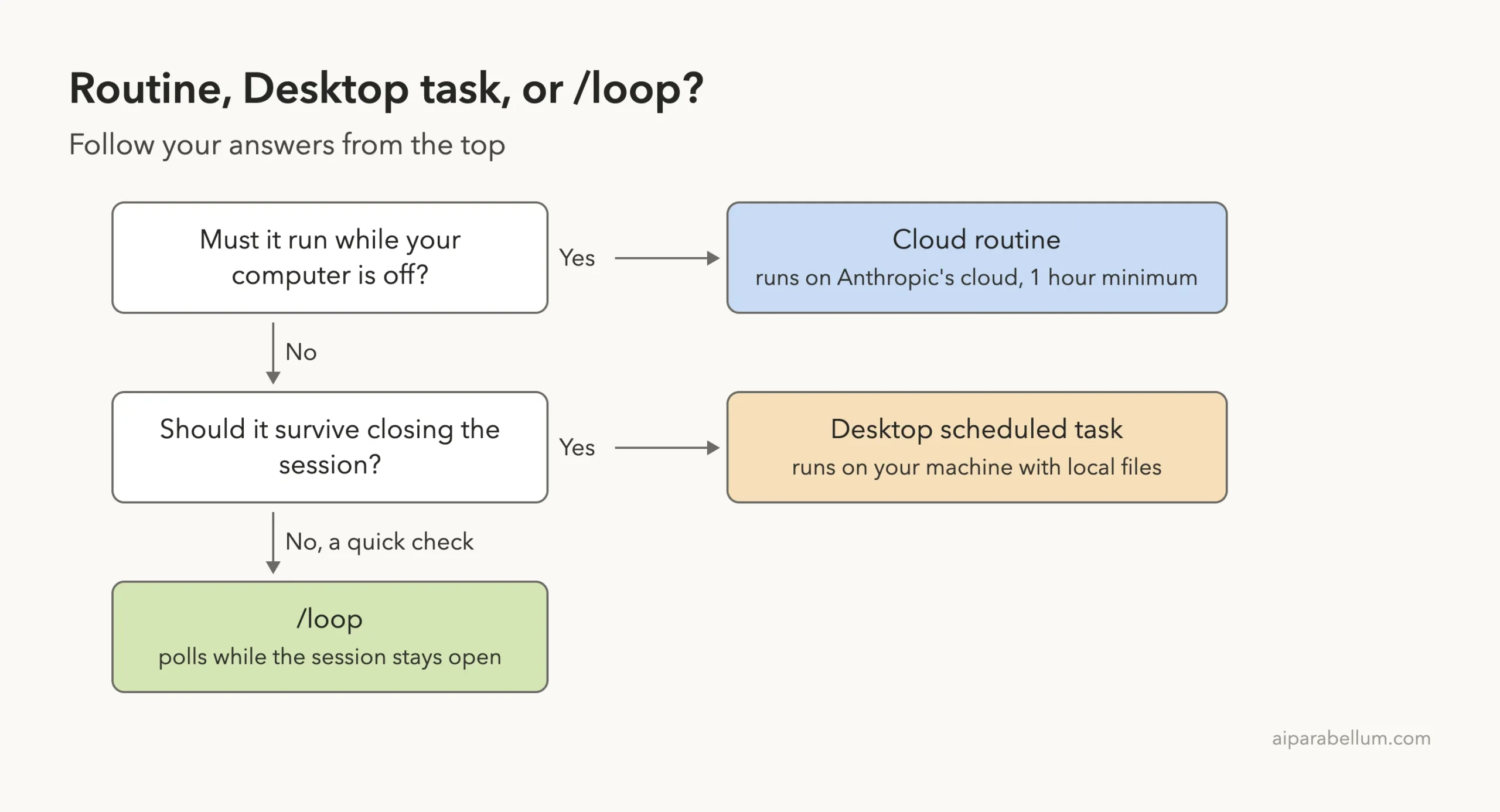
Ask two questions. Must the job run while your computer is off? If yes, use a cloud routine.
If no, should the job survive closing the session? If yes, use a Desktop scheduled task. If it is only a quick check while you work, use /loop.
| Your job | Best fit | Why |
|---|---|---|
| Groom issues every weeknight | Cloud routine | Must run with your laptop closed |
| Review every new pull request | Cloud routine | A GitHub trigger starts it, and /loop has no event triggers |
| Summarize local notes each morning | Desktop scheduled task | Needs local files and no open session |
| Watch a deploy for the next hour | /loop | Short, in-session, and cancelled when done |
| Check CI and answer review comments | /loop | Uses your open session and current branch |
| Check every 10 minutes | /loop | Routines cannot run more often than hourly |
Other tools to know
The docs point to two nearby features. If you want to react to events instead of polling, look at Channels. If you want Claude to keep working toward a condition instead of on a timer, look at /goal.
For CI-style automation you can also use a schedule trigger in GitHub Actions. And if you want to start a task from your phone or browser, see Claude Code web.
Turn a Loop Into a Routine
A common path is to start with /loop while you figure out the right prompt, then promote it. Once the prompt works and you want it to run without you, create a routine from the same words.
/schedule every weeknight at 9:07pm, check the open issues and label any that are missing an areaClaude asks follow-up questions and creates the cloud task. Before you rely on it, use Run now once and read the transcript. Our Claude AI overview covers which plans include cloud features.
Try It Yourself
Make a small folder with one file called status.txt that says “running”. Open Claude Code there and paste this prompt:
/loop 5m check whether status.txt says done and tell me in one lineThen edit the file to say “done” and wait for the next run, or ask Claude to run the check now. When you are finished, type “cancel the status check loop” so nothing keeps running.
Common Mistakes
- Expecting
/loopto keep running after you close the terminal. It stops, and it does not catch up on missed runs. - Pressing
Escto stop a fixed-interval loop. Ask Claude to cancel it instead. - Using a routine for a job that needs files only on your machine. Cloud runs use a fresh clone.
- Asking a routine to run every 10 minutes. The shortest interval is one hour.
- Forgetting that a recurring loop expires after seven days.
- Scheduling on the hour and then wondering why the run is late.
Pro Tips
- Prototype the prompt with
/loop, then move it to a routine once it behaves. - Use
/loop 20m /review-pr 1234style prompts to repeat a skill. Only skills Claude may run on its own fire; built-in commands such as/modelarrive as plain text. - Put a project default in
.claude/loop.mdand edit it while the loop runs, because changes apply on the next iteration. - Ask “what scheduled tasks do I have?” at the start of a session so no old loop surprises you.
- Set
CLAUDE_CODE_DISABLE_CRON=1if you want session scheduling turned off entirely.
Cheat Sheet
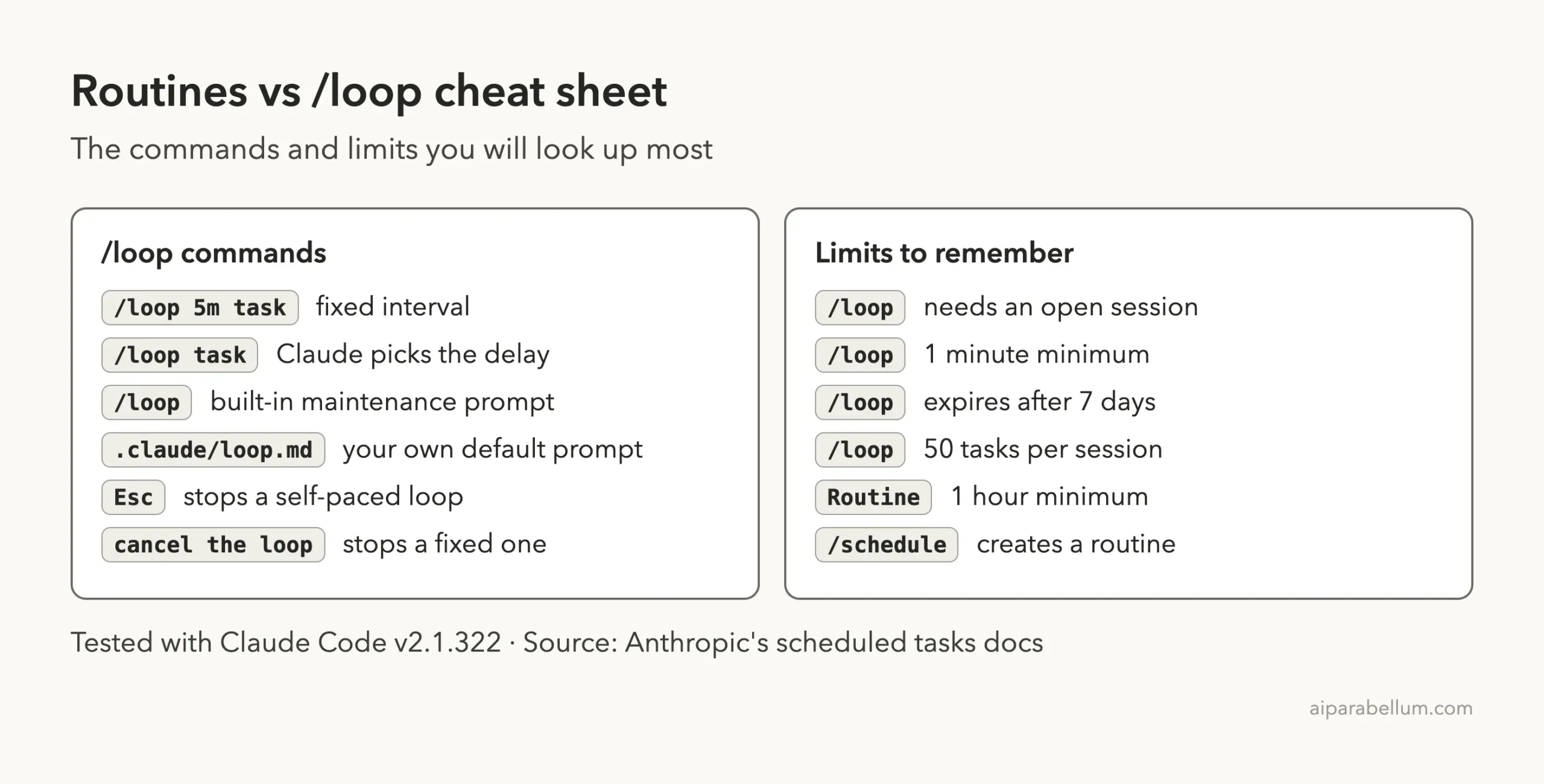
Frequently Asked Questions
Is /loop the same as a routine?
No. A /loop runs inside your open session on your machine, while a routine runs in Anthropic’s cloud and keeps going when your computer is off.
Does /loop keep running if I close the terminal?
No. Tasks fire only while Claude Code is running and idle. You can background the session, which carries loops over to a background session that runs without a terminal.
How often can each one run?
A /loop can run as often as once a minute. A routine’s shortest interval is one hour.
How long does a /loop last?
A recurring task expires seven days after you create it. It fires one last time and deletes itself, unless you cancel it sooner.
Can a routine read my local files?
No. A cloud routine works on a fresh clone of your repository. Use a Desktop scheduled task or /loop when you need local files.
Conclusion
Pick a cloud routine when the work must run on its own, from a schedule, an API call, or a GitHub event, and use /loop when you want a quick, short-lived check inside a session you already have open. Our test showed how light /loop is: one prompt created the job, one question listed it, and one sentence cancelled it. When your loop proves its worth, promote it with /schedule. For the full details, see Anthropic’s scheduled tasks documentation and the routines docs.
Previous in the series: Part 38: Claude Code Routines: Examples and Limits
Next in the series: Part 40: Claude Code Headless Auth: Use It With a Subscription or a Key.