Claude Code routines let you put Claude on autopilot. You write a prompt once, pick a trigger, and Claude runs it in the cloud while your laptop is closed. In this guide you get six real claude code routines examples straight from Anthropic’s docs, plus every limit you need to know before you rely on them.
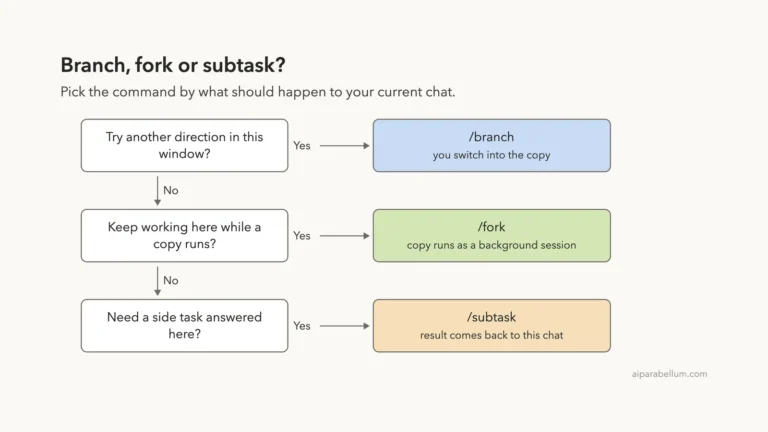
This is Part 38 of 45 in our Claude Code Deep Dives, part of our Claude Code tutorials. Last time we covered forking a conversation.
Tested with Claude Code v2.1.322 on November 12, 2026, on macOS. We ran the /schedule command inside a throwaway demo folder and read the official docs line by line.
We did not create a live cloud task, because that needs a GitHub repository and writes to a real account, so the examples and limits below come from Anthropic’s documentation.
We did not use any Windows or Linux machine; routines run in Anthropic’s cloud, so the steps are the same on every system.
Routines at a Glance
| Question | Short answer |
|---|---|
| What is it? | A saved prompt, one or more repositories, and some connectors that run on their own |
| Where does it run? | On Anthropic’s cloud, not on your machine |
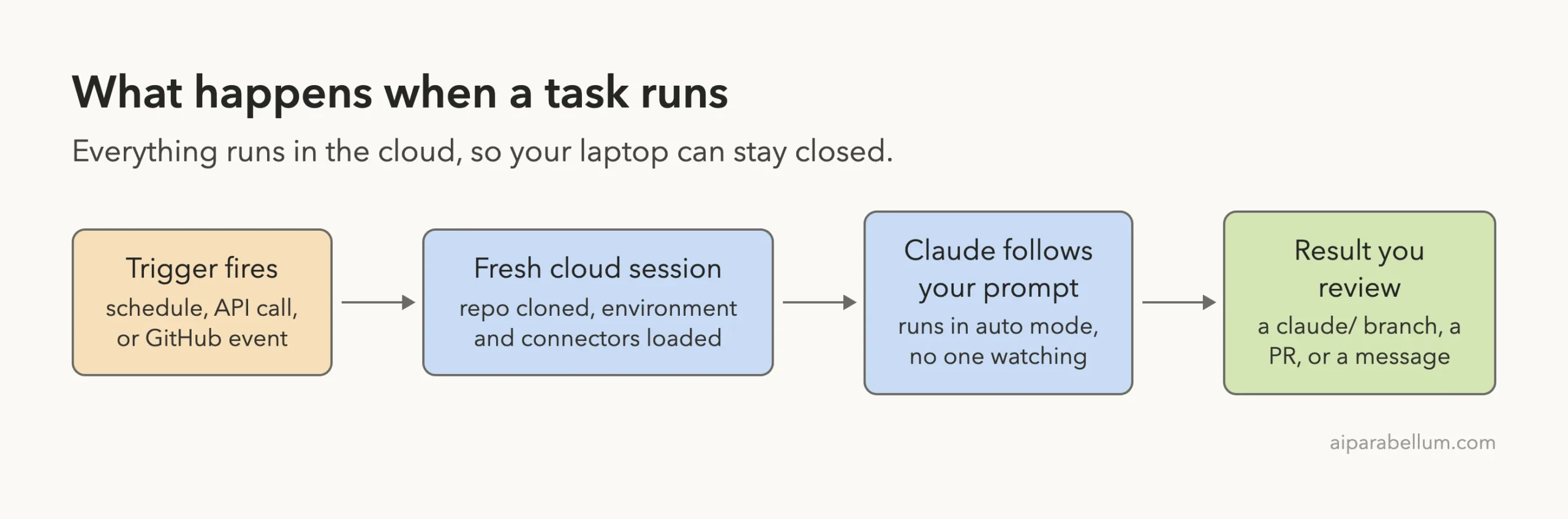
| What starts it? | A schedule, an API call, or a GitHub event |
| Which plans? | Pro, Max, Ultra, Team, and Enterprise |
| Where do you manage it? | claude.ai/code/routines, the Desktop app, or /schedule in the CLI |
| Status | Research preview, so behavior and limits may change |
What Are Claude Code Routines?
A routine is a saved Claude Code setup: a prompt, the repositories Claude should work in, and the connectors it may use. Anthropic’s docs now call them scheduled tasks, and the old name “routines” still shows up in the web address, the /routines alias, and the API.
Each run is a full Claude Code cloud session. It can run shell commands, use skills, and call any connector you include. Because it runs on Anthropic’s servers, it keeps working when your laptop is shut.
Routines belong to your own claude.ai account. They are not shared with teammates, and every run counts against your usage. Anything the task does through GitHub or a connector shows up as you, so commits and pull requests carry your GitHub user.
A routine is a prompt you wrote once, with a trigger that presses the button for you.
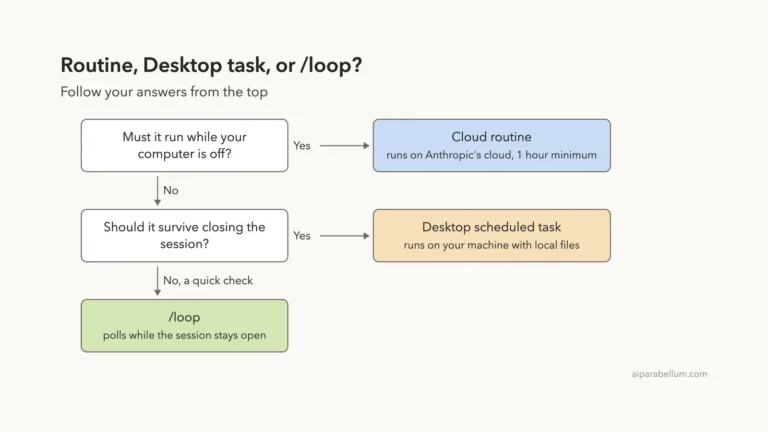
Two other features also schedule work, but on your own machine: Desktop scheduled tasks and the /loop command. Routines are the cloud option, so pick them when the job should not depend on your computer being awake.
Check That /schedule Is Available
The fastest way to see if routines work for you is to type /sched in Claude Code. If your sign-in qualifies, the command menu shows /schedule with the description “Create and manage routines: cloud agents on a schedule”. That is exactly what we saw on v2.1.322.
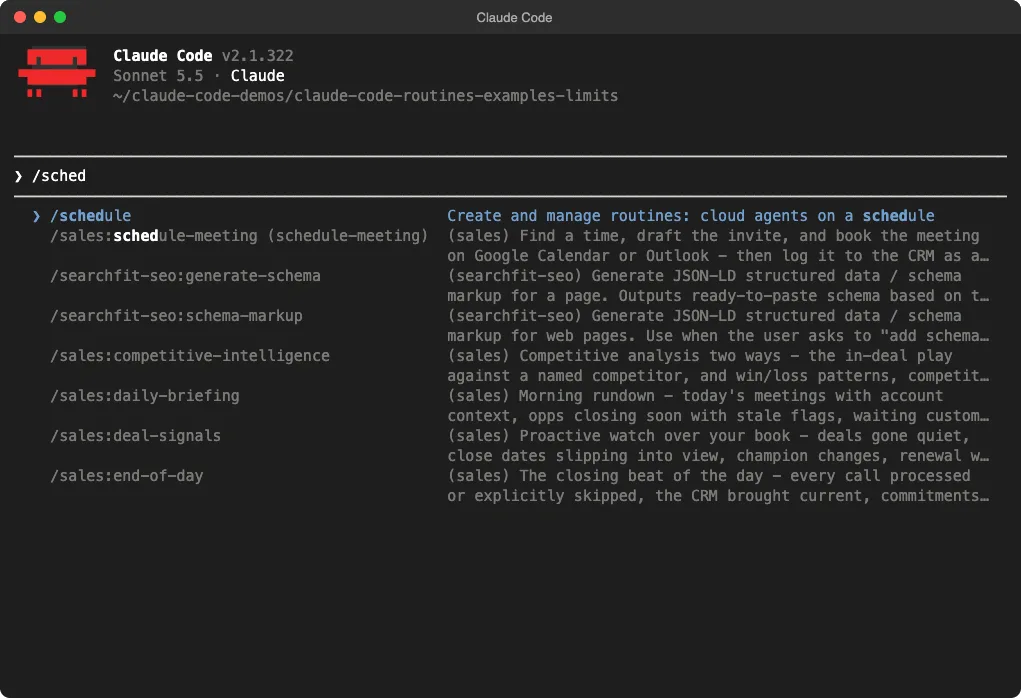
If you do not see it, the docs list the usual causes. You may be signed in with a Console API key or a cloud provider such as Amazon Bedrock, because /schedule needs a claude.ai subscription login. You may also be inside a cloud session, or your organization may have turned scheduled tasks off.
In those cases you can still create tasks on the web at claude.ai/code/routines, as long as you have a paid plan and your organization allows it. For plan basics, see our Claude AI overview.
Six Claude Code Routines Examples
Anthropic’s docs describe six use cases. Each pairs a trigger with work that is unattended, repeatable, and tied to a clear outcome.
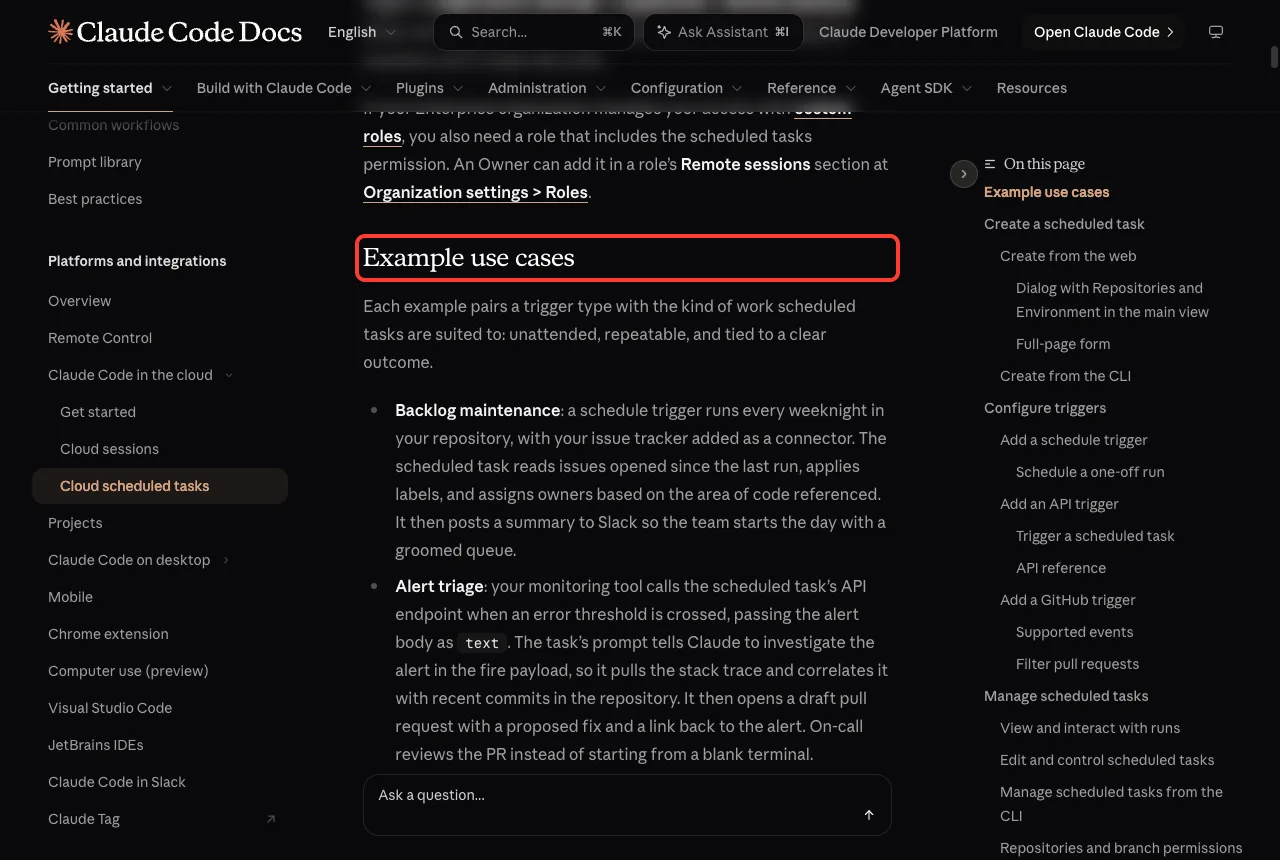
| Example | Trigger | What Claude does |
|---|---|---|
| Backlog maintenance | Schedule, every weeknight | Reads new issues, applies labels, assigns owners, and posts a summary to Slack |
| Alert triage | API call from a monitoring tool | Investigates the alert, correlates it with recent commits, and opens a draft pull request |
| Bespoke code review | GitHub, pull_request.opened | Applies your team’s checklist and leaves inline comments plus a summary |
| Deploy verification | API call from your CD pipeline | Runs smoke checks, scans logs, and posts a go or no-go |
| Docs drift | Schedule, weekly | Scans merged PRs, flags outdated docs, and opens update PRs |
| Library port | GitHub, pull_request.closed (merged) | Ports a change to a parallel SDK in another language and opens a matching PR |
Example 1: Backlog Maintenance
A schedule trigger runs every weeknight in your repository, with your issue tracker added as a connector. Claude reads the issues opened since the last run, applies labels, and assigns owners based on the code each issue mentions. It then posts a summary to Slack so your team starts the day with a groomed queue.
Example 2: Alert Triage
Your monitoring tool calls the task’s API endpoint when an error threshold is crossed and passes the alert body as text. Claude pulls the stack trace, matches it to recent commits, and opens a draft pull request with a proposed fix. The on-call person reviews a PR instead of starting from a blank terminal.
Example 3: Bespoke Code Review
A GitHub trigger fires on pull_request.opened. Claude applies your own review checklist and leaves inline comments for security, performance, and style. Human reviewers can then focus on design instead of mechanical checks.
Example 4: Deploy Verification
After each production deploy, your pipeline calls the task’s endpoint. Claude runs smoke checks against the new build, scans error logs for regressions, and posts a go or no-go to the release channel before the deploy window closes.
Example 5: Docs Drift
A weekly schedule trigger scans the pull requests merged since the last run. Claude flags documentation that mentions changed APIs and opens update PRs against the docs repository for an editor to review.
Example 6: Library Port
A GitHub trigger runs on pull_request.closed, filtered to merged PRs in one SDK repository. Claude ports the change to a parallel SDK in another language and opens a matching PR, so the two libraries stay in step.
The Three Triggers Explained
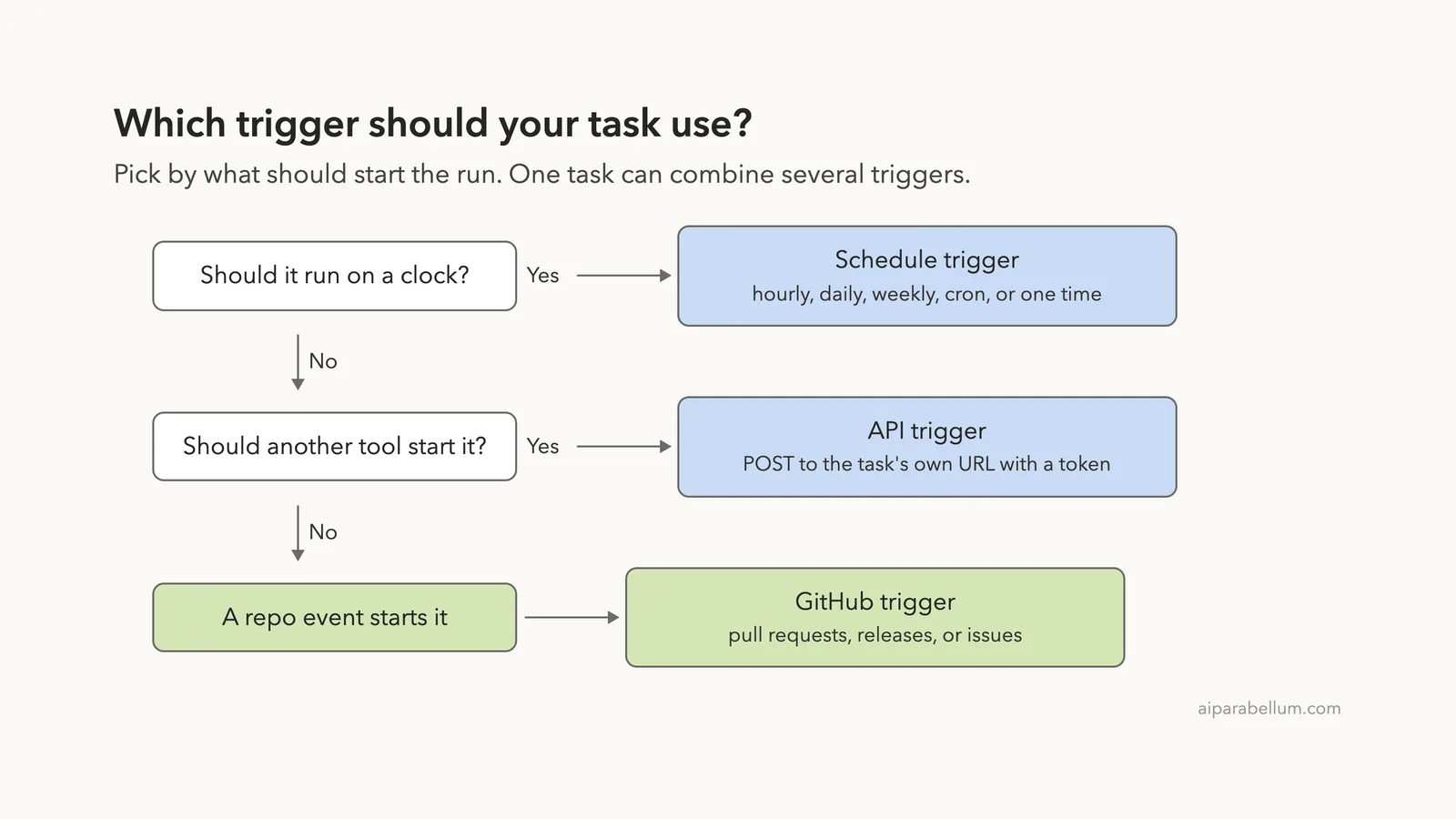
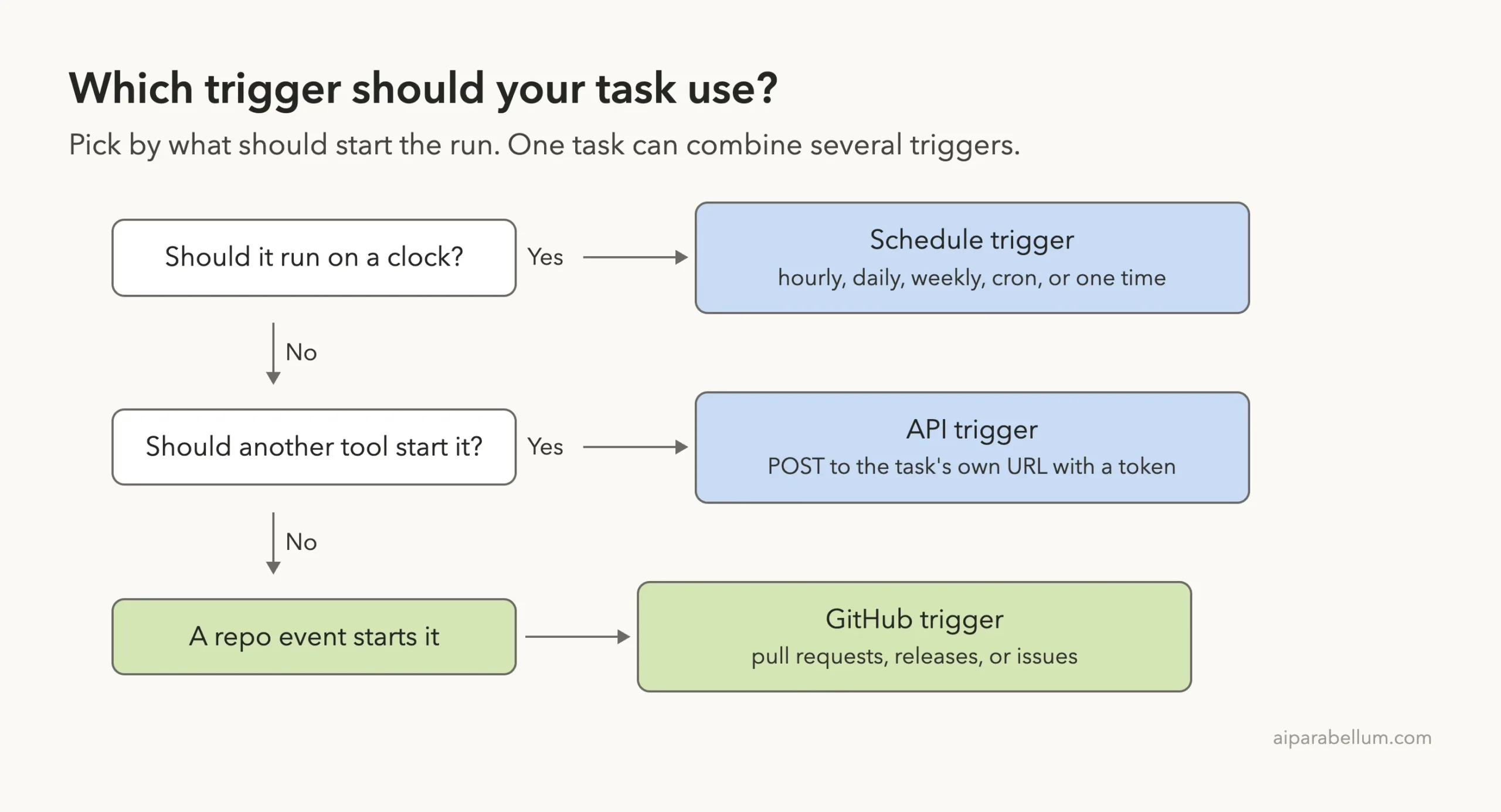
Every routine can have one or more triggers, and one task can combine them. A PR review task, for example, can run nightly, fire from a deploy script, and also react to every new PR.
Schedule Trigger
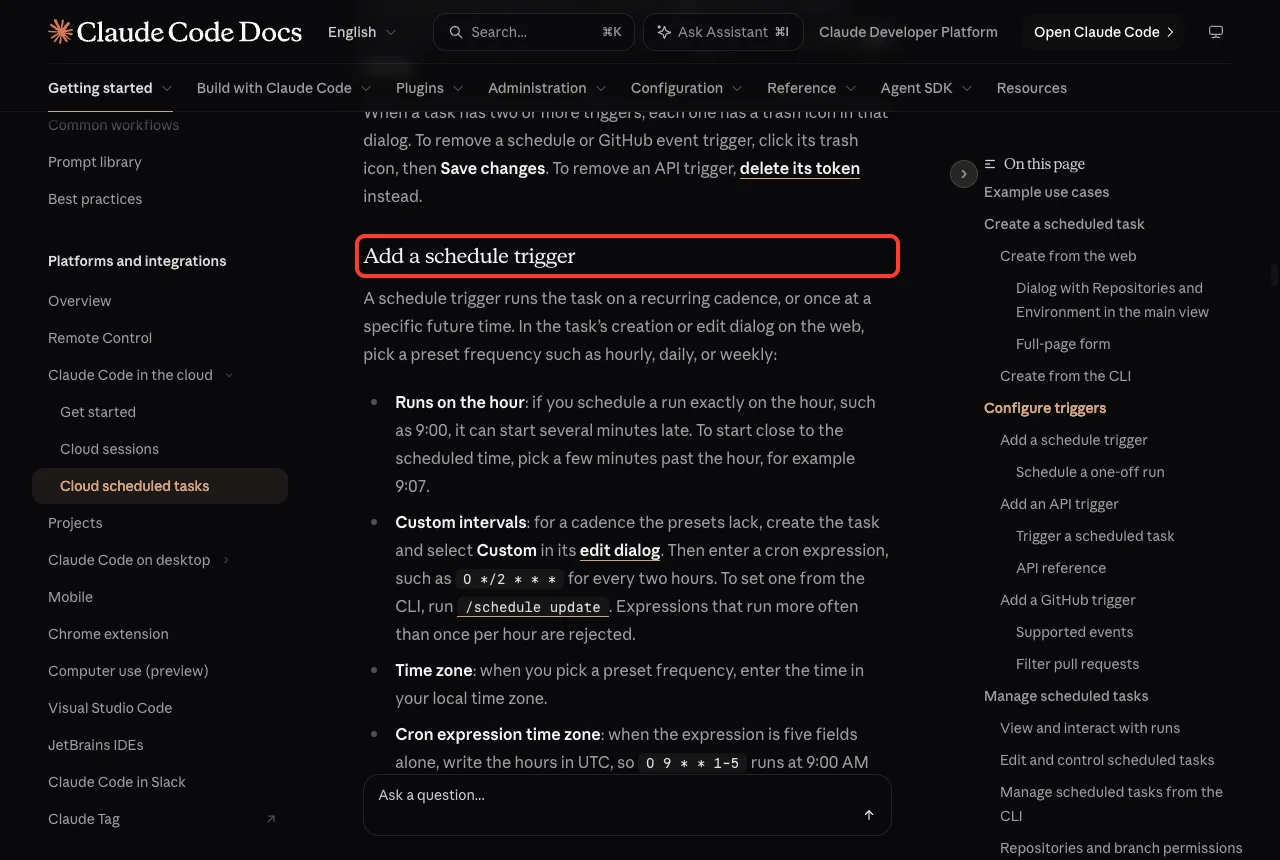
A schedule trigger runs on a recurring cadence such as hourly, daily, or weekly, or once at a future time. The docs give a few rules worth remembering:
- A run set exactly on the hour, like 9:00, can start several minutes late. Pick a few minutes past the hour, such as 9:07.
- For a custom cadence, choose Custom in the edit dialog and enter a cron expression like
0 */2 * * *for every two hours. - Cron expressions that run more often than once per hour are rejected.
- Presets use your local time zone, but a plain five-field cron expression is read in UTC, so
0 9 * * 1-5means 9:00 AM UTC on weekdays.
One-Off Runs From the CLI
A one-off schedule runs the task a single time, then turns itself off and shows as Completed. From the CLI you describe the time in plain words, and Claude confirms the exact timestamp before saving it. These are the two examples from the docs:
/schedule tomorrow at 9am, summarize yesterday's merged PRs
/schedule in 2 weeks, open a cleanup PR that removes the feature flag
API Trigger
An API trigger gives the task its own HTTP endpoint. You POST to it with the task’s bearer token, and Claude starts a new session and returns a session URL. You add it on the web only; the CLI cannot create or manage the token.
The token is shown once, so store it in a secret manager. Each task has its own token, and you can rotate it with Regenerate or remove API access with Delete token. The request body accepts an optional text field for run details, such as an alert body:
curl -X POST https://api.anthropic.com/v1/claude_code/routines/trig_01ABCDEFGHJKLMNOPQRSTUVW/fire \
  -H "Authorization: Bearer sk-ant-oat01-xxxxx" \
  -H "anthropic-beta: experimental-cc-routine-2026-04-01" \
  -H "anthropic-version: 2023-06-01" \
  -H "Content-Type: application/json" \
  -d '{"text": "Sentry alert SEN-4521 fired in prod. Stack trace attached."}'
The task ID and token above are placeholders from the docs. Replace them with the values you copy from your own task, or the call fails with a 401 error.
There is a safety detail here. The text arrives wrapped in a <routine-fire-payload> block that labels it as untrusted data. Your saved prompt must opt in, for example “Investigate the alert described in the routine-fire-payload block”, or Claude treats the text as inert context.
The /fire endpoint ships under a beta header and is for claude.ai users only. Anthropic warns that its shapes, rate limits, and token rules may change during the research preview.
GitHub Trigger
A GitHub trigger starts a new session when a matching event happens on a connected repository. Two PR updates make two separate sessions. The Claude GitHub App must be installed on the repository, and running /web-setup alone does not install it.
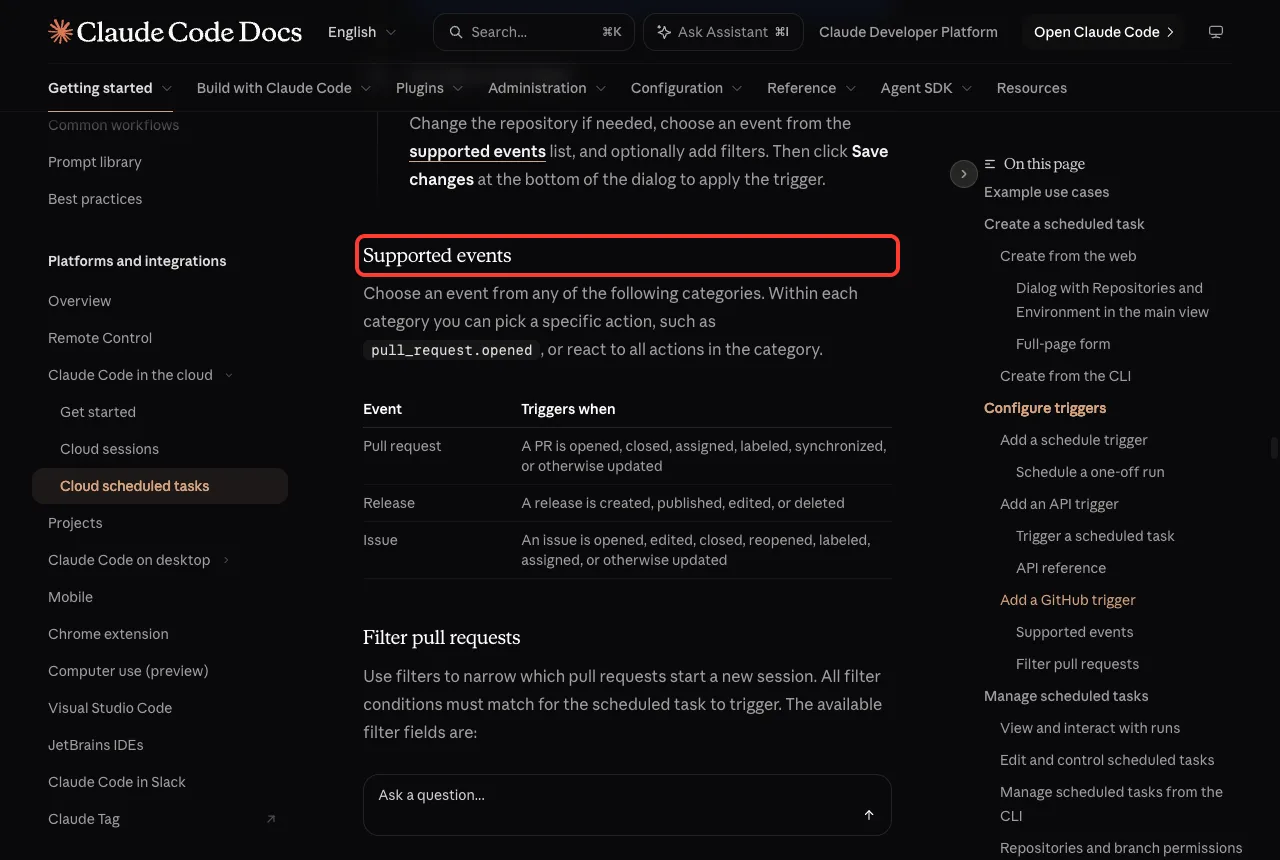
You can narrow pull request triggers with filters on author, title, body, base branch, head branch, labels, draft state, and merged state. Operators include equals, contains, starts with, is one of, is not one of, and matches regex. All conditions must match for the task to run.
The regex operator tests the whole field, not a part of it. To match any title with “hotfix” inside, write .*hotfix.*, or use the contains operator instead. Three filter combinations from the docs:
- Auth module review: base branch
mainand head branch containsauth-provider. - Ready-for-review only: is draft equals
false. - Label-gated backport: labels include
needs-backport.
From the CLI, you can attach a GitHub trigger to an existing task with a request like /schedule add a GitHub trigger to my nightly review for pull requests opened in acme/webapp. That path needs Claude Code v2.1.225 or later.
How to Create a Routine
You can create a task on the web, in the Desktop app, or from the CLI. All three write to the same cloud account, so a task made in one place shows up in the others.
- Open
claude.ai/code/routinesand click New task. In some accounts the button reads New routine. - Name the task and write the prompt. Make it self-contained and clear about what success looks like, because nobody can answer questions mid-run.
- Choose a trigger: Schedule, GitHub event, or API.
- Under Advanced settings, select one or more repositories. Each is cloned at the start of a run.
- Pick a cloud environment, which sets network access, environment variables, and a setup script.
- Pick a model and, if offered, an effort level.
- Review connectors and remove the ones the task does not need.
- Click Create, then use Run now on the detail page to test it.
From the CLI, run /schedule and describe the job, such as /schedule daily PR review at 9am. Claude asks follow-up questions about the schedule, repositories, and prompt, then saves it. You can also use /schedule list, /schedule update, and /schedule run to manage tasks.
Since v2.1.227 you can ask about history, for example /schedule why did my nightly review do nothing this morning?. Claude lists recent runs and reads their logs to explain what happened.
Routines Limits You Need to Know
This is the part most guides skip. There are two kinds of limits: your subscription usage and separate hourly caps on how runs start.
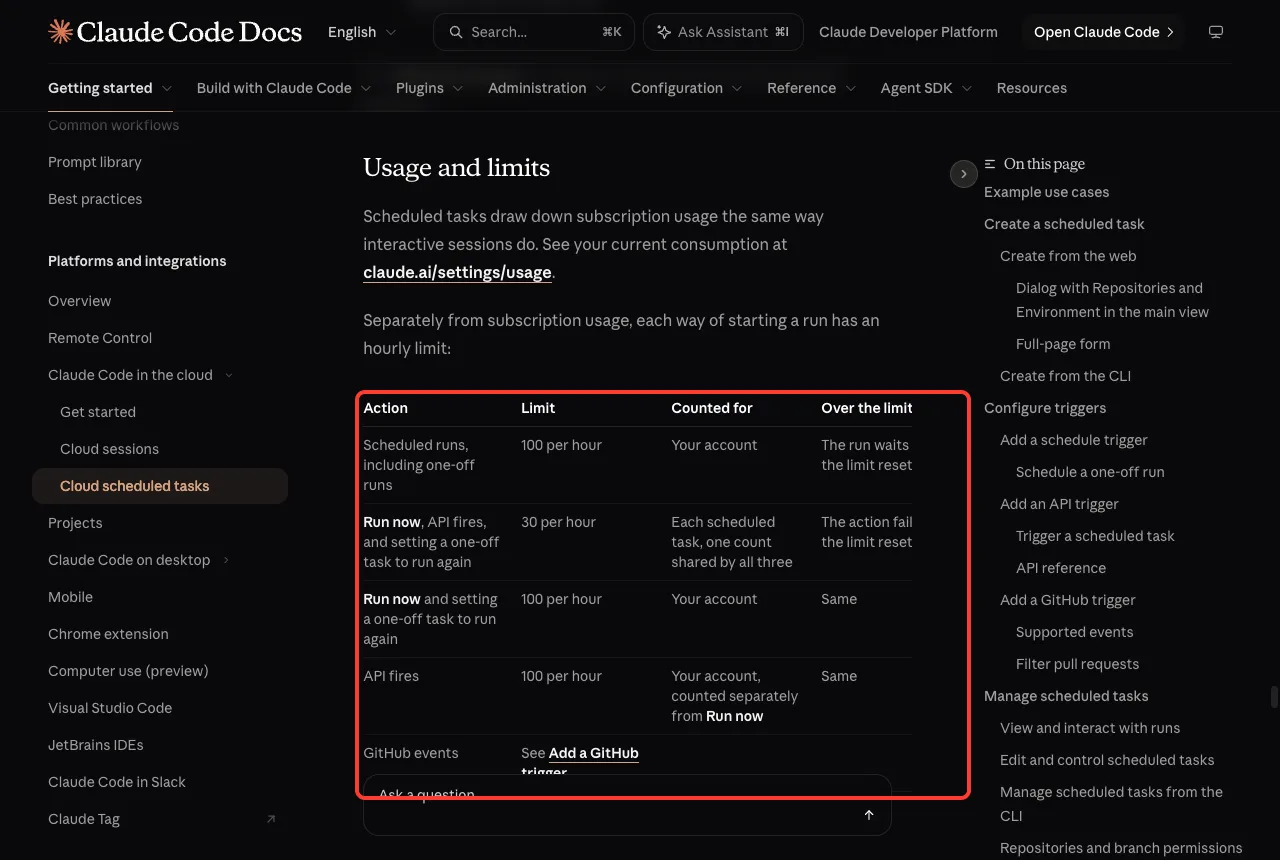
| Action | Limit | Counted for | Over the limit |
|---|---|---|---|
| Scheduled runs, including one-off runs | 100 per hour | Your account | The run waits until the limit resets |
| Run now, API fires, and re-running a one-off task | 30 per hour | Each task, one shared count | The action fails until reset |
| Run now and re-running a one-off task | 100 per hour | Your account | The action fails until reset |
| API fires | 100 per hour | Your account, counted separately from Run now | The action fails until reset |
| GitHub events | Per-task and per-account hourly caps | Task and account | Events beyond the cap are dropped |
None of these hourly limits has overage. The docs also point out that scheduled tasks draw down your subscription usage the same way interactive sessions do. If you hit your usage limit, organizations with usage credits turned on can keep running on metered overage; without credits, extra runs are rejected until your window resets.
Other Limits and Gotchas
- Cron cannot run more often than once per hour.
- If your GitHub connection is missing or expired, runs are skipped for up to 72 hours. After that the task turns off, and you turn it back on after reconnecting.
- If your subscription is paused, your tasks are put on hold and do not run.
- Team and Enterprise Owners can turn scheduled tasks off for the whole organization.
- Tasks are personal. Teammates cannot see or edit them.
- The whole feature is a research preview, so numbers on this page may change.
What a Run Can Touch: Permissions and Network
A run can reach only three things: the repositories you select, the environment’s network access and variables, and the connectors you include. Scope each one to what the task needs.
Claude pushes its work to branches that start with claude/ unless your prompt names another branch. To control where a run can push, use branch protection rules or rulesets on GitHub.
The Default environment has Limited network access with package managers allowed.
A request to a blocked host fails with a 403 error and an x-deny-reason: host_not_allowed header. If your task needs another domain, add it to the environment’s Allowed domains before the next run. Connectors reach their services through Anthropic’s servers, so they need no allowlist changes.
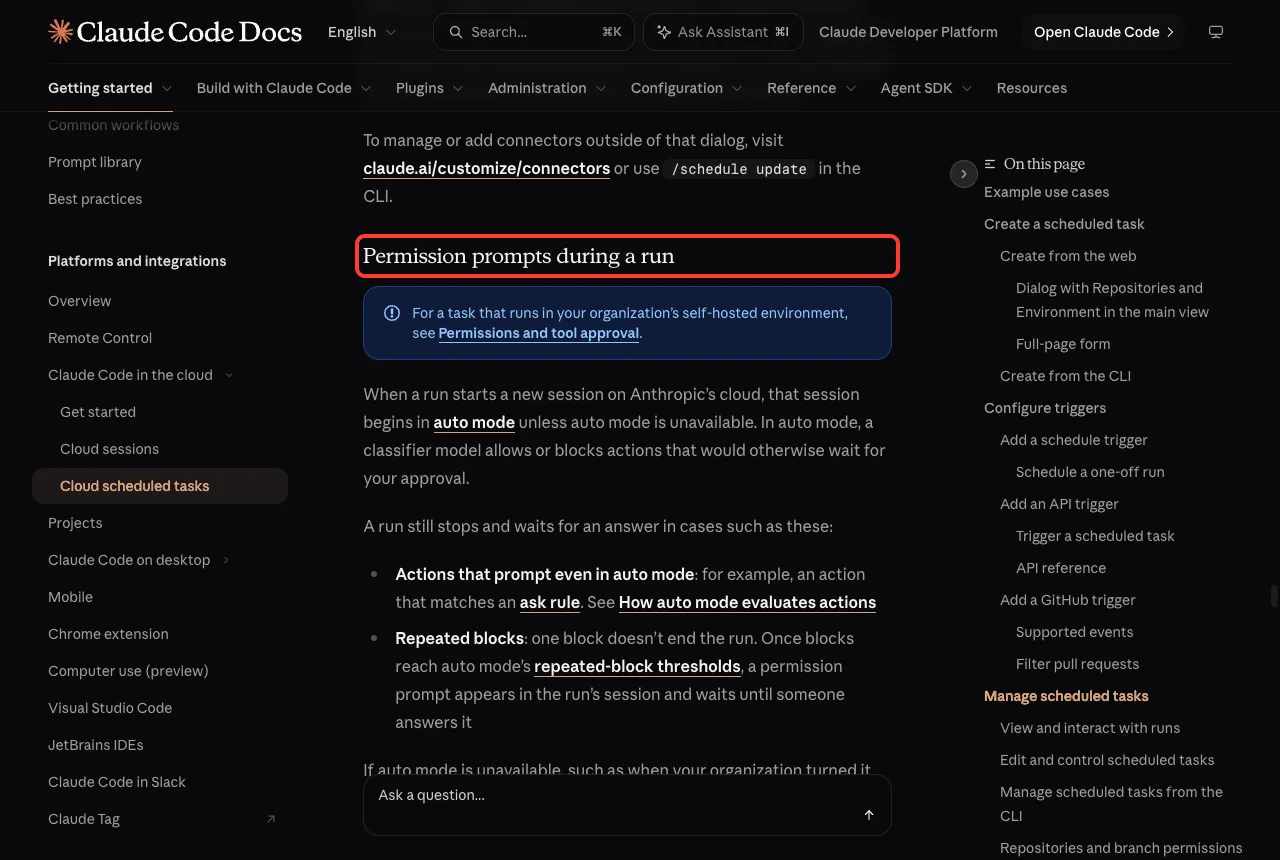
Runs start in auto mode, where a classifier model allows or blocks actions that would normally wait for your approval.
A run still stops and waits if an action matches an ask rule, or after repeated blocks reach the thresholds. You answer from the run’s session on the detail page. To learn how modes work, see our guide to permission modes.
The docs also state that a fired prompt is not live user input. It cannot act as approval for actions during the run, so do not write prompts that assume you said yes in advance.
Read What a Run Did
Open the task’s detail page and click a run under History. It opens as a full session, so you can read the transcript, review changes, create a pull request, or continue the chat yourself.
Outcomes mean less than you might think. Succeeded means the session ended without Claude Code reporting a failure, not that your goal was met.
Blocked network requests and missing connector tools show up in the transcript, not on the row. Always open a run before trusting it.
| Status | What it means |
|---|---|
| Succeeded | The session ended without Claude Code reporting a failure |
| Failed | The session stopped unexpectedly, ended on an error, or was archived before the run started |
| Cancelled | The session was archived; even a succeeded run turns Cancelled if you archive it |
Try It Yourself
Start with a safe, read-only task so you can learn the flow. Open Claude Code in a small repository you own and paste this prompt:
/schedule every Friday at 9:07am, read the pull requests merged this week and open an issue that lists any docs that mention changed behaviorAnswer Claude’s follow-up questions, then click Run now on the web to test it once. Open the run, read the transcript, and tighten the prompt before you leave it on its own. For a more automatic CI-style setup, compare it with GitHub Actions.
Common Mistakes
- Scheduling exactly on the hour and wondering why the run starts late.
- Writing a vague prompt. The task runs alone, so spell out what to do and what finished looks like.
- Leaving every connector on. They are all included by default, and Claude can write through them.
- Reading cron hours as local time. Plain five-field cron is UTC.
- Trusting a Succeeded badge without opening the transcript.
- Sending JSON in the API
textfield and expecting it to be parsed. It arrives as a plain string.
Pro Tips
- Test with Run now before you rely on a schedule, but remember it counts toward the 30-per-hour task limit.
- Use filters such as is draft equals
falseso GitHub triggers skip noisy events. - Store API keys that Claude calls during a run as network secrets, not environment variables, because variables are visible to everyone who uses the environment.
- Give a task that keeps a page current an artifact you already published.
- Compare with local options such as Claude Code web and the
/loopcommand before choosing.
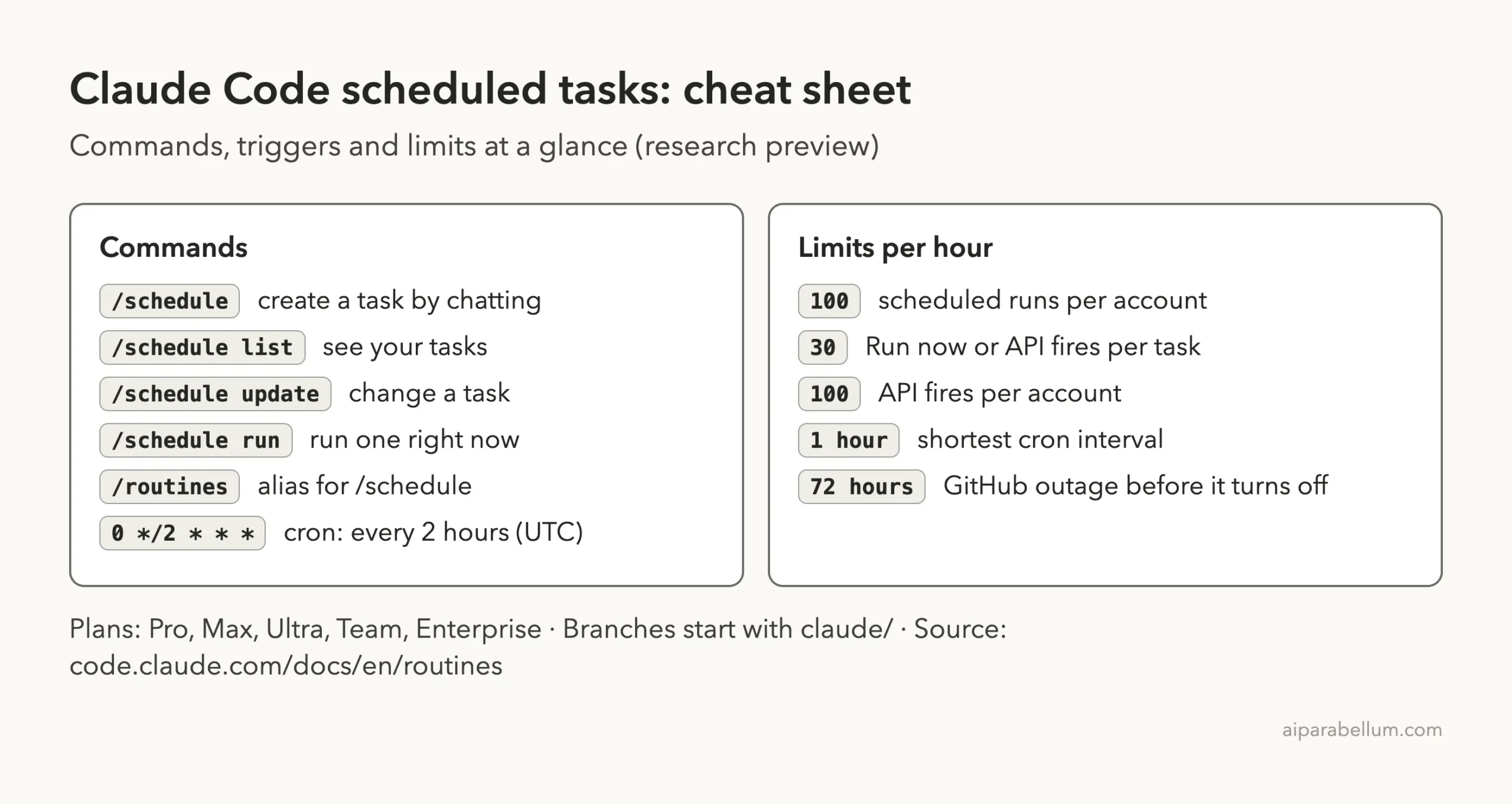
Cheat Sheet
Frequently Asked Questions
Are Claude Code routines the same as scheduled tasks?
Yes. Scheduled tasks is the current name in the docs, and routines is the earlier name. It still appears in the web address, the /routines alias, and the API.
Do routines run when my computer is off?
Yes. They run on Anthropic’s cloud infrastructure, so they keep working when your laptop is closed. Desktop scheduled tasks and /loop run on your machine instead.
Which plans can use routines?
Pro, Max, Ultra, Team, and Enterprise plans. On Team and Enterprise, an Owner can turn the feature off for everyone.
How often can a routine run?
The shortest cron interval is once per hour. Your account can start 100 scheduled runs per hour, and Run now or API fires are capped at 30 per hour for each task.
Why does /schedule say Unknown command?
Most often you are signed in with an API key or a cloud provider login, which does not work with /schedule. Sign in with your claude.ai account, or manage tasks on the web instead.
Conclusion
Claude Code routines turn a good prompt into a job that runs on a schedule, on an API call, or on a GitHub event, all in the cloud. The six examples show where they fit best, and the hourly limits, the one-hour cron floor, and the 72-hour GitHub grace period show where they stop. Start with one small task, test it with Run now, read the transcript, and grow from there. For the full details, see Anthropic’s scheduled tasks documentation.
Previous in the series: Part 37: How to Fork a Conversation in Claude Code
Next in the series: Part 39: Claude Code Routines vs /loop: Which to Use.