You are an hour into a Claude Code session, the context is full of useful work, and you want to try a risky idea without wrecking it. This is exactly when you want to know how to do a claude code fork conversation step: copy the chat at this exact point, explore the new idea, and keep the original safe. In this guide we ran the real commands in a demo session and show you what each one does.
This is Part 37 of 45 in our Claude Code Deep Dives, part of our Claude Code tutorials. In the last part we built a custom output style, and for the basics of reopening old chats, see our guide to resuming old sessions.
Tested with Claude Code v2.1.322 on November 12, 2026, on macOS. Everything ran in a throwaway demo folder, so our personal Claude Code setup stayed untouched. We did not use any Windows or Linux machine; the details for other systems come from Anthropic’s official docs.
Quick Summary
| Command | What it does | Where you end up |
|---|---|---|
/branch [name] | Copies the chat at this point and switches you into the copy | The new branch, with the original saved |
/resume | Opens the session picker so you can go back | Any saved conversation |
/fork [prompt] | Copies the chat into a background session | Still in your current chat |
/subtask <task> | Starts a forked subagent that reports back | Still in your current chat |
--fork-session | Flag that gives a resumed session a new ID | A new session, started from the shell |
What It Means to Fork a Conversation in Claude Code
A Claude Code conversation is a growing list of messages, file reads and tool results. Forking makes a second copy of that list at one moment in time. After that, the two copies live separate lives.
Think of it like saving a game before a hard boss fight. If the fight goes badly, you load the save and try a different plan. Nothing you did in the failed attempt leaks back into the save.
Anthropic’s official commands reference describes /branch as creating a branch of the current conversation at this point, so you can try a different direction without losing the conversation as it stands. That one sentence is the whole idea.
A fork is a save point: try the risky idea, and your original chat stays exactly as it was.
Why Not Just Keep Talking?
You could keep going in the same chat, but every wrong turn stays in the context. Claude reads all of it on every message, which uses up space and can pull the answer off course.
A fork gives you a clean second try that still remembers everything useful from before. It is also cheaper than starting over, because you do not need to explain the project again.
Step 1: Build Some Context to Fork
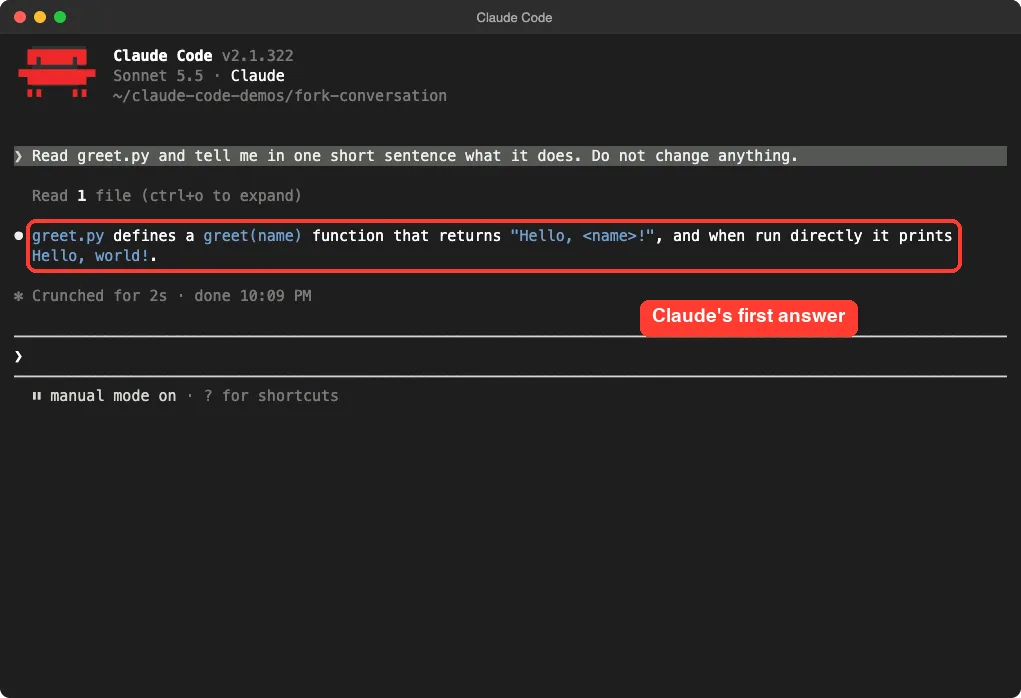
We made a tiny demo folder with one file, greet.py, which holds a greet(name) function. Then we started Claude Code and asked it to read the file in one sentence, without changing anything.
Read greet.py and tell me in one short sentence what it does. Do not change anything.Claude answered that the file defines a greet(name) function that returns a greeting and prints “Hello, world!” when run directly. That short exchange is our “saved game”: a chat with some history in it.
Step 2: Fork the Conversation in Claude Code With /branch
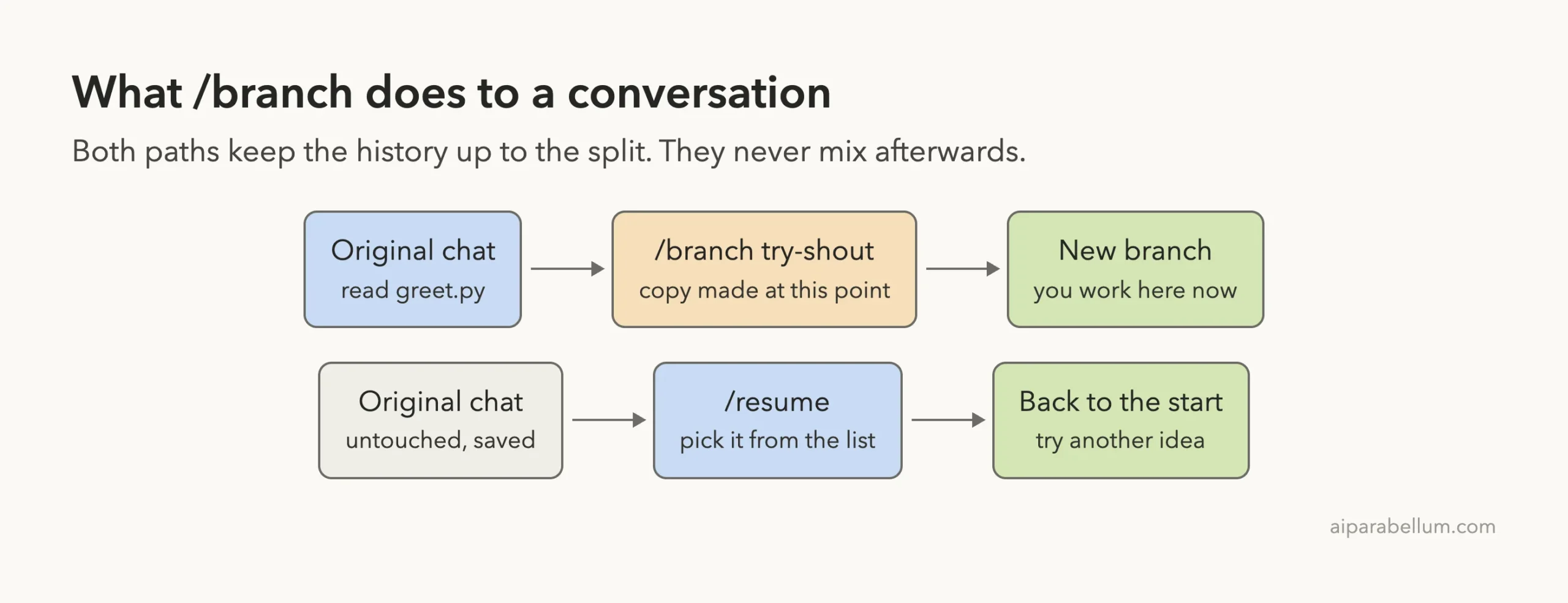
Now we wanted to explore an idea without touching this chat. We typed /branch try-shout. The name after the command is optional, but a name makes the branch easy to find later.
Claude Code printed a confirmation. It said the conversation was branched as “try-shout”, that we were now in the new branch, and it gave two session IDs: the new one, and the original one with the commands to go back to it.
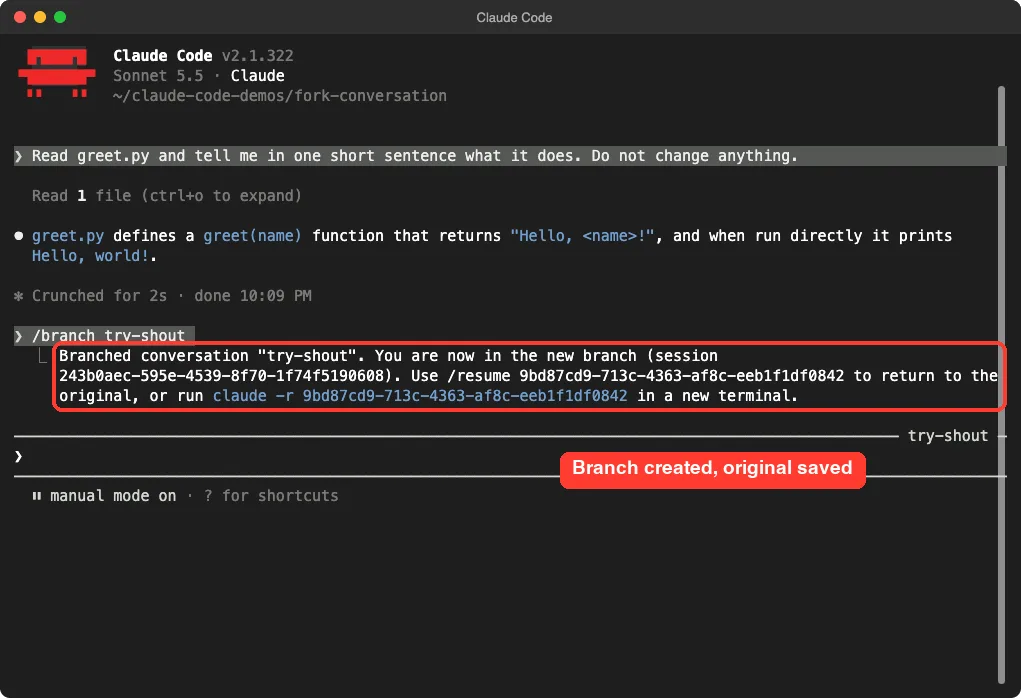
The confirmation mentions two ways back. Inside Claude Code you run /resume with the original ID. From a new terminal you run claude -r with that same ID.
Also look at the right edge of the prompt box. It now shows the branch name, try-shout, so you always know which copy you are in.
What a Branch Keeps
Per the docs, the branch switches you into it and preserves the original. In our test the branch still knew about greet.py, because the next prompt could build on it without us pasting anything again.
Step 3: Explore the Idea in the Branch
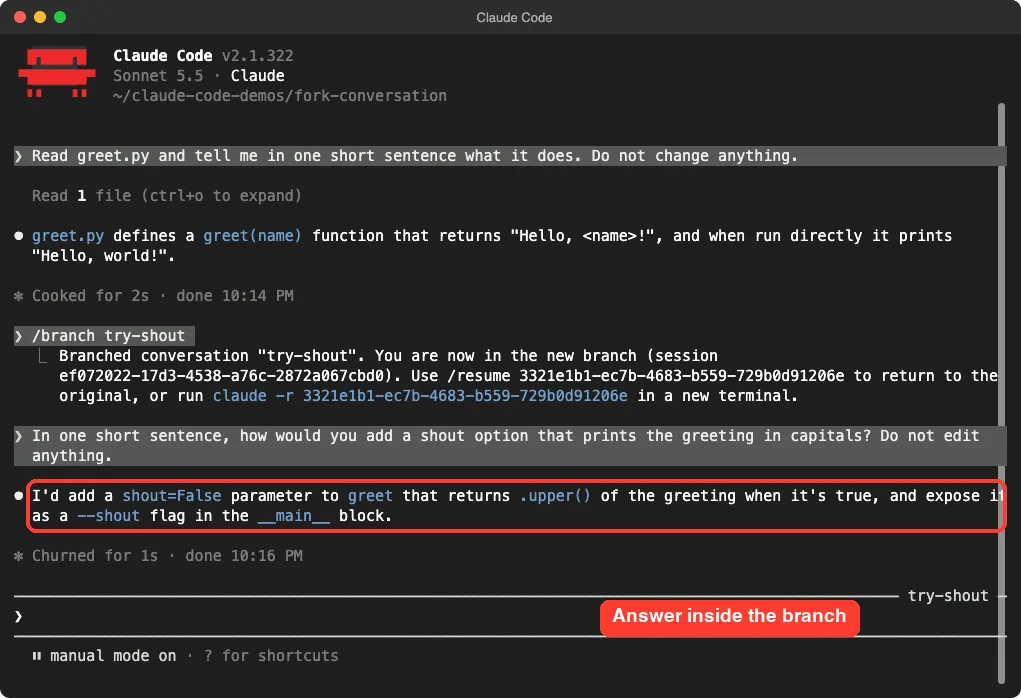
Inside the branch we asked for a different direction. We wanted to know how Claude would add an option that prints the greeting in capital letters, and we told it not to edit anything.
In one short sentence, how would you add a shout option that prints the greeting in capitals? Do not edit anything.Claude replied that it would add a shout=False parameter to greet, return the greeting with .upper() when it is true, and expose it as a --shout flag in the main block. Notice that it did not ask what greet.py was. It remembered.
In a real project this is where you would let Claude try the risky refactor. If it goes badly, you simply walk away from the branch.
Step 4: Go Back to the Original With /resume
To return, type /resume. A “Resume session” picker opens with a search box and a list of saved conversations. Each row shows a title, how long ago it was active, the Git branch and the size.
In our picker you can see both the original chat, titled by Claude from our first prompt, and the branch named try-shout. Older rows come from earlier test runs we made while preparing this article.
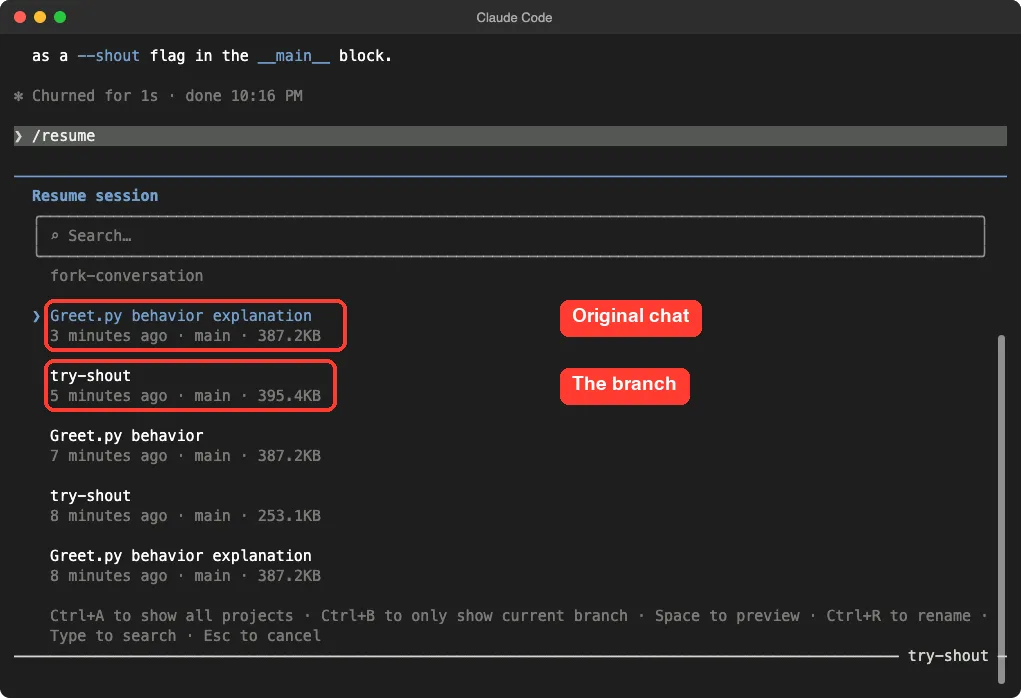
The footer of the picker shows useful keys. Space previews a session, Ctrl+R renames it, and Esc cancels. We pressed Esc to stay in the branch for the next test.
One thing to keep straight: the Git branch column in this picker is about your code repository. A conversation branch from /branch is a different thing, and it does not create a Git branch.
Step 5: Fork a Claude Code Conversation to the Background With /fork
The second tool is /fork. It sounds like /branch, but it behaves differently. According to the commands reference, /fork copies the current conversation into a new background session and lets you keep working where you are.
We typed /fork with no prompt. Claude Code printed a single line: the session is waiting for a prompt, the copy’s name and a short session ID. The docs say that without a prompt the copy waits in agent view for its first instruction.
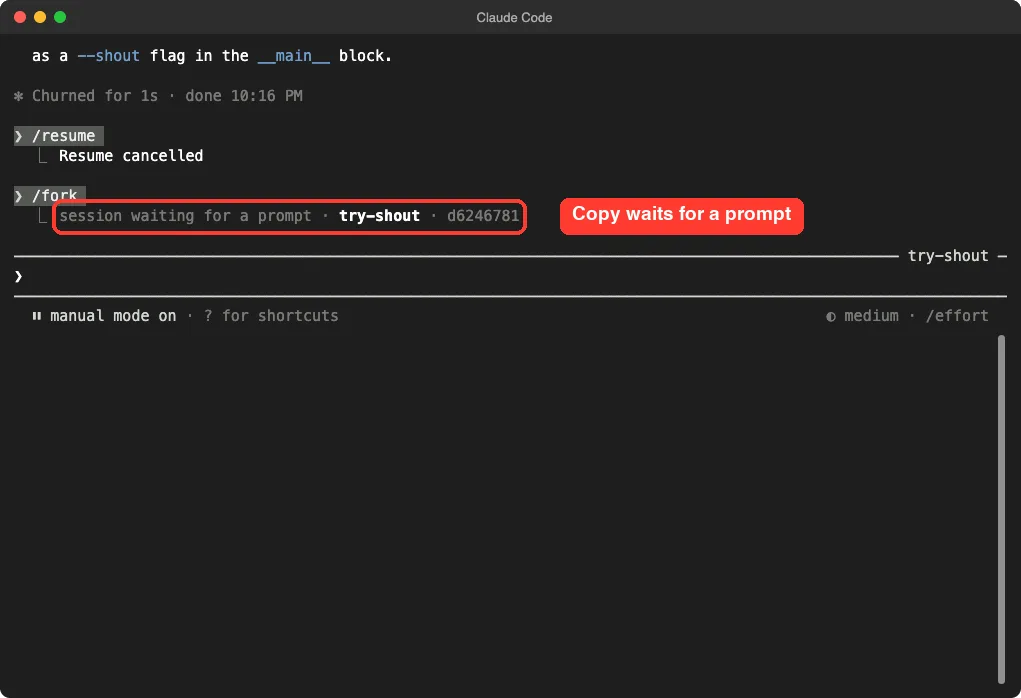
If you pass a prompt, such as /fork open a draft pull request with the work so far, the copy starts working on it right away. That is the docs’ own example, and it is a handy way to hand off a side job while you carry on.
How a Fork Stays Out of Your Way
The agent view documentation explains that after a fork, the two conversations are independent. Nothing the copy does enters your original chat on its own.
It also says the copy carries over the model, permission mode and effort level. And unless it edits in place, Claude Code tells the copy to make a Git worktree of its own before changing code, so it does not collide with your files. We only tested the empty copy, so we did not watch that worktree step happen.
Branch vs Fork vs Subtask
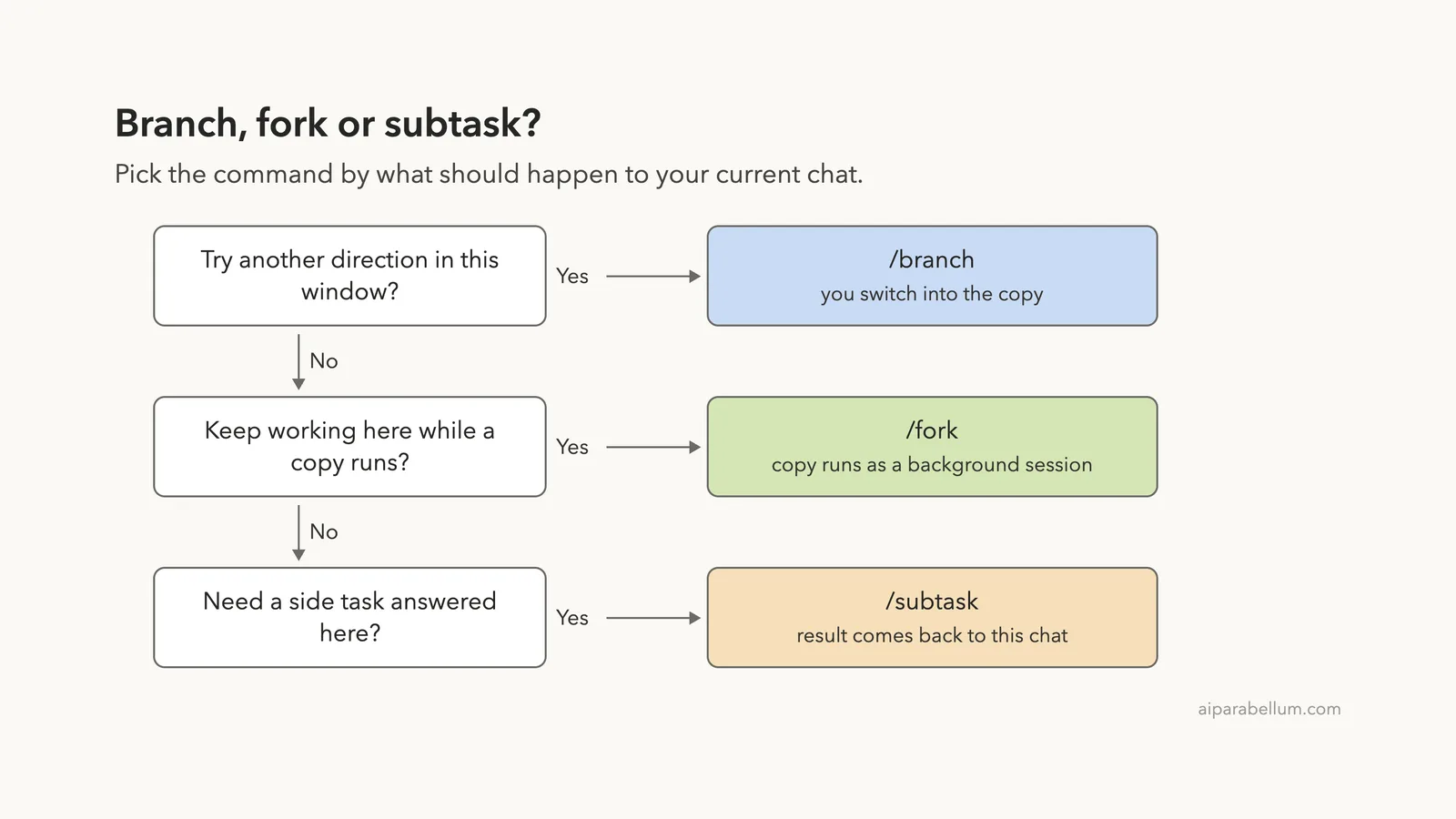
There are three similar commands, and the names are easy to mix up. The diagram below gives a quick way to choose.
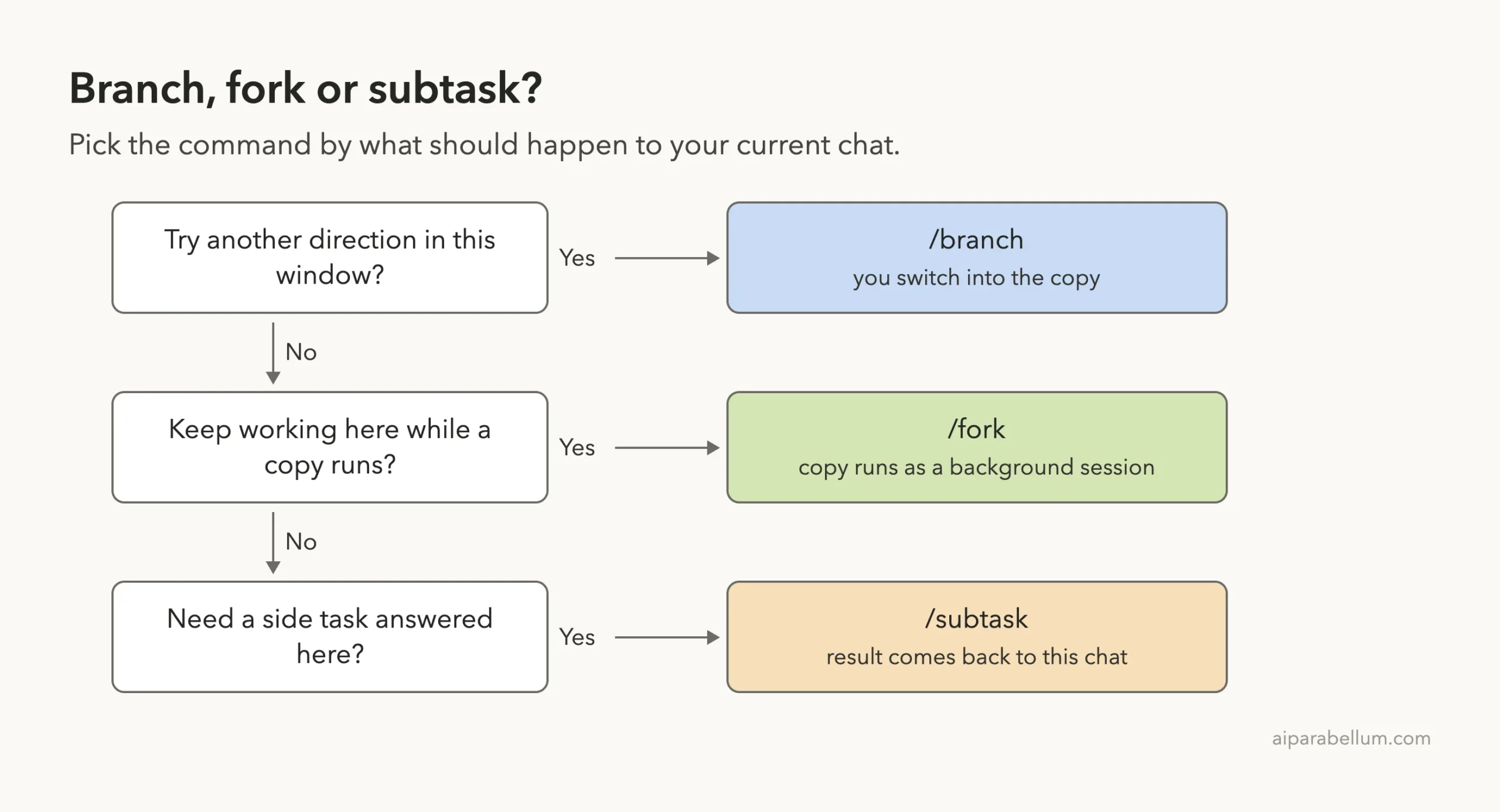
| Command | You stay in this chat? | Result returns here? | Best for |
|---|---|---|---|
/branch | No, you switch to the copy | No | Trying a different approach |
/fork | Yes | No, it is a separate session | Parallel work you check later |
/subtask | Yes | Yes, when it finishes | A side question that feeds back in |
The reference describes /subtask as spawning a forked subagent: a background subagent that inherits the full conversation and works on the task while you keep working, with its result returning to this conversation. If you want to learn more about helpers like this, see our guide to Claude Code subagents.
Fork From the Shell With –fork-session
You can also fork before a session even starts. The command line help lists a flag called --fork-session. It says that when resuming, Claude Code creates a new session ID instead of reusing the original, and you use it with --resume or --continue.
claude --continue --fork-session
claude --resume <session-id> --fork-session
This is helpful when you want to reopen yesterday’s work but keep the old transcript exactly as it was. We read this flag from the official help output and the sessions docs and did not run it in our capture, so check it on your own version.
The sessions documentation adds a small detail. If you pass --fork-session, Claude Code does not restore plan mode when it resumes.
Real Examples of When to Fork
Compare Two Designs
You have asked Claude to plan a feature, and you are torn between two designs. Run /branch design-a and let it build option A. Then /resume the original, run /branch design-b and compare.
Keep a Long Session Healthy
A long chat can get heavy. If you want a quick side question answered without adding more clutter to the main thread, /subtask is a good fit. For housekeeping inside one chat, read our guide to the context window.
Hand Off a Side Job
You are mid-task and remember a chore, like writing a changelog. Run /fork write a changelog entry for the work so far and keep going. You can check the copy later in claude agents.
Undo Without Leaving the Chat
If you only need to roll back a mistake, a fork is more than you need. Use /rewind instead, which our post on checkpoints and rewind covers in detail.
Try It Yourself
Make a throwaway folder with one small file, start Claude Code there and run this sequence. It takes about five minutes and costs a few short prompts.
Read my file and explain it in one sentence. Do not change anything.
/branch idea-one
Suggest one improvement in one sentence. Do not edit anything.
/resume
(pick the original chat, then run /branch idea-two)
Afterwards, open the picker once more and confirm that all three conversations are listed. Then try /fork and look at the one-line confirmation.
Common Mistakes
- Expecting
/branchto create a Git branch. It copies the conversation only; your files and your repository are not branched. - Using
/forkwhen you wanted to switch./forkkeeps you in the current chat and starts a background copy. - Forgetting the original’s ID. Copy it from the confirmation, or just use the
/resumepicker. - Letting a forked copy and your main chat edit the same files at once. The docs say outside a Git repository, sessions write to the working directory directly and are not isolated from each other.
- Forking a session started with special launch flags. The docs say sessions started with a replaced system prompt or a
--toolsallowlist cannot be forked, and Claude Code tells you so.
Pro Tips
- Name every branch.
/branch try-shoutis much easier to find later than an unnamed copy. - Fork before a risky step, not after. A branch only contains what was said up to that moment.
- Keep prompts in a branch small and tell Claude not to edit when you only want ideas.
- Use the picker’s
Spacekey to preview a session before you open it. - Pair forks with worktrees when two copies need to edit code. Our guide to Git worktrees shows how.
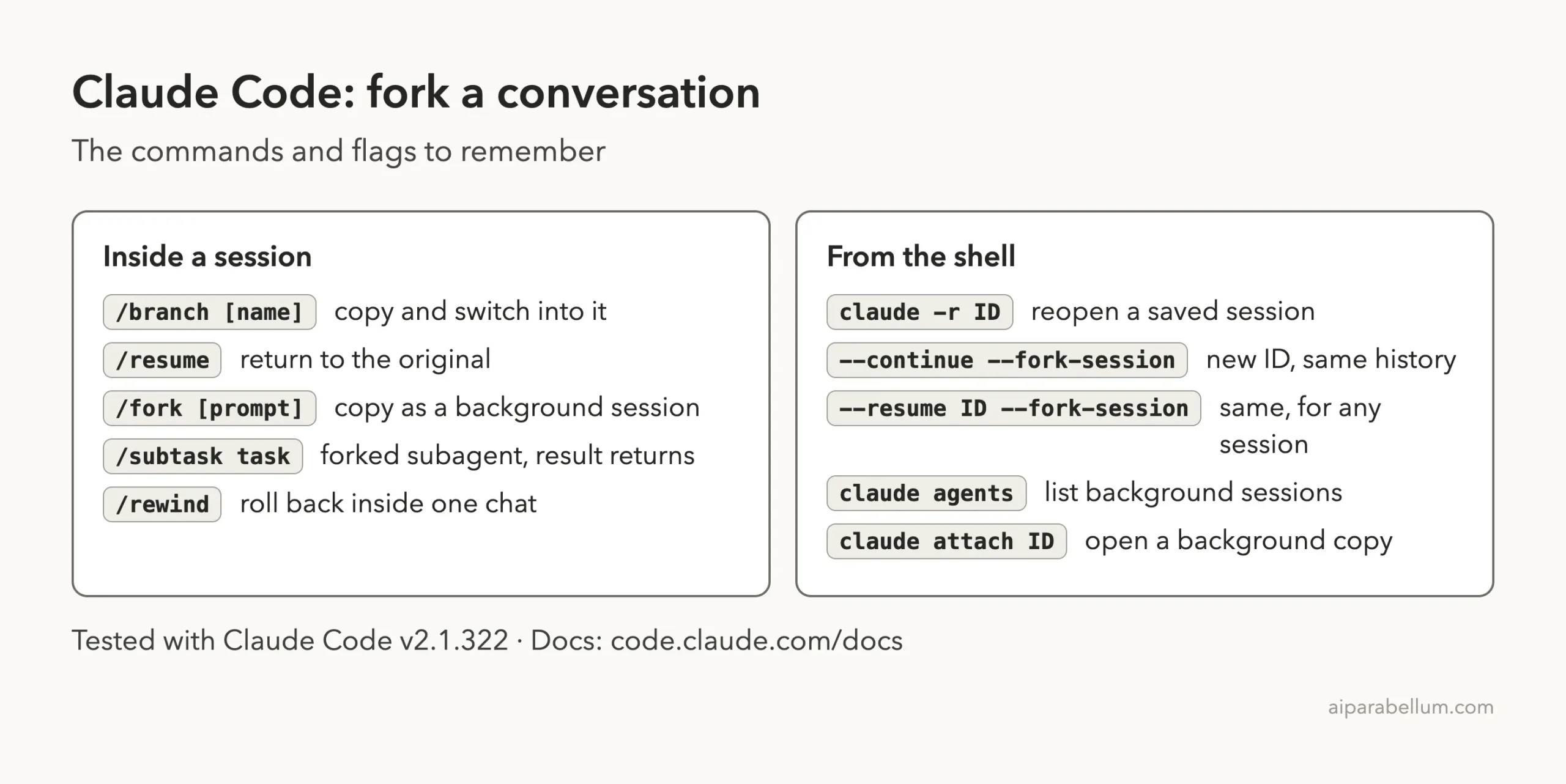
Cheat Sheet
Frequently Asked Questions
What is the difference between /branch and /fork in Claude Code?
With /branch you switch into the copy and the original stays saved. With /fork you stay where you are, and the copy runs as a background session.
Does forking change my files?
No. Forking copies the conversation, not your project. Files only change if a session, original or copy, edits them.
How do I get back to the original conversation?
Run /resume and choose it from the picker, or use the ID printed in the branch confirmation. From a new terminal, claude -r with that ID also works.
Is there a flag to fork when I start Claude Code?
Yes. The help lists --fork-session, which gives a resumed session a new ID. Use it with --resume or --continue.
Do forks cost extra?
A copy still has to read the shared history when you send it a message, so it uses context like any chat. We did not measure the cost of a fork, so we cannot give you a number.
Conclusion
Forking is the safest way to explore a second idea without losing a good conversation. In our real session, /branch try-shout created a named copy, the /resume picker listed both chats, and /fork made a background copy that waited for its first prompt. Use /branch to switch, /fork to stay put and /subtask for answers that come back, and read our overview of Claude for the bigger picture.
Previous in the series: Part 36: Custom Output Style
Next in the series: Part 38: Claude Code Routines: Examples and Limits.