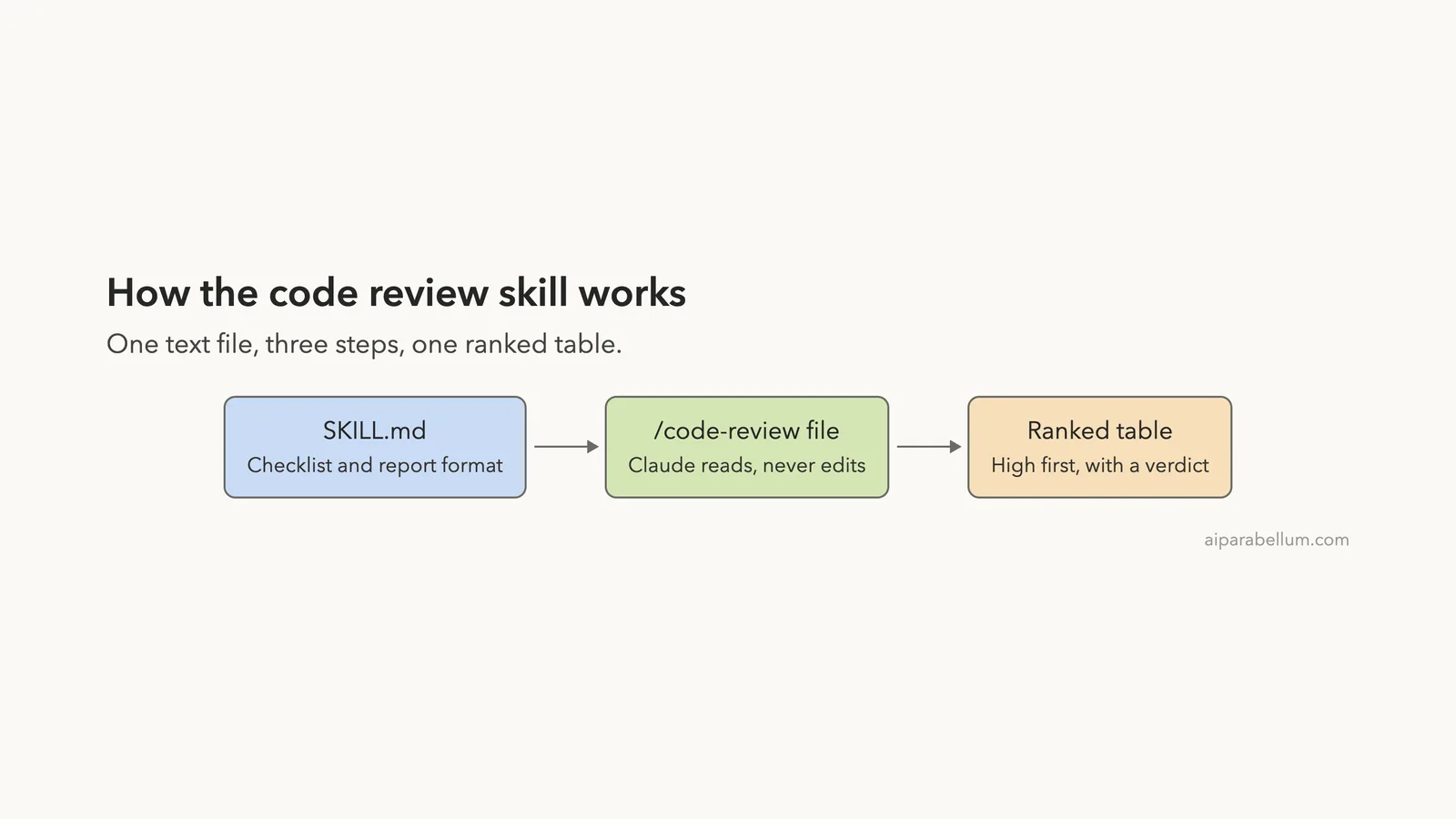
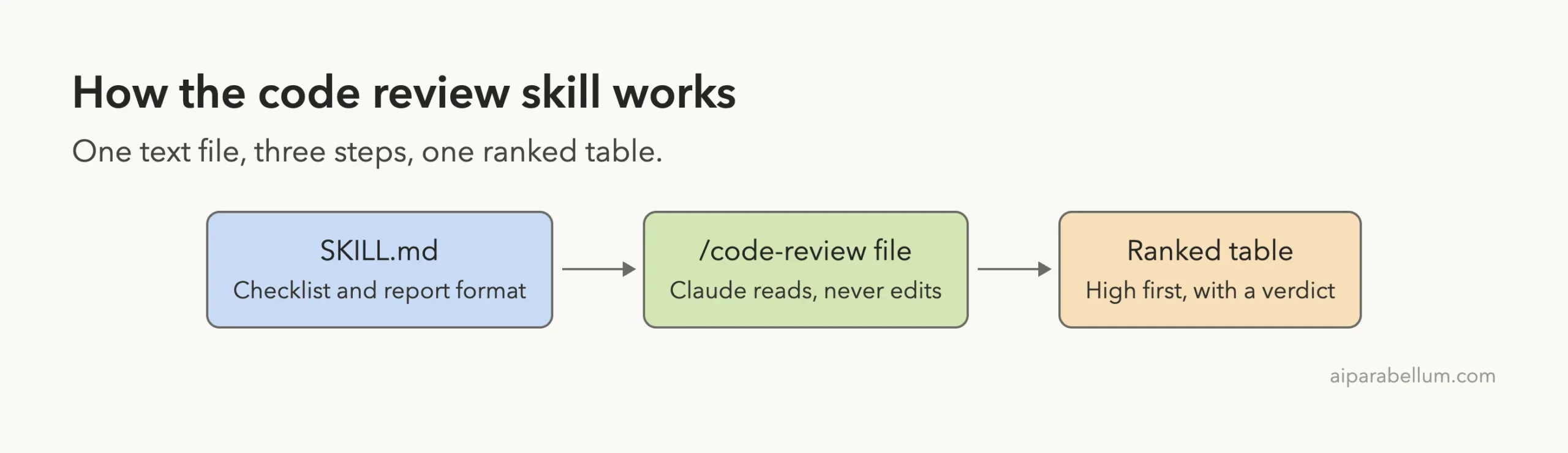
A claude code review skill is a small text file that tells Claude exactly how to review your code, every time you ask. We built one from scratch, pointed it at a deliberately messy Python file, and compared it with a plain “Review this file” request. Along the way we found a naming trap that can quietly switch off a built-in command.
This is Part 12 of 45 in our Claude Code Deep Dives, part of our Claude Code tutorials. In the last part we looked at UI design skills, and today we write a skill ourselves.
Tested with Claude Code v2.1.318 on November 5, 2026, in a throwaway demo folder. Nothing was installed into the global Claude Code setup, and we started both sessions with --setting-sources project.
Quick Summary
| Question | Answer |
|---|---|
| What did we build? | One SKILL.md file with a checklist and a fixed report format |
| Where does it live? | .claude/skills/code-review/SKILL.md inside the project |
| What did we test? | A 25-line file with seven planted problems, reviewed with and without the skill |
| What changed with the skill? | A ranked table with line numbers, a verdict and a short length |
| What did not change? | Both runs found the main bugs |
| Biggest warning | A skill named code-review replaces the bundled /code-review command |
Why Build a Claude Code Review Skill
If you ask Claude to review code, you get a good answer, but the shape of the answer changes from run to run. One time you get headings, another time a numbered list, and sometimes a block of rewritten code you did not ask for.
A skill fixes the shape. You write your checklist and your report format once, and Claude follows them whenever the skill runs.
Anthropic’s skills documentation says to create a skill when you keep pasting the same instructions or checklist into chat. A review checklist is a perfect example.
If skills are new to you, start with our guide to Claude Code skills and then come back.
The Demo File We Reviewed
We made two identical folders under ~/claude-code-demos/. Each holds one file, inventory.py, which we wrote ourselves and filled with typical mistakes.
import sqlite3

API_KEY = "sk-demo-1234567890"


def add_item(name, qty, items=[]):
    items.append({"name": name, "qty": qty})
    return items


def find_item(conn, name):
    cur = conn.execute("SELECT * FROM stock WHERE name = '" + name + "'")
    return cur.fetchone()


def average_qty(items):
    total = 0
    for i in range(1, len(items)):
        total += items[i]["qty"]
    return total / len(items)


def load_report(path):
    try:
        f = open(path)
        return f.read()
    except:
        return None
The key is a made-up value, not a real secret. The planted problems are a hardcoded key, a mutable default argument, SQL built from a string, a loop that skips the first item, a possible divide by zero, a bare except and a file that is never closed.
Only the first folder, skill-review, got the skill. The second, skill-review-plain, is the control.
How to Build the Skill Step by Step
Step 1: Make the folder
A project skill is a folder inside .claude/skills/, and the file in it must be called SKILL.md.
mkdir -p .claude/skills/code-reviewStep 2: Write the frontmatter
The block between the two --- lines tells Claude what the skill is. The docs list every field, and we used four of them.
namesets the command name. If you leave it out, the folder name is used.descriptionsays what the skill does and when to use it. Claude reads this to decide when to apply it, so put the main use first.argument-hintis the hint shown while you type, such as[file or folder].allowed-toolslists tools Claude can use without asking during that turn. We gave itRead Grep Glob, which are reading tools.
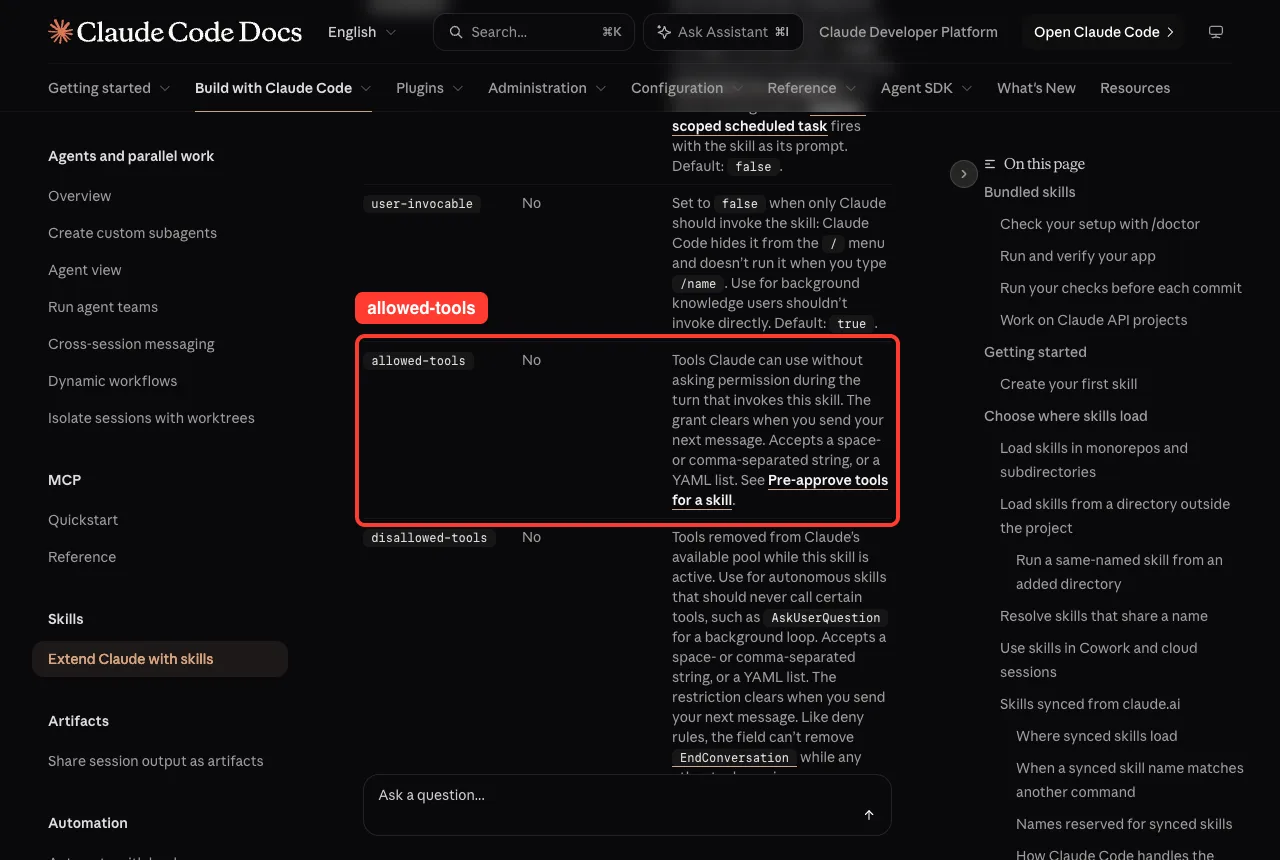
The docs note that the grant clears when you send your next message. We did not test what happens when Claude tries a tool outside the list, so we only claim that the list covers reading.
Step 3: Write the instructions
Below the frontmatter goes plain Markdown. Here is the full file we used.
---
name: code-review
description: Review code for bugs, security problems and unclear logic, and report findings ranked by severity. Use when the user asks to review, check or audit a file or a change.
argument-hint: [file or folder]
allowed-tools: Read Grep Glob
---

# Code review

Review $ARGUMENTS (or the files the user names). Read the files first. Do not edit anything.

## What to check, in this order

1. Security: SQL built from strings, hardcoded secrets, unsafe file paths, unchecked user input.
2. Correctness: off-by-one errors, wrong conditions, mutable default arguments, missing None checks.
3. Error handling: bare except blocks, swallowed errors, missing cleanup.
4. Clarity: confusing names, dead code, functions that do too much.

## How to report

Start with one sentence saying what the code does.

Then give a table with the columns: Severity (High, Medium or Low), Line, Problem, Fix. Sort High first. Report only problems you can point to on a real line. If you are not sure, say so in the Problem column.

End with one line: "Verdict: ship, fix first, or rewrite" and a short reason.

Keep the whole review under 250 words. Never claim you ran the code.
Three choices matter here. The order of the checklist tells Claude what to rank first, and the report format makes every review look the same.
The last two rules, a word limit and “never claim you ran the code”, keep the review honest and short.
The text $ARGUMENTS is replaced by whatever you type after the command name. So /code-review inventory.py puts inventory.py into the sentence.
Step 4: Check that Claude can see it
Start Claude Code in the folder and run /skills. A skill that loaded shows up in the list with its source and size.
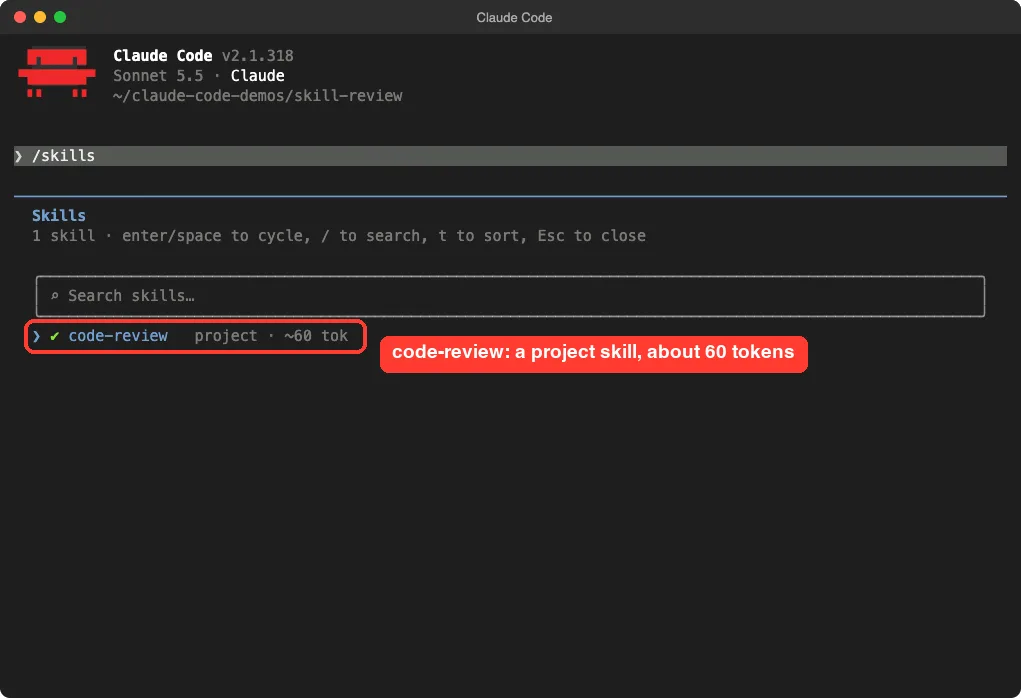
The small size is the point. Claude keeps only the short description in view and loads the full file when the skill runs.
Running the Claude Code Review Skill
We typed one line: /code-review inventory.py. The session read the file and answered in 18 seconds.
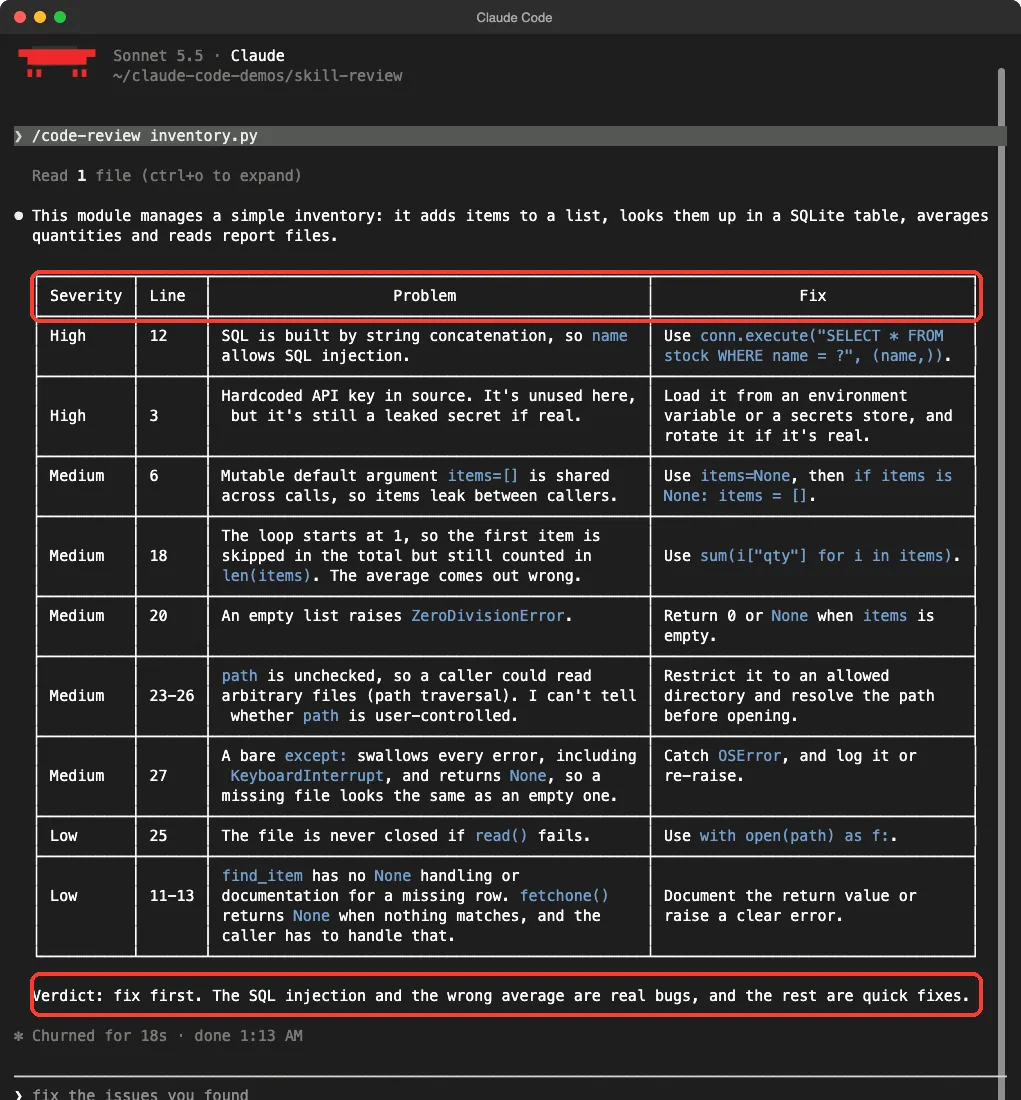
The answer follows our format to the letter. It opens with one sentence about the file, then a table sorted High first, then a verdict: fix first, because the SQL injection and the wrong average are real bugs.
What it found
- High: SQL built by joining strings on line 12.
- High: the hardcoded key on line 3.
- Medium: the mutable default list, the loop that starts at 1, the empty-list crash, an unchecked file path and the bare
except. - Low: the file that is never closed and the missing-row case in
find_item.
One row is worth a closer look. On the file path, the review says it cannot tell whether the path comes from a user. That is exactly what our rule “if you are not sure, say so” asked for.
The Same Review Without the Skill
In the control folder we typed Review inventory.py and nothing else. It answered in 11 seconds.
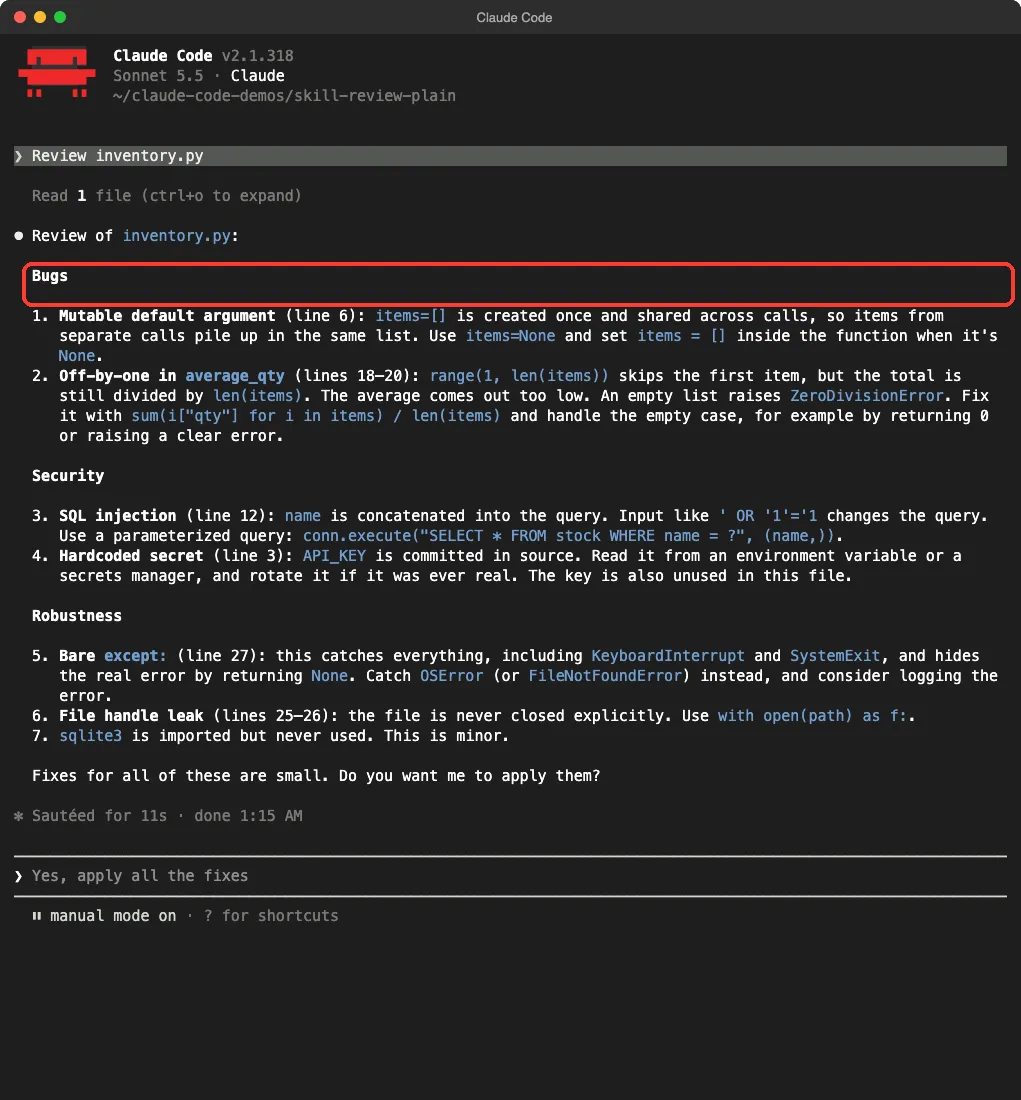
It is a good review. It grouped the problems under Bugs, Security and Robustness, found the same core issues and even noticed an unused sqlite3 import that the skill run did not mention.
We ran the plain request a few times while capturing. The content stayed similar, but the shape moved around.
In one run Claude added a full rewritten version of the file, and in another it ended with a question about applying the fixes. The skill runs kept the same table every time.
Side by Side: What the Skill Changed
| Point | Plain request | With the skill |
|---|---|---|
| Core bugs found | All of them | All of them |
| Format | Grouped lists, varies by run | Ranked table, same each run |
| Ranking | By topic | By severity, High first |
| Line numbers | Most items | Every row |
| Verdict line | No | Yes |
| Extra finding | Unused import | File path risk |
| Time in the captured run | 11 seconds | 18 seconds |
Takeaway: the skill did not make Claude smarter. It made the review predictable and easy to scan.
The Naming Trap: Your Skill Can Replace a Built-In
Here is the surprise. Claude Code already ships with a bundled /code-review command that reviews your current changes. It can also check a pull request, run at different effort levels and apply fixes with --fix.
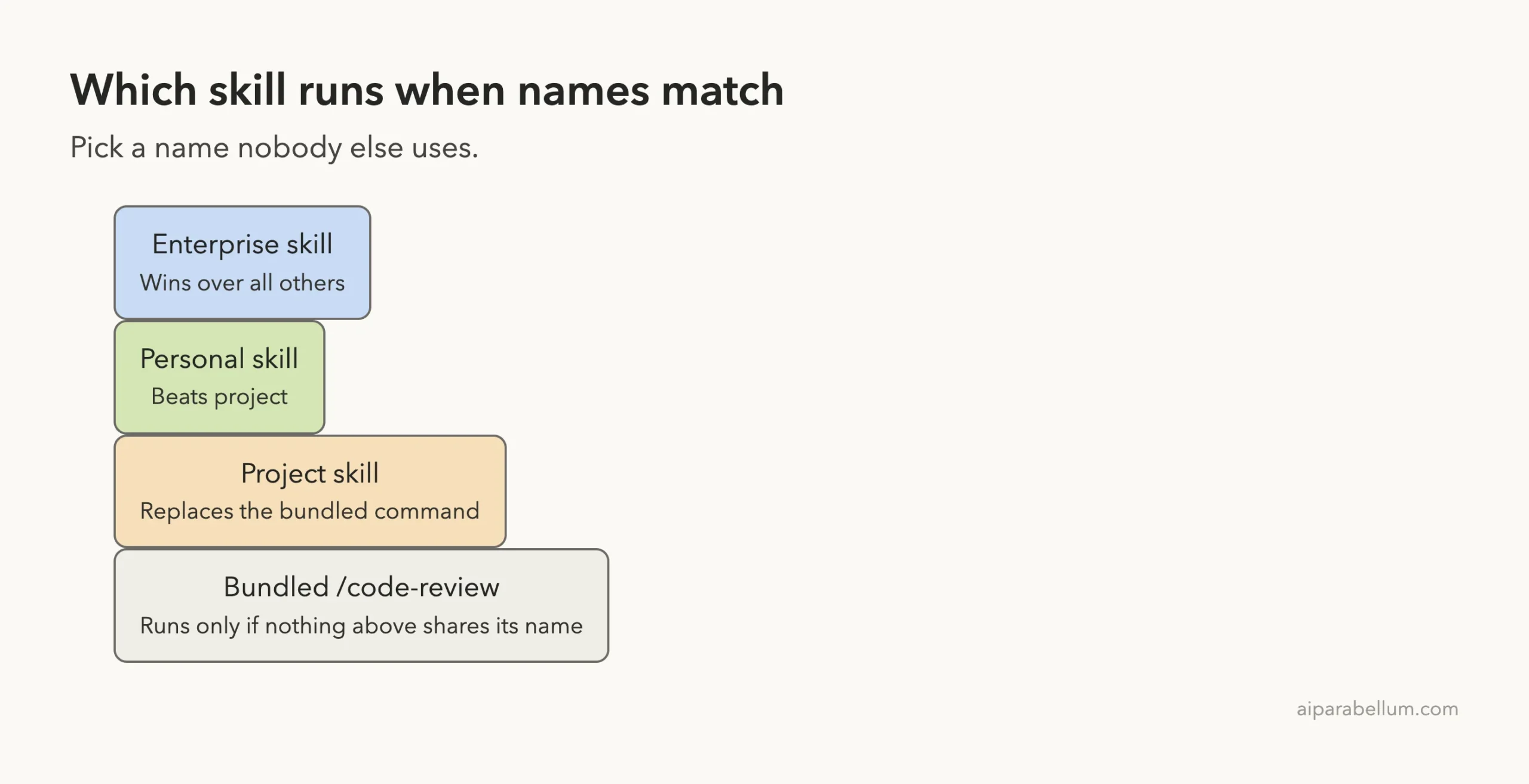
When we named our skill code-review, we shadowed it. The docs table on shared names says your skill replaces the bundled command, but not its aliases.
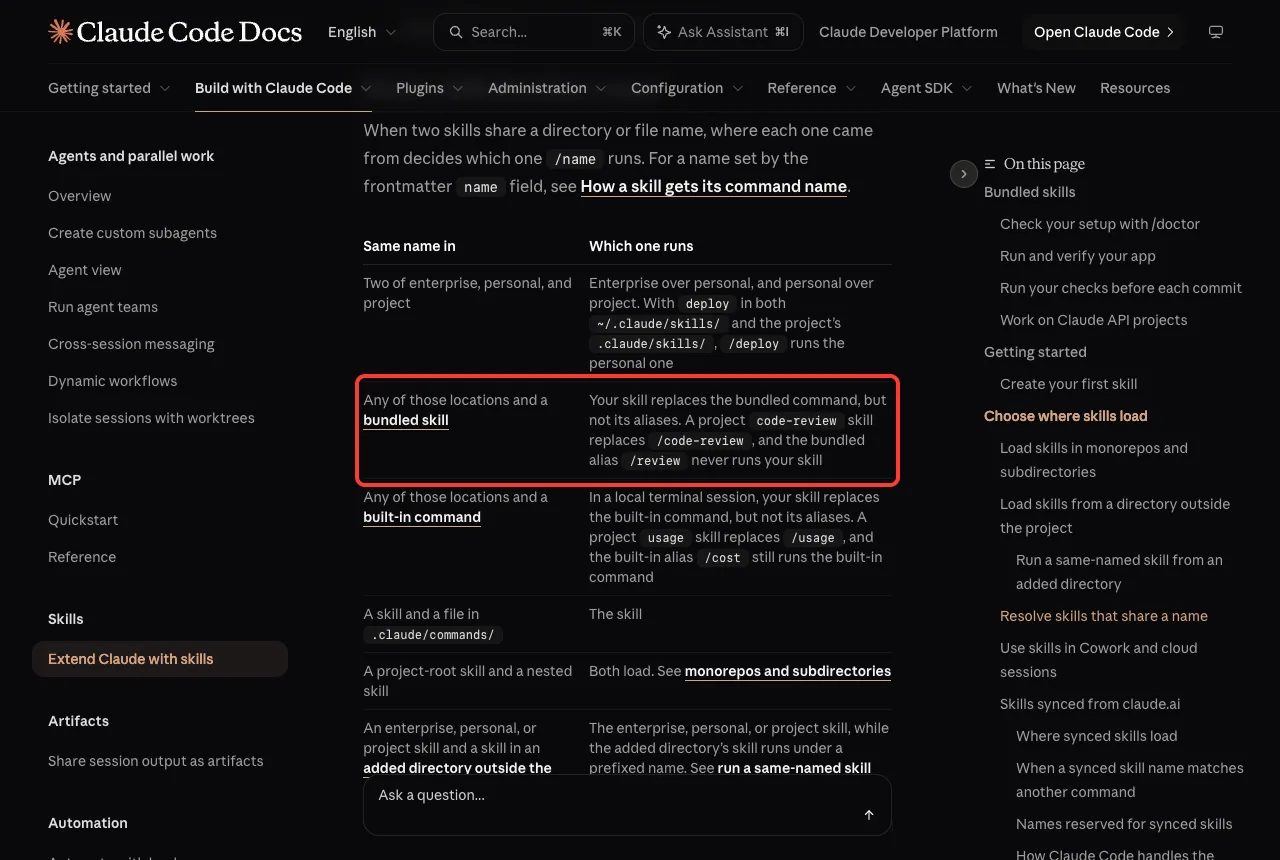
That means that inside our demo folder, /code-review ran our file and not the built-in one. We did that on purpose for the test, and only in a throwaway folder. In a real project you probably want both.
What to do instead
- Pick a name that is clearly yours, such as
team-revieworpr-checklist. Then/code-reviewkeeps working as the built-in. - If you want to replace it on purpose, do it in one project and tell your team.
- Check the commands reference before you choose a name, since bundled skills such as
/simplifyand/debugtake names too.
We did not run the renamed version, so our test results above are for the skill under the code-review name. The docs say renaming the folder is enough to avoid the clash.
Skill, Bundled Command or Cloud Review: Which One?
The three options do different jobs, so here is how we would pick.
| Option | Best for | Where it runs |
|---|---|---|
| Your own skill | Your checklist and your report format on one file or folder | Your terminal session |
Bundled /code-review | Checking the current diff or a pull request, with effort levels | Your terminal session; ultra runs in the cloud |
| Code Review for GitHub | Automatic review of every pull request | Anthropic infrastructure, for Team and Enterprise plans |
The Code Review documentation describes the GitHub version, which finds issues with several agents, verifies them and comments inline. We did not test that one, because it needs a Team or Enterprise plan and a connected GitHub repo.
Honest Verdict
The skill is worth writing if you review code often and want the same layout every time. It took us a few minutes, it is one readable file, and it makes reviews easy to compare over time.
It is not a replacement for a deeper review. It reads the file and reasons about it, and it said plainly that it did not run the code. It also found fewer items than we planted in one case, so treat it as a first pass.
Keep the limits in mind. We reviewed one small file, and we ran each setup only a handful of times. A larger codebase, or a skill with different rules, may behave differently.
Who should build one
- You have a team checklist, such as “check logging” or “check database calls”, that you keep retyping.
- You want reviews in a fixed format you can paste into a ticket.
- You want a read-only review that never edits files.
Who can skip it
- You only want a general review of your latest changes. The bundled command already does that.
- You need automatic checks on every pull request. Look at the GitHub Code Review feature instead.
Try It Yourself
Create a demo folder, never a real project, and save the skill file shown above. Then make a test file with a few mistakes of your own.
mkdir -p ~/claude-code-demos/review-test/.claude/skills/team-review
cd ~/claude-code-demos/review-test
# save SKILL.md in .claude/skills/team-review/ with name: team-review
claude --setting-sources project
Inside Claude Code, run /skills to confirm the skill is listed. Then run it on your test file.
/team-review mycode.pyFor a fair comparison, open a second folder without the skill and type Review mycode.py. Compare the two answers. If a skill does not appear, see our fix guide on skills not triggering.
Ideas to extend it
- Add a rule such as “flag any function longer than 40 lines”.
- Add a section for your own stack, like checking that every database call uses parameters.
- Make a second skill that only checks security, with the same table format.
- Test and improve the skill with the method in our guide to testing skills.
Common Mistakes
- Naming the skill
code-reviewand forgetting that it replaces the bundled command. - Writing a vague description. Claude uses it to decide when to apply the skill, so name the real use first.
- Putting rules that must always hold only in the skill text. If a rule must run every time, the docs recommend a hook instead.
- Leaving out a length limit, which lets reviews grow into essays.
- Trusting one run. Run the skill on two or three files before you rely on it.
Pro Tips
- Put the most important rules near the top of
SKILL.md. The docs say that after a long chat is compacted, only the start of an invoked skill may be kept. - Ask for “only problems you can point to on a real line”. It cuts guesses.
- Give the skill a way to say “not sure”. Honest doubt beats a confident wrong answer.
- Use
disable-model-invocation: trueif you want the skill to run only when you type it. - Learn the file format in our SKILL.md format guide, and compare when to pick a skill or a workflow in workflow versus skill.
Cheat Sheet
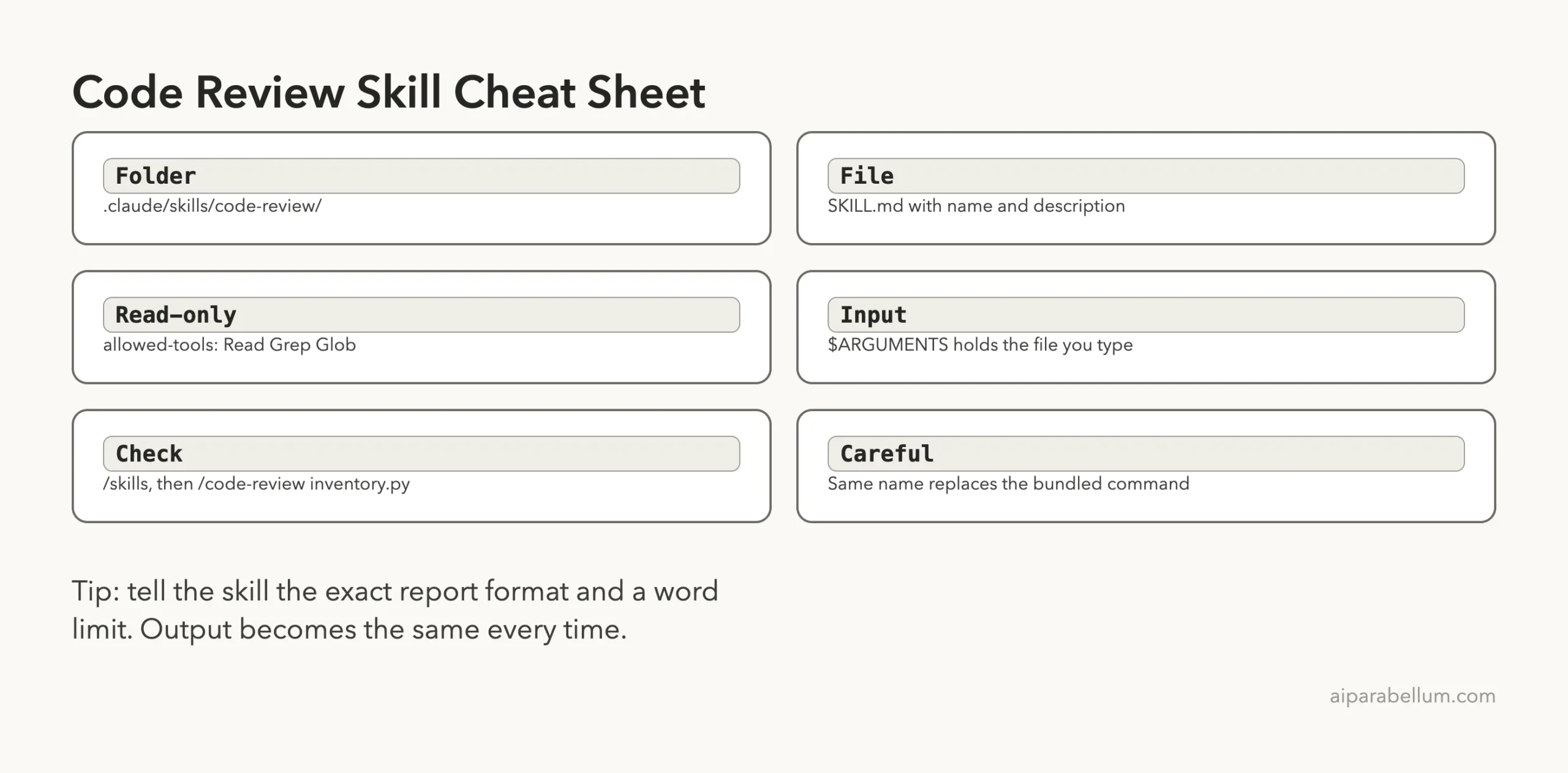
Frequently Asked Questions
Do I need a plugin to make a code review skill?
No. We saved one file in .claude/skills/code-review/ inside a project, and it appeared in /skills straight away.
Will my skill edit my code?
Ours did not, because the instructions say not to edit and the allowed tools are for reading. We saw no edits in our runs, but a text instruction is guidance, not a lock.
Can I use a skill with the built-in /code-review command?
Yes, as long as the names differ. Give your skill another name, such as team-review, and both commands will work side by side.
Does the skill review pull requests?
Ours reviews the file or folder you name. For pull requests, the bundled command accepts a PR number, and GitHub Code Review can comment automatically on a Team or Enterprise plan.
Is the review as good as a human reviewer?
It caught our seven planted problems in a tiny file, but that is one small test. Use it as a quick first pass and keep human review for anything important.
Conclusion
A claude code review skill took a few minutes to write and gave us the same ranked table, line numbers and verdict on every run, while the plain request varied in shape. It did not find more bugs, so the gain is consistency and speed of reading, not extra insight. Just be careful with the name, because code-review replaces the bundled command in your project. Try the file above on a demo folder, then adapt the checklist to your own code. For more guides, browse our Claude hub.
Previous in the series: Part 11: Best Claude Code Skills for UI Design (Tested)
Next in the series: Part 13: Claude Code Skill for Writing Documentation.