If you have ever opened a skill and wondered what each line at the top does, this guide to the SKILL.md format is for you. A skill is just a folder with one text file, but the few lines of settings at the top decide how the skill appears, who can start it and what it is allowed to do. We built three small skills, ran them in real Claude Code sessions and checked every field against the official documentation.
This is Part 1 of 45 in our Claude Code Deep Dives, part of our Claude Code tutorials.
Tested with Claude Code v2.1.316 on November 3, 2026. We tested on macOS; all demo skills were project skills in a throwaway folder, so nothing in our personal setup changed.
Quick Summary: The SKILL.md Format in One Table
| Part | What it is | Required? |
|---|---|---|
| Skill folder | A directory such as .claude/skills/deploy/ that holds the skill | Yes |
SKILL.md | The one file every skill needs | Yes |
| Frontmatter | YAML settings between two --- lines at the very top | No, but description is recommended |
| Body | Markdown instructions Claude follows when the skill runs | Yes, it is the point of the skill |
| Supporting files | Extra reference files or scripts next to SKILL.md | No |
What Is a SKILL.md File and Why Does It Exist?
A skill teaches Claude Code a repeatable job, such as writing a release note or running a deploy checklist. Instead of pasting the same long prompt every day, you save it once and call it by name. If you are new to the tool, start with our guide to Claude Code.
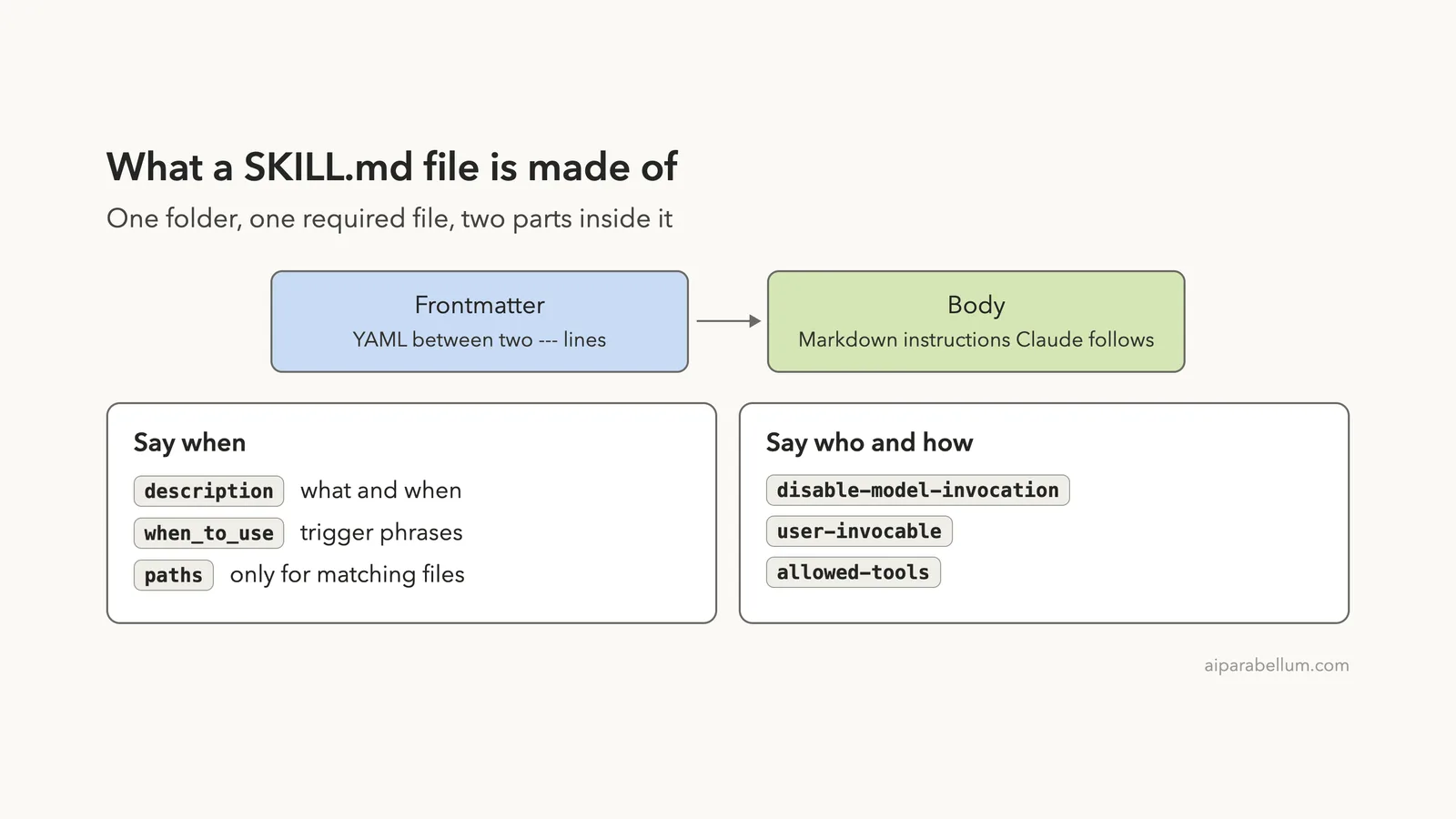
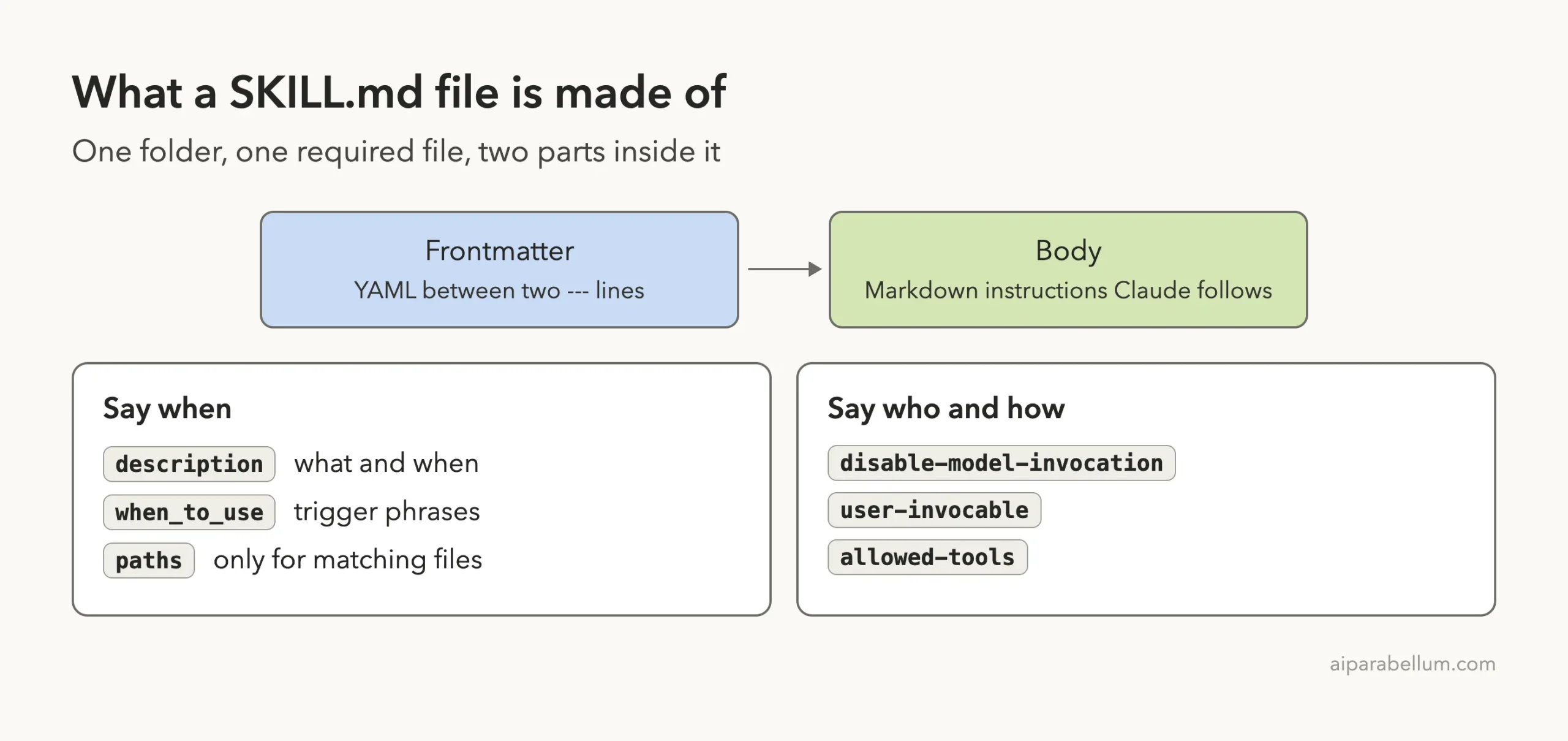
The file has two parts. The frontmatter tells Claude Code about the skill, and the body holds the instructions.
Anthropic’s skills documentation describes this layout and is the source for every field in this guide.
Where to Put a Skill Folder
Skills load from a few places. A personal skill lives in ~/.claude/skills/<name>/SKILL.md and works in all your projects. A project skill lives in .claude/skills/<name>/SKILL.md inside a repository and travels with the code.
For this guide we used project skills only, in a demo folder with this layout:
skill-md-format/
├── CHANGES.md
└── .claude/skills/
    ├── release-note/SKILL.md
    ├── deploy/SKILL.md
    └── house-style/SKILL.md
The folder name becomes the command you type. You can change it with the name field, which we cover below.
The Basic Rules of Frontmatter
Frontmatter is a block of YAML wrapped in two lines of three dashes. Claude Code reads it only when the opening --- is the very first line of the file. If it is not, the whole file, dashes included, is treated as the skill body.
All fields are optional, and field names use lowercase words joined by hyphens. The one exception is when_to_use, which uses underscores. A name that does not match exactly is ignored without any error, so a typo fails silently.
Boolean fields accept true and false, and also yes, no, on, off, 1 and 0. If the YAML cannot be parsed, the skill still loads with no fields set, which means /skill-name works but Claude cannot match your description.
Every Frontmatter Field Explained
Here is the full list from the official reference for the version we tested. We group them by the question each one answers.
Fields That Name and Describe the Skill
| Field | What it does |
|---|---|
name | The command name shown in the / menu. Defaults to the folder name. |
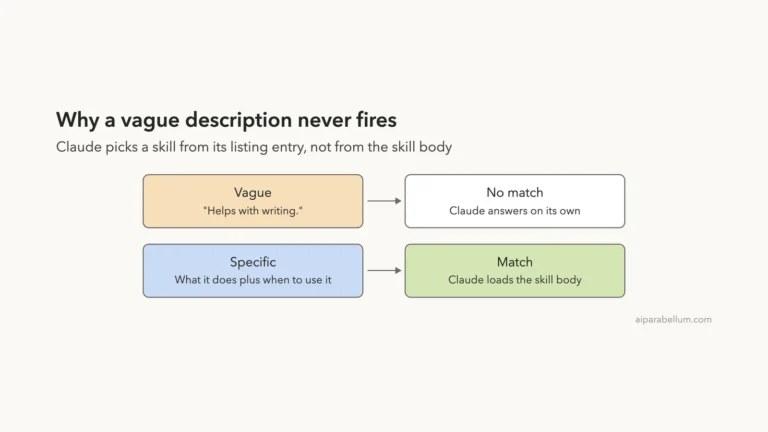
description | What the skill does and when to use it. Claude reads it to decide when to load the skill. If you leave it out, the first non-empty line of the body is used. |
when_to_use | Extra trigger phrases or example requests, added to the description in the skill listing. |
argument-hint | A hint shown while you type, such as [issue-number]. |
arguments | Named positional arguments you can use as $name in the body. |
Put the key use case first in description. The combined description and when_to_use text is cut at 1,536 characters in the skill listing, so long text at the end may never be seen.
Fields That Control Who Can Start the Skill
| Field | What it does |
|---|---|
disable-model-invocation | Set to true so Claude cannot load the skill on its own. You start it by typing /name. Default is false. |
user-invocable | Set to false so only Claude can use it. It disappears from the / menu. Default is true. |
paths | Glob patterns that limit automatic loading to work on matching files. |
Fields That Control Tools, Model and Environment
| Field | What it does |
|---|---|
allowed-tools | Tools Claude can use without asking during the turn that runs the skill. The grant clears on your next message. |
disallowed-tools | Tools removed from Claude’s pool while the skill is active. |
model | Model for the rest of the current turn. It accepts the same values as /model, or inherit. |
effort | Effort level for the current turn: low, medium, high, xhigh or max, depending on the model. |
context | Set to fork to run the skill in a forked subagent. |
agent | Which subagent type to use when context: fork is set. |
background | Only with context: fork. Set to false to wait for the result instead of running in the background. |
hooks | Hooks that start when the skill is invoked and keep running for the session. |
shell | Shell for inline commands: bash (default) or powershell. |
Fields From the Agent Skills Spec
| Field | What it does |
|---|---|
metadata | A free-form key-value map for your own tools. Claude Code does not act on it. |
license | The license that covers the skill. Accepted but not acted on. |
compatibility | Environment notes, up to 500 characters. Accepted but not acted on. |
This matters if you plan to share a skill beyond Claude Code. The docs say that claude.ai uploads and the Skills API accept only name, description, license, compatibility, metadata and allowed-tools. Any other field makes the upload fail with an error instead of being ignored.
Step 1: Write a Skill With Arguments
Keep the body short and the description clear: the description is how Claude finds the skill, and the body is a cost on every turn.
Our first skill writes a release note from a small CHANGES.md file. It uses seven fields, so it is a good tour of the format.
---
name: release-note
description: Writes a short release note for one version from CHANGES.md. Use when the user asks for a release note or changelog entry.
when_to_use: Trigger phrases include "write release notes", "changelog for 1.4", "announce the release".
argument-hint: [version] [audience]
arguments: [version, audience]
allowed-tools: Read
effort: low
---

Read CHANGES.md and write a release note for version $version, aimed at $audience.

Rules:
- Start with the heading "Release $version"
- Use at most three bullet points
- Keep each bullet under 12 words
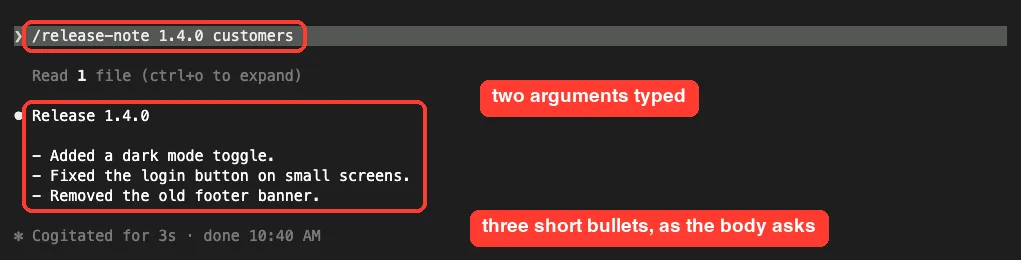
The arguments list gives each position a name. The first value you type becomes $version and the second becomes $audience. The docs also describe $ARGUMENTS for the full text and $0 and $1 for positions.
Because allowed-tools lists Read, Claude can read CHANGES.md for this turn without a permission prompt. We ran it with two arguments and the real session produced a three-line note.
Step 2: See the Argument Hint and Menu Description
Two fields shape what you see before the skill even runs. When we typed /release-note followed by a space, Claude Code showed the argument-hint as a faded hint after the command name.

The / menu also shows each skill’s description. Typing /dep listed our deploy skill with the description we wrote, tagged as a project skill.
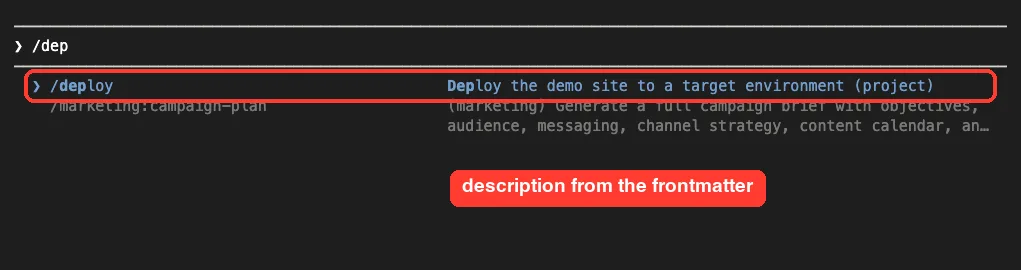
This is why a clear description matters. It is the label people see and the text Claude reads. Our guide to slash commands covers the built-in commands that share this menu.
Step 3: Control Who Can Start a Skill
By default, you and Claude can both start any skill. Two fields change that. The next diagram shows the three possible setups.
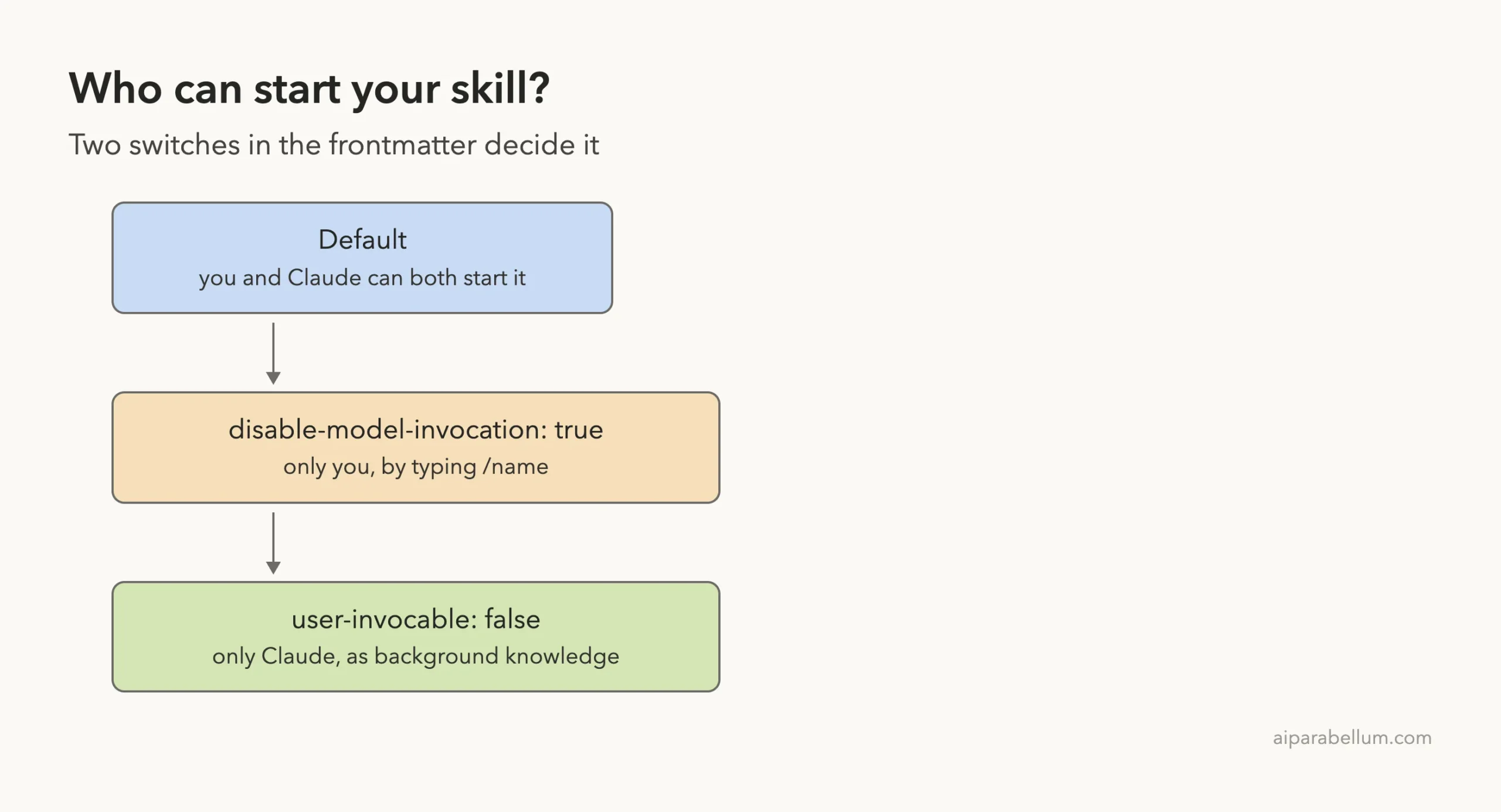
The table below is taken from the official docs and shows what each setting changes.
| Frontmatter | You can invoke | Claude can invoke | When loaded |
|---|---|---|---|
| Default | Yes | Yes | Description always in context, full skill loads when invoked |
disable-model-invocation: true | Yes | Not on its own | Description not in context, full skill loads when invoked |
user-invocable: false | No | Yes | Description always in context, full skill loads when invoked |
A Skill Only You Can Run
Our deploy skill sets disable-model-invocation: true. It is a pretend deploy that prints four steps and runs no real commands, which keeps the demo safe.
---
name: deploy
description: Deploy the demo site to a target environment
disable-model-invocation: true
argument-hint: [environment]
---

Pretend to deploy the demo site to $ARGUMENTS. Do not run any real command.
Print these four steps as done: tests passed, build finished, upload finished, site checked.
When we typed /deploy staging, it printed the four steps. Then we sent a plain request, “Please deploy to production now.” Claude did not run the skill. It replied that it had not deployed anything to production and offered two choices: run the pretend deploy or use a real deploy command that we would supply.
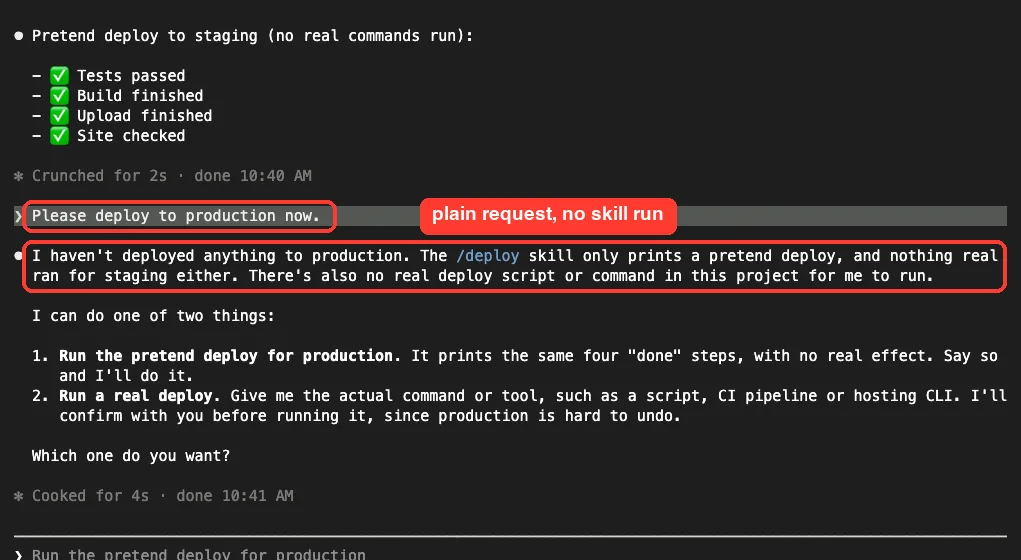
This is one run, so we do not claim it proves every case. The docs describe the rule behind it: Claude cannot start the skill on its own, so it points you to type the command yourself. That is the right setting for anything with side effects, such as deploys or sending messages.
A Skill Only Claude Can Use
The house-style skill holds background rules, not an action, so it sets user-invocable: false.
---
name: house-style
description: Writing rules for every note in this project. Background knowledge for Claude.
user-invocable: false
---

When you write any note in this project, never use exclamation marks and always end with the line "- The Demo Team".
Typing /house in the real session gave “No commands match”, which confirms the skill is hidden from the menu. We did not test whether Claude applies it in later replies, so we make no claim about that here.

Placeholders You Can Use in the Body
Claude Code replaces certain placeholders before Claude reads the skill. These are the ones listed in the docs.
| Placeholder | Meaning |
|---|---|
$ARGUMENTS | Everything typed after the command. If the body has no placeholder, the text is appended as ARGUMENTS: value. |
$ARGUMENTS[N] or $N | One argument by position, counting from 0. |
$name | A named argument from the arguments field. |
${CLAUDE_SESSION_ID} | The current session ID. |
${CLAUDE_EFFORT} | The current effort level. |
${CLAUDE_SKILL_DIR} | The folder that holds the skill’s SKILL.md. |
${CLAUDE_PROJECT_DIR} | The project root folder. |
Wrap a multi-word value in quotes to pass it as one argument. To print a literal dollar amount such as $1.00, write \$1.00.
You can also run a shell command and inject its output with a line like !`git diff HEAD`. Claude Code runs it first and puts the result into the skill, so Claude sees fresh data.
Add Supporting Files Without Bloating the Skill
Once a skill loads, its text stays in the conversation, so every line costs tokens on every turn. Keep SKILL.md short and move long reference material into separate files in the same folder.
my-skill/
├── SKILL.md
├── reference.md
├── examples.md
└── scripts/
    └── helper.py
Mention each file inside SKILL.md so Claude knows what it holds and when to open it. Use ${CLAUDE_SKILL_DIR} in commands so the path works from any folder. For more on how context fills up, see how it works.
Try It Yourself
Build the release-note skill in a throwaway folder, never in a real project. Create a folder, add a small CHANGES.md, make .claude/skills/release-note/SKILL.md and start claude inside it. You can ask Claude Code to write the skill file for you with this prompt:
Create .claude/skills/release-note/SKILL.md. It should write a release note from CHANGES.md for a version and an audience that I pass as two arguments. Use the name, description, argument-hint, arguments and allowed-tools fields, and keep the body under ten lines.Then run /release-note 1.0.0 customers and check that the note matches your rules.
Next, add disable-model-invocation: true and see how the behavior changes. New to the tool? Our first session guide shows how to start safely.
Common Mistakes
- Putting a blank line or comment before the first
---, which turns the frontmatter into plain skill text. - Writing
allowed_toolsordisable_model_invocationwith underscores. Onlywhen_to_useuses them, and a wrong name is ignored silently. - Using angle brackets in the description. Claude Code shows them as
<and>, so use square brackets orargument-hintinstead. - Adding Claude Code only fields such as
argument-hintto a skill you plan to upload to claude.ai, which fails the upload. - Writing a vague description such as “helps with files”. Claude cannot tell when to use it.
- Expecting a rule to hold every time. The docs say to move must-follow rules into a hook, since Claude may skip skill guidance.
Pro Tips
- Start the description with the main use case, then add trigger phrases in
when_to_use. - Use
disable-model-invocation: truefor anything with side effects. - Put the most important instructions at the top. After compaction, Claude Code keeps only the first 5,000 tokens of each invoked skill.
- Run
claude plugin validate .claude/skillsto find files whose frontmatter does not parse (needs v2.1.233 or later). - Use
--debugto see a YAML parse error. - Run
/doctorto see how much context your skill listing uses.
Cheat Sheet
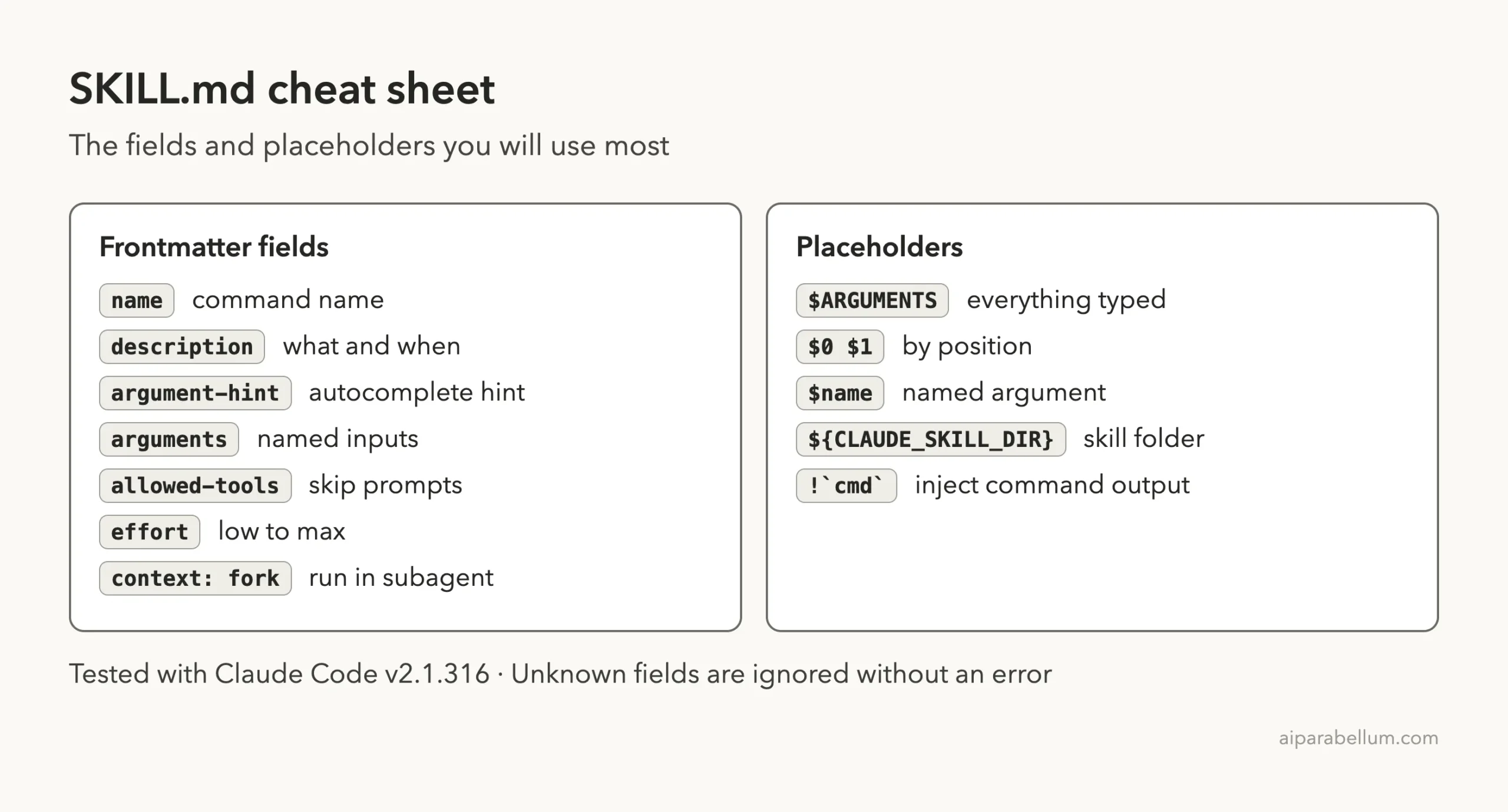
Save this card for the next time you write a skill. Our Claude Code shortcuts guide has more quick references.
Frequently Asked Questions
Is any field in SKILL.md required?
No. All fields are optional, but the docs recommend description so Claude knows when to use the skill. Without it, the first non-empty line of the body is used.
What happens if I misspell a frontmatter field?
Claude Code ignores a field it does not recognize and reports no error. Check names against the official table, hyphens included.
What is the difference between name and the folder name?
In a personal or project skill, name sets the command shown in the menu, and the folder name also invokes the skill. Without name, the folder name is the command.
Can I use my skill in claude.ai?
Yes, with limits. Uploads accept only six fields, so remove any Claude Code only fields first.
Body features such as ! command injection do not work in claude.ai chat or the API. Learn more on our Claude AI page.
Why did Claude stop following my skill?
The skill text is added when it is invoked and is not re-read on later turns. Word guidance as standing rules, and invoke the skill again after a compaction.
Conclusion
The SKILL.md format is simple once you see its two parts: frontmatter that says when, who and how, and a body that says what to do. In our real sessions, the arguments, the argument hint, the menu description, the manual-only deploy and the hidden background skill all behaved as the docs describe. Keep your descriptions clear, your bodies short and your risky skills manual-only, and your skills will be easy to trust. Browse all our Claude Code tutorials for the next part.
Next in the series: Part 2: Claude Code Skills Best Practices: Write Skills That Trigger Reliably.