You wrote a skill, saved it in the right folder, and Claude Code ignored it. This guide to Claude Code skills best practices shows why that happens and how to fix it. We built the same skill twice, once with a vague description and once with a specific one, then ran the same prompt in real Claude Code sessions to see which one fired.
This is Part 2 of 45 in our Claude Code Deep Dives, part of our Claude Code tutorials. If you have not seen the fields yet, read Part 1, SKILL.md Format Explained: Every Frontmatter Field With Examples, first.
Tested with Claude Code v2.1.316 on November 3, 2026. We tested on macOS, in two throwaway demo folders with project skills, so nothing in our personal setup changed. One demo is one demo: the result below is what we saw in our own sessions, and the rules come from Anthropic’s official docs.
Quick Summary: What Makes a Skill Trigger Reliably
| Practice | Why it matters |
|---|---|
| Say what the skill does and when to use it | Claude picks a skill from its description |
| Put the key use case first | Description and when_to_use text is cut at 1,536 characters in the listing |
| Use words people really type | Claude matches your request to the description |
Keep SKILL.md under 500 lines | Long files cost context once the skill loads |
| Put vital rules near the top | After compaction, Claude Code can keep only the start of a skill |
| Move must-always rules into hooks | A hook runs every time its event happens |
| Test with a real prompt | You find out in seconds if the skill fires |
How Does Claude Code Decide to Use a Skill?
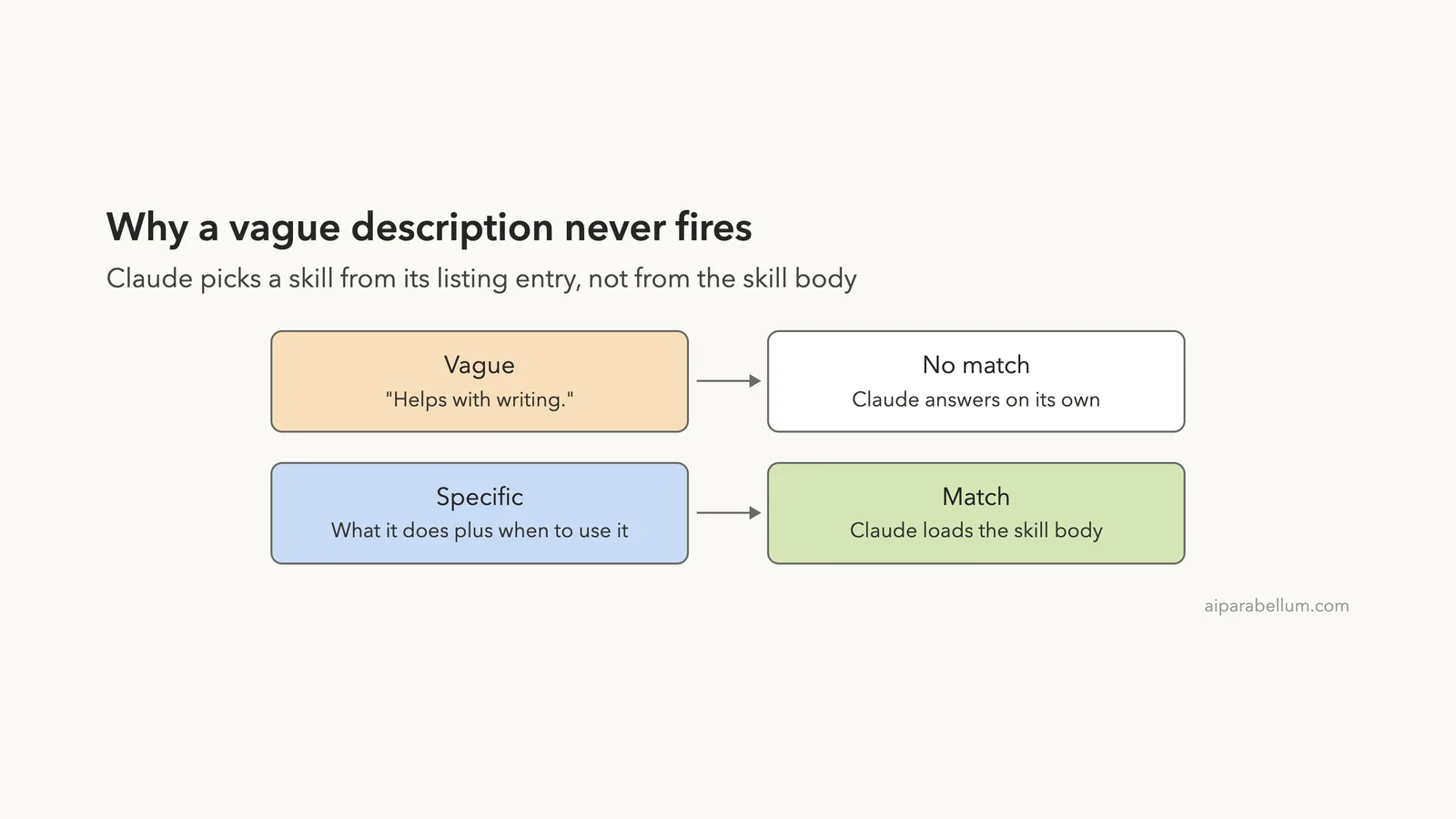
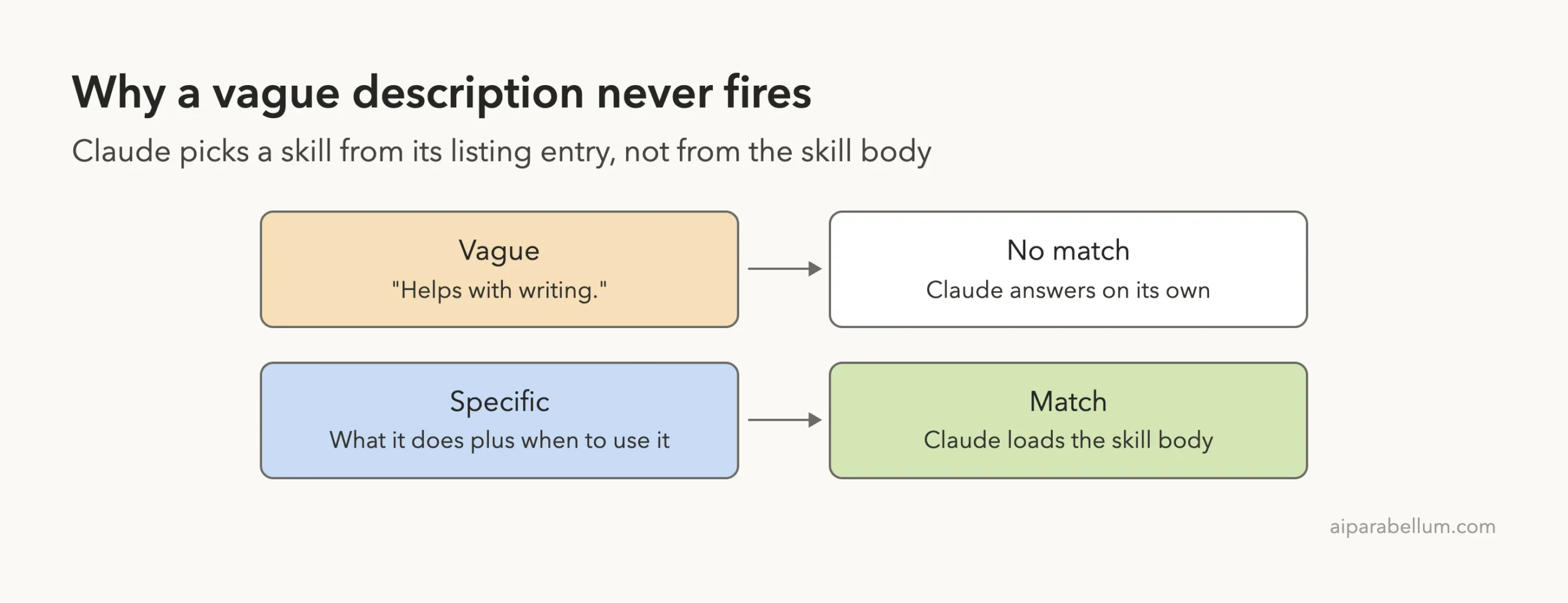
Claude Code does not read every skill file at the start of a session. It loads a short listing of skill names and descriptions, and Claude uses that listing to decide what is available. The full skill body is read only when the skill is invoked.
That one fact explains most trigger problems. If the description does not tell Claude what the skill is for, Claude has no reason to open it. The official docs say it plainly: the description helps Claude decide when to load the skill automatically.
The skills documentation and the authoring best practices are the sources for the rules in this article. For the bigger picture of how sessions work, see this overview.
Our Test: Vague Description Versus Specific Description
We created two demo projects. Each holds one skill with the exact same body, a small release notes template. Only the description differs.
The first skill is called helper and has this frontmatter:
---
name: helper
description: Helps with writing.
---
The second skill is called writing-release-notes:
---
name: writing-release-notes
description: Turns a list of code changes into customer-facing release notes. Use when the user asks for release notes, a changelog entry, or "what's new" text for a version.
---
Both bodies tell Claude to use a fixed format and to finish with the line “Checked against the release-notes template.” That closing line is our proof: if it appears, the skill body was used.
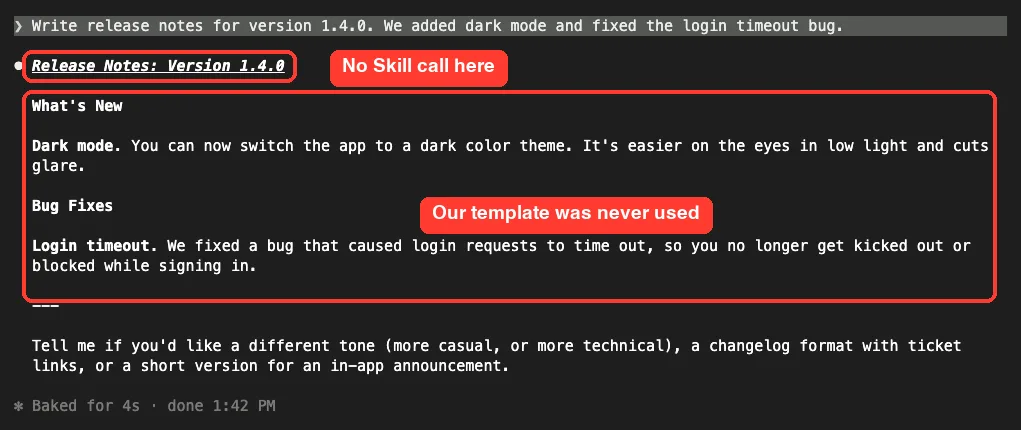
We started a fresh Claude Code session in each folder and typed the same prompt: “Write release notes for version 1.4.0. We added dark mode and fixed the login timeout bug.”
Result 1: The vague description was ignored
In the first session, Claude wrote nice release notes, but it never called the skill. There is no Skill line in the screen, the layout is its own, and our closing template line is missing.
The skill was there and valid. Claude simply had no clue from “Helps with writing.” that it should apply to release notes.
Result 2: The specific description fired on its own
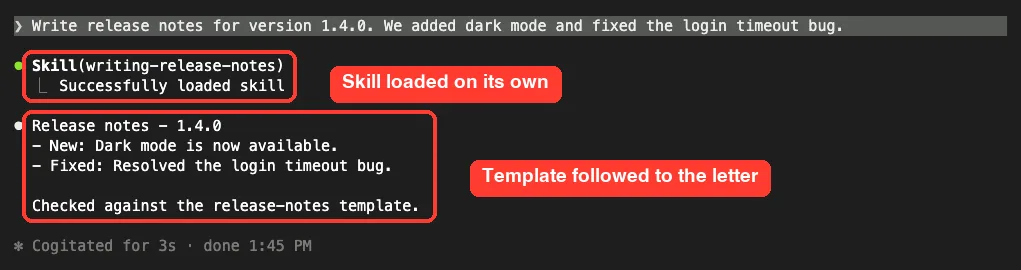
In the second session, the same prompt made Claude call Skill(writing-release-notes) by itself. The reply followed our format exactly and ended with the template line.
We never typed the skill name. Claude matched the words “release notes” in our request to the words in the description.
Claude Code Skills Best Practices for Writing a Description
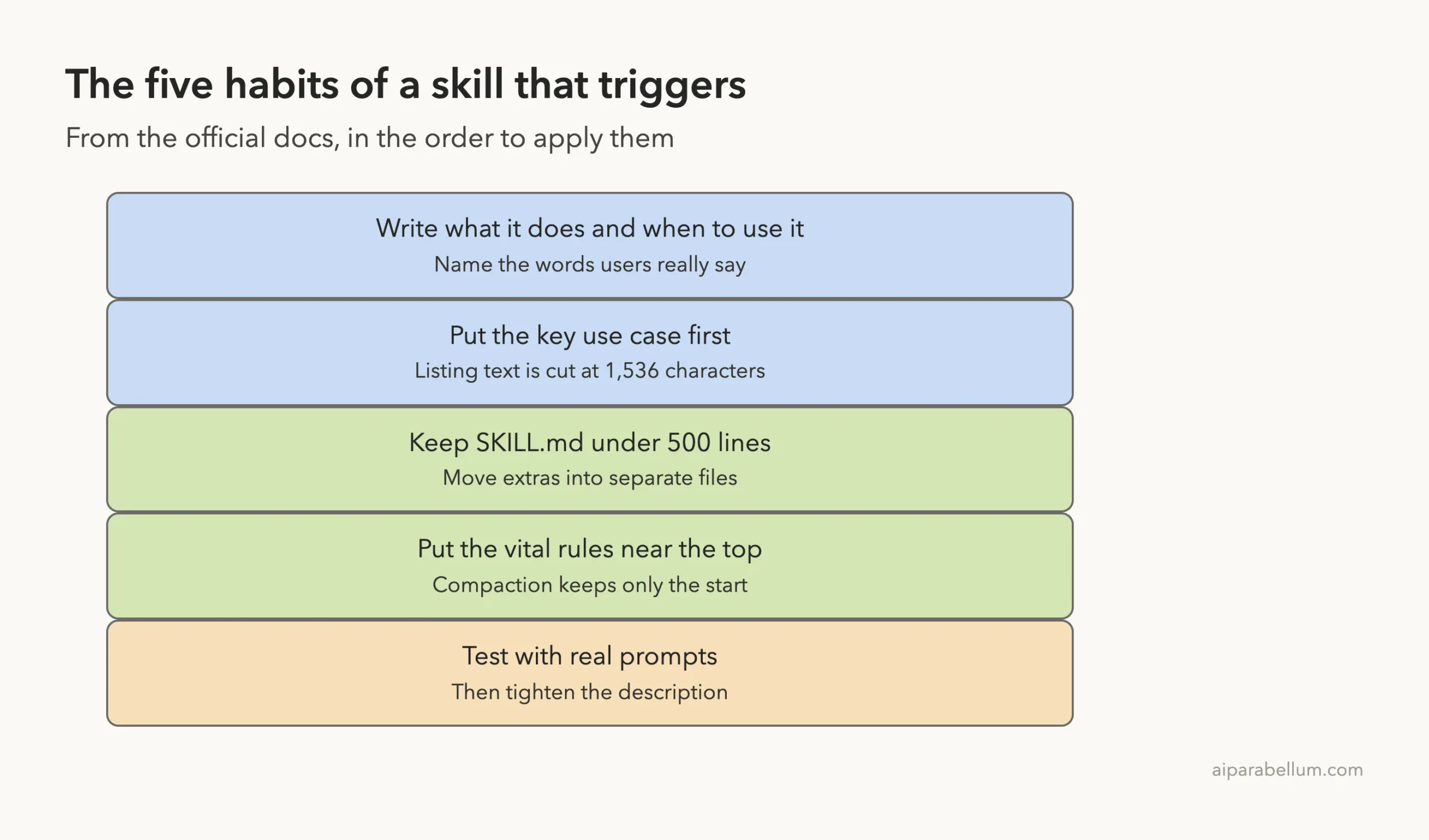
A good description has two jobs. It says what the skill does, and it says when to use it.
Anthropic’s guide recommends being specific and including key terms, covering both the what and the when. Our winning description does exactly that in two short sentences.
Use a simple formula
- Start with a verb phrase for the job, such as “Turns a list of code changes into release notes.”
- Add “Use when the user asks for…” followed by two or three phrases people really say.
- Keep it short enough that the first words carry the main idea.
Put the key use case first
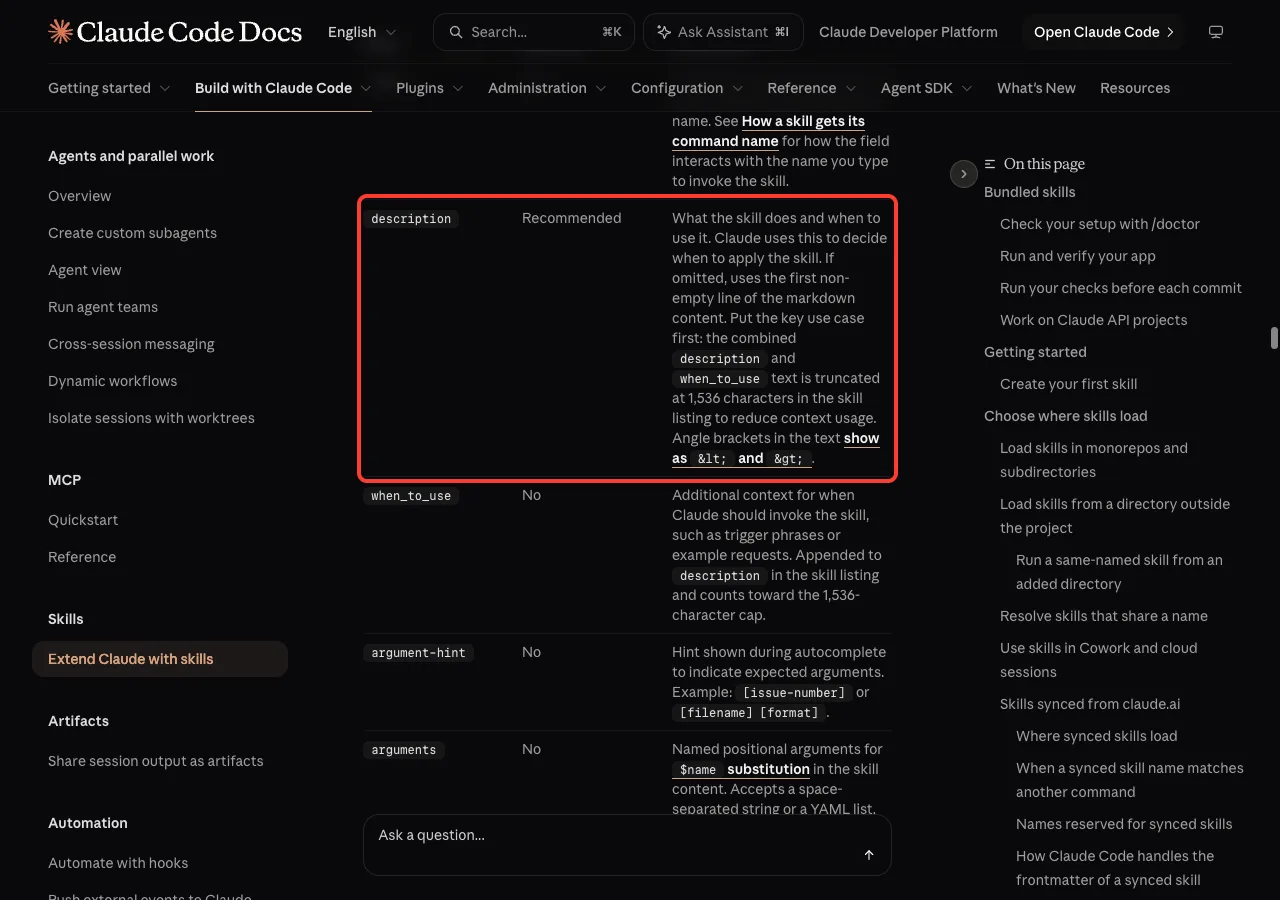
The docs state that the combined description and when_to_use text is truncated at 1,536 characters in the skill listing. They advise putting the key use case first. If you pile background into the opening lines, the trigger words may sit past the cut.
Use when_to_use for extra trigger phrases
The optional when_to_use field holds extra context, such as trigger phrases or example requests. It is added to the description in the listing and counts toward the same cap, so it is not a place for long text. Our SKILL.md format guide covers the field in detail.
Name the skill clearly
Anthropic’s guide suggests consistent names, and it favors names that describe the activity, such as verb-and-ing forms. Our failing demo used the bland name helper, while the working one was named for its job. A clear name also makes a skill easier to find in the / menu, which our guide to slash commands explains.
What Happens When You Have Many Skills?
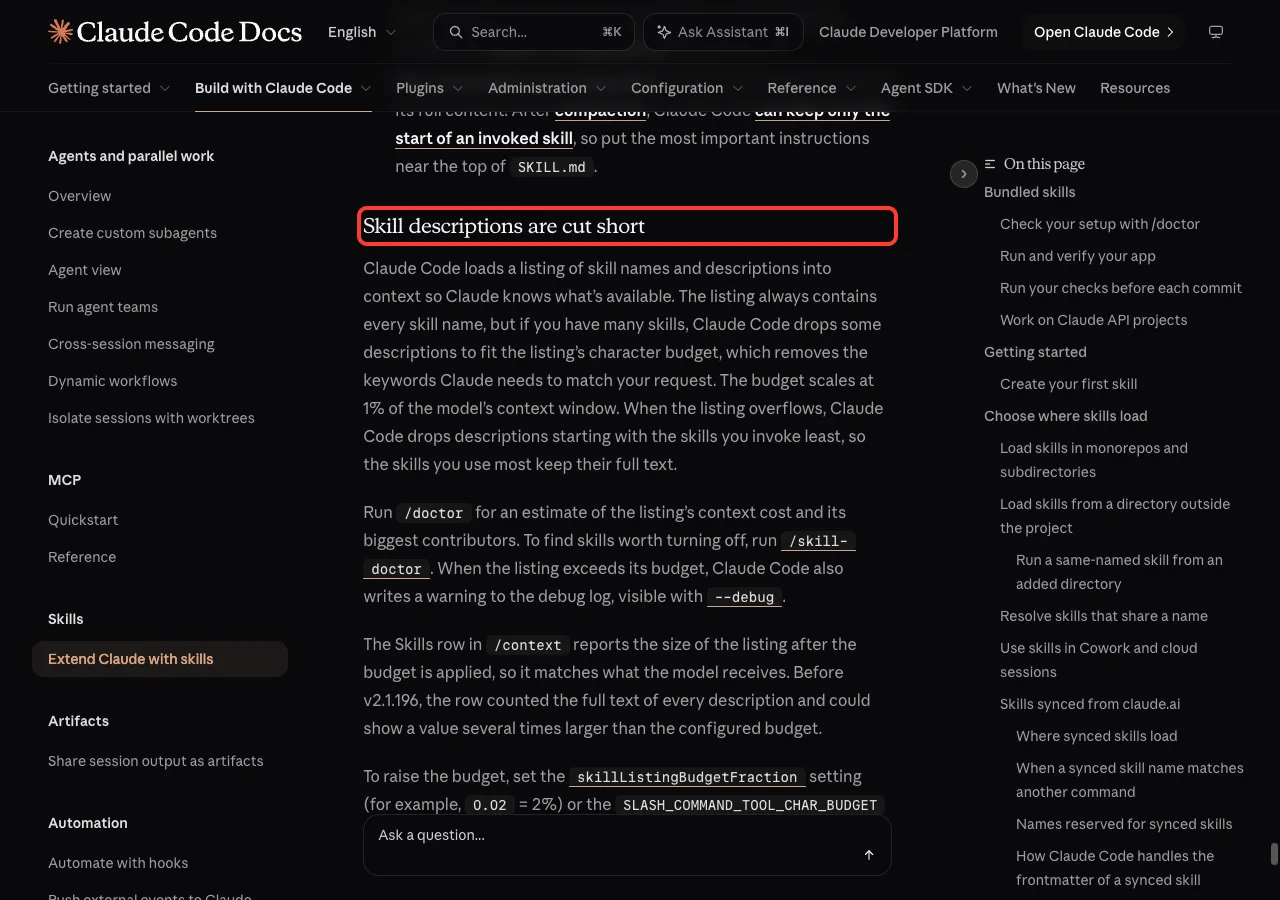
Every skill adds to the listing, and the listing has a character budget. The docs say the budget scales at 1% of the model’s context window.
When there are too many skills, Claude Code drops some descriptions, starting with the skills you invoke least. The names stay, but the keywords Claude needs to match your request are gone.
Three ways to deal with a full listing
- Run
/doctorfor an estimate of the listing cost and its biggest contributors. - Run
/skill-doctorto see which skills cost the most and which ones you never use, then turn those off. - Trim the
descriptionandwhen_to_usetext at the source, or raise the budget with theskillListingBudgetFractionsetting.
When the listing goes over budget, Claude Code also writes a warning to the debug log. You can see it by starting with --debug.
Skills Best Practices: Keep SKILL.md Short and Organized
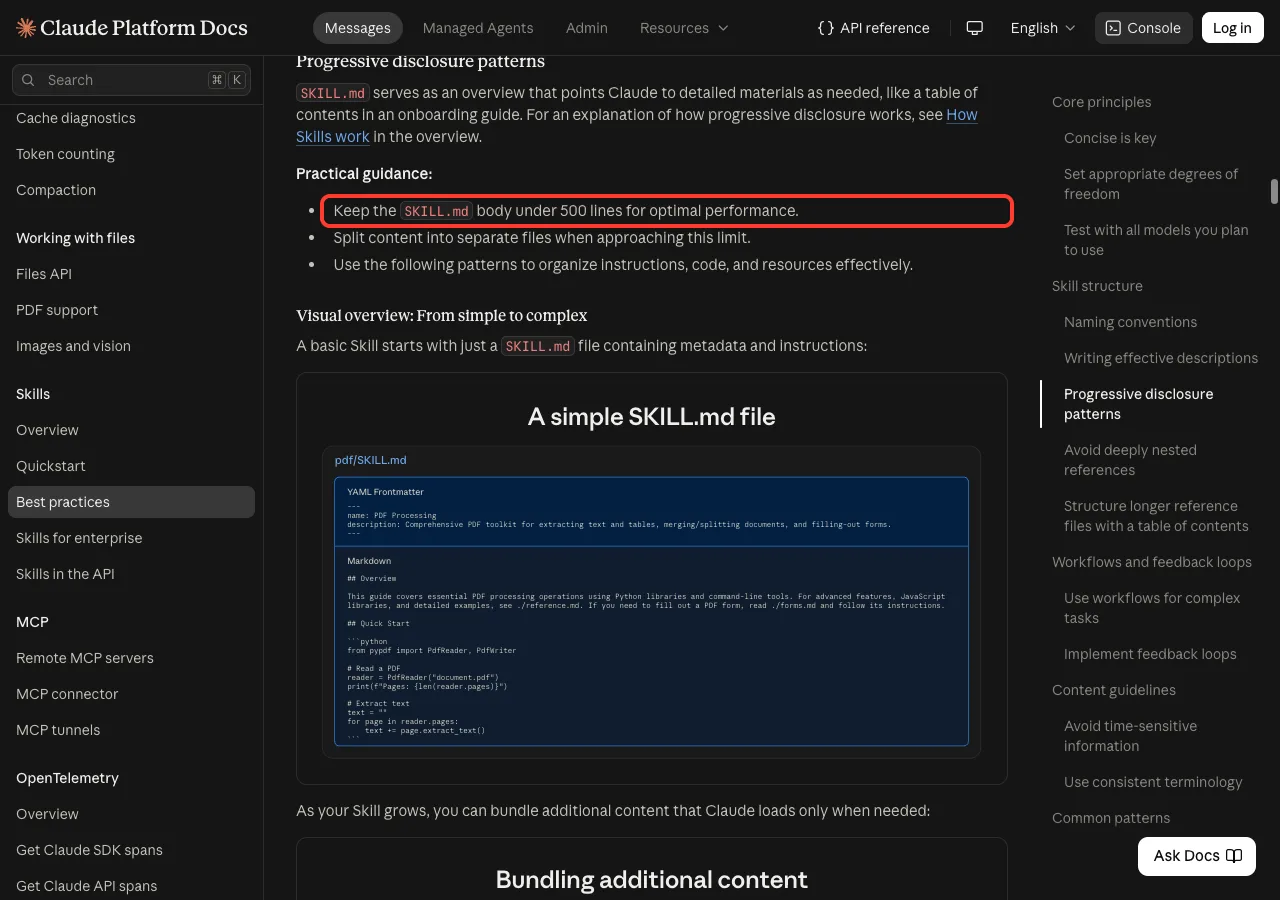
Once a skill loads, its text competes with your conversation for space. Anthropic’s authoring guide says to keep the SKILL.md body under 500 lines and to split content into separate files as you approach that limit.
Only add what Claude does not already know
The guide starts from the idea that Claude is already very smart. For each paragraph, ask whether Claude really needs it and whether it justifies its cost. Our release notes body is only a few lines, because Claude already knows what release notes are.
Point to extra files
Treat SKILL.md like a table of contents. Put long references in files such as reference.md and tell Claude when to read each one. The guide says to keep references one level deep from SKILL.md, so Claude reads complete files instead of previewing nested ones.
Match how strict you are to how risky the task is
For flexible jobs like code review, give general direction. For fragile jobs like database migrations, give exact steps. The guide compares this to a narrow bridge versus an open field.
Use clear steps and checks
For multi-step jobs, number the steps and add a check, such as running a validator and fixing errors before moving on. The guide says this kind of feedback loop greatly improves output quality.
Why Does Claude Follow a Skill at First, Then Stop?
This is the second most common complaint, and the docs explain it. Claude Code adds the skill text to the conversation when the skill is invoked and does not re-read the file on later turns.
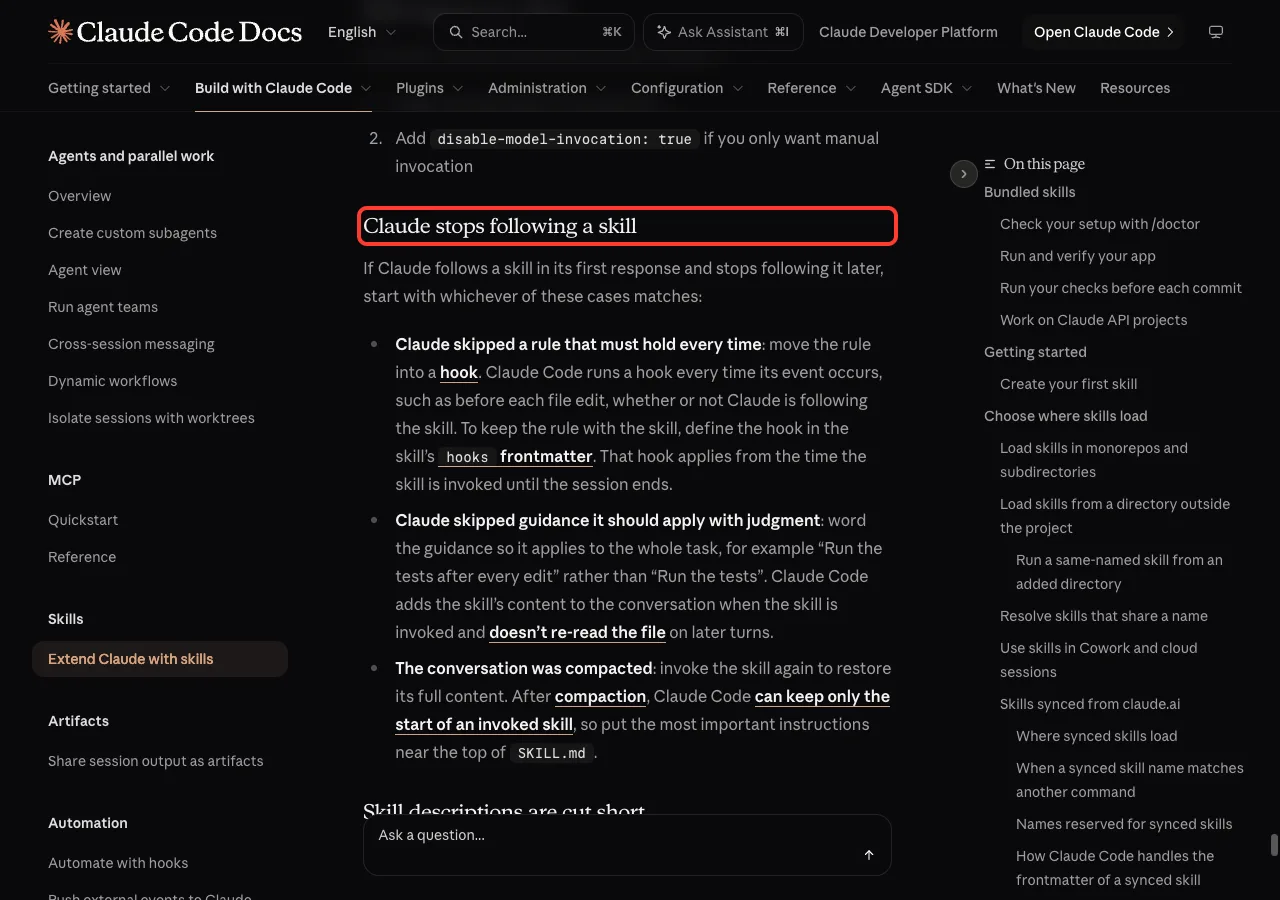
The docs list three cases:
- A rule must hold every time: move it into a hook. A hook runs every time its event occurs, whether or not Claude follows the skill.
- Guidance needs judgment: word it so it applies to the whole task, such as “Run the tests after every edit” instead of “Run the tests.”
- The conversation was compacted: invoke the skill again, and put the most important instructions near the top of
SKILL.md.
The last point is easy to miss. After compaction, Claude Code can keep only the start of an invoked skill, so the first lines of your file matter most.
What If the Skill Triggers Too Often?
The opposite problem is just as real. The docs give two fixes: make the description more specific, or add disable-model-invocation: true if you only want manual invocation.
Use the second fix for anything with side effects, like deploys. Claude then cannot start the skill on its own, but you can still type it as a command.
Takeaway: Claude picks a skill from its description, so write what it does and when to use it.
Try It Yourself
You can repeat our test in about five minutes. Use a throwaway folder, never a real project.
- Create
.claude/skills/helper/SKILL.mdwith a vague description and a distinctive closing line in the body. - Start Claude Code in that folder and ask for a task the skill covers. Note whether a Skill line appears and whether your closing line shows up.
- Rewrite the description with what and when, restart the session, and ask again.
Here is a prompt that asks Claude to do the rewrite for you:
Read .claude/skills/helper/SKILL.md. Rewrite only its description so it says what the skill does
and "Use when the user asks for ..." with three phrases a person would really type.
Keep it under 300 characters and show me the before and after.
After you apply the new text, start a fresh session before testing, so the new listing is loaded.
Common Mistakes
- Writing a description that says only what the topic is, like “Helps with writing,” with no trigger.
- Burying the main use case at the end of a long description, past the 1,536 character cut.
- Using angle brackets in the description. The docs say they show as
<and>, so use square brackets instead. - Packing everything into one huge
SKILL.mdinstead of linking to files. - Relying on a skill for a rule that must always hold, instead of a hook.
- Collecting dozens of skills you never use, which pushes descriptions out of the listing.
Pro Tips
- Test with a plain prompt, not the slash command. Typing the skill name proves it loads, but only a plain request proves it triggers.
- Use the same words in the description that your team uses in chat.
- If the YAML is malformed, the docs say the body still loads with empty metadata, so the slash command works but Claude cannot match the description. Run with
--debugto see the parse error. - Let Claude help write the skill, then trim it. Anthropic’s guide describes working with one Claude to draft a skill and testing it with a fresh one.
- Build the skill from real gaps: first notice what you keep explaining, then write just enough to cover it.
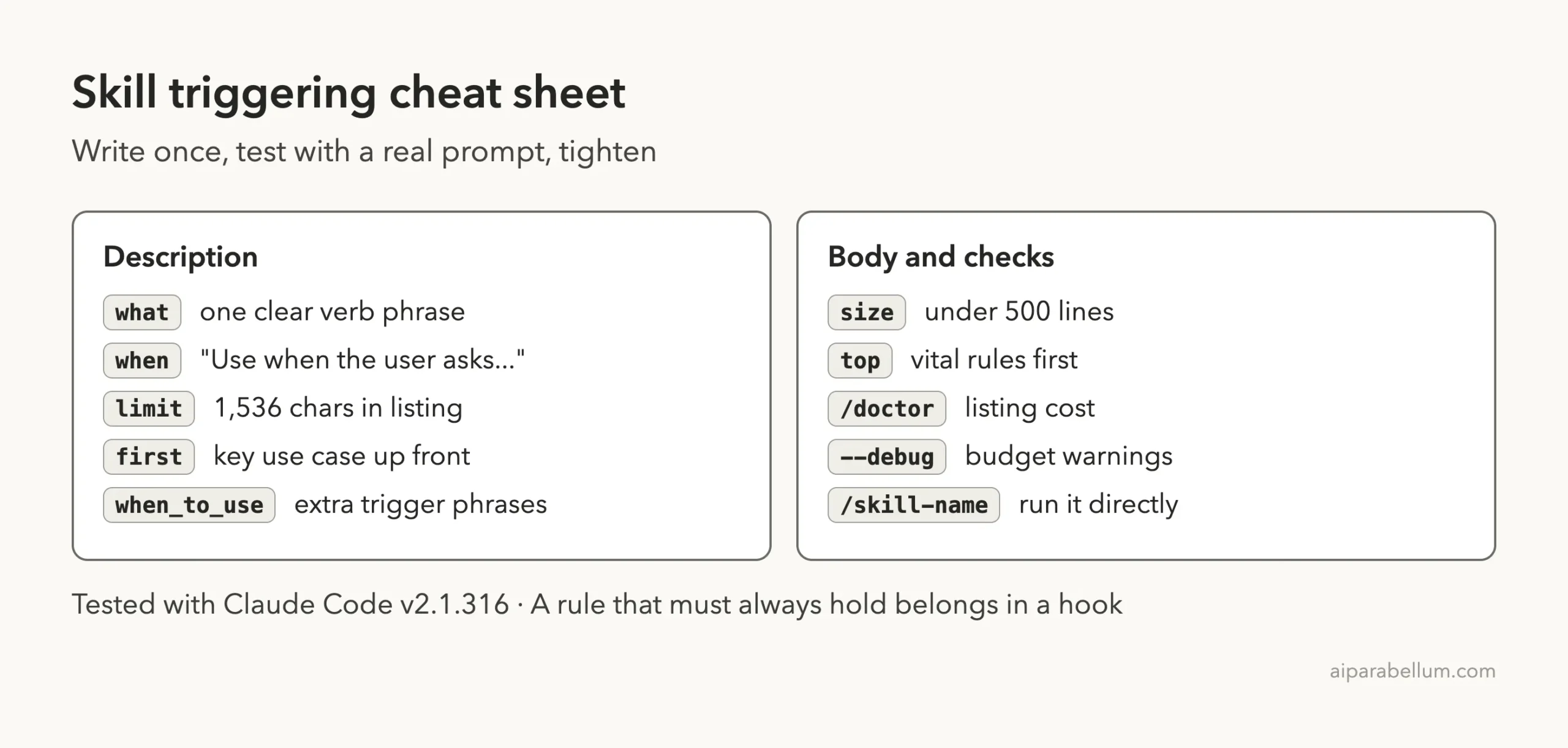
Cheat Sheet: Skills That Trigger
Frequently Asked Questions
How long can a skill description be?
The docs say the combined description and when_to_use text is truncated at 1,536 characters in the skill listing. Aim for far less, with the key use case first.
Why does Claude ignore my skill?
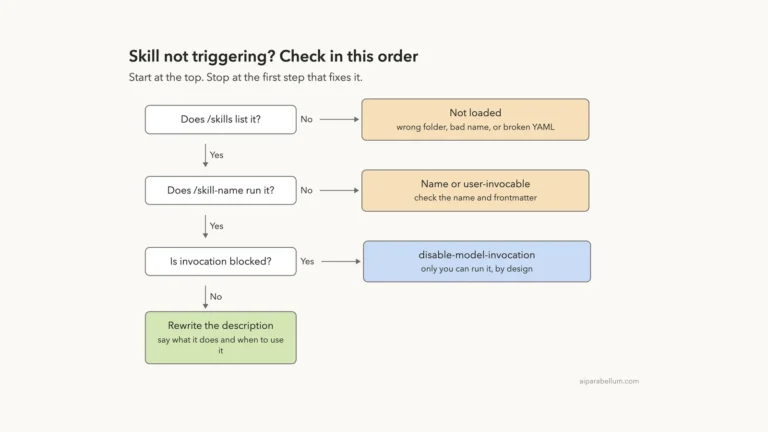
The most likely cause is a description that does not match how you phrase requests. In our test, “Helps with writing.” never fired, while a description naming release notes did. Part 3 of this series digs into how to find out why a skill does not fire.
Can I force a skill to run?
Yes. If the skill is user-invocable, type /skill-name to run it directly. That is also a good way to check that the file itself loads.
How many lines should SKILL.md have?
Anthropic recommends keeping the body under 500 lines for best performance, and splitting content into separate files when you near that.
Do these rules apply in claude.ai too?
The authoring guide covers skills across Claude products. For the app itself, see our Claude AI page, and check the docs for any Claude Code only fields before you upload a skill.
Conclusion
Reliable skills come down to one idea: Claude chooses them from a short description, so that description has to say what the skill does and when to use it. In our real sessions, the same skill body was ignored under “Helps with writing.” and loaded on its own once the description named release notes. Keep the key use case first, keep the file short, put vital rules near the top, and move must-always rules into hooks, and your skills will fire when you expect them to. Browse all our Claude Code tutorials for the next part.
Previous in the series: Part 1: SKILL.md Format Explained: Every Frontmatter Field With Examples
Next in the series: Part 3: Claude Code Skill Not Triggering? How to Find Out Why.