
If Claude Code stops with an API Error 400 that says tool_use ids were found without tool_result blocks, the conversation history has broken. Claude called a tool, but the matching result is missing or in the wrong place, so the Claude API refuses the whole request. When people search for claude code tool_use ids without tool_result, they are usually stuck in a session where every new message fails the same way.
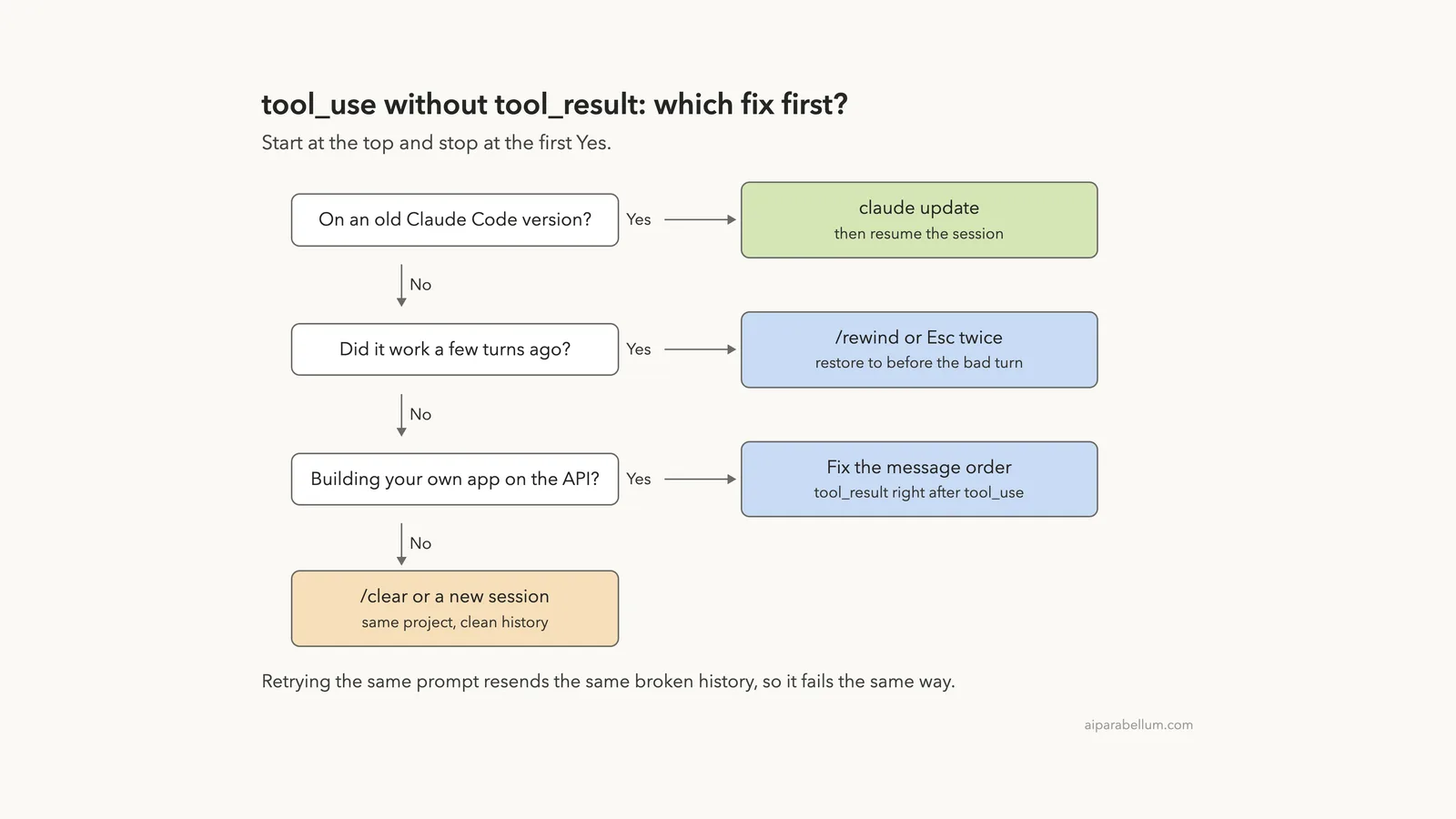
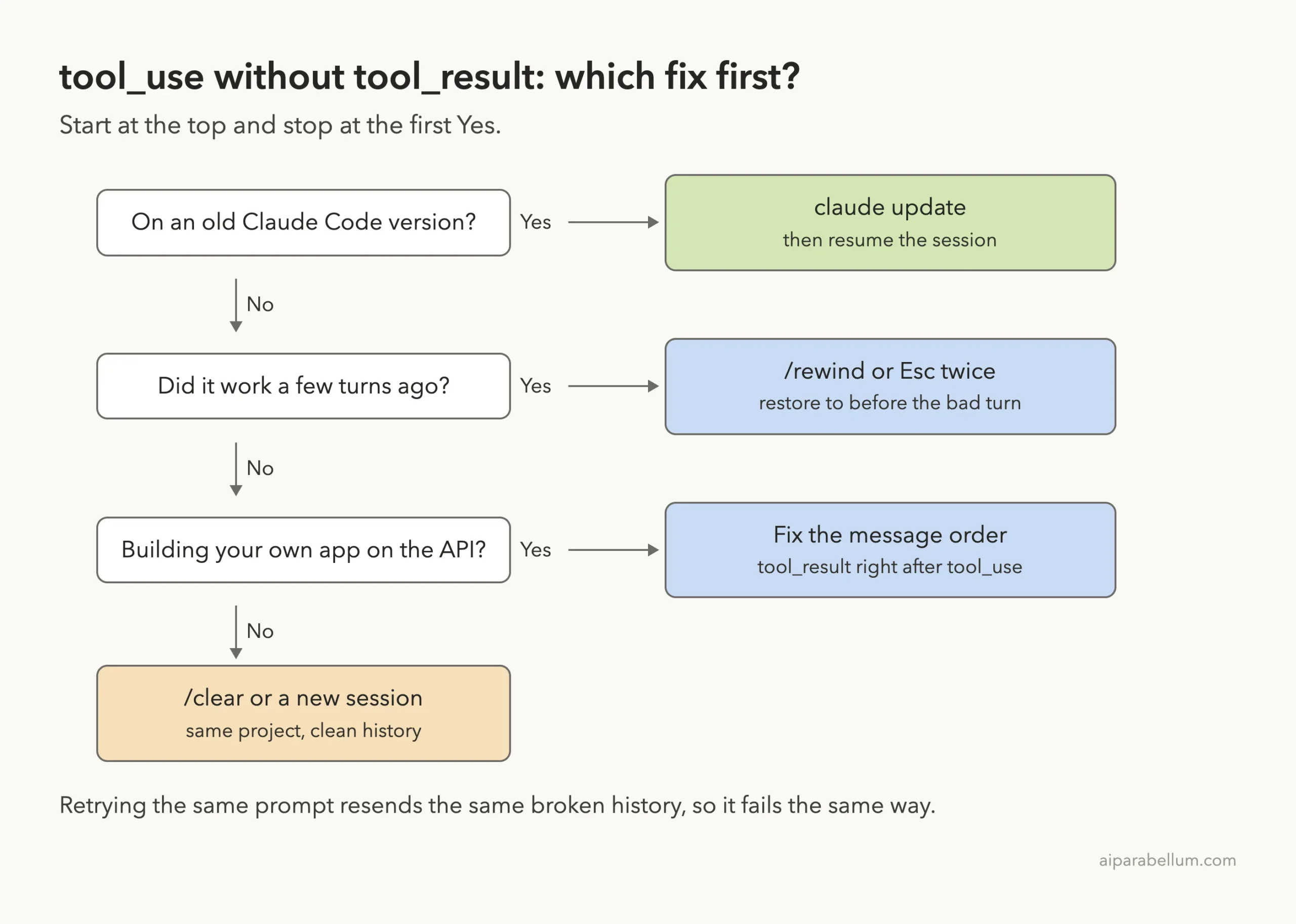
Your project files are fine, and your account is fine. The problem lives in the saved conversation, so the fix is to get a clean history again. Here is the short fix list:
- Run
claude updatefirst. Anthropic says older versions could trigger this error during normal tool use. - Run
/rewind, or pressEsctwice with an empty prompt, and step back to a point before the broken turn. - If you can’t find a good point, run
/clearor start a new session in the same folder. - If you see it in your own app built on the Claude API, put each
tool_resultright after itstool_use.
This guide is part of our help series. Browse all our Claude Code tutorials for more fixes and how-tos.
Tested with Claude Code v2.1.328 on macOS on November 19, 2026. We can’t break a conversation history on purpose without damaging a real session, so the error text and its causes come from Anthropic’s official documentation. We ran the fixes below for real in a small demo folder, and those terminal captures are real.
tool_use ids Without tool_result: Quick Summary
| Question | Short answer |
|---|---|
| Message you see | API Error: 400 with tool_use ids were found without tool_result blocks immediately after |
| What it means | The tool calls and tool results in the history no longer line up |
| Where it comes from | The Claude API rejects the request as a 400 invalid_request_error |
| Related messages | orphaned tool_result, duplicate tool_use ID, unexpected tool_use_id, tool use concurrency issues |
| Does retrying help? | No, the same broken history is sent again |
| First fix | claude update |
| Main fix | /rewind or Esc twice, then restore to before the bad turn |
| Last resort | /clear or a new session |
What the tool_use and tool_result Error Means
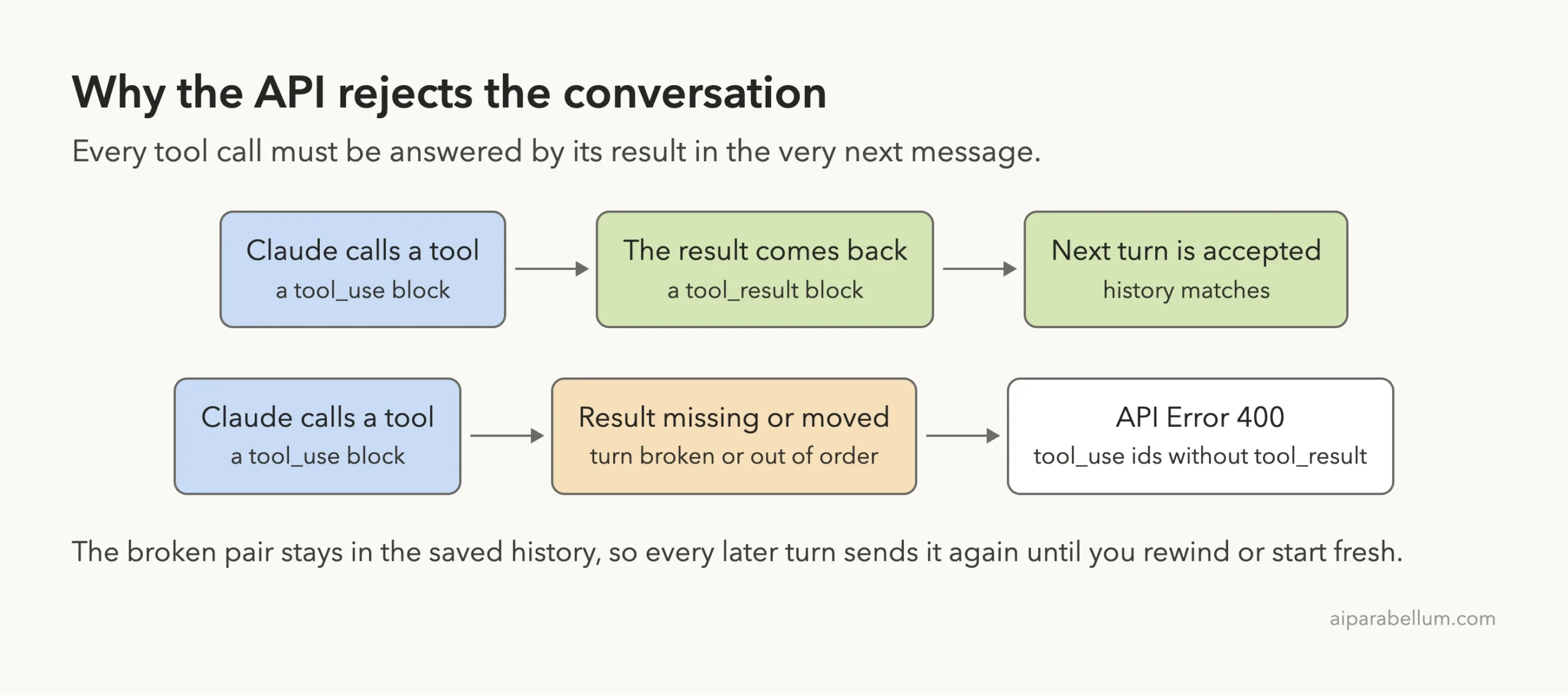
Every time Claude Code reads a file, edits code or runs a command, it works in pairs. Claude sends a tool_use block that asks for a tool to run. Claude Code runs it and sends back a tool_result block with the same ID.
The Claude API is strict about these pairs. Anthropic’s guide to handling tool calls says tool result blocks must immediately follow their tool use blocks, with no other messages in between. It also says the tool_result blocks must come first in the user message, and any text must come after them.
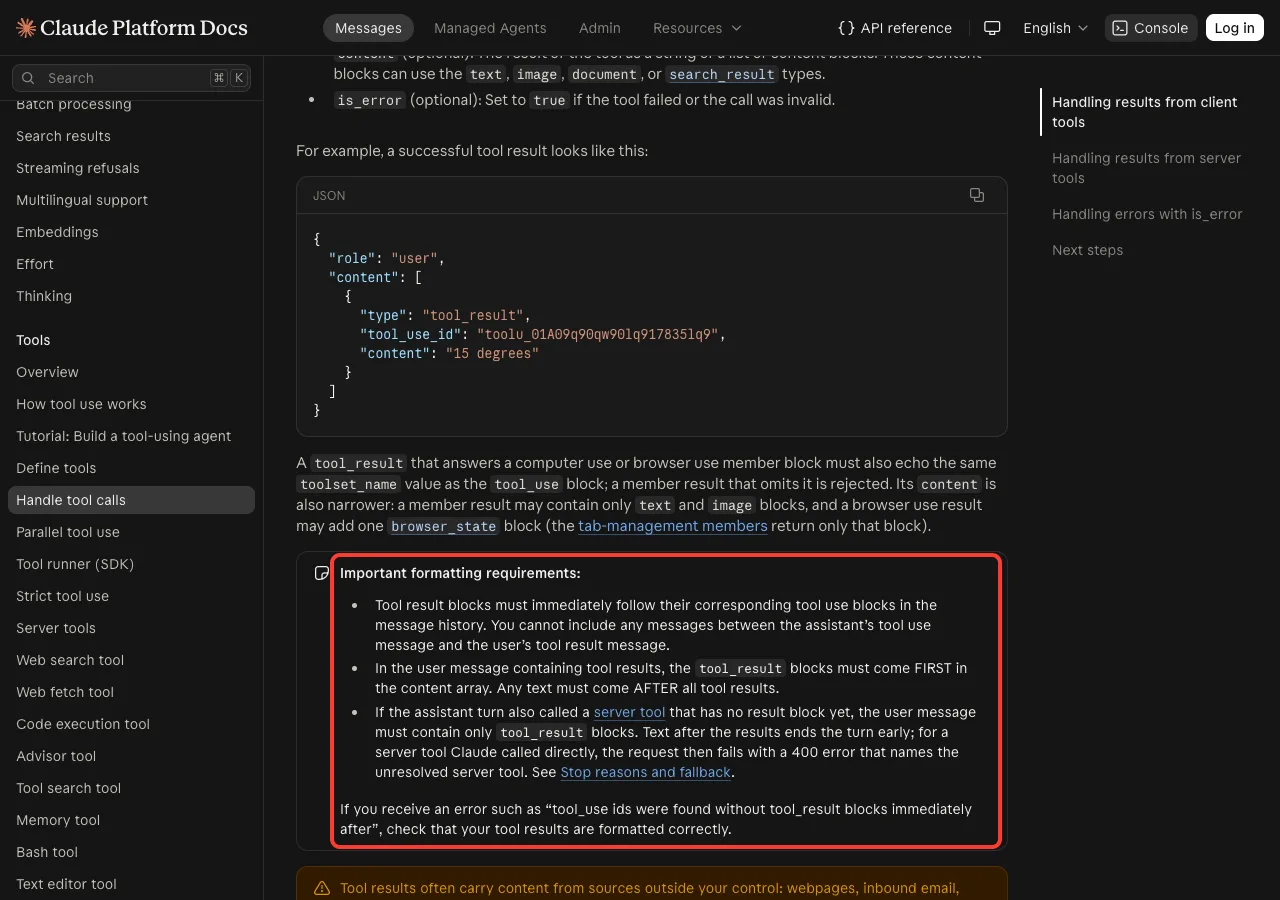
The same note names this exact message. If you receive an error such as tool_use ids were found without tool_result blocks immediately after, the docs say to check that your tool results are formatted correctly. In Claude Code, you don’t format them yourself, so a broken pair points to a conversation that got out of step.
Why It Shows Up as API Error 400
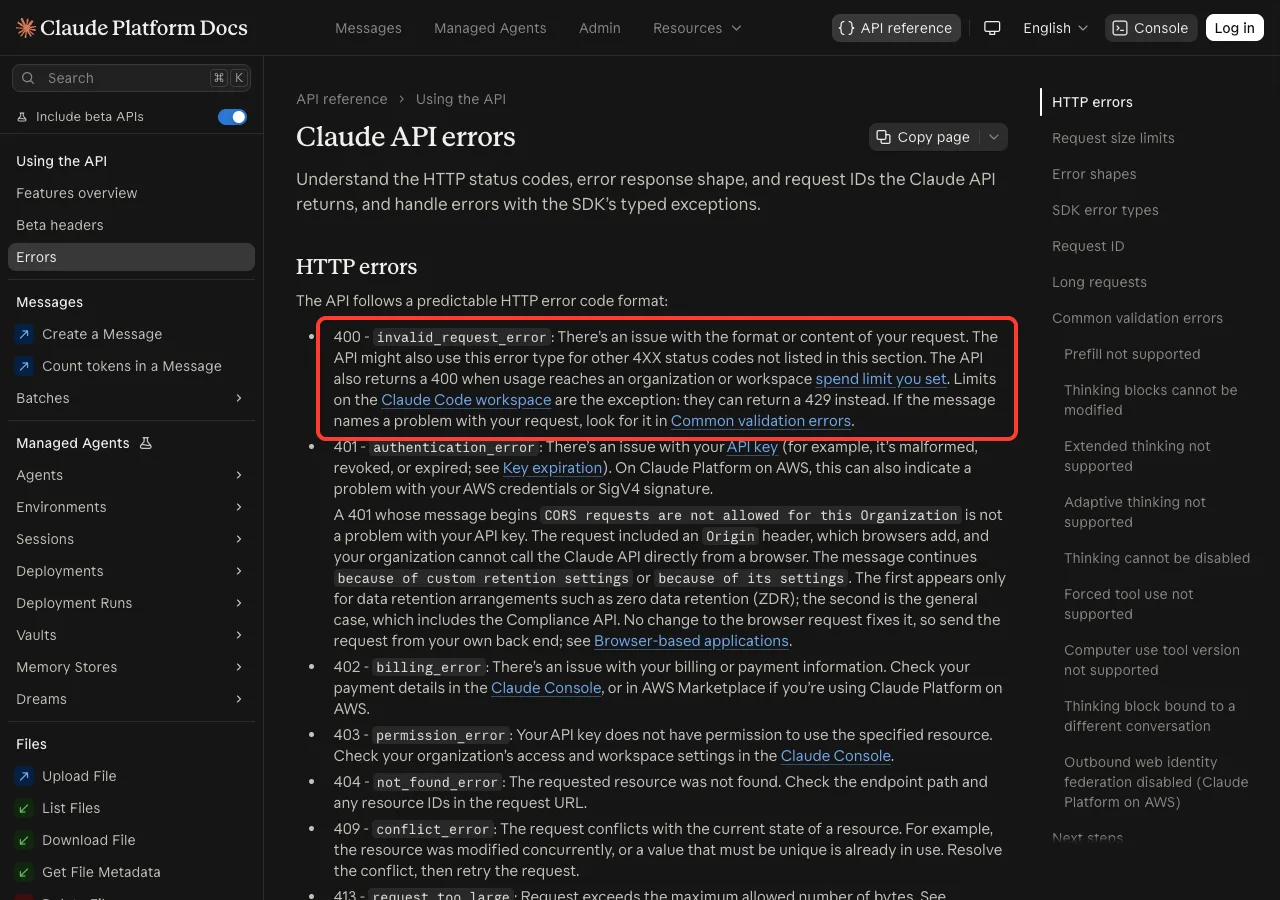
On the Claude API, a 400 invalid_request_error means there is an issue with the format or content of your request. A history with an unanswered tool call is a format problem, so it falls into this group.
This is why the error keeps coming back: Claude Code sends the whole conversation with each new message. As long as the broken pair sits in that history, each request fails before Claude can answer. For other 400 messages, see our 400 and 500 guide.
The Official Claude Code Error Entry
Claude Code’s error reference groups this message with a family of related ones under “Tool use or thinking block mismatch”. Its one-line summary is that the conversation history reached the API in an inconsistent state.
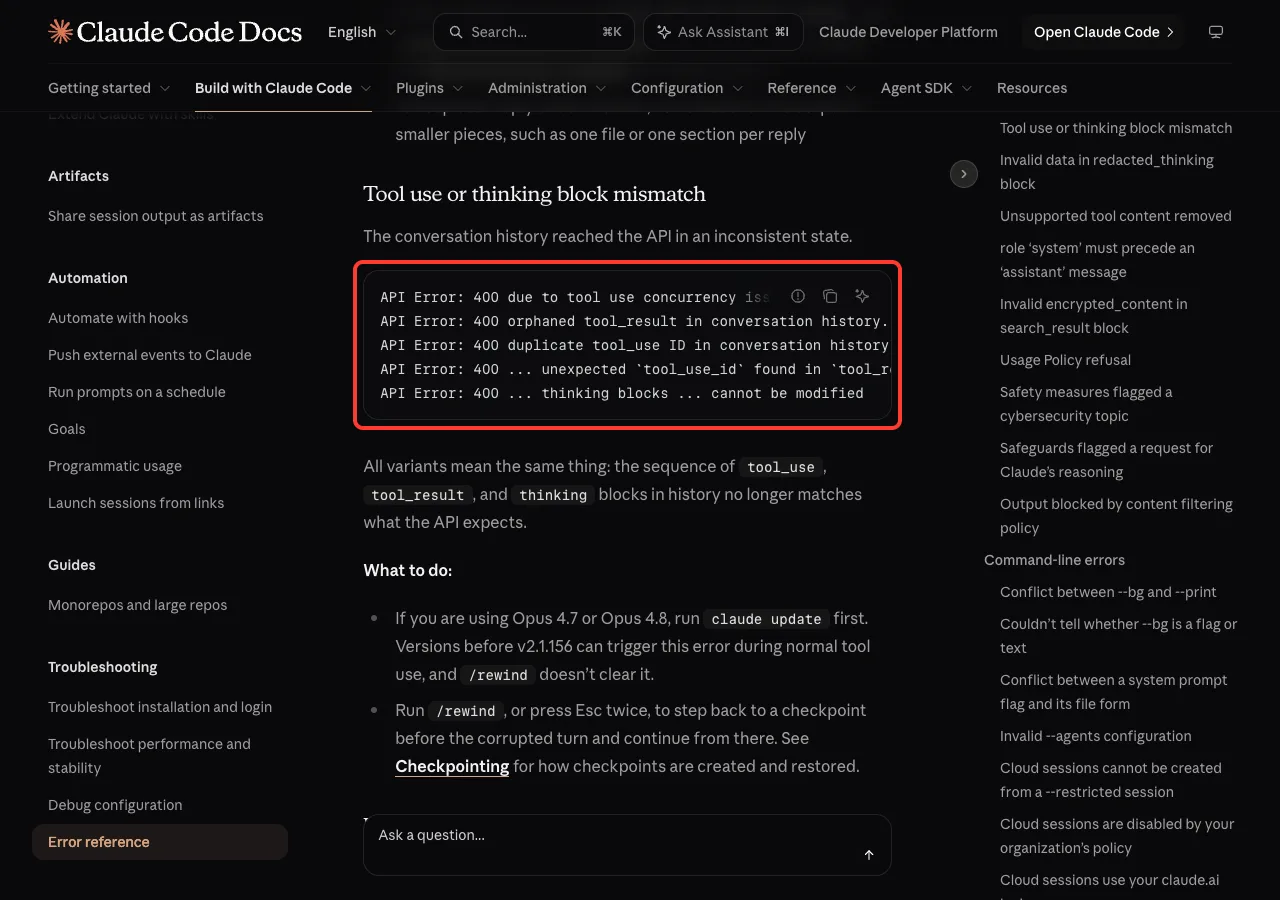
These are the variants listed there. You may see any of them, and the page says all of them mean the same thing:
API Error: 400 due to tool use concurrency issues. Run /rewind to recover the conversation.API Error: 400 orphaned tool_result in conversation history. Run /rewind to recover the conversation.API Error: 400 duplicate tool_use ID in conversation history. Run /rewind to recover the conversation.API Error: 400 ... unexpected `tool_use_id` found in `tool_result` blocksAPI Error: 400 ... thinking blocks ... cannot be modified
In each case, the order of tool_use, tool_result and thinking blocks in the history no longer matches what the API expects. The tool_use ids without tool_result wording is the API’s own version of the same complaint.
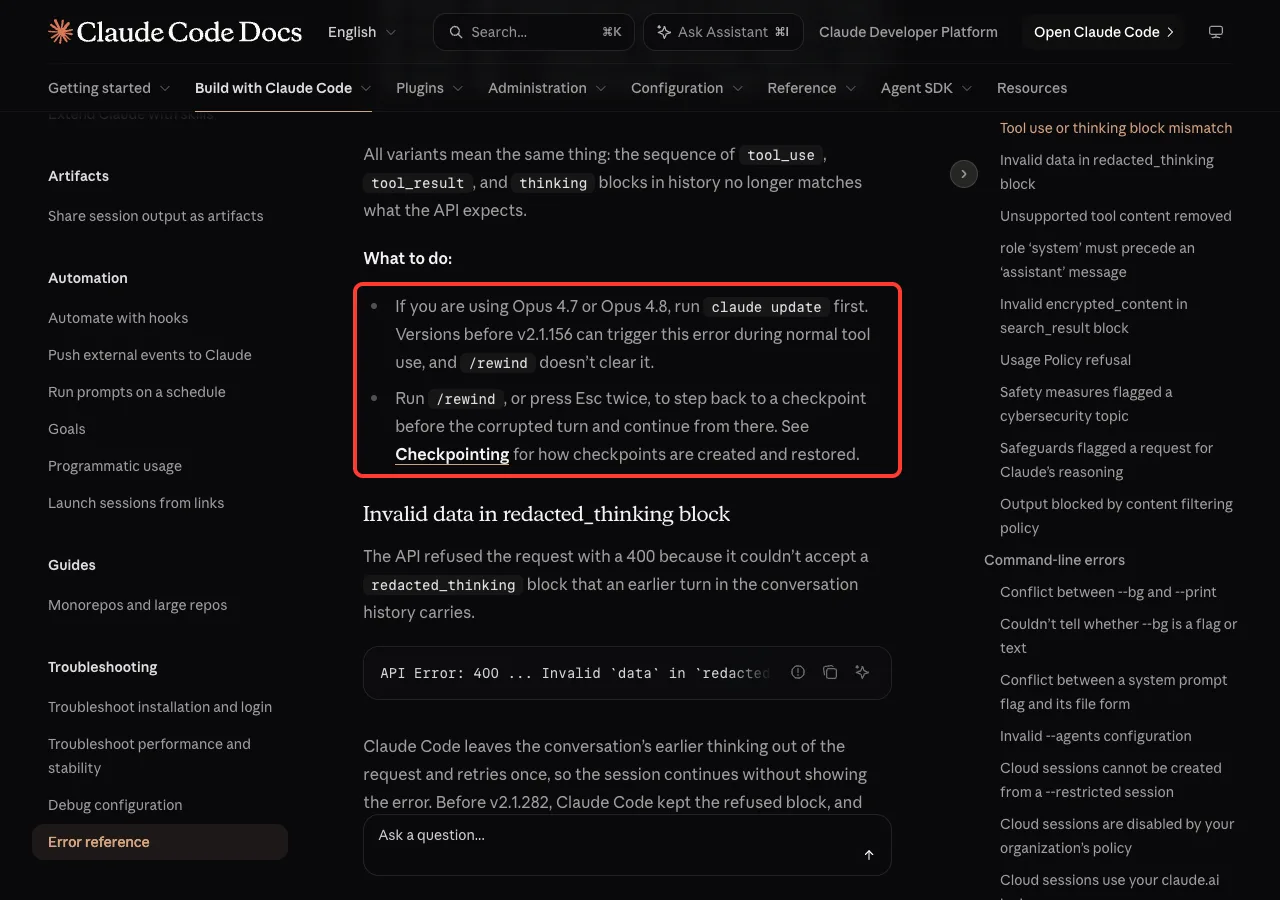
The error is about the conversation, not your code. Fix the history and the session works again.
Common Causes of tool_use ids Without tool_result
Anthropic doesn’t list every way a history can break, but the docs and the error text point to a few clear situations:
- An older Claude Code version. The error reference says versions before v2.1.156 can trigger this error during normal tool use with Opus 4.7 or Opus 4.8, and that
/rewinddoesn’t clear it there. - A turn that ended between a tool call and its result, so the call has no answer.
- Several tools running at once, which the “tool use concurrency issues” variant refers to.
- A saved session that something other than the Anthropic API answered, such as a third-party proxy set through
ANTHROPIC_BASE_URL. The docs describe proxies leaving tool content in session files that the API doesn’t accept. - Your own code on the Claude API, where a
tool_resultis missing, has the wrongtool_use_id, or comes after other text.
Fix 1: Update Claude Code
Start here, because it takes a few seconds and Anthropic lists it first. Check your version, then update:
claude --version
claude update
On our Mac, the update moved Claude Code from v2.1.325 to v2.1.328. After an update, start Claude Code again and resume your session with claude --continue or /resume.
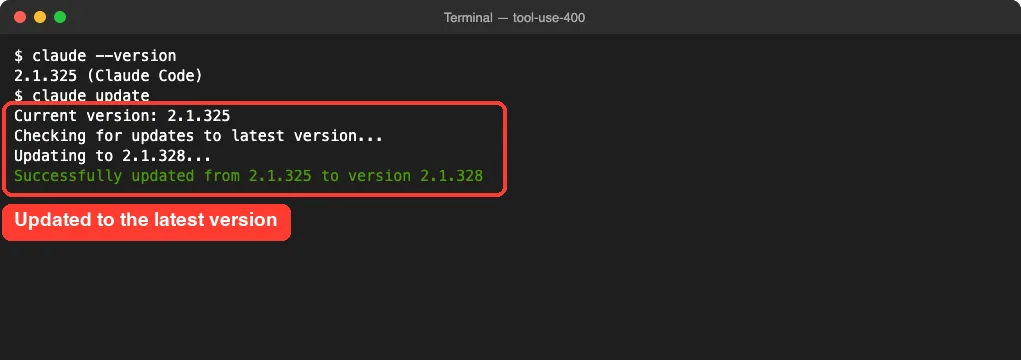
If the same session still fails after the update, the broken pair is already saved in the history. Move on to Fix 2. Our guide to resuming sessions covers --continue and /resume in detail.
Fix 2: Rewind to Before the Broken Turn
This is the main fix, and it is the one the error text itself suggests. The rewind menu lets you drop the broken part of the conversation and carry on from a clean point.
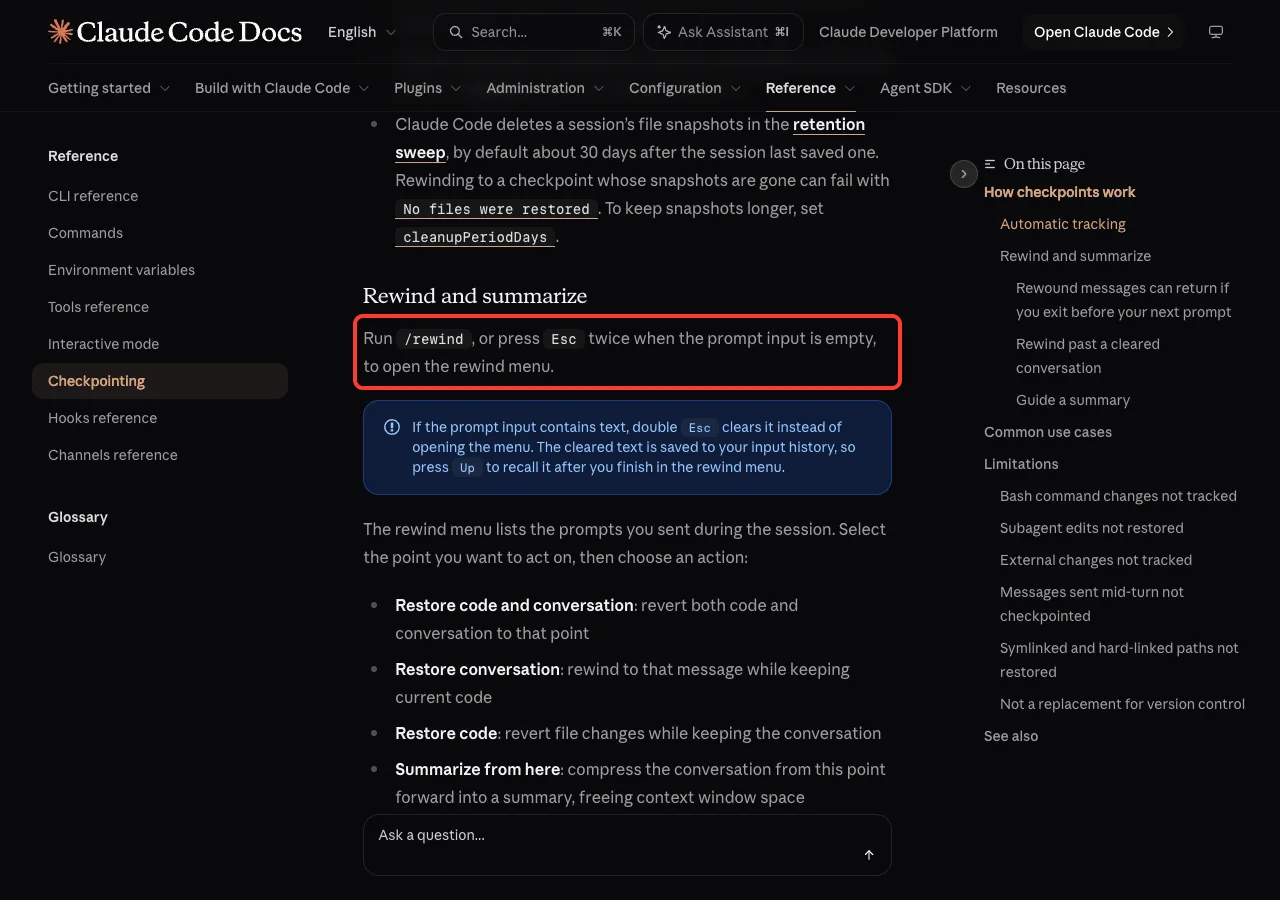
Step 1: Open the Rewind Menu
Type /rewind and press Enter. You can also press Esc twice, but only when the prompt box is empty. If there is text in the box, a double Esc clears it instead, which is what happened in our first attempt.
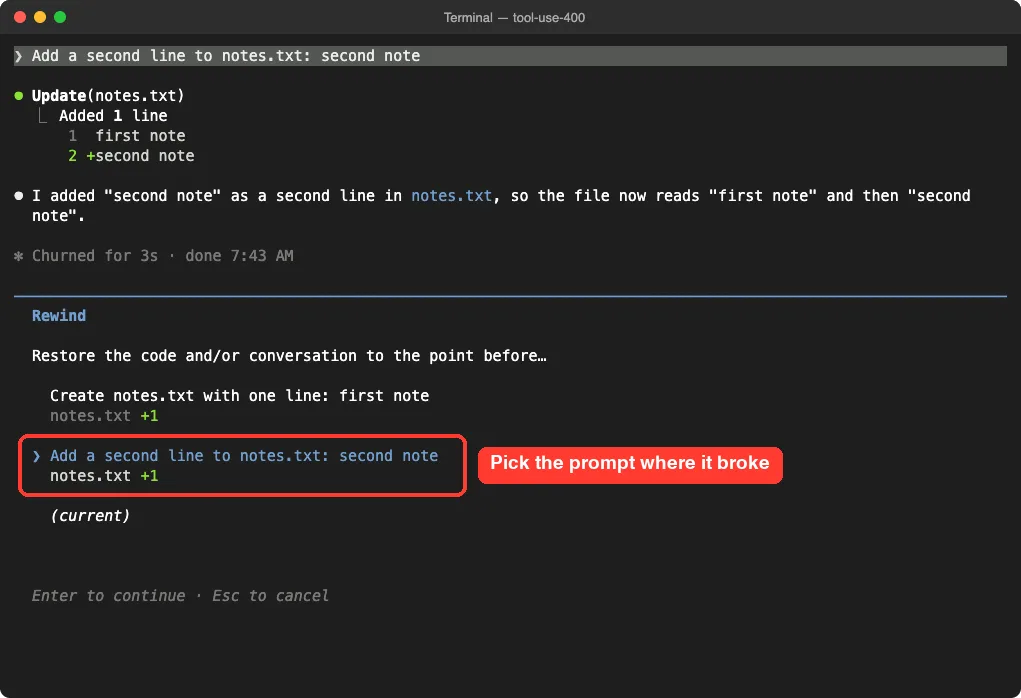
Step 2: Pick the Prompt Where It Broke
The menu lists the prompts you sent in this session. Pick the one where the error first appeared. Rewinding takes you back to the point before that prompt was sent.
Step 3: Choose What to Restore
Claude Code then asks what to restore. In our demo, it showed six options:
- Restore code and conversation: both go back to that point.
- Restore conversation: the chat goes back, and your files stay as they are now.
- Restore code: files go back, and the chat stays.
- Summarize from here and Summarize up to here: compress part of the chat.
- Never mind: leave without changes.
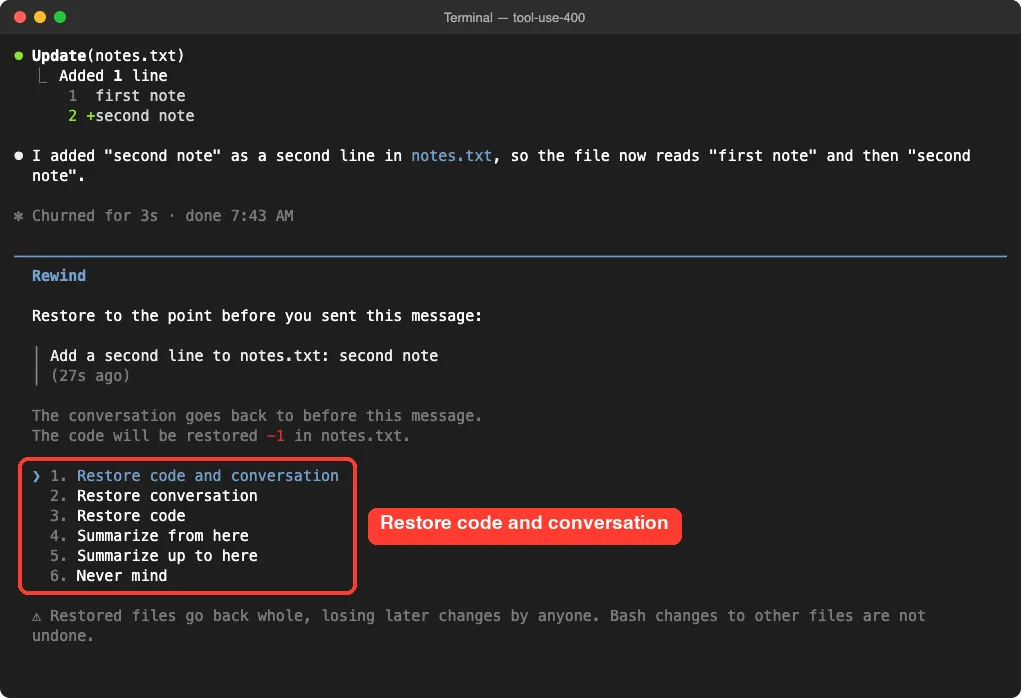
For this error, the conversation is the part that is broken. If you want to keep the file changes Claude already made, choose Restore conversation. If you also want the files back, choose Restore code and conversation, as we did.
Step 4: Send the Prompt Again
After the restore, Claude Code puts your original prompt back in the input box. In our test, notes.txt went back to one line, and the prompt was ready to send again.
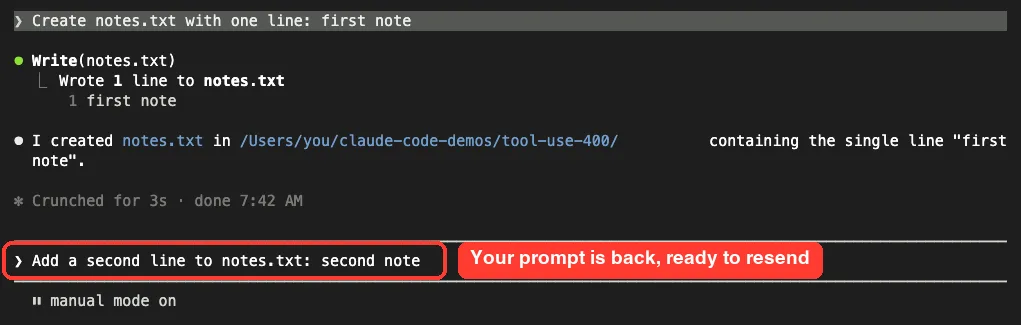
Press Enter to try again, or edit the prompt first. Our checkpoints and rewind guide explains the menu in more depth.
Fix 3: Start a Clean Conversation
Sometimes rewinding isn’t enough, for example when the error started in the first turn or you can’t tell which turn broke. Then start fresh in the same project folder.
- Run
/clearto start a new conversation in the same Claude Code window. - Or exit with
/exitand runclaudeagain without--continue.
You don’t lose the old chat completely. The checkpointing docs say that after /clear, the rewind menu shows an extra entry at the top labeled /resume <session-id> (previous session), which takes you back to the cleared conversation until you exit.
Before you clear, ask Claude for a short summary of the task and paste it into the new conversation. That keeps your progress without the broken history. If you use a third-party proxy, also try the same task with a direct connection, since the docs say Claude Code only removes unsupported tool content when it talks to the Anthropic API directly.
Fix 4: If You Build Your Own App on the Claude API
Many people who search this message aren’t using Claude Code at all. They are writing their own agent or script with the Claude API. In that case, the fix is in your message list.
A correct tool result follows the assistant message that holds the tool_use. It is a user message whose content starts with a tool_result block that uses the same ID:
{
  "role": "user",
  "content": [
    {
      "type": "tool_result",
      "tool_use_id": "toolu_01A09q90qw90lq917835lq9",
      "content": "15 degrees"
    }
  ]
}
Check these rules from Anthropic’s docs:
- Send a result for every
tool_useblock Claude returned, including when it called several tools in one turn. - Put the results in the very next user message, with nothing in between.
- Put every
tool_resultblock first in the content array, and any text after them. - Copy each
tool_use_idexactly from the matching call. - If a tool failed, still send a result and set
is_errortotrue, instead of dropping it.
Real Examples
Here is how the fixes map to everyday situations:
| Situation | Best fix |
|---|---|
| Every message fails after you updated nothing for weeks | claude update, then resume |
| It worked, then broke after one long multi-tool turn | /rewind to before that turn |
| You want to keep the files Claude just wrote | Rewind with Restore conversation |
| The first turn already fails | /clear or a new session |
| Your own Python or TypeScript agent fails on the second call | Fix the order and IDs of tool_result blocks |
Try It Yourself
Practice the rewind fix before you need it. Make an empty folder, start claude in it, and send two small prompts:
Create notes.txt with one line: first noteAdd a second line to notes.txt: second noteNow type /rewind, pick the second prompt and choose Restore code and conversation. Open notes.txt and check that it has one line again. That is the exact move you’ll make when this 400 error appears.
Common Mistakes
- Sending the same prompt over and over. The broken history goes with each request, so each one fails.
- Pressing
Esctwice while text is in the prompt box. That clears the text instead of opening the menu. - Rewinding to the wrong point. Pick the prompt where the error first appeared, not the last one you sent.
- Expecting rewind to undo shell commands. The docs say files changed only by Bash commands aren’t tracked, so use Git for those.
- Exiting right after a rewind. The docs warn that rewound messages can return if you exit before sending your next prompt.
- Hand-editing session files to remove the broken block. Use
/rewindor/clearinstead.
Pro Tips
- Keep Claude Code current with
claude update, since Anthropic fixed a known cause of this error in a past version. - Commit your work in Git often, so a fresh start never costs you file changes.
- Use Restore conversation when your files are right and only the chat is broken.
- To try a different approach without touching the original session, Anthropic’s docs suggest
/branchorclaude --continue --fork-session. - Keep long tasks in smaller steps, so a rewind costs you less work.
Seeing a different message? Our list of common errors covers the rest, and the content filtering error guide covers another 400 that rewind helps with.
tool_use ids Without tool_result Cheat Sheet
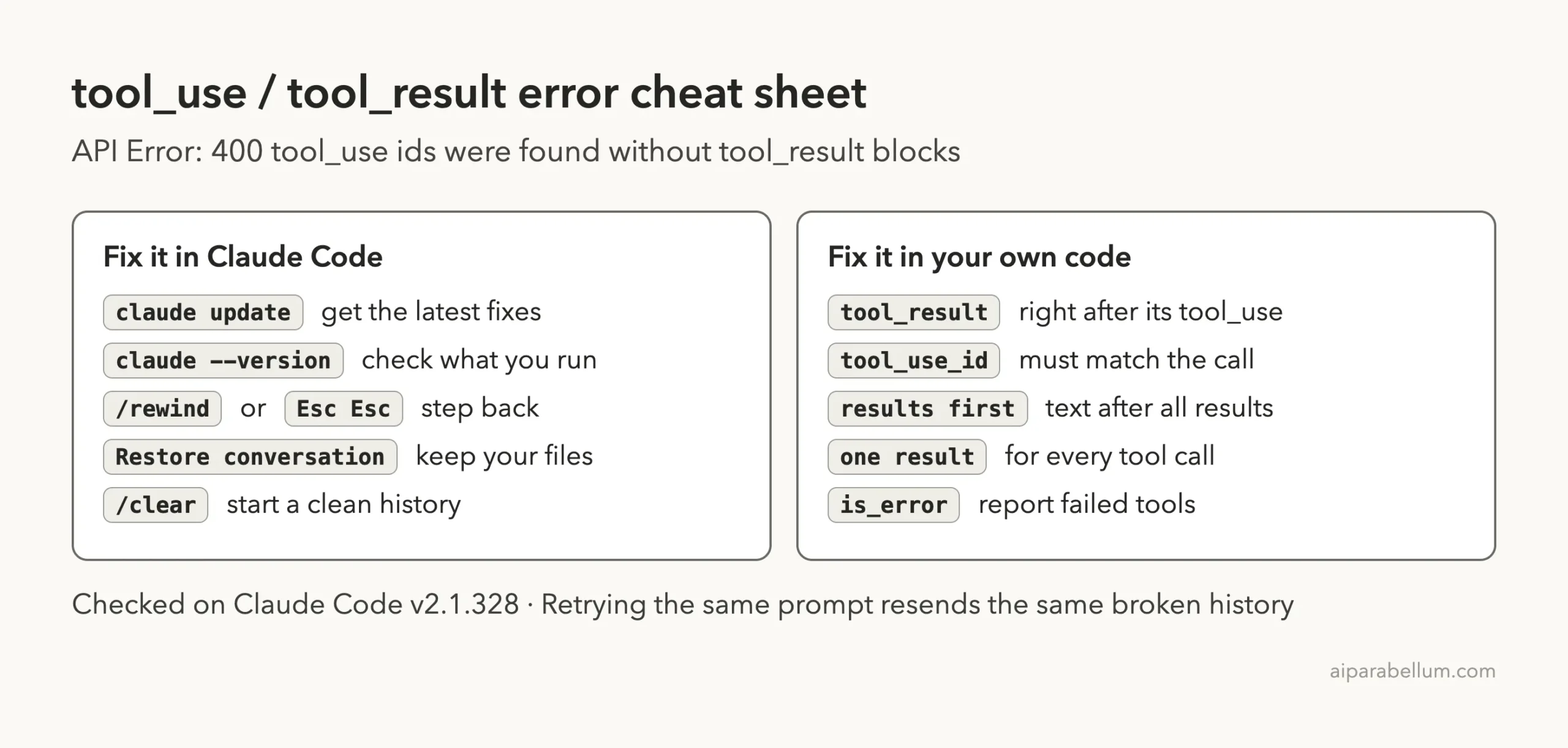
For every other command, keep our commands cheat sheet nearby. You can read the official entry in Anthropic’s error reference, the checkpointing guide and the troubleshooting guide.
Frequently Asked Questions
What does “tool_use ids were found without tool_result blocks” mean?
It means a tool call in the conversation has no matching result right after it. The Claude API rejects the request with a 400 error because the history isn’t in the order it expects.
Did I lose my code?
No. The error is about the conversation history, not your files. If you rewind, choose Restore conversation to keep your files exactly as they are.
Why does every message fail after the first error?
Claude Code sends the whole conversation with each message. The broken tool pair stays in that history, so every request fails until you rewind past it or start a clean conversation.
Does /rewind always fix it?
Not always. Anthropic says that on versions before v2.1.156 with Opus 4.7 or Opus 4.8, /rewind doesn’t clear it, so run claude update first. If rewinding still fails, use /clear.
How do I fix it in my own API code?
Send a tool_result for every tool_use, in the very next user message, with matching IDs. Put the results before any text in that message.
Conclusion
The Claude Code API Error 400 about tool_use ids without tool_result blocks means the tool calls and results in your conversation fell out of order, so the API rejects every new request in that session. Run claude update first, then use /rewind or Esc twice to restore the conversation to before the broken turn, and fall back to /clear if no clean point exists. In our test, a rewind reset the demo file and put the prompt back in the box in seconds, and your project files stay safe the whole time. To see what else Claude AI can do, browse the rest of our guides.