You wrote a skill, saved it, and asked Claude for exactly what it does. Nothing happened. If your Claude Code skill is not triggering, the cause is almost always one of four things, and you can tell which one in about five minutes.
This is Part 3 of 45 in our Claude Code Deep Dives, part of our Claude Code tutorials. In Part 2 we covered writing reliable skills. Here we flip it around and debug a skill that does not fire.
Tested with Claude Code v2.1.316 on November 3, 2026, on macOS. We built a small demo project with four skills, reproduced a real miss, and fixed it.
Quick Answer: Why Claude Code Skips a Skill
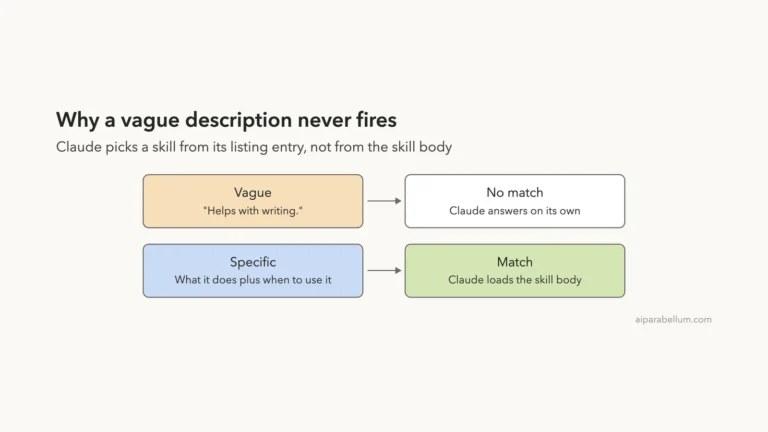
Claude picks skills by reading each skill’s description. If that text is vague, Claude has no reason to choose the skill. If the skill never loaded at all, or you blocked automatic use, Claude cannot choose it either.
| Symptom | Likely cause | Fix |
|---|---|---|
Skill missing from /skills | Wrong folder, bad name, or broken YAML | Move it to .claude/skills/<name>/SKILL.md and validate |
/skill-name works, Claude never picks it | Vague description | Say what it does and when to use it |
| Claude says it cannot run the skill | disable-model-invocation: true | Remove it, or run the skill yourself |
| Skill ignored for some files | The paths field | Work inside the session directory |
How Claude Code Decides to Use a Skill
Each loaded skill puts its name and description in front of Claude. When you ask for something, Claude compares your request with those descriptions and calls the skill if one fits. The full instructions in SKILL.md load only after that.
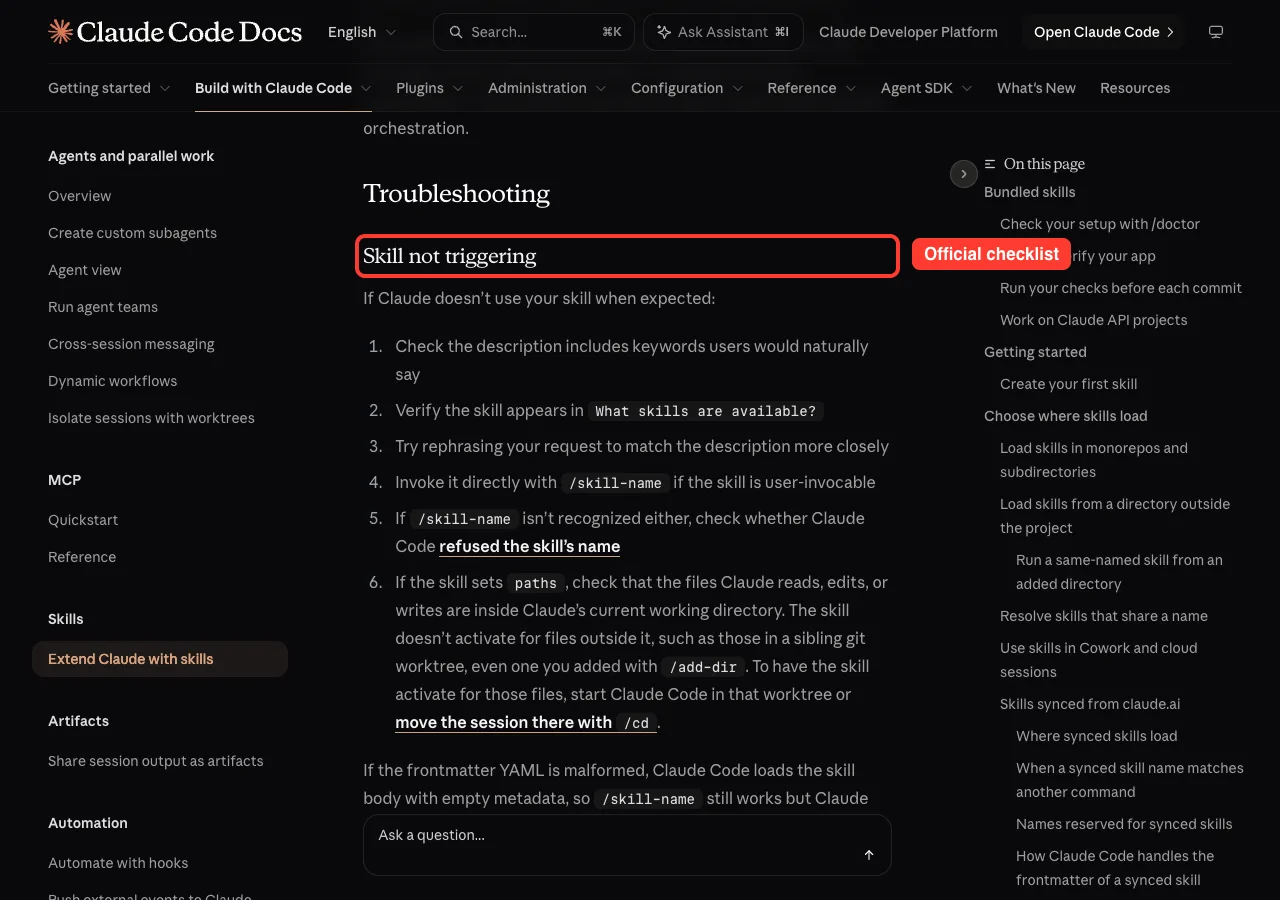
So the description is the doorbell. A skill with a great body and a weak description is a house nobody can find. The official skills documentation lists its own troubleshooting checklist, shown below.
Step 1: Check That the Skill Loaded
Type /skills inside Claude Code. You get a searchable list of every loaded skill, with its source and a rough token cost. Type part of your skill’s name to filter the list.
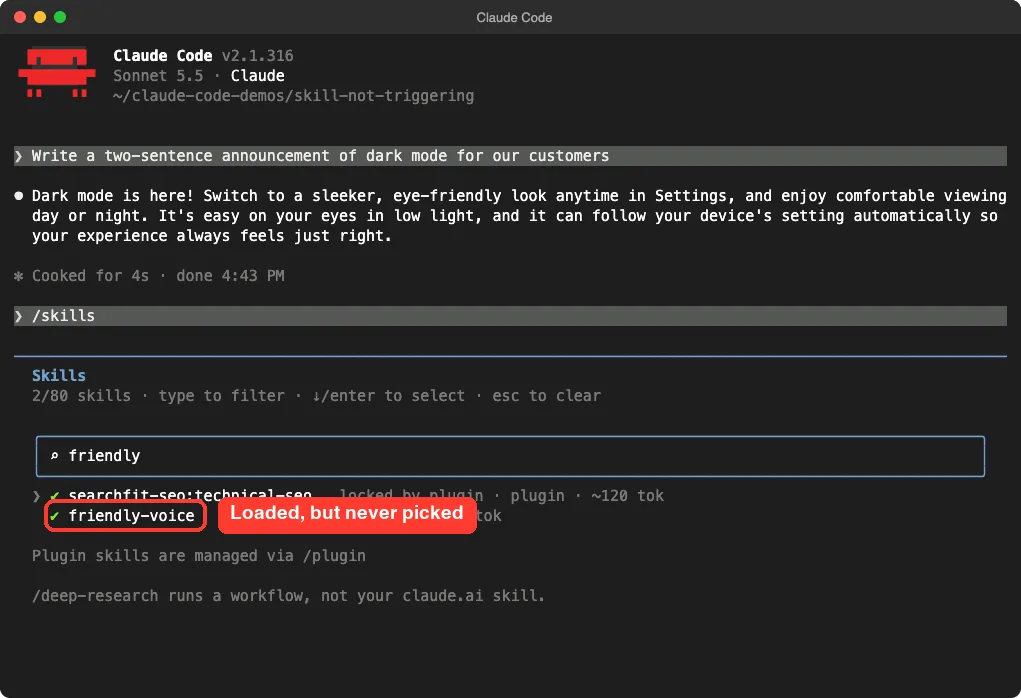
If your skill is missing here, stop. No wording change will help until it loads. Check these first:
- The folder must be
.claude/skills/<skill-name>/SKILL.mdin your project, or~/.claude/skills/<skill-name>/SKILL.mdfor personal skills. - The file name must be exactly
SKILL.md. - Per the docs, a name containing odd characters such as a zero-width space or
<does not load. - Outside a plugin, a name that is or starts with
anthropic-skillsdoes not load. - Do not use
syncedas a folder name. Claude Code reserves it.
Step 2: Look for Broken Frontmatter
The block between the two --- lines is YAML. If it does not parse, the docs say Claude Code loads the skill body with empty metadata. The skill can still run when you type /skill-name, but Claude cannot match it to your request, because the description was dropped.
You can catch this without spending a single prompt. Run the validator from your project folder:
claude plugin validate .claude/skillsWe made a skill with an unclosed quote on purpose. The validator found it right away.
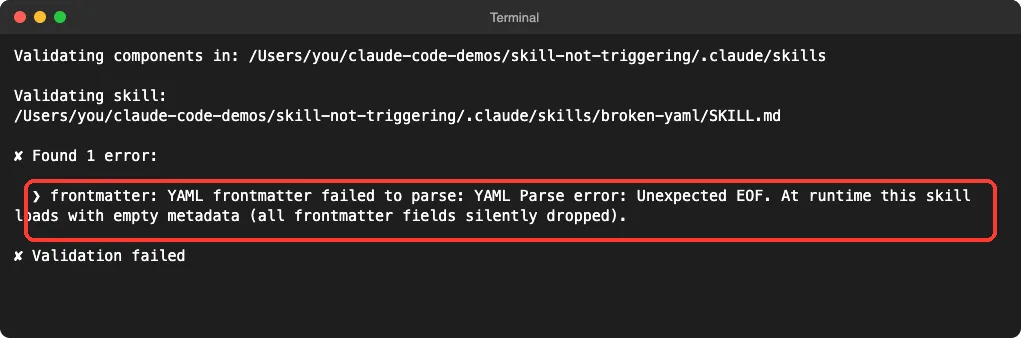
The docs say this check needs Claude Code v2.1.233 or later. You can also start Claude with --debug to see the parse error while the session runs.
One small trap: our first test used a description with a colon inside it, and the validator passed it. So a clean result does not prove every odd description is fine, which is another reason to test with a real prompt.
Step 3: Reproduce the Miss With a Real Prompt
This is the most useful test. Make a skill with a marker, a line that proves it ran.
Then ask for something it should handle. Our skill had one rule: end every reply with Voice check: friendly. The description was deliberately weak.
---
name: friendly-voice
description: Helps with documents.
---

Write in our friendly brand voice: short sentences, no jargon.
End every reply with the line: Voice check: friendly
We then asked: Write a two-sentence announcement of dark mode for our customers. Claude answered fine, but there was no Skill(...) line and no marker. The skill sat unused.
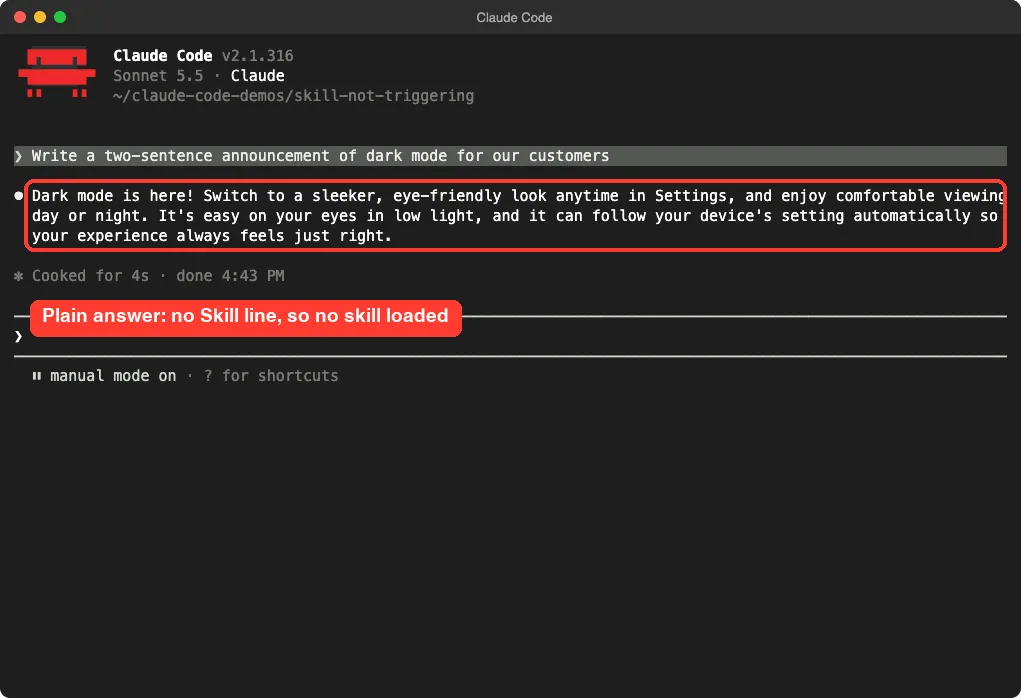
That Skill(name) line is your proof. When a skill loads, Claude Code prints it in the chat. No line means no load.
Step 4: Rewrite the Description
A good description answers two questions. What does the skill do, and when should Claude use it? Include the words a person would really type, like announcement, email, or release note.
description: Writes customer-facing text in our friendly brand voice. Use when the user asks for an announcement, release note, email, or any message meant for customers.We saved the change and ran the identical prompt in a fresh session. This time Claude loaded the skill and applied its rule.
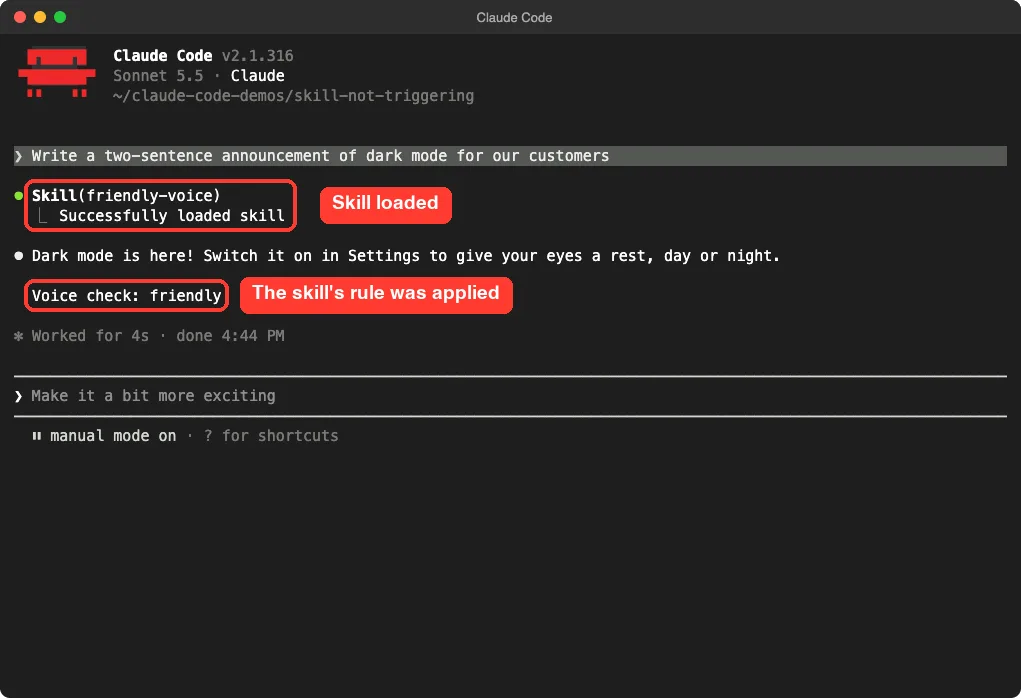
That is one run each, not a benchmark. It shows the mechanism clearly, but results can vary from prompt to prompt. If you need numbers, try the same prompt a few times.
A Weak Description Does Not Always Fail
We also made a skill named release-notes with the same vague description, “Helps with documents.” When we asked for release notes, Claude loaded it anyway.
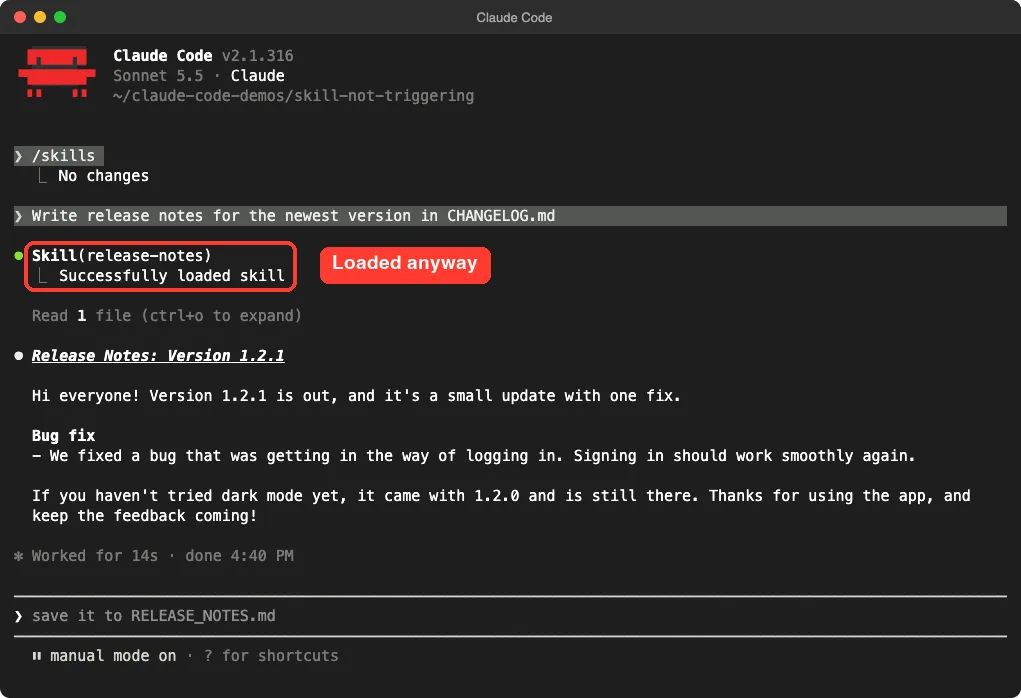
We did not test why, so we will not guess. The lesson is practical: a prompt that echoes the skill’s purpose is a weaker test than a natural request. Test with the words real users would use.
Step 5: Check for Blocked Automatic Use
Some skills are meant to be manual. Setting disable-model-invocation: true in the frontmatter means only you can run the skill. The docs recommend this for workflows with side effects, like deploying.
---
name: deploy-helper
description: Walks through our deploy checklist. Use when the user asks to deploy or ship a release.
disable-model-invocation: true
---
We asked Claude to deploy our release. It found the skill, explained that it is user-only, and told us to type /deploy-helper ourselves.
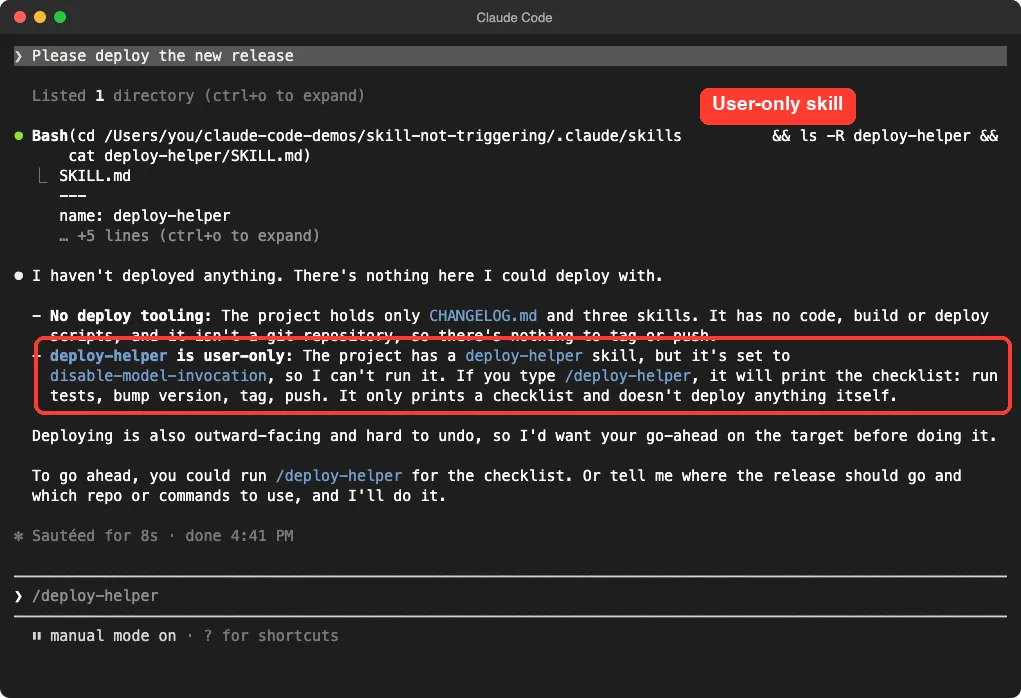
This is not a bug. If you want Claude to use the skill itself, remove that line. The opposite setting, user-invocable: false, hides the skill from the slash menu while letting Claude use it.
Step 6: Check Paths and Other Edge Cases
If your skill sets a paths field, it only activates for files inside Claude’s current working directory. The docs give a sibling git worktree as an example, even one added with /add-dir. Start Claude in that worktree, or switch with /cd.
Also remember that skills load when invoked and are not re-read on later turns. After a long chat is compacted, the docs say to invoke the skill again, and to put the most important instructions near the top of SKILL.md. Our guide to /doctor shows how to spot setup problems, and the SKILL.md format guide explains each field.
Skill, Hook, or Instruction? Know What You Need
Sometimes the skill triggered, and Claude still skipped a step. That is a different problem. The docs give two cases: a rule that must hold every time, and guidance Claude should apply with judgment.
- For a rule that must hold every time, such as a check before each file edit, use a hook. Claude Code runs a hook whenever its event occurs, whether or not Claude follows the skill.
- For judgment guidance, word it so it covers the whole task. “Run the tests after every edit” works better than “Run the tests”.
- For long sessions, invoke the skill again after compaction, since only the start of an invoked skill may be kept.
If you cannot see a Skill line in the chat, the skill did not load, so debug the loading before the wording.
This split saves time. You stop rewriting a description when the real fix is a hook or a shorter, clearer first paragraph.
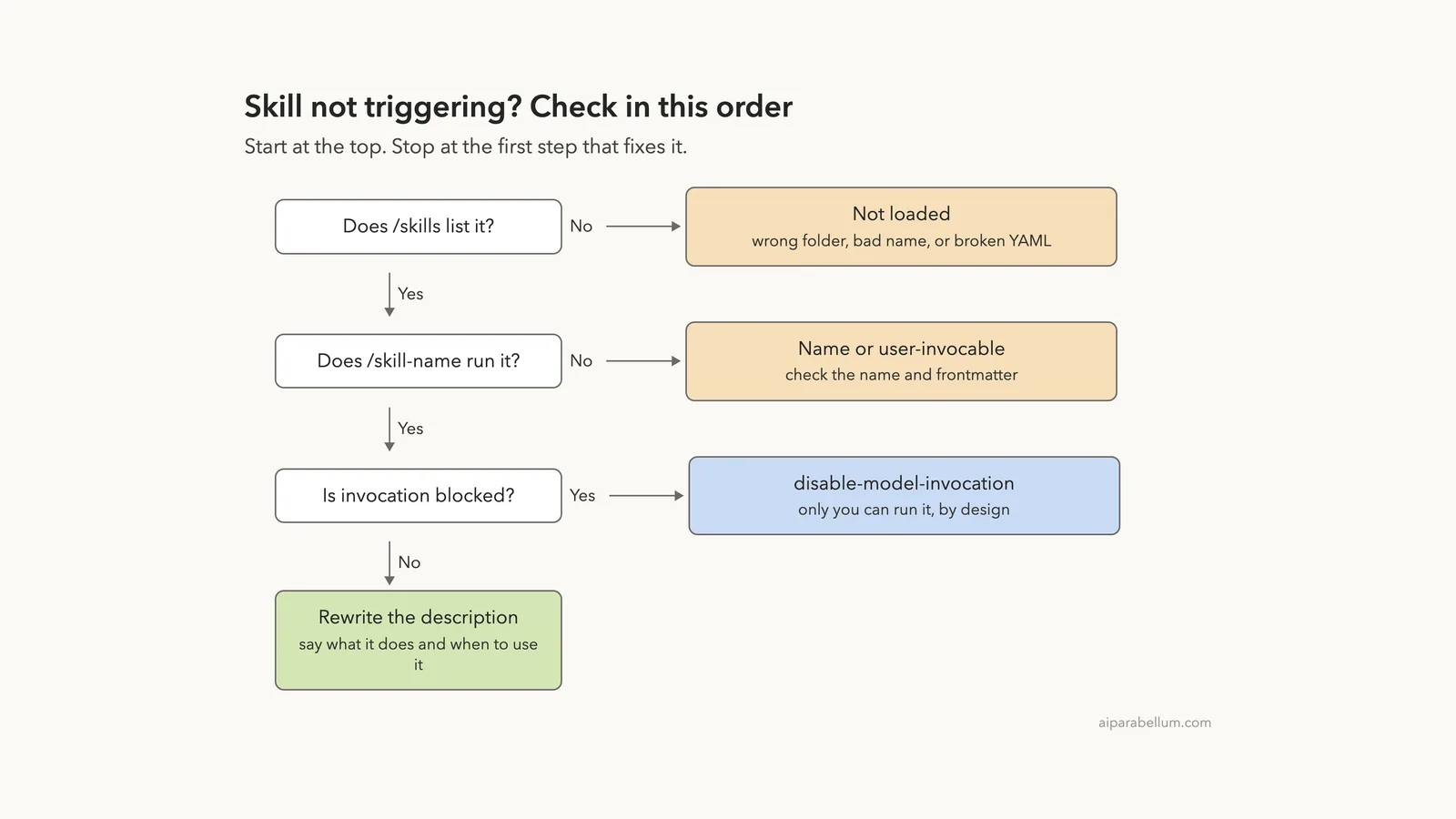
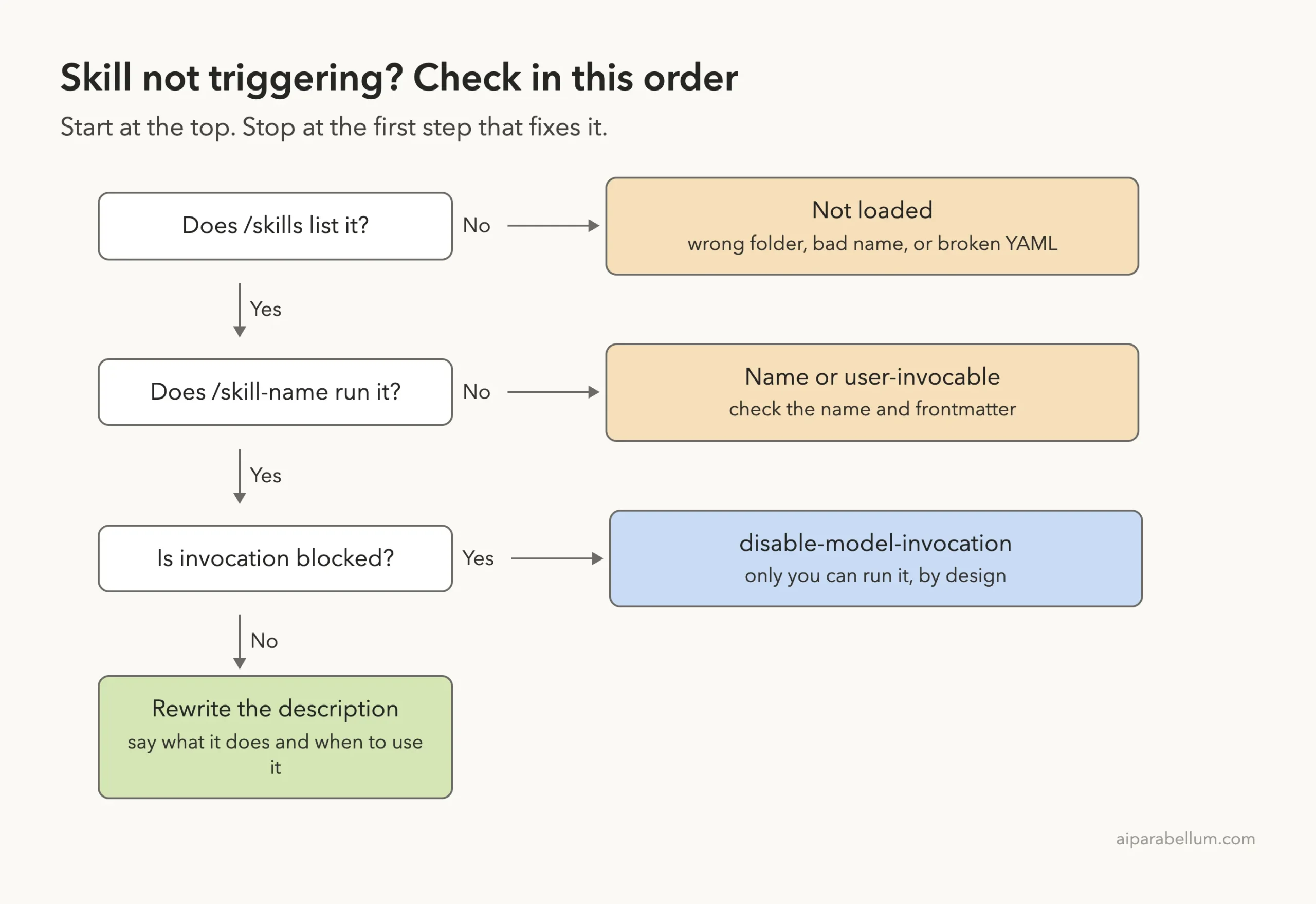
The Debugging Order in One Picture
Follow this ladder from the top. Each step rules out one cause.
Try It Yourself
Practice in a throwaway folder, never a real project. You need only a few minutes and no extra tools. Create a skill with a vague description and watch it miss, then fix it.
mkdir -p demo/.claude/skills/my-voice && cd demo
claude
Then ask Claude to create the skill with this prompt, run your test prompt, and check for a Skill(...) line:
Create .claude/skills/my-voice/SKILL.md with the description "Helps with documents" and a rule that every reply ends with the line "Voice check: friendly".Now edit the description to say what and when, start a fresh session, and ask again. Compare the two runs.
Common Mistakes
- Writing a description like “Helps with documents” that names no task or trigger words.
- Editing the description and testing in the same long conversation instead of a fresh one.
- Testing with a prompt that repeats the skill name, which proves little.
- Forgetting that
disable-model-invocation: trueblocks Claude on purpose. - Putting the file at
.claude/skills/SKILL.mdwithout a folder named after the skill. - Skipping the marker line, so you cannot tell whether the skill ran.
Pro Tips
- Add a marker line to every new skill while you test, then remove it later.
- Write the description as two sentences: what it does, then “Use when…” with real phrases.
- Run
claude plugin validatein CI or before each commit to catch broken YAML. - If a rule must happen every time, the docs suggest a hook instead of a skill. See our Claude Code hooks.
- Plugin authors can measure trigger rates with
claude plugin eval, per the docs.
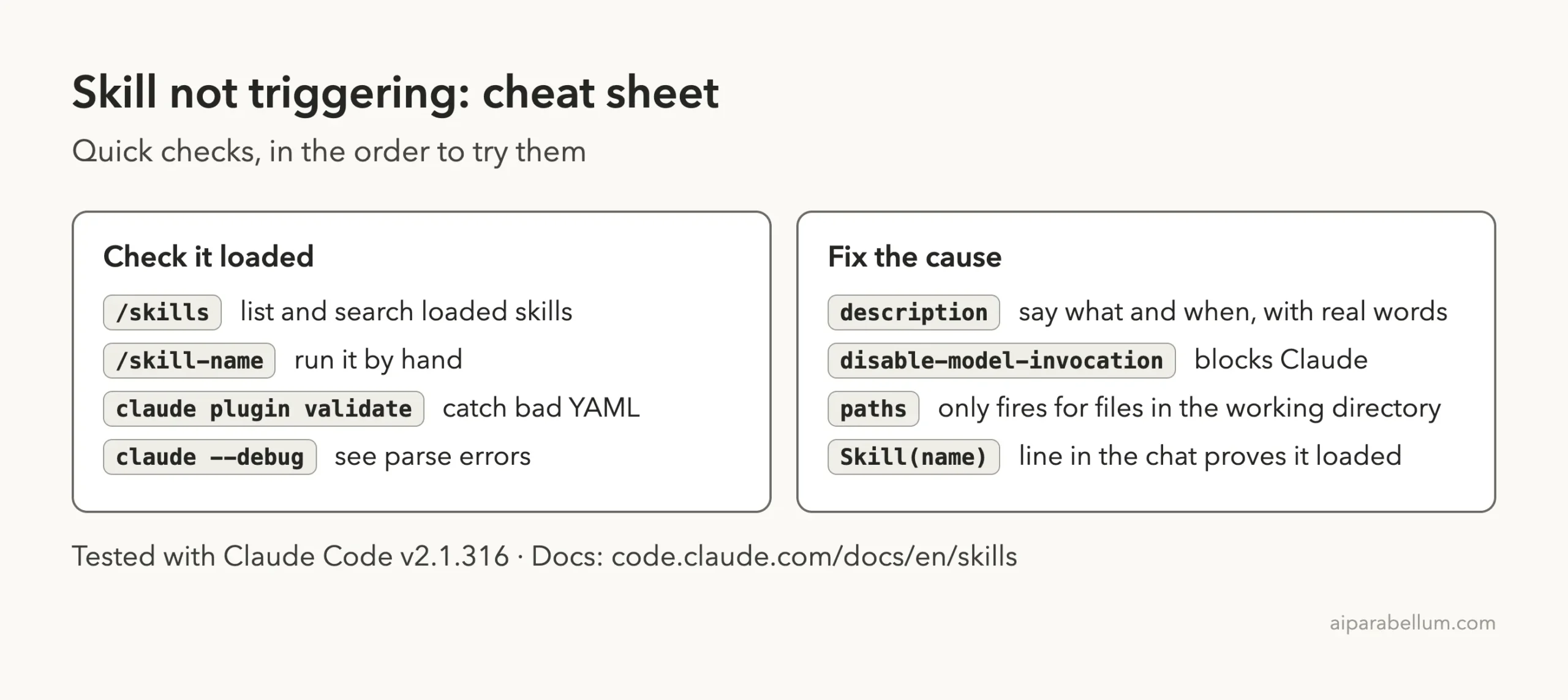
Cheat Sheet
Frequently Asked Questions
Why is my Claude Code skill not triggering automatically?
The most common reason is a vague description. Claude chooses skills from the description text, so say what the skill does and when to use it, with words people would really type.
How do I see which skills Claude Code has loaded?
Type /skills. It lists loaded skills with their source and token cost, and you can type to filter by name.
Can I run a skill if Claude will not pick it?
Yes, if it is user-invocable. Type /skill-name and it runs directly. If that is not recognized either, check the skill’s name and folder.
Does a broken SKILL.md file stop the whole skill?
Per the docs, malformed frontmatter loads the body with empty metadata. The skill still runs by slash command, but Claude cannot match your description.
Why does Claude refuse to deploy with my skill?
If the skill sets disable-model-invocation: true, only you can run it. That is a safety choice for workflows with side effects.
Conclusion
When a skill does not fire, work down the ladder: confirm it loads with /skills, validate the YAML, test with a marker line, check for blocked invocation, and then rewrite the description. In our demo, one clearer description turned a silent skill into one that loaded on the same prompt. For more on Claude, see our Claude AI page, and read our slash commands guide to keep going.
Previous in the series: Part 2: Claude Code Skills Best Practices: Write Skills That Trigger Reliably
Next in the series: Part 4, Claude Code Skills vs Subagents vs Plugins: Which One to Use, is coming soon.