Writing a skill is the easy part, because the hard part is knowing whether it actually works. The claude code skill creator is Anthropic’s own helper for that job: it runs your skill against test prompts, grades the results and shows you numbers.
We ran it on a deliberately weak skill, fixed the skill from what it found and measured again. The short answer: it works, and it is honest about its own limits.
This is Part 7 of 45 in our Claude Code Deep Dives, part of our Claude Code tutorials. Before this, read Part 6.
Tested with Claude Code v2.1.318 on November 4, 2026, using skill-creator from Anthropic’s skills repository at commit ca45fc4 (October 28, 2026). We tested on macOS in a throwaway demo folder with project settings only, so nothing in our personal setup was used or changed.
Claude Code Skill Creator at a Glance
| Question | Answer |
|---|---|
| What it is | A skill that helps you write, test and improve other skills |
| Who makes it | Anthropic |
| How you start it | Type /skill-creator, or ask Claude to evaluate one of your skills |
| What it produces | Test cases, graded runs, and a benchmark with pass rate, time and tokens |
| What it costs | Extra model usage, because every test run is a separate subagent |
| Best for | Skills whose output you can check, such as fixed formats and file transforms |
A skill you have not tested is a guess. Skill creator turns the guess into a pass rate you can compare before and after every edit.
What Skill Creator Does and Why It Exists
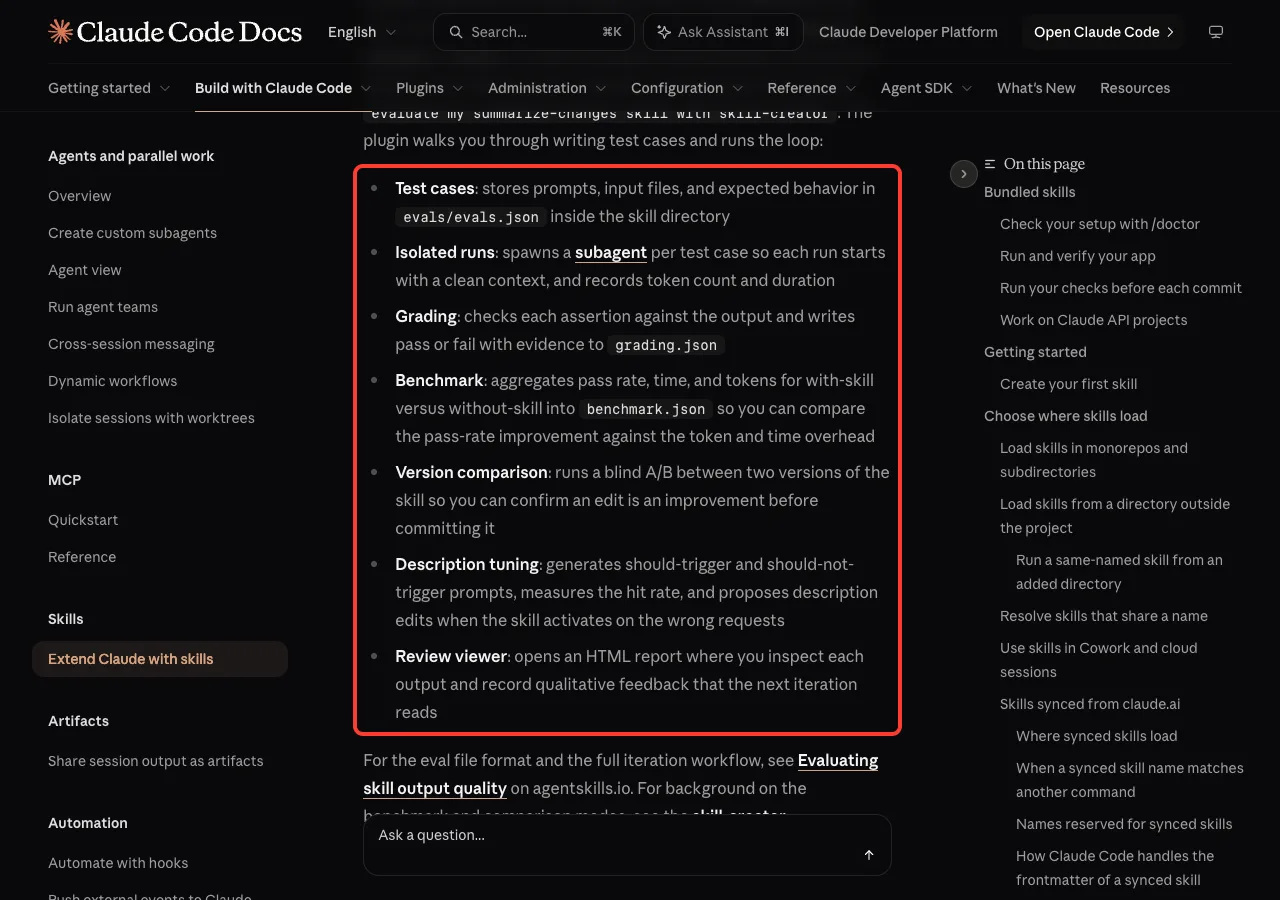
The official skills documentation says you can ask Claude to evaluate an existing skill with a sentence such as “evaluate my summarize-changes skill with skill-creator”. The plugin then walks you through writing test cases and runs a loop. The docs list seven parts of that loop.
- Test cases: prompts, input files and expected behavior stored in
evals/evals.jsoninside the skill directory. - Isolated runs: one subagent per test case, so each run starts with a clean context and records tokens and duration.
- Grading: each assertion is checked against the output and marked pass or fail with evidence in
grading.json. - Benchmark: pass rate, time and tokens for with-skill versus without-skill in
benchmark.json. - Version comparison: a blind A/B between two versions of a skill.
- Description tuning: should-trigger and should-not-trigger prompts that measure how often the skill activates.
- Review viewer: an HTML report where you read each output and leave feedback.
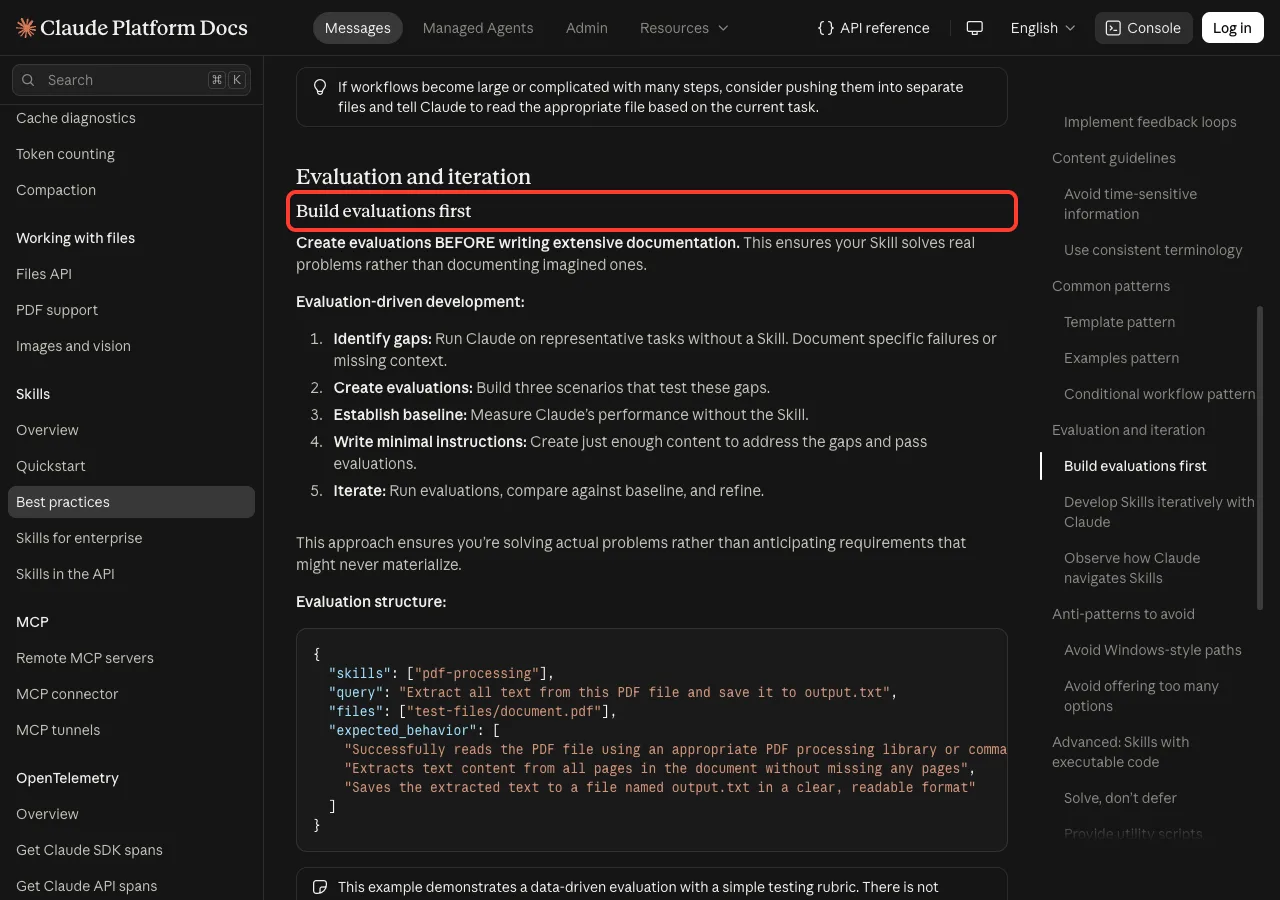
Anthropic’s general authoring best practices make the same point from the writing side. They say to create evaluations before writing extensive documentation, so your skill solves real problems instead of imagined ones.
How the Test Loop Works
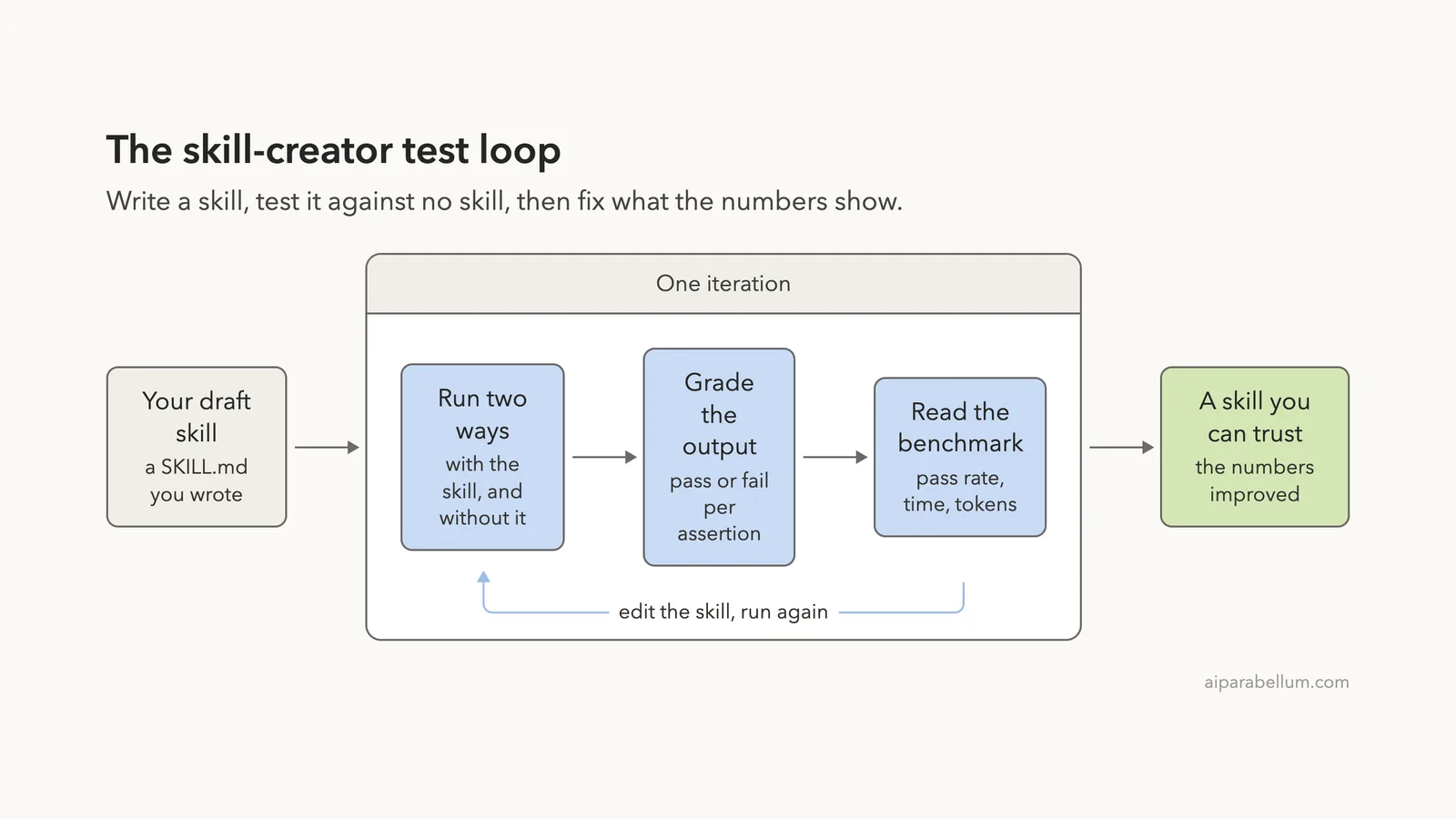
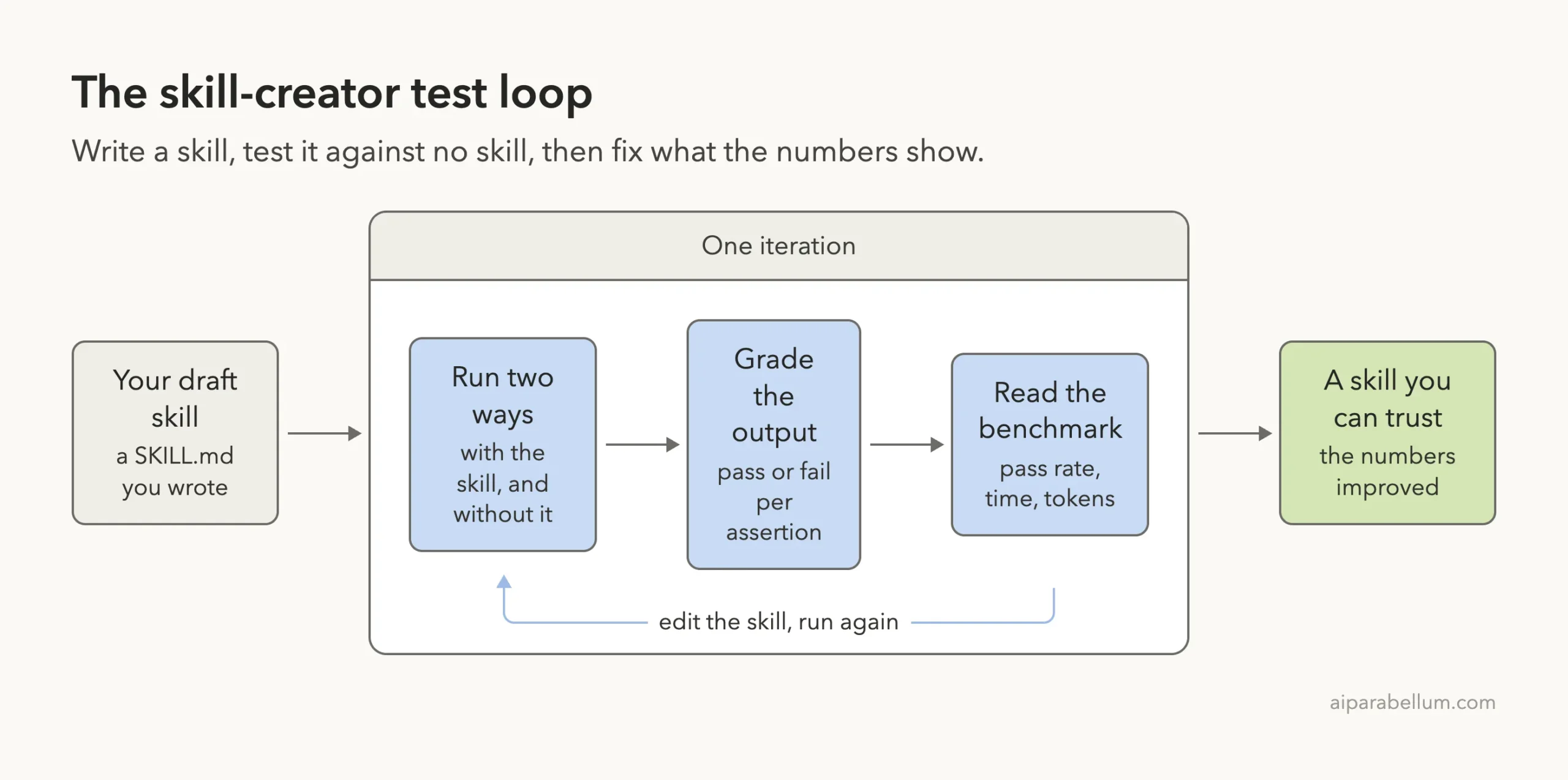
Every round of the loop has the same three beats. Claude runs each test prompt twice, once with your skill and once without it.
It grades both outputs against a short list of checks. Then it adds up the results into a benchmark.
If you are improving a skill you already have, the baseline is not “no skill” but the old version. The repository’s instructions tell Claude to snapshot the skill before editing, so the old and new versions can be compared fairly.
Our Demo Project
We made a demo folder with two sample note files and two skills, all inside the project’s .claude folder. The first skill was Anthropic’s skill-creator, copied from the repository. The second was a weak skill we wrote on purpose.
project/
├── notes/
│   ├── monday.txt
│   └── tuesday.txt
└── .claude/skills/
    ├── skill-creator/
    └── standup-notes/
        └── SKILL.md
The weak skill turns rough notes into a standup update. Its whole body is two lines, and its description is one thin sentence.
---
name: standup-notes
description: Turns rough notes into a standup update.
---

# Standup Notes

Read the notes the user gives you and write a standup update from them.
Keep it short and professional.
The sample notes were short and messy on purpose, with one real blocker, one thing that only sounded like a blocker and one fact about a teammate. For setup details on how a skill is laid out, see our guide to the SKILL.md format.
Step 1: Load Skill Creator in a Safe Place
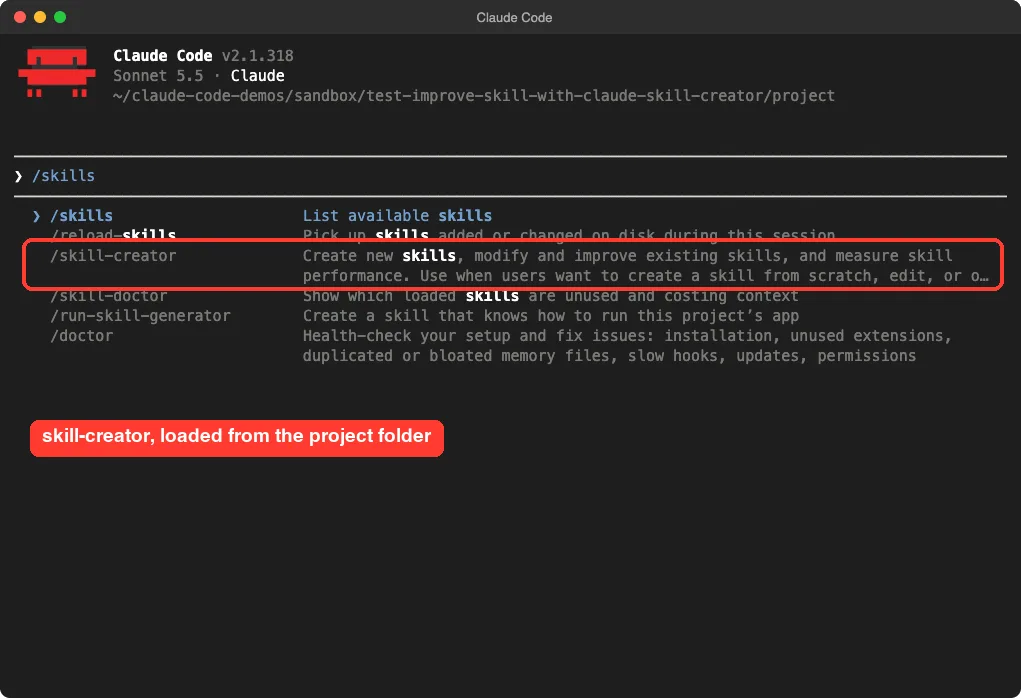
The docs describe skill-creator as a plugin from the official marketplace. We did not want to change our personal setup, so we copied its folder into the demo project’s .claude/skills/ instead. We then started Claude Code with --setting-sources project, which keeps user settings out of the session.
Typing /skills showed it in the menu, loaded straight from the project folder. Before running it we read its scripts. They call claude -p for test runs and can open a local viewer in a browser, and we found nothing else unusual.
Step 2: Ask for the First Test Round
We kept the request small, because every test run costs model usage. This was the only prompt for round one:
Use the skill-creator skill to improve my standup-notes skill. Keep it tiny:
write 2 test prompts that use notes/monday.txt and notes/tuesday.txt, add 3
simple assertions to each, run each test with the skill and without it, grade
the results and show me the benchmark. Do not open a browser. Stop after
iteration 1 and tell me what you would change in the skill.
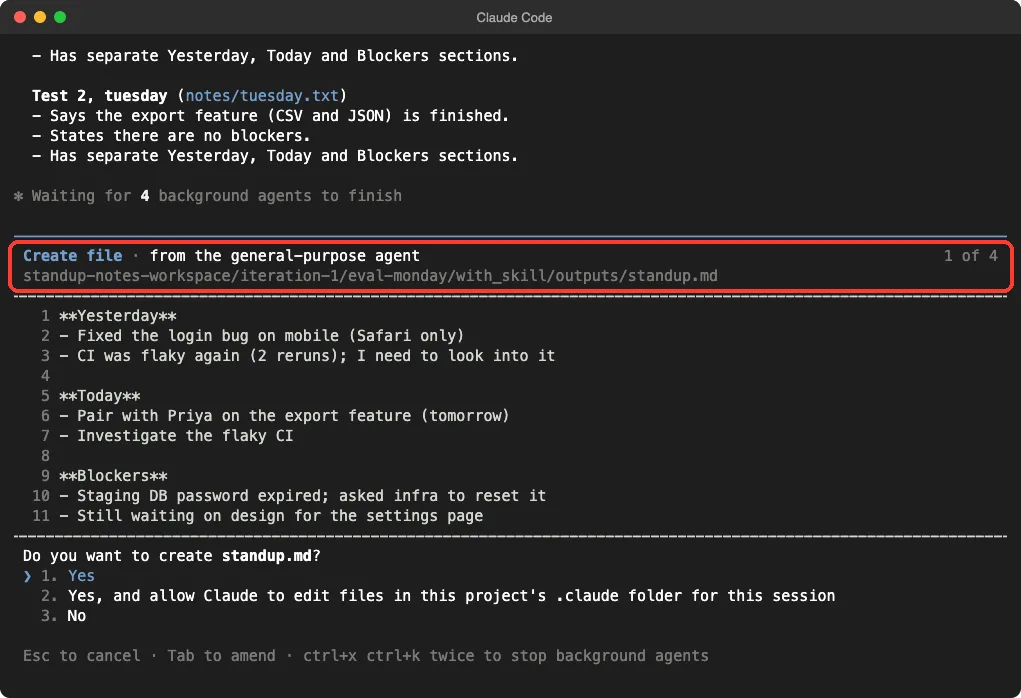
Claude wrote the test cases into evals/evals.json, then started four background agents, two with the skill and two without. Each wrote its answer to its own outputs/standup.md file. Claude Code asked permission for every file write and command, and we approved them, because they were all inside the demo folder.
Step 3: Read the Benchmark
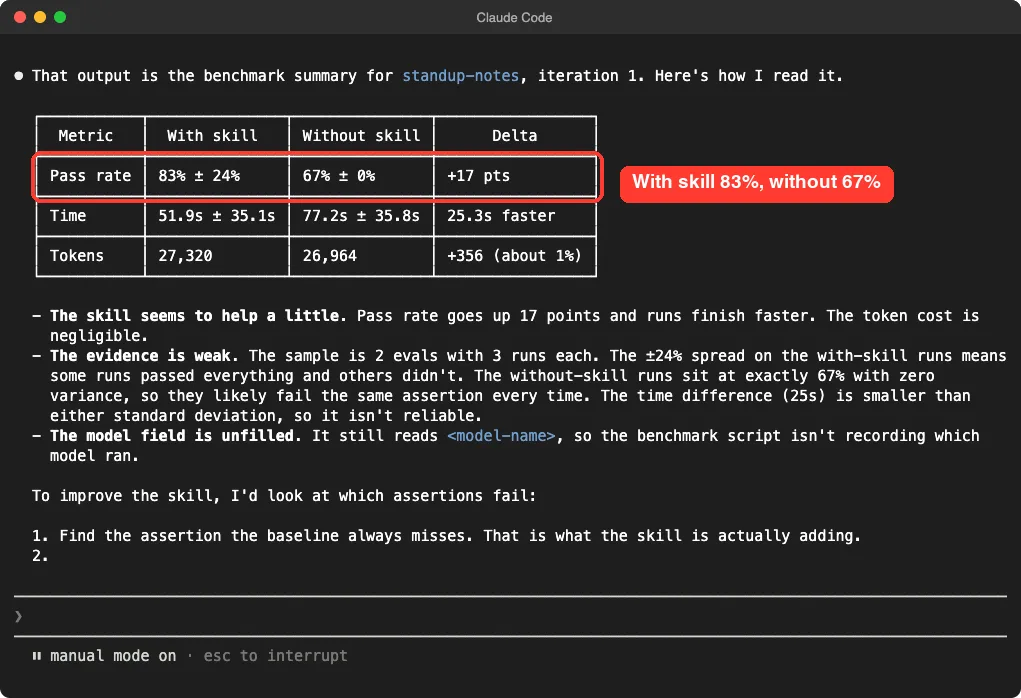
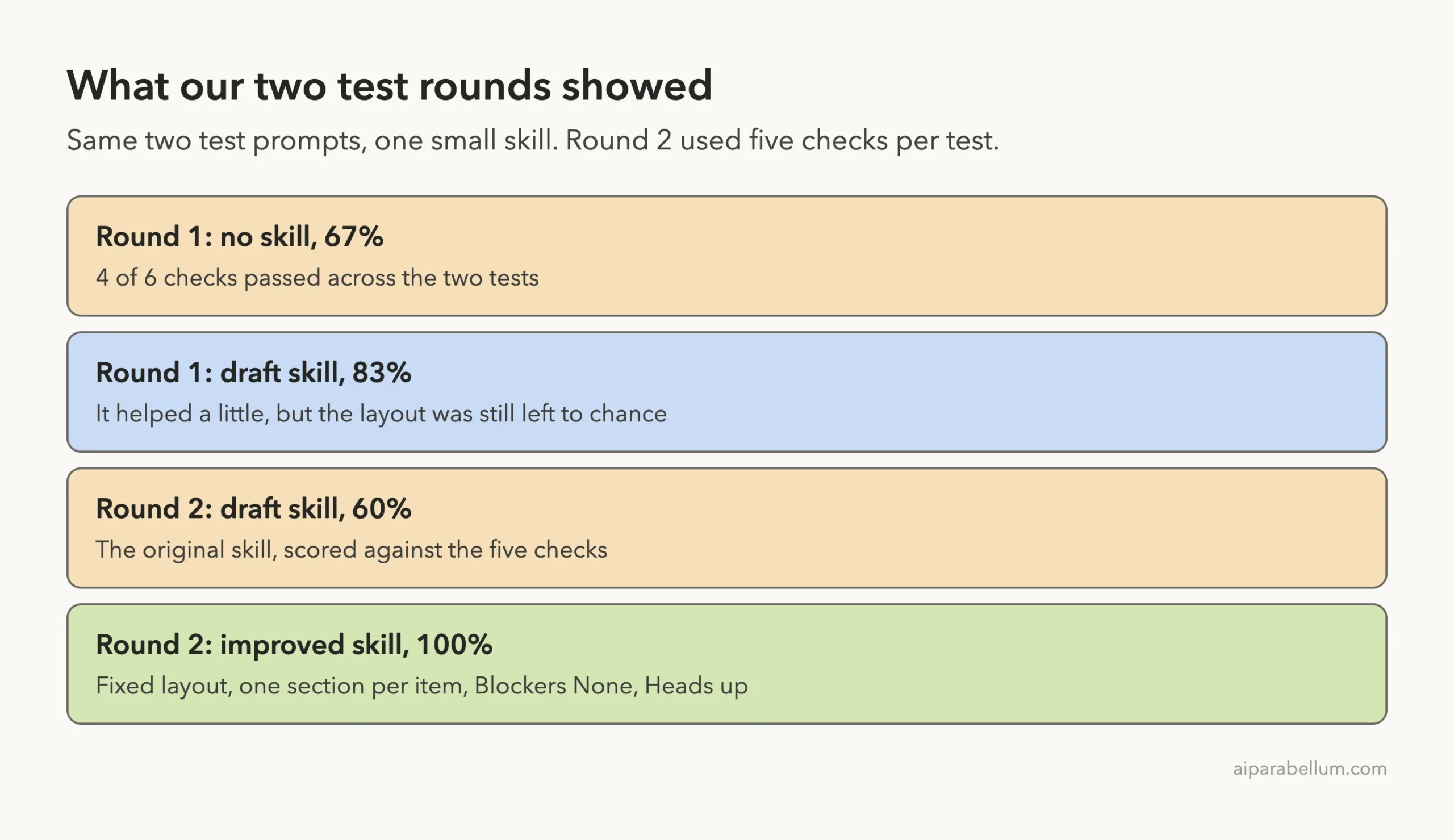
When the runs finished, Claude graded each output and aggregated the results with the repository’s aggregate_benchmark script. It wrote the files into an iteration-1 folder, with a folder per test and per configuration. Here is what the first benchmark said.
| Metric | With skill | Without skill |
|---|---|---|
| Pass rate | 83% | 67% |
| Time | 51.9 seconds | 77.2 seconds |
| Tokens | 27,320 | 26,964 |
The skill helped a little. But Claude itself warned that the evidence was weak, because the time gap was smaller than the spread between runs. We agree, and we would not claim the skill makes anything faster.
Step 4: Let the Failures Tell You What to Fix
The more useful result was not the table but which checks failed. We opened the graded outputs and compared them.
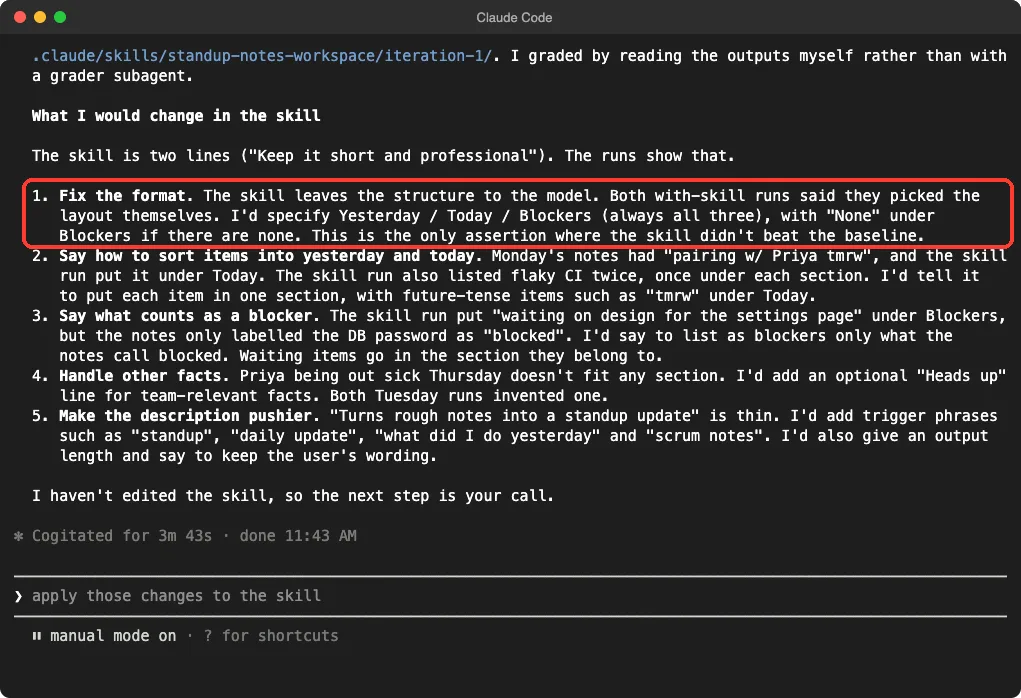
- With the skill, Monday’s update put “waiting on design” under Blockers, although the notes only called the expired database password a blocker.
- With the skill, the flaky CI item showed up twice, once under each section.
- On Tuesday, both the skill run and the no-skill run merged Yesterday and Today into one heading, so the layout check failed for both.
- Both skill runs said they had chosen the layout themselves, because our two-line skill never specified one.
Claude then listed five changes it would make: fix the format, put each item in one section only, count only what the notes call blocked as a blocker, add an optional Heads up line, and make the description pushier. That last idea matches our own advice in the skills best practices guide.
Step 5: Apply the Fixes and Compare Against the Old Version
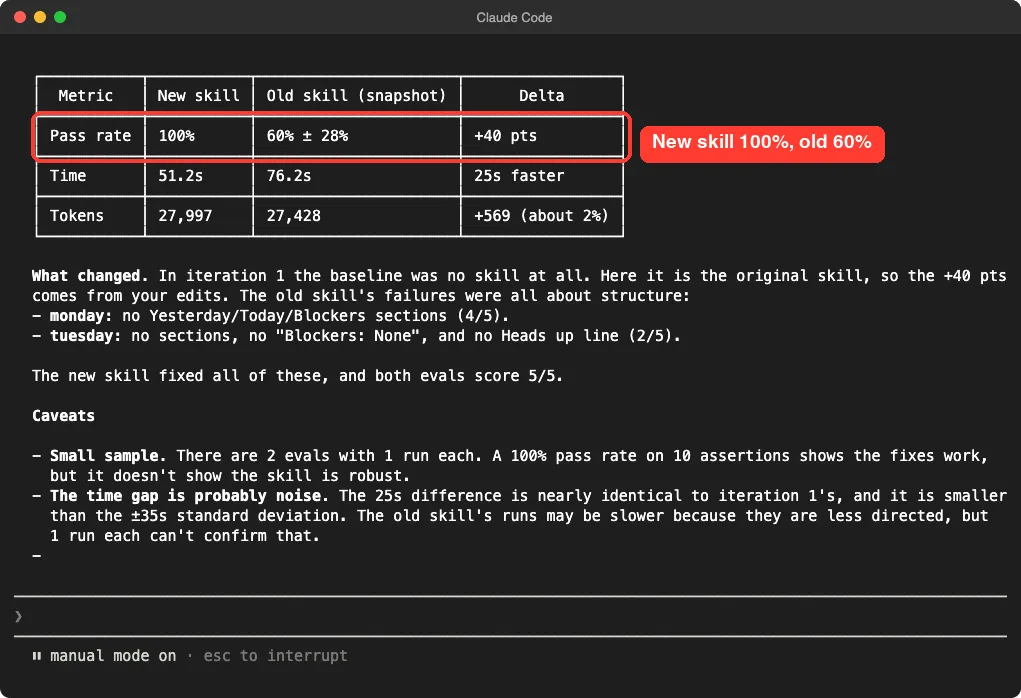
For round two we asked Claude to snapshot the old skill, rewrite the skill with those fixes and run both versions on the same two tests. This time the baseline was the old skill, not no skill. The rewritten skill now defines the exact layout and explains why a predictable layout matters, and its description lists trigger phrases such as “standup”, “daily update” and “write my standup”.
| Metric | New skill | Old skill |
|---|---|---|
| Pass rate | 100% | 60% |
| Monday checks passed | 5 of 5 | 4 of 5 |
| Tuesday checks passed | 5 of 5 | 2 of 5 |
| Time | 51.2 seconds | 76.2 seconds |
| Tokens | 27,997 | 27,428 |
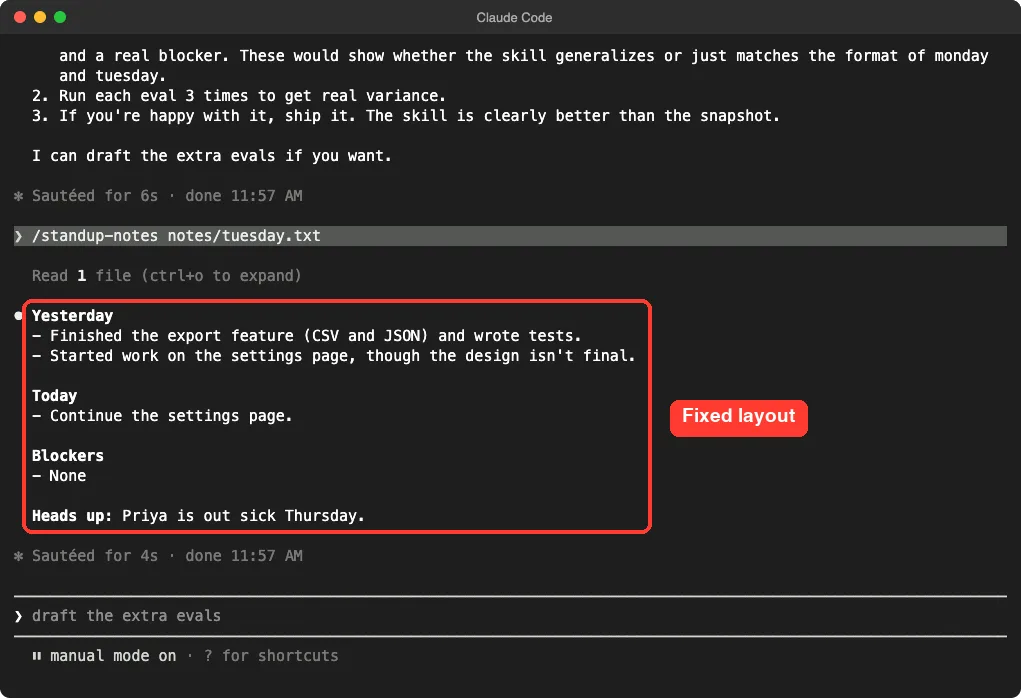
We then ran the improved skill by hand with /standup-notes notes/tuesday.txt. It produced the fixed layout, wrote “None” under Blockers and added the Heads up line about the teammate who is out sick.
What This Test Does Not Prove
A 100% score looks great, so here is the honest version. We did not claim the skill is robust, and Claude’s own caveats said the same.
- One run per test per version is a hint, not proof. Real confidence needs several runs of each test.
- We added two of the five round two checks after writing the new rules. The new skill was written to pass them, so the old skill was always going to lose on those two.
- Claude graded the outputs itself in both rounds, instead of using the separate grader agent that the repository describes.
- The time and token differences were small compared with the spread between runs, so we did not report them as a win.
- In round two Claude spotted that the aggregation script had listed the old skill first, computed the difference the wrong way round and reported three runs per configuration. It corrected the files, which is a good reminder to read the numbers before you trust them.
We did not run the description tuning feature. The docs and the repository describe it, but we only tested the run, grade and benchmark loop.
Try It Yourself
Pick one skill you already have, ideally one whose output has a clear shape. Copy the skill-creator folder into a throwaway project, or install it from the official marketplace as the docs describe, and paste a prompt like this:
Use the skill-creator skill to evaluate my [skill-name] skill. Write 2 test
prompts, add 3 simple assertions to each, run each test with the skill and
without it, grade the results and show me the benchmark. Do not open a browser.
Stop after iteration 1 and tell me what you would change.
Read the failed checks first, not the pass rate. Then ask Claude to snapshot the skill, apply the fixes and rerun both versions. If your skill is an instruction set for a long workflow, our guide to workflows versus skills helps you decide whether a skill is even the right container.
Common Mistakes
- Testing without a baseline. Without a with-versus-without comparison, you cannot tell whether the skill or the model produced a good answer.
- Writing checks that cannot fail. A check that passes for every version teaches you nothing, and Claude flagged one of ours as partly empty.
- Writing checks after the skill and then calling the result proof. Write the checks from real needs first, then the skill.
- Trusting one run. A single run per test is fine for finding problems, but not for claiming a win.
- Judging subjective skills by numbers. For writing style or design, the repository itself suggests human review rather than forced assertions.
- Skipping the review of scripts. Skill-creator runs
claude -psubprocesses, so read what you copy, as we did.
Pro Tips
- Keep test prompts realistic. Use messy, real-sounding input, like the sample notes in our demo.
- Keep the first round tiny. Two tests and three checks each is enough to find the biggest problems, and it keeps usage low.
- Explain the why in the skill. The rewrite that passed explained why a predictable layout matters, instead of shouting rules.
- Snapshot before editing. A snapshot gives you a fair baseline when you improve a skill.
- Use the review viewer for longer outputs. The repository’s viewer script can write a standalone HTML file instead of opening a server. We did not need it for text outputs.
- If a skill never triggers at all, test the description first. Our not triggering guide covers that case, and our five skills tutorial has more practice material.
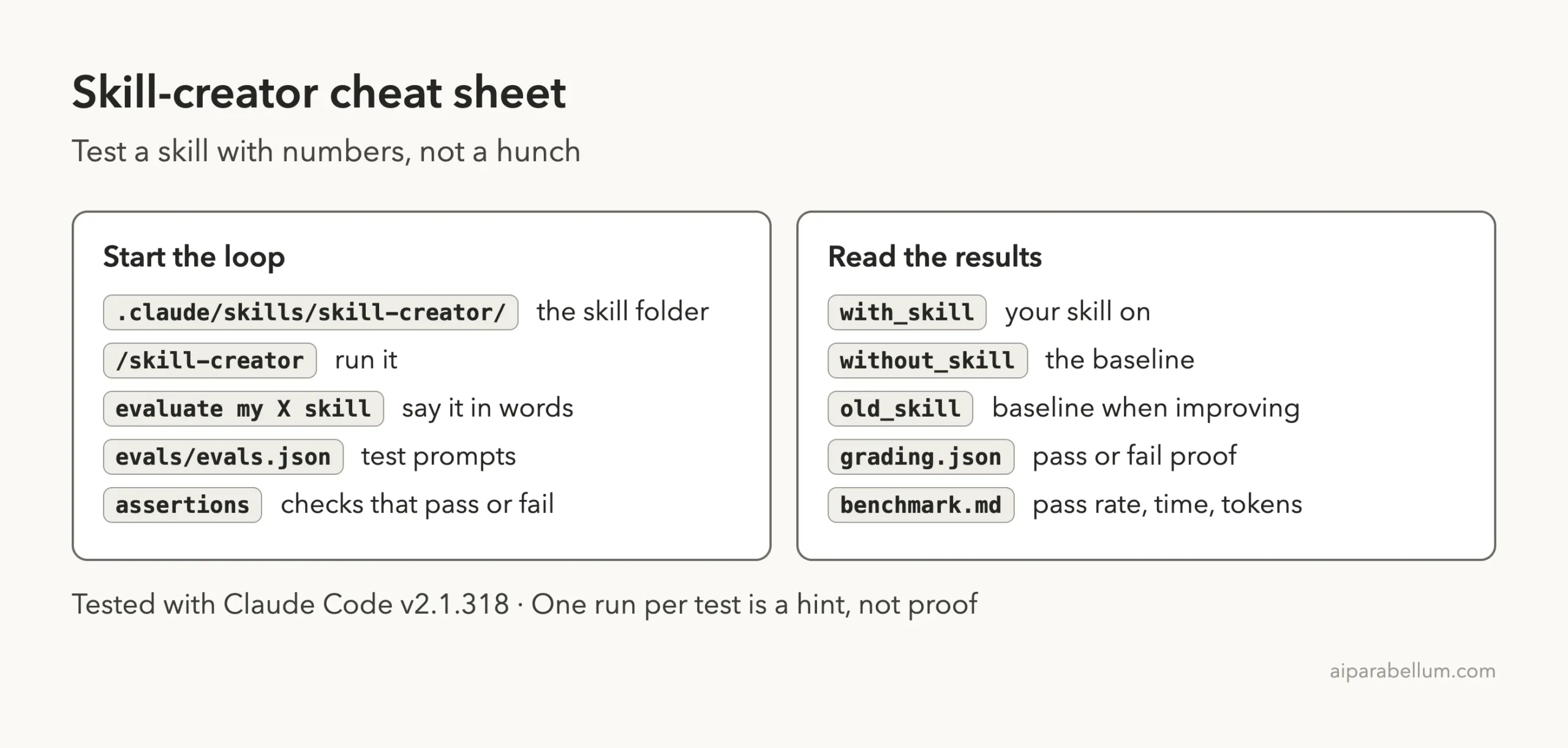
Cheat Sheet
Frequently Asked Questions
What is the Claude Code skill creator?
It is a skill from Anthropic that helps you create new skills, improve existing ones and measure how well they perform. It writes test cases, runs your skill against a baseline, grades the output and reports a benchmark.
How do I install skill-creator?
The docs describe installing it as a plugin from the official marketplace. For this test we copied its folder into a demo project’s .claude/skills/ folder instead, which loads it for that project only.
Does testing a skill cost extra?
Yes. Each test case runs as its own subagent, and a with-skill and a without-skill run double that. Our first round used four runs and our second used four more, so keep your first round small.
Can skill creator fix the skill for me?
It proposes fixes based on the failed checks, and it can rewrite the skill when you ask. In our test it made no edits until we told it to apply the changes.
Is one benchmark run enough to trust a skill?
No. One run per test only shows direction. Run each test several times before you rely on a pass rate, as Claude itself advised in our session.
Conclusion
Skill creator gives you a repeatable way to test a skill instead of trusting a hunch. In our small test, the failed checks showed exactly what a weak two-line skill was missing, and a rewrite scored 100% against the old version’s 60%. Treat numbers from one run as a hint, write your checks from real needs, and keep the loop small until you know what to fix. Read the best parts of Anthropic’s skills collection in the next part, and for more on this skill format, start from our Claude Code skills guide and the Claude AI overview.
Previous in the series: Part 6: Claude Code Workflow vs Skill: When to Use Each
Next in the series: Part 8, Anthropic’s Official Skills Repo: Install It and Try the Best Ones, is coming soon.