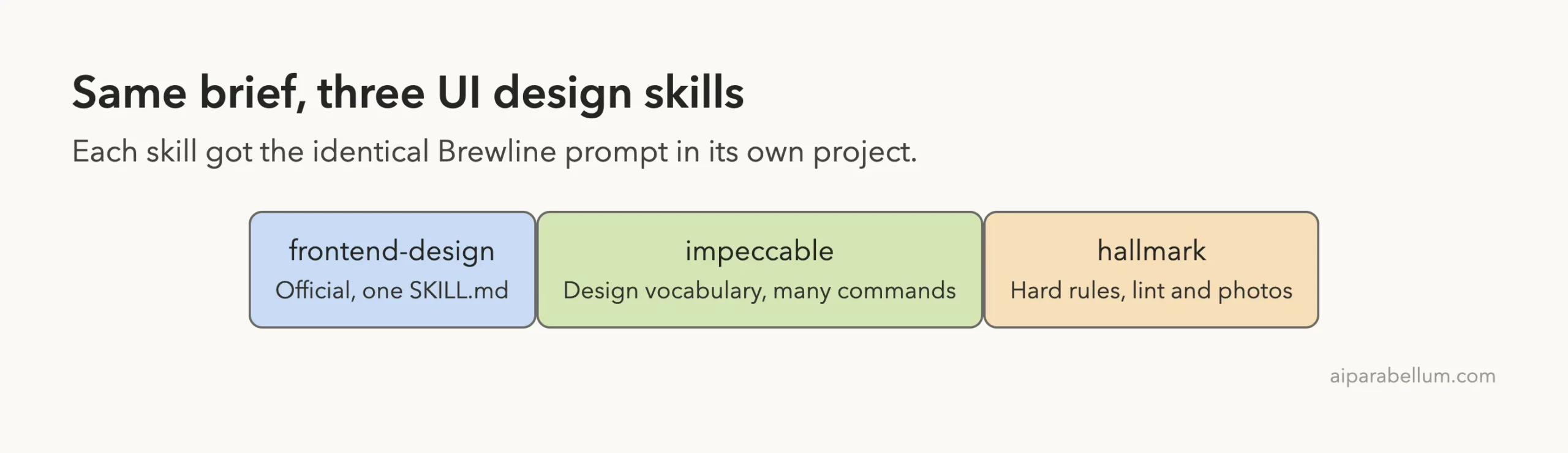
Looking for the best claude code skills for ui design? We gave three popular ones the exact same brief, a one-page site for a made-up coffee delivery service called Brewline, and compared the pages they built. These claude code ui design skills are not equal: one is Anthropic’s own skill, and the other two are community projects with tens of thousands of GitHub stars.
This is Part 11 of 45 in our Claude Code Deep Dives, part of our Claude Code tutorials. In the last part we covered the web development skills, so today we stay on the look and feel of the page.
Tested with Claude Code v2.1.318 on November 4, 2026. Versions tested: frontend-design from the anthropics/skills repo at commit ca45fc4 (October 28, 2026), Impeccable 4.8.0 at commit 5af4319, and Hallmark 2.0.0 at commit de4999e (both November 4, 2026).
Quick Summary
| Skill | What it is | What we saw | Verdict |
|---|---|---|---|
frontend-design | Official skill, one SKILL.md | Bold type, tilted bag ticket, clean plan rows. Done in 54 seconds. | Best starting point, nothing to install |
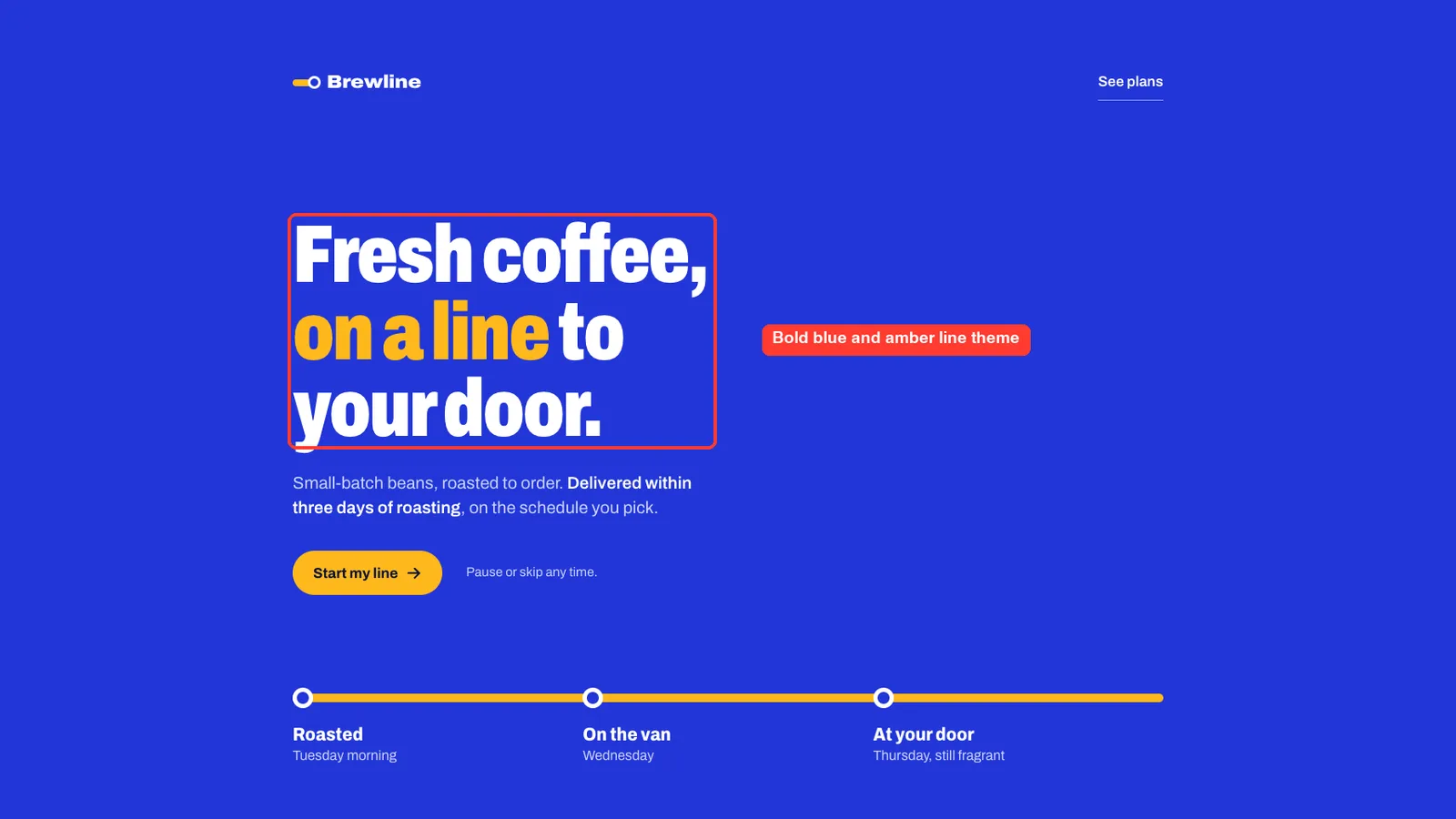
impeccable | Community skill with a large design vocabulary and many commands | Loud blue and amber page with a delivery line. Its helper script was not available, and the skill said which steps it skipped. | Strong look, but most of its power needs its launcher |
hallmark | Community skill with hard rules and a lint script | Warm editorial page with a real photo. Plan rows had a spacing flaw, and the final lint step waited for approval. | Most opinionated, needs the most supervision |
How We Picked the Best Claude Code UI Skills
We started from the design entries in our Skills Directory. We wanted skills that change how Claude builds a screen, not tools that extract a design from another site or connect to a paid design service. That left one official skill and two community favorites.
If skills are new to you, our guide to Claude Code skills explains the idea, and the official skills docs cover the file format.
Our safe setup
We never touched our normal Claude Code setup. Each skill went into its own throwaway project under .claude/skills/, and we started Claude Code with --setting-sources project so nothing from our personal settings leaked in. We read the hooks and scripts of each repo before running anything.
Impeccable’s plugin ships hooks that call a launcher script, and that launcher downloads a program from GitHub on first use. We did not want to run a downloaded binary, so we copied only the skill’s instructions and reference folder, not its scripts or hooks. Keep that in mind when you read the Impeccable results below.
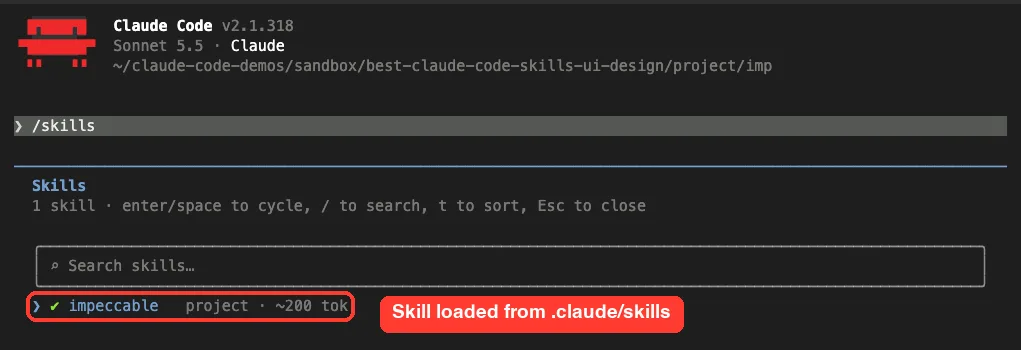
/skills list shows each skill and its rough token cost: about 70 for frontend-design, 90 for hallmark and 200 for impeccableThe brief we used
Every skill got the same prompt, only the skill name changed. We added a line telling Claude not to ask questions, because Hallmark’s instructions say to ask once about audience and tone.
Use the frontend-design skill. Build a one-page website for Brewline, a small coffee delivery service. One file, index.html, with inline CSS and no JavaScript libraries. Include a hero, three delivery plans with prices, how it works in three steps, and a sign-up section. Keep the copy short. Do not ask me questions; make reasonable choices.We ran Claude Code in acceptEdits mode, one session at a time, then opened each finished file in a headless browser at 1280 pixels wide. For Hallmark we also allowed local node commands, since its rules call for a lint script.
Skill 1: frontend-design
This is the official one. Its whole instruction file is short and written as a role: act like the design lead at a studio that has already rejected cliché proposals, ground the look in the subject, and take aesthetic risk if the brief allows it.
There are no scripts, so there is nothing to install or approve. We covered it in depth in our frontend design test.
Frontend-design gives direction, not a process, so you still have to look at the page.
What it built
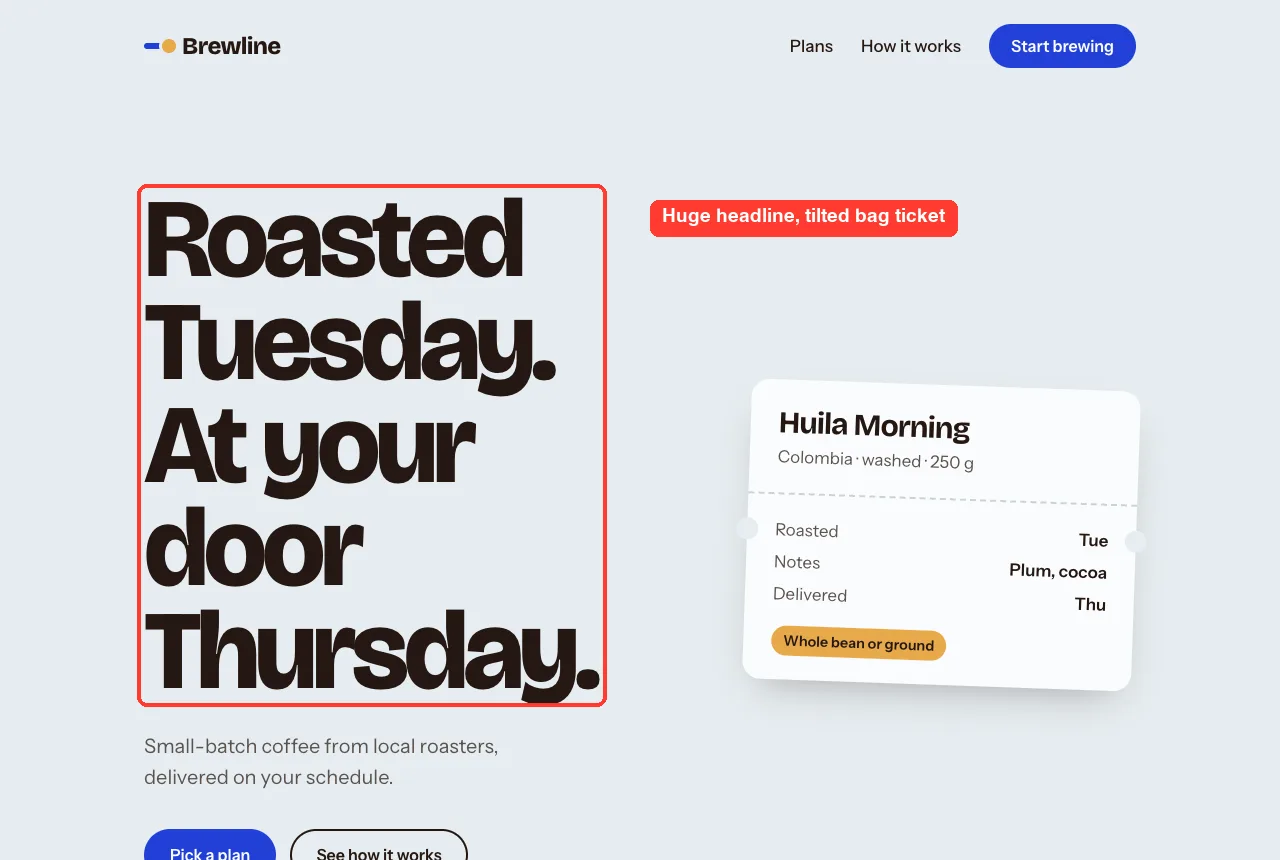
Claude finished in 54 seconds and wrote a 13.7 KB file. The hero is a huge headline, Roasted Tuesday, At your door Thursday, next to a tilted coffee bag ticket that lists the roast, notes and delivery day.
Claude also explained its choices in plain words: cobalt blue instead of the usual brown and cream, one drawn line as the only motion, and numbered steps only where the order matters. It added that the prices and roast names were placeholders and that it had not opened the page in a browser.
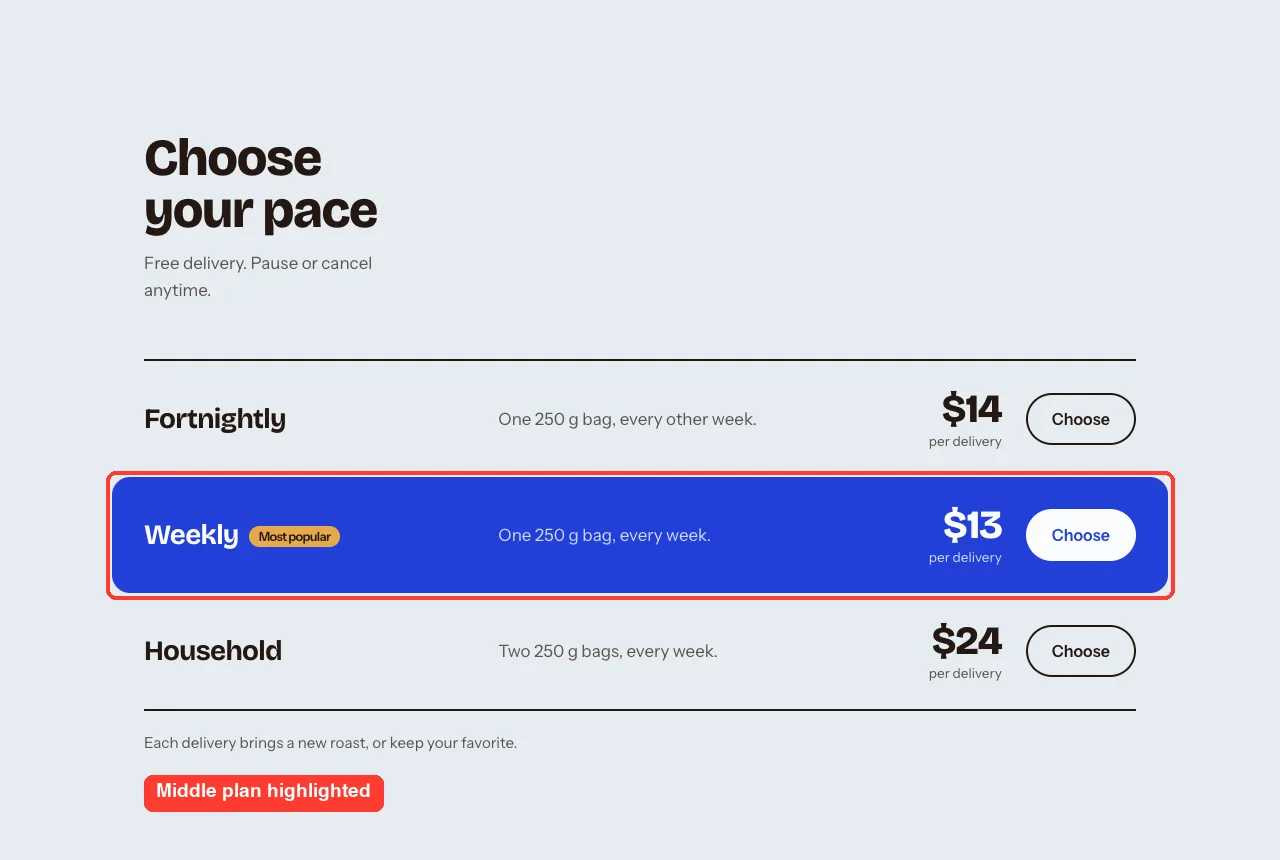
The plan section is three ruled rows instead of three boxed cards. The middle plan is filled in blue and marked as the most popular one, and every price, label and button lines up.
Where it falls short
It gives you direction, not a process. There is no checklist that makes Claude look at the finished page, so you still need to open the file yourself. It also loads two fonts from Google Fonts, so the page needs a network connection to look right.
Skill 2: impeccable
Impeccable describes itself as a design vocabulary for your coding agent. One skill carries many commands, such as polish, critique, audit, bolder and quieter, plus long reference files on layout, color, type and motion. The project lives at pbakaus/impeccable on GitHub, and our Impeccable install guide covers setup.
The skill file tells Claude to run a launcher script first to load project context, then read a craft-floor file before touching any UI. In our setup the launcher was missing on purpose.
What it built
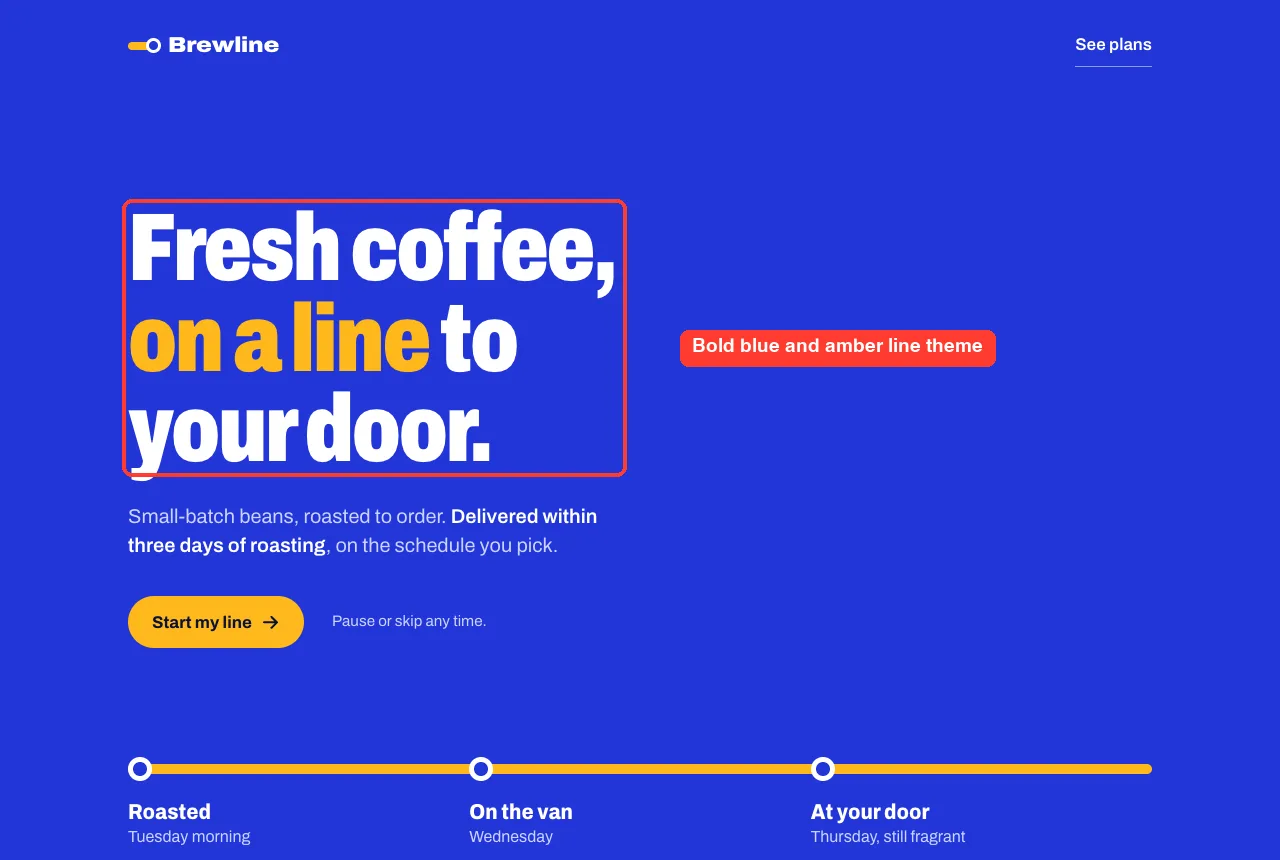
Claude loaded the skill, tried to run the launcher, read the reference files it could reach, and finished in 1 minute 51 seconds with a 17.8 KB file. The page is a full-bleed blue hero with the headline Fresh coffee, on a line to your door, an amber button, and a three-stop delivery line that runs across the bottom.
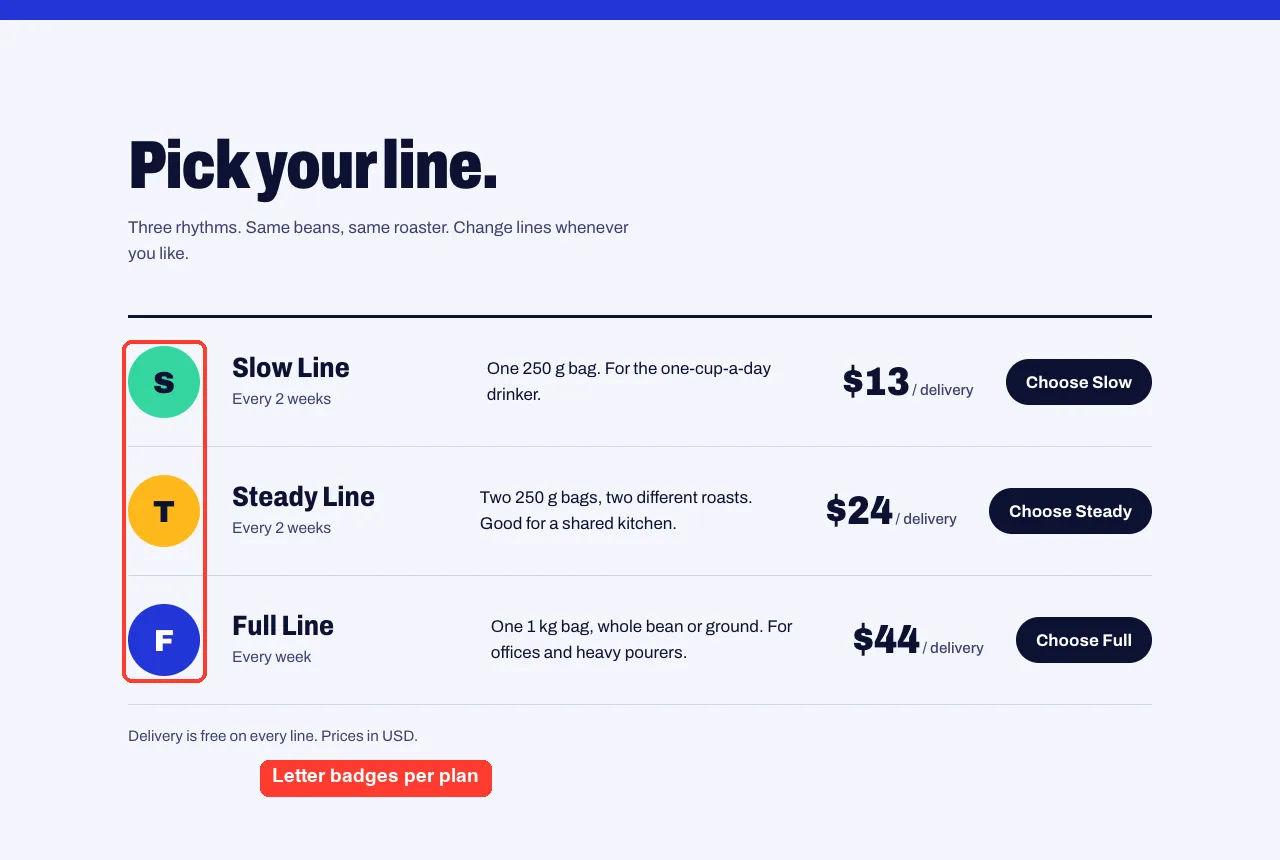
The plans are rows with a colored letter badge for each plan, a one-line description, the price and a button. Everything stays readable and aligned, and the badges give the section a bit of personality.
What it told us it skipped
The honest part is in its final message. Claude said the launcher script was missing, so it ran none of the skill’s process: no direction roll, no design brief file and no finish review. It chose the direction itself from the instructions it had read.
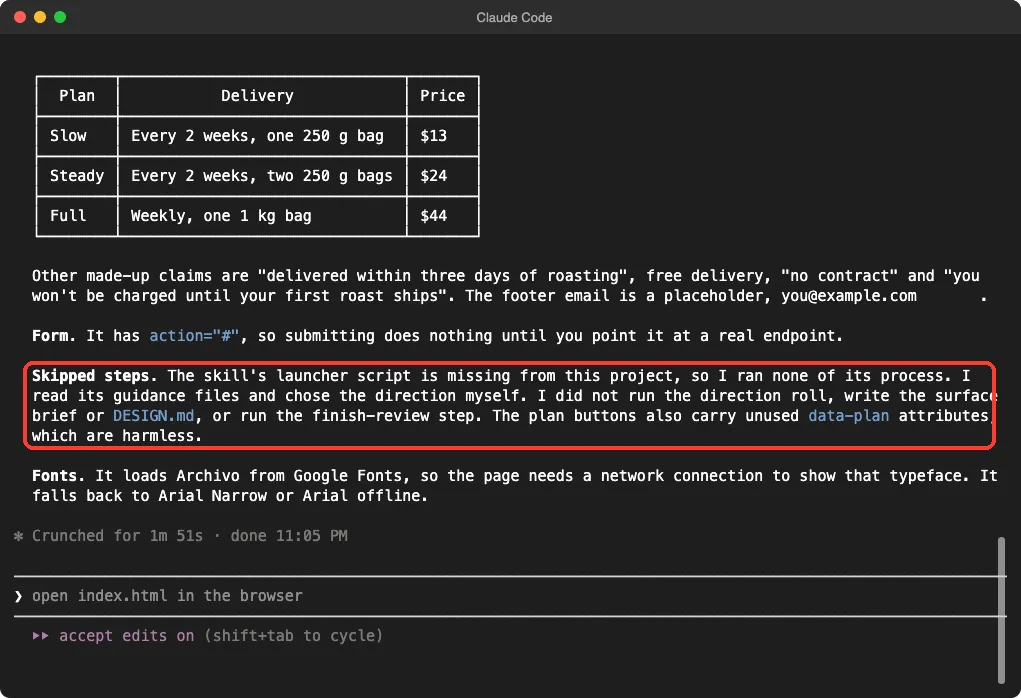
That means our test shows Impeccable’s written guidance, not its full tooling. We have not tested the launcher, the hooks or the live browser mode, so we cannot say how much they add.
Skill 3: hallmark
Hallmark is built around a hard floor of rules. Its skill file lists sixteen of them, for example no raw colors outside a token block, no animating width or height, no eyebrow labels in tracked capitals, no invented metrics or testimonials, and the headline and main button must fit on a 1280 by 800 screen. You can find it at Nutlope/hallmark on GitHub, and our Hallmark install guide goes through setup.
It also ships a lint script, sloplint.mjs, that Claude is told to run on the finished page with a render pass. Another script can generate images with an outside service, which needs an API key we did not have.
What it built
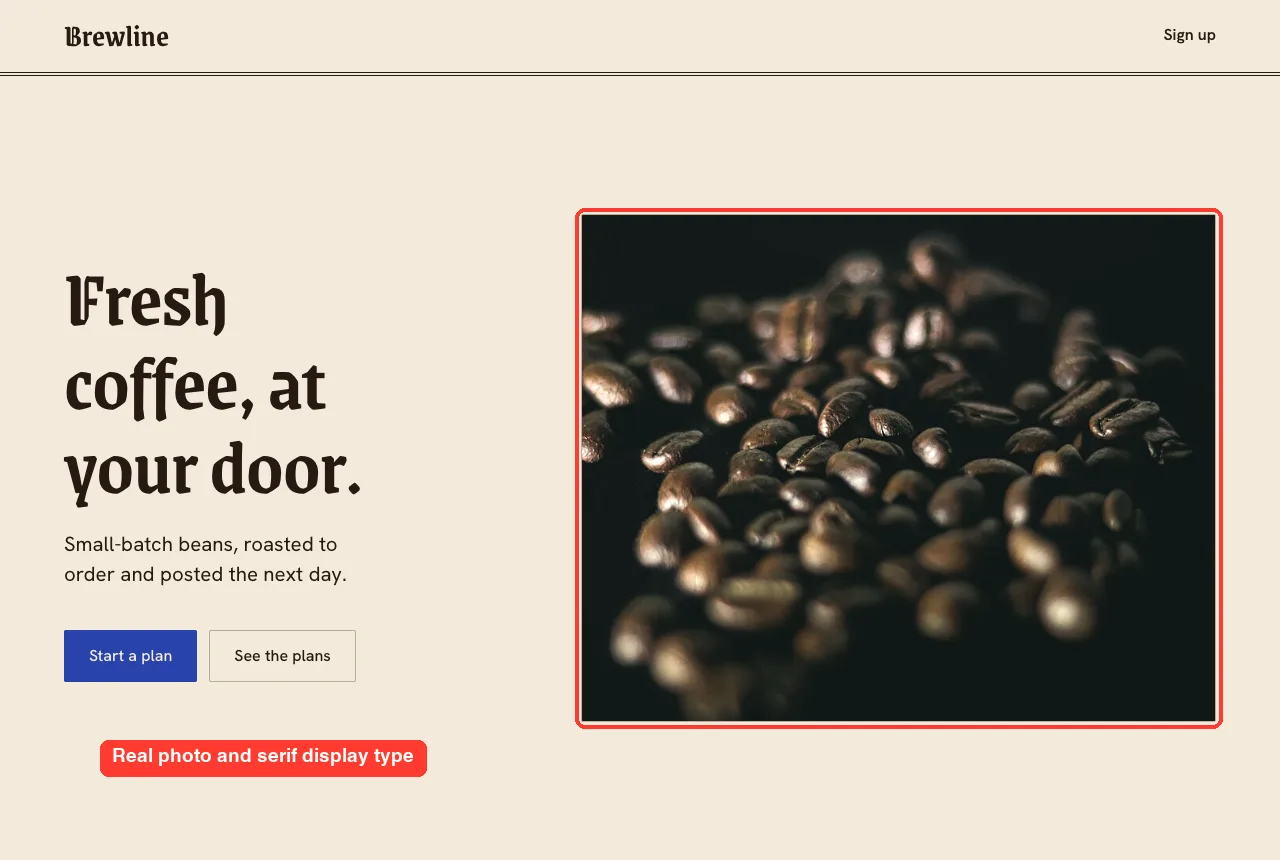
Hallmark split the work into several files: tokens.css for colors and fonts, base.css, a source page and the final index.html, which came to 22.3 KB. Its hero is a warm paper background, a serif display headline and a large photo of coffee beans.
The photo is not stored in our folder. The page links to an image on Wikimedia, so it needs a network connection to show it, and you should check the license of any image you keep.
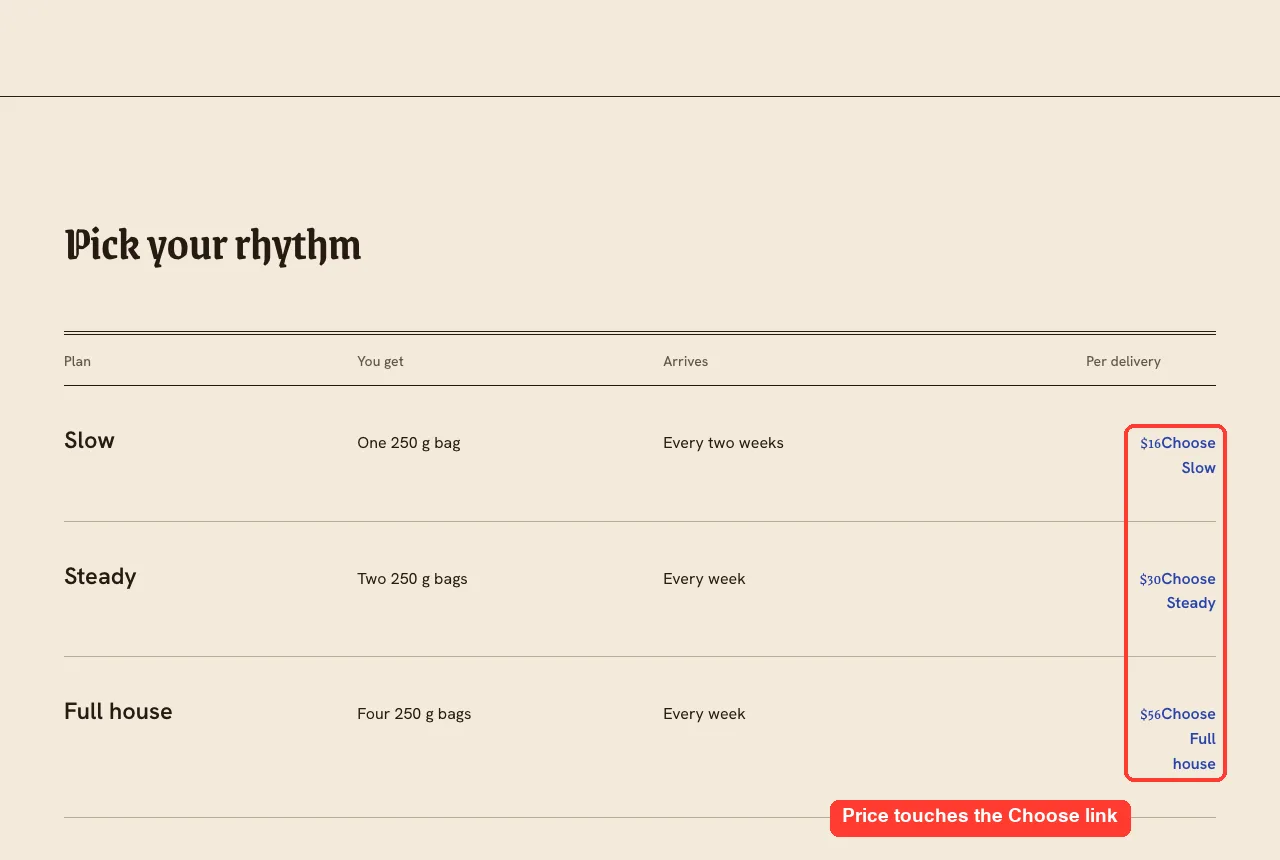
The plan section had a flaw
When we scrolled to the plans at 1280 pixels, the price and the Choose link ran together in the right column, so a row read like a price glued to a link. The links also wrapped onto two or three lines. The page was not broken, but this is the kind of detail a lint pass with a render check is meant to catch.
The lint step waited for us
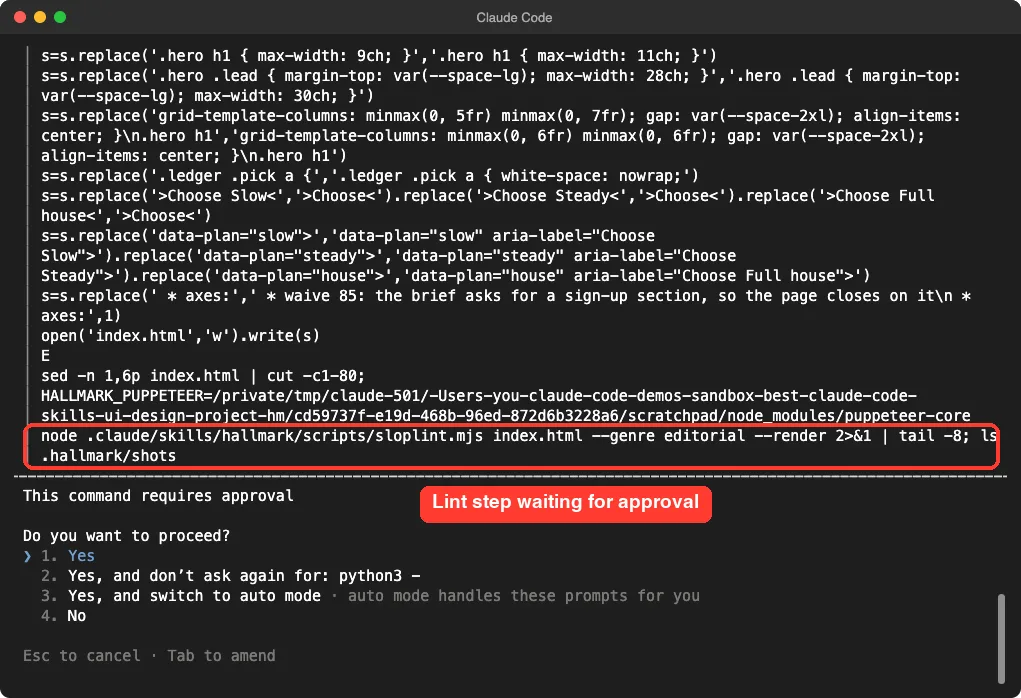
In our run Claude patched the page with a Python script and then asked permission to run the lint script with a render. Our capture script had pressed Enter on earlier prompts at fixed intervals, and the session was still sitting at this one when the capture ended. So we cannot report a lint result.
Which of the Best Claude Code UI Skills Should You Use?
All three produced a page that looks designed rather than templated, and none of them looked like the others. Two of the three even landed on the same idea, a blue and amber line to show the delivery route, which is a reminder that the same brief nudges different skills toward similar choices.
| If you want | Pick | Why |
|---|---|---|
| A fast, no-setup upgrade for new pages | frontend-design | One text file, no scripts, cleanest result in our test |
| A shared vocabulary to polish and critique later | impeccable | Commands like critique and audit are built for iteration, but plan to run its launcher |
| Strict rules and a lint check | hallmark | The rule list is the most detailed, but expect more prompts and review the output |
Our pick for most readers is frontend-design first. If you keep getting generic-looking pages, add one of the community skills in a project folder and compare. Do not install all three at once, because they give Claude overlapping instructions.
Real Examples to Copy
Run one skill by name
Use the hallmark skill. Build a one-page website for my bakery. One file, index.html, no JavaScript libraries.Ask Claude to check its own work
Open index.html in a browser at 1280 and 390 pixels wide, list anything that overlaps or wraps badly, then fix it.Check the skill loaded
/skillsTry It Yourself
Pick a small made-up brand, then give each skill the same prompt in its own project folder. Open all three files side by side and write down what differs: type, color, spacing and how the plan section looks.
Use the frontend-design skill. Build a one-page website for a dog-walking service called Pawline. One file, index.html, inline CSS, no JavaScript libraries. Include a hero, three plans with prices, and a sign-up section. Keep the copy short. Do not ask me questions.Common Mistakes
- Trusting the page without opening it. In our runs Claude said it had not looked at the page, and Hallmark’s plan table needed a visual check.
- Installing a community skill without reading its scripts or hooks first.
- Leaving the prompt vague. A brand name, the sections you want and a copy limit gave far better results than a generic request.
- Stacking several design skills in one project, which makes the instructions compete.
- Keeping placeholder prices and email addresses. All three skills told us the numbers were made up.
Pro Tips
- Use
--setting-sources projectwhen you test a skill so your personal settings do not change the result. - Run the skill on the same brief you will use later, not on a toy example.
- Ask Claude which steps of the skill it skipped. Impeccable answered clearly without being asked.
- Check where images and fonts load from. Fonts from Google Fonts and photos from Wikimedia need a network connection and may carry license terms.
- Browse more design add-ons in the Claude Code plugins guide and learn how plugin marketplaces work before you install anything.
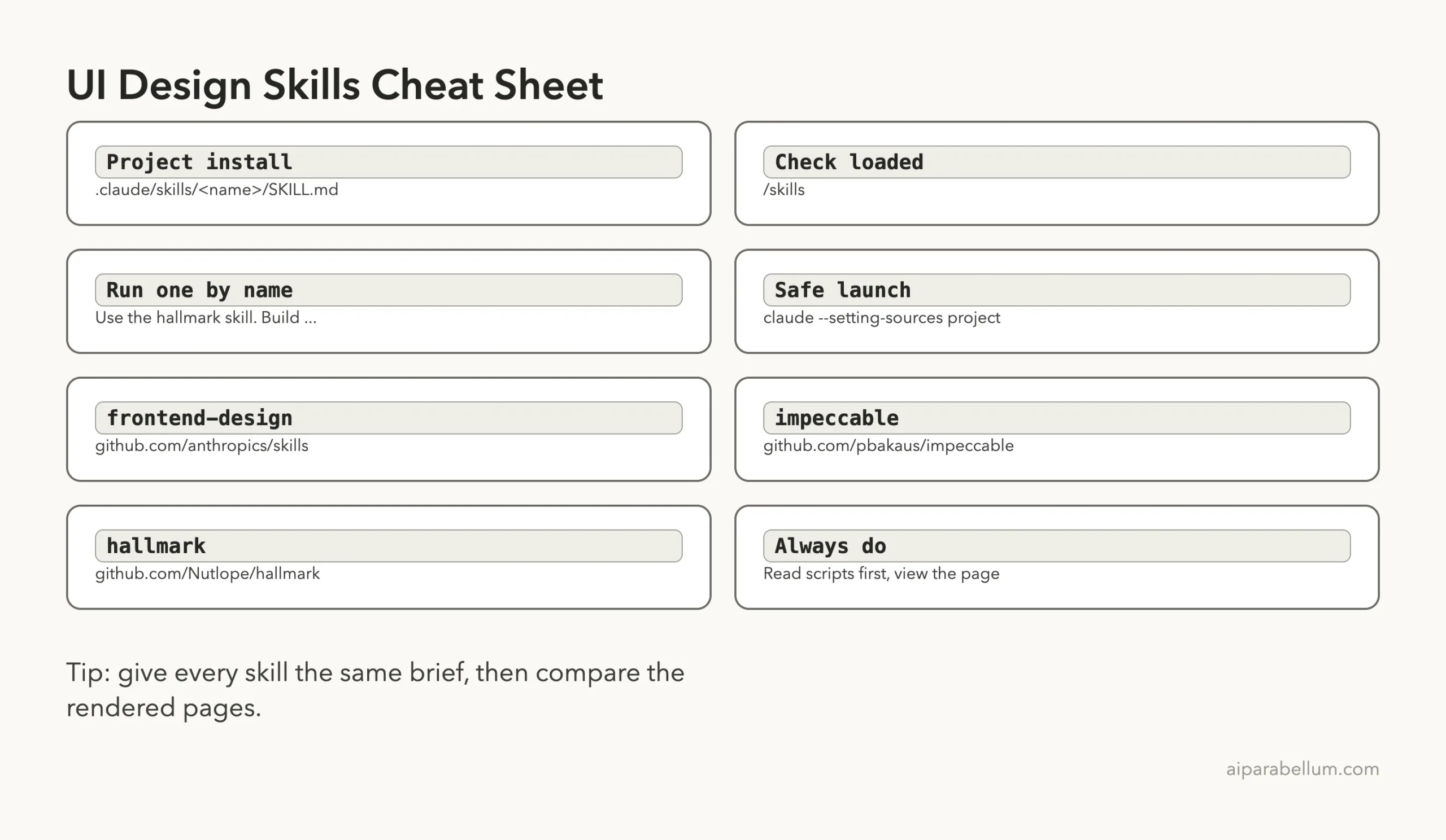
Cheat Sheet
What We Did Not Test
We did not run Impeccable’s launcher, hooks, live browser mode or any of its sub-commands such as critique or polish. We did not get a Hallmark lint result, and we did not use its image generator or its redesign mode. We also ran each skill once, so a second run could look different.
We left out design tools that need outside accounts, such as Figma, Canva and Superdesign, and tools that copy a design from an existing website. Those deserve their own posts.
Frequently Asked Questions
What is the best Claude Code skill for UI design?
For most people, the official frontend-design skill. It is one text file, needs no setup and gave the cleanest page in our test. The community skills add rules and tooling, but they ask for more supervision.
Do these skills work without any design knowledge?
Yes. You describe the page in plain English and Claude applies the skill. You will still get better results if you name the brand, the sections and the mood you want.
Is it safe to install Impeccable or Hallmark?
Read them first. Impeccable’s launcher downloads a program on first run, and Hallmark ships scripts that run in your terminal.
We tested both inside a throwaway project and never touched our normal settings.
Can I use more than one design skill at once?
You can, but we would not. Each skill gives Claude its own rules about type, color and layout, and they can pull in different directions. Test them one at a time.
Do I need the plugin system to use them?
No. We copied the skill folders into .claude/skills/ inside a project and they appeared in /skills. Our skills repo guide shows the same method.
Conclusion
Among the best claude code skills for ui design, the official frontend-design skill gave us the cleanest page with the least effort, Impeccable produced a loud and confident page even without its tooling, and Hallmark built the richest page but left a spacing flaw and an unfinished lint step. Start with the first, compare against one community skill on your own brief, and always open the page before you trust it. For more guides, see our Claude hub.
Previous in the series: Part 10: Best Claude Code Skills for Web Development (Tested)
Next in the series: Part 12: Claude Code Skill for Code Review: Build and Test One.