Impeccable is a free design skill for Claude Code that promises to catch AI slop: the cream backgrounds, tiny all-caps labels and stock layouts that make so many AI-built pages look alike. We installed Impeccable in Claude Code, built the same landing page with and without it, then ran its review and polish commands on the plain page.
The short version: Impeccable produced a far more distinctive page and its critique found a real bug. The new build took about 5 times the time and usage, though, and the polish pass left the page looking much the same.
This guide covers the install, the commands worth trying first, what our test showed and how to remove every file afterwards. Tested with Claude Code v2.1.312 and Impeccable 4.8.0 on October 30, 2026, on macOS, with the default Sonnet 5.5 model.
Key takeaway: try the free detector and one critique first, and save full Impeccable builds for pages where the look really matters.
Impeccable at a Glance
| Question | Short answer |
|---|---|
| What is it? | A design skill with commands, reference guides, four helper agents, automatic hooks and a rule-based slop detector. |
| What does it cost? | The skill is free under the Apache 2.0 license, but its commands use your Claude usage. |
| How big is the install? | 19 MB in our project, most of it the detector program. |
| How do you run it? | Type /impeccable followed by a command and a target. |
| Did it make a better page? | A bolder and more memorable one, in our single test. |
| Best feature in our test? | The critique command, which found a bug the plain build had shipped. |
What Is Impeccable for Claude Code?
A Claude Code skill is a folder of instructions that Claude loads when it needs them. If skills are new to you, start with our guide to Claude Code skills.
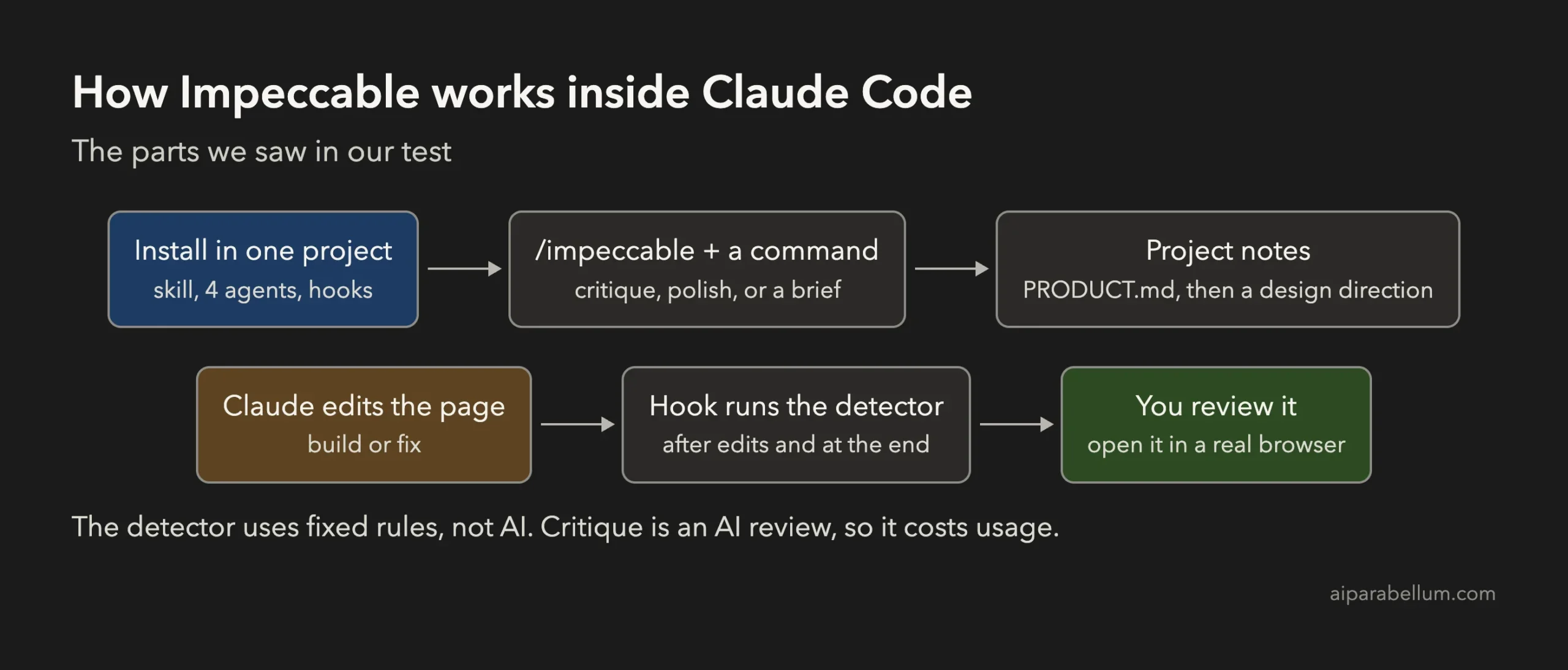
Impeccable goes further than most skills, because it has three separate parts. The commands steer the work, the detector checks a page with fixed rules, and the hooks run that detector for you whenever Claude edits a page.
That split matters for your usage. The detector runs no AI model, so it costs nothing to run from the terminal, while commands like critique and polish are normal Claude work.
How to Install Impeccable in Claude Code
You need Node.js for the npx command, and nothing else. Run the installer from your project folder and name the scope, so it can’t land in your global setup by accident.
# inside your project folder
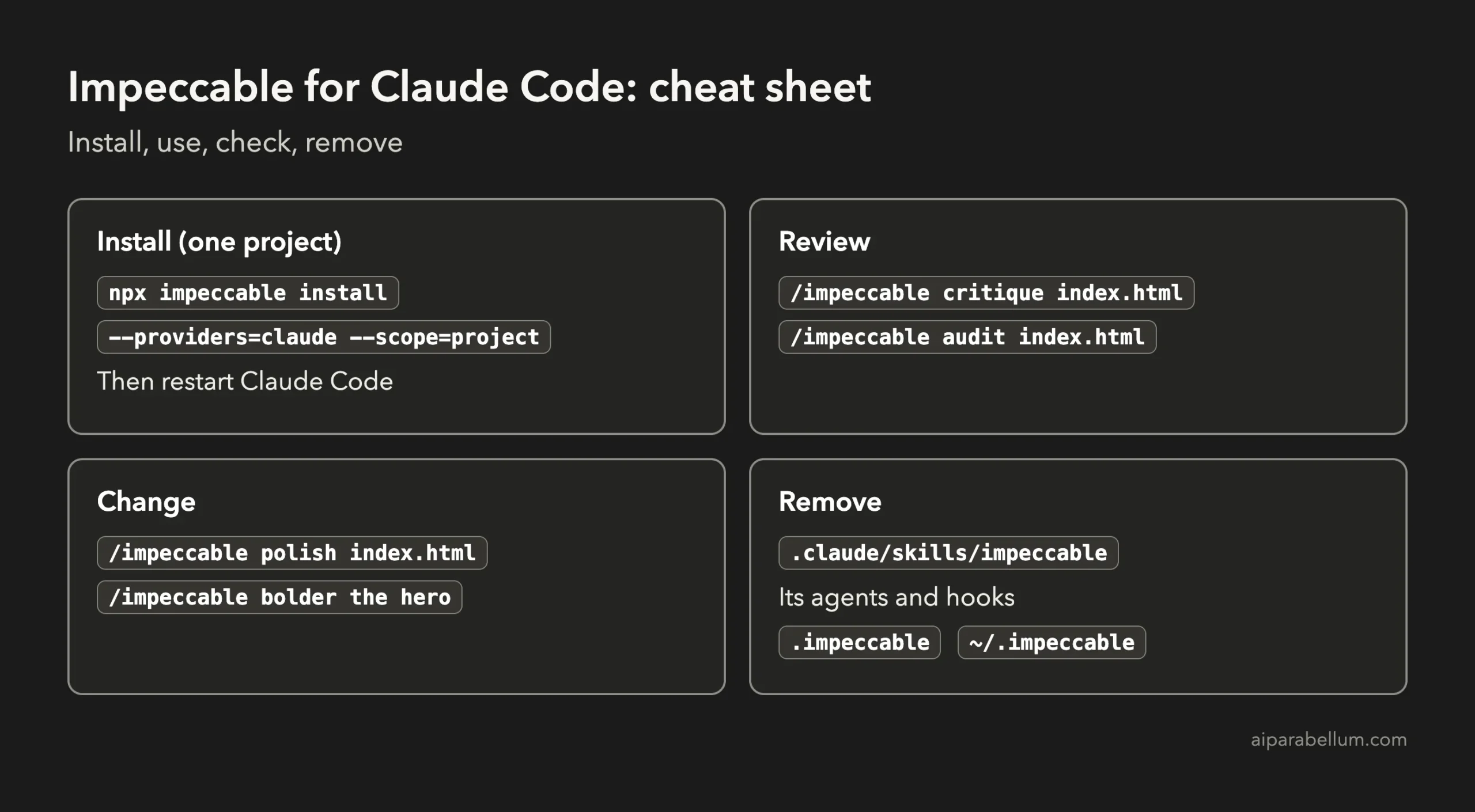
npx impeccable install --providers=claude --scope=project
Our run with those options, plus -y to skip the prompts, printed this:
Installed impeccable into: .claude (project)
Installed impeccable engine v0.1.18 (darwin-arm64) into: .claude/skills/impeccable/scripts/bin/darwin-arm64/impeccable
Installed Claude Code agents into: .claude/agents
Installed hooks into: .claude
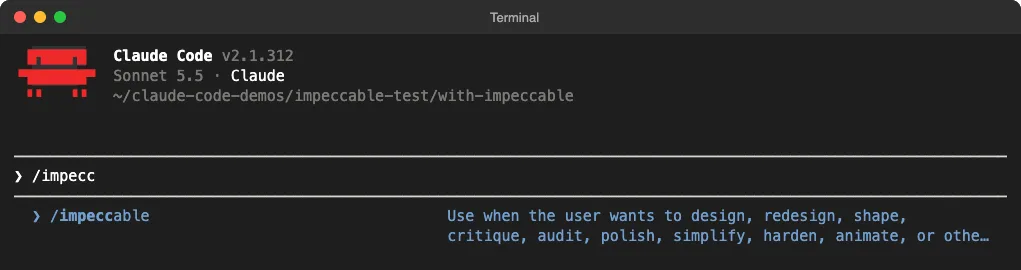
Restart Claude Code afterwards and type /impeccable to confirm it’s there. Add --no-hooks to the install command if you don’t want the automatic checks.
What the Installer Changes
Check what you’re adding before you run it on a real project, because this is more than a single skill folder. Our project install added these items:
- The skill itself, in
.claude/skills/impeccable. - Four helper agents, in
.claude/agents. - Three hooks in
.claude/settings.local.json, which run at session start, after each edit or write, and when Claude stops.
Two more things surprised us. The hooks also created a small ~/.impeccable folder in our home directory (16 KB), even though we chose a project install, and a .impeccable folder appeared in the project.
Impeccable also has anonymous usage data turned on by default for its design-direction feature, which fetches options from its website. Its own status message says project names and code are not sent, though we did not inspect the traffic ourselves. To turn it off, run impeccable telemetry off or set DO_NOT_TRACK=1.
The Plugin Route
Impeccable’s GitHub page (pbakaus/impeccable) also lists a plugin install, which our guide to Claude Code plugins explains. We didn’t test this route, because we wanted everything to stay inside one demo project.
The Impeccable Commands Worth Trying First
The project lists 24 commands, which is a lot to learn on day one. These are the ones to start with, and you can type /impeccable alone to see the rest.
| Command | What it does | When to use it |
|---|---|---|
/impeccable init | Writes a PRODUCT.md file about your product | Once per project, first |
/impeccable critique | Scores the design and ranks what to fix | When a page feels off |
/impeccable audit | Checks accessibility, speed and responsive layout | Before you ship |
/impeccable polish | Makes a final quality pass | When the page is nearly done |
/impeccable bolder | Pushes a safe design further | When a section looks bland |
We ran critique, polish and a new build in our test. The audit and bolder descriptions above come from the skill’s own documentation.
A narrow target usually works better than a whole page, as the project’s own docs point out. So try /impeccable critique the pricing cards before you point it at your entire site.
How We Tested Impeccable
We wrote one brief for a made-up business: a landing page for Harbor Lane Coffee, a Portland roaster selling an $18 monthly bean subscription. It asked for a hero, how it works, three coffees, pricing and a sign-up form, in one index.html file.
Claude Code then ran four separate jobs in throwaway demo folders:
- A plain build with no skill installed.
- A new build with
/impeccablein front of the same brief. - A
critiqueof the plain page, set to report only. - A
polishof a copy of the plain page, as a separate session.
There are two limits you should know about. We ran these jobs in Claude Code’s non-interactive mode with a restricted list of allowed commands, which blocked Chrome, so Impeccable couldn’t look at its own pages or run its usual finish review. With no one to answer them, it also skipped its design questions, so a hands-on session could well turn out better.
Results: Plain Claude Code vs Impeccable
The cost column is the figure Claude Code reports for each run. On a subscription, treat it as a guide to how much usage a job takes, not as a bill.
| Job | Time | Cost | Detector findings | Sign-up form |
|---|---|---|---|---|
| Plain build | 55 seconds | $0.19 | 5 | Bug: form stays on screen |
| Impeccable build | 305 seconds | $0.91 | 4 (all false alarms) | Worked |
| Critique of plain page | 40 seconds | $0.53 | Report only | Found the bug |
| Polish of plain page | 62 seconds | $0.30 | 4 | Bug still there |
The New Build Looked Very Different
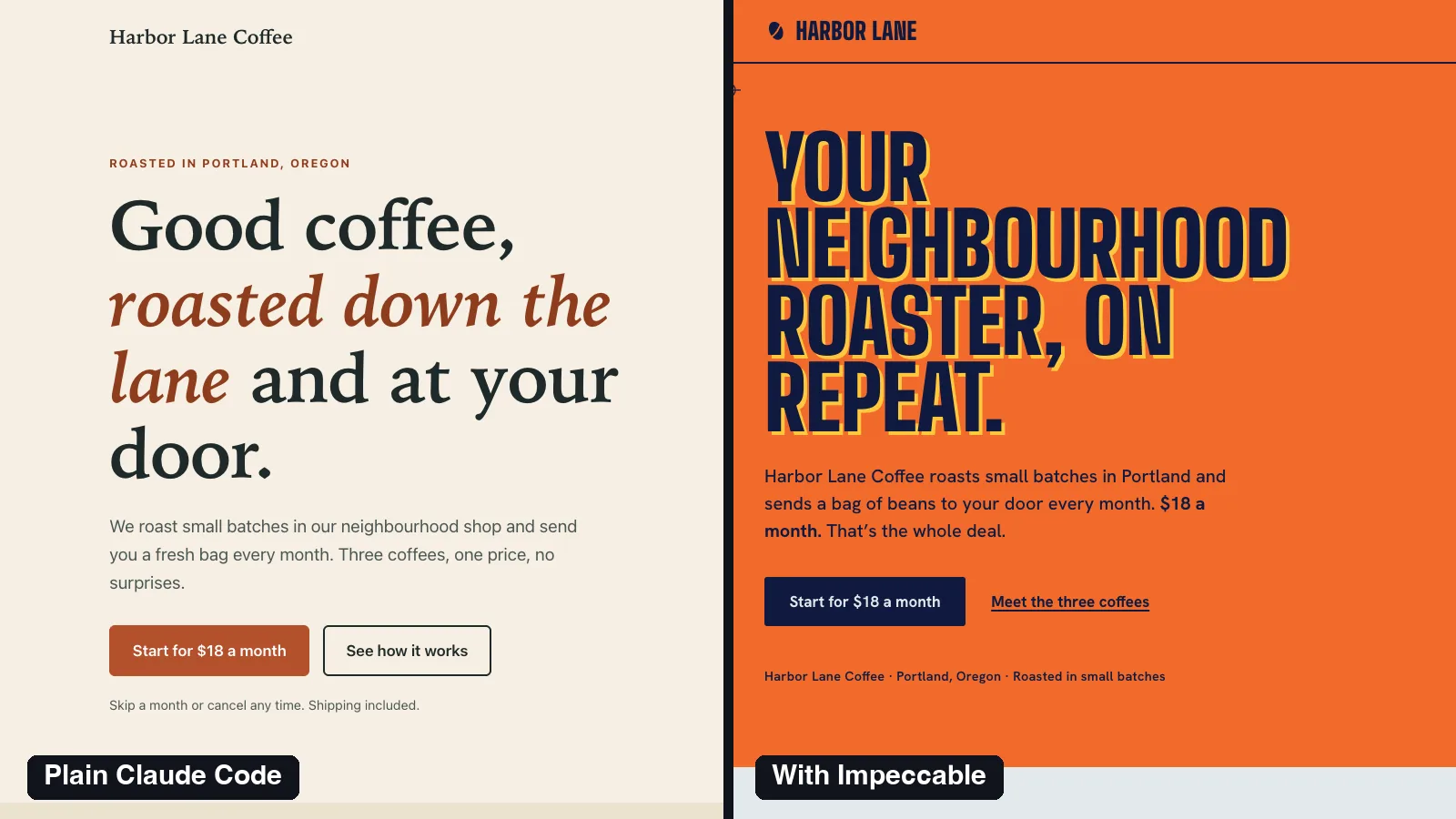
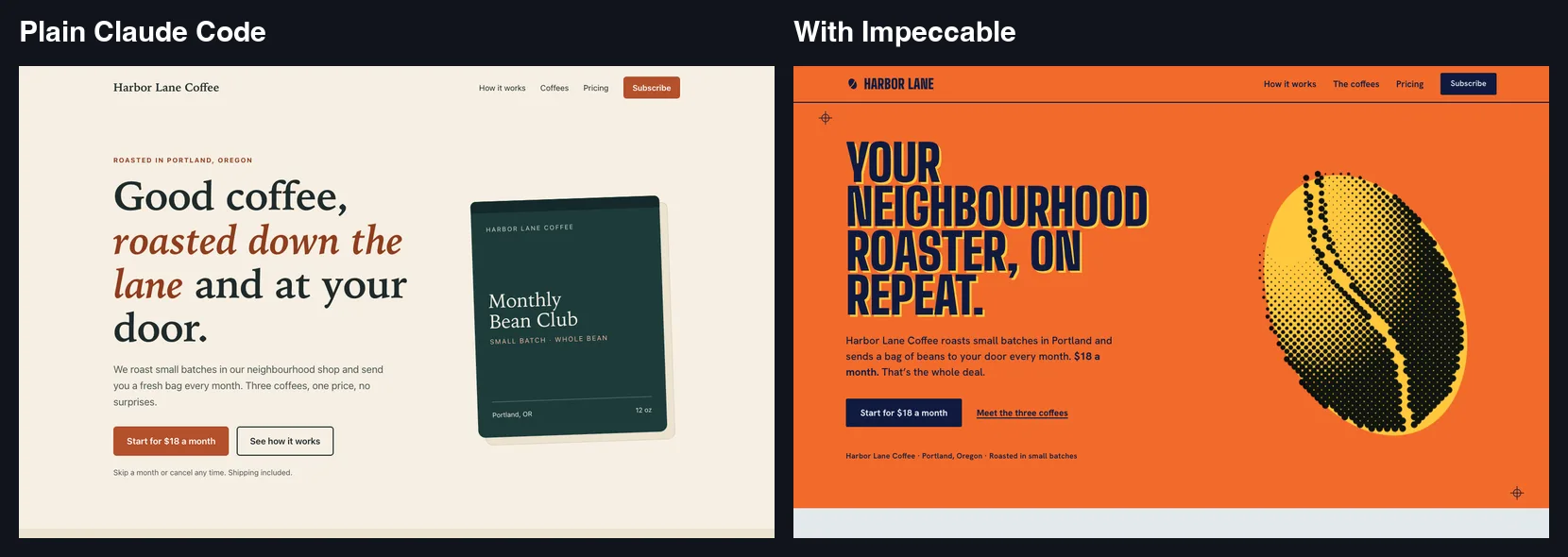
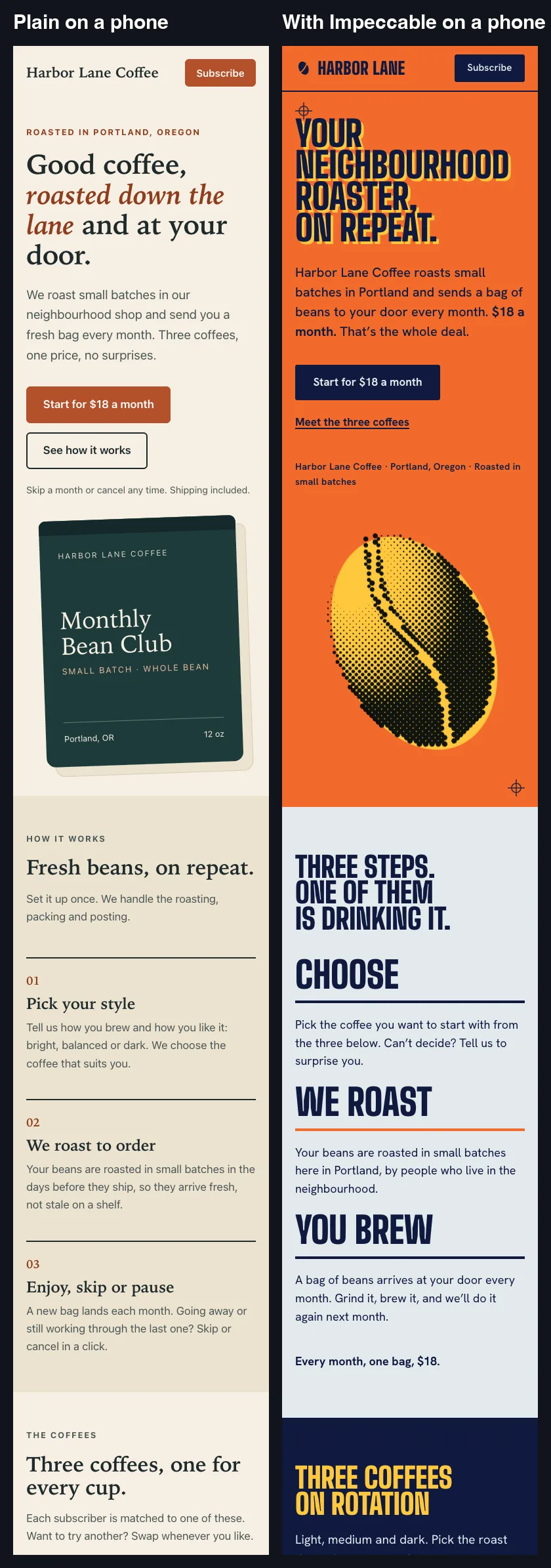
The plain build gave us exactly what the skill warns about: a cream background, a small all-caps label, and a serif headline with an italic phrase. It’s tidy, and we’ve seen it many times before.
The Impeccable build chose a screen-printed gig poster idea, with orange, navy and yellow, a halftone coffee bean and a pricing section shaped like a ticket. Nobody would mistake it for the default, and the coffee list reads like a concert bill rather than three cards.
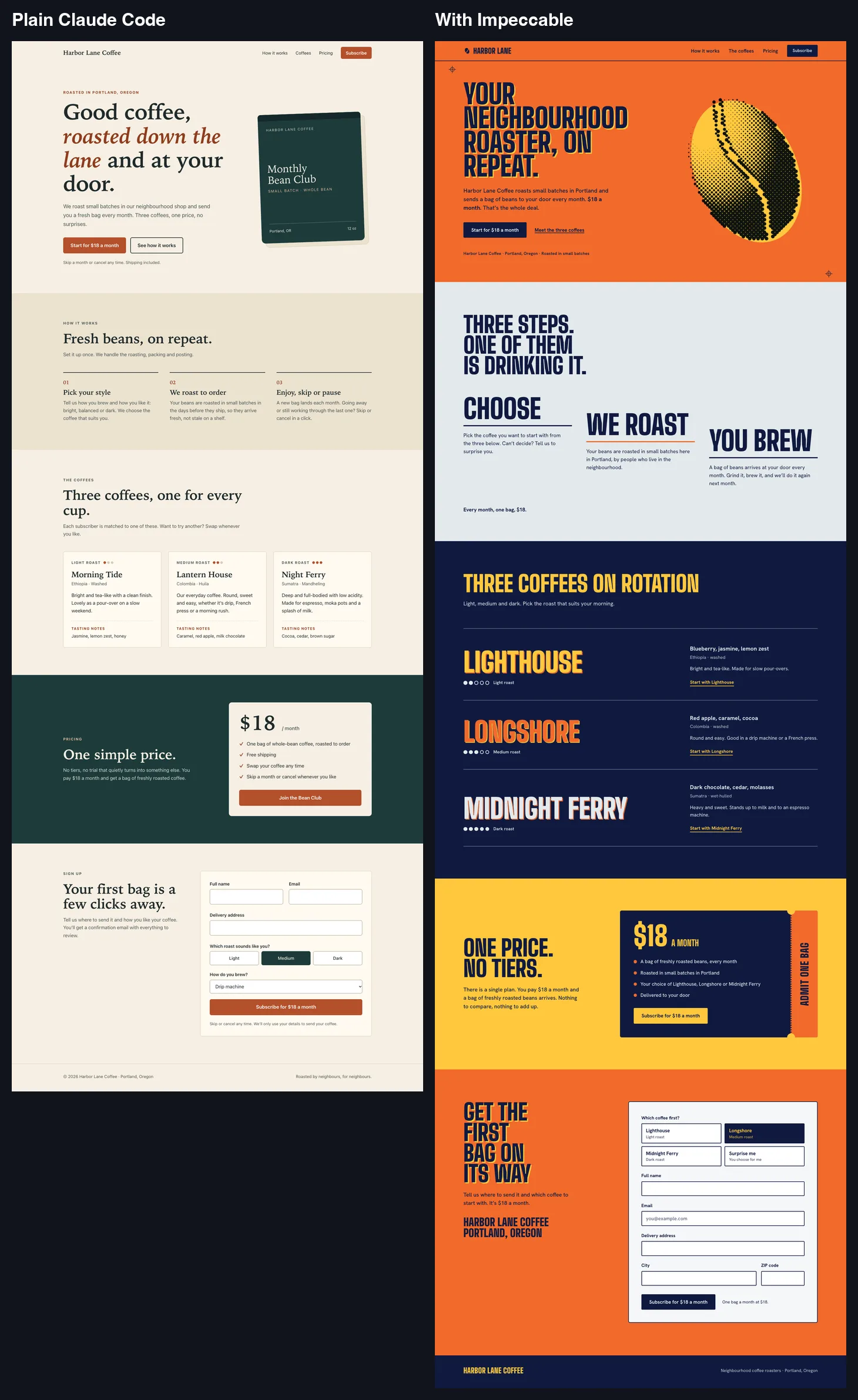
Boldness has a cost, though. The orange and the offset yellow shadow on every large heading get loud across a long page, and a small roaster might prefer something calmer. Treat this as a strong first draft, and use quieter if it goes too far.
It was also more careful with facts in one place. The plain build invented free shipping and easy swaps, while the Impeccable build left shipping terms out. Both invented their coffee names, however, and both forms send nothing anywhere, so a real business would need to fix that before launch.
It Held Up on a Phone
We checked all the pages at 390 and 320 pixels wide, and none of them scrolled sideways. The Impeccable page is a little longer on a phone, at about 6,000 pixels against 5,500 for the plain page.
Critique Was the Most Useful Command
The critique run scored the plain page 19 out of 32 and listed its priorities, with the sign-up form at the top. It said a CSS rule probably kept the form on screen after a successful sign-up.
We tested that in a browser and the bug was real: the success message appeared while the filled-in form stayed on screen. Our plain build had reported no such problem, because it hadn’t tested the form in a browser at all.
It also caught contradictions in the copy, such as “three coffees” sitting next to “we choose the coffee that suits you”. That’s the kind of feedback a good reviewer gives, and at $0.53 it was worth the usage on a page that matters.
Polish Changed Less Than We Expected
The polish run made small, sensible edits: it removed the all-caps labels, softened the bag’s shadow, balanced the headline and added a skip link. The page still has the cream background and italic headline, and that was deliberate, since Claude said replacing them would be a redesign.
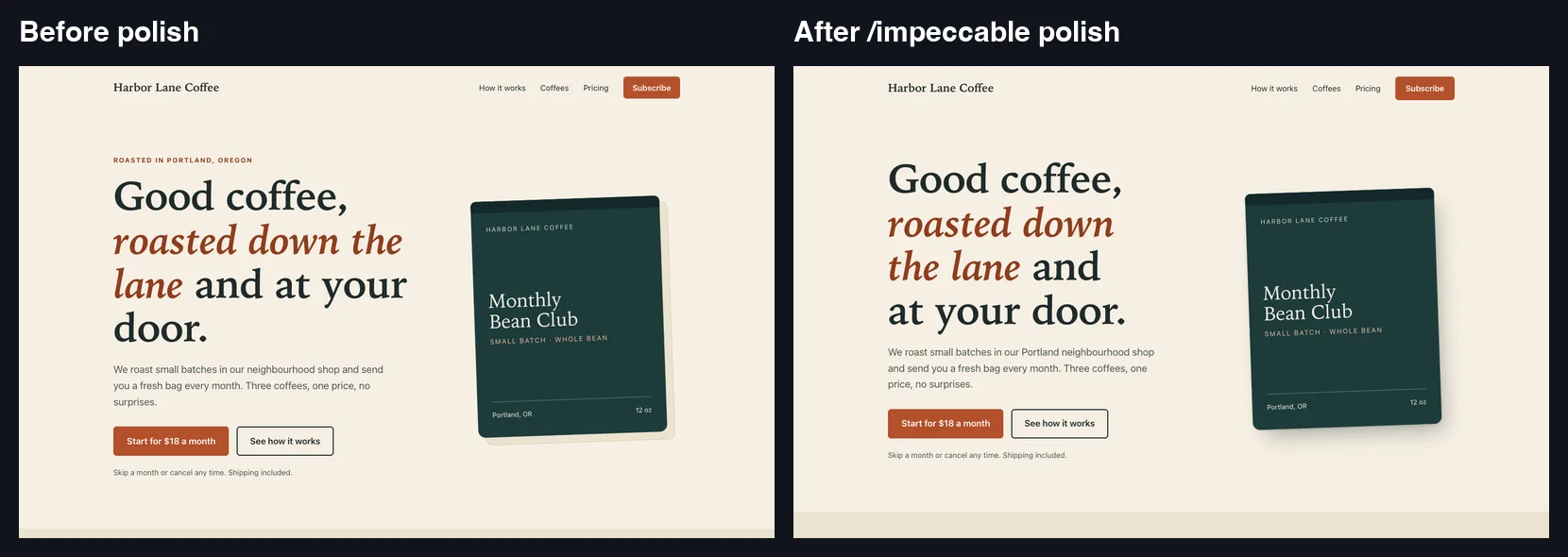
Two things to watch here. The form bug survived, because this session never saw the critique, so run critique first and fix its findings by name.
Claude’s closing summary also focused on the hook’s findings and left out most of its edits, including the removed labels. We only saw the full list by comparing the two files, so review the changes yourself rather than relying on the summary.
How Good Is the Impeccable Slop Detector?
You can run the detector on any file from the terminal, with no AI model involved. It’s the cheapest way to try Impeccable, and it needs no install in your project:
npx impeccable detect index.html
npx impeccable detect --list-rules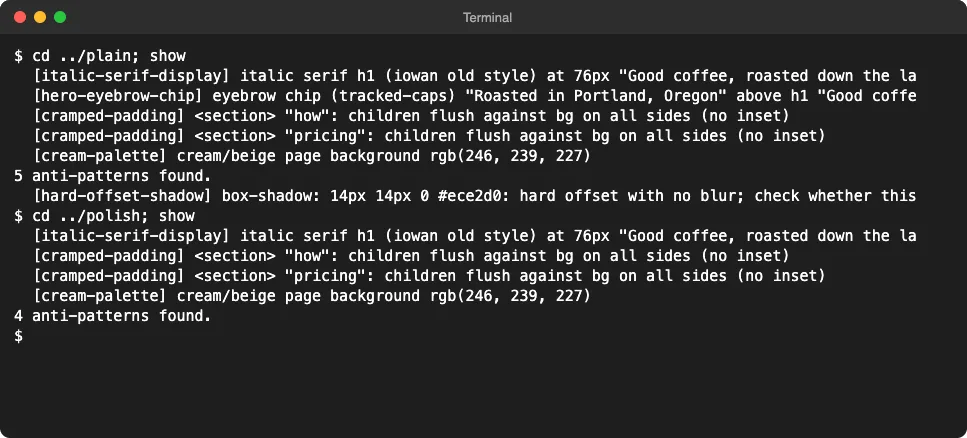
Its results were useful but need judgement. It correctly flagged the cream background and the label above the headline, which are the exact habits it was built to catch.
It also raised false alarms. The “cramped padding” warnings on the coloured sections were wrong, since those sections have plenty of space, and all four findings on the Impeccable build were this same rule. Claude judged them false and added an ignore rule, so that build scans clean only after that exception.
It also doesn’t test whether a page works, and it missed the form bug completely. A clean scan means a page avoids some known visual habits, not that it’s good.
Is Impeccable Worth Installing?
It’s worth it if you build pages with Claude Code and they keep coming out looking the same. It’s less useful for quick internal tools, where about 5 times the usage for a more striking look won’t pay off.
We’d use it in this order, from cheapest to most expensive:
- Run
npx impeccable detecton a page you already have. - Run
/impeccable critiqueon one important section. - Fix what it finds, naming each problem in your request.
- Use a full
/impeccablebuild only for pages where the look matters.
If you’re comparing design skills, we also tested the Hallmark anti-AI-slop skill with its own brief. It also cost about 5 times as much as a plain build, but the briefs differ, so this isn’t a head-to-head result.
Keep your hopes realistic too. This was one brief with one model, so another page could come out differently. We also didn’t test the live browser mode, the Chrome extension or scanning a live URL.
How to Remove Impeccable
The command list we checked shows no uninstall option, so remove it by hand. In your project, delete these:
- The
.claude/skills/impeccablefolder. - The
impeccable-*.mdfiles in.claude/agents. - The Impeccable hook entries in
.claude/settings.local.json. - The
.impeccablefolder, plusPRODUCT.mdif you no longer want it.
Then delete ~/.impeccable from your home folder, as long as no other project still uses it. After removing the same items from our test, we confirmed the Claude settings file was unchanged, and all our test pages were deleted too.
FAQ
Is Impeccable free?
Yes. The skill is open source under the Apache 2.0 license, but commands such as critique and polish use your normal Claude usage. The terminal detector uses no AI model.
Does Impeccable work with tools other than Claude Code?
Its documentation lists many others, including Cursor, Codex CLI, GitHub Copilot and Gemini CLI. We only tested it with Claude Code.
Do I need to run /impeccable init first?
The docs say to run it once per project. In our test, a build created PRODUCT.md by itself from the brief and marked its guesses as assumptions, so a real init with your own answers should give it better material.
Will Impeccable slow down Claude Code?
Its hooks run on every edit and when Claude stops, and our new build took about 5 times as long as the plain one. Install with --no-hooks if you only want the commands, then run the detector when you choose.
Does Impeccable replace a designer?
No. It gave us a stronger first draft and a useful review, but it can’t supply your real photos, reviews or brand story. Someone still has to judge the result in a browser.
Conclusion
Impeccable for Claude Code does move a page away from the usual AI look, and its critique found a real bug that the plain build missed. It also costs about 5 times as much for a new build, its detector raises false alarms, and its polish pass won’t fix what it hasn’t been told about. Start with the free detector and one critique, then decide whether full builds earn their cost. For more guides, browse our Claude Code tutorials or see how Claude Code hooks work.