Hallmark is a free design skill for Claude Code that tries to stop the “AI slop” look: the same cream background, the tiny all-caps label above every heading, and the empty “photo goes here” boxes you see on so many AI-built pages. We installed the Hallmark skill in Claude Code, built the same landing page with and without it, and compared the results side by side.
The short version: Hallmark made a page that looked clearly more finished, with real photos, no label clutter and a strong price section. It also took about 5 times longer and cost about 5 times more to build, and it picked a heading font we would not have chosen.
This guide shows how to install Hallmark safely, how to use it, what changed in our test, and where the hype goes too far.
Tested with Claude Code v2.1.312 and Hallmark 2.0.0 on October 29, 2026, on macOS, with the default Sonnet 5.5 model.
Hallmark Skill at a Glance
| Question | Short answer |
|---|---|
| What is it? | A design skill (instructions, 50 themes and check scripts) that Claude Code follows when it builds web pages. |
| Who makes it? | Together AI, under the MIT license (free to use). |
| Does it work with Claude Code? | Yes. It also supports Cursor, Codex CLI and OpenCode. |
| How do you run it? | Type /hallmark followed by what you want built. |
| Did it make a better page? | In our test, yes, with a few catches. |
| What does it cost? | The skill is free, but builds use more of your Claude usage: about 5 times more in our test. |
What Is the Hallmark Skill for Claude Code?
A Claude Code skill is a folder of instructions that Claude loads only when it needs them. If you are new to skills, our guide to Claude Code skills explains how they work.
Hallmark is a big skill. Its folder holds 182 files and about 7 MB: a main SKILL.md file, around 50 design themes with preview pictures, reference notes on layout, type and colour, and a few Node.js scripts. The main one, sloplint, checks a page for the habits that make AI-built pages look generated.
Its idea is simple. Instead of letting the model fall back on its usual defaults, Hallmark gives it a theme, a set of rules it must follow, and a checker that fails the page when it slips back into the usual tells.
How to Install the Hallmark Skill in Claude Code
There are three ways to install Hallmark. We used the third one, because it keeps everything inside one project and runs no installer.
Option 1: The Skills Installer
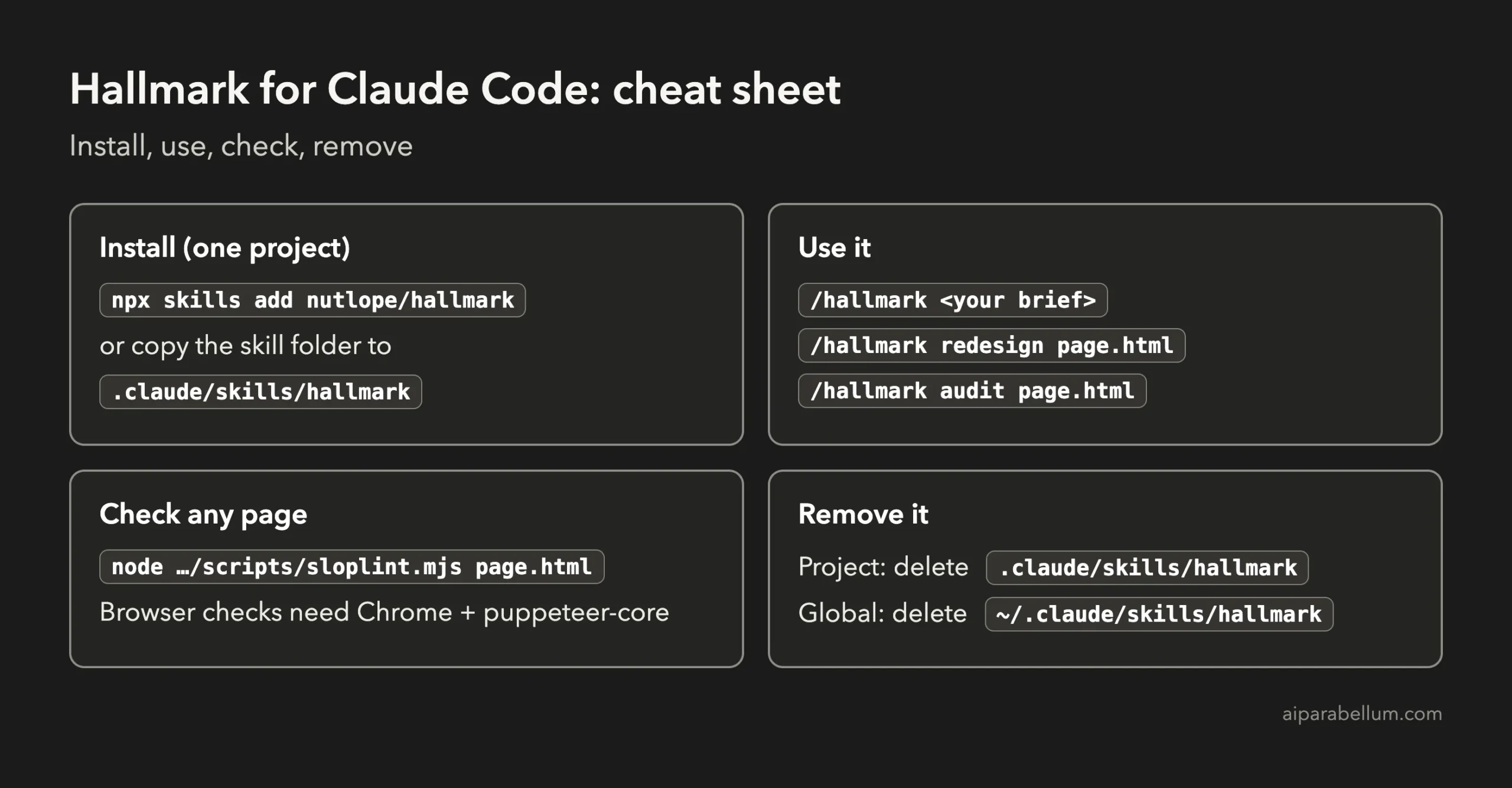
Hallmark’s GitHub page (nutlope/hallmark) suggests this command. Leave off -g to install it into the current project only, or add -g to install it for every project.
# current project only
npx skills add nutlope/hallmark

# every project (installs into ~/.claude/skills/hallmark)
npx skills add nutlope/hallmark -g
Option 2: As a Claude Code Plugin
You can also add it through the plugin system, which our guide to Claude Code plugins covers in detail. Inside Claude Code, run:
/plugin marketplace add nutlope/hallmark
/plugin install hallmark@hallmark
Option 3: Copy the Folder Into One Project
This is what we did. You only need the skills/hallmark folder, so copy it into your project’s .claude/skills folder. The full repository is much larger because it also holds the project’s website, so a sparse download saves space.
# inside your project folder
git clone --depth 1 --filter=blob:none --sparse https://github.com/Nutlope/hallmark.git /tmp/hallmark
git -C /tmp/hallmark sparse-checkout set skills/hallmark
mkdir -p .claude/skills
cp -R /tmp/hallmark/skills/hallmark .claude/skills/
Start Claude Code in that project and run /skills, then search for hallmark. It should show up as a project skill.
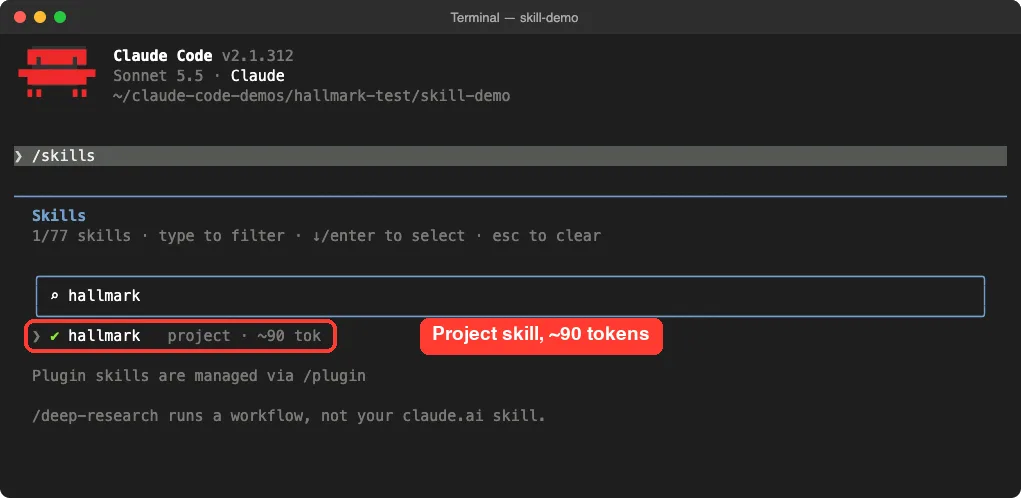
Install Hallmark in one project first. You can always add it globally later, and a project install is easy to remove.
How to Use Hallmark in Claude Code
Type /hallmark and Claude Code shows the skill with its description. Add your request after the command, or just ask Claude to “use hallmark to build” something.
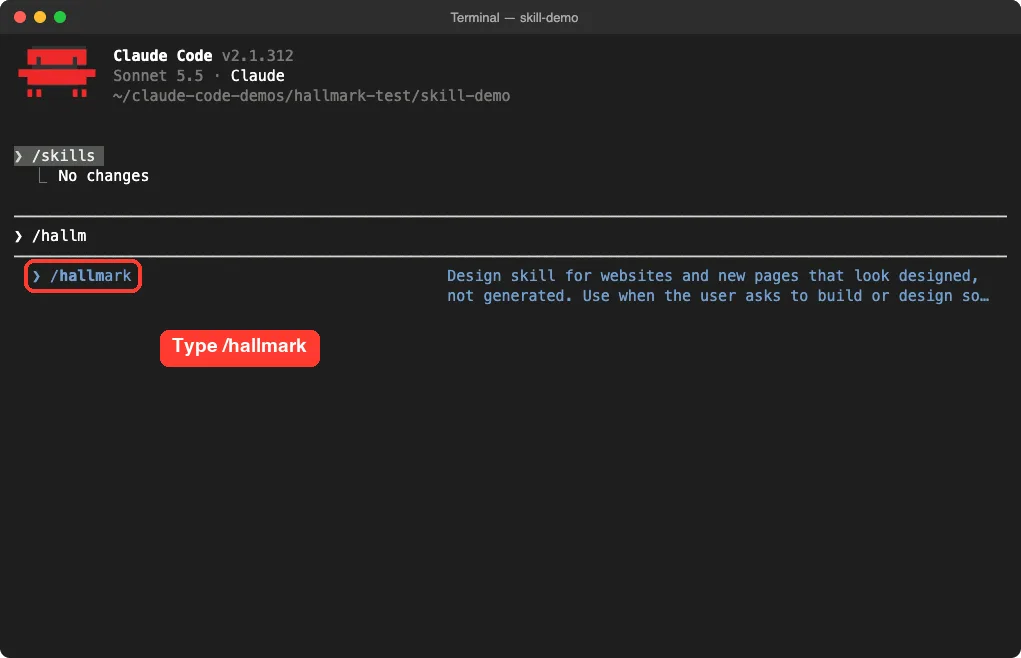
Hallmark has three main commands:
- /hallmark followed by your brief builds a new page.
- /hallmark redesign followed by a file or folder rebuilds an existing page and keeps its content and links.
- /hallmark audit followed by a file only reports problems and changes nothing.
Before it builds, Hallmark asks four questions at once: what material you have (photos, screenshots, real numbers), who the audience is, the one action the page should drive, and the tone. If your request already answers all four, it skips the questions, so a detailed brief saves a round trip.
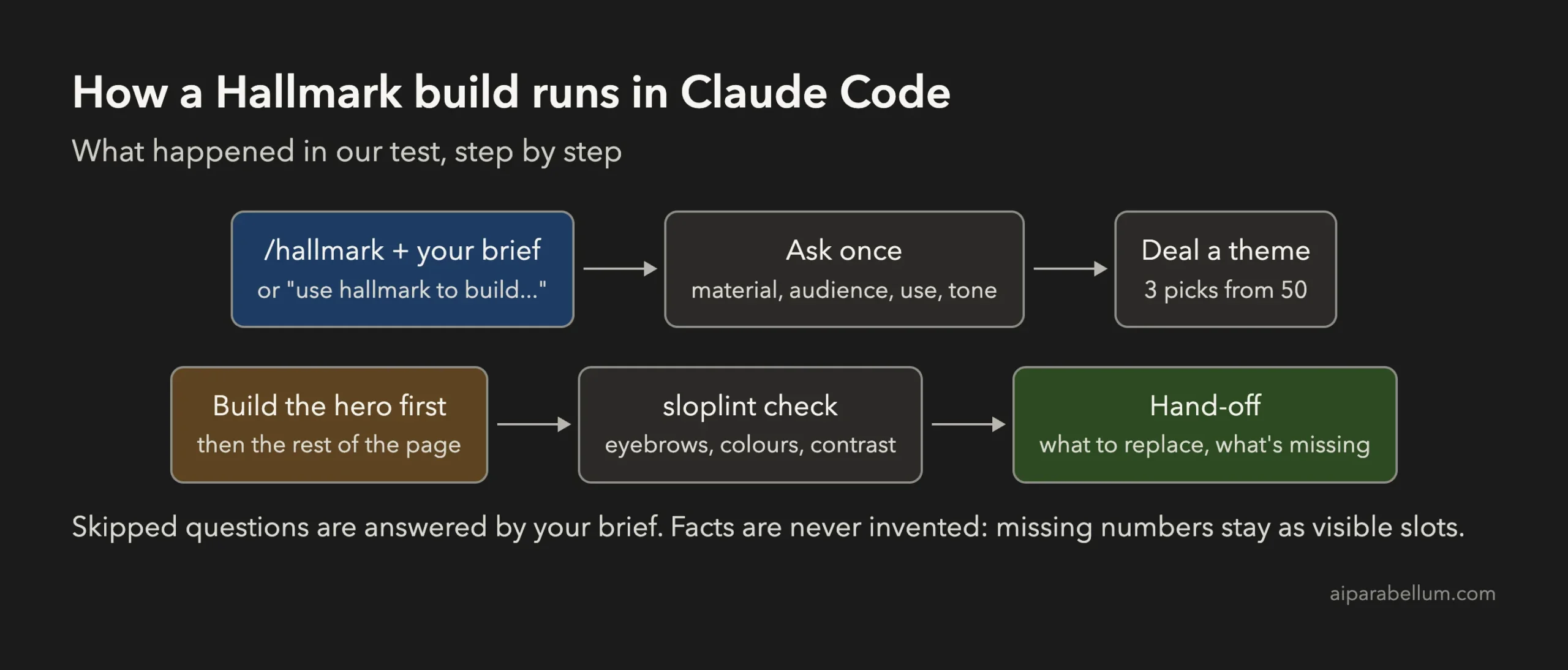
Hallmark does not invent facts. Any number you did not give it stays as a visible slot, which we liked.
Our Test: The Same Landing Page With and Without Hallmark
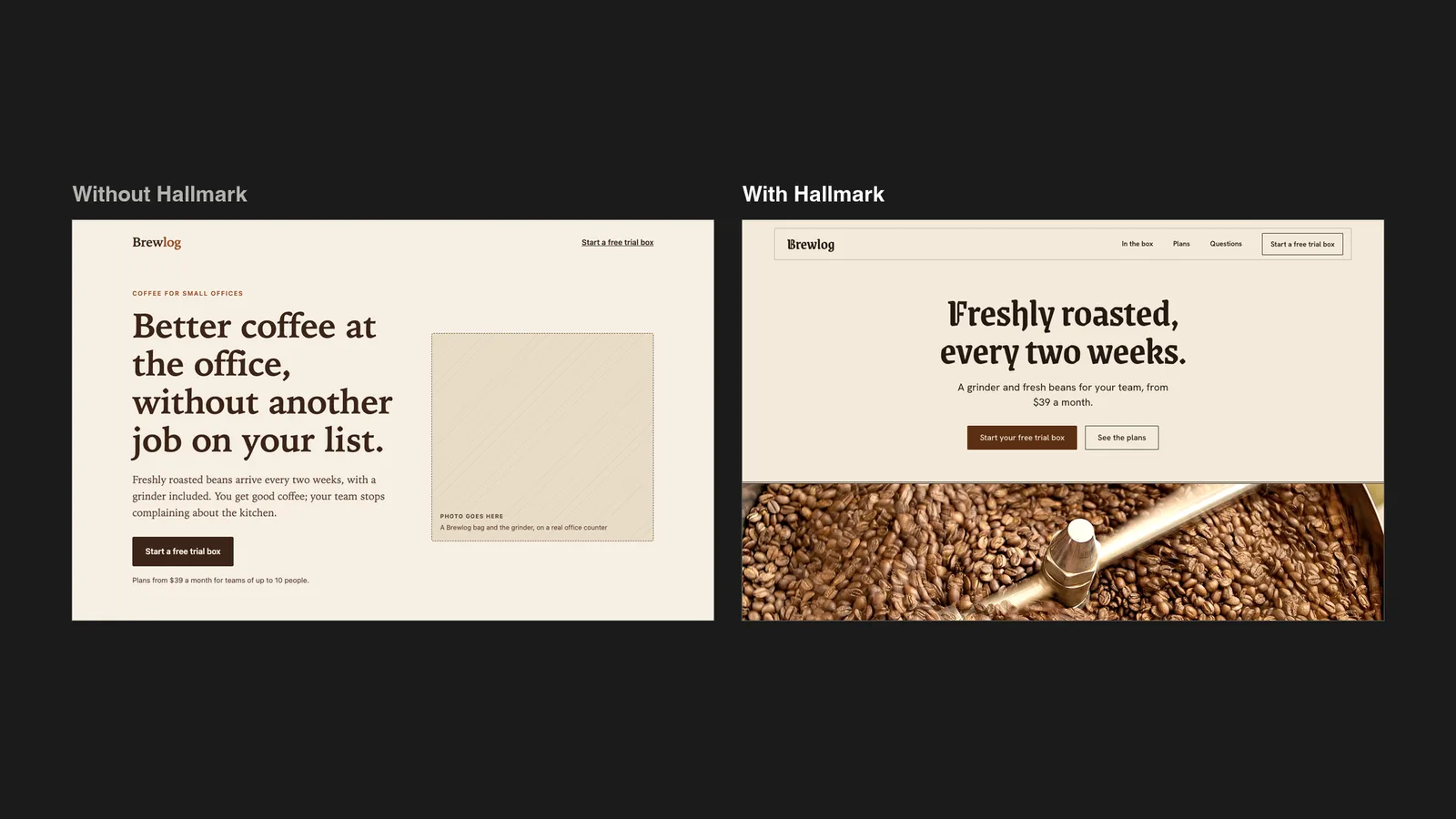
We gave Claude Code the same brief twice, in two empty demo folders: a landing page for Brewlog, a made-up coffee subscription for small offices. The brief named the audience, the main action (start a free trial box), the tone and a coffee-brown accent colour. One build used Hallmark, the other did not.
| Measure | Without Hallmark | With Hallmark |
|---|---|---|
| Build time | 44 seconds | 3 minutes 32 seconds |
| Agent turns | 2 | 30 |
| Estimated cost (API rates) | $0.16 | $0.87 |
| All-caps labels above headings | 6 | 0 |
| Pictures | 2 empty placeholder boxes | 2 credited Wikimedia Commons photos |
| Hallmark checker result | 21 failures | Clean |
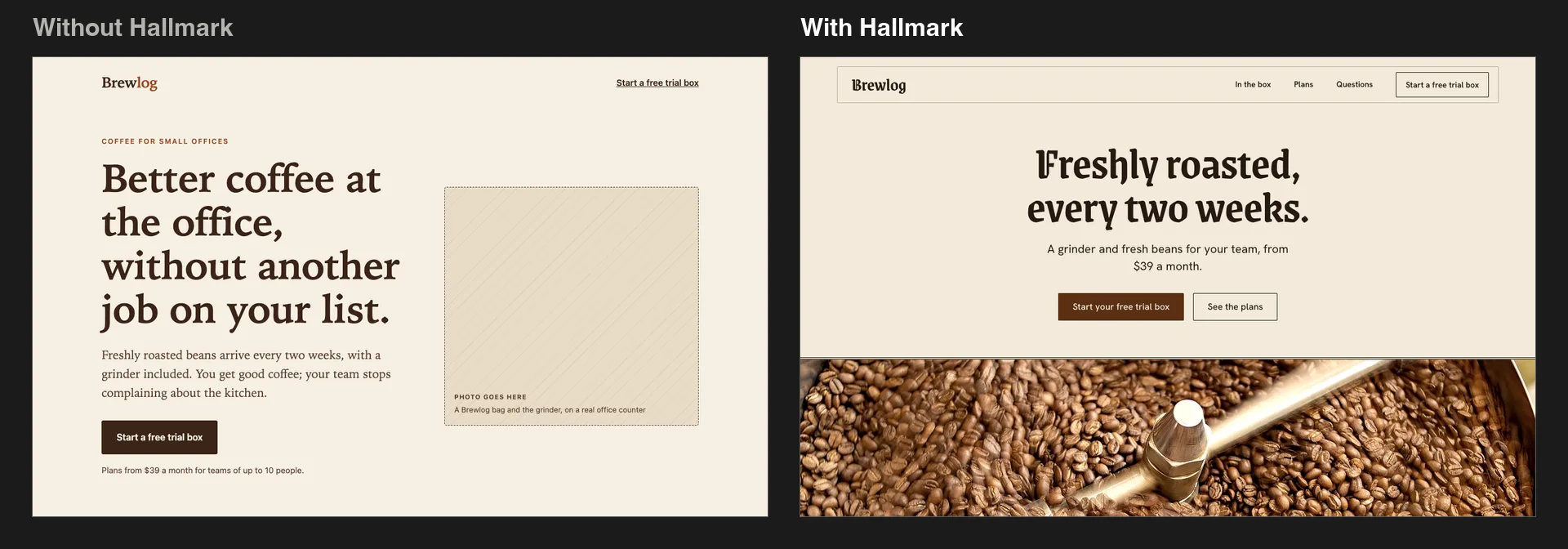
The plain page was not bad. Sonnet 5.5 gave us tidy type and a sensible layout. But it had the tells Hallmark targets: a small all-caps label above every heading and two dashed “photo goes here” boxes.
The Hallmark page dealt a theme called Vellum, swapped its blue accent for our coffee brown, and opened with a centred headline over a large photo of beans in a roaster. Further down it set the price huge on a brown band and added a short Q&A section built only from facts in our brief.
The Phone View
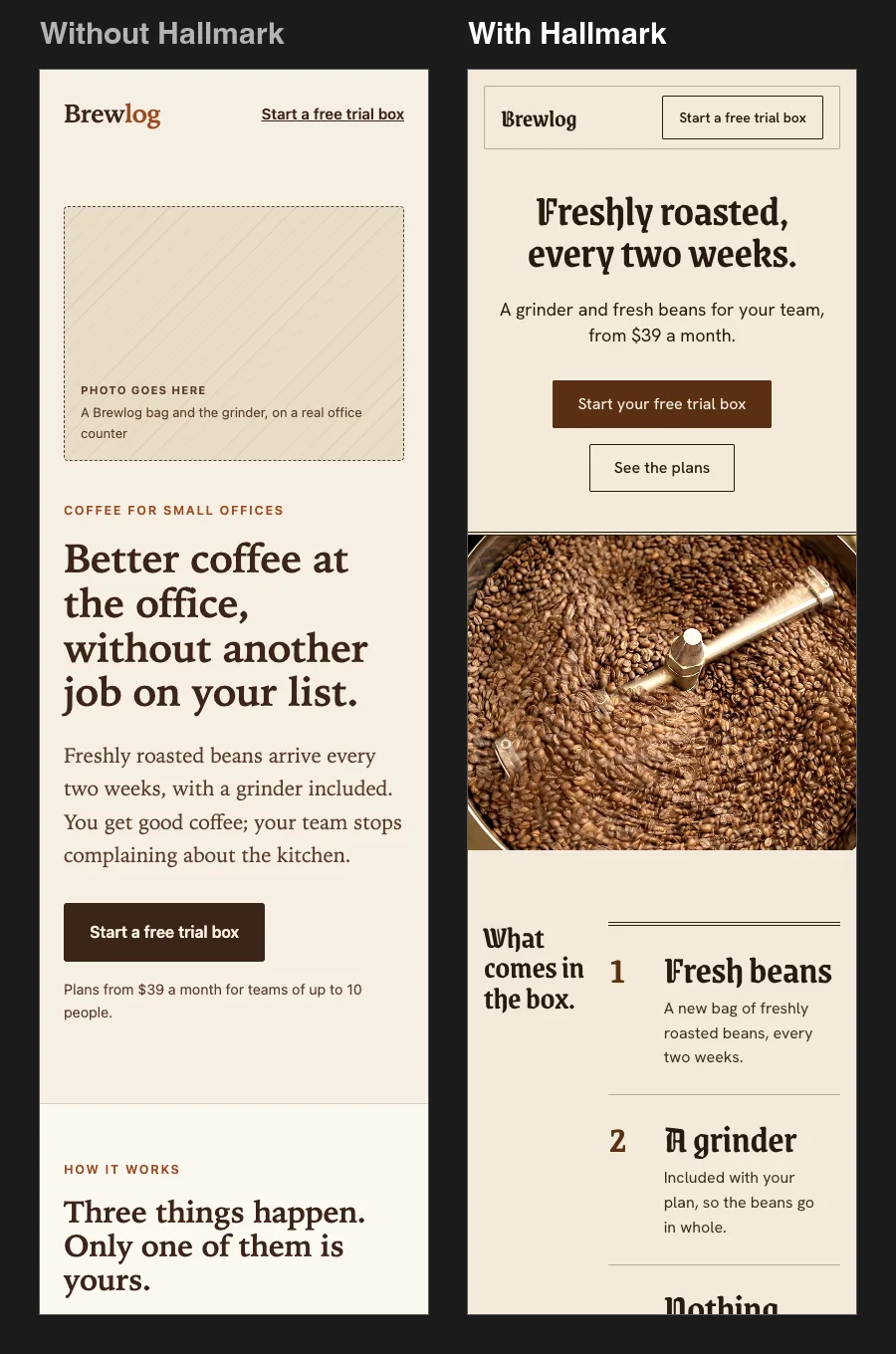
On a phone, Hallmark’s hero looked better, but its “What comes in the box” section kept two columns and squeezed the text. Hallmark told us it could not check the phone layout, because its browser checks need Chrome plus the puppeteer-core package, and we had not installed it.
What the Hallmark Checker Found
Hallmark’s sloplint script can check any HTML page, even one Hallmark did not build. We ran it on both pages.
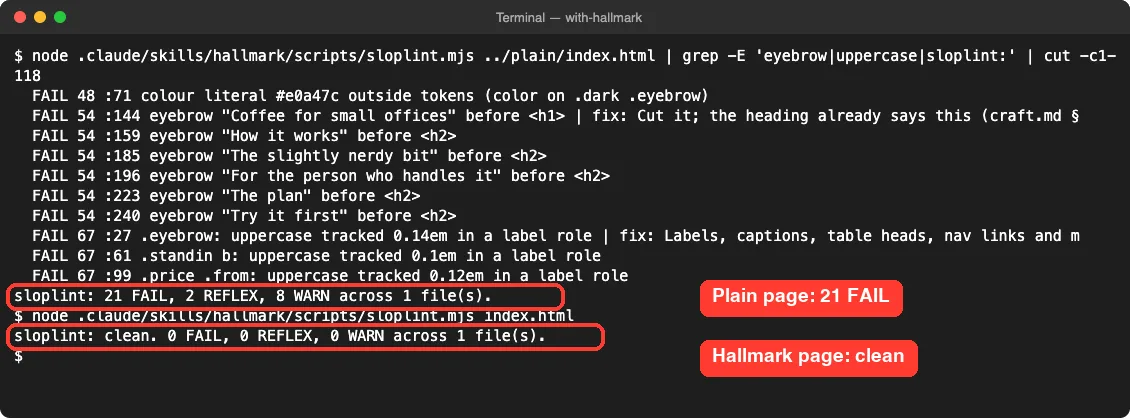
Be careful with that score. Hallmark’s page was built to pass Hallmark’s own checker, and some failures on the plain page are style rules, not real problems, such as “never use a dash in copy” and “no Hallmark stamp”. The eyebrow labels and the colours outside the colour tokens were fair catches.
What Makes Sense and What Doesn’t
Hallmark is popular for a reason, but not every claim about it holds up. Here is our honest take after the test.
| Claim | What we found | Verdict |
|---|---|---|
| It removes the usual AI-design tells | Zero eyebrow labels, no empty boxes, real photos | True |
| Its pages look more designed | Clearly stronger hero, price section and photos | True, in our test |
| It never invents facts | Missing prices stayed as a visible slot | True |
| Its theme always fits your brand | It picked a blackletter heading font for a coffee brand | Not always |
| It works the same with no extra setup | Browser and phone checks need Chrome and puppeteer-core | Partly |
| It is free to use | The skill is free, but builds used about 5 times more usage | True, with a cost |
Two more things to know. The finished page loads its heading font from Google Fonts and links its photos straight from Wikimedia Commons, so for a real site you should host those files yourself or swap in your own photos. Also, the -g install writes to your global Claude Code folder, and the optional edit hook adds an entry to a settings.json file, so read what a command does before you run it.
Hallmark is worth it when a page has to look good and you are happy to spend more time and usage on it. For quick internal pages, plain Claude Code is faster and cheaper.
Tips for Better Results With Hallmark
- Answer the four questions in your first message: material, audience, main action and tone. It saves a round of questions.
- Give it real photos or screenshots whenever you can. Stand-in photos are fine for a draft but never for launch.
- If you do not like the theme, say so and ask for a different one, or ask for a custom design to skip the themes.
- Install Chrome support if you want the phone and layout checks to run, and check the page on your own phone either way.
- Use /hallmark audit on pages you already have to get a list of fixes without changing anything.
For a gentler start, our guide to making a landing page walks through a simple page with plain Claude Code, and our project on building a personal website shows a full site from an empty folder.
How to Remove the Hallmark Skill
Removing Hallmark is just deleting its folder. For a project install, delete .claude/skills/hallmark inside the project. For a global install, delete ~/.claude/skills/hallmark, and if you added the edit hook, run its remove option first so your settings file is cleaned up.
We removed everything from our test machine once this guide was done, including both demo pages.
Frequently Asked Questions
Is the Hallmark skill free?
Yes. Hallmark is open source under the MIT license. You only pay for the Claude usage that your builds use.
Does Hallmark work on existing websites?
Only when you ask for it by name, with /hallmark redesign or /hallmark audit. It will not touch an existing design on its own.
Does Hallmark need an API key?
No. It has an optional image-generation step that uses a Together AI key, but it stays off unless you set one.
Why did my Hallmark build take so long?
Hallmark plans, picks a theme, builds the hero first, checks the page and reviews it. In our test that took 30 turns instead of 2.
Can I use Hallmark with React or Tailwind?
Yes. Hallmark reads your project’s framework, fonts and colours before it builds, and its checker also covers .jsx, .tsx and .vue files.
Conclusion
The Hallmark anti-AI-slop skill does what it promises in Claude Code: in our test it removed the usual design tells, used real credited photos and produced a page that looked far more finished than the plain build. It is not magic, though, since it took about 5 times the time and usage, chose a heading font that did not suit the brand, and left a phone layout issue it could not check without extra setup. Install it in one project, give it a detailed brief, check the result on a real phone, and keep plain Claude Code for quick pages. For more guides like this, browse all our Claude Code tutorials or read our overview of Claude AI.