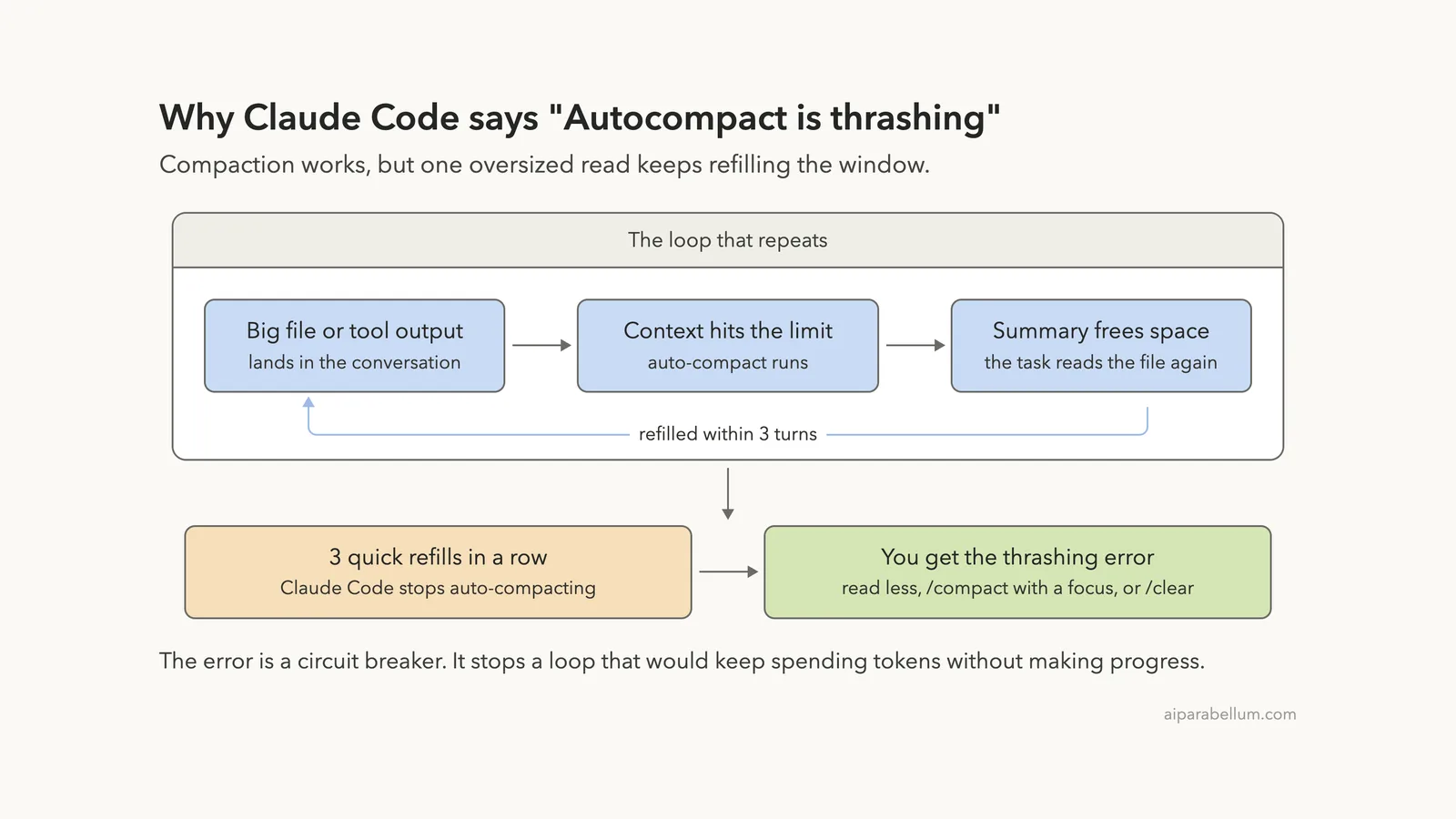
If you see the Claude Code autocompact is thrashing error, one file or one tool output is too big for your context window. Claude Code summarized the conversation, the same oversized content filled the window again right away, and after three rounds it stopped trying.
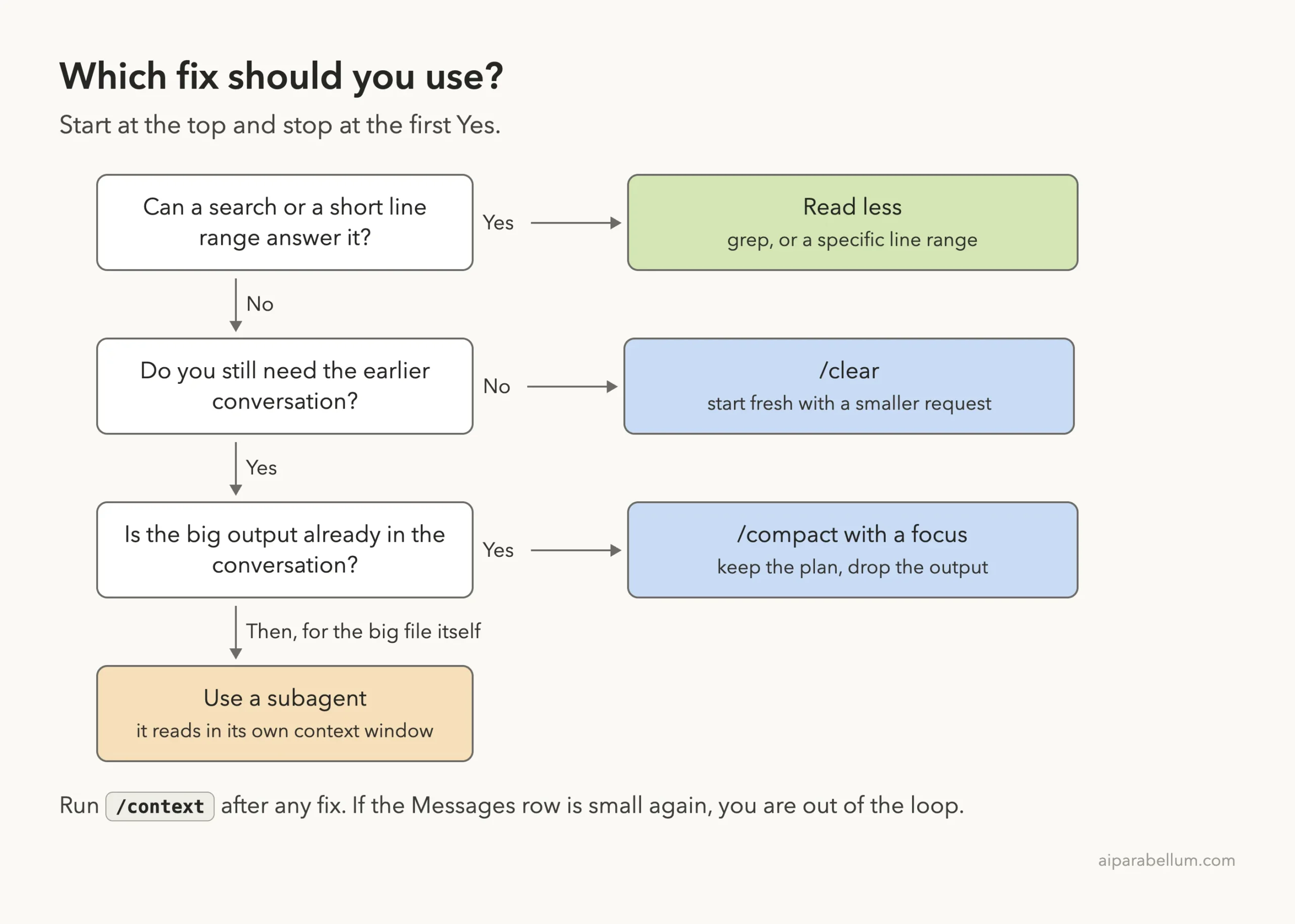
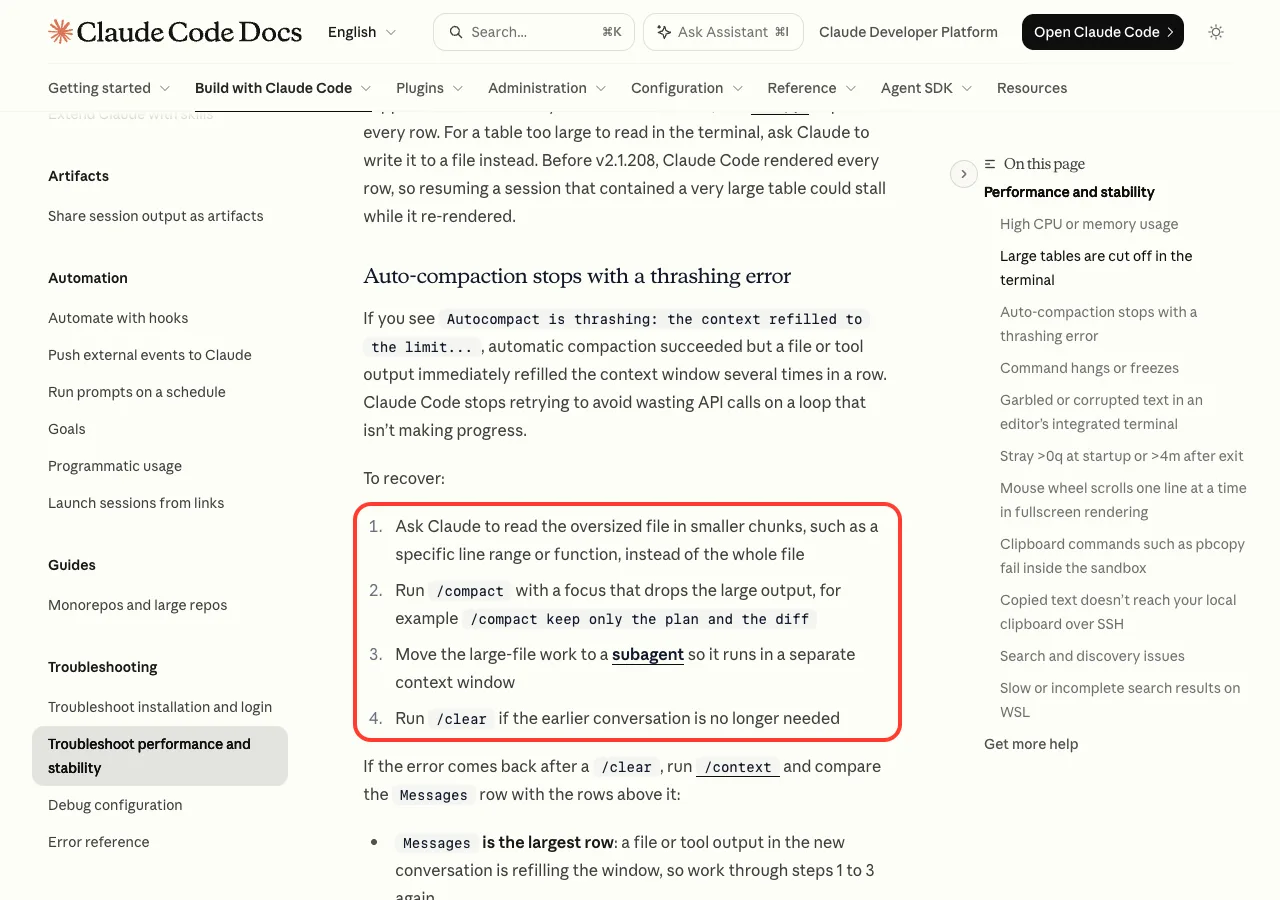
The fix is to send less into the conversation. Ask for a line range or a search instead of the whole file, run /compact with a focus that drops the big output, hand the big file to a subagent, or run /clear and start again with a smaller request.
The “Compaction failed” message is a close cousin. It means the summary step itself could not get the conversation under the limit, and /clear is the reliable way out.
This guide is part of our help series. Browse all our Claude Code tutorials for more fixes and how-tos.
Tested with Claude Code v2.1.325 on macOS on November 17, 2026. We triggered the thrashing error for real in a small throwaway demo folder and ran each fix in the same session, and every terminal capture below is real.
We tested on macOS; the Windows and Linux steps follow Anthropic’s official instructions. The commands and messages are the same on all three.
Claude Code Autocompact Is Thrashing: Quick Summary
Here are the two messages, word for word, as they appear in Claude Code v2.1.325:
Autocompact is thrashing: the context refilled to the limit within 3 turns of the previous compact, 3 times in a row. A file being read or a tool output is likely too large for the context window. Try reading in smaller chunks, or use /clear to start fresh.Compaction failed · conversation could not be reduced below the context limit| What you see | What it means | Fastest fix |
|---|---|---|
| Autocompact is thrashing | Summaries work, but a huge file or output refills the window each time | Read a line range or search the file instead |
| Compaction failed · conversation could not be reduced below the context limit | Even after summarizing, the conversation is still too big | /clear, then send less |
| Prompt is too long · automatic compaction failed: (an error) | The summary request hit another error, named after the colon | Fix the named error, then /compact |
| Not enough messages to compact. | One huge prompt, nothing earlier to summarize | /clear and resend with less |
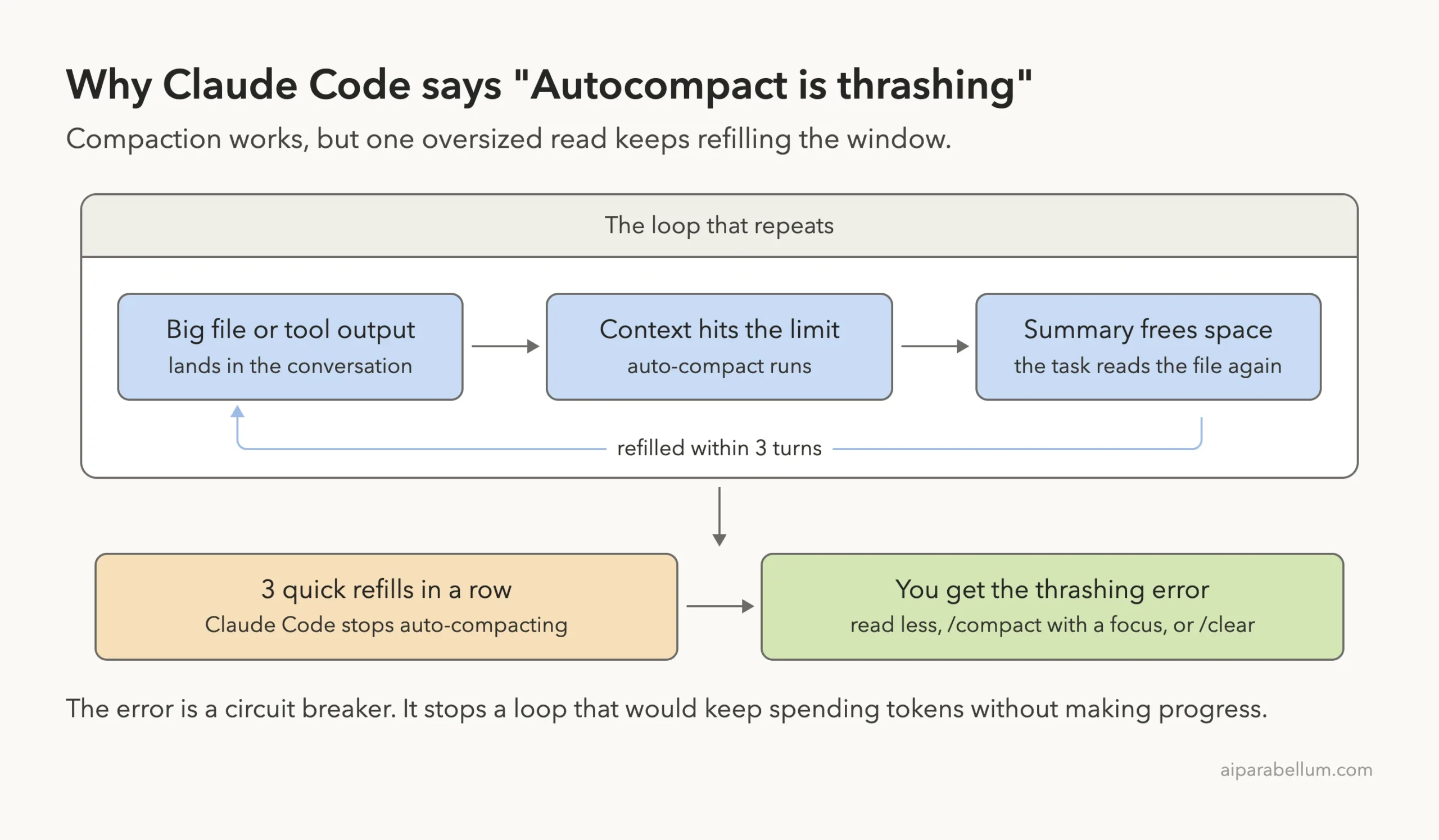
What the Thrashing Error Means
Claude Code keeps your prompts, file reads and command output in a context window. When that window gets close to full, auto-compact replaces the older history with a short summary so you can keep working. Our guide to the context window covers the basics.
Thrashing is what happens when that rescue works but does not help. The summary frees space, the task continues, and the very next file read or tool output fills the window again. The message spells out the rule: the context refilled within 3 turns of the last compact, 3 times in a row.
The official docs say Claude Code then stops retrying, to avoid wasting API calls on a loop that is not making progress. So the error is not a crash. It is a circuit breaker.
Thrashing means compaction is working fine. The thing you are feeding it is simply too big.
How We Reproduced the Error
We wanted to see the real message, so we built a safe test. In an empty demo folder we generated a made-up log file, server.log, with 30,000 lines (about 2.8 MB).
Filling a full-size window just for a screenshot would be wasteful, so we started the session with a small auto-compact window:
claude --model haiku --autocompact 100kThe --autocompact flag sets how full the window can get before Claude Code compacts, for that one launch only. It does not change your saved settings. Then we sent one prompt that asks for far too much:
Read all of server.log with the Read tool, 1000 lines per call and three calls
in parallel per step, then tell me how many ERROR lines it has. Do not use Bash or Grep.
Within the first minute Claude Code compacted, went back to reading the same file, and compacted again.
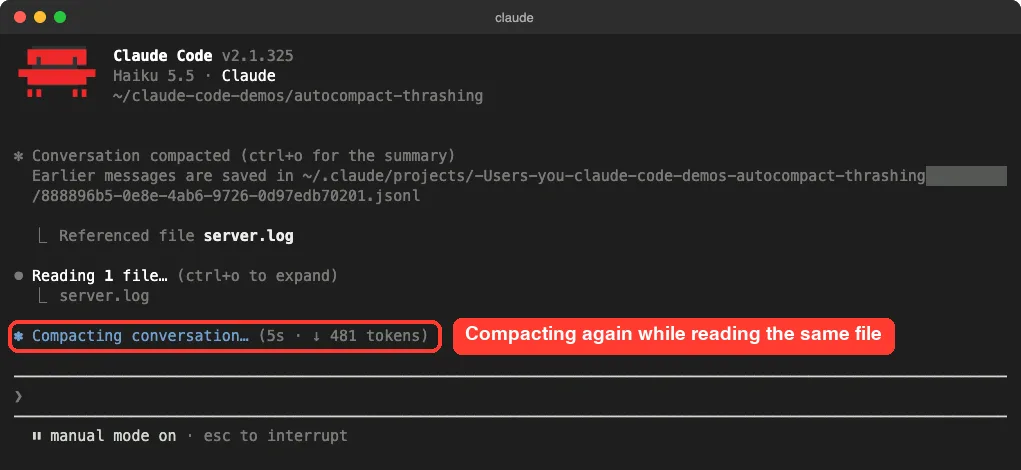
After 1 minute and 3 seconds the task stopped with the thrashing error. Claude never got to answer the question.
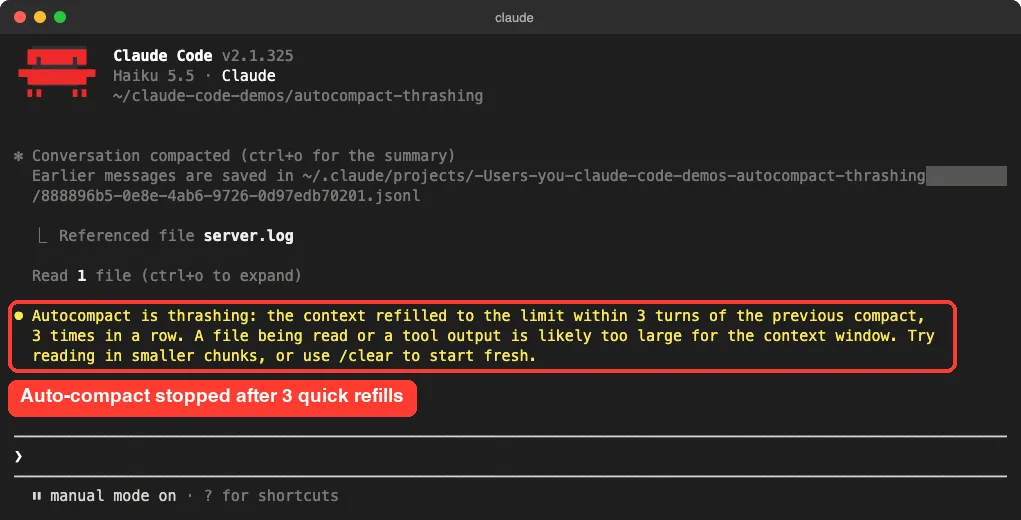
One note on fairness. We forced a small window so the test stayed cheap. With the default window you need a much larger file or output to get here, but the cause and the fixes are the same.
What /context Showed Right After
We ran /context straight after the error. The Messages row held 36.4k tokens, and the Suggestions block said the context was 89% full, with Read results alone using 38.5k tokens.
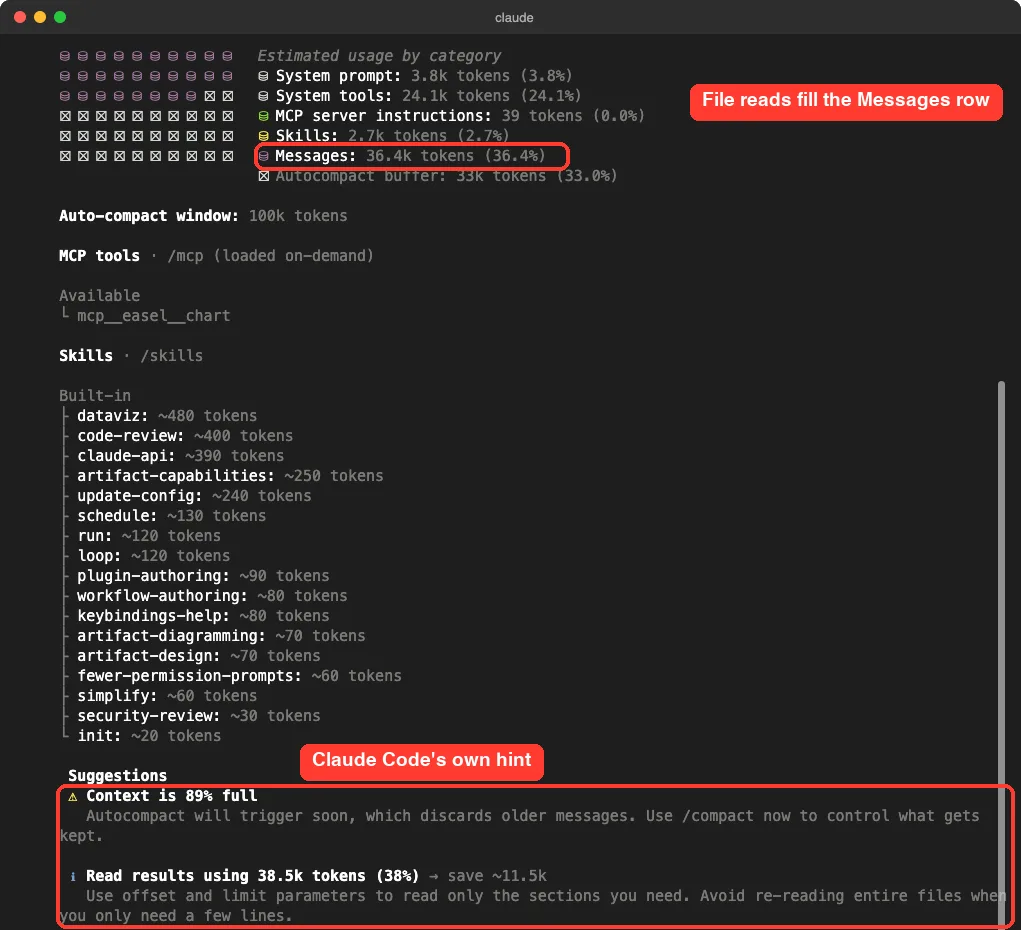
That hint at the bottom is the whole fix in one line: use offset and limit to read only the sections you need. The next sections show four ways to do that.
Fix 1: Read Less of the File
This is the first recovery step in the official docs: ask Claude to read the oversized file in smaller chunks, such as a specific line range or function. Tested or docs: tested.
Often you do not need the file in the conversation at all. Our question was a count, so a search answers it. We asked:
Use Grep in count mode to count the ERROR lines in server.log. Do not read the file.Claude ran grep -c and answered in 5 seconds: 889 ERROR lines. We checked the file ourselves and the number is correct. Then we asked for a small slice:
Read only lines 1 to 60 of server.log and show me the first ERROR line.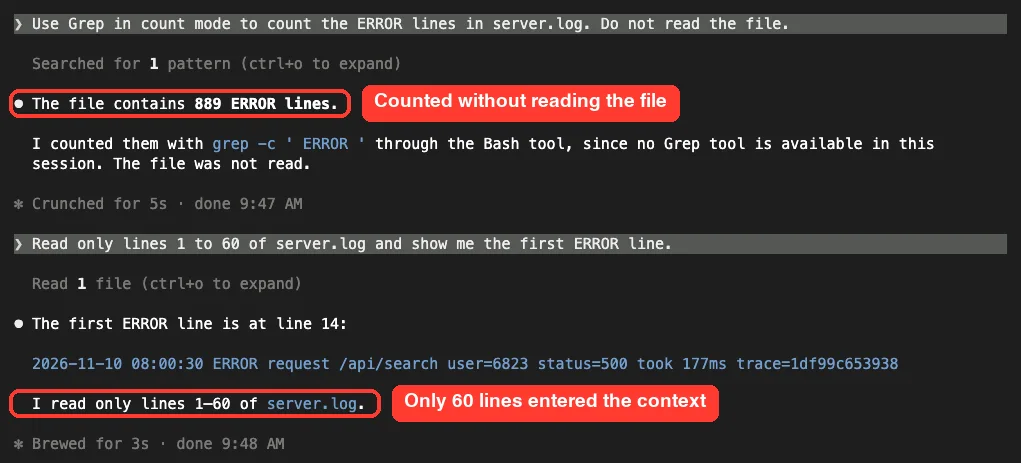
The task that thrashed for a minute now finished in 5 seconds, because almost nothing entered the context. A few prompts that work well:
- Search
app.logfor “timeout” and show 5 lines around each match. - Read lines 400 to 520 of
report.csv. - Read only the
checkoutfunction inorders.js. - Show me the last 50 lines of the build output, not all of it.
Fix 2: Run /compact With a Focus
If the big output is already sitting in the conversation, tell the summary what to keep. The docs give this example: /compact keep only the plan and the diff. Tested or docs: tested.
We were not sure a manual compact would work right after auto-compact gave up. It did. We ran:
/compact keep only my question about counting ERROR lines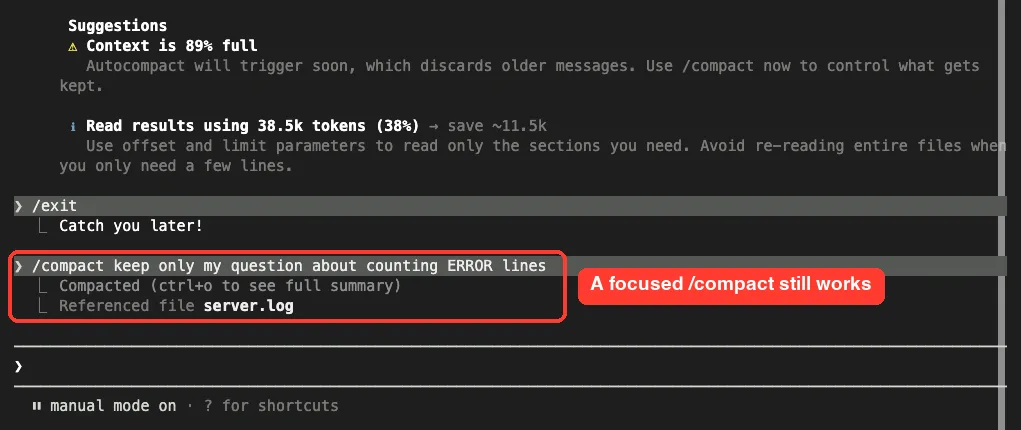
Then /context again. The Messages row fell from 36.4k to 9.2k tokens, and the session sat at 39% of its window.
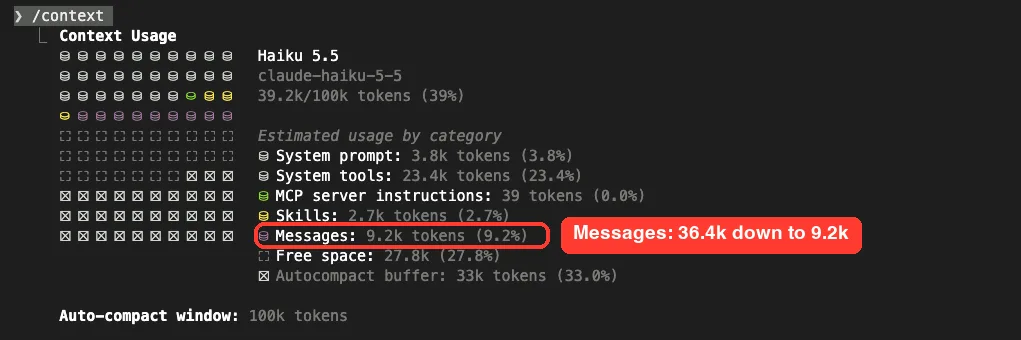
A focused compact keeps your conversation, which makes it the right fix when you have a plan or decisions you do not want to lose. Just do not follow it with the same oversized request, or the loop starts again.
Fix 3: Move the Big File to a Subagent
Sometimes the work really does need a lot of reading. The docs suggest moving it to a subagent, because a subagent runs in a separate context window and only its answer comes back. Tested or docs: tested.
Use a subagent to read lines 1 to 1500 of server.log and report only how many
ERROR lines are in that range.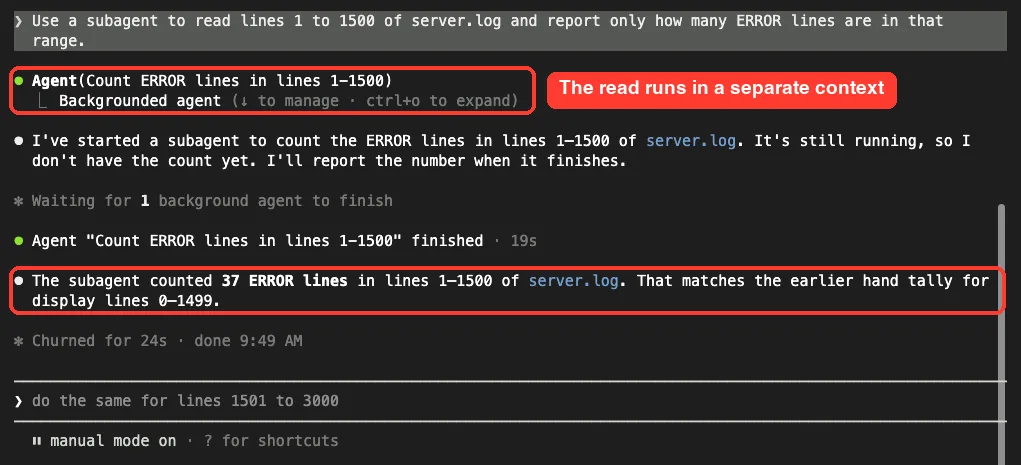
The subagent finished in 19 seconds and reported 37 ERROR lines, which matches our own count of that range. After the grep, the 60-line read and the subagent, /context showed 46.2k of 100k tokens used, with Messages at 15.6k.
A subagent has a context limit too, so give it a bounded job, not the whole 30,000 lines. If you are new to them, start with our guide to Claude Code subagents.
Fix 4: Run /clear and Start Fresh
If you no longer need the earlier conversation, /clear is the cleanest reset. It is also the fix the error message itself suggests. Tested or docs: tested.
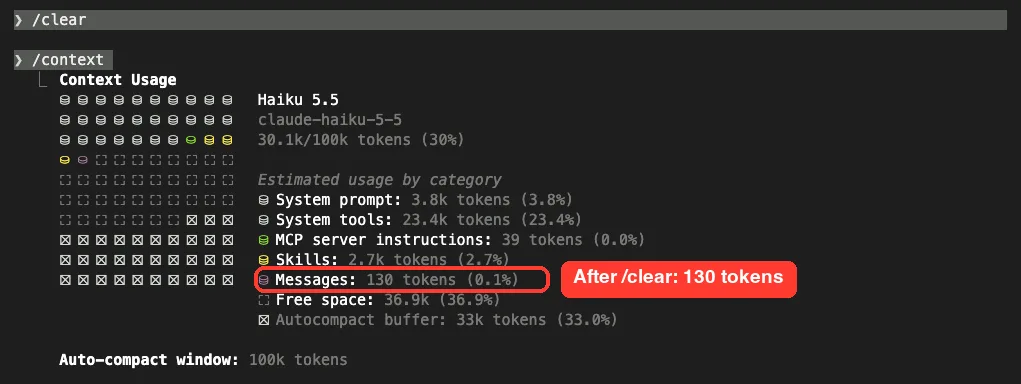
Here is how the Messages row moved through our test session:
| Moment | Messages row | Window used |
|---|---|---|
| Right after the thrashing error | 36.4k tokens | 89% full |
After the focused /compact | 9.2k tokens | 39% |
| After grep, a 60-line read and a subagent | 15.6k tokens | 46% |
After /clear | 130 tokens | 30% |
These numbers come from one session with a 100k auto-compact window, so treat them as an example. Not sure which reset fits? Our comparison of clear vs compact walks through each one.
If the Thrashing Error Comes Back After /clear
The docs cover this case. Run /context and compare the Messages row with the rows above it. Tested or docs: from the official docs.
- Messages is the largest row: a file or tool output in the new conversation is refilling the window. Go back to Fixes 1 to 3.
- The other rows together are larger: what loads at startup leaves too little room to work in. Trim it.
To trim what loads at startup, the docs suggest two things. Disable MCP servers you are not using with /mcp disable <name>, and cut down large CLAUDE.md files or move instructions into path-scoped rules that load only when relevant.
Also check that you did not set a very small auto-compact window by accident. Run /autocompact to see the current value, and /autocompact auto to go back to the window tuned for your model.
What “Compaction Failed” Means
The second message is shorter: “Compaction failed · conversation could not be reduced below the context limit”. We found this exact text in Claude Code v2.1.325, but we could not trigger it safely, and the official error reference does not list this wording yet. Tested or docs: explained from the message text and the related docs entries.
The message says what happened. Claude Code tried to summarize, and the result was still over the limit. That points to the same root cause as thrashing, only worse: something so large that even a summary plus the newest content will not fit.
What to do, in order:
- Run
/contextto see which row is the big one. - Try
/compactwith a focus that names the small part you need. - If that fails too, run
/clearand resend your request with less pasted text, fewer attachments or a line range. - Update with
claude update. Several compaction fixes shipped in recent versions.
The Related Message in the Official Docs
The error reference documents a longer form: “Prompt is too long · automatic compaction failed:” followed by an underlying error, such as an unavailable model or an authentication failure.
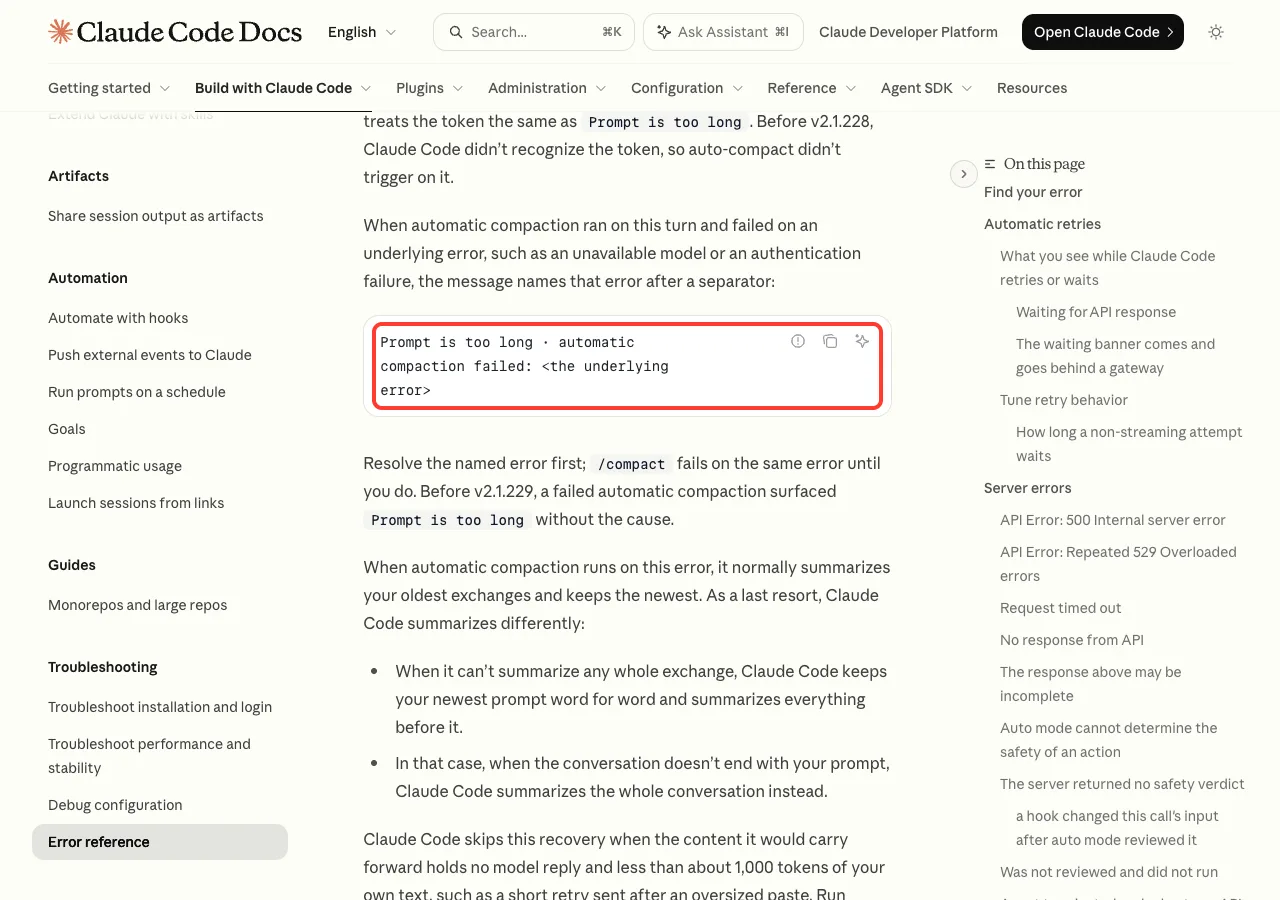
The docs are clear about the order: resolve the named error first, because /compact fails on the same error until you do. They add a few version notes that explain why updating helps:
- Before v2.1.269, compaction failed whenever it could not summarize a whole exchange, so a session could hit the error on every turn.
- Before v2.1.304, pressing stop while Claude was compacting could end the turn with this error. Your conversation is unchanged, so run
/compactand send the message again. - With a custom
ANTHROPIC_BASE_URL, set the model’s real context window or update to v2.1.299 or later.
If /compact answers “Not enough messages to compact.”, the conversation is a single exchange with nothing earlier to summarize. Run /clear and resend with less. Our prompt too long fix covers that family of messages in detail.
Try It Yourself
You do not need to cause the error to practice the fix. Next time you work with a large file, paste this instead of asking Claude to read it:
Do not read the whole file. First tell me how many lines server.log has.
Then search it for the word ERROR and show me only the count and the first 3 matches.
Then run /context and look at the Messages row. It should stay small, because only the search results entered the conversation.
Common Mistakes
- Sending the same request again. The loop repeats, and you pay for every round.
- Turning auto-compact off to make the error go away. You then hit the context limit instead; see our guide on when to turn off auto-compact.
- Running a plain
/compactand then asking for the whole file again. The summary was never the problem. - Mixing this up with a hang. If the screen sits on “Compacting conversation” and never finishes, use our fix for a session stuck compacting.
- Giving a subagent the entire oversized file. It has a window of its own, and it can fill up the same way.
Pro Tips
- Ask for counts, matches and ranges first. Read whole files only when they are small.
- Pipe long command output through a filter, or ask Claude to show only the last lines or the failing tests.
- Check
/contextbefore a big task. These token saving tips keep the window small in the first place. - Put a context meter in your status line so you notice a filling window before auto-compact does.
- Keep lasting rules in
CLAUDE.md, not in the chat, so a compact or a clear never costs you your setup. New to Claude AI tools? That one habit saves the most pain.
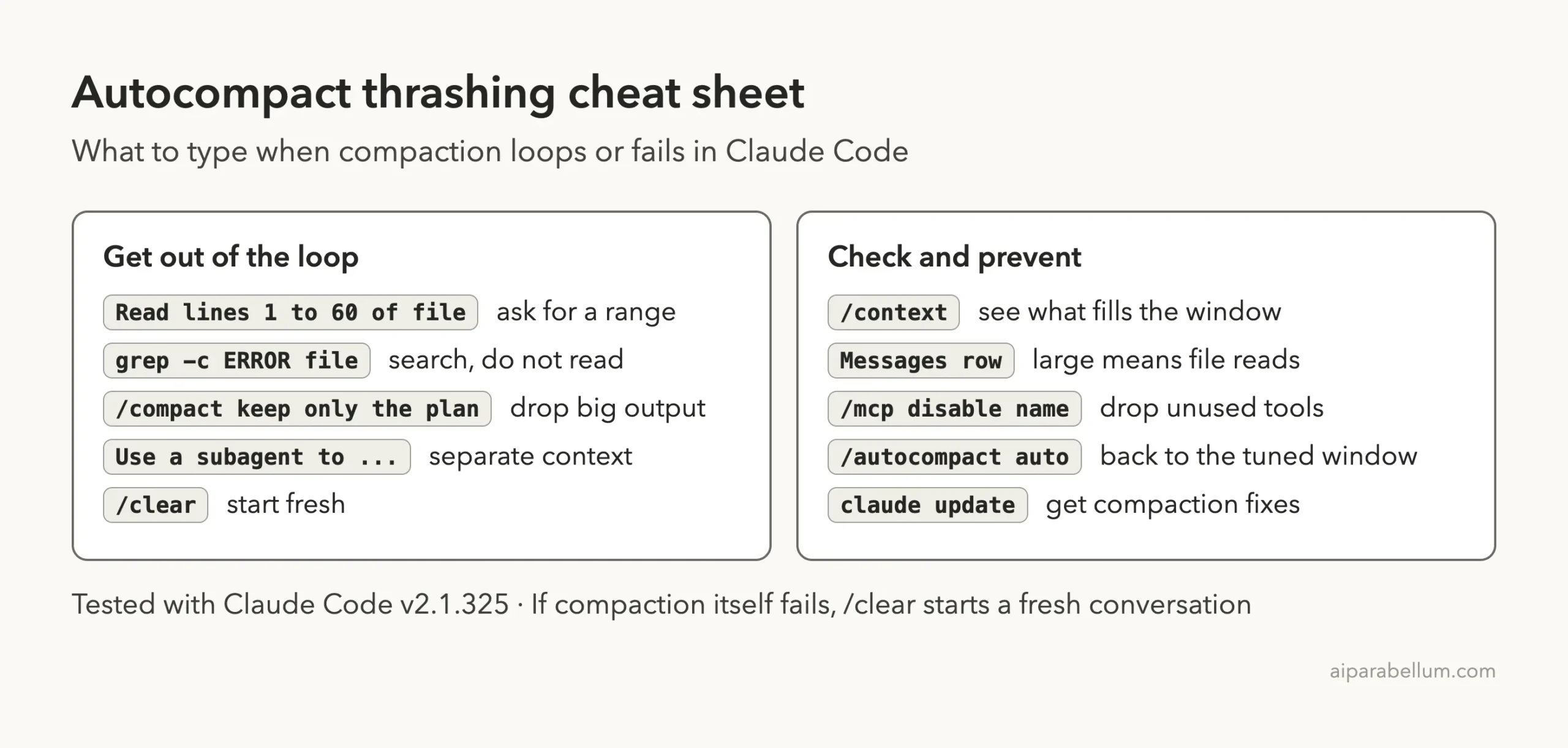
Autocompact Thrashing Cheat Sheet
Frequently Asked Questions
What does “Autocompact is thrashing” mean in Claude Code?
It means auto-compact summarized your conversation, but a large file or tool output refilled the context window within 3 turns, 3 times in a row. Claude Code stops auto-compacting so it does not loop forever.
How do I fix the autocompact thrashing error?
Send less into the conversation. Ask for a line range or a search, run /compact with a focus, move the big read to a subagent, or run /clear and start with a smaller request.
Did I lose my work when the error appeared?
No. The error only stops the current task. Your files are untouched, and in our test the session stayed usable: a focused /compact and new prompts worked right after it.
What does “Compaction failed · conversation could not be reduced below the context limit” mean?
Claude Code tried to summarize the conversation and it was still too large to fit. Try a focused /compact, and if that fails, run /clear and resend your request with less content.
Will a bigger context window stop the thrashing?
It makes the error less likely, since a larger window fits larger reads. It does not fix the habit that causes it, though. A file that is too big for the window will thrash at any size, so reading less is the lasting fix.
Conclusion
The Claude Code autocompact is thrashing error looks alarming, but it is a safety stop: compaction worked, the same oversized file or output refilled the window three times, and Claude Code refused to keep looping. In our test a whole-file read of a 30,000-line log thrashed in about a minute, while a grep count answered the same question in 5 seconds, and a focused /compact, a subagent and /clear each brought the Messages row back down. If you see “Compaction failed” instead, the conversation is too large even for a summary, so clear it and send less. For the full recovery steps and the newest wording, check the official troubleshooting guide and the error reference, and see our roundup of common errors for related messages.