If you hit the Claude Code violate usage policy error, the API declined to answer because something in your conversation triggered a Usage Policy check. It is not a crash, and it does not mean your account is in trouble. The full message on older versions reads: “Claude Code is unable to respond to this request, which appears to violate our Usage Policy”.
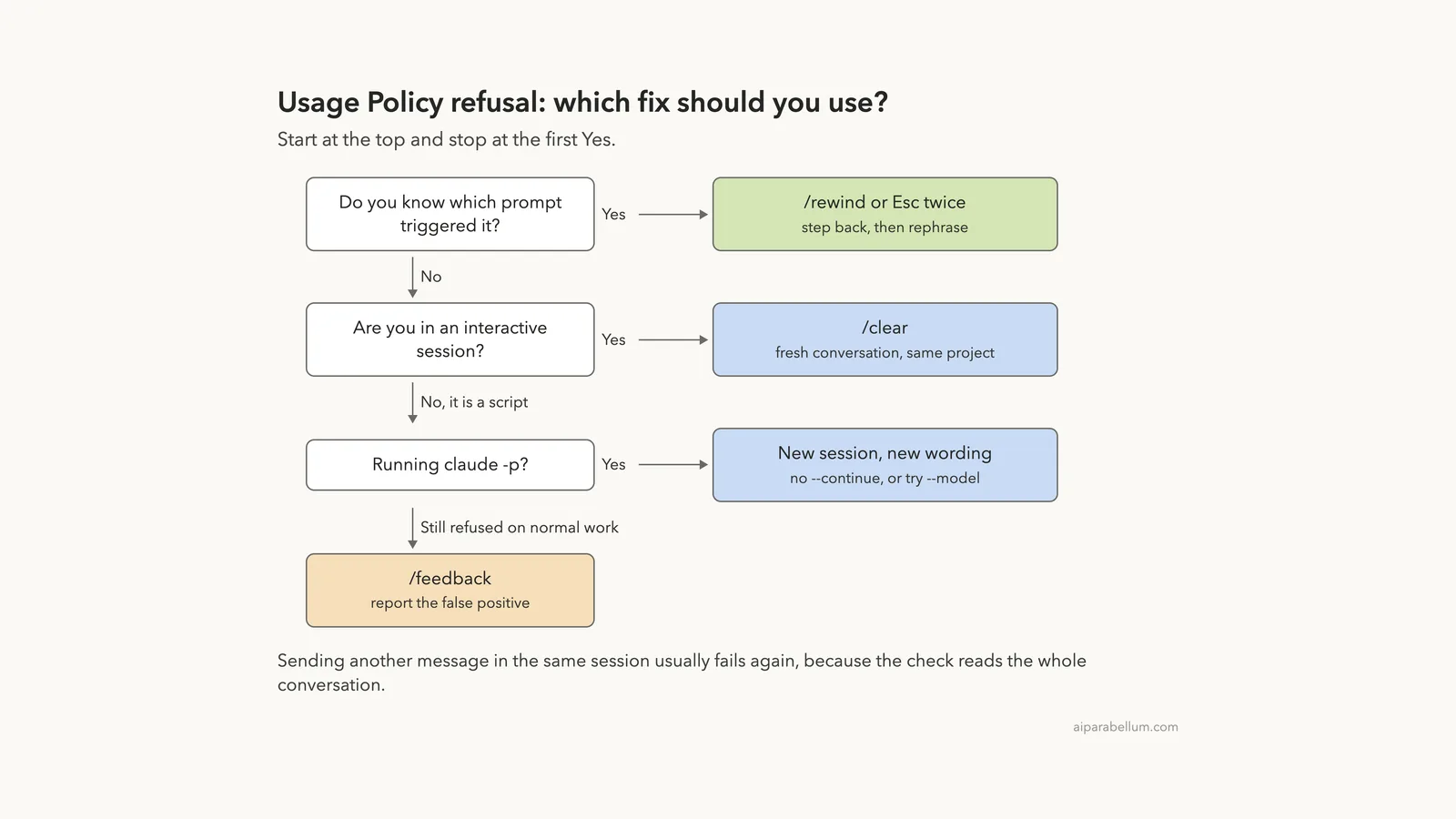
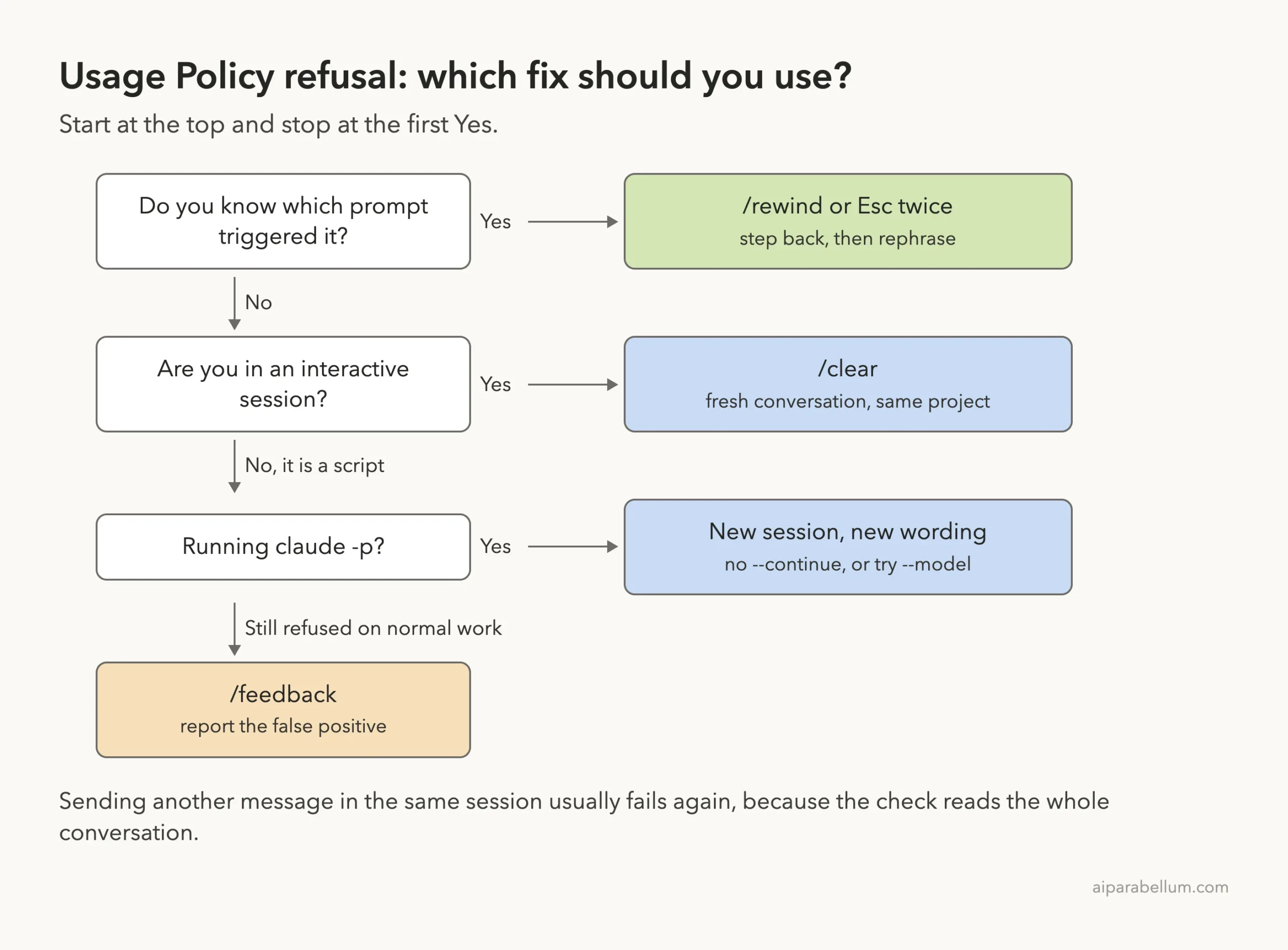
The check looks at the whole conversation, not only your last prompt. That is why sending another message in the same session usually fails the same way. Here is the short fix list:
- Press
Esctwice or run/rewind, step back to before the turn that caused it, then rephrase. - If you can’t tell which turn caused it, run
/clearto start a fresh conversation in the same project. - In a script that uses
claude -p, retry with new wording in a new session, without--continue. - If the refusal is wrong, report it with
/feedback.
On Claude Code v2.1.219 and later the wording is different: “can’t help with this. Start a new session to continue.” It is the same refusal with the same fixes.
This guide is part of our help series. Browse all our Claude Code tutorials for more fixes and how-tos.
Tested with Claude Code v2.1.325 on macOS on November 17, 2026. We did not trigger the refusal on purpose, so the message text and its causes come from Anthropic’s official error reference. We ran every fix command below in a normal session in a small demo folder, and those terminal captures are real.
Claude Code Violate Usage Policy Error: Quick Summary
| Question | Short answer |
|---|---|
| What does it mean? | The API declined to respond because content in the conversation triggered a Usage Policy check |
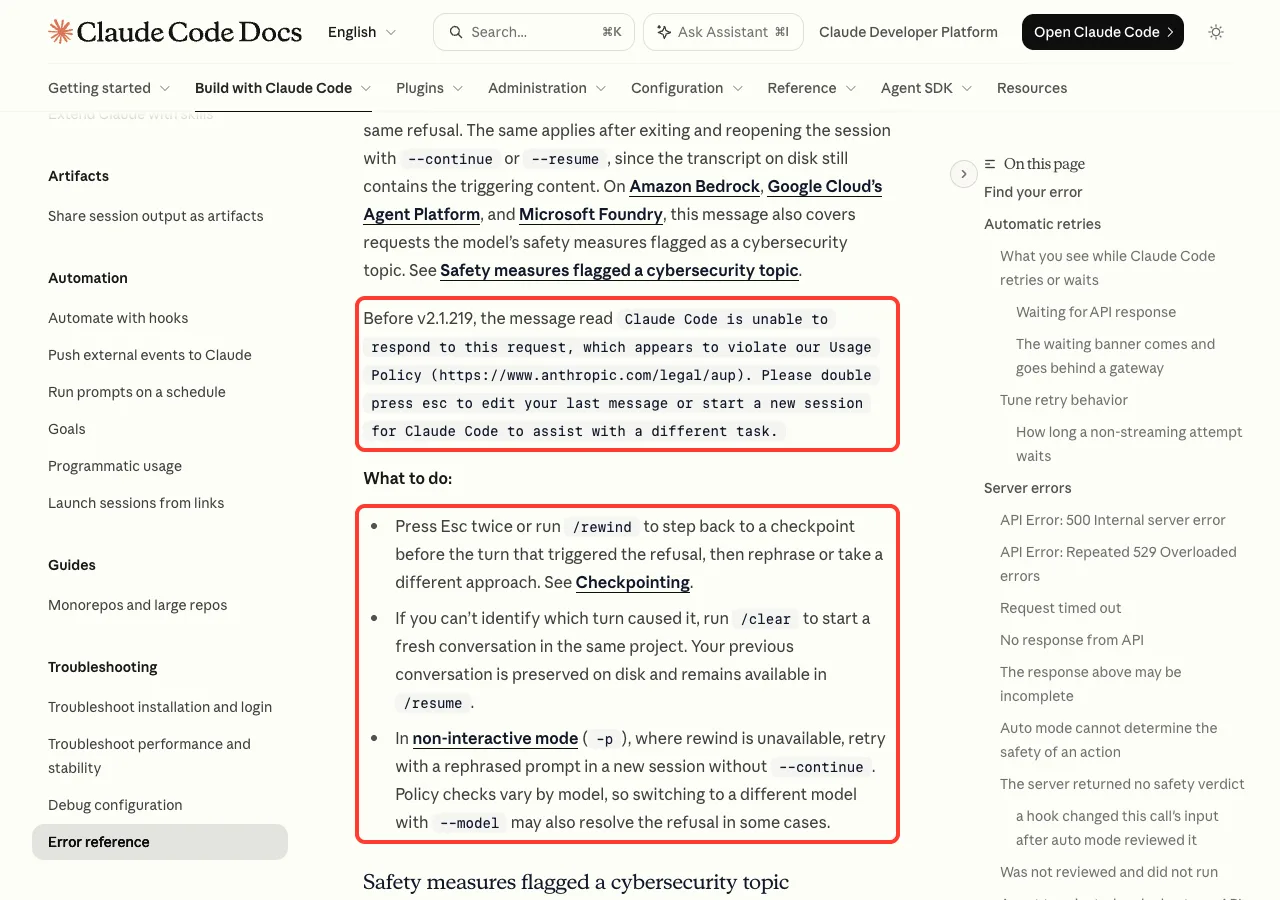
| Old wording | Claude Code is unable to respond to this request, which appears to violate our Usage Policy (before v2.1.219) |
| New wording | API Error: <model> can't help with this. Start a new session to continue. |
| Why does it repeat? | The check reads the full conversation, so the triggering content is still there on your next message |
| Fastest fix | Esc twice or /rewind, then rephrase |
| Fix when you can’t find the turn | /clear for a fresh conversation |
| Fix in scripts | New session, new wording, no --continue; a different --model may help |
| Is my work lost? | No. The old conversation stays on disk and shows up in /resume |
What the Usage Policy Error Message Looks Like
The message has changed over time, so the text on your screen depends on your Claude Code version. Both versions point to the same Usage Policy page, https://www.anthropic.com/legal/aup.
The Older Message (Before v2.1.219)
This is the wording most people search for. Anthropic’s error reference quotes it in full:
Claude Code is unable to respond to this request, which appears to violate our Usage Policy (https://www.anthropic.com/legal/aup). Please double press esc to edit your last message or start a new session for Claude Code to assist with a different task.Notice that the message already names both fixes. Double press Esc to edit your last message, or start a new session.
The Current Message (v2.1.219 and Later)
Newer versions show a shorter message that names the model that declined:
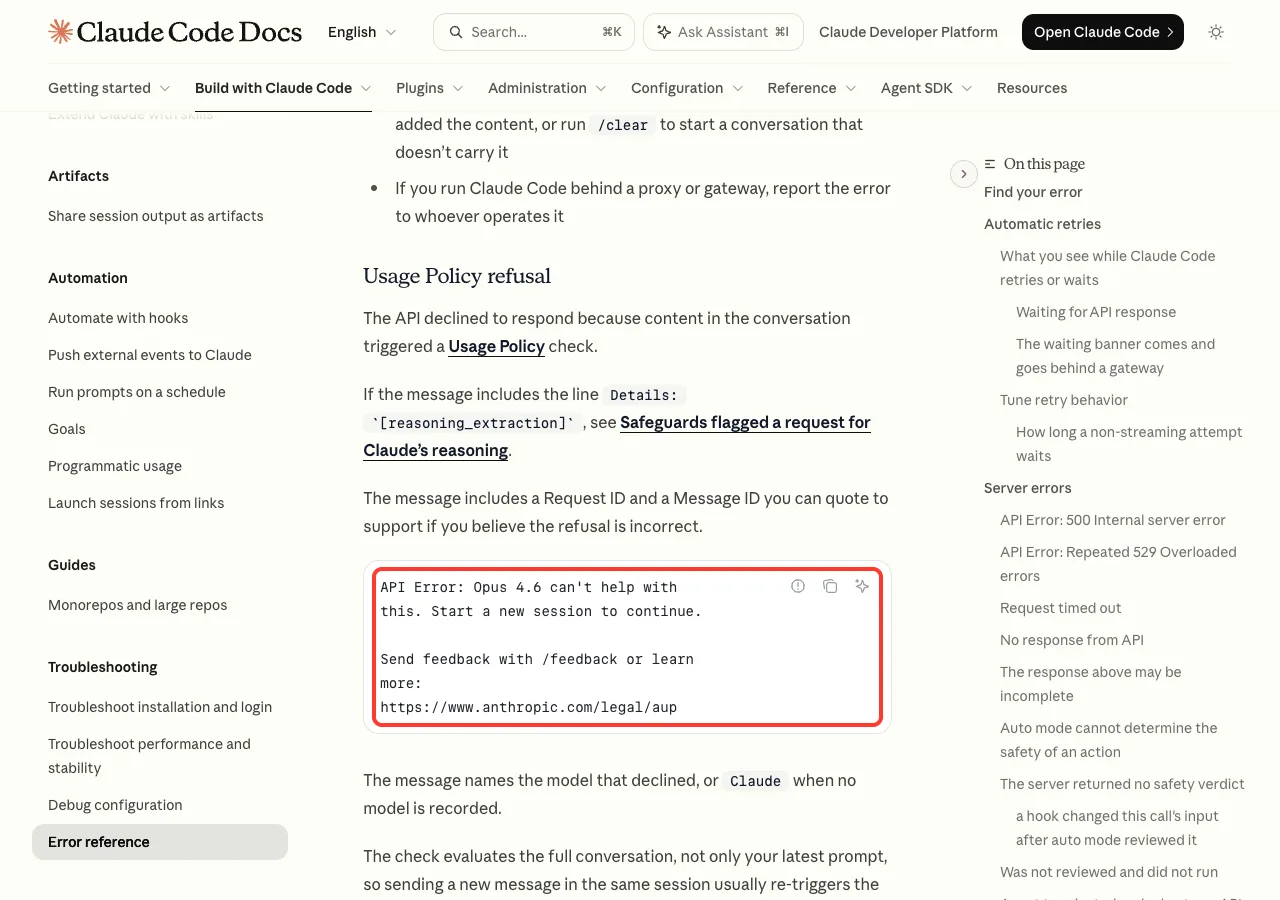
API Error: Opus 4.6 can't help with this. Start a new session to continue.

Send feedback with /feedback or learn more: https://www.anthropic.com/legal/aup
The model name changes to match the model you are using. If no model is recorded, the message says Claude instead. The docs also say the message includes a Request ID and a Message ID that you can quote to support if you believe the refusal is incorrect.
Why the Usage Policy Error Happens
The official explanation is one sentence: the API declined to respond because content in the conversation triggered a Usage Policy check. The key words are “content in the conversation”. That covers much more than the prompt you just typed.
In a Claude Code session, the conversation includes your prompts, Claude’s replies, the files Claude read, the output of commands it ran and any pages it fetched. If any of that content trips the check, the request is declined. So the trigger can be something you never wrote yourself.
The check reads the whole conversation. Your last prompt may be innocent while an earlier file or command output is the real trigger.
Why Normal Work Can Trigger It
Anthropic does not publish a list of exact triggers. What the docs do say is that these checks can be wrong about legitimate work. The cybersecurity safeguard message itself says the safeguards are “intentionally broad” and “can sometimes flag legitimate cybersecurity work”.
Based on that, these are the situations where a false positive is most likely:
- Security work, such as reviewing exploit code, malware samples, penetration test notes or vulnerability reports.
- Scraped or pasted text, such as web pages, logs, forum dumps or datasets with content you did not read first.
- Files with unusual content, such as test fixtures, word lists or sample data that look harmful out of context.
- Project context, such as a
CLAUDE.mdfile or folder that describes security or biology material.
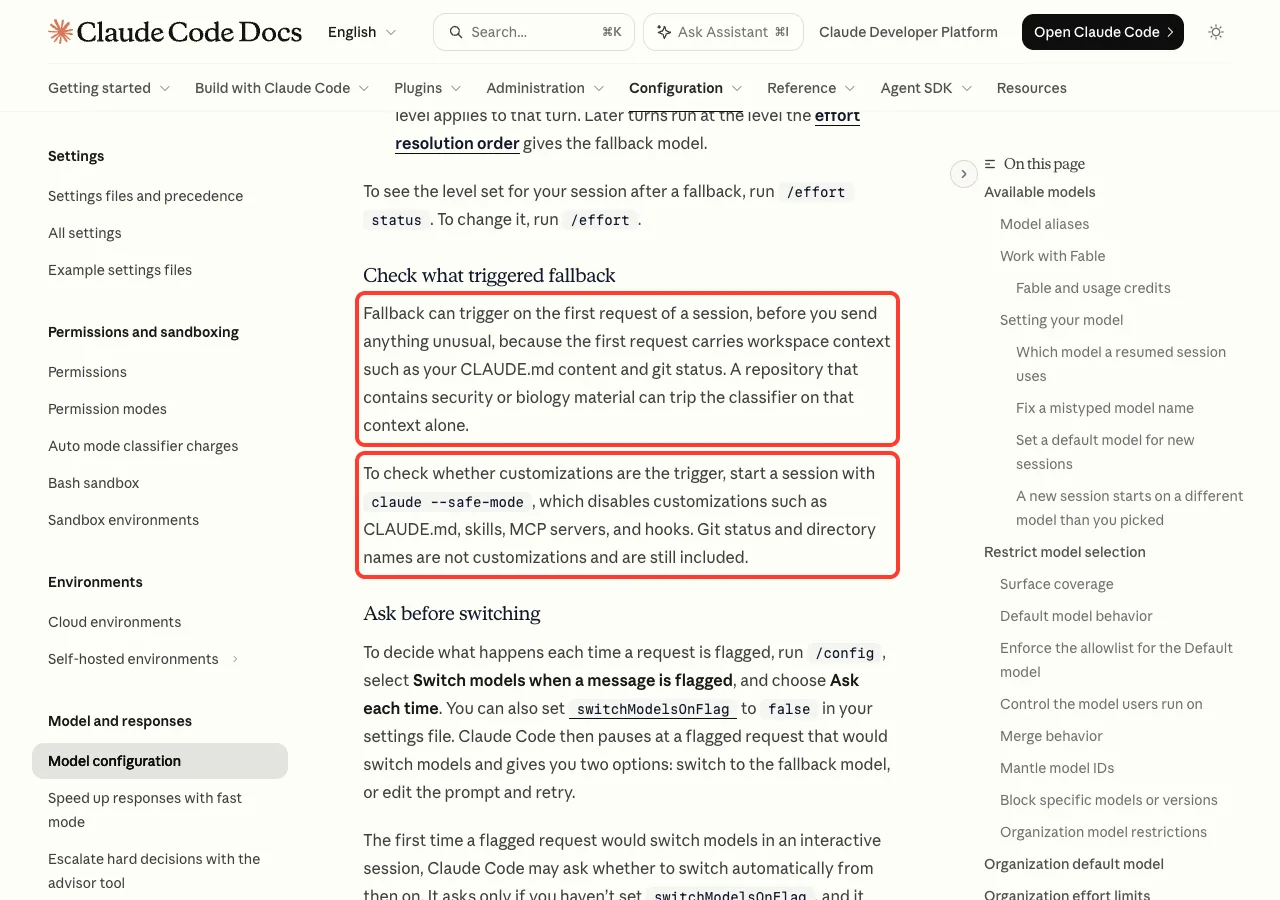
The last one surprises people. The model configuration docs note that the first request of a session carries workspace context such as your CLAUDE.md content and git status. A repository that contains security or biology material can trip a classifier on that context alone, before you send anything unusual.
claude --safe-mode helps you check.Why It Keeps Happening in the Same Session
This is the part that makes the error feel like a dead end. You get refused, you type something harmless, and you get refused again.
The docs explain why. The check evaluates the full conversation, so a new message in the same session usually re-triggers the same refusal. The same is true after you exit and reopen the session with --continue or --resume, because the transcript on disk still contains the triggering content.
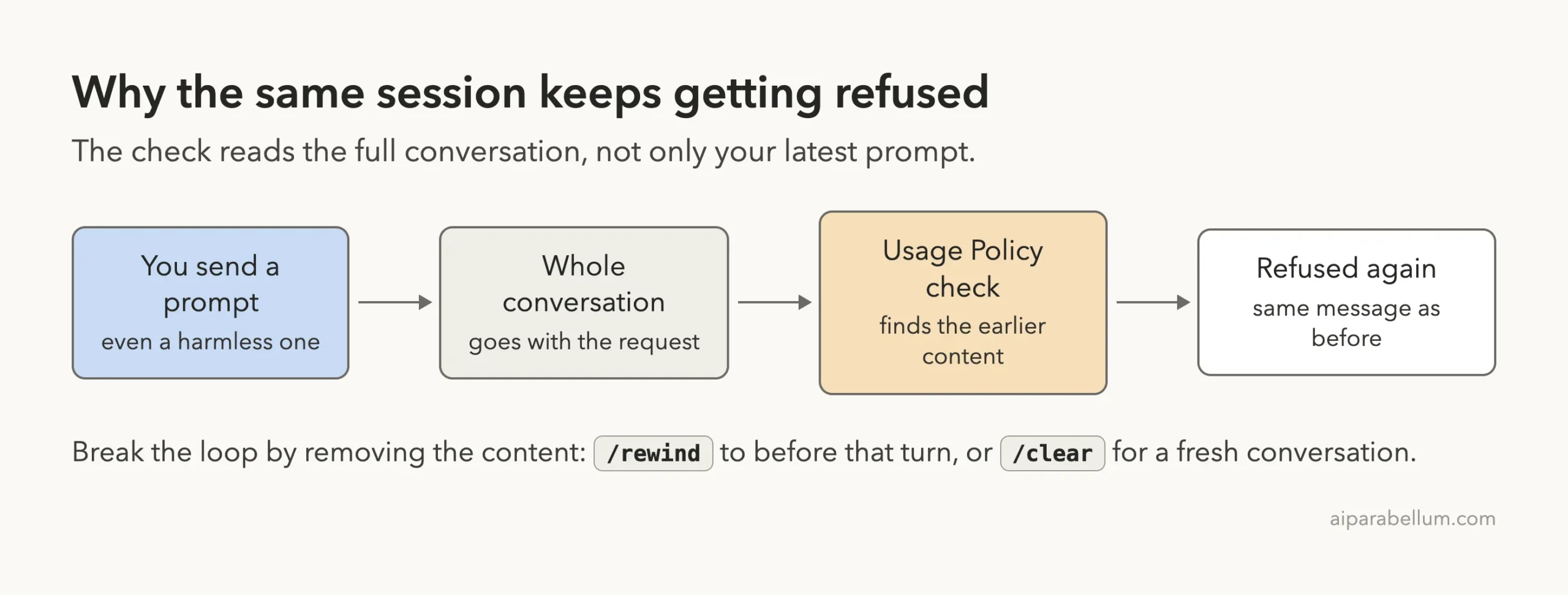
So the fix is always the same idea. You have to remove the triggering content from the conversation, either by stepping back to before it or by starting fresh.
Fix 1: Rewind to Before the Turn That Triggered It
This is the first fix in the official list, and the best one when you know which prompt caused the refusal. It keeps the rest of your session. We ran these steps in a normal session to show what each screen looks like.
- Make sure the prompt box is empty, then press
Esctwice. You can also type/rewindand press Enter. - In the rewind menu, use the arrow keys to pick the prompt that triggered the refusal.
- Press Enter, then choose Restore conversation.
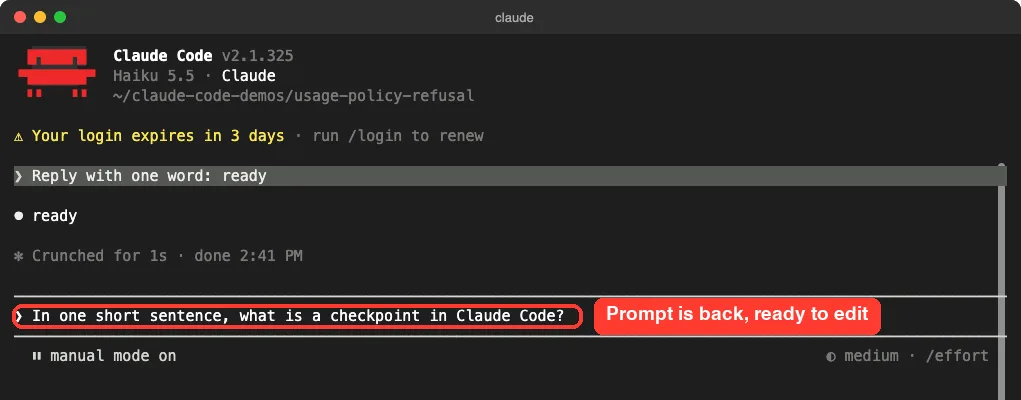
- Edit the prompt that comes back into the input box, or take a different approach.
One detail from the checkpointing docs matters here. If the prompt box contains text, double Esc clears the text instead of opening the menu. When we sent two quick Esc presses with a suggestion showing in the box, the menu did not open, so we used /rewind instead.
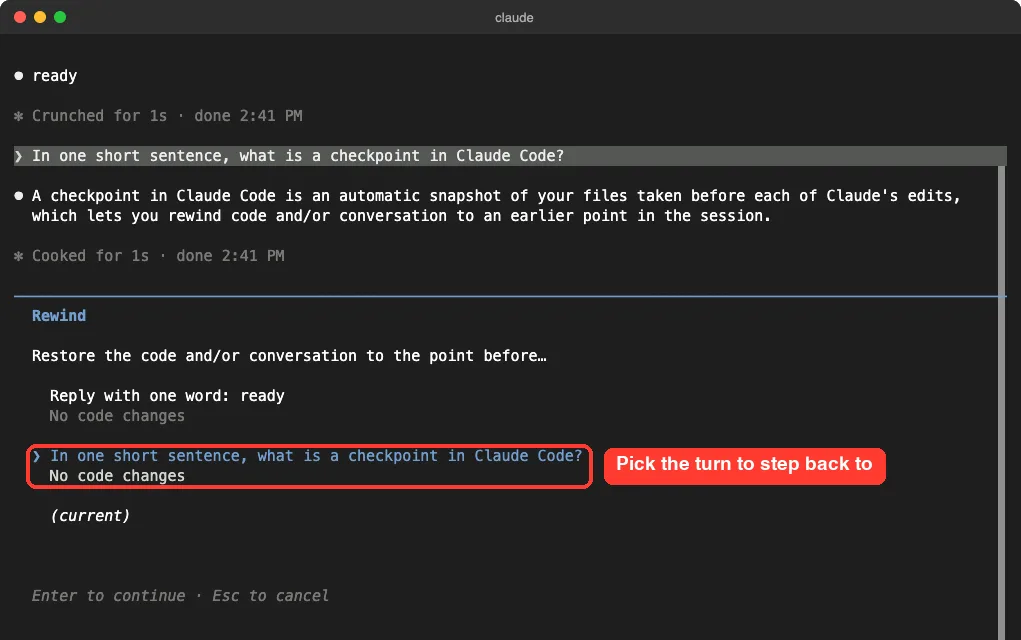
After you press Enter, Claude Code asks what to restore. In our demo no files had changed, so the menu offered Restore conversation, two Summarize options and Never mind.
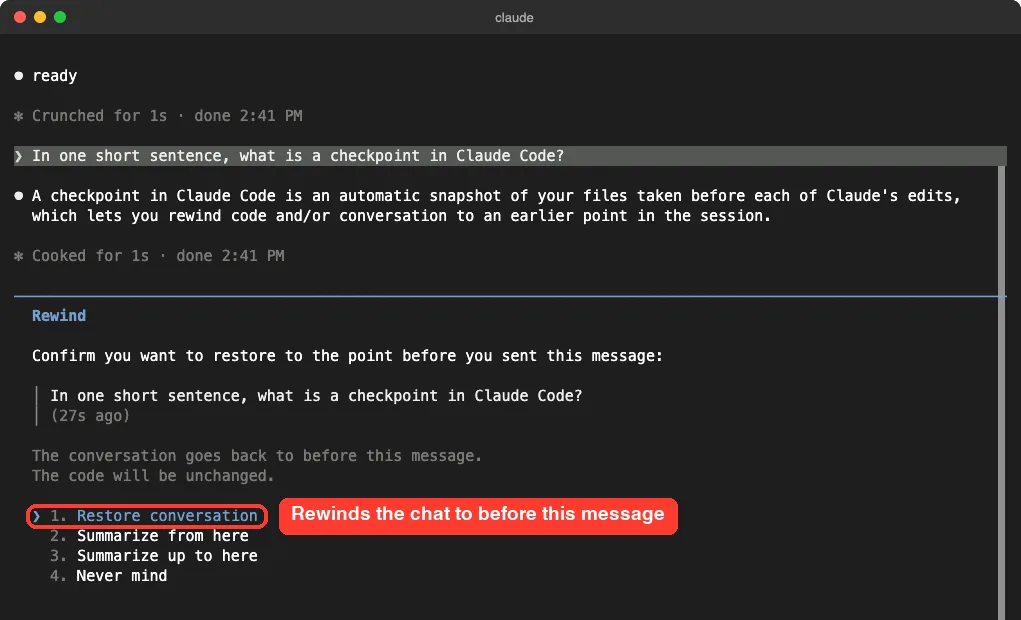
Choose Restore conversation, not a Summarize option. The docs say summarizing keeps the original messages in the session transcript, so it is not the right tool for removing content. If Claude also edited files in that turn, you will see Restore code and conversation as well, which undoes those edits too.
Once the conversation is restored, the selected turn and everything after it are gone from the chat. Your original prompt is placed back in the input box so you can edit it.
Our guide to Claude Code checkpoints covers the rewind menu in more depth, including what it can and can’t undo.
How to Rephrase After a Rewind
The docs only say to “rephrase or take a different approach”. These are practical ways to do that for honest work:
- Say what you are doing and why, for example that you are fixing a vulnerability in your own code.
- Ask for the defensive result (a patch, a test, an explanation) instead of the harmful artifact itself.
- Point Claude at a smaller part of the file instead of the whole thing, if one section is the problem.
- Leave the odd file out of the session and describe what you need from it in your own words.
Rephrasing is for false positives. If a request really is against the Usage Policy, new wording is not a fix, and you should not try to work around the check.
Fix 2: Start a Fresh Conversation With /clear
Sometimes you can’t tell which turn caused the refusal. Maybe Claude read twenty files, or the trigger was in a long command output. In that case the docs say to run /clear, which starts a fresh conversation in the same project.
/clearYou do not lose the old conversation. The docs state that it is preserved on disk and remains available in /resume. We checked this: after /clear, the session picker still listed the conversation we had just left.
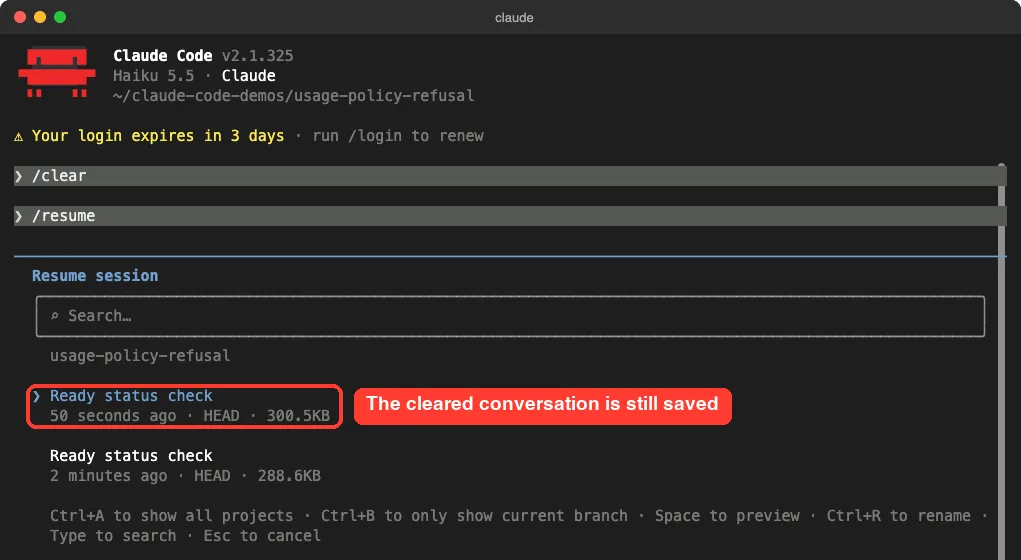
/clear, the old conversation is still in the /resume picker.Be careful with that picker, though. If you resume the refused conversation, the triggering content comes back with it, and so does the refusal. Use it to look something up or to rewind, not to carry on as before.
In the fresh conversation, give Claude a short summary of where you were, and leave out the file or text you suspect. If you are not sure when to clear and when to start over, see our comparison of clear versus compact.
If a Brand-New Session Is Refused Too
If the refusal shows up on the very first message of a new session, the trigger is probably in what Claude Code loads at startup. The docs suggest starting a session with claude --safe-mode, which disables customizations such as CLAUDE.md, skills, MCP servers and hooks.
claude --safe-modeIf the same prompt works in safe mode, one of your customizations is the trigger. Check your CLAUDE.md file first, then skills and MCP tool descriptions. The docs add that git status and directory names are not customizations, so they are still included in safe mode.
Fix 3: Scripts and claude -p
The rewind menu only exists in interactive sessions. For headless mode, the docs give a different fix: retry with a rephrased prompt in a new session, without --continue.
Each plain claude -p run starts a new session, so the main thing is to drop --continue and --resume from the retry. Those flags reload the old transcript, and the old transcript still has the triggering content.
The docs also say that policy checks vary by model, so switching to a different model with --model may resolve the refusal in some cases. Here is what that retry pattern looks like, using a harmless prompt:
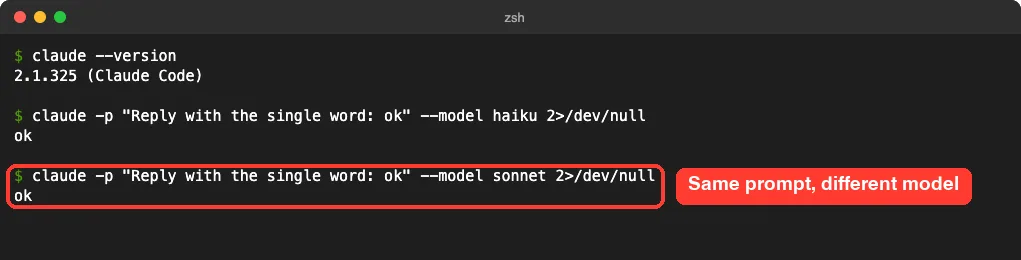
claude -p runs of the same prompt on different models. Neither uses --continue.This shows the commands only; it is not proof that a model switch clears a refusal, because we did not trigger one. Treat --model as something to try, as the docs describe it. Our guide on how to choose a model lists the names you can pass.
Related Refusal Messages You Might See Instead
The Usage Policy refusal has a few close relatives. They look similar, but the right fix differs, so read your message carefully.
| Message contains | What it is | What to do |
|---|---|---|
can't help with this. Start a new session to continue | Usage Policy refusal | /rewind, /clear or a new session |
appears to violate our Usage Policy | The same refusal on versions before v2.1.219 | Same fixes; update when you can |
safeguards flagged this message | A cybersecurity topic flag | /feedback for a false positive, or apply to the Cyber Verification Program |
Details: `[reasoning_extraction]` | A request for Claude’s internal reasoning | Remove instructions that ask Claude to write out its thinking |
Output blocked by content filtering policy | The output filter stopped a response | Rephrase, or rewind and take a different approach |
The Cybersecurity Flag
If you do security work, you are more likely to see this one. The message names the model and says its safeguards flagged the message. It links to Anthropic’s Cyber Verification Program, which the docs say grants access for legitimate cybersecurity work.
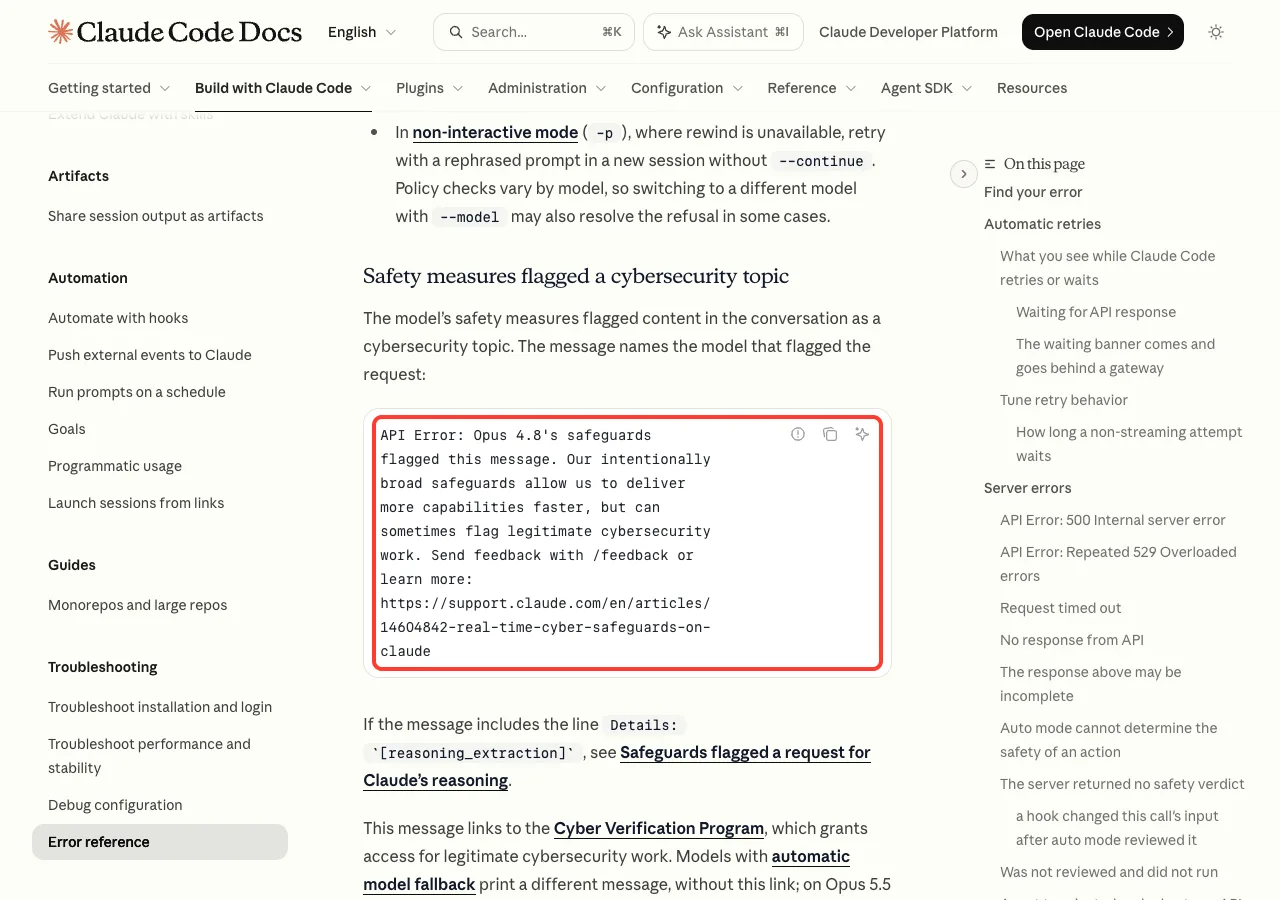
There is one twist. On Amazon Bedrock, Google Cloud’s Agent Platform and Microsoft Foundry, a cybersecurity flag produces the Usage Policy refusal message instead. So on those providers, the usage policy error can also mean a cybersecurity flag.
On some newer models, Claude Code may switch a flagged request to a fallback model instead of refusing it. You will see a notice in the transcript when that happens, and you can go back with /model.
The Reasoning Extraction Line
If your refusal includes the line Details: `[reasoning_extraction]`, the cause is different. Safeguards flagged the request as asking the model to reproduce its internal reasoning in the response.
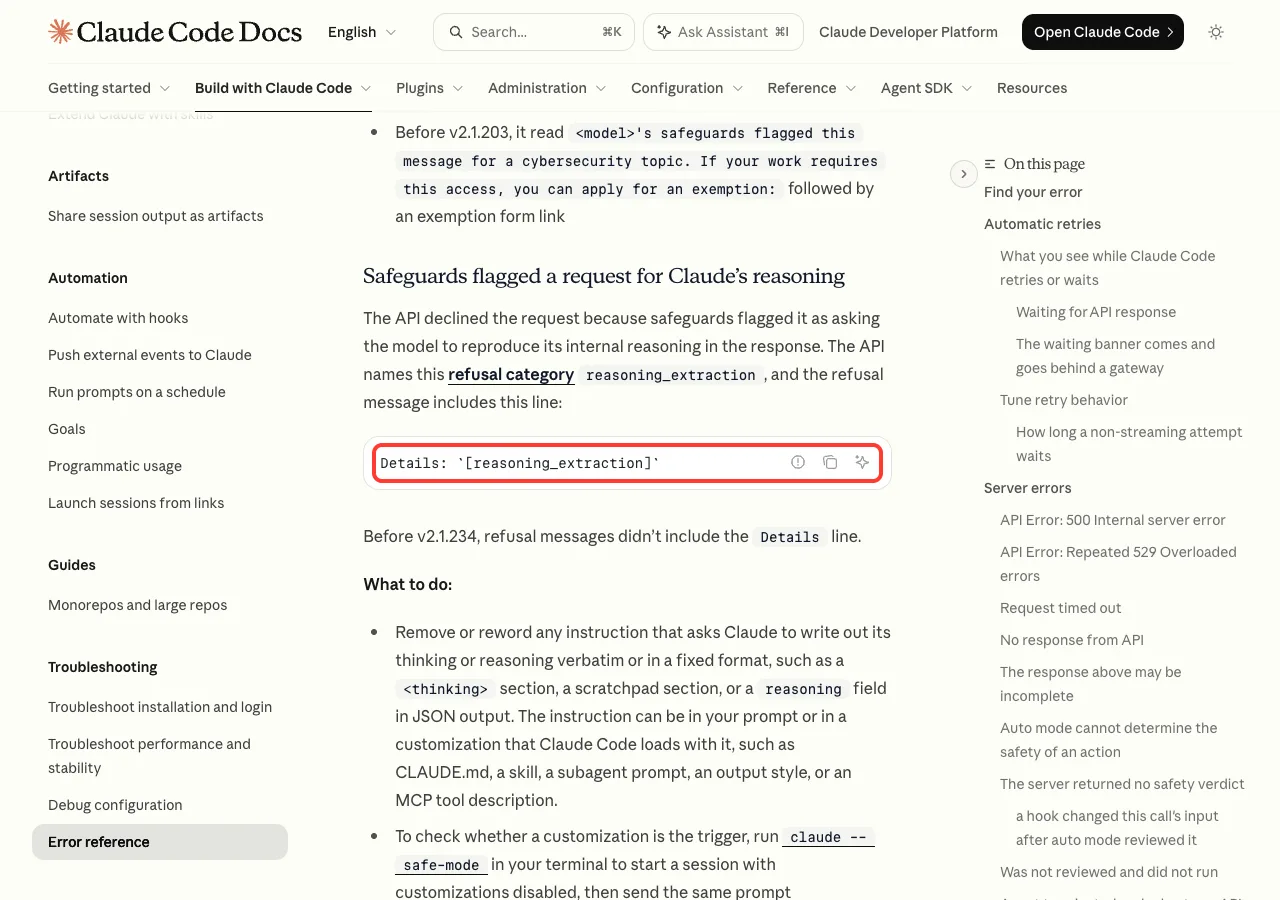
reasoning_extraction line has its own cause and its own fix.The fix is to remove or reword any instruction that asks Claude to write out its thinking word for word or in a fixed format, such as a <thinking> section or a reasoning field in JSON output. That instruction can sit in your prompt, in CLAUDE.md, in a skill or in a subagent prompt. You can still ask Claude for a short explanation of its answer.
Try It Yourself
You do not need a refusal to practice the fix. Start Claude Code in an empty test folder and send these two prompts, one after the other:
Reply with one word: ready

In one short sentence, what is a checkpoint in Claude Code?
Now run /rewind, pick the second prompt and choose Restore conversation. The second answer disappears and the prompt returns to the input box. Then run /clear followed by /resume to confirm that the old conversation is still saved.
Common Mistakes
- Sending the same prompt again. The check sees the same conversation and gives the same answer.
- Typing a harmless follow-up in the same session. The earlier content still travels with the request.
- Quitting and reopening with
claude --continue. The transcript on disk still holds the triggering content. - Choosing a Summarize option in the rewind menu. Use Restore conversation to actually step back.
- Pressing
Esctwice with text in the prompt box. That clears the text instead of opening the menu.
Pro Tips
- Keep risky-looking files out of the session until you need them. Point Claude at specific files instead of whole folders.
- Start a new session for security work, so a refusal there does not block an unrelated long task.
- Look at what a file or page contains before you ask Claude to read it, especially scraped text.
- Note the Request ID and Message ID from the message before you clear, in case you want to contact support.
- For related API failures, see our guides to common errors and to API error 400.
Usage Policy Error Cheat Sheet
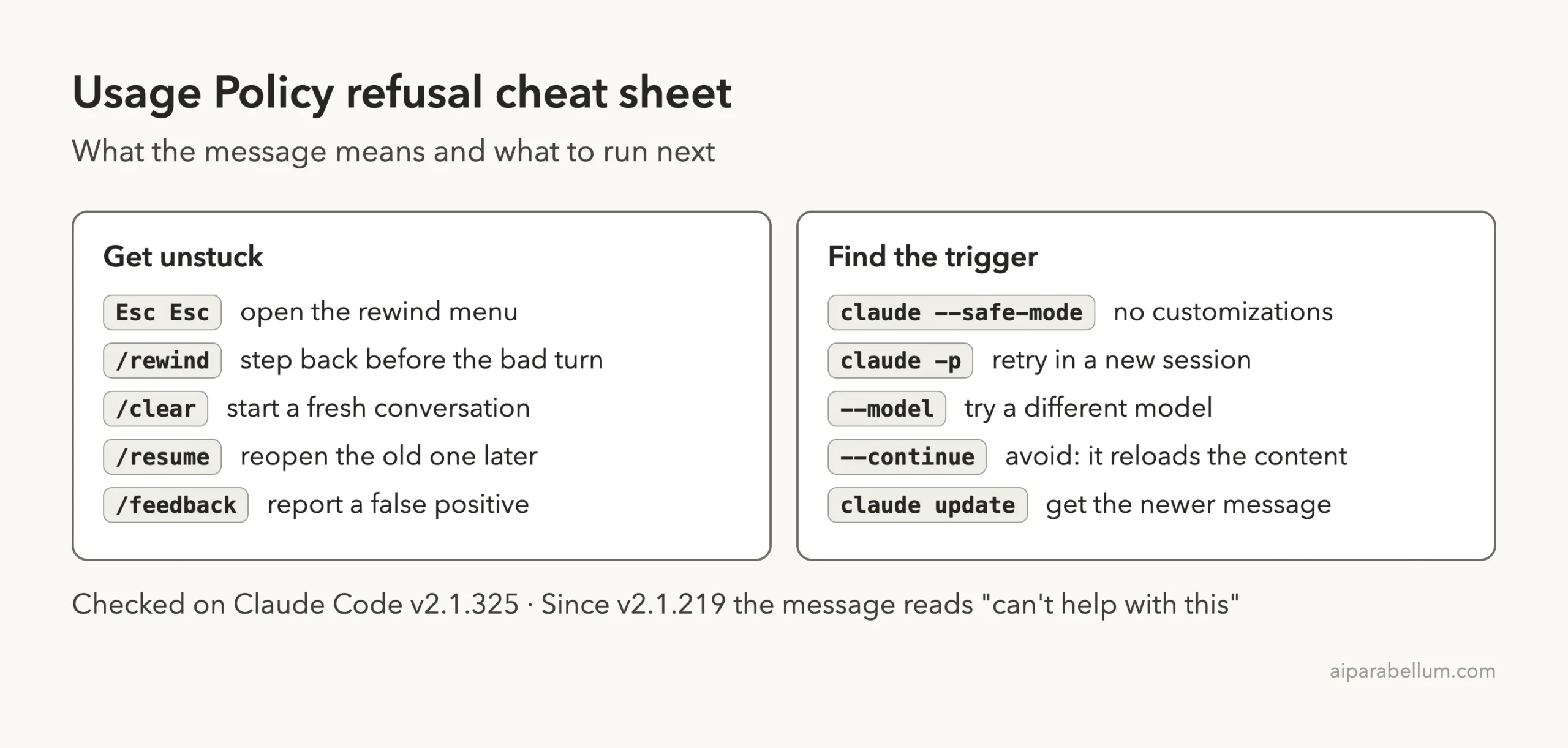
For every other command, keep our commands cheat sheet nearby. You can read the full official entries in Anthropic’s error reference and its checkpointing guide.
Frequently Asked Questions
What does “appears to violate our Usage Policy” mean in Claude Code?
It means the API declined to respond because content in the conversation triggered a Usage Policy check. The content can be your prompt, a file Claude read or the output of a command. On v2.1.219 and later, the same refusal says the model “can’t help with this”.
Will I get banned for seeing this error?
The error reference describes this message as a declined request, not as an account action. It does not mention bans or suspensions. If you think the refusal was wrong, the docs point you to /feedback and to support, with the Request ID and Message ID from the message.
Why do I keep getting the error after changing my prompt?
Because the check evaluates the full conversation, not only your latest prompt. The content that triggered it is still in the session. Run /rewind to step back before that turn, or /clear to start a fresh conversation.
Do I lose my work when I start a new session?
No, your files stay as they are, and the previous conversation is preserved on disk and listed in /resume. Our guide to resuming sessions shows how to reopen it. Just remember that resuming it brings the triggering content back.
Can switching models fix a Usage Policy refusal?
Sometimes. The docs say policy checks vary by model, so a different model with --model may resolve the refusal in some cases. It is not guaranteed, and rewinding or clearing is the more reliable fix.
Conclusion
The “appears to violate our Usage Policy” message means the API declined a request because of content somewhere in your conversation, and it repeats because that content is sent again with every new message. The way out is to remove the content: press Esc twice or run /rewind and restore the conversation to before the bad turn, or run /clear when you can’t find it. In scripts, retry in a new session with new wording and no --continue. Your old conversation stays saved, and if honest work keeps getting refused, /feedback is the official way to report it. To see what else Claude AI can do, browse the rest of our guides.