If Claude Code says “Failed to authenticate,” it means your saved login or API key was not accepted, and Claude Code will not do any work until that is fixed. The good news is that the message almost always points to one of four causes, and each has a short fix.
The short answer: run /login and sign in again. If that does not help, run /status to see which credential Claude Code is really using, because a stale ANTHROPIC_API_KEY in your shell can quietly beat your login. For a 403 after login, check that your plan is active, your role allows Claude Code, and no proxy is in the way.
This is a help article in our Claude Code tutorials collection. If your problem started during setup, our guide to install problems covers the install side.
Tested with Claude Code v2.1.310 on October 28, 2026, on macOS. We tested on macOS; the Windows and Linux steps follow Anthropic’s official instructions.
We reproduced two real messages in a throwaway home folder, so your own login was never touched. The expired-token, 403 and organization messages cannot be triggered safely, so those come from the official docs, shown in highlighted screenshots.
Quick Answer: Fix Claude Code Failed to Authenticate
Find the first words of your message in the table, then jump to the matching section.
| Message | What it means | First fix |
|---|---|---|
| Not logged in · Please run /login | No valid credential for this session | Run /login |
| Login expired · Please run /login | Claude Code could not renew your saved login | Run /login |
| OAuth token revoked or expired (401) | The API rejected your saved login | Run /login |
| Failed to authenticate (in -p mode) | Same errors, shown in non-interactive mode | Sign in again in the same environment |
| Invalid API key | Your ANTHROPIC_API_KEY was rejected | Fix or unset the key |
| API Error: 403 Request not allowed | Plan, role or proxy problem | Check plan status and role |
| This organization has been disabled | An old API key overrides your subscription | Run unset ANTHROPIC_API_KEY |
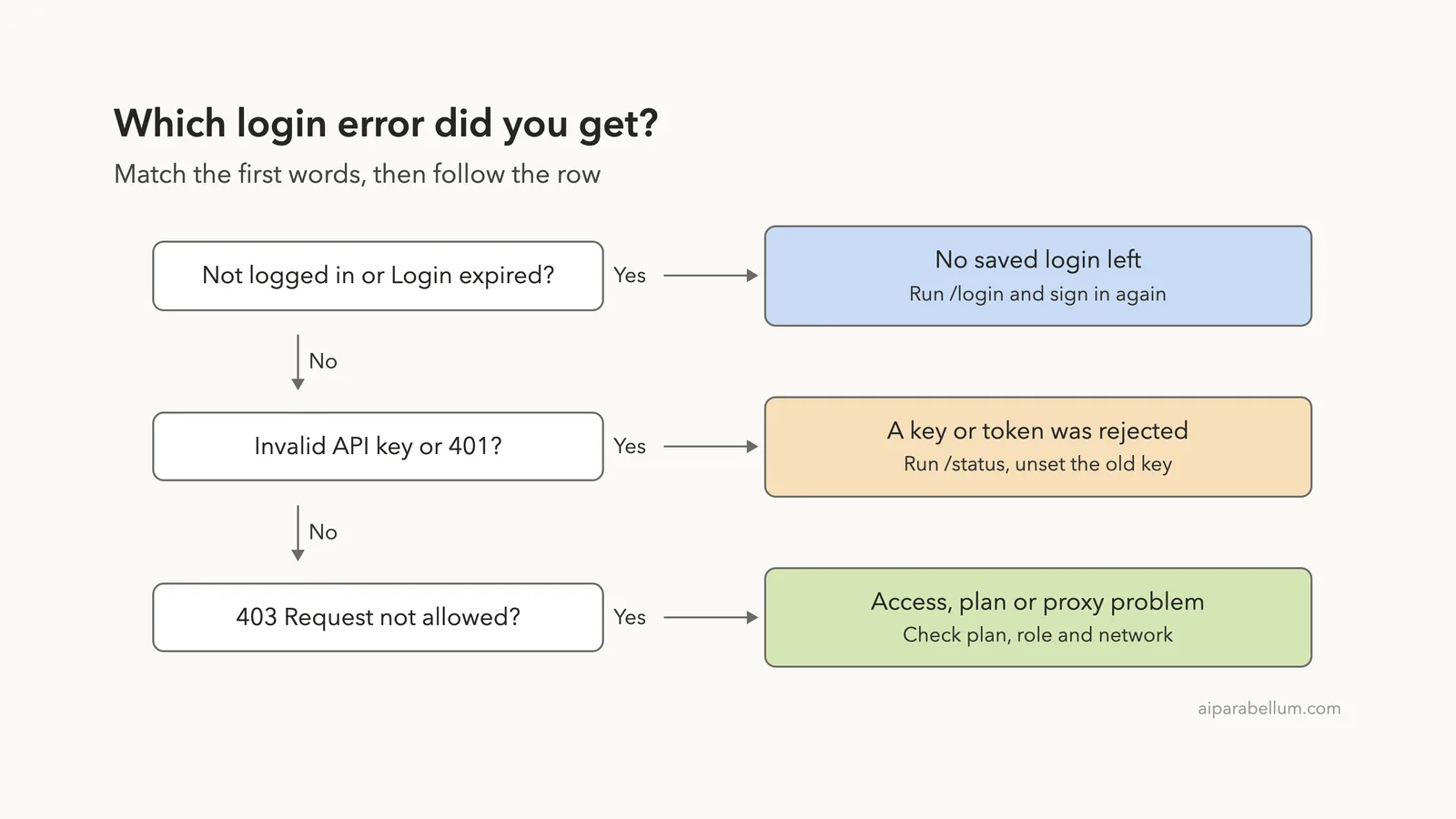
Read the first words of the message. Claude Code uses different wording for a missing login, an expired login and a rejected key, and each one has a different fix.
What “Failed to Authenticate” Means
Every request Claude Code makes has to carry a credential, which is proof of who you are. That credential can be your subscription login from /login, an API key from the Claude Console, a long-lived token, or a cloud provider setting. If the credential is missing, expired or rejected, the request stops.
According to the official error reference, the exact words depend on how you run Claude Code. In the interactive screen you see messages like “OAuth token revoked · Please run /login.” In non-interactive mode (the -p flag) and the Agent SDK, the same problem is reported as “Failed to authenticate,” with the structured error code authentication_failed.
That is why people searching for “failed to authenticate” often find a script or CI job at fault, not the terminal. The fix is the same in both cases: get a valid credential into the environment that runs the command.
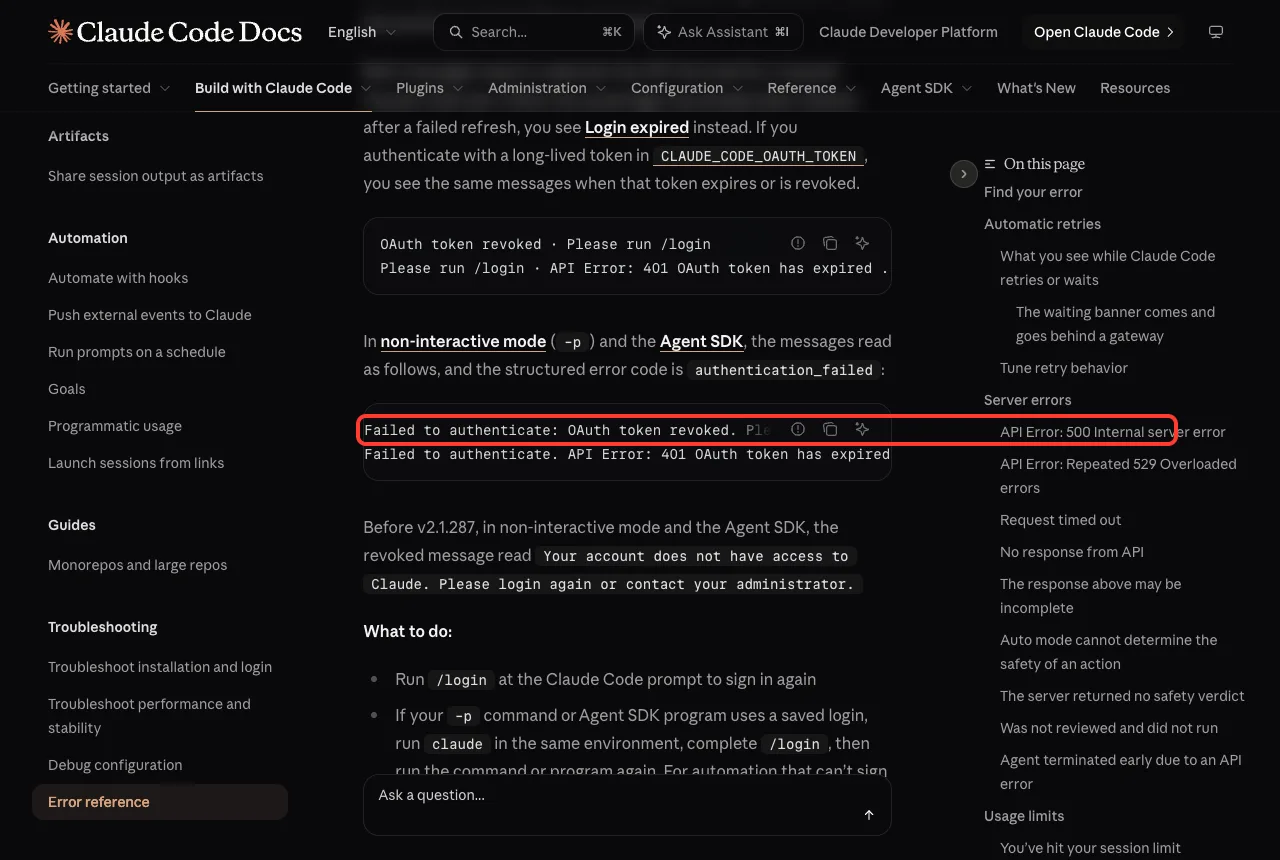
The diagram below turns the common messages into a quick decision ladder.
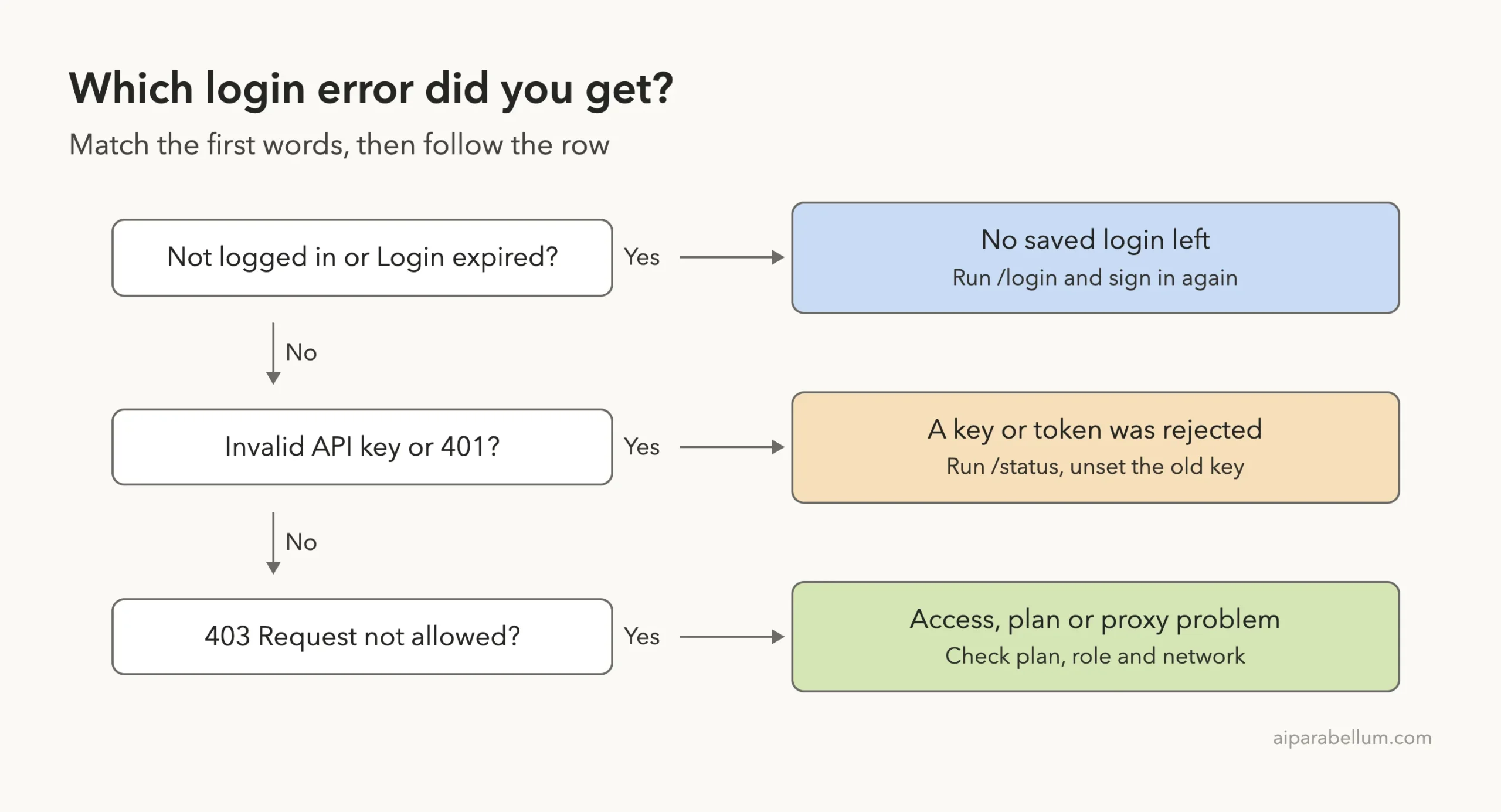
Fix 1: Sign In Again With /login
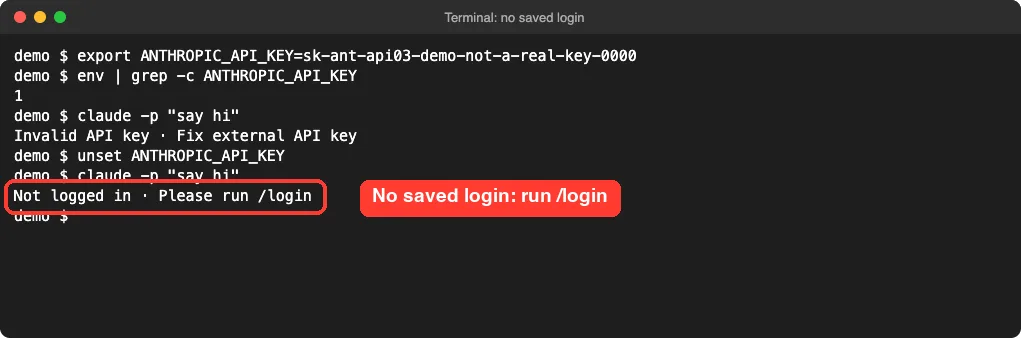
When Claude Code shows “Not logged in,” no credential is available for the session. Type /login at the Claude Code prompt, choose your account type, and finish the sign-in in your browser. Your session picks up the new login right away.
Here is what we saw for real. In a throwaway home folder with no saved login and no key, running a one-line prompt printed the message below.
Two related messages mean nearly the same thing. “Login expired · Please run /login” appears when Claude Code tried to renew your saved login, the renewal was rejected, and the saved credentials were cleared. After that, every request stops locally until you sign in, so retrying without signing in just shows the same message.
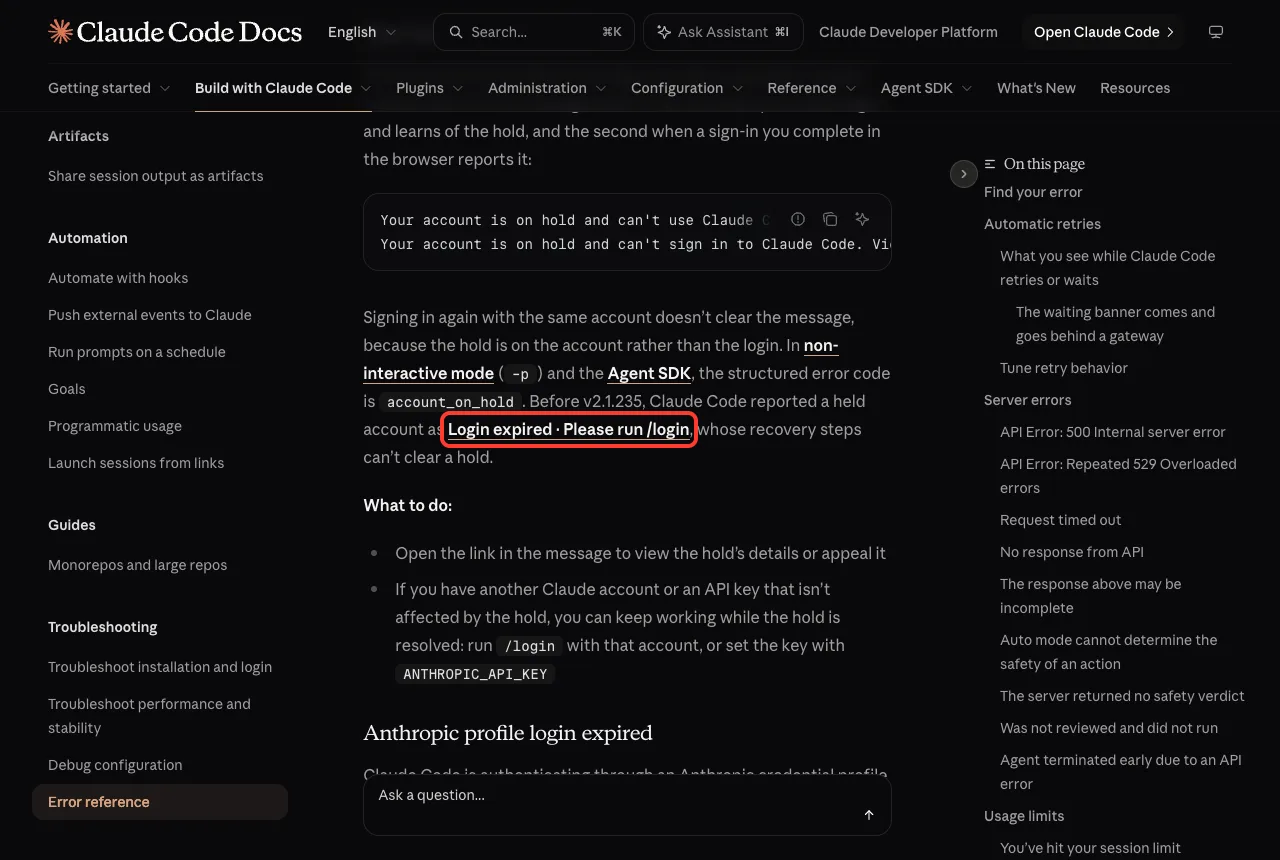
You can spot this early. The docs say /status shows a Login row reading “Expired — log in again” when your saved login can no longer be refreshed. Claude Code also warns at startup when your login is within three days of expiring, so run /login then to renew.
If the login prompt keeps coming back
Some people sign in and then see the prompt again at the next launch. The official docs point to two checks: your system clock and, on macOS, the login keychain. If the keychain is locked, the docs give this command to unlock it in the same shell session.
security unlock-keychain ~/Library/Keychains/login.keychain-dbAfter unlocking, run /login again. The authentication page also notes that when the keychain rejects a write, Claude Code stores your login in ~/.claude/.credentials.json instead, the same way it works on Linux.
Fix 2: Reset Your Login Cleanly
When login fails and the cause is not clear, the troubleshooting guide recommends a clean re-authentication. It resolves most cases and takes under a minute.
- Run /logout to sign out completely.
- Close Claude Code.
- Start it again with claude and complete the sign-in.
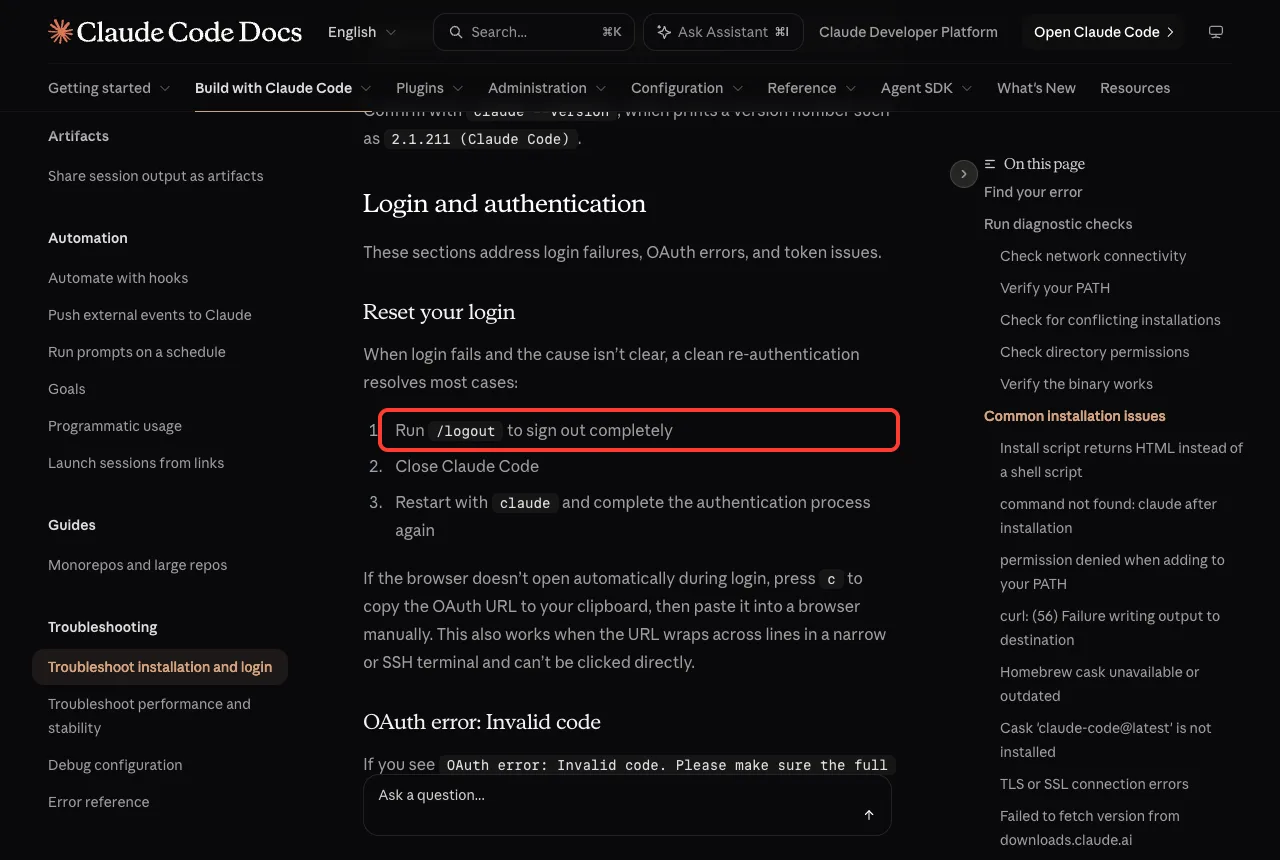
If the browser does not open on its own, press c at the login prompt to copy the sign-in URL, then paste it into a browser. This also helps when the URL wraps across lines in a narrow terminal. Over SSH, the browser may open on the wrong machine, so copy the URL and open it on your own computer.
If the browser then shows “OAuth error: Invalid code,” the code expired or was cut off while copying. Press Enter to retry and finish the login quickly after the browser opens. In WSL2, SSH or containers, the browser shows a login code instead of redirecting, and you paste that code at the “Paste code here” prompt.
Fix 3: Find the Stale API Key That Beats Your Login
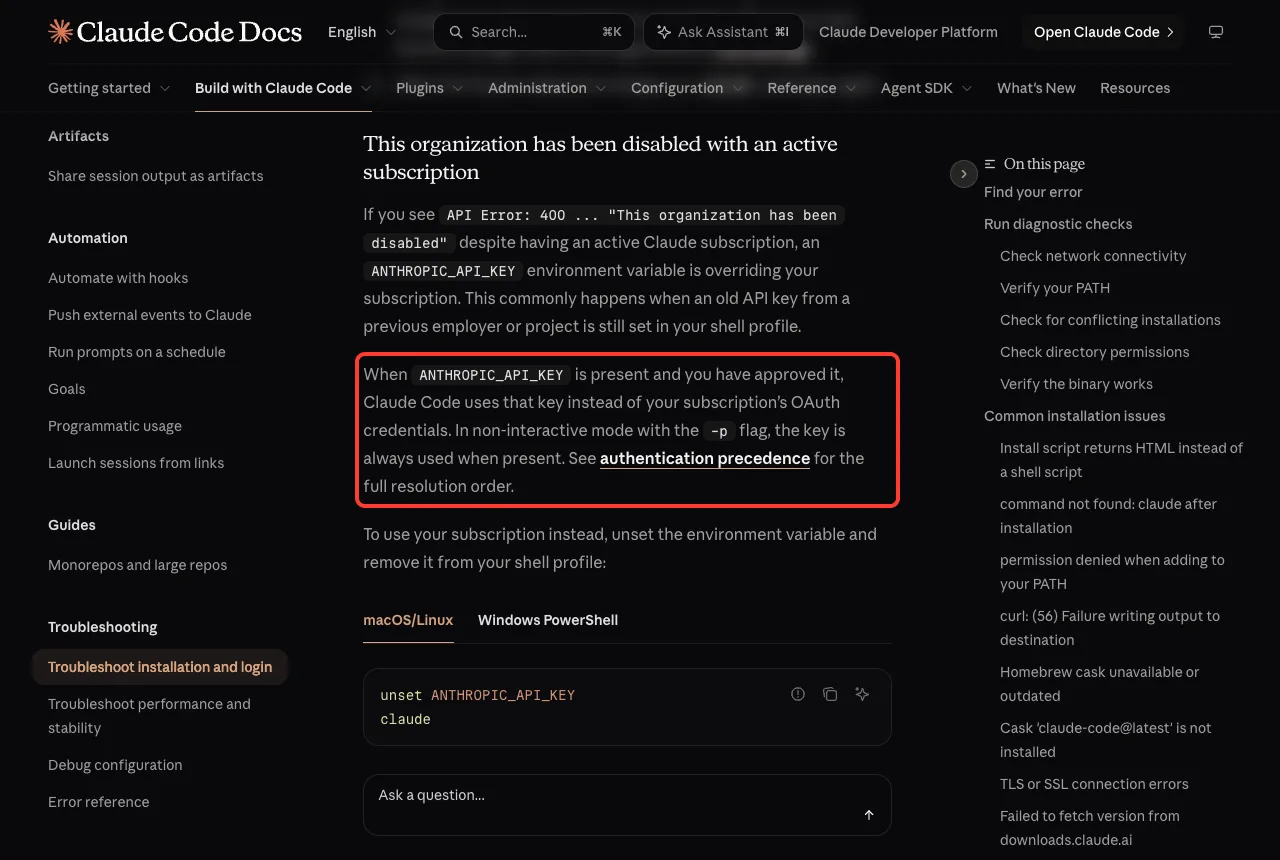
This is the hidden cause behind many “my login is fine but nothing works” reports. Claude Code does not simply use your /login. When several credentials exist, it picks one in a fixed order, and an ANTHROPIC_API_KEY set in your shell ranks above your subscription login.
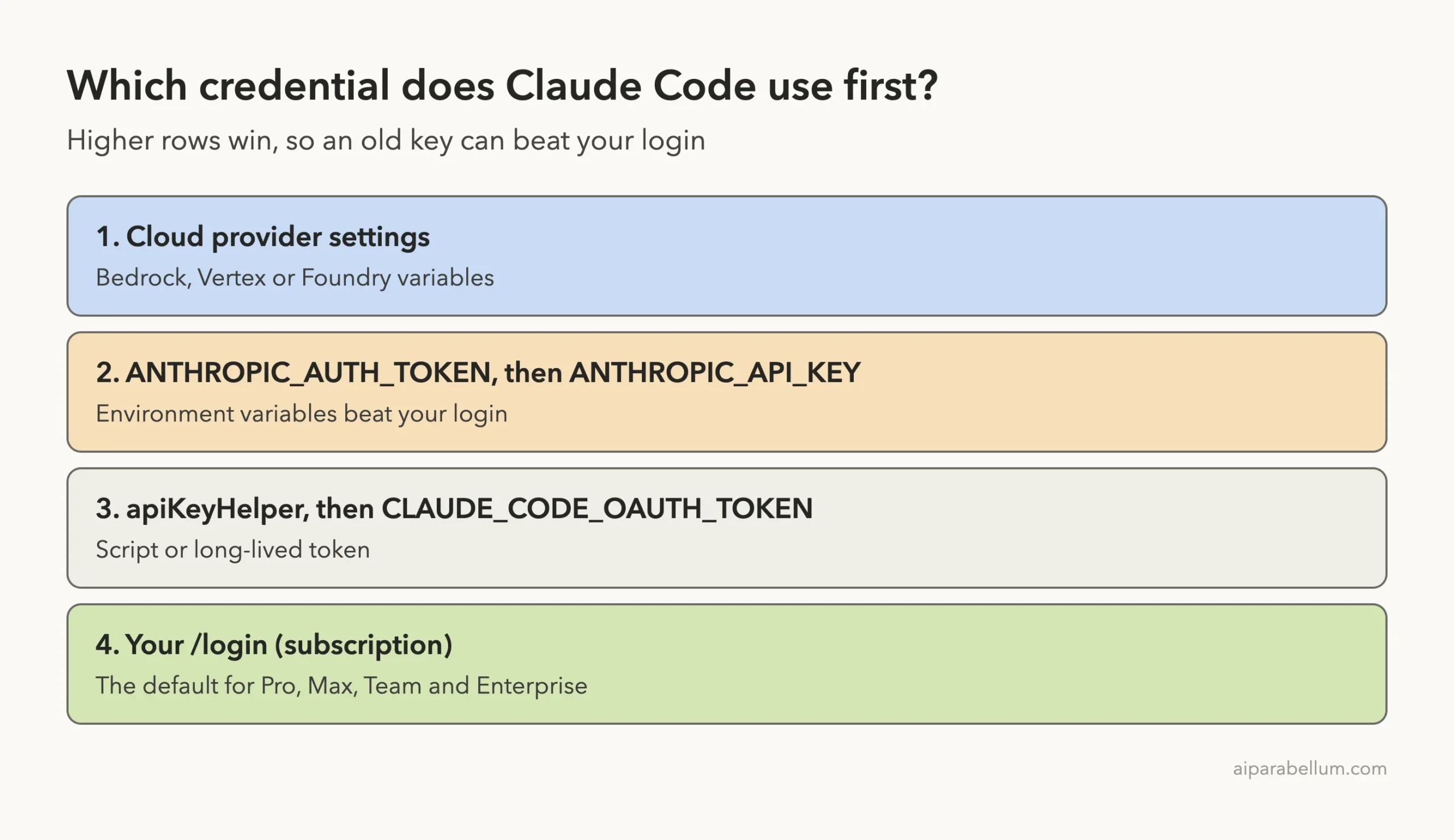
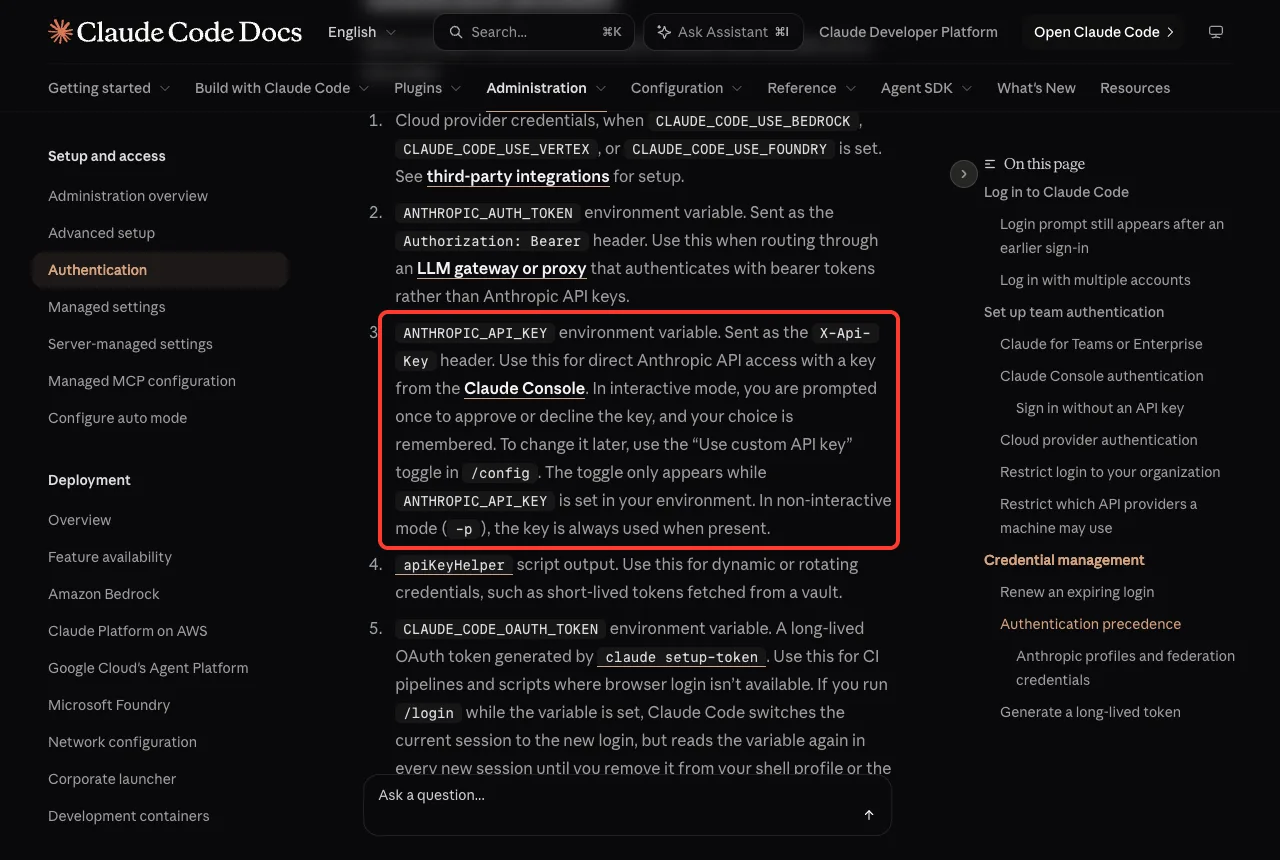
The official list is longer than the diagram, because it also covers named profiles and federation credentials. The part that matters for most people is simple: environment variables win over /login. In interactive mode Claude Code asks once whether to use the key, and in -p mode it always uses the key if one is present.
We reproduced the result with a made-up key. In our throwaway home folder we exported a fake ANTHROPIC_API_KEY and ran a one-line prompt. Claude Code rejected it with the message shown below.
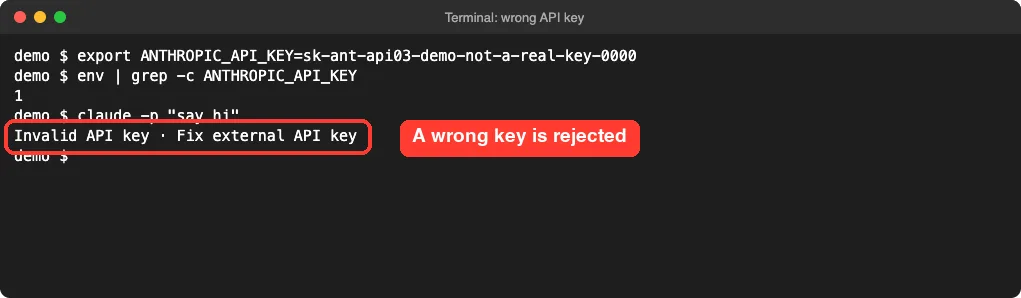
Because the second line of the demo shows the variable is set, the fix is to look for it in your own shell. The docs suggest these steps.
- In the shell where you launched claude, run env | grep ANTHROPIC to list every ANTHROPIC variable.
- Run unset ANTHROPIC_API_KEY to drop the key for this shell. In PowerShell, use Remove-Item Env:ANTHROPIC_API_KEY.
- Open ~/.zshrc, ~/.bashrc or ~/.profile and delete any export ANTHROPIC_API_KEY line so it does not return.
- Launch claude again and run /status to confirm the active credential is your subscription.
Tools like direnv, dotenv shell plugins and terminals inside editors can load a key from a .env file in your project without you setting it by hand. If the variable keeps reappearing after you remove it, look there. If the key comes from an apiKeyHelper script, run that script directly and confirm it prints only a valid key.
“This organization has been disabled”
A close cousin of the stale key is “API Error: 400 … This organization has been disabled” while you hold an active subscription. The troubleshooting guide says an old key from a previous employer or project is usually still set in your shell profile.
Unset it as above and run claude again.
Fix 4: Error 401 Invalid Authentication Credentials
An “API Error: 401 Invalid authentication credentials” means the server received your credential and refused it. The error reference gives a clear order of checks.
- Run /status. If it shows an API key row that is not marked as not in use, that key is active and /login will not replace it. Rotate the key in the Claude Console or unset it.
- If /status shows only your login, run /login once. If the credential was revoked, a fresh login replaces it.
- If the same message returns for the same account, the account or organization may no longer be active. Check the account that /status reports and ask your admin to restore access.
- If ANTHROPIC_BASE_URL points at an LLM gateway, the text after 401 is your gateway’s message and /login does not change it. Fix the credential your gateway expects.
The docs also describe two token messages. “OAuth token revoked” means you signed out everywhere or an admin removed access, and “OAuth token has expired” means the automatic refresh failed mid-session. Both are fixed by running /login.
Failed to authenticate in scripts and CI
In a -p command or Agent SDK program, run claude in the same environment, complete /login, then rerun your command. For automation that cannot sign in interactively, the docs offer two options. Set ANTHROPIC_API_KEY, or generate a long-lived token with claude setup-token.
The setup-token command opens the same browser flow as /login and prints a one-year token. It does not save the token, so you copy it and set it as CLAUDE_CODE_OAUTH_TOKEN where you need it.
It needs a Pro, Max, Team or Enterprise plan and can only make model requests. If that token is set and a request fails with 401, Claude Code keeps sending the value you set, so generate a fresh token or unset the variable and use /login.
Fix 5: Error 403 “Request Not Allowed” After Login
A 403 is different from a 401. A 401 means your credential was rejected, while a 403 means you were recognized but not allowed. The troubleshooting guide covers “API Error: 403 Request not allowed” after logging in with three checks.
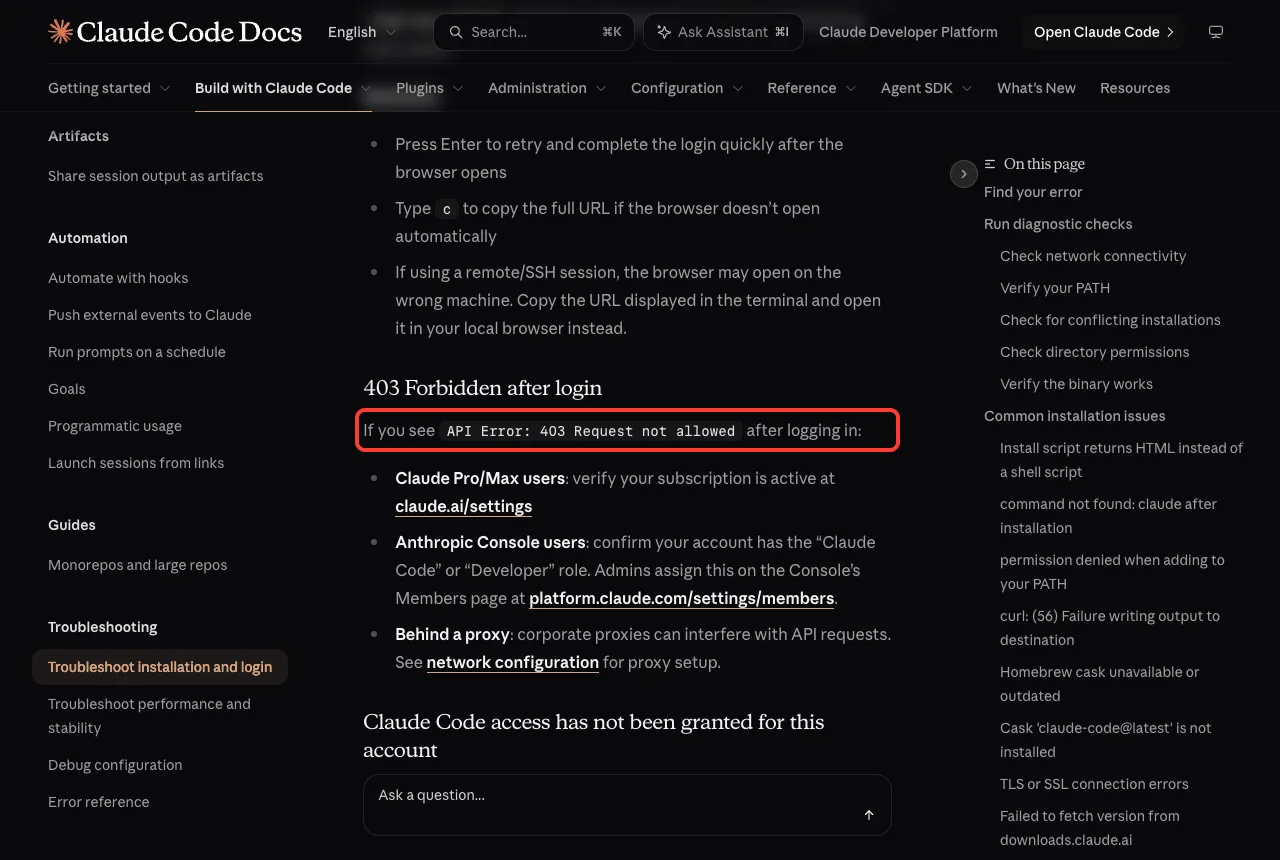
| Who you are | What to check |
|---|---|
| Claude Pro or Max user | Confirm your subscription is active at claude.ai/settings |
| Anthropic Console user | Confirm your account has the Claude Code or Developer role, which admins assign on the Console Members page |
| Behind a proxy | Corporate proxies can interfere with API requests, so review the network configuration |
Two other access messages are worth knowing.
If the sign-in page says “Claude Code access has not been granted for this account,” your Enterprise organization set your role to Custom and none of your custom roles grants Claude Code. Nothing you change in Claude Code fixes that, so an Owner has to assign a suitable role. After that, run claude and log in again.
The install guide also notes that a 403 while downloading Claude Code is usually a proxy or network filter blocking the host, or a region where Claude Code is not available. That is a download problem rather than a login problem.
Real Examples
These short stories show how the fixes play out. They follow the official docs and our demo, not user reports.
Example 1: Fine in the app, broken in a script
Your script prints “Failed to authenticate,” but the interactive terminal works. The script runs in a different environment, so it has no saved login. Set ANTHROPIC_API_KEY or CLAUDE_CODE_OAUTH_TOKEN in the environment that runs the script, not only in your own shell.
Example 2: Subscription is active, key is old
You pay for a plan, but every request says the organization is disabled. An old key exported in your profile is winning. Run env | grep ANTHROPIC, unset it, remove the export line, and relaunch.
Example 3: Login worked yesterday
Today you see “Login expired.” Claude Code could not renew the saved login, so it cleared it. Run /login, and next time watch for the three-day warning at startup.
Try It Yourself
Practice reading your own credential setup without changing anything. Start Claude Code in a small demo folder and paste this prompt. It only explains, and it never prints a key.
Explain which credential this Claude Code session is using, using what /status shows. Do not print any key or token. Then tell me which ANTHROPIC environment variable names are set, names only, and whether any of them could override my subscription login.Then run /status yourself and compare. If an API key row appears without a not-in-use note, you now know why /login alone would not help.
Common Mistakes
- Running /login again and again while an ANTHROPIC_API_KEY still overrides it. Check /status first.
- Unsetting the key in one terminal but leaving the export line in ~/.zshrc, so it returns in the next window.
- Fixing the terminal but forgetting the script or CI job, which runs in a different environment.
- Treating a 403 like a 401. A 403 is about permission, so check plan, role and proxy rather than signing in again.
- Pasting a truncated login code. Use Enter to retry, or press c to copy the full URL.
- Sharing screenshots that show keys. Keep keys and tokens out of chats, tickets and screenshots.
Pro Tips
- Run /status whenever a login behaves oddly. It shows the active credential and marks the one not in use.
- Renew your login when the three-day warning appears, especially before unattended or background sessions.
- For CI, prefer a long-lived token from claude setup-token or an apiKeyHelper script over browser login.
- Keep project .env files free of ANTHROPIC keys unless you really want them used.
- If you use the web version, see our guide to web version, where cloud sessions always use your subscription credentials.
- Read the full error reference and the authentication guide when your message does not match the table above.
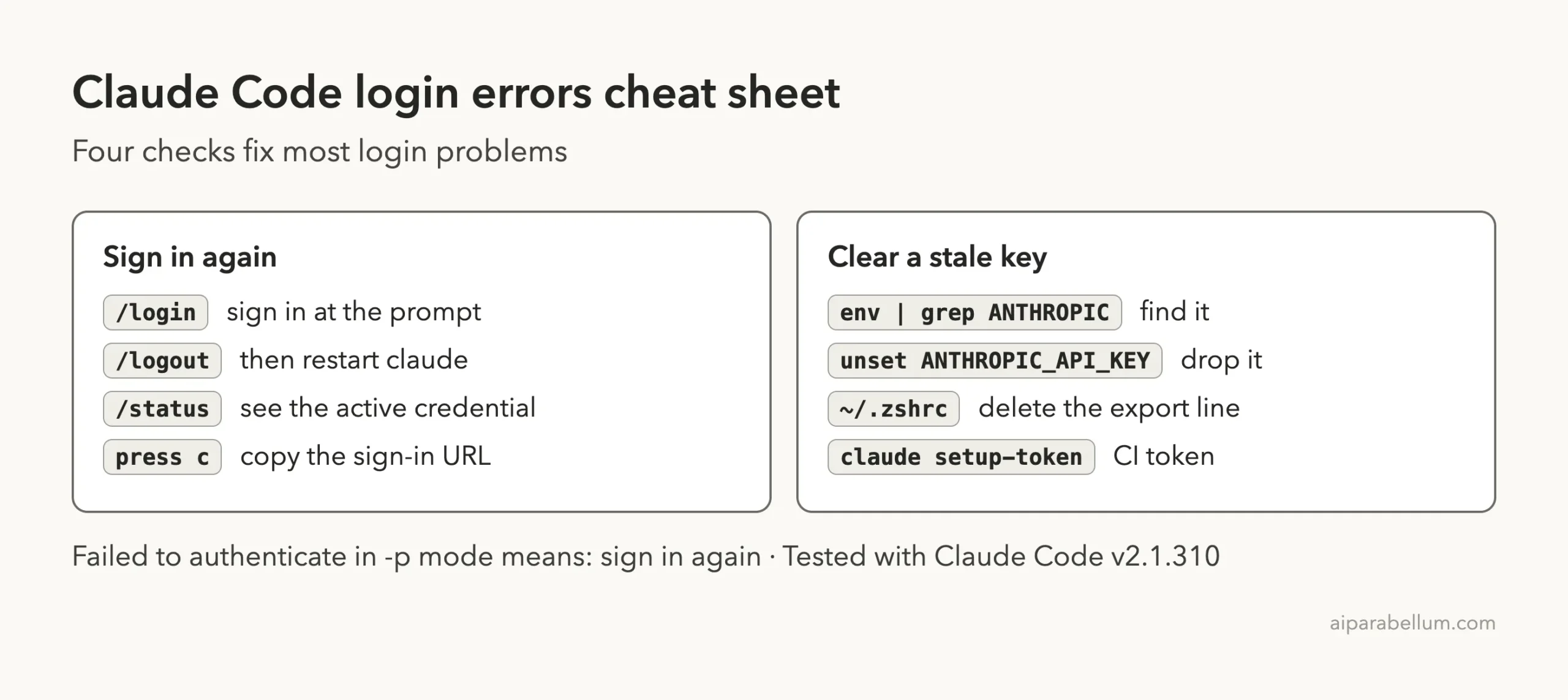
Cheat Sheet
Save this card for the next time a login message appears.
Frequently Asked Questions
What does “Failed to authenticate” mean in Claude Code?
It is the non-interactive (-p) and Agent SDK wording for a login or token problem, such as an expired or revoked OAuth token. Sign in again in the same environment, or use an API key or a long-lived token.
How do I log in to Claude Code again?
Type /login at the prompt and finish the sign-in in your browser. For a clean reset, run /logout, close Claude Code, start claude again and sign in.
Why do I get a 401 even after logging in?
Often an approved ANTHROPIC_API_KEY is the active credential and takes precedence over your login. Run /status, then unset the key and remove it from your shell profile.
Why do I get a 403 “Request not allowed”?
Check that your Pro or Max subscription is active, that your Console account has the Claude Code or Developer role, and that a proxy is not interfering with requests.
Do I need to keep logging in every day?
No. If you are prompted repeatedly, the docs point to your system clock and, on macOS, the login keychain. Unlock it with the security command shown above, then run /login again.
Conclusion
Claude Code “Failed to authenticate” and 401 errors almost always come down to a missing, expired or overridden credential. Run /login first, use /status to see which credential is really active, and unset any stale ANTHROPIC_API_KEY. For a 403, check your plan, your role and your proxy, and keep our Claude guide handy for account questions.