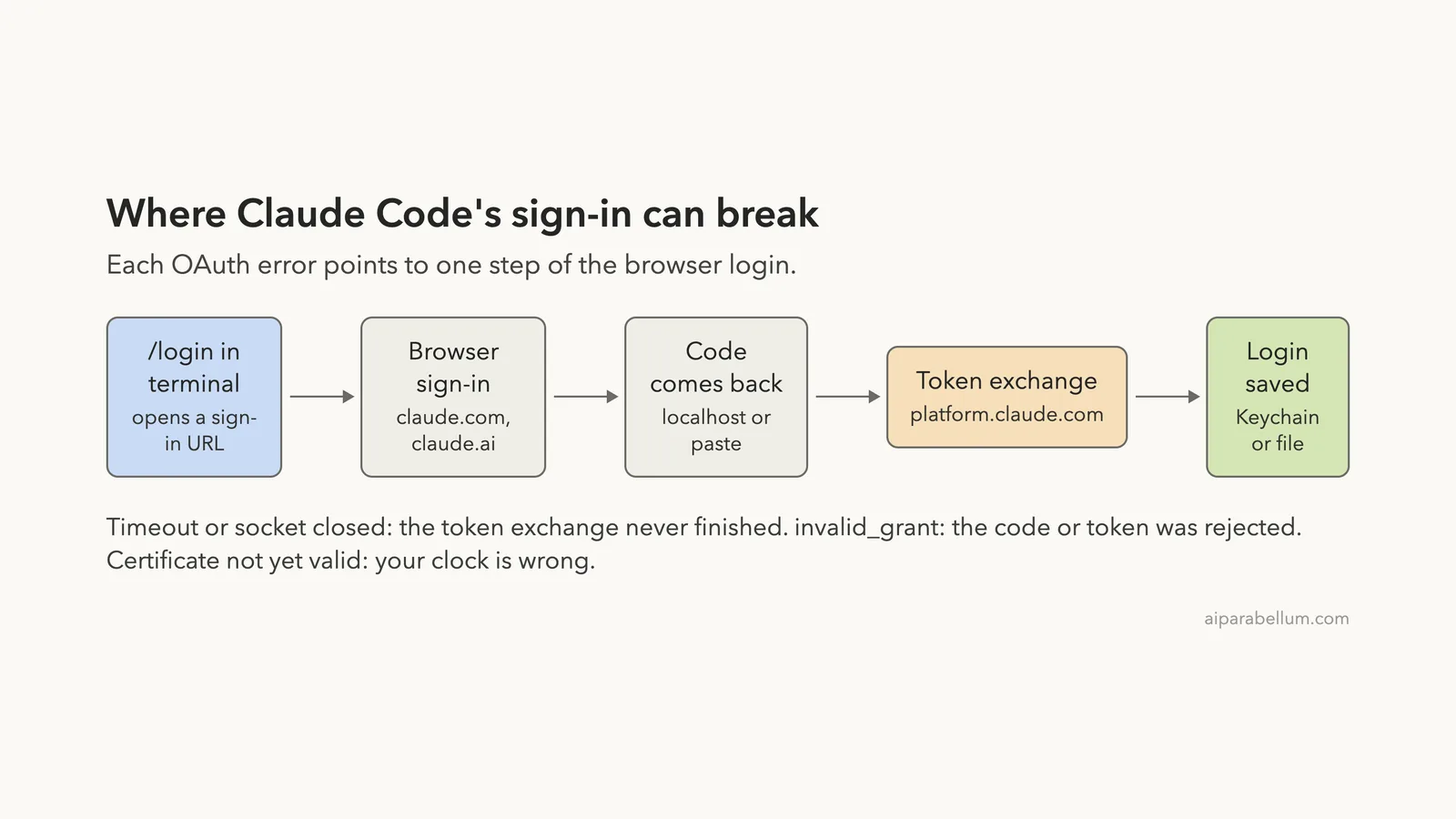
A Claude Code OAuth error shows up when the browser sign-in can’t finish handing your login back to the terminal. The three messages people search for most are “OAuth error: timeout of 15000ms exceeded”, “invalid_grant” and “socket is closed”, and each one points to a different step of the same login flow.
A 15000ms timeout means a sign-in request waited 15 seconds and got no reply, so something on your network path (VPN, proxy, firewall, captive Wi-Fi) is in the way.
invalid_grant means the login code or saved token was rejected, usually because it expired, was already used, or your computer’s clock is wrong. Socket closed means a proxy or VPN cut the connection halfway.
- Timeout of 15000ms: turn off the VPN, check proxy variables, allow
platform.claude.comandclaude.ai, then run/loginagain. - invalid_grant or “Invalid code”: set your clock to update automatically, start one fresh
/login, and finish it within a few minutes. - Socket is closed: run
claude update, then retry; behind a company proxy, check its settings. - Certificate is not yet valid: your date or time is behind; fix the clock and sign in again.
- Nothing works on SSH, WSL or a container: press
cto copy the login URL, sign in on your own computer, and paste the code at thePaste code hereprompt.
This guide is part of our help series. Browse all our Claude Code tutorials for more fixes and how-tos.
Tested with Claude Code v2.1.325 on macOS on November 18, 2026. We can’t safely trigger these sign-in failures without breaking a working login, so the fixes come from Anthropic’s official documentation, and the exact error wording comes from what users report. The network and clock checks in this guide were run for real in a demo folder.
We tested on macOS; the Windows and Linux steps follow Anthropic’s official instructions.
Claude Code OAuth Error: Quick Summary
| Error text | What it usually means | First fix to try |
|---|---|---|
OAuth error: timeout of 15000ms exceeded | A sign-in request got no reply in 15 seconds | Check VPN, proxy and firewall, then /login |
invalid_grant | The login code or refresh token was rejected | Fix the clock, run one fresh /login |
OAuth error: Invalid code | The code expired or was cut off when pasted | Retry quickly, copy the full code |
Socket is closed | A proxy or VPN dropped the connection | claude update, then retry |
certificate is not yet valid | Your system clock is set too early | Turn on automatic date and time |
OAuth error with a 500 status | The sign-in server had a problem | Wait a few minutes and retry |
What an OAuth Error in Claude Code Actually Means
When you sign in with a Claude subscription, Claude Code doesn’t ask for a password in the terminal. It opens a browser page, you approve access there, and the browser hands a one-time code back to Claude Code. Claude Code then swaps that code for a login token and saves it.
That swap is the part most OAuth errors come from. The docs’ network table says OAuth token exchange, refresh and revocation go to platform.claude.com for both Console and claude.ai accounts. So even if claude.ai opens fine in your browser, the terminal can still fail if it can’t reach that host.
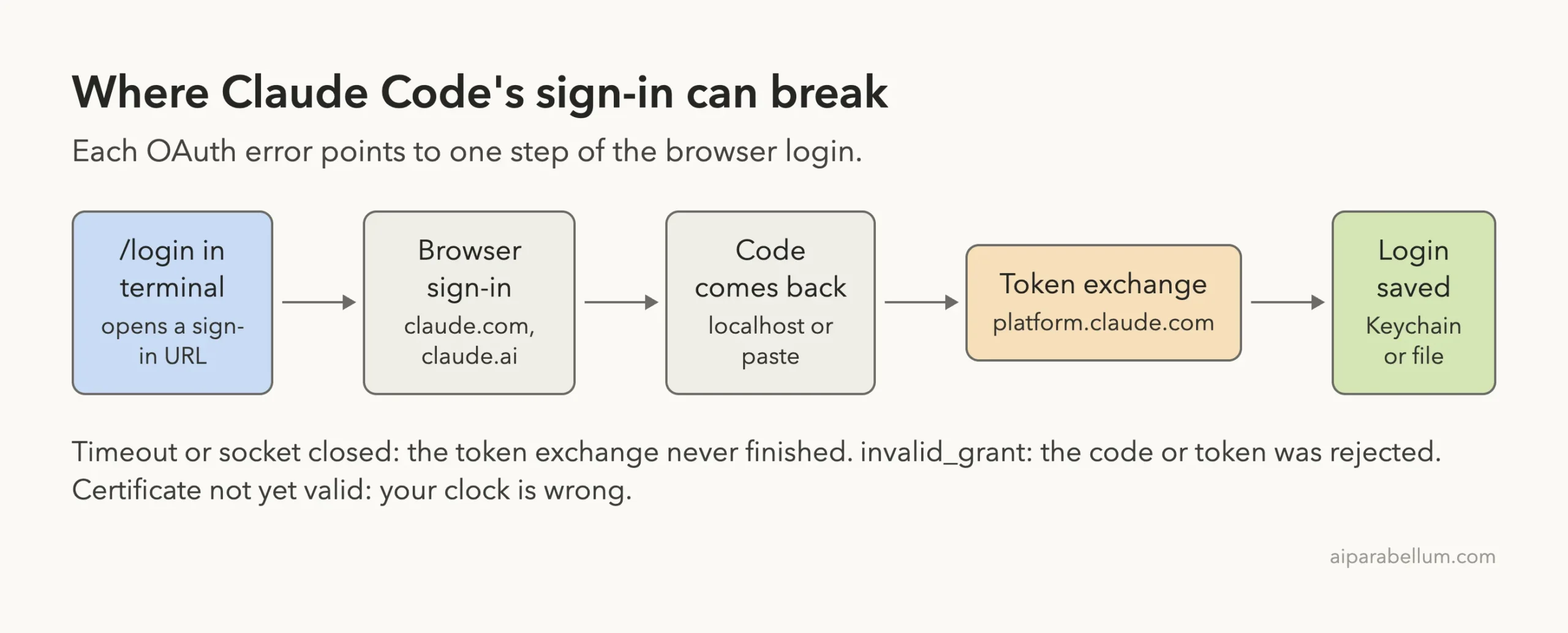
Once the token is saved, it lives in the macOS Keychain on a Mac, or in a credentials file when the Keychain can’t be written. Later, Claude Code refreshes that token in the background. If a refresh is rejected, you see invalid_grant or a “please log in again” message even though you signed in yesterday.
Why the number is 15000ms
15000 milliseconds is 15 seconds. The message format matches a web request that gave up after its time limit, not a wrong password. In practice, it means Claude Code sent a sign-in request and nothing answered in time, which almost always points to the network path rather than your account.
Fix 1: Timeout of 15000ms Exceeded
Work through these in order. Each one takes a minute, and you can stop as soon as /login works.
Step 1: Check that the sign-in hosts answer
Anthropic’s network page lists the hosts Claude Code needs. For sign-in, the important ones are claude.ai, claude.com and platform.claude.com, plus sso.claude.com if your company uses single sign-on.
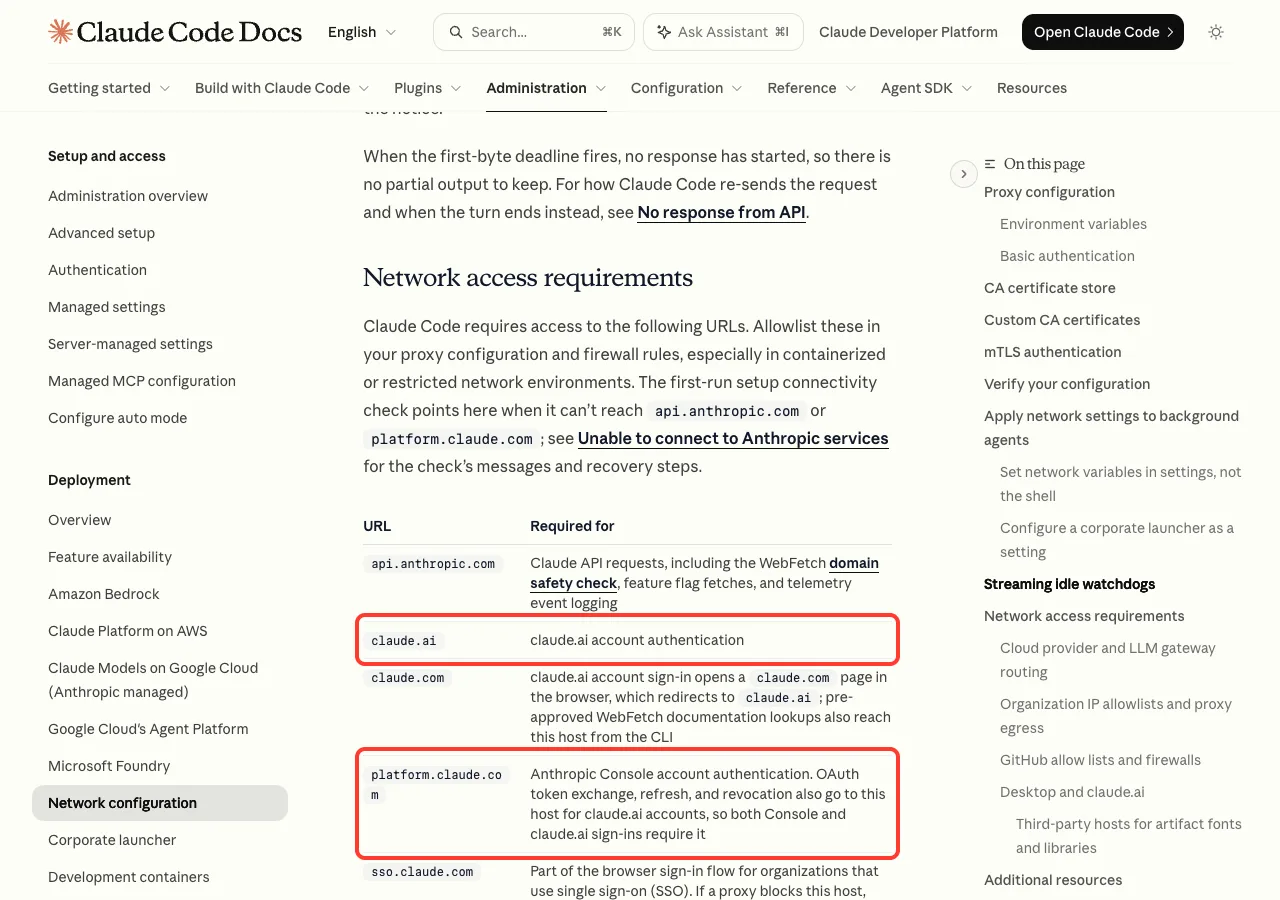
You can test them from your own terminal with curl. Any HTTP status, even 403 or 404, means the host answered. A long wait that ends with HTTP 000 means it’s blocked, and that matches the 15000ms timeout.
for h in claude.ai claude.com platform.claude.com api.anthropic.com; do
  printf "%-22s " $h
  curl -s -o /dev/null --max-time 15 -w "HTTP %{http_code}  %{time_total}s\n" https://$h
done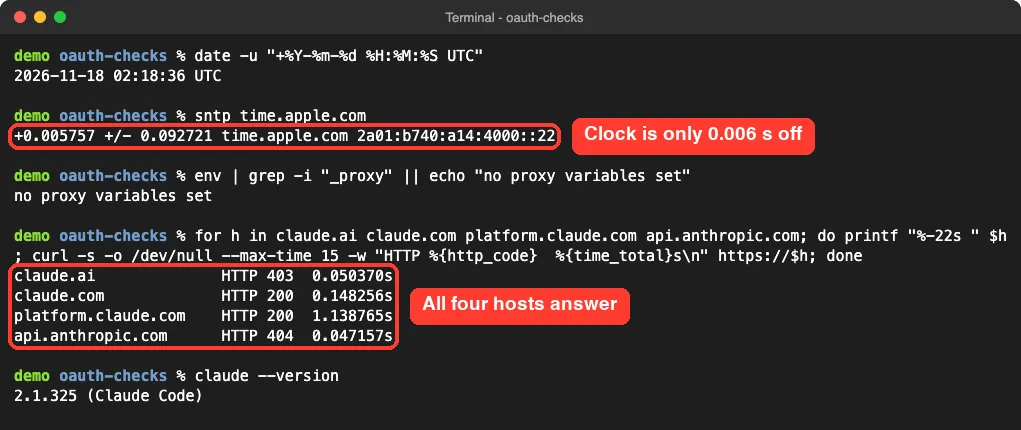
In our run, claude.ai returned 403 to curl, which is normal for a website that doesn’t serve plain scripts. What matters is that it replied in a fraction of a second.
Step 2: Turn off the VPN or switch networks
A VPN, a hotel or office Wi-Fi with a sign-in page, or a security app can hold the request until it times out. Disconnect the VPN, or try a phone hotspot for a minute, and run /login again. If it works on the hotspot, the first network is the cause.
On macOS, the docs also warn that a VPN client you disconnected or removed can leave a stale tunnel behind. Look for leftover utun interfaces with ifconfig, and remove the VPN’s network extension in System Settings if you no longer use it. For deeper connection problems, see our guide on the unable to connect error.
Step 3: Set the proxy correctly
If your company requires a proxy, Claude Code must be told about it before it starts. It reads the standard variables HTTPS_PROXY, HTTP_PROXY and NO_PROXY, and you can also put them in the env block of settings.json.
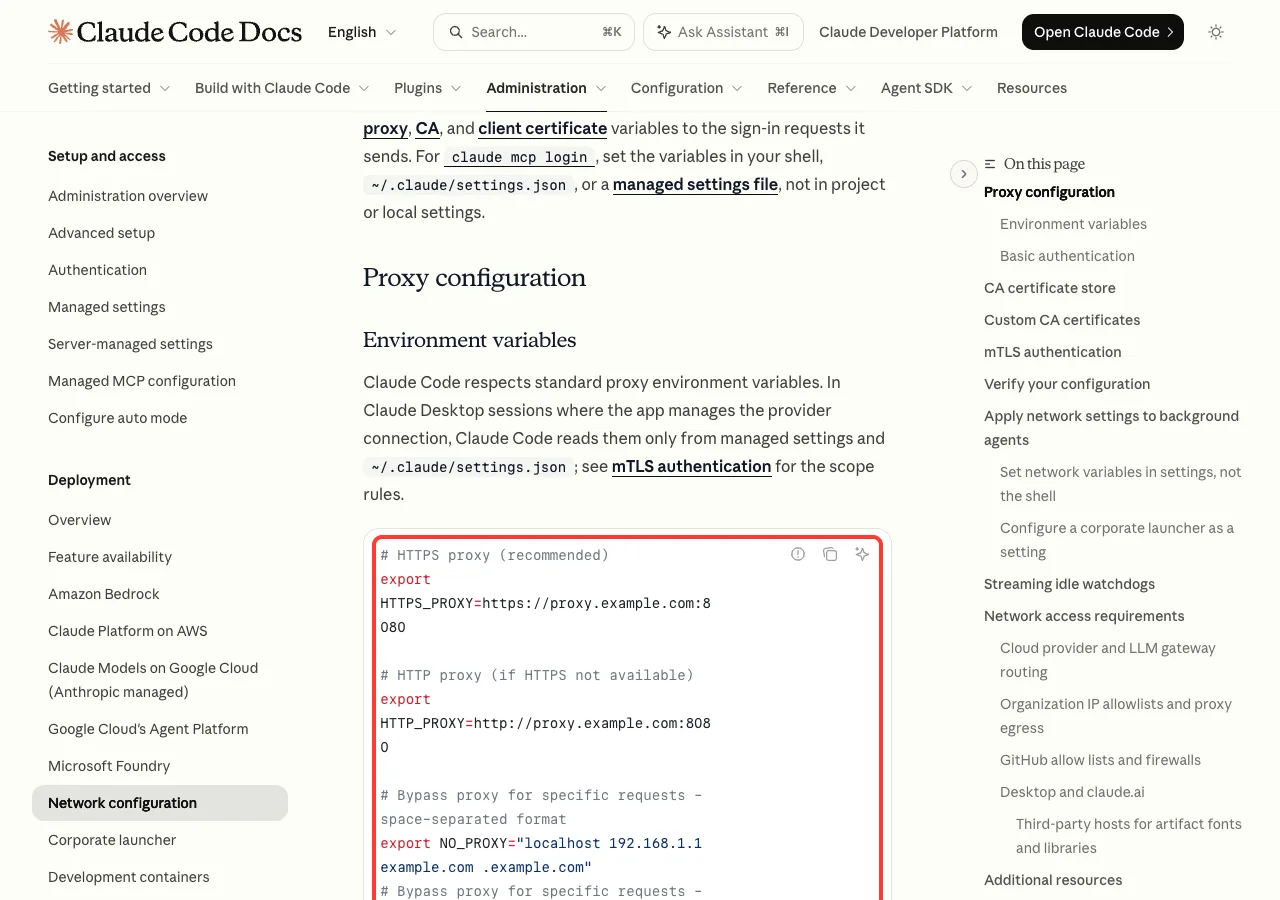
export HTTPS_PROXY=https://proxy.example.com:8080
claude
Two details catch people out. Claude Code does not support SOCKS proxies, so a socks5:// value won’t help.
Proxy variables are read once at startup, so open a new terminal after you change them. Run env | grep -i _proxy to see what is actually set.
Step 4: Allow the hosts in your firewall
On a work laptop, ask IT to allow the hosts from the table above. Mention platform.claude.com by name, because it is the one most often missing from older allowlists.
Fix 2: invalid_grant and “OAuth error: Invalid code”
invalid_grant is the standard OAuth wording for “this code or token is no good”.
The code may have expired, been used already, been cut off when pasted, or been revoked. Claude Code’s own version of this is OAuth error: Invalid code. Please make sure the full code was copied.
Step 1: Fix your system clock
Tokens carry timestamps, so a clock that is minutes off can make a valid token look expired or not yet valid. Anthropic’s troubleshooting page says to check that your system clock is accurate if login prompts keep coming back, because token validation depends on correct timestamps.
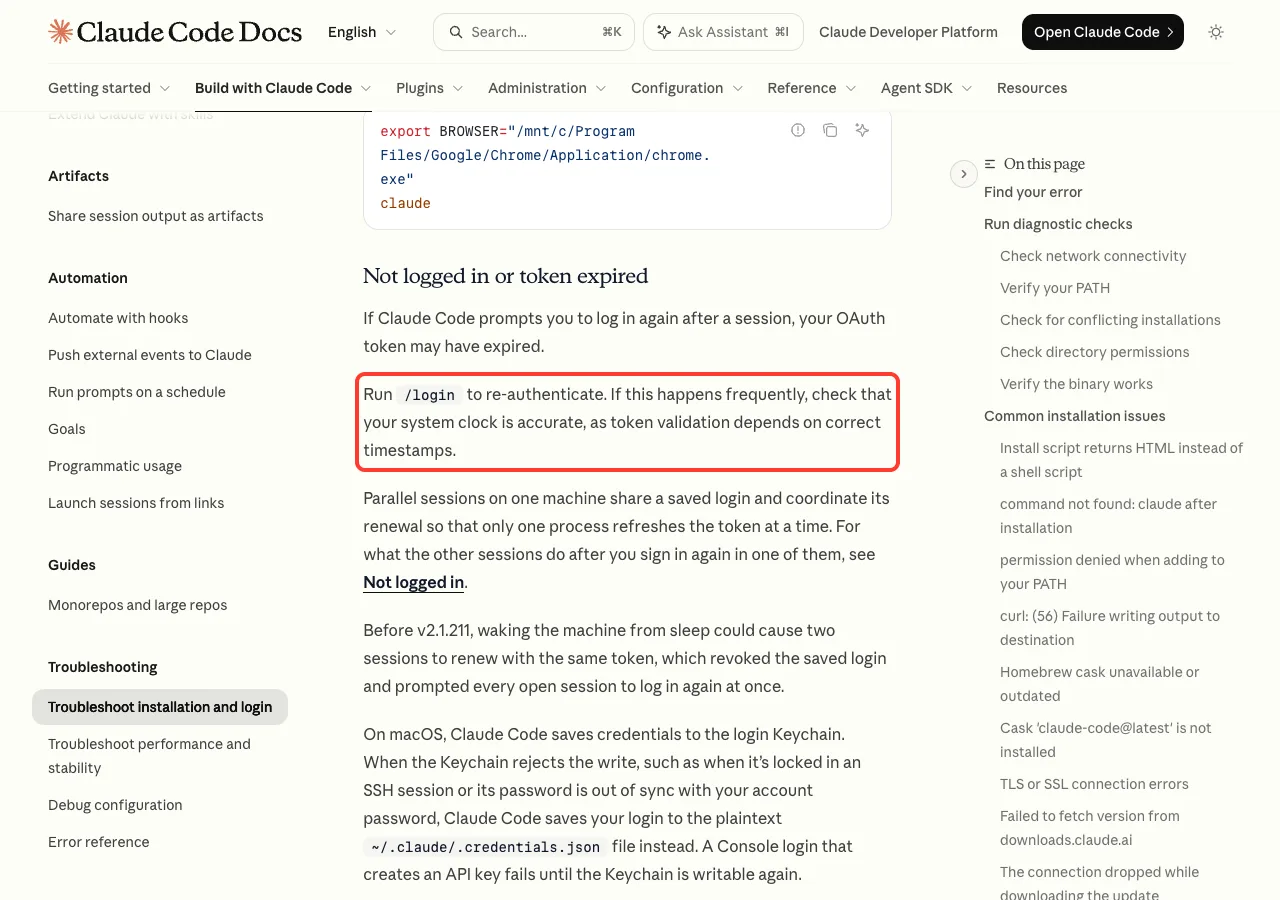
- macOS: System Settings, General, Date and Time, turn on “Set time and date automatically”. Check the offset with
sntp time.apple.com. - Windows: Settings, Time and language, turn on “Set time automatically”, then click “Sync now”.
- Linux: run
timedatectland make sure “System clock synchronized” says yes.
Step 2: Start one fresh login and finish it fast
Each login code works once and only for a short time. If you opened several sign-in tabs, or waited a long time before pasting, start over. Run /login, use only the newest browser tab, and complete it right away.
The docs’ clean reset is three steps: run /logout, close Claude Code, then start claude and sign in again. Note that logging out also removes saved MCP server logins and plugin secrets, so you may need to re-authorize those afterwards.
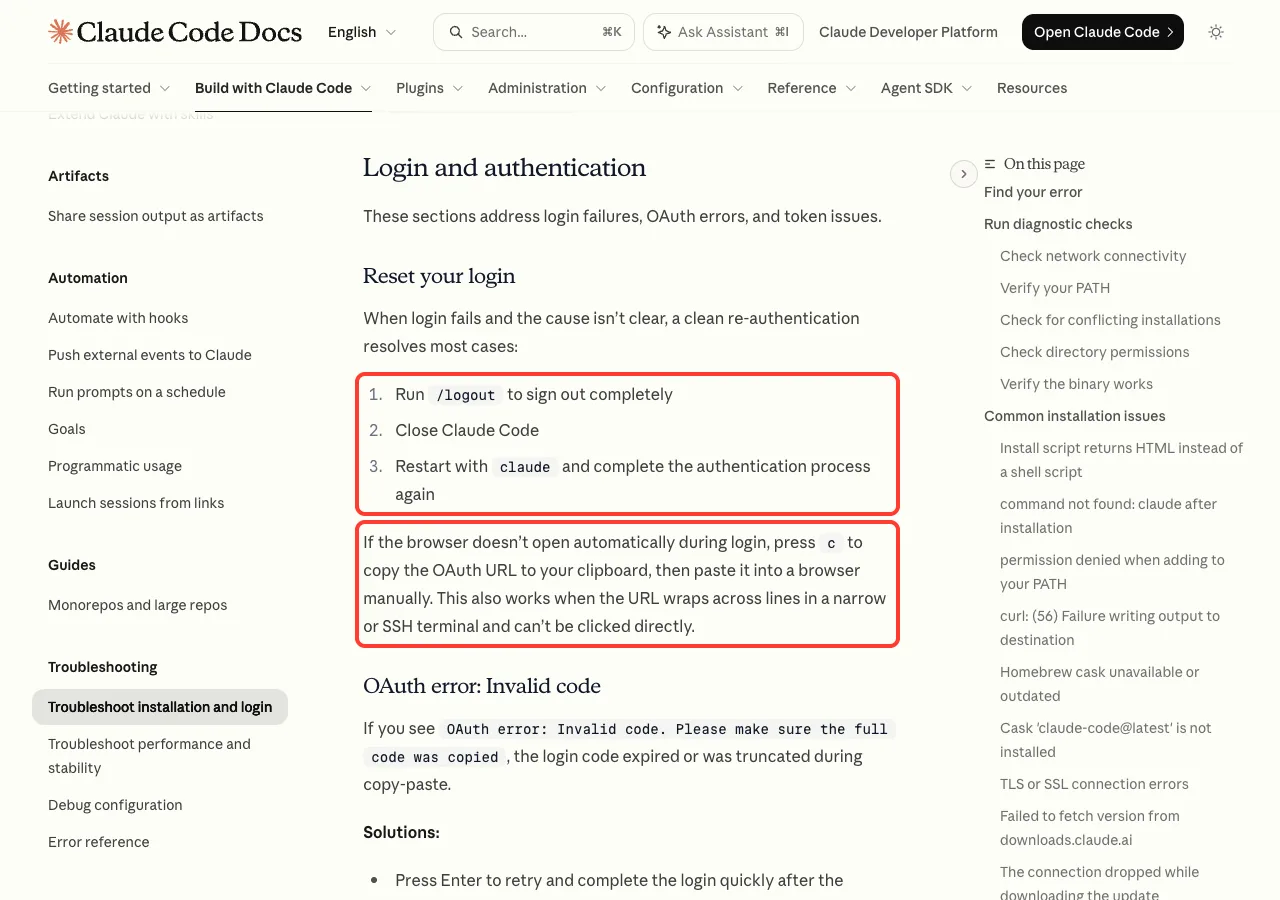
Step 3: Close other Claude Code windows
Parallel sessions share one saved login and take turns refreshing it. Before v2.1.211, waking a Mac from sleep could make two sessions refresh with the same token, which revoked the login for all of them.
Update with claude update and close extra windows before you sign in again. Our guide to the login loop fix covers this pattern in more depth.
Fix 3: Socket Is Closed
The docs define Socket is closed as a connection that was closed while a response was still arriving. The most common cause they name is a corporate proxy on Windows dropping an open tunnel. During sign-in, the same thing can cut the token exchange short.
- Run
claude update. From v2.1.214, Claude Code retries this failure instead of stopping. - Run
/loginagain on a stable connection. - If it keeps happening behind the same proxy, ask IT whether the proxy closes long or streaming connections, and review the proxy steps above.
Not sure how to update? Our page on updating Claude Code walks through every install type.
Fix 4: Certificate Errors During Sign-In
“Certificate is not yet valid” almost always means your clock is set to a date before the server’s certificate started. Fix the clock with the steps in Fix 2 and the error goes away.
A different family of errors, such as unable to get local issuer certificate or SELF_SIGNED_CERT_IN_CHAIN, means a company proxy is inspecting secure traffic. Ask IT for the proxy’s root certificate as a PEM file and point Claude Code at it.
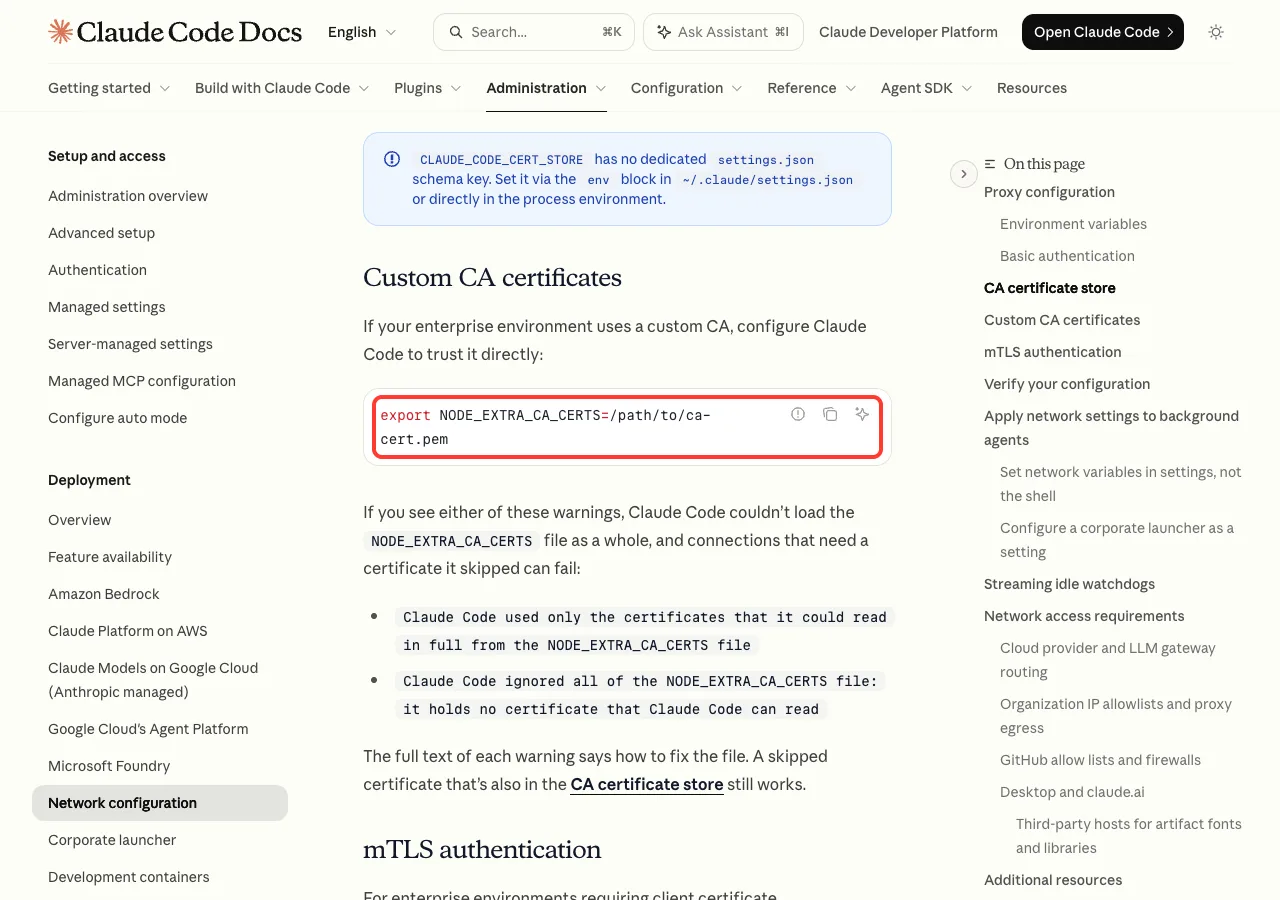
export NODE_EXTRA_CA_CERTS=/path/to/corporate-ca.pem
claude
Never set NODE_TLS_REJECT_UNAUTHORIZED=0 to make the error disappear. The docs warn it turns off certificate checks entirely.
Fix 5: Sign In on SSH, WSL2 or a Container
On a remote machine, the browser may open on the wrong computer, or the sign-in finishes and then shows a connection error for a localhost address. You don’t need to fix either problem. The docs give a copy-and-paste route instead.
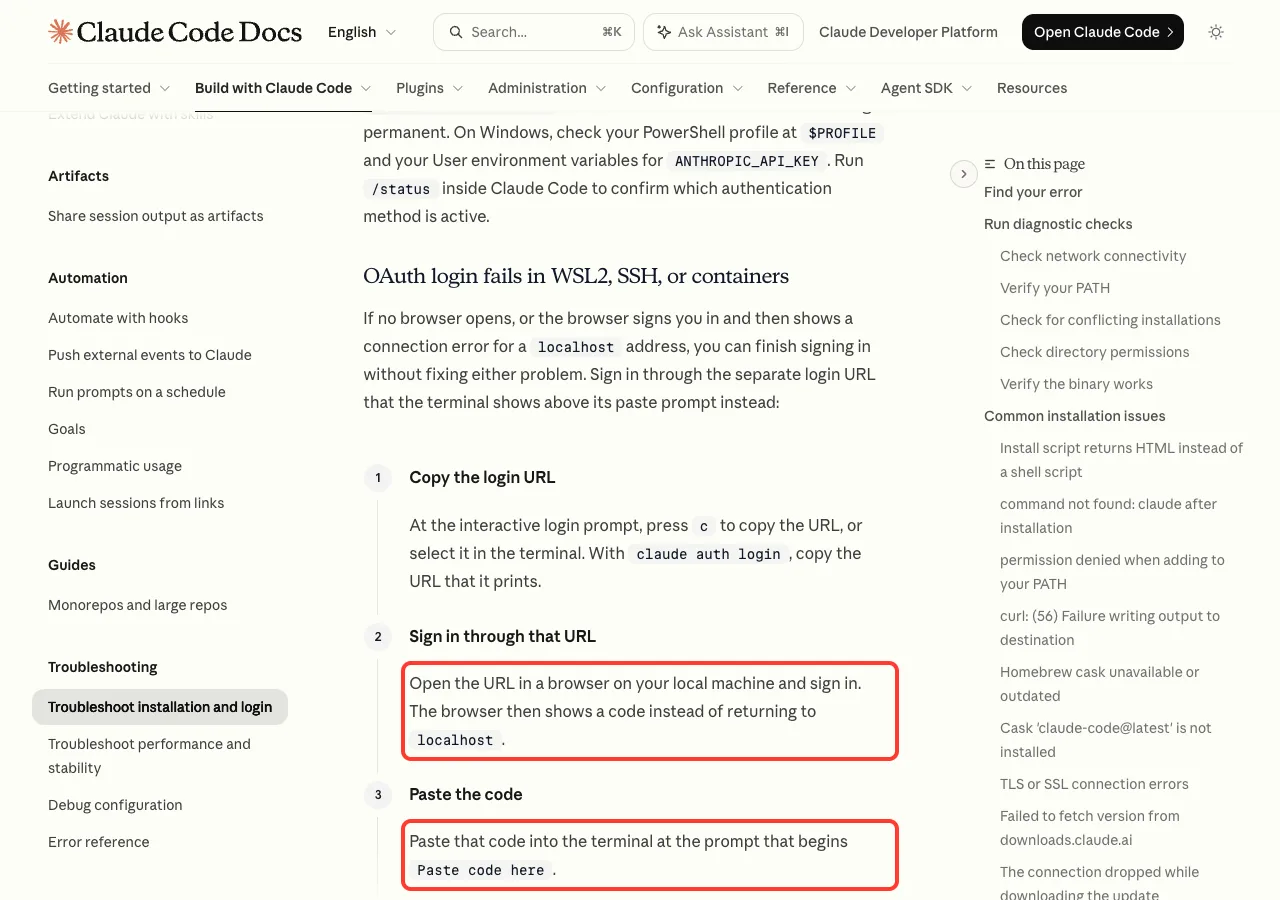
- At the login prompt, press
cto copy the URL, or copy the URL thatclaude auth loginprints. - Open it in a browser on your local machine and sign in. The browser shows a code instead of returning to
localhost. - Paste the code at the prompt that begins
Paste code here.
If pasting into the prompt does nothing, try your terminal’s other paste shortcut, or run claude auth login, which reads the pasted code from standard input. For machines where a browser login is impossible, run claude setup-token on a computer where sign-in works and set the printed token as CLAUDE_CODE_OAUTH_TOKEN on the remote one.
Which Fix Should You Try First?
Match the words in your error to the chart below. Stop at the first Yes, and only fall back to a full login reset when nothing else fits.
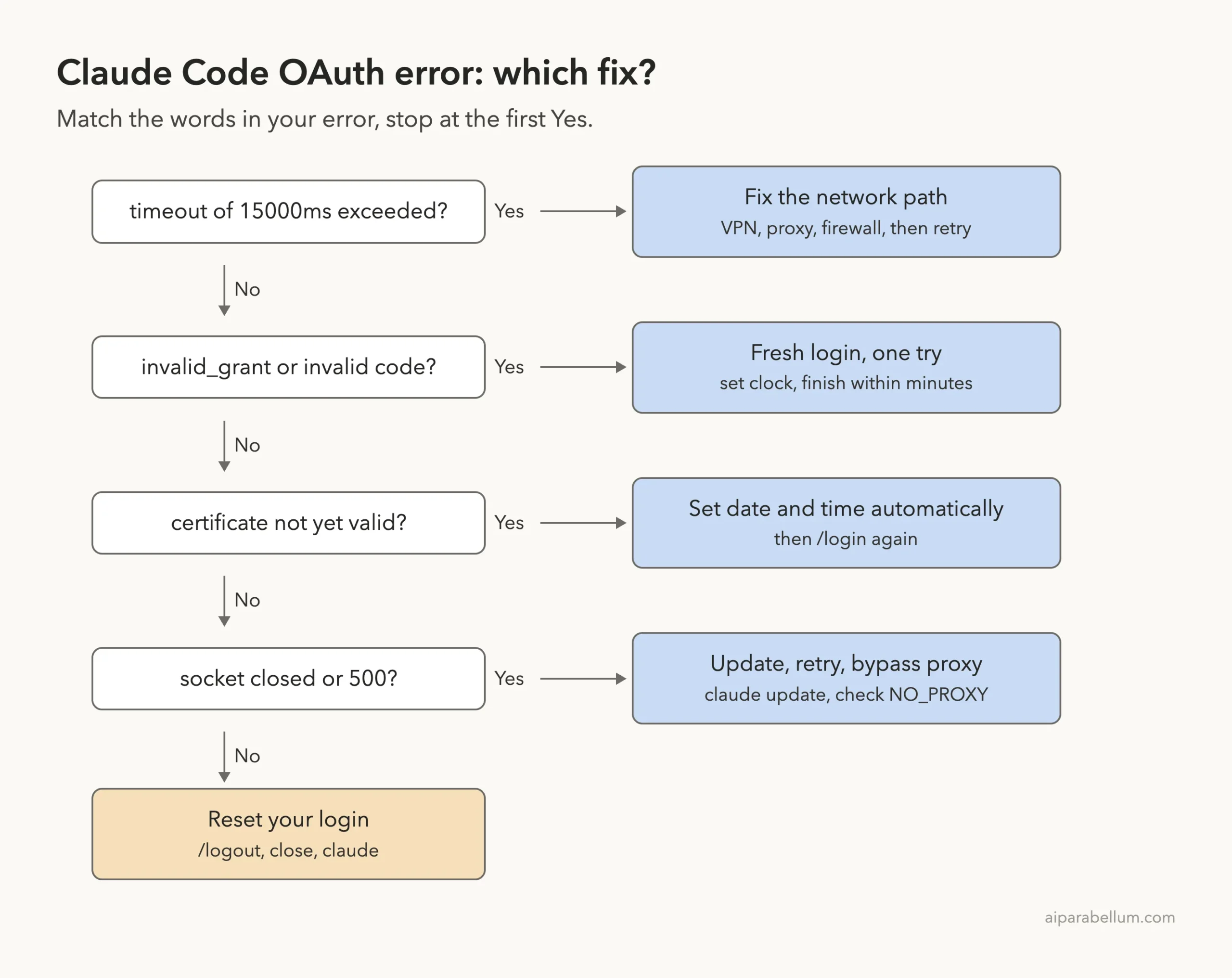
What about an OAuth error with status 500?
A 500 status means the sign-in server itself had a problem, not your computer. Wait a few minutes, check Anthropic’s status page, and try again. If the same 500 keeps coming back after an hour, use /feedback or contact support.
Real Examples
These are typical situations behind each message, matched to the fix from this guide that fits. They are common patterns, not cases we reproduced.
| Situation | Error seen | Fix to use |
|---|---|---|
| Work laptop on office Wi-Fi | timeout of 15000ms exceeded | IT allowed platform.claude.com |
| Laptop with a stale VPN | timeout of 15000ms exceeded | Disconnect VPN, new terminal, /login |
| Dual-boot PC with clock drift | certificate is not yet valid | Automatic time on, then /login |
| Pasted a code after a long break | OAuth error: Invalid code | Fresh /login, pasted within a minute |
| Several Claude Code windows after sleep | invalid_grant on refresh | claude update, one window, sign in again |
| Claude Code on a remote server | localhost connection error | Copy URL with c, paste the code |
Try It Yourself
You can run the same safe checks we ran, without touching your login. If you are already signed in to Claude Code, paste this prompt into a session and let it run the read-only commands for you.
Run these read-only checks and explain the results in plain English.
Do not change any settings and do not log me out:
1. date -u
2. sntp time.apple.com (macOS) or timedatectl (Linux)
3. env | grep -i _proxy
4. curl each of claude.ai, claude.com, platform.claude.com, api.anthropic.com
   with a 15 second limit and print the HTTP status and time
Then tell me which, if any, could cause an OAuth timeout or invalid_grant.
Common Mistakes
- Testing only claude.ai in the browser. The token exchange goes to
platform.claude.com, which a firewall can block on its own. - Setting a SOCKS proxy. Claude Code doesn’t support SOCKS, so use an HTTP or HTTPS proxy URL.
- Changing proxy variables but reusing the old terminal. Claude Code reads them once at startup.
- Opening many sign-in tabs. Only the newest code is valid, and each one works once.
- Turning off certificate checks with
NODE_TLS_REJECT_UNAUTHORIZED=0instead of adding the company CA. - Leaving an old
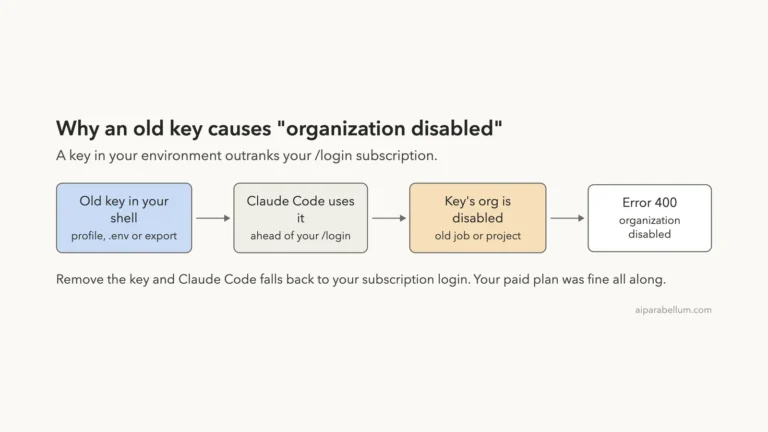
ANTHROPIC_API_KEYin your shell. It outranks your login and causes different errors; see our 401 error guide.
Pro Tips
- Run
claude doctorafter sign-in trouble on a Mac. It warns when the Keychain can’t be written, which can make logins disappear. Our doctor command guide shows the full report. - Use
/statusto confirm which login is active once you’re back in. - Put proxy and CA variables in the
envblock of~/.claude/settings.jsonso background agents get them too. - Start with
claude --debugto confirm your CA file loaded; the log shows a line forNODE_EXTRA_CA_CERTS. - Keep
claude setup-tokenfor CI and servers, not for your everyday laptop.
Claude Code OAuth Error Cheat Sheet
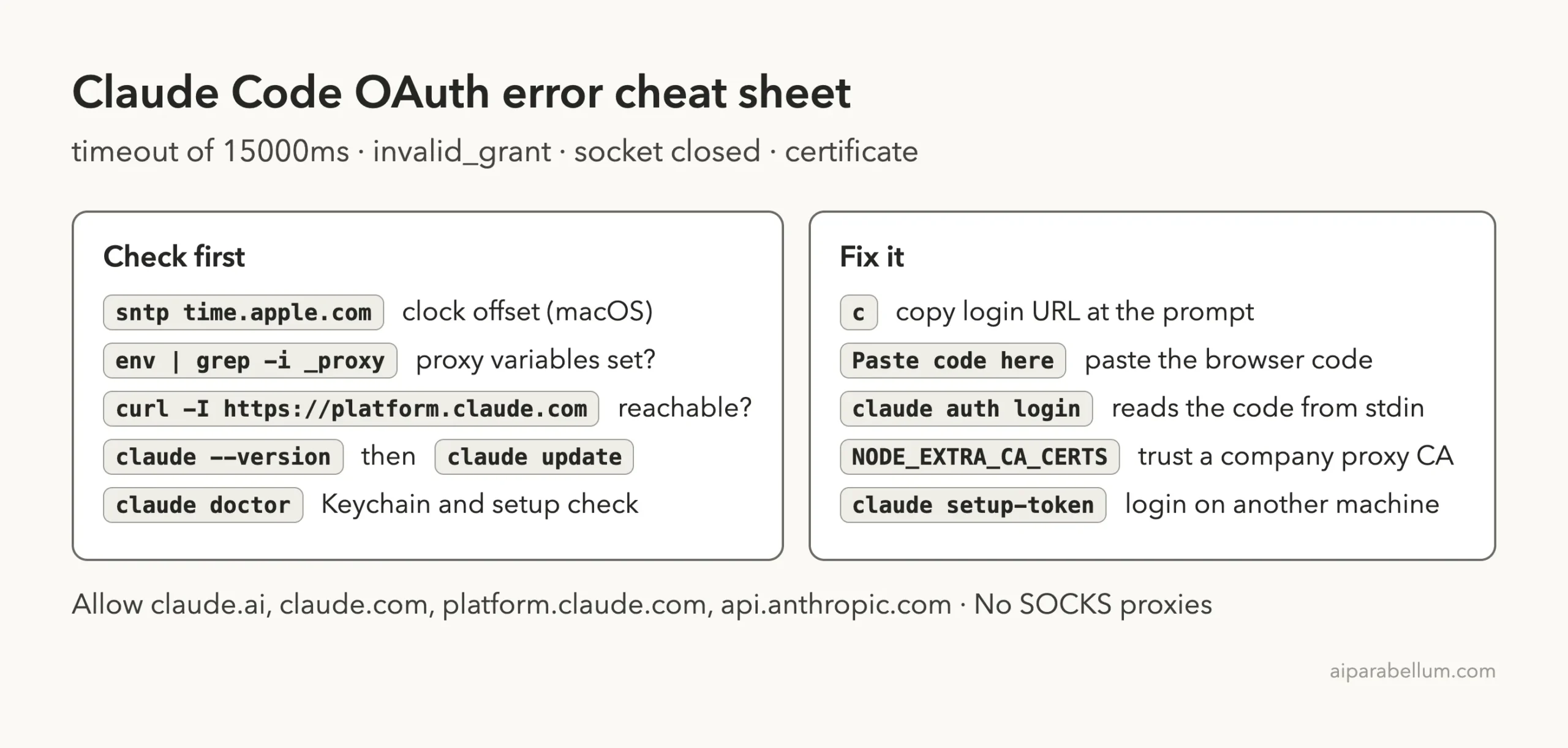
For every other message you might see, keep our list of common errors handy, along with the broader install and login troubleshooting guide. If a Cloudflare page appears instead of a sign-in screen, read our Cloudflare 403 fix.
Frequently Asked Questions
Does a Claude Code OAuth error mean my account is banned?
No. Timeouts, invalid_grant and socket errors come from the network, the clock or an expired code. Account problems show different messages, such as 403 or “organization disabled”.
Why does claude.ai work in my browser but Claude Code times out?
The terminal finishes sign-in by talking to platform.claude.com, and it may not use your browser’s proxy. Check that host with curl and set HTTPS_PROXY if your network needs one.
How long is the login code valid?
The docs don’t give an exact time, only that an “Invalid code” error means the code expired or was cut off. Paste it within a minute or two to be safe.
Do I need to log out before logging in again?
Usually not; /login replaces the old login. Use the full /logout reset only when the cause isn’t clear, since it also clears MCP logins and plugin secrets.
Can I sign in without a browser at all?
On that machine, yes. Generate a token with claude setup-token on a computer with a browser, then set it as CLAUDE_CODE_OAUTH_TOKEN. You can also use an API key from the Claude Console instead.
Conclusion
A Claude Code OAuth error is almost never a problem with your plan: “timeout of 15000ms exceeded” means a sign-in host didn’t answer in 15 seconds, invalid_grant means a code or token was rejected, and “socket is closed” means a proxy or VPN cut the connection. Check that platform.claude.com and claude.ai answer, set your clock to update automatically, fix or bypass the proxy, update with claude update, and then run one fresh /login, using the copy-and-paste code route on SSH, WSL or containers. If you’re new to sign-in options and plans, our plans guide and the overview of Claude AI are good next reads, and the official login troubleshooting docs and network configuration page have the full details.