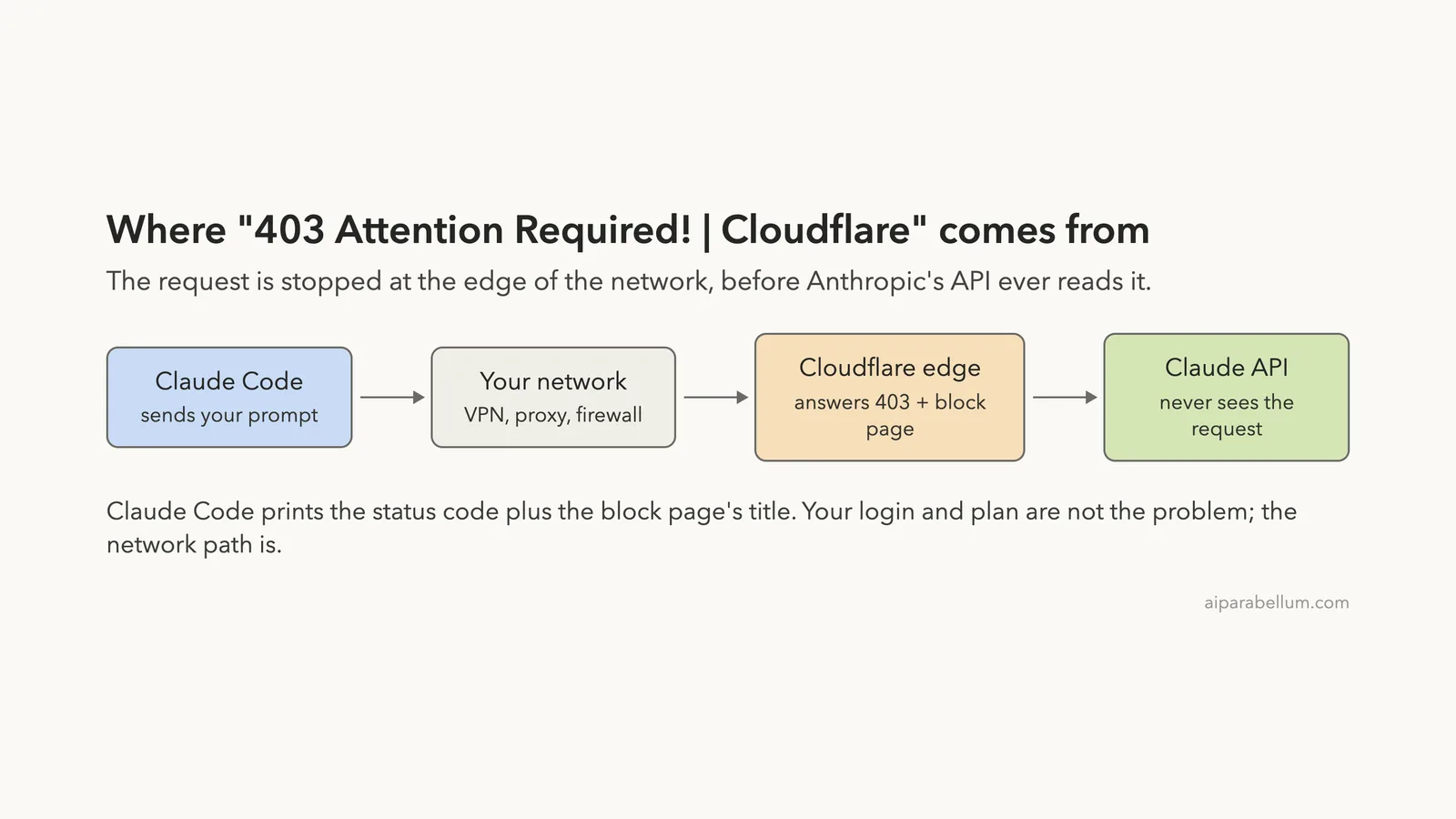
The Claude Code 403 Cloudflare error reads Failed to authenticate. API Error: 403 Attention Required! | Cloudflare, and it is a network block rather than a login problem.
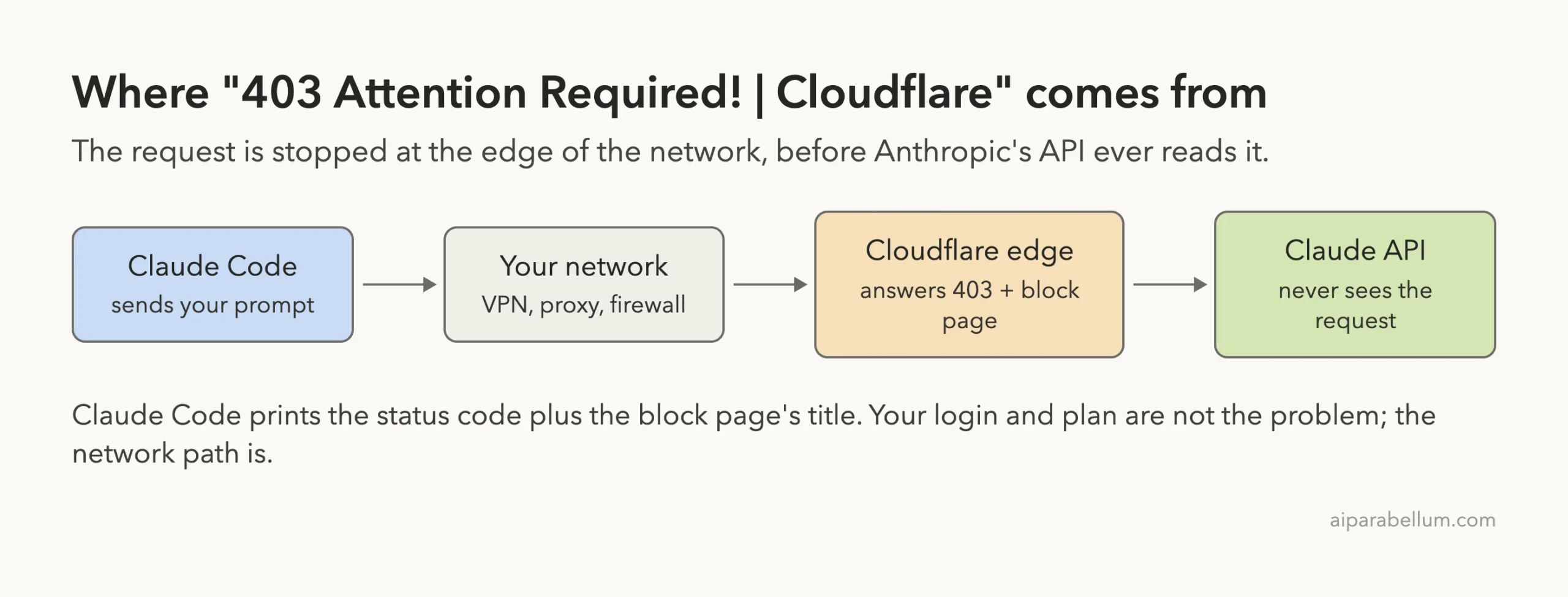
Your request was refused at the edge of the network, before Anthropic’s API ever read it. The short fix: turn off your VPN or switch its server, then try again. If you are not on a VPN, try a different network such as a phone hotspot, and check that no proxy setting or leftover ANTHROPIC_BASE_URL value is sending your requests the wrong way.
Running /login again will not clear it, and neither will reinstalling. The words after 403 are simply the title of a block page that something on the path sent back instead of an answer. Change the path your request takes and the error goes away.
This guide is part of our help series. Browse all our Claude Code tutorials for more fixes and how-tos.
Tested with Claude Code v2.1.325 on macOS on November 16, 2026. A live block depends on the network you are on and can’t be triggered on demand, so we reproduced the exact message by pointing Claude Code at a small test page on our own Mac that answers with a 403 and the same page title.
The causes and fixes come from Anthropic’s official network and error docs, and each section says which is which. We tested on macOS; the Windows and Linux steps follow Anthropic’s official instructions.
Claude Code 403 Cloudflare Error: Quick Summary
| Question | Short answer |
|---|---|
| What is it? | A 403 block page returned by the network in front of the API, not by the API itself |
| Is my account the problem? | Almost never. The request did not get far enough for your account to matter |
| Most likely cause | A VPN, a proxy, or a network whose address is being refused |
| First fix | Turn the VPN off or change its server, then send a short test prompt |
| Second fix | Switch networks, for example to a phone hotspot |
| Work network fix | Set HTTPS_PROXY and ask IT to allow Anthropic’s hosts |
Does /login help? | No. Signing in again sends the request down the same blocked path |
| Does Claude Code retry? | Not in our test: it failed once, in about one second |
What “403 Attention Required! | Cloudflare” Means
A 403 is the web’s way of saying “I understood you, and the answer is no.” The part that confuses people is the rest of the line. “Attention Required! | Cloudflare” is not an Anthropic message at all.
Anthropic’s API is reached through Cloudflare, a network service that sits in front of many websites. We checked this from our own terminal: a plain request to api.anthropic.com came back with a server: cloudflare header. When that front door refuses a visitor, it answers with a web page, and the wording in this error matches that page’s title.
Claude Code expects the API to reply in JSON, a structured format made for programs. When it gets a web page instead, it has very little to work with. Anthropic’s error reference explains what it does next: it shows the status code and the page’s title.
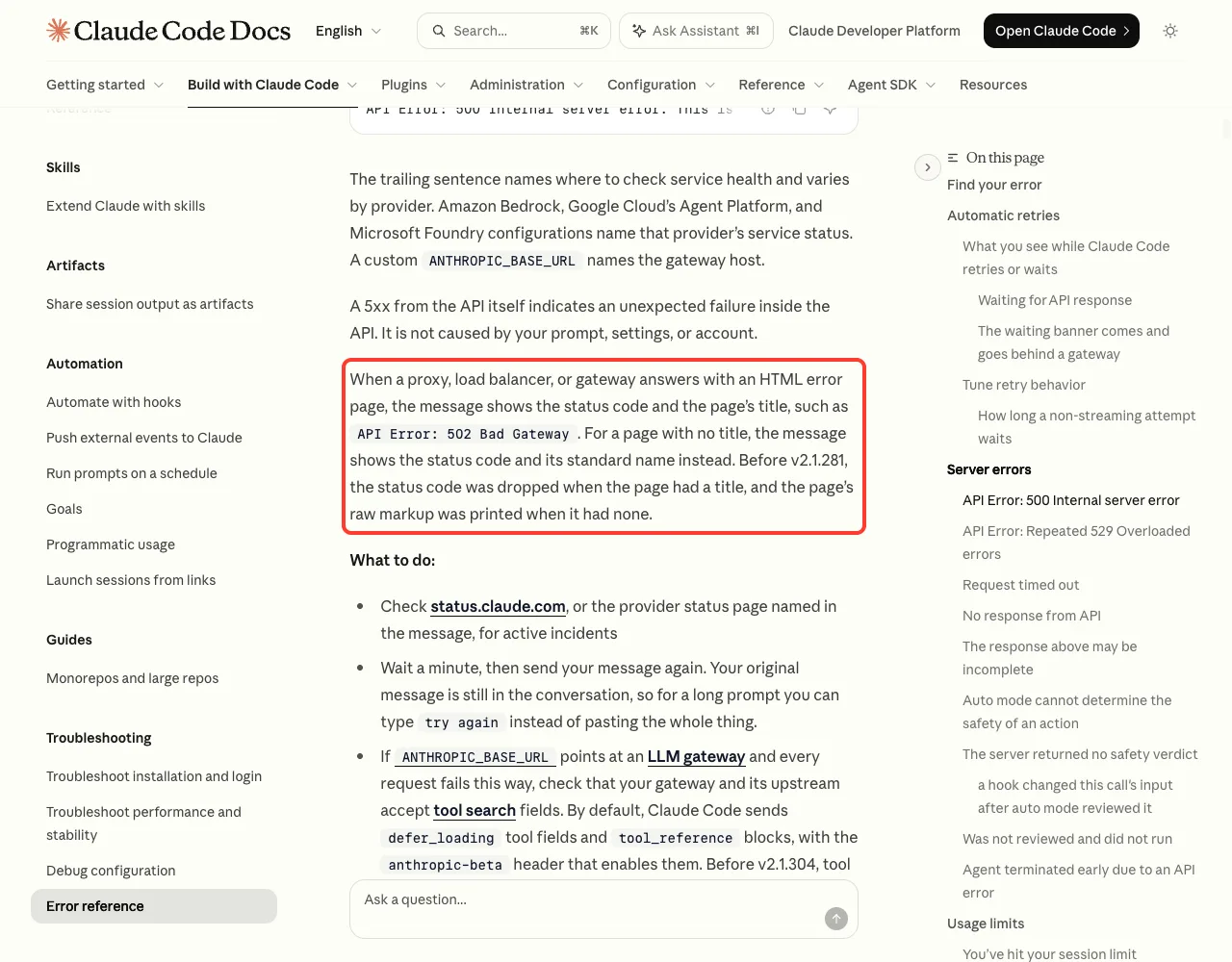
The same paragraph has a useful detail for older installs: before v2.1.281, Claude Code dropped the status code when the page had a title. So an old version may show the Cloudflare page title with no 403 in front of it, and it is the same problem.
The text after the number is a page title, not a diagnosis. Read it as “something answered with a web page instead of the API.”
Why it says “Failed to authenticate”
Claude Code treats a 403 as a sign-in failure, because a real 403 from the API usually is one. That is why the line opens with “Failed to authenticate” even though your login is fine. Our login error fixes guide covers the cases where the account really is the cause.
There is a quick way to tell the two apart. A true account 403 comes with an API message, such as API Error: 403 Request not allowed. A network block comes with a page title, such as the Cloudflare one here.
We Reproduced the Exact Error Message
To see how Claude Code builds this line, we wrote a tiny test server on our Mac. It answers every request with a 403 and a web page that carries the same Cloudflare title as the error. Then we pointed Claude Code at it with a throwaway test key, inside a demo folder.
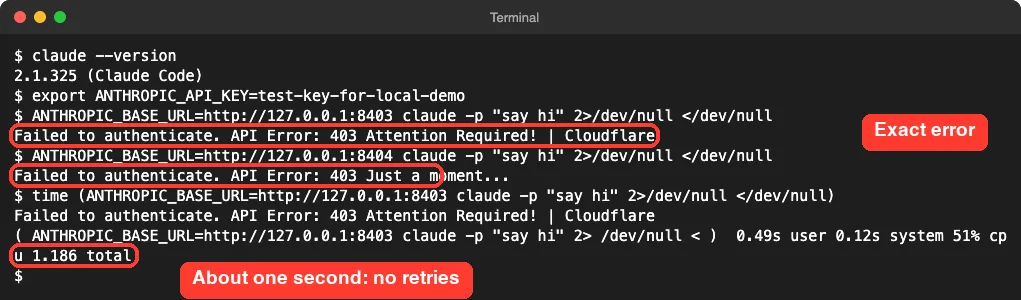
The output matched the reported error word for word. When we changed only the page title to “Just a moment…”, the message changed with it. That confirms what the docs say: Claude Code is repeating a title, and the title tells you who answered.
Two more things stood out. The failure took about 1.2 seconds, and our test server logged a single message request, so Claude Code did not retry it in this test. Waiting it out will not help the way it can with a server error.
To be clear about scope, this was our own test page, not Cloudflare. It shows how the message is formed, not why a real network blocked you. The causes below come from Anthropic’s docs.
Why a Claude Code 403 Cloudflare Block Happens
Anthropic’s docs point at the same short list of suspects every time a request fails on the way to the API: the VPN, the proxy, the firewall and the region. Here is how each one leads to a 403.
| Cause | What is going on | Where it comes from |
|---|---|---|
| VPN | Your requests leave from the VPN’s address, and that address is refused | Error reference lists a VPN that blocks api.anthropic.com as a common cause |
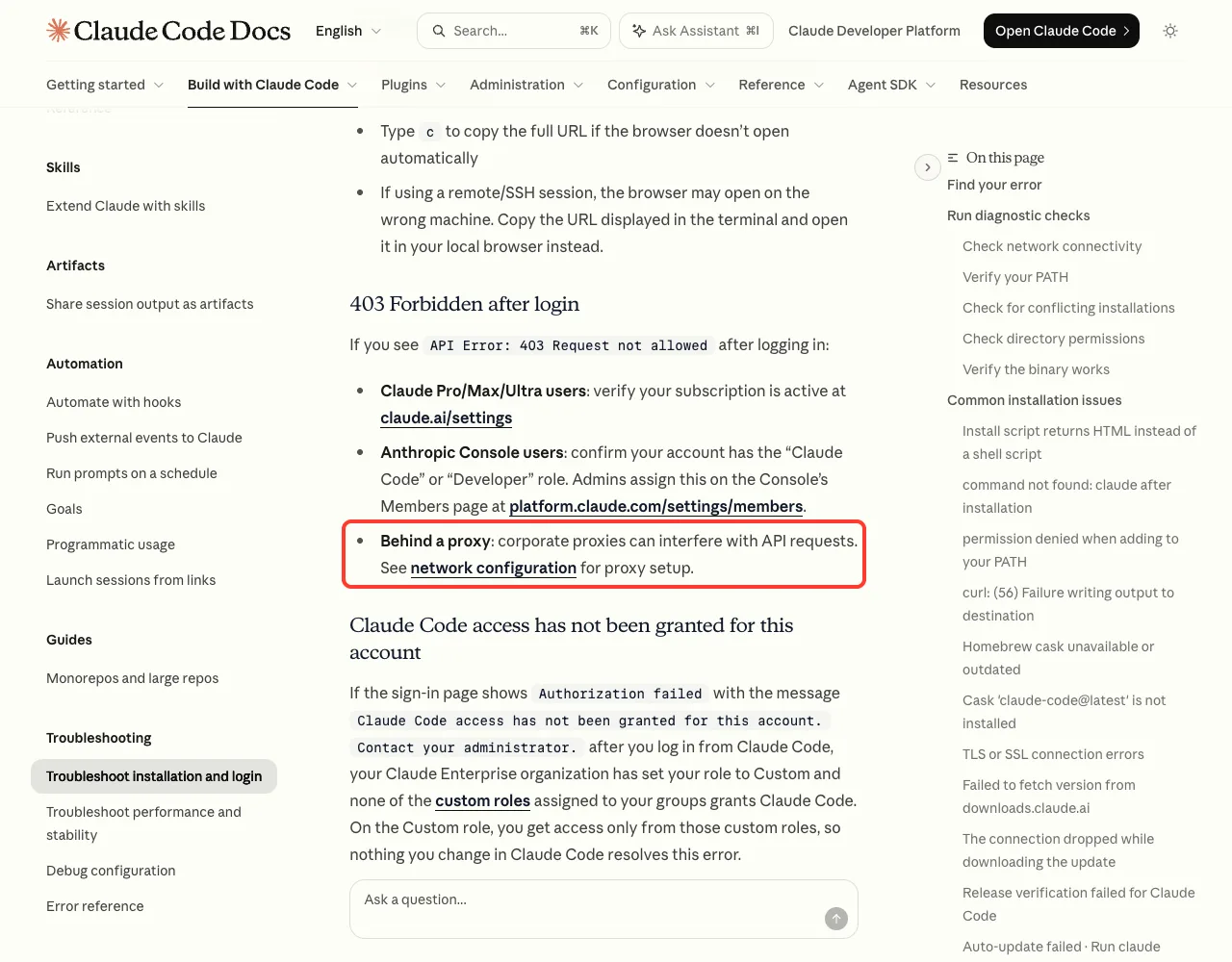
| Proxy or network filter | A device on a work or school network blocks or rewrites the request | Install troubleshooting: a 403 is usually a proxy or network filter |
| Region | Claude Code is not offered where your connection appears to be | Install troubleshooting links the supported countries list |
| Leftover settings | A stale proxy variable or ANTHROPIC_BASE_URL sends requests somewhere else | Error reference, under Unable to connect to API |
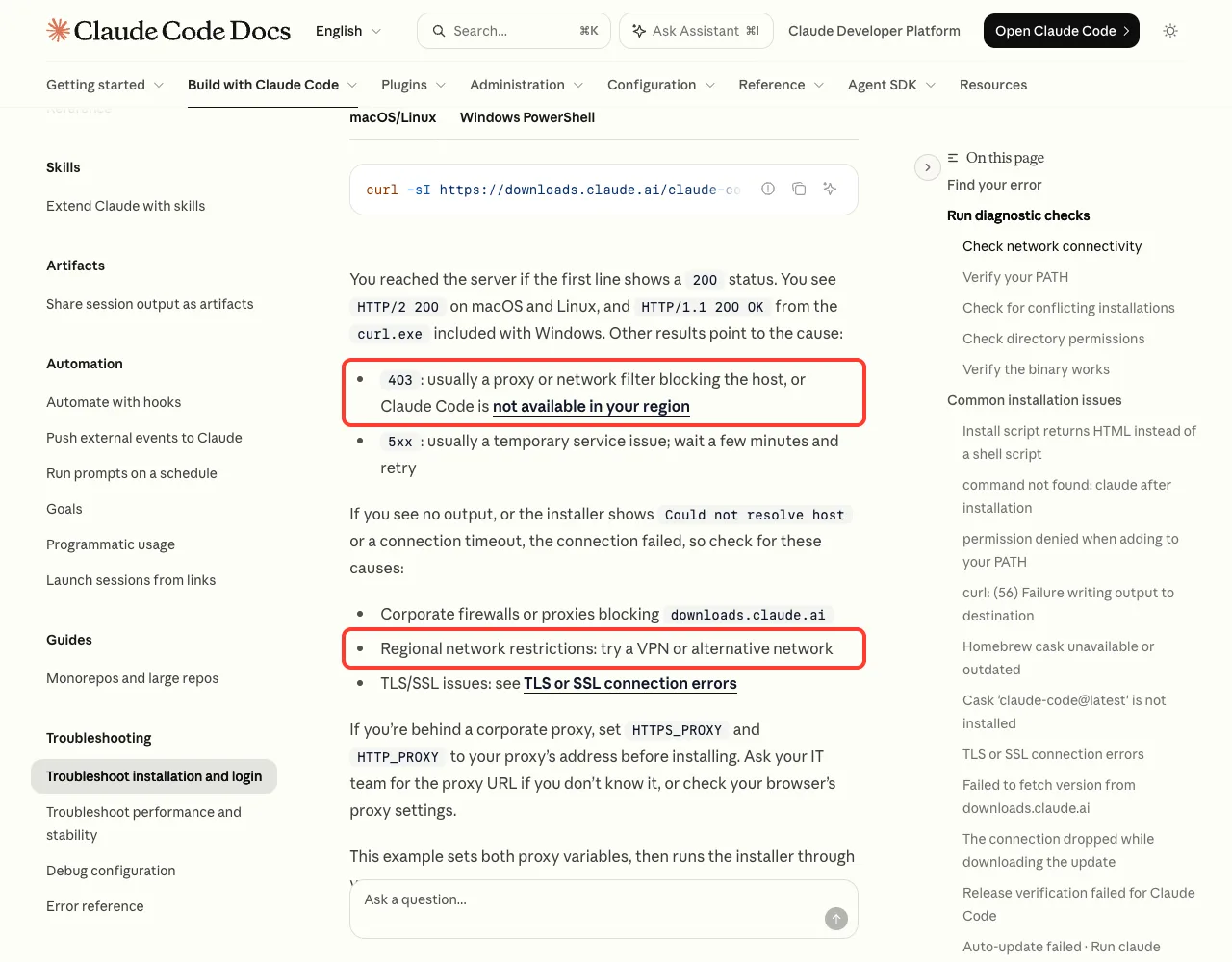
Notice that a VPN shows up on both sides. If you are in a supported country, a VPN can cause the block. If the network you are on is the restricted one, the docs suggest trying a VPN or another network to get around it.
How to Fix the Claude Code 403 Cloudflare Error
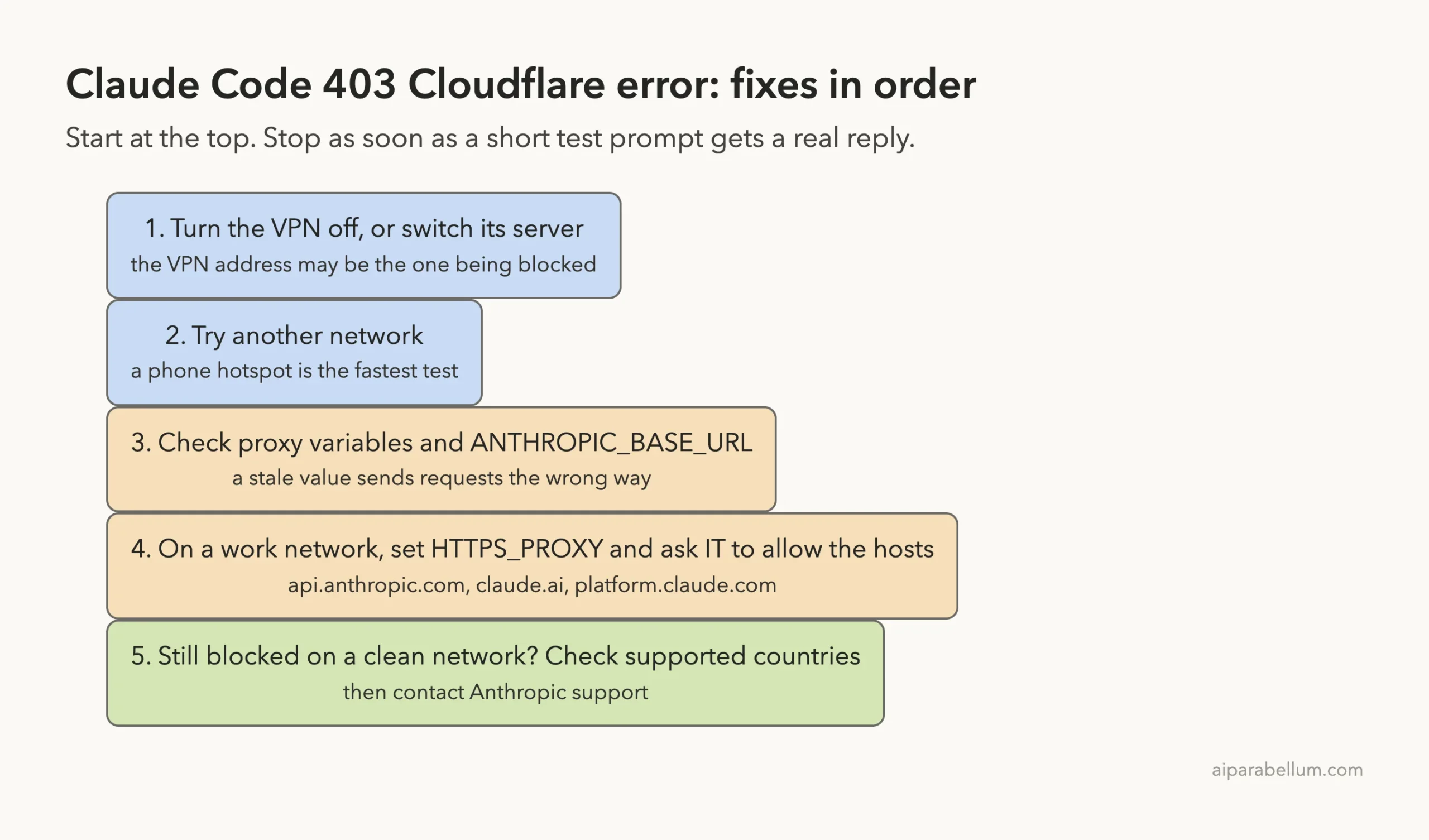
Work through these in order and stop as soon as a short test prompt gets a real reply. The first two take under a minute.
Fix 1: Turn off the VPN or switch its server
Disconnect the VPN, open a new terminal and run a short prompt. If Claude Code answers, the VPN’s address was the problem. If you need the VPN on, pick a different server or location in its app and test again.
Some VPN apps let you exclude certain apps or addresses from the tunnel. If yours does, leaving the terminal or Anthropic’s hosts outside the tunnel keeps the VPN for everything else. This step follows the docs’ list of causes; we did not test individual VPN products.
Fix 2: Try another network
Connect your computer to a phone hotspot and run the same prompt. This is the fastest way to learn whether the block belongs to the network or to your machine.
If it works on the hotspot, your usual network is filtering the request. At home, that points at the router or the internet provider. At work or school, go to Fix 4.
Fix 3: Check proxy variables and ANTHROPIC_BASE_URL
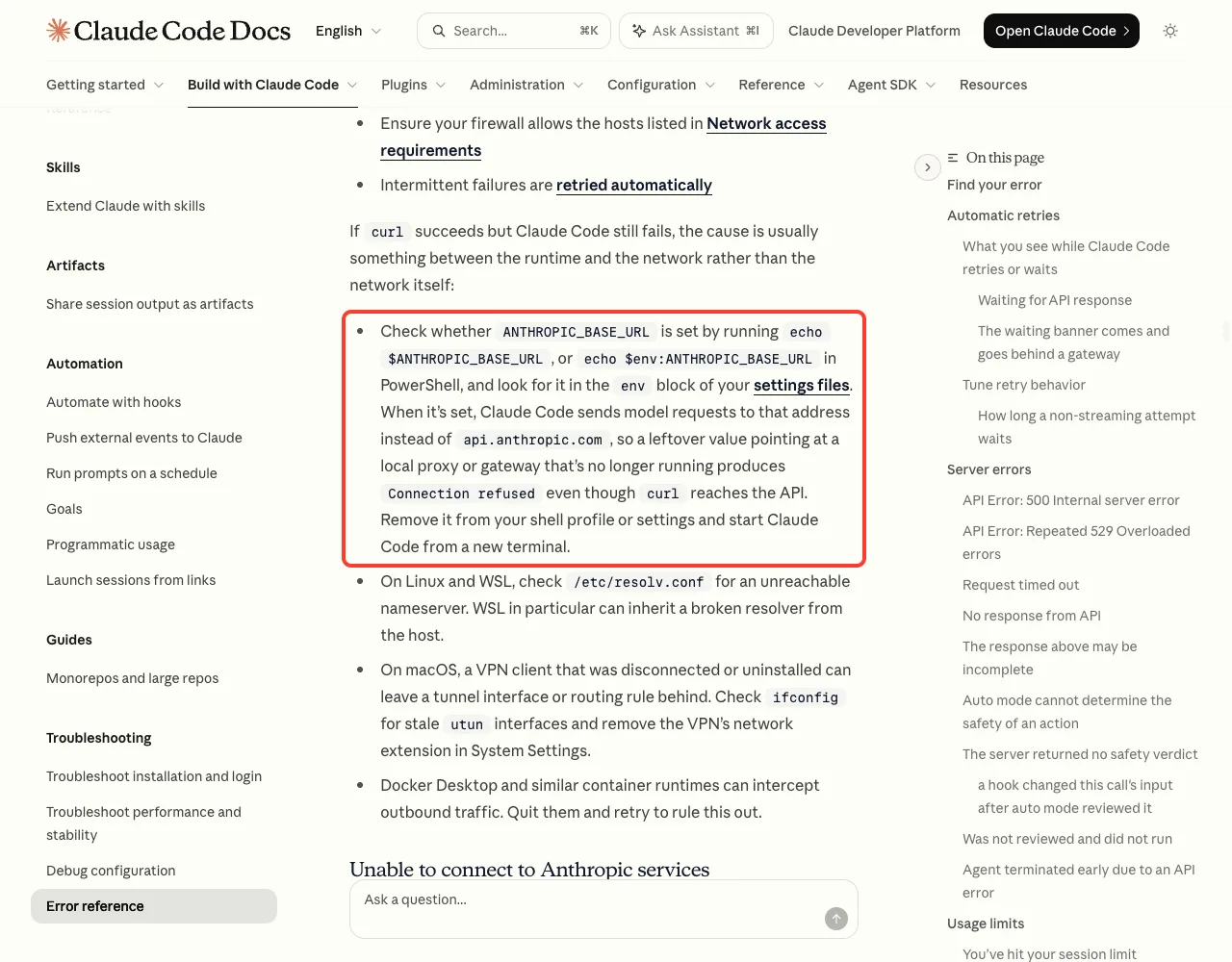
Old settings are easy to forget. A proxy variable from a past job, or an ANTHROPIC_BASE_URL left over from trying a gateway, quietly sends every request somewhere other than Anthropic.
env | grep -i proxy
echo $ANTHROPIC_BASE_URL
On Windows PowerShell, the docs give echo $env:ANTHROPIC_BASE_URL for the second check. Both commands should print nothing unless you set those values on purpose.
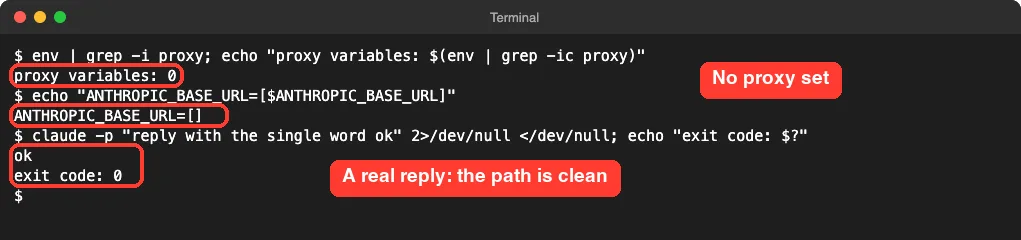
If something does print, the error reference says to remove it from your shell profile or settings and start Claude Code from a new terminal. Also look inside the env block of your settings files, since the same values can live there. Our guide to environment variables shows where each one can be set.
ANTHROPIC_BASE_URL values: check the shell and the env block of your settings files.Fix 4: On a work network, set the proxy and ask IT to allow the hosts
Many offices require all traffic to pass through a company proxy. If Claude Code doesn’t know about it, requests take a path the network refuses. The network docs say Claude Code respects the standard proxy variables.
export HTTPS_PROXY=https://proxy.example.com:8080Ask your IT team for the real address. Set it before you launch Claude Code, because the docs note that shell variables are read once at startup. One limit to know: Claude Code does not support SOCKS proxies.
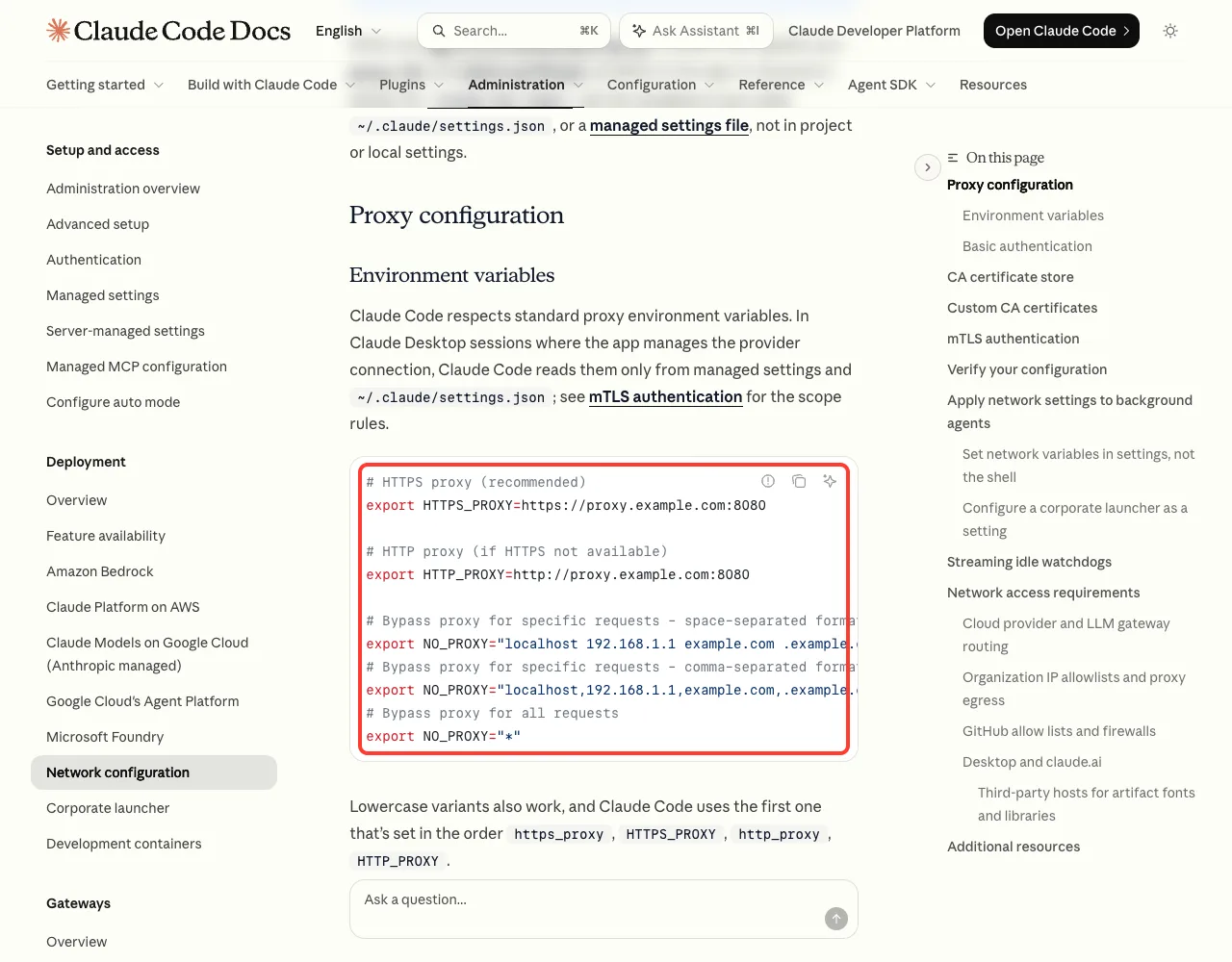
To make it stick, put the same value in the env block of ~/.claude/settings.json. The docs say every variable on that page can be set there.
{
  "env": {
    "HTTPS_PROXY": "https://proxy.example.com:8080"
  }
}
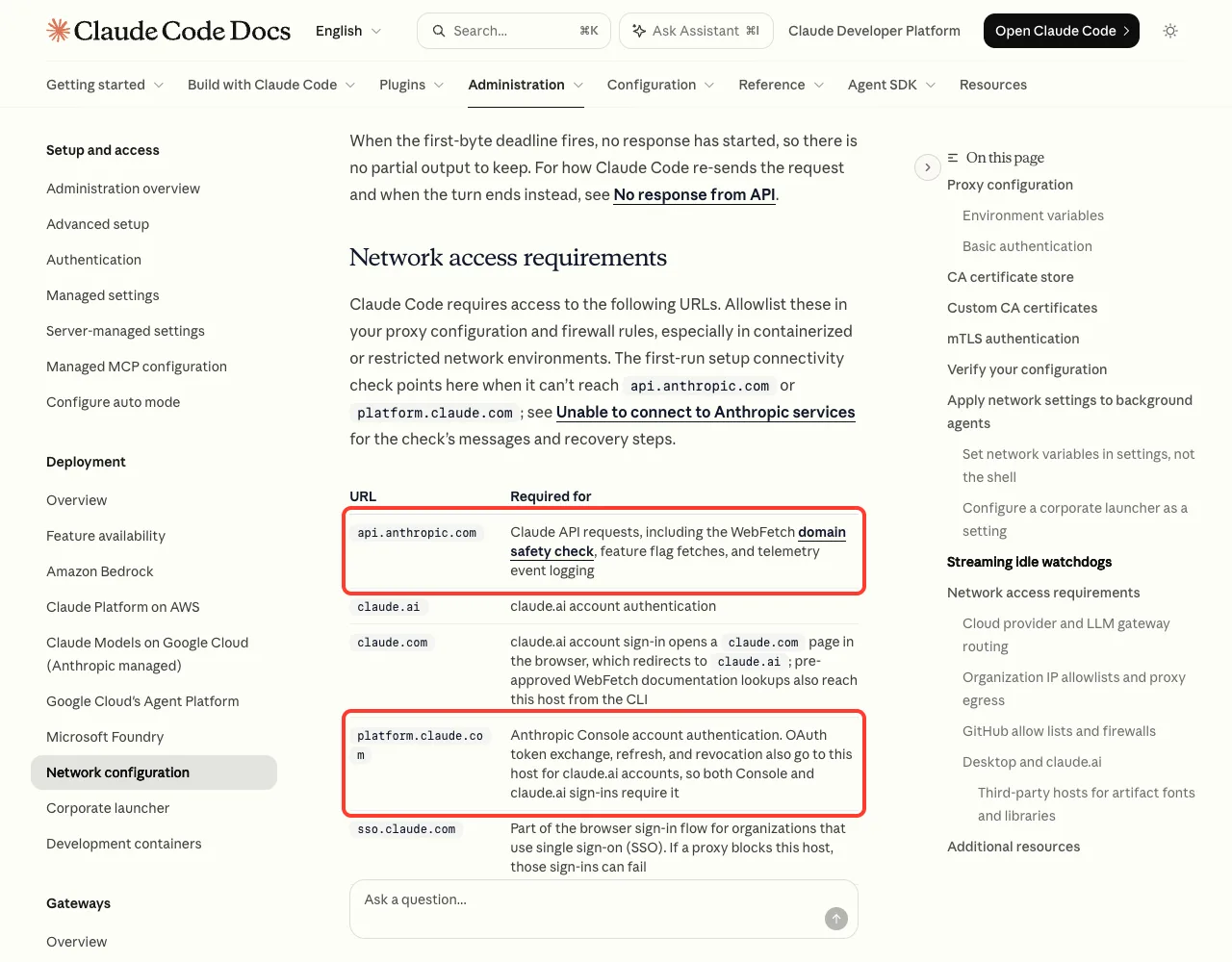
Then send IT the list of hosts Claude Code needs. For sign-in and everyday requests, the key ones are api.anthropic.com, claude.ai, claude.com and platform.claude.com. The full table is on the network configuration page.
Fix 5: Check supported countries, then contact support
If every network gives you the same block and nothing is set on your machine, check Anthropic’s supported countries list. The docs name region as the other usual reason for a 403.
If you are in a supported country and still blocked on a clean network, that is the point to contact Anthropic support. Include the full error line and the network you were on.
How to Confirm the Network Path Is Clean
You don’t have to guess whether a fix worked. The error reference gives one command to test whether you can reach the API host from the same shell.
curl -I https://api.anthropic.comOn Windows PowerShell, use curl.exe -I https://api.anthropic.com so the built-in alias is not used. We added one more check of our own that makes the result easier to read: ask for the messages address and look at what comes back.
curl -s https://api.anthropic.com/v1/messages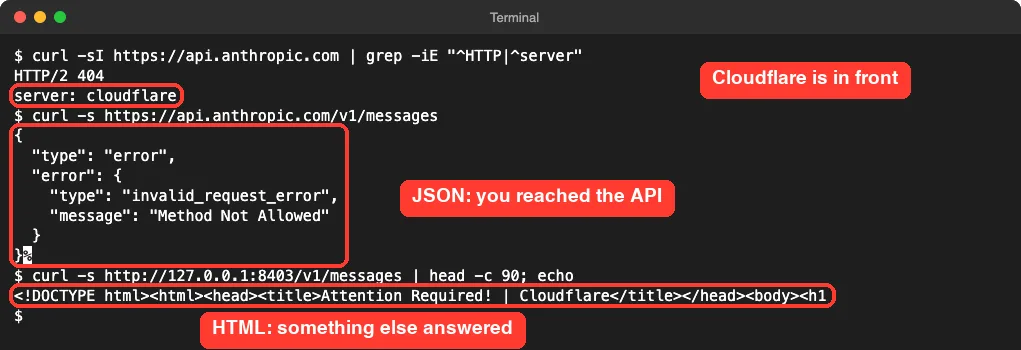
On our Mac the reply was a small JSON error saying “Method Not Allowed”. That sounds bad, but it is good news: it is the real API talking. If you see HTML with a block page title instead, you are still blocked, and Claude Code will be too.
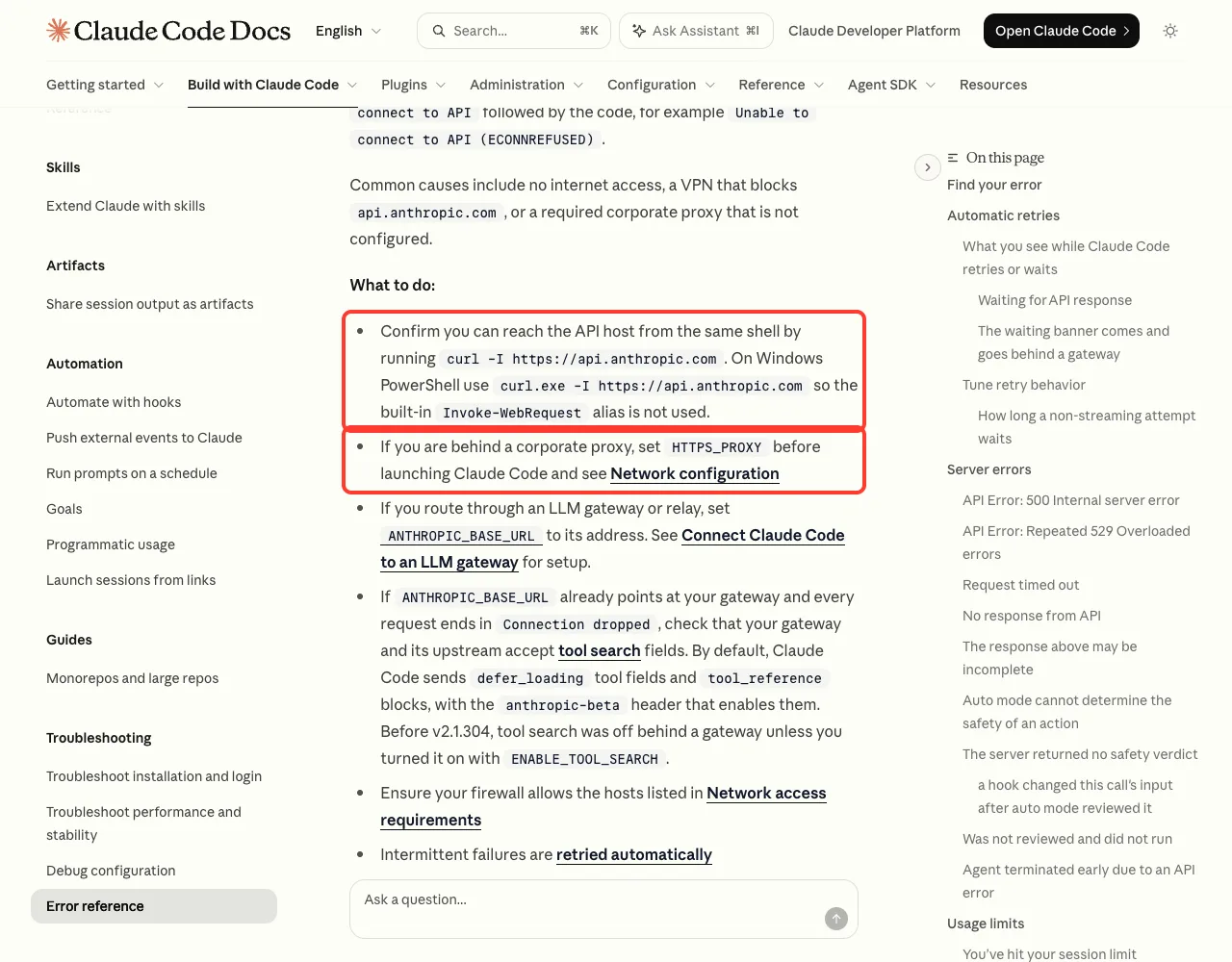
curl, and set HTTPS_PROXY if you are behind a corporate proxy.When curl works but Claude Code still fails
The error reference covers this case too. It suggests checking ANTHROPIC_BASE_URL first, as in Fix 3. On macOS, it adds that a VPN you disconnected or removed can leave a tunnel or routing rule behind, and that container tools such as Docker Desktop can intercept outgoing traffic.
If the request never connects at all, you will see a different message. Our connection error guide covers ConnectionRefused, ECONNRESET and timeouts.
Related 403 Messages in Claude Code
Not every 403 is this one. The text after the number tells you which fix applies.
| Message | What it means | Where to look |
|---|---|---|
403 Attention Required! | Cloudflare | A block page answered instead of the API | This guide: VPN, proxy, network |
403 Request not allowed | The API refused the account after login | Subscription status or Console role |
403 with another page title | A different proxy or gateway answered with its own page | The device named in the title |
Gateway refused the request | Your company’s Claude gateway said no | Your gateway administrator |
For a wider list of messages and what each one means, see our roundup of common errors. If you suspect an outage rather than a block, a Claude status check takes a few seconds.
Try It Yourself
Run this after each change you make. It sends one tiny request and prints the result, so you know right away whether the path is clear.
claude -p "reply with the single word ok"; echo "exit code: $?"A reply of “ok” and an exit code of 0 means you are through. If the 403 line comes back with exit code 1, move to the next fix on the list.
Common Mistakes
- Running
/loginover and over. The login is not what was refused, so a fresh one changes nothing. - Reinstalling Claude Code. The block sits on the network, outside the app.
- Setting a proxy variable in a terminal while Claude Code is already running. It only reads shell variables at startup, so restart it.
- Using a SOCKS proxy address. Claude Code does not support SOCKS, so use an HTTP or HTTPS proxy.
- Testing in a browser only. The Claude AI website loading in your browser does not prove the terminal takes the same path, especially with a per-app VPN or proxy.
- Writing retry loops in scripts. In our test the failure was instant and not retried, so a loop just repeats the block.
Pro Tips
- Read the words after the number first. A page title means a network device answered; an API sentence means the API did.
- Run
/statusinside Claude Code to see the Proxy row. The docs say it shows the active proxy URL and flags a value it can’t parse. - Start with
claude --debugwhen a proxy or certificate setting doesn’t seem to apply. The debug log shows what loaded. - Keep proxy settings in
~/.claude/settings.jsonrather than a shell profile if you use background agents. The docs note that shell exports don’t reliably reach them. - Update Claude Code. Since v2.1.281 the message keeps the status code next to the page title, which makes this error much easier to recognize.
- For other status codes, our guide to API error 400 and 500 explains which ones are worth retrying.
Cheat Sheet
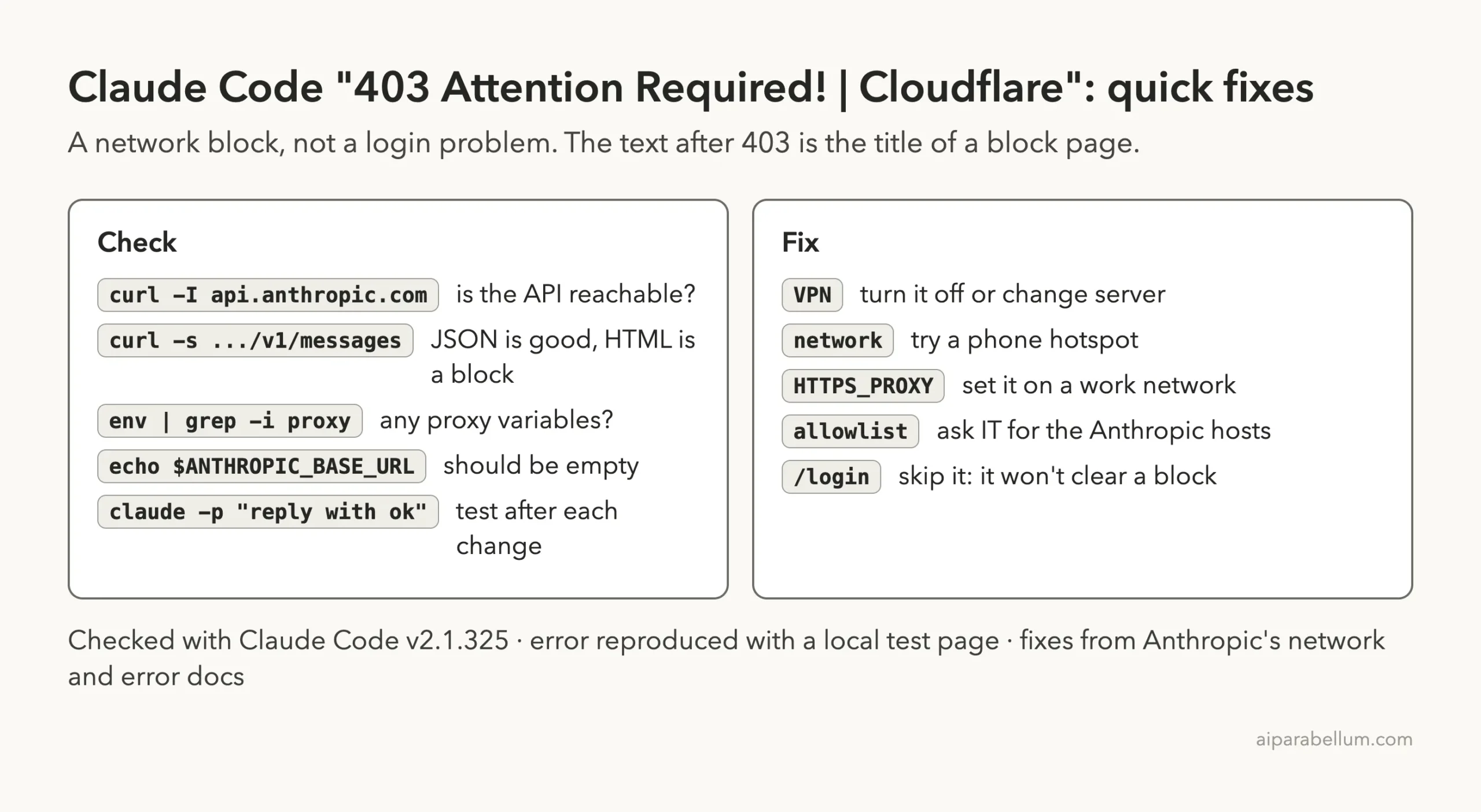
Frequently Asked Questions
Is my Claude account banned if I see 403 Attention Required! | Cloudflare?
No. This message is a block page from the network in front of the API, and it is tied to where your request came from, not to your account. An account problem shows an API message after the number instead of a page title.
Why does Claude Code say “Failed to authenticate” for a network block?
Claude Code treats a 403 status as a sign-in failure, because that is what a 403 from the API normally means. It can’t see inside the block page, so it reports the status code and the page’s title. We confirmed this with a local test page in v2.1.325.
Will logging in again fix the Claude Code 403 Cloudflare error?
No. A new login travels the same blocked path. Fix the path first by changing the VPN, the network or the proxy setting, and your existing login will work again.
Does Claude Code work with a VPN?
It can, but Anthropic’s error reference lists a VPN that blocks api.anthropic.com as a common cause of connection failures. If you hit this error with a VPN on, turn it off or switch servers and test again.
What should I ask my IT team for?
Ask for the company proxy address to put in HTTPS_PROXY, and ask them to allow the hosts in Anthropic’s network access table, starting with api.anthropic.com, claude.ai, claude.com and platform.claude.com. The network configuration page has the full list to forward.
Conclusion
The Claude Code 403 Cloudflare error is a network block wearing a login error’s clothes: a block page answered instead of the API, and Claude Code printed the status code and that page’s title. Turn off or switch the VPN, try another network, clear stale proxy and ANTHROPIC_BASE_URL values, and on a work network set HTTPS_PROXY and get Anthropic’s hosts allowed. Confirm with a short test prompt after each change, and check the official error reference and troubleshooting guide if a different message appears.