If you are wondering what’s new in Claude Code this week, the short answer is: a lot. Anthropic shipped four versions between November 9 and November 13, 2026, with an experimental Code Mode, a new default Fable model and several permission changes that can surprise you if you use the sandbox. We updated, tried the main changes in a small demo folder and wrote down what really happens.
This weekly roundup is part of our Claude Code tutorials. If you missed the previous one, read last week’s roundup first.
Tested with Claude Code v2.1.325 on November 16, 2026, on macOS, inside a small throwaway demo folder. Everything else in this post comes from the official changelog entries dated November 9 to November 13, 2026.
What’s New in Claude Code: The Week at a Glance
The changelog lists four versions for this week and 552 entries in total. About two thirds of them are bug fixes, so the list of things you will notice is much shorter than it sounds.
| Version | Date | Headline change | Entries |
|---|---|---|---|
| 2.1.321 | November 9, 2026 | Claude Fable 5.2 becomes the default Fable model | 118 |
| 2.1.322 | November 10, 2026 | Fast mode on Vertex in the global, us and eu regions | 1 |
| 2.1.323 | November 12, 2026 | Code Mode, an experimental opt-in | 294 |
| 2.1.325 | November 13, 2026 | Sandboxed Bash commands follow the normal permission flow | 139 |
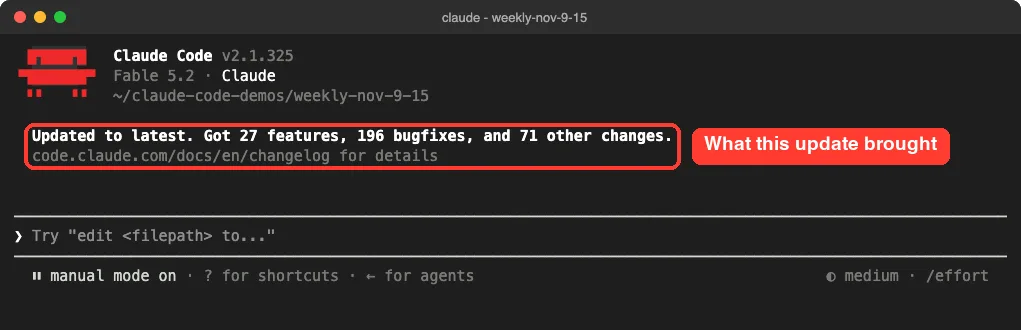
When we started Claude Code after updating from 2.1.322 to 2.1.325, it summed up the jump on the welcome screen. Your numbers will differ, because they depend on the version you update from.
Code Mode: Claude Writes JavaScript to Call Its Tools
Code Mode is the biggest of the Claude Code updates this week. Normally Claude asks for one tool call at a time, such as a file read or a shell command, and reads each result before the next step. In Code Mode, Claude writes one piece of JavaScript that makes several tool calls, and Claude Code runs that code in your session.
Anthropic’s docs say it suits tasks with many related tool calls: a change repeated across many files, a search whose results need filtering, or several independent commands that can run together. It is experimental, off by default, and the docs warn it may change or be removed in any release.
How to Turn On Code Mode
You need Claude Code v2.1.323 or later, an interactive terminal session, and a Claude subscription or Console account. Then start Claude Code with one environment variable set:
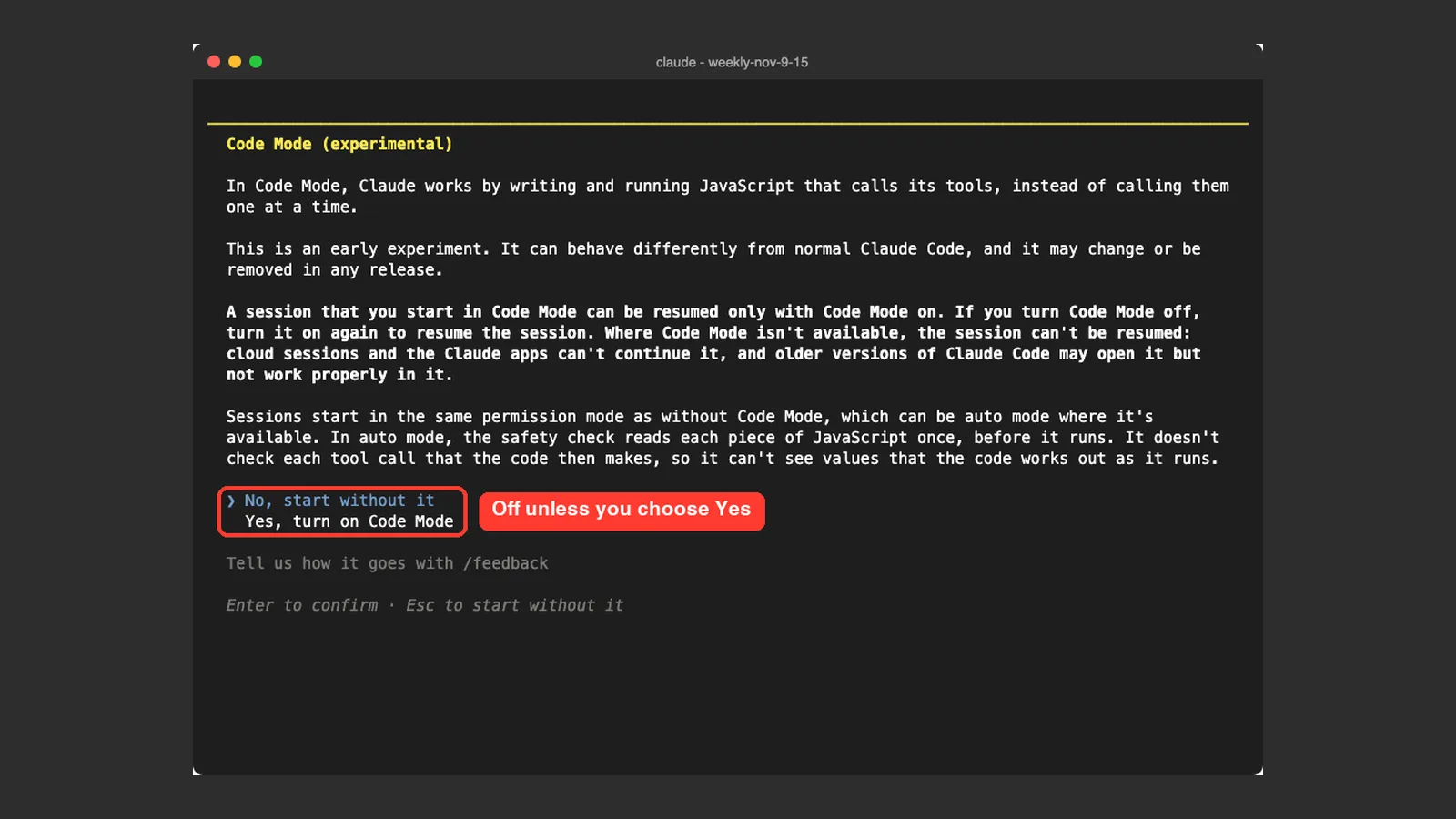
CLAUDE_CODE_EXPERIMENTAL_CODE_MODE=1 claudeClaude Code asks you to confirm before the first Code Mode session. The default choice is No, so nothing changes unless you pick Yes, turn on Code Mode.
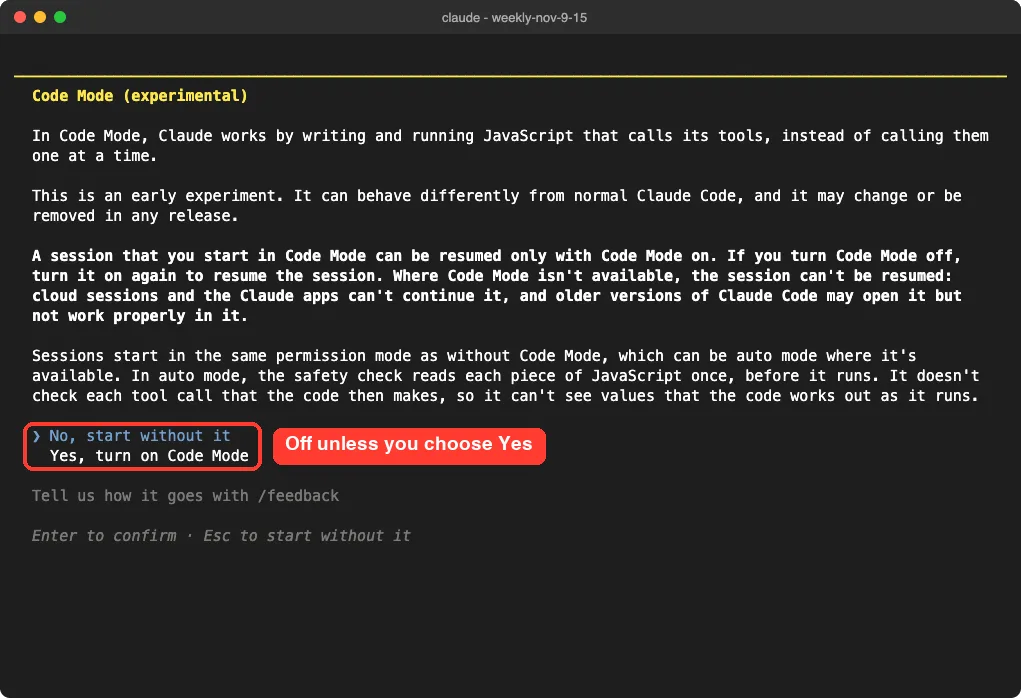
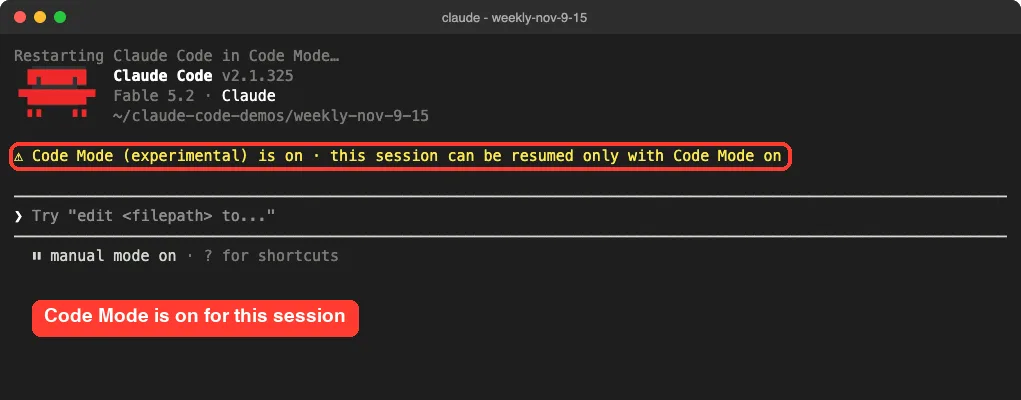
After we chose Yes, Claude Code restarted and showed a yellow line near the top. That line is your proof that the session is really in Code Mode.
Our Code Mode Test
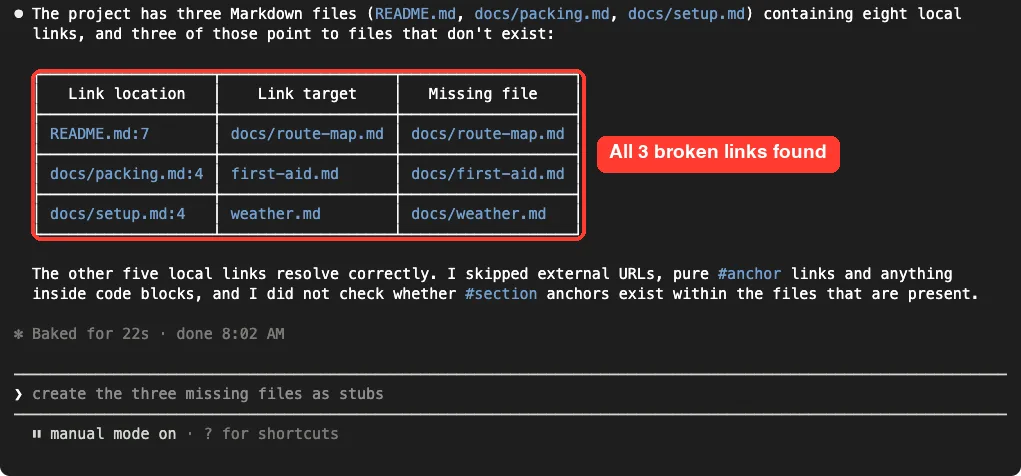
Our demo folder held three small Markdown files with eight local links. We broke three of those links on purpose, then sent the sample prompt from the docs:
Read every Markdown file in this project and list the links that point to local files that don't exist.Claude found all three broken links and finished in 22 seconds. It still asked for permission once, for a shell command that checked which files exist, because we were in manual mode.
In the conversation you see the tool calls, not the code. To read the code, press Ctrl+O to open the transcript, find the Code row, and press Ctrl+E to expand it.
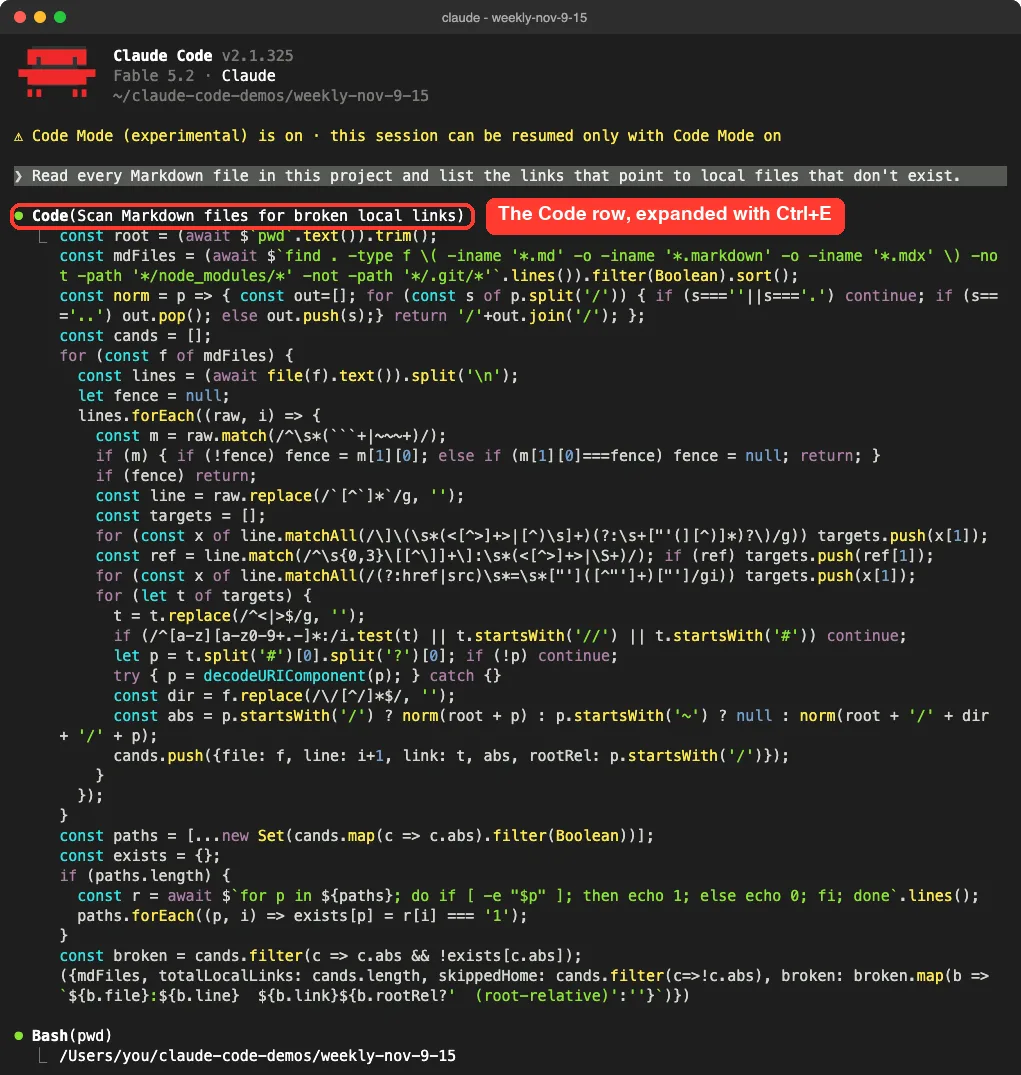
Code Mode did the job in one script instead of many separate steps, but this was one small test, not a speed benchmark.
Code Mode Limits to Know First
- A session started in Code Mode can be resumed only in the terminal with Code Mode on.
- It does not work with
-p, the Agent SDK, the VS Code panel, the Desktop app or cloud sessions. - Remote Control, Claude in Chrome and computer use are not available in a Code Mode session.
- In auto mode, the safety check reviews each piece of code once, not each tool call the code makes.
- Code that cannot run in the background stops after ten minutes.
To turn it off, remove the variable or set it to 0, then start a new session. Organizations can block it by setting the same variable to 0 in managed settings.
Claude Fable 5.2 Is the New Default Fable Model
Version 2.1.321 added Claude Fable 5.2, with the model ID claude-fable-5-2. The changelog lists a 1M context window and API prices of $8 per million input tokens, $40 per million output tokens and $0.20 per million tokens for cache reads.
If you had saved Fable 5.1 as your model, your pick moves to Fable 5.2. That happens at once on Pro and Max plans, and on Team and Enterprise plans once your organization allows it. You can go back with /model claude-fable-5-1.
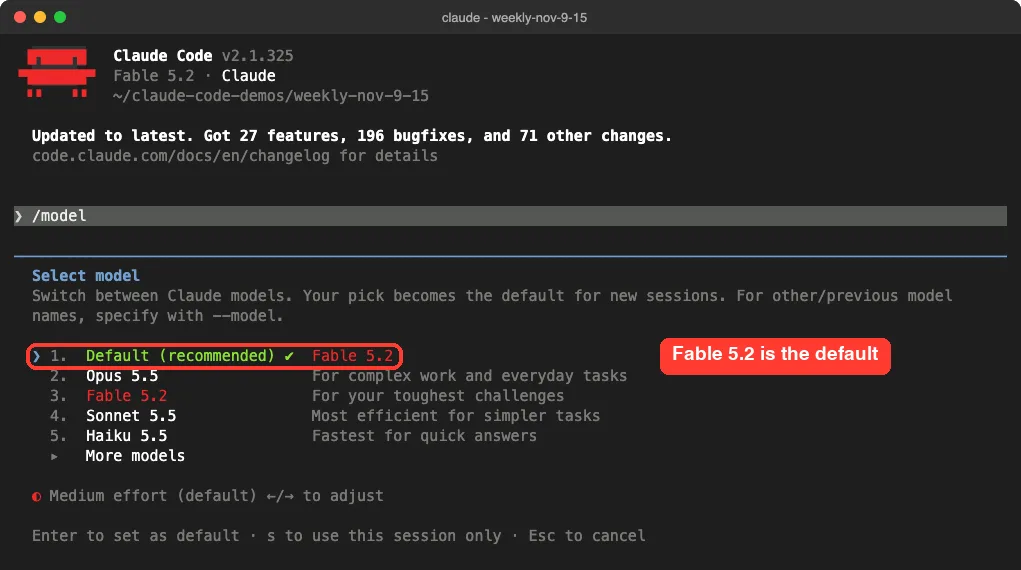
The picker above is what our account showed, so yours may list different models. Our guide on how to choose a model explains each option and when a smaller model is the better pick.
Sandboxed Bash Commands Now Ask for Permission
This is the change most likely to interrupt your day. Until now, commands running inside the Bash sandbox could run without prompts. From 2.1.325, sandboxed Bash commands follow the normal permission flow by default.
If you liked the old behavior, add this to your settings file:
{
  "sandbox": {
    "autoAllowBashIfSandboxed": true
  }
}
Teams that turn the sandbox on through managed settings need the same key in their highest-ranking managed source. Our guide to the settings files shows where each file lives.
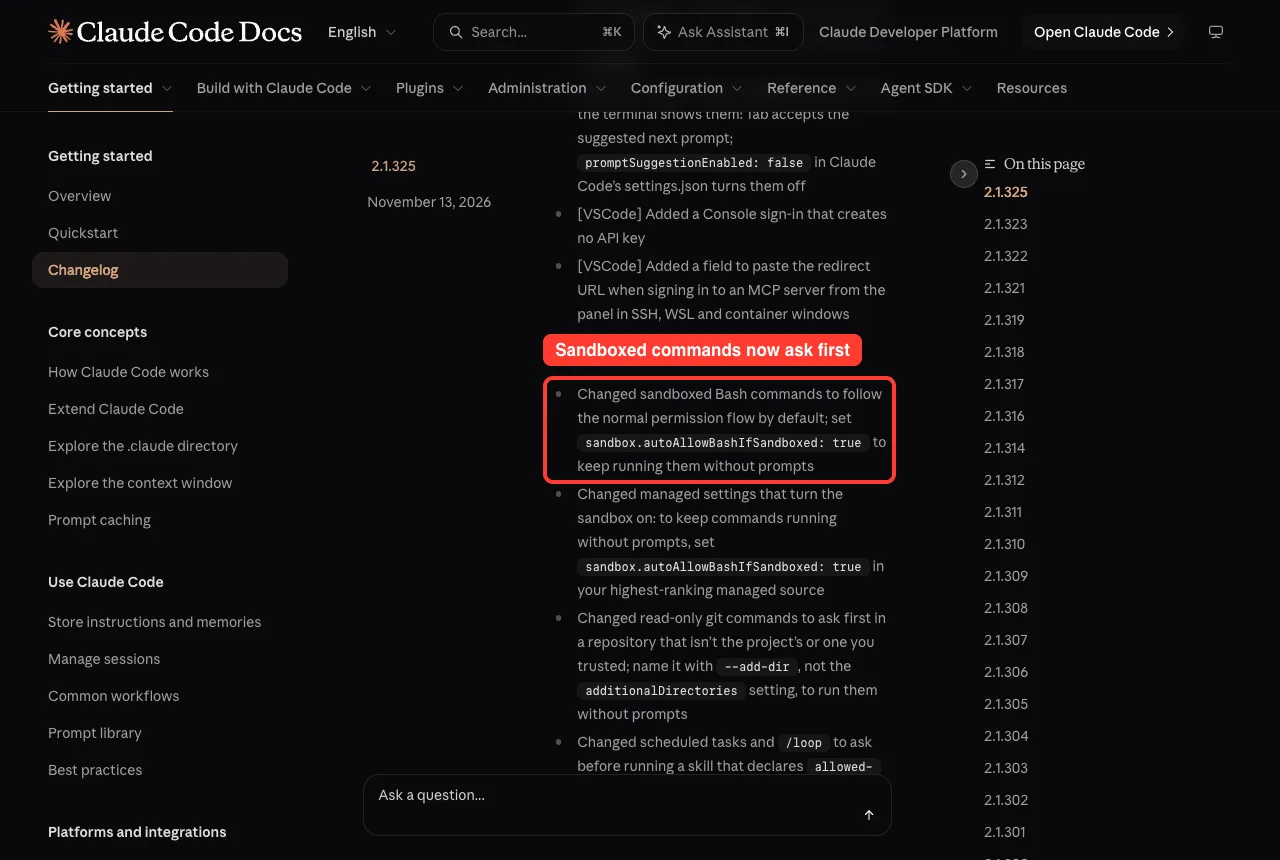
Two related changes landed in the same version. Read-only git commands now ask first in a repository that is not your project’s or one you trusted, and you name that repository with --add-dir to skip the prompt. Scheduled tasks and /loop also ask before running a skill that declares allowed-tools or hooks, unless you add Skill(name) to permissions.allow.
A New Warning for Risky Allow Rules
Version 2.1.323 added a start-up warning for Bash allow rules that put a * inside a variable’s value. The changelog’s own example is Bash(PORT=* npm run dev). The star there can match much more than a port number.
We added exactly that rule to the demo project’s .claude/settings.json and started Claude Code. The warning appeared in yellow above the prompt box.
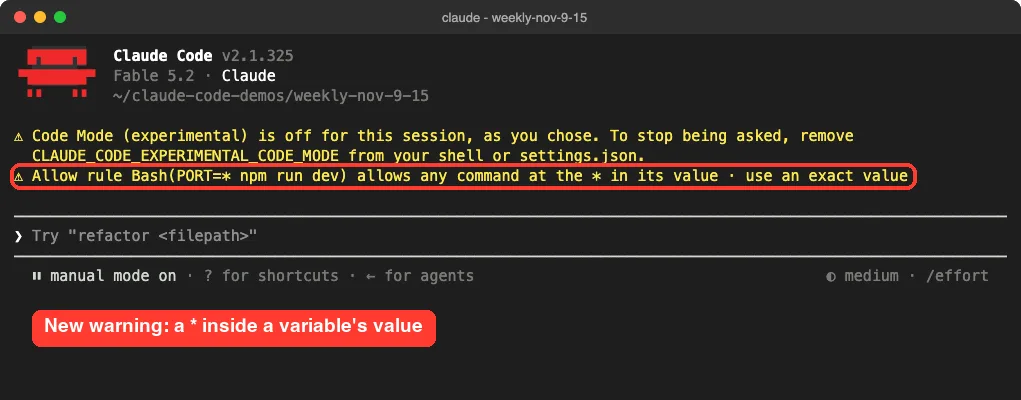
The fix is simple: use an exact value, such as Bash(PORT=3000 npm run dev). If you need several ports, add one rule for each.
The “don’t ask again” option also got safer this week. An allow rule that looks like it holds a secret, or that would be saved to a settings.local.json file that git tracks, now lasts for the session only and is not saved.
claude rm Now Says What It Really Does
The claude rm command removes a background session from your list. People read that as deleted forever, so 2.1.323 changed the wording. The command and the agents view now say a session is removed from the list, and the help text says the conversation is kept.
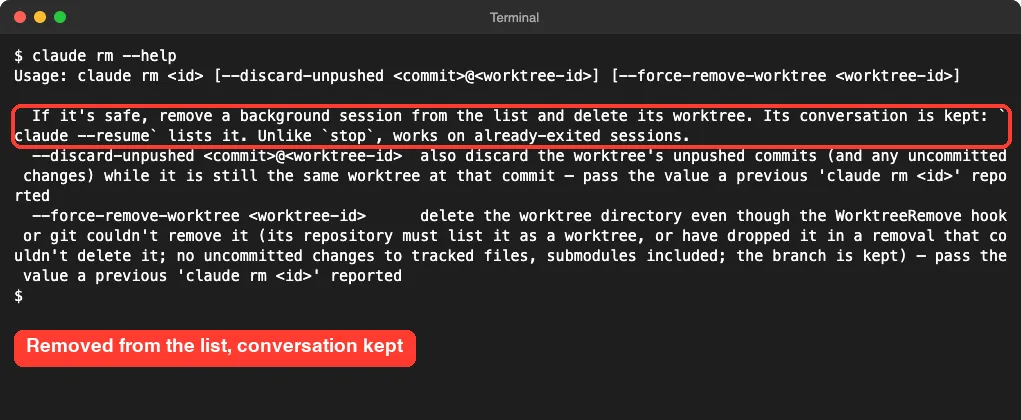
So if you removed a session by mistake, run claude --resume and pick it from the list.
VS Code Gets Prompt Suggestions and a Trust Prompt
The VS Code extension picked up several features that the terminal already had. We did not run these ourselves this week, so this section follows the changelog.
- Prompt suggestions: press Tab to accept the suggested next prompt. Set
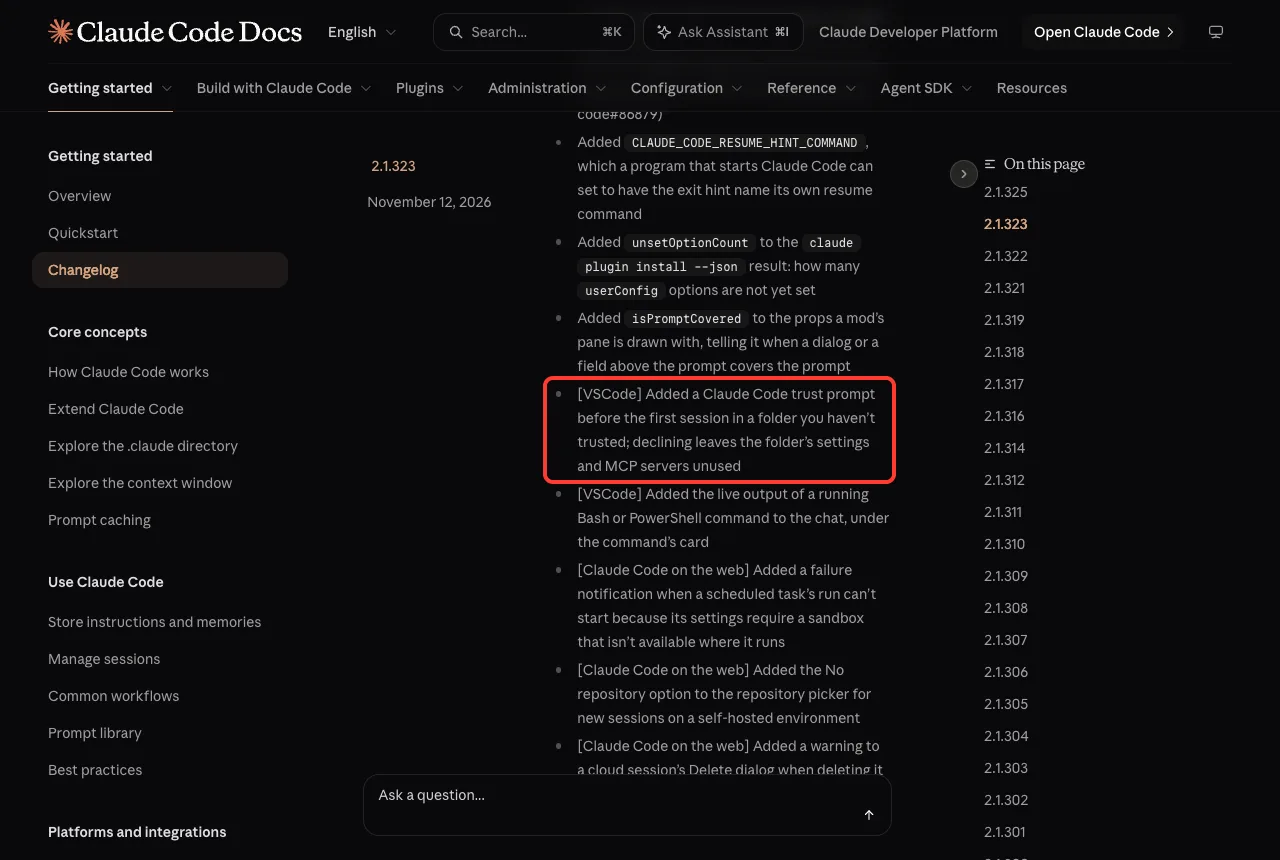
promptSuggestionEnabledtofalseinsettings.jsonto turn them off. - A trust prompt before the first session in a folder you have not trusted. If you decline, the folder’s settings and MCP servers stay unused.
- Live output of a running Bash or PowerShell command, shown in the chat under the command’s card.
- A Console sign-in that creates no API key.
Smaller Claude Code Updates Worth Knowing
/security-reviewnow asks before Claude runs it, outside auto mode and bypass./logoutin a background session now signs out every session on the computer and deletes stored MCP logins and plugin secrets, as it does in a terminal.- For a model ID Claude Code does not recognize, the assumed context window went from 200K to 1M. Set
CLAUDE_CODE_DISABLE_1M_CONTEXT=1to keep 200K. - Authors of plugins can state a supported version range with
engines["claude-code"]inplugin.json. Plugins outside the range are not installed, updated or loaded. - Fast mode labels in
/fast,/configand/modelnow name your current model when it supports fast mode. - The
subagentStatusLinesetting was removed. Settings files that still hold the key load as before.
Do You Need to Change Anything?
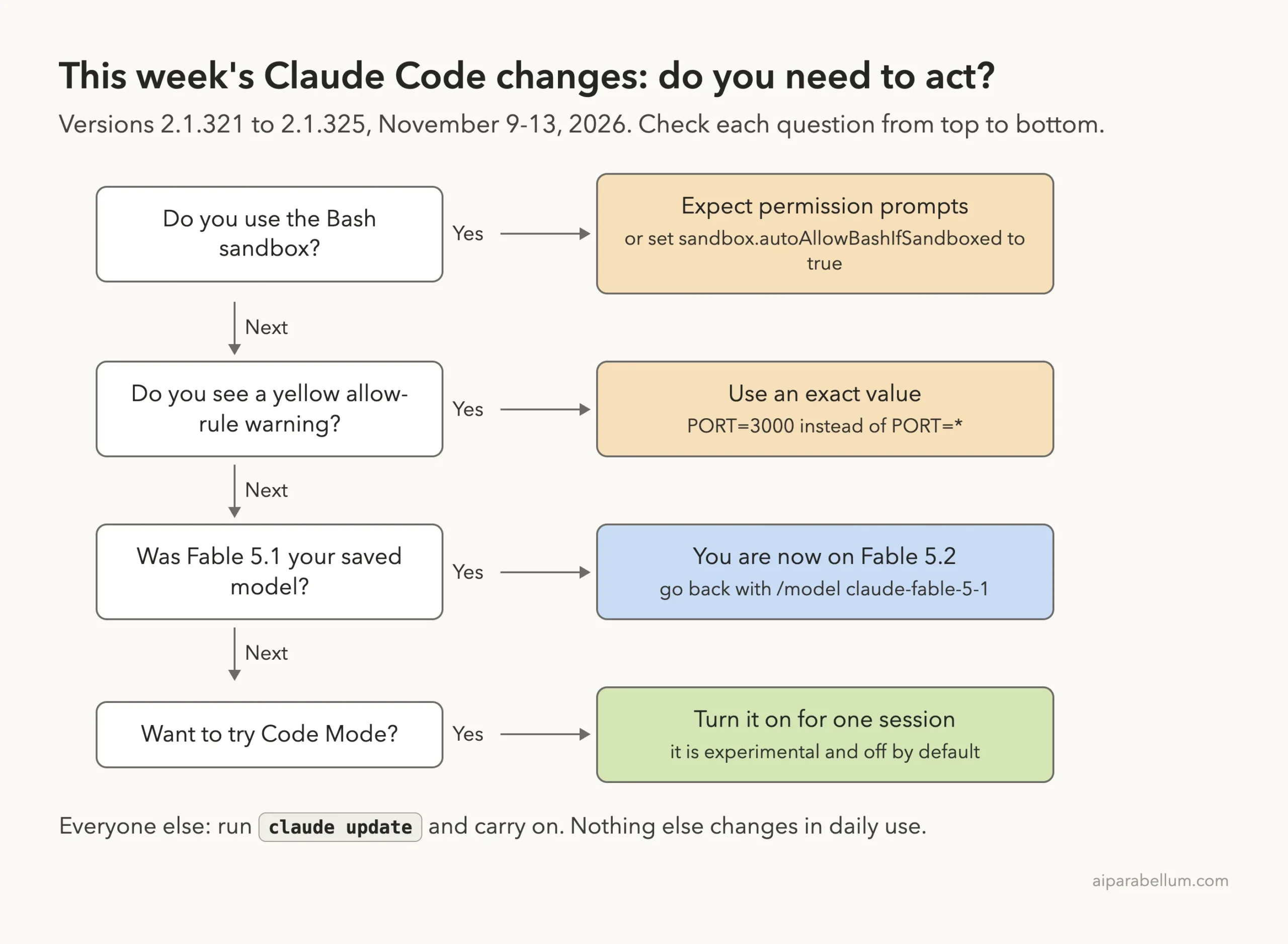
Most people only need to update. This diagram covers the four cases where this week’s releases ask something of you.
Should You Update?
Yes. The week brings 357 bug fixes and several safety improvements, and nothing we tried broke after the update. The one thing to plan for is the sandbox change, because more permission prompts can stall a scheduled or unattended run.
- Run
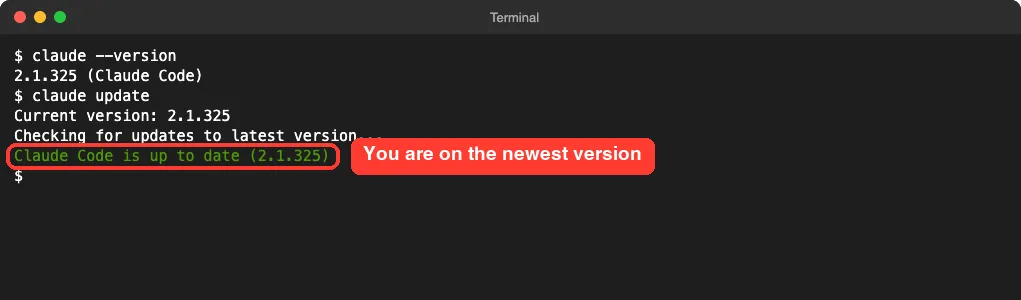
claude updatein your terminal. - Run
claude --versionand check that it shows 2.1.325 or newer. - Start
claudein a project and read any yellow warnings above the prompt box. - If you rely on the sandbox for unattended work, decide whether to set
sandbox.autoAllowBashIfSandboxed.
If the update does not go through, our update guide walks through the usual causes.
Also Fixed This Week
We counted 357 fixes across the week: 74 in 2.1.321, 195 in 2.1.323 and 88 in 2.1.325. A few that many people will feel:
- macOS: “Not logged in · Please run /login” no longer comes back right after a successful
/loginwhen the keychain is slow to answer. - Bash commands no longer sometimes run in the wrong folder when Claude sends several at once and an earlier one changes folders.
- A rewind no longer sometimes changes your permission mode.
- High memory use in long sessions that repeatedly read single lines from large files is fixed, along with a memory spike after Claude changed a very large file.
- A rare crash on permission prompts and background tasks is gone.
- Remote Control sessions no longer show as disconnected for a minute or more after a network change.
Try It Yourself
Want a safe way to try Code Mode? Make an empty folder, add two or three Markdown files that link to each other, and break one link. Start Claude Code there with the variable set, choose Yes, then paste this prompt:
Read every Markdown file in this project and list the links that point to local files that don't exist.When Claude answers, press Ctrl+O, find the Code row and press Ctrl+E to read the JavaScript. Press Ctrl+O again to return to the conversation.
Common Mistakes
- Turning on Code Mode in a session you plan to continue in the Desktop app. You cannot move it there.
- Assuming the sandbox still runs everything without asking. Since 2.1.325 it follows the normal permission flow.
- Ignoring the yellow allow-rule warning. A
*inside a variable’s value allows more than you meant. - Thinking
claude rmdeletes a conversation. It only removes the session from the list.
Pro Tips
- Try Code Mode by setting the variable in your shell for one run. Put it in user settings only if you want it for every new session.
- Review the different permission modes before using Code Mode in auto mode, because the check covers the code, not each call.
- Keep deny rules or hooks for commands you must control. The docs note the auto mode check cannot see values the code works out as it runs.
- If you use Claude through a gateway, Amazon Bedrock, Google Cloud or Microsoft Foundry, skip Code Mode for now. The docs say it is not available there.
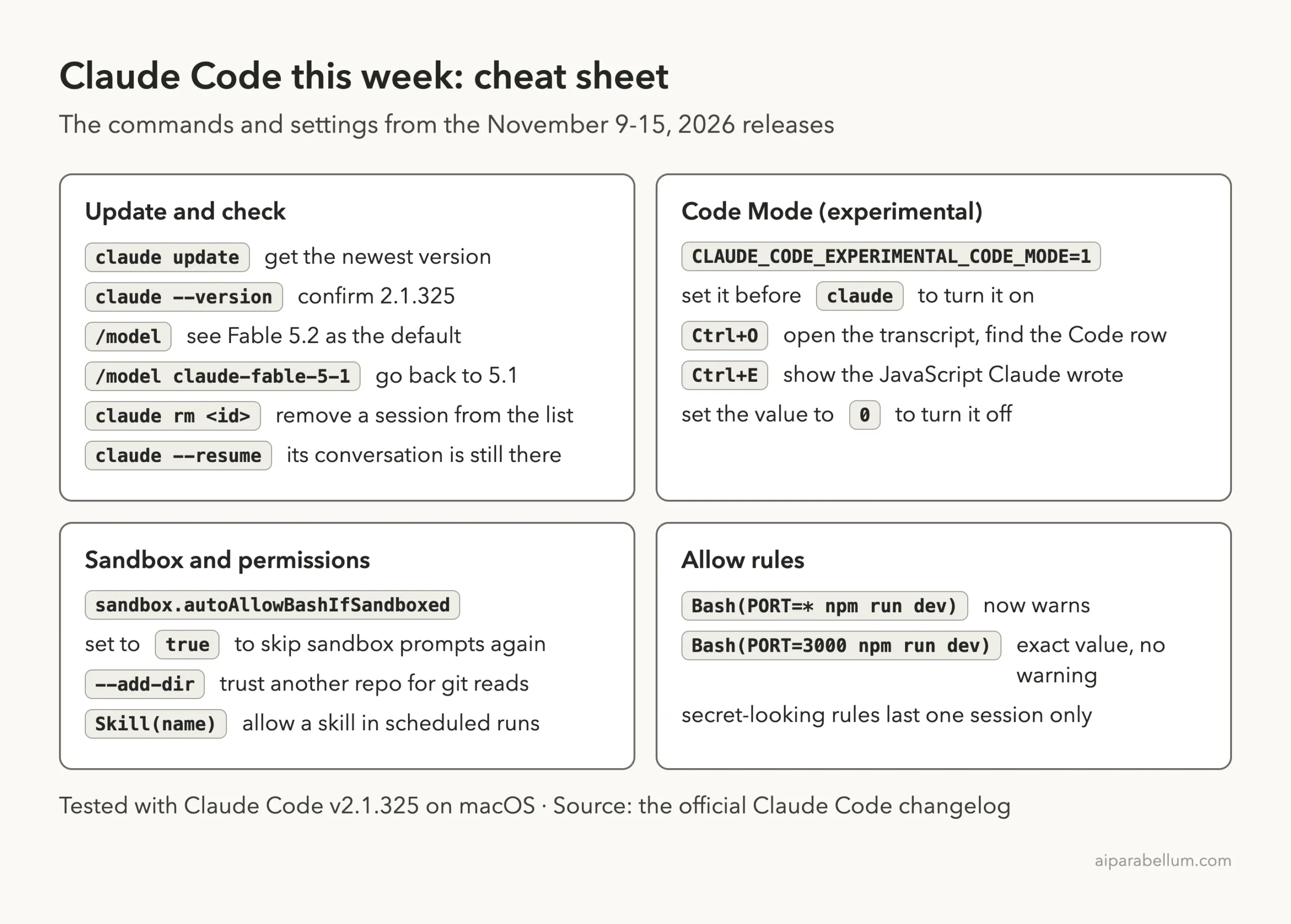
This Week’s Cheat Sheet
Frequently Asked Questions
What is the latest Claude Code version this week?
The newest version released between November 9 and November 15, 2026 is 2.1.325, dated November 13. Run claude --version to see yours.
Is Code Mode on by default?
No. It is an experimental opt-in. You set CLAUDE_CODE_EXPERIMENTAL_CODE_MODE to 1 and then confirm in a dialog whose default answer is No.
Why is Claude Code suddenly asking about sandboxed commands?
Since 2.1.325, sandboxed Bash commands follow the normal permission flow. Set sandbox.autoAllowBashIfSandboxed to true if you want them to run without prompts again.
Can I still use Fable 5.1?
Yes. The changelog says you can switch back with /model claude-fable-5-1.
Does claude rm delete my conversation?
No. It removes the background session from the list and deletes its worktree when that is safe. The conversation is kept, and claude --resume lists it.
Conclusion
This was a busy week: Code Mode gives Claude a new way to work through many tool calls in one script, Fable 5.2 takes over as the default Fable model, and the sandbox, allow rules and “don’t ask again” all became a little stricter. Update with claude update, check for yellow warnings, and decide whether the sandbox setting matters for your unattended runs. For every entry, including the fixes we did not list, read the official Claude Code changelog and the Code Mode docs, and browse the rest of our Claude Code tutorials for step-by-step guides.