CodeBurn is a free tool that reads your local AI coding sessions and tells you where the tokens went. Its CodeBurn Claude Code add-on is a small MCP server, so Claude can answer “how much did I spend today?” without you leaving the chat. We added it to a throwaway demo folder, asked it two questions, and measured what it costs your context.
This guide is part of our Claude Code tutorials. Find more servers in our MCP servers directory.
Tested with Claude Code v2.1.322 on November 12, 2026, using the codeburn npm package at version 0.9.28, which matches commit 40d5880 of github.com/getagentseal/codeburn. The repository is MIT licensed, was not archived, and had a push two days before our test.
The server connected with no account and no key, answered from local files, and its two tools cost 507 tokens of context. We ran each test once.
Quick Summary: What We Tested
| Question | Answer |
|---|---|
| What is it? | A local MCP server from the CodeBurn project with two tools, get_usage and get_savings |
| Does it need an account or key? | No. It reads session files already on your Mac |
| How did we install it? | claude mcp add at local scope, with the version pinned |
| What did we run? | One spend question and one savings question inside Claude Code |
| Context cost | 225 tokens for get_savings and 282 for get_usage, as listed by /context |
| Our verdict | Easy and useful if you want spend answers in chat. Our demo was tiny, so we cannot judge big histories |
One honest note. The plan-limit and quota features are mentioned in the project’s description, but we did not test them. This post covers only what we ran.
What CodeBurn Is and Why It Exists
Every Claude Code session is saved on your computer as a log file. Those logs record how many tokens each call used. CodeBurn reads them, applies published prices, and shows spend by tool, model, project and task.
The README says it works with 42 tools, and Claude Code is one of them. It also has a command-line view, a desktop app and a dashboard. We tested only the MCP server, which is the part that runs inside Claude Code.
MCP is the Model Context Protocol, a standard way to give Claude extra tools. If it is new to you, our MCP guide explains it from scratch.
The README says the server runs over stdio, which means Claude Code starts it as a local program. It says the server makes no network call of its own and pseudonymizes project names unless Claude asks for real ones. We read those claims and did not test every one.
Is CodeBurn Safe to Add?
We checked three things before running anything.
- The npm package named
codeburnpoints to the GitHub repository above, and itsserver.jsonlists the same version, 0.9.28. - The package scripts include no install step, only build and test scripts, so nothing runs when it downloads.
- The docs say the command-line tool sends nothing. Anonymous telemetry applies to the desktop app, the macOS menu bar and the Windows tray, which we did not use.
One detail worth knowing. The README says prices come from the LiteLLM price list, fetched and cached for 24 hours. So the server may fetch a price file even though it makes no call about your usage.
It also reads every session on your machine. In a quick command-line check without any isolation, it saw months of our history. So for this test we gave it a separate folder to read, which the next section explains.
How to Add CodeBurn to Claude Code
The README gives this one-line install: claude mcp add codeburn -- npx -y codeburn mcp. We changed three things. We pinned the version, used local scope so it only exists in one folder, and passed two environment variables.
The first variable is CLAUDE_CONFIG_DIR, which the configuration docs say overrides the Claude Code data folder CodeBurn scans. The second is HOME, set to an empty folder, so no other tool’s data is found. Together they limit CodeBurn to the three sessions we created in the demo.
claude mcp add codeburn --scope local \
  -e HOME=/path/to/empty-folder \
  -e CLAUDE_CONFIG_DIR=/path/to/copied-sessions \
  -- npx -y [email protected] mcp
If you only want the normal setup, skip the two -e lines and use the README command. Then CodeBurn reads all your real sessions.
Next we ran claude mcp get codeburn to check it.
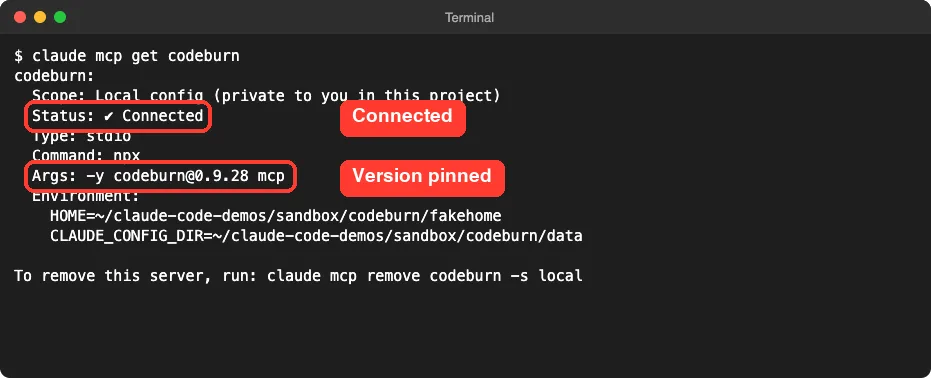
For the general steps, see the Anthropic MCP quickstart. The scopes are explained in the MCP docs. If you are not sure where the setting is stored, our guide to the MCP config file shows the locations.
Our Demo Setup
The demo project had three tiny files: a pasta recipe note, a small Python file and a shopping list. We ran three short headless prompts to create real sessions: summarize the note, add a function to the Python file, and sort the list. The cheap Haiku model handled them.
Then we copied only those three session logs into the folder CodeBurn reads. Running the CodeBurn command-line report on that folder showed 3 sessions, 8 calls and about $0.0138. That is our reference number, and the MCP answer later matched it.
We then started claude in the demo folder and ran /mcp.
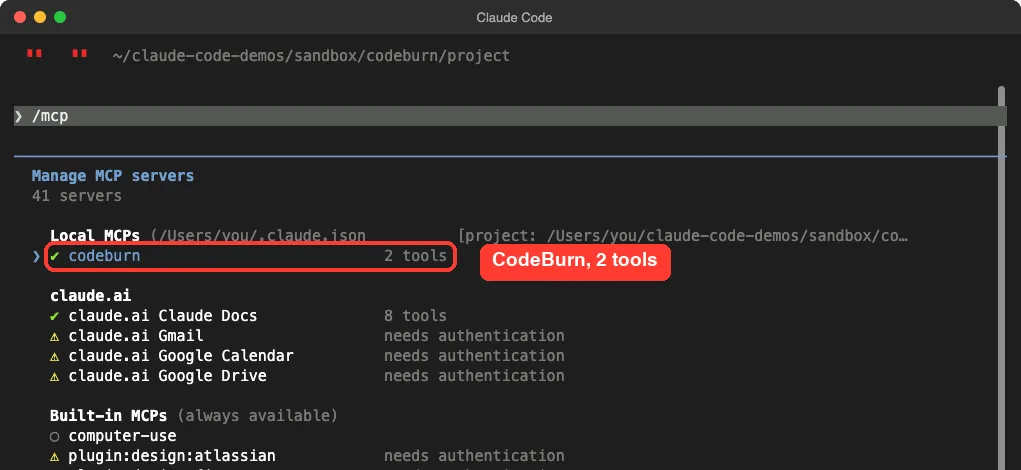
The list had no sign-in warning next to it, unlike some of the account-based connectors shown below it. That fits the project’s claim that it needs no account.
The Two Tools Claude Code Sees
| Tool | What the docs say it returns |
|---|---|
get_usage | Spend and usage with breakdowns by tool, model, project and task. The docs call it fast |
get_savings | Cost reductions: waste findings, retry tax and routing waste. The docs call it the slower, deeper one |
The tool description Claude Code showed us said you can omit by for a headline summary, or set it to break spend down by project, model, task or provider.
Test 1: Ask What You Spent Today
We typed one plain prompt and asked for a short answer.
Use the codeburn MCP server get_usage tool to show how much we spent today, split by model. Keep the answer to 4 lines.Claude Code paused and asked for permission. The dialog showed the tool name and the arguments Claude chose: by set to “model” and period set to “today”. We picked “Yes” for this one call.
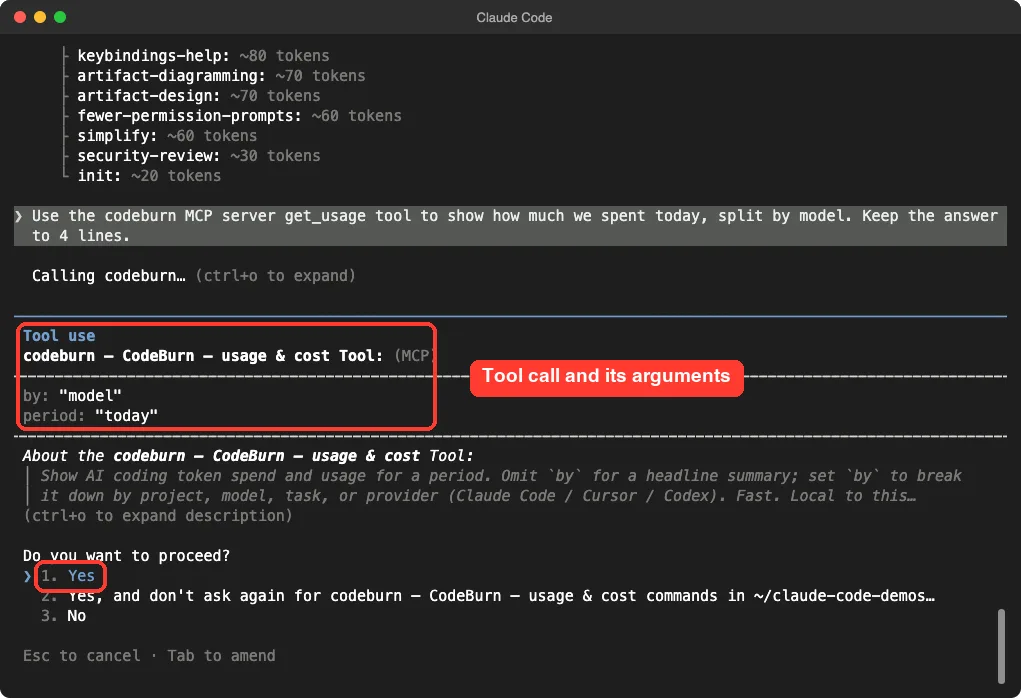
The answer came back in about four seconds.
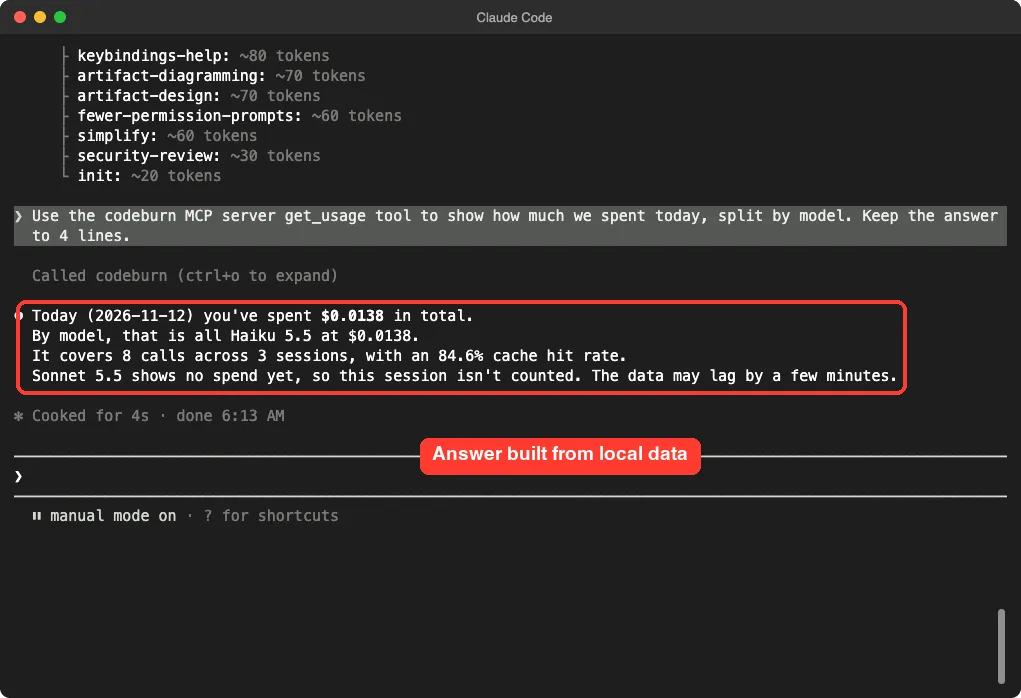
Claude reported $0.0138 in total, all on Haiku 5.5, across 8 calls and 3 sessions, with an 84.6% cache hit rate. Those numbers match the command-line report we ran earlier on the same folder. Claude also noted that the Sonnet session we were typing in was not counted yet, and that the data may lag by a few minutes.
That lag is worth remembering. The live session you are in may not show up straight away.
Test 2: Ask Where You Can Save
Next we called the slower tool.
Use the codeburn get_savings tool and tell me in 3 short lines whether it found anything to save.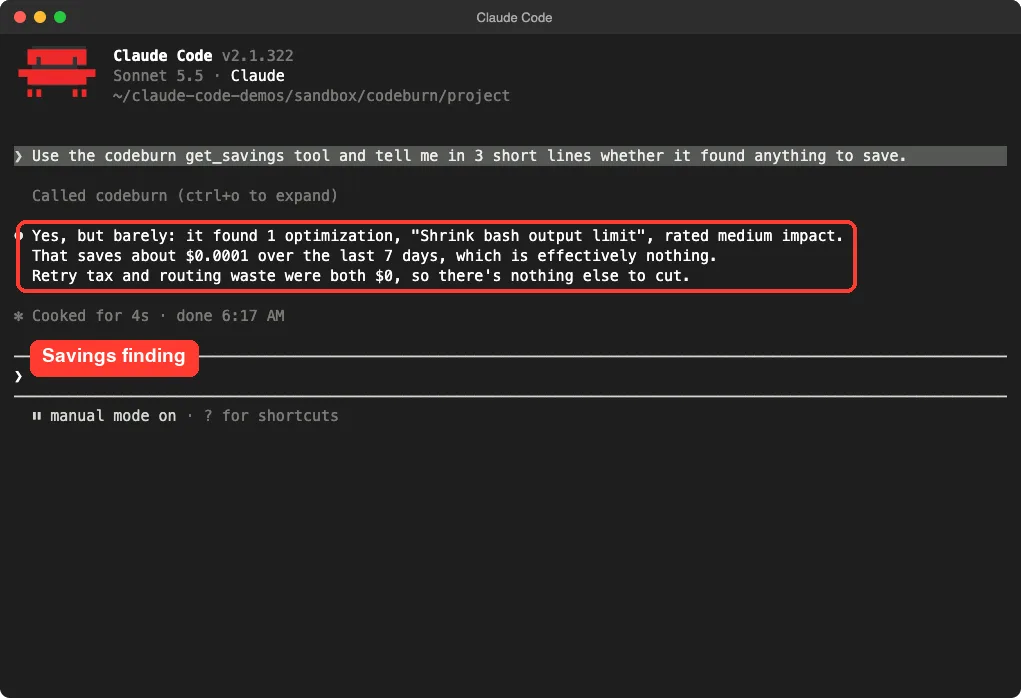
It found one optimization, “Shrink bash output limit”, rated medium impact, worth about $0.0001 over seven days. Retry tax and routing waste were both $0. That is the honest result for three tiny prompts, since there was almost nothing to waste.
So we cannot tell you how useful the savings tool is on a busy month. The README says the deeper command-line version also looks at unused MCP servers and long CLAUDE.md files. We did not run that.
What It Costs Your Context
Every MCP tool adds its definition to Claude’s working memory. We ran /context with the server connected and read the MCP tools table.
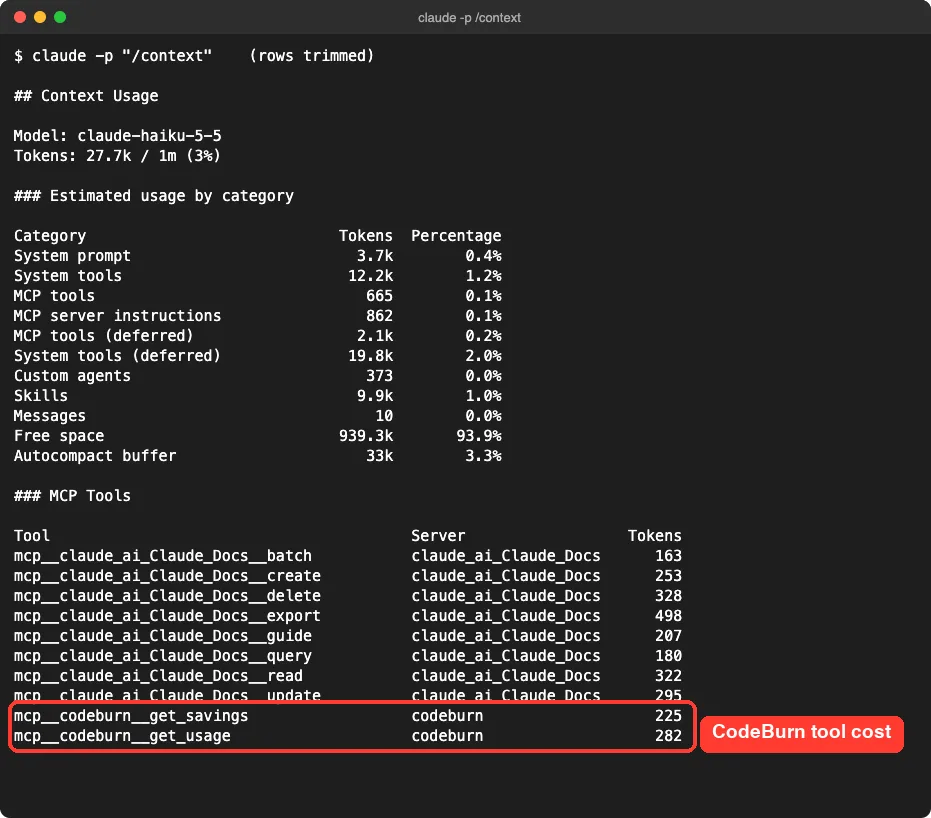
The two tools came to 507 tokens. For comparison, the eight tools of another connector in the same table ranged from 163 to 498 tokens each. The report also has separate lines for deferred tools, so some tools may be loaded on demand, and we did not check which line CodeBurn’s tools sit in.
Either way the cost is small. Our best MCP servers compares the cost of other servers if you want a yardstick.
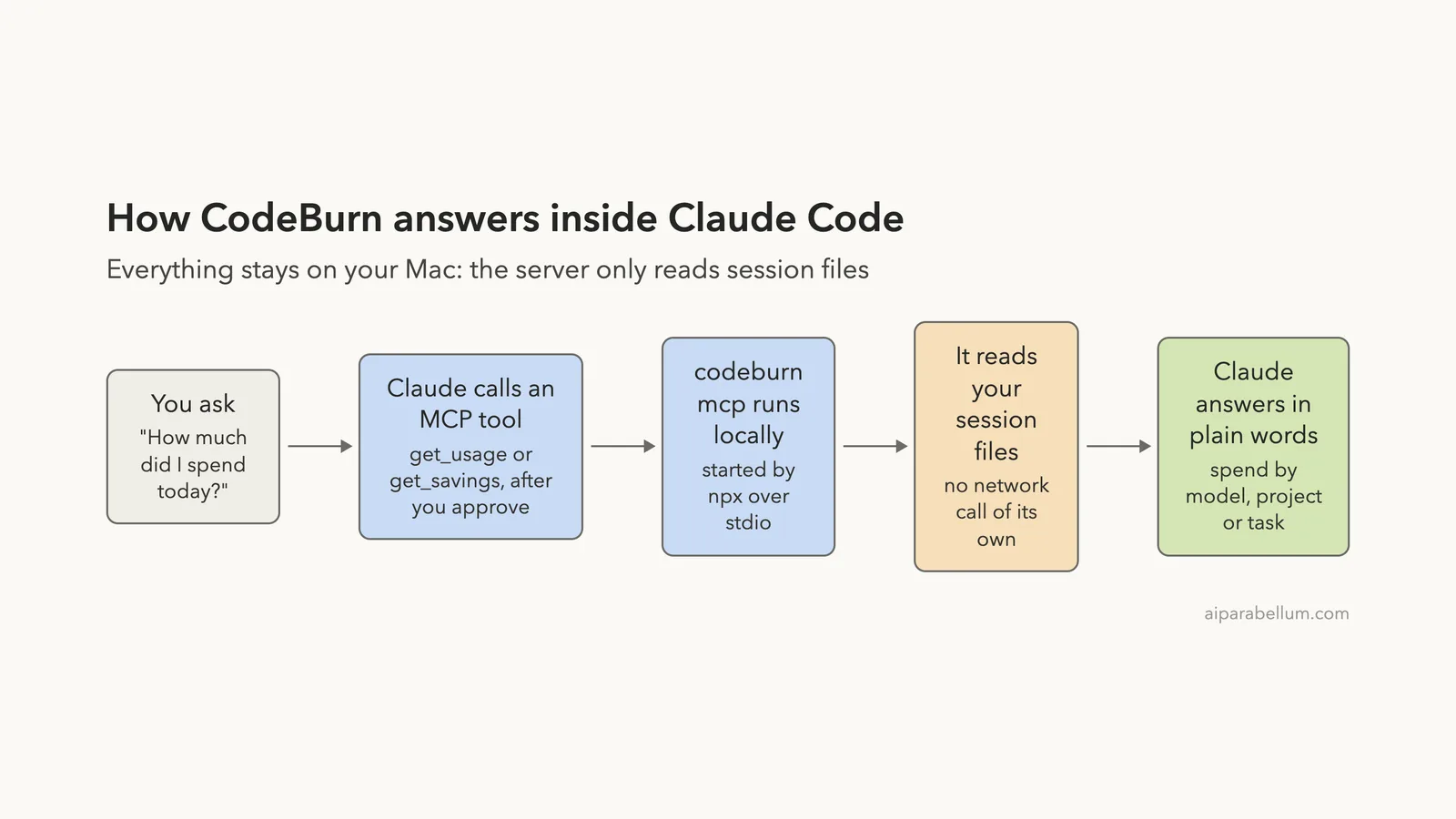
How It Fits Together
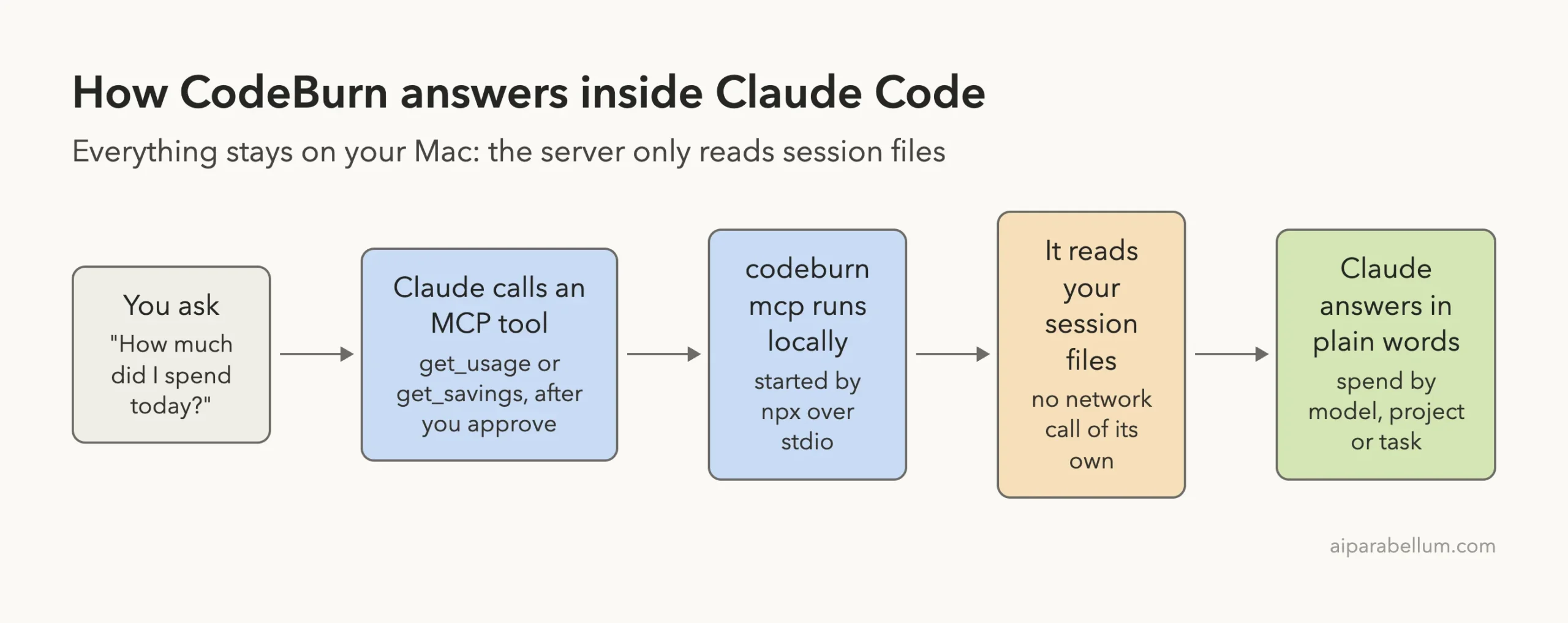
Claude does the thinking and CodeBurn does the arithmetic. That split is why the numbers matched the command-line report.
Try It Yourself
Start with a safe practice run. Make an empty folder, run a couple of short prompts there, and point CodeBurn at only that folder as we did. Then try this prompt.
Use the codeburn get_usage tool and show my spend this week by project. Keep it to 5 lines.If you want the full picture, use the README one-liner and let it read all your sessions. Ask the same question and compare the answer with Claude Code’s own cost counter. The README warns that CodeBurn can show less than Claude Code’s counter for some calls Claude Code does not write to its logs.
Common Mistakes
- Forgetting to pin the version. Without
@0.9.28,npxfetches whatever is newest each time. - Expecting the live session to appear at once. Our answer said the data may lag by a few minutes.
- Approving every call blindly. The dialog shows the arguments, so read them.
- Treating plan-limit numbers as tested. We did not run that part.
Pro Tips
- Ask for a short answer. A four-line limit kept the reply clean.
- Run
/contextafter adding any server so you know its token cost. - Use local scope while you try it, then remove it with
claude mcp remove codeburn --scope localif you do not keep it. - Ask for real project names only when you need them, since the default hides them.
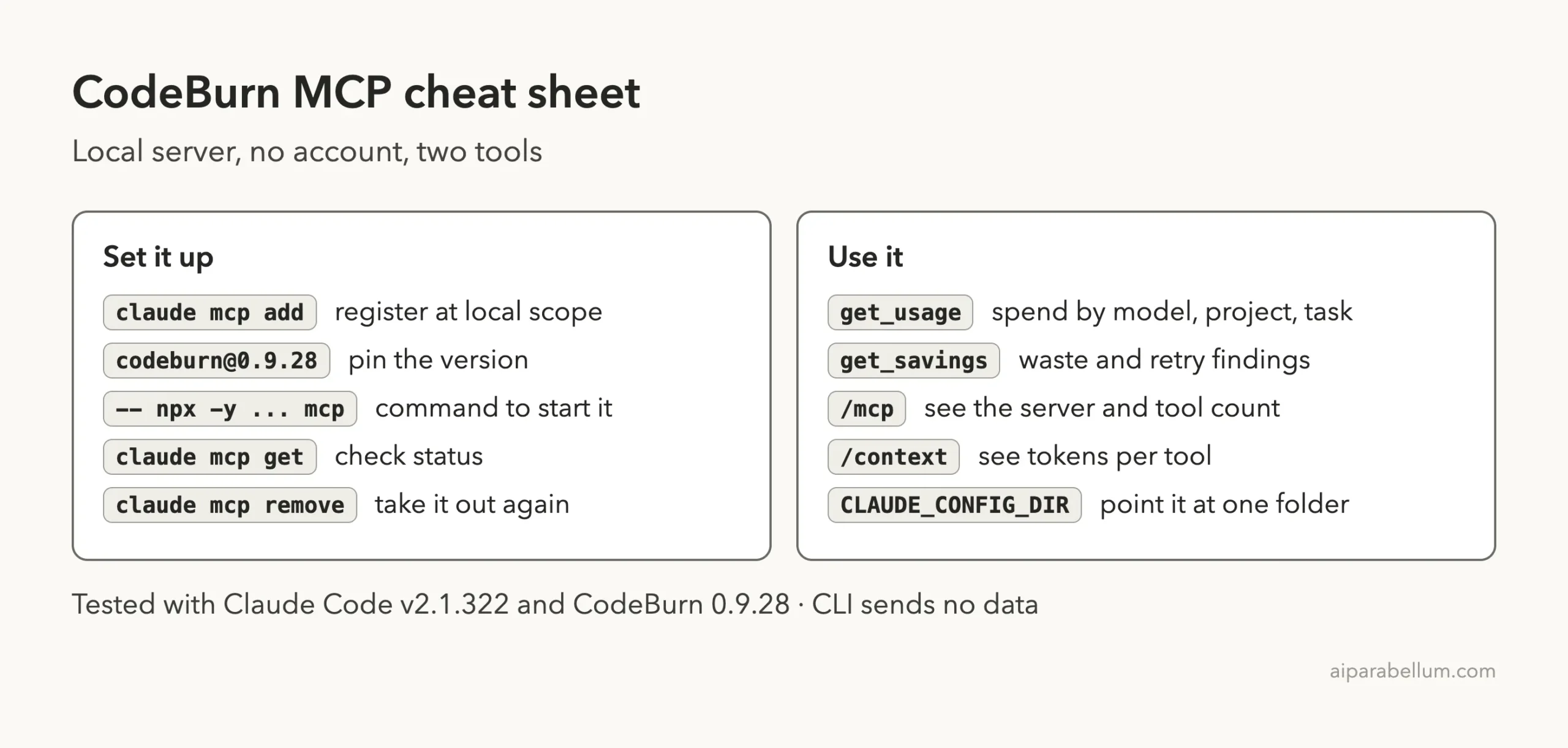
Cheat Sheet
Frequently Asked Questions
Does CodeBurn need an account or API key?
No. In our test it connected with no sign-in and read session files already on disk.
Does the CodeBurn MCP server send my data anywhere?
The README says it makes no network call of its own and that the command-line tool sends nothing. It does fetch a price list, cached for 24 hours. Telemetry applies only to its desktop apps.
Can it show my plan limits?
The project’s description mentions plan quotas, but we did not test that, so we cannot confirm how it works.
Why did the answer say my current session was missing?
Claude noted the data may lag a few minutes. Our Sonnet session showed no spend yet.
How do I remove it?
Run claude mcp remove codeburn --scope local from the folder where you added it.
Conclusion
CodeBurn’s MCP server is a light, no-account way to ask Claude about your token spend. In our run, it connected at once, answered a spend question that matched the command-line report, and its two tools cost 507 tokens of context. The savings finding was tiny because our demo was tiny, and we did not test plan limits or a large history. If you pay by the token and want answers in chat, it is worth trying in a small folder first, and you can browse more Claude add-ons in our directory.