Looking for the best Claude Code MCP servers? There are thousands, but you only need a few to start. We installed three official reference servers from the Model Context Protocol project, ran each one inside a real Claude Code session, and wrote down what actually happened.
This is Part 25 of 45 in our Claude Code Deep Dives, part of our Claude Code tutorials.
Tested with Claude Code v2.1.318 on 2026-11-05. The servers came from the modelcontextprotocol/servers repository, commit 3638028 (last updated 2026-11-04), and the repo is still active and not archived.
Quick Summary: Our Picks
| Server | Tools | Best for | Account needed | Our verdict |
|---|---|---|---|---|
| Filesystem | 16 | Reading and editing files in folders you choose | No | Useful when files live outside your project |
| Memory | 9 | Facts that should outlive one chat | No | Works, but you must curate it |
| Sequential Thinking | 1 | Planning a hard task step by step | No | Nice for plans, not always needed |
All three run on your own computer, need no sign-up, and cost nothing beyond the normal Claude Code usage. We did not test the other reference servers in the repository (fetch, git, time and everything), so we will not rate them here.
What Is an MCP Server in Claude Code?
MCP stands for Model Context Protocol. It is an open standard that lets Claude Code call tools that live outside of Claude Code itself. An MCP server is a small program that offers a list of tools, and Claude decides when to call them.
Anthropic’s MCP documentation shows examples such as reading an issue tracker, querying a database or checking monitoring data. Our own MCP guide explains the basics if this is new to you.
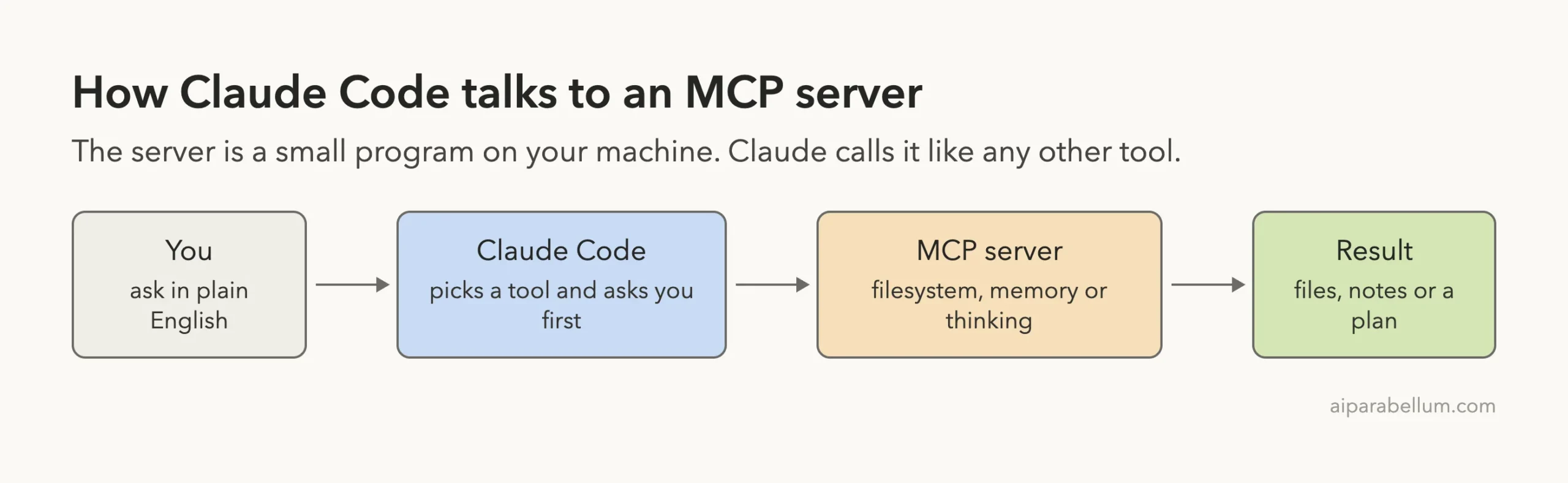
How We Tested These MCP Servers
We never touched the real Claude Code setup. We made a throwaway bakery demo project with a tiny app.py, a data/orders.csv file and a notes/todo.md list. Then we wrote a small config file and started Claude Code with only that file.
{"mcpServers":{
 "filesystem":{"command":"npx","args":["-y","@modelcontextprotocol/[email protected]","/path/to/demo-project"]},
 "memory":{"command":"npx","args":["-y","@modelcontextprotocol/[email protected]"],"env":{"MEMORY_FILE_PATH":"/path/to/demo-project/memory.json"}},
 "sequential-thinking":{"command":"npx","args":["-y","@modelcontextprotocol/[email protected]"]}
}}
We pinned the versions so you can repeat the test. Then we started Claude Code like this:
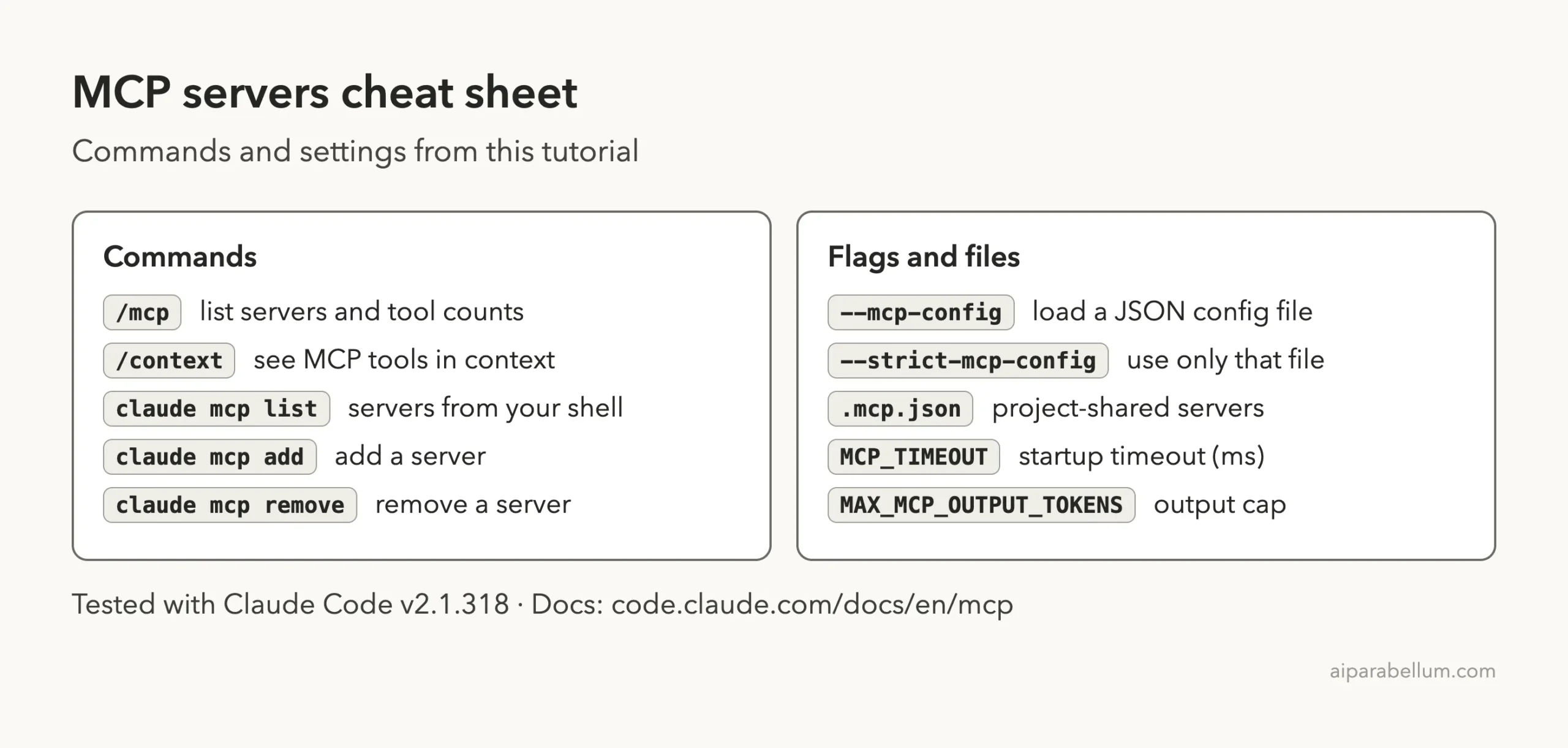
claude --mcp-config mcp-test.json --strict-mcp-config --setting-sources projectThe --mcp-config flag loads a JSON file, and --strict-mcp-config tells Claude Code to use only the servers in that file. The --setting-sources project flag keeps your personal settings out of the session.
Before running anything we read the package files. None of the three servers has an install script, and each one only starts when Claude Code launches it.
Step 1: Confirm the Servers Are Connected
Type /mcp inside Claude Code to see every connected server. Ours showed three green check marks with their tool counts: filesystem with 16 tools, memory with 9 and sequential-thinking with 1.
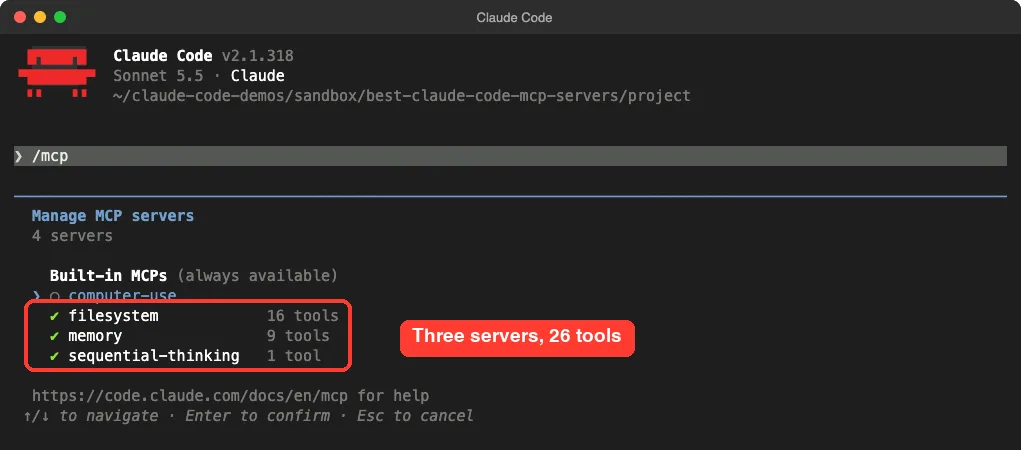
/mcp panel after loading our three test serversIf a server shows a red mark instead, the usual cause is a wrong path or a missing npx. You can also run claude mcp list from your shell to check status.
Filesystem Server: Tested
The filesystem server gives Claude 16 tools for reading, writing, searching and listing files. You pass it the folders it may touch as command-line arguments, and it refuses everything else.
What We Ran
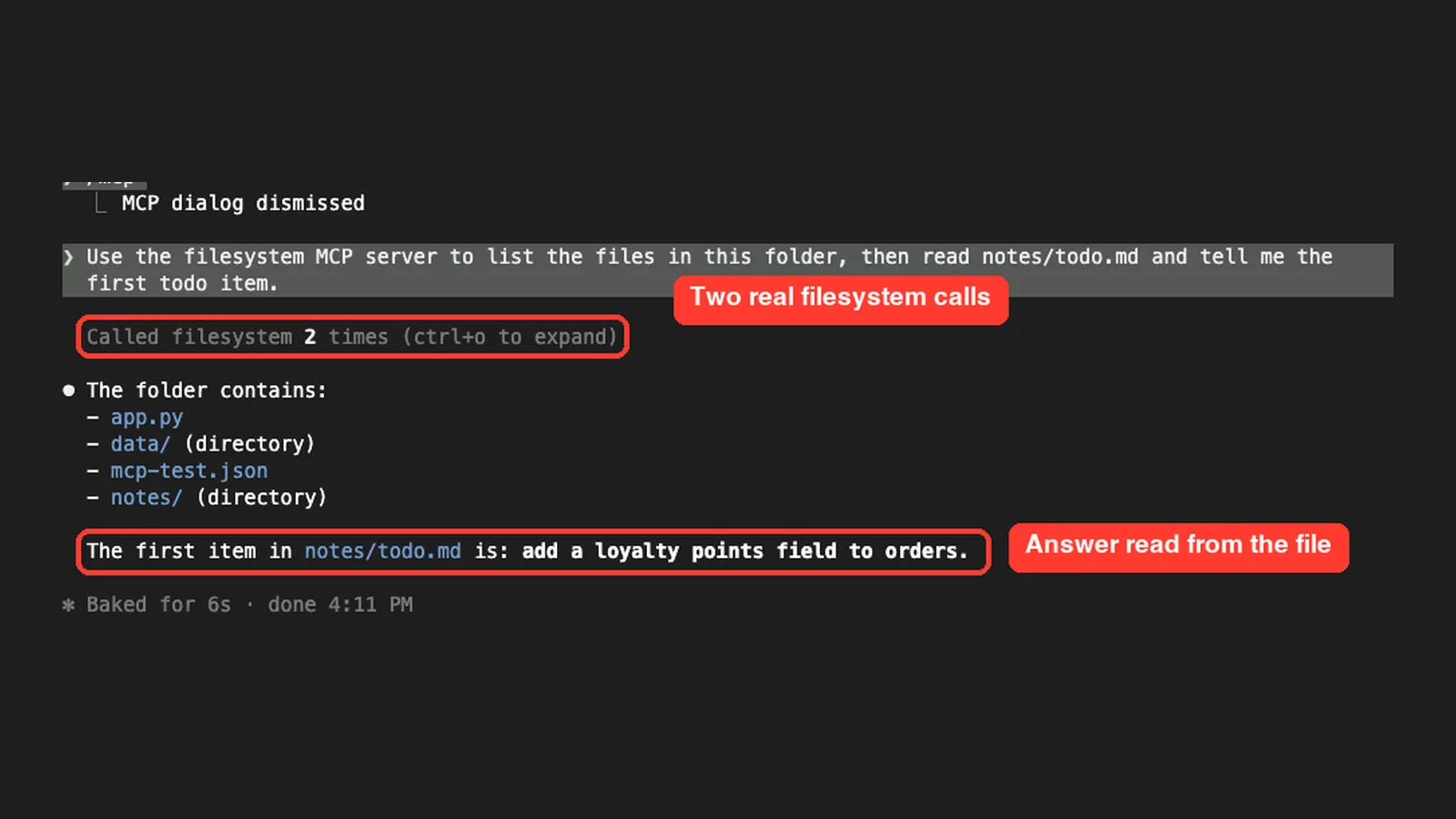
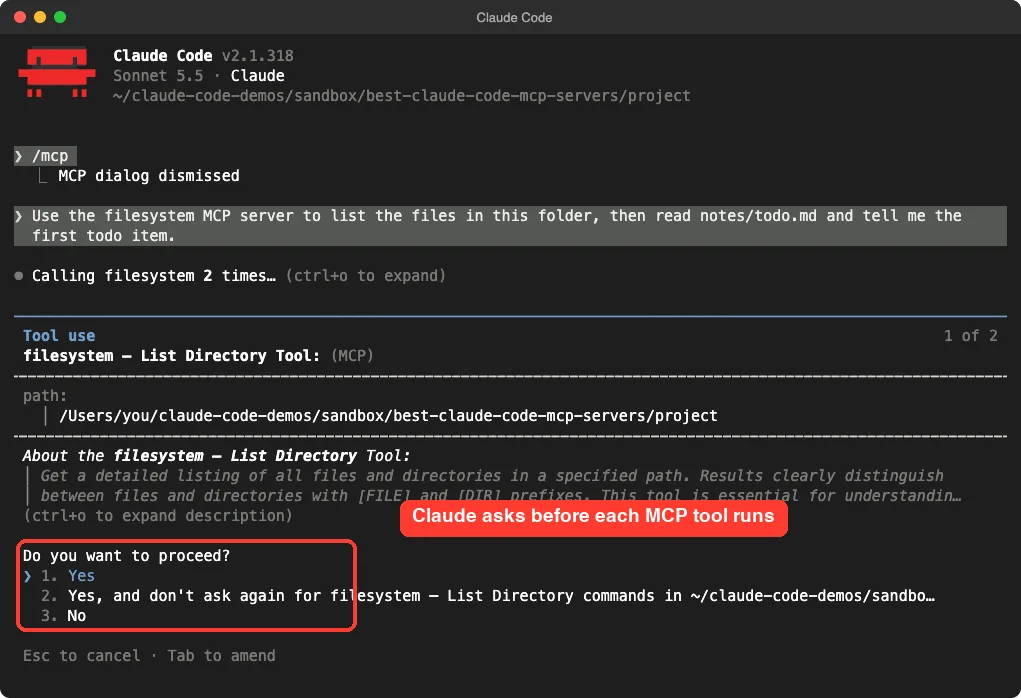
Use the filesystem MCP server to list the files in this folder, then read notes/todo.md and tell me the first todo item.Claude Code stopped and asked for permission before the first call. The prompt names the server and the tool, shows the path, and offers three choices: yes, yes and do not ask again, or no.
What Happened
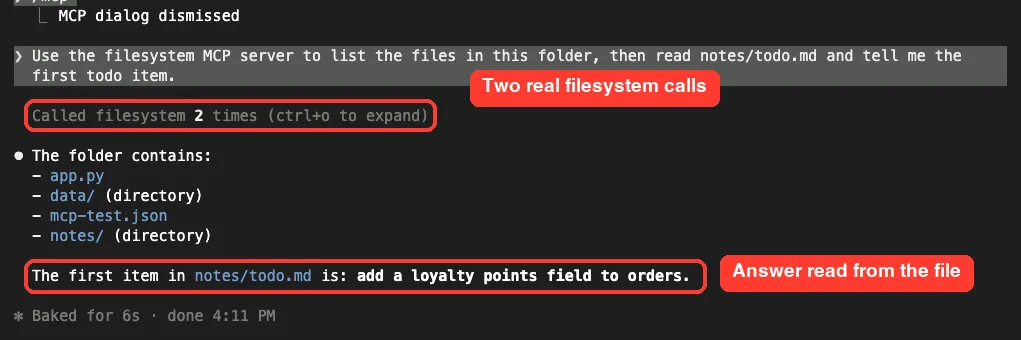
After we approved both calls, Claude listed the four entries in the folder and quoted the first todo item correctly: add a loyalty points field to orders. The whole answer took about six seconds.
Our Verdict
Be honest with yourself here. Claude Code already reads and edits files in your project without any MCP server. The filesystem server only earns its place when you want Claude to work in a separate folder, such as a notes vault, with a strict allow-list.
Memory Server: Tested
The memory server stores a small knowledge graph of entities, relations and observations. It saves that graph to a file, so the facts stay after you close the session.
What We Ran
Use the memory MCP server to remember that the bakery app stores orders in data/orders.csv and totals must round to 2 decimals.What Happened
Claude created one entity called bakery-app with two observations. We did not take its word for it. We opened the file we had set with MEMORY_FILE_PATH, and it held exactly this line:
{"type":"entity","name":"bakery-app","entityType":"project","observations":["Orders are stored in data/orders.csv","Totals must round to 2 decimals"]}
Our Verdict
It works, and the file is plain text you can read and delete.
The catch is that nothing decides what is worth remembering except you and your prompts. For project rules, a CLAUDE.md file is simpler. We did not run a second session to test recall, so we cannot claim how well Claude uses old memories later.
Sequential Thinking Server: Tested
This server has a single tool. Claude calls it repeatedly to write out a plan one thought at a time, and it can revise earlier thoughts.
What We Ran
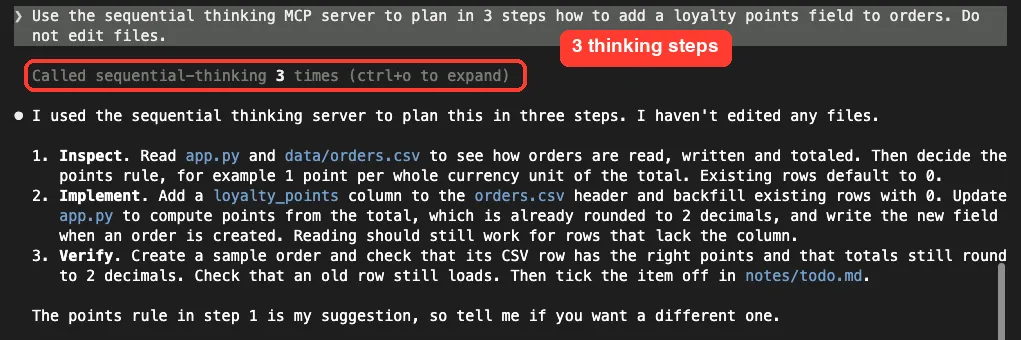
Use the sequential thinking MCP server to plan in 3 steps how to add a loyalty points field to orders. Do not edit files.What Happened
Claude called the tool three times and then gave a clear plan: inspect the files, add a loyalty_points column and update app.py, then verify with a sample order. It also said the points rule was only its suggestion and asked if we wanted a different one. No files changed.
Our Verdict
The plan was good, but we did not run the same prompt without the server, so we cannot say the server made it better. Claude Code also has plan mode built in. Try the server on a big, messy task before you keep it.
Do MCP Servers Slow Down Claude Code or Use Extra Tokens?
This is the question most readers have. We ran /context with all three servers connected. The MCP section is labeled loaded on-demand, and it lists the 26 tool names without a token count.
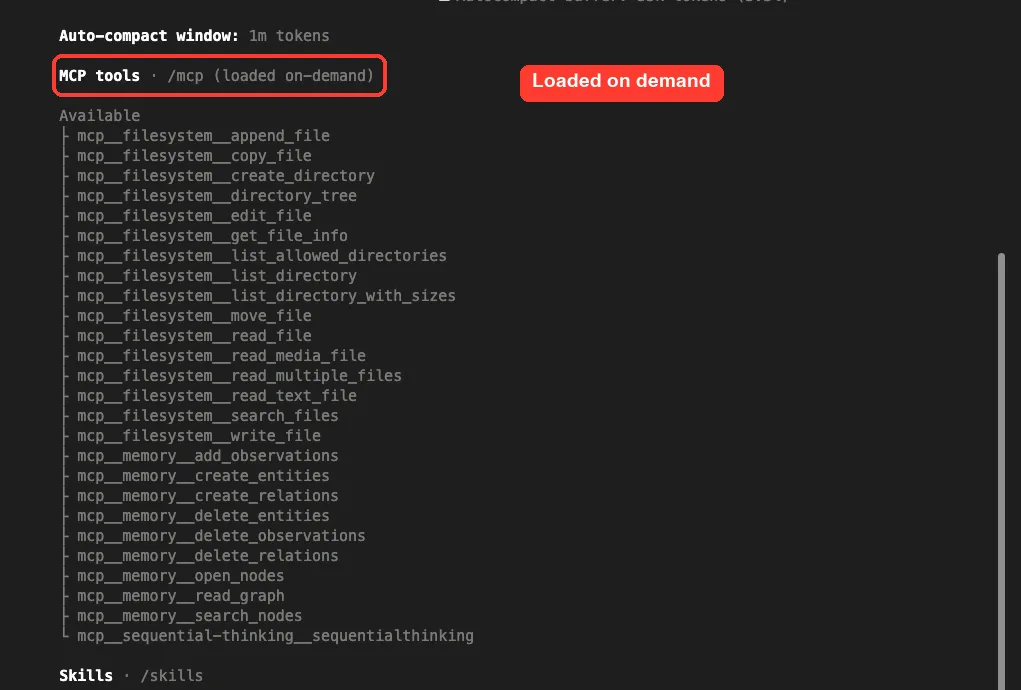
The official docs explain why. Tool search is on by default for current Claude models, so Claude Code does not paste every tool definition into the conversation up front. The docs also say output over 10,000 tokens triggers a warning, and the default cap is 25,000 tokens, which you can change with MAX_MCP_OUTPUT_TOKENS.
The lesson is simple. A few servers cost little, but every server still adds tools Claude has to search through. Keep only the ones you use.
Install an MCP server for a job Claude Code cannot already do. Everything else just adds tools to search through.
Which MCP Server Should You Install?
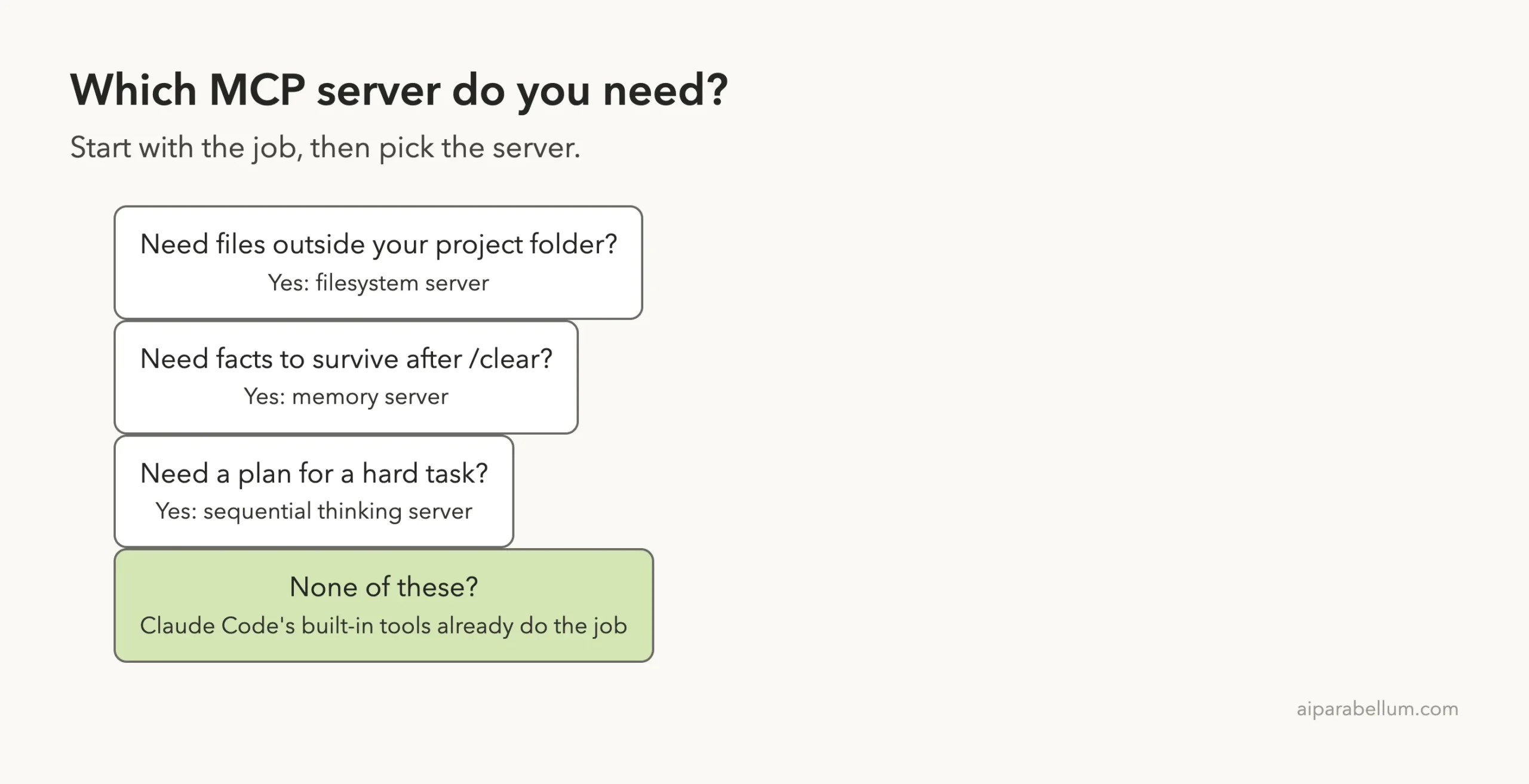
Our honest ranking after this test, from most to least useful for most people:
- Filesystem: install it if you need Claude to work inside a folder outside your project.
- Sequential Thinking: try it on complex planning, and remove it if plan mode already does the job.
- Memory: install it only if you want a readable file of facts you control.
For account-based servers such as GitHub, databases or design tools, follow the setup steps in the official Anthropic docs. We did not test those here. If you want to see a real third-party server, read our Scrapling MCP test.
Try It Yourself
Practice with a throwaway folder, never a real project. Create a folder with one text file, save the config above with your own paths, and start Claude Code with the three flags. Then paste this prompt:
Use the filesystem MCP server to list the files in this folder, then use the memory MCP server to remember the name of the biggest file.Then open the memory file and check what Claude stored. Where your config file lives matters, so our guide on the config file location is worth a read.
When an MCP Server Is Not the Answer
Many jobs need no server at all. If you only want Claude to follow your project rules, a CLAUDE.md file does that with zero setup. If you want a repeatable workflow, a skill or a custom slash command is lighter than a server.
A server makes sense when Claude needs a live connection to something it cannot reach alone. Examples from the official docs include issue trackers, databases and monitoring tools. The three reference servers we tested are best seen as learning tools: small, readable and safe to try, which makes them a good first step before you connect a real service.
Also think about trust. Each server you add is code that runs with your permissions. A short list that you understand beats a long list copied from a forum post.
How to Remove a Server When You Are Done
Cleaning up is easy. If you loaded servers through --mcp-config, just start Claude Code without that flag and they are gone. If you added one with claude mcp add, run claude mcp remove followed by the server name.
Do not forget the data files. The memory server wrote a memory.json file in our demo folder, and it stays there until you delete it. Check where each server keeps its files before you rely on it for anything private.
Common Mistakes
- Installing many servers at once. Each one adds tools, so start with one.
- Giving the filesystem server your whole home folder. Allow only the folders it needs.
- Using
@latestor no version in the config. Pin a version so a surprise update cannot change behavior. - Trusting a server without reading it. Check the package scripts first, as we did.
- Clicking “don’t ask again” without reading the tool name. Allow only what you understand.
Pro Tips
- Use
/mcpafter every config change to confirm the tool counts. - Add
--strict-mcp-configwhen testing so other servers do not mix in. - Set
MCP_TIMEOUTin milliseconds if a slow server fails to start. - Share a server with your team through a
.mcp.jsonfile in the project. - Remove a server you no longer use with
claude mcp remove.
Cheat Sheet
Frequently Asked Questions
What are the best MCP servers for Claude Code?
It depends on the job. In our test, the official filesystem, memory and sequential thinking servers all worked, and none needed an account. Pick by need rather than popularity.
Are MCP servers safe to install?
Only if you trust the code. A server runs on your computer with your permissions. Read its package scripts, pin its version and limit the folders it can reach.
Do MCP servers cost money?
These three do not. They are free and open source. Claude Code usage is billed as usual, and servers that connect to paid services may have their own costs.
How do I add an MCP server to Claude Code?
Use claude mcp add with a transport and a command, or put the server in a JSON file and load it with --mcp-config. The same MCP page lists every option.
Do I need MCP servers if I use Claude Code on a single project?
Often not. Claude Code already reads, edits and searches files in your project. Add a server when you need something outside of it.
Conclusion
The best MCP servers for Claude Code are the ones that solve a real problem for you. In our test, filesystem, memory and sequential thinking all connected, asked permission, and did what we asked, but only filesystem clearly adds something Claude Code lacks on its own. Start with one server, test it on a throwaway folder, and see more in our Claude guide or the official servers repository.
Previous in the series: Part 23, Claude Code Subagents
Next in the series: Part 26, Claude Code Memory Plugins: Do They Help? We Tested, is coming soon.