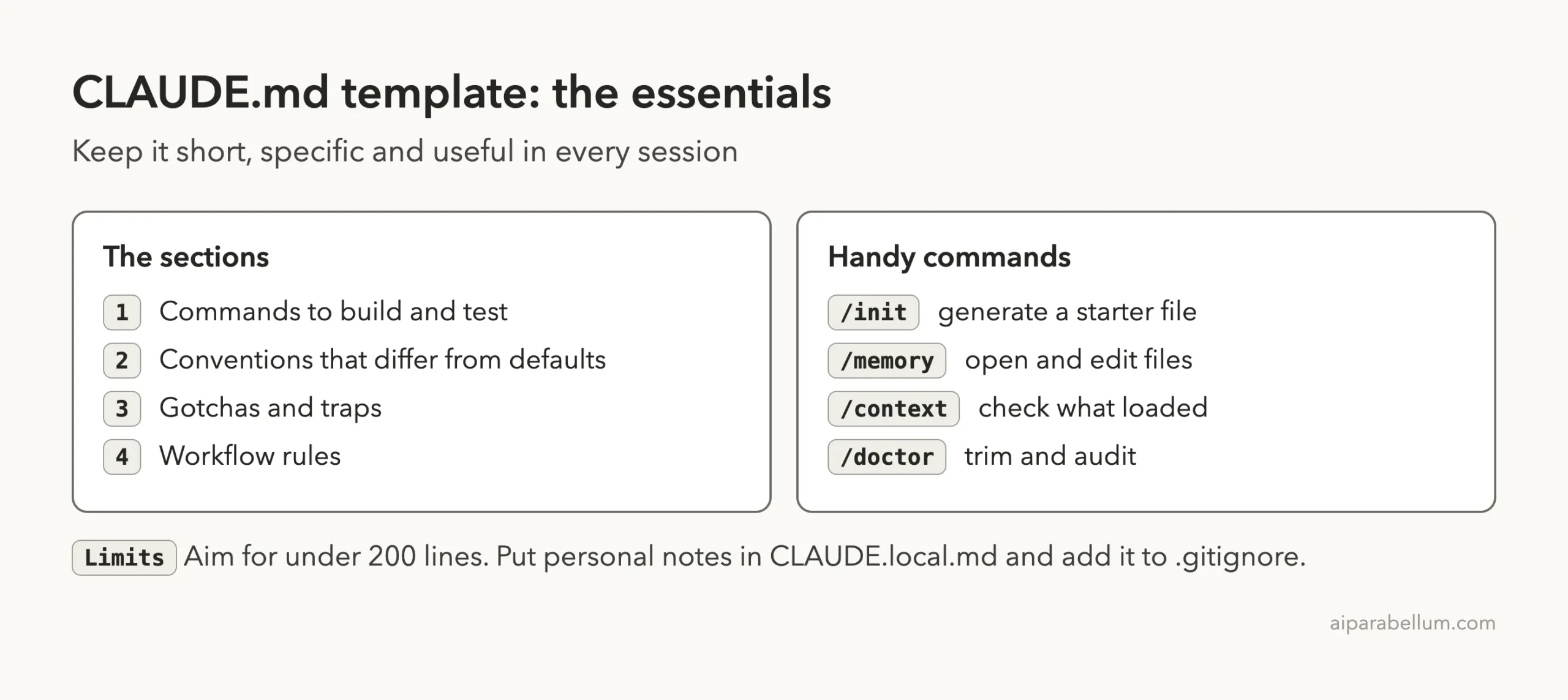
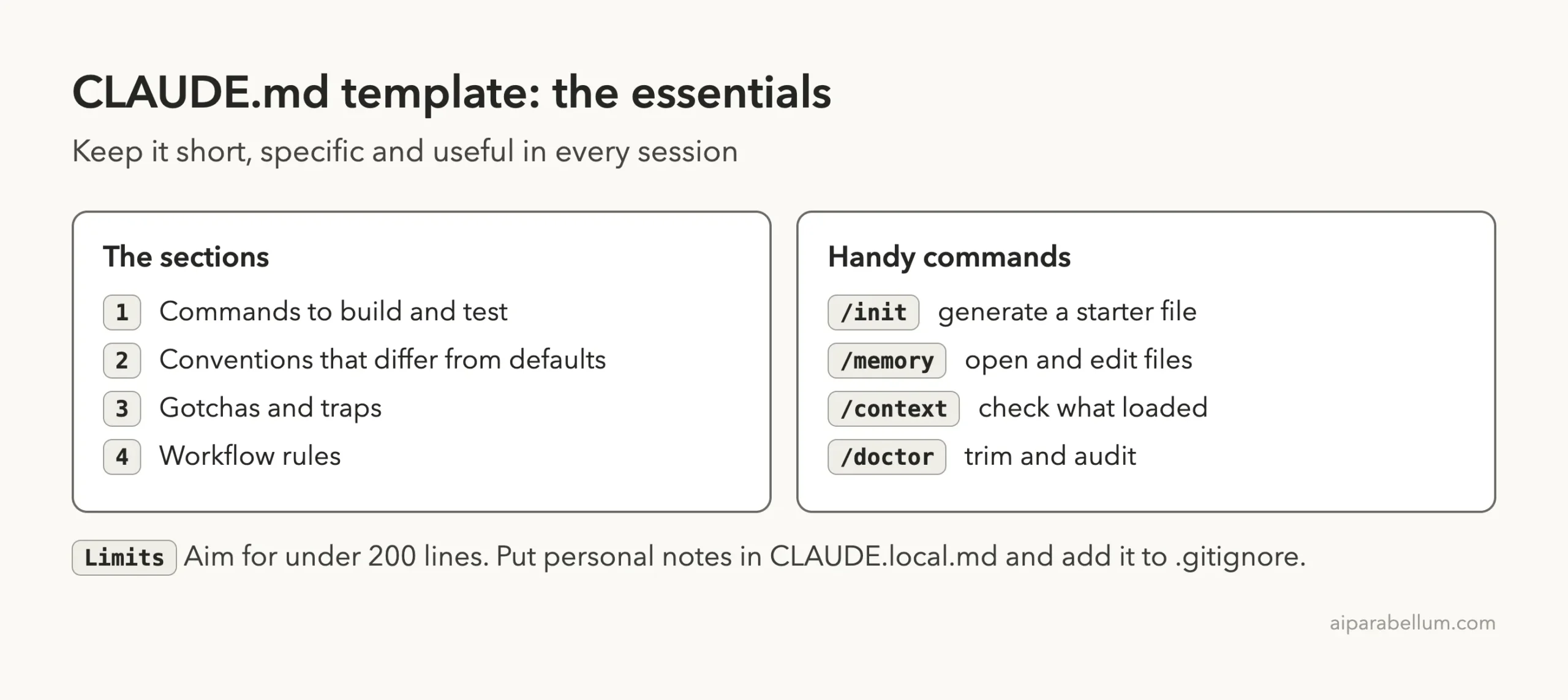
A good CLAUDE.md template has four short sections: the commands that build and test your project, the conventions that differ from the defaults, the gotchas that trip people up, and a few workflow rules. Keep the whole file under about 200 lines, and write each line so concrete that you could check it.
Below you can copy a full template and fill in your own details in a few minutes. We also put it to work in a throwaway demo project, so you can see Claude Code answer from the file instead of guessing.
This guide is part of our Claude Code tutorials, where we answer one specific question per post. If you only want the file, jump to the copy-paste block in the next section.
Tested with Claude Code v2.1.312 on November 1, 2026. We tested on macOS; the Windows and Linux steps follow Anthropic’s official instructions.
Quick Answer: The CLAUDE.md Template to Copy
Save this as CLAUDE.md in the root folder of your project, then replace every line in angle brackets with your own facts. Delete any section you do not need.
# Project: <project name>

<One sentence on what this project does.>

## Commands
- Install: `<install command>`
- Run all tests: `<test command>`
- Run one test file: `<single test command>`
- Lint or typecheck: `<check command>`

## Conventions
- <Style rule that differs from the tool defaults>
- <Which helper or module to use for errors>
- <Naming rule for files or functions>

## Gotchas
- <Something that looks unused but is live>
- <An environment variable that tests need>
- <A folder or file Claude should not edit>

## Workflow
- <What to do before finishing, such as add a test>
- <How big a change should be>
The table below explains what each section is for. Think of it as the reason each part earns a place in the file.
| Section | What goes in it | Why Claude needs it |
|---|---|---|
| Commands | Exact build, test and lint commands | Claude can check its own work as it goes |
| Conventions | Rules that differ from tool defaults | Claude cannot guess your team’s habits |
| Gotchas | Traps, misleading code, hidden setup | It stops the same mistake from happening twice |
| Workflow | Standing “always do X” rules | It keeps every session working the same way |
What Is a CLAUDE.md File?
A CLAUDE.md file is a plain markdown file that gives Claude Code standing instructions. According to the official memory docs, each Claude Code session begins with a fresh context window, and CLAUDE.md is one of two ways knowledge carries from one session to the next.
The other way is auto memory, where Claude writes notes for itself based on your corrections. CLAUDE.md is the one you write. You can think of it as the briefing note you would hand a new teammate on their first day.
The docs are clear about one point. Claude treats CLAUDE.md as context, not as enforced configuration. It usually follows it, but the file is guidance and not a lock.
A CLAUDE.md is a briefing, not a rulebook that can force anything.
A Real CLAUDE.md Example We Tested
To make the template concrete, we filled it in for a tiny made-up project. We created a demo folder at ~/claude-code-demos/claudemd-template with a small Python library called Tip Splitter. It has one function that splits a restaurant bill, a test file, and an AppError class for errors.
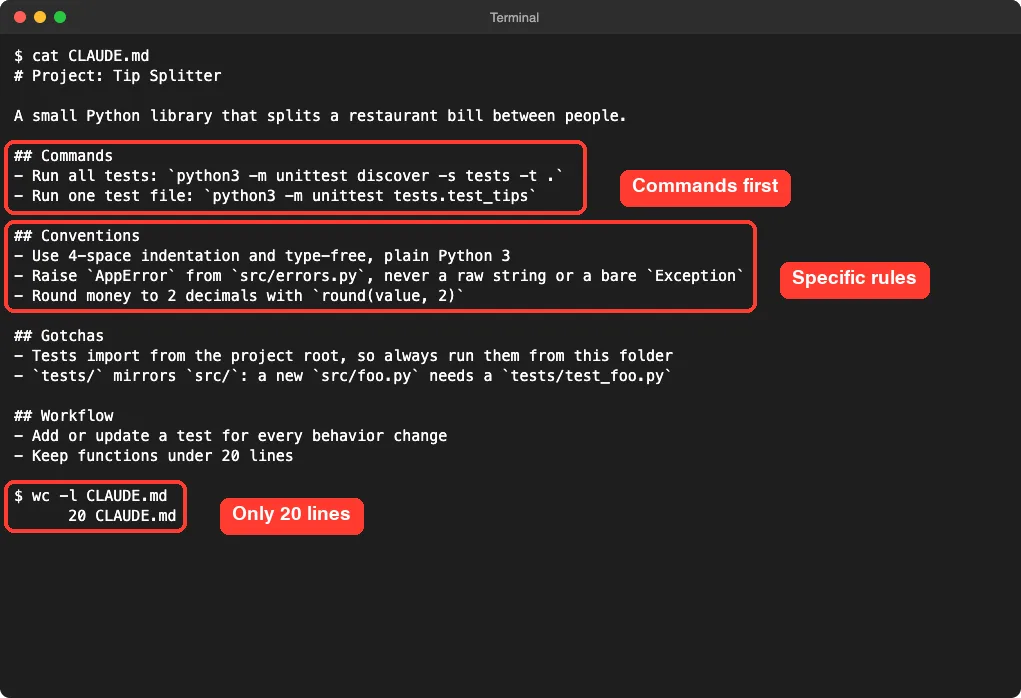
Here is the CLAUDE.md we wrote for it. It is 20 lines long.
# Project: Tip Splitter

A small Python library that splits a restaurant bill between people.

## Commands
- Run all tests: `python3 -m unittest discover -s tests -t .`
- Run one test file: `python3 -m unittest tests.test_tips`

## Conventions
- Use 4-space indentation and plain Python 3
- Raise `AppError` from `src/errors.py`, never a raw string or a bare `Exception`
- Round money to 2 decimals with `round(value, 2)`

## Gotchas
- Tests import from the project root, so always run them from this folder
- `tests/` mirrors `src/`: a new `src/foo.py` needs a `tests/test_foo.py`

## Workflow
- Add or update a test for every behavior change
- Keep functions under 20 lines
One small note: in the screenshot below, the second convention line reads “4-space indentation and type-free, plain Python 3”. We tidied that wording above because “type-free” was a clumsy phrase. The rest of the file is exactly what Claude Code read.
How We Checked That Claude Code Loaded It
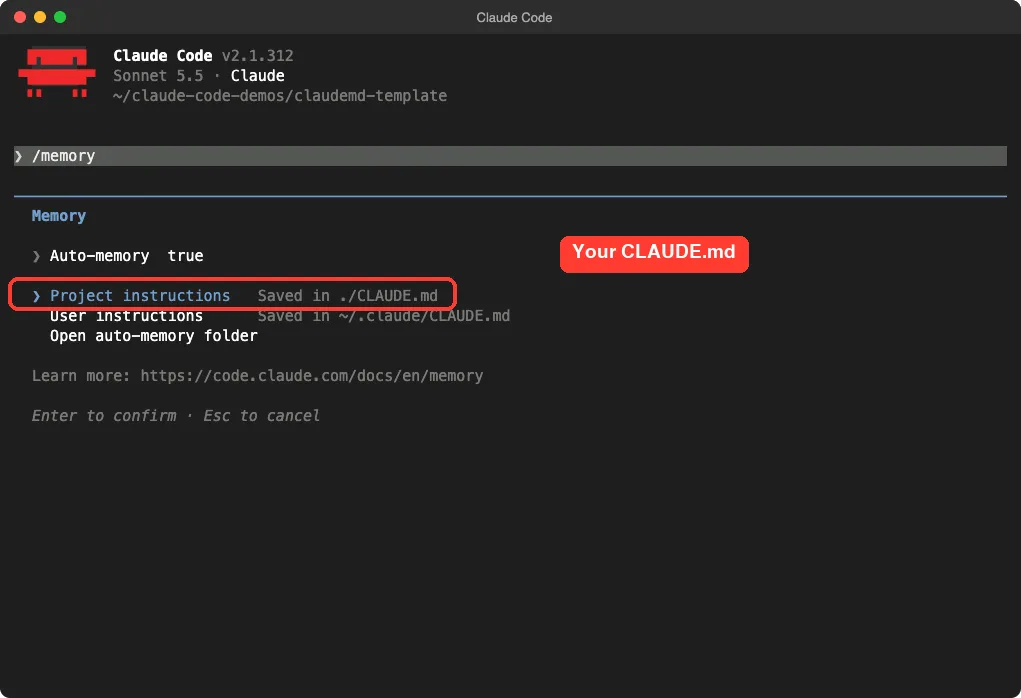
We started Claude Code inside the demo folder and typed /memory. This opens a small panel that lists your memory files. It showed “Project instructions” as saved in ./CLAUDE.md, which is the file we had just written.
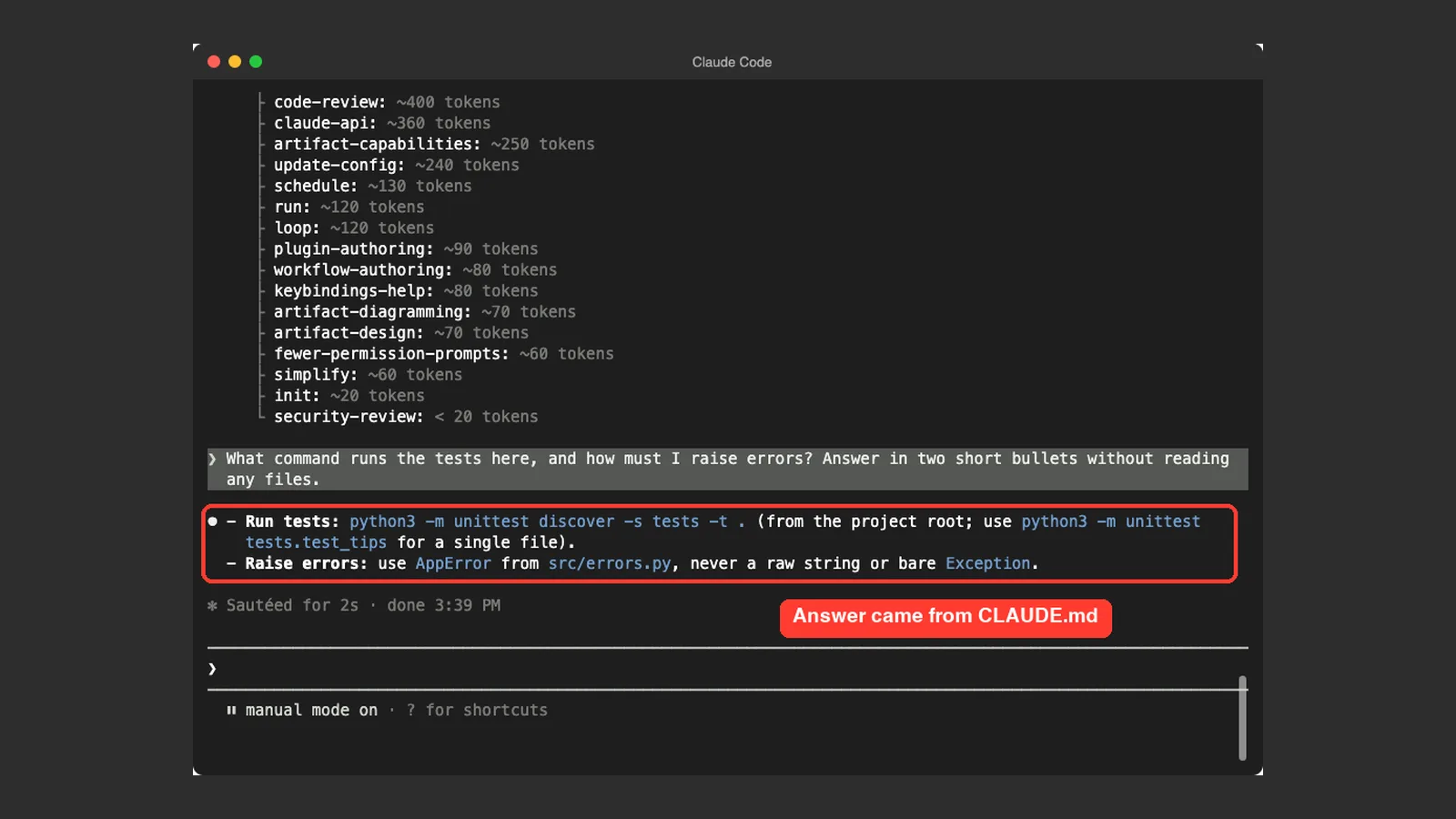
Then we asked a question that only the file could answer: What command runs the tests here, and how must I raise errors? Answer in two short bullets without reading any files.
We told Claude not to read any files on purpose. That way the answer had to come from what was already loaded at the start of the session. Claude Code replied with the exact test command from the file, including the single-file variant, and said to use AppError from src/errors.py, never a raw string or a bare Exception.
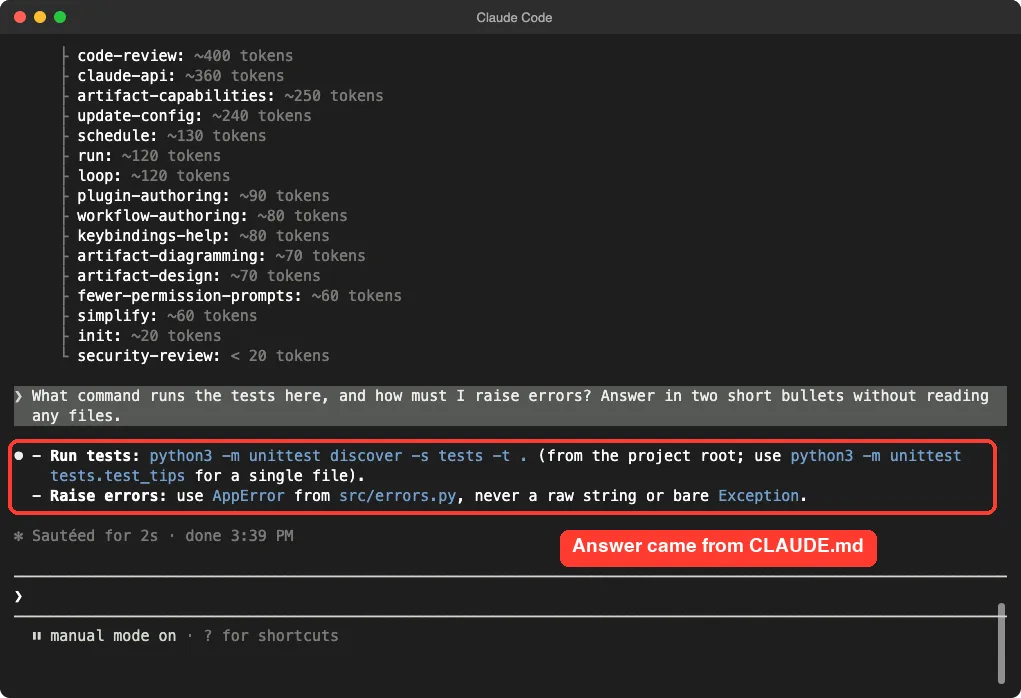
This is one demo with one question, so treat it as an example and not a full test. It does match how the docs describe the file: Claude Code loads it at the start of every session.
We also ran /context, which the docs say lists loaded files under Memory files. It also shows skills from our own setup, so we did not screenshot it.
Where to Put the File
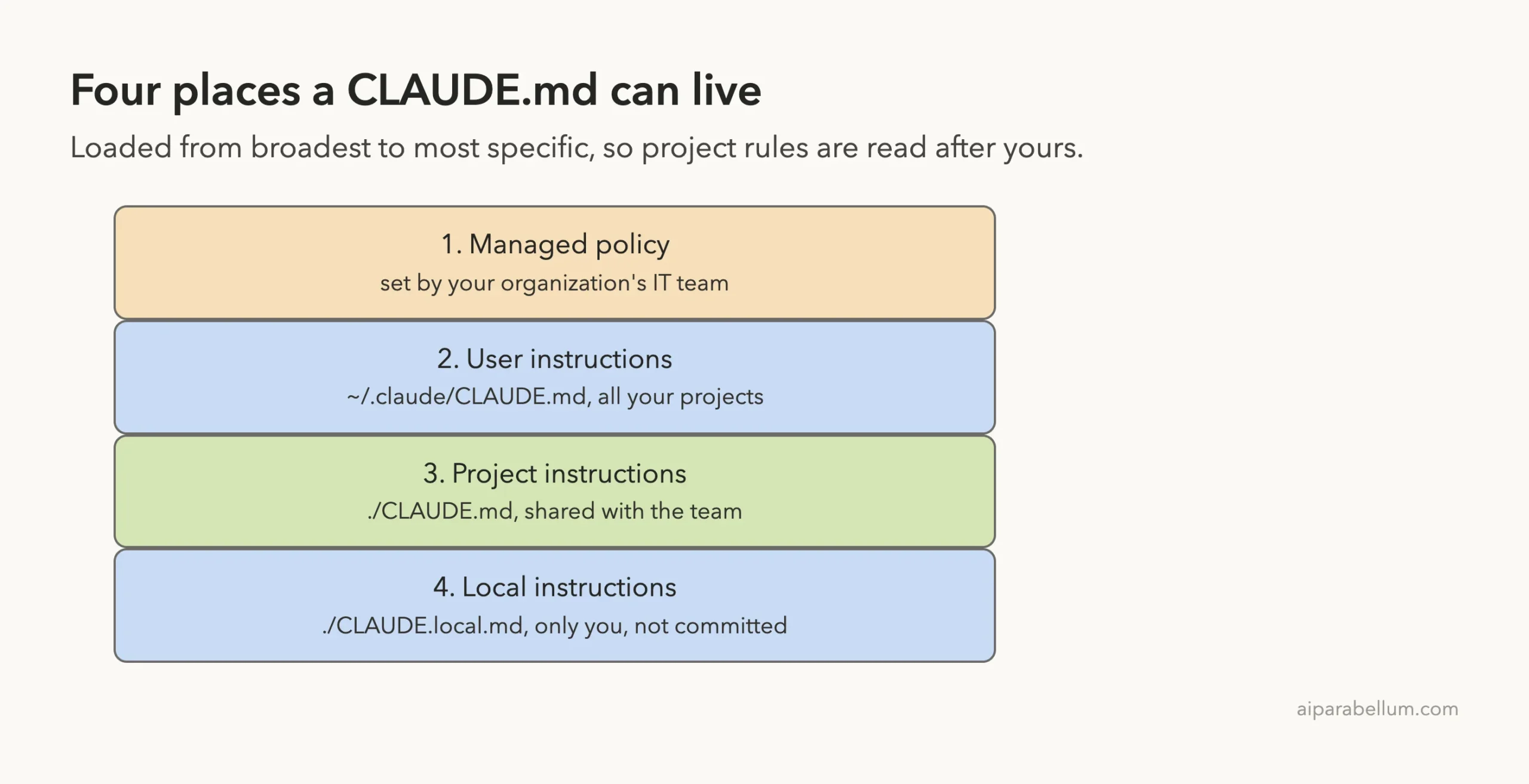
The docs list four locations. They load in order from the broadest scope to the most specific, so a project instruction appears in context after a user instruction.
| Scope | Location | Shared with |
|---|---|---|
| Managed policy | Set by your organization, such as /Library/Application Support/ClaudeCode/CLAUDE.md on macOS | Everyone in the organization |
| User instructions | ~/.claude/CLAUDE.md | Only you, in all projects |
| Project instructions | ./CLAUDE.md or ./.claude/CLAUDE.md | Your team, through source control |
| Local instructions | ./CLAUDE.local.md | Only you, in this project |
For most people, the project file is the one to start with. Put it in the root of your project and commit it, so every teammate gets the same instructions.
Personal Notes Go in CLAUDE.local.md
Your sandbox URLs or favorite test data do not belong in a shared file. Put them in CLAUDE.local.md at the project root. It loads alongside CLAUDE.md, and the docs tell you to add it to .gitignore so it is not committed.
Files in Parent and Sub Folders
Claude Code loads CLAUDE.md from your working directory and from every directory above it. The files are joined together instead of overriding each other. Files in subfolders are loaded later, once Claude reads or edits a file in that subfolder.
How to Write Each Section Well
The template is easy to fill in badly. These tips come from the official guidance on writing effective instructions.
Make Every Line Concrete
The docs recommend instructions that are concrete enough to verify. They give three examples, such as “Use 2-space indentation” instead of “Format code properly”, and “Run npm test before committing” instead of “Test your changes”.
Use the same test on your own lines. If a new teammate could not tell whether they followed it, rewrite it.
Only Write What Claude Cannot Work Out
The best practices guide says every line in CLAUDE.md takes a little of Claude’s attention on every task, so the file works best when it holds only what Claude could not work out from the code. It lists four kinds of content that pass that test.
- How to confirm work in the repo: the exact test, typecheck and lint commands, and how to run a single test file.
- Places where the code is misleading, such as an old pattern that new code must not copy.
- Decisions that are not in the repo, such as how deploys work.
- Anything you have had to correct twice already.
Group Lines Under Headers
The docs say organized sections are easier for Claude to follow than dense paragraphs. That is why the template uses short headers with bullets under them.
Do Not Contradict Yourself
If two instructions disagree, the docs warn that Claude may pick one arbitrarily. This often happens when a parent folder, a subfolder and your personal file all say something different about the same thing.
How Long Should a CLAUDE.md Be?
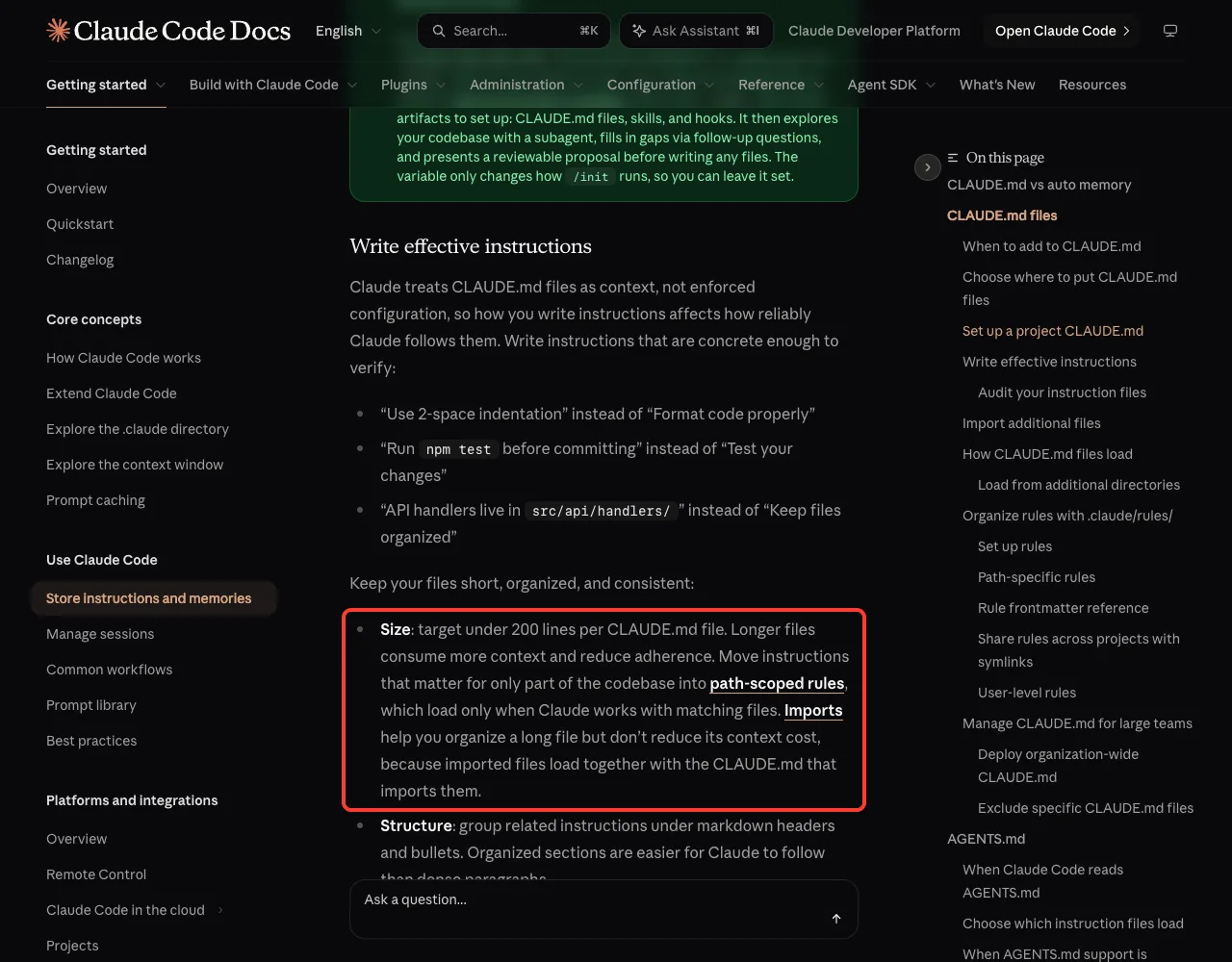
The docs say to target under 200 lines per CLAUDE.md file. Longer files use more context and can lower how well Claude follows them.
Our demo file is 20 lines, and that is a healthy size for a small project. The 200-line number is a ceiling, not a goal.
Split a Growing File
When the file grows, do not just add imports. The docs note that imports help you organize a long file but do not reduce its context cost, because imported files load with the file that imports them.
Instead, move instructions that matter for only part of the codebase into .claude/rules/ files. A rule file can use paths frontmatter so it loads only when Claude works with matching files. Here is the docs example:
---
paths:
  - "src/api/**/*.ts"
---

# API Development Rules

- All API endpoints must include input validation
- Use the standard error response format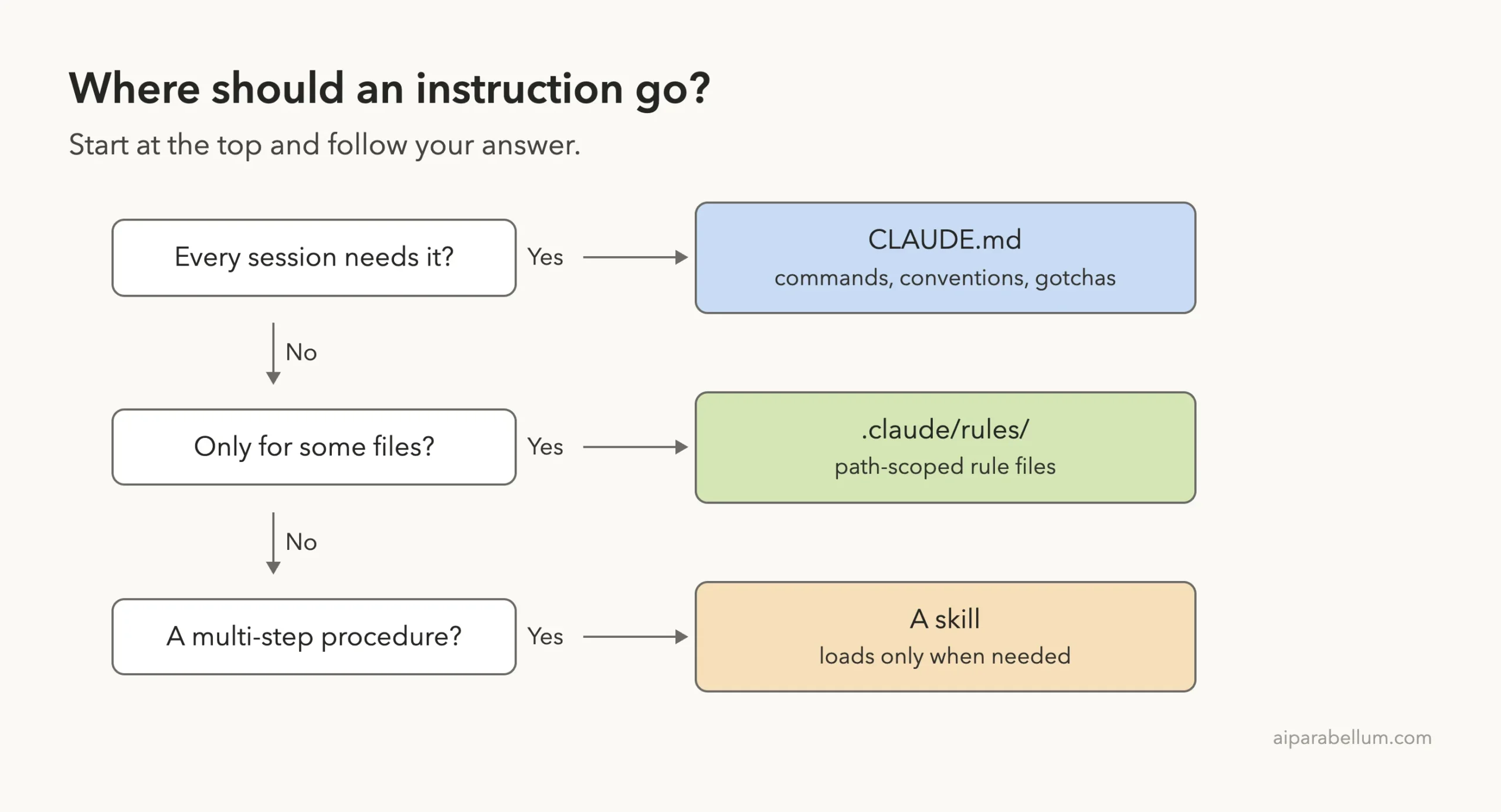
A multi-step procedure, like a release checklist, belongs in a skill instead. The docs say skills load only when you invoke them or when Claude decides they are relevant.
Generate a Starter File With /init
You do not have to write the file from scratch. Run /init in a session, and the docs say Claude analyzes your codebase and creates a file with the build commands, test instructions and conventions it finds.
If a CLAUDE.md already exists, /init suggests improvements instead of overwriting it. We did not run /init in this test, because we wanted to show a file written by hand. Read what it produces before you keep it.
The best practices guide says that from there the work is mostly removing lines. Keep the facts Claude would not find on its own, and cut the rest.
Check and Trim With /doctor
The docs describe /doctor as a checkup that can propose trims for a checked-in CLAUDE.md. It cuts content Claude can derive from the codebase, such as directory layouts and dependency lists, and keeps pitfalls and conventions.
There is also /doctor prompt-audit. It looks for instructions written for older models, references to files that do not exist, and files that contradict each other. It requires Claude Code v2.1.283 or later, and nothing changes until you ask Claude to apply the findings.
Four More Templates for Common Projects
The template above works for any stack. Here is how the Commands section might look for four common setups. The commands are examples, so swap in the ones your project really uses.
| Project type | Install | Test one file |
|---|---|---|
| Node with pnpm | pnpm install | pnpm vitest run path/to/file.test.ts |
| Python | pip install -r requirements.txt | python3 -m unittest tests.test_name |
| Rust | cargo build | cargo test test_name |
| Go | go mod download | go test ./path/to/pkg |
The first row echoes the example in the official best practices guide, which shows a short file with Commands, Conventions and Gotchas headers. The other rows are our own illustrations, not copied from the docs.
What Not to Put in CLAUDE.md
It is tempting to paste everything you know about the project. The guidance points the other way.
- Do not describe your architecture and file layout in detail. The best practices guide says Claude reads the repo itself, so write down only what is not in there.
- Do not use it for rules that can never have exceptions. The docs say that for something that must happen every time, use a hook, a deny rule or a managed setting instead.
- Do not store secrets in it. It is a plain text file that you may commit and share.
- Do not add private notes to the shared file. Use
CLAUDE.local.md.
A related tip from the docs: if Claude keeps ignoring a line, adding emphasis such as IMPORTANT probably will not fix it. Either the file has grown long enough that the line gets lost, or the line is a hard rule that belongs in a hook.
Claude Is Not Following My CLAUDE.md
If Claude seems to ignore the file, work through the checks the docs suggest, from easiest to hardest.
- Confirm the file is loaded. Run
/memoryor/contextand look for it in the list. - Make the instruction more specific. “Use 2-space indentation” works better than “format code nicely”.
- Look for conflicting instructions across your CLAUDE.md files and rules.
- Check the file size. The docs say files over 200 lines may reduce adherence.
- Check for competing built-in guidance, such as commit and pull request rules that Claude Code adds on its own.
If your repository uses an AGENTS.md file, the docs describe how Claude Code can read it in place of CLAUDE.md. A CLAUDE.md that contains @AGENTS.md is a simple way to bring that file in. Read the memory page for the exact rules for your version.
For related settings, see our guide to the settings.json location and our look at the context window, which explains why a shorter file helps.
Try It Yourself
Practice in a throwaway folder, never in a real project. Create a tiny demo with these commands:
mkdir -p ~/claude-code-demos/my-claudemd-test
cd ~/claude-code-demos/my-claudemd-test
cat > CLAUDE.md <<'EOT'
# Project: Notes Demo

## Commands
- Run the script: `python3 hello.py`

## Conventions
- Always greet the user in Spanish
EOT
echo 'print("hello")' > hello.py
claude
Then paste this prompt and compare the answer with your file:
How should you greet the user in this project, and how do I run the script? Answer in two bullets without reading any files.Edit the file, quit with Ctrl+C twice, start Claude Code again and ask the same question. You should see the new instruction in the answer.
Common Mistakes
- Writing vague rules such as “write clean code”, which nobody can check.
- Pasting the whole README into the file, which fills context for no gain.
- Letting the file grow past 200 lines without moving parts into rules files.
- Leaving old instructions that contradict new ones.
- Putting personal preferences in the shared file instead of
CLAUDE.local.md. - Forgetting that the file loads at session start, so you need a new session to be sure a change took effect.
Pro Tips
- Start with the Commands section. It gives Claude a way to check its own work.
- Add a line each time Claude makes the same mistake twice.
- Run
/memoryto open and edit your files without leaving the session. - Use HTML comments for notes to teammates. The docs say block-level comments are stripped before the content reaches Claude.
- Review the file every few weeks and delete anything out of date.
- Commit the project file so the whole team benefits.
Cheat Sheet
Frequently Asked Questions
Where do I put the CLAUDE.md file?
For a project, put it at ./CLAUDE.md or ./.claude/CLAUDE.md. For personal rules across every project, use ~/.claude/CLAUDE.md. Private project notes go in CLAUDE.local.md.
How long should a CLAUDE.md be?
The official docs target under 200 lines per file. Shorter is usually better, because every line uses a little of Claude’s attention in every session.
Can Claude Code write my CLAUDE.md for me?
Yes. Run /init and Claude analyzes your codebase to create a starting file. Treat it as a first draft and remove anything Claude could work out on its own.
Does Claude always follow CLAUDE.md?
Not always. The docs say it is context, not enforced configuration. For rules with no exceptions, use a hook or a permission deny rule instead.
What is the difference between CLAUDE.md and auto memory?
You write CLAUDE.md, and it holds instructions and rules. Claude writes auto memory itself, and it holds learnings from your corrections. Both are loaded at the start of a session.
Conclusion
A solid CLAUDE.md template is short: commands, conventions, gotchas and workflow rules, written as lines you could verify, in a file under 200 lines. In our one demo, a 20-line file was enough for Claude Code to quote the exact test command and error rule without opening a single file. Copy the template above, fill in your own project facts, and learn more about the assistant behind the tool on our Claude AI page. For every option, read the official memory guide and the best practices guide.