If Claude Code shows “Remote managed settings failed to load (authentication rejected (401)) · no remote policy applied”, it means Claude Code tried to download your company’s central settings from Anthropic, and the server refused the credential it sent. People who search for claude remote managed settings failed to load are almost always on a Claude for Teams or Claude for Enterprise account, because only those plans use server-managed settings.
The good news: your session still starts. The warning only tells you that your organization’s policy is not active right now. The usual fix is to repair the sign-in that Claude Code is using:
- Run
/statusinside Claude Code and check which sign-in is active. - Look for a stray
ANTHROPIC_API_KEYorCLAUDE_CODE_OAUTH_TOKENin your shell withenv | grep -E "ANTHROPIC|CLAUDE_CODE", and unset it if you don’t need it. - Sign in again with
claude auth loginin your shell, or/logininside a session. - Run
claude doctorand read theManaged settings (remote)line to confirm the fix. - If a fresh sign-in still gets a 401, ask your organization admin to check your seat and access.
This guide is part of our help series. Browse all our Claude Code tutorials for more fixes and how-tos.
Tested with Claude Code v2.1.325 on macOS on November 18, 2026. We can’t safely trigger a real 401 against an organization’s settings, so the exact warning text and its meaning come from Anthropic’s official documentation. The claude doctor and /status captures below are real, from a throwaway demo folder.
We tested on macOS; the Windows and Linux steps follow Anthropic’s official instructions.
Remote Managed Settings Failed to Load: Quick Summary
| Question | Short answer |
|---|---|
| Exact message | Remote managed settings failed to load (authentication rejected (401)) · no remote policy applied |
| Who sees it | Team and Enterprise users whose org uses server-managed settings |
| What failed | The settings download; the server rejected the credential |
| Does Claude Code still work? | Yes, unless your admin requires the settings to load first |
| “no remote policy applied” | No cached copy from the last 24 hours, so no org policy runs |
| “using cached policy” | The last good copy of the settings still applies |
| Fastest fix | Remove stray keys or tokens, then claude auth login |
| How to check | claude doctor and /status |
What Are Remote Managed Settings in Claude Code?
Claude Code reads settings from several places: your own user settings, project settings and local settings, which we cover in our guide to settings files. On top of those, a company can push its own rules that you can’t override. Those are called managed settings.
There are two ways a company can deliver them. Endpoint-managed settings are files or OS policies that IT installs on your computer. Server-managed settings, which the warning calls “remote managed settings”, live in the claude.ai admin console and Claude Code downloads them from api.anthropic.com.
According to the official server-managed settings docs, an Owner or Primary Owner sets them up under Organization settings, then Claude Code fetches them at startup and checks for updates every hour. Typical uses are permission deny lists, audit hooks, allowed models and company announcements.
The warning is not about your project. It is about a policy download from your company’s admin console.
Who gets server-managed settings
Only Claude for Teams and Claude for Enterprise organizations can use them. The session must also connect straight to api.anthropic.com and sign in with one of the credentials the docs list.
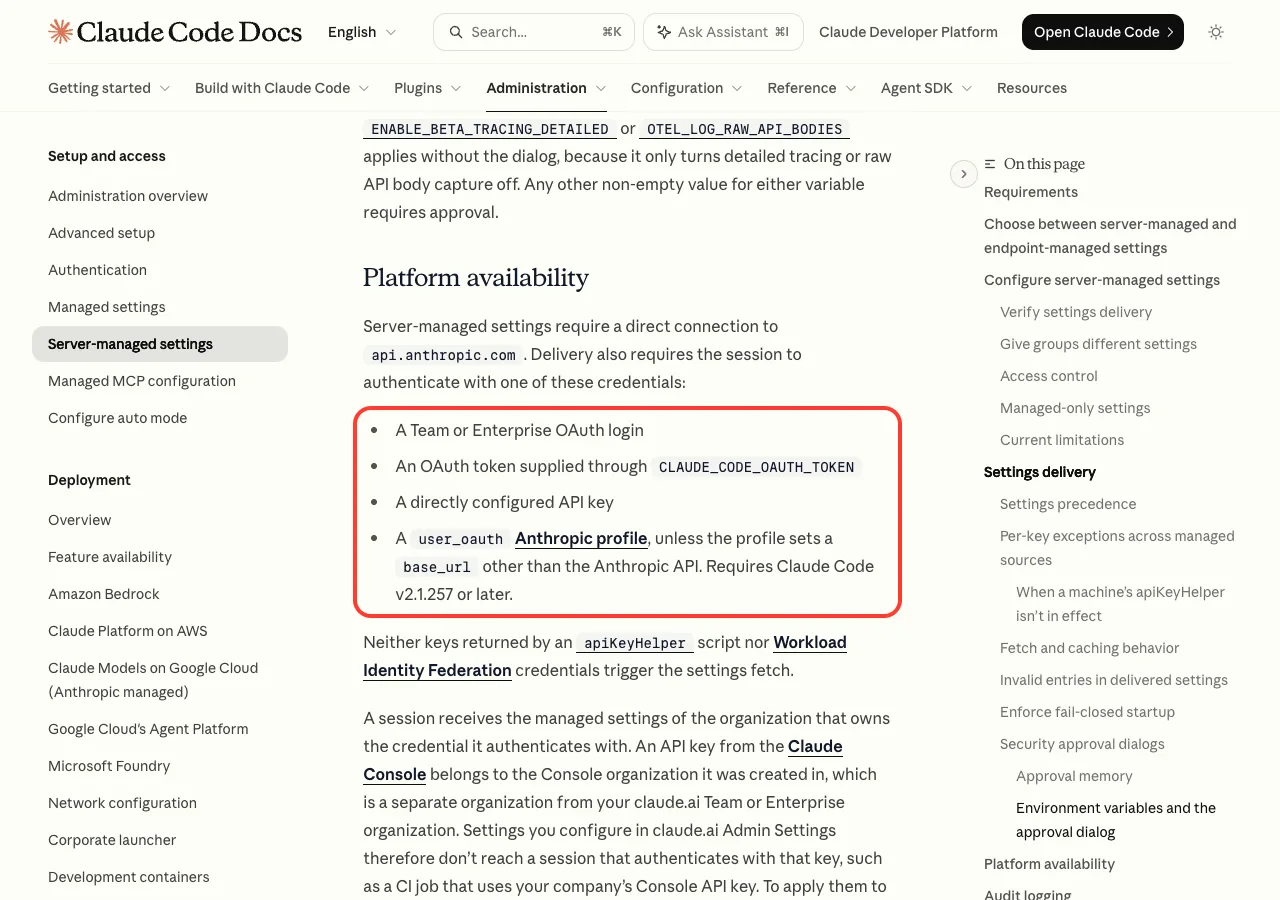
Those credentials are a Team or Enterprise OAuth login, a token in CLAUDE_CODE_OAUTH_TOKEN, a directly configured API key, or a user_oauth Anthropic profile. Keys from an apiKeyHelper script and Workload Identity Federation credentials don’t trigger the fetch at all.
What the 401 Warning Actually Means
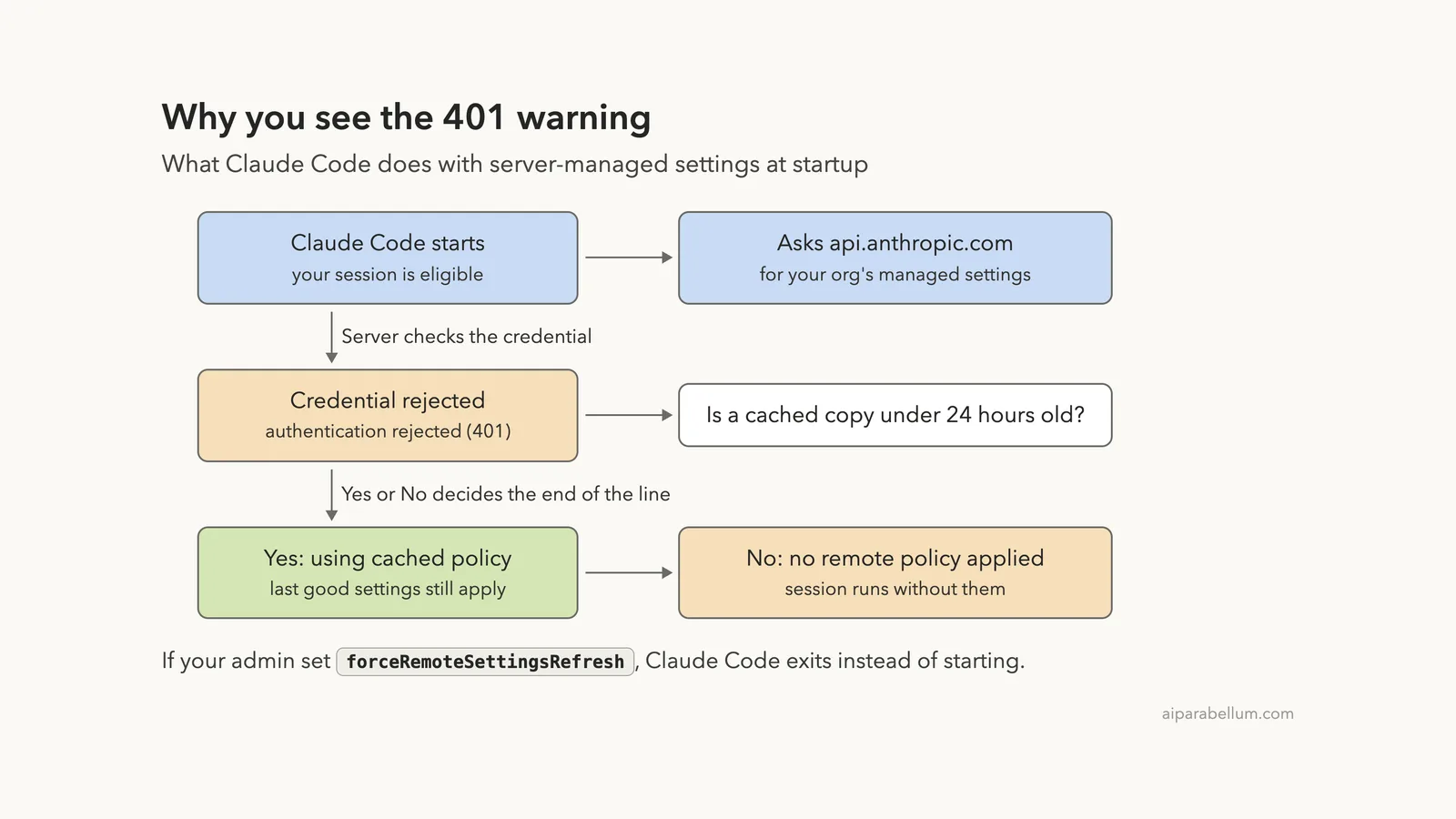
The official error reference has an entry for this exact message. It says your session is eligible for server-managed settings, but Claude Code couldn’t fetch them or couldn’t apply what came back.
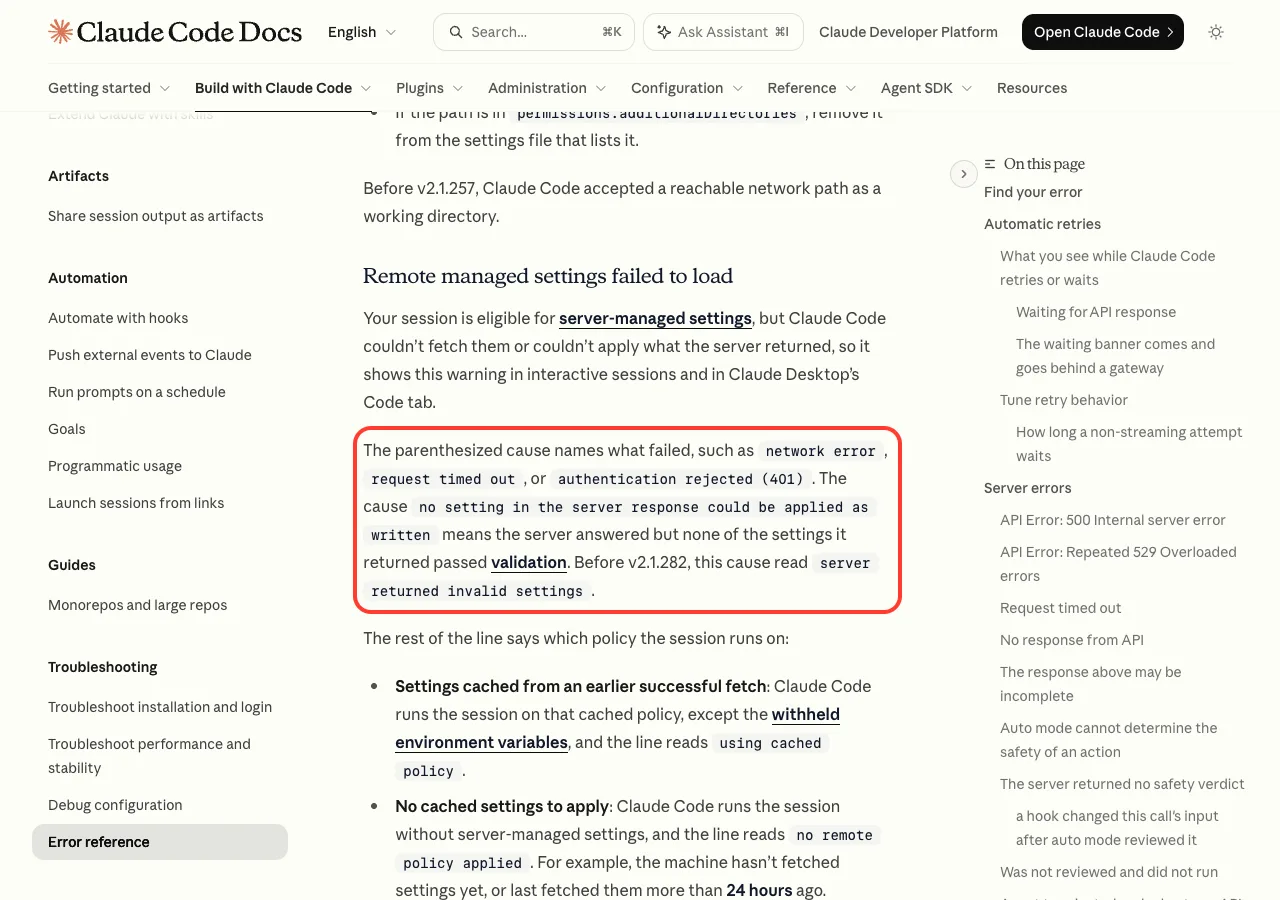
The part in parentheses names the cause. A 401 is an HTTP status that means “I don’t accept this credential”. So the server got the request but would not hand over your organization’s settings to the sign-in Claude Code sent.
The four causes you might see
| Cause in parentheses | What it means | First thing to try |
|---|---|---|
authentication rejected (401) | The credential was refused | Check /status, then sign in again |
network error | The request never got through | Check you can reach api.anthropic.com |
request timed out | No answer in time | Retry, check proxy or VPN |
no setting in the server response could be applied as written | Settings arrived but none passed validation | Ask your admin to fix them |
Before v2.1.282, the last cause read server returned invalid settings. And before v2.1.248, Claude Code only wrote a failed fetch to the debug log, so older versions never showed this warning at all.
“No remote policy applied” vs “using cached policy”
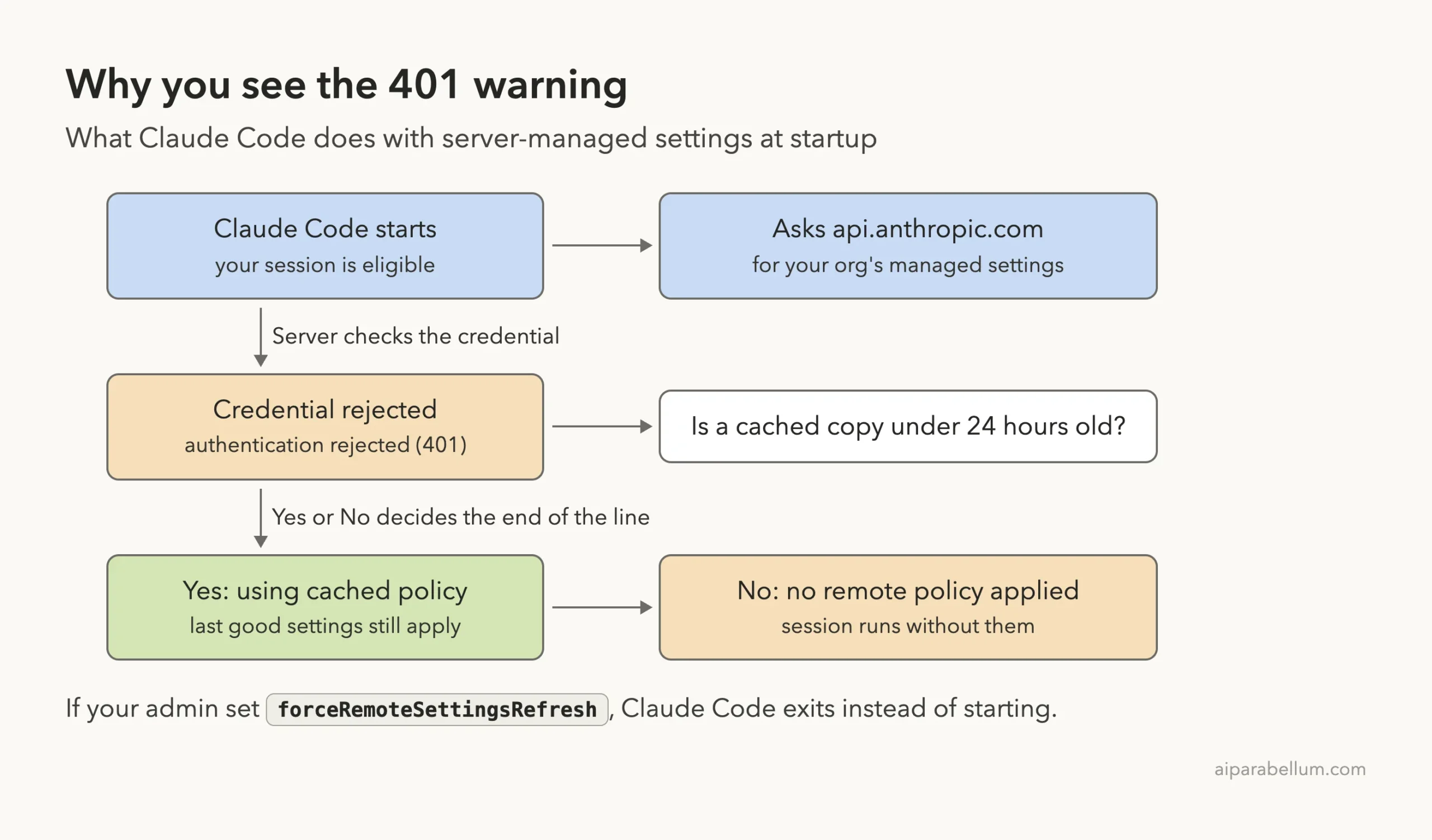
The end of the line tells you which rules your session is running on. If Claude Code has a copy of the settings from an earlier good fetch, the line ends with using cached policy and those rules still apply. The docs say to plan for that copy to expire 24 hours after the last successful fetch.
If there is no recent copy, the line ends with no remote policy applied. Your session runs without your company’s server-managed rules. Any endpoint-managed settings that IT installed on the machine still apply.
In the Claude Desktop Code tab, the same warning shows up as a line in the conversation. You may also see “Remote managed settings are still loading”, “did not load”, or “have now loaded” as the fetch changes state.
Why Claude Code Gets a 401 for Managed Settings
The docs don’t list every reason a server rejects a credential in this one entry. They do say what to do for an authentication cause: check your sign-in with /status. Anthropic’s other 401 entries describe the usual reasons a credential gets rejected, and they fit this warning well.
An old API key or token outranks your login
Claude Code picks one credential when several are present. An ANTHROPIC_API_KEY you approved, or a CLAUDE_CODE_OAUTH_TOKEN in your shell, ranks above your normal /login sign-in.
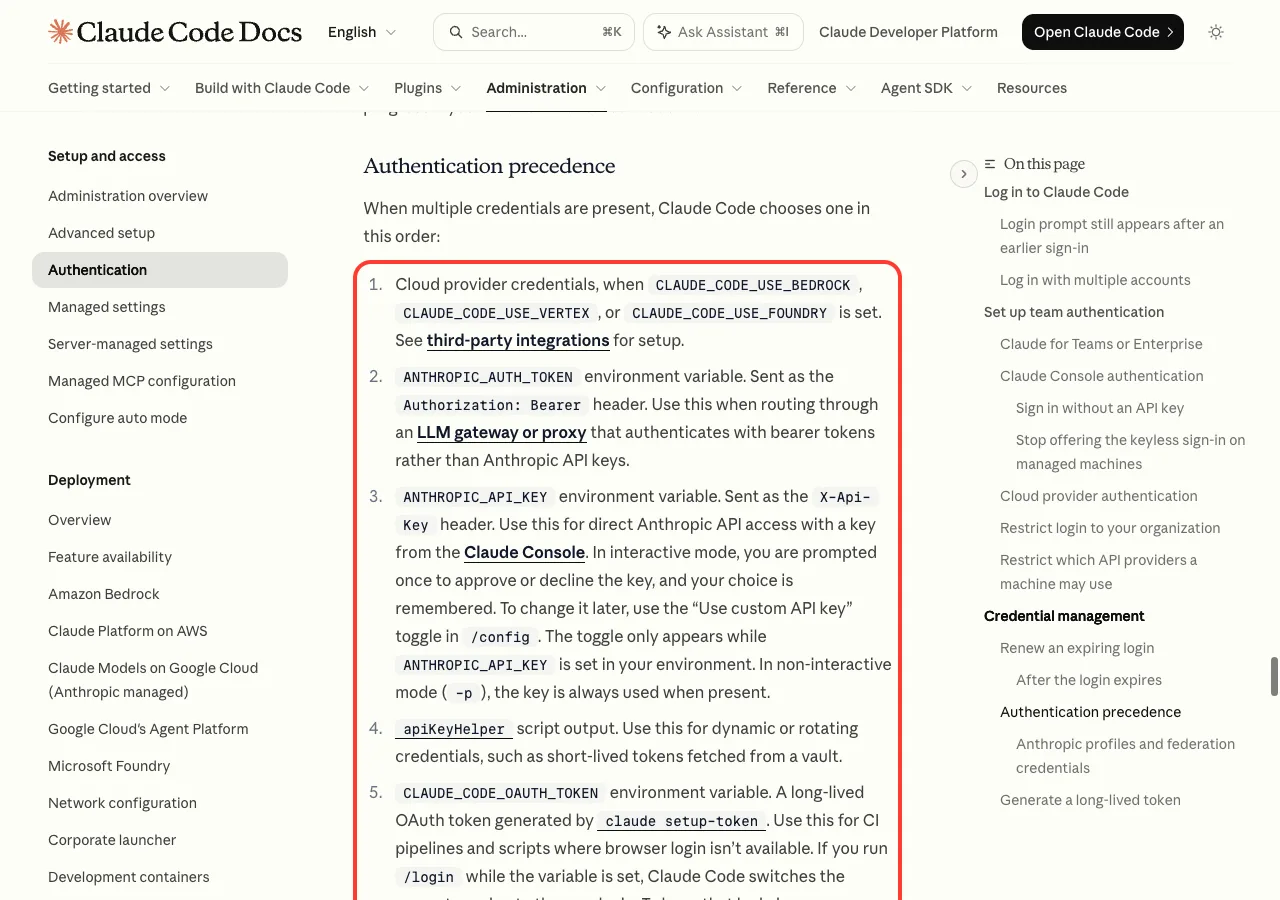
If that key was revoked, or the token expired, the settings request carries a dead credential. The docs note that with CLAUDE_CODE_OAUTH_TOKEN, Claude Code keeps sending the value you set after a 401 instead of switching to your saved login. We saw a similar trap in our post on a disabled organization.
Your saved sign-in expired or was revoked
Logins don’t last forever. In our own demo session, Claude Code even showed a banner reading “Your login expires in 2 days · run /login to renew”. Once a login expires or gets revoked, every request made with it, including the settings fetch, can come back as a 401.
Your access to the organization changed
The docs explain that Anthropic returns a 401 “Invalid authentication credentials” when a credential was recently revoked, when an organization removed your access, or when an account was deactivated. If an admin removed your seat, signing in again won’t help. Only the admin can restore it.
How to Fix Remote Managed Settings Failed to Load (401)
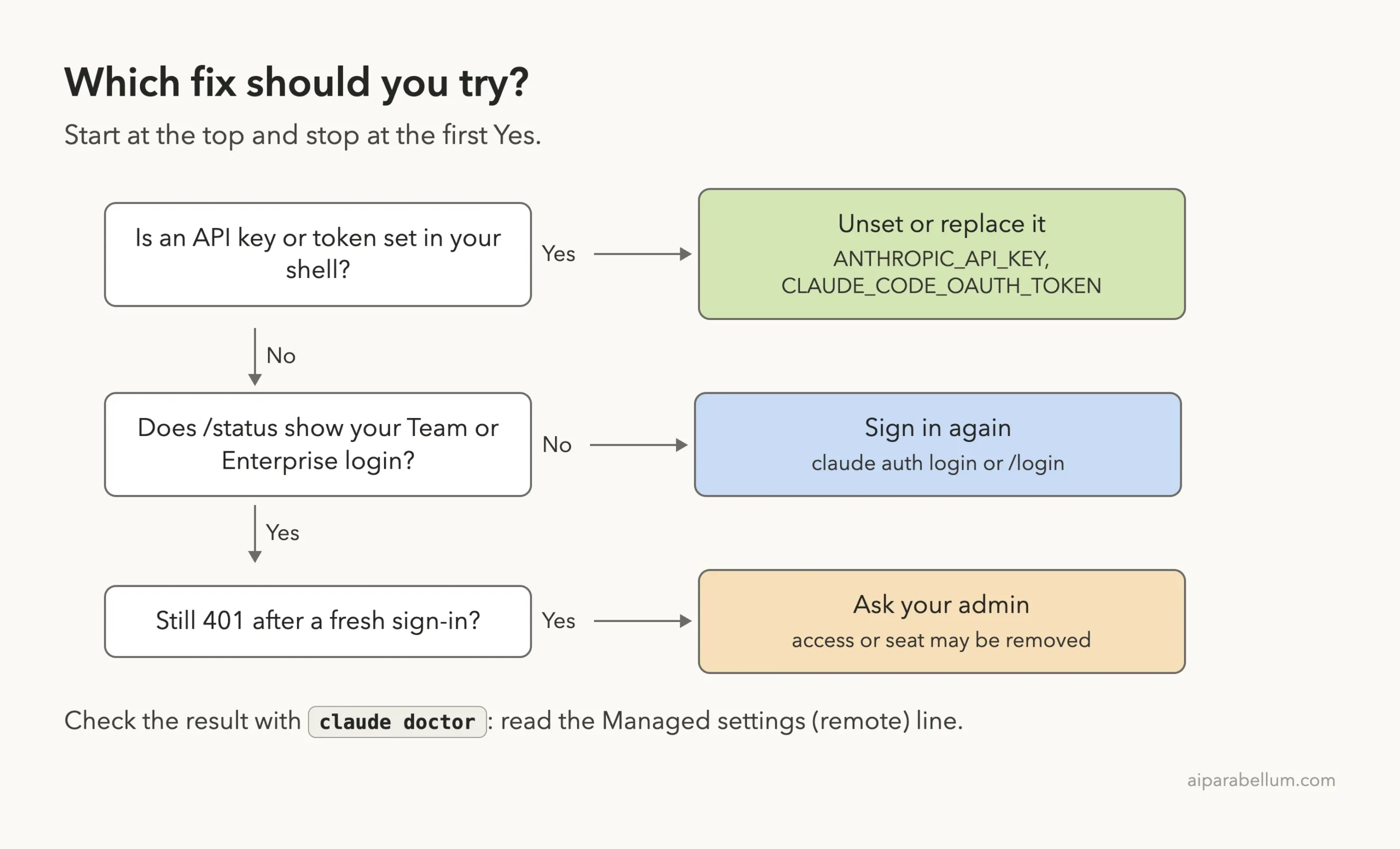
Work through these steps in order and stop when the warning goes away. Each step uses commands from Anthropic’s docs. We ran the safe check commands ourselves.
Step 1: See which sign-in Claude Code is using
Start Claude Code and run /status. Look at the Login method, Organization and Setting sources rows.
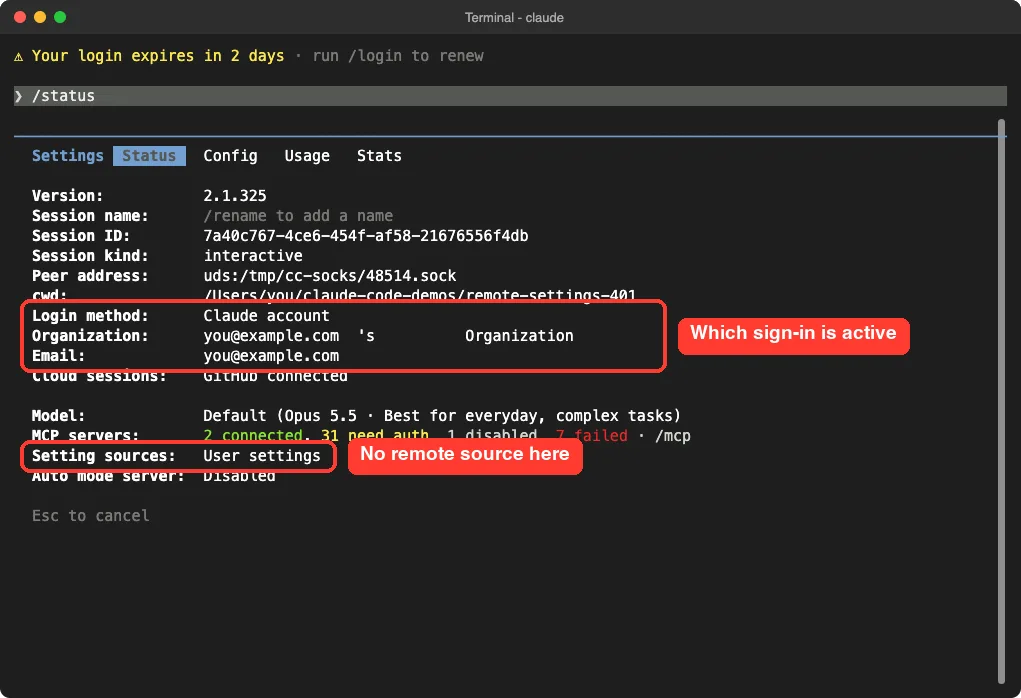
Our demo account is not on a Team or Enterprise plan, so Setting sources shows only User settings. On a machine where server-managed settings load, the docs say this line lists Enterprise managed settings with remote in parentheses. If /status shows an API key row that is in use, that key is the credential being rejected.
Step 2: Remove stray keys and tokens
Check your current shell for leftover variables:
env | grep -E "ANTHROPIC|CLAUDE_CODE"If you see an old key or token you don’t need, clear it for this shell and start Claude Code again:
unset ANTHROPIC_API_KEY
unset CLAUDE_CODE_OAUTH_TOKEN
claude
To make it permanent, delete the matching export line from ~/.zshrc, ~/.bashrc or your project’s .env file. In PowerShell on Windows, the docs use Remove-Item Env:ANTHROPIC_API_KEY. The docs also say a token can be set in settings files, so check the env block in your settings.json files too.
Step 3: Sign in again
If you rely on your normal Team or Enterprise login, refresh it. From your shell, run:
claude auth loginInside a running session, /login does the same job. The docs point out that claude auth commands still work even when an admin forces settings to load before a session can start, so you can always sign in again. If logins keep slipping away, our login loop guide covers the clock and keychain checks.
Step 4: For CI jobs, use a fresh token
Automated jobs often use CLAUDE_CODE_OAUTH_TOKEN. If that token was revoked or expired, generate a new one with claude setup-token, authorize it for your Team or Enterprise organization, and replace the old value in the job’s secrets.
The docs add one more catch. A Claude Console API key belongs to a separate Console organization, so your claude.ai settings never reach a job that signs in with it. For those jobs, use the OAuth token or an endpoint-managed settings file instead.
Step 5: Confirm with claude doctor
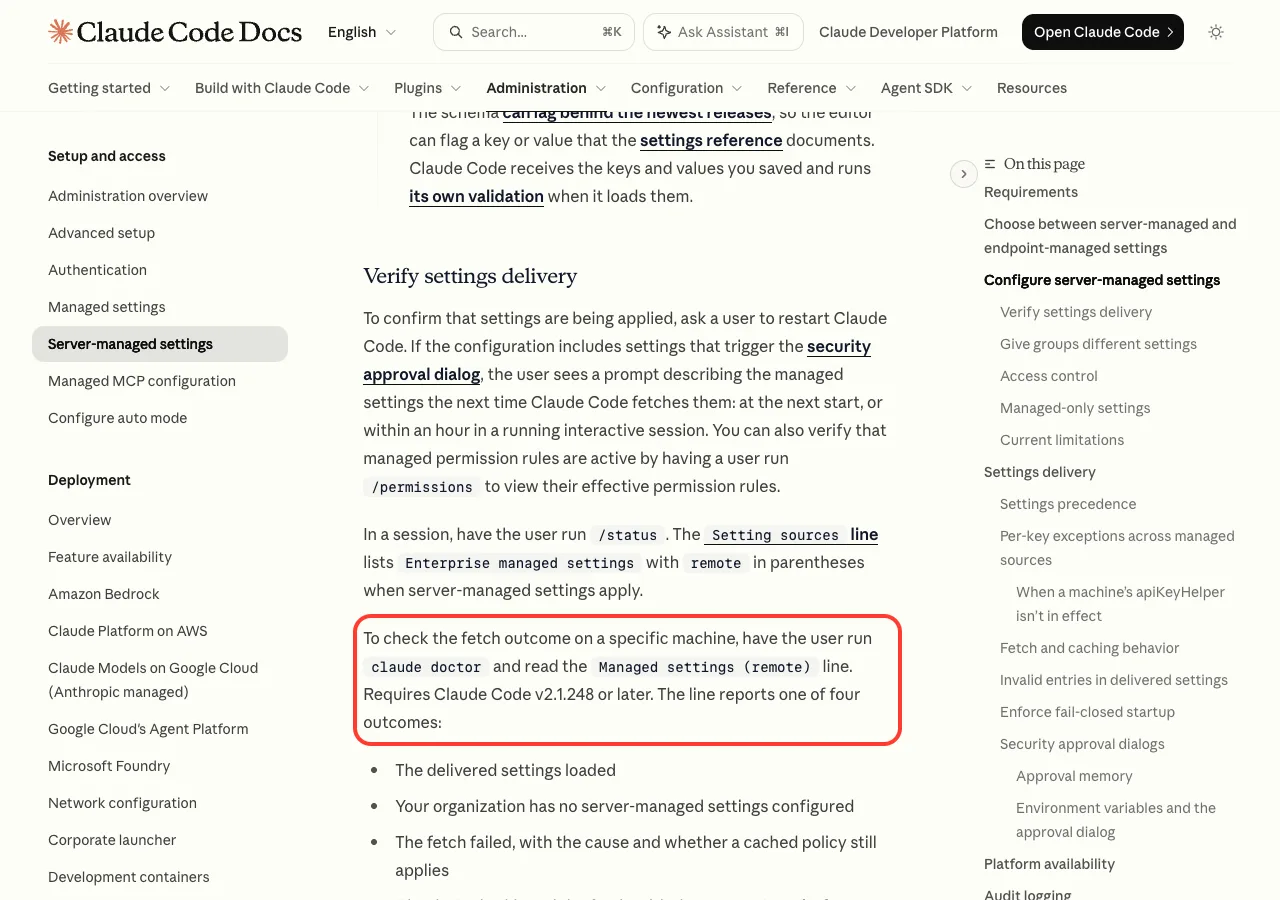
Run claude doctor in your shell. Since v2.1.248, it prints a Managed settings (remote) line that reports one of four outcomes: the settings loaded, your org has none configured, the fetch failed (with the cause), or the fetch was skipped (with the reason).
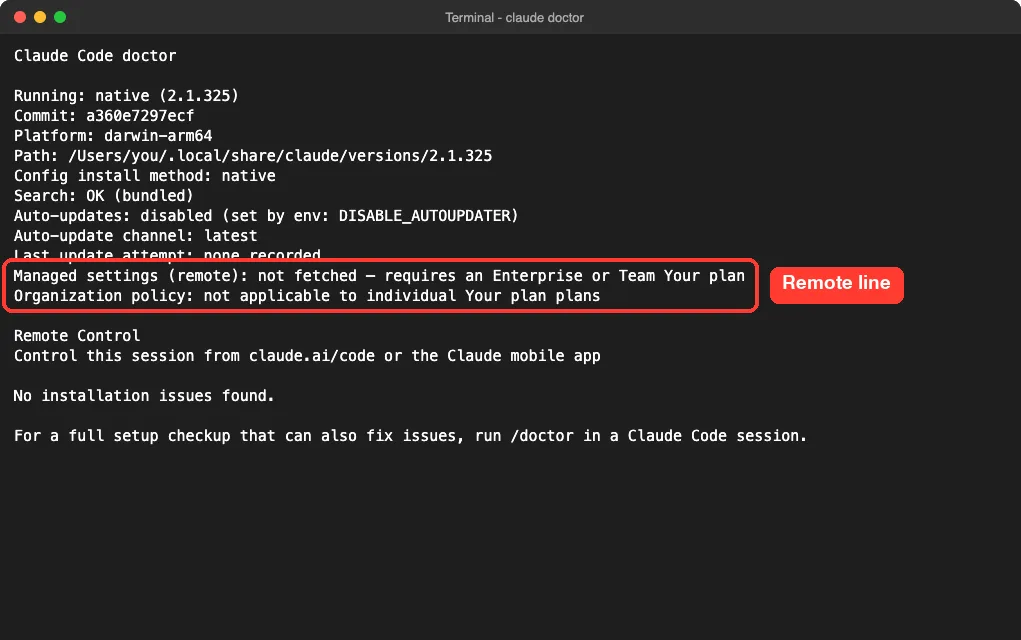
On our demo account, the line says the fetch did not happen because it needs an Enterprise or Team plan. On your work machine, you want it to say the delivered settings loaded. For more on this tool, see our walkthrough of Claude Code doctor.
Step 6: Ask your admin
If you’ve removed stray credentials, signed in fresh, and claude doctor still reports a 401, the problem is likely on the organization side. Send your admin the full warning line and the doctor output. They can check that your seat is active and that the org still has Claude Code access.
What the Docs Say to Do
For an authentication cause, it says to check your sign-in with /status. For a network cause, check that the machine can reach api.anthropic.com. For invalid settings, ask your admin to fix them on the server.
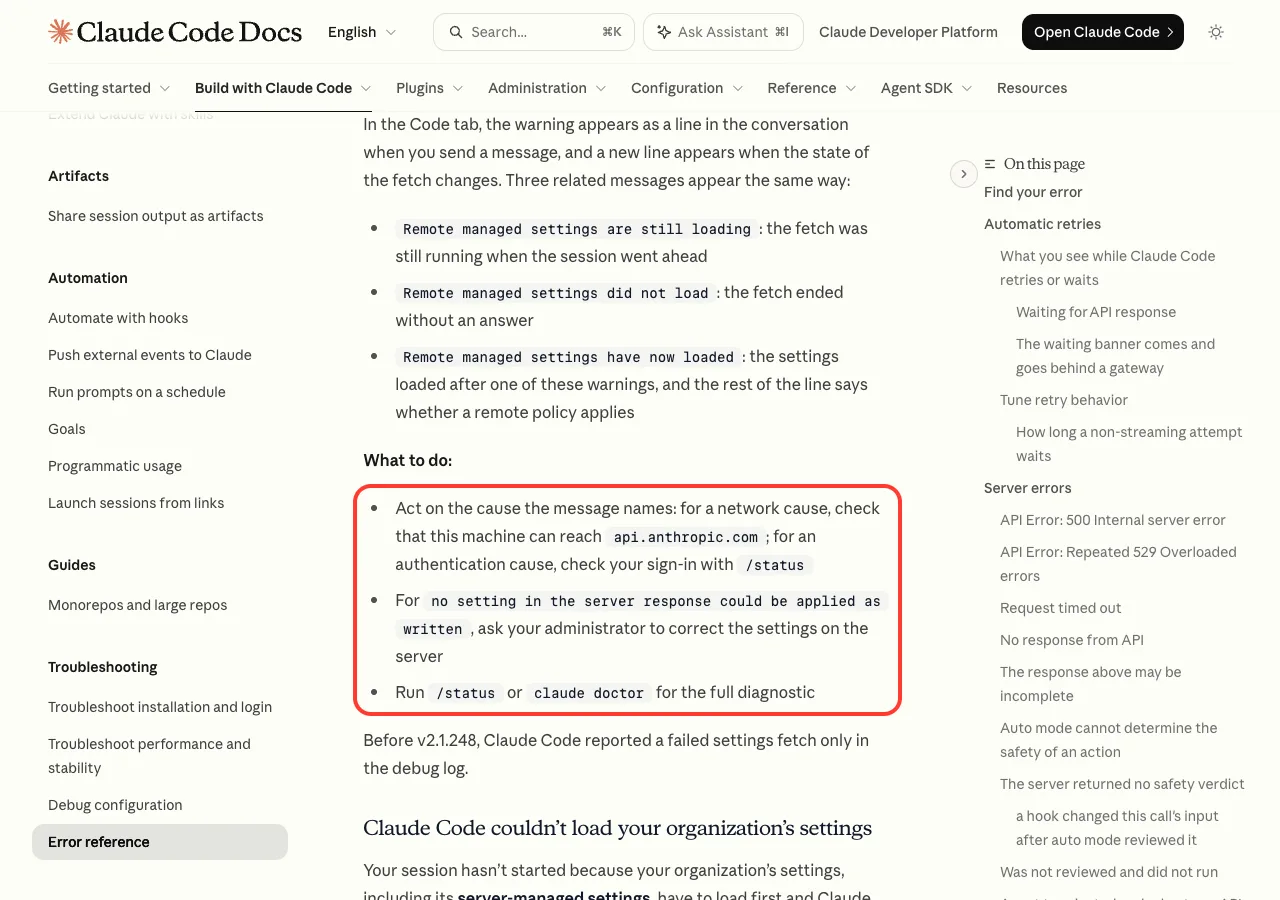
If your warning names a network cause instead, our connection error guide covers proxies, VPNs and firewalls.
Real Examples: Skipped Fetch vs Failed Fetch
A skipped fetch is different from a failed one, and it’s easy to mix them up. If you export a provider variable like CLAUDE_CODE_USE_BEDROCK or a custom ANTHROPIC_BASE_URL, Claude Code never asks for the settings at all.
We tested this safely by running claude doctor with a made-up gateway address set only for that one command:
ANTHROPIC_BASE_URL=https://llm-gateway.example.com claude doctor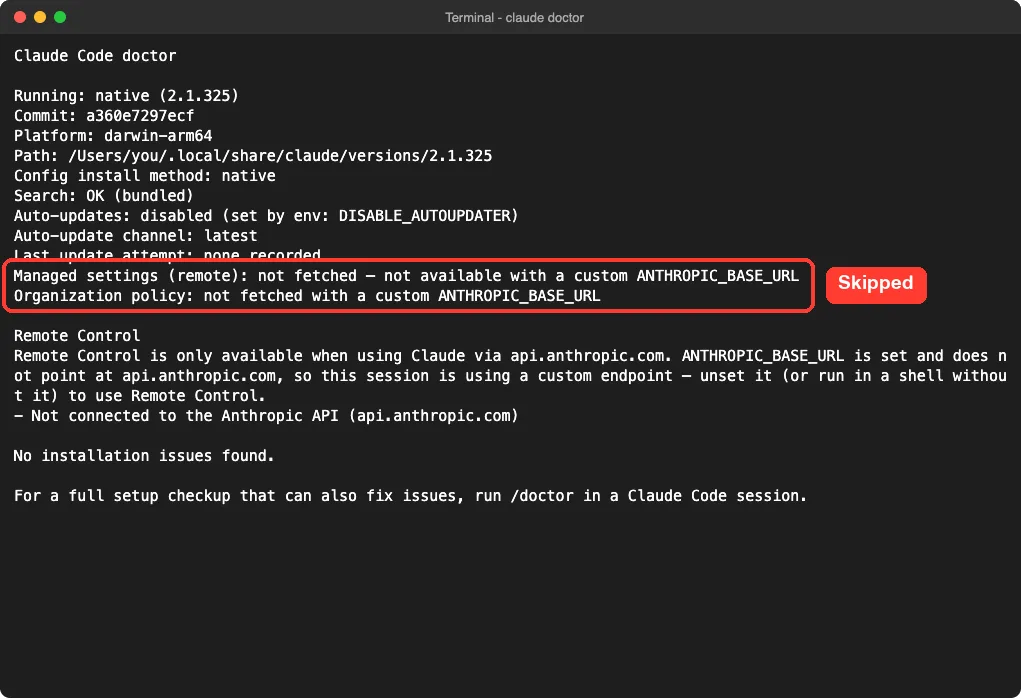
Doctor reported “not fetched — not available with a custom ANTHROPIC_BASE_URL”. You won’t get a 401 in this case. You simply won’t get your org’s settings, and the docs say a server-managed env block can’t undo it, because that block arrives through the fetch the export prevents.
What happens when admins require the settings
Admins can set forceRemoteSettingsRefresh to true. Then Claude Code won’t start on cached or missing settings. If the fetch fails, it exits instead of showing the warning.
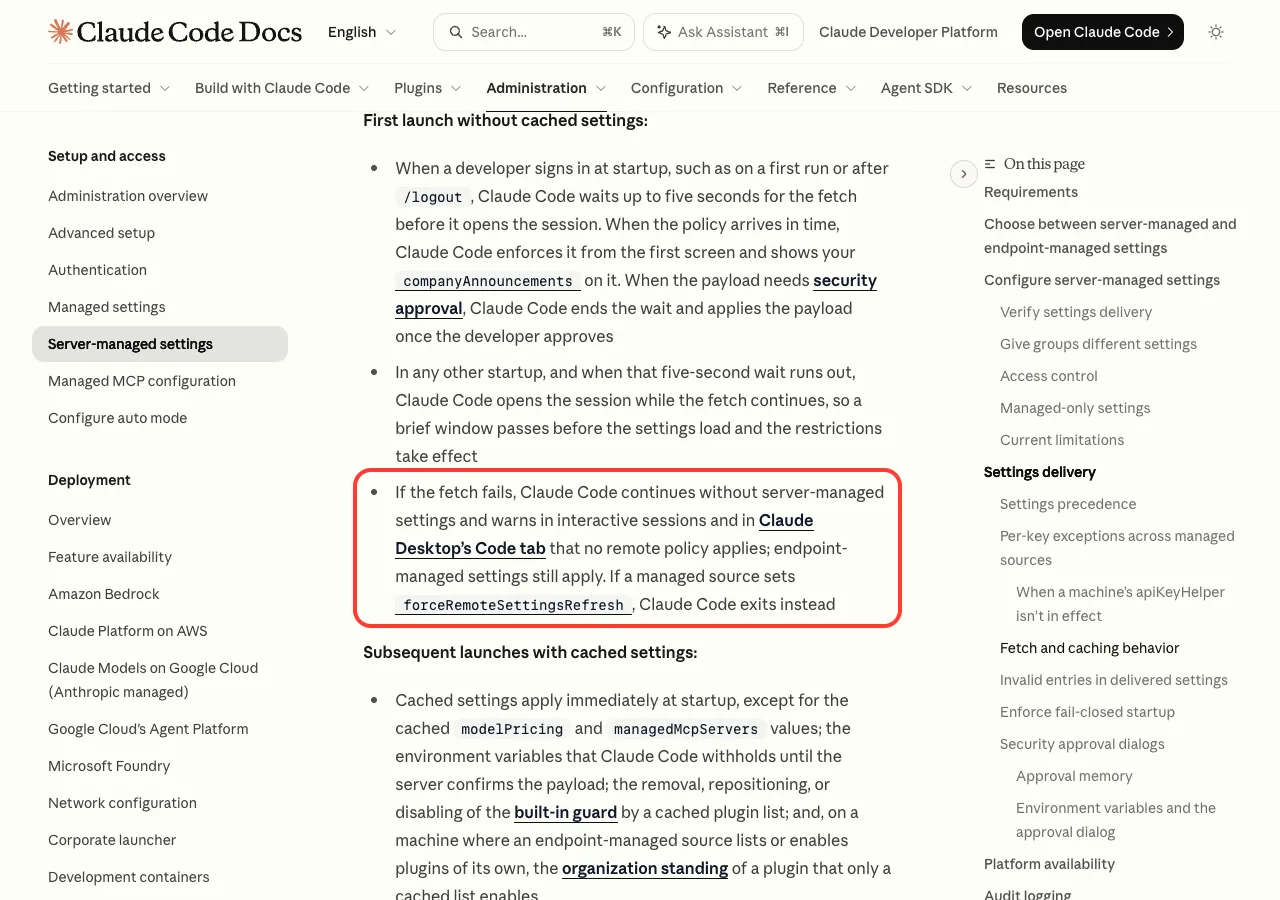
In that case you may see a message that your organization’s settings are needed “before a session can start”. The fix is the same: run claude auth login in your shell, then start again.
Try It Yourself
You can check your own machine without breaking anything. Run claude doctor in a terminal and read the Managed settings (remote) line. Then open a session in any scratch folder and paste this prompt to get a plain-English summary:
Explain what each line of my `claude doctor` output means, especially the
"Managed settings (remote)" line. I will paste it below. Tell me if my
organization's remote settings loaded, failed, or were skipped, and why.
Paste your doctor output after the prompt. Claude will walk you through it, and you’ll know which of the steps above apply to you.
Common Mistakes
- Thinking the warning breaks Claude Code. It doesn’t; the session runs, just without your org’s remote rules.
- Running
/loginover and over while anANTHROPIC_API_KEYstill outranks the login. - Unsetting a variable in one terminal, then starting Claude Code from another window that still has it.
- Confusing a skipped fetch (custom
ANTHROPIC_BASE_URL) with a failed one. - Editing or deleting the cached settings file to make the warning go away. The next fetch restores it, and it doesn’t fix the sign-in.
- Using a Console API key for CI and expecting claude.ai admin settings to apply.
Pro Tips
- Run
claude --versionfirst. Versions before v2.1.248 don’t show the warning or the doctor line. - Keep work and personal credentials in separate shells so a personal key never leaks into your work sessions.
- Watch for the “Your login expires in N days” banner and renew before it runs out.
- Admins can confirm delivery by asking a user to run
/permissionsand check the managed rules show up. - If you’re resetting things anyway, our reset guide shows what’s safe to clear.
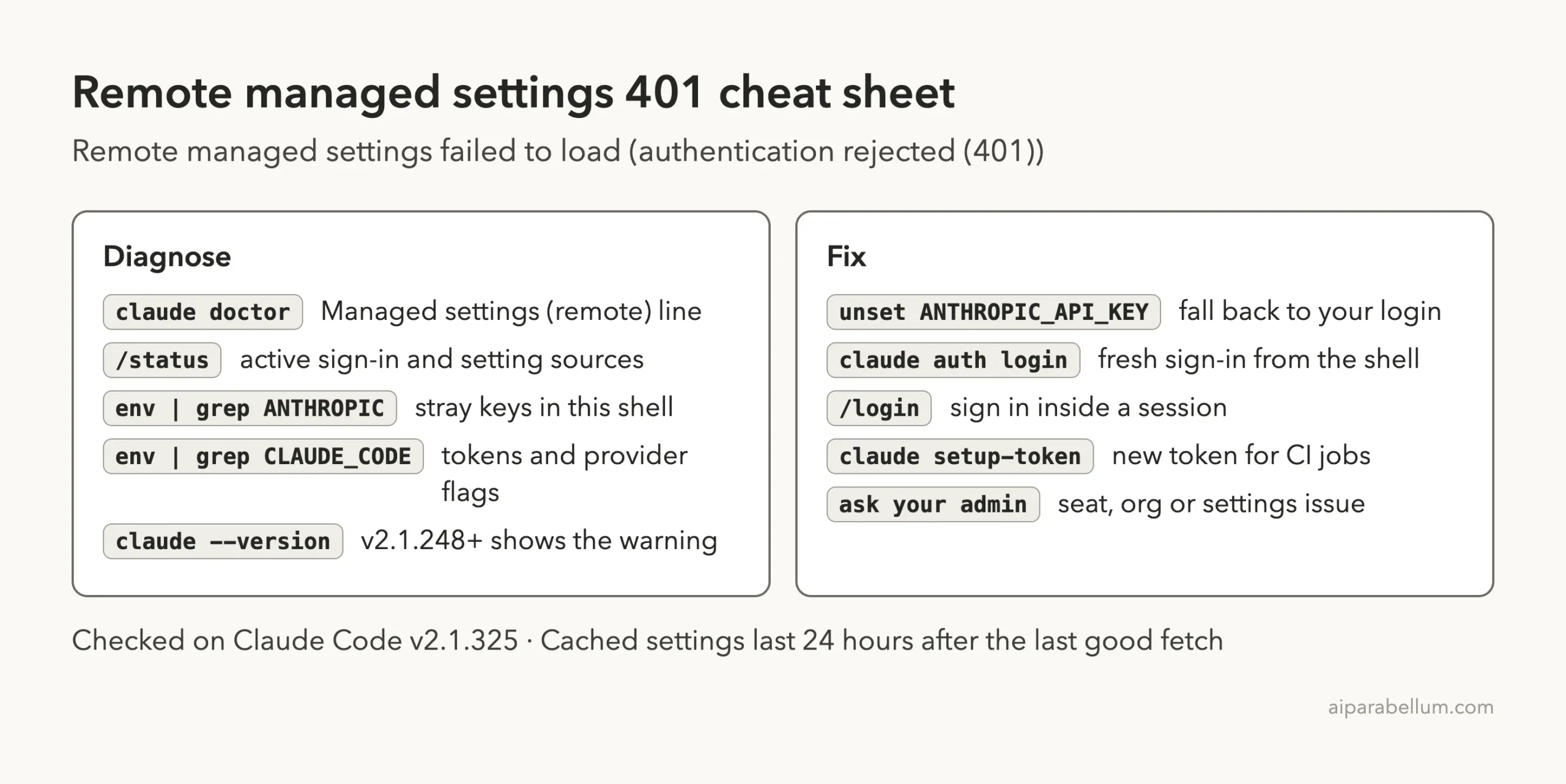
Cheat Sheet
Frequently Asked Questions
Is my company’s policy still enforced when I see this warning?
Only if the line ends with “using cached policy”. If it ends with “no remote policy applied”, your session runs without server-managed settings, though any settings IT installed on the machine still apply.
I’m on a Pro or Max plan. Why would I see this?
You normally won’t, because server-managed settings are only for Team and Enterprise. Our own claude doctor run on a non-Team account simply reported that the fetch needs a Team or Enterprise plan. If you see it anyway, you may be signed in with a work credential or token.
How long do cached managed settings last?
The docs say to plan for them to expire 24 hours after the last successful fetch. Claude Code also checks for new settings every hour during a session.
Will signing in again always fix the 401?
It fixes an expired or revoked login. It won’t help if an API key or token outranks your login, or if your access to the organization was removed. For the related login errors, see our 401 error guide.
Where can I see all Claude Code errors in one place?
Our errors roundup lists the messages people hit most, with links to a fix for each.
Conclusion
The “Remote managed settings failed to load (authentication rejected (401)) · no remote policy applied” warning means Claude Code asked Anthropic for your Team or Enterprise organization’s central settings and the server refused the credential it sent, so the session runs without that policy unless a recent cached copy exists. Start with /status to see which sign-in is active, clear any leftover ANTHROPIC_API_KEY or CLAUDE_CODE_OAUTH_TOKEN, sign in again with claude auth login, and confirm with the Managed settings (remote) line in claude doctor. If a fresh sign-in still gets a 401, your admin needs to check your access. To learn more about Claude AI and its tools, browse the rest of our guides.