If Claude Code stops with “API Error: Claude’s response exceeded the 32000 output token maximum”, Claude’s reply grew longer than the most text one request was allowed to return, so it was cut off mid-sentence. People who run into the Claude Code output token maximum usually hit it while asking for a big file, a long report or a full rewrite in one go.
Nothing is broken, and your files are safe. The limit is a setting, and the number in the message tells you what it was set to.
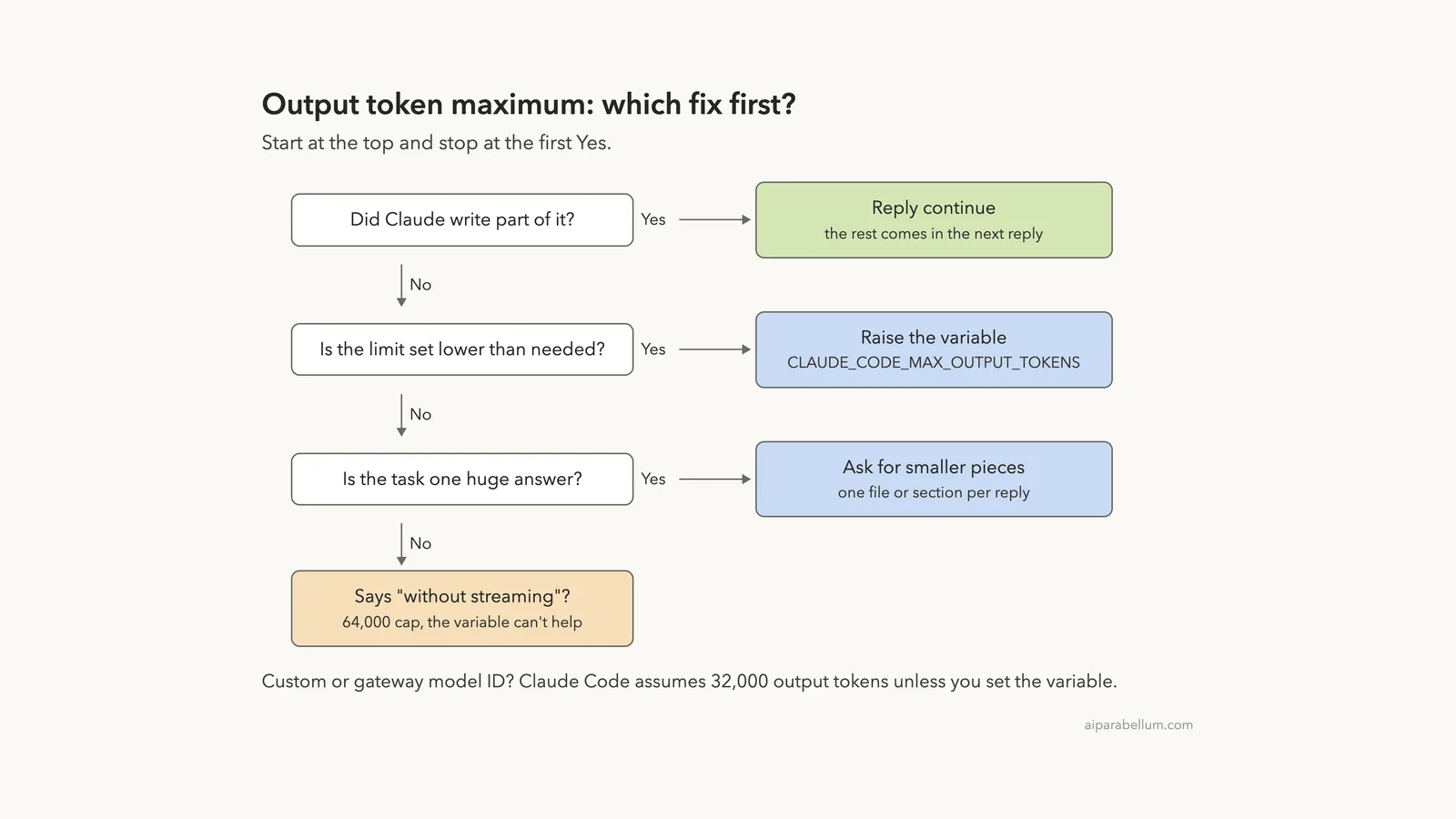
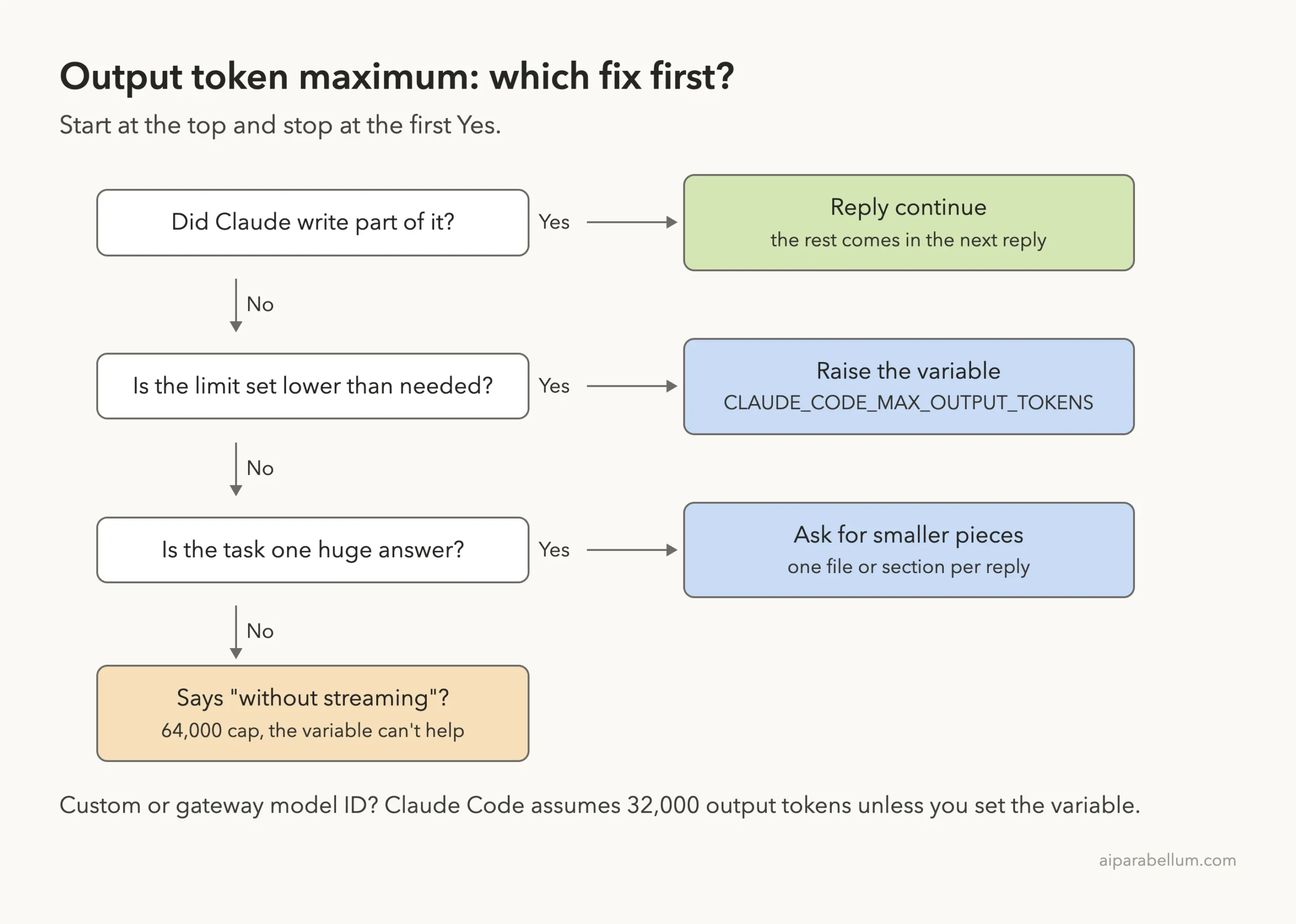
Here is the short fix list:
- Reply
continueto get the rest of a reply that was cut off. - Raise the limit with the
CLAUDE_CODE_MAX_OUTPUT_TOKENSenvironment variable, in your shell or in theenvblock of a settings file. - Ask Claude for smaller pieces, such as one file or one section per reply.
- If the message says “a request sent without streaming”, the cap is 64,000 and the variable can’t raise it, so split the work instead.
This guide is part of our help series. Browse all our Claude Code tutorials for more fixes and how-tos.
Tested with Claude Code v2.1.328 on macOS on November 19, 2026. Producing a 32,000-token reply just to show an error would waste a lot of usage, so we set a tiny limit of 300 tokens in a demo folder and got the same message with a smaller number. Every terminal capture below is real, and the limits and rules come from Anthropic’s official Claude Code docs.
Output Token Maximum Error: Quick Summary
| Question | Short answer |
|---|---|
| Message you see | API Error: Claude's response exceeded the 32000 output token maximum |
| What it means | One reply hit the output token limit and was cut off |
| Why 32000? | The default for a model ID Claude Code doesn’t recognize, or a value you set |
| Variable that controls it | CLAUDE_CODE_MAX_OUTPUT_TOKENS |
| Fastest fix | Reply continue |
| Lasting fix | Raise the variable, or ask for smaller pieces |
| Can’t be raised when | The message names “a request sent without streaming” (64,000 cap) |
| Are files lost? | No, only the reply was cut short |
What the Claude Code Output Token Maximum Error Means
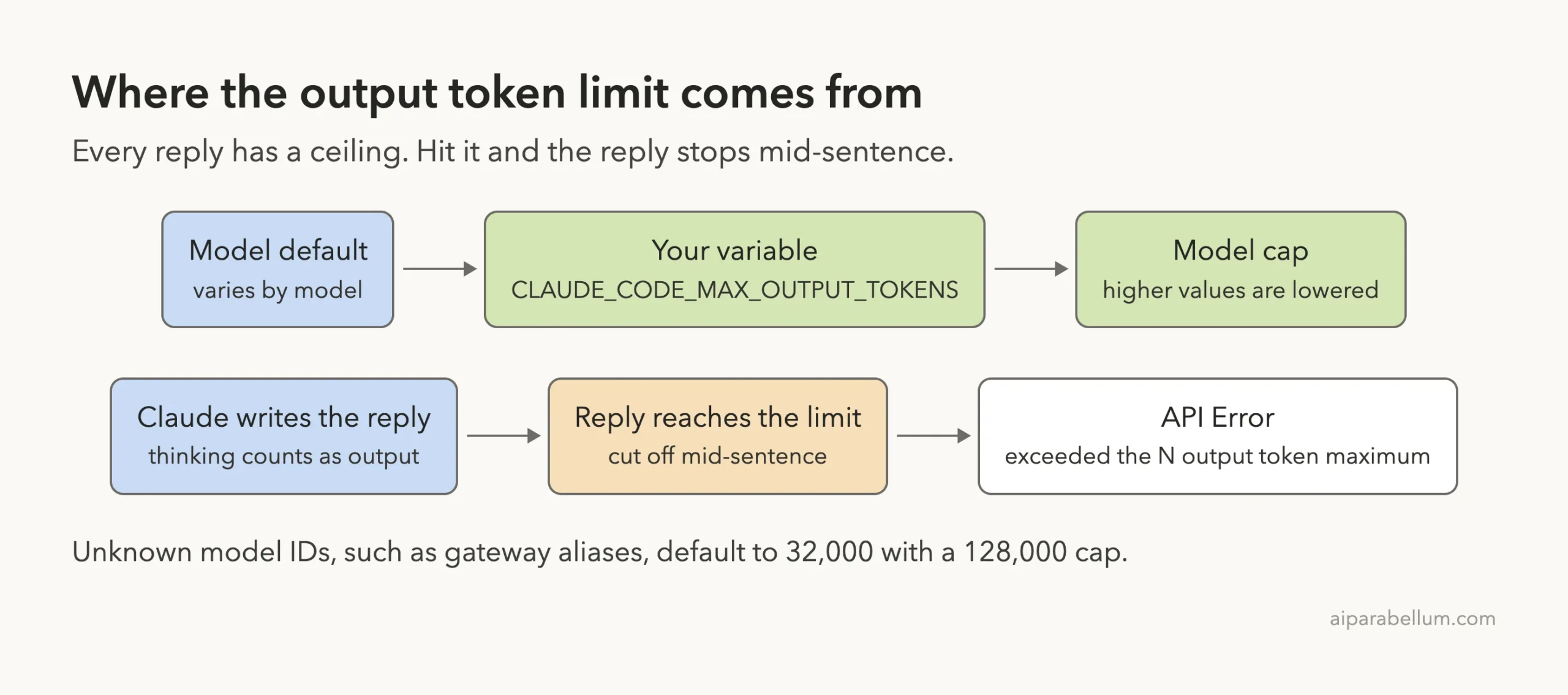
Every reply from Claude has a ceiling on how many tokens it can contain. A token is a small chunk of text, often part of a word. When a reply reaches that ceiling, the API stops it right there, even in the middle of a word.
Anthropic’s error reference describes it simply: Claude’s reply reached the largest number of output tokens the request allowed and was cut off there. Claude Code then shows the error so you know the reply isn’t complete.
The Exact Error Messages
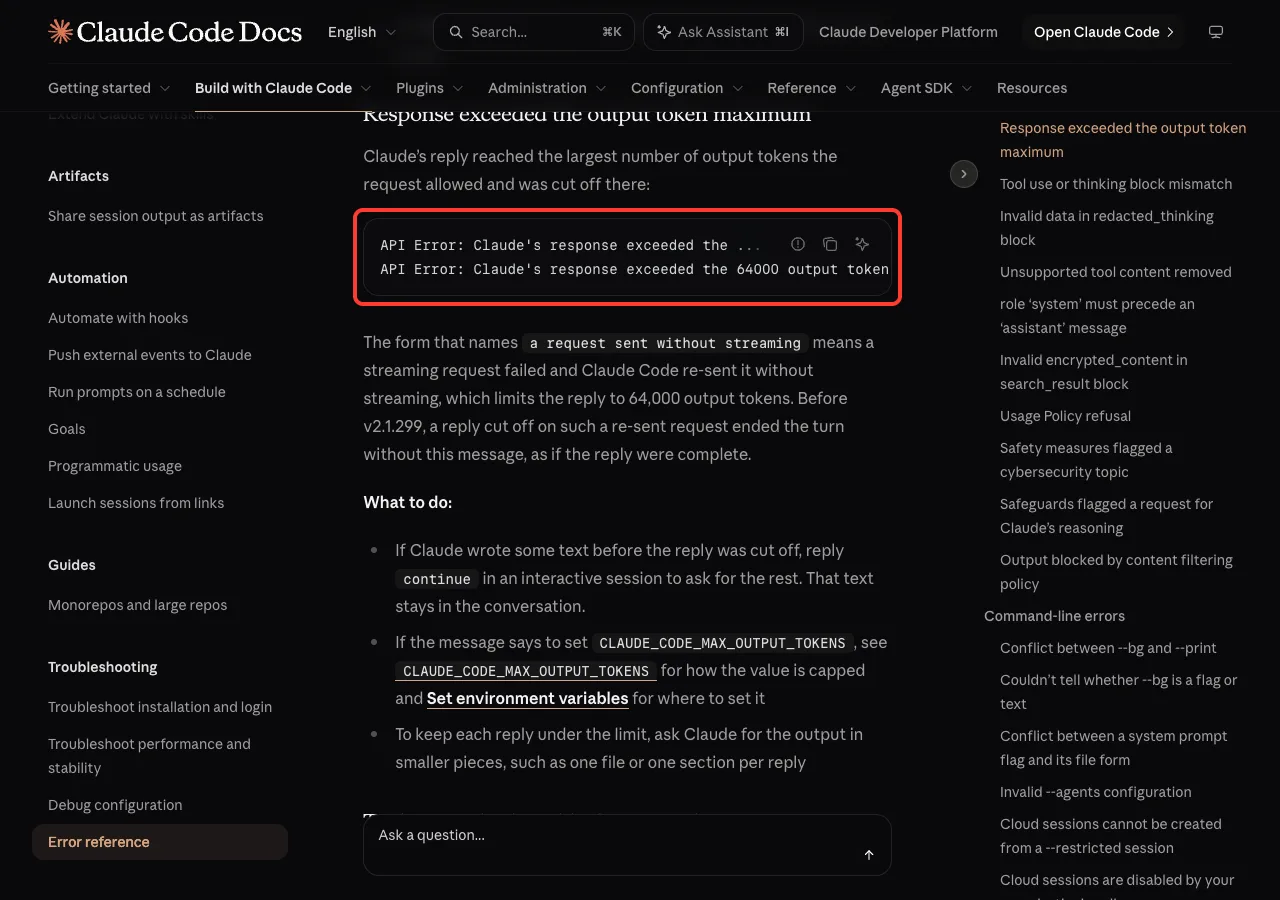
The docs list two forms. The number in the first one changes with your limit, so you might see 32000, 64000 or any other value:
API Error: Claude's response exceeded the 32000 output token maximum. To configure this behavior, set the CLAUDE_CODE_MAX_OUTPUT_TOKENS environment variable.
API Error: Claude's response exceeded the 64000 output token maximum for a request sent without streaming. The CLAUDE_CODE_MAX_OUTPUT_TOKENS environment variable cannot raise this limit.
The second form means a normal streaming request failed and Claude Code re-sent it without streaming. That fallback limits the reply to 64,000 output tokens, and no setting changes it. The docs add that before v2.1.299, a reply cut off this way ended silently, as if it were complete, which is one more reason to stay updated.
Why the Number Is 32000
Output limits vary by model. The Claude Code environment variables page says that for a model ID Claude Code can’t resolve to a model it knows, the default is 32000 and the cap is 128000.
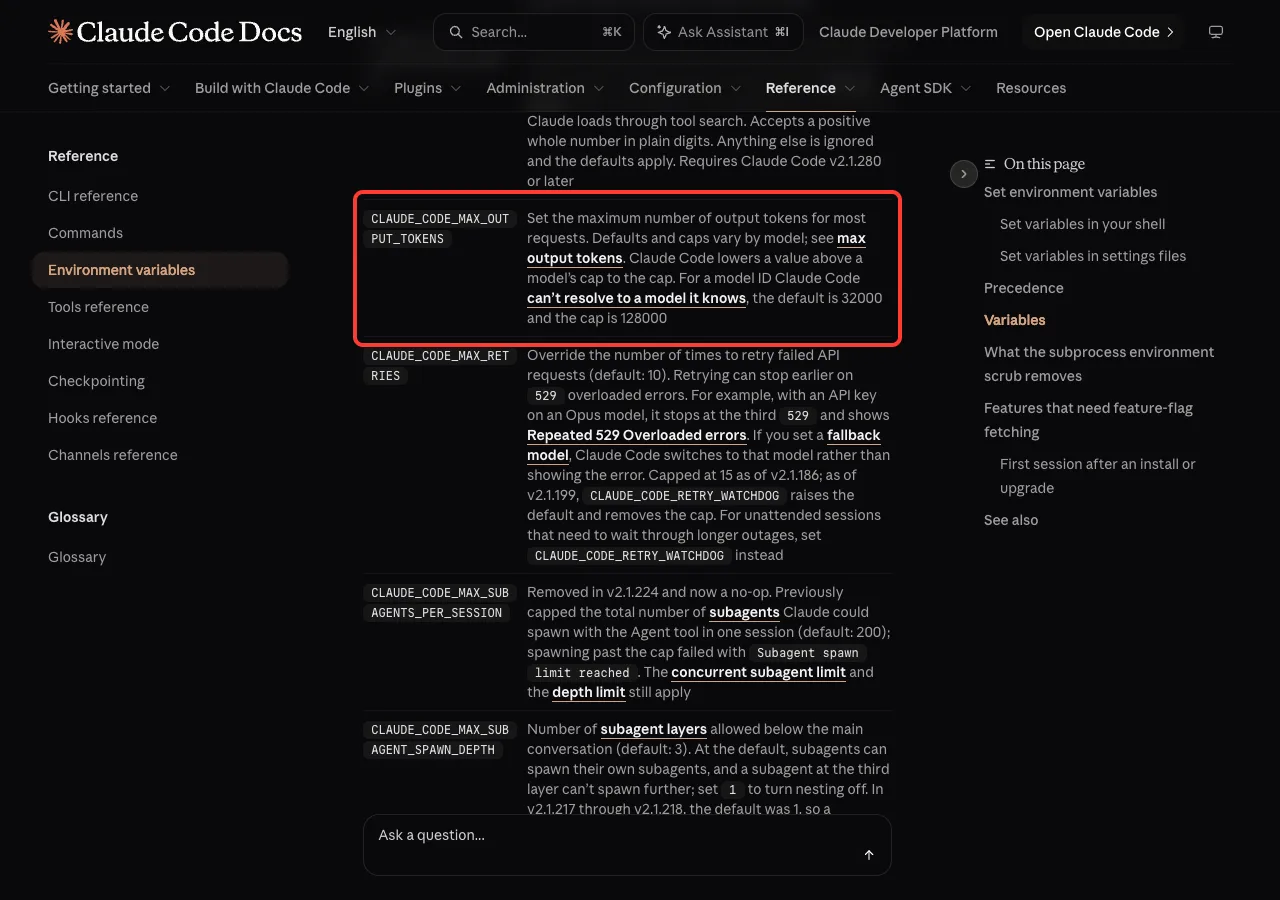
CLAUDE_CODE_MAX_OUTPUT_TOKENS.So the 32000 in your message usually comes from one of these:
- You use an LLM gateway, a proxy or a custom model alias that Claude Code doesn’t recognize.
- Your Claude Code version is older than the model you picked, so it doesn’t know that model yet.
- You, a teammate or a shell profile set
CLAUDE_CODE_MAX_OUTPUT_TOKENS=32000at some point. - A team or company settings file sets the variable for everyone.
If you connect through Amazon Bedrock, Google Vertex AI or a gateway, our cloud provider setup guide explains how model IDs are chosen there.
Thinking Counts Toward the Limit
Claude often thinks before it answers. Anthropic’s cost docs say thinking tokens are billed as output tokens, and the MAX_THINKING_TOKENS entry says Claude Code caps the thinking budget at one token below the request’s max output tokens. In plain words, thinking and the visible answer share the same ceiling.
That is why a reply can hit the limit sooner than you expect. A related error, max_tokens must be greater than thinking.budget_tokens, appears when a fixed thinking budget leaves no room for an answer at all. Our guide to effort levels explains how thinking depth is chosen.
We Reproduced the Error in a Demo Folder
To see the message for real, we made an empty demo folder with one README file. Then we set a tiny limit in the shell and checked it with echo:
export CLAUDE_CODE_MAX_OUTPUT_TOKENS=300
echo $CLAUDE_CODE_MAX_OUTPUT_TOKENS
claude --model haiku
Next, we asked for something far too long for that limit:
Write a 700-word short story about a lighthouse keeper. Reply in the chat, no files.The story arrived in a few chunks, each one breaking off mid-word. Then Claude Code stopped with the error, and the prompt box suggested resending the message.
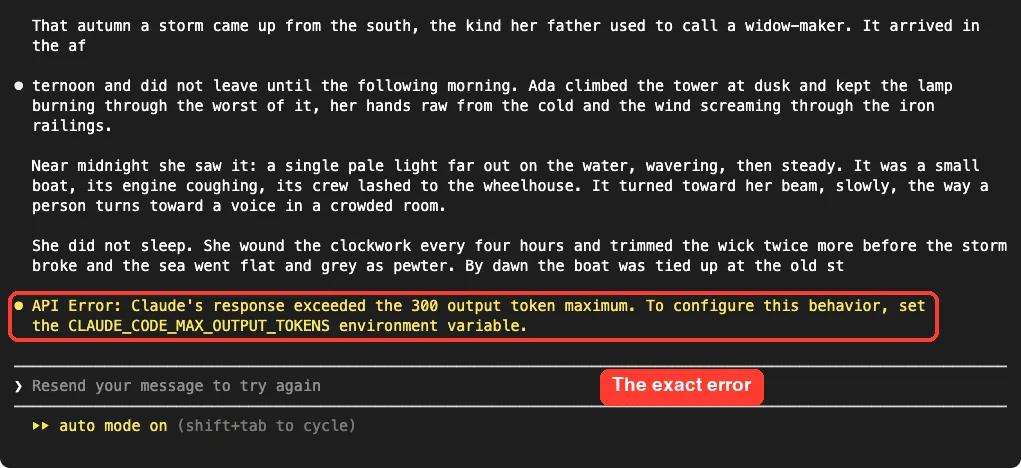
The number in the message is your current limit. Change the limit or the size of the request, and the error goes away.
The wording matches the official message word for word. Only the number differs, because our limit was 300 instead of 32000.
Fix 1: Reply “continue”
This is the fastest fix and the first one in Anthropic’s list. If Claude wrote some text before the cut, type continue and press Enter in the same session. The partial text stays in the conversation, so Claude knows where it stopped.
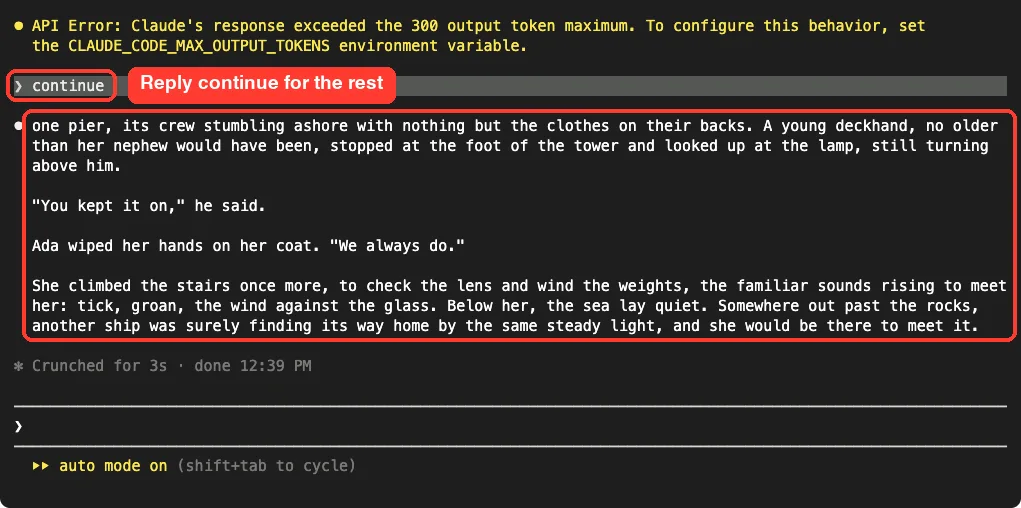
continue, Claude finished the story from the exact word where it stopped.In our test, Claude picked up mid-sentence and finished the story in one more reply. Keep in mind that the next reply has the same ceiling. If the missing part is still longer than the limit, you may need to type continue more than once, or use one of the fixes below.
The continue reply works in an interactive session. In a one-shot command such as claude -p, there is no follow-up turn, so raise the limit or split the task instead.
Fix 2: Raise CLAUDE_CODE_MAX_OUTPUT_TOKENS
If you often need long replies, raise the limit. The docs say Claude Code lowers a value above a model’s cap to the cap, so a large number can’t break anything. It just won’t go past what the model allows.
Option A: Set It in Your Shell
On macOS, Linux or WSL, set the variable before you start Claude Code. A shell variable lasts for that terminal window only:
export CLAUDE_CODE_MAX_OUTPUT_TOKENS=64000
claude
To keep it for every session, add the export line to ~/.zshrc or ~/.bashrc. In Windows PowerShell, the docs use $env:CLAUDE_CODE_MAX_OUTPUT_TOKENS = "64000" for one window, and setx or [Environment]::SetEnvironmentVariable to keep it. We tested on macOS; the Windows and Linux steps follow Anthropic’s official instructions.
Claude Code reads shell variables at startup. If Claude Code is already running, exit and start it again after you change one.
Option B: Set It in a Settings File
A settings file applies every time claude runs, however you launch it. Add the variable under the env key. The value goes in quotes as a string:
{
  "env": {
    "CLAUDE_CODE_MAX_OUTPUT_TOKENS": "16000"
  }
}
We saved that in our demo folder as .claude/settings.local.json, which applies to you in this project only. Use ~/.claude/settings.json for every project, or .claude/settings.json to share it with your team through Git.
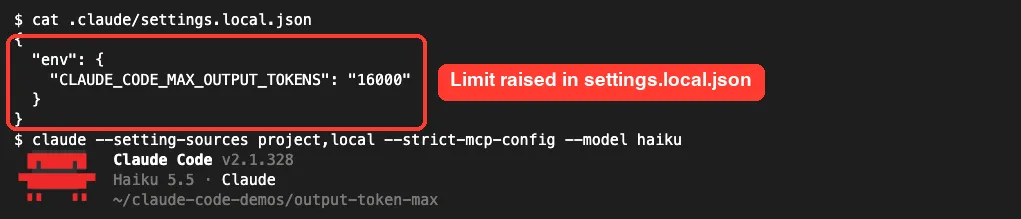
With that file in place and no shell variable, we asked for a 400-word version of the story. It came back complete in one reply, with no error.
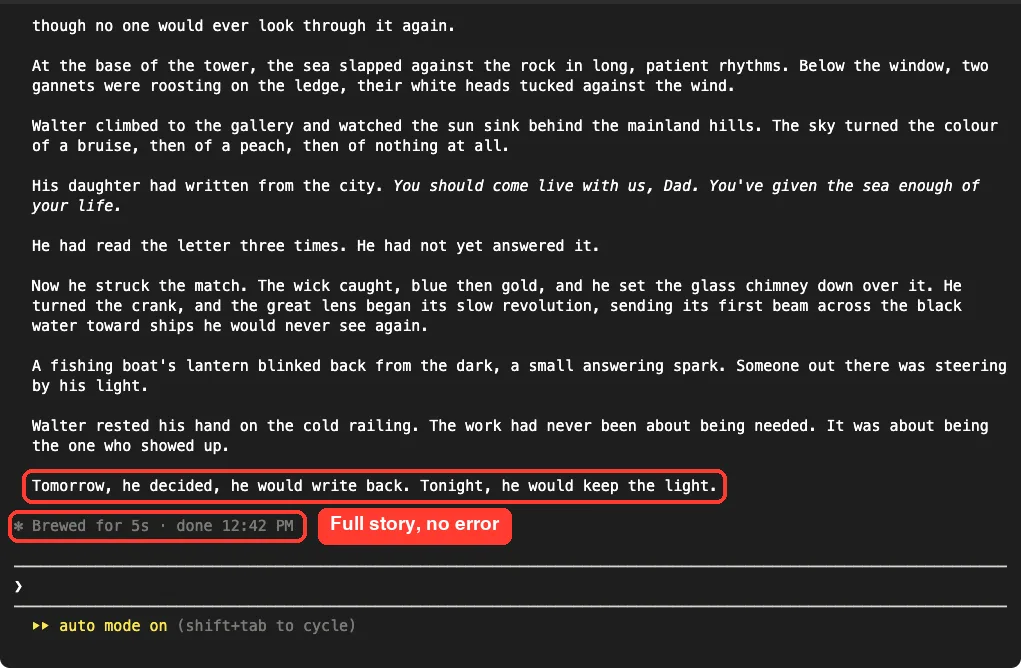
Two things to know about settings files. A running session picks up changed env values when you save the file.
When the same variable is in both your shell and a settings file, the docs say the settings file value applies in most sessions. If a raised shell value seems ignored, check your settings files for an older value. Our guide to settings file locations shows where each one lives, and our environment variables guide covers the rest.
Fix a Gateway or Custom Model ID
If the 32000 default comes from a model ID Claude Code doesn’t recognize, the variable is the direct fix. The model configuration docs also list ways to make Claude Code recognize the ID, which helps with more than output limits:
- A model newer than your version: run
claude update. - Your gateway’s name for a model Claude Code knows: map it with a
modelOverridesentry in settings.
Our page on choosing a model walks through model settings in more detail.
Fix 3: Ask for Smaller Pieces
A higher limit isn’t always the best answer. Very long replies take longer, cost more and are harder to check. Anthropic’s own advice is to ask Claude for the output in smaller pieces, such as one file or one section per reply.
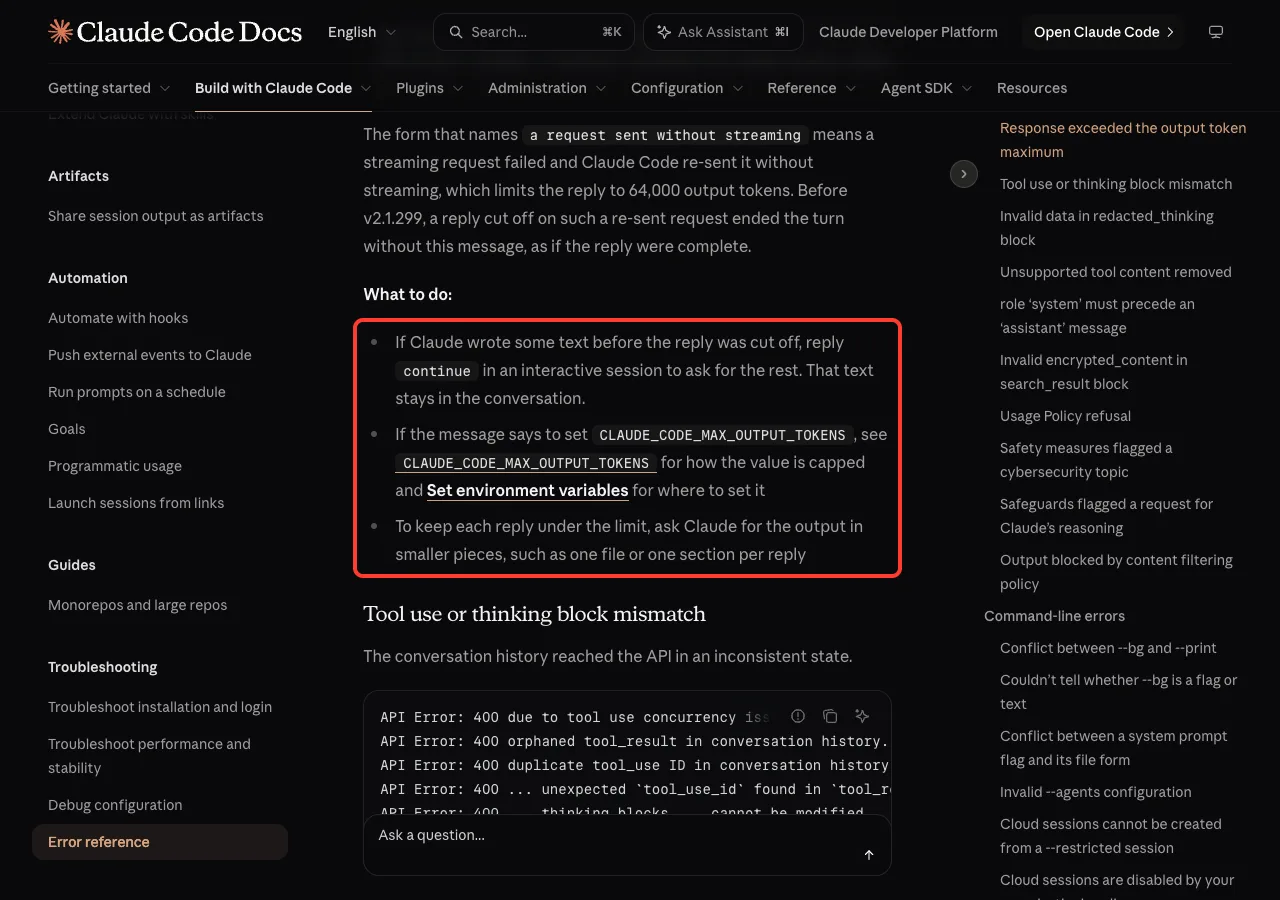
We tried this with the 300-token limit still in place. A small request fit easily:
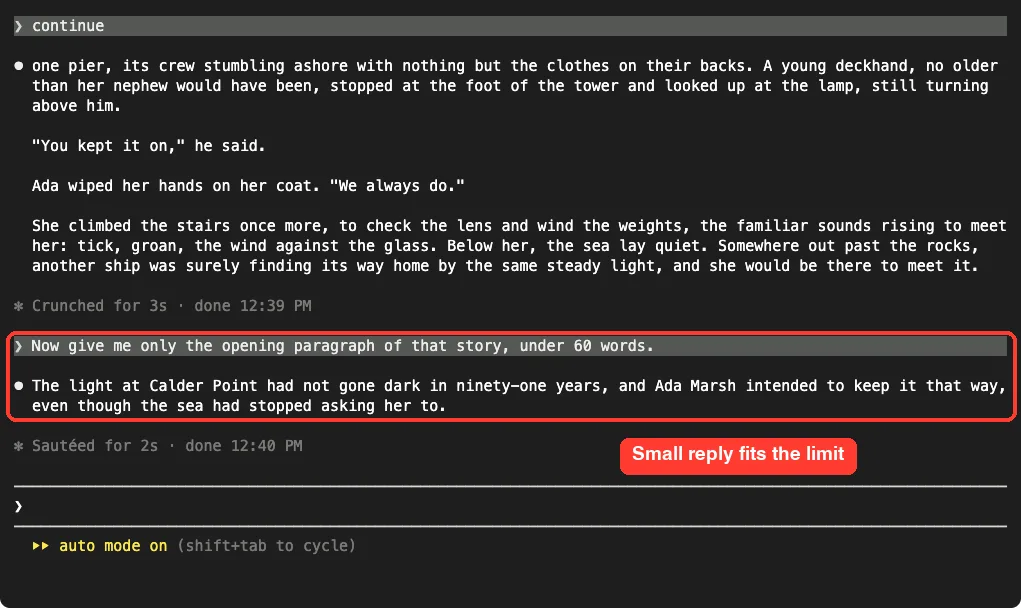
Writing to files doesn’t get around the limit by itself. When Claude creates a file, the file’s content is part of its reply, so a huge single file can still hit the ceiling. Split big jobs like these:
- “Create the HTML file first. Stop there and I’ll ask for the CSS next.”
- “Write sections 1 to 3 of the report into report.md, then wait.”
- “Refactor one module at a time, starting with auth.js.”
Smaller steps also keep your context lighter. Our token saving tips cover more ways to keep sessions lean.
Fix 4: The “Without Streaming” Version
If your message ends with “The CLAUDE_CODE_MAX_OUTPUT_TOKENS environment variable cannot raise this limit”, raising the variable won’t help. The streaming request failed first, and the non-streaming retry has a fixed 64,000-token cap.
Use continue or smaller pieces. If streaming fails often, look at what sits between you and the API, such as a proxy or an unstable network. Our connection error guide covers network problems.
Real Examples
| Situation | Best fix |
|---|---|
| A long answer stopped mid-sentence once | Reply continue |
| You always get 32000 behind a company gateway | Set CLAUDE_CODE_MAX_OUTPUT_TOKENS or map the ID with modelOverrides |
| Claude tries to write one giant file | Ask for one file or one section per reply |
| Raising the variable changed nothing | Check settings files for an older value, then restart |
| The message names “without streaming” | Split the work; the 64,000 cap is fixed |
A claude -p script gets cut off | Raise the variable for that script, or split the prompt |
Try It Yourself
You can see this error safely in a minute. Make an empty folder, start a new terminal there, and set a small limit for that window only:
export CLAUDE_CODE_MAX_OUTPUT_TOKENS=300
claude
Then send this prompt:
Write a 700-word short story about a lighthouse keeper. Reply in the chat, no files.When the error appears, type continue, then ask for only the opening paragraph. Close that terminal afterward, and the small limit goes away with it.
Common Mistakes
- Sending the whole big request again unchanged. It hits the same ceiling for the same reason.
- Changing a shell variable while Claude Code is running. Shell values are read at startup, so restart it.
- Writing the number without quotes in the settings
envblock. The docs show values as strings, such as"16000". - Forgetting an old value in
~/.claude/settings.jsonthat overrides your shell. - Raising the variable for the “without streaming” form, which it can’t change.
- Assuming file writes are free. Big file contents count as output too.
Pro Tips
- Use
.claude/settings.local.jsonto raise the limit in one project without touching others. - Keep Claude Code current with
claude update, so it recognizes new model IDs and their real limits. - Ask Claude for an outline first, then fill each section in its own reply.
- Commit your work with Git before big generation jobs, so a cut-off file is easy to spot and redo.
- Watch your usage while you test higher limits. Our guide on token usage shows where to look.
Seeing a different message? Our list of common errors covers the rest.
Claude Code Output Token Maximum Cheat Sheet
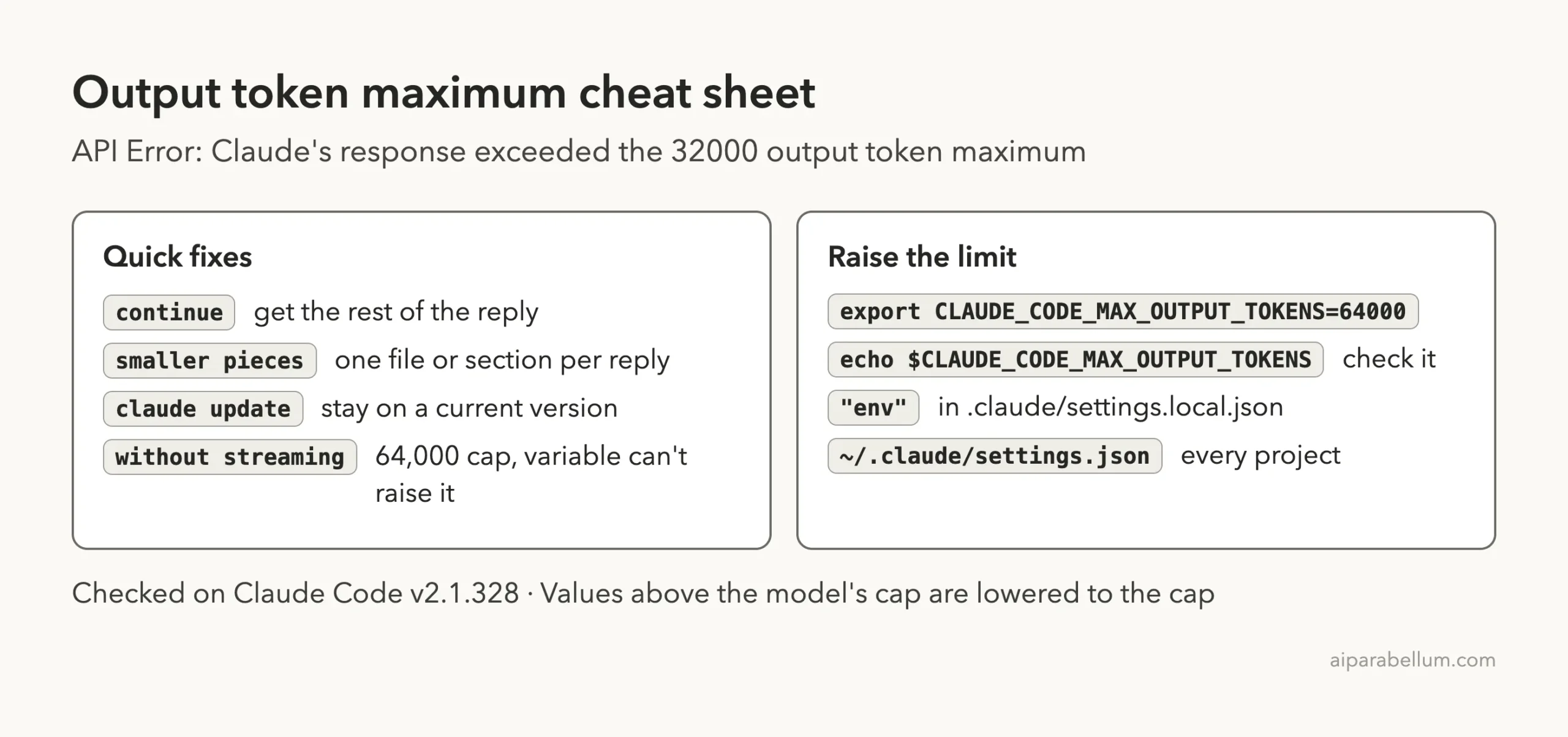
You can read Anthropic’s own entries in the Claude Code error reference, the environment variables page, the settings guide and the troubleshooting guide.
Frequently Asked Questions
What does “exceeded the 32000 output token maximum” mean?
It means one of Claude’s replies reached the most output tokens it was allowed, 32,000 in this case, and was cut off. Claude Code shows the error so you know the reply is incomplete.
Why is my limit 32000?
The docs say 32000 is the default for a model ID Claude Code doesn’t recognize, such as a gateway alias. It can also come from a value you or your team set with CLAUDE_CODE_MAX_OUTPUT_TOKENS.
What is the highest value I can set?
It depends on the model. Claude Code lowers any value above the model’s cap to the cap, and for unrecognized model IDs that cap is 128000.
Does a higher limit cost more?
Only when replies actually get longer, since output tokens are what you pay for. The limit itself is just a ceiling, but longer replies use more of your usage.
Did I lose my work?
No. Only the reply was cut short. Reply continue for the rest, and check any file Claude was writing at that moment.
Conclusion
The Claude Code “exceeded the 32000 output token maximum” error means a single reply hit its output ceiling and was cut off, usually because an unrecognized model ID falls back to the 32,000 default or a low value was set somewhere. Reply continue to get the rest, raise CLAUDE_CODE_MAX_OUTPUT_TOKENS in your shell or in a settings file’s env block for a lasting fix, and ask for one file or section per reply when the job is simply too big, remembering that the “without streaming” form has a fixed 64,000 cap. To see what else Claude AI can do, browse the rest of our guides.