If you searched for claude code ultrathink, you probably want a quick answer: does typing that word really make Claude think harder, and what are the effort levels everyone talks about? Yes, it does, and we tested both on a real Claude Code session. In short, ultrathink asks for deeper reasoning on a single turn, while effort levels set how hard Claude thinks for the whole session.
This post explains both in plain English, shows you real screenshots, and tells you when each one is worth the extra cost. You will also learn why phrases like “think hard” and “think more” do nothing special.
This is a help guide in our Claude Code series. Browse all our Claude Code tutorials. If you are new here, our guide on choosing a model is a good companion read.
Tested with Claude Code v2.1.312 on November 1, 2026 (macOS, Sonnet 5.5). We tested on macOS; the Windows and Linux steps follow Anthropic’s official instructions, and the commands are the same everywhere.
Quick Answer: What Is Ultrathink in Claude Code?
Ultrathink boosts one turn. Effort levels set the whole session.
Ultrathink is a keyword. Write ultrathink anywhere in your prompt and Claude Code asks for deeper reasoning on that one turn, without changing your session effort setting. The next prompt goes back to normal.
When you type it in the terminal prompt, the word turns rainbow-colored and the footer says “Deeper reasoning requested for this turn”. That rainbow is your sign that it worked. Claude Code recognizes only this exact keyword.
Other phrases such as “think”, “think hard” and “think more” are passed through as ordinary text.
Summary Table
| Thing | What it does | How long it lasts |
|---|---|---|
ultrathink | Requests deeper reasoning | One turn only |
/effort | Opens the effort slider | Saved as your default, or this session only |
--effort | Sets a level at launch | One session |
CLAUDE_CODE_EFFORT_LEVEL | Forces a level from your shell | Every session that inherits it |
| Ultracode toggle | Plans a dynamic workflow for bigger tasks | Until you turn it off |
What Is an Effort Level?
An effort level controls how much reasoning Claude spends on each step. Anthropic calls this adaptive reasoning: the model decides whether and how much to think based on how hard the task looks, and the effort level moves that balance. Lower effort is faster and cheaper for simple jobs.
Higher effort gives deeper reasoning for complex problems.
For most models that support effort, the levels are low, medium, high, xhigh and max. Opus 4.6 and Sonnet 4.6 skip xhigh. If you pick a level a model does not support, Claude Code uses the highest supported level at or below the one you chose.
For example, xhigh runs as high on Opus 4.6.
The same level name does not mean the same thing on every model. Anthropic says the scale is calibrated per model, so do not assume high on one model equals high on another.
The Five Levels and When to Use Them
The official docs describe each level by the kind of work it suits. Here is the same guidance in simple words.
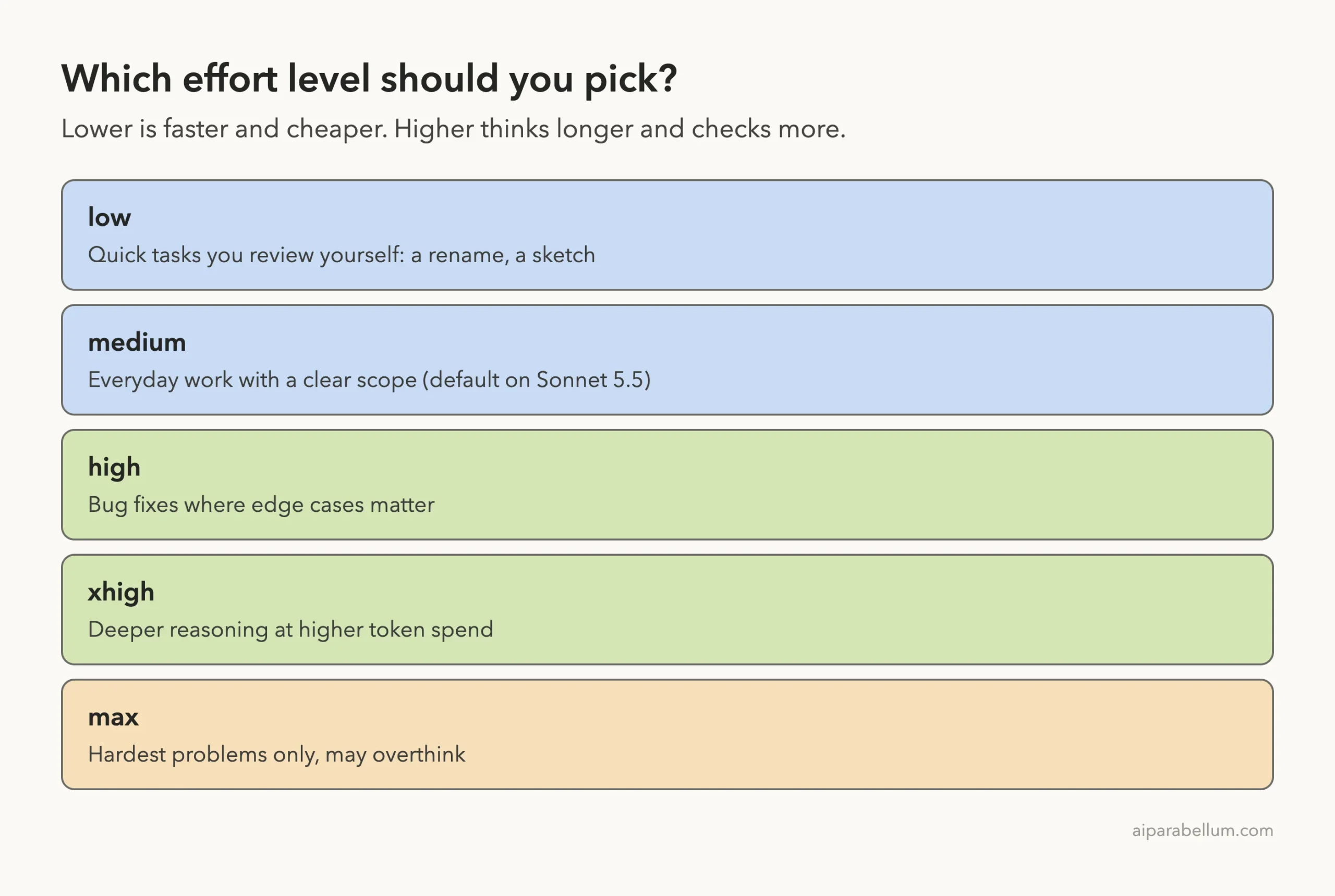
low: quick exchanges where you review each result, such as brainstorming, a first sketch or a rename.medium: everyday work with a clear scope, such as adding a feature. It is the default on Opus 5.5, Sonnet 5.5 and Haiku 5.5.high: work where verification matters or edge cases are likely, such as fixing a bug in an existing codebase. It is the default on most other models.xhigh: deeper reasoning at a higher token spend. It is the default on Opus 4.7.max: hard problems you want Claude to work through without you, such as hunting for security holes.
Anthropic adds a warning for max: it may show diminishing returns and is prone to overthinking, so test it before you adopt it broadly. In their tests, a higher level checked more edge cases and verified more of its own work. A lower level returned a starting point sooner, which suits work where you steer each step.
Step 1: Open the Effort Slider With /effort
Start Claude Code and type /effort with no arguments. A slider appears with all five levels, from “Faster” on the left to “Smarter” on the right. Use the left and right arrow keys to move, Enter to confirm and Esc to cancel.
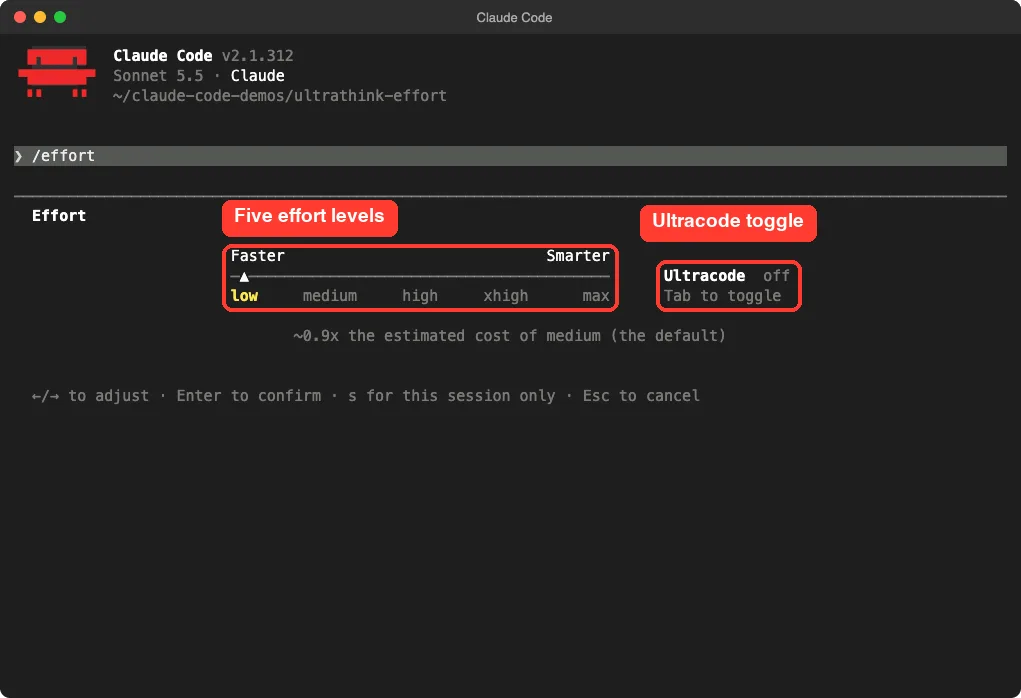
Under the slider, Claude Code shows an estimated cost compared with medium. On our test session, low showed about 0.9x the cost of medium and xhigh showed about 3.5x. Treat these as the tool’s own estimates for the model we used, not a promise for your bill.
You can also skip the slider and type a level directly, for example /effort high. That form saves the level as your default.
Why Max Needs Care
When we moved the slider to max, Claude Code showed its own warning: it may use excessive tokens, give long response times or overthink, and it should be used sparingly for the hardest tasks. It estimated about 10.2x the cost of medium.
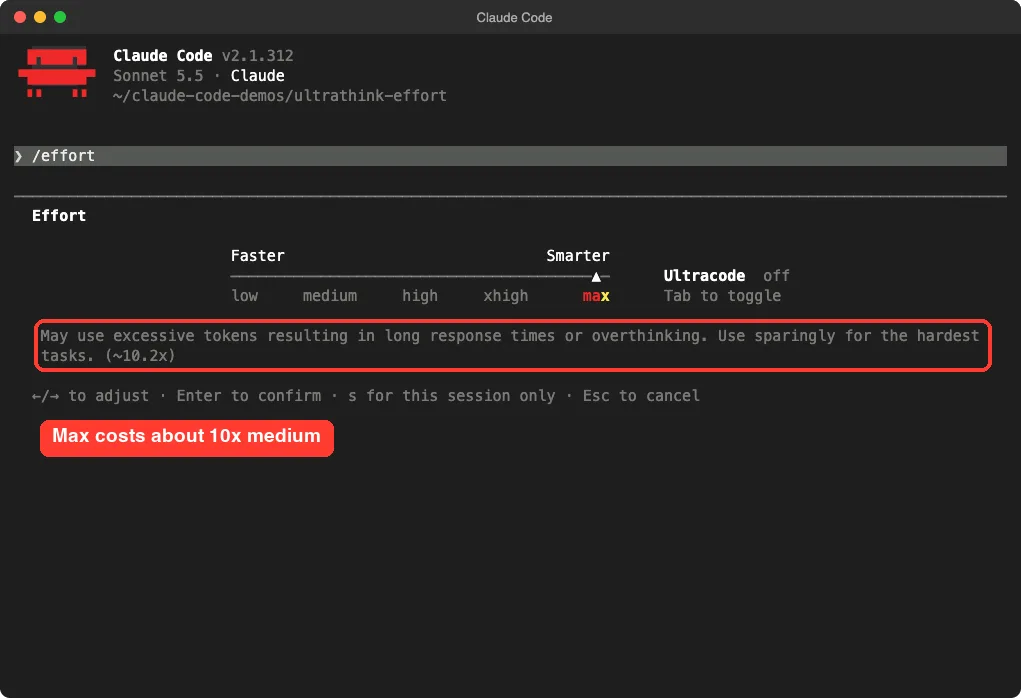
The docs add one more detail: unless you set it through the CLAUDE_CODE_EFFORT_LEVEL environment variable, max applies to the current session only. It is never saved as your default.
Step 2: Check Which Level You Are Using
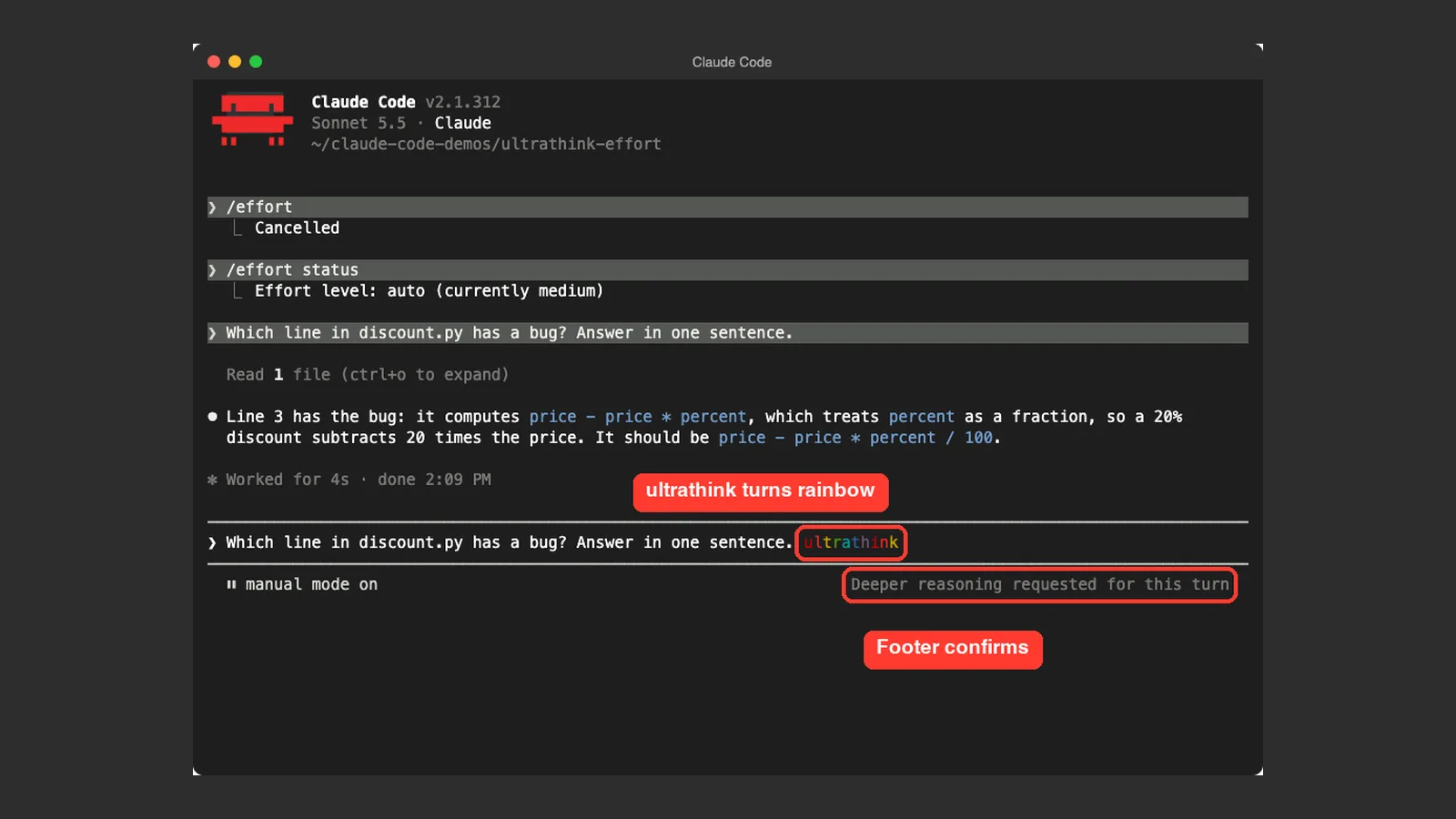
Run /effort status to see what Claude Code is sending. In our fresh session on Sonnet 5.5 it answered “Effort level: auto (currently medium)”. That matches the docs, which say Sonnet 5.5 starts at medium unless something else sets a level.
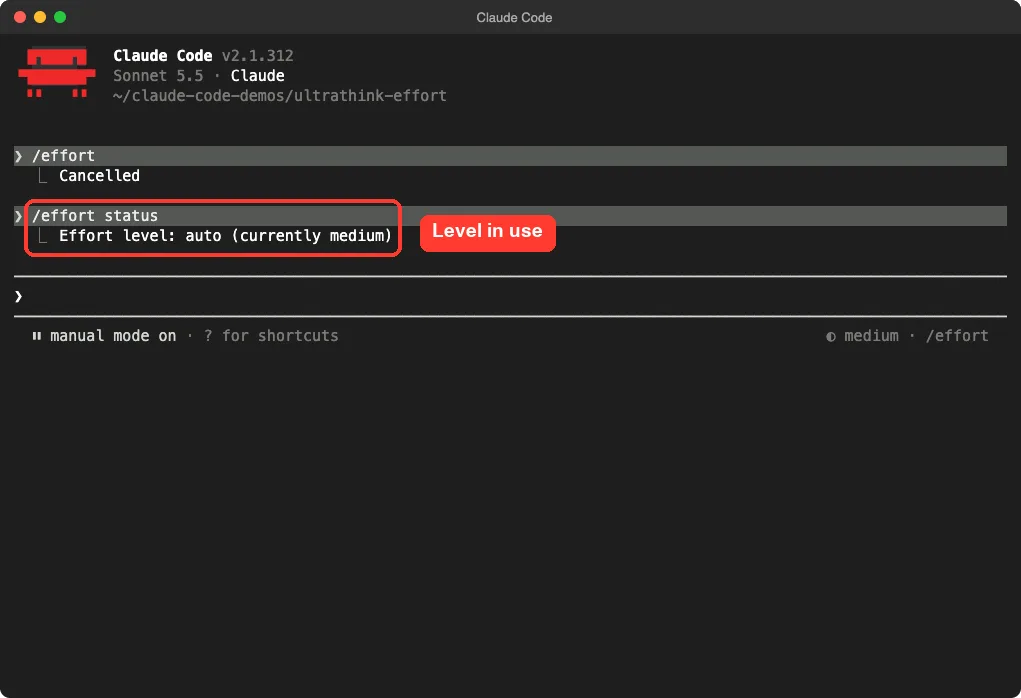
The footer of the prompt also shows the level, for example “medium” next to /effort. A level in the session header comes from your setting, even if Claude is still finishing a turn at the old level.
When a New Level Starts
Once /effort confirms a new level, the next message you send runs at that level. If Claude is busy, you do not need to interrupt it. Type a short message such as keep going and press Enter to queue it, and Claude works at the new level from then on.
It is normal for the current turn to finish at the old level.
Step 3: Try Ultrathink on One Prompt
Now the fun part. We made a tiny demo file named discount.py with a deliberate bug: it subtracts price * percent instead of dividing the percent by 100. Then we asked the same question twice.
The first time we used a normal prompt at the default medium level.
Which line in discount.py has a bug? Answer in one sentence.Claude read the file and found the bug in 4 seconds. The second time we added the keyword at the end:
Which line in discount.py has a bug? Answer in one sentence. ultrathink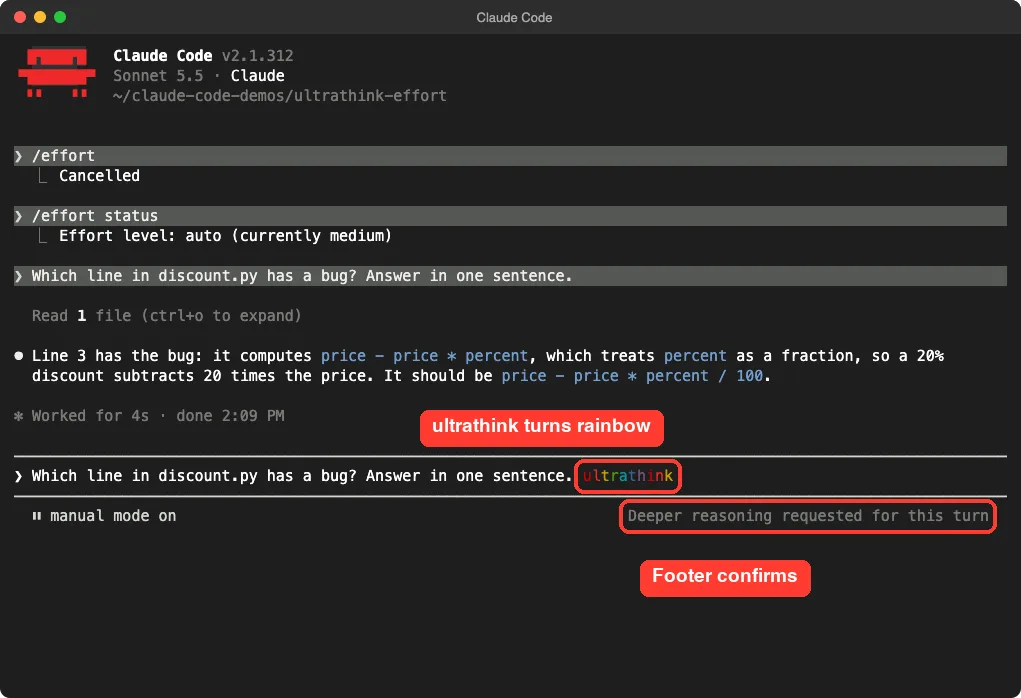
Before we pressed Enter, the word showed in rainbow colors and the footer read “Deeper reasoning requested for this turn”. That confirmed Claude Code had recognized the keyword and could raise the turn.
What Changed in the Answer
Both answers found the right line. The difference was the detail. The ultrathink answer also worked out the actual result of the bug, saying the call returns -950 instead of 40, and the status line said “Cogitated for 2s” instead of “Worked for 4s”.
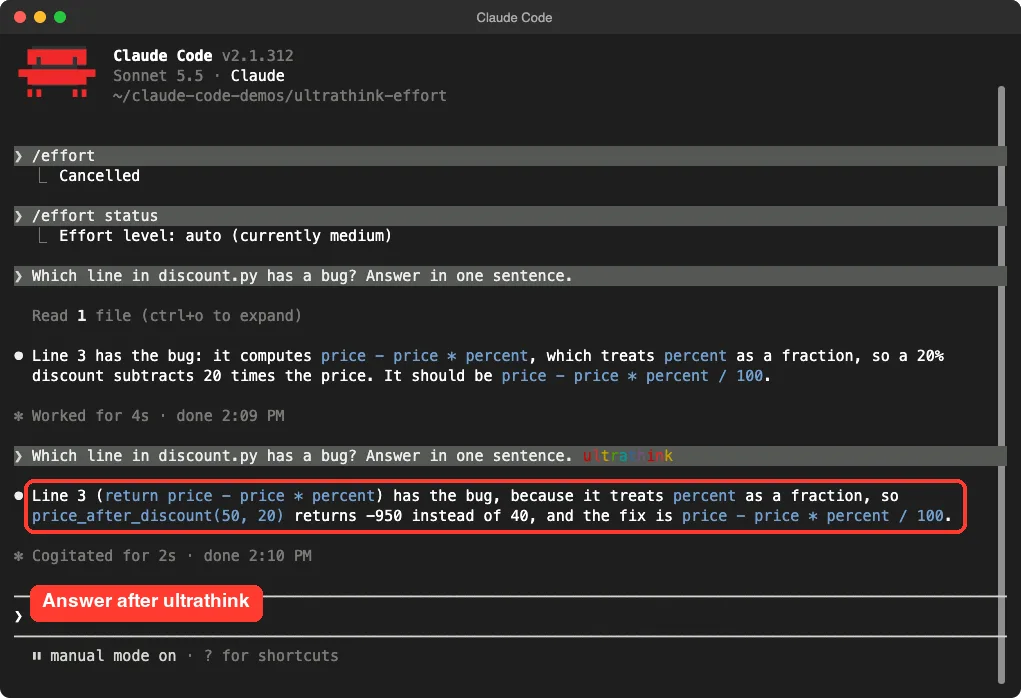
This is one demo on a very small file, so we do not claim ultrathink is always better or faster. On an easy bug, both levels got it right. The keyword matters more on messy, ambiguous problems where extra checking pays off.
How Ultrathink Works Under the Hood
According to the docs, Claude Code does two things when it sees the keyword. First, it adds an in-context instruction asking for deeper reasoning on that turn. Second, when typed in the terminal prompt, the word can also raise that turn to xhigh effort.
That second part needs Claude Code v2.1.311 or later, and it is why the word turns rainbow.
It does not change your saved setting. After the turn ends, you are back at whatever level the session was using. That makes it the safest way to spend extra thinking on one hard question without paying for it all day.
If the Word Is Not Rainbow
If ultrathink does not turn rainbow when you start a new turn, the official docs suggest these fixes:
- Retype it outside anything such as quotes, brackets, a path or a command, in a prompt that does not start with
/. - Unset
CLAUDE_CODE_EFFORT_LEVELif it is set belowxhigh, raise your ownmaxEffortLeveltoxhighor above, or ask an organization admin to raise the organization limit. - Run
/modeland switch to an Opus 5.5, Sonnet 5.5, Haiku 5.5 or Fable 5.1 model.
On providers where the word cannot raise a turn, such as Amazon Bedrock, set the effort level directly instead.
All the Ways to Set Effort
You are not limited to the slider. Claude Code gives you several ways to set a level, and each fits a different habit.
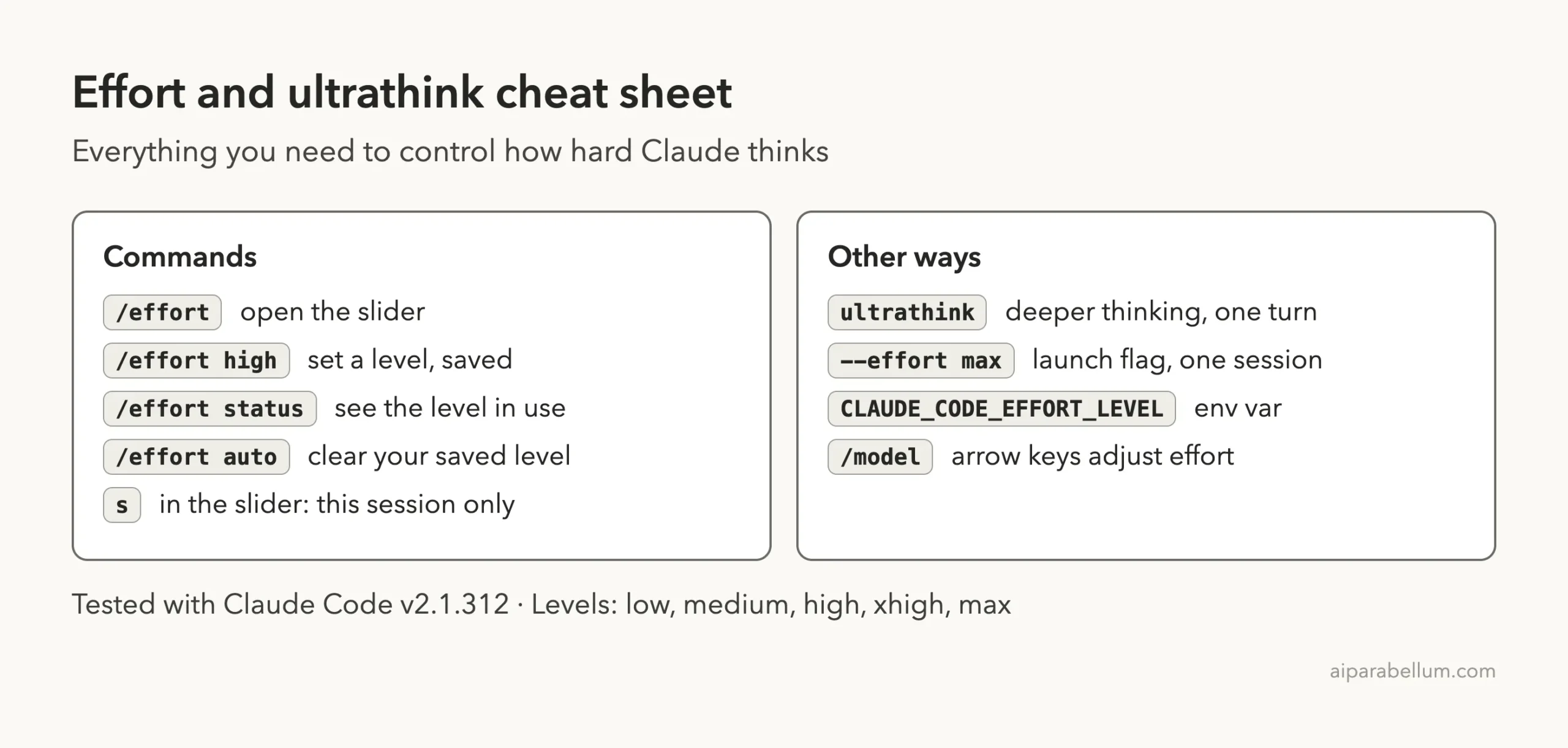
/effort: open the slider, type a level such as/effort high, or run/effort autoto clear your saved level for the active model./model: use the left and right arrow keys on the effort slider while you pick a model.--effort: pass a level name when you launch, for exampleclaude --effort high, to set it for a single session.CLAUDE_CODE_EFFORT_LEVEL: export a level name in your shell.- Settings: set a per-model level, or use
effortLevelwithlow,medium,highorxhigh. - Skill and subagent files: add an
effortfield to override the level while that skill or subagent runs.
Note that max is not accepted in the effortLevel setting. It also never saves as a default unless you use the environment variable.
Save It or Use It Once?
When you pick low, medium, high or xhigh in an interactive session, how you confirm decides how long it lasts. Press Enter in the slider, or type a level after /effort, and Claude Code saves it as your default for later sessions. Press s in the slider and it applies to this session only.
The s shortcut needs Claude Code v2.1.257 or later.
Claude Code saves the level per model under modelSettings in your user settings, so each model keeps its own level. To see where that file lives, read our guide to the settings.json location.
Which Setting Wins?
Sometimes two settings disagree. Claude Code resolves the level in a fixed order and takes the first source that applies.
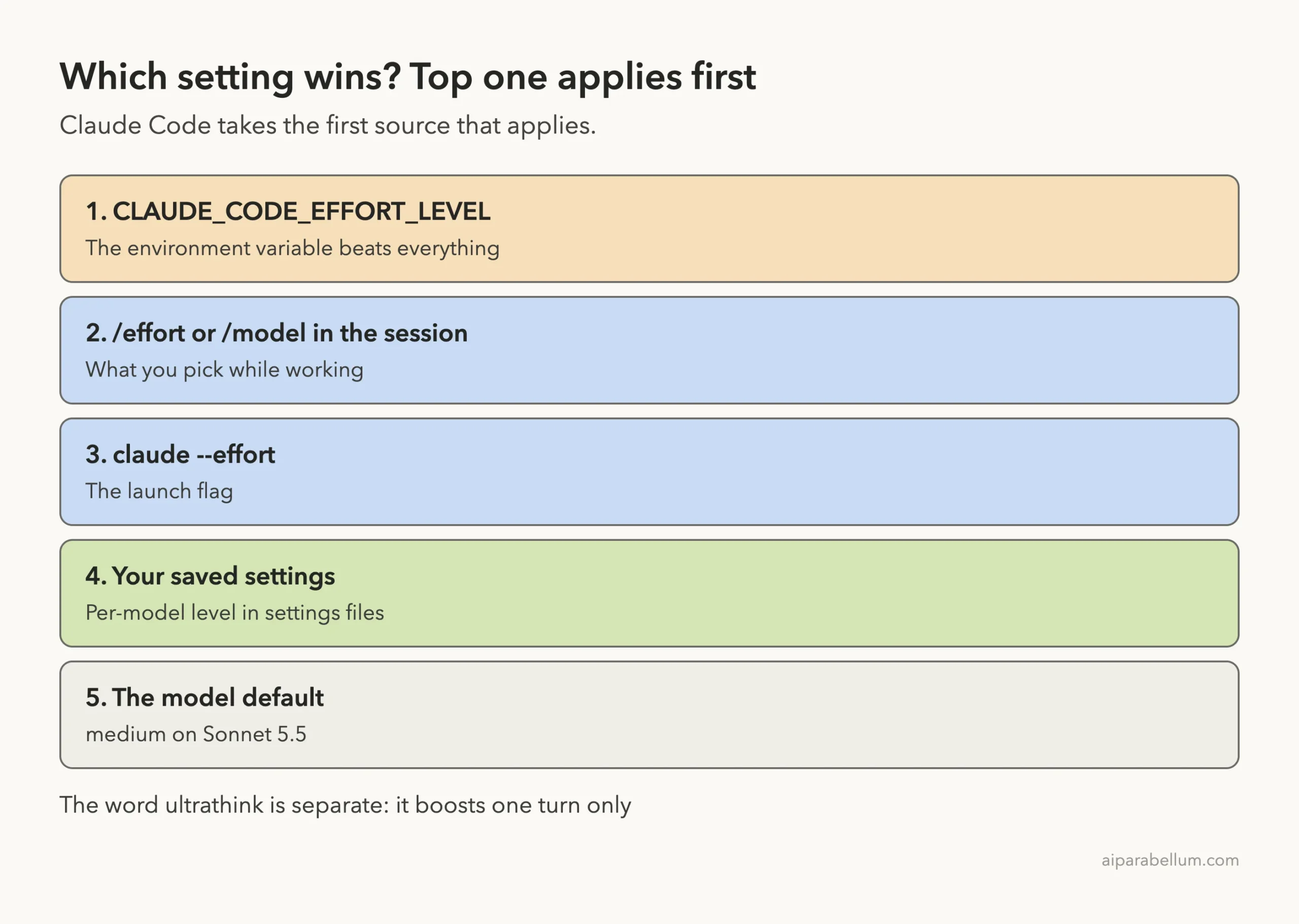
- The
CLAUDE_CODE_EFFORT_LEVELenvironment variable. - A level you pick in the session with
/effortor the/modelpicker. - Launching with
--effort. - Your saved settings.
- The model default:
highon most models,mediumon Opus 5.5, Sonnet 5.5 and Haiku 5.5, andxhighon Opus 4.7.
This explains a common surprise. If you export CLAUDE_CODE_EFFORT_LEVEL in your shell profile and then use the slider, the environment variable still wins. If your level never seems to change, check that variable first.
Ultrathink vs Ultracode
The names sound alike, but they are different things. Ultrathink is a keyword for one turn. Ultracode is a toggle you can see on the right side of the /effort slider.
Anthropic describes it as a Claude Code setting rather than an effort level: with it on, Claude plans a dynamic workflow for each substantial task, at whichever effort level the session runs at.
You can turn it on with /effort ultracode, by pressing Tab in the slider, or by launching with claude --effort ultracode, which also starts the session at xhigh. Turn it off with /effort ultracode off. It is unavailable when workflows are turned off or when the model does not support xhigh.
We only looked at the toggle and did not run a workflow, so read the model configuration docs for the details.
Sending No Effort Level at All
Some people want the API’s own default instead of Claude Code’s. To do that, start claude from a shell that exports CLAUDE_CODE_EFFORT_LEVEL set to auto or unset. Then run /effort status to confirm.
The answer “Effort level: auto” means no level is sent. The answer “auto (currently medium)”, which is what we saw, means a level is still being sent, here the model’s default. If a maxEffortLevel cap applies, Claude Code lowers its own default to fit that cap.
Effort, Cost and Context
Higher effort means more thinking, and thinking uses tokens. That is why the slider shows cost estimates. If your bill or usage matters, read our guides on managing costs and on how to see token usage.
For long chats, our context window guide explains how to keep a session healthy.
A simple habit saves money: leave the session at the default and add ultrathink only on the prompts that truly need it. Reach for /effort high or xhigh only when a whole stretch of work is hard.
Real Examples
Here is how we would pick a level for common jobs, based on the official guidance.
- Renaming a variable across two files:
lowor the default. - Adding a small feature with a clear spec:
medium. - Fixing a bug that only shows up sometimes:
high, or default plusultrathinkon the key prompt. - Reviewing a design with many trade-offs:
xhighfor the session. - Searching a codebase for security problems:
max, but test it on a small area first.
Planning is another good moment for extra thinking. Our guide on plan mode pairs well with ultrathink: ask for a plan with the keyword, review it, then drop back to normal effort for the edits.
Try It Yourself
Make a small practice folder, add a file with a simple bug, and compare the two modes. Never practice in a real project.
mkdir ~/effort-practice && cd ~/effort-practice
claude
Create a short file with a bug of your own, then ask this twice, once without and once with the keyword:
Which line in my file has a bug? Answer in one sentence.
Which line in my file has a bug? Answer in one sentence. ultrathink
Then run /effort status, open /effort, move the slider and press Esc to cancel without saving.
Common Mistakes
- Typing “think harder” and expecting a boost. Only
ultrathinkis recognized; other phrases are plain text. - Wrapping the word in quotes, brackets or a path. It may not turn rainbow, so retype it plainly.
- Starting a prompt with
/and adding the word later. Slash-command prompts do not count. - Leaving
maxon for everything. It costs far more and may overthink. - Forgetting an exported
CLAUDE_CODE_EFFORT_LEVEL, which overrides the slider. - Expecting a saved level to carry across models. Levels are saved per model.
Pro Tips
- Watch the footer. “Deeper reasoning requested for this turn” is your proof the keyword worked.
- Press
sin the slider when you want a level for today only. - Use
/effort autoto clear your saved level and return to the model default. - When moving to a newer model, start at its default and adjust only if results disappoint.
- Set
effortin a skill file when one skill always needs deep reasoning.
Cheat Sheet
Frequently Asked Questions
Does ultrathink still work in Claude Code?
Yes. In our test on v2.1.312 the word turned rainbow and the footer confirmed deeper reasoning for that turn. The terminal rainbow behavior needs v2.1.311 or later.
Is ultrathink the same as the max effort level?
No. Ultrathink affects one turn and, when typed in the terminal, can raise it to xhigh. The max level is a session setting and is the deepest one.
Do “think hard” or “think more” work?
Not as special keywords. The docs say Claude Code passes them through as ordinary prompt text.
What is the default effort level?
It depends on the model. Sonnet 5.5, Opus 5.5 and Haiku 5.5 default to medium, Opus 4.7 to xhigh, and most others to high. On our Sonnet 5.5 session, /effort status showed medium.
How do I reset my effort level?
Run /effort auto to clear your saved level for the active model. Also check that CLAUDE_CODE_EFFORT_LEVEL is not set in your shell.
Conclusion
Effort levels set how hard Claude Code thinks across a session, and ultrathink gives you a one-turn boost without touching that setting. Keep the default for daily work, add the keyword for the tricky prompt, and save max for your hardest problems after a small test. You can read Anthropic’s full details in the official model configuration guide linked above, and learn more about the assistant itself on our Claude page.