The Claude Code raw mode is not supported error means you started the interactive version of Claude Code somewhere that has no keyboard to read from. That usually happens when you pipe text into claude, redirect its input, or run it from cron, a CI job or another program. The interactive screen needs a real terminal, and in those places there isn’t one.
The quick fix is to add -p. Run claude -p "your question" or cat file.txt | claude -p "your question", and Claude Code prints the reply and exits without needing a keyboard. If you actually want to chat, start claude straight from a terminal window with no pipe in front of it.
If the error showed up while installing Claude Code, the fix is different: rerun the official installer. Current versions also replace the old “Raw mode” wording with a clearer “Claude Code can’t read the keyboard here” message, so running claude update helps you see what is really going on.
Browse all our Claude Code tutorials for more fixes and how-tos.
Tested with Claude Code v2.1.328 on macOS on November 21, 2026. We reproduced the no-terminal case in a throwaway demo folder with a small notes file, then ran each fix. Every terminal capture below is real output from that session.
We tested on macOS; the Windows and Linux steps follow Anthropic’s official instructions.
Quick Summary
| Question | Short answer |
|---|---|
| What the error means | Interactive claude had no terminal to read your keys from |
| Typical triggers | Pipes, redirects, cron, CI runners, apps that launch claude |
| Fix for scripts | Add -p: claude -p "question" |
| Fix for chatting | Run claude directly in a terminal |
| Fix during install | Rerun the official installer |
| Newer message (v2.1.287+) | Claude Code can’t read the keyboard here |
| Exit code when it stops | 1 |
| macOS and Linux bonus | echo "hi" | claude works in a real terminal |
What “Raw Mode Is Not Supported” Means in Claude Code
When you run plain claude, it opens a full-screen interactive session. To react to every key you press, such as arrows, Esc and Ctrl+C, that screen puts the terminal into “raw mode”. Raw mode only exists on a real terminal device.
Pipe text into claude, and its standard input (stdin) becomes the pipe instead of your keyboard. A pipe can’t switch into raw mode. Older builds of Claude Code tried anyway and failed.
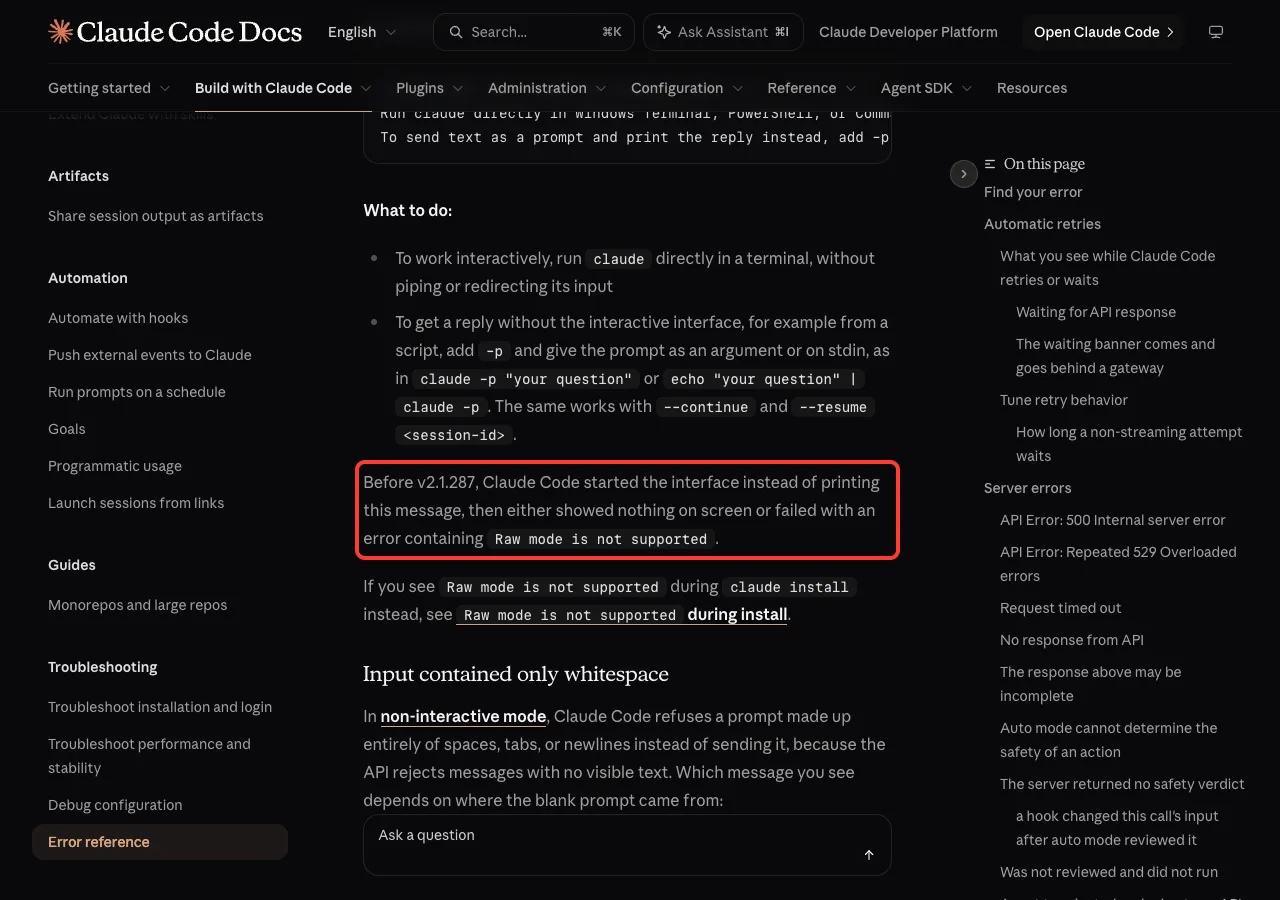
Anthropic’s error reference says that before v2.1.287, Claude Code started the interface in this situation and then either showed nothing on screen or failed with an error containing “Raw mode is not supported”. Newer versions check first and explain the problem in plain words.
Raw mode needs a keyboard. If nobody is typing, use claude -p.
We Reproduced the Error on v2.1.328
On a Mac, piping text into claude from a normal terminal doesn’t fail anymore. To see the error, we needed a setup with no terminal at all, which is exactly what cron jobs and CI runners give a program.
We wrote a tiny helper, detach.py, that starts a command in a new session with no controlling terminal. It’s four lines of Python using os.setsid(), and it imitates what a scheduler does:
#!/usr/bin/env python3
# Runs a command with no controlling terminal, like cron or a CI runner does.
import os, sys
os.setsid()
os.execvp(sys.argv[1], sys.argv[1:])
The message you see today
Then we piped a word into interactive claude through that helper:
echo 'hi' | ./detach.py claude; echo "exit code: $?"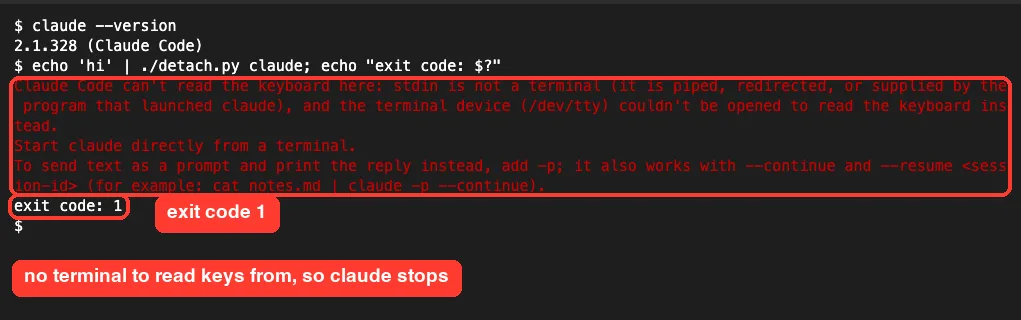
Claude Code printed three lines in red and stopped with exit code 1:
- “Claude Code can’t read the keyboard here”, followed by the reason: stdin is piped, and
/dev/ttycouldn’t be opened. - “Start claude directly from a terminal.”
- A hint to add
-p, which also works with--continueand--resume.
This is the modern form of the raw mode error. If you are on an older build, the same situation gives you a blank screen or the “Raw mode is not supported” text instead. Either way, the cause and the fixes are the same.
Why macOS and Linux usually still work
The docs explain a platform difference. On macOS and Linux, Claude Code reads your keystrokes from /dev/tty and starts the session, using any piped text as your first prompt. You only see the message when /dev/tty can’t be opened, as in our cron-like test.
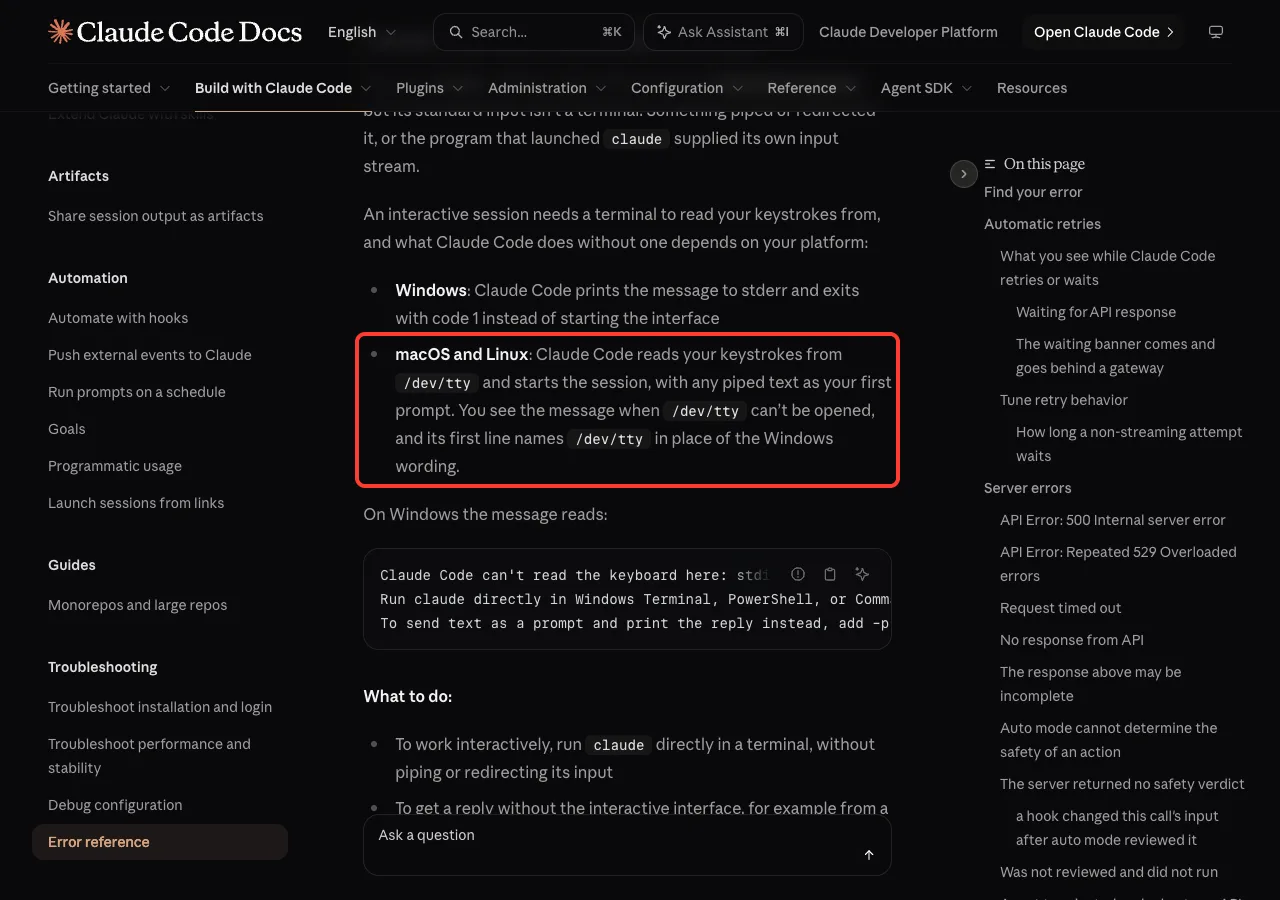
On Windows, Claude Code prints the message and exits with code 1 whenever stdin is piped or redirected. Its wording names Windows Terminal, PowerShell and Command Prompt instead of /dev/tty, and it can’t fall back to the console for input yet.
How Piped Input Reaches Claude Code
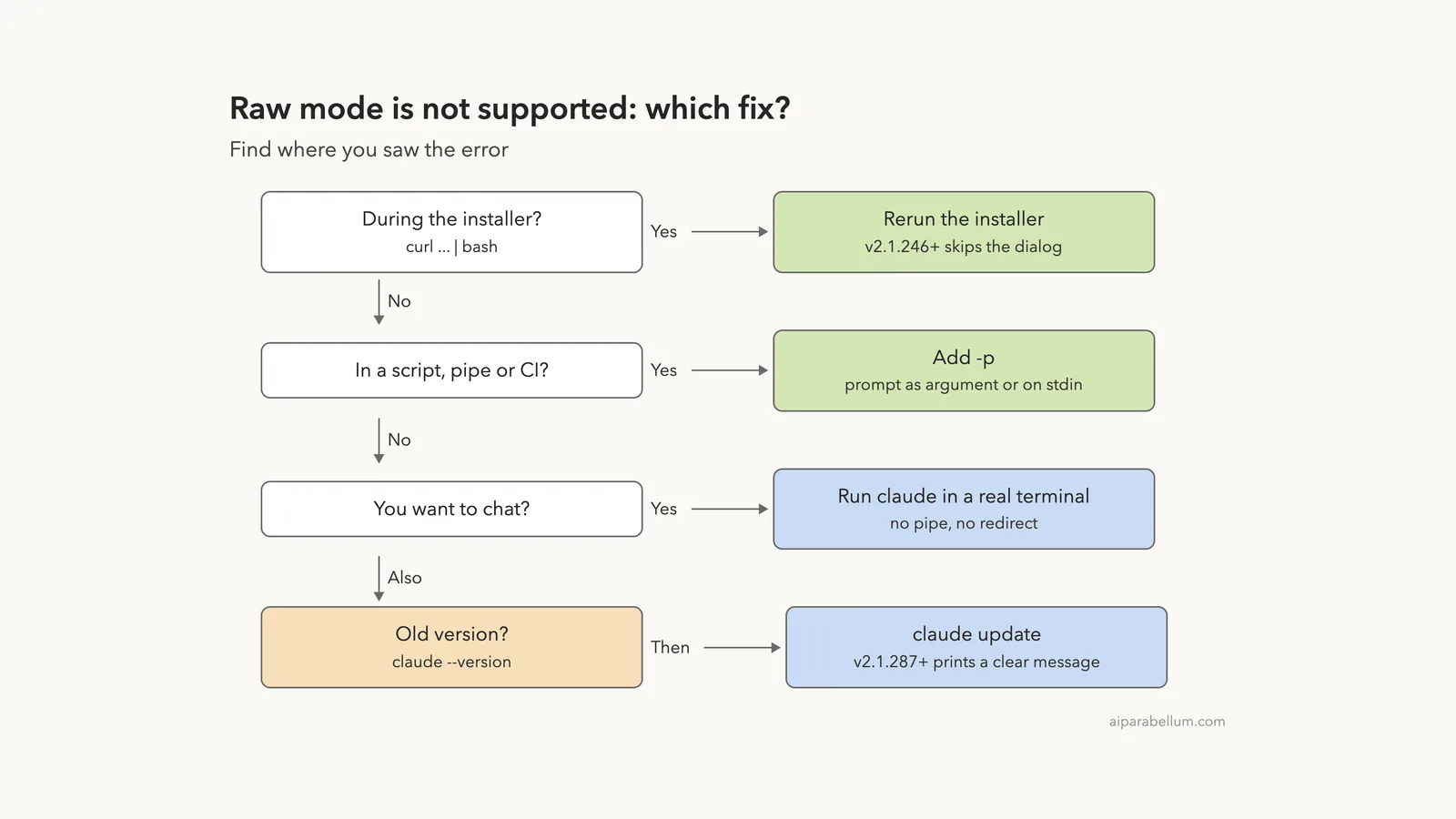
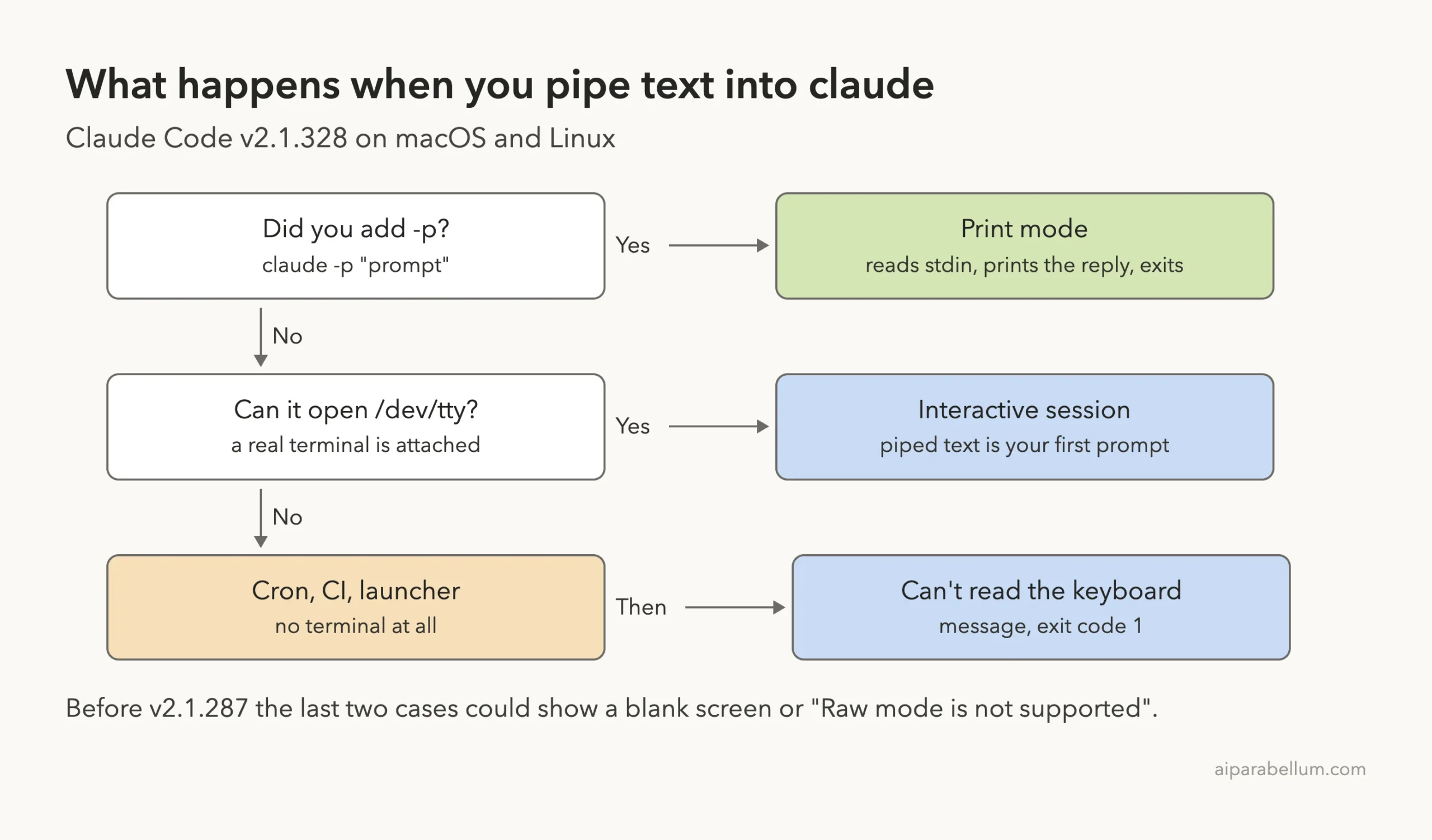
Three things decide what happens: whether you used -p, whether a terminal is attached, and which version you run. This diagram puts them in order.
Common places the error appears
- A shell script that runs
cat notes.md | claudeand expects an answer back. - A cron job or macOS launch agent that calls
claudeon a schedule. - A CI pipeline step, a Docker container started without a TTY, or a git hook.
- An editor task runner or another app that launches
claudewith its own input stream. - The install script, when it runs
claude installfromcurl ... | bashon older versions.
How to Fix “Raw Mode Is Not Supported” in Claude Code
Start with where you saw the error, then pick the matching fix. Most people only need Fix 1.
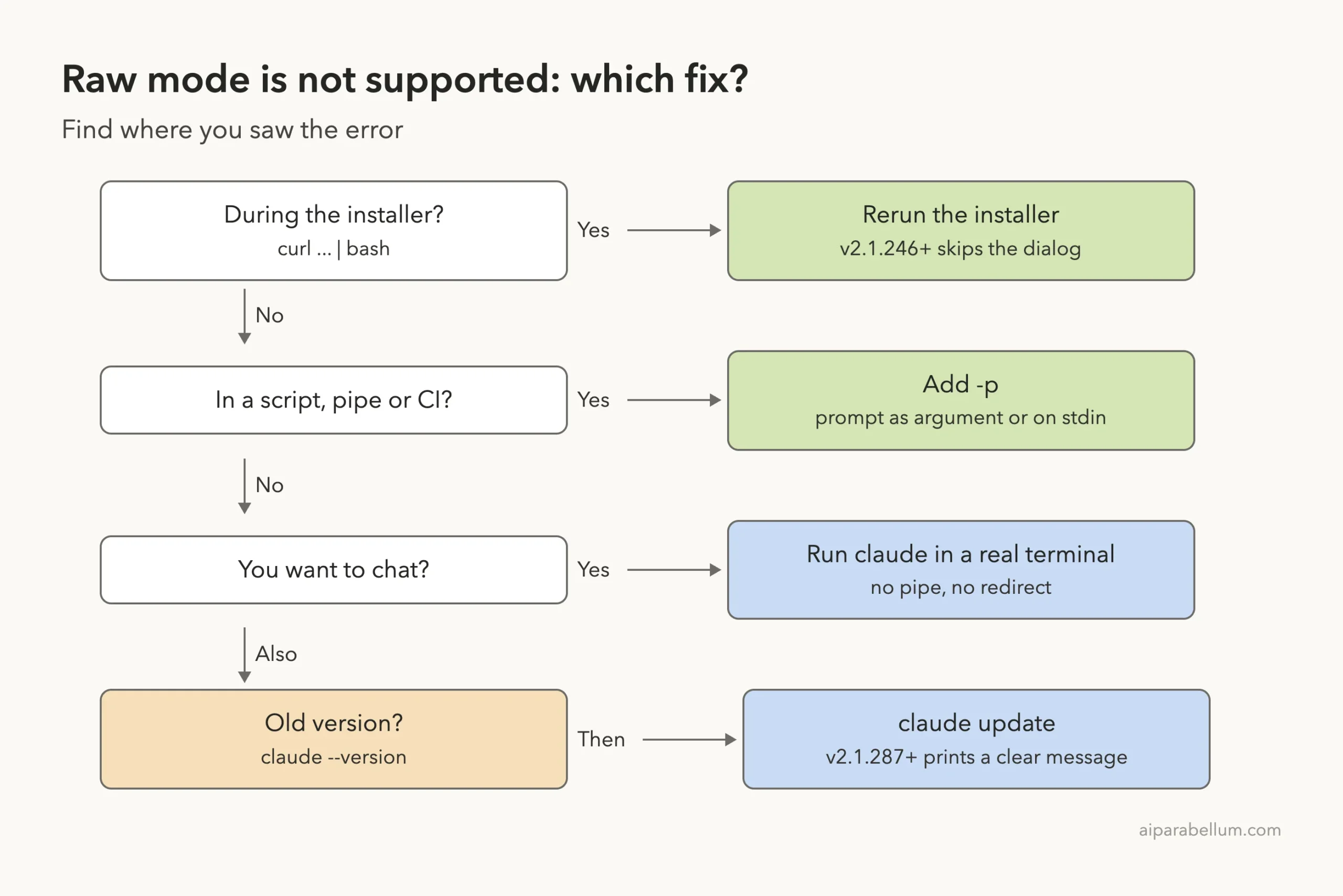
Fix 1: Add -p for scripts and pipes
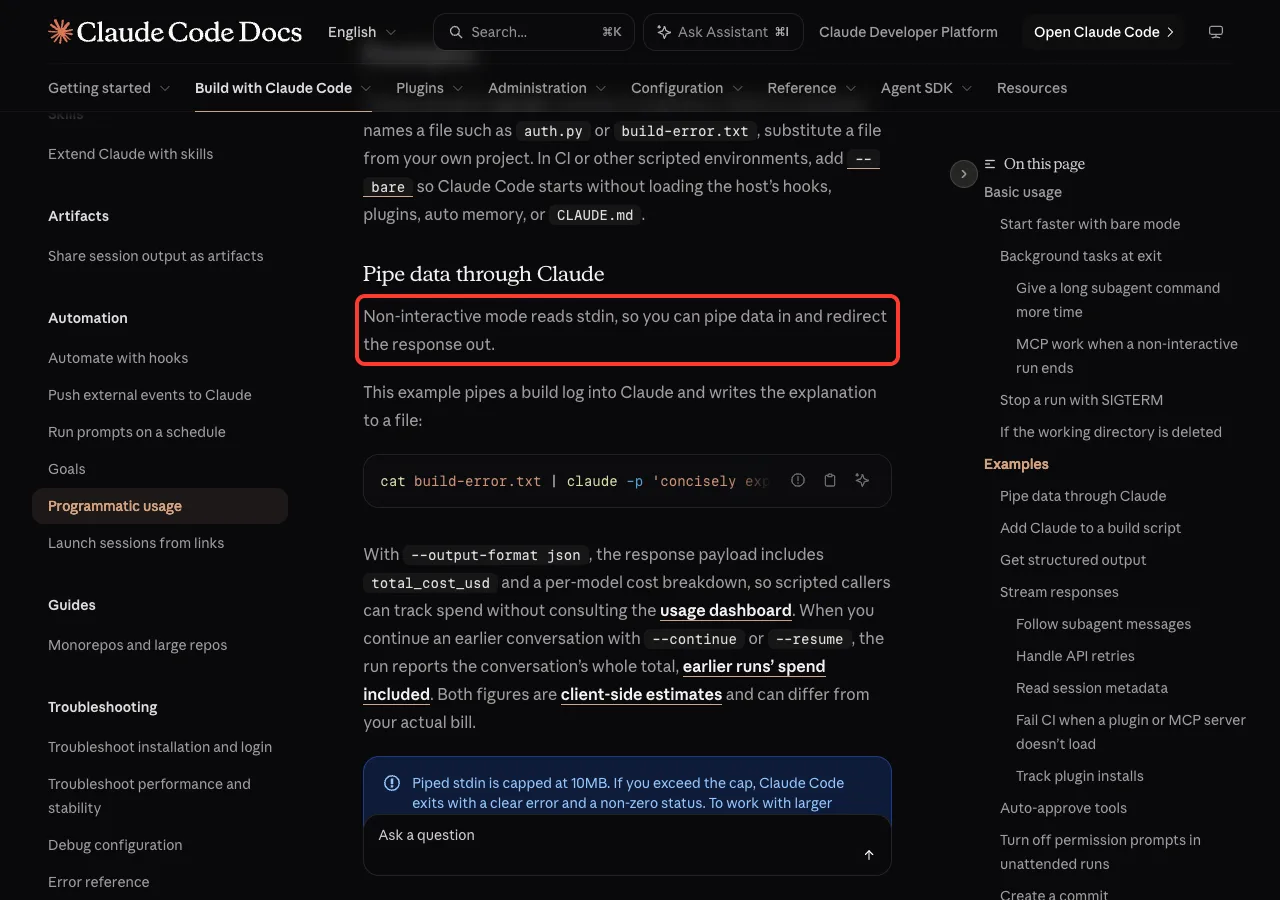
The -p flag (short for --print) runs Claude Code in non-interactive mode. The headless docs say this mode reads stdin, so you can pipe data in and redirect the reply out. No keyboard is needed.
cat notes.txt | claude -p 'Turn these notes into a 3-item checklist'
The piped text and the prompt argument are combined, so Claude saw both the file and the instruction. To prove the fix also works where the error happened, we ran it through the same no-terminal helper:
cat notes.txt | ./detach.py claude -p 'Which item is due Friday? One line.'
For scripts that parse the result, add --output-format json. Our guide to Claude Code headless mode walks through the output formats and more -p patterns.
Fix 2: Keep the conversation going with –continue
Some scripts need more than one turn. The error message itself points out that -p works with --continue and --resume <session-id>, so you can keep a thread across several calls:
claude -p "Summarize notes.txt"
echo "Now list only the items due this week" | claude -p --continue
Use --resume with a session ID when a script runs several conversations side by side and you need to pick a specific one.
Fix 3: Run claude directly in a terminal to chat
If you wanted the full interactive session, remove whatever sits in front of claude. Open Terminal, iTerm, Windows Terminal or PowerShell, cd into your project, and type claude with no pipe and no < redirect.
On macOS and Linux, a pipe from a real terminal is fine too. We ran this in a normal terminal window:
echo 'Summarize notes.txt in one short line' | claude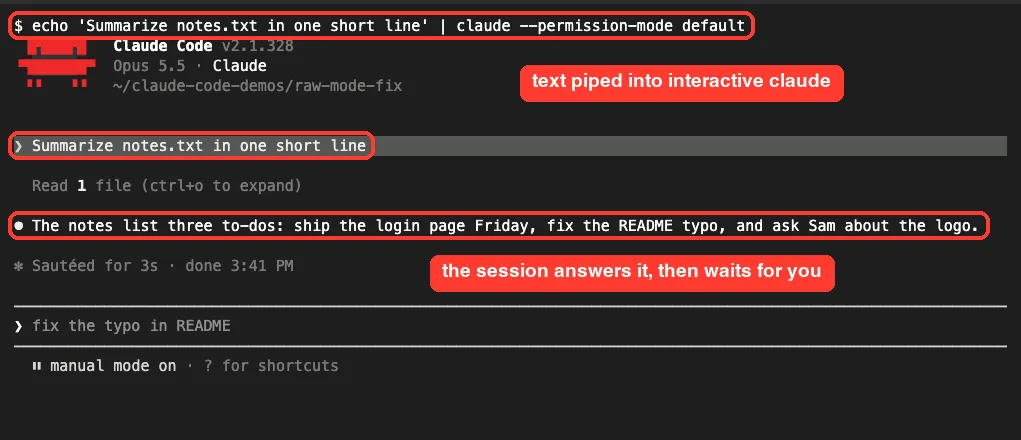
Claude Code asked us to trust the folder first, as it does for any new folder, then answered and waited for our next message. The gray “fix the typo in README” line is just a suggested follow-up, not something we typed. This trick won’t work on Windows yet; use -p there.
Fix 4: Rerun the installer if the error appeared during install
The install docs describe a separate cause. When an organization’s server-managed settings include changes that need security approval, Claude Code versions before 2.1.246 tried to show the approval dialog during claude install. The installer runs from a pipe, so the dialog failed with “Raw mode is not supported”.
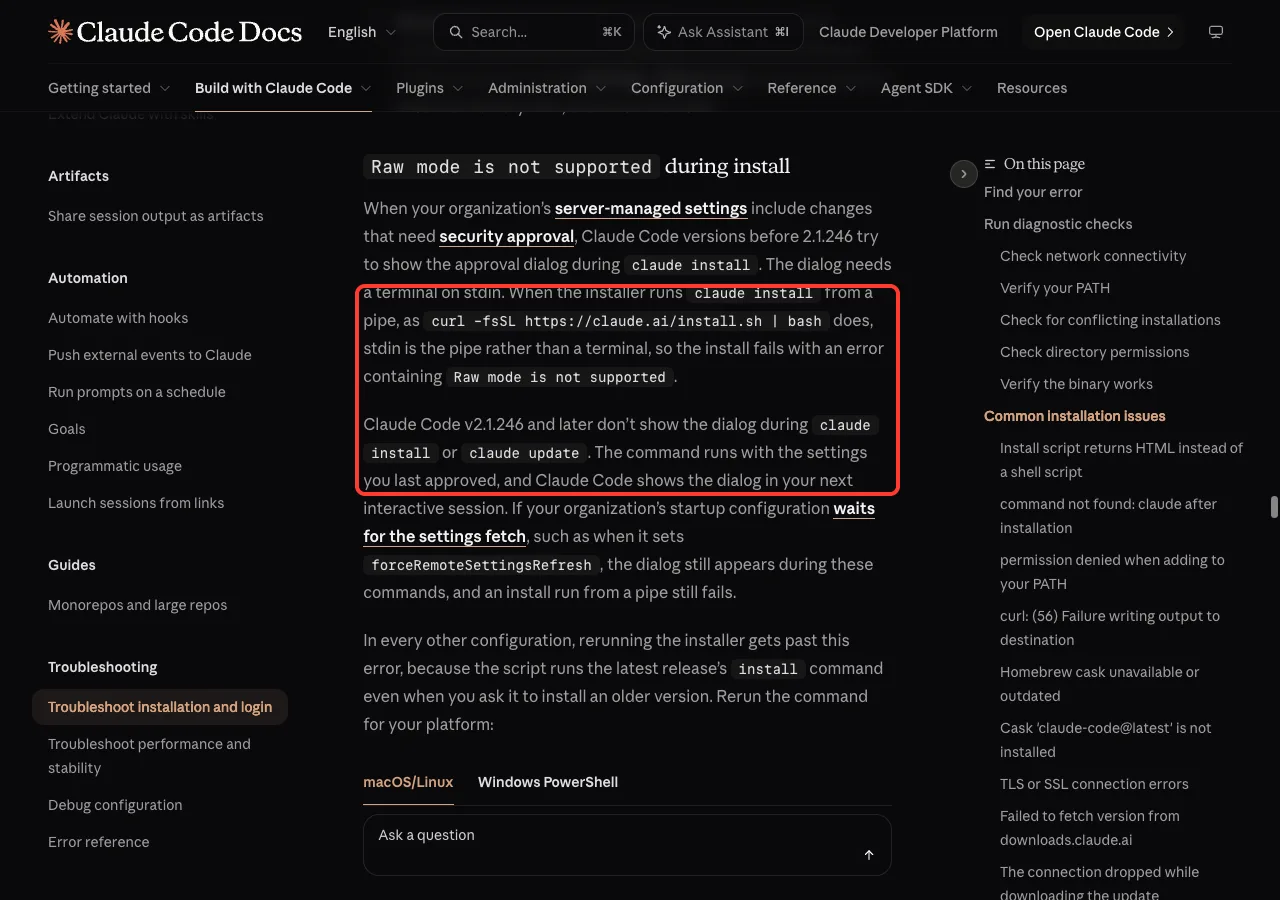
Rerunning the installer gets past it, because the script runs the latest release’s install command. Use the one for your platform:
# macOS and Linux
curl -fsSL https://claude.ai/install.sh | bash

# Windows PowerShell
irm https://claude.ai/install.ps1 | iex
Then check the result with claude --version. The install troubleshooting page adds one exception: if your organization’s startup config waits for the settings fetch, for example with forceRemoteSettingsRefresh, an install run from a pipe can still fail. In that case, talk to whoever manages your Claude Code settings.
Fix 5: Update so you get the clear message
If you still see a blank screen or the old wording, you are on a version older than 2.1.287. Check and update:
claude --version
claude update
Updating won’t make interactive mode work without a terminal, but the new message tells you exactly why it stopped. If claude update itself gives you trouble, our guide on updating Claude Code covers the usual fixes.
Real Examples: Scripts, Cron and CI
Here is how the same fix looks in the places where this error usually shows up.
A shell script
#!/bin/bash
# summarize-log.sh
tail -n 200 build.log | claude -p "Explain the first error in two sentences" > summary.txt
A cron job
# crontab -e
0 9 * * 1 cd ~/projects/site && claude -p "List TODO comments in src/" > ~/todo-report.txt 2>&1
Cron has no terminal, so interactive claude would stop with exit code 1. With -p, the job runs and the report lands in the file. Remember that cron uses a short PATH, so you may need the full path to claude.
A CI step
CI runners also lack a terminal, and they need a way to sign in. Our CI/CD pipeline example shows a working setup, and the guide to headless auth explains the login side. For GitHub specifically, see our GitHub Actions guide.
| Where you run it | Has a terminal? | What to use |
|---|---|---|
| Terminal window | Yes | claude or claude -p |
| Pipe in a terminal (Mac, Linux) | Yes, via /dev/tty | echo "..." | claude works |
| Pipe on Windows | No for input | claude -p |
| Cron, launch agents | No | claude -p |
| CI, Docker without TTY | No | claude -p |
curl ... | bash installer | No | Rerun the installer |
Try It Yourself
You can see the difference in under a minute. In any small folder you trust, make a notes file and compare the two commands:
printf 'buy milk\ncall the bank\nrenew passport\n' > notes.txt
cat notes.txt | claude -p "Which task is most urgent? One line."
echo "exit code: $?"
Then, if you are on macOS or Linux, try the interactive version from the same terminal and type /exit when you are done:
echo "Sort the tasks in notes.txt by urgency" | claudeIf a script of yours keeps failing, you can also paste it into a working Claude Code session with this prompt:
This script runs claude without a terminal and fails with "Raw mode is not
supported" or "can't read the keyboard here". Rewrite every claude call to use
-p with the prompt as an argument, keep the same inputs and outputs, and
explain each change in one line.
Common Mistakes
- Piping into plain
claudeinside a script and expecting it to print an answer. Without-p, it tries to open the full interactive screen. - Adding
< /dev/nullor< input.txtto “fix” a hang. That is still a redirect, and interactive mode still needs a keyboard. - Testing a cron command in your terminal, seeing it work, and assuming cron will behave the same. Your terminal has a TTY; cron doesn’t.
- Assuming the Mac pipe trick works on Windows. On Windows, piped input to interactive
claudeexits with code 1. - Sending an empty prompt from a variable. With
-p, a whitespace-only prompt fails with “Input contained only whitespace”, so check the variable first.
Pro Tips
- Check the exit code in scripts with
$?. A 1 after a bareclaudecall is a strong sign this is your problem. - Piped stdin for
-pis capped at 10MB, per the headless docs. For bigger files, mention the file path in the prompt instead of piping it. - Use
--output-format jsonwhen another program reads the reply, so you parse fields instead of text. - If an error message doesn’t match this one, our roundup of common Claude Code errors covers the others.
- If
claudeisn’t found at all in cron or CI, see our fix for command not found.
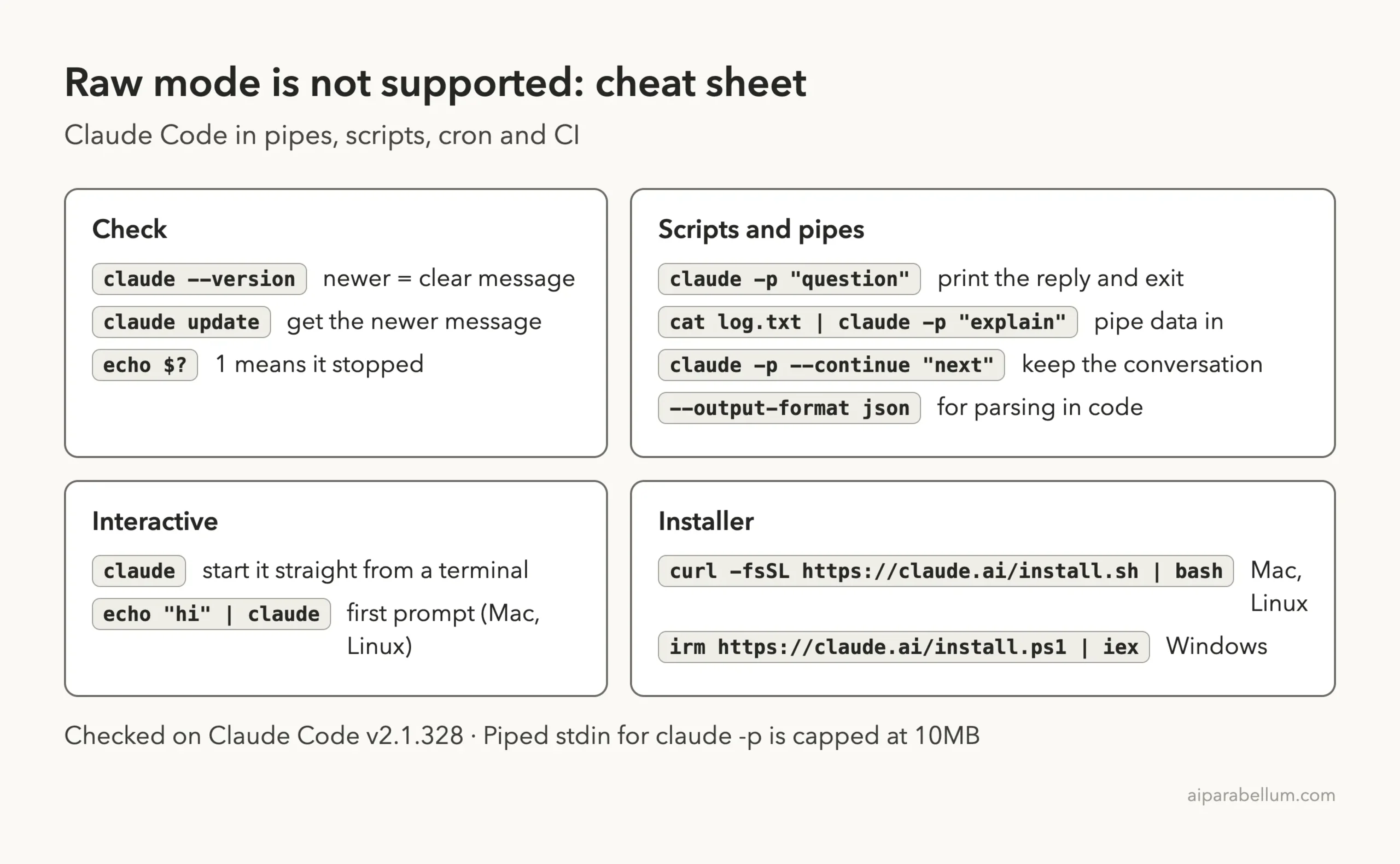
Cheat Sheet
Frequently Asked Questions
What does “Raw mode is not supported” mean in Claude Code?
It means interactive Claude Code tried to read your keystrokes from something that isn’t a terminal, such as a pipe or a redirect. Use claude -p for scripts, or run claude directly in a terminal.
Why don’t I see “Raw mode” anymore?
Since v2.1.287, Claude Code checks first and prints “Claude Code can’t read the keyboard here” instead. Older versions showed a blank screen or the raw mode error.
Can I pipe text into interactive Claude Code?
On macOS and Linux, yes, from a real terminal: the piped text becomes your first prompt, as we saw in our test. On Windows, or anywhere without a terminal, use -p.
How do I run Claude Code from cron or CI?
Always use claude -p with the prompt as an argument or on stdin. Make sure the job can find the claude binary and has a way to sign in.
I got the error while installing. What now?
Rerun the official installer for your platform, then check claude --version. Versions 2.1.246 and later skip the approval dialog that caused it during install.
Conclusion
The Claude Code raw mode is not supported error is not a bug in your project; it simply means interactive Claude Code had no keyboard to read from. In our test on v2.1.328, a cron-like run with no terminal stopped with a clear message and exit code 1, while the same run with -p answered and exited with code 0. Add -p in scripts, pipes, cron and CI, start claude straight from a terminal when you want to chat, rerun the installer if the error came during install, and update so you get the clearer message. To learn more about the model behind the tool, see our overview of Claude AI.