If Claude Code shows “Request too large (max 32MB)”, the raw data it tried to send to the Claude API was bigger than 32 megabytes, so the API turned it away before reading a single word. A Claude Code request too large error almost always comes from a huge paste, a pile of screenshots or PDFs, or big tool output building up in one conversation.
Your files and project are fine. Only that one request was refused, and the message itself tells you which fix will work.
Here is the short fix list:
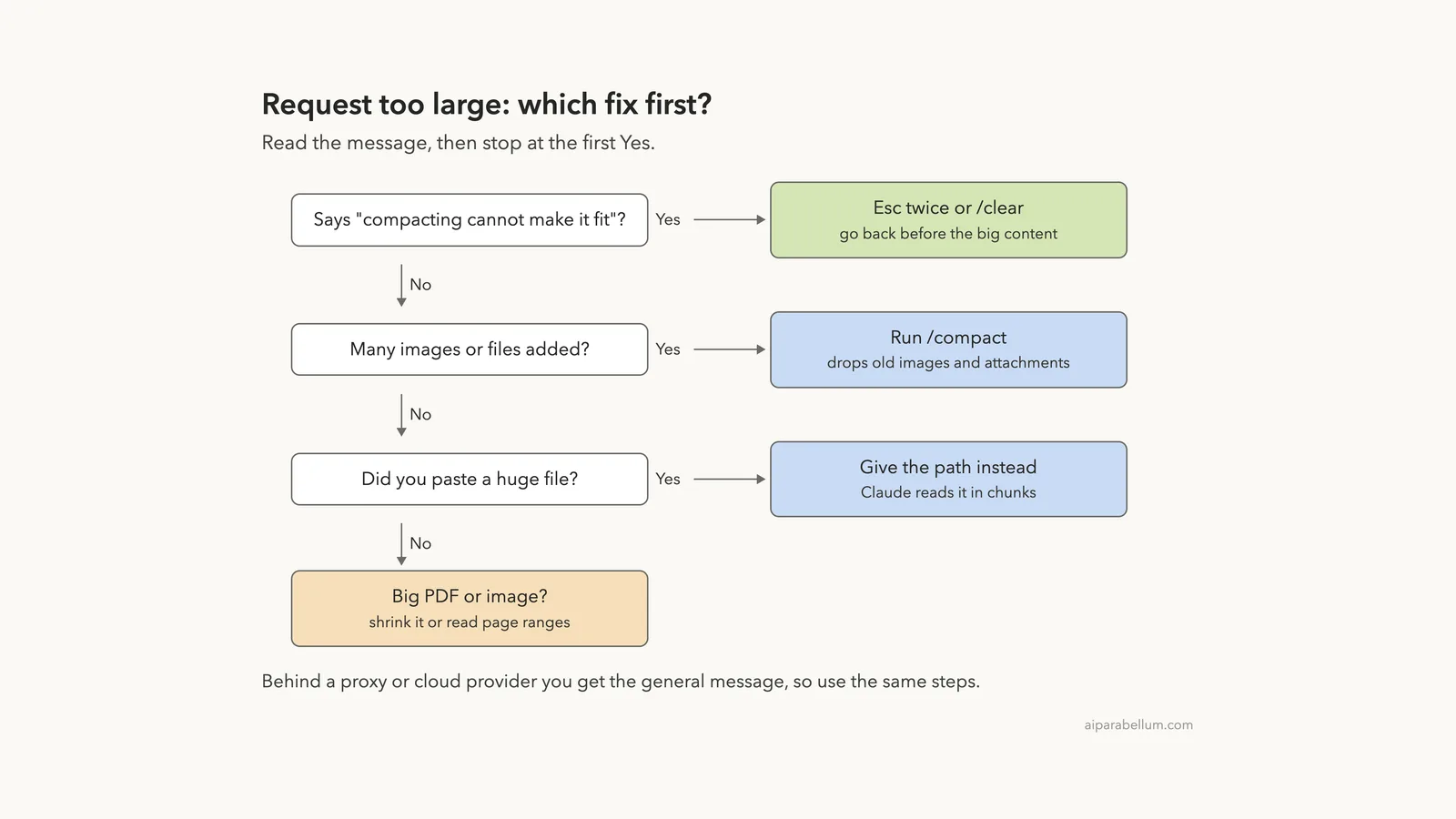
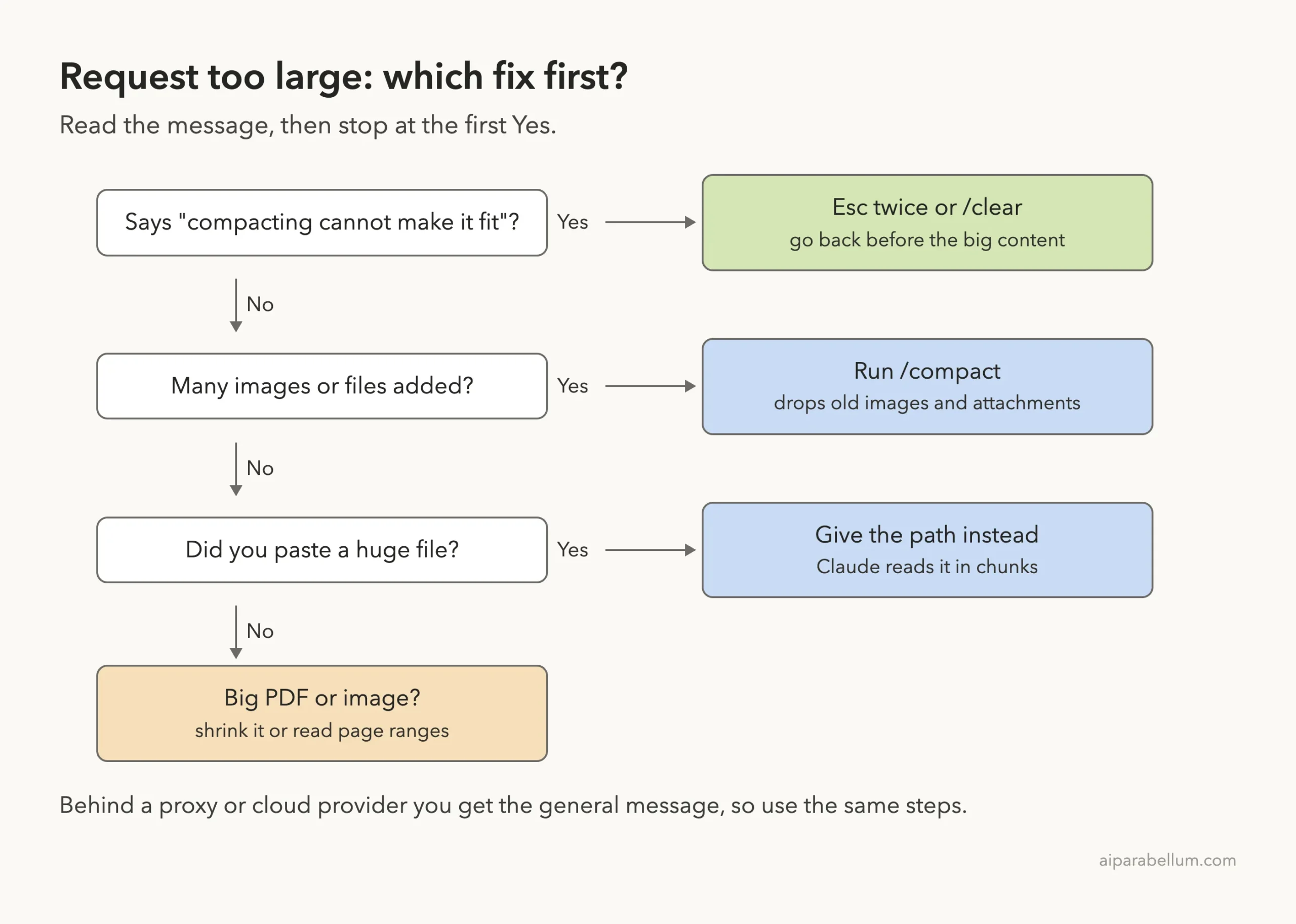
- If the message says “compacting cannot make it fit”, press Esc twice to go back past the turn that added the big content, or run
/clear. - Otherwise, run
/compact, which drops the images and attachments that piled up. - Next time, give Claude the file’s path instead of pasting it, so it can read the file in small chunks.
- For a big PDF or image, shrink it or ask Claude to read only a page range.
This guide is part of our help series. Browse all our Claude Code tutorials for more fixes and how-tos.
Tested with Claude Code v2.1.328 on macOS on November 19, 2026. Pushing more than 32MB at the API just to show the error would be slow and wasteful, so the error text below comes from Anthropic’s official error reference, shown in highlighted screenshots. Every fix, though, we ran for real in a demo folder holding 42MB of test files, and every terminal capture is genuine.
Request Too Large in Claude Code: Quick Summary
| Question | Short answer |
|---|---|
| Message you see | Request too large (max 32MB), plus a hint about what to do |
| HTTP status | 413, which the Claude API calls request_too_large |
| What it means | The raw request body passed 32MB before tokens were even counted |
| Usual causes | Big pastes, many images or PDFs, huge tool output |
| Fastest fix | /compact, or Esc twice if compacting can’t help |
| Lasting fix | Point Claude at file paths instead of pasting contents |
| Same as “Prompt is too long”? | No, that one is about tokens and the context window |
| Are files lost? | No, only the request was rejected |
What Causes the Claude Code Request Too Large Error
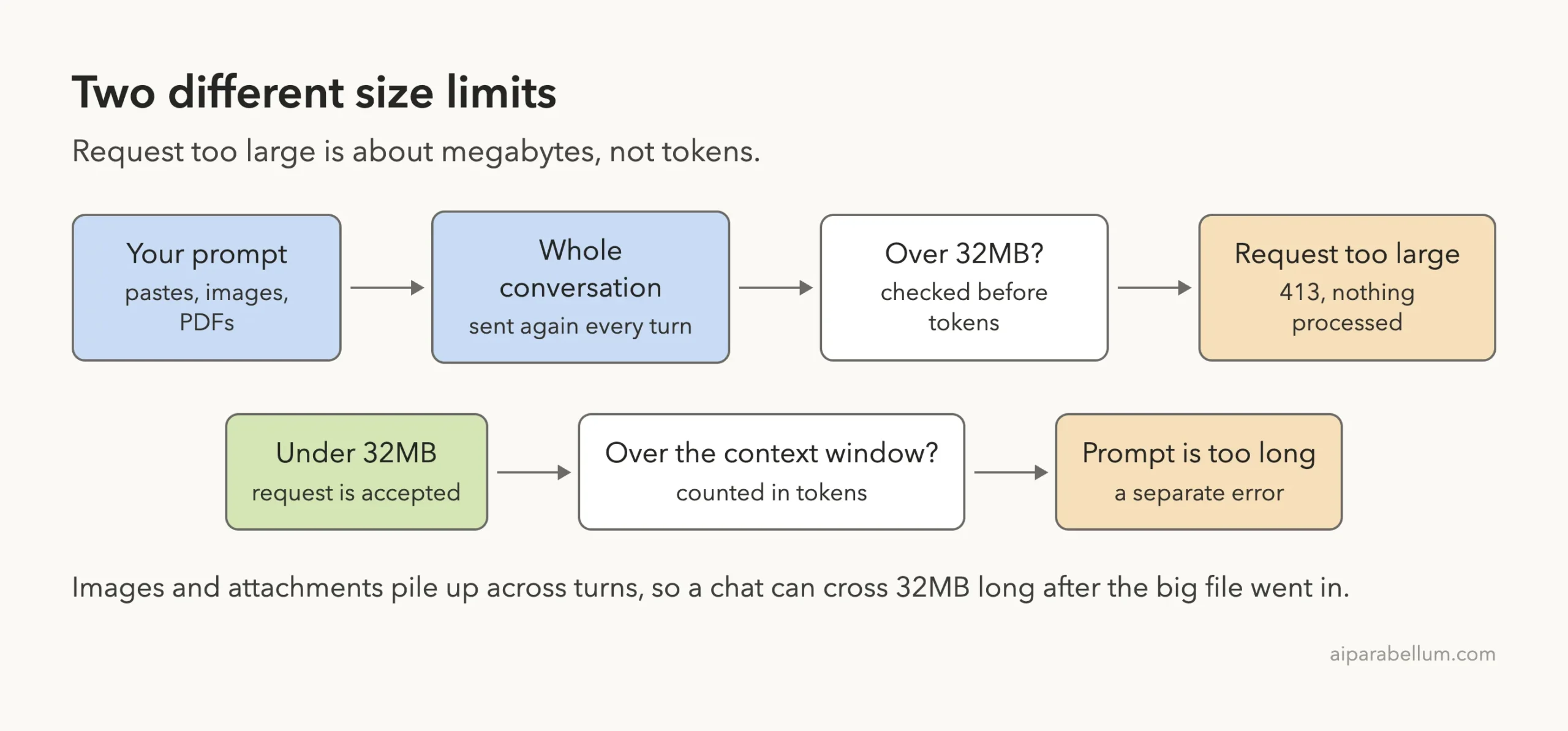
Every time you send a message, Claude Code sends the API the whole conversation so far, not just your newest line. That includes your earlier prompts, Claude’s replies, tool results, and any images, PDFs or pasted text you added along the way.
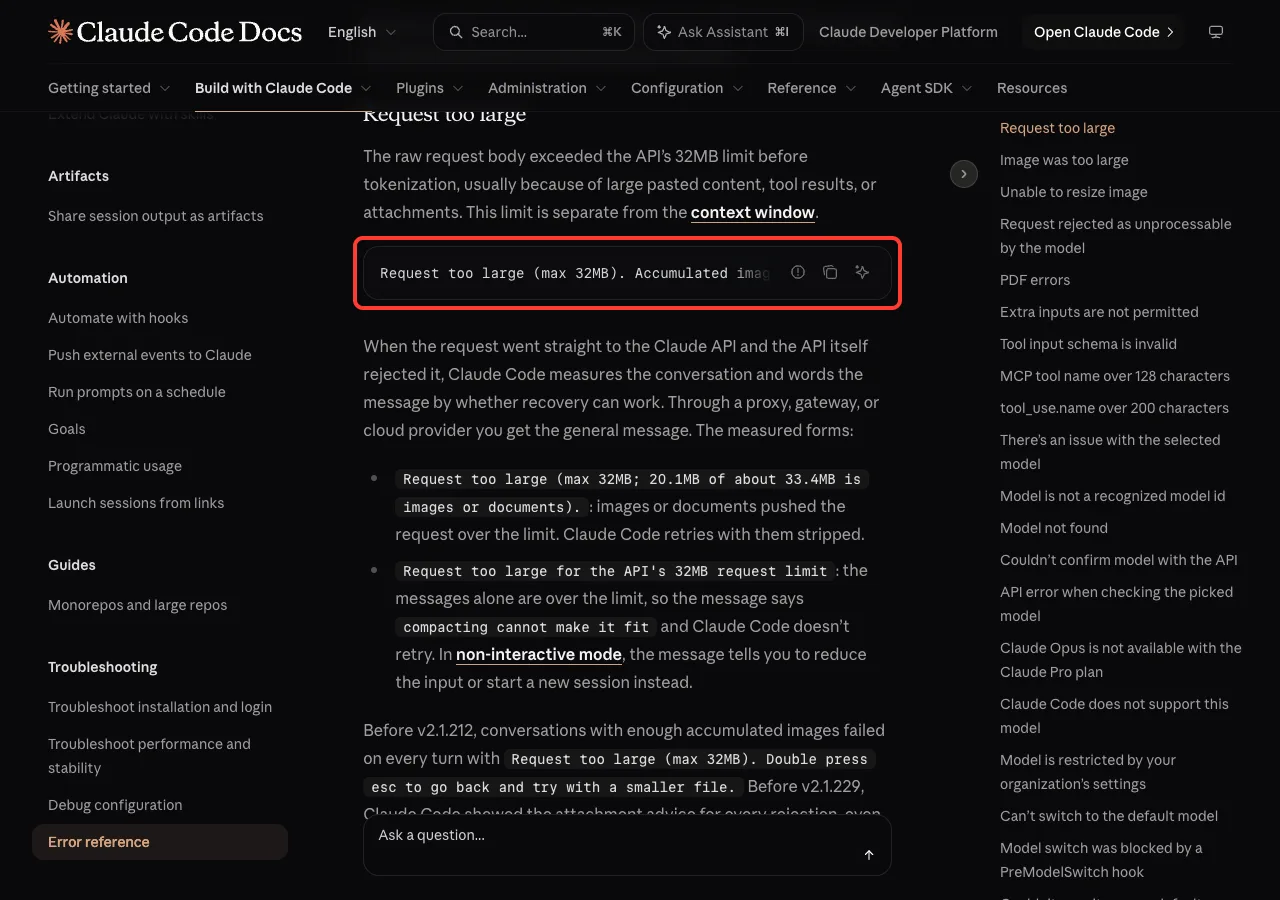
The Claude API puts a hard cap of 32MB on that request body. Anthropic’s error reference says the raw request “exceeded the API’s 32MB limit before tokenization”, usually because of large pasted content, tool results or attachments. Anthropic’s API error list names the same thing status 413, request_too_large.
The Exact Error Messages
The general form, which you also get when you connect through a proxy, gateway or cloud provider, reads like this:
Request too large (max 32MB). Accumulated images and attachments in the conversation pushed the request over the limit. Run /compact, or double press esc to go back and remove attachments.When Claude Code talks straight to the Claude API, it measures the conversation and picks one of two more specific forms:
Request too large (max 32MB; 20.1MB of about 33.4MB is images or documents).Images or documents pushed the request over, and Claude Code retries on its own with them stripped out.Request too large for the API's 32MB request limit. The messages alone are too big, so the message adds “compacting cannot make it fit” and Claude Code doesn’t retry.
In non-interactive mode, such as claude -p, that second form tells you to reduce the input or start a new session instead. The numbers in the first form change with your conversation; 20.1MB and 33.4MB are just the docs’ example.
Megabytes, Not Tokens
This is the part that confuses most people. The 32MB check happens before the API counts tokens, so it’s about raw file size. A few big screenshots can weigh more than a whole novel’s worth of text.
That makes it a different problem from the prompt too long error, which means the conversation has more tokens than the model’s context window. You can hit either one, and the fixes overlap, but the cause is not the same.
Why It Shows Up Late in a Session
Because the whole history is sent each turn, images and attachments add up. You might attach ten screenshots over an hour, each one fine on its own, and only the eleventh turn crosses 32MB.
The docs note that before v2.1.212, a conversation with enough stored images failed on every single turn after that. Newer versions strip old images and retry, and since v2.1.229 the message only suggests attachment fixes when they can actually help. That’s a good reason to stay updated.
How to Fix “Request Too Large” in Claude Code
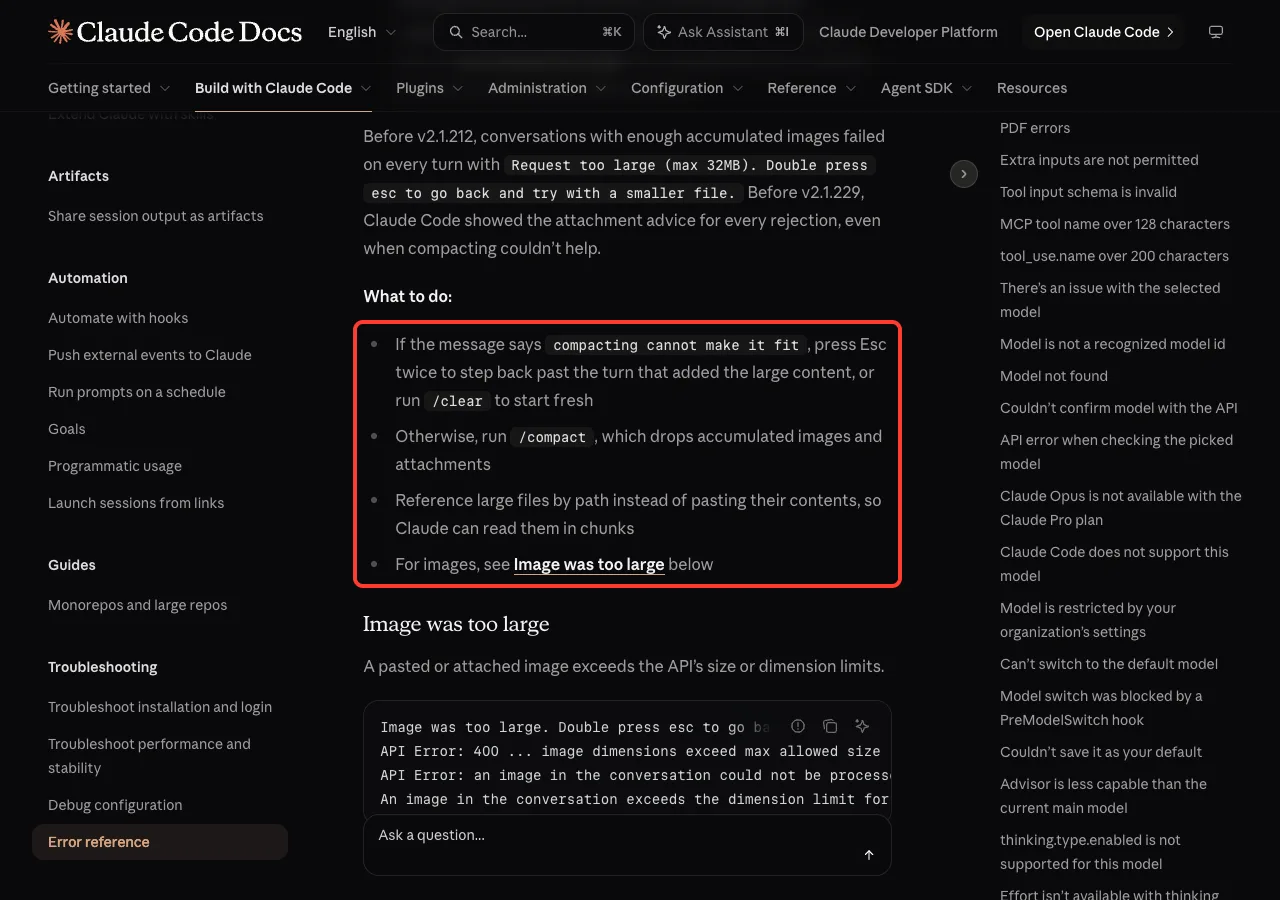
Anthropic’s error reference gives a short “What to do” list for this error. We tried each step in a throwaway demo project with a 19MB log file and a 23MB CSV export, 42MB together, which is more than the API would accept in one request.
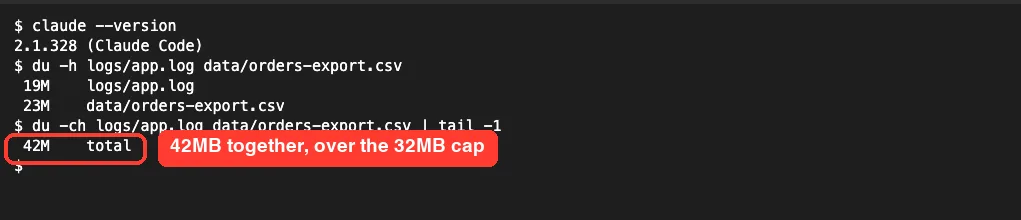
Fix 1: Press Esc Twice or Run /clear
If your message says “compacting cannot make it fit”, the content in the conversation itself is over the limit. Summarizing won’t shrink it enough, so you need to remove the turn that added it.
Press Esc twice on an empty prompt. Claude Code opens the Rewind menu, which lists your earlier prompts so you can jump back to a point before the big paste or attachment. Pick that point, press Enter, and resend a smaller version.
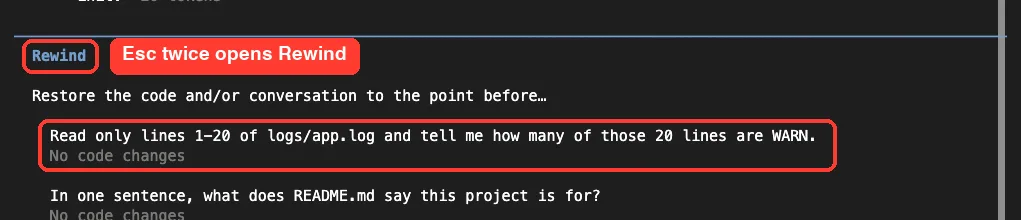
If you don’t need anything from the conversation, /clear starts fresh in the same window. Our clear vs compact guide explains what each choice keeps.
Fix 2: Run /compact to Drop Old Attachments
If the message doesn’t say “compacting cannot make it fit”, run /compact. The docs say it drops accumulated images and attachments, and it replaces older turns with a short summary.
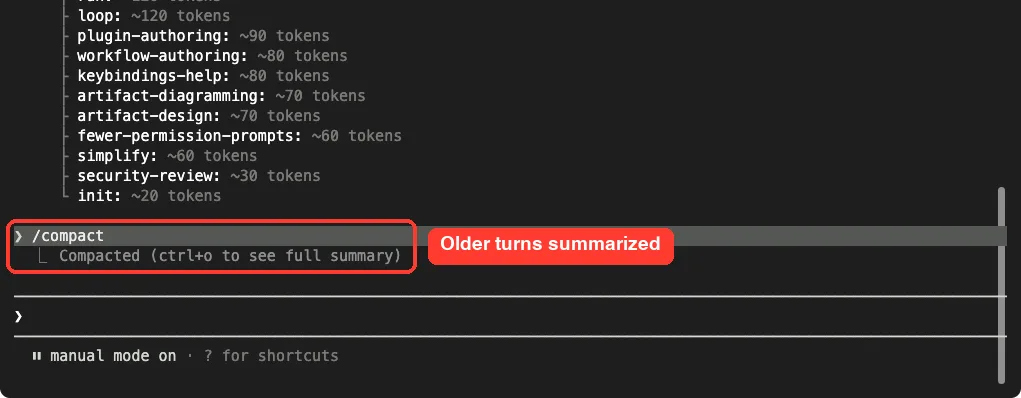
/compact run in our demo session: older turns are summarized.You can add a focus to tell it what to keep, for example /compact keep only the plan and the latest diff. If compacting itself seems to hang, see our fix for stuck compacting.
Fix 3: Give Claude the Path Instead of Pasting
This is the fix that stops the error from coming back. When you paste a file, every byte goes into the conversation and gets sent again on every later turn.
Claude Code shows a big paste as a single placeholder line, which makes it easy to forget how much is inside. Our paste of 3,000 log lines collapsed to one short tag:
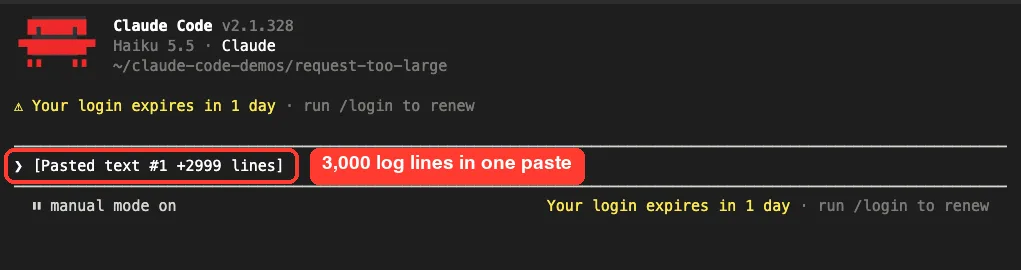
We cleared that paste without sending it. Instead, we named the file and told Claude how to look at it. It ran a search on the 19MB log and sent back only the answer:
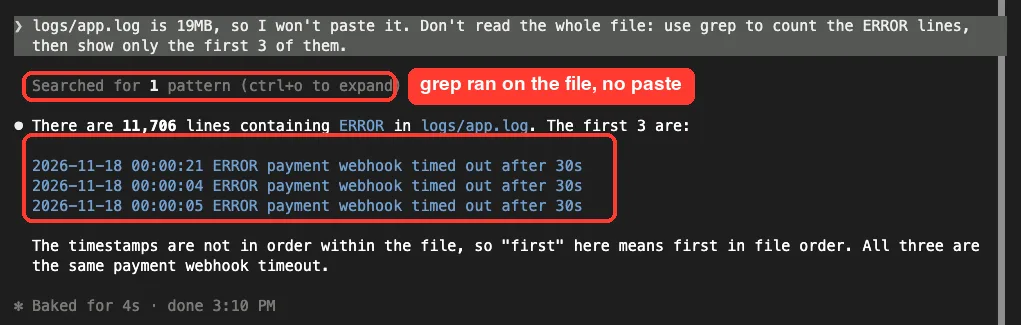
You can also ask for a line range. The Read tool pulls in only what you ask for:
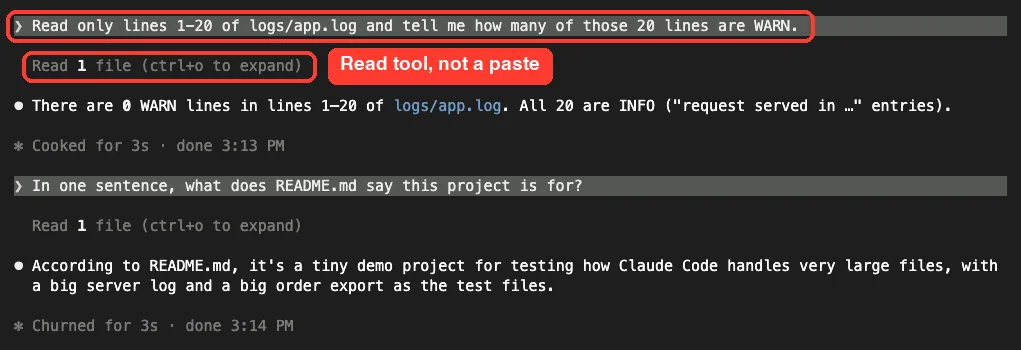
Fix 4: Shrink Big PDFs and Images
PDFs and images have their own limits, and they often lead to this error when you attach several. The docs list a PDF cap of 100 pages and 20MB, and suggest reading a page range or turning the PDF into text with a tool like pdftotext.
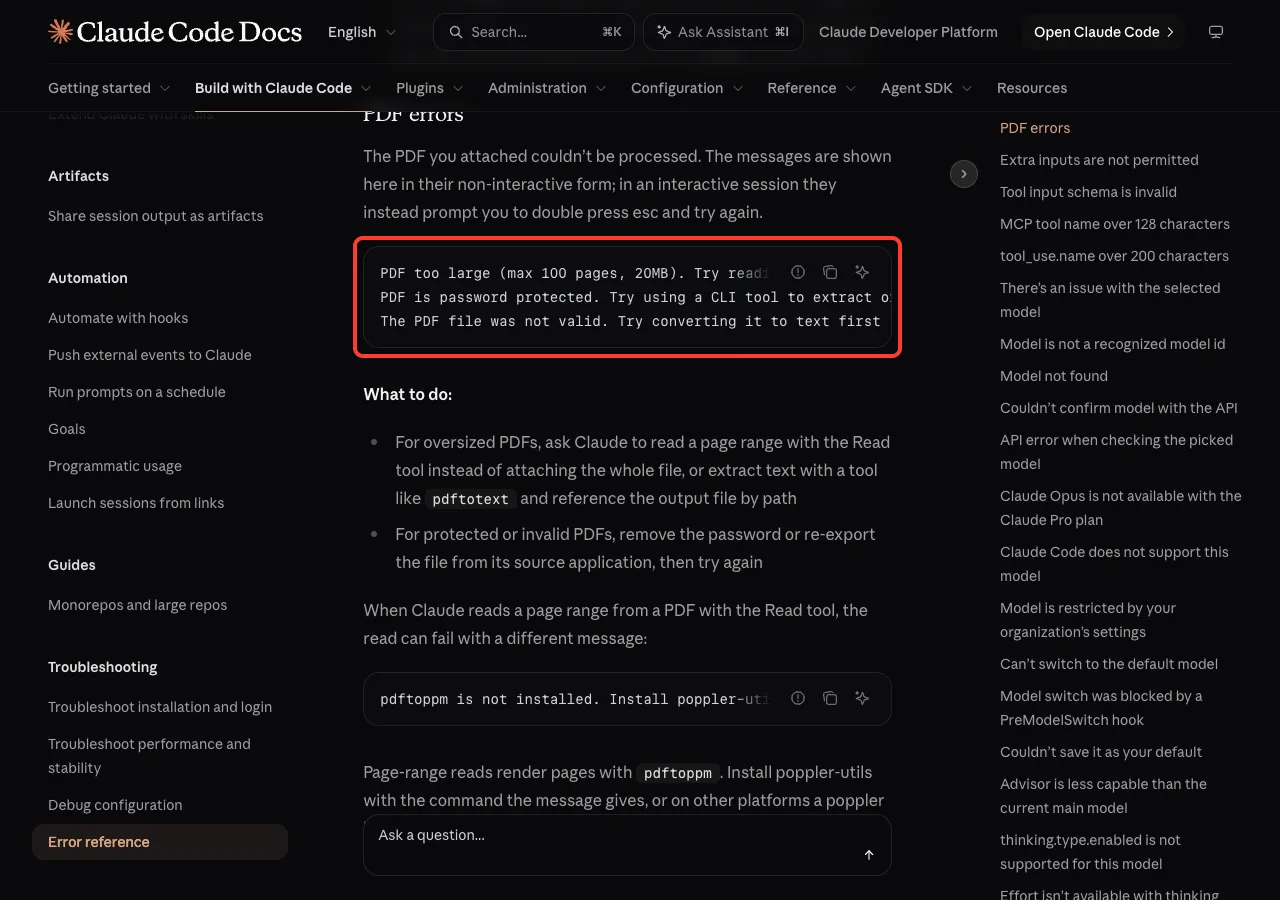
For screenshots, crop to the part that matters and save as PNG or JPEG before attaching. Our test of reading PDFs shows how page ranges work in practice.
Fix 5: Check What Fills the Session With /context
Run /context to see a breakdown of the conversation. It counts tokens, not megabytes, so it won’t show the 32MB figure, but a large Messages row tells you a lot of content has built up.
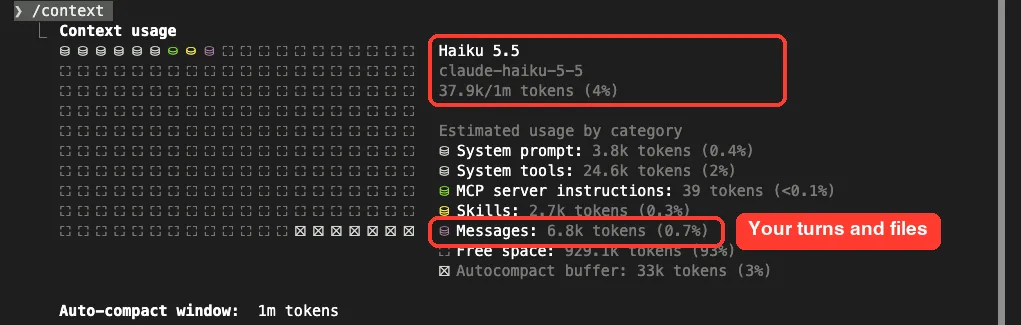
/context holds your turns, files and tool output.Our context window guide walks through every row of this screen.
Fix 6: Update Claude Code
Several fixes for this error landed in recent versions, including automatic retries with images stripped and clearer messages. Run claude update, then check with claude --version.
claude update
claude --version
Real Examples of What Triggers It
These are the situations the docs point to, in plain terms:
| Situation | Why it gets too large | Best fix |
|---|---|---|
| Pasting a whole log or data export | All of it is sent on every turn | Esc twice, then name the path |
| Many screenshots in one long chat | Images pile up in the history | /compact |
| Several big PDFs attached | Documents count toward 32MB | Page ranges or pdftotext |
| A tool dumped huge output | Tool results stay in the history | /compact or /clear |
| Using a proxy or cloud provider | Only the general message is shown | Same steps, starting with /compact |
If you can name the file, don’t paste the file. A path costs a few bytes; a paste costs every byte, every turn.
Try It Yourself
Make a demo folder with one big text file, then ask Claude to work on it without pasting anything. This prompt keeps the request small no matter how big the file is:
logs/app.log is very large, so I won't paste it. Don't read the whole file:
use grep to count the ERROR lines, then show only the first 3 of them.
Then try /context to see how little the Messages row grew, and Esc twice to see the Rewind menu. It’s a quick way to build the habit before a real 32MB problem shows up.
Common Mistakes
- Running
/compactagain and again when the message says “compacting cannot make it fit”. It won’t help; go back with Esc twice or use/clear. - Re-pasting the same big file after the error. The new paste trips the same limit.
- Assuming a big context window means big requests are fine. The 32MB cap applies even when the model has plenty of token room left.
- Attaching full-size screenshots when a small crop would do.
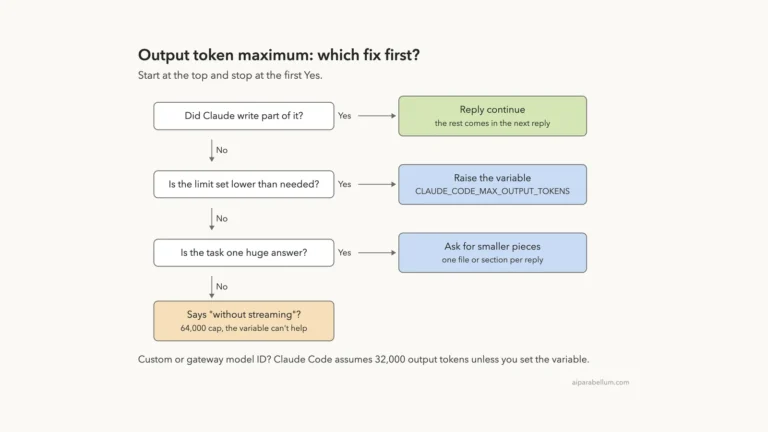
- Mixing up this error with output token limits, which are about the size of Claude’s reply, not your request.
Pro Tips
- Start long image-heavy tasks in a fresh session, and
/compactbetween stages. - Ask Claude to write big results to a file instead of printing them in the chat.
- For huge data files, ask for a summary first, such as column names, row counts or the top errors.
- Use
head,grepor line ranges in your prompt so Claude never needs the whole file at once. - Keep a link to our common errors guide handy for the other messages you might meet.
Claude Code Request Too Large Cheat Sheet
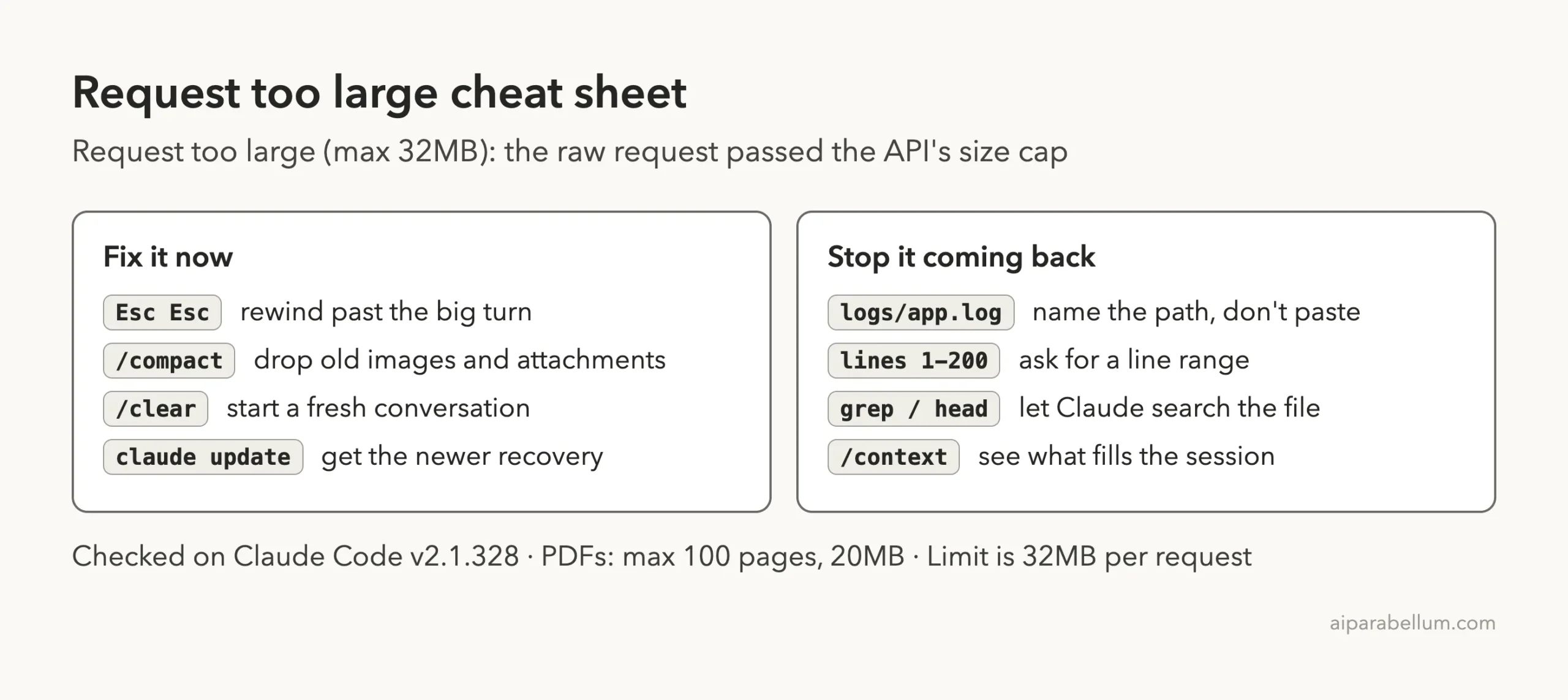
You can read Anthropic’s own entries in the Claude Code error reference and the troubleshooting guide. For more commands, our commands cheat sheet has them all on one page.
Frequently Asked Questions
What is the size limit for a Claude Code request?
32MB for the raw request body sent to the Claude API. That covers the whole conversation, including images, documents and tool results, not just your latest message.
Is “Request too large” the same as “Prompt is too long”?
No. Request too large is about megabytes and is checked first. Prompt is too long is about tokens and the model’s context window.
Why does /compact not fix it?
If the message says “compacting cannot make it fit”, the messages themselves are over 32MB. Press Esc twice to go back before the big content, or run /clear.
Does it cost me usage?
Anthropic’s API docs say that on the first-party Claude API this error is returned before the request reaches the API servers, so the oversized request never gets a reply. Your next, smaller message is a normal request.
Did I lose my work?
No. Only the request was refused. Your files are untouched, and the conversation stays as it was until you compact, rewind or clear it.
Conclusion
The Claude Code request too large error means the conversation Claude Code tried to send passed the Claude API’s 32MB cap, the 413 request_too_large limit, usually because of big pastes, stacked-up images and PDFs, or huge tool output. Press Esc twice or run /clear when the message says compacting can’t help, run /compact in every other case, and give Claude file paths, line ranges and search commands instead of pasting whole files so it never builds up again. To see what else Claude AI can do, browse the rest of our guides.