You can run Claude Code subagents on a different model from your main session, and it takes one line in a file. A cheap, fast model can scan files while a stronger one handles the hard thinking. We built three small helpers, pointed each at a different model, and checked what really ran.
This is Part 29 of 45 in our Claude Code Deep Dives, part of our Claude Code tutorials. In the last part we ran subagents vs teams, and the part before that covered the subagent file format.
Tested with Claude Code v2.1.322 on November 12, 2026, on macOS. Everything ran in a throwaway demo folder with --setting-sources project, so our personal Claude Code setup stayed untouched. We did not use any Windows or Linux machine.
Quick Summary
| Question | Short answer |
|---|---|
| How do I pick a model for a subagent? | Add model: haiku, model: sonnet or model: opus to the agent file |
| Other values? | A full model ID, or inherit to copy the main session |
| Can one setting change every subagent? | Yes, with CLAUDE_CODE_SUBAGENT_MODEL plus CLAUDE_CODE_SUBAGENT_MODEL_FORCE=1 |
| What did we test? | Three helpers on Haiku, Sonnet and Opus, then the same helpers with the force setting |
| What happened? | Each helper ran on its own model. With the force setting, all three ran on Haiku |
| Our verdict | Give simple look-up jobs to Haiku and keep Opus for the few tasks that need deep reasoning |
Why Run Claude Code Subagents on Different Models?
Not every job needs the strongest model. Listing function names in a file is easy work. Spotting a subtle design problem is harder work.
The official subagents documentation lists cost control as one reason to use subagents, by routing tasks to faster, lower-cost models like Haiku. Each subagent also gets its own context window, sized by its own model, so a helper on a smaller-window model gets the smaller window.
If you are new to the idea, our subagents guide explains the basics first.
The Four Places a Model Can Come From
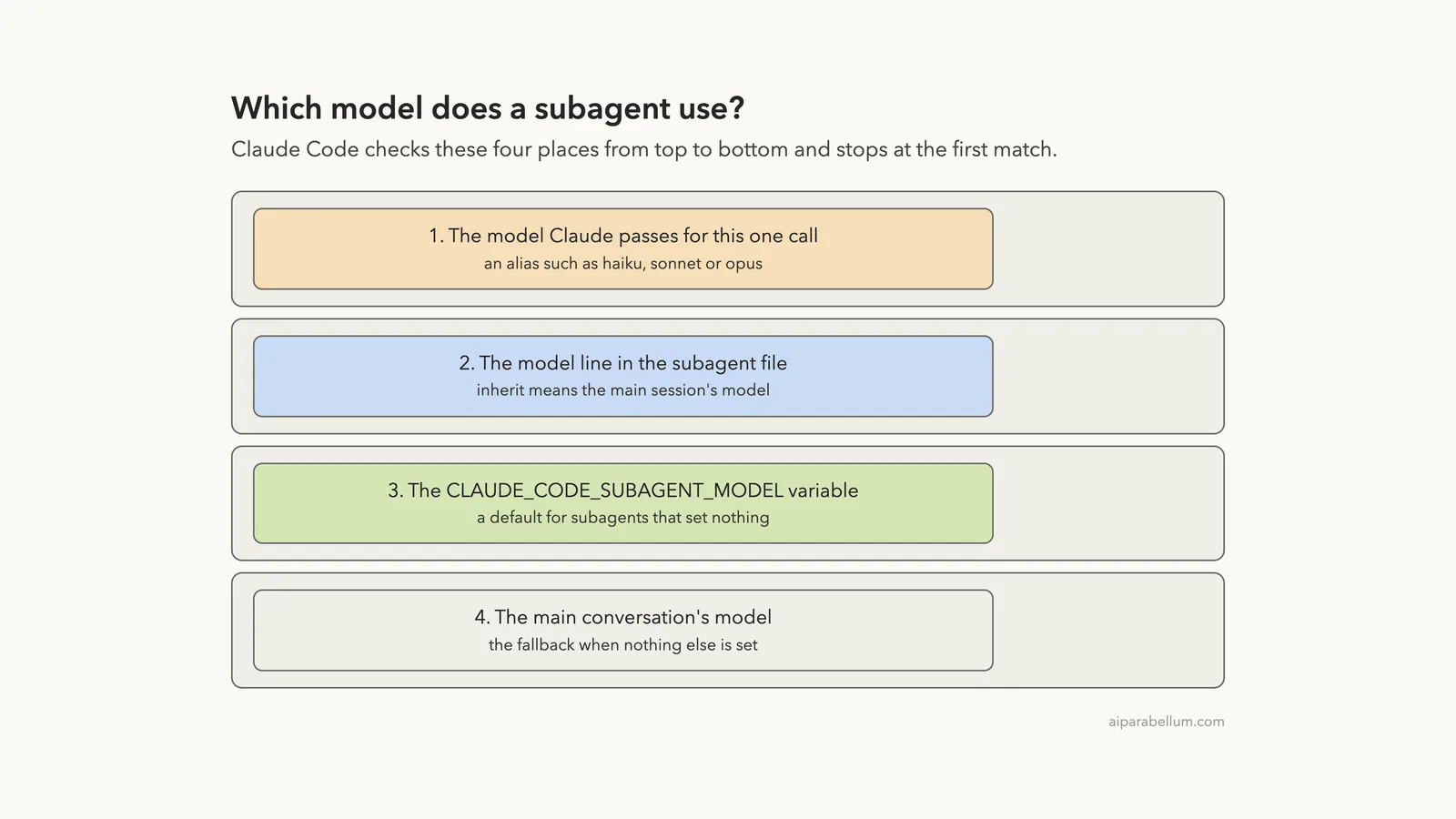
When Claude hands a job to a subagent, Claude Code works out the model in a fixed order. The docs list four steps, and it stops at the first one that has a value.
- The model Claude passes for that single call, as an alias like
haiku,sonnet,opusorfable. - The
modelline in the subagent file. The wordinherithere means the main session’s model. - The
CLAUDE_CODE_SUBAGENT_MODELenvironment variable, set to an alias or a full model ID. - The main conversation’s model.
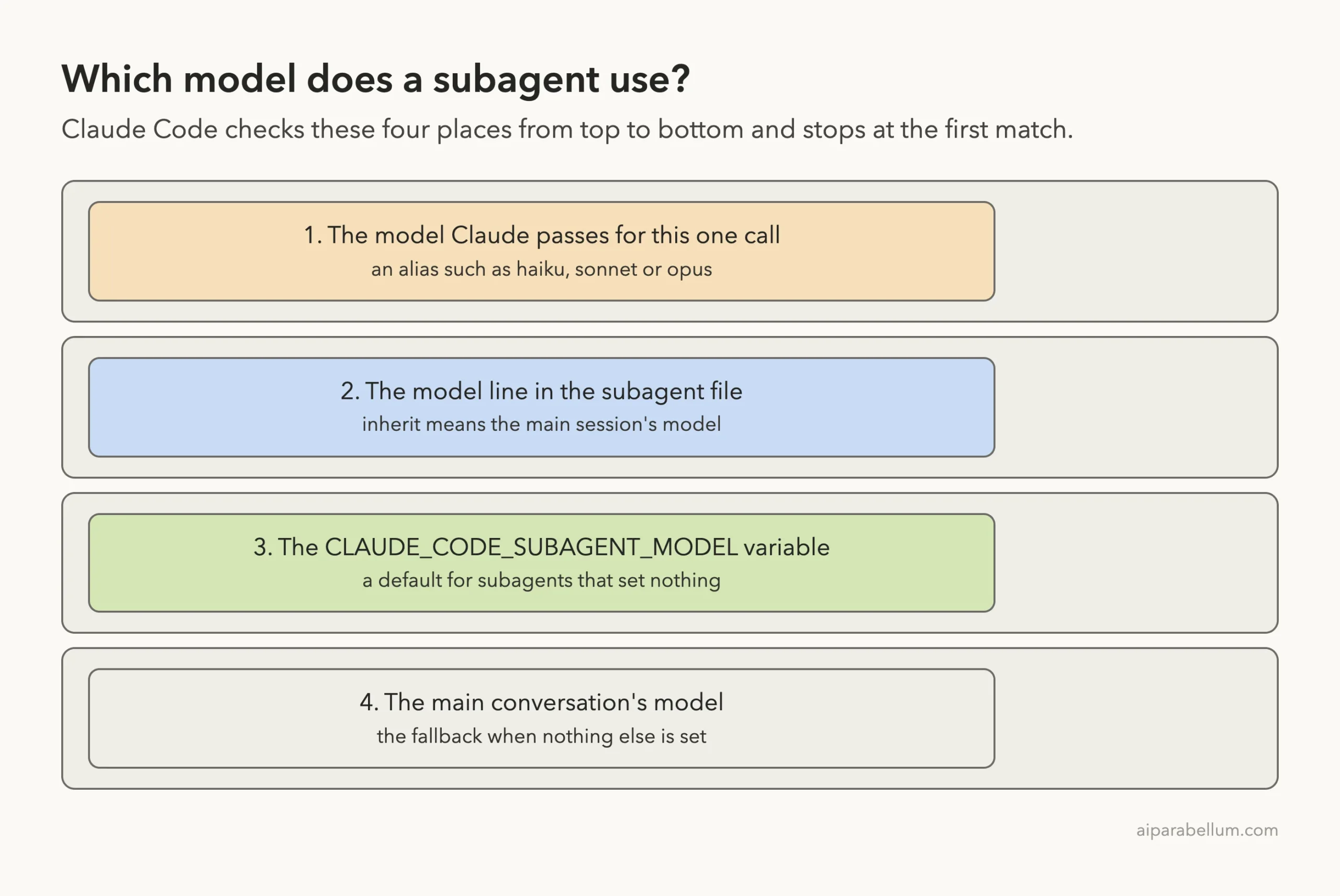
The docs add one history note. Before version 2.1.251, the environment variable came first and beat everything else. On current versions it sits third.
Set a Claude Code Subagent Model in the File
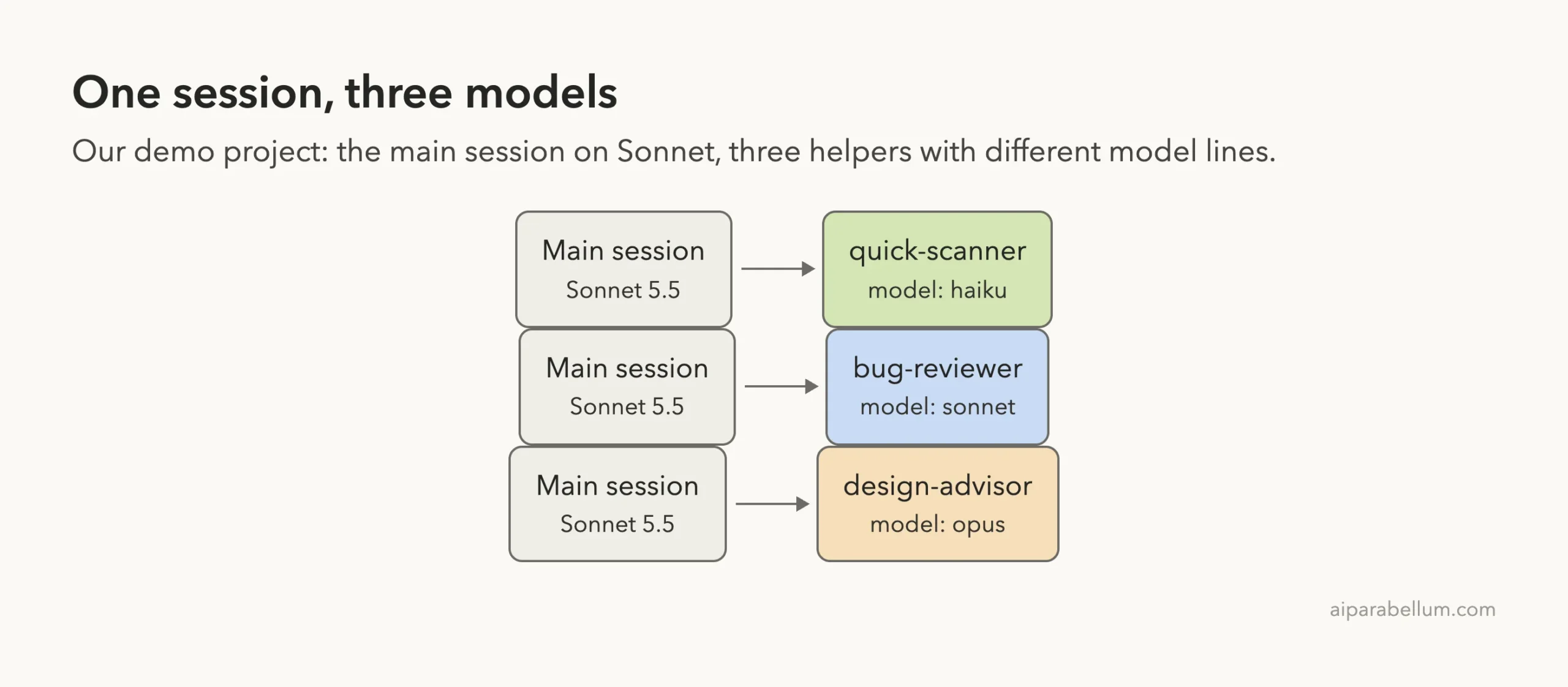
A subagent is a Markdown file in .claude/agents/. The model line goes in the frontmatter, the short block at the top between two lines of dashes. We made three files, each a few lines long. Here is the middle one:
---
name: bug-reviewer
description: Careful bug review of one file. Use when you need a bug check.
tools: Read, Grep
model: sonnet
---
You are a bug reviewer. Read the file you are given and name the single most serious bug in one sentence. Then add one line: "Model: <the exact model name from your system prompt>".
The other two files are the same, except for the name, the job and the model line. quick-scanner uses model: haiku and lists function names. design-advisor uses model: opus and gives one sentence of design advice.
The last line of each prompt asks the helper to name its own model. That makes the result easy to see on screen. We also checked it a second way, which you will see below.
Step 2: The Demo File and the Prompt
The demo project holds one tiny file, src/cart.py, with a planted bug. The discount is divided by 10 instead of 100.
def cart_total(prices, discount_percent):
    total = 0
    for p in prices:
        total += p
    return total - total * discount_percent / 10
Then we started Claude Code in the folder and typed one prompt. Our main session ran on Sonnet 5.5, which the welcome banner shows.
Use the quick-scanner, bug-reviewer and design-advisor subagents in parallel, each on src/cart.py. Print one line per subagent that includes the model it reported. Do not edit files.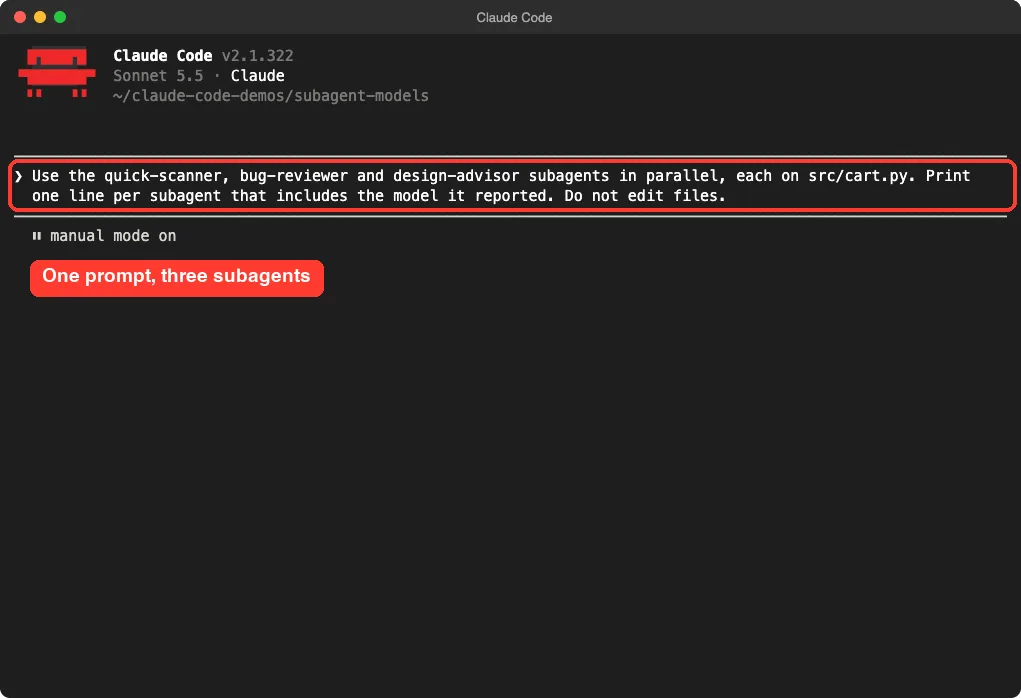
Step 3: Watch Each Helper Run on Its Own Model
Claude launched the helpers as background agents. The first to finish was quick-scanner, after 3 seconds. It reported claude-haiku-5-5 and found the single function in the file.
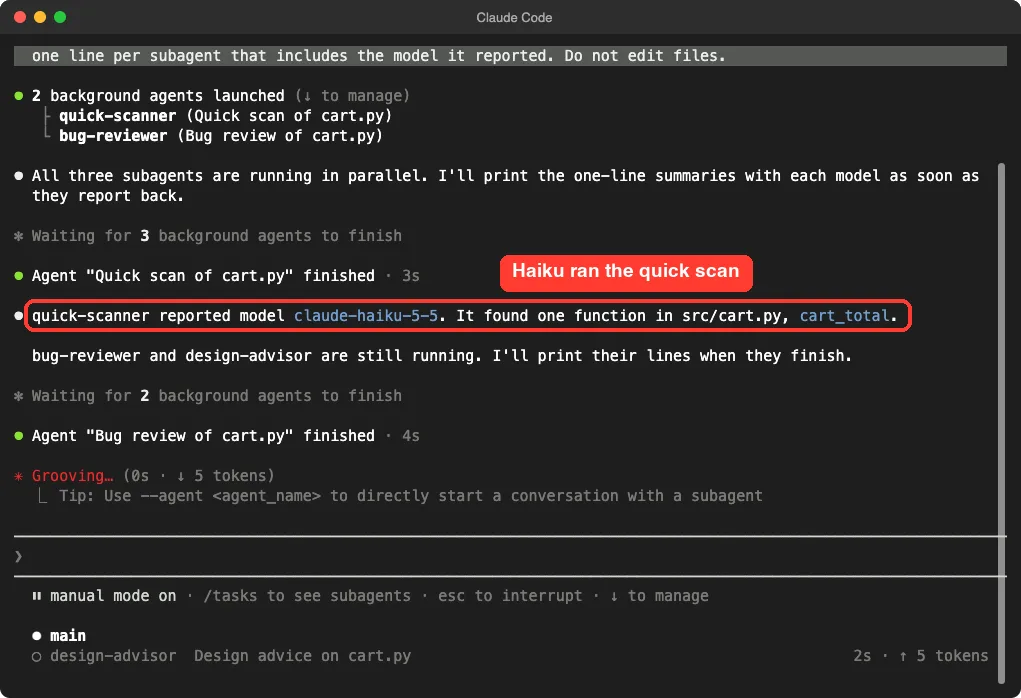
The bug reviewer finished next, and the design advisor last. The final summary lists all three models.
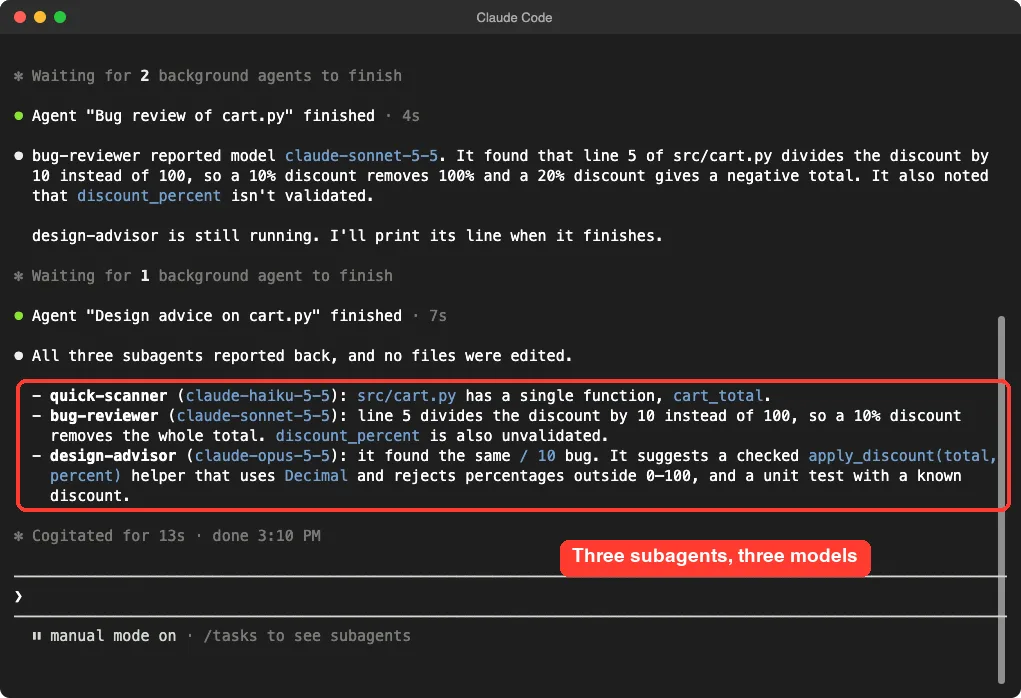
Same prompt, same file, three helpers on three different models.
Both the Sonnet and Opus helpers found the same real bug. The Opus helper went a step further and suggested a checked helper function and a unit test. That is a small sign of the extra effort a stronger model puts in, though one run proves nothing about quality in general.
Prove It: Count the Models With a Script
A model telling you its own name is a weak proof. So we also ran the same prompt in non-interactive mode with --output-format json. The result includes a modelUsage field that lists every model that did any work.
claude -p "Use the quick-scanner, bug-reviewer and design-advisor subagents in parallel, each on src/cart.py. Do not edit files." --setting-sources project --output-format jsonThe field listed three models, which matches our three agent files. Here is what it reported for that one run.
| Model | Output tokens | Cost in that run |
|---|---|---|
claude-haiku-5-5 | 412 | $0.0008 |
claude-sonnet-5-5 | 1,093 | $0.0818 |
claude-opus-5-5 | 335 | $0.0291 |
The Sonnet row is the biggest because it covers both the main session and the bug reviewer. The Haiku row is tiny. These are single runs on a one-file demo, so treat them as an illustration, not a benchmark.
Step 4: Change the Default With an Environment Variable
Next we set CLAUDE_CODE_SUBAGENT_MODEL=haiku and ran the same prompt again. We expected nothing to change, because the docs say the variable is only a default. A model named in the subagent file still wins.
That is what happened. All three models still showed up in modelUsage, and the reported lines named Haiku, Sonnet and Opus. The variable only matters for subagents that name no model of their own, such as the built-in general-purpose helper.
Force One Different Model on Every Subagent
To override the agent files, add CLAUDE_CODE_SUBAGENT_MODEL_FORCE=1 next to the model variable. The docs say this needs Claude Code v2.1.257 or later, and that it also covers teammates and workflow agents. You can set both in the env block of a settings file:
{
  "env": {
    "CLAUDE_CODE_SUBAGENT_MODEL": "haiku",
    "CLAUDE_CODE_SUBAGENT_MODEL_FORCE": "1"
  }
}
We tested it from the shell instead, in an interactive session. All three helpers reported claude-haiku-5-5, even though two of the files say Sonnet and Opus.
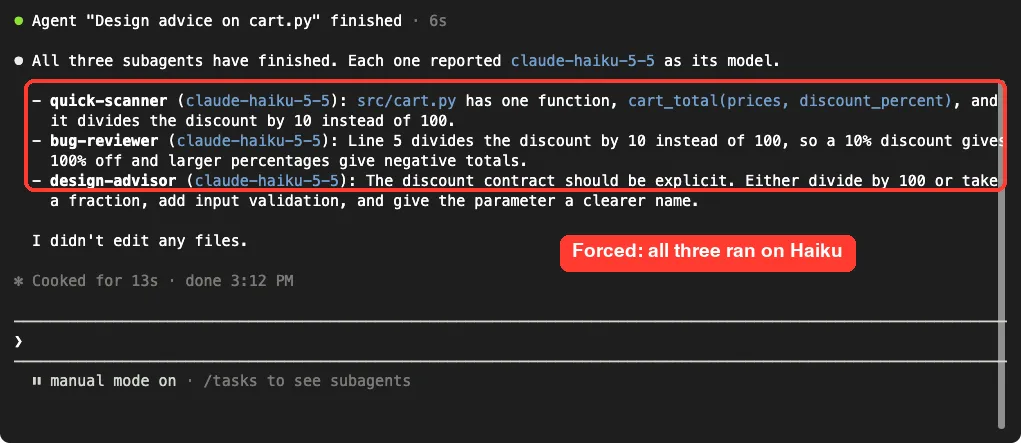
The scripted run agreed. Only Haiku and Sonnet (the main session) appeared in modelUsage, and the whole run cost about $0.072, down from about $0.112. Again, that is one small run, but the direction is what the docs describe.
Check a Model While You Work
The docs say /tasks shows which model a subagent runs on, on the subagent’s row. It needs Claude Code v2.1.242 or later. We relied on the summary and the usage field in our tests, so we did not capture this screen.
The docs also say that if an allowlist blocks a model, Claude Code swaps in another one and shows a warning in interactive sessions. A family alias such as opus moves to the newest permitted version of that family.
Good Jobs for Each Model
The docs do not hand out a fixed list, so this is our own rule of thumb from the demo. Match the job to the model.
| Job | Suggested model line | Why |
|---|---|---|
| List functions, find files, search text | model: haiku | Simple work, finishes fast, lowest cost |
| Review one file for bugs | model: sonnet | Found the planted bug in our test |
| Design advice, hard trade-offs | model: opus | Gave the most detailed advice in our test |
| Work that should match the main session | model: inherit | Follows whatever you chose with /model |
If you want to compare subagents with other add-ons first, see our guide to skills vs subagents.
Try It Yourself
Make a folder with one short code file. Add two agent files, one with model: haiku and one with model: opus, then run this prompt.
Use both subagents on the file in src/. Print one line per subagent with the model it reported. Do not edit files.Then repeat it with --output-format json in non-interactive mode and look at modelUsage. If both models appear, your setup works.
Common Mistakes
- Setting only
CLAUDE_CODE_SUBAGENT_MODELand expecting every helper to change. Files that name a model keep it unless you also set the force variable. - Writing a model name the docs do not list. Stick to
sonnet,opus,haiku,fable, a full model ID orinherit. - Creating the first agent file in a new folder and not restarting. The docs say the watcher covers only directories that existed when the session started.
- Trusting what a model says about itself. Use
/tasksor the usage field to confirm. - Putting the strongest model on every helper. You pay for power you may not need.
Pro Tips
- Start cheap. Put Haiku on read-only look-up helpers and move up only if the answers fall short.
- Keep the main session on the model you like and let the files decide for the helpers.
- Use
--setting-sources projectin test folders so your personal agents do not mix in. - Check
modelUsageafter any change to your model setup.
Cheat Sheet
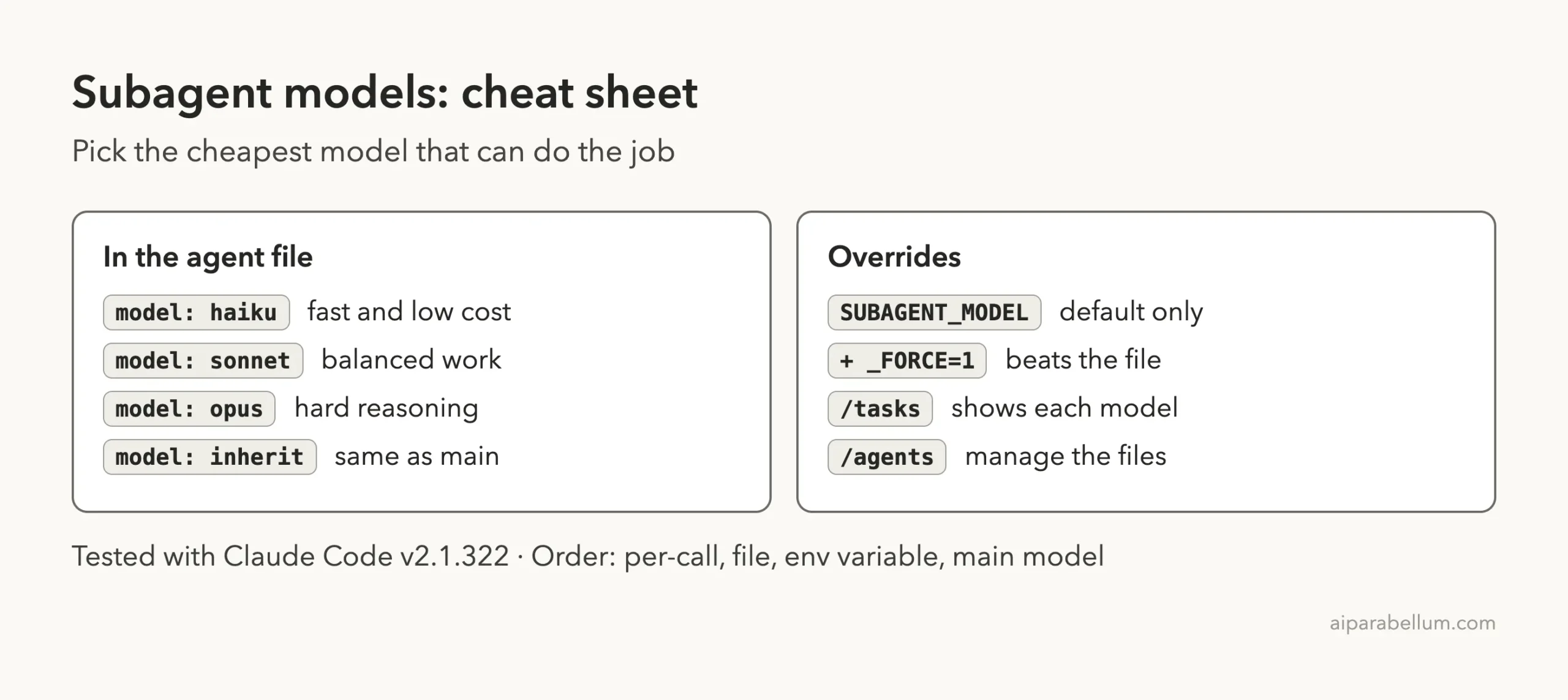
Frequently Asked Questions
How do I run a Claude Code subagent on a different model?
Add a model line to the subagent’s frontmatter, such as model: haiku. You can use an alias, a full model ID or inherit.
Which model does a subagent use if I set nothing?
It uses the CLAUDE_CODE_SUBAGENT_MODEL model if you set one. Otherwise it uses the main conversation’s model.
Does the environment variable override the agent file?
Not by itself. In our test, the file’s model still won. Add CLAUDE_CODE_SUBAGENT_MODEL_FORCE=1 to make the variable win.
How can I see which model a subagent ran on?
Run /tasks in an interactive session, which names the model on each row. In scripts, read the modelUsage field from --output-format json.
Does a cheaper subagent model save money?
The docs describe routing tasks to lower-cost models as a way to control costs. In our one-file run, the Haiku helper cost a fraction of a cent, but we did not run a larger cost study.
Conclusion
Running Claude Code subagents on different models is simple: add a model line to each agent file. In our demo the three helpers ran on Haiku, Sonnet and Opus, and the force setting flipped them all to Haiku. Use the cheapest model that does each job well, and confirm what ran with /tasks or the usage field. For more background, see the Claude guide.
Previous in the series: Part 28, Subagents vs Teams
Next in the series: Part 30: Claude Code Subagent Best Practices.