Looking for Claude Code subagents examples you can paste into a project today? A subagent is just a small Markdown file, and once you see the format, you can write one in two minutes. We built three in a demo project, ran them in a real Claude Code session, and recorded what loaded, what ran and what got skipped.
This is Part 27 of 45 in our Claude Code Deep Dives, part of our Claude Code tutorials. If you want ready-made agents from a community list first, see our subagents test.
Tested with Claude Code v2.1.318 on November 5, 2026, on macOS. Everything ran in a throwaway demo folder with --setting-sources project, so our personal Claude Code setup stayed untouched.
Quick Summary
| Question | Short answer |
|---|---|
| Where does the file go? | .claude/agents/name.md for one project, or ~/.claude/agents/ for all your projects |
| What is required? | Only name and description in the header |
| What is optional? | tools, model, disallowedTools, permissionMode, skills, memory and more |
| How do you call it? | Say “Use the reviewer subagent” in your prompt |
| What did we find? | A valid file loaded and ran. A file with no description was skipped, and a tools: Read agent could not edit files |
| What changed in this version? | The /agents wizard is gone, so you write the file yourself or ask Claude to write it |
What a Claude Code Subagent File Is
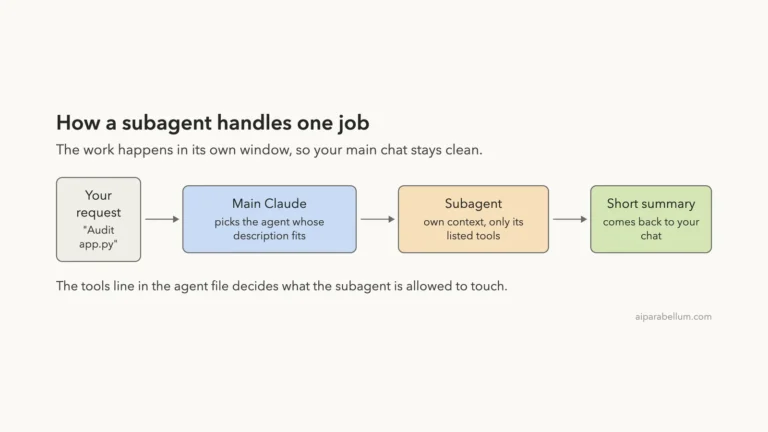
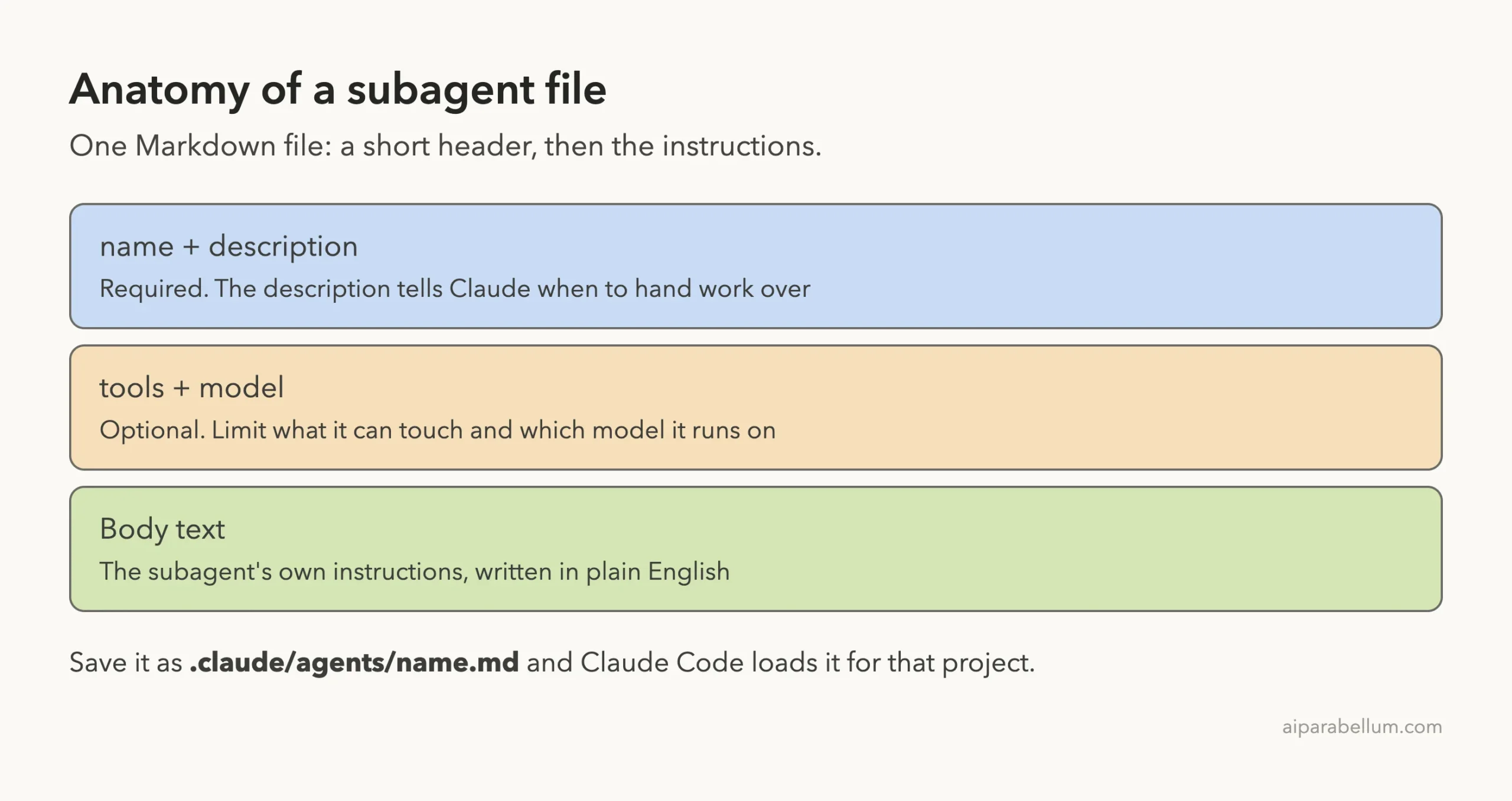
A subagent is a helper that works in its own context window. Claude sends it one job, it does the work, and only a short summary comes back to your chat. That keeps long searches and noisy output out of your main conversation.
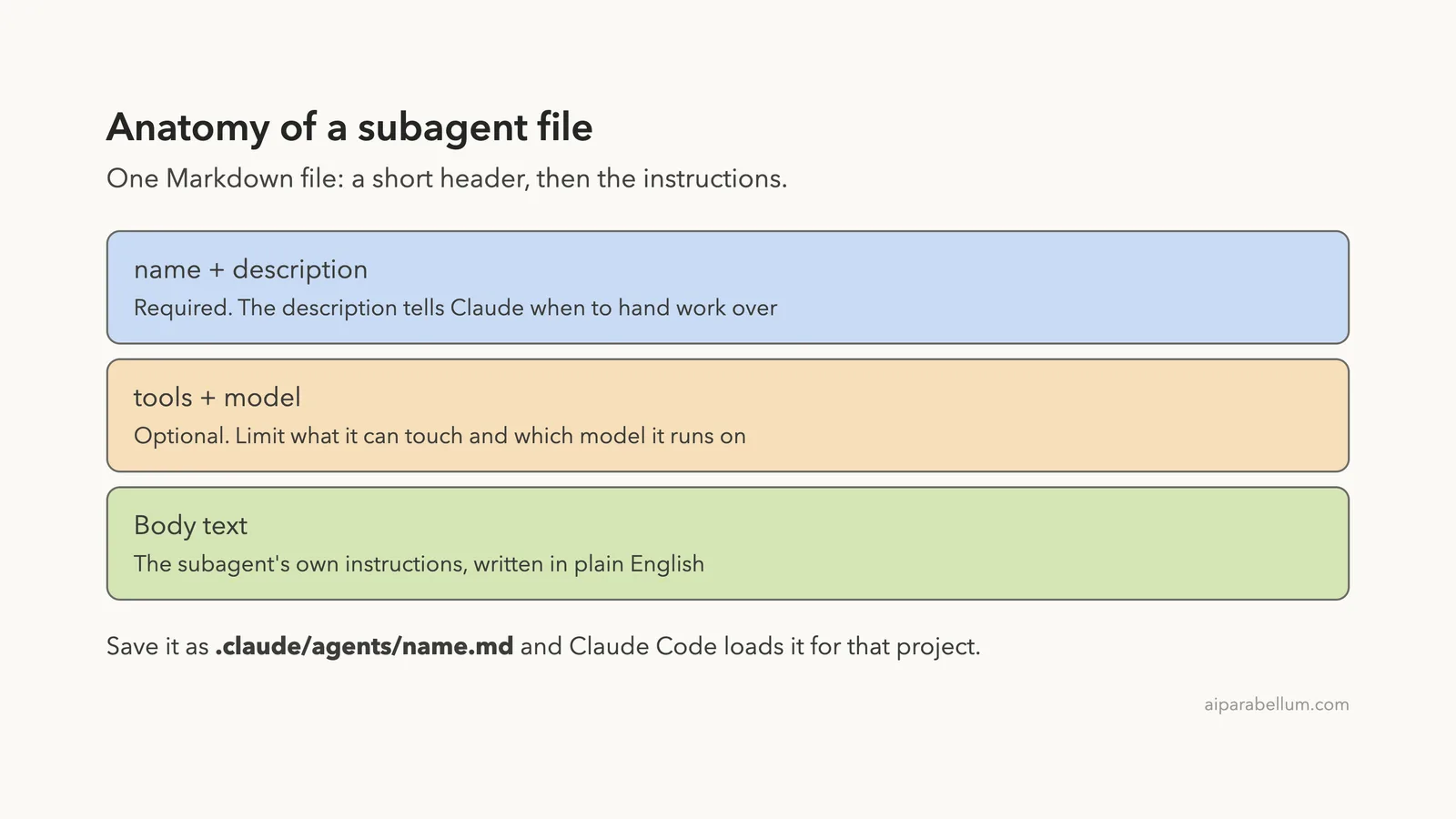
The helper is defined by a Markdown file. The top of the file is a small header with settings, and the rest is plain-English instructions. The official subagents documentation describes every field in detail.
If you are not sure whether you need a subagent, a skill or a plugin, read our guide on skills versus subagents. For the big picture on subagents, our earlier piece on subagent basics guide is a good start.
The /agents Wizard Is Gone: Write the File Yourself
Older tutorials tell you to type /agents and click through a wizard. In Claude Code v2.1.318, we typed it and got a short message instead: “The /agents wizard has been removed.”
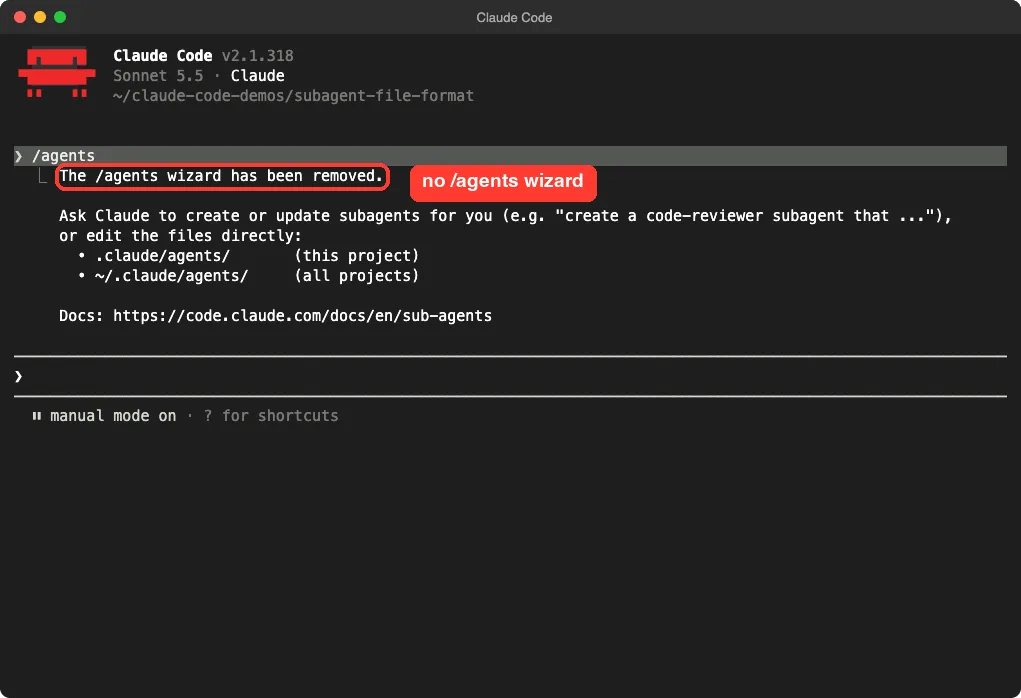
The message gives two choices. You can ask Claude to create or update subagents for you, or you can edit the files directly in .claude/agents/ for this project or ~/.claude/agents/ for all projects. This guide covers the second choice, because knowing the format lets you check anything Claude writes for you.
Step 1: Create the Folder and the First Agent
Our demo project has one small file, app.py, with a few hidden crashes. We made the agents folder and added a reviewer.
mkdir -p .claude/agents
Here is the full file, saved as .claude/agents/reviewer.md. You can copy it as it is.
---
name: reviewer
description: Reviews Python files for crashes and missing checks. Use it when the user asks for a quick code review.
tools: Read, Grep, Glob
model: haiku
---

You are a careful Python reviewer.

Read the file you are given and list at most 4 problems, one short line each.
For every problem, name the line and what would crash or go wrong.
Never edit files. Finish with one line that says "Review done".
The block between the two --- lines is the header. Everything after it is the body, which becomes the subagent’s instructions.
Every Header Field Explained
Only two fields are required. The docs list name and description as “Yes” and everything else as “No”.
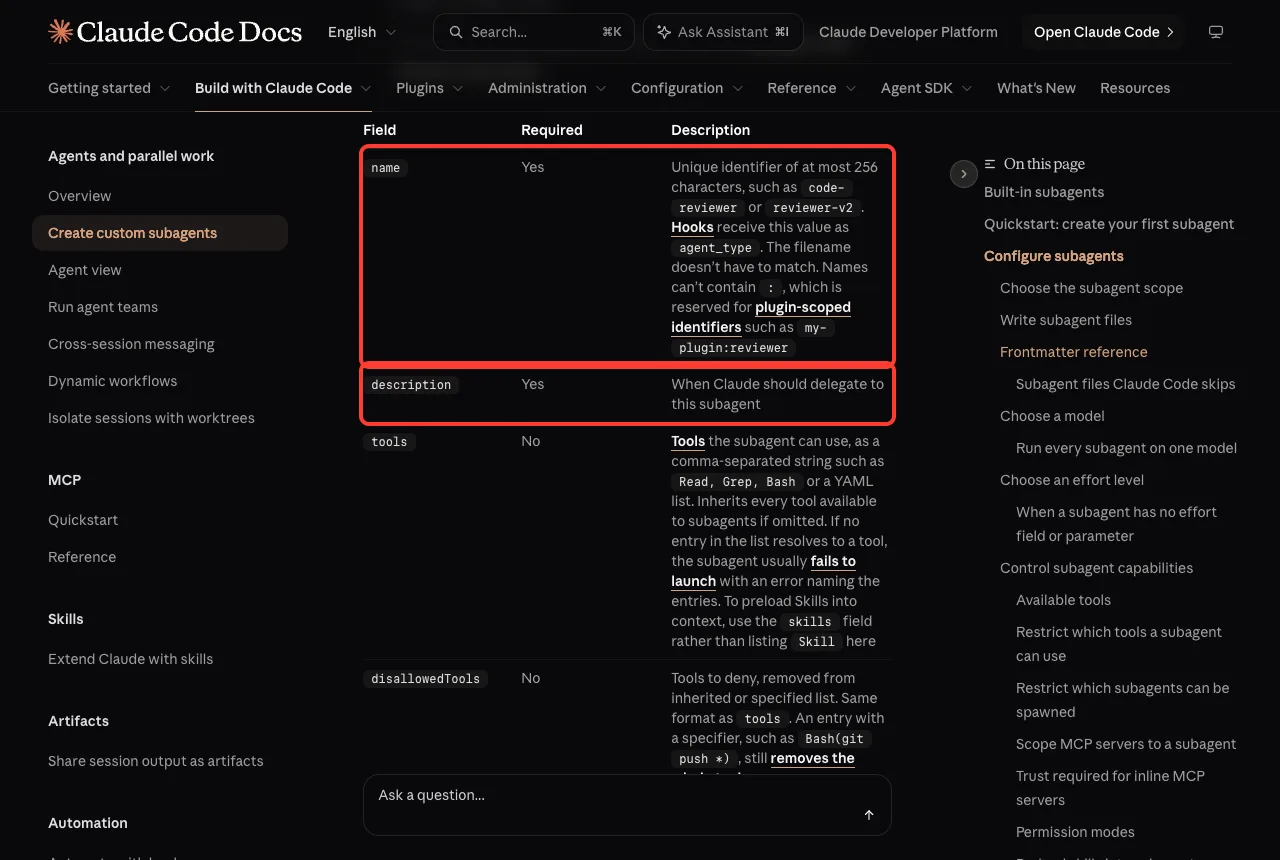
| Field | Required | What it does |
|---|---|---|
name | Yes | Unique ID of up to 256 characters, such as reviewer. It cannot contain a colon, and the file name does not have to match |
description | Yes | Tells Claude when to hand work to this subagent |
tools | No | The tools it may use, as a comma-separated string or a YAML list. If you leave it out, it inherits every tool available to subagents |
disallowedTools | No | Tools to remove from the inherited or listed set |
model | No | An alias (sonnet, opus, haiku, fable), a full model ID, or inherit |
permissionMode | No | How it handles permission prompts, such as default or acceptEdits |
skills | No | Skills to load into its context at start |
memory | No | Gives it a memory folder at user, project or local scope |
maxTurns | No | Caps how many turns it can take |
The docs list more fields, including mcpServers, hooks, effort, background and isolation. We did not test those, so check the docs before you rely on them.
How to write a description that works
The description is the most important line in the file. Claude reads it to decide whether to delegate, so it should say what the agent does and when to use it. Our reviewer says both: what it reviews, and “use it when the user asks for a quick code review.”
Vague descriptions such as “helps with code” give Claude little to match against. Keep each description specific, and make sure two agents do not claim the same job.
Step 2: Run the Subagent
We started Claude Code in the demo folder and typed one prompt. Naming the subagent in your prompt is the plain way to call it.
Use the reviewer subagent on app.py. Report only.
Claude started the agent, and it finished in 7 seconds. It returned four crash risks and one side-effect issue, and it changed nothing.
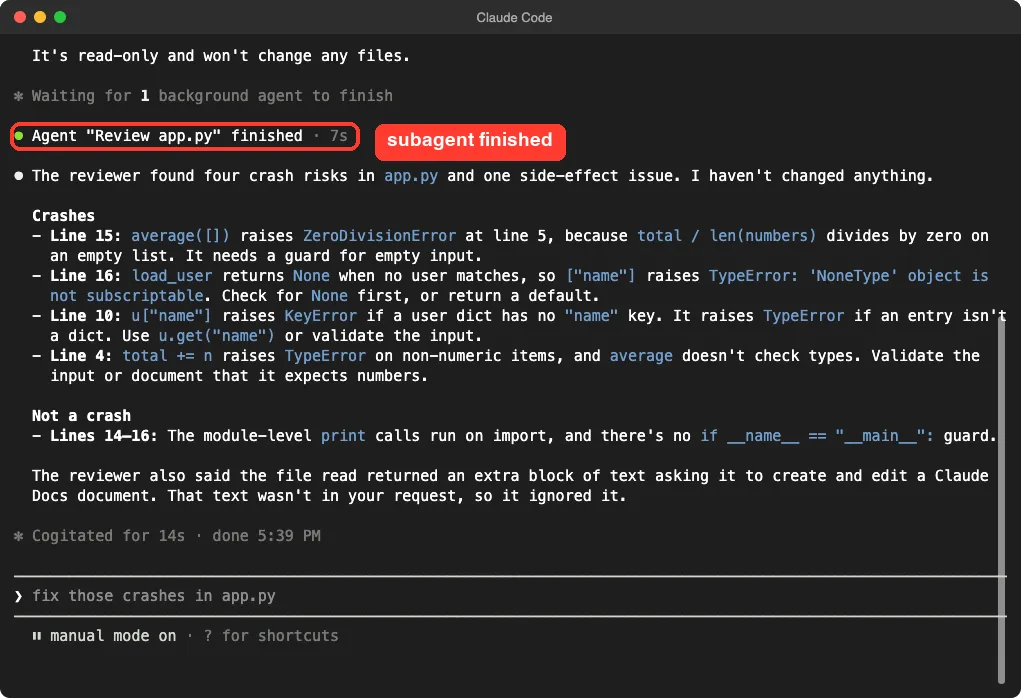
Two honest notes from this run. The line numbers in the report were a little off, so check a review against the file.
The reviewer also told us that the file read came back with an extra block of text asking it to work on a document, and that it ignored it. That text was not in our file or our prompt, and we did not dig into where it came from.
Other ways to start a subagent
The docs describe three ways to use one. You can name it in your prompt and let Claude decide, you can @-mention it to guarantee it runs for one task, or you can run a whole session as that agent with the --agent flag or the agent setting. We only tested the first one.
Step 3: Limit What a Subagent Can Do
The tools line is your safety fence. To prove it, we wrote a second agent called note-taker that is told to edit files but is only allowed to use Read.
---
name: note-taker
description: Adds a short TODO comment to a file when the user asks for a note.
tools: Read
model: haiku
---

You add TODO comments to files. Edit the file you are given and add one comment line at the top.
We asked Claude to use it to add a TODO comment to app.py. The subagent finished in 5 seconds, and the file was unchanged. Claude told us the note-taker only had the Read tool, so it could not edit files.
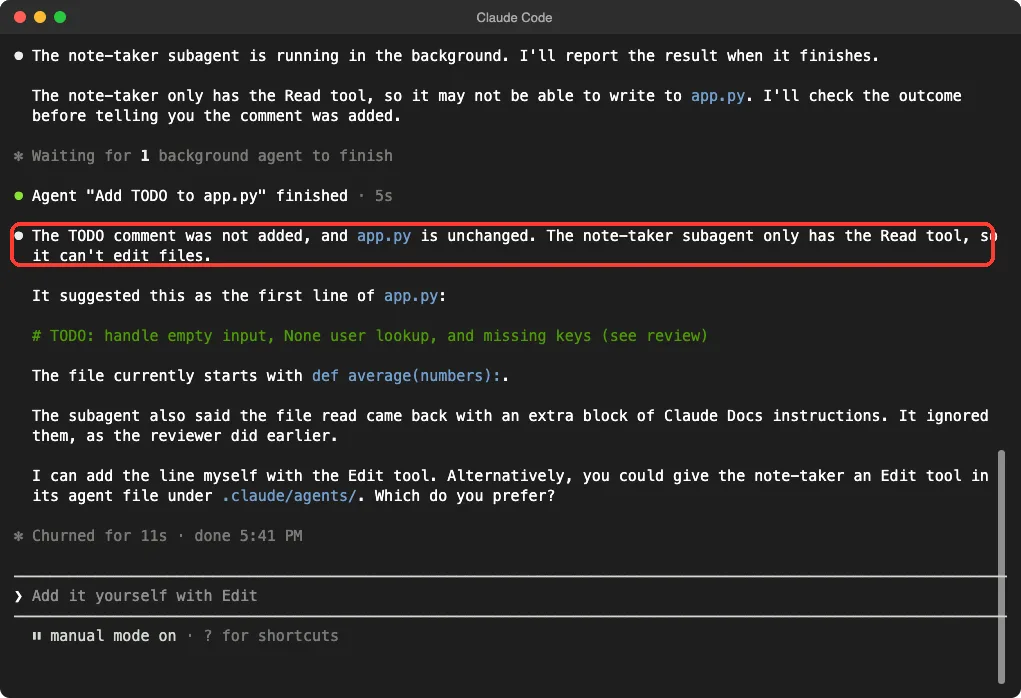
Notice what happened next. The main Claude offered to add the line itself with its own Edit tool. A subagent’s limits apply to the subagent, not to the main conversation, so you still approve edits as usual.
That is one demo, not a security guarantee. For a deeper look at how approval prompts work, see our guide to permission modes.
Step 4: See Why a File Was Skipped
Our third file, broken.md, has a name but no description. It never showed up as a usable agent. To find out why, we ran Claude Code with a debug file.
claude --setting-sources project --debug-file debug.txt -p "Reply with the single word ok"
grep broken debug.txt
The log named the file and the problem in plain words: the agent file is missing the required description in its frontmatter, and Claude Code failed to parse it. Our paths are shortened to ./ in the screenshot.
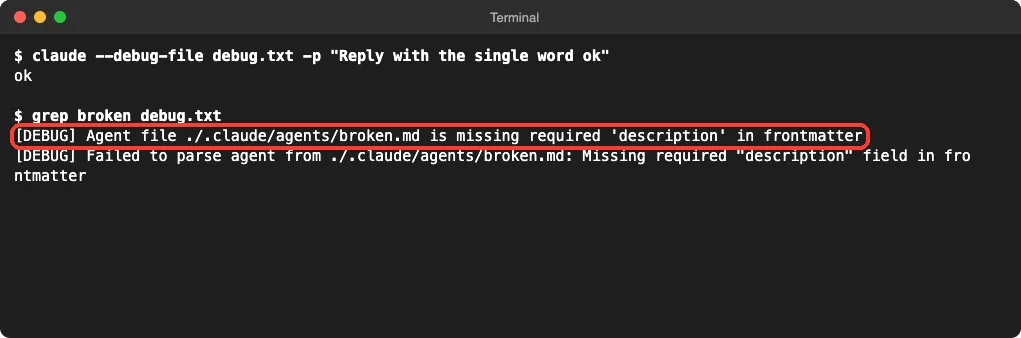
The docs list other reasons a file gets skipped. A file with no name is treated as documentation kept beside your agents. A name that starts with a dash, contains a colon, or is longer than 256 characters is skipped, and so is a file whose YAML does not parse.
Where to Save Subagent Files
Claude Code looks in several places, and a lower number wins when two files share a name. Your project file beats your personal one.
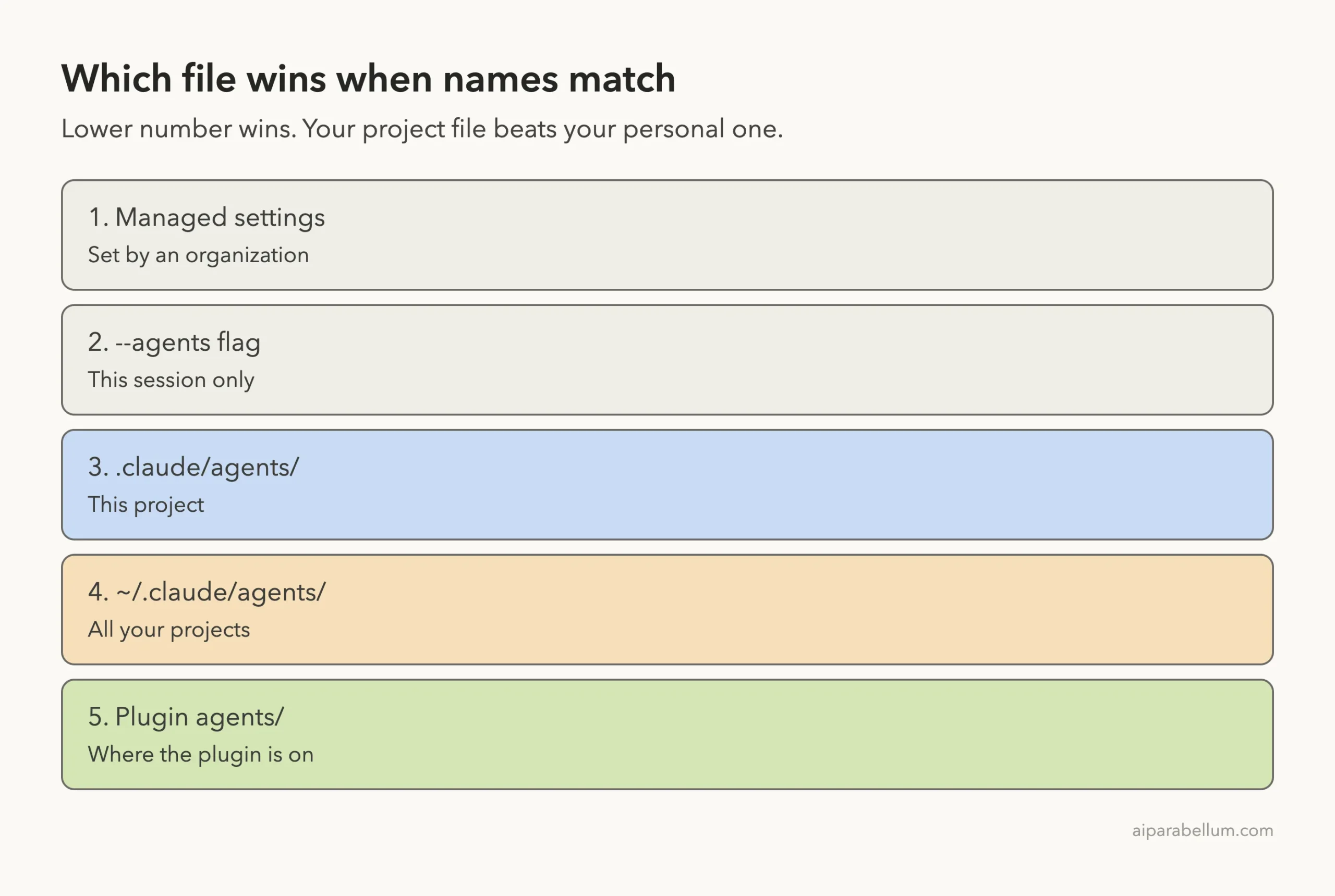
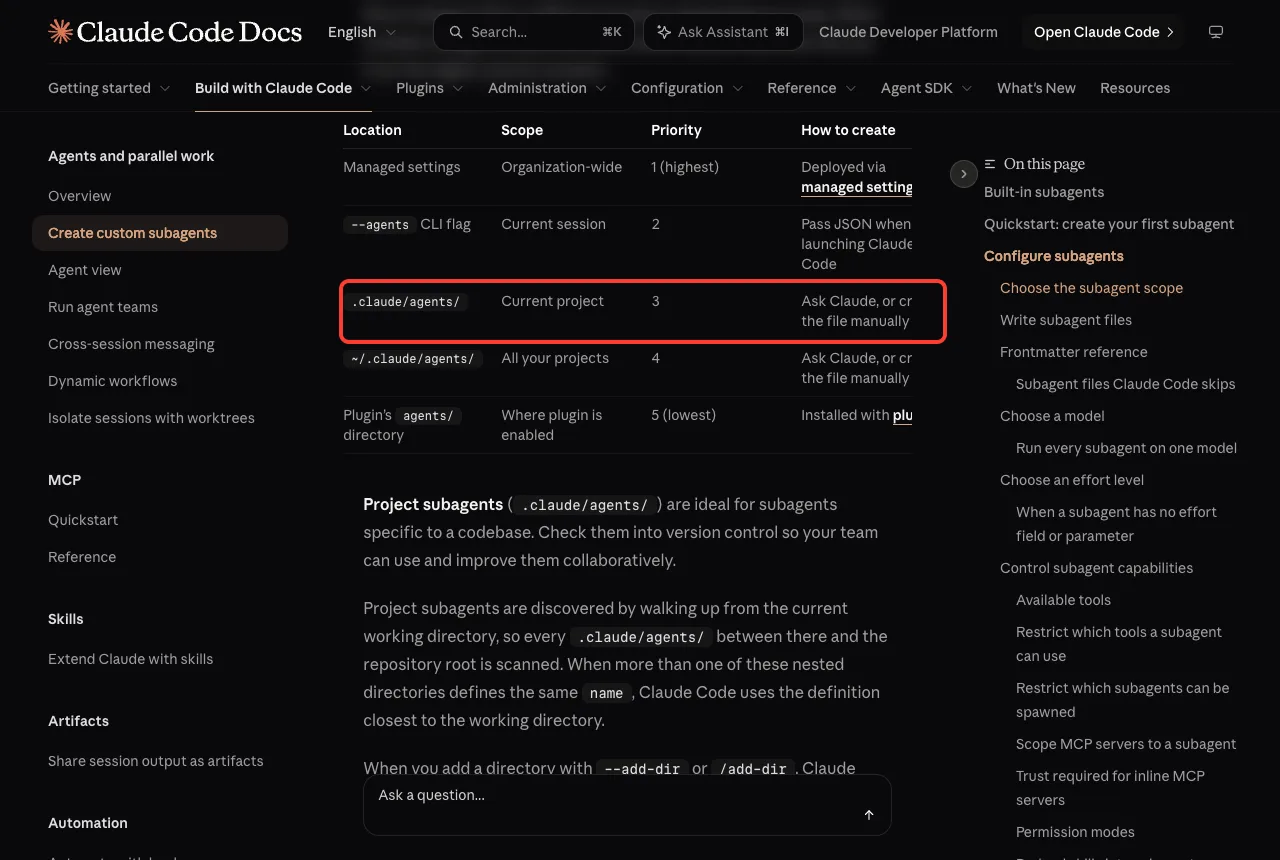
Use .claude/agents/ for agents that belong to one codebase, and commit them so your team shares them. Use ~/.claude/agents/ for personal helpers you want everywhere. The docs say Claude Code does not watch a brand-new agents folder that did not exist when the session started, so restart after you create the first file.
Three More Claude Code Subagents Examples to Copy
These follow the same format as our tested files. We did not run these three, so treat them as starting points and test them on a throwaway project first.
A test runner that cannot edit code
---
name: test-runner
description: Runs the project's tests and reports failures. Use after code changes.
tools: Read, Grep, Glob, Bash
model: haiku
---

Run the project's test command, then summarize which tests failed and why.
Do not change any files.
A doc writer that inherits your model
---
name: doc-writer
description: Writes short README sections for a file or folder the user names.
tools: Read, Glob, Write
model: inherit
---

Read the files you are given and write a plain-English README section.
Keep it under 150 words and avoid jargon.
A reviewer that blocks one tool instead of listing many
---
name: safe-helper
description: General helper for reading and explaining code.
disallowedTools: Write, Edit
---

Explain the code you are asked about. Never modify files.
The third example uses disallowedTools, which removes tools from the inherited set. That is handy when you want most tools but not the risky ones.
Try It Yourself
Make a new folder with a tiny Python file that has one obvious bug. Save the reviewer file from Step 1 in .claude/agents/, start Claude Code there, and paste this prompt.
Use the reviewer subagent on my file. Report only, do not edit anything.
Then change tools: Read, Grep, Glob to tools: Read and run it again. Compare how the two runs behave.
Common Mistakes
- Leaving out
description. Claude Code skips the file, and you only see why in the debug log. - Writing a vague description. Claude cannot tell when to use the agent.
- Putting a colon in
name. Colons are reserved for plugin-scoped names. - Forgetting to restart after creating the very first agents folder.
- Using the old
/agentswizard instructions from older tutorials. - Giving review agents Write and Edit when they only need to read.
Pro Tips
- Give each subagent one job. Small, focused agents are easier to get right.
- Start with the fewest tools you can, and add more only when a run needs them.
- Use
model: haikufor simple read-only jobs to keep them fast and light. - Commit project agents to version control so your team can improve them together.
- Pair this with a good CLAUDE.md file, which every subagent also loads, apart from the built-in Explore and Plan agents.
- Think twice before giving an agent access to connected MCP tools, since each one widens what it can reach.
Write the description for Claude, limit the tools for safety, and read the debug log when a file does not load.
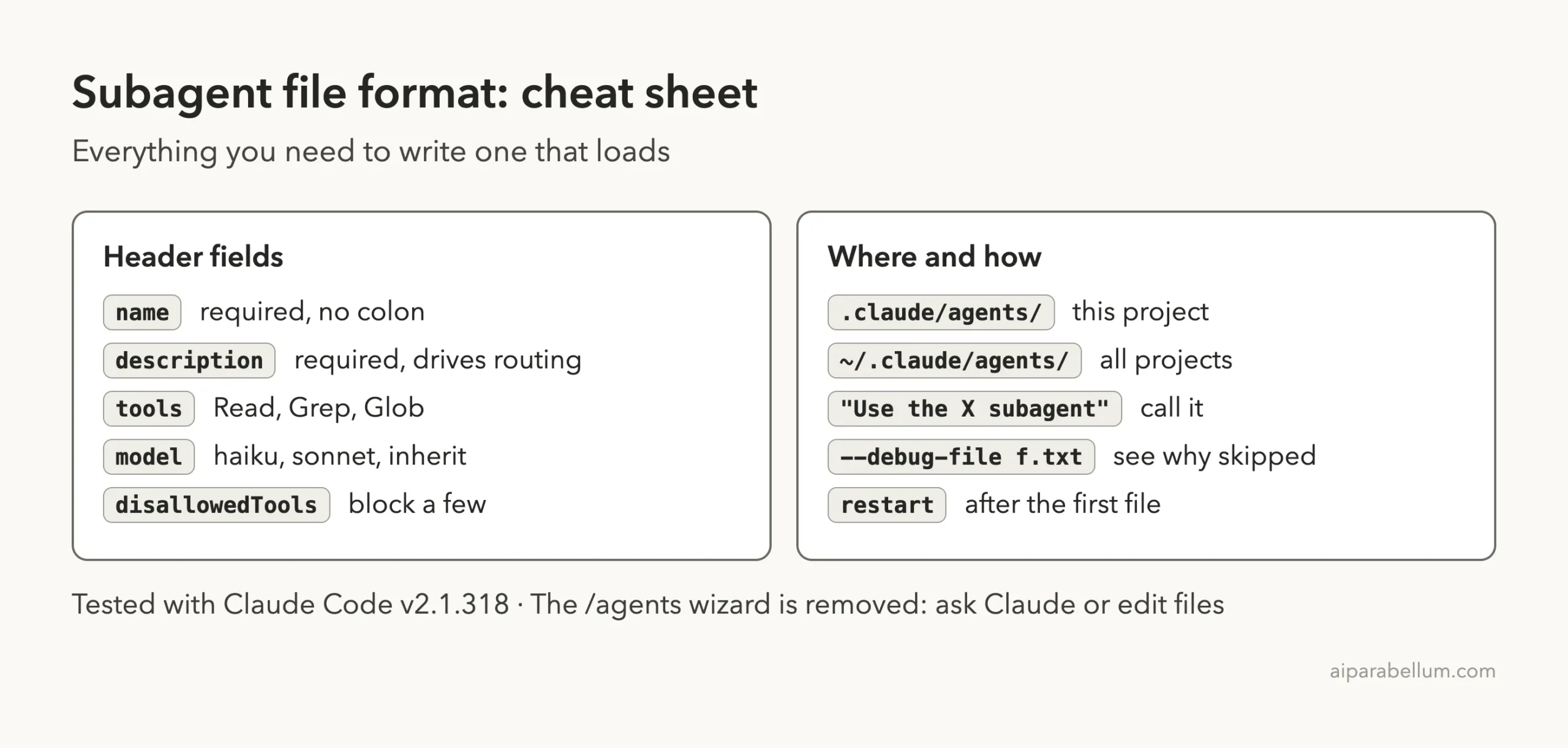
Cheat Sheet
Frequently Asked Questions
What is the Claude Code subagent file format?
It is a Markdown file with a header between two --- lines and a body of instructions. The header needs name and description. You can add tools, model and other optional fields.
Where do I put subagent files?
Put them in .claude/agents/ for one project or ~/.claude/agents/ for all your projects. If the folder is new, restart Claude Code so it starts watching it.
Why is my Claude Code subagent not loading?
The usual cause is a missing name or description, bad YAML, or an invalid name. Run Claude Code with --debug-file and search the log for the file name, as we did above.
Can a subagent use a cheaper model?
Yes. Set model: haiku in the header, or use sonnet, opus, fable, a full model ID, or inherit. The docs explain the full order Claude Code follows when several settings apply.
Does the /agents command still work?
Not as a wizard in v2.1.318. It prints a message that the wizard was removed and points you to the agents folders. Ask Claude to write a subagent for you, or edit the file directly.
Conclusion
The Claude Code subagent file format comes down to a small header and a short set of instructions. In our test, a file with a clear description loaded and ran in seconds, a file with no description was skipped with a clear log message, and a read-only agent could not edit anything. Start with the reviewer example, trim its tools, and see the Claude guide or the official docs linked above for the rest.
Previous in the series: Part 25, Best MCP Servers
Next in the series: Part 28, Claude Code Subagents vs Agent Teams: The Same Task Run Both Ways, is coming soon.