Claude Code subagents vs agent teams is a question that sounds bigger than it is. Both let Claude split a job across several helpers, so which one should you reach for? We ran the exact same bug-review task twice in a demo project, once with subagents and once with an agent team, and kept every screen.
This is Part 28 of 45 in our Claude Code Deep Dives, part of our Claude Code tutorials. In the last part we wrote a subagent file step by step, so start there if subagents are new to you.
Tested with Claude Code v2.1.322 on November 11, 2026, on macOS. Both runs happened in throwaway folders under a demo directory with --setting-sources project, so our personal Claude Code setup stayed untouched.
Quick Summary
| Question | Short answer |
|---|---|
| What is the main difference? | Subagents report back to the main session. Teammates share a task list and can message each other |
| Which one is on by default? | Subagents. Agent teams are experimental and need CLAUDE_CODE_EXPERIMENTAL_AGENT_TEAMS=1 |
| What did we test? | Three small Python files, each with a planted bug, reviewed by three helpers with no file edits |
| What happened? | Both runs found the two serious bugs and finished in seconds |
| What did the docs say about cost? | Teams use significantly more tokens, because each teammate is a separate Claude instance |
| Our verdict | For a small, independent job, use subagents. Save teams for work where helpers must talk to each other |
What Subagents and Agent Teams Are
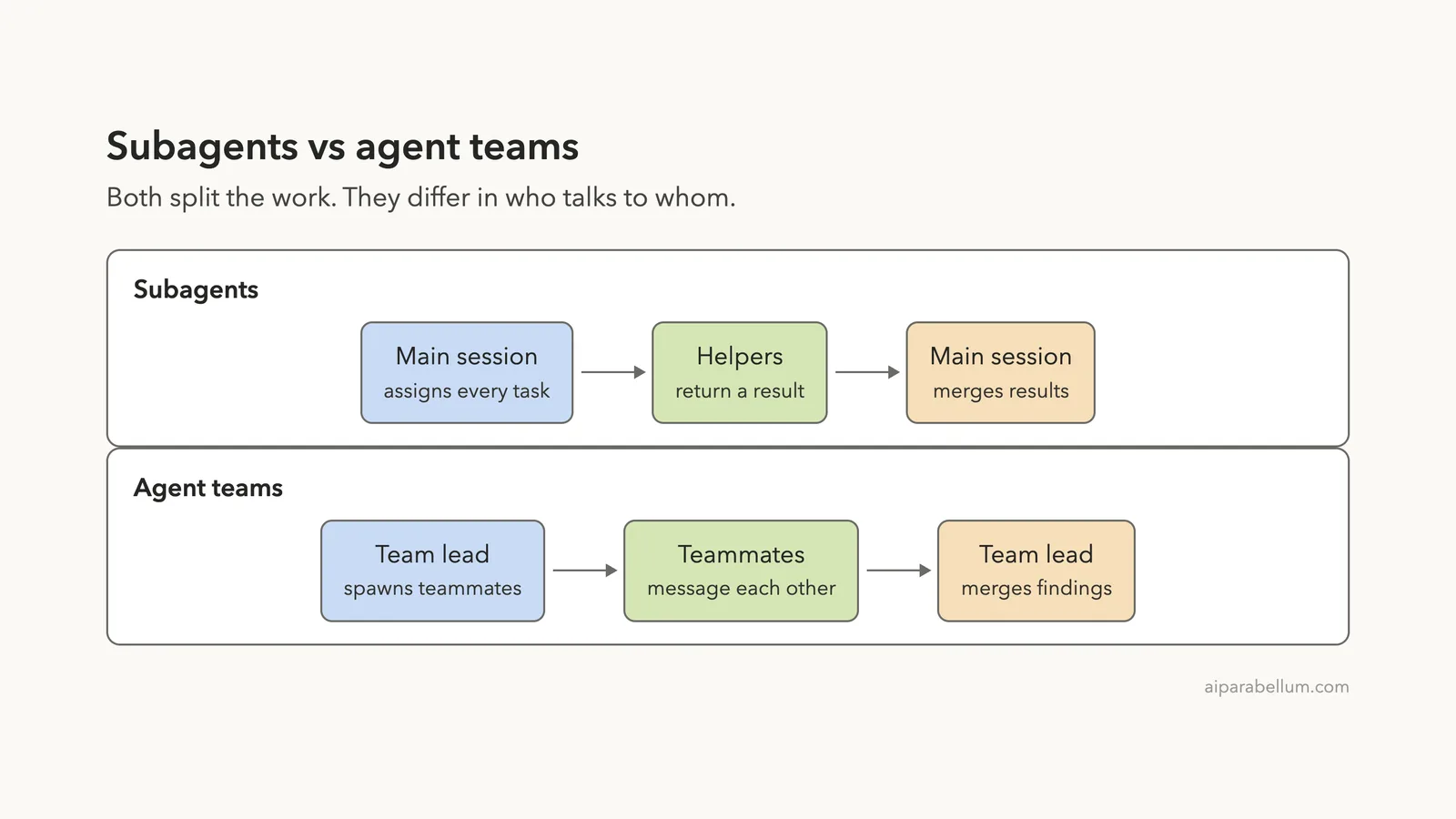
A subagent is a helper that works in its own context window. Claude hands it one job, it does the work, and a short result comes back to the session that asked. You can read more in our subagents guide.
An agent team is a group of full Claude Code sessions. One session acts as the team lead, and the others are teammates that each have their own context window. According to the official agent teams documentation, teammates share a task list, claim work and message each other directly.
Think of subagents as people you send on separate errands who each come back to you. Think of an agent team as a small project group that talks in a shared chat while you watch.
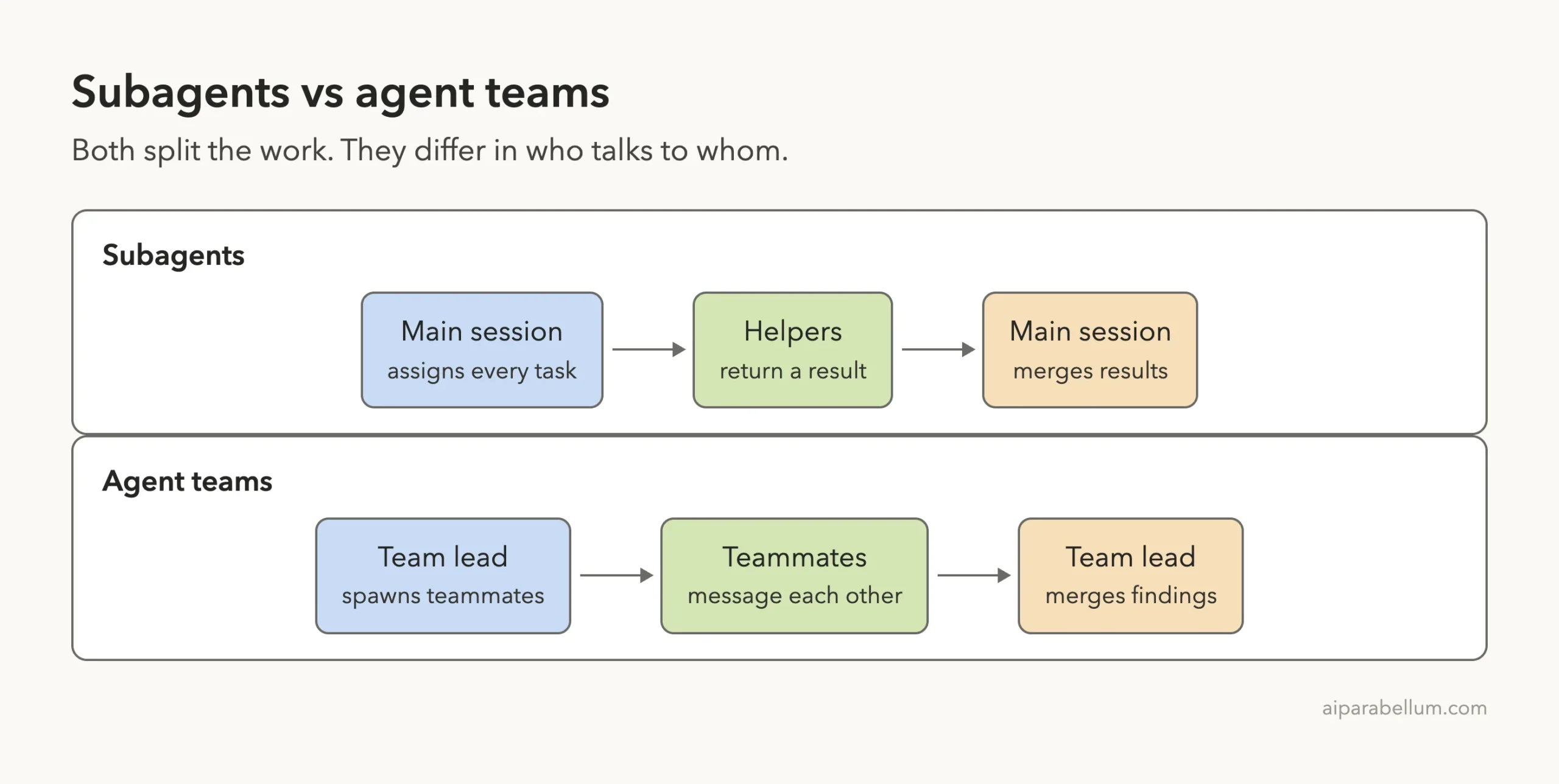
Subagents vs Agent Teams: Side-by-Side From the Docs
Before the test, here is how Anthropic describes the two options. We checked each row against the official pages while writing.
| Topic | Subagents | Agent teams |
|---|---|---|
| Context | Own context window, results return to the caller | Own context window, fully independent |
| Communication | Return a result to the caller | Teammates message each other directly |
| Coordination | The main agent manages all work | Self-coordination through messages and a shared task list |
| Best for | Focused tasks where only the result matters | Complex work that needs discussion and collaboration |
| Token cost | Lower, results are summarized back | Higher, each teammate is a separate Claude instance |
| Status | Built in | Experimental, off by default |
The docs also point out a lighter option. If you just want two sessions of your own to share findings, cross-session messaging can do that without a team.
Our Test Setup
We wanted a task that is small, safe and easy to check. So we made two identical demo folders, each with three tiny files in src/: cart.py, names.py and ages.py. Each file has a bug we planted on purpose.
# src/cart.py
def cart_total(prices, discount_percent):
    total = 0
    for p in prices:
        total += p
    return total - total * discount_percent / 10

# src/ages.py
def is_adult(age):
    return age > 18
The cart file divides the discount by 10 instead of 100. The ages file rejects 18-year-olds. The names file crashes on a single-word name.
Nothing in the folders was edited by either run, and we told Claude not to edit anything.
Same files, same model, same version. Only the prompt wording and one setting changed.
Folder A used a normal project. Folder B had one extra file, .claude/settings.json, that turns on the experimental flag:
{
  "env": {
    "CLAUDE_CODE_EXPERIMENTAL_AGENT_TEAMS": "1"
  }
}
We used the same model and the same version in both runs. Only the wording of the prompt changed.
Run 1: Three Subagents
In folder A we asked for subagents by name. This is the exact prompt:
Review the three files in src/ for bugs. Use three subagents in parallel, one per file, and do not edit any files. Then give me one short combined list of the bugs found.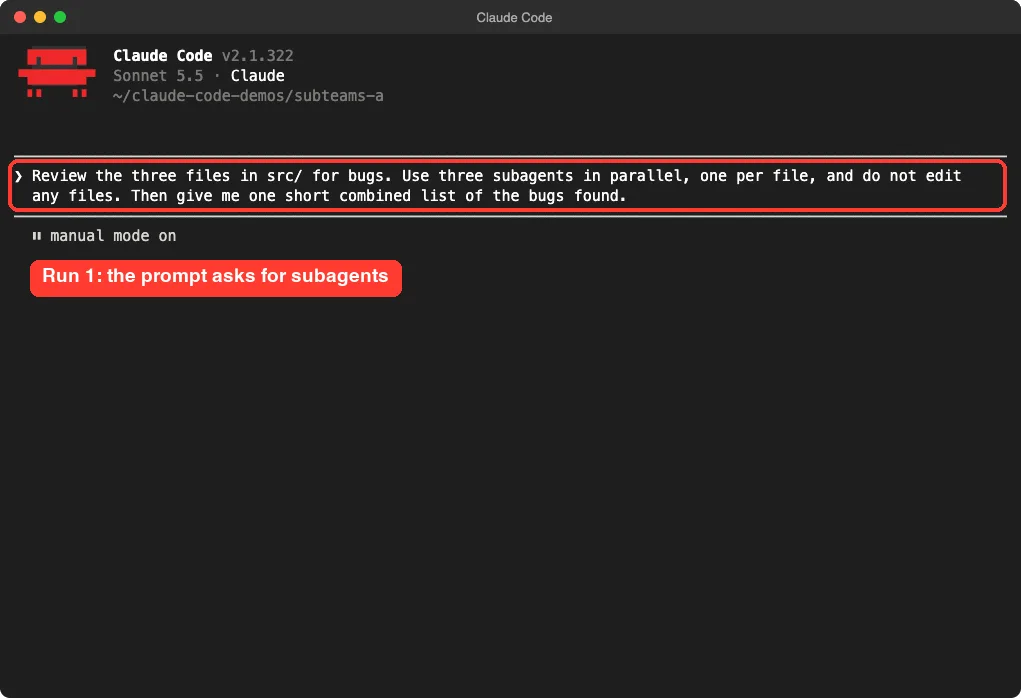
Claude launched three background agents, one for each file. They finished one after another, and Claude waited for all of them before it wrote anything. The screen shows each finish time.
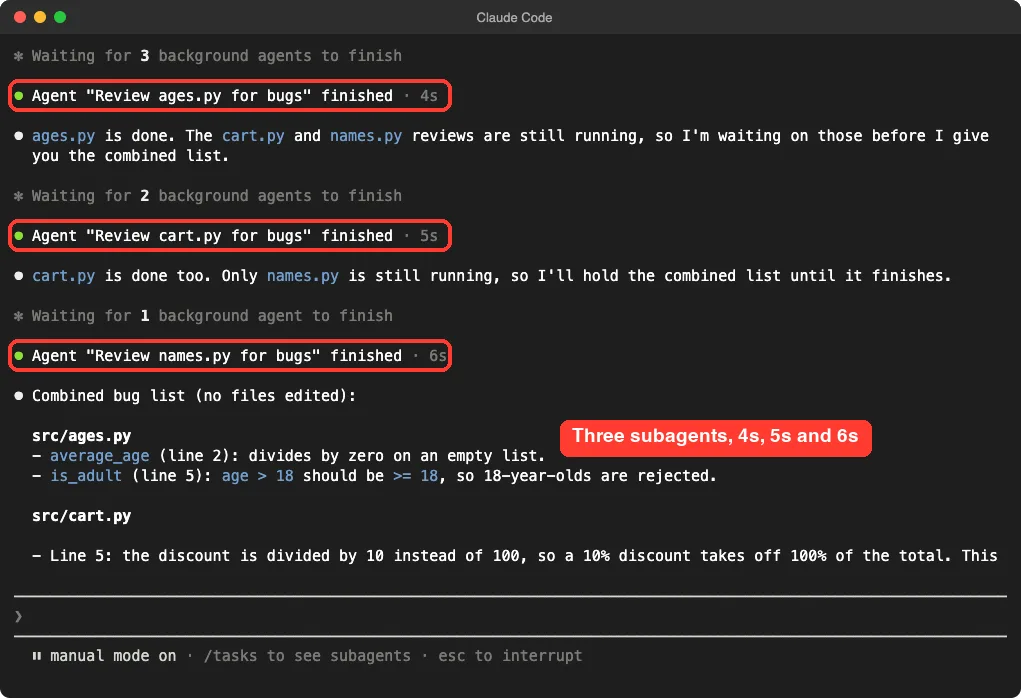
Then the main session merged the three reports into one list and told us no files were edited. It also said it had not read the files itself, so the findings came only from the subagents. That is a useful reminder of how the pattern works: the main session sees summaries, not the helpers’ full work.
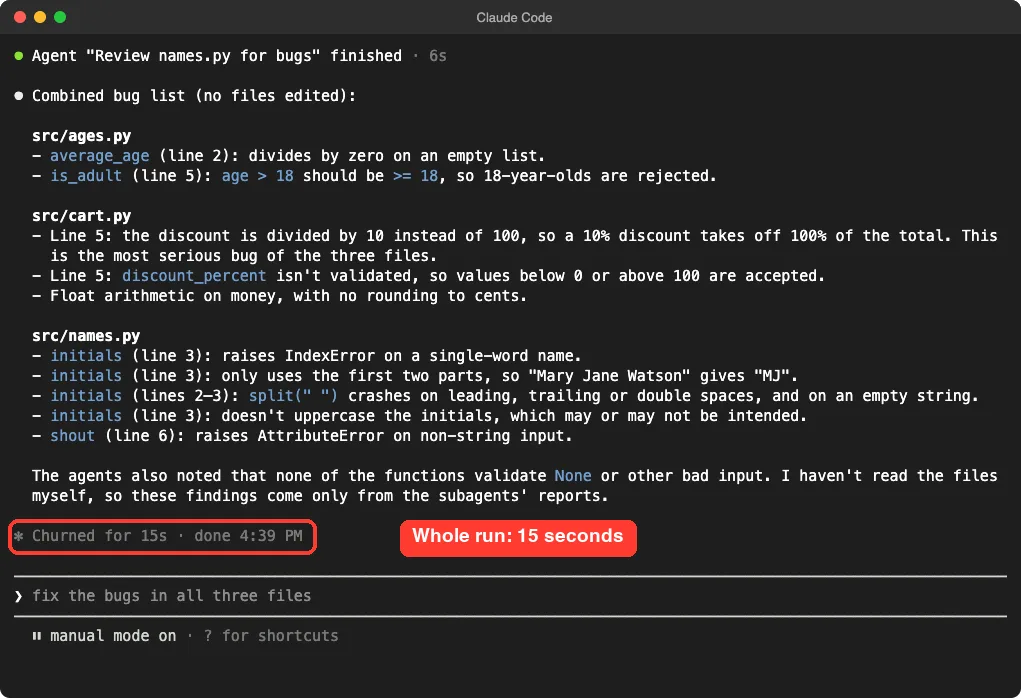
What the subagents found
- In
cart.py, the discount is divided by 10 instead of 100. Claude called this the most serious bug of the three files. - In
ages.py,age > 18should beage >= 18, andaverage_agefails on an empty list. - In
names.py,initialsraises an error on a single-word name, andshoutfails on non-string input. - Smaller notes covered missing validation and float math on money.
Run 2: An Agent Team
In folder B, with the flag on, we asked for a team. The task and the files were the same.
Create an agent team with three teammates, one per file in src/, to review each file for bugs. Do not edit any files. Then give me one short combined list of the bugs found.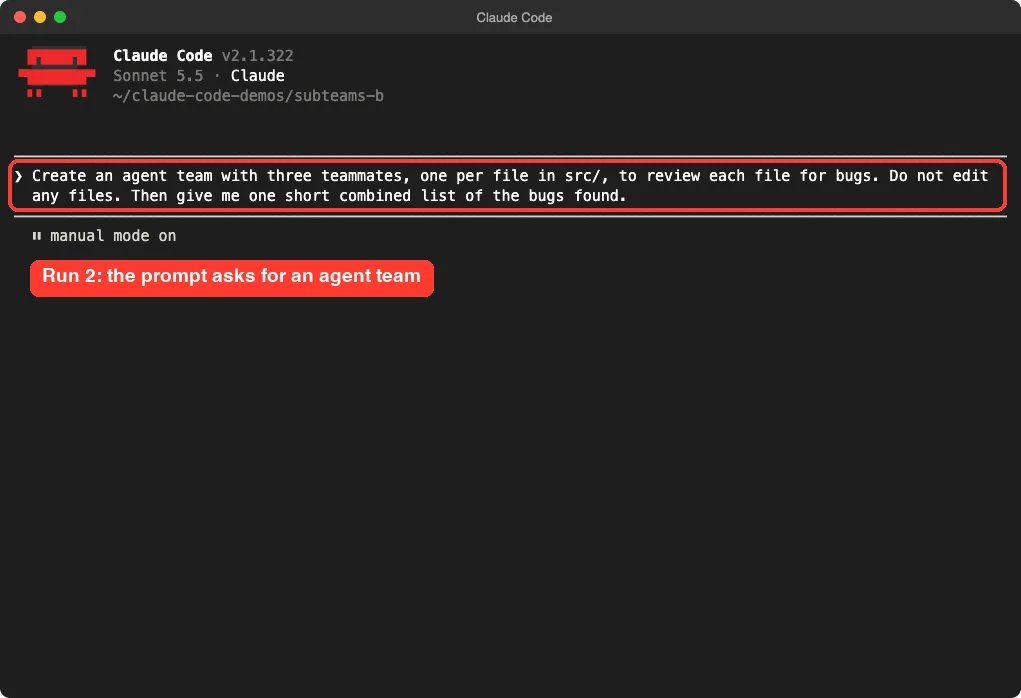
This time Claude named three teammates: ages-reviewer, cart-reviewer and names-reviewer. They appeared in a panel below the prompt, each with a task, an elapsed time and its own token count. The count was about 29 thousand tokens per teammate at the moment we looked.
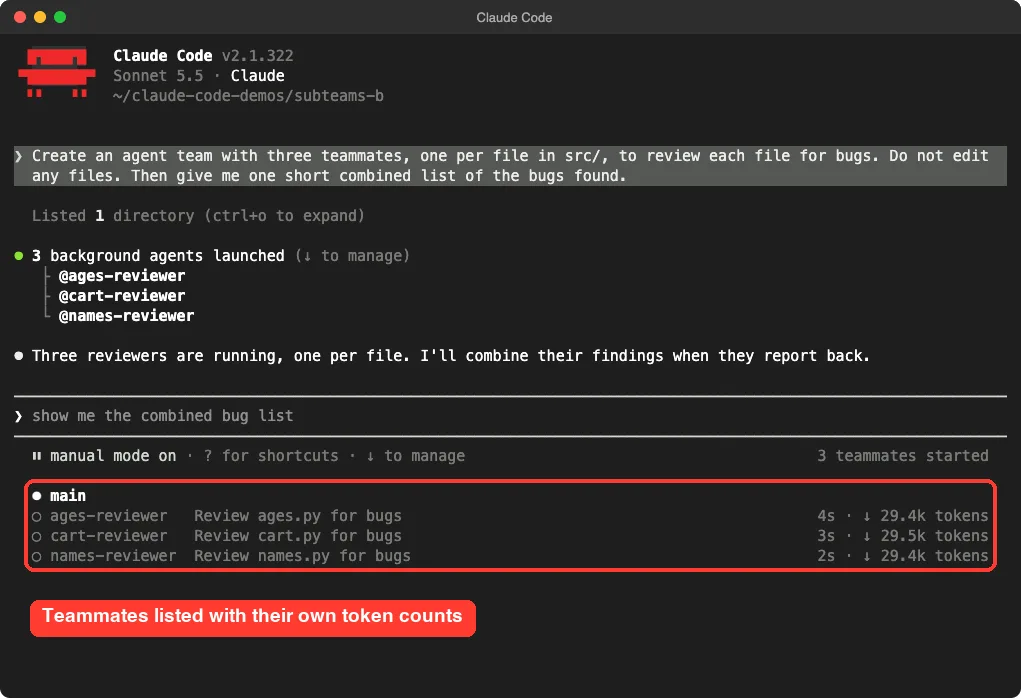
The panel is the biggest visible difference. With subagents we saw lines saying an agent finished. With a team we got a live roster that we could select with the arrow keys and open with Enter, as the docs describe.
The teammates sent their findings to the lead, and the lead merged them into one list. By the time of our next snapshot, about 12 seconds after we pressed Enter, all three reviewers had reported.
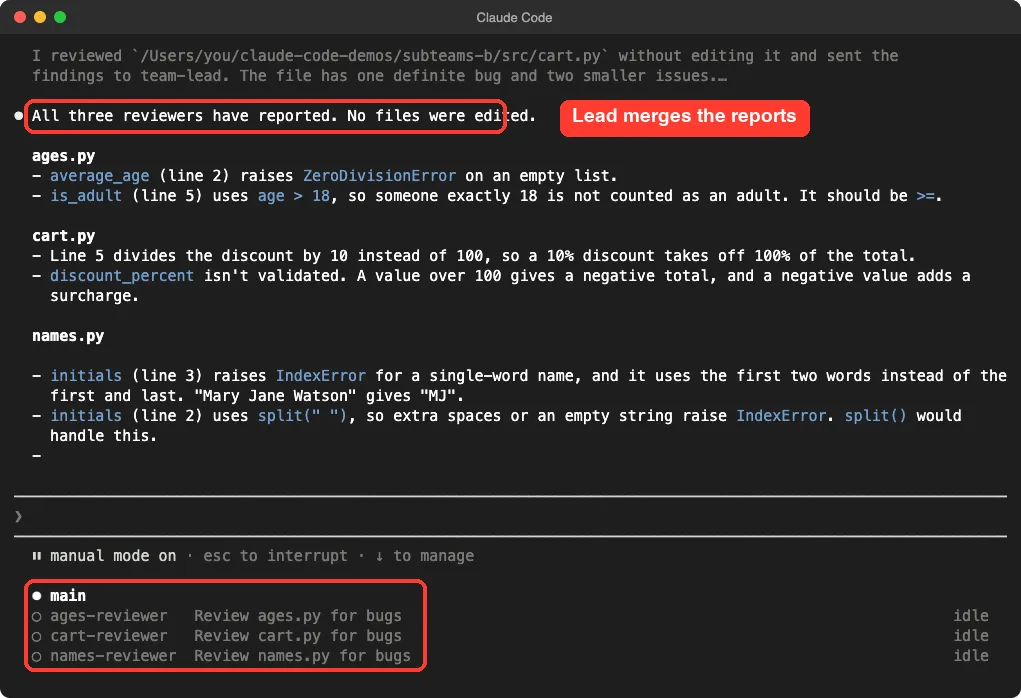
What the team found
The team found the same two serious bugs: the / 10 discount and the > in is_adult. Its list also covered the empty-list crash, the single-word name crash and the split(" ") problem. The lead even closed with a line naming the two clearest bugs.
We also noticed a few small things. The lead got an idle notice from each teammate when it finished, and it told us a repeated notice added nothing new. That is the team’s messaging at work, but it is extra chatter you do not get with plain subagents.
What We Learned From Running Both
For this job, the two runs looked almost the same in the result. Both found the planted bugs, neither edited a file, and both finished in seconds. Here is the comparison from our own runs.
| What we saw | Subagents | Agent team |
|---|---|---|
| Setup | None | One environment setting |
| Helpers launched | 3 background agents | 3 named teammates |
| Time | 15 seconds for the whole run | Done within about 12 seconds of the prompt |
| Serious bugs found | Both | Both |
| What you see while it runs | Agent finished lines | A roster with token counts |
| Extra chatter | Little | Idle notices from each teammate |
One honest limit: this is one demo, and the timings are close enough that you should not read a speed winner into them. We also did not capture a token total for the subagent run, so we cannot give you a measured cost comparison. The docs say teams use significantly more tokens, and the roster showed us why: each teammate carries its own full context.
Why the Task Was Not Really a Team Job
Our three files had nothing to do with each other. Each helper could finish alone and hand over a result. That is exactly the shape of work where the docs say subagents are enough.
Agent teams pay off when the helpers need each other. The docs list four strong uses: research and review where teammates challenge each other’s findings, new modules where each teammate owns a separate piece, debugging with competing theories, and changes that span several layers like front end, back end and tests.
The docs also warn about the downsides. Coordination overhead grows with each teammate, tokens scale linearly, and there are known limits around resuming sessions, task status and shutdown.
Subagents vs Agent Teams: Which One Should You Use?
Here is a simple way to decide. Start with the lighter option and move up only when you hit a real need.
- Use a single session when the work is sequential, touches the same file, or has many dependencies.
- Use subagents when you want focused helpers that report back, like reading different files, running searches or checking different parts of a codebase.
- Use an agent team when helpers should debate, share findings or claim work from a shared list without you in the middle.
If you are unsure how subagents compare with skills and plugins, our guide to skills vs subagents covers that choice.
How to Turn On Agent Teams
Teams are off by default. You turn them on with the CLAUDE_CODE_EXPERIMENTAL_AGENT_TEAMS variable, either in your shell or in settings.json, as we did in folder B.
Two things from the docs are worth knowing before you flip the switch. First, with teams enabled, a subagent that Claude names launches as a teammate, so a team can form even when you did not ask for one. Second, teams only spawn in an interactive session, not in non-interactive mode with the -p flag.
Display modes
The default display mode is in-process, where everything runs in your one terminal. If you use tmux or iTerm2, you can set teammateMode to auto in ~/.claude/settings.json to get one pane per teammate. We only tested the in-process mode, which is what you see in the screenshots.
Controlling teammates
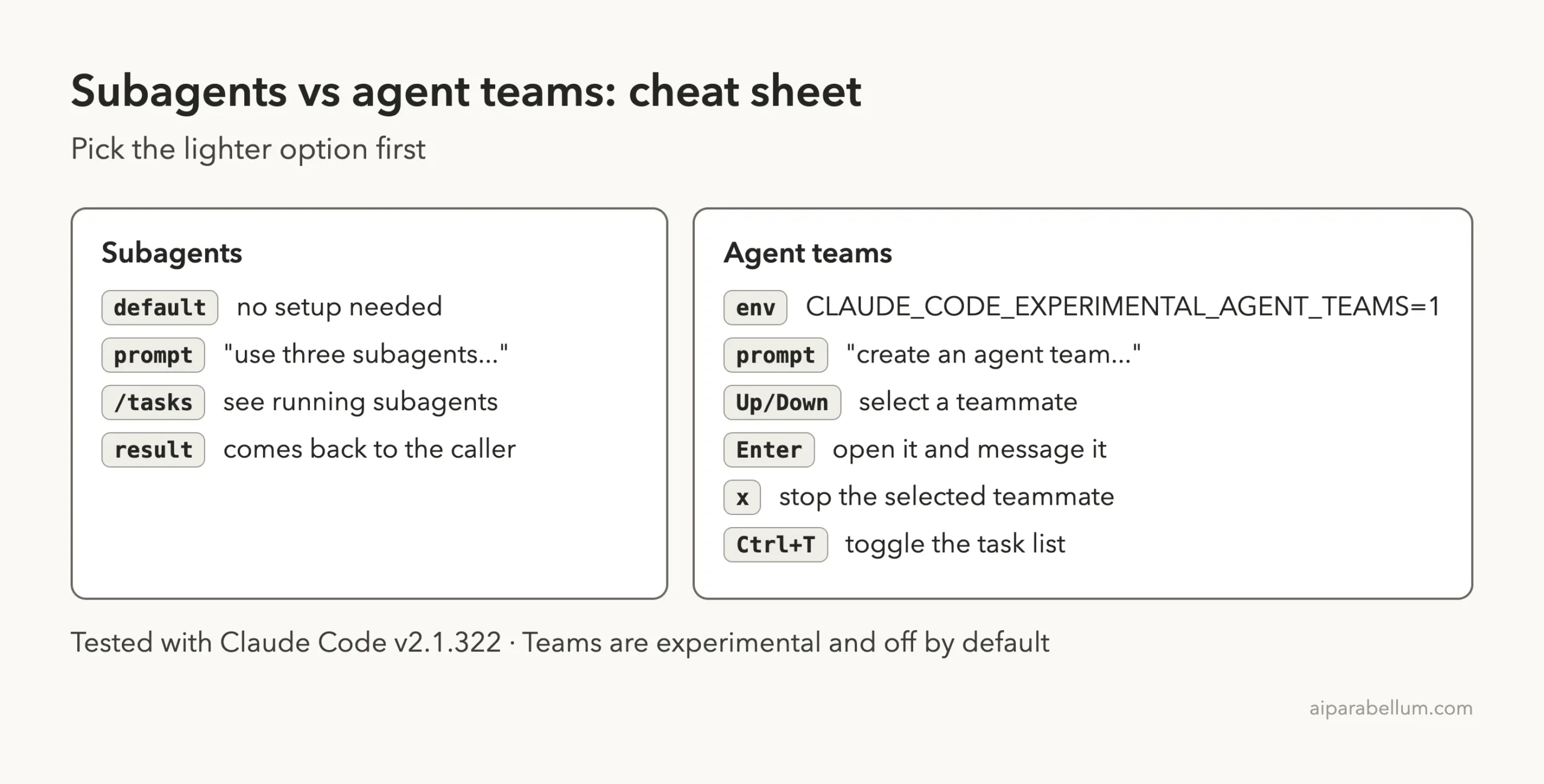
In the panel, use the arrow keys to select a teammate and press Enter to open its session. Press x on a selected teammate to stop it, and press Ctrl+T to toggle the task list.
Try It Yourself
Make a small folder with three short files that each have an obvious bug. Run the subagent prompt first, then repeat the task in a folder with teams enabled. Compare the lists and watch the screen.
Review the files in src/ for bugs. Use one subagent per file, do not edit any files, and give me one short combined list.For a harder test, give the team a job where the pieces depend on each other, such as three competing theories for one failing test. That is where teammates talking to each other can make a difference, and we plan to cover it in a later part.
Common Mistakes
- Expecting a team without turning the flag on. Claude may quietly use subagents instead, and the panel alone does not prove a team formed.
- Using a team for sequential work. The docs say a single session or subagents fit that better.
- Letting two helpers edit the same file. Give each one its own files.
- Spawning too many teammates. More helpers means more cost and more coordination.
- Trusting a merged list blindly. In our subagent run the main session said it had not read the files itself.
Pro Tips
- Ask for no edits on a first run, so you can judge the plan before anything changes.
- Give each helper a clear, self-contained job with a deliverable, such as one review per file.
- Name the roles in your prompt if you want a team, for example “create an agent team with three teammates”.
- Test in a throwaway folder with
--setting-sources projectfirst.
Cheat Sheet
Frequently Asked Questions
What is the difference between Claude Code subagents and agent teams?
Subagents work inside one session and report results back to it. Agent teams are several full sessions that share a task list and can message each other. Teams are experimental and need a setting to turn them on.
Are agent teams better than subagents?
Not by default. In our same-task test, both found the same serious bugs in seconds. The docs say teams fit work where helpers must discuss and coordinate, and subagents fit focused jobs where only the result matters.
Do agent teams cost more?
The docs say they use significantly more tokens than a single session, because each teammate is a separate Claude instance with its own context. We saw each teammate carrying roughly 29 thousand tokens in the panel, but we did not measure a full cost comparison.
How do I enable agent teams in Claude Code?
Set CLAUDE_CODE_EXPERIMENTAL_AGENT_TEAMS to 1 in your environment or in the env block of settings.json. Then describe the team you want in plain English.
Can I use agent teams in non-interactive mode?
No. The docs say Claude does not spawn teammates with the -p flag, and a named subagent runs as an ordinary subagent there.
Conclusion
Claude Code subagents vs agent teams comes down to one question: do your helpers need to talk to each other? In our test, three independent file reviews gave the same useful result both ways, so the lighter subagents were the better fit. Turn on agent teams when the work needs discussion, and keep an eye on token use. For more background, see the Claude guide and the official subagents documentation at code.claude.com.
Previous in the series: Part 27, Subagent File Format
Next in the series: Part 29, Run Claude Code Subagents on Different Models, is coming soon.