The core Claude Code subagents best practices are simple: give each helper one small job, give it only the tools it needs, and make it send back a short answer. That sounds easy, but a few habits make the difference between a helper you trust and one that wastes your time. We built two small helpers, ran them in a real session, and checked what the official docs recommend against what actually happened.
This is Part 30 of 45 in our Claude Code Deep Dives, part of our Claude Code tutorials. In the last part we ran subagent models, and earlier we covered the subagent file format.
Tested with Claude Code v2.1.322 on November 12, 2026, on macOS. Everything ran in a throwaway demo folder with --setting-sources project, so our personal Claude Code setup stayed untouched. We did not use any Windows or Linux machine.
Quick Summary
| Practice | What to do | What we saw |
|---|---|---|
| Focus | One subagent, one task | Two small helpers, each with a single job |
| Description | Make it specific so Claude knows when to delegate | Claude picked the right helper by name and by purpose |
| Tools | Grant only what the job needs | A read-only reviewer could not edit a file |
| Output | Tell the helper exactly what to send back | A runner returned 2 failing lines out of 150 |
| Sharing | Check .claude/agents/ into version control | Plain files, so git handles them like any other code |
Claude Code Subagents Best Practices From the Docs
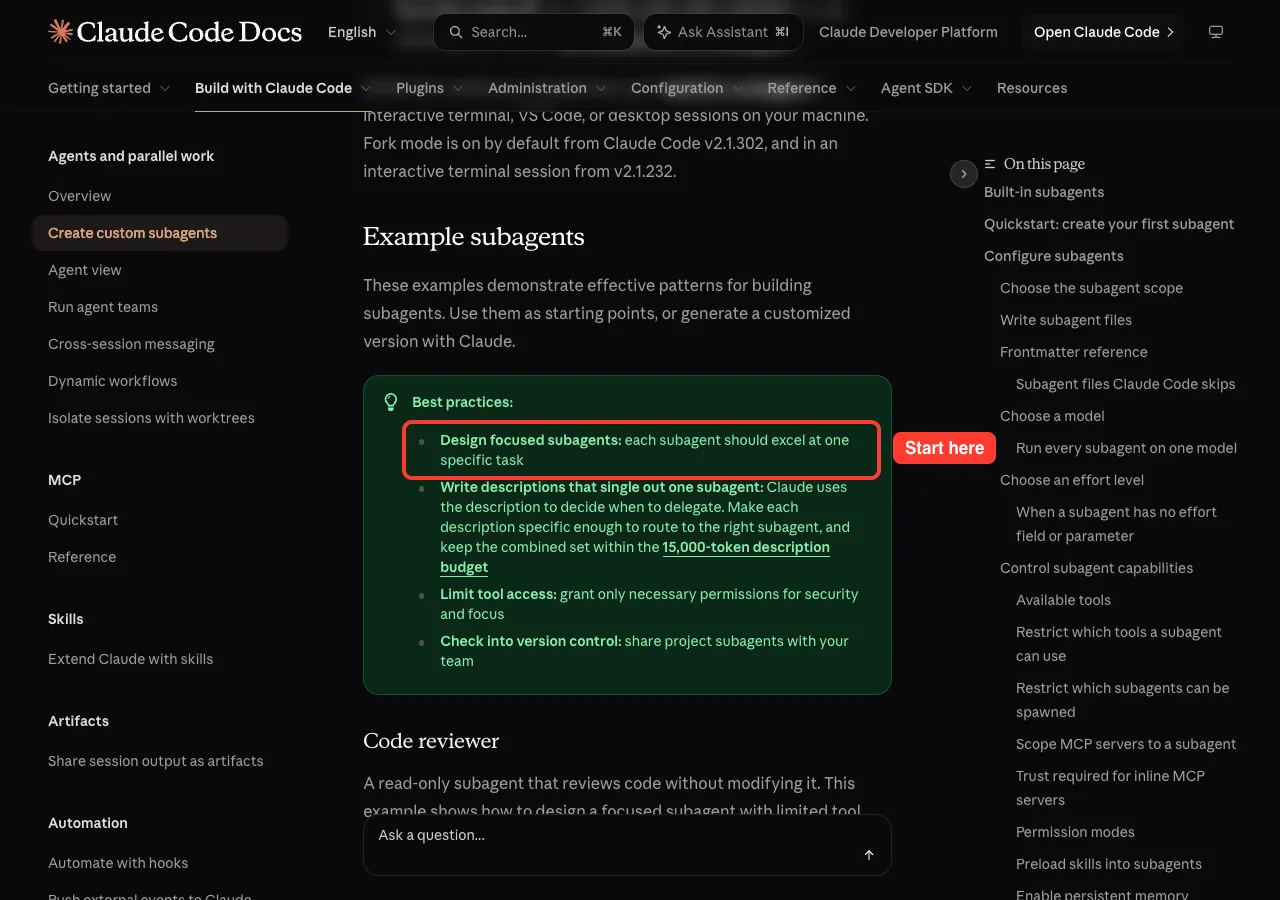
The official subagents documentation has a short best-practices box. It lists four tips, and we use them as our checklist for this post.
- Design focused subagents, so each one excels at one specific task.
- Write descriptions that single out one subagent, because Claude uses the description to decide when to delegate.
- Limit tool access to what is necessary, for security and focus.
- Check project subagents into version control so your team shares them.
If you are brand new to the idea, start with our subagents guide and then come back here.
When Should You Use a Subagent at All?
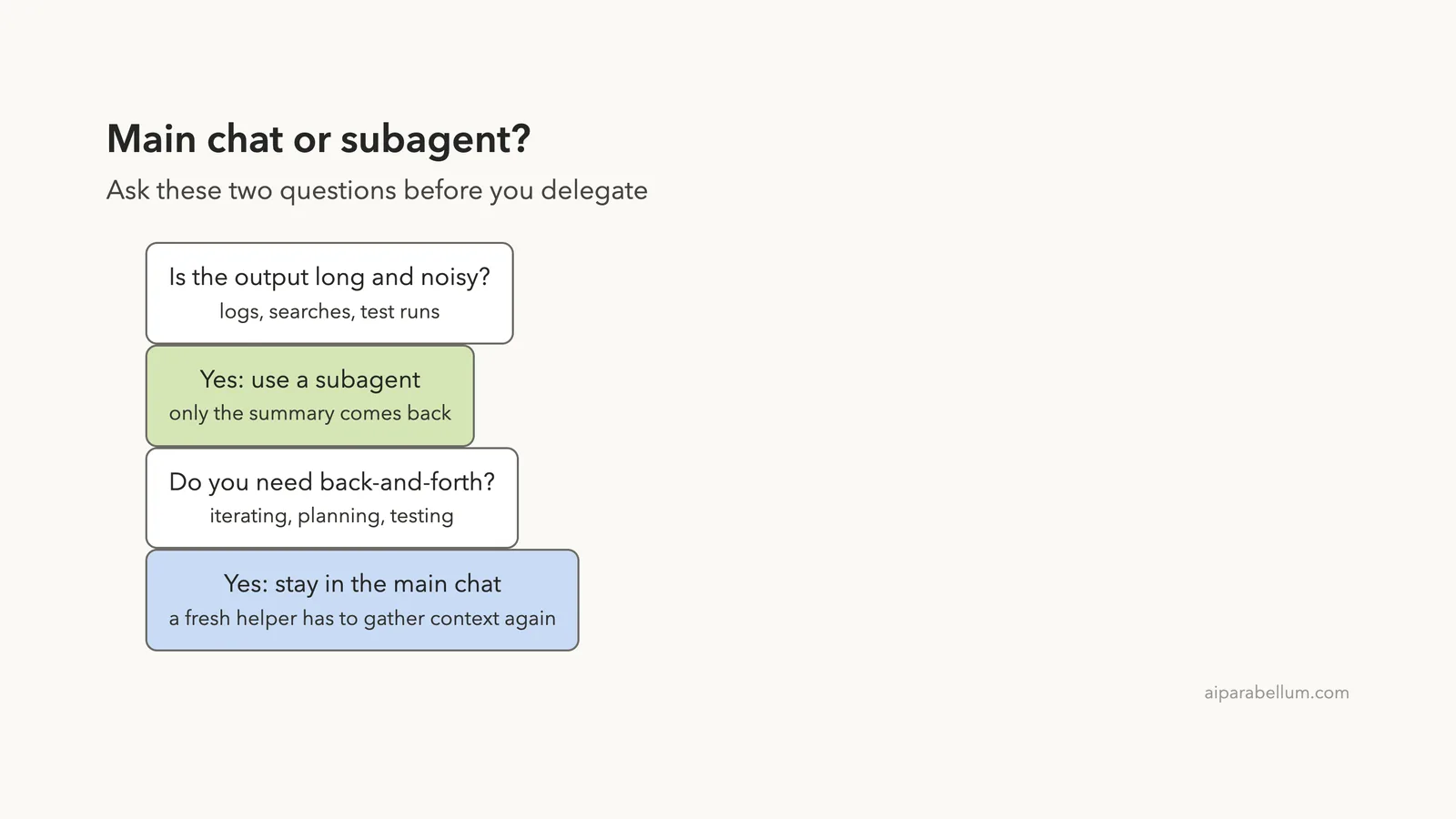
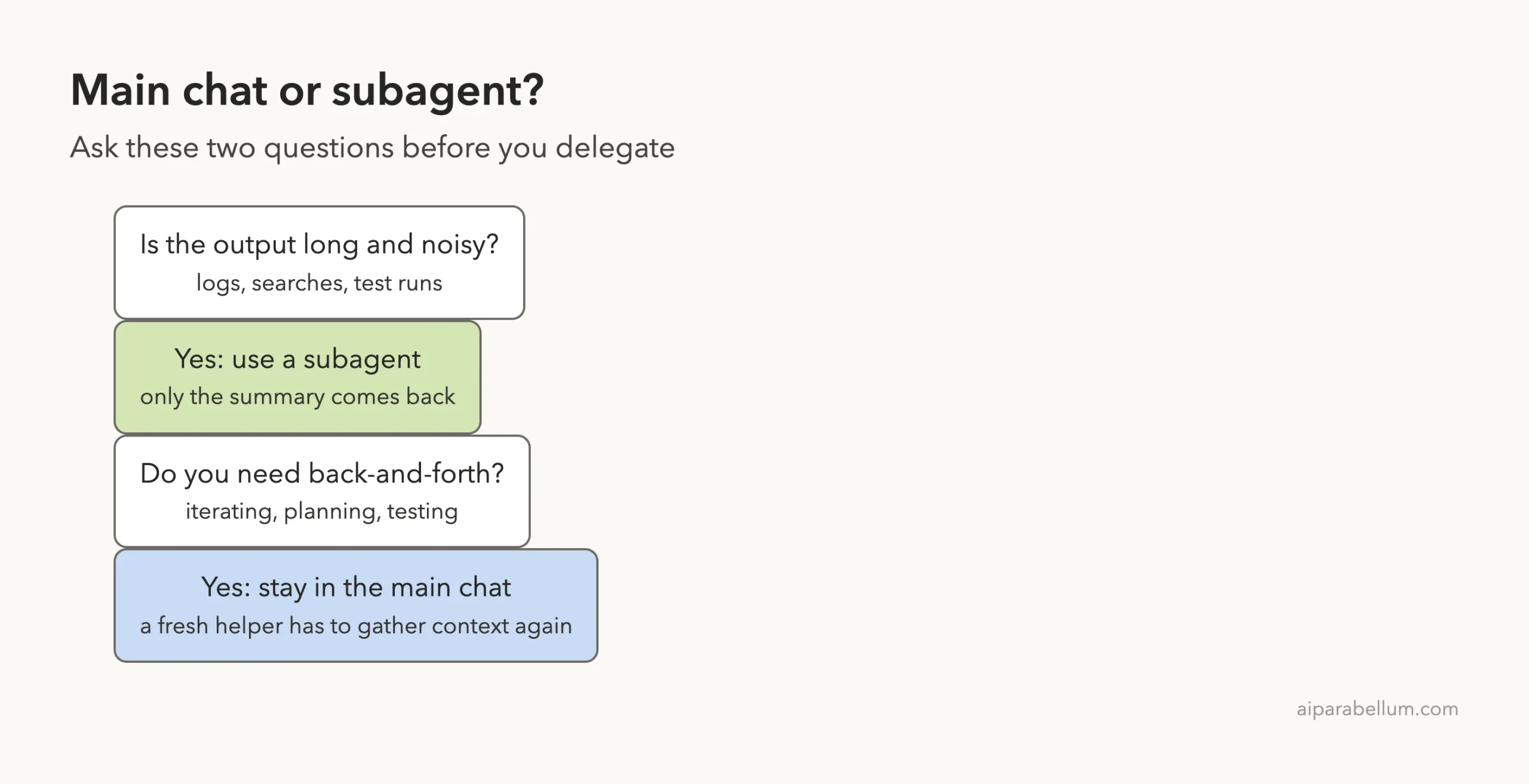
The first best practice is knowing when not to delegate. The docs give a clear split. Use the main conversation when the task needs frequent back-and-forth, when several phases share a lot of context, or when speed matters, because a fresh subagent may need time to gather context.
Use a subagent when the task produces verbose output you do not need in your main chat, when you want to enforce tool limits, or when the work is self-contained and can return a summary.
Best Practices for Claude Code Subagents: Focused Files
A subagent is a Markdown file in .claude/agents/. The top of the file is frontmatter, a short block between two lines of dashes. Below it comes the prompt that tells the helper how to behave.
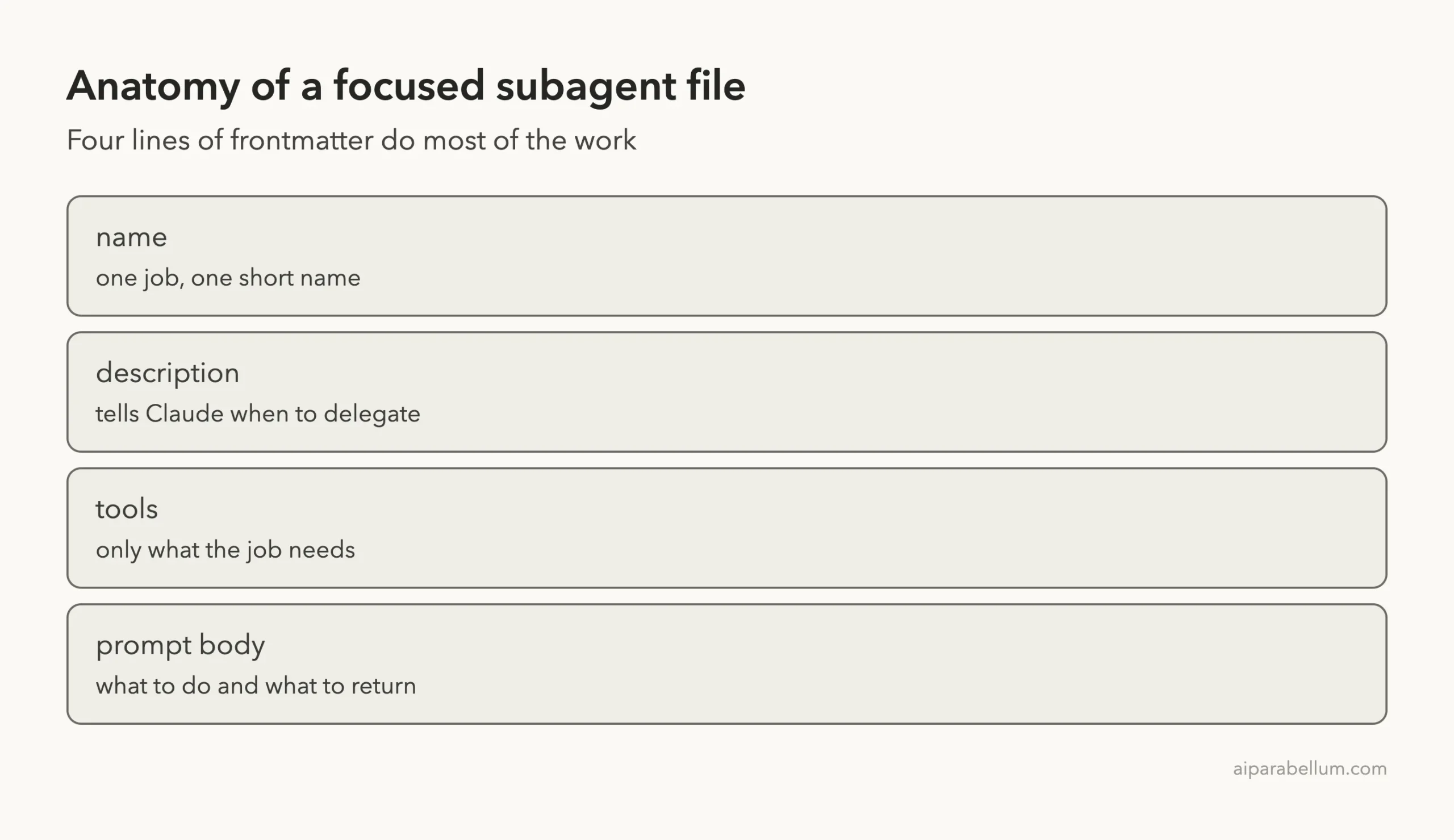
We made two helpers for a tiny demo project. Each does one thing and nothing else. The first is a reviewer for one source file:
---
name: code-reviewer
description: Read-only bug review of one source file. Use when the user asks for a review or a bug check. Never edits files.
tools: Read, Grep, Glob
model: haiku
---
You are a careful code reviewer. Read the file you are given and name the single most serious bug in one sentence, with the line. Do not change anything.
The second runs a noisy script and reports only the failures:
---
name: check-runner
description: Runs scripts/run_checks.py and reports only the failing checks. Use when the user wants check results without the noisy output.
tools: Bash, Read
model: haiku
---
Run `python3 scripts/run_checks.py`. Reply with only the lines that failed and the total number of checks. Never paste the passing lines.
Notice that neither file tries to be a general assistant. A helper that reviews, tests, refactors and writes docs would be harder to describe and harder to trust.
Practice 2: Write a Description That Routes Well
Claude reads each description to decide when to hand off work, so the description is really a routing rule. Good ones say what the helper does, when to use it, and sometimes what it never does. Ours both follow that pattern.
The docs add a limit worth knowing. Keep the combined set of descriptions within the 15,000-token description budget. If you collect dozens of helpers, short and distinct descriptions matter even more.
The docs also say a file with a name but no description is skipped, and the reason goes to the debug log.
A file with no name is treated as documentation kept beside your agents. We did not trigger those cases in our demo, so we are only repeating what the docs state.
One thing we did notice is that the old /agents wizard is gone in v2.1.322. When we typed it, Claude Code said the wizard has been removed and pointed us to the .claude/agents/ folders, or to asking Claude to create a subagent for us.
Practice 3: Limit What a Subagent Can Do
Our reviewer lists only Read, Grep and Glob. It has no Edit or Write tool. To see if that holds up, we gave Claude an awkward request that asks the reviewer to do something it cannot.
Use the code-reviewer subagent to fix the bug in src/cart.py. Tell me exactly what it reported.The demo file has a planted bug, where a discount is divided by 10 instead of 100. Claude noticed the mismatch right away and said the reviewer is read-only, so it can find the bug but cannot fix it.
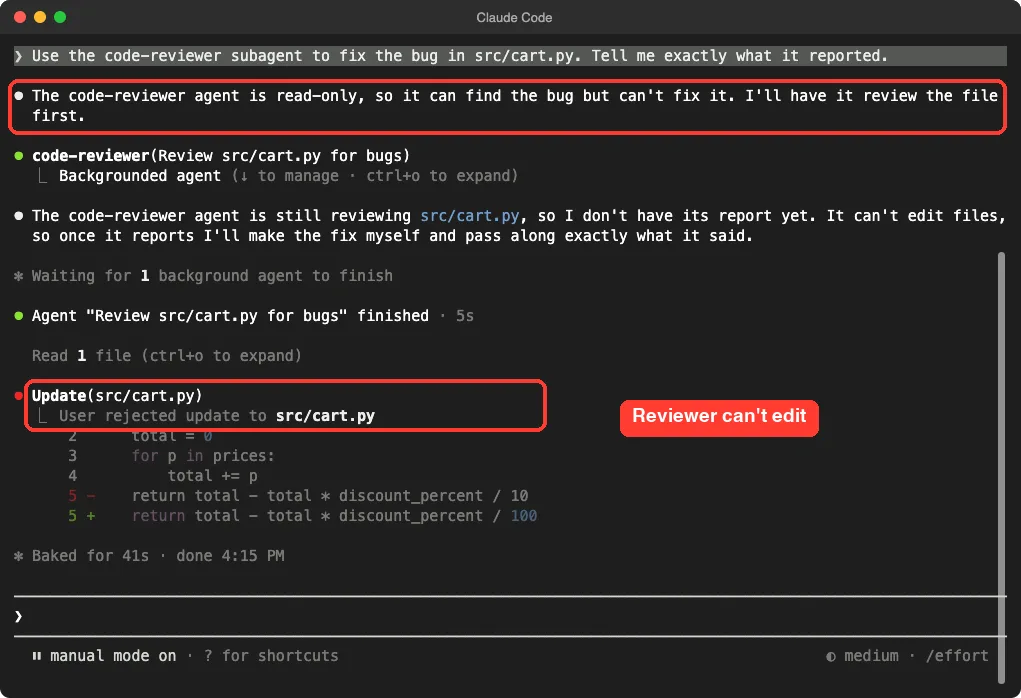
The reviewer finished in 5 seconds. Then the main session proposed the edit itself, and Claude Code asked us for permission first.
We said no on purpose, so the file stayed as it was. Later the main session summarized the reviewer’s report: the bug is on line 5, the suggested fix is to change the divisor to 100, and the reviewer made no edits.
A read-only helper can look at everything and change nothing.
That is the point of limiting tools. If a reviewer cannot write, a vague prompt or a confused answer cannot damage your files. The docs also describe a disallowedTools field if you would rather list what to block than what to allow.
Practice 4: Keep Noisy Output Out of Your Chat
The demo project also has a script that prints 150 lines, with two failures hidden inside. Reading all 150 lines in your main chat would eat context for no good reason. This is the job subagents are best at.
Use the check-runner subagent and tell me which checks failed.The helper needed to run a shell command, so Claude Code asked for approval and named the check-runner as the source. This is a useful habit: when a background helper asks for permission, the prompt tells you which one is asking.
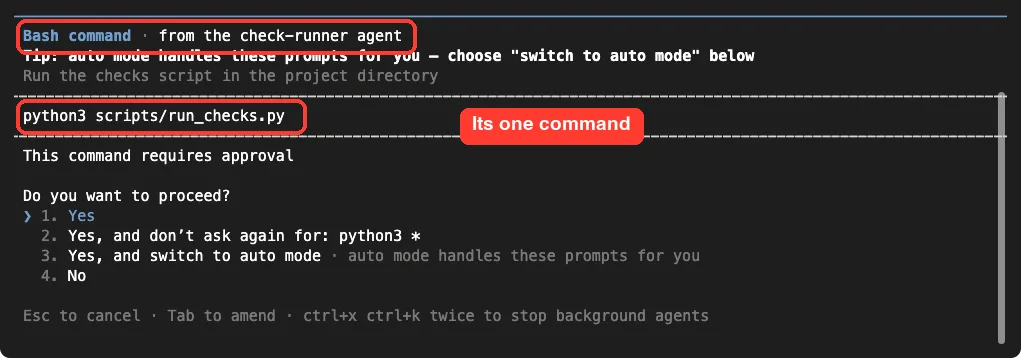
We approved it. The helper finished in 24 seconds and the main chat received a short answer: two of 150 checks failed, number 047 and number 112. None of the 148 passing lines reached the main conversation.
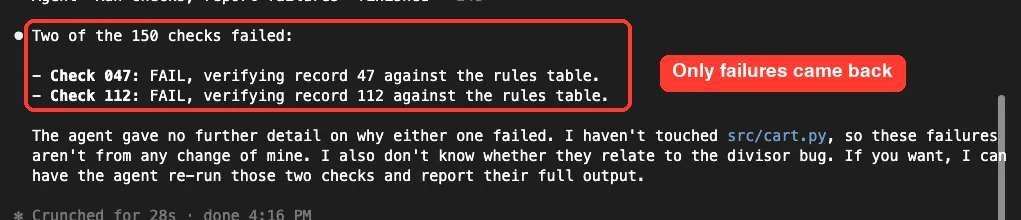
This works because of the last line of the helper’s prompt: reply with only the failing lines and never paste the passing ones. Telling a helper exactly what to return is one of the cheapest improvements you can make.
Practice 5: Pick the Model on Purpose
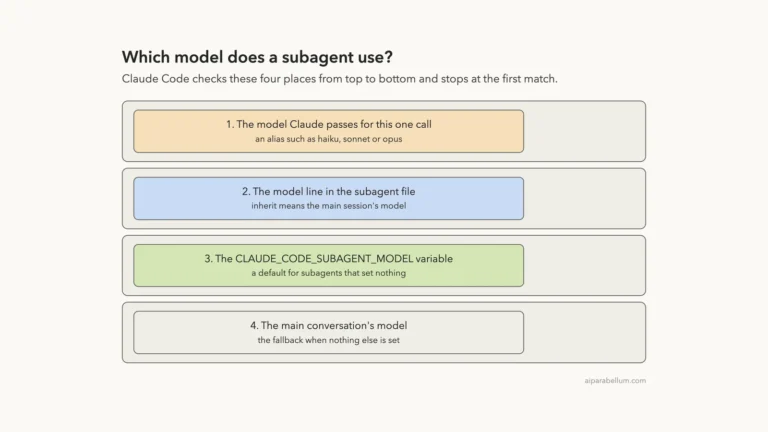
Both of our helpers use model: haiku, because reading a file and running a script are simple jobs.
The docs list cost control as a reason to use subagents, by routing tasks to faster, lower-cost models. We did not run a cost study, so we cannot give you a savings number. Our model test shows how to confirm which model really ran.
Practice 6: Share Subagents With Your Team
Project subagents live in .claude/agents/, so they travel with your repository. Commit the folder and your teammates get the same helpers after a pull. The docs mark the project scope as the recommended default because it makes subagent knowledge shareable through version control.
For helpers you want in every project, the docs point to user-level subagents in ~/.claude/agents/. If you want to bundle helpers with other add-ons, see our guide to skills versus subagents.
Context a Subagent Does and Does Not Get
Another best practice is writing a prompt that does not assume shared memory. According to the docs, a subagent starts with its own system prompt, the task message Claude writes for it, the CLAUDE.md files from your project, and a git status snapshot.
The built-in Explore and Plan helpers skip CLAUDE.md. A subagent does not load the main conversation’s auto memory.
In practice, put the rules your helper needs inside its own file. Do not count on it knowing what you discussed earlier in the chat.
| Helper gets | Helper does not get |
|---|---|
| Its own system prompt from the file | Your earlier conversation |
| The task message Claude writes | Your output style, except in a fork |
| CLAUDE.md files (not for Explore and Plan) | The main conversation’s auto memory |
| A git status snapshot | Skills, unless you list them in the file |
Try It Yourself
Make a folder with one short code file and add one read-only helper in .claude/agents/. Then start Claude Code there and run this prompt.
Use the reviewer subagent on the file in src/ and tell me exactly what it reported. Then try to make it edit the file.If your helper lists only Read, Grep and Glob, you should see Claude explain that it cannot edit. Then add a second helper that runs a noisy command and returns only a short summary.
Common Mistakes
- Making one giant helper that reviews, tests and writes. Split it into focused ones.
- Writing a vague description such as helps with stuff. Claude cannot tell when to use it.
- Leaving out the
toolsline, so the helper inherits every tool and can change things you did not expect. - Forgetting to say what to return, so the helper sends back long logs.
- Creating the first agent file in a new folder without restarting. The docs say the watcher covers only directories that existed when the session started.
- Using a subagent for work that needs constant back-and-forth with you.
Pro Tips
- End each helper prompt with the exact format you want back, such as one sentence or failing lines only.
- Start with the tightest tool list and add a tool only when the job needs it.
- Use
/tasksto see running subagents. - Use
--setting-sources projectin test folders, so your personal agents do not mix in. - Keep descriptions short and different from each other, so routing stays clear.
Cheat Sheet
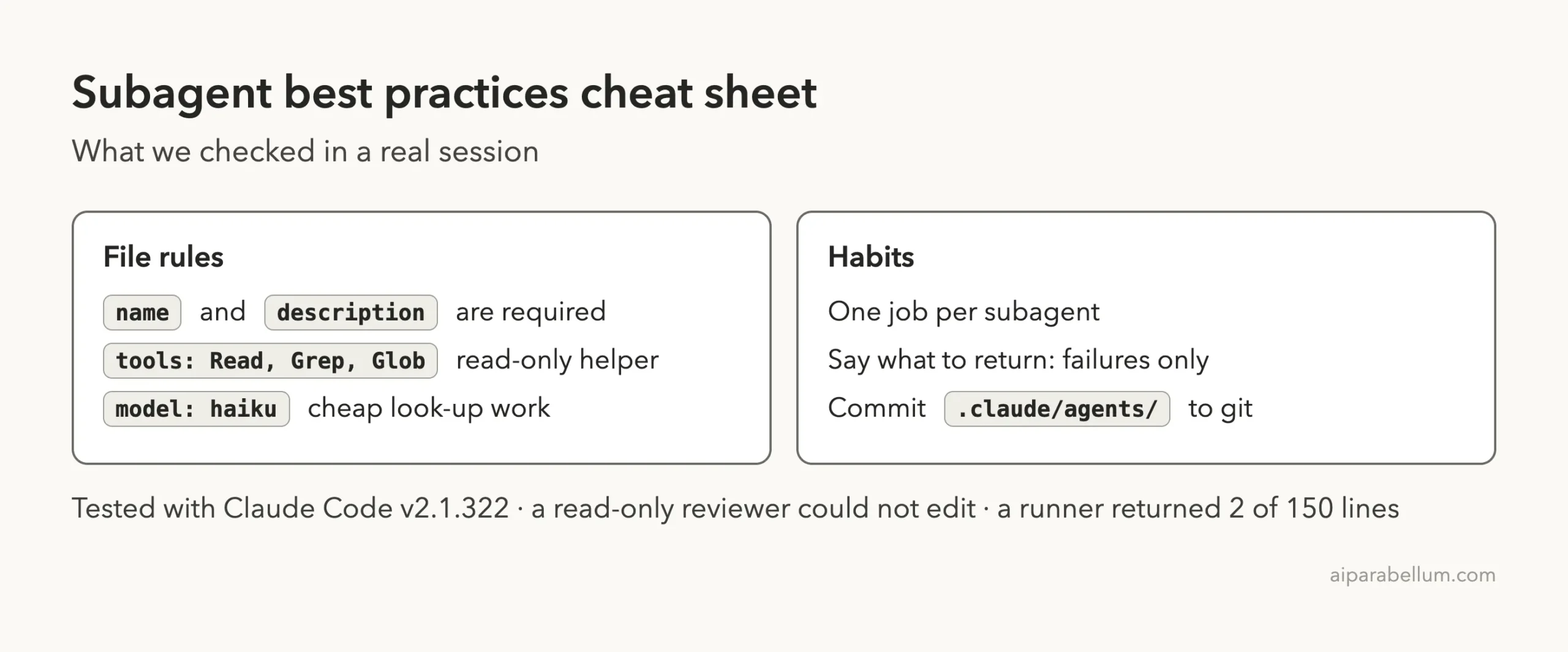
Frequently Asked Questions
What is the best way to write a subagent description?
Say what the helper does, when to use it, and what it never does. Claude uses the description to decide when to delegate, so it must be specific enough to point to one helper.
How many tools should a subagent have?
Only the ones it needs. Our reviewer had Read, Grep and Glob, and it could not edit files.
Should I use a subagent or the main conversation?
Use a subagent for noisy, self-contained work that can return a summary. Stay in the main chat when you need back-and-forth or when several phases share context.
Where do I store subagents for my team?
Put them in .claude/agents/ in your project and commit the folder. The docs recommend the project scope as the default.
Can a subagent ask me for permission?
Yes. In our test, the check-runner needed approval for a shell command, and the prompt named the subagent that was asking.
Conclusion
Good Claude Code subagent best practices come down to focus, clear descriptions, tight tool lists and short answers. In our demo a read-only reviewer could not edit a file, and a runner turned 150 noisy lines into two useful ones. Start small, test each helper with a real prompt, and commit the files so your team benefits too. For more background, see the Claude guide.
Previous in the series: Part 29, Subagent Models
Next in the series: Part 31, Claude Code Agent Teams With tmux: Setup Guide, is coming soon.