Superpowers is a free set of skills that teaches Claude Code to work like a careful developer: ask before building, write a plan, write tests first, debug step by step and prove the work is done before saying so. It is one of the most starred Claude Code add-ons on GitHub, so we installed Superpowers for Claude Code and tested it against plain Claude Code on the same task.
The short version: Superpowers really did change how Claude worked. It wrote the tests before the code, watched them fail, then made them pass, and it handled one tricky input better. On a small task, though, plain Claude Code was almost as good, and it was faster and cheaper.
This guide shows how to install it (including a way to try it for one session only), what each part does, what we saw in our test, and when it is worth using.
Tested with Claude Code v2.1.312 and Superpowers 7.0.1 on October 29, 2026, on macOS, with the default Sonnet 5.5 model.
Superpowers for Claude Code at a Glance
| Question | Short answer |
|---|---|
| What is it? | A plugin with 15 workflow skills: brainstorming, planning, test-driven development, debugging, code review and more. |
| Who makes it? | Jesse Vincent, open source under the MIT license. |
| Where do you get it? | Anthropic’s official plugin marketplace, or its GitHub page (obra/superpowers). |
| Does it change your code? | No. It changes how Claude works, not what your project contains. |
| Did it help in our test? | Yes, a little: more tests, stricter input checks, tests written first. |
| What does it cost? | The plugin is free. Our build took about 1.6 times longer and cost about 1.4 times more. |
What Is Superpowers in Claude Code?
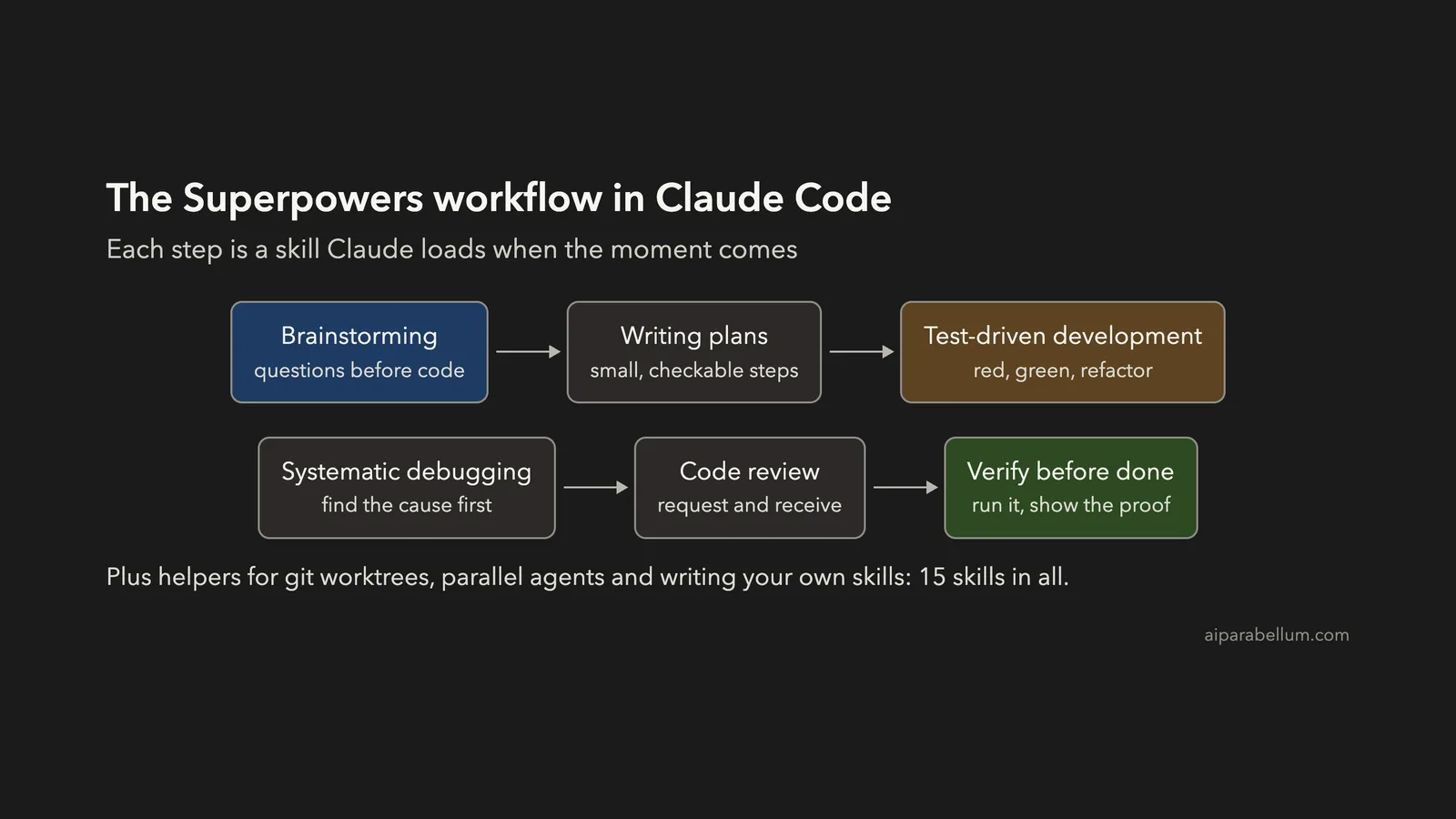
Superpowers is a Claude Code plugin made of skills. A skill is a set of instructions Claude loads only when it needs it; our guide to Claude Code skills explains the idea. Superpowers bundles 15 of them into one working method.
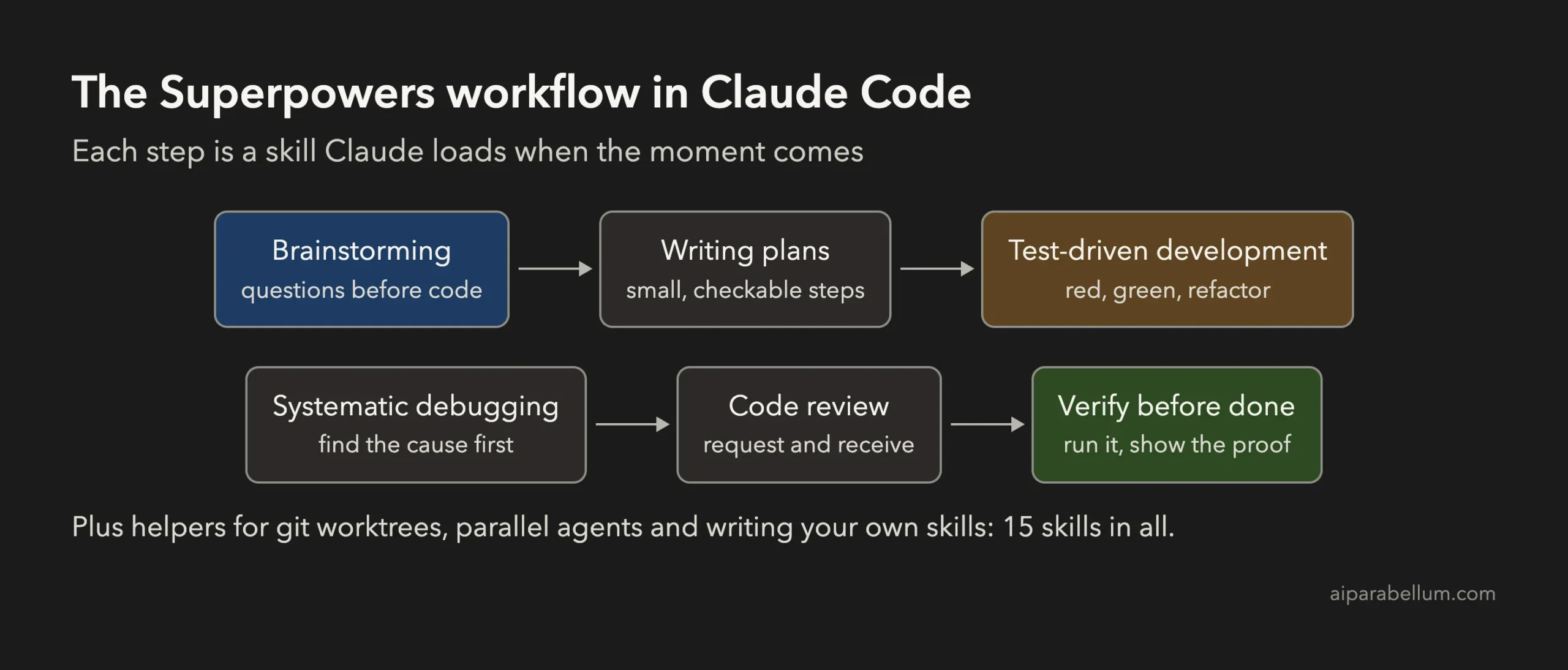
Here is what the main skills do:
- Brainstorming asks you questions and sharpens the idea before any code is written.
- Writing plans turns the idea into small, checkable steps, and executing plans works through them.
- Test-driven development writes a failing test first, then the code that makes it pass.
- Systematic debugging hunts for the real cause of a bug instead of guessing at fixes.
- Requesting and receiving code review add a review step and teach Claude to weigh feedback.
- Verification before completion makes Claude run the code and show proof before it says “done”.
The rest cover git worktrees, running subagents in parallel, finishing a branch and writing your own skills.
How to Install Superpowers in Claude Code
You can install Superpowers for every session, or try it in one session first. We used the one-session method so nothing changed in our normal setup.
Option 1: Install From the Official Marketplace
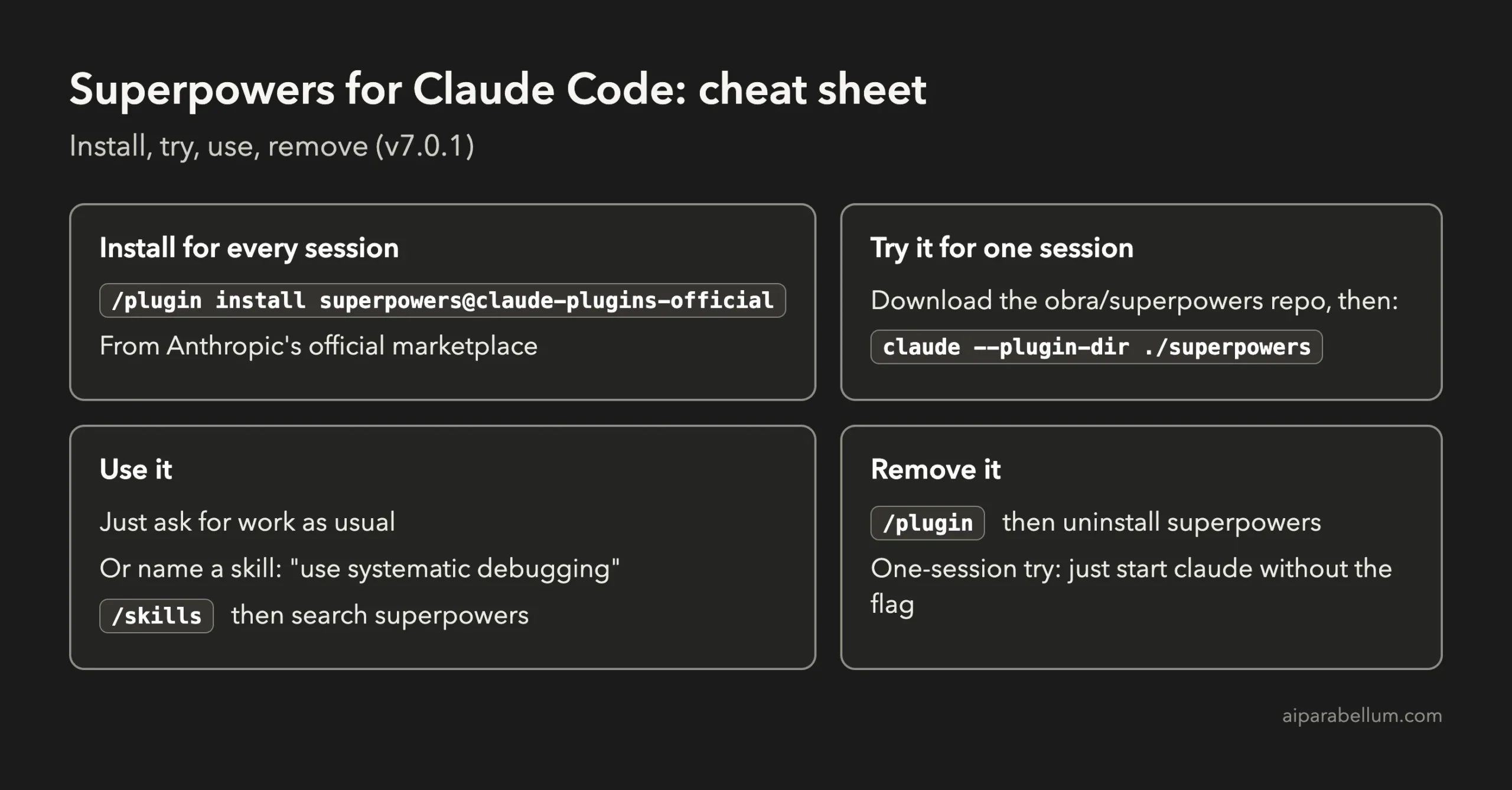
Superpowers is listed in Anthropic’s official plugin marketplace. Inside Claude Code, run this command, and restart Claude Code if it asks you to:
/plugin install superpowers@claude-plugins-officialThis keeps Superpowers on in every session. Our guide to Claude Code plugins shows how to manage, turn off and remove plugins with the /plugin menu.
Option 2: Try It for One Session Only
Claude Code can load a plugin from a folder for a single session with the --plugin-dir flag. Nothing is installed, and the plugin is gone the next time you start claude without the flag.
git clone --depth 1 https://github.com/obra/superpowers.git
cd your-project
claude --plugin-dir ../superpowers
To check it loaded, run /skills and search for superpowers. You should see all 15 skills.
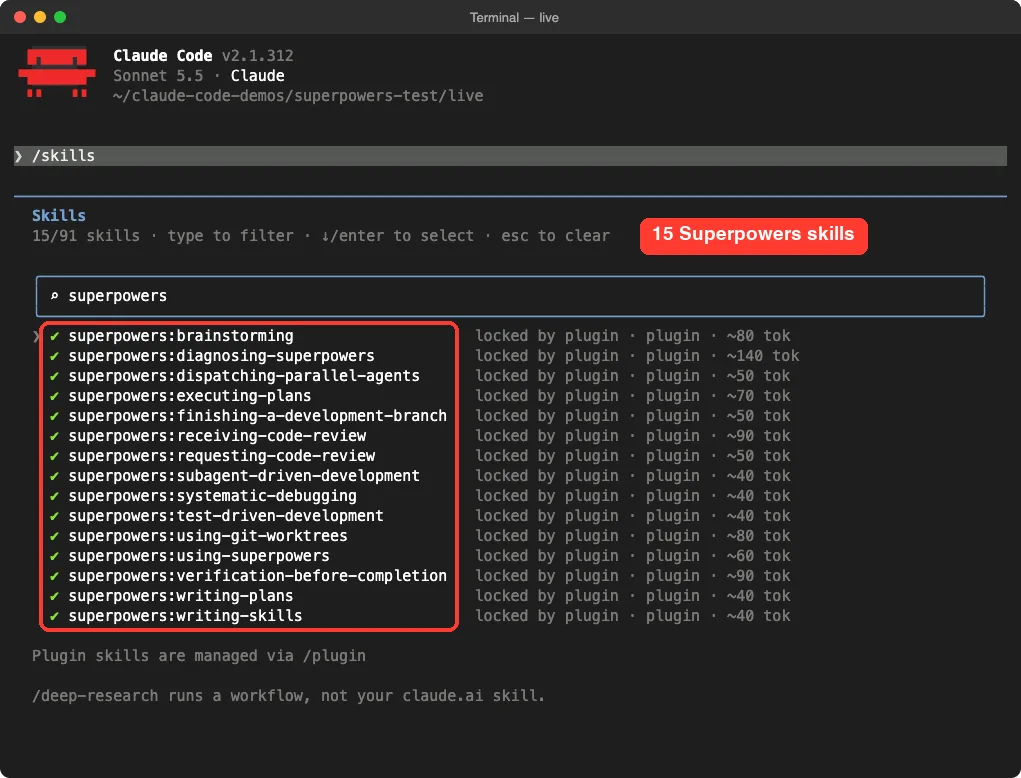
Try Superpowers for one session with –plugin-dir before you install it everywhere. It is the easiest way to see if its style suits you.
How to Use Superpowers
You don’t need special commands. Ask for work as you normally would, and Claude picks the skill that fits. When a session starts, Superpowers adds a short guide (about 500 words) that tells Claude to check its skills before acting.
You can also name a skill when you want it, for example “use systematic debugging on this error” or “brainstorm this with me first”. That is handy when you want the full process on a task Claude might treat as simple.
In our test, Claude announced “Using superpowers:test-driven-development to build this tests-first” and loaded that skill on its own. It then wrote the test file before any code.
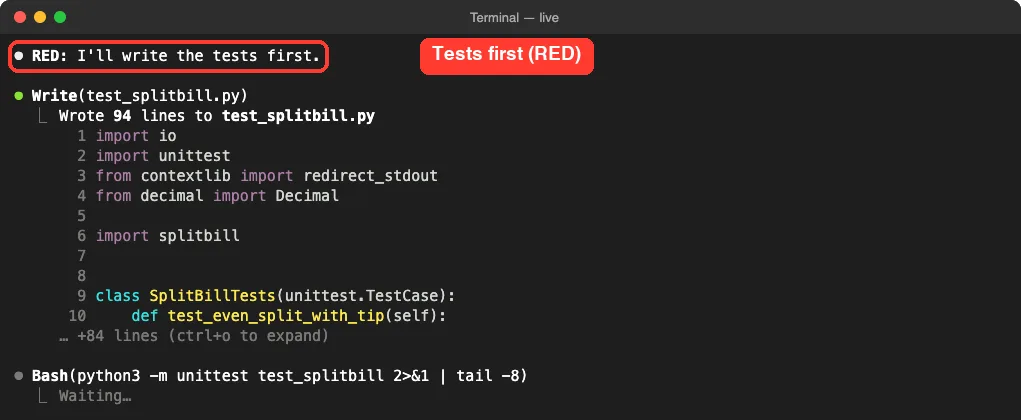
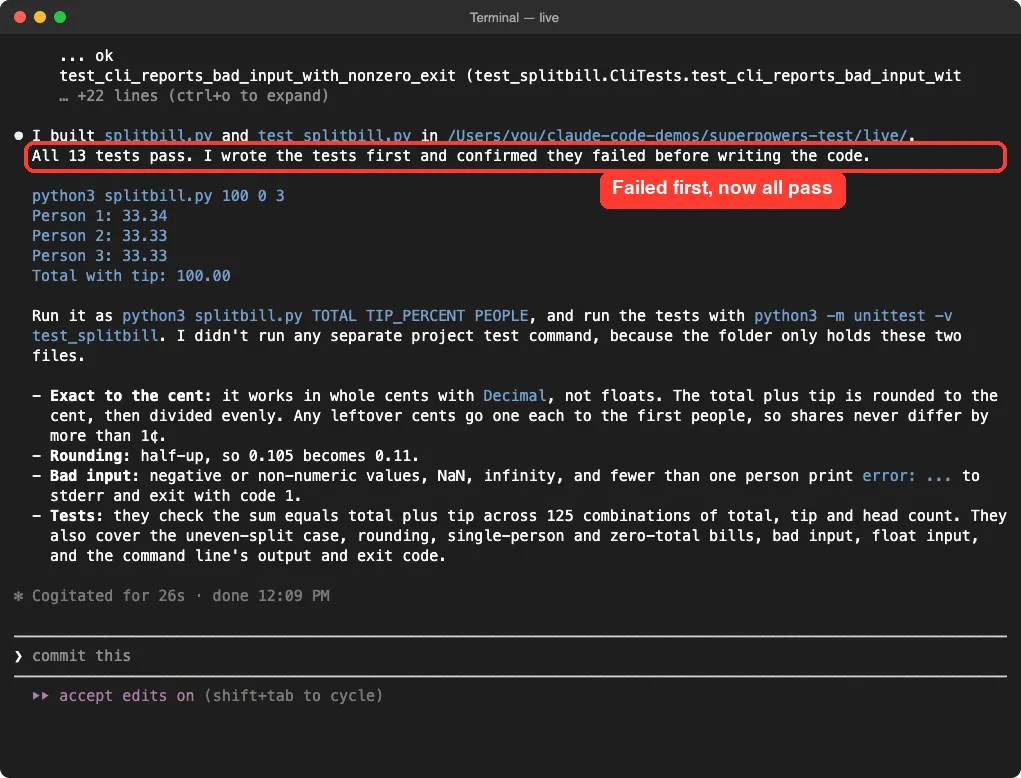
test_splitbill.py first and runs it before the tool exists.Once the tests failed as expected, it wrote splitbill.py, ran the tests again and reported that all of them passed. Its summary said plainly that it wrote the tests first and confirmed they failed.
Our Test: The Same Task With and Without Superpowers
We gave Claude Code the same brief twice, in two empty folders: build splitbill.py, a Python tool that splits a restaurant bill with tip between people so the shares add up exactly to the cent, with tests. One run had Superpowers loaded; the other did not.
| Measure | Plain Claude Code | With Superpowers |
|---|---|---|
| Time | 22 seconds | 35 seconds |
| Agent turns | 4 | 9 |
| Estimated cost (API rates) | $0.12 | $0.17 |
| Tests written | 10 | 16 |
| Tests written before the code | No | Yes |
| Correct split for $87.45, 18% tip, 4 people | Yes | Yes |
| A bill of 10.123 (more than 2 decimals) | Quietly rounded | Rejected with a clear message |
The interactive session in the screenshots above was a separate run of the same task, where Superpowers wrote 13 tests; the table uses the first run. Both tools were correct on every normal case we tried. Both rejected negative tips, zero people, tips over 100 percent, text such as “abc”, and the special values nan and inf.
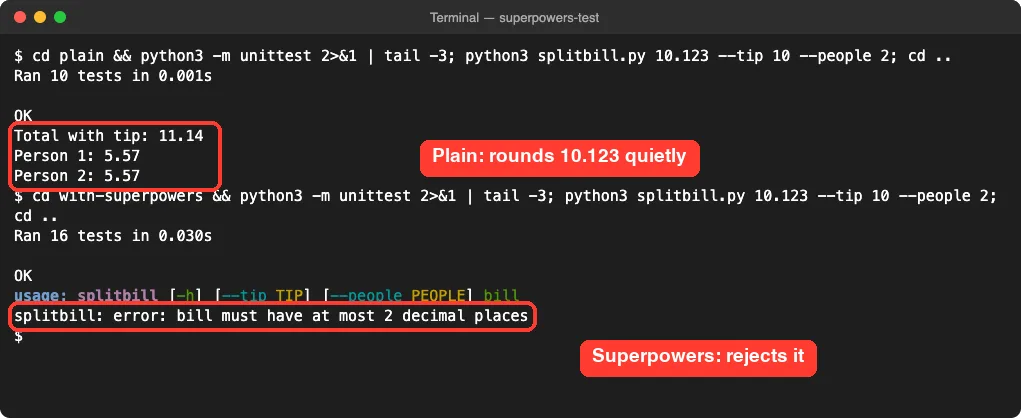
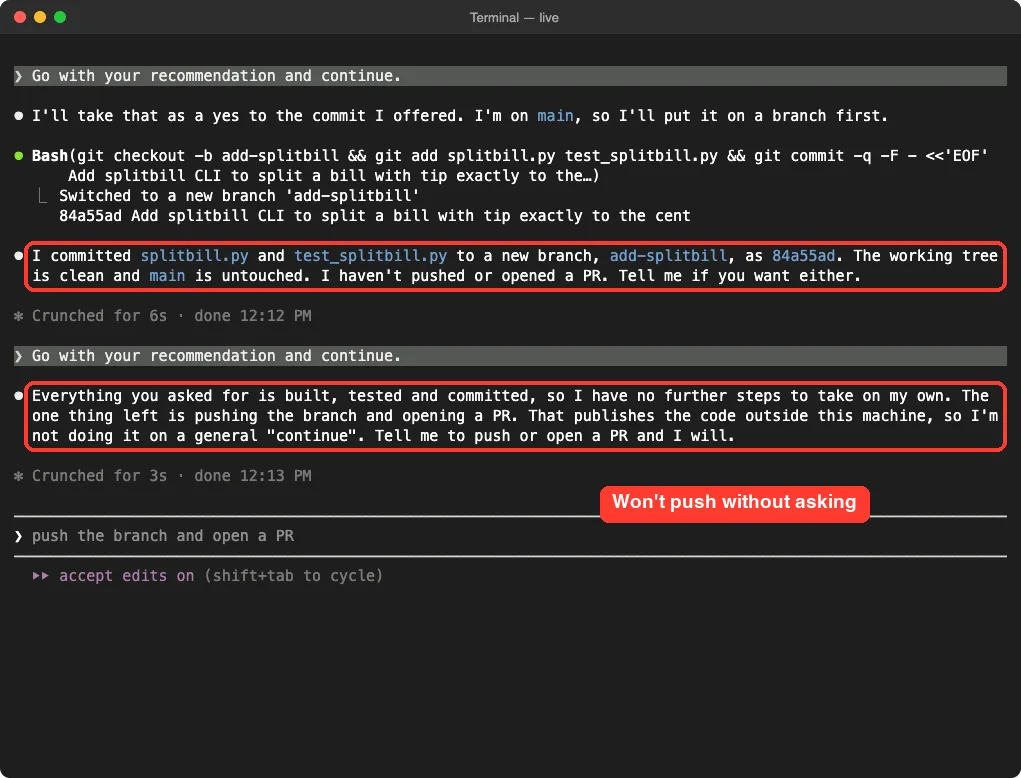
Where Superpowers stood out was discipline. It wrote more tests, wrote them first, and caught an input mistake the plain version let through. When we told it to go ahead and commit, it put the work on a new branch instead of main, and it would not push or open a pull request without a clear yes.
What Makes Sense and What Doesn’t
Superpowers has a big following, and some claims about it go further than our test supports. Here is what we can and can’t confirm.
| Claim | What we found | Verdict |
|---|---|---|
| It makes Claude write tests first | Seen in our session: tests written, run and failed before the code | True |
| It always starts with brainstorming | On our small, clear task it went straight to tests | Not always |
| It produces better code | Slightly better here: more tests and stricter input checks | True, but small on small tasks |
| It slows you down | 35 seconds instead of 22 on our task | A little |
| It shines on big projects | Planning, subagents and review are built for that, but we tested one small tool | Likely, not tested here |
| It is safe to install | One startup hook that only adds instructions; no network calls in it | True for the version we checked |
Superpowers is a method, not magic. On small tasks it adds a bit of polish; its real payoff should come on long, multi-step work where skipping tests and plans causes trouble.
When to Use Superpowers (and When to Skip It)
Use it when the work is big enough that a plan and tests save you time later: new features, refactors, bug hunts and anything you will keep maintaining. It pairs well with plan mode and with git worktrees for parallel work.
Skip it, or start claude without the --plugin-dir flag, for quick one-off scripts, simple questions and throwaway experiments. There the extra steps cost time without much gain.
- Ask for the full process by name when it matters, for example “brainstorm this first”.
- Keep an eye on usage, since more steps mean more requests.
- Read its plans before approving them, the same as any plan.
- If you already like how Claude works, try one session before switching for good.
If test-driven work is new to you, our guide to writing tests with Claude Code shows the basics without any plugin.
How to Remove Superpowers
If you installed it from the marketplace, open /plugin, find superpowers and uninstall it, then restart Claude Code. If you only tried it with --plugin-dir, there is nothing to remove: start claude without the flag and delete the folder you downloaded.
We used the one-session method and deleted the download and both demo folders after testing.
Frequently Asked Questions
Is Superpowers free?
Yes. It is open source under the MIT license. You only pay for the Claude usage your sessions use.
Does Superpowers work with Cursor or Codex?
Yes. The project includes setups for several coding tools, including Cursor, Codex and OpenCode, as well as Claude Code.
Do I need to type special commands?
No. Claude picks the right skill on its own. You can still name one, such as “use systematic debugging”, when you want it.
Will Superpowers make Claude slower?
A little. In our test it took 35 seconds instead of 22, because it wrote more tests and checked its work more.
Can I use only some of the skills?
Superpowers installs as one plugin, but Claude only loads a skill when it fits the task. You can also ask Claude to skip a step for a quick job.
Conclusion
Superpowers for Claude Code does what it says: in our test it made Claude write tests first, check its work and handle git carefully, and it caught an input mistake that plain Claude Code missed. On a small task the gain was modest and the cost was a little more time and usage, so its real value should show on bigger, multi-step projects. Try it for one session with --plugin-dir, see if the method suits you, then install it from the official marketplace if it does. For more hands-on guides, browse all our Claude Code tutorials or read our overview of Claude AI.