Claude Code test-driven development means you ask Claude to write a failing test first, then the smallest code that makes it pass, and only then tidy up. You stay in charge of the rules, and Claude does the typing and the test runs. The result is code that comes with a safety net from the very first line.
Many people let Claude write the code first and add tests later, or never. That works until a small change quietly breaks something. In this guide you will follow a real red, green, refactor loop in a throwaway project, see exactly what Claude did at each step, and learn the prompts that kept it on track.
This post answers one of the most common Claude Code questions. It is part of our Claude Code tutorials collection, so browse all our Claude Code tutorials for more guides like it.
Tested with Claude Code v2.1.316 on 2026-11-02. We tested on macOS with Python’s built-in unittest; the same prompts work with any test runner.
Quick Answer: How to Do TDD With Claude Code
Do TDD with Claude Code in four moves. Tell it to write the tests but not the code, run them and watch them fail, ask for the smallest code that passes, then repeat for each new rule. Keep the test command in your CLAUDE.md so Claude never has to guess it.
| Step | What you ask Claude | What you should see |
|---|---|---|
| 1. Red | Write the tests. Do not write the code yet. Run them. | The run fails |
| 2. Green | Write the smallest code that makes them pass. | All tests pass |
| 3. New rule | Add this test first, show it fail, then fix the code. | One failure, then all green |
| 4. Refactor | Clean up the code and run every test again. | Still all green |
A test you never saw fail proves nothing. Make Claude show you the red run every time.
What Is Claude Code Test Driven Development?
Test-driven development, or TDD, is a way of writing code in very small loops. You write a test that describes one behavior, you watch it fail, you write just enough code to pass it, and then you clean up. Developers call the three stages red, green and refactor.
The order matters because the failing test proves the test can actually catch a problem. If you write the code first, a test that passes might be passing for the wrong reason. We saw this happen in our own run, and we show it below.
Why TDD fits Claude Code so well
Claude Code works in a loop of gathering context, taking action and checking results. A test suite is the best “check results” step you can give it. The official best practices page asks whether Claude knows what done looks like, and names a failing test it has to turn green as one good answer.
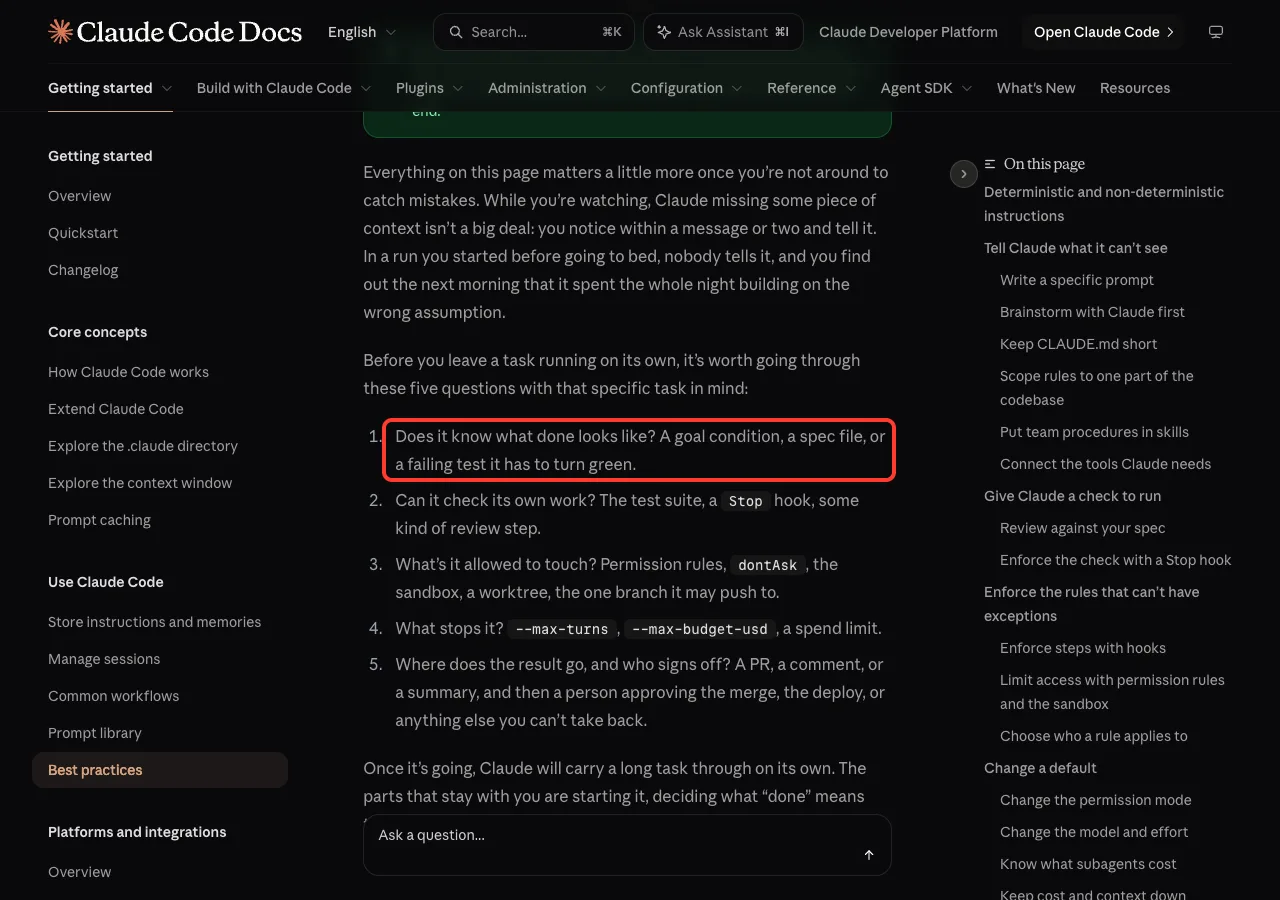
In other words, TDD gives Claude a target it can verify by itself. You do not have to read every line to know whether it worked, because the tests tell you. You can read more about how Claude Code decides when it is finished in our guide to the /goal command.
Set Up a Practice Project
We made a throwaway folder with one file. It is a CLAUDE.md that tells Claude how to run the tests and to stay inside the Python standard library. If you have never written one, our guide to the CLAUDE.md file explains the idea, and the CLAUDE.md template gives you a copy-ready example.
# Demo project

Tiny Python practice project. Run the tests with: python3 -m unittest -v
Use only the Python standard library. Keep files small.
That second line of the file is the important one. The official docs say the single most useful line in your CLAUDE.md is the command that runs your tests. When Claude knows it, every red and green run uses the same command.
Start Claude Code with fewer approval prompts
TDD means many small file edits and test runs. To keep the demo smooth we started Claude Code in accept edits mode and pre-approved only Python commands.
claude --permission-mode acceptEdits --allowedTools "Bash(python3:*)"File edits then go through without a prompt, and python3 commands run on their own. Anything else, such as deleting files, would still ask first. Our guide to permission modes explains every option, and you can press Shift+Tab inside a session to switch modes.
Claude Code TDD Step 1: Write Tests First (Red)
Our goal was a small function called slugify that turns a title into a web-friendly slug. For example, “Hello, World!” should become “hello-world”. We gave Claude the rules and, importantly, told it not to create the code file yet.
Let's do TDD. Write test_slugify.py for a function slugify(text) that will
live in slugify.py: lowercase output, spaces become hyphens, punctuation is
removed. Do NOT create slugify.py yet. Run python3 -m unittest -v, then
reply in two short lines.
Claude wrote an 18-line test file with three tests, ran the suite and reported the failure. The run was red because the module did not exist yet, which is a valid first red step.
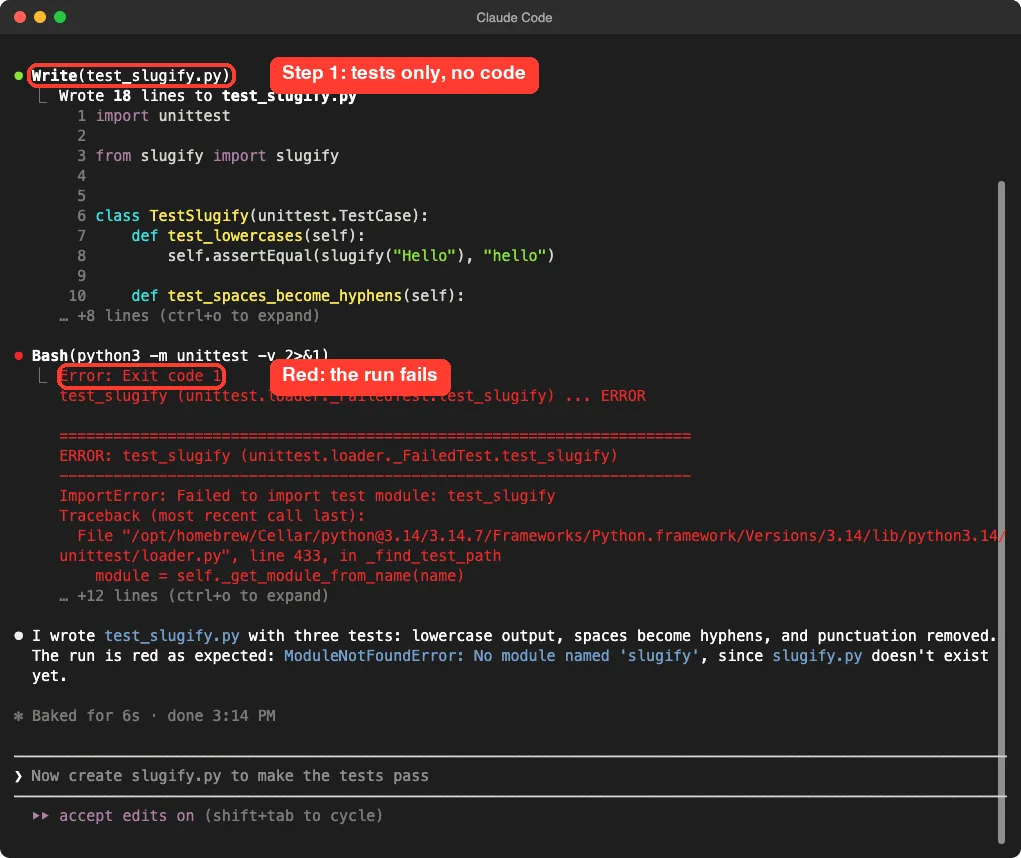
Notice the words “Do NOT create slugify.py yet”. Without that line, Claude may write the tests and the code in one go, and you never see a red run. Saying it out loud costs nothing.
Is an import error a real failing test?
It counts as red, but it is the weakest kind. Python could not even load the test file, so none of the three tests ran.
That is fine for the very first step. If you want a sharper red, ask Claude to create an empty function that returns nothing, so each test fails on its own line.
Step 2: Write the Smallest Code That Passes (Green)
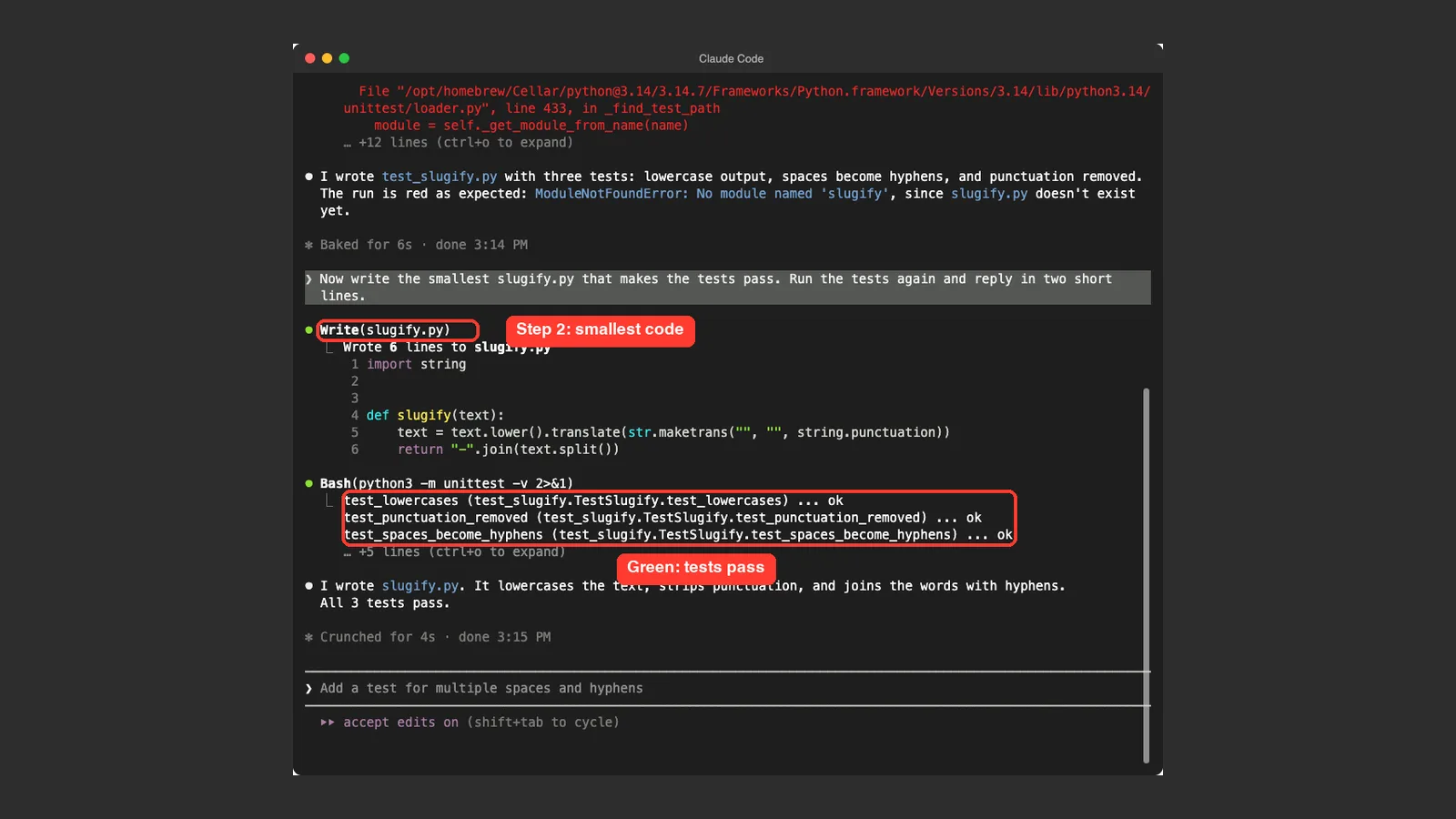
Next we asked for the smallest possible implementation. The phrase “smallest” keeps Claude from adding features nobody asked for.
Now write the smallest slugify.py that makes the tests pass. Run the tests
again and reply in two short lines.
Claude wrote a six-line file, ran the suite, and all three tests passed. The code lowercases the text, removes punctuation with Python’s string.punctuation table, and joins the words with hyphens.
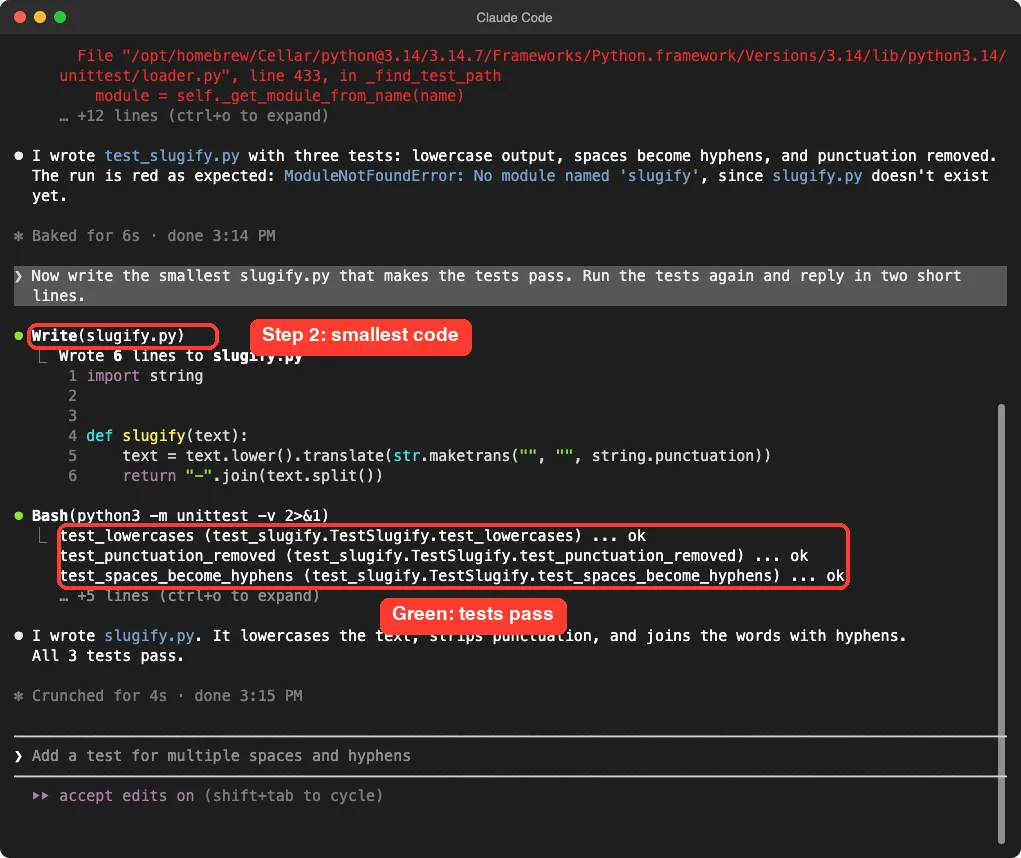
This is the moment to read what Claude wrote. Six lines are easy to review. In a real project you would also read the tests, because the tests are now the spec you own.
Step 3: Add a New Rule and Watch It Fail
Now comes the part that makes TDD worth the effort. We added a new rule: hyphens inside words must stay, so “well-known tool” becomes “well-known-tool”. The first version of the code removed every hyphen, so it should break.
New rule: hyphens inside words must stay, so 'well-known tool' becomes
'well-known-tool'. Add that test first, run it to see it fail, then fix
the code and run all tests. Reply in three short lines.
Claude added test_inner_hyphens_kept and ran the suite. The new test failed while the other three still passed, which is exactly the red state we wanted. Then Claude changed one line in slugify.py to stop stripping hyphens and ran everything again.
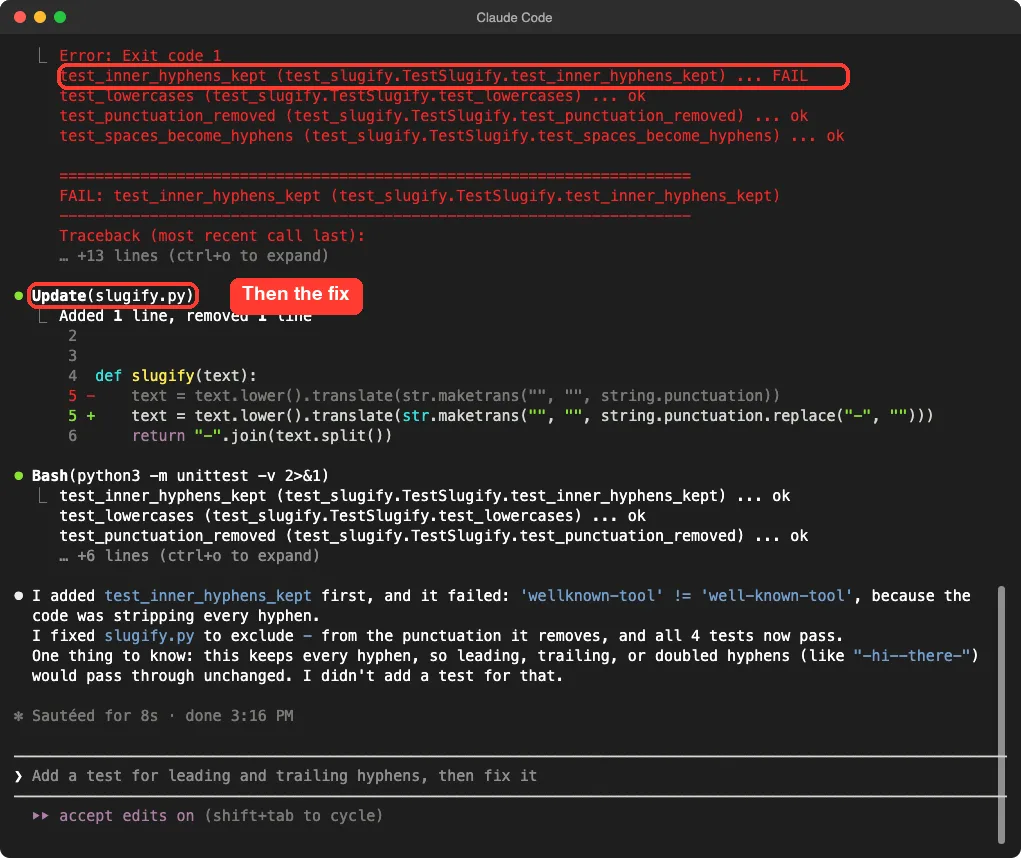
Claude’s summary said the test failed with 'wellknown-tool' != 'well-known-tool' because the code was stripping every hyphen. It also warned that leading, trailing or doubled hyphens would now pass through unchanged, and that no test covered them yet. That honest note is a gift: it tells you what to test next.
When a New Test Passes on the First Run
In our first, separate attempt we asked for a different rule: leading and trailing hyphens must be removed. Claude added the test and ran it, and it passed immediately. Claude said so plainly: there was no red step, and it had not changed the code.
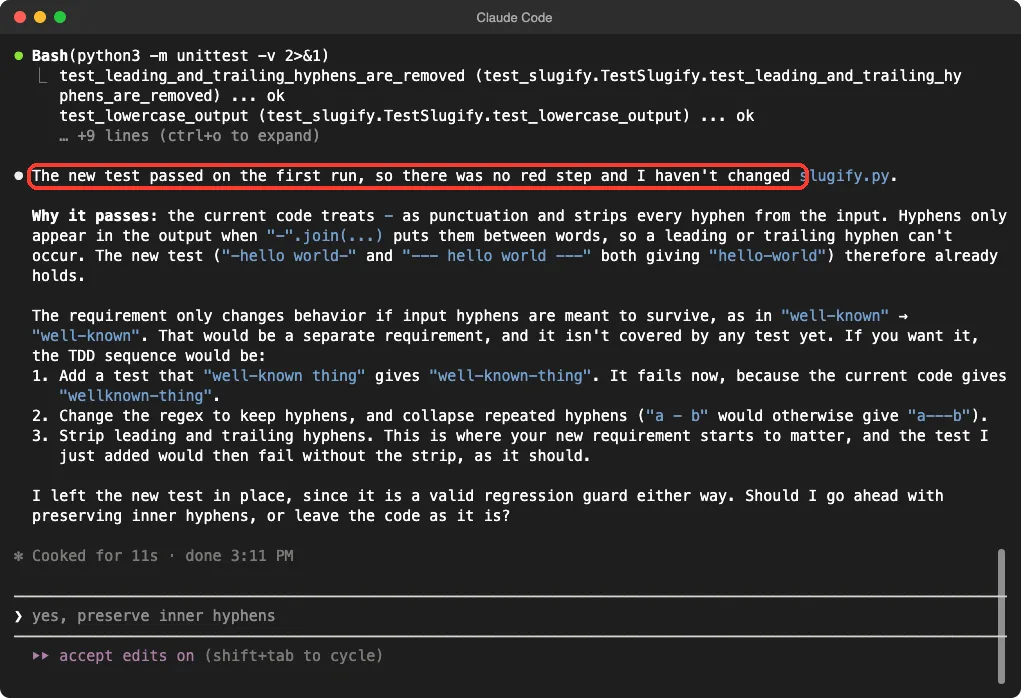
The reason was that the old code already stripped every hyphen, so none could be left at the edges. The test was valid, but it did not describe a behavior we were missing.
That is why you ask Claude to run each new test before fixing anything. If it does not fail, either the rule is already met or the test is checking the wrong thing.
What to do when there is no red step
- Read the new test and ask whether it can really fail.
- Try a clearly broken input and see if the test catches it.
- Keep the test as a guard against future changes, but do not count it as proof of new work.
- Ask Claude which behavior is still untested.
Step 4: Refactor With Tests as a Safety Net
Refactoring means changing how code is written without changing what it does. Once your tests pass, you can ask Claude to tidy up and trust the suite to catch mistakes.
Refactor slugify.py so it is easy to read. Do not change behavior.
Run all tests when you are done and tell me the result.
We did not run a separate refactor in our demo, because six lines had nothing to tidy. We list the prompt because it is the third stage of the loop and you will need it in bigger files. If a test fails after the refactor, you can roll back with /rewind, which our commands cheat sheet covers.
The Claude Code Test Driven Development Loop at a Glance
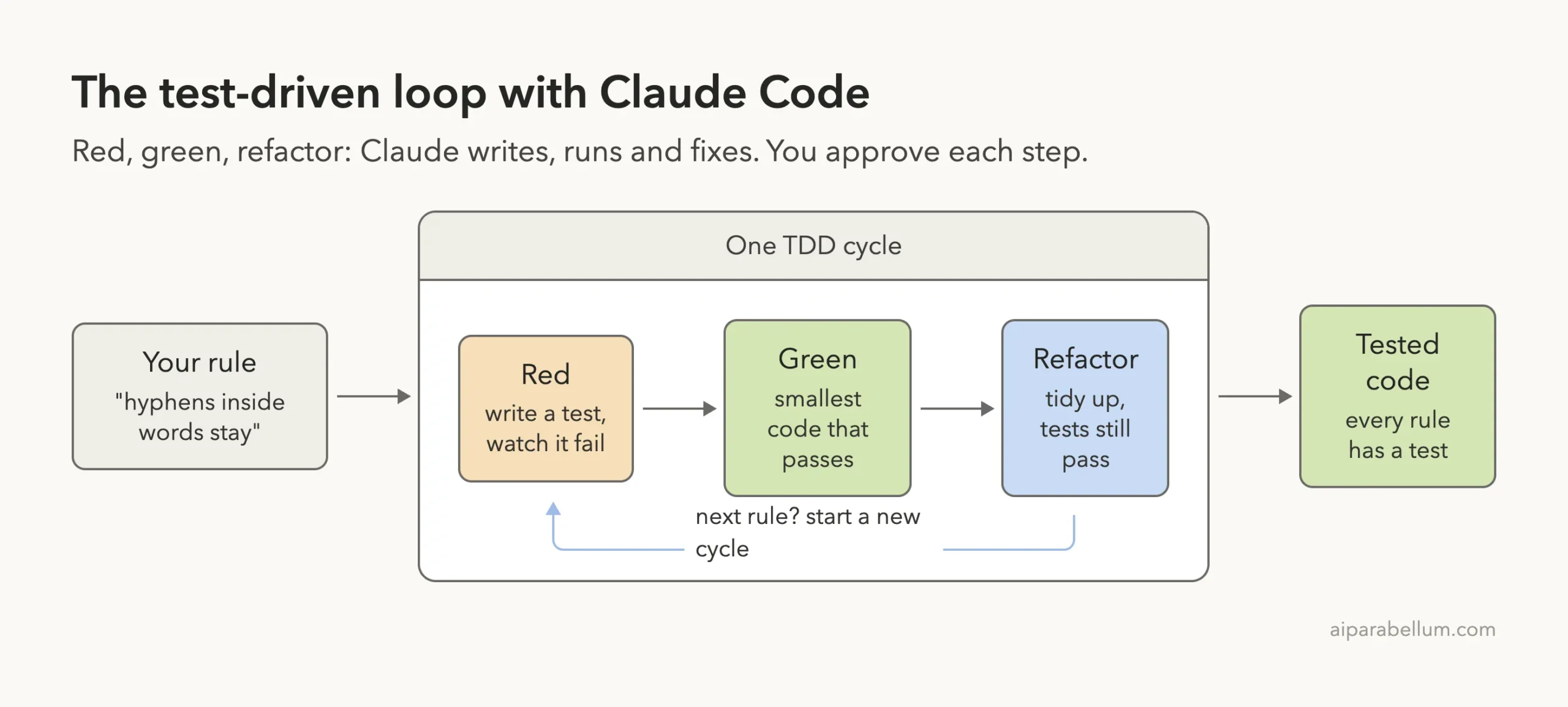
Think of every rule as its own small cycle. You never write more than one failing test at a time, and you never leave the loop with a red suite. That keeps each Claude Code session easy to review and easy to undo.
Make Claude Keep Going Until the Tests Pass
Sometimes the green step takes more than one attempt, especially in real projects. The official docs describe three ways to make Claude keep going until the check passes, and they apply neatly to TDD.
- In the prompt, ask Claude to run the tests after and keep going until they pass. Claude decides for itself when it is satisfied.
- As a goal, use the
/goalcommand with a condition such as all tests in a folder passing. A separate model checks the condition after every turn. - As a
Stophook, run your test script whenever Claude tries to end its turn, and send it back to work if the script fails.
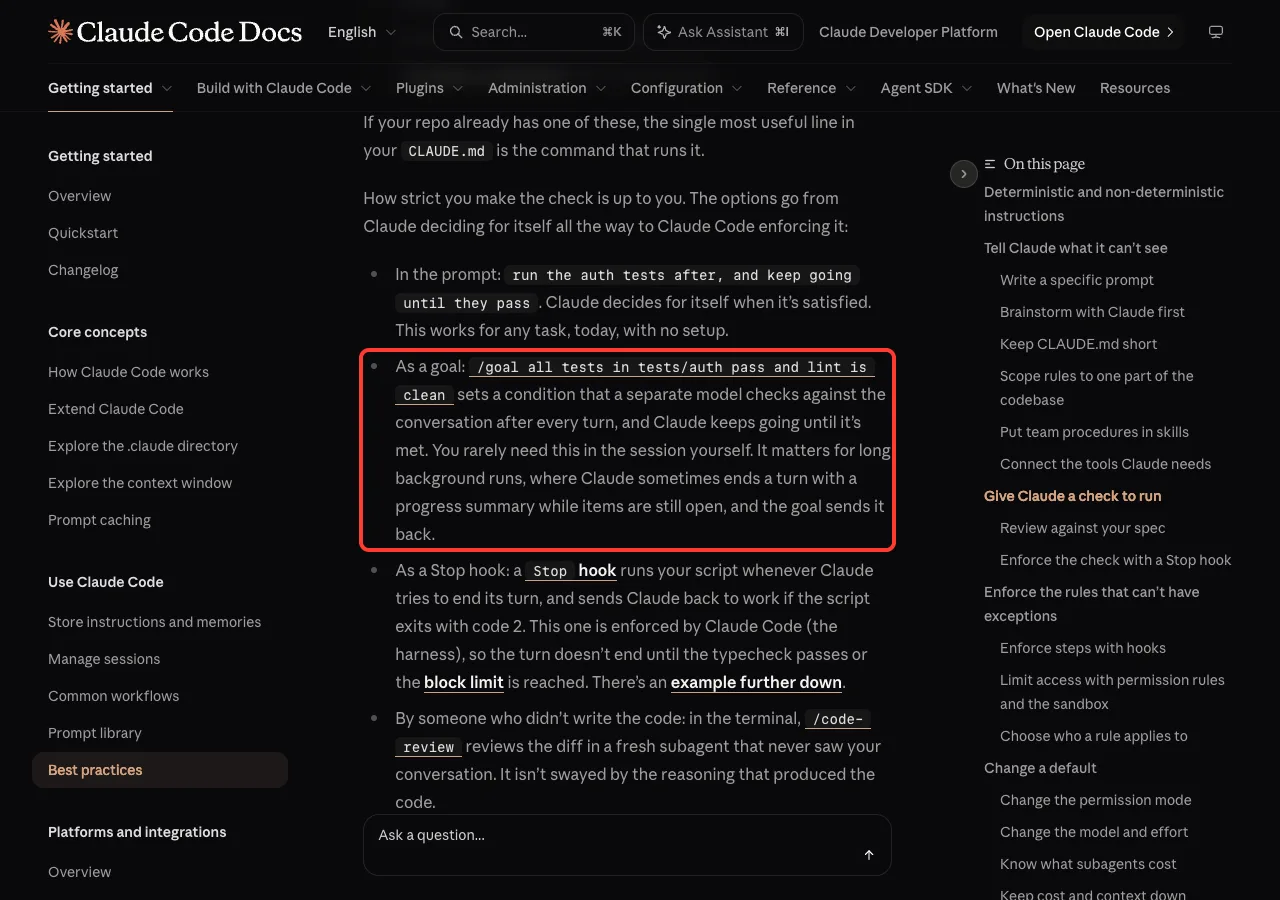
The docs say the goal option matters most for long background runs. For a short TDD loop like ours, a clear prompt was enough. For the hook route, see our guide to Claude Code hooks.
Try It Yourself
Here is a practice task you can run in any empty folder. Create a CLAUDE.md with your test command, start Claude Code, and paste this prompt.
Let's do TDD. Write test_wordcount.py for a function word_count(text) in
wordcount.py. It should count words separated by any whitespace and return 0
for an empty string. Do NOT create wordcount.py yet. Run the tests and show
me they fail. Then wait for my go-ahead before writing any code.
When the red run looks right, say “Now write the smallest code that passes.” Then add one new rule at a time, such as ignoring punctuation or counting hyphenated words as one. Always ask for the failing run before the fix.
Common Mistakes
- Letting Claude write the tests and the code together, so you never see a red run.
- Asking for too many rules at once. One rule per cycle keeps failures easy to read.
- Skipping the review of the tests. Claude can write a test that passes for the wrong reason.
- Forgetting to put the test command in
CLAUDE.md, so Claude picks a different command each time. - Treating a test that passed on the first run as proof that new work happened.
- Letting a long session pile up. Use
/clearbetween unrelated features, as explained in our guide to the context window.
Pro Tips
- Use plan mode first on bigger features, so Claude lists the test cases before writing any. Our plan mode guide shows how.
- Ask Claude to reply in two or three short lines, as we did, so the red and green results stay readable on screen.
- When Claude warns about an untested edge case, copy that warning straight into your next prompt as the new rule.
- Run the whole suite, not just the new test, after every fix. A fix for one rule can break another.
- Commit after every green run, so each cycle is a safe checkpoint.
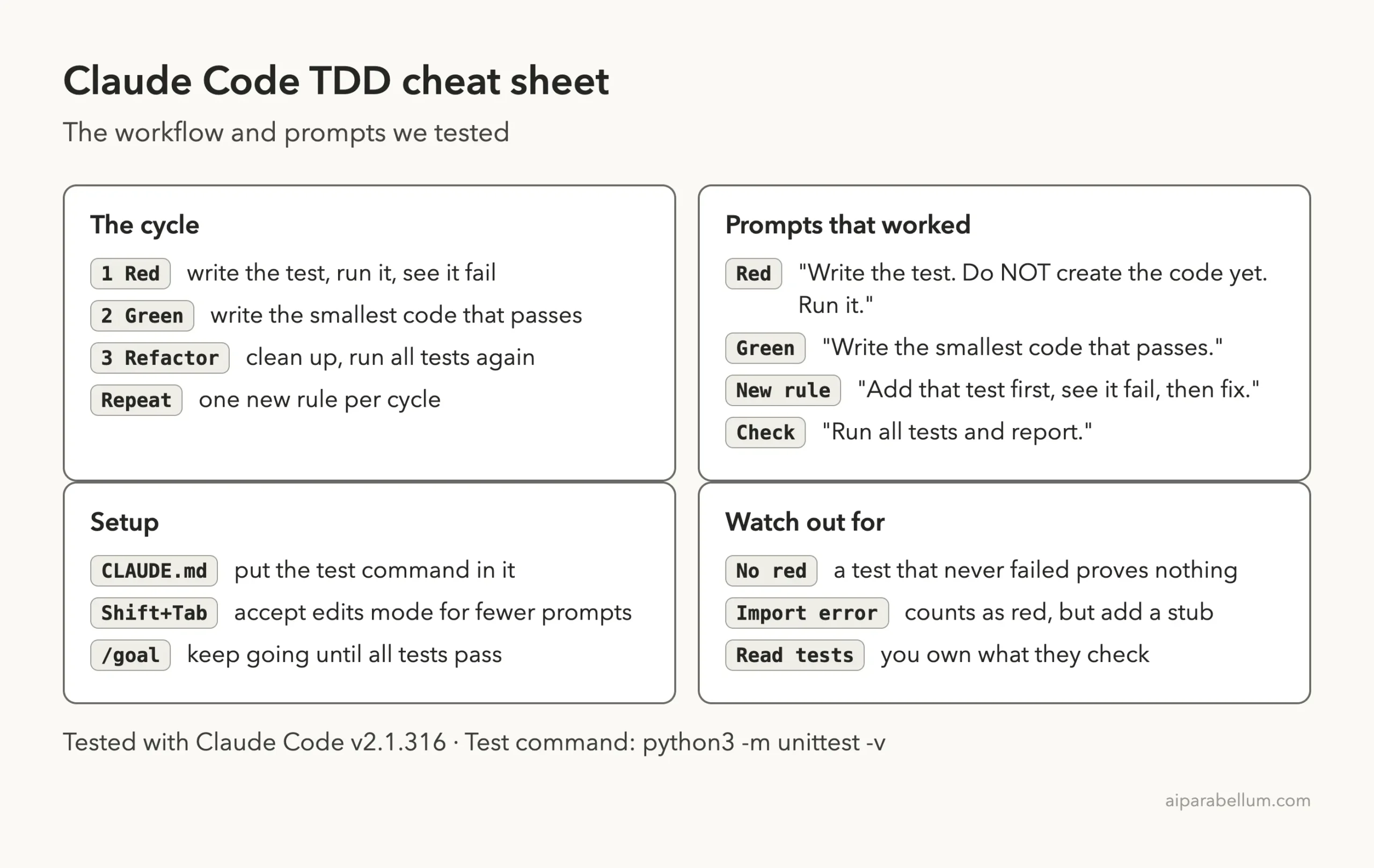
Claude Code TDD Cheat Sheet
Frequently Asked Questions
Can Claude Code do test-driven development?
Yes. In our test Claude wrote the failing tests, ran them, wrote the smallest passing code, and fixed a new rule after watching its test fail. It works best when you state the order in the prompt and tell Claude not to write the code early.
How do I stop Claude from writing the code before the tests?
Say it directly in the prompt, for example “Do NOT create slugify.py yet.” In our run Claude followed that instruction and only wrote the test file in the first step.
Which test framework should I use?
Use the one your project already has. We used Python’s built-in unittest because it needs no install, and the test command went into CLAUDE.md. The same workflow applies to any runner Claude can call from the terminal.
What if the new test passes right away?
It means the behavior already worked, or the test is not checking what you think. Ask Claude why it passed, as we did, and look for the rule that is still untested. Keep the test as a guard, but do not count it as new proof.
Do I need to approve every test run?
Not if you pre-approve it. We started Claude Code with accept edits mode and --allowedTools "Bash(python3:*)", so file edits and Python commands ran without prompts while other commands still asked.
Conclusion
Claude Code test-driven development works when you set the order in your prompt: tests first, a visible red run, the smallest passing code, then a refactor. In our demo Claude wrote three tests, turned them green with a six-line file, and fixed a new hyphen rule only after its test failed. Keep the test command in CLAUDE.md, add one rule per cycle, and read the tests yourself. To go deeper on the model behind it all, see our Claude guide, and read the official best practices page for more ways to give Claude a check to run.