If you are wondering what’s new in Claude Code this week, here is the short answer: charts inside the terminal, scheduled tasks that live for 30 days and a code review that sticks to bugs. Anthropic shipped five versions between November 16 and November 20, 2026. We tried the main changes in small demo folders and wrote down what really happens.
This weekly roundup is part of our Claude Code tutorials. If you missed the previous one, read last week’s roundup first.
Tested with Claude Code v2.1.330 on November 23, 2026, on macOS, inside small throwaway demo folders. Everything else in this post comes from the official changelog entries dated November 16 to November 20, 2026, and the linked docs pages.
What’s New in Claude Code: The Week at a Glance
The changelog lists five versions for this week and 956 entries in total. Its own section counts add up to 613 bug fixes, so the list of changes you will notice is much shorter.
| Version | Date | Headline change | Entries |
|---|---|---|---|
| 2.1.326 | November 16, 2026 | A warning for incomplete --allowedTools rules, plus a tighter sandbox | 367 |
| 2.1.327 | November 17, 2026 | MCP server JSON can come from a pipe | 173 |
| 2.1.328 | November 19, 2026 | /code-review reports bugs and marks how serious each one is | 144 |
| 2.1.329 | November 19, 2026 | The trust dialog names the file that holds hooks | 130 |
| 2.1.330 | November 20, 2026 | Built-in charts and 30-day scheduled tasks | 142 |
Charts Inside Claude Code With Easel
Version 2.1.330 lists easel, a built-in mod that draws charts. A mod is a small add-on that changes what Claude Code shows or does, and our guide to Claude Code mods covers the idea in full.
Easel draws in two cases: when you ask for a chart, and automatically under MCP results that hold metrics over time. You install nothing, so we simply asked:
Draw a line chart of visits to a recipe site: Mon 120, Tue 180, Wed 150, Thu 240, Fri 310, Sat 420, Sun 390.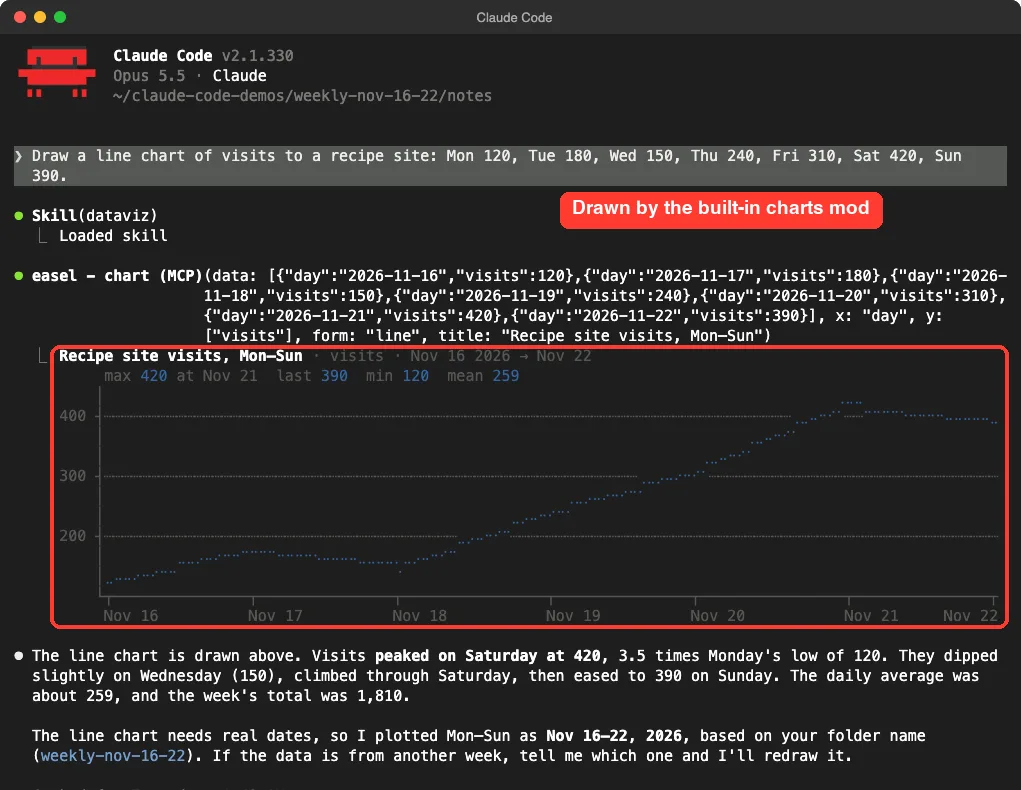
The chart came back with its axis, its highest and lowest values and the average. One detail to watch: a line chart needs real dates, so Claude picked November 16-22 from our folder name and told us about it. If you have real dates, put them in the prompt.
Who Gets Easel Charts
- Plans: Pro and Max, and Team and Enterprise where available. You must be signed in with a claude.ai subscription.
- Platforms: macOS and Linux. The mods docs say Linux inside WSL is not included.
- Off switch: turn off Auto charts in
/configto stop only the automatic ones, or disablecc-plugin-easelin/plugin.
Scheduled Tasks and /loop Now Run for 30 Days
A recurring task in Claude Code used to end seven days after you made it. From 2.1.330, recurring tasks and the /loop command can run up to 30 days while their session keeps running, and they say when they end.
We asked for a weekday reminder in plain English:
Every weekday at 9am, read TODO.md and tell me what is due. Keep it recurring.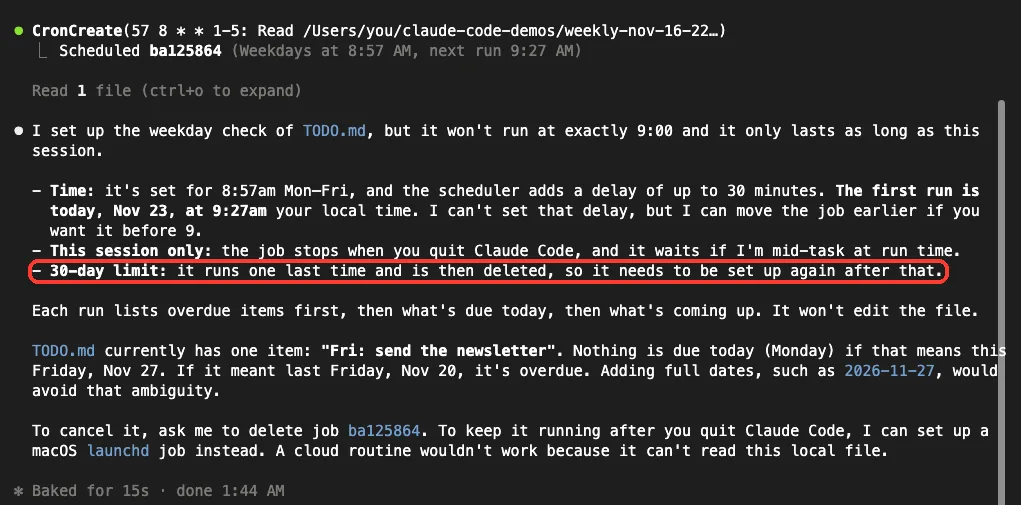
Two things in that answer are worth knowing. The job does not fire at exactly 9:00, because the scheduler adds a delay, and it lives only as long as the session.
Tasks made before 2.1.330 still end at seven days. When we checked, the scheduled tasks docs still described the older seven-day rule, so trust the changelog and the message in your own session.
/tasks Now Lists Scheduled Work
Version 2.1.329 made /tasks far more useful. It now shows this session’s scheduled tasks, /loop wakeups, the goal and this conversation’s forks, and x stops one after asking.
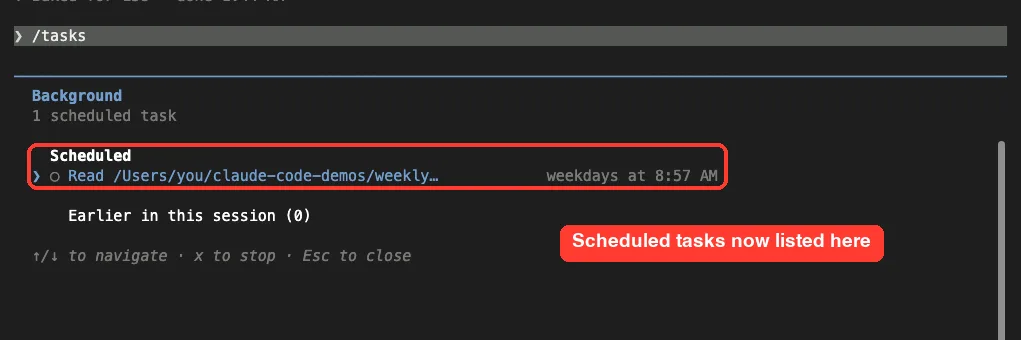
The same version changed saved tasks. In new signed-in sessions, most tasks saved by earlier versions need scheduling again, although --resume of their own session still runs them. Choosing “Exit and stop tasks” now also ends the session’s scheduled tasks, unless you exit while Claude is responding.
/code-review Sticks to Bugs and Checks the Whole Branch
The code review command changed twice this week. On most models, 2.1.328 made it report only bugs and CLAUDE.md violations, mark each finding Important, Pre-existing or Nit, and end each summary with a suggested fix.
Then 2.1.329 changed what it looks at. With no target, it now reviews the whole branch against the default branch, and a problem that lost the diff on branches with several commits is fixed.
Our Code Review Test
We made a tiny repository with a main branch and a feature branch of two commits, and planted one bug in each commit. Then we ran this on the feature branch:
/code-review medium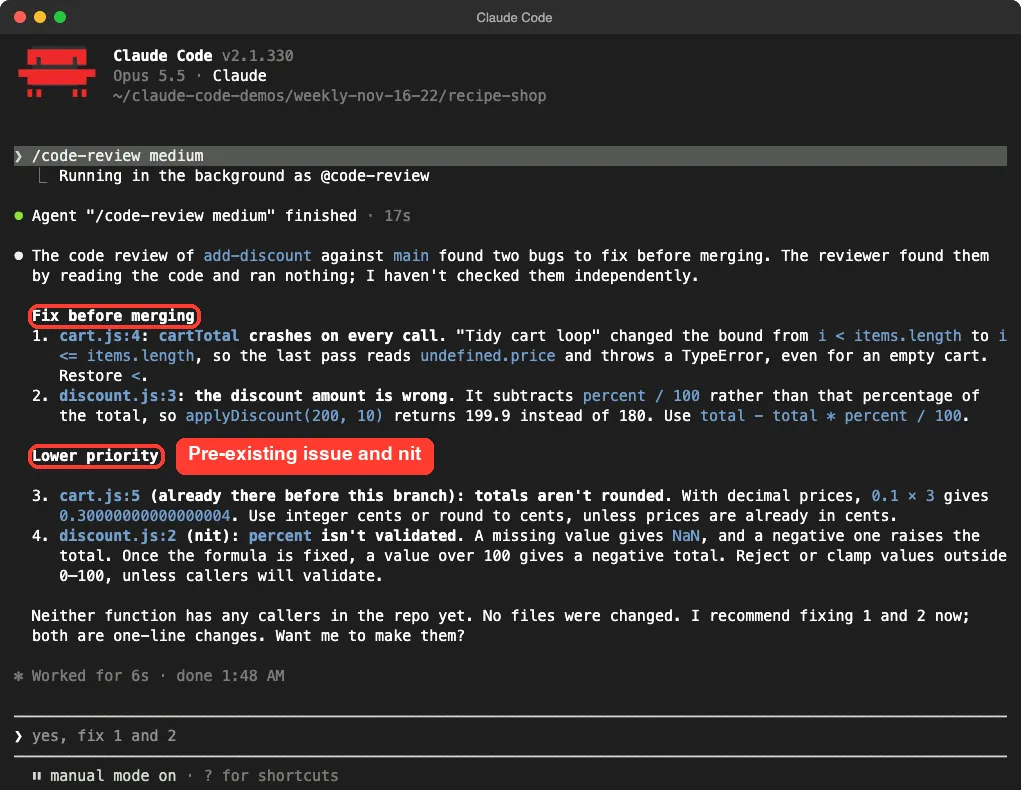
It compared the branch with main and found both planted bugs, one from each commit. It also listed an issue that was there before the branch and a nit about input checks, each with a suggested fix. No files were changed.
We also ran /code-review low on the same branch. It listed only the two planted bugs, which is what you want for a quick check.
Use /code-review to find bugs and /simplify to clean up code. Since this week they are two separate jobs on most models.
One more fix matters if you review pull requests. /code-review with a PR number could sometimes review the checked-out branch without saying so. It now reads the pull request with gh pr diff, or says when it can’t.
The Trust Dialog Names the File With Hooks
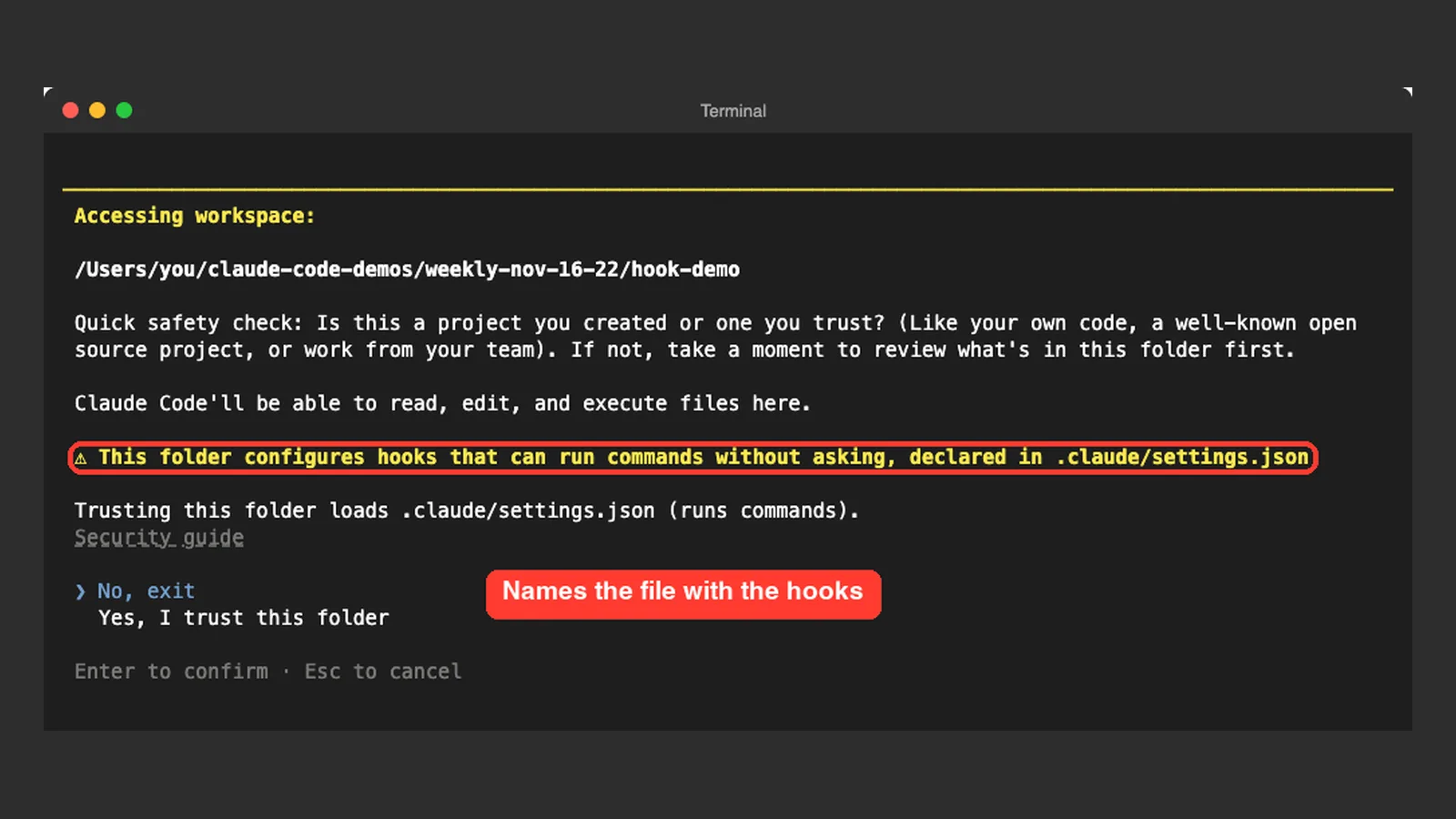
When you open a folder for the first time, Claude Code asks if you trust it. Version 2.1.329 made that question more useful: if the folder sets up Claude Code hooks, the warning now says where they are declared.
Hooks can run commands on your computer without asking, so this is the line to read before you press Enter. We put one harmless hook in a demo project and opened it.
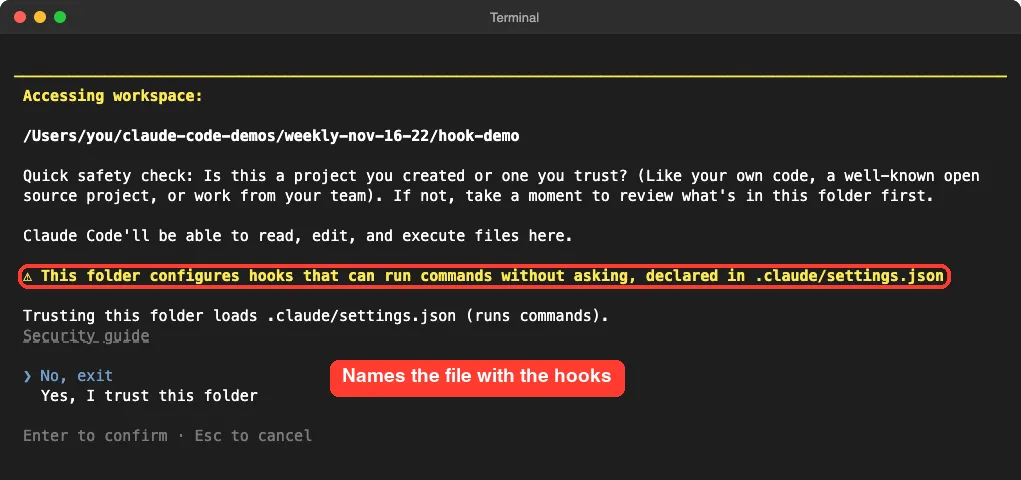
If you see this warning in a project you just downloaded, choose No, exit, open the named file in a text editor and read it first.
The trust prompt also shows up in a new place. From 2.1.326, --add-dir and /add-dir in local terminal sessions ask about a folder you have not trusted yet.
A Warning for Broken –allowedTools Rules
Version 2.1.326 added a startup warning for an --allowedTools, --disallowedTools or --tools value that doesn’t look like a complete rule. We left out a closing bracket on purpose:
claude --allowedTools "Bash(git status"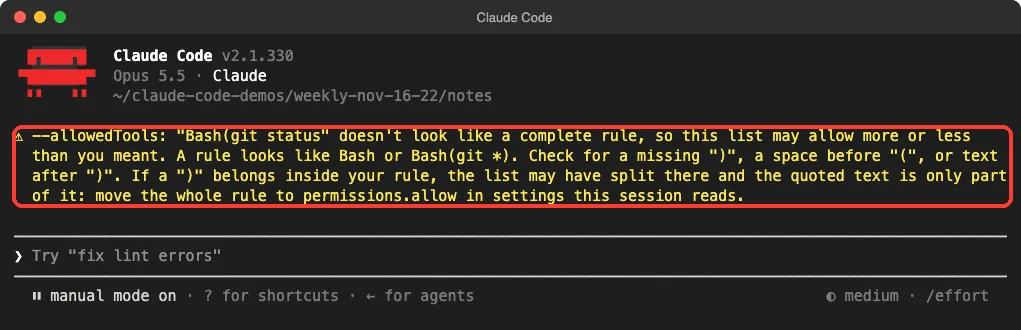
The message says the list may allow more or less than you meant. If you keep these flags in scripts, start each one by hand once after updating. Our guide to permission rules shows the correct shape.
Add MCP Servers From a Pipe
The MCP server command claude mcp add-json can now read the server’s JSON from standard input. That keeps tokens off the command line. Put a dash where the JSON would go:
cat server.json | claude mcp add-json demo-server - --scope project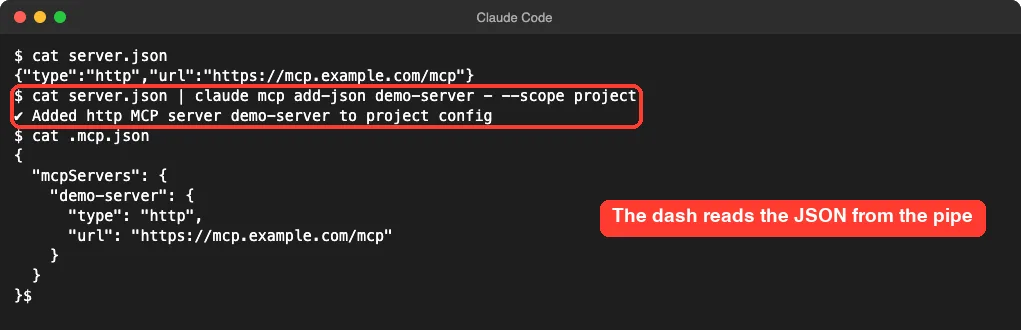
It needs 2.1.327 or later, and it doesn’t work inside a Claude Code session. Keep in mind that --scope project writes to .mcp.json, which teams usually share, so leave real tokens out of that file.
claude mcp add No Longer Overwrites an Odd File
The same version made claude mcp add --scope project safer. If .mcp.json lists its servers at the top level with no mcpServers key, the command now stops instead of overwriting the file.
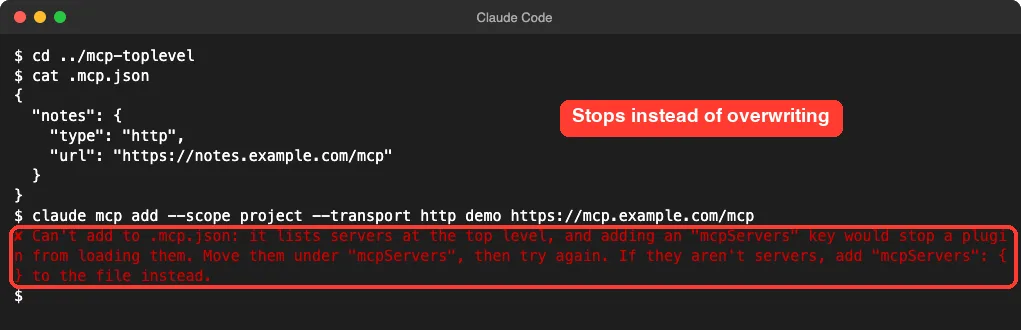
Risky Commands Ask More Often
This section follows the changelog. We did not run destructive commands just to see a prompt.
- More
rmcommands aimed at the root, home, a top-level folder or the working folder ask for approval. Where nobody can answer, they are refused. - Sandboxed commands on macOS, Linux and WSL can no longer write to some sensitive home folders by default. Some can be allowed with
sandbox.filesystem.allowWritein user or managed settings. - Claude’s file tools refuse writes to Claude Code’s sign-in files, such as
.credentials.json. - Some
cpandmvcommands ask first. ExitWorktreeasks before removing a worktree that may hold unsaved work.
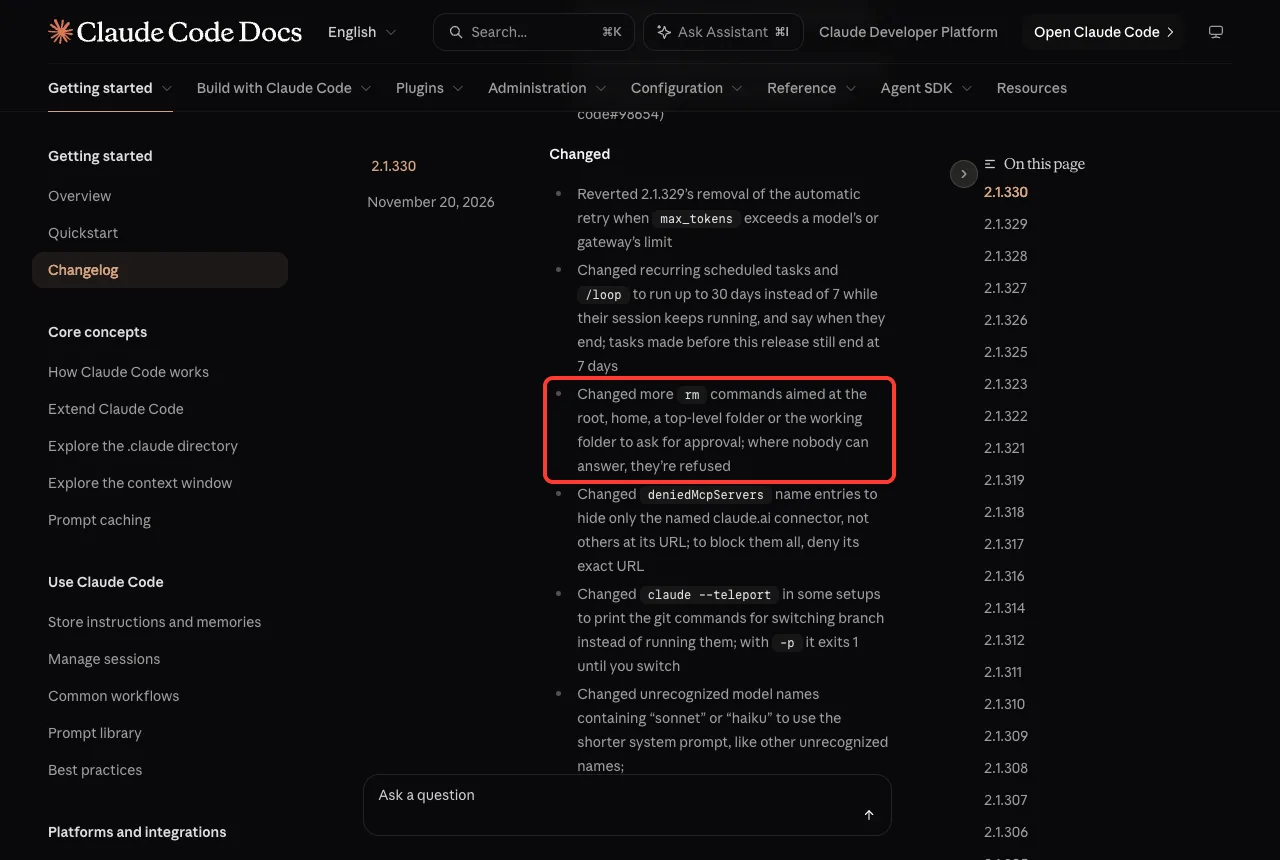
The common thread is unattended work. A script that ran quietly last week can now be refused, so test yours once. Our sandbox guide explains which folders a sandboxed command can write to.
VS Code Extension Updates
The VS Code extension got a long list of additions. We did not run these ourselves, so the list follows the changelog.
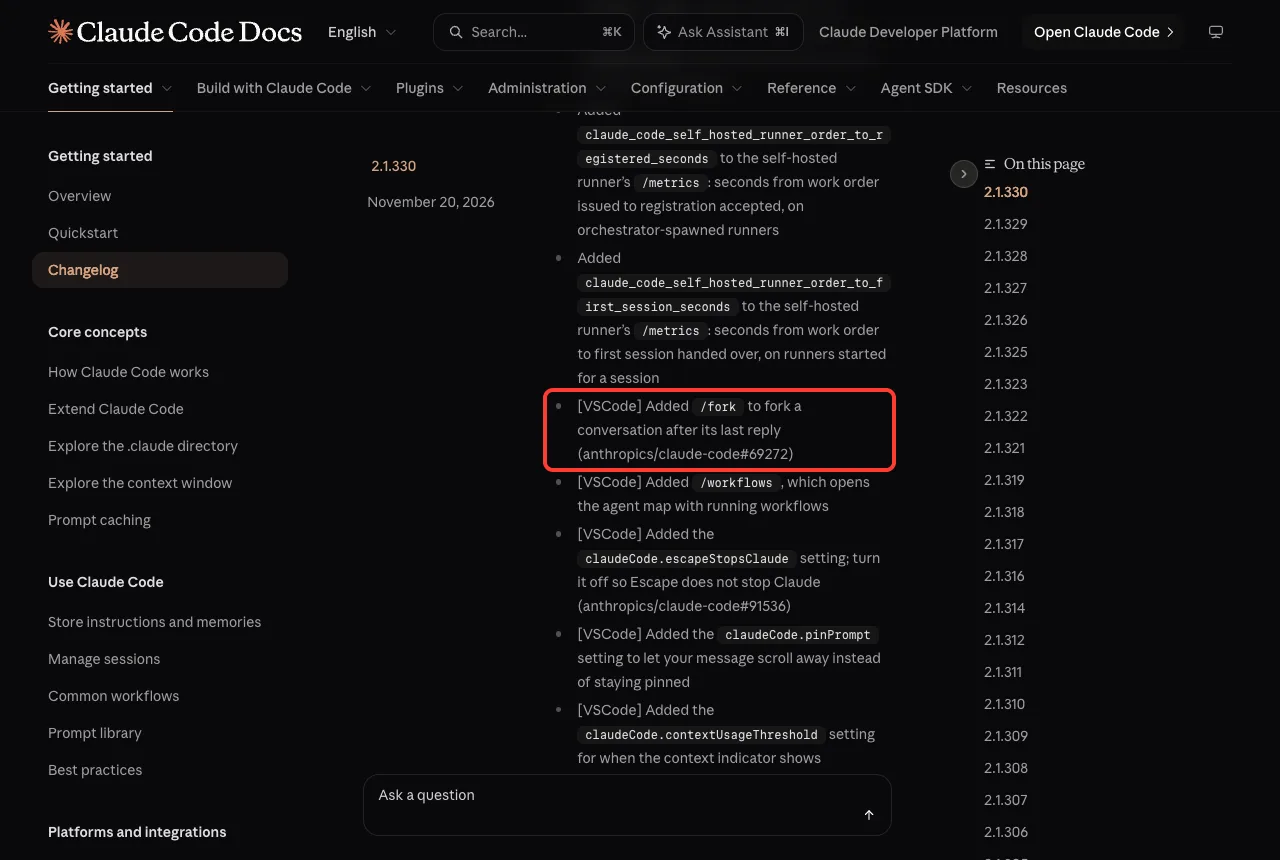
/forkforks a conversation after its last reply./workflowsopens the agent map with running workflows.- “Claude Code: Add to Chat” in the Explorer’s right-click menu @-mentions the selected files and folders.
- Turn off
claudeCode.escapeStopsClaudeso Escape does not stop Claude. - Turn off
claudeCode.promptSuggestionsif you don’t want suggested prompts. - After you decline the trust prompt, Review trust brings it back without reloading the window.
Smaller Claude Code Updates Worth Knowing
/bugasks Yes or No before sending a report.Ctrl+Oshows startup notices that were hidden./tui classicis a new name for the non-fullscreen renderer./install-github-appasks before it changes a repository.- Arrow keys on most permission prompts stop at No instead of wrapping around.
- First-run setup preselects the “Auto (match terminal)” theme instead of Dark mode.
- Code Mode can now be turned on with agent teams enabled, or with OpenTelemetry events and metrics enabled.
Do You Need to Change Anything?
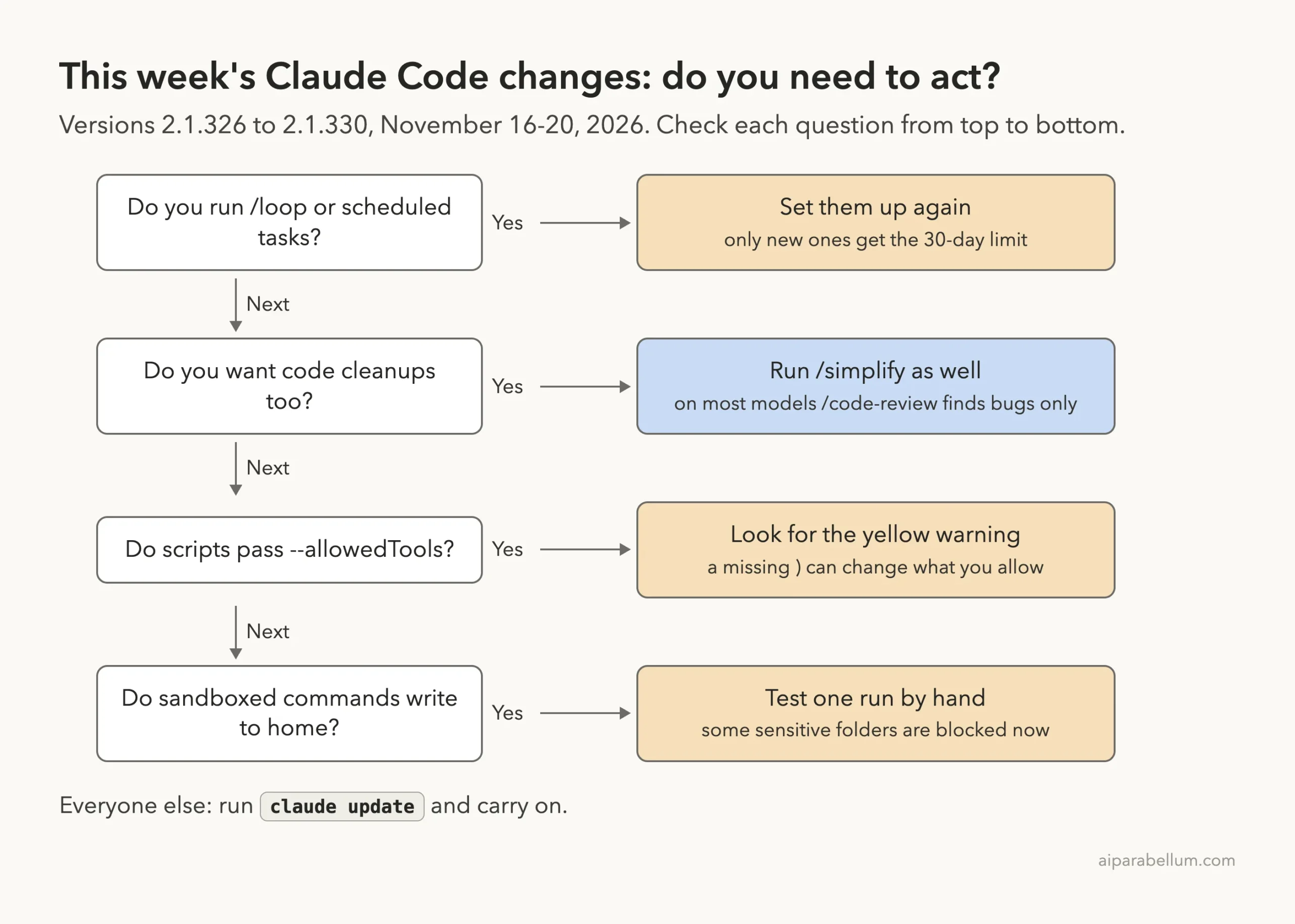
Most people only need to update. This diagram covers four cases where this week’s releases ask something of you.
Should You Update?
Yes. The week brings 613 listed bug fixes, and everything we tried on 2.1.330 worked. If you run unattended scripts, plan ten minutes to test them, because more commands can now ask or be refused.
- Run
claude updatein your terminal. - Run
claude --versionand check that it shows 2.1.330 or newer. - Start
claudein a project and read any yellow warnings above the prompt box. - Set up long-running scheduled tasks again if you want the 30-day limit.
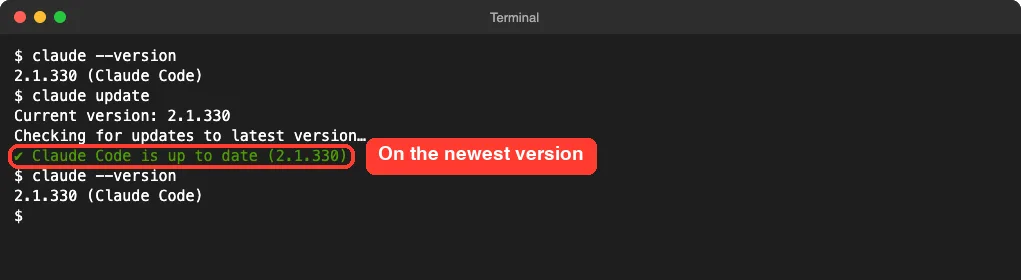
If the update does not go through, our update guide walks through the usual causes.
Also Fixed This Week
The changelog’s section counts are 233 fixes in 2.1.326, 100 in 2.1.327, 91 in 2.1.328, 91 in 2.1.329 and 98 in 2.1.330. A few that many people will feel:
- Claude Code no longer freezes for up to several minutes right after compacting a very long conversation.
- WebFetch no longer freezes the session for minutes on some pages.
~/.claude.jsonis no longer sometimes reset to defaults when a network stall or file lock interrupts a save.- macOS: repeated sign-outs when Claude Code could read the Keychain but not save to it are fixed.
- Bash commands in zsh no longer stop with a “not found” error at a word that starts with
=, such asecho ====. /exportno longer overwrites an existing file without asking.- VS Code: copying a code block no longer adds a trailing newline that ran the command on paste.
Try It Yourself
Want to see the new review behavior safely? Make a tiny git repository, commit a short script on main, then create a branch and break the script in two separate commits. Start Claude Code there and paste:
/code-review lowCheck that both commits show up in the result. Then start a new session, ask for a daily reminder and type /tasks to find it under Scheduled.
Common Mistakes
- Expecting an old task to last 30 days. Tasks made before 2.1.330 still end at seven.
- Expecting
/code-reviewto suggest cleanups. On most models that is now the job of/simplify. - Pressing Enter through the trust dialog without reading the file it names.
- Closing the terminal and expecting a session task to keep running.
Pro Tips
- Give easel real dates for a line chart, so Claude does not have to guess them.
- Pick the review effort yourself.
lowwas enough for our two planted bugs, andmediumadded two smaller findings. - Use
/tasksbefore you leave a session, so you know what would stop with it. - New to the tool? Our Claude overview explains what it can do beyond the terminal.
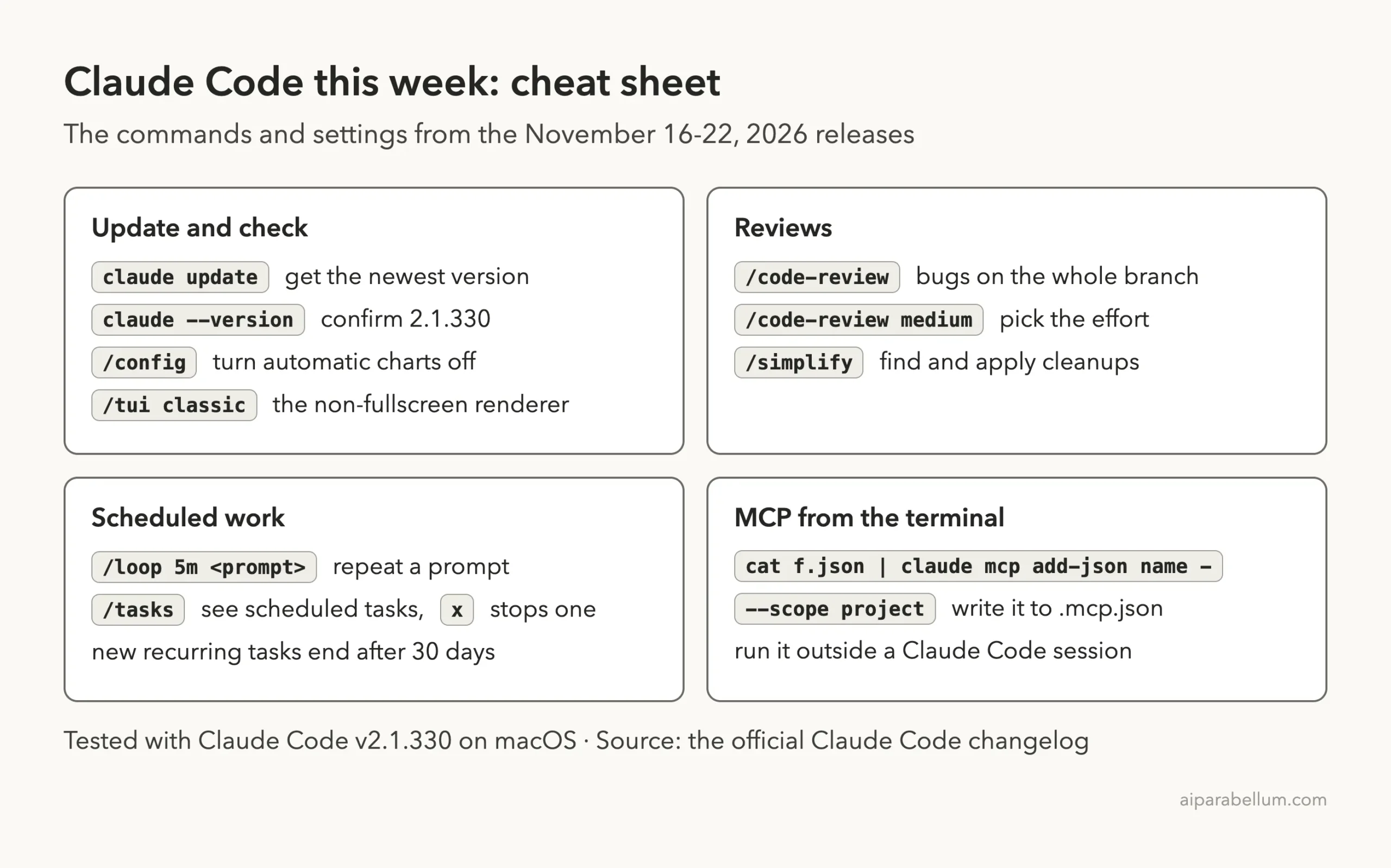
This Week’s Cheat Sheet
Frequently Asked Questions
What is the latest Claude Code version this week?
The newest version released between November 16 and November 22, 2026 is 2.1.330, dated November 20. Run claude --version to see yours.
How do I turn off charts in Claude Code?
Open /config and turn off Auto charts to stop the automatic ones. To remove the charts mod completely, disable cc-plugin-easel in /plugin.
Do Claude Code scheduled tasks run when I close the terminal?
No. Tasks made with /loop or by asking Claude belong to the session, so they need it open. claude --resume can bring back recurring tasks that have not expired.
Why does /code-review no longer suggest cleanups?
Since 2.1.328, on most models it reports only bugs and CLAUDE.md violations. Run /simplify for reuse, simplification and efficiency.
Why is Claude Code suddenly asking about rm commands?
Version 2.1.330 asks for approval on more rm commands that target the root, home, a top-level folder or the working folder.
Conclusion
This week gives you charts in the terminal, scheduled tasks that last up to 30 days, a code review that covers the whole branch and clearer warnings about hooks and tool rules. Update with claude update, set up the tasks you want to keep, and test any unattended script once. For every entry, including the fixes we did not list, read the official Claude Code changelog, and browse the rest of our Claude Code tutorials for step-by-step guides.