A Claude Code goal is a finish line you set with the /goal command. Instead of nudging Claude with “keep going” after every reply, you describe what done looks like, and Claude keeps working turn after turn until a separate model confirms the condition holds. It is a simple idea that changes how long tasks feel.
In this guide you will learn how to set a goal, write a condition that works, check its status, read the evaluator’s reasons and clear a goal. We tested every step for real in a tiny Python demo folder, and every screenshot below comes from those sessions.
This is Part 40 of 53 in our Claude Code tutorials series. In the previous part we covered agent teams, where a lead session coordinates helpers; today one session learns to keep itself going.
Tested with Claude Code v2.1.310 on October 25, 2026, on macOS, inside a small throwaway demo folder.
Quick Summary: The Claude Code Goal Command at a Glance
| Question | Short answer |
|---|---|
| What does /goal do? | Keeps Claude working across turns until your condition is met |
| Set a goal | /goal all tests in test/auth pass and the lint step is clean |
| Check status | /goal with nothing after it |
| Clear a goal | /goal clear (stop, off, reset, none and cancel also work) |
| Who decides it is done? | A small fast model that reads the conversation after each turn |
| How many goals at once? | One per session; a new one replaces the old one |
| Longest condition | 4,000 characters |
| Best paired with | Auto mode, so turns don’t pause for permission prompts |
What Is a Claude Code Goal?
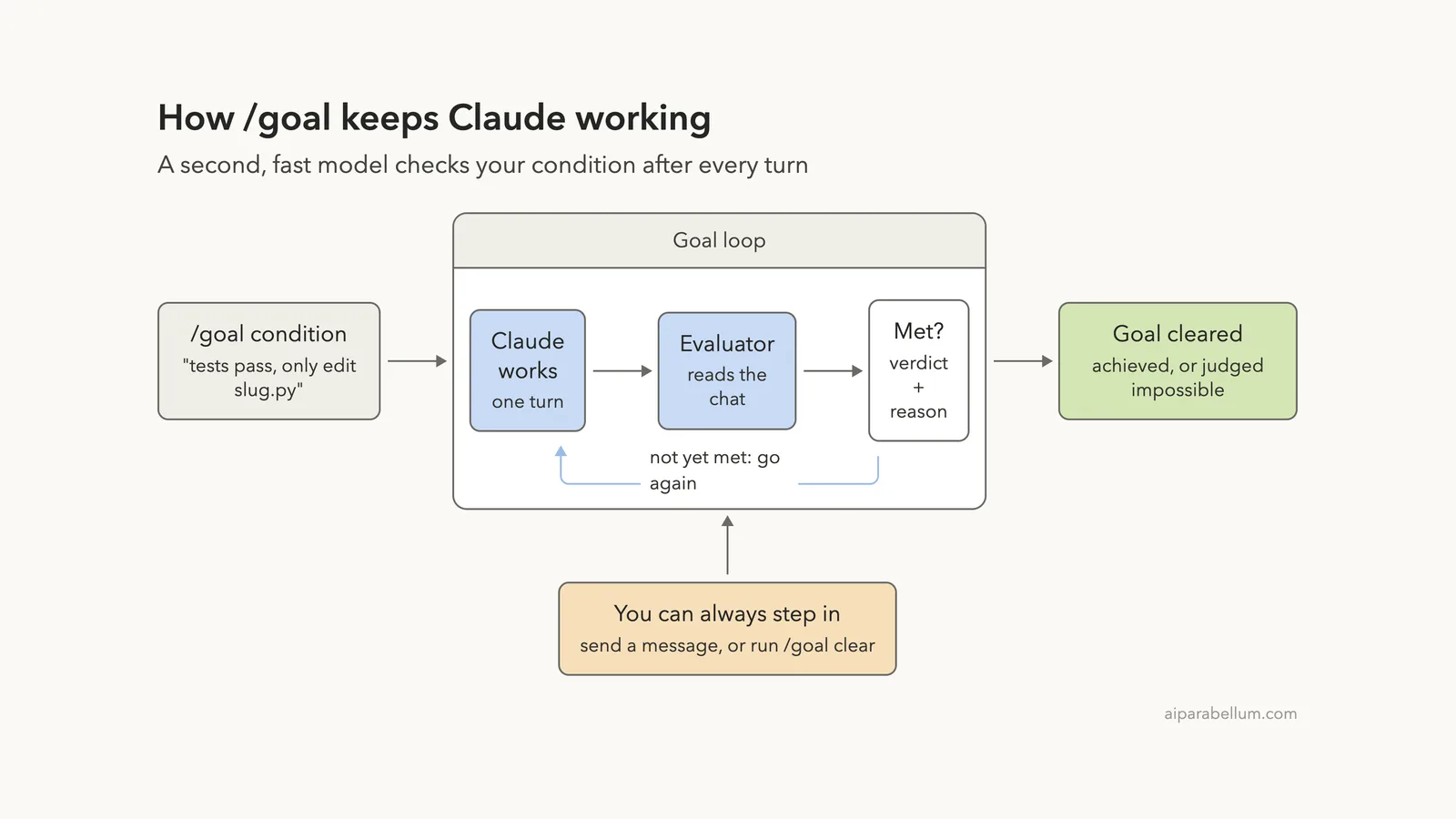
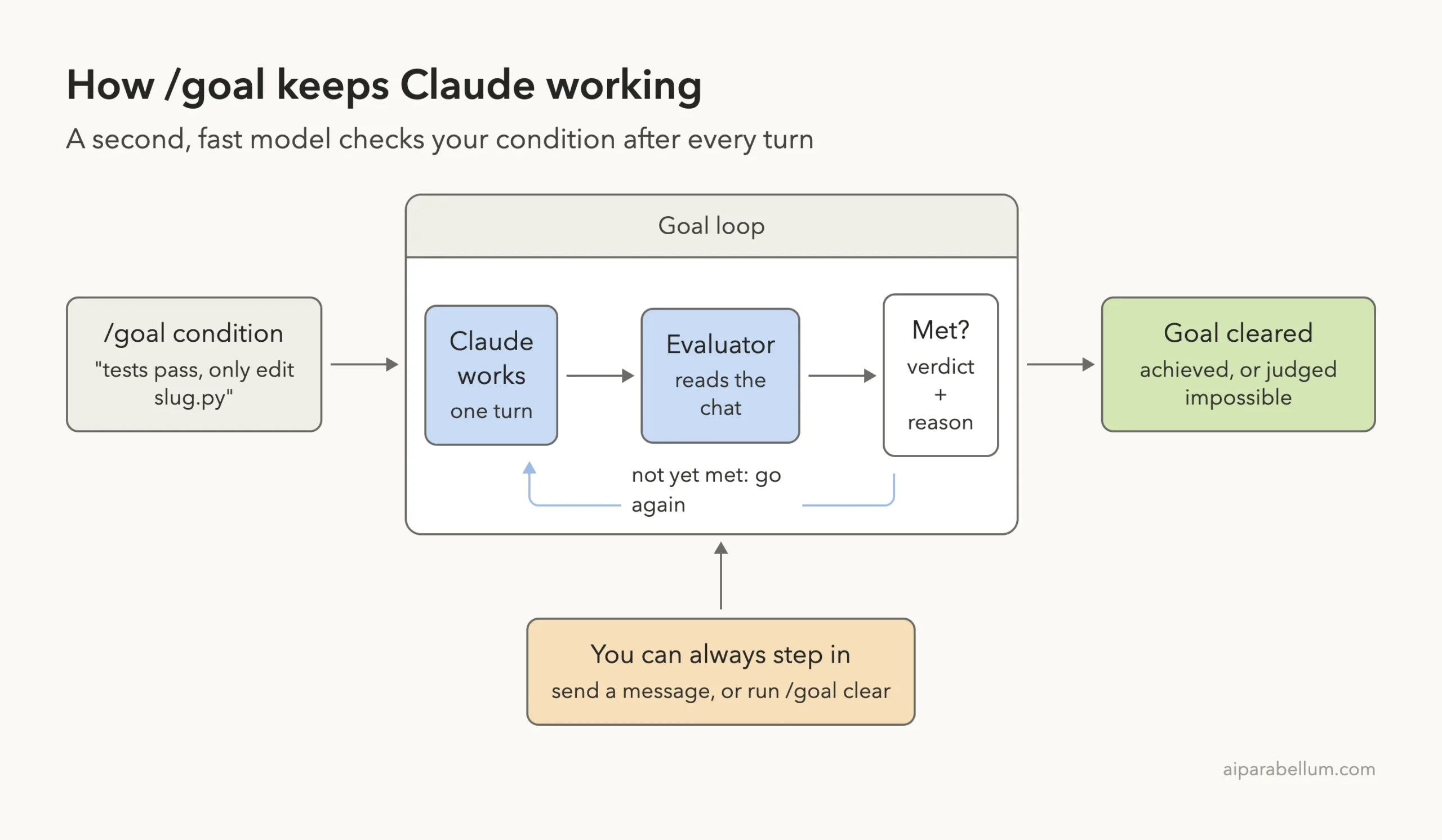
Normally, Claude Code stops when it thinks the job is finished, and then it waits for you. With /goal, a second check runs after each turn. Claude Code sends your condition and the conversation so far to your configured small fast model, and that model returns one of three verdicts.
- Not yet met: Claude starts another turn and uses the evaluator’s reason as guidance.
- Met: the goal clears and an achieved entry appears in the transcript.
- Impossible: the evaluator decided the condition can never be satisfied, so the goal clears with a failed entry and the reason.
The official /goal documentation describes it as a wrapper around a session-scoped, prompt-based Stop hook. If you read our guide to Claude Code hooks, that is the same machinery, just set up for you with one command.
The worker does the job, and a fresh pair of eyes decides when the job is really done.
Why it exists
Big jobs rarely finish in one turn. Migrating a module, working through a list of failing tests or splitting a huge file often takes many rounds of edit, run and check. Without a goal, you sit there typing “continue” every time Claude pauses.
The docs list good fits: migrating a module until every call site compiles and tests pass, implementing a design doc until all acceptance criteria hold, splitting a large file until each piece is under a size budget, and clearing a labeled issue backlog. The common thread is a clear, checkable end state.
Our Demo Setup
We made a small folder with a function called slugify that turns a blog title into a URL slug. A test file checks four titles, and two of them fail because the function only swaps spaces for dashes. That gives Claude a real, measurable target.
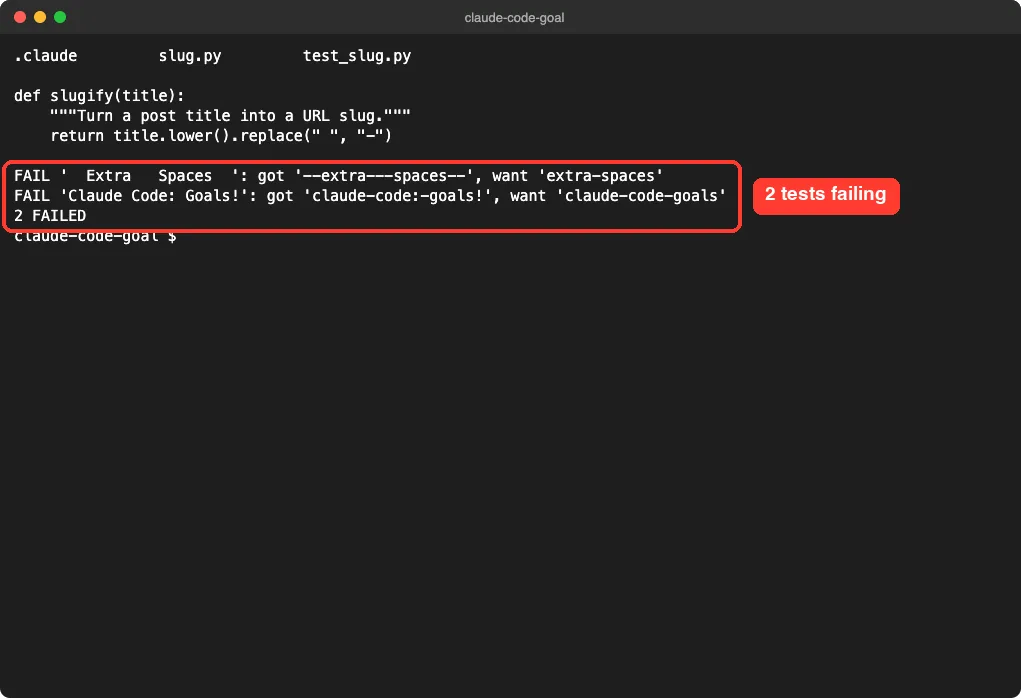
We also added a small project settings file that pre-approves edits to slug.py and the exact test command. As you will see, Claude chose a slightly different command, which turned into a useful lesson about permissions.
How to Set a Claude Code Goal, Step by Step
Step 1: Type /goal
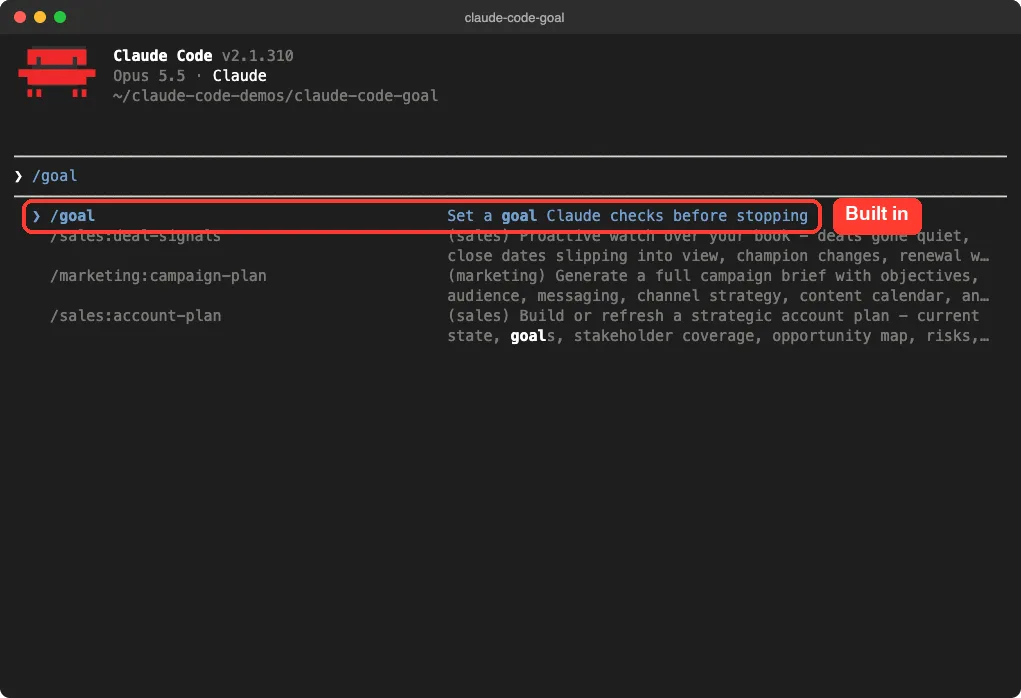
Start Claude Code in your project and type /goal. The command menu shows it as a built-in command with the description “Set a goal Claude checks before stopping.”
Step 2: Add your condition and press Enter
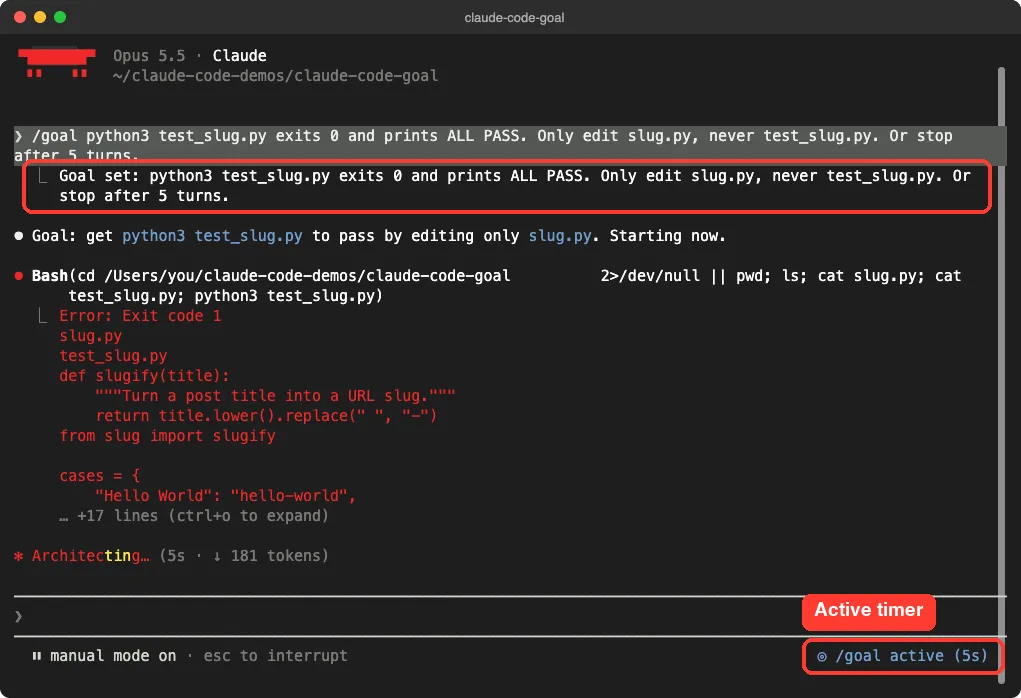
Type the condition right after the command. Here is the exact one we used:
/goal python3 test_slug.py exits 0 and prints ALL PASS. Only edit slug.py, never test_slug.py. Or stop after 5 turns.Setting a goal starts a turn right away, with the condition itself as the instruction, so you don’t need to send a separate prompt. Claude Code confirmed with “Goal set:” and a small “/goal active” timer appeared in the bottom right corner.
Step 3: Watch out for permission prompts
A goal does not change your permission mode. Our settings allowed the plain test command, but Claude ran it with an extra echo of the exit code, so Claude Code stopped and asked for approval. While that prompt waits, the goal waits too.
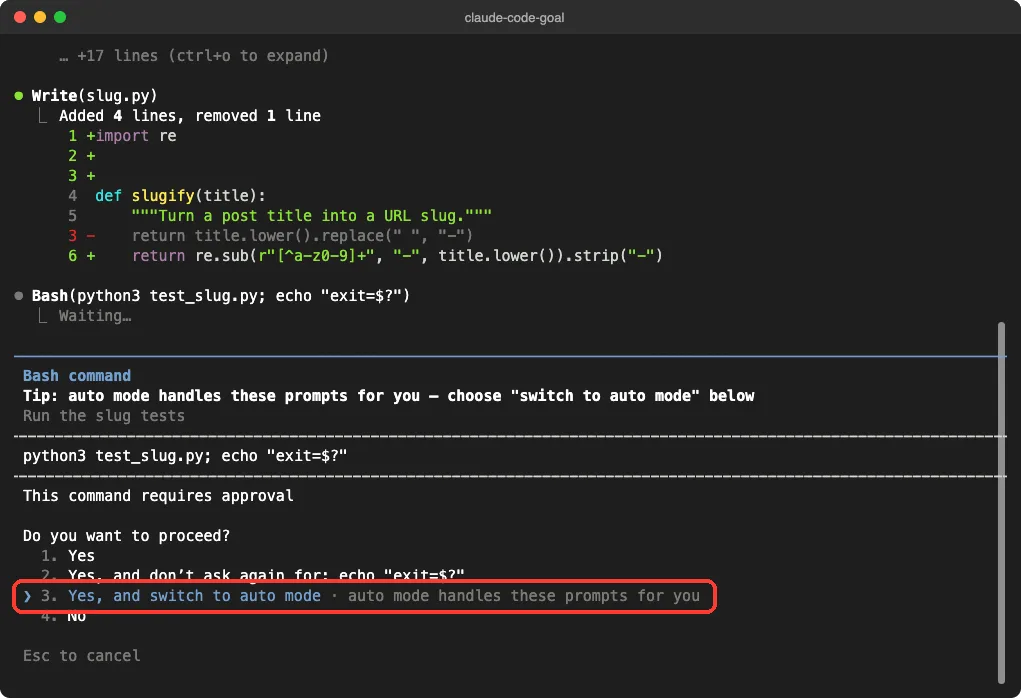
We chose the option to switch to auto mode, which the docs recommend for goals that should run unattended. Our guide to permission modes explains what auto mode allows and what it still blocks.
Step 4: See the verdict
Claude rewrote one line of slug.py, ran the tests, and got ALL PASS with exit code 0. The evaluator agreed, and Claude Code printed a “Goal achieved” line with the time, turn count and tokens.
The 2 minutes in our first run include the time the permission prompt sat waiting. The goal needed just one turn, and Claude Code reported “Worked for 13s” at the end.
Watching a Goal Run Over Several Turns
Our first goal was finished in a single turn, so we set up a second demo to see the loop in action. We asked for three note files, but told Claude to create only one per turn. This time we started the session in auto mode.
/goal the notes/ folder holds 1.txt, 2.txt and 3.txt, each with one short line. Create only ONE file per turn, then end the turn. Or stop after 5 turns.After each of the first two turns, the transcript showed “Goal not yet met… continuing” and Claude carried on by itself. After the third file, the evaluator returned met.
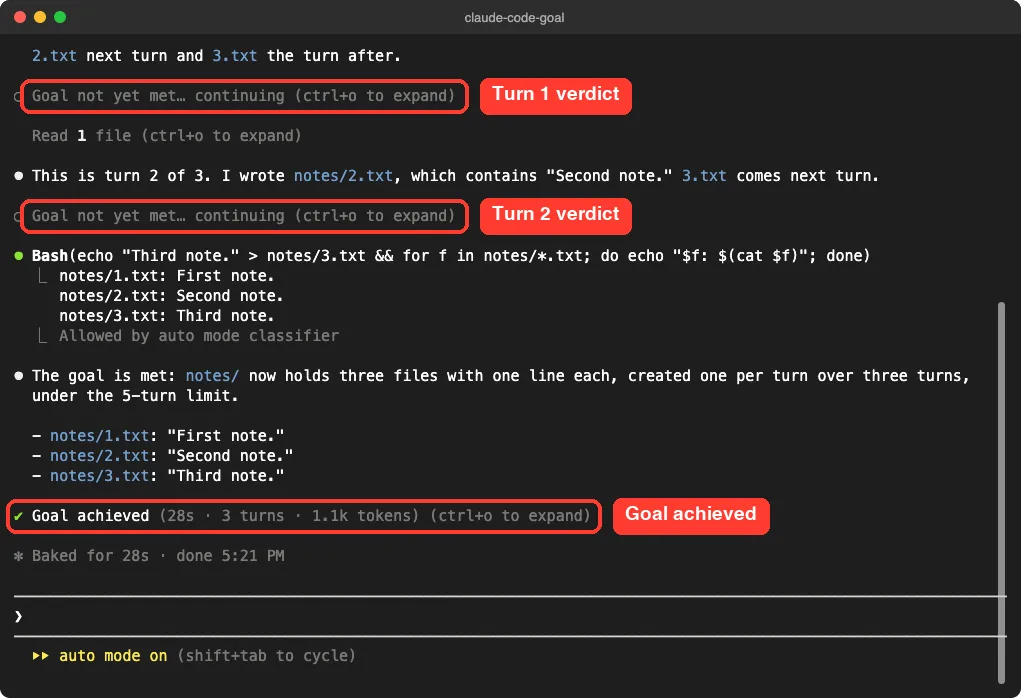
We never typed a second prompt. The whole run took 28 seconds, 3 turns and about 1.1k tokens, according to the achieved line.
Read the reason with Ctrl+O
Every verdict comes with a short reason. Press Ctrl+O to open the detailed transcript and read it. In our slug demo, the evaluator noted that the test run printed ALL PASS with exit 0 and that slug.py was the only file written.
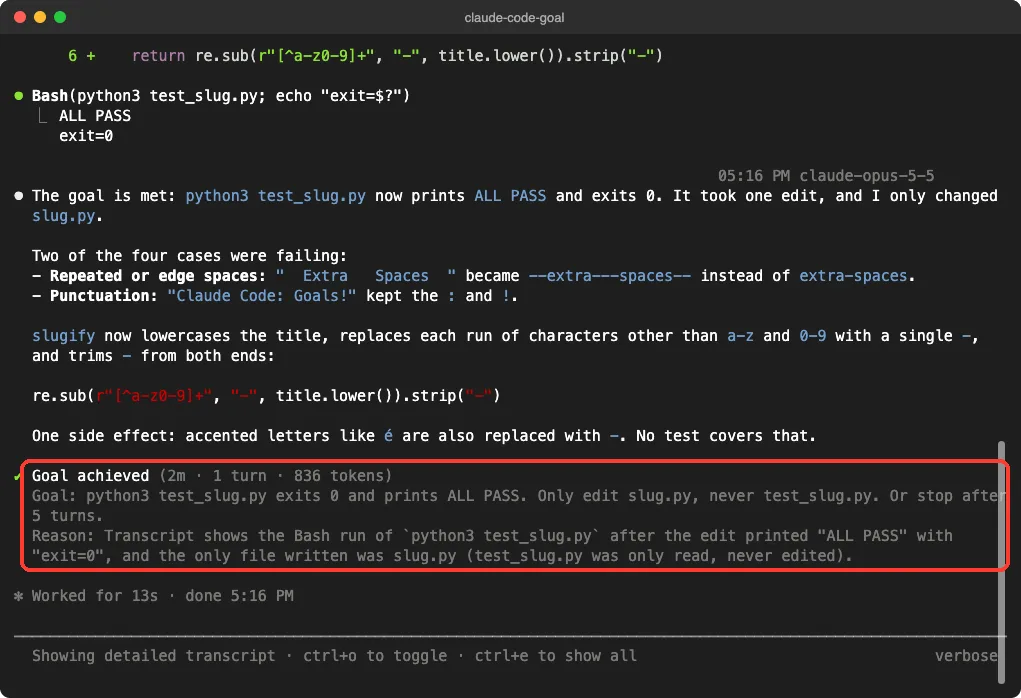
That reason is handy when a goal keeps going longer than you expected. It tells you exactly what the evaluator thinks is still missing.
Check, Clear and Resume a Goal
Check status with /goal
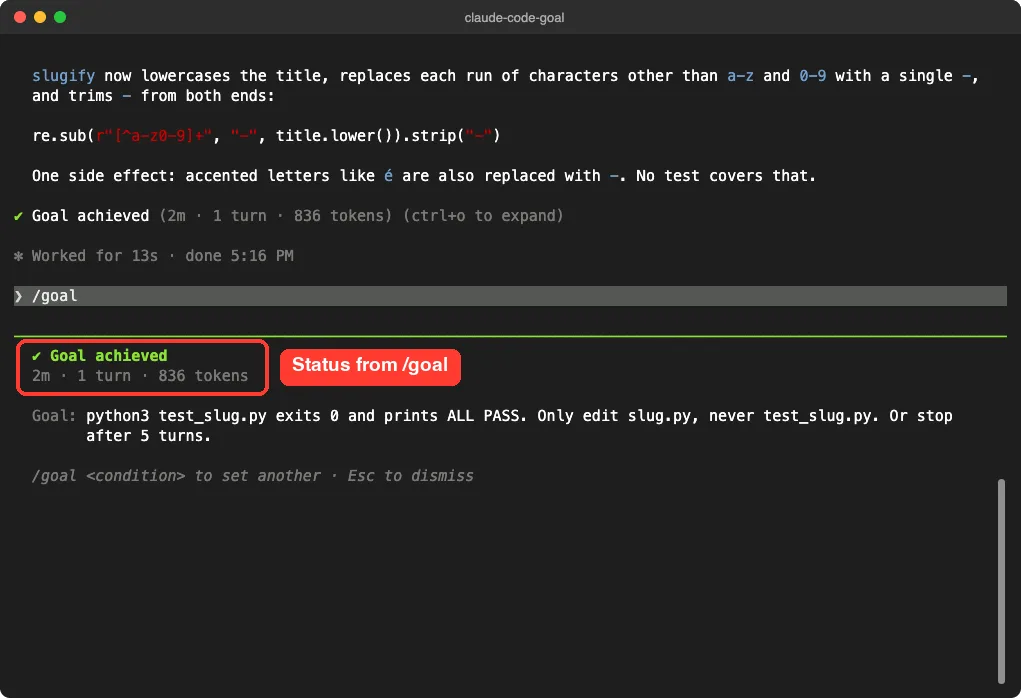
Run /goal with nothing after it. While a goal is active, the docs say the status shows the condition, how long it has run, how many turns were evaluated, the token spend and the latest reason. Our goal had already finished, so we saw the achieved summary instead.
Clear a goal with /goal clear
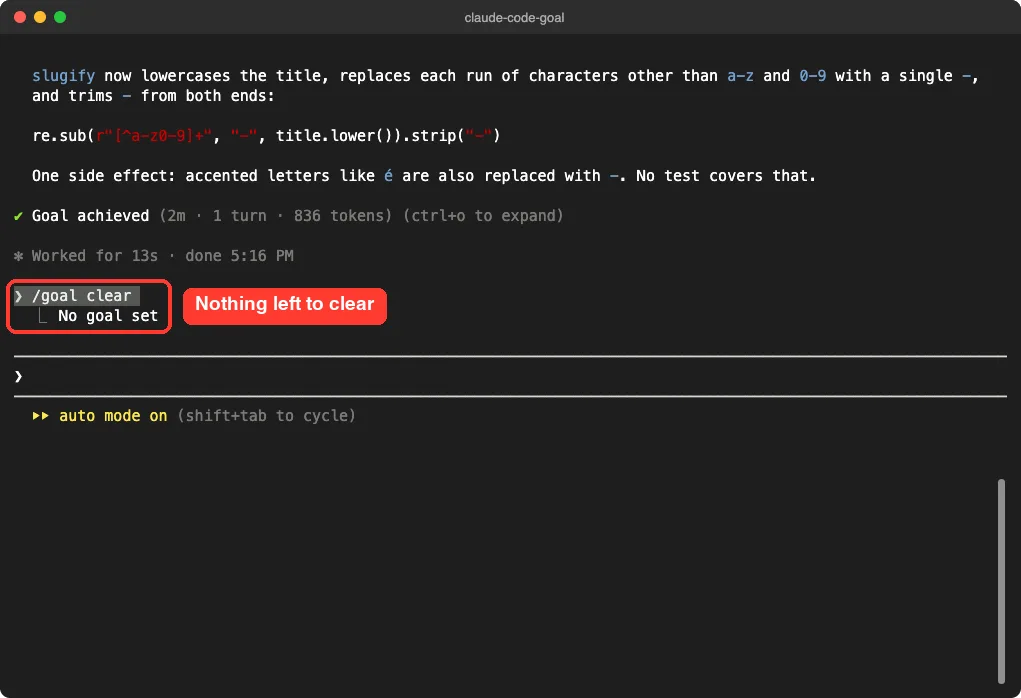
Run /goal clear to remove an active goal before it resolves. Claude Code replies with “Goal cleared:” and the condition, or “No goal set” if nothing is active. Ours was already achieved, so we got the second message.
Running /clear to start a fresh conversation also removes any active goal. You can still interrupt anytime by sending a message, which starts the next turn right away.
Resume a session with a goal
If you close a session while a goal is still active, Claude Code restores it when you come back with –continue, –resume or the session picker. The condition carries over, but the turn count, timer and token baseline reset. Our guide to resuming sessions covers those commands.
How to Write a Good Goal Condition
The evaluator does not run commands or read files on its own. It only judges what Claude has already shown in the conversation. So write a condition that Claude’s own output can prove.
| Ingredient | Example | Why it helps |
|---|---|---|
| One measurable end state | All tests in test/auth pass | There is a clear yes or no |
| A stated check | npm test exits 0 | Claude knows how to prove it |
| Constraints | No other test file is modified | Stops shortcuts like editing the tests |
| A limit | Or stop after 20 turns | Puts a ceiling on time and tokens |
Compare these two conditions. “Make the app better” gives the evaluator nothing to check. “python3 test_slug.py exits 0 and prints ALL PASS, and only slug.py changes” gives it a clear finish line.
Goal vs Loop vs Stop Hook
Claude Code has three ways to keep a session running between prompts. The difference is what starts the next turn.
| Approach | Next turn starts when | Stops when |
|---|---|---|
| /goal | The previous turn finishes | The condition is met or judged impossible, an error you must fix, or /goal clear |
| /loop | A time interval passes | You stop it, or Claude decides the work is done |
| Stop hook | The previous turn finishes | Your own script or prompt decides |
Use our /loop guide when you want timed checks, like polling a deploy every five minutes. A Stop hook lives in your settings file and applies to every session in its scope, while /goal lasts only for the current session.
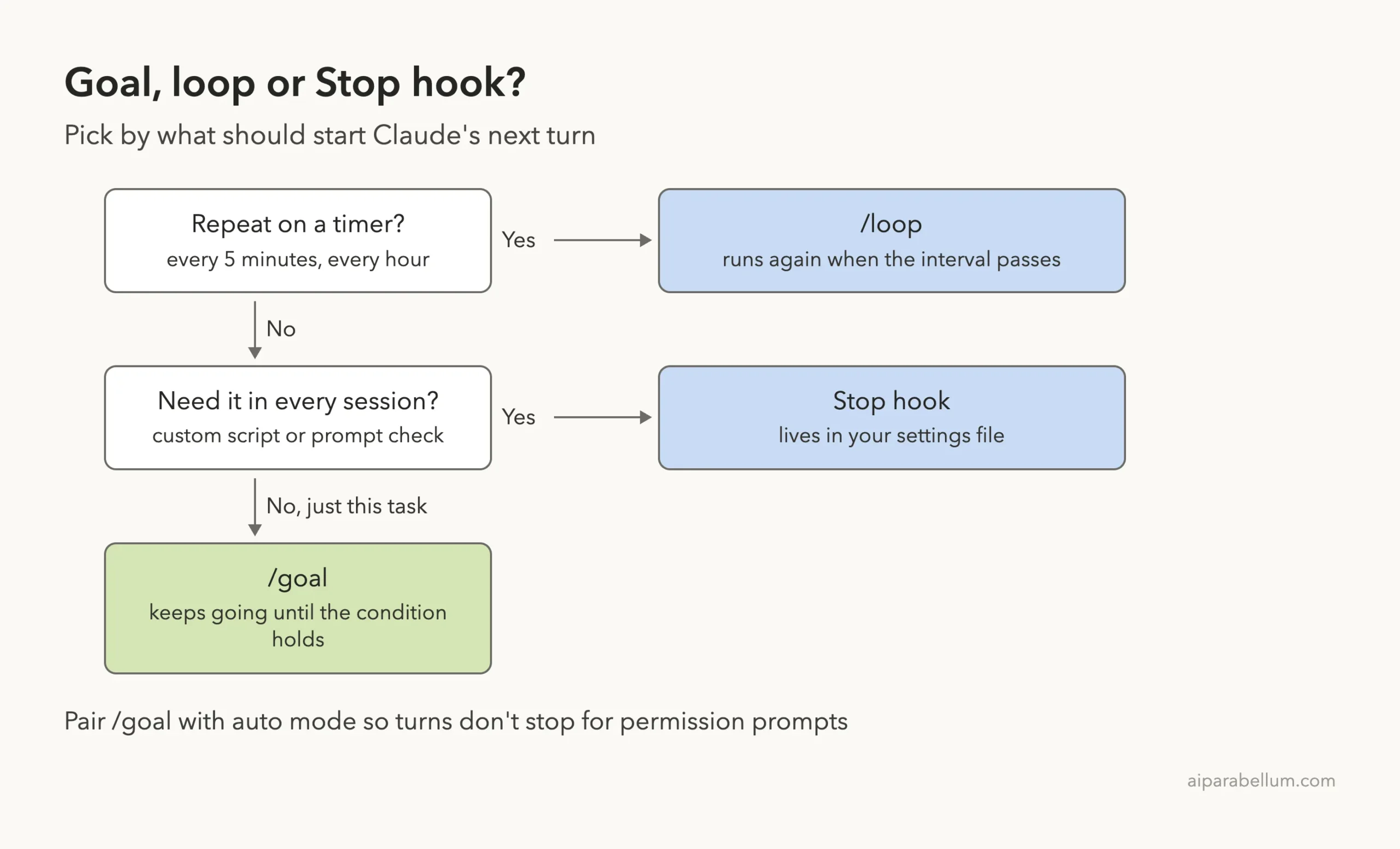
Auto mode and /goal also work together. Auto mode removes per-tool prompts inside a turn, and /goal removes the per-turn prompts between them.
Real Examples You Can Copy
- /goal all tests in test/auth pass and the lint step is clean
- /goal every call site of the old API compiles and npm test exits 0. Do not change any test file. Or stop after 20 turns.
- /goal each file in src/utils is under 300 lines and git status shows no unrelated changes
- /goal CHANGELOG.md has an entry for every PR merged this week
Run a goal headless
/goal also works in non-interactive mode, in the desktop app and through Remote Control. With -p, the loop runs to completion in one call, so it fits scripts covered in our headless mode guide.
claude -p "/goal CHANGELOG.md has an entry for every PR merged this week" --output-format stream-json --verboseDefault text output prints only the final reply when the loop ends, so a long goal can look stuck. The stream-json flags from the headless docs print each message as it happens. Press Ctrl+C to stop it early.
What Happens When Something Goes Wrong
Some errors clear the goal because only you can fix them. The docs name four: an authentication failure when Claude Code manages its own credentials, an exhausted credit balance, a context overflow that auto-compaction could not clear, and a model that isn’t available. The warning ends with “Run /goal again to continue.”
Other errors keep the goal set. On v2.1.269 or later, temporary problems like an overloaded server show a “Goal still active” notice and retry, up to three times. Problems a retry would only repeat, such as a rate limit or a usage limit, show “Goal paused” instead.
If a subagent or background command is still running when a turn ends, evaluation waits for it. After 30 minutes of waiting, Claude Code runs a check-in, and the CLAUDE_CODE_GOAL_CHECKIN_MINUTES variable changes that interval, with 0 turning check-ins and automatic retries off. See our guide to environment variables for how to set one.
Try It Yourself
Make a new empty folder, start Claude Code there, and switch to auto mode with Shift+Tab if your account offers it. Then paste this goal. It is small, cheap and shows the not-yet-met loop clearly.
/goal the notes/ folder holds 1.txt, 2.txt and 3.txt, each with one short line. Create only ONE file per turn, then end the turn. Or stop after 5 turns.Watch for the “not yet met” lines, press Ctrl+O to read the reasons, then run /goal to see the summary. For a bigger practice task, try it on failing tests as in our tests tutorial.
Common Mistakes
- Vague conditions. “Clean up the code” has no clear end, so the evaluator can’t confirm it.
- Asking the evaluator to check things Claude never shows. It reads the conversation; it never runs your tests itself.
- Forgetting permissions. In manual mode, a goal stalls at every approval prompt, as ours did.
- No limit on long jobs. Without “or stop after N turns,” a stubborn goal can use more tokens than you planned.
- No guardrails. Without “never edit the tests,” a model could make tests pass the wrong way.
Pro Tips
- Name the exact proof, like “npm test exits 0,” so Claude prints it and the evaluator can see it.
- Pre-approve the commands the goal will need with allow rules, or use auto mode.
- Read the latest reason with Ctrl+O or /goal when progress seems slow.
- To evaluate on a different model, set ANTHROPIC_DEFAULT_HAIKU_MODEL, but know it also changes background tasks like summarization, as the model configuration docs warn.
- Keep goals focused on one outcome. Two separate goals in a row beat one giant goal.
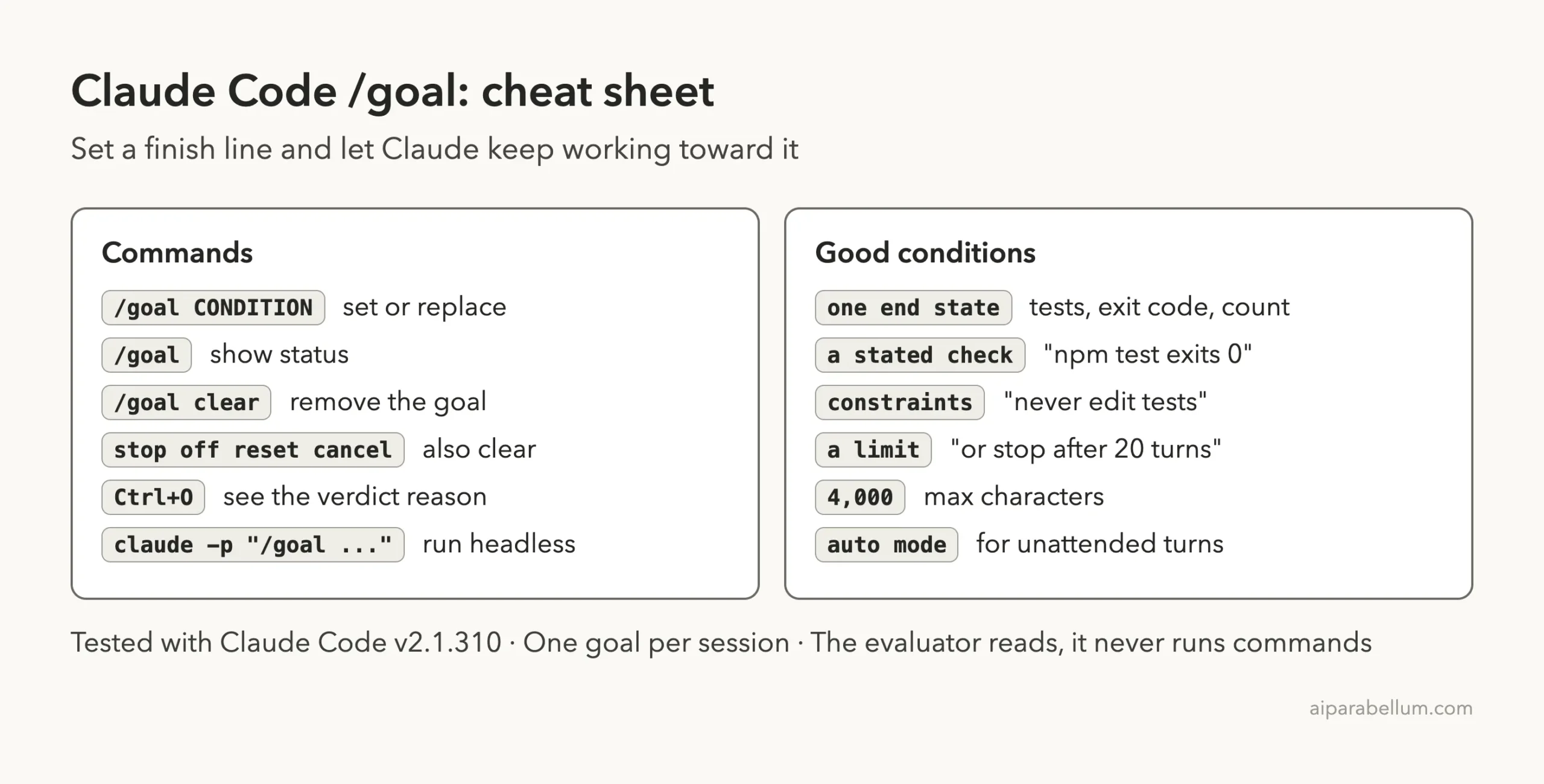
Claude Code Goal Cheat Sheet
Frequently Asked Questions
Does /goal cost extra?
The evaluator uses tokens on your small fast model after each turn. The docs say this is typically negligible compared to the main work, and the goal status shows the token spend.
Can I run more than one goal at a time?
No. Each session holds one goal. Setting a new goal replaces the old one.
Why is /goal not working in my project?
/goal follows the same workspace trust rule as hooks, so the folder must be trusted. It is also unavailable when disableAllHooks is true or when managed settings set allowManagedHooksOnly, and the command tells you why.
Does the evaluator run my tests?
No. It does not call tools. Claude runs the tests, the output lands in the conversation, and the evaluator reads that output.
What happens if Claude stops making progress?
If Claude keeps replying without using any tools for several turns in a row, Claude Code stops the loop, prints a warning and hands control back to you. The goal stays set, and evaluation resumes after your next prompt.
Conclusion
The Claude Code goal command turns “keep going until it works” into a single line: you set a measurable finish line, Claude works turn after turn, and a separate model decides when it is truly done. In our tests it fixed a failing slug function in one turn and walked through a three-step task on its own, with clear verdicts and reasons along the way. Write conditions with one end state, a stated check and a limit, pair goals with auto mode, and you can hand off longer jobs with confidence while you focus on something else, whether you use Claude AI for code or anything else.
Previous in the series: Part 39, Claude Code Agent Teams Explained
Next in the series: Part 41: The Claude Code Sandboxed Bash Tool Explained.