Claude Code Superpowers is a free plugin that adds 15 ready-made skills to Claude Code, and it makes Claude follow a strict routine: ask questions before building, find the cause of a bug before fixing it, and write tests first. We loaded it in a throwaway sandbox, watched two of those skills fire by themselves, and checked what its startup hook really does. This guide shows how to try it safely, what we saw, and who should keep it.
This is Part 16 of 45 in our Claude Code Deep Dives, part of our Claude Code tutorials. In the last part we built a resume skill from scratch, and today we try a skill pack that somebody else wrote. If you want background on the model behind it, our Claude AI overview explains it.
Tested with Claude Code v2.1.318 on November 5, 2026, with Superpowers v7.0.2 (commit 22f0b46). We loaded it with --plugin-dir and --setting-sources project in a throwaway folder, so nothing was installed into the normal Claude Code setup.
Quick Summary
| Question | Answer |
|---|---|
| What is it? | An open-source plugin of 15 skills plus one startup hook |
| Who made it? | Jesse Vincent, MIT license, repository obra/superpowers |
| Official install command | /plugin install superpowers@claude-plugins-official |
| How we tested it | A cloned copy loaded with --plugin-dir in a demo folder |
| Skills we saw fire | brainstorming and systematic-debugging, both without being asked |
| What we did not run | The full plan, subagent and branch-finishing chain from start to end |
What Is Claude Code Superpowers?
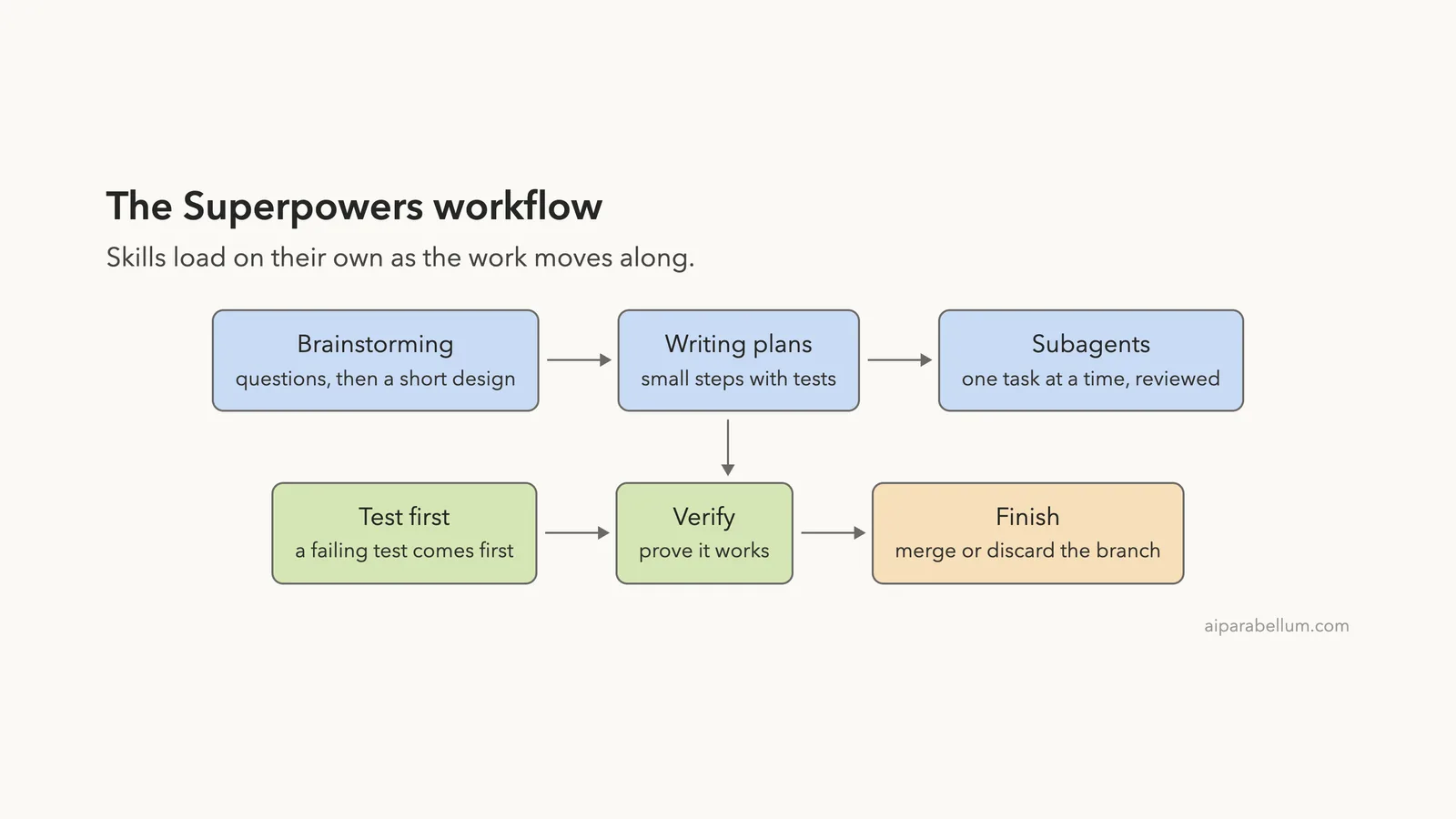
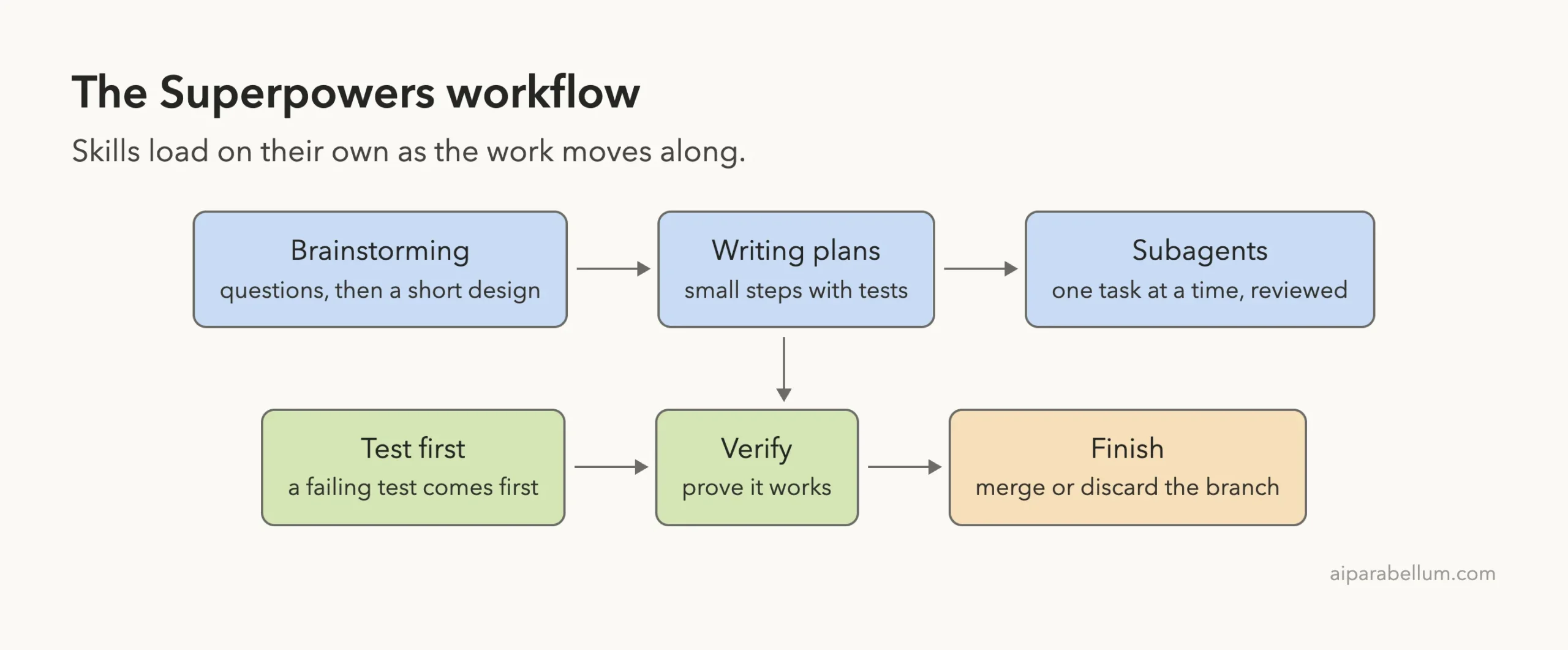
Superpowers describes itself as a complete software development method for coding agents, built from a set of skills that load on their own. A skill is a folder with a SKILL.md file that Claude can read when the job matches. If skills are new to you, start with our guide to Claude Code skills.
What makes Superpowers different from a normal skill is the attitude. Its opening skill, using-superpowers, tells Claude that even a one percent chance a skill applies means it must check that skill first. In plain words, it removes the “I can just answer quickly” shortcut.
The plugin has no slash commands and no custom agents. It ships skills and one hook, and that is all.
The 15 Skills in the Box
Our /skills screen listed all 15, each marked as locked by the plugin. The token numbers beside them are what Claude Code showed for each skill description, between about 40 and 140 tokens.
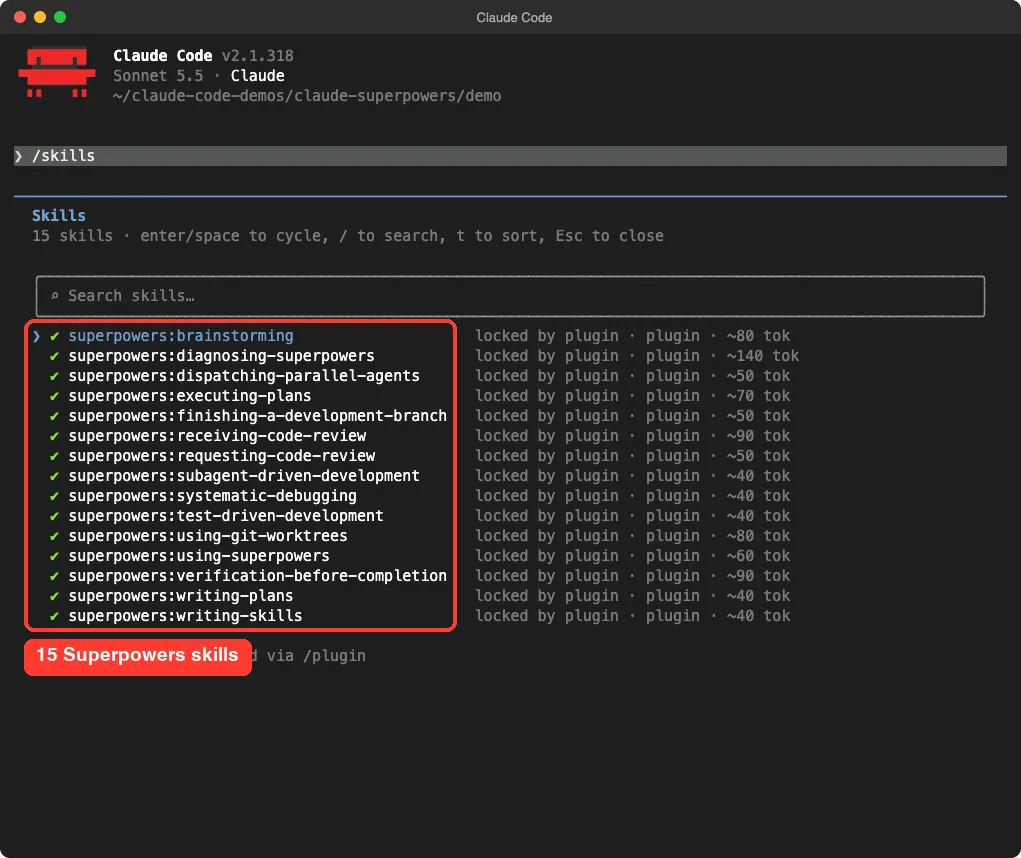
/skills screen after loading the plugin: 15 skills, all from Superpowers| Group | Skills | What they do, per the README |
|---|---|---|
| Design and planning | brainstorming, writing-plans | Draw out what you want, then split the work into small tasks with exact file paths |
| Building | test-driven-development, subagent-driven-development, executing-plans, dispatching-parallel-agents | Red-green-refactor, and a fresh subagent per task with a review after each |
| Quality | systematic-debugging, verification-before-completion, requesting-code-review, receiving-code-review | Root cause first, proof before “done”, and reviews by severity |
| Git | using-git-worktrees, finishing-a-development-branch | Isolated branch to work in, then merge, open a PR, keep or discard |
| Meta | using-superpowers, writing-skills, diagnosing-superpowers | The rulebook, a guide for writing your own skills, and a session troubleshooter |
How to Install Superpowers in Claude Code
Option 1: The official marketplace
The README says Superpowers is available from Anthropic’s official plugin marketplace. Inside Claude Code, run this one line.
/plugin install superpowers@claude-plugins-officialThere is also a separate marketplace from the author. Register it first, then install from it.
/plugin marketplace add obra/superpowers-marketplace
/plugin install superpowers@superpowers-marketplace
Both commands write to your own Claude Code setup, so we did not run them for this test. Our plugins guide explains how plugin installs work, and the official plugins documentation covers the same commands.
Option 2: Try it without installing (what we did)
You can load a plugin from a folder for a single session. That leaves your normal setup alone, which is the safer way to judge a tool before keeping it.
git clone --depth 1 https://github.com/obra/superpowers
cd my-demo-folder
claude --setting-sources project --plugin-dir /path/to/superpowers
The --plugin-dir flag loads the plugin for that session only. The --setting-sources project flag tells Claude Code to read only the project’s own settings, so your personal skills and hooks stay out of the test.
Read the Hook Before You Trust It
A plugin can run a command on every session start, so we read the hook first. Superpowers registers one SessionStart hook that runs when a session starts, clears or compacts.
The hook calls a script named session-start. That script reads the file skills/using-superpowers/SKILL.md, wraps it in JSON and prints it, so Claude gets the rulebook at the top of every session. We found no network call in the hook or the script.
The README does mention one optional piece of telemetry. The brainstorming skill has an optional visual companion, and its logo is loaded from the authors’ website with the Superpowers version in the request. You can switch it off with the SUPERPOWERS_DISABLE_TELEMETRY environment variable.
The plugin also honors Claude Code’s DISABLE_TELEMETRY setting. We did not trigger the visual companion in our test.
For a deeper look at hooks in general, see our guide to Claude Code hooks.
Test 1: Brainstorming Starts Before Any Code
Our demo folder held a tiny splitter.py with two functions for splitting a restaurant bill. We typed one casual sentence: we wanted a feature that splits a bill unevenly when one person ordered more.
We did not name any skill. Claude called Skill(superpowers:brainstorming) on its own, read the two files, and then explained what it found before writing anything.
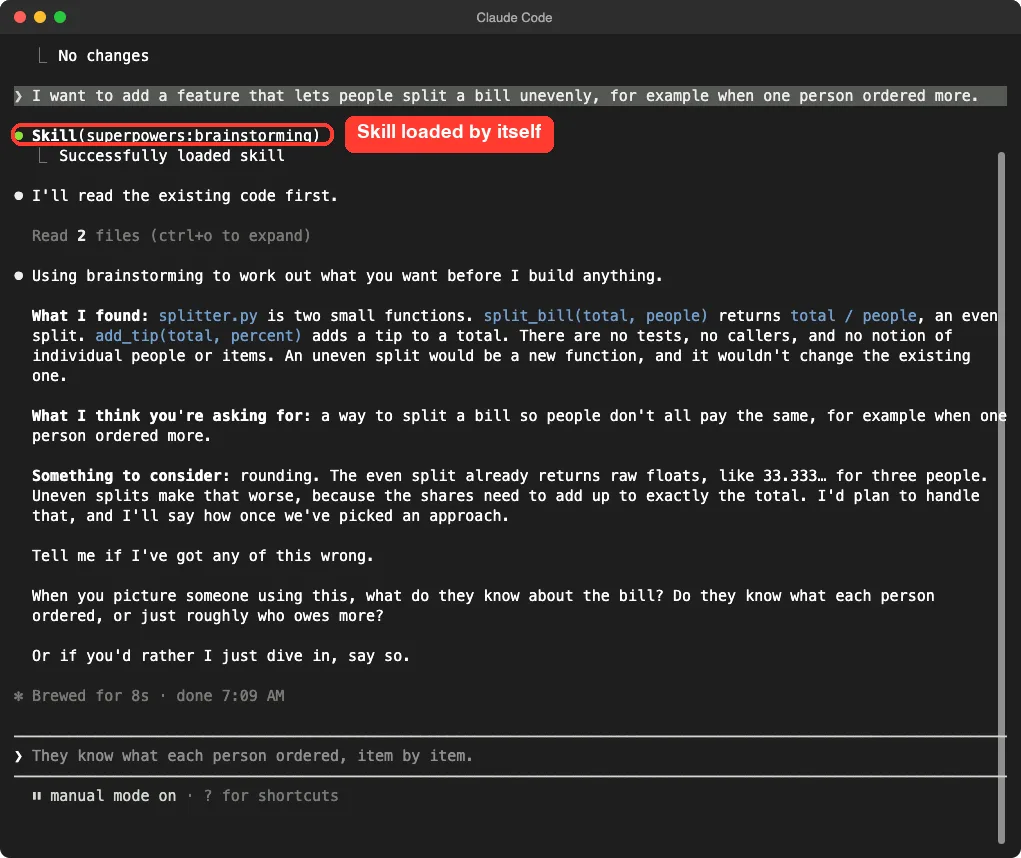
The reply had a clear shape. It said what it found in the code, restated what it thought we wanted, flagged a rounding issue for uneven splits, and asked one question about what users know about the bill. It ended with “Or if you’d rather I just dive in, say so.”
That last line matters. The routine is strict, but the user still has the last word.
Test 2: Debugging Without Guessing
In a second session we reported a bug: split_bill crashes with a ZeroDivisionError when the number of people is 0. We added “do not change any files yet” so the test stayed read-only.
Claude loaded superpowers:systematic-debugging without being asked, read the files, and then asked to run a short Python command to reproduce the crash.
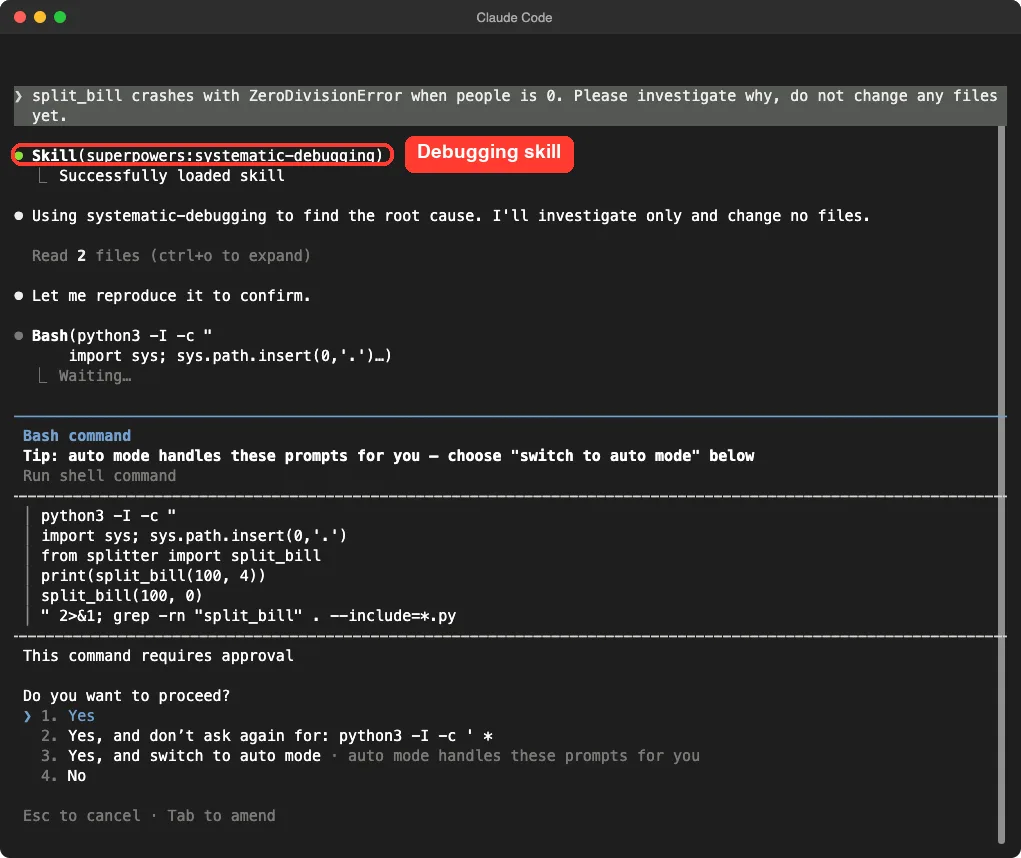
After we approved the command, the answer was well organized. It showed the evidence, the line that fails, why the function has no rule for bad input, and three fix options with a recommendation.
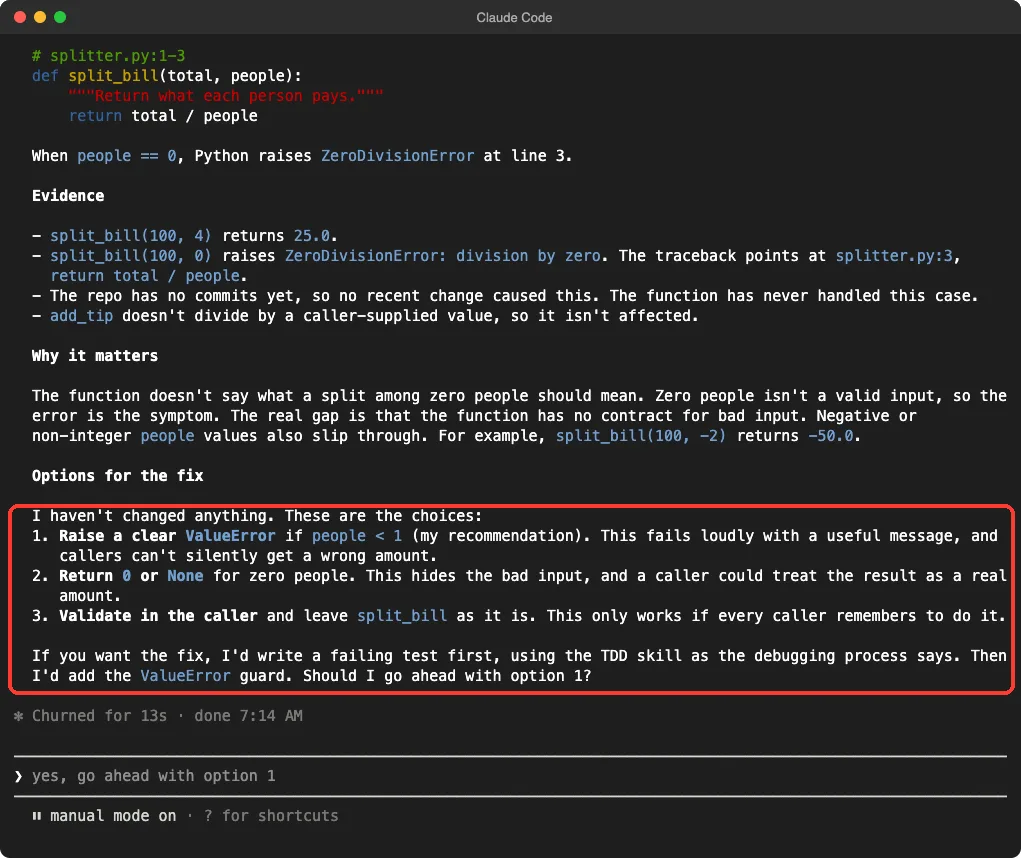
It also spotted something we had not asked about: a value of -2 for people returns -50.0. It finished by saying that, if we wanted the fix, it would write a failing test first. We stopped there, so we did not see that part run.
Superpowers adds a process, not a new model: it makes Claude ask, investigate and test before it builds.
What We Did Not Test
We ran two prompts across two sessions, and we kept the work small on purpose. We did not run the full chain of plan writing, worktrees, subagents, code review and branch finishing. Those pieces are described in the README, but we have not seen them run here.
That is a real limit. A tool that works for hours on a big feature needs a bigger test than ours, so treat our results as proof that the entry points work, not as proof of the whole method.
Plain Claude Code or Superpowers?
| Situation | Plain Claude Code | With Superpowers |
|---|---|---|
| A vague feature request | Often starts coding fast | Reads the code and asks questions first, as we saw |
| A bug report | Often proposes a fix right away | Reproduces it and lists causes before touching files, as we saw |
| A quick one-line change | Done in seconds | May add steps you did not need, so tell Claude to skip them |
| Cost | Normal | Extra context from the rulebook at each session start, plus more messages |
Who Should Install It
Superpowers suits you if you build real features, you like having a checklist, and you want Claude to slow down and think. It is also a good match if you often get fixes that treat the symptom instead of the cause.
It is a weaker fit for tiny scripts, quick edits and exploring ideas where speed matters most. You can still keep it installed and say “just do it” when you want a shortcut, as the brainstorming reply itself offered.
If you only want a few of these habits, you can copy the ideas into your own skill. Our guide to SKILL.md fields shows how, and our comparison of skills versus plugins helps you choose the right piece.
Common Mistakes
- Installing into your main setup before reading the hook. Try
--plugin-dirfirst. - Expecting instant code. Brainstorming asks questions first by design.
- Approving every permission prompt without reading it. The debugging skill ran a shell command, and we read it before saying yes. See how to manage permission prompts.
- Forgetting that the plugin loads only for that session when you use
--plugin-dir. - Judging the whole system by one small prompt. Test a real feature before you decide.
Pro Tips
- Run
/skillsafter loading to confirm all 15 skills appear. - Say “just dive in” when a task is small and you do not want the full routine.
- Ask Claude to figure out what went wrong with Superpowers in this session. The README says that triggers the
diagnosing-superpowersskill. - Set
SUPERPOWERS_DISABLE_TELEMETRYif you do not want the optional logo request. - Check the repository’s release notes before updating, because the plugin changes often.
Try It Yourself
Make a small folder with one Python file and two short functions. Load the plugin with the commands above, then paste this prompt.
Add a feature to this project that lets me round every result to the nearest cent. Ask me whatever you need to know first.Watch for the Skill(superpowers:brainstorming) line, then try a second prompt that reports a bug and compare how Claude behaves.
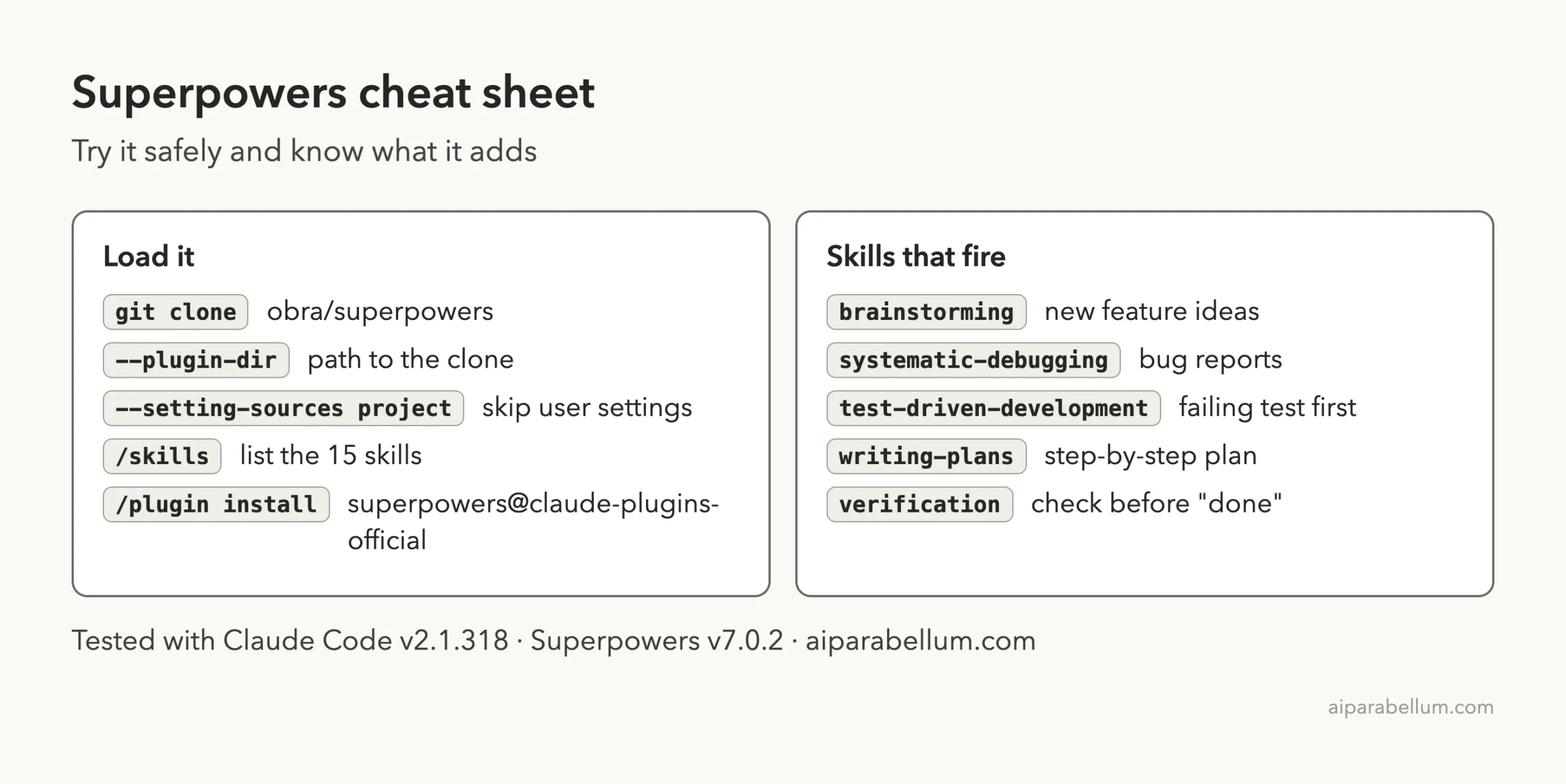
Cheat Sheet
Frequently Asked Questions
Is Claude Code Superpowers free?
Yes. The repository uses the MIT license and the plugin itself costs nothing. You still pay for the normal Claude Code usage that its extra steps consume.
Does Superpowers change my Claude Code settings?
Loaded with --plugin-dir, it ran for that session only. A normal /plugin install adds it to your own setup, so it stays until you remove it.
Can I use only some of the skills?
The plugin loads all of them together. You can copy a single skill folder into your own .claude/skills folder if you want just one, and the license allows it.
Does it work with tools other than Claude Code?
The README lists install steps for many other coding agents. We tested only Claude Code, so we cannot speak for the rest.
Will it slow Claude down?
It adds questions and checks, so simple tasks can take more messages. In our two tests the extra steps were short, but we ran only small prompts.
Conclusion
Superpowers turns Claude Code into a more careful partner: in our two small tests it asked before building and investigated before fixing, and its startup hook only prints one skill file. We did not run the long plan-and-subagent chain, so test it on a real feature before you rely on it, and keep it if you like having a process. For more add-ons, browse our Skills Directory and the source repository at obra/superpowers.
Previous in the series: Part 15: Claude Code Resume Skill: Build and Test One
Next in the series: Part 17, How to Use gstack With Claude Code (Tested), is coming soon.