The Claude Code code review plugin is an official add-on from Anthropic that reviews a GitHub pull request with several Claude agents working at the same time. We loaded it in a throwaway sandbox, pointed it at a real open pull request, and watched all of it run. This guide shows how to install it, what the review looked like, what it cost us in clicks and minutes, and who should keep it.
This guide is part of our Claude Code tutorials. Find more add-ons in our Skills Directory.
Tested with Claude Code v2.1.318 on November 5, 2026, with the plugin at version 1.0.1 (repository commit fa4eb54, dated November 3, 2026). We loaded it with --plugin-dir and --setting-sources project in a throwaway folder, so nothing was installed into the normal Claude Code setup. Everything below is one run on one pull request, so treat it as one honest example and not a benchmark.
Quick Summary
| Question | Answer |
|---|---|
| What is it? | An official plugin with one command, /code-review, that reviews a pull request using parallel agents |
| Who made it? | Anthropic, listed in the official marketplace as code-review |
| Install command | /plugin install code-review@claude-plugins-official |
| Needs | A GitHub pull request and the GitHub CLI (gh) signed in |
| What we ran | One full review of a small open pull request (4 minutes 27 seconds) and one skipped trivial pull request |
| What we did not run | The --comment option that posts to GitHub, because we did not want to write on a stranger’s pull request |
What Is the Claude Code Code Review Plugin?
The plugin adds one slash command that takes a pull request and returns a short list of problems worth fixing. According to its README, it launches several agents in parallel, each looking at the change from a different angle, and then throws away anything it is not confident about.
Its own description is “Automated code review for pull requests using multiple specialized agents with confidence-based scoring.” In plain words, it tries to behave like a careful reviewer who only speaks up when sure. A plugin is a bundle of commands, skills or agents that you can add to Claude Code. If that idea is new, our guide to skills versus plugins explains the differences.
The plugin folder is tiny. It holds a license, a README, a manifest and one file, commands/code-review.md. That single file is the whole review recipe, written as plain English instructions to Claude.
How to Install the Code Review Plugin
Option 1: The official marketplace
The plugin lives in Anthropic’s official marketplace. Our /plugin screen listed it as code-review with 477.6K installs, next to other popular plugins such as Superpowers. To add it to your own setup, run this inside Claude Code.
/plugin install code-review@claude-plugins-officialThis writes to your own Claude Code configuration, so we did not run it for the test. The official discover plugins page covers the same install flow, and our plugins guide walks through it step by step.
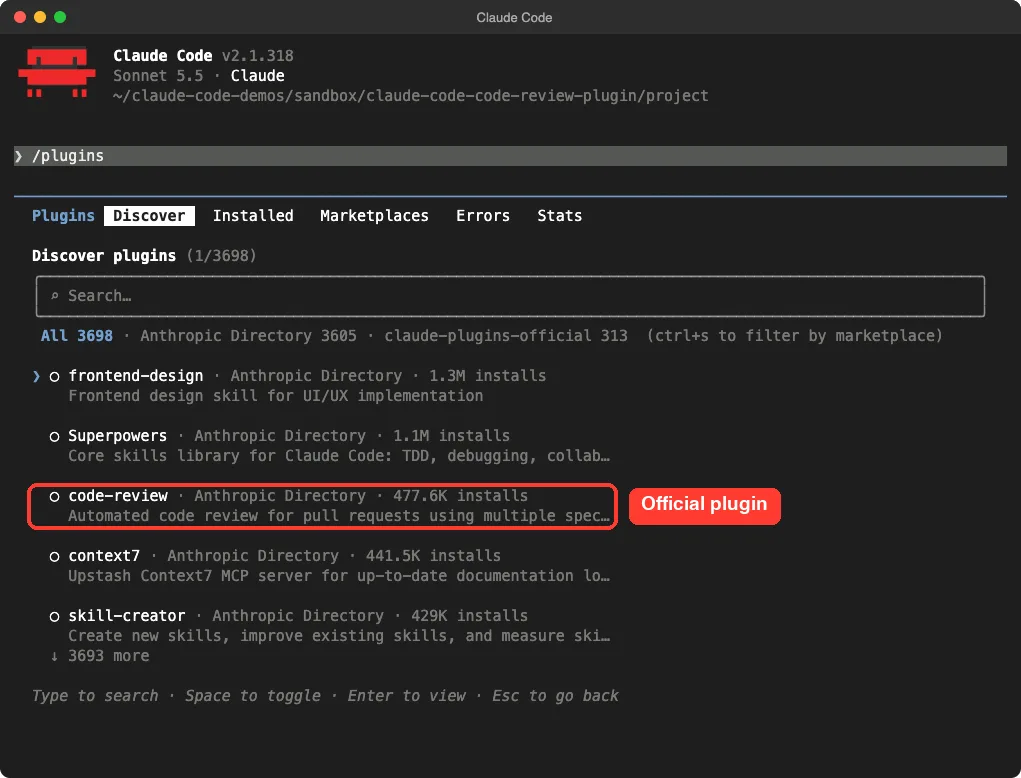
/plugin Discover tab lists code-review as an official pluginOption 2: Try it without installing (what we did)
You can load a plugin from a folder for one session only. We cloned the public plugins repository and loaded just the code-review folder.
git clone --depth 1 https://github.com/anthropics/claude-plugins-public
cd my-demo-folder
claude --setting-sources project --plugin-dir /path/to/claude-plugins-public/plugins/code-review
The --plugin-dir flag loads the plugin for that session only. The --setting-sources project flag keeps your personal settings out of the test. The official plugins documentation describes the same flag.
What you need before the first review
The README lists two requirements: a Git repository with GitHub integration, and the GitHub CLI installed and signed in. The command only calls gh for reading pull requests, so run gh auth status first and fix any sign-in problem before you start.
A CLAUDE.md file is optional but recommended. Two of the four reviewers check your changes against the rules in it, so a repository without one gets less out of the plugin. If you do not have one yet, our CLAUDE.md template is a good start.
Read the Command Before You Trust It
A plugin command can run shell commands, so we read the file first. The header of commands/code-review.md limits the tools the command may use without asking.
The allowed shell commands are all read-only gh calls: gh pr view, gh pr diff, gh pr list, gh issue view, gh issue list and gh search. The only write action is gh pr comment, plus an inline comment tool, and the file says to use them only when you pass --comment. We found no network calls besides gh, and no hooks.
The instructions are strict about noise. They tell the agents to flag only code that will fail to compile, code that will produce wrong results whatever the input, and clear rule breaks in CLAUDE.md. Style complaints, “might be a problem” guesses and issues a linter would catch are on the do-not-flag list.
Two Commands With Almost the Same Name
This was a surprise. When we typed /code-rev in the session, Claude Code offered two commands: the built-in /code-review and a second one called /code-review:code-review. The second one is the plugin, with the plugin name written in front.
The built-in command’s description reads “Review the current diff or a PR for bugs and cleanups.” The plugin’s reads “Code review a pull request.” They are different tools, so type the full name when you want the plugin’s four-reviewer recipe.
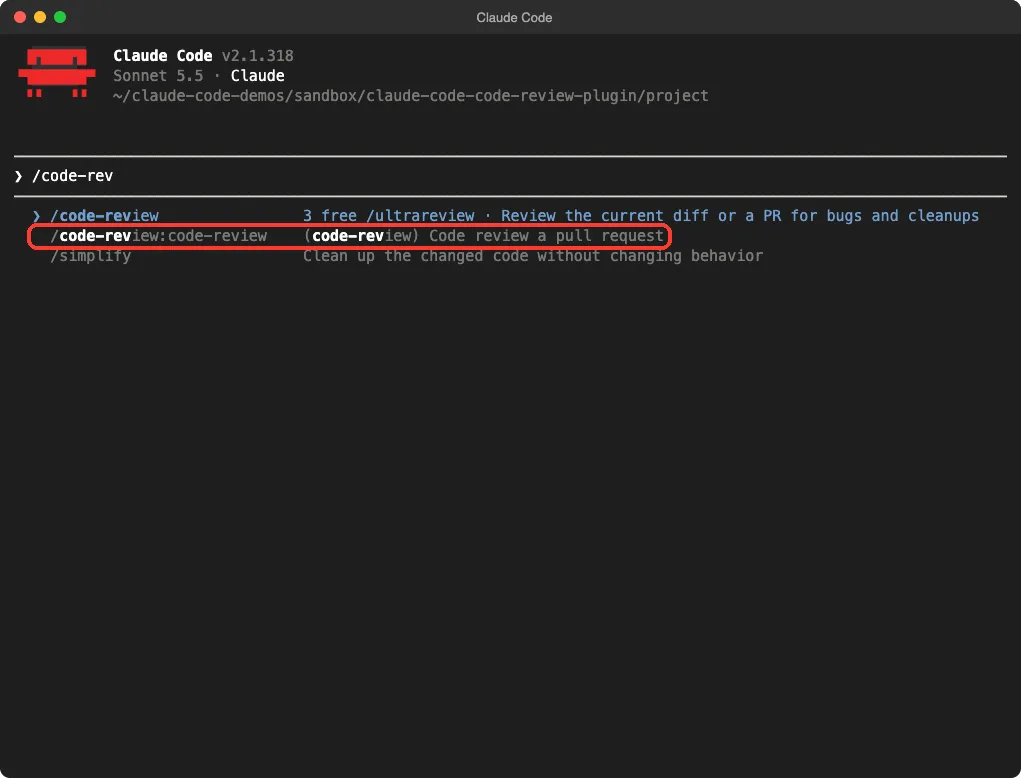
/code-rev shows both the built-in command and the plugin’s command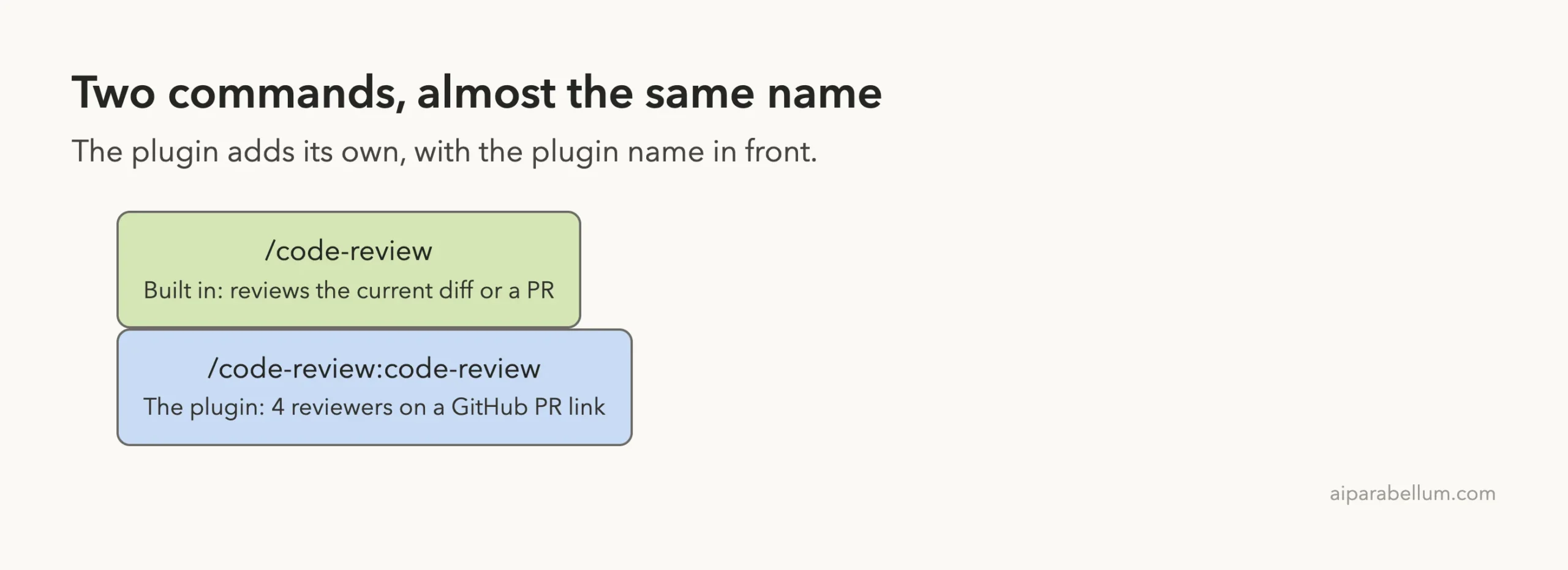
If you only want to review your own uncommitted changes, the built-in command is the closer fit. For a deeper look at building a review of your own, see our test of a review skill test.
Test 1: Reviewing a Real Pull Request
We needed a real pull request, and creating one on GitHub would have published something under a real account. Instead we picked a small open pull request in the public plugins repository: 52 added lines across two files, a change to how a security hook reads git output. The command accepts a pull request link, so we ran this in an empty demo folder.
/code-review:code-review https://github.com/anthropics/claude-plugins-public/pull/7002We did not pass --comment, so the review stayed in the terminal. We left the pull request untouched, and afterward it still had zero comments.
What happened, step by step
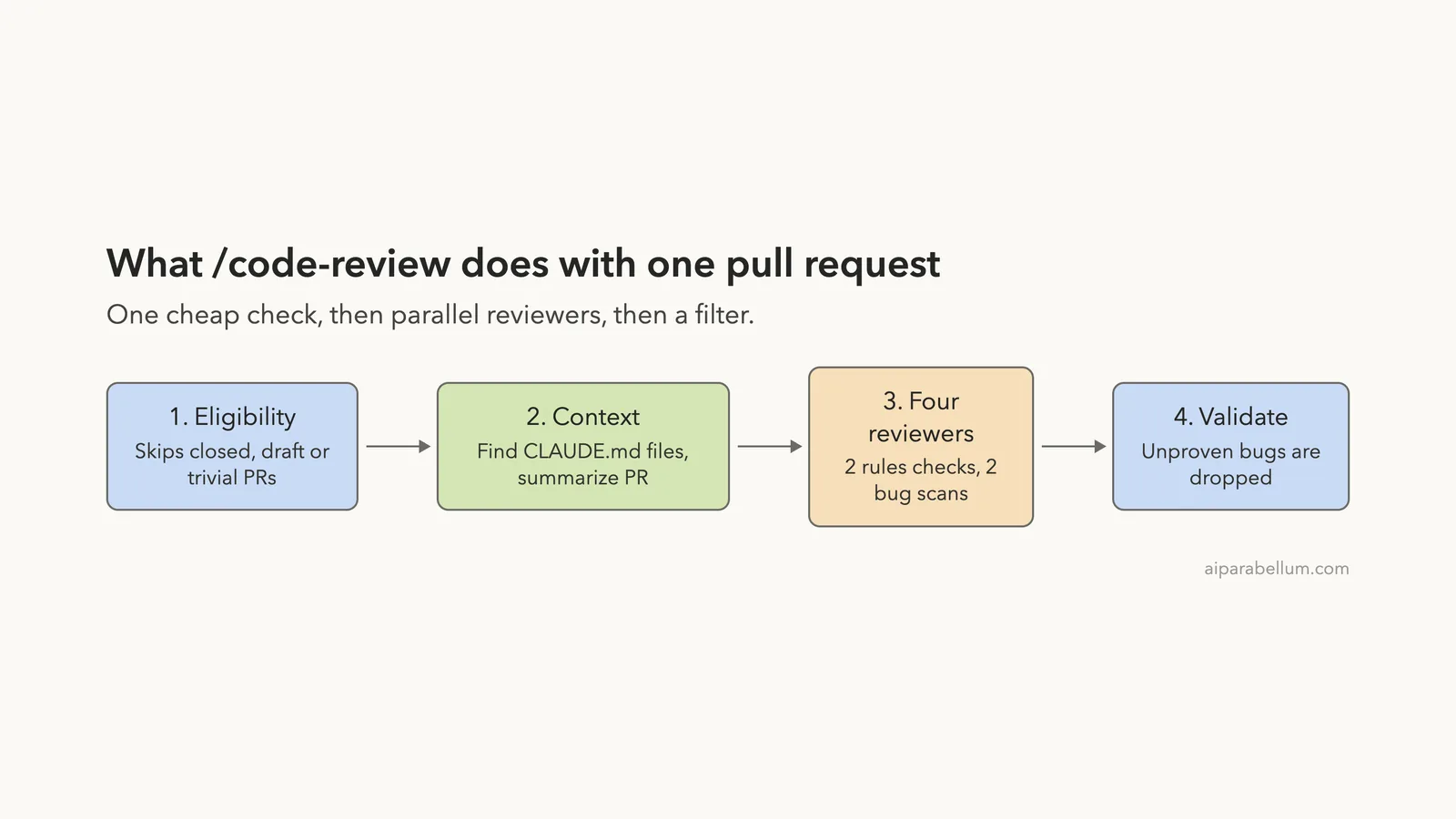
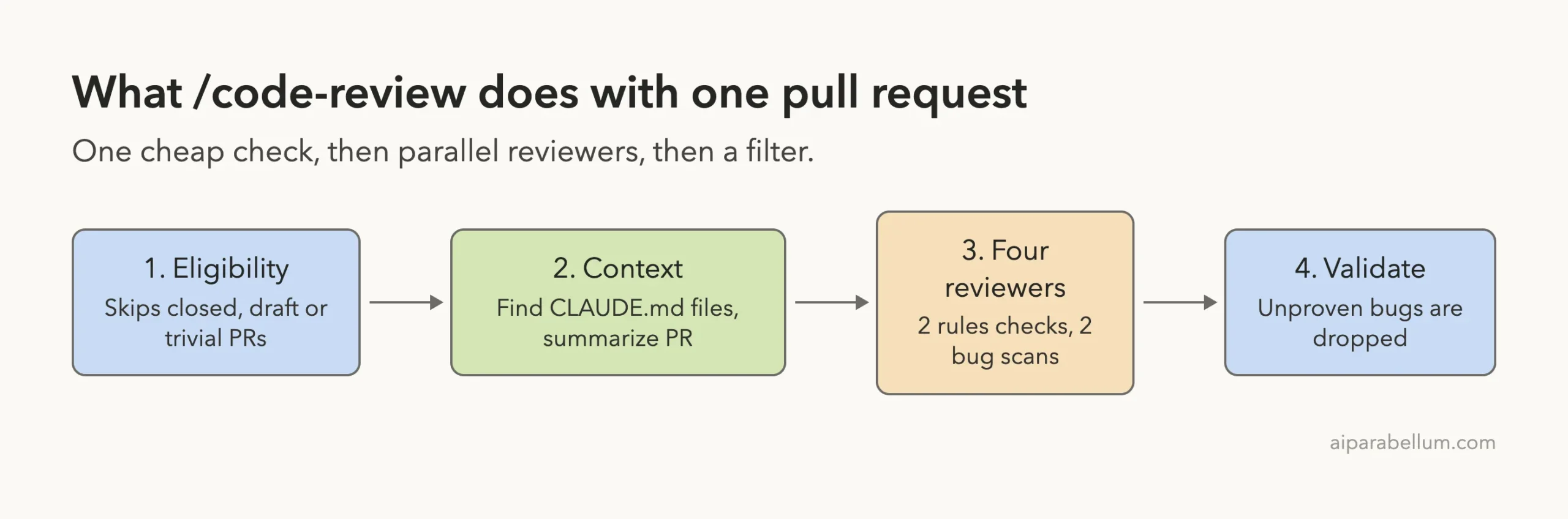
First, a small Haiku agent checked whether the pull request was worth reviewing. It finished in 7 seconds. Then two more agents started side by side: one to find CLAUDE.md files, one to summarize the change.
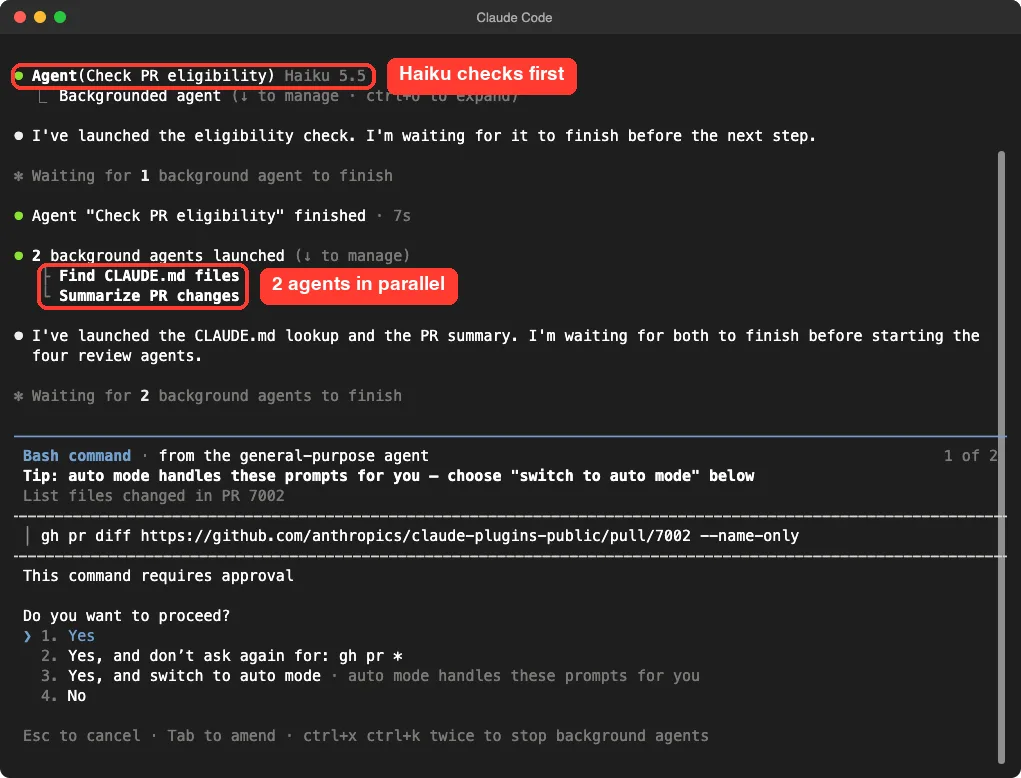
The summary agent took 1 minute 6 seconds. The CLAUDE.md lookup found nothing, because that repository has no such file. Claude said so and skipped the two rule-checking agents, which is sensible, since there was nothing to check against.
That left the two bug agents. One read only the diff and finished in 30 seconds. The other looked at the logic of the code the pull request introduced and took 2 minutes 36 seconds.
The result
Both bug agents came back empty, so the final answer was “No issues found. I checked PR #7002 for bugs and CLAUDE.md compliance.” Claude added its reasons: the new setting correctly overrides a repository-level value, and the two new tests first prove that a plain git log triggers the stand-in program, so the “not triggered” check means something.
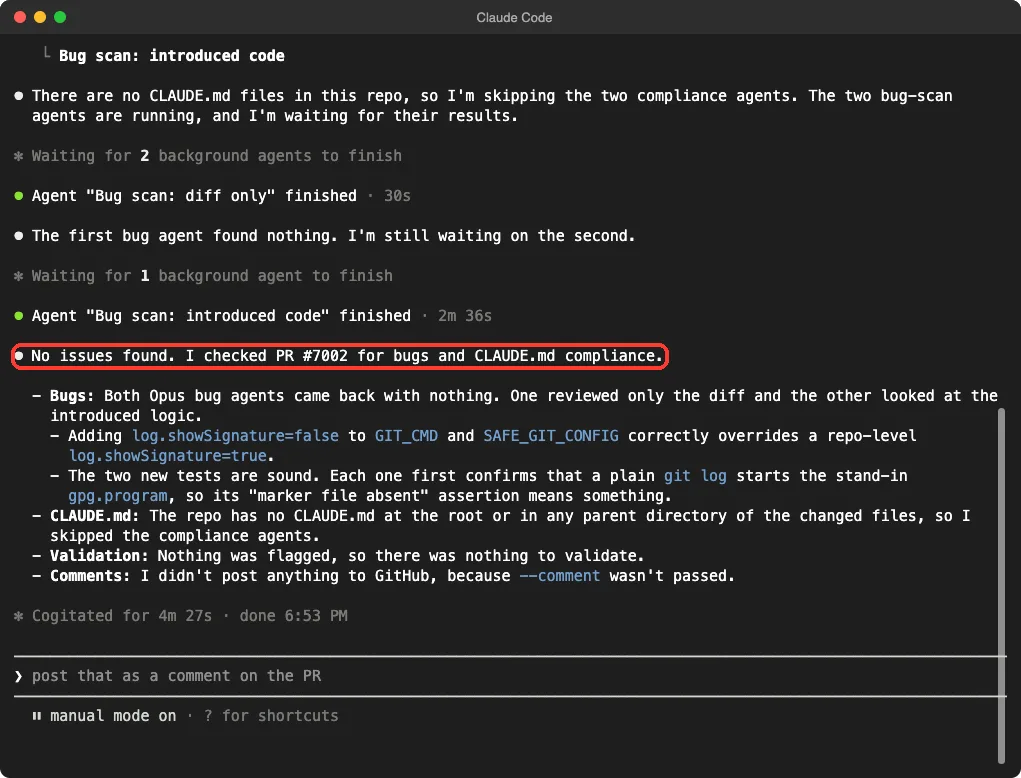
We want to be fair here. “No issues found” on one small pull request does not prove the plugin catches real bugs, and we did not plant a bug to test it. What we can say is that it ran end to end, explained its reasoning, and did not invent problems to look busy.
The approval prompts
The command file allows read-only gh calls, but the agents sometimes built longer commands, for example one that chained gh pr diff with gh pr view, or a loop that fetched files with gh api. Claude Code stopped and asked each time, because those shapes did not match the allowed list.
We answered Yes after reading each one. All the commands we saw only read pull request data. Expect a handful of these prompts during a review, or choose the “don’t ask again for: gh pr *” option if you trust the commands in your own project.
Test 2: A Pull Request That Does Not Need Review
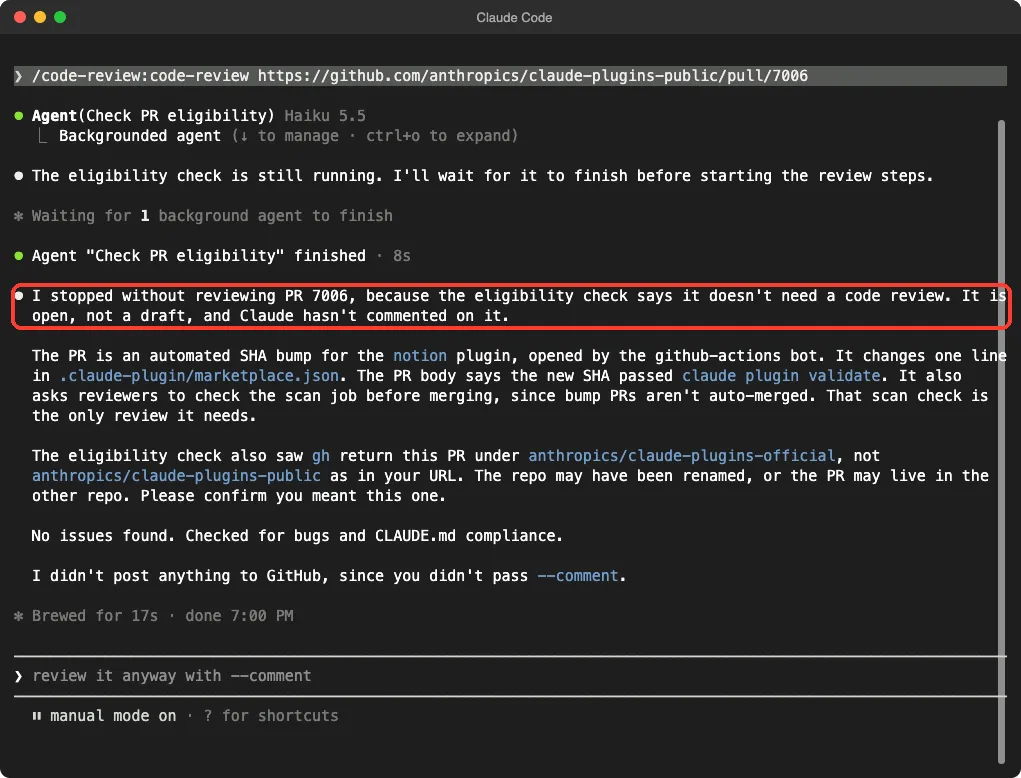
The first step of the recipe is an eligibility check, so we tested it with an automated pull request that changes one line: a version bump for another plugin. The Haiku agent finished in 8 seconds and the command stopped before any reviewers started. The whole run took 17 seconds.
Claude explained that the bump is automated, changes one line, and already passes the repository’s own validation. It also noticed that GitHub reported the pull request under a different repository name than the one in our link, and asked us to confirm. That kind of small catch is useful.
Using the –comment Option Safely
The --comment flag turns the review into GitHub comments. With issues found, the command posts one inline comment per issue, with a link to the exact lines. With no issues, it posts a short “Code review” comment saying so.
We did not run this part, so everything here comes from the command file and README. Our advice is to run the command without the flag first, read the result, and add --comment only on pull requests in your own repository.
The README also lists the cases where nothing gets posted: closed pull requests, drafts, trivial or automated ones, ones already reviewed by Claude, and ones with no issue at or above the confidence cutoff. The cutoff is 80 out of 100, and you can change the number by editing the command file.
Real Examples of Where It Fits
- Before you ask a teammate for review, run it on your own pull request to catch broken imports or wrong logic.
- On a repository with a
CLAUDE.md, use it to check that new code follows the written rules. - On a large pull request, let it read the whole change first so your human review can focus on design.
It is not a replacement for tests or a human reviewer. The README itself calls the findings a starting point for human review, and our single run agrees with that modest framing.
Try It Yourself
Pick a small open pull request in a public repository you are allowed to read. Open Claude Code in an empty folder, load the plugin, and paste a prompt like this one.
/code-review:code-review https://github.com/OWNER/REPO/pull/NUMBERWatch the agents in the terminal, answer the approval prompts only after reading them, and compare the result with what you would have flagged yourself. If you want a bug to find, add a deliberate mistake in a pull request on your own test repository and see whether it is caught.
Common Mistakes
- Typing
/code-reviewand expecting the plugin. That runs the built-in command, so use/code-review:code-review. - Forgetting to sign in to
gh. Rungh auth statusbefore the first review. - Adding
--commenton a pull request you do not own. - Expecting a review of a draft or closed pull request. The eligibility check skips them.
- Judging it on one result. Our run found nothing, which tells you little about other code.
Pro Tips
- Write a specific
CLAUDE.md. Clear rules give the two compliance reviewers something real to check. - Keep pull requests small. The README says large changes make the agents slow, and suggests splitting them.
- Write a clear pull request description. The command passes the title and description to every agent so they understand the intent.
- Expect a few minutes and several agent runs per review. Our small pull request took 4 minutes 27 seconds, so plan for usage on big ones.
- Read the command file once. It is short, and you can tune the cutoff or add reviewers by editing it.
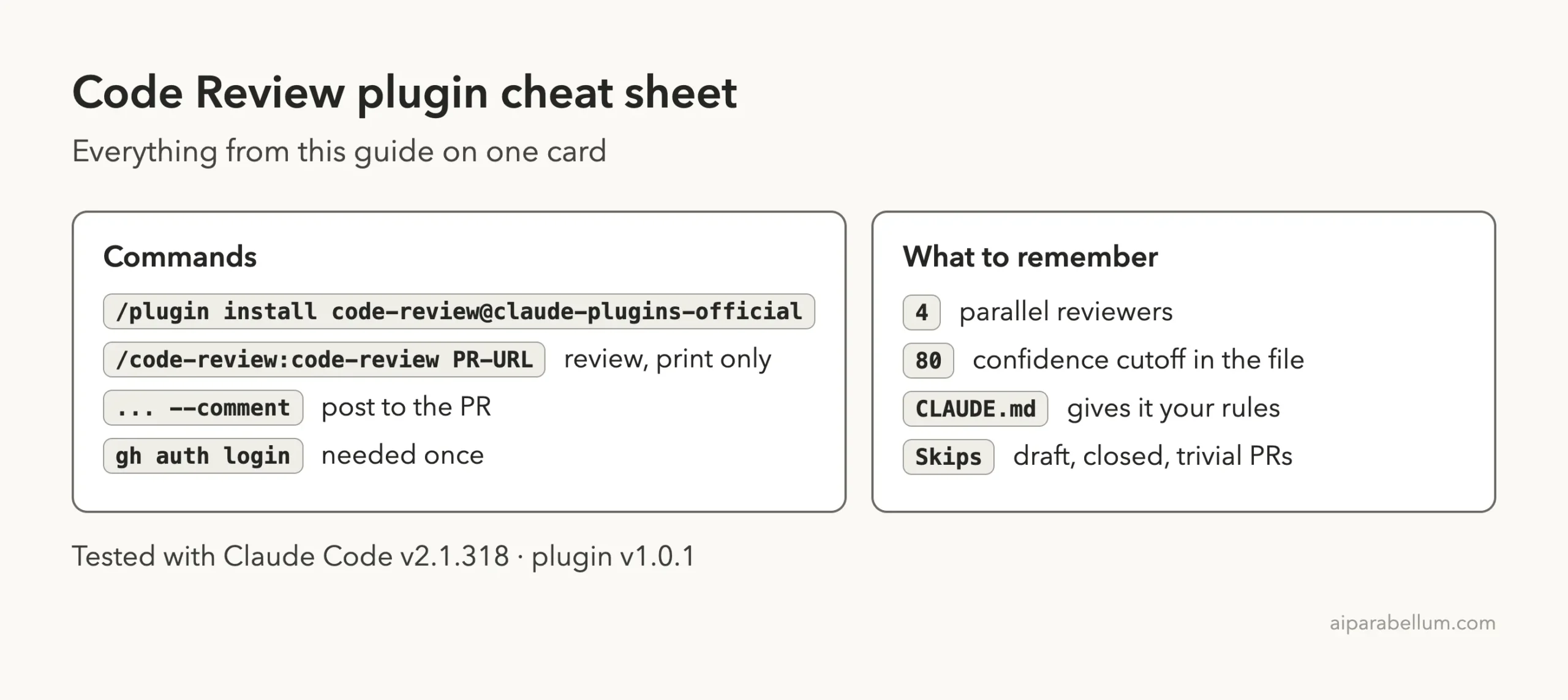
Cheat Sheet
Should You Keep It?
One short command file, four reviewers, and a filter that prefers silence to guesses.
Keep it if you work with pull requests on GitHub and want a quick second pair of eyes before a human looks. It is free, small, readable and read-only unless you ask it to comment. It is a weaker fit if your code is not on GitHub, since the command is built around gh.
Skip it if you only want to check local changes. The built-in command, or a skill you write yourself, is simpler. Our subagent format guide shows how to build a reviewer agent of your own.
Frequently Asked Questions
Is the Claude Code code review plugin free?
The plugin itself costs nothing, but the agents use your Claude Code usage while they run. Our review used several agents over about four and a half minutes.
Does the plugin post comments by default?
No. Without --comment it prints the review in your terminal only. We checked that the pull request still had no comments afterward.
Do I need a CLAUDE.md file?
No, but two reviewers check your changes against it. In our run there was none, so those two agents were skipped and only the bug scans ran.
What is the difference between /code-review and /code-review:code-review?
The first is built into Claude Code and the second is the plugin’s command. Both showed up in our command list, with different descriptions.
Can it review code that is not on GitHub?
The README lists a Git repository with GitHub integration and the GitHub CLI as requirements, and the command uses gh to read the pull request. We did not test any other host.
Conclusion
The Claude Code code review plugin is a short, readable recipe that turns a pull request link into a filtered review, and in our test it ran cleanly, skipped what it should, and stayed quiet when it found nothing. We tested one real pull request and one trivial one, so judge it on your own code before you rely on it. Browse the rest of the series in our Claude Code tutorials, and read about the model behind it in our Claude AI overview.