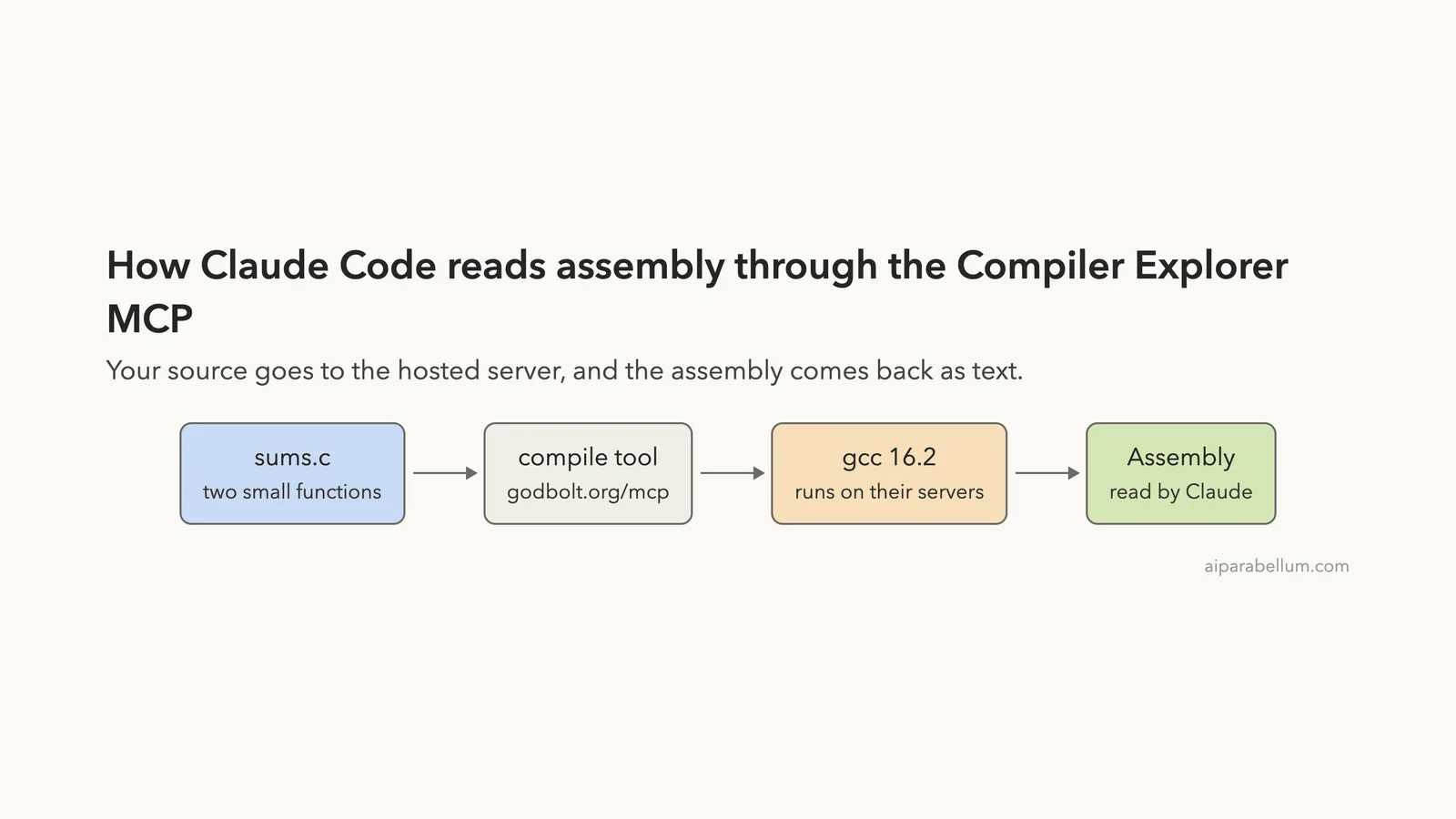
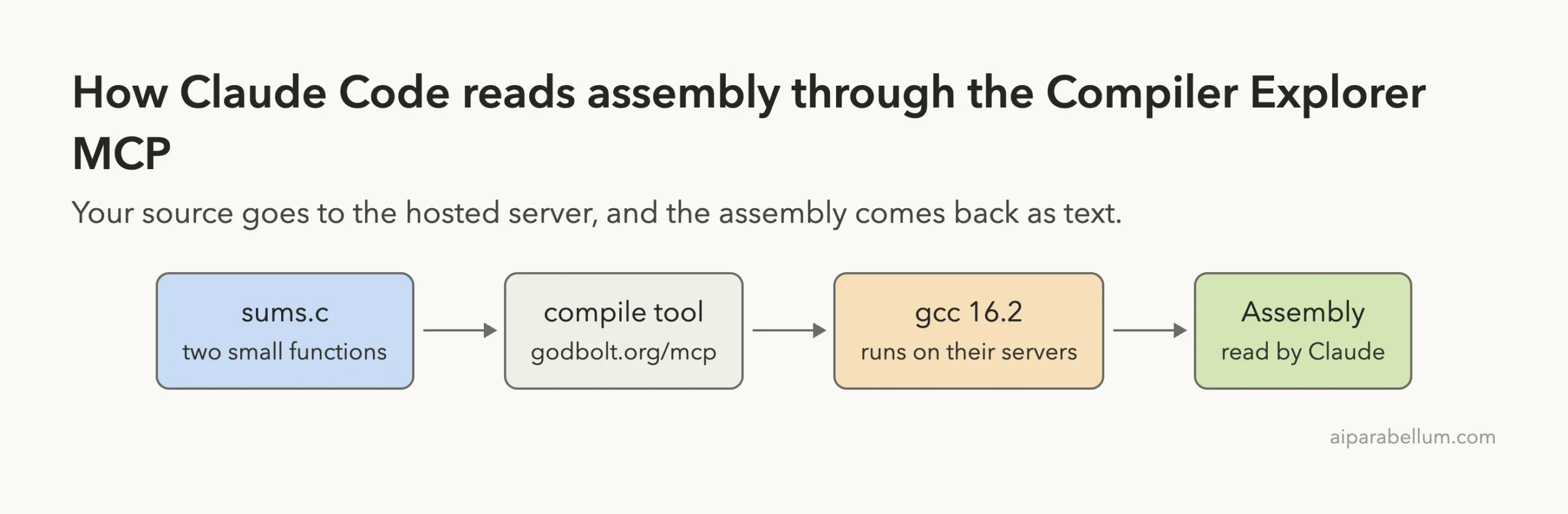
The Compiler Explorer MCP lets Claude Code send a piece of code to godbolt.org, compile it, and read the assembly that comes back. We added it to a throwaway folder, gave Claude two small C functions, and asked what the compiler really did with each one. It connected with no sign-in, and the answers were real, checkable assembly.
This guide is part of our Claude Code tutorials. Find more servers in our MCP servers directory.
Tested with Claude Code v2.1.322 on November 11, 2026. The server is hosted at https://godbolt.org/mcp, so there is no package to pin.
It comes from the compiler-explorer repository, and we read the repo at commit 7b177ae from November 11, 2026. Its server.json lists version 1.0.0 and its docs/MCP.md describes the endpoint.
One prompt got us the assembly for both functions, and the answer showed that the loop was not turned into a formula by gcc 16.2.
Quick Summary: What We Tested
| Question | Answer |
|---|---|
| What is it? | A hosted MCP server built into Compiler Explorer, the site behind godbolt.org |
| Does it need an account? | No. /mcp showed “connected” and “Auth: not signed in” |
| What did we run? | Adding the server, listing its tools, and three prompts that compiled our own C code |
| What did we see? | Real x86-64 assembly from gcc 16.2 for both functions at -O2, plus a -O0 versus -O2 comparison |
| Context cost | 3,531 tokens for 7 tool definitions, as measured for our directory |
| Our verdict | Easy to add and genuinely useful if you want Claude to look at compiler output |
What the Compiler Explorer MCP Is and Why It Exists
Compiler Explorer is a free website where you type code and see the assembly next to it. Many programmers use it to check what a compiler does with their code. The project now ships an MCP server so that an AI assistant can do the same thing.
MCP is the Model Context Protocol, a standard way to give Claude extra tools. If it is new to you, our MCP guide explains it, and our plugins guide shows how plugins can bundle such servers.
The project’s docs/MCP.md says the endpoint is unauthenticated and uses the streamable HTTP transport in stateless mode. Each call is one request and one response, with no session kept between calls.
The idea is simple. Instead of you copying code into a browser tab, Claude does it for you and then explains the result in plain English.
Is the Compiler Explorer MCP Safe to Add?
Before adding any server, ask what it can do and where your data goes. This one is hosted, so any source code Claude sends in a compile call goes to servers run by the Compiler Explorer project. Do not send private or confidential code to it.
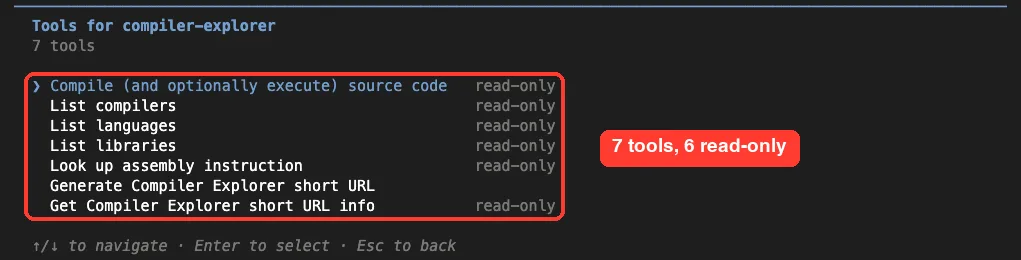
The /mcp screen labeled six of the seven tools as read-only. The only tool without that label is the one that makes a short link. The docs say that tool is additive only and returns the same link for the same payload.
The compile tool can also run the program when you set execute to true. The docs say it runs in an ephemeral sandbox and that sandbox effects do not escape the call. We did not use execute in our tests, so we only read that claim.
The repository uses the BSD 2-Clause license. We never touched our normal setup. The server was added at local scope inside a throwaway demo folder and removed after the test, and the MCP docs explain scopes in detail.
How to Add the Compiler Explorer MCP to Claude Code
The project’s docs give the install line below. We added --scope local so the server exists only in one folder.
claude mcp add --scope local --transport http compiler-explorer https://godbolt.org/mcpClaude Code printed that it added the server to the local config for the project folder. Then we started claude there and ran /mcp.
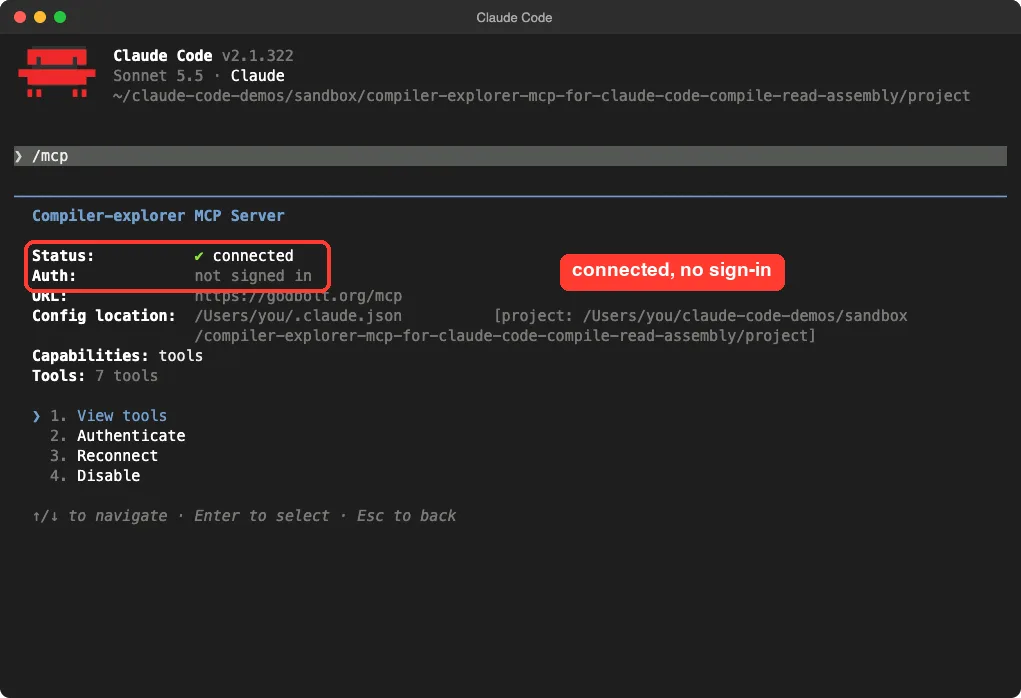
No sign-in prompt, no key, and no extra install. If you want the general steps for any server, the MCP quickstart covers them.
The Seven Tools Claude Code Sees
Choosing View tools in /mcp listed seven tools. Our directory measured their definitions at 3,531 tokens, which is a moderate cost for a server you only need in some sessions.
| Tool | What the docs say it does |
|---|---|
compile | Compiles source with a chosen compiler and options, and can run the result |
list_languages | Lists every supported language with its default compiler |
list_compilers | Lists compilers, filtered by language, instruction set or text |
list_libraries | Lists libraries you can link for a language |
lookup_asm_instruction | Returns documentation for an assembly mnemonic such as imul |
generate_short_url | Saves your setup and returns a godbolt.org/z/... link |
get_shortlink_info | Turns a short link back into source and settings |
What the compile Tool Accepts
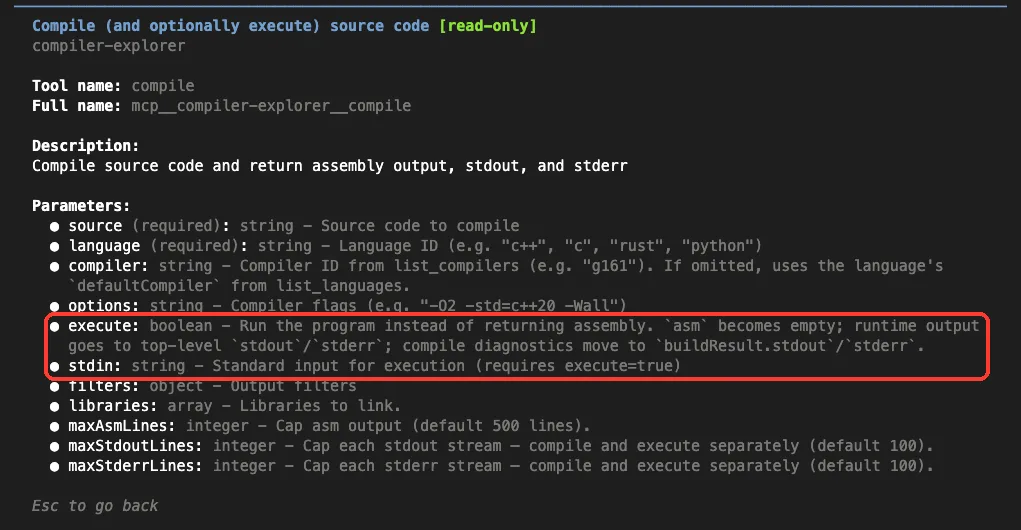
Opening the compile tool in /mcp shows its inputs. Only source and language are required. You can also pass a compiler ID, options such as -O2, and libraries to link.
The execute input runs the program instead of returning assembly. The output is capped by default at 500 lines of assembly and 100 lines each of stdout and stderr, and you can raise those caps.
Test 1: Compile Two Functions and Compare Them
We created a file called sums.c with two ways to add up the numbers from 1 to n. One uses a loop and one uses the formula n * (n + 1) / 2.
unsigned sum_loop(unsigned n) {
    unsigned total = 0;
    for (unsigned i = 1; i <= n; i++) {
        total += i;
    }
    return total;
}

unsigned sum_formula(unsigned n) {
    return n * (n + 1) / 2;
}
Then we asked Claude to compile both and compare them.
Read sums.c. Use the compiler-explorer MCP to compile both functions with x86-64 gcc at -O2 and show me the assembly for each. Then tell me in 3 short lines whether the two compile to the same code.Claude read the file, called the server twice, and said it would use the latest stable release, gcc 16.2. Choosing the compiler on its own is handy, but check which one it picked if the version matters to you.
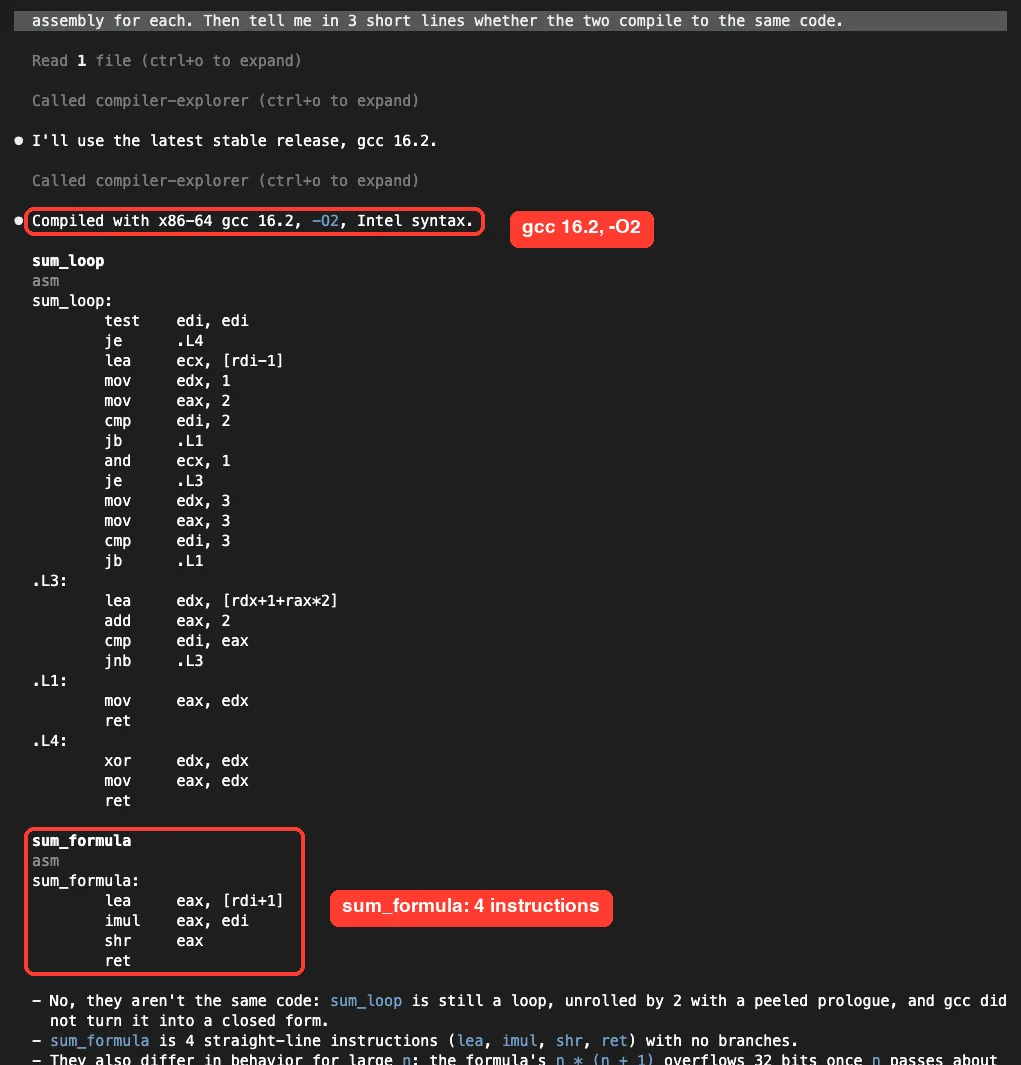
The assembly for sum_formula was four instructions: lea, imul, shr and ret. The assembly for sum_loop was longer, with a loop label and jumps.
Claude’s three lines said the two are not the same code, that sum_loop is still a loop unrolled by two, and that gcc did not turn it into a closed formula. That is the useful insight here. It is a fact about this compiler version and these flags, and we did not test other compilers.
Claude also pointed out that the two functions differ for large inputs.
The formula overflows 32 bits once n passes 65,535, while the loop only wraps once the sum itself passes 232, around n = 92,681. We checked the arithmetic, and it holds. It was a bonus we did not ask for.
What the Raw Tool Result Looks Like
You can press ctrl+o to expand the transcript and see what the server really returned. The result was a JSON block with the assembly for each function as one text string, plus empty stdout and stderr.
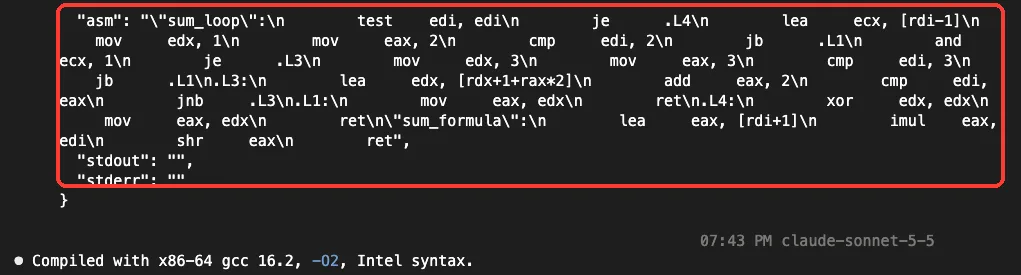
Because it comes back as plain text, Claude can read it directly. That is why it could explain the loop structure instead of guessing.
As a cross-check, we also sent a similar request straight to the public Compiler Explorer API in C++ mode with gcc 14.2. The loop again came back with a test, a few setup instructions and a loop. We mention it only as a sanity check, not as a second result for the article.
Test 2: Compare -O0 and -O2 for the Loop
Next we asked for a before and after for one function.
Using the compiler-explorer MCP, compile only sum_loop from sums.c with x86-64 gcc at -O0 and again at -O2. Count the asm lines of each and say in 3 short lines what changed.Claude called the server three times and used gcc 16.2 again. It reported a small table: at -O0 the function was 18 lines of assembly (15 instructions), and at -O2 it was 26 lines (22 instructions).
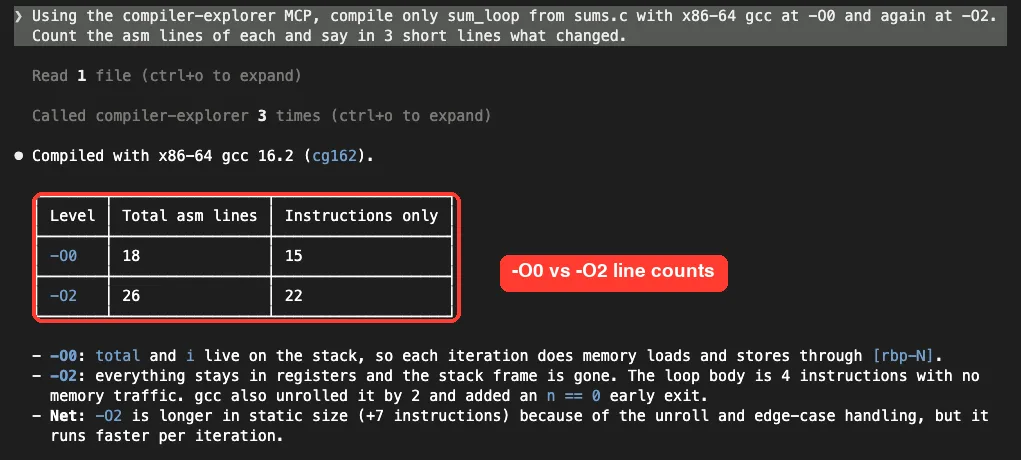
It explained the numbers in plain terms. At -O0 the variables live on the stack, so each pass through the loop reads and writes memory. At -O2 everything stays in registers, the stack frame is gone, and gcc added an early exit for the case where n is zero.
The counts are Claude’s own, taken from the assembly the server returned, and we did not recount them by hand. Claude also said the optimized version “runs faster per iteration”. We did not measure speed, so treat that as a reasonable expectation, not a result.
The interesting lesson is that more optimization made the code longer, not shorter. Smaller assembly is not the goal. Fewer memory operations in the hot loop is.
What We Did Not Test
We want to be clear about the edges of this test.
- We never used
execute, so we cannot say how running a program looks. - We never made a short link, so
generate_short_urlandget_shortlink_infoare known only from the docs. - We tested only C with x86-64 gcc. Other languages and compilers were not part of our run.
- We used one small file. Large projects, libraries and multi-file builds were out of scope.
Who Should Add the Compiler Explorer MCP to Claude Code?
| Your situation | Our advice |
|---|---|
| You want to see what a compiler does with a small function | Add it. It worked well in our tests |
| You are learning assembly or optimization | Good fit. Claude explains the output in plain English |
| Your code is private or under NDA | Skip it, because the source goes to a hosted server |
| You need to build a full project with many files | Use your local compiler. We tested only single small files |
Common Mistakes
- Not saying which compiler and flags you want. Claude will choose for you, and the answer may change with the version.
- Sending confidential code to a hosted server.
- Trusting performance claims that nobody measured. Assembly shows what the code is, not how fast it runs.
- Adding the server at user scope for a quick test. Use
--scope local, and remove it withclaude mcp remove compiler-explorerafterward.
Pro Tips
- Name the compiler and flags in your prompt, such as x86-64 gcc at
-O2, so results are repeatable. - Ask for a short answer, like “in 3 short lines”, so Claude explains instead of pasting everything.
- Press
ctrl+oto check the raw tool result when a claim matters to you. - Raise
maxAsmLinesin your prompt if the output is cut off at the default of 500 lines.
Try It Yourself
Run this in a throwaway folder with a small C file of your own, and compare what you see with ours.
claude mcp add --scope local --transport http compiler-explorer https://godbolt.org/mcp
claude
# inside Claude Code:
Using the compiler-explorer MCP, compile my function with x86-64 gcc at -O0 and at -O2. Tell me in 3 short lines what changed.
# when finished:
claude mcp remove compiler-explorer
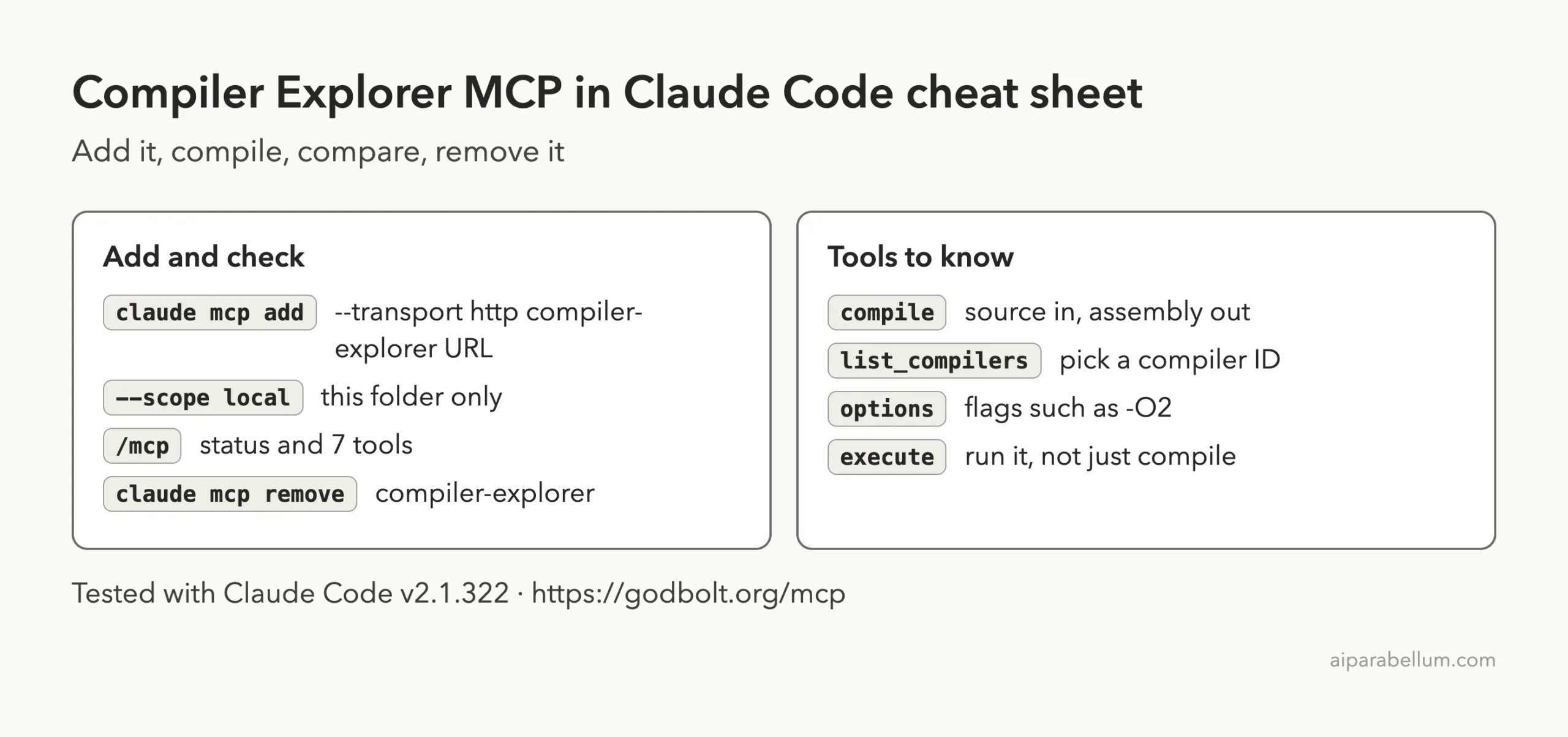
Cheat Sheet
Frequently Asked Questions
Does the Compiler Explorer MCP need an account or API key?
No. In our test, /mcp showed it connected with “Auth: not signed in”, and we entered no key.
Which compilers can Claude use through it?
The docs say it covers the compilers Compiler Explorer supports, and list_compilers lets Claude look them up. In our runs Claude chose gcc 16.2 on its own.
Does it send my code to a server?
Yes. The server is hosted at godbolt.org, so the source in a compile call goes there. Avoid confidential code.
Can it run my program?
The compile tool has an execute option that runs the program in a sandbox, according to the docs. We did not test it.
How do I remove it?
Run claude mcp remove compiler-explorer from the folder where you added it at local scope.
Conclusion
The Compiler Explorer MCP is one of the easier servers to try. It needs no account, adds seven tools at a modest context cost, and in our tests it returned real gcc 16.2 assembly that Claude could explain. We saw that gcc did not turn our loop into a formula at -O2, and that -O2 made the loop longer but moved its variables into registers. Add it if you want a quick way to check what a compiler does, keep private code away from it, and try the execute and short link tools yourself, since we did not.
Next, browse more tested add-ons in our skills directory, or read the Claude overview.