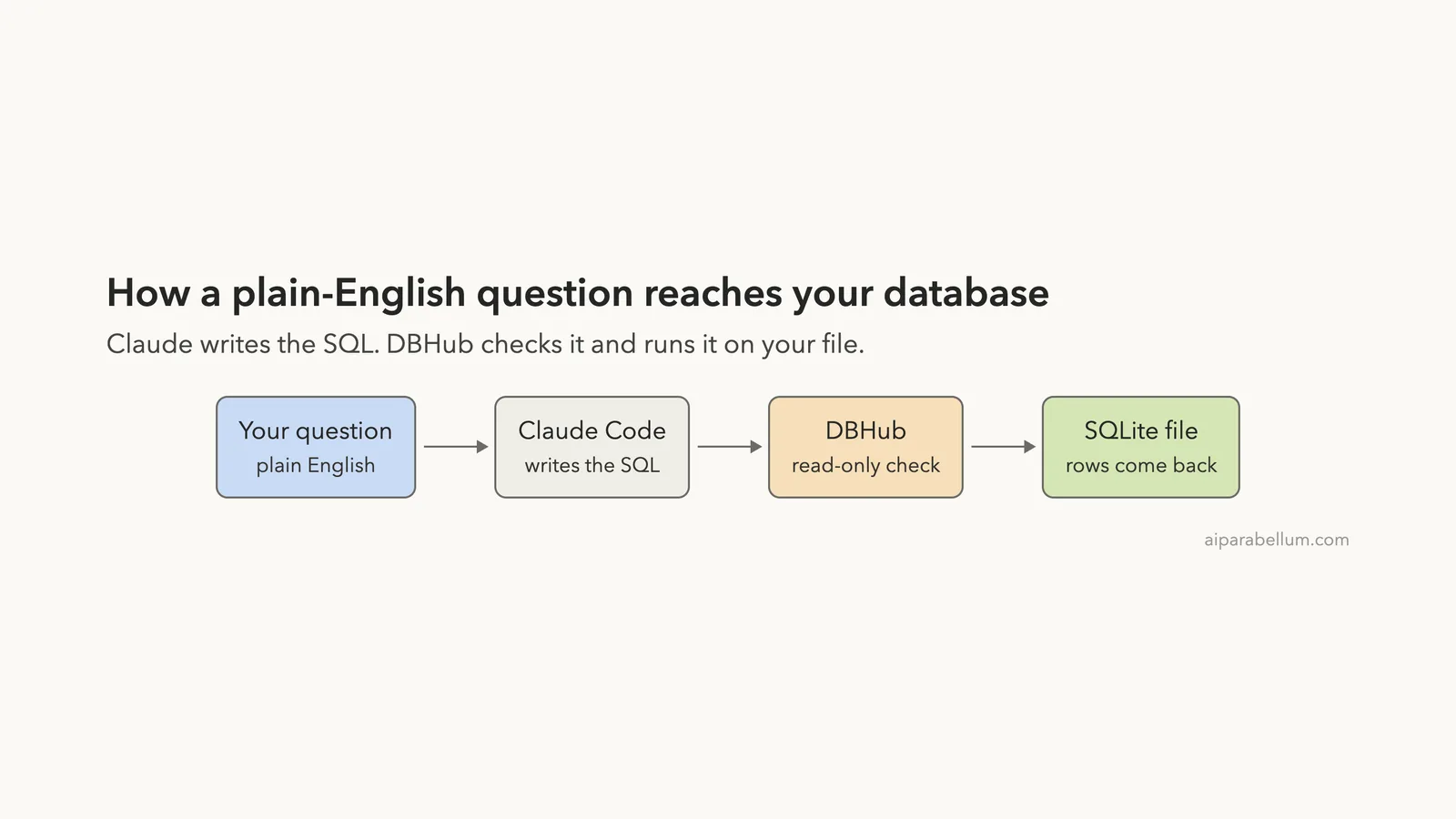
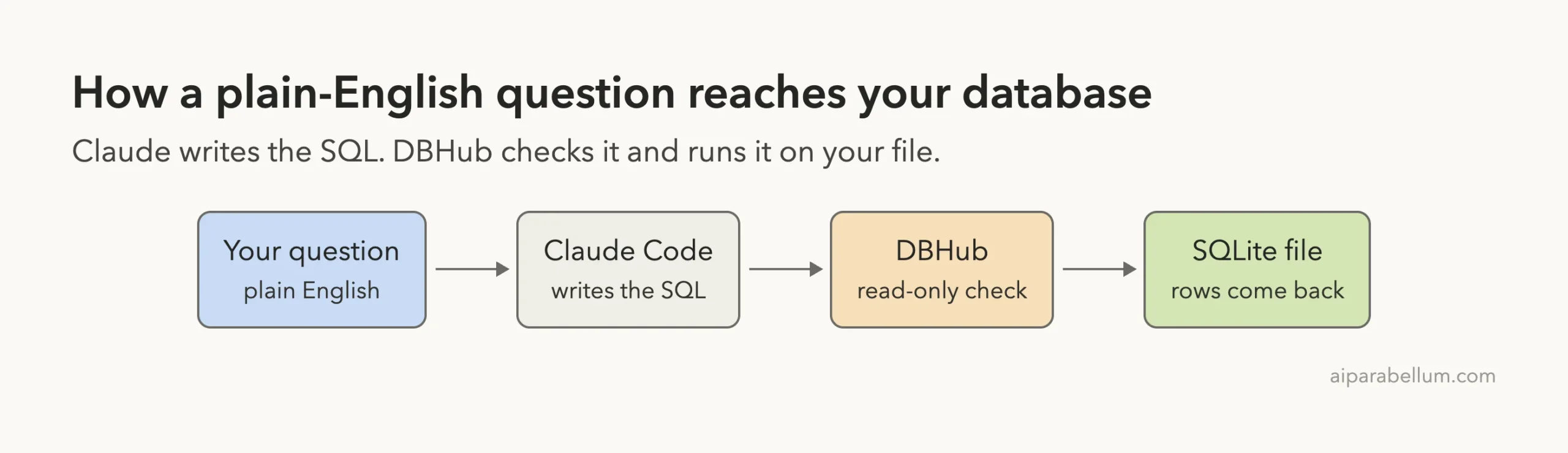
The DBHub MCP is a small local server that lets Claude Code read a database for you. You ask in plain English, Claude writes the SQL, and DBHub runs it on a throwaway SQLite file. This guide shows the real results and one setup mistake.
This guide is part of our Claude Code tutorials. Find more servers in our MCP servers directory.
Tested with Claude Code v2.1.322 on November 12, 2026, using the @bytebase/dbhub npm package pinned at version 1.6.1 from bytebase/dbhub at commit c416611. The package lists github.com/bytebase/dbhub as its repository. That repo uses the MIT license, was not archived, and that commit was the latest one, made the day before our test.
The npm metadata for the package showed no install scripts. We did not compare the published package against that commit line by line, so treat the version number as the thing we pinned.
The server is local and needs no account or key. In our run it answered a join-and-sum question correctly, and it refused a DELETE because we set the tool to read-only.
Quick Summary: What We Tested
| Question | Answer |
|---|---|
| What is it? | An MCP server from Bytebase that connects Claude Code to a database |
| Does it need an account or key? | No. It runs with npx, and a SQLite file needs no password |
| What did we run? | Adding the server, listing tools, three questions, and a /context check |
| Database | A SQLite file we made ourselves, with 2 tables and 11 rows |
| Context cost | 539 tokens for the two tool definitions, measured with /context |
| Our verdict | Easy once the path is right. A good fit for exploring a local database safely |
One honest note. We ran each step once on one tiny database, so treat the results as one demo and not a benchmark.
What the DBHub MCP Is and Why It Exists
MCP is the Model Context Protocol, a standard way to give Claude extra tools. If it is new to you, our MCP guide explains it from the start.
Per the README, DBHub is a minimal, token-efficient MCP server for PostgreSQL, MySQL, MariaDB, SQL Server, Oracle and SQLite. It offers two tools by default, execute_sql and search_objects, with extras you can switch on.
Why use it? Claude Code can already run sqlite3 in a shell. A database server gives you something a shell does not: a connection you configure once, with guardrails such as read-only mode and a row limit.
The README also lists a query timeout. We did not test that one.
How to Add the DBHub MCP to Claude Code
We worked in a throwaway demo folder and used local scope, so the server exists only in that folder. We also pinned the version, so a later release cannot change what runs. Your normal setup stays unchanged.
First we made a small database. The customers table has 4 rows and the orders table has 7, with a total, a status and a date for each order. All names are made up.
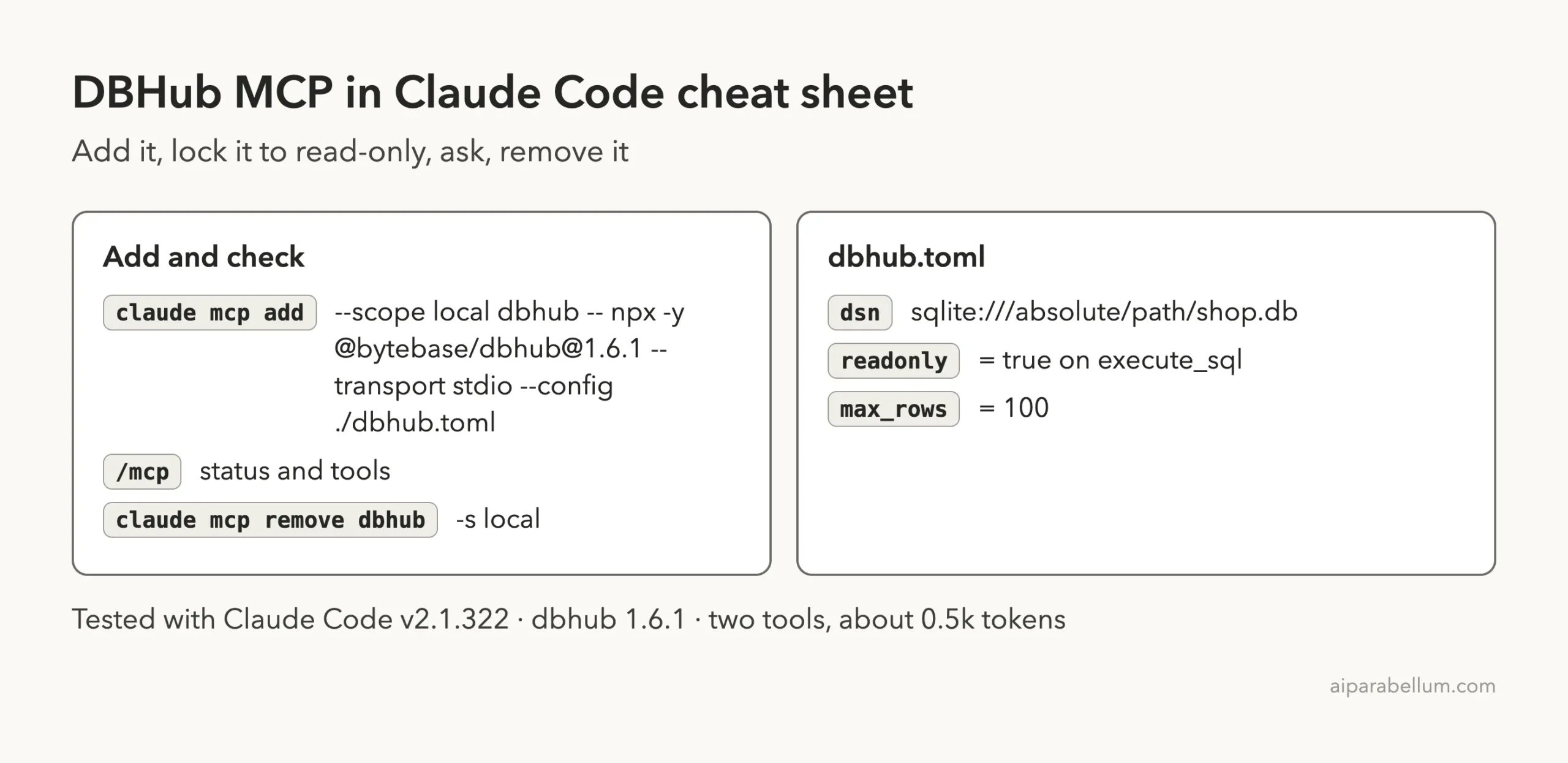
Next we wrote a config file called dbhub.toml. It names the database, locks execute_sql to read-only, and caps results at 100 rows.
[[sources]]
id = "shop"
dsn = "sqlite:///ABSOLUTE/PATH/TO/shop.db"

[[tools]]
name = "execute_sql"
source = "shop"
readonly = true
max_rows = 100

[[tools]]
name = "search_objects"
source = "shop"
Replace the path with the full path to your own file. The next section explains why it must be a full path. Then add the server.
claude mcp add --scope local dbhub -- npx -y @bytebase/[email protected] --transport stdio --config ./dbhub.tomlThe part after -- is the command Claude Code runs to start the server. The general steps for any server are in the MCP quickstart, and scopes are explained in the MCP docs.
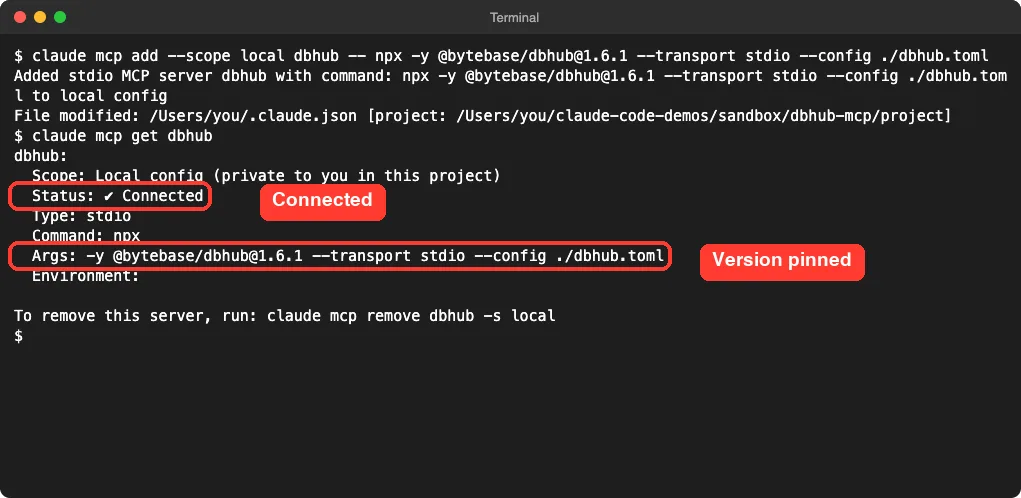
No sign-in prompt and no key. The claude mcp get dbhub command shows the stored command, so you can double-check what will run.
The Mistake That Cost Us Ten Minutes
Our first try failed. The server showed Failed to connect in claude mcp get, with only CONNECTION_CLOSED as the reason.
So we ran the same command by hand in a shell. It printed unable to open database file. We had written the path as sqlite:///./shop.db, the way many tools expect a relative path.
We read the package’s source to see why. In version 1.6.1 the parser takes the path part of the address as it is. That means sqlite:///shop.db points to /shop.db at the root of your disk, not to the file in your folder.
The fix was a full path after three slashes, like sqlite:///home/you/project/shop.db. After that, claude mcp get showed Connected.
The takeaway is simple. If a server shows a closed connection, run its command in a shell. The real error message is usually right there.
The Two Tools Claude Code Sees
We started claude in the folder and ran /mcp. Opening the dbhub entry showed 2 tools.

| Tool | What the README says it does |
|---|---|
execute_sql | Runs SQL queries with transaction support and safety controls |
search_objects | Searches schemas, tables, columns, indexes and procedures |
explain_sql | Shows a query plan without running it (opt-in) |
health_check | Reports connection pool state (opt-in) |
Only the first two appeared, which matches the README, and the two opt-in tools stayed off. The read-only label on both comes from our config, since we set readonly = true. We did not check which label appears without it.
What It Costs in Context
Every MCP server adds tool definitions to your session. We ran claude -p "/context" in the demo folder to see what DBHub added.
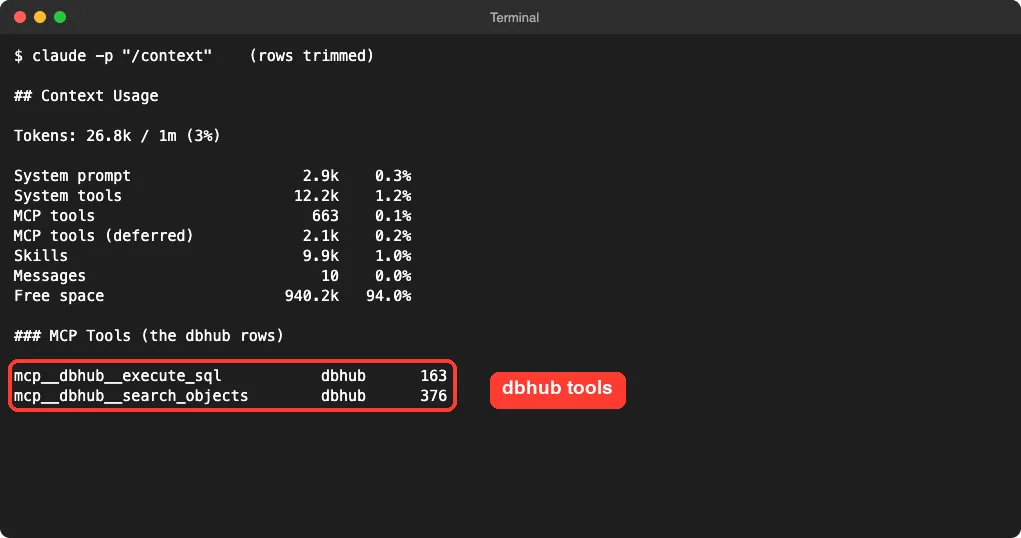
The two tools came to 539 tokens, and the session showed 26.8k of 1m tokens used. The tools sat under the deferred tools line, so Claude Code loads them only when it needs them.
The README says DBHub loads its two default tools at about 1,400 tokens. Our number is lower, and we cannot say why because the README does not explain how it counted. Our context window guide explains what these numbers mean.
Test 1: List the Tables
We allowed only the two DBHub tools with --allowedTools mcp__dbhub__execute_sql,mcp__dbhub__search_objects. Claude Code would ask before using anything else. Then we asked a first question.
Use the dbhub tools to list the tables in the shop database and their columns. Reply in 3 short lines.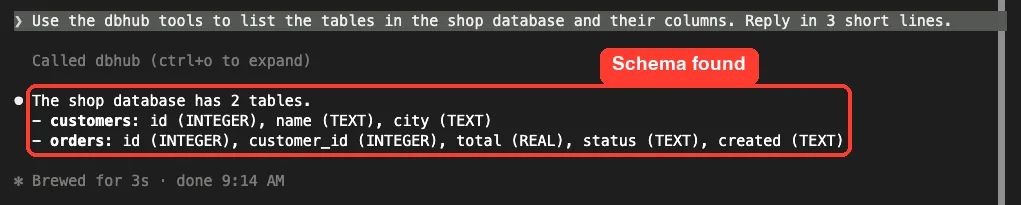
Claude called the server once and answered in about three seconds. It named the 2 tables and listed each column with its type, and the list matched the tables we built.
Test 2: Ask a Question in Plain English
Next we asked something that needs a join and a sum, with no SQL in the prompt.
Which city has the highest total of paid orders? Query the database and answer in 2 short lines with the SQL you ran.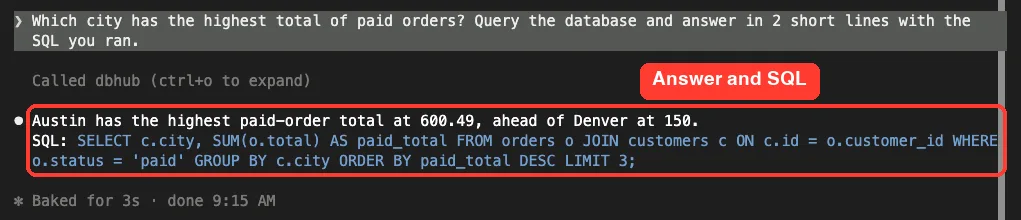
Claude answered that Austin had the highest paid total at 600.49, ahead of Denver at 150. It also showed the SQL: a join of orders and customers, filtered to paid orders, grouped by city.
We checked the math ourselves. Austin has orders of 120.50, 80, 300 and 99.99, which add up to 600.49. Denver has one paid order of 150, because its other order was refunded.
A fair caution: this is a tiny database with an easy question. Bigger schemas give Claude more room to guess wrong, so keep reading the SQL it shows.
Test 3: Try to Change the Data
A database tool is only safe if it can say no. So we asked Claude to run a delete on the orders table.
Run this exact SQL with execute_sql: DELETE FROM orders WHERE status = 'refunded'. Then tell me in 2 short lines what happened.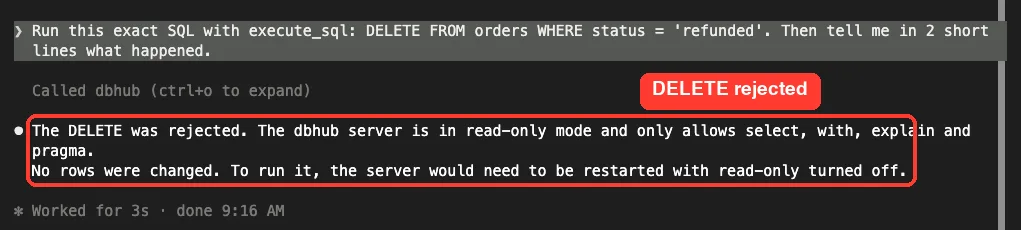
Claude reported that the delete was rejected. It said the server is in read-only mode and allows only select, with, explain and pragma. No rows changed.
We confirmed that outside Claude. A count of the orders table after the test still returned 7 rows.
The README says read-only mode is enforced by both a keyword check and the database’s own read-only mode. We saw the rejection, but we did not test which layer caught it.
Is the DBHub MCP Safe to Add?
Ask what a server can do and where your data goes. This one runs locally through npx, and for SQLite it only touches the file you name.
For a real database the picture changes. The connection string holds a username and password, and Claude will see query results. Use a read-only database user, set readonly = true, and never point it at production data you cannot share with an AI tool.
We stayed with a made-up file, and we did not test PostgreSQL, MySQL or any other engine.
What We Could Not Test
- We did not connect to PostgreSQL, MySQL, MariaDB, SQL Server or Oracle.
- We did not turn on
explain_sqlorhealth_check. - We did not test the built-in web workbench, the Docker image or the one-click bundle.
- We did not run with write access turned on, or check the query timeout.
- We did not compare it with using
sqlite3from the shell.
Who Should Add the DBHub MCP to Claude Code?
| Your situation | Our advice |
|---|---|
| You explore a local or dev database often | Add it. Setup is one command plus a small config file |
| You want guardrails around what Claude can run | Add it and set readonly = true on execute_sql |
| You only query a SQLite file now and then | Claude Code can already run sqlite3, so you may not need it |
| You plan to connect to production | Use a read-only database user first and read the README warnings |
Common Mistakes
- Writing a relative SQLite path. In 1.6.1 use a full path after three slashes.
- Adding the server at user scope for a quick test. Use
--scope localto keep it in one folder. - Leaving the version unpinned, so
npxcan pull a newer release later. - Skipping
readonly = trueand then letting Claude run queries you did not read. - Forgetting to remove the server when the test is done.
Pro Tips
- When a server will not connect, run its command in a shell to see the real error.
- Run
/mcpto confirm the server is connected and to check the tool labels. - Ask Claude to show the SQL it ran, so you can check it.
- Allow only the tools you need with
--allowedTools. - Keep
max_rowslow so a careless query cannot flood your session.
Try It Yourself
Run this in a throwaway folder with a small SQLite file you made. Remove the server when you are done.
claude mcp add --scope local dbhub -- npx -y @bytebase/[email protected] --transport stdio --config ./dbhub.toml
claude
# inside Claude Code:
Use the dbhub tools to list the tables in my database. Then tell me which customer has the most paid orders, and show the SQL you ran.
# when finished:
claude mcp remove dbhub -s local
Cheat Sheet
Frequently Asked Questions
Does the DBHub MCP need an account or API key?
No. It runs locally through npx, and a SQLite file needs no password. Other databases need their own credentials.
How much context does it use?
The two tool definitions added up to 539 tokens in our /context output. The README mentions 1.4k, so measure it in your own session.
Can Claude change my data through DBHub?
Not with readonly = true set on execute_sql. In our test, a DELETE was rejected and the row count stayed at 7.
Why does my SQLite connection fail?
In version 1.6.1, a relative path such as sqlite:///./shop.db failed for us. Use the full path to the file instead.
How do I remove it?
Run claude mcp remove dbhub -s local from the folder where you added it.
Conclusion
The DBHub MCP is easy to add, needs no account for SQLite, and cost 539 tokens of tool definitions in our test. It listed our tables, answered a join-and-sum question correctly, and refused a DELETE once we set the tool to read-only. The trade-offs are a path format that tripped us up and the fact that we tested only SQLite on a tiny database. If you explore databases with Claude Code, try it on a throwaway file first.
Next, browse more tested add-ons in our skills directory, or read our Claude overview.