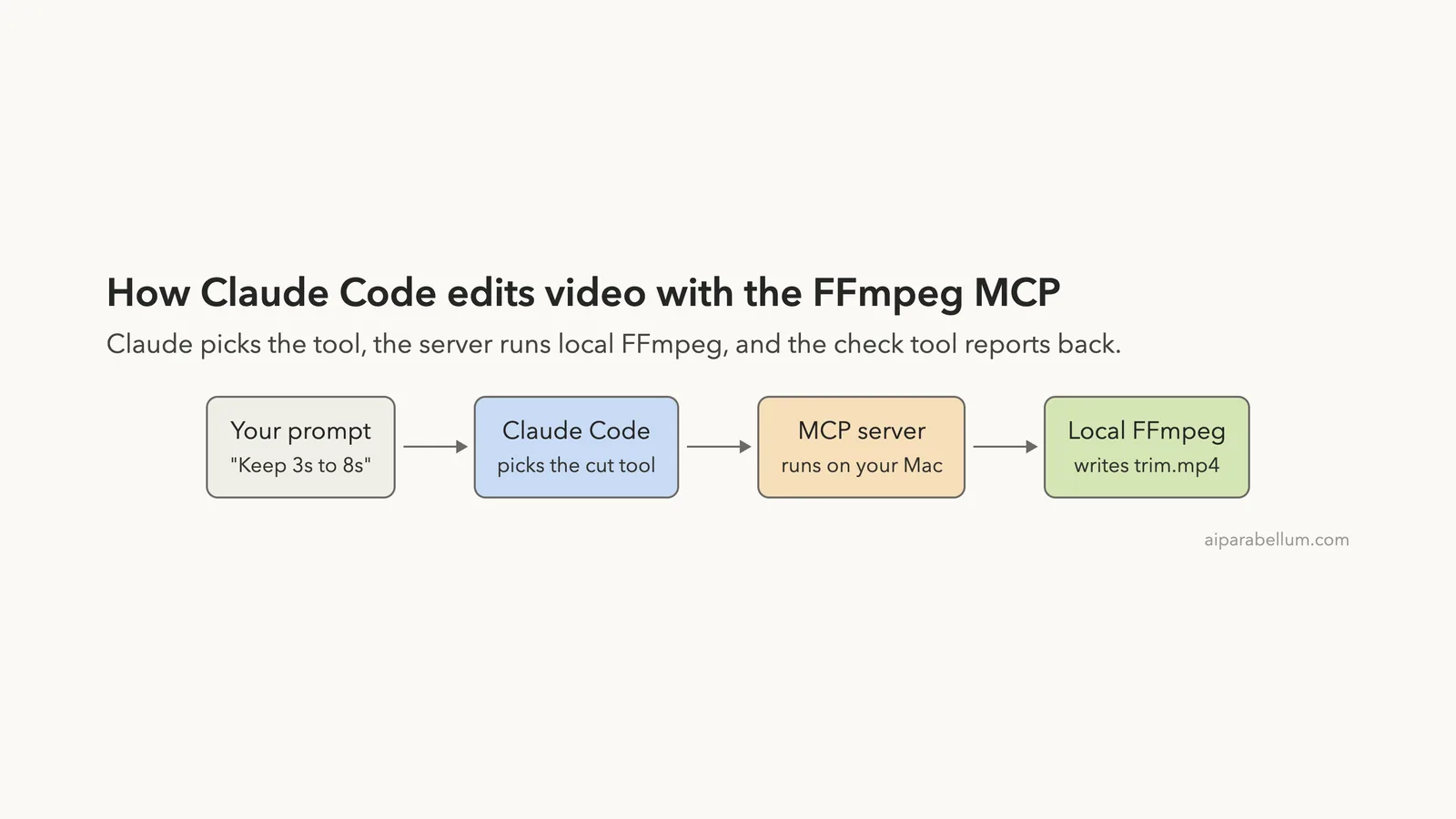
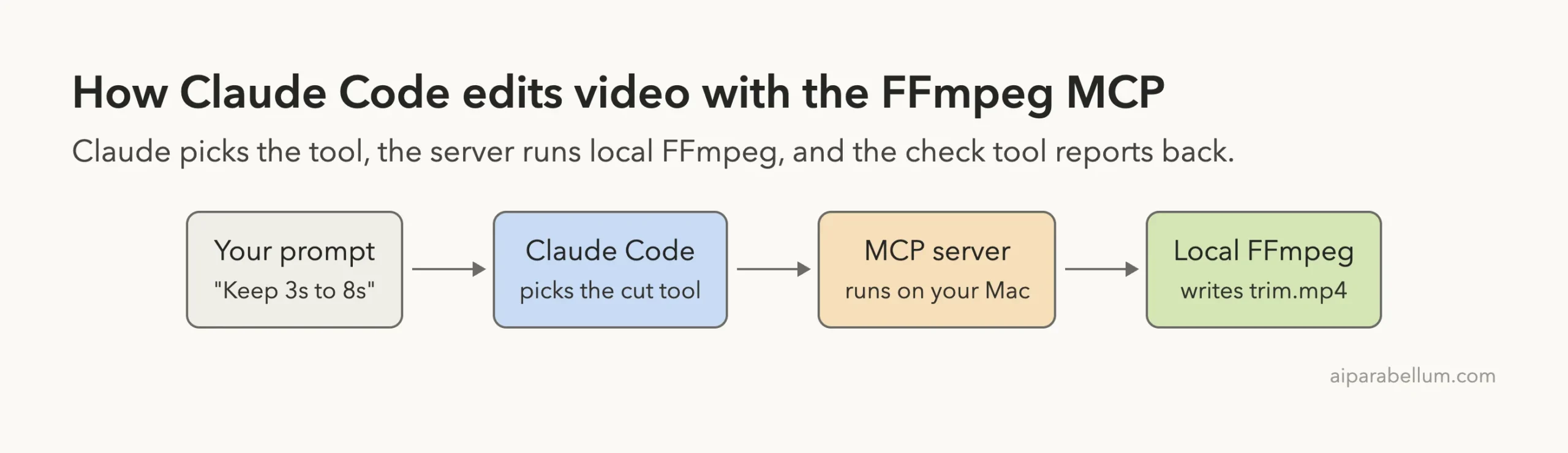
The FFmpeg MCP for Claude Code is an MCP server that lets Claude edit video files on your own Mac. You ask in plain English, Claude picks an editing tool, and local FFmpeg does the work. This guide shows a real probe, cut, check and vertical export on a clip we made ourselves, what it costs in tokens, and one cut that was not as clean as it looked.
This guide is part of our Claude Code tutorials. Find more servers in our MCP servers directory.
Tested with Claude Code v2.1.322 on November 12, 2026, using the ffmpeg-skill npm package pinned at version 3.6.0. The package lists github.com/kajisho5/ffmpeg-skill as its repository, and we cloned that repo at commit 641564b. It uses the MIT license, was not archived, and its latest commit was made on November 12, 2026.
The package metadata has no install scripts. Before running anything we read the installer file bin/install.js and the MCP server file mcp/server.py, and we searched the scripts for network calls. We found none, but we did not read every line of the 42 editing scripts.
The server needs no account and no key, and it works on files on your own disk. It does need FFmpeg 6.1 or newer on your machine.
Quick Summary: What We Tested
| Question | Answer |
|---|---|
| What is it? | A skill and MCP server that wraps 42 FFmpeg-based video tools for coding agents |
| Does it need an account or key? | No. The README says no cloud and no API keys, and we used none |
| What does it need? | Node (for npx), Python 3.10 or newer, and FFmpeg 6.1 or newer |
| What did we run? | The tool list, a probe, a cut, a delivery check, a vertical 9:16 export and a /context check |
| Context cost | About 25.7k tokens for the 12 default tool definitions, held back until needed |
| Our verdict | Fast and accurate for basic edits. Read the cut warnings before you publish |
One honest note. We ran each step once on a 12-second test clip, so this is one demo and not a benchmark. We also ran 4 of the 42 tools.
What the FFmpeg MCP Is and Why It Exists
MCP is the Model Context Protocol, a standard way to give Claude extra tools. If it is new to you, our MCP guide explains it from the start.
FFmpeg is a free command-line program that cuts, converts and fixes video and audio. It is powerful, but its commands are long and easy to get wrong. A single typo in a flag can re-encode a file you wanted to leave alone.
This project puts a layer on top. Each job, such as cut, caption or loudness, is a small script with fixed options. The README says the MCP server builds its tool list from a machine-readable contract, so the tool names and options match the scripts.
Claude does not write an FFmpeg command line itself. The README says the server accepts the named script’s own options, and never a raw FFmpeg command or a shell. That limits what a prompt can do, which we liked.
The package works as an agent skill too. Here we used only the MCP route, which is the way for clients that have no shell.
How to Add the FFmpeg MCP to Claude Code
We worked in a throwaway demo folder and used local scope, so the server exists only in that folder. We also pinned the version, so a later release cannot change what runs. Your normal setup stays unchanged.
First we made a test clip with FFmpeg itself. It is a 12-second test pattern with a timer burned into the picture and a steady tone, saved as sample.mp4. The timer will matter later, because it shows exactly which seconds survive a cut.
Then we added the server with one command.
claude mcp add --scope local ffmpeg -- npx -y [email protected] mcpThe part after -- is the command Claude Code runs to start the server.
Notice the final word, mcp. Without it, npx ffmpeg-skill runs the installer, and that copies files into ~/.claude/skills, which we did not want.
The general steps for any server are in the MCP quickstart, and scopes are explained in the MCP docs.
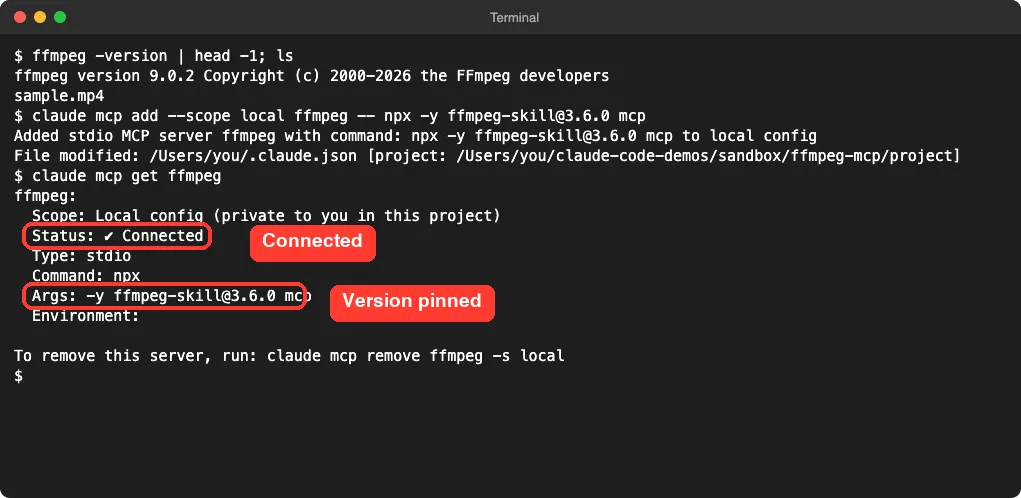
No sign-in prompt and no key. The claude mcp get ffmpeg command shows the stored command, so you can double-check what will run.
The 12 Tools Claude Code Sees
We started claude in the folder and ran /mcp. The ffmpeg entry listed 12 tools, even though the project has 42.
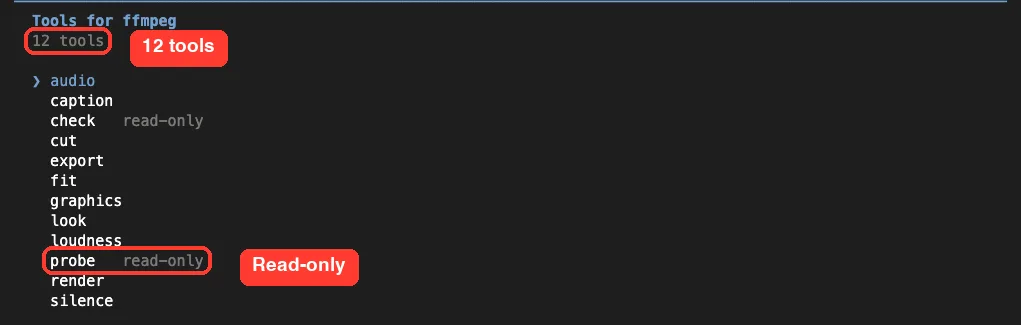
The README explains why. By default the server lists a core set of 12, so your session does not pay for 30 schemas it rarely uses.
All 42 stay reachable by name, and an environment variable named FFMPEG_SKILL_MCP_FULL=1 lists them all. We did not test that setting.
| Tool | What it does, in plain words |
|---|---|
probe | Reads a file and reports length, size and codecs. Read-only |
cut | Keeps a time range of a video |
check | Tests a file against a platform such as YouTube. Read-only |
fit | Changes the shape of a video, for example to 9:16 |
export | Makes a delivery file for a platform |
caption, audio, loudness, silence | Subtitles, audio clean-up, volume levels and silence removal |
graphics, look, render | Overlays, frame previews and whole-edit rendering |
We only ran probe, cut, check and fit. The descriptions of the other eight come from the tool list and the README.
What It Costs in Context
Every MCP server adds tool definitions to your session. We ran claude -p "/context" in the demo folder to see what the server added.
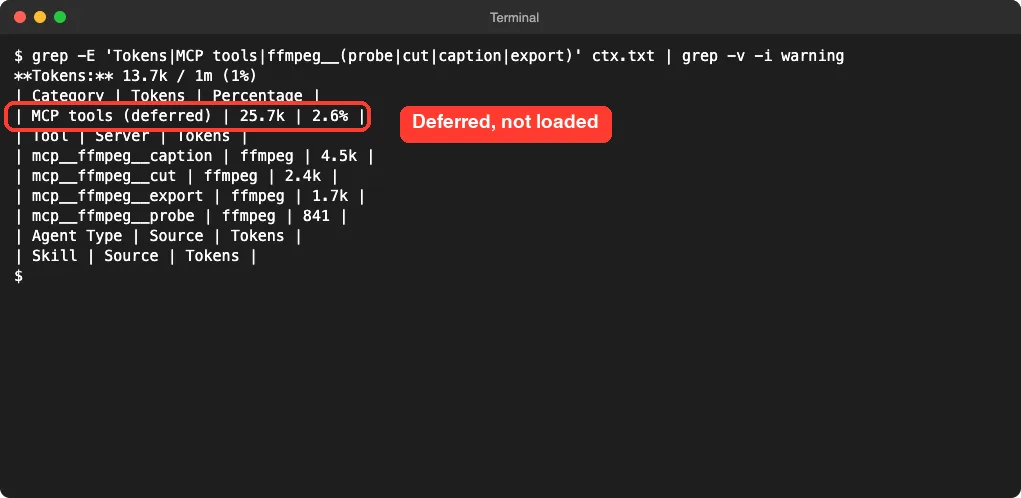
The listing gave each tool its own number, from 841 tokens for probe to 4.5k for caption. Adding all 12 up gave 25.7k tokens, which matched the summary line of 25.7k, or 2.6 percent of the window.
An earlier run in the same folder showed 27.5k deferred, so the number moves a little between runs. In that run the loaded MCP tools line read only 635 tokens. That tells us Claude Code held the definitions back and fetches them when a request needs a video tool.
A fair caution: these are our measurements on one setup. Measure it in your own session. Our context window guide explains what these numbers mean.
Test 1: Probe a Video File
Our first prompt asked Claude to look at the clip.
Use the ffmpeg MCP probe tool on sample.mp4 and tell me the duration, resolution and codecs in two short lines.Claude Code asked for permission before calling the tool and showed the file path it would read. We approved it. The whole round trip took 4 seconds by the timer in the screenshot.

We checked this against our own command. We had asked FFmpeg for a 12-second, 720p, 30 fps clip with a mono tone, and every detail came back right.
Test 2: Cut the Clip and Check the Result
Next we asked for a cut and a delivery check in one prompt.
Now use the ffmpeg cut tool to keep 3s to 8s of sample.mp4 as trim.mp4, then run the check tool on it.Claude called the server two times, once for the cut and once for the check. It reported that trim.mp4 is 5.07 seconds long, still 1280 by 720, and copied without re-encoding.
A copy without re-encoding is fast and loses no quality. The check ran against YouTube’s rules, since we had not named a platform. It found 0 failures and 2 warnings.
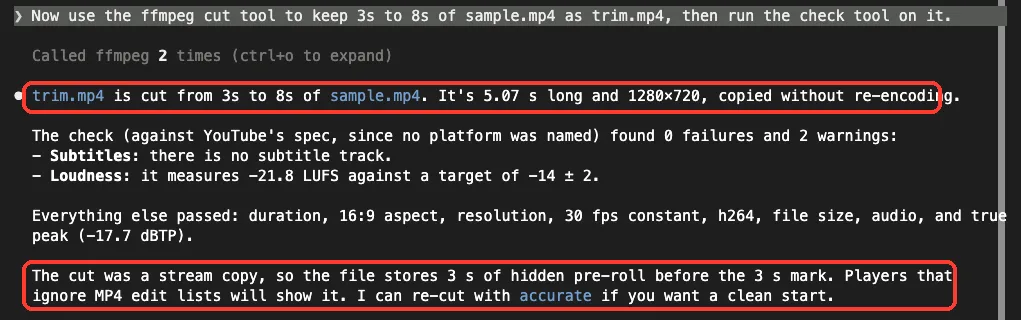
| Check result | What Claude reported |
|---|---|
| Failures | 0 |
| Subtitles warning | No subtitle track in the file |
| Loudness warning | -21.8 LUFS against a target of -14, give or take 2 |
| Passed | Duration, 16:9 shape, resolution, constant 30 fps, H.264, file size, audio and true peak of -17.7 dBTP |
Both warnings make sense. Our test clip has no subtitles, and a plain sine tone is quieter than YouTube’s loudness target. The server did not guess; it measured.
The last paragraph of the answer is the most useful part. Claude pointed out that a stream copy stores 3 seconds of hidden pre-roll before the 3 second mark. Players that ignore MP4 edit lists will show it, and Claude offered to re-cut with the accurate mode for a clean start.
Did the Cut Really Start at 3 Seconds?
We did not want to take Claude’s word for it, so we looked at the picture. Our test clip has a timer burned into the corner. We pulled one frame, 1 second in, from each file with FFmpeg.
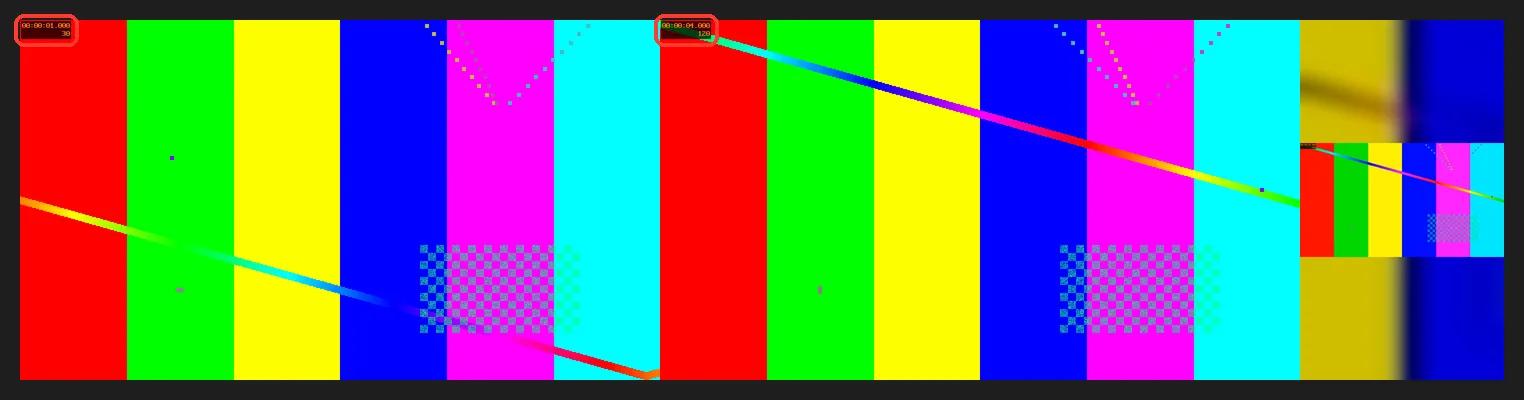
One second into the original, the timer reads 1.000. One second into trim.mp4, it reads 4.000. So the clip does start at 3 seconds, as asked.
We also ran ffprobe on the file. The video stream was 5.07 seconds and the audio 5.01 seconds, which fits the stream-copy note about keyframe edges.
For a social post that gap does not matter. For frame-exact work, ask for the accurate cut.
Test 3: Make a Vertical Copy
For the third test we asked for the shape used by phone video.
Use the ffmpeg fit tool to make a 9:16 vertical copy of trim.mp4 called vertical.mp4, and tell me the new resolution in one line.
The result is 406 by 720, which is a true 9:16 shape. It is small, because the tool kept the source height of 720. We asked for no size, and a phone platform may want 1080 by 1920, so say so in your prompt.
The right-hand frame in the picture above shows the result. The whole original frame sits in the middle, and a blurred, enlarged copy fills the top and bottom. Nothing was cropped out.
We did not test other fit modes, such as a hard crop or black bars, and we did not run the export tool for a platform preset.
Is the FFmpeg MCP Safe to Add?
Ask what a server can do and where your data goes. This one runs on your Mac through npx, and in our test it only touched the files we named.
From what we read, it does not call out to the internet. The privacy file in the repo says the same, but we did not watch network traffic, so treat that as what the code and docs say. We saw no account step and no key prompt.
Claude Code asked before each tool call, which is the default. It labels only probe and check as read-only, so cut, fit and the others can write files. That is a good moment to check the output file name, because a careless prompt could point the output at a file you care about.
The README says an existing output file is refused unless you pass an overwrite option. We did not test it, but it is a sensible default for a tool that writes video.
Our advice is simple. Pin the version, use local scope, keep your originals in a separate folder and give outputs new names.
What We Could Not Test
- We ran 4 of the 42 tools: probe, cut, check and fit.
- We did not test captions, silence removal, loudness fixes, graphics, rendering a whole edit or batch folders.
- We did not test
FFMPEG_SKILL_MCP_FULL=1, which lists all 42 tools. - We did not test the accurate cut mode that Claude offered, or any HDR or multi-camera tool.
- We used one made-up 12-second clip, not real footage with faces, speech or music.
- We tested on macOS only. The Windows and Linux notes follow the project’s README.
Who Should Add the FFmpeg MCP to Claude Code?
| Your situation | Our advice |
|---|---|
| You trim and convert clips often | Add it. Each job took one sentence and under 10 seconds |
| You post to YouTube or phone platforms | Add it. The check tool names the problems before you upload |
| You never remember FFmpeg flags | Add it. You describe the result and the tool handles the flags |
| You need frame-exact cuts | Ask for the accurate cut mode, and verify the first frame yourself |
| You watch your token budget | It is deferred here, but 12 tools is about 25.7k tokens, so check /context |
| You have no FFmpeg 6.1 or newer | Install it first. The server does not bring its own |
Common Mistakes
- Running
npx ffmpeg-skillwithoutmcp, which installs into your Claude folder instead of starting the server. - Adding the server at user scope for a quick test. Use
--scope localto keep it in one folder. - Leaving the version unpinned, so
npxcan pull a newer release later. - Skipping the warnings. In our run the most useful line was one we had not asked for.
- Assuming a fast stream-copy cut is frame-exact. It snaps to keyframes.
- Not naming a size for a vertical export, then getting a small 406 by 720 file.
- Forgetting to remove the server when the test is done.
Pro Tips
- Run
probefirst. Knowing the length and codecs makes the next prompt more exact. - Name the platform in your prompt, such as YouTube or a phone feed, so the check uses the right rules.
- Ask for the output file name yourself, so you never overwrite an original.
- Check
/mcpto confirm the server is connected and see the tool count. - Add one more line to a prompt when you need a size, like 1080 by 1920.
Try It Yourself
Run this in a throwaway folder with a short clip of your own. Remove the server when you are done.
claude mcp add --scope local ffmpeg -- npx -y [email protected] mcp
claude
Then paste this prompt inside Claude Code.
Probe clip.mp4. Cut the first 10 seconds into short.mp4, check it for YouTube, and tell me about any warnings.When you are finished, remove the server.
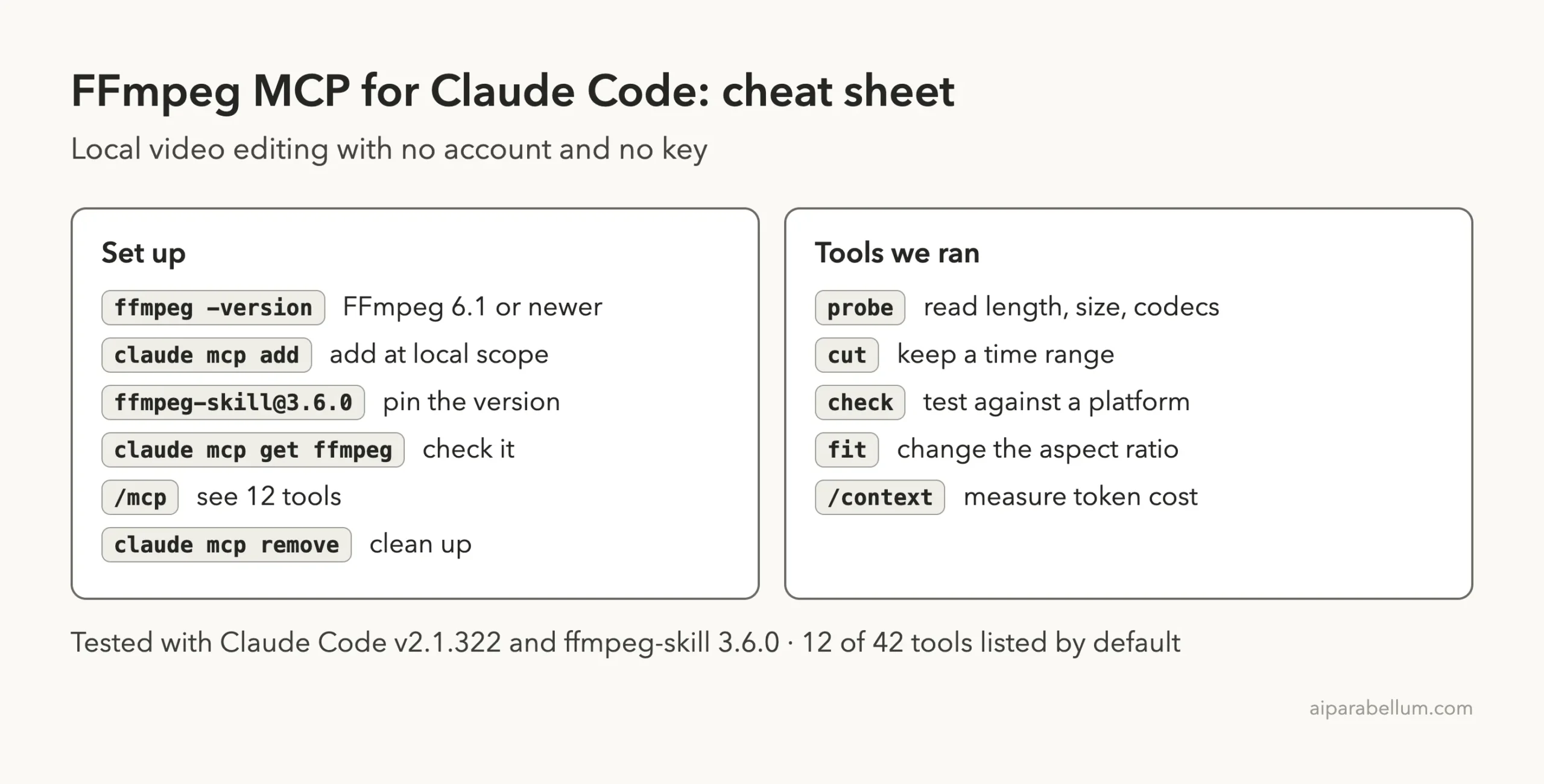
claude mcp remove ffmpeg -s localCheat Sheet
Frequently Asked Questions
Does the FFmpeg MCP need an account or API key?
No. The README says no cloud and no API keys, and we used none. You do need FFmpeg 6.1 or newer on your machine.
Does it upload my videos anywhere?
From the code and docs we read, no. The server runs local scripts on files you name. We did not watch network traffic, so check that yourself if your footage is sensitive.
Why does it list only 12 tools?
To keep your context small. The other 30 can still be called by name, and FFMPEG_SKILL_MCP_FULL=1 lists all 42. We did not test that setting.
Is the cut frame-exact?
Not by default in our run. The cut was a stream copy, so it snapped to keyframes and kept a little extra at the start. Claude offered an accurate mode for a clean start.
Can I use it on Windows or Linux?
We tested on macOS only. The README gives Windows and Linux notes, and the steps follow the project’s own instructions.
Conclusion
The FFmpeg MCP for Claude Code turned four plain sentences into a probe, a cut, a delivery check and a vertical copy, all on local files with no account. The checks were honest, including a warning about hidden pre-roll that we did not ask for, and the timer in our test clip confirmed the cut. The tool list costs about 25.7k tokens when loaded, so measure it, and read the warnings before you post anything.
Want more on the assistant behind it? Our Claude guide covers the models and plans.