The front-end checklist MCP is a hosted server that lets Claude check your HTML, CSS and JavaScript against a large list of web quality rules. We added it to Claude Code, pointed it at a deliberately sloppy bakery page, and watched what it flagged. Then we asked Claude to fix the page and run the check again.
This guide is part of our Claude Code tutorials. Find more servers in our MCP servers directory.
Tested with Claude Code v2.1.322 on November 11, 2026. The server is hosted at https://mcp.frontendchecklist.io, so there is no package version to pin. We used the hosted server from github.com/thedaviddias/Front-End-Checklist at commit e8d14d0, the repo version current on the test day.
One command added the server, no sign-in was needed, and Claude went from 7 critical findings to 0.
Quick Summary: What We Tested
| Question | Answer |
|---|---|
| What is it? | A hosted MCP server with 11 tools that review code and pages against the Front-End Checklist rules |
| Does it need an account? | No. /mcp showed it as connected with “Auth: not signed in” |
| What did we run? | Adding the server, a review of one HTML page, fixes, and a second review |
| What did we not run? | The audit_url tool, because our demo page was local and the tool needs a public https address |
| Context cost | 3,608 tokens for the 11 tool definitions, as measured for our directory |
| Our verdict | Useful as a second opinion on markup. Treat the result as a heuristic, not a clean bill of health |
One honest note. Our demo is a 13-line page. It shows how the tool behaves, not how it copes with a big React app.
What the Front-End Checklist MCP Is and Why It Exists
Front-End Checklist is an open-source collection of web quality rules. The README counts 386 English rules, while the project’s MCP page says 385, so treat the number as roughly that. They cover HTML, CSS, JavaScript, accessibility, performance, SEO, security, images, privacy and more.
MCP is the Model Context Protocol, a standard way to give Claude extra tools. If it is new to you, our MCP guide explains it, and our plugins guide shows how plugins can bundle such servers.
The idea is simple. Instead of Claude reviewing your page from memory, it asks the server which rules apply and gets back prioritized findings with fix guidance. It works with Claude and any other MCP client.
| Tool | What it does |
|---|---|
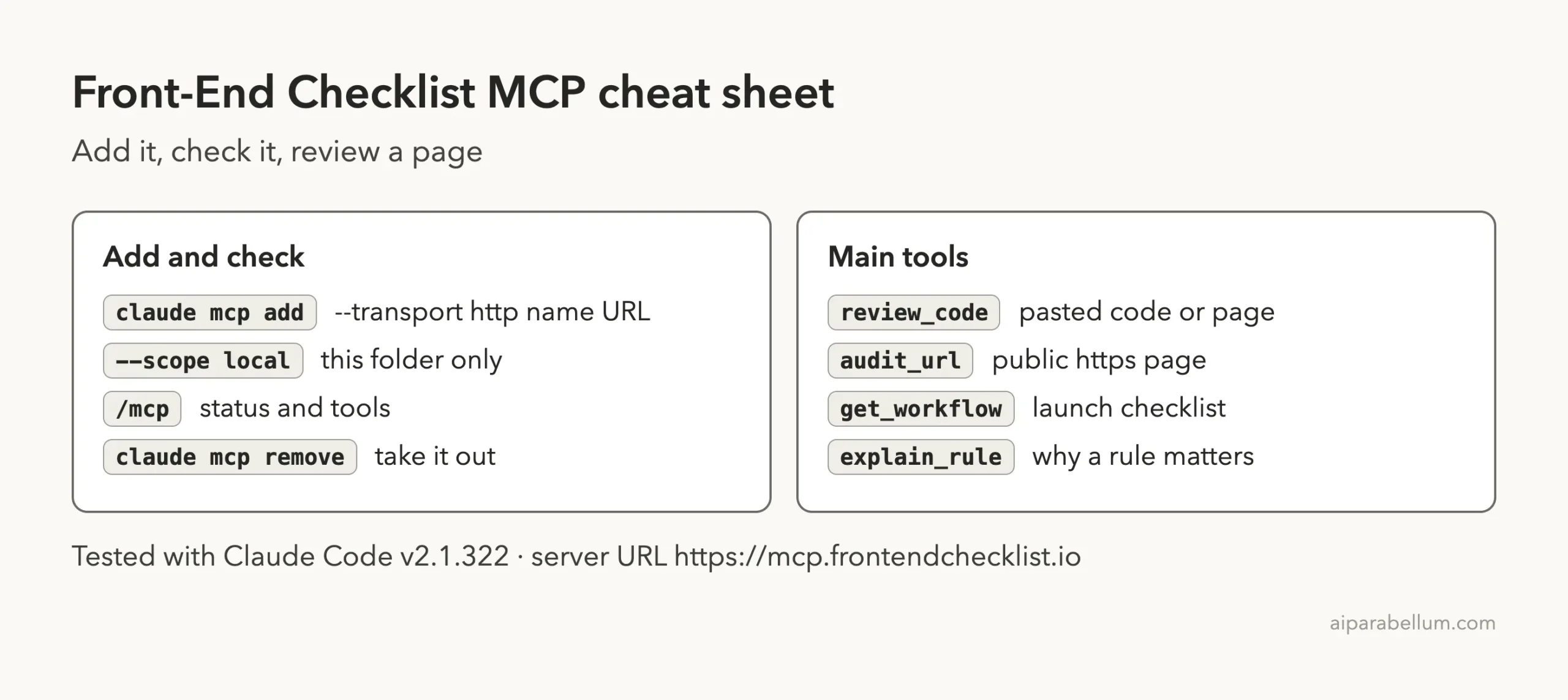
review_code | Reviews pasted HTML, CSS, JavaScript, React or Next.js code and returns prioritized findings |
audit_url | Fetches a public https page and audits its HTML |
get_workflow | Returns an ordered list of checks, such as a launch checklist |
get_checklist_rules, get_quick_reference | Loads a whole checklist or a compact version in one call |
get_rule, search_rules, check_rule | Look up, search and test code against one rule |
fix_rule, explain_rule, list_categories | Fix guidance, the reason behind a rule, and the category list |
Is the Front-End Checklist MCP Safe to Add?
Before adding any server, ask what it can do and where your code goes. The project’s page says the server is read-only, needs no authentication and collects only anonymous usage counters. It also says that when you use review_code, your code is sent to the server but not stored or logged.
That last point matters. A hosted server means your code leaves your machine, so do not paste private code you are not allowed to share. We only sent our own throwaway demo page.
Our directory measured all 11 tools as read-only, with none destructive.
We never touched our normal setup. The server was added at local scope inside a throwaway demo folder and removed after the test. The MCP docs and the MCP quickstart describe the same claude mcp add command.
Step 1: Add the Server With One Command
Run this inside your project folder. The --scope local flag keeps the server private to that folder.
claude mcp add --scope local --transport http front-end-checklist https://mcp.frontendchecklist.ioClaude Code answered that it added the HTTP server to the local config, and claude mcp list showed it as connected. Then we started Claude Code in the folder and typed /mcp.
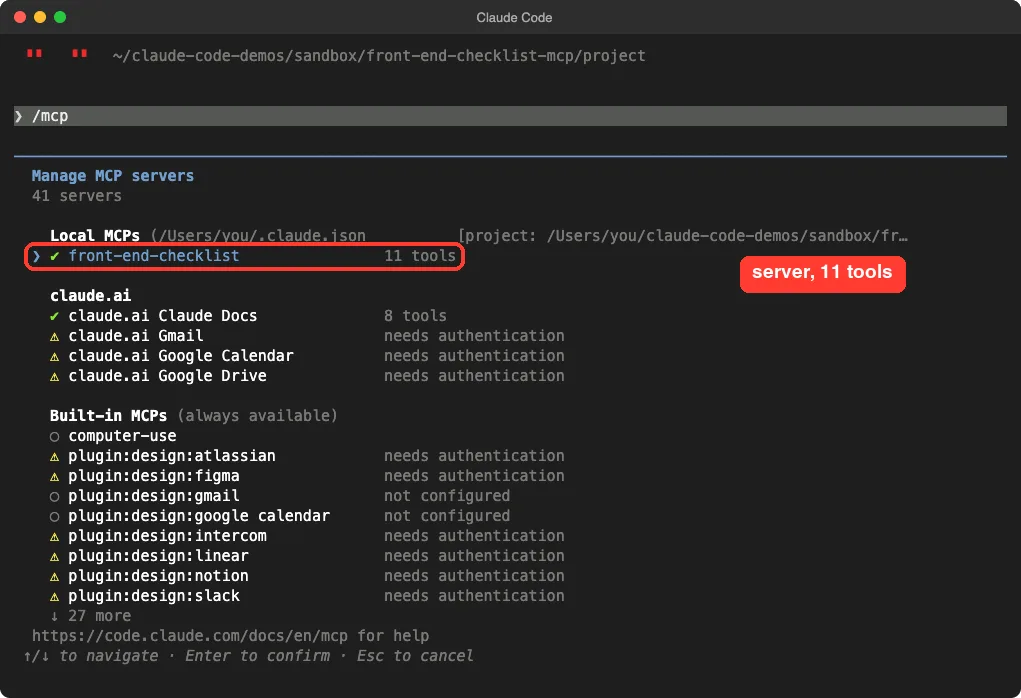
The other entries in that list are unrelated connectors from the Claude app. They have nothing to do with this server.
Step 2: Confirm No Account Is Needed
Selecting the server in the list shows its details. The status was connected, and the Auth line read “not signed in”. The server also advertises tools, resources and prompts.
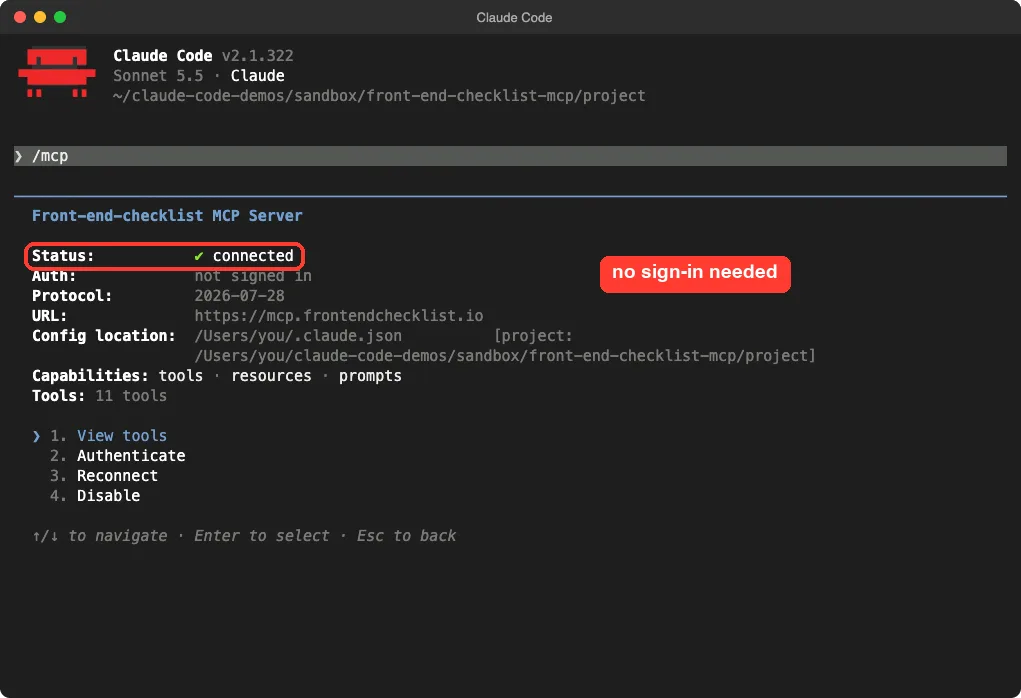
That is the whole setup. There is no key to paste and no sign-up page.
Step 3: Build a Page With Obvious Problems
We wrote a tiny page with common beginner mistakes. It has no doctype, no language, no heading, an image without alt text, an input without a label and a clickable div.
<html>
<head>
<title>Sunrise Bakery</title>
</head>
<body>
<div class="top">Sunrise Bakery</div>
<img src="hero.jpg">
<div onclick="location.href='/menu'">See our menu</div>
<input type="text" placeholder="Your email">
<button>Join</button>
<p style="color:#bbb">Fresh bread every morning, baked in small batches.</p>
</body>
</html>
Nothing here needs a real image or server. We only wanted the markup to review.
Step 4: Ask Claude for a Checklist Review
The prompt names the server on purpose. The project’s page notes that some clients load MCP tools lazily, so naming the server helps Claude choose it.
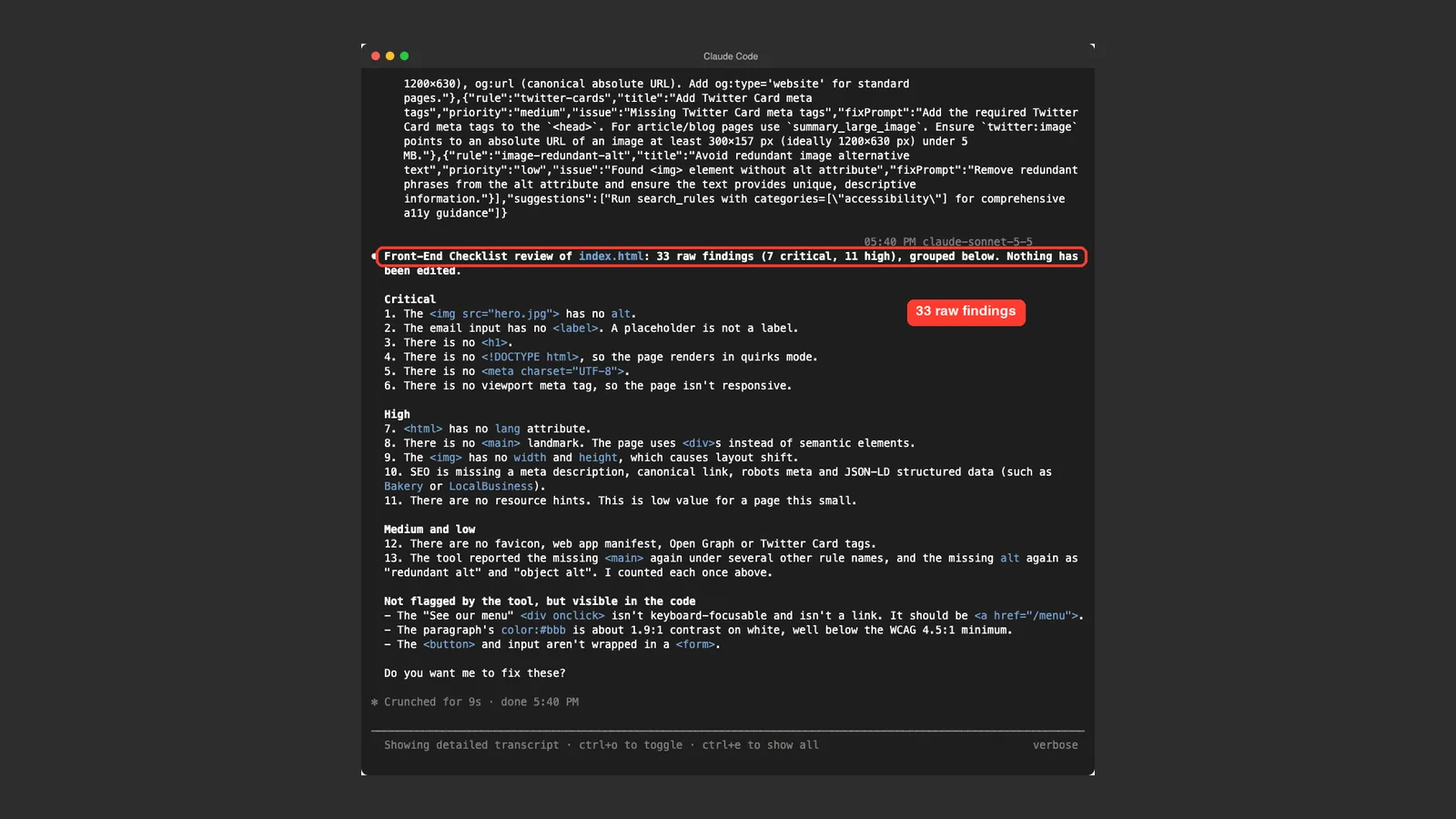
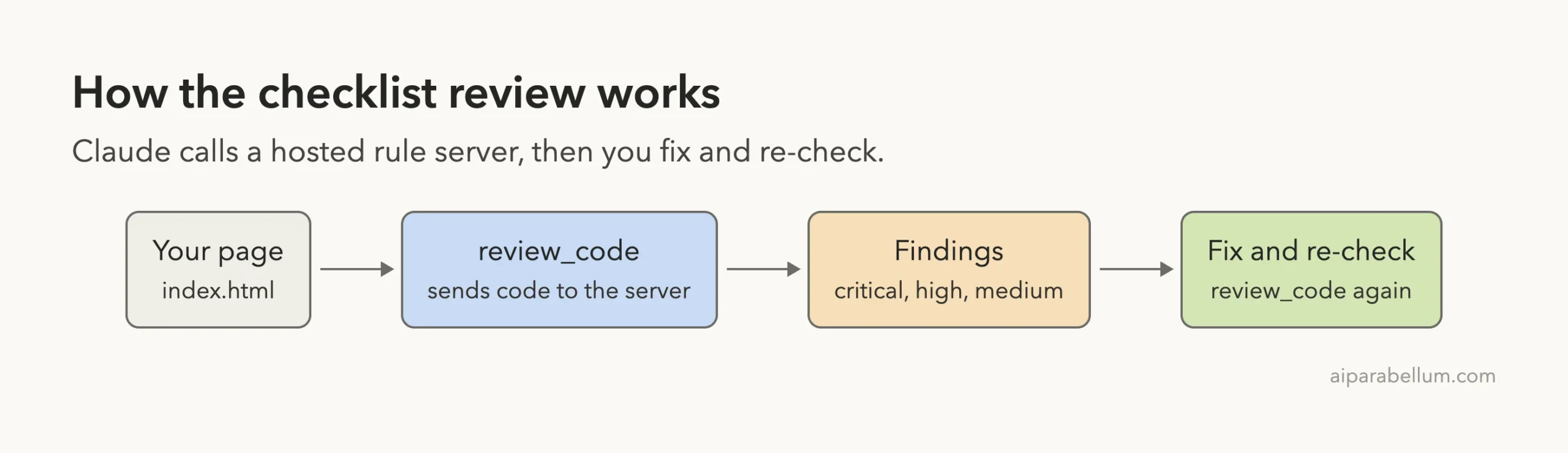
Use the Front-End Checklist MCP (review_code) to review index.html. List the findings with their priority, highest first. Do not edit anything yet. Keep it short.Claude called review_code once and then summarized. It reported 33 raw findings, 7 critical and 11 high. It grouped them and listed the critical ones first: the missing alt text, the unlabeled email input, no <h1>, no doctype, no charset and no viewport tag.
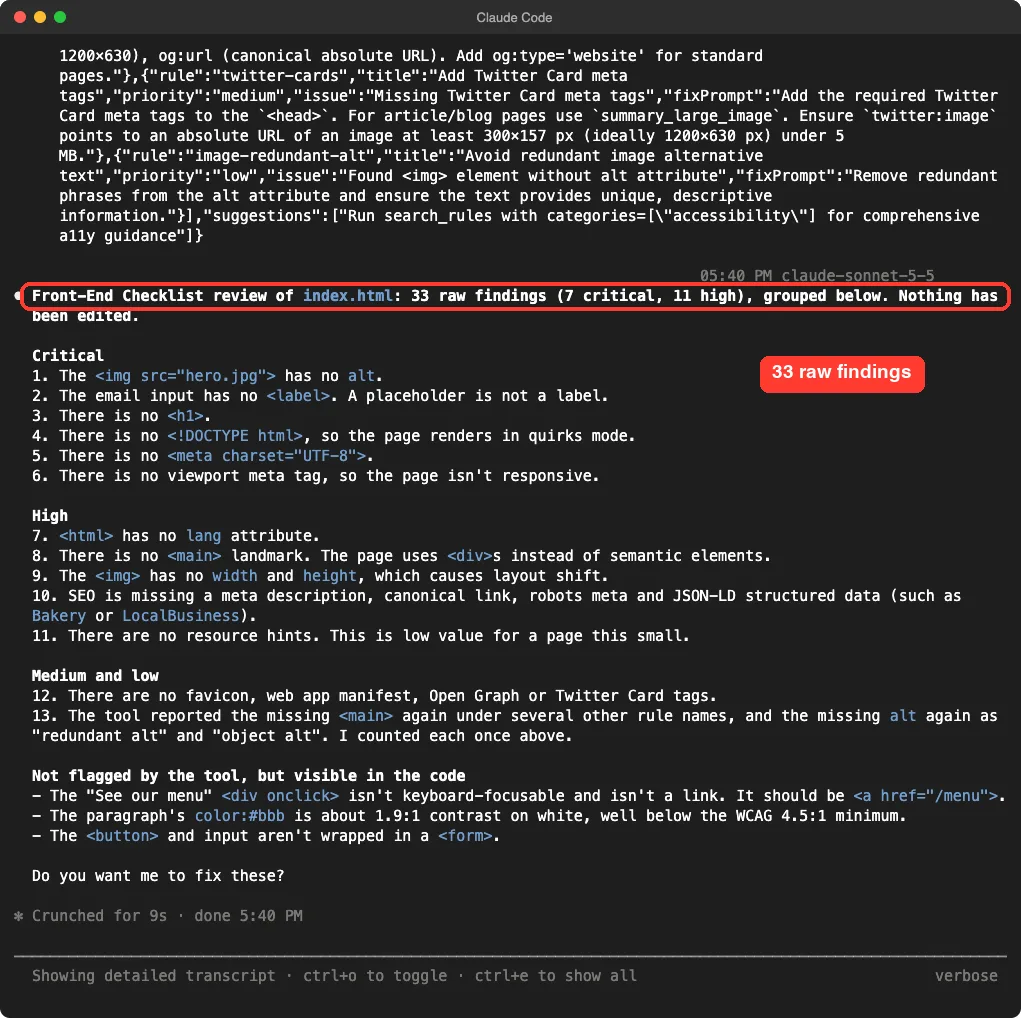
Look at item 13 in that screenshot.
The tool reported the missing <main> under several rule names and the missing alt text again as “redundant alt”. Claude counted each problem once, which is why 33 raw findings became a short list. Expect some duplication in the raw output.
What the Tool Missed
Claude also listed three problems the tool did not flag but were visible in the code.
The clickable div is not keyboard focusable. The paragraph color #bbb has poor contrast on white. The button and input were not inside a <form>.
This is the honest limit of the server. It checks rules against your code, but it is not a full audit. Claude’s own reading of the code still caught things the rules did not.
Step 5: Fix Everything and Run the Review Again
Next we asked Claude to fix every critical and high finding plus the three missed issues, then run review_code again.
Use the Front-End Checklist MCP (review_code) on index.html, then fix every critical and high finding in index.html and also the three issues the tool missed (clickable div, low contrast, form). Then run review_code again and tell me the critical and high counts before and after. Keep the final answer short.Claude edited the file and reported 7 critical and 11 high before, and 0 and 0 after. The fixed body now has a header, a <main> landmark, an <h1>, a described image with width and height, a real link, and a labeled form.
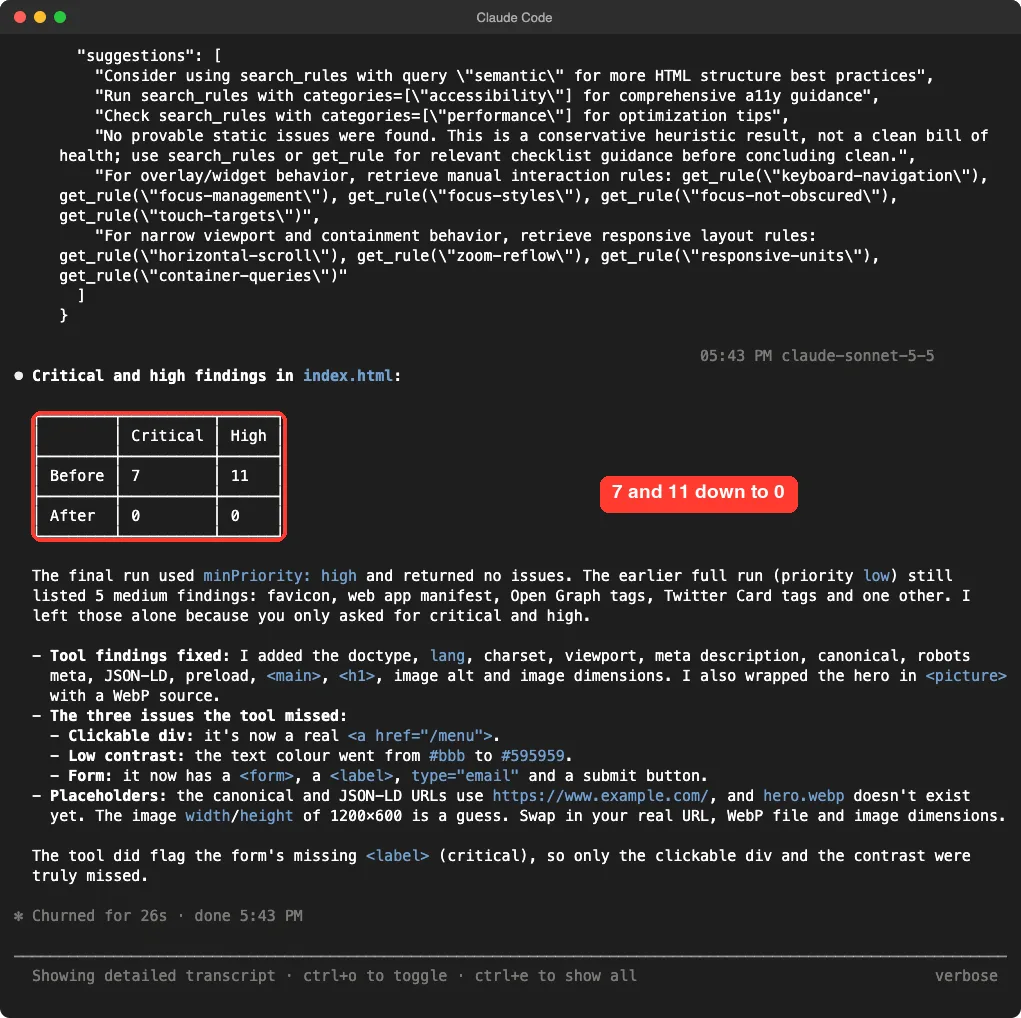
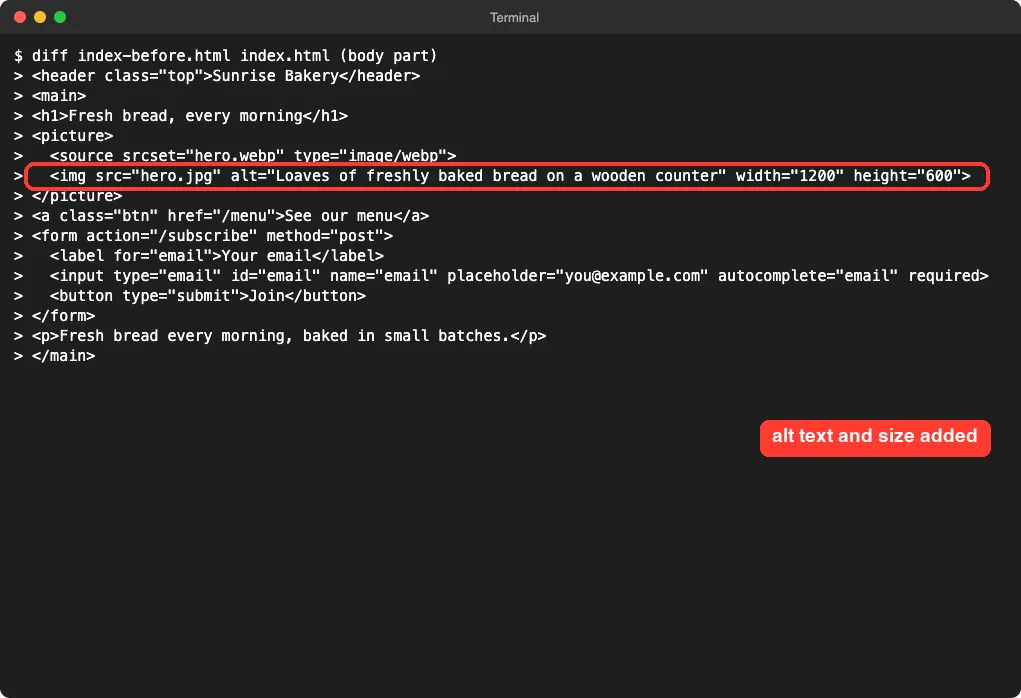
Two cautions from this run. First, the second review ran with a high-priority filter, so it did not recheck the medium findings. Claude said five medium findings were left alone, such as the favicon, web app manifest and social tags, because we asked only for critical and high.
Second, the tool’s own output said “No provable static issues were found. This is a conservative heuristic result, not a clean bill of health.” Claude also made placeholders: the canonical and structured data URLs use https://www.example.com/, the hero.webp file does not exist, and the image size of 1200 by 600 is a guess. A zero count is not proof that a page is perfect.
Diagram: How the Review Loop Works
Context Cost: What 11 Tools Add to Claude
Every MCP server adds its tool descriptions to Claude’s context. Our directory measured this server at 3,608 tokens for 11 tools. That is a modest cost, and you can remove the server when you are not doing front-end work.
Check your own numbers with /mcp and the context view in Claude Code. If you use many servers, those costs add up, so add only the ones you use.
Try It Yourself
Pick a small page of your own that you are happy to send to a hosted server. Add the server at local scope, then try this prompt.
Use the Front-End Checklist MCP (review_code) to review my page. Group the findings by priority, remove duplicates, and tell me which problems the tool did not flag but you can see in the code. Do not edit anything yet.Then try the launch workflow with a prompt like this.
Use the Front-End Checklist MCP launch workflow and show me the critical checks.If your page is public on https, you can also try the audit_url tool. We did not run it, so we cannot say how it behaves.
Common Mistakes
- Not naming the server in your prompt, so Claude reviews from memory instead of calling the tool.
- Pasting private or client code into a hosted server without permission.
- Reading “0 critical” as “page is perfect” when the review used a priority filter.
- Copying the generated placeholders, such as
example.comURLs, into production. - Leaving the server installed when you do not need it, which keeps its tool definitions in context.
Pro Tips
- Ask Claude to count duplicates once, as it did here, so the list stays readable.
- Run a full review first, then a filtered one, so you see the medium findings too.
- Use
explain_rulewhen a rule seems strange. It explains why the rule exists. - Remove the server with
claude mcp remove front-end-checklistwhen you are done.
Cheat Sheet
Frequently Asked Questions
Does the front-end checklist MCP need an account or API key?
No. In our test, /mcp showed it connected with “Auth: not signed in”, and no key was entered.
Does it send my code to a server?
Yes. It is a hosted server, so review_code sends your code to it. The project says the code is not stored or logged, but only share code you are allowed to share.
How many rules does it use?
The README counts 386 English rules, and the project’s MCP page says 385. We did not count them ourselves.
Can it replace a full accessibility audit?
No. In our test it missed a clickable div and low text contrast, and it called its own result a heuristic. Use it as a second opinion.
How do I remove it?
Run claude mcp remove front-end-checklist from the same folder where you added it at local scope.
Conclusion
The Front-End Checklist MCP is easy to add, needs no account, and gave Claude a clear list of real problems on our demo page. It cut 7 critical and 11 high findings to zero after fixes, but it missed two issues Claude spotted itself and warned that its result is not a clean bill of health. If you write front-end code and are comfortable sending it to a hosted server, it is a handy second opinion. Treat it as one check among several.
Next, browse more tested add-ons in our skills directory.