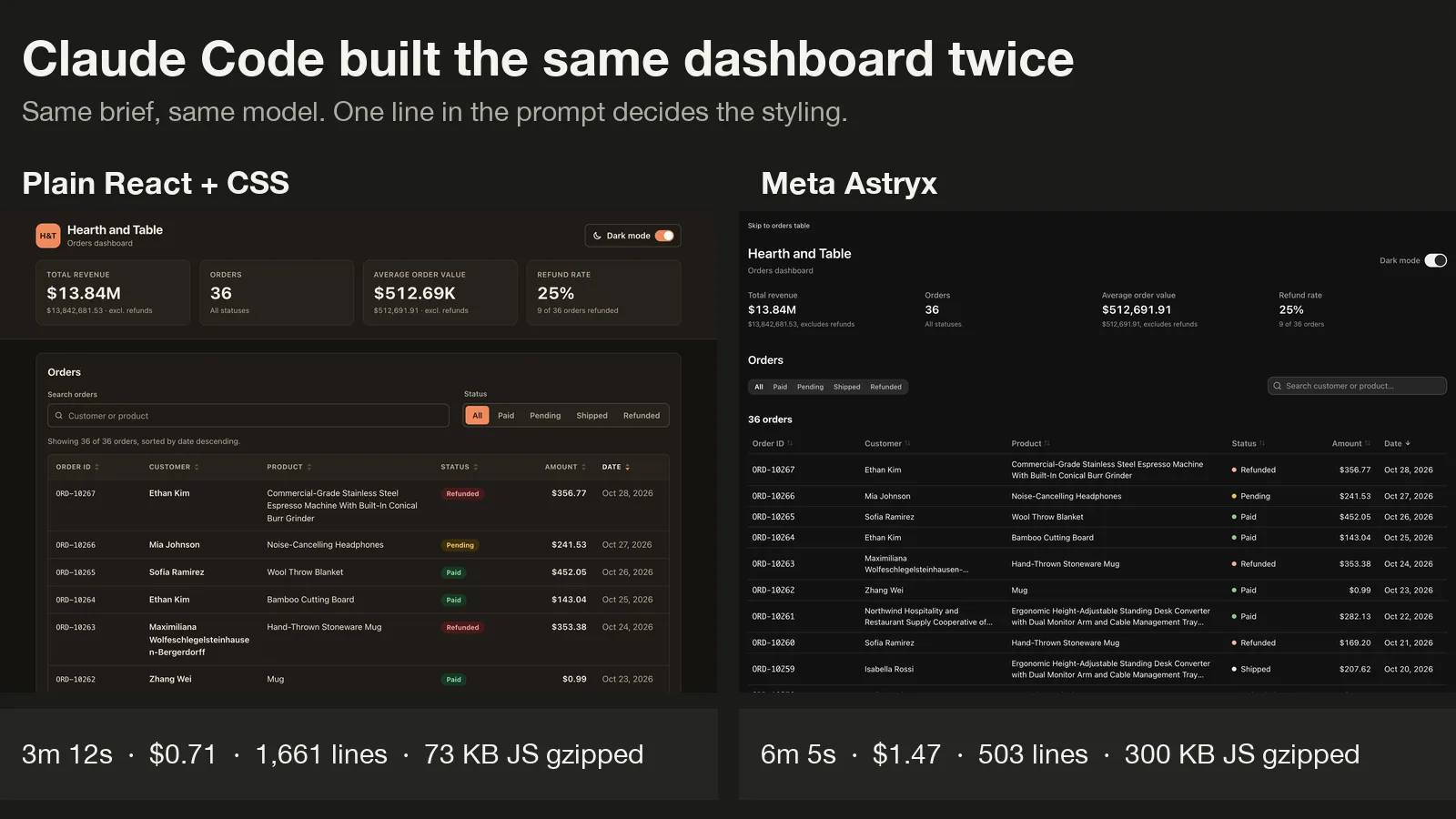
Meta Astryx is the open-source design system everyone is talking about this week, and its main pitch is that AI coding agents can build with it as well as people can. We wanted to see what that means in practice, so we gave Claude Code the same dashboard brief twice: once with plain CSS, and once with Astryx installed.
This post shows how to set up Meta Astryx with Claude Code in a few commands, then what the test found. Both builds worked. The differences were in code size, speed, bundle weight and how the page behaves on a phone.
Quick verdict
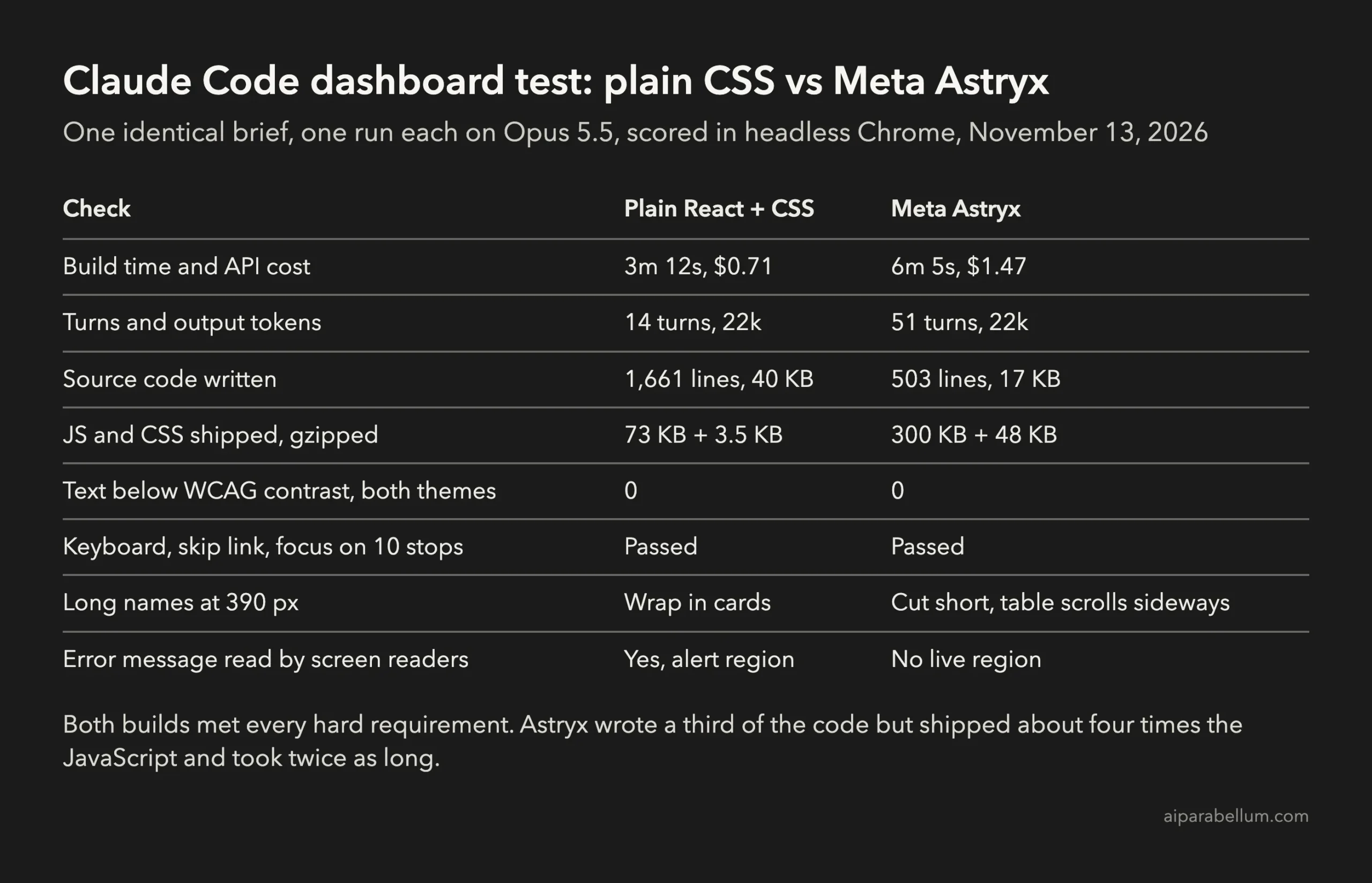
Astryx did what it promises. Claude wrote 503 lines instead of 1,661, used 14 ready-made components, and the Astryx checker passed the result with no failures.
The cost was real, though. The Astryx run took twice as long, made 51 turns instead of 14, and shipped about four times the JavaScript. On a 390 px phone, its table scrolled sideways and cut long names short, where the plain build switched to readable cards.
If your team wants every screen to look the same and is fine with a heavier bundle, Astryx with Claude Code is a good fit. For a small one-off page, plain CSS was faster, lighter and just as accessible in our test.
What Meta Astryx is
Astryx is a React design system that grew inside Meta over eight years. According to its GitHub repository, it powers more than 13,000 internal apps. It is MIT licensed, still marked as beta, and has close to 27,000 stars.
It ships 150+ components, seven themes, dark mode, page templates and a command-line tool. It needs React 19 or later, and its styles are written with StyleX, though you can override them with plain CSS or Tailwind.
The part that matters for Claude Code is the CLI. It can search components, print their docs, scaffold templates, and run a doctor check on your source and build. The official docs describe it as one reference for people and agents alike.
How to set up Meta Astryx for Claude Code
Start in an existing React 19 project, for example one made with Vite. Install the core package, a theme and the StyleX peer dependency:
npm install @astryxdesign/core @astryxdesign/theme-neutral @stylexjs/stylex
npx astryx theme add neutral
The second command writes src/astryx-themes.js, which you pass to the Theme component. Then import the two base stylesheets once, in your entry file:
import '@astryxdesign/core/reset.css';
import '@astryxdesign/core/astryx.css';
Now give Claude Code the Astryx instructions. This command writes them into the project only:
npx astryx init --agent claude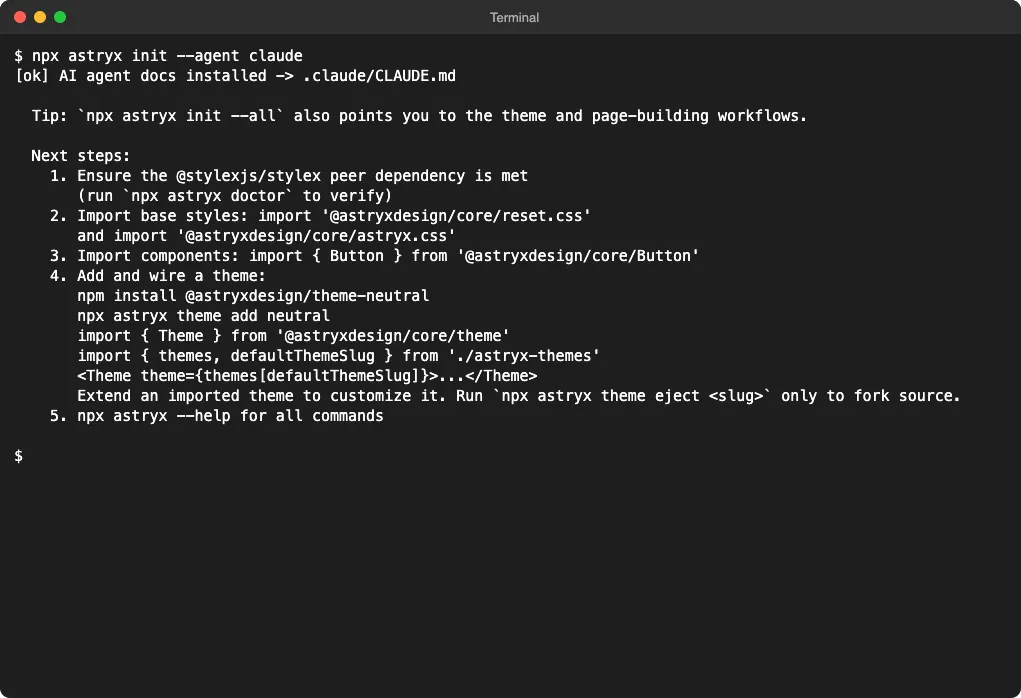
The file it writes, .claude/CLAUDE.md, is short and strict. It tells Claude to start from a template, use Astryx components instead of raw <div> elements, use theme tokens instead of hard-coded colors, and run astryx doctor --built before calling the work done.
There is also a global option, init --user, which installs an Astryx skill for every project on your computer. We skipped it on purpose. A project-level file keeps Astryx rules out of projects that do not use it.
Claude uses the CLI to look things up as it works. You can try the same search yourself:
npx astryx search "sortable table" --limit 3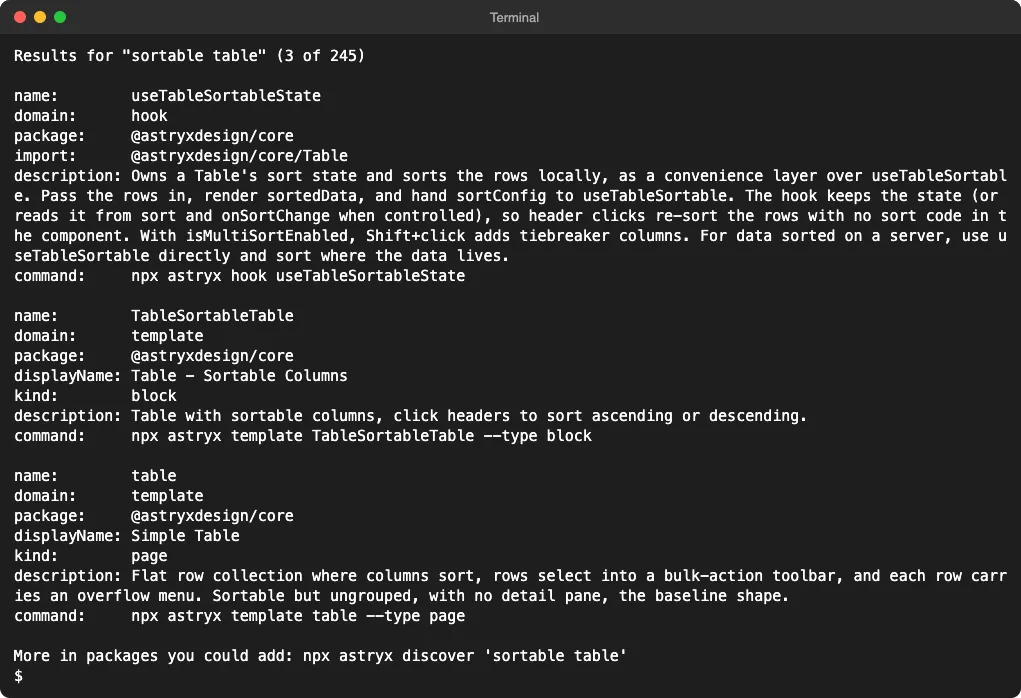
When the build is ready, the checker reads both the source and the built files:
npm run build
npx astryx doctor --built .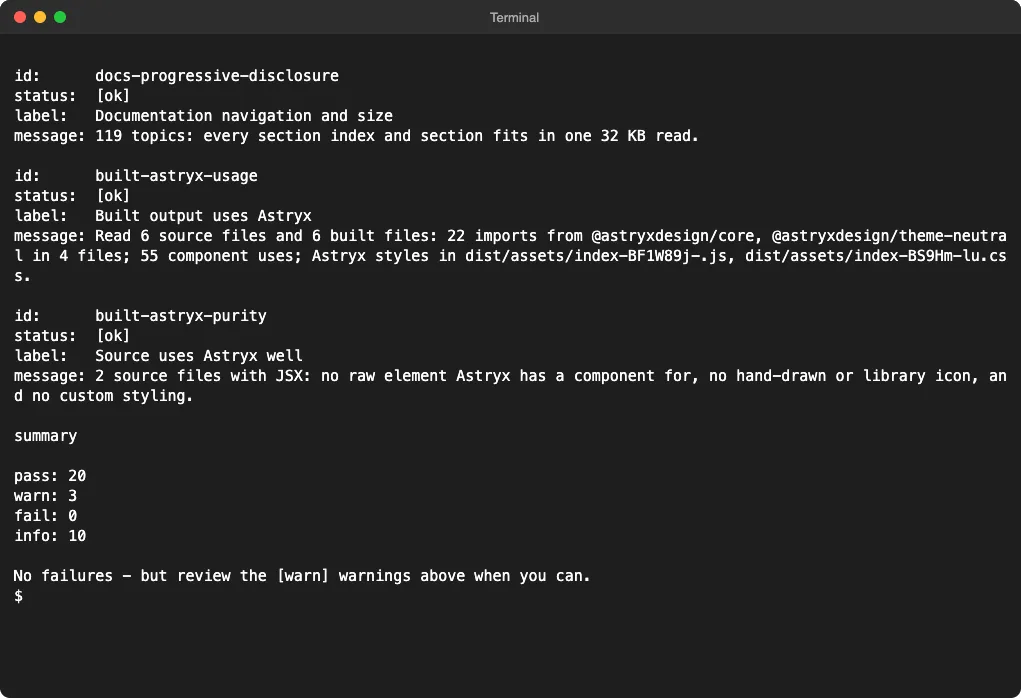
All three warnings came from the generated theme file, which loads the Figtree font from Google Fonts. Claude saw that and chose not to import that file, so the warnings did not affect the shipped page.
How we tested it
We wrote one fixed brief for an orders dashboard: a header with four summary figures, a sortable table with a status filter and search, long labels that hold up at 1280 and 390 px, empty and error states with a Retry button, full keyboard use with a skip link, and a light and dark switch.
Both runs used the same Vite and React 19 starter, the same 36 sample orders and the same model, Opus 5.5. The only difference was one line in the prompt. The plain run was told to write its own CSS. The Astryx run was told to use the installed design system and read .claude/CLAUDE.md.
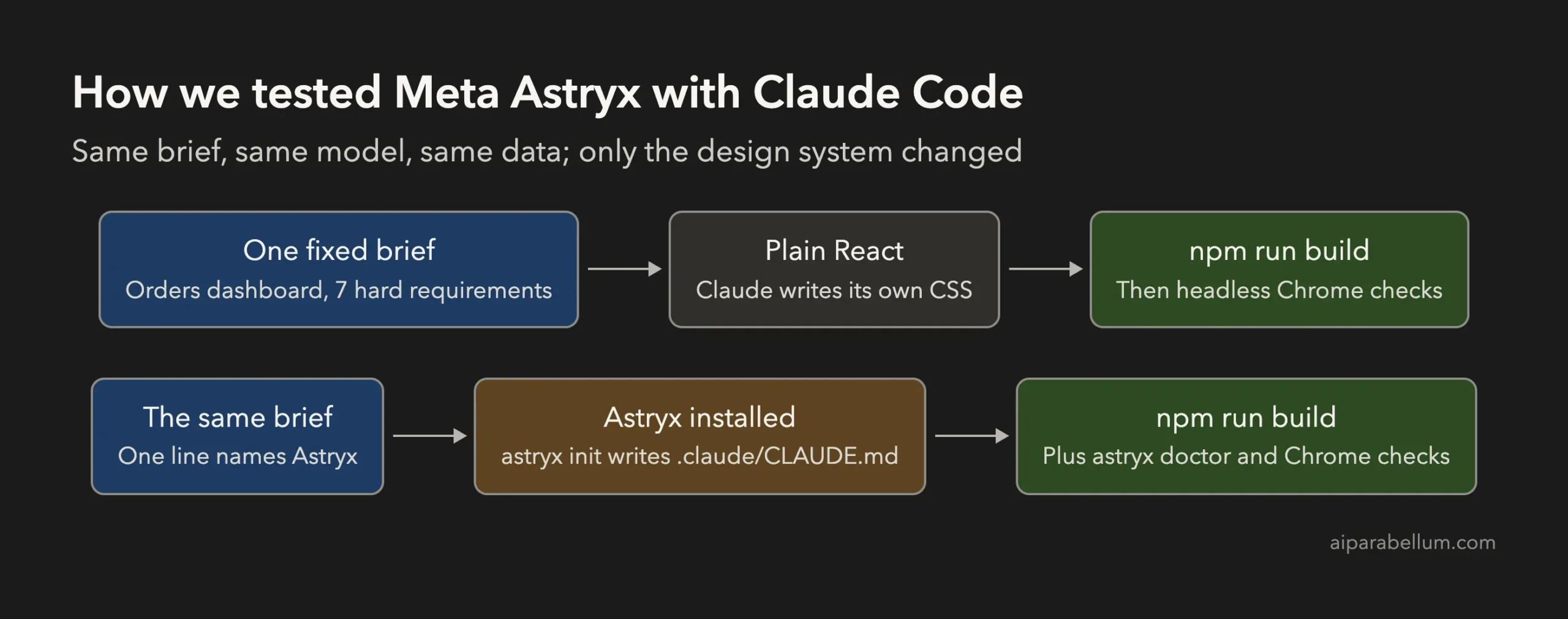
Each build was then served locally and scored in headless Chrome. The script checked layout at both widths, network calls, color contrast in both themes, tab order and focus, keyboard sorting, the filter, and all three states.
The results
| Check | Plain React + CSS | Meta Astryx |
|---|---|---|
| Build time and API cost | 3m 12s, $0.71 | 6m 5s, $1.47 |
| Turns and output tokens | 14 turns, 22.2k | 51 turns, 21.7k |
| Source code written | 1,661 lines, 24 <div> tags | 503 lines, 0 <div> tags |
| JavaScript shipped (gzipped) | 73 KB | 300 KB, plus 106 KB of lazy chunks before gzip |
| CSS shipped (gzipped) | 3.5 KB | 48 KB |
| Text below WCAG contrast | 0 in both themes | 0 in both themes |
| Keyboard, skip link, visible focus | Passed, 10 stops | Passed, 10 stops |
| Long names at 390 px | Wrap inside cards | Cut with an ellipsis, table scrolls sideways |
| Error message in a live region | Yes | No |
Both builds compiled, made no network calls and logged no console errors. Both handled the empty, no-match and error states, and both sorted columns with Enter and Space.
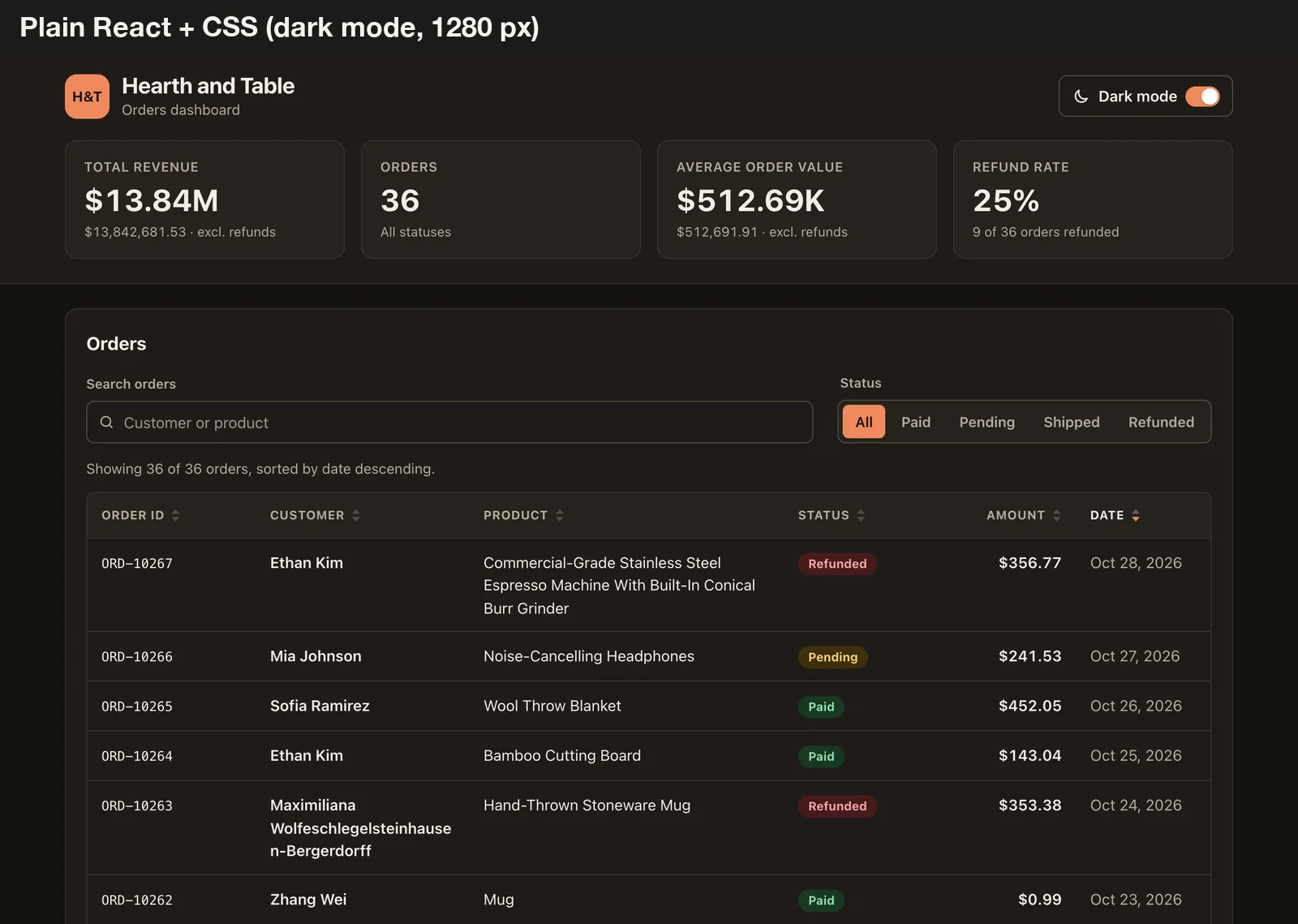
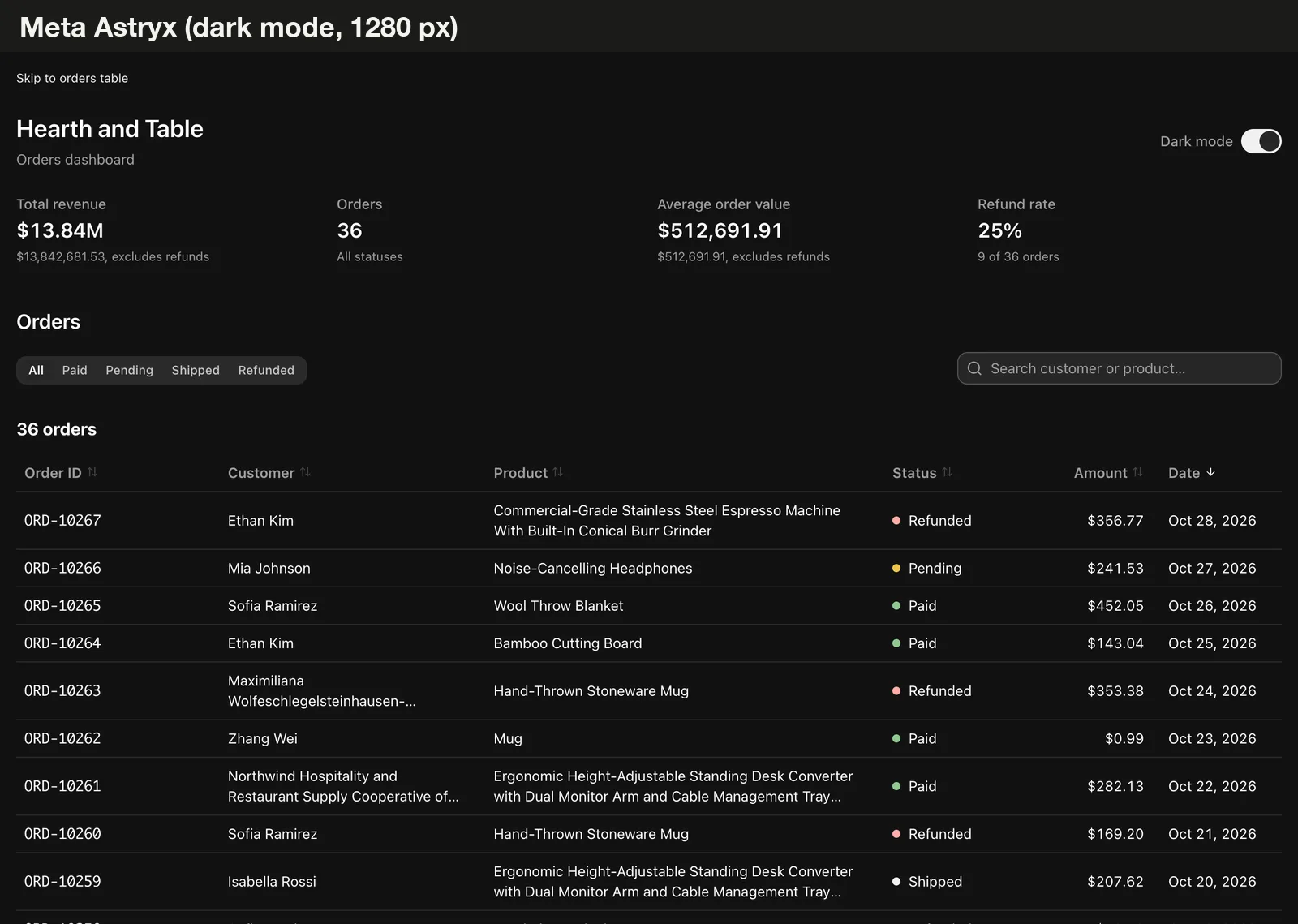
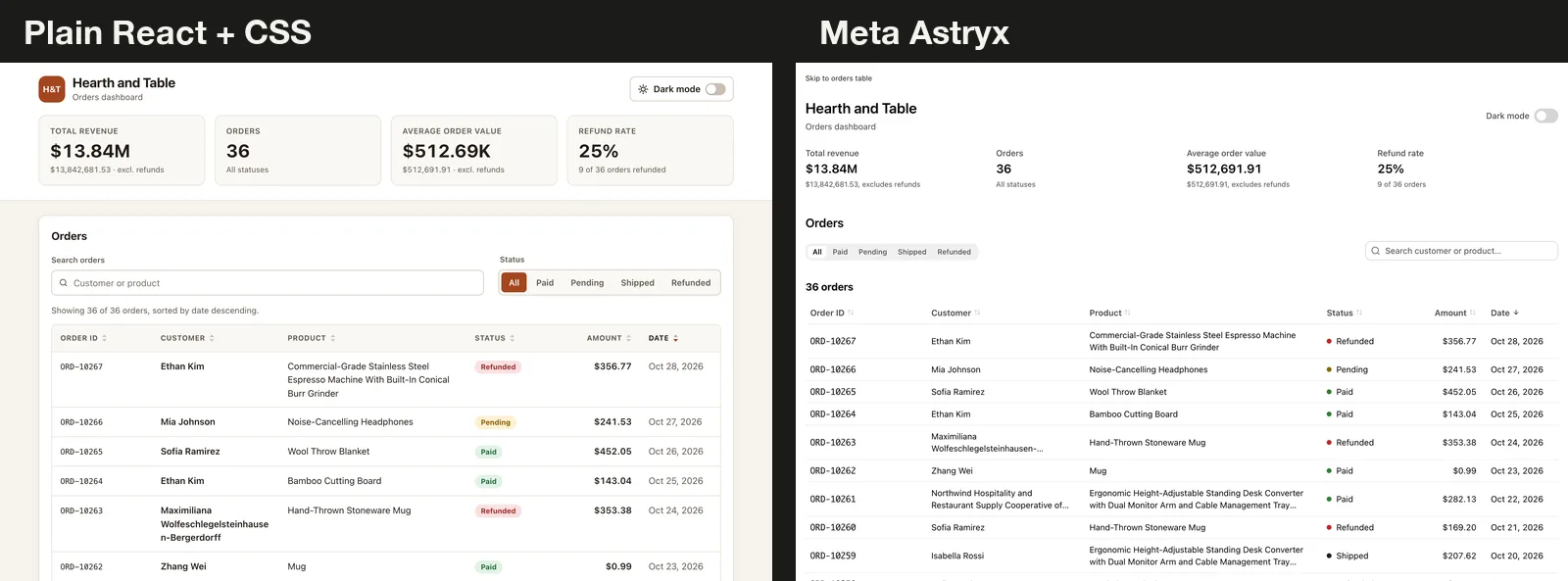
The look is the clearest difference. Claude’s own CSS was more decorated. The Astryx page looks like a product from a large company, which is the point of a shared design system.
What Astryx did well
The code was much smaller. Claude wrote about a third as many lines, with no raw <div> tags and no hand-written styles. It built the page from 14 components, including Table, SegmentedControl, Banner, EmptyState and Switch.
That matters for teams. Smaller code that uses shared components is easier to review, and a future change to the design system updates every screen at once.
The CLI also kept Claude on track. It made 27 Astryx CLI calls during the run to search components and read their docs, then ran the doctor check before finishing, as CLAUDE.md asked.
Where it fell short
The first cost is time. Looking things up took 51 turns, so the run took twice as long and cost about twice as much in API usage, even though Claude wrote about the same number of tokens.
The second is weight. The Astryx bundle was 934 KB of JavaScript before gzip and 297 KB of CSS, against 238 KB and 12.5 KB for the plain build. A design system pulls in more than one page needs, and this one is still in beta.
The third showed up on a phone. The plain build turned the table into stacked cards. The Astryx build kept the table, so it scrolled sideways inside its box and cut long names with an ellipsis, with no tooltip to show the full text.
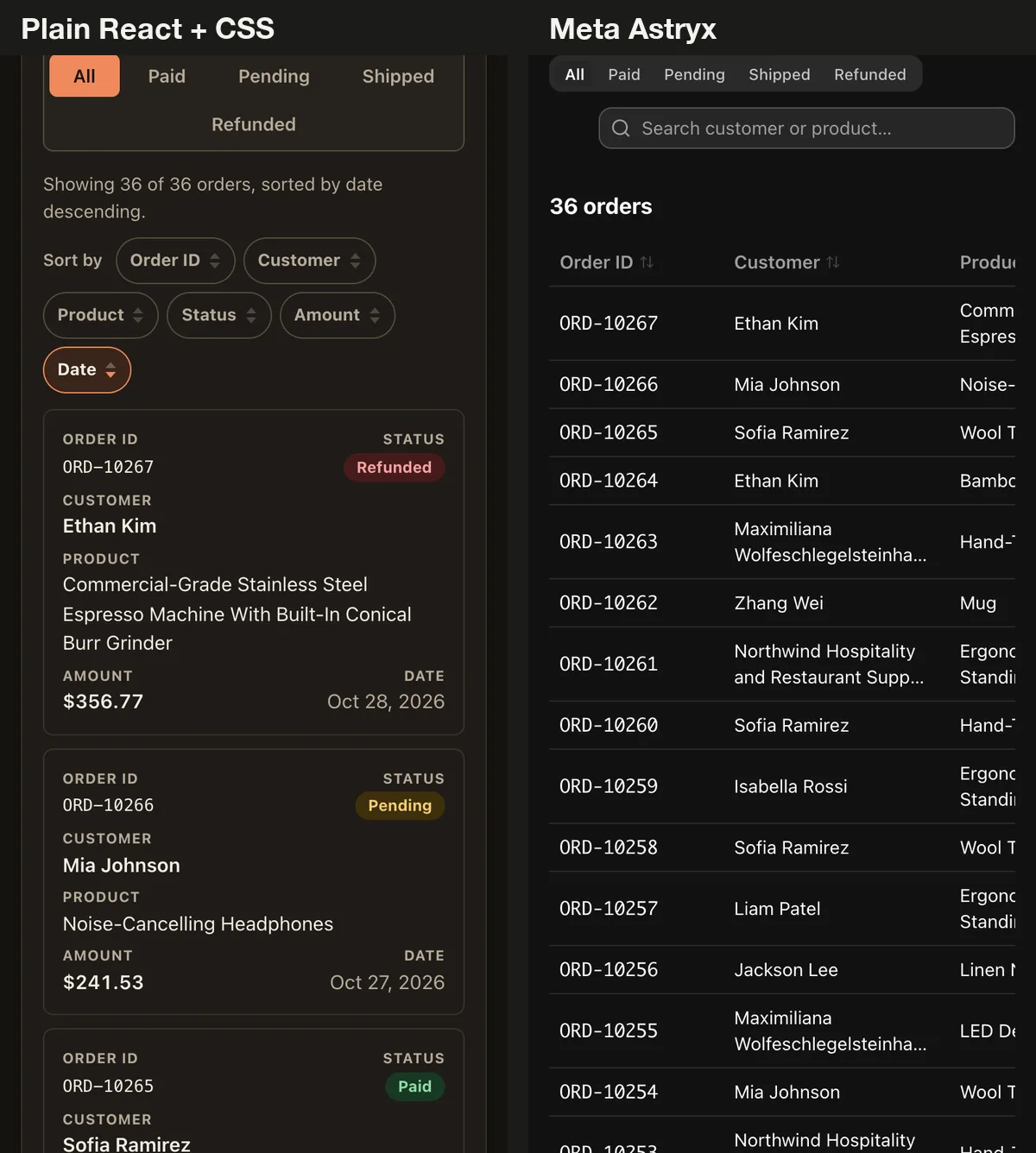
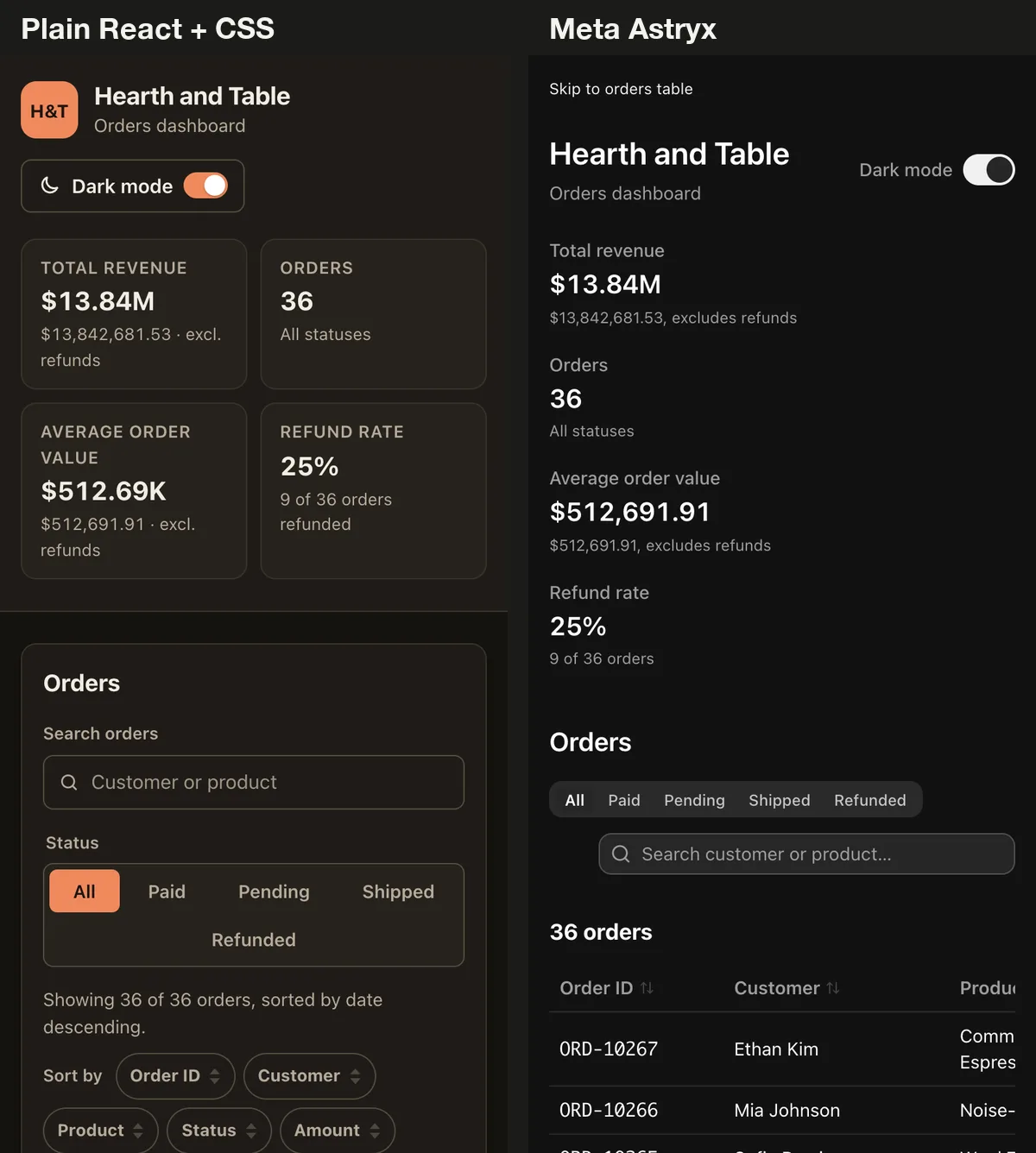
There were smaller differences too. The Astryx skip link stays visible at all times instead of appearing on focus. Its error message is not placed in a live region once loading ends, so a screen reader may not announce it. The plain build used an alert region for the same message.
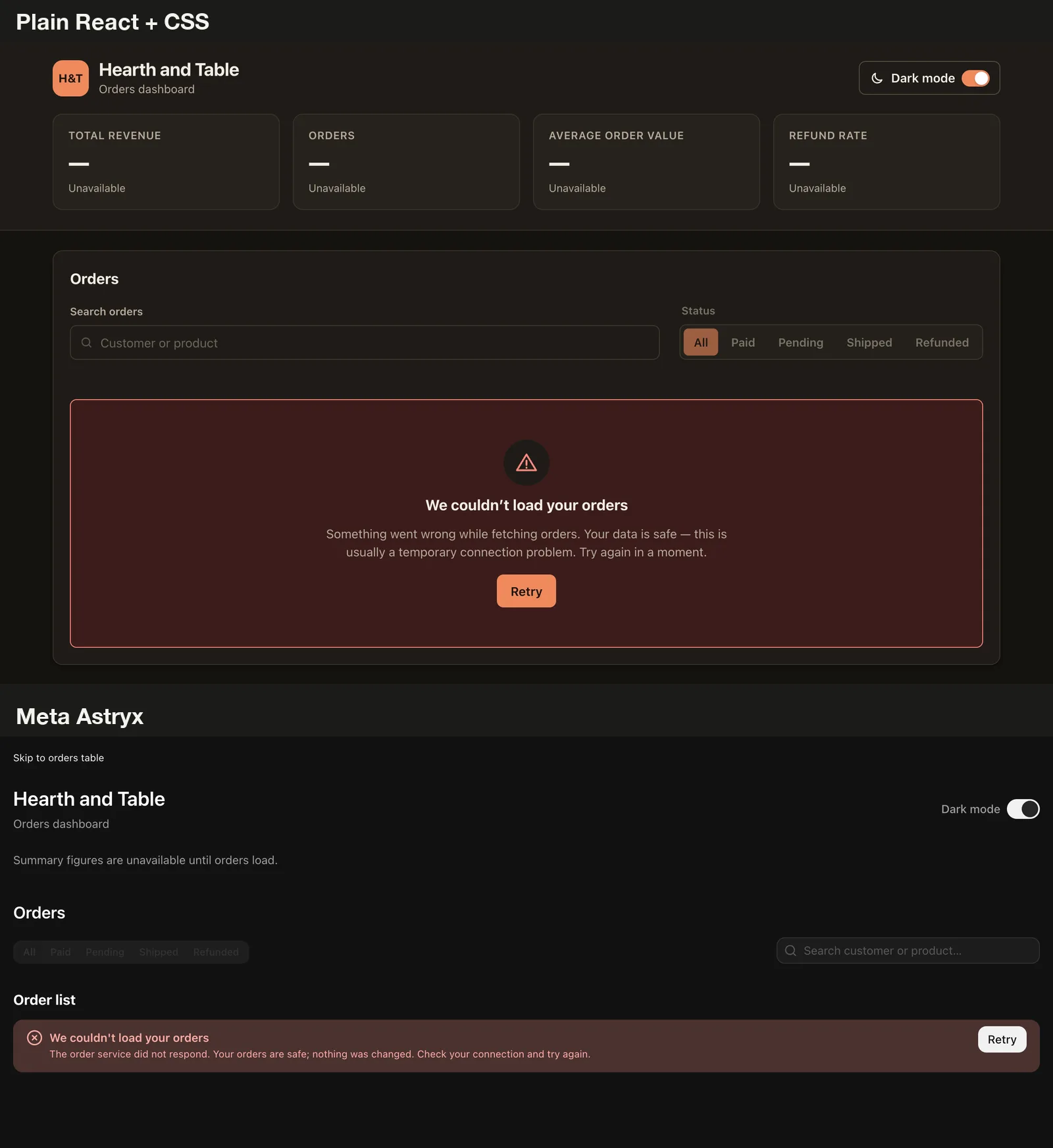
None of these are hard failures, and all of them are easy to fix with one more prompt. They show that the design system does not replace checking the result.
Tips for using Astryx with Claude Code
- Keep
astryx init --agent claudeat the project level unless you use Astryx everywhere. - Ask for a phone layout by name, for example “show the table as cards below 600 px”. Astryx will not choose that for you.
- Run
npx astryx doctor --built .after every build, and read the warnings. - Check your bundle size with
npm run buildoutput before you ship, especially for small pages. - Delete
src/astryx-themes.jsif Claude does not use it, or self-host its font. - Pre-approve the commands Claude needs, such as
npx astryxandnpm run build, so a long run does not stop for permission.
If you want other ways to steer Claude’s front-end work, our design skills test ran a similar brief with two popular skills, and the Skills Directory lists more you can install.
How we ran it and what we did not test
Each build ran once through claude -p with Opus 5.5, in a throwaway folder, with web search and subagents turned off. Claude could read and edit files and run npm run build; the Astryx run could also call the Astryx CLI. Nothing outside the test folder was changed.
During the Astryx run, a few compound shell commands Claude tried, such as chaining cat and grep, were blocked by the permission rules we set. Claude found other ways to get the same information, and the run finished normally. Some of the extra turns came from that.
We used Astryx CLI and core version 0.7.15 and the neutral theme. One run per build is a small sample, so treat the time and cost numbers as a rough guide. We did not test the other six themes, the template commands, server-side rendering or a larger app.
Final verdict
Meta Astryx with Claude Code works as advertised. The agent instructions and CLI got Claude to build a clean, consistent dashboard from shared components, with a third of the code and a passing doctor report.
For a team that already ships many React screens, that consistency is worth the extra time and bundle weight. For a quick single page, Claude’s own CSS was faster, half the price and lighter, and it made better choices on a phone without being asked.
Whichever way you go, check the result in a real browser. Both builds looked finished, and only testing showed where each one fell short. You can find more hands-on guides in our Claude Code tutorials.