Do Claude Code design skills actually make better interfaces, or just prettier screenshots? Most tests of a frontend design skill compare landing pages, where a bold font and a nice hero can carry the whole result.
So we picked a harder brief: a small admin dashboard with very long names, million-dollar amounts, an empty state, an error state and full keyboard use. We built it three times with the same prompt, once with no skill, once with Anthropic’s frontend-design skill and once with the community favorite Impeccable, then scored all three in a real headless browser.
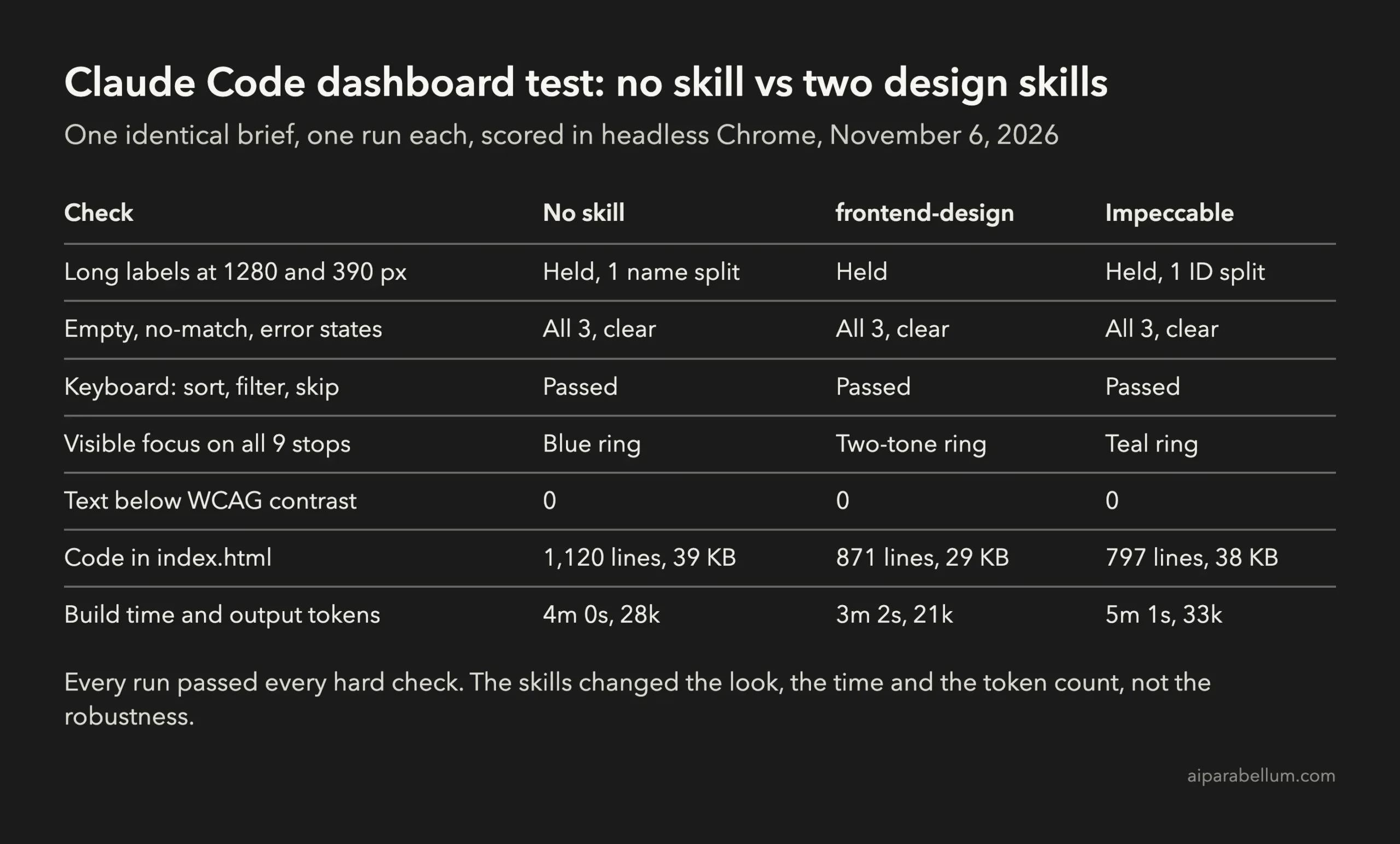
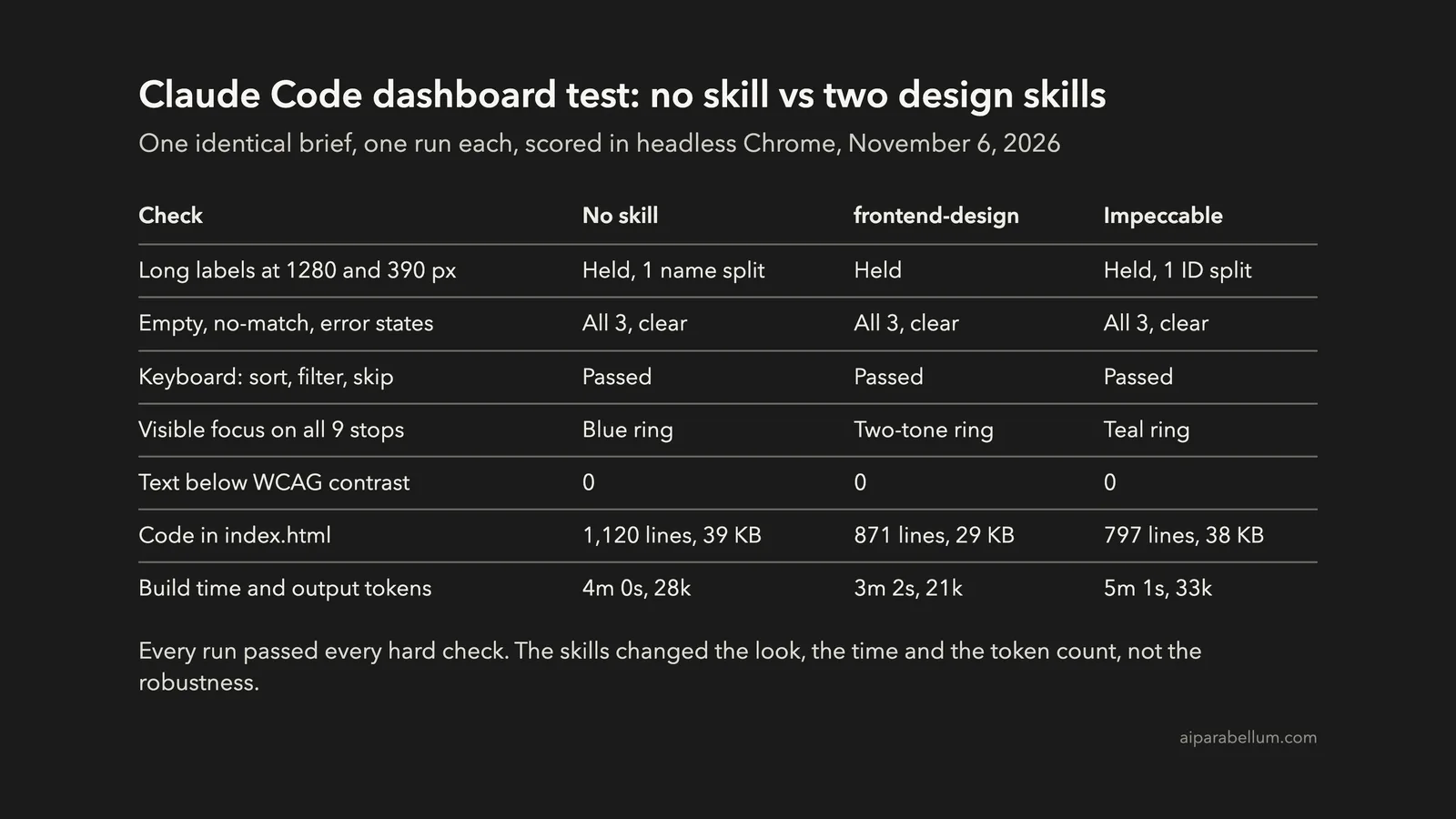
Key takeaway: On a clear, detailed brief, plain Claude Code already handled long labels, empty and error states, keyboard use and contrast. The skills changed the look and the cost, not whether the dashboard worked.
This test is part of our Claude Code tutorials. You can find both skills, and hundreds more, in our Claude Code Skills Directory.
Tested with Claude Code v2.1.318 and Opus 5.5 on November 6, 2026. Versions tested: frontend-design from the anthropics/skills repository at commit ca45fc4 (October 28, 2026) and Impeccable 4.8.0 at commit c3bb418 (November 5, 2026).
The Three Claude Code Setups We Compared
A skill is a folder with a SKILL.md file that Claude Code can load when a task matches its description. If skills are new to you, start with our guide to Claude Code skills or the official skills documentation.
| Setup | What it is | What we installed |
|---|---|---|
| No skill | Plain Claude Code, our baseline | Nothing |
| frontend-design | Anthropic’s official design skill | One SKILL.md file, about 1,500 words |
| Impeccable | Community design skill with over 100,000 GitHub stars | SKILL.md plus its 42 reference files |
The frontend-design skill is mostly about visual direction. Its quality floor still lists “visible keyboard focus, reduced motion respected” among the basics.
The Impeccable repository ships a whole design toolkit with commands such as audit, polish and harden. For dashboards it uses an “Operate” mode, where “scanability, consistency, native expectations, and the real usage scene outrank expression.”
We left out the Taste skill on purpose, since it already has its own post: our Taste skill test. If you want the landing-page view of these skills, see our UI design skills comparison.
The Dashboard Brief: Identical in All Three Runs
We sent the exact same prompt, byte for byte, in every run. Only the skill folder inside the project changed.
Build an admin dashboard for a small online store's orders. Put everything in one file, index.html, with inline CSS and JavaScript. Load the orders from the existing data.js file with a script tag (it sets window.ORDERS). Make no network requests: no CDNs, no web fonts, no remote images.

The dashboard needs:
1. A header with the store name, Hearth and Table, and four summary figures computed from the data: total revenue, number of orders, average order value and refund rate.
2. An orders table with the columns order ID, customer, product, status, amount and date. Every column can be sorted. Above the table, a status filter (All, Paid, Pending, Shipped, Refunded) and a text search over customer and product.
3. Some customer names, product names and order IDs are very long, and some amounts run into the millions. The layout must stay intact at 1280 px and at 390 px wide.
4. An empty state: when no orders match the filters, and when the page is opened with ?state=empty (treat the data as empty). Explain what happened and offer a way forward.
5. An error state: when the page is opened with ?state=error, behave as if loading the orders failed. Show a clear message and a Retry button.
6. Full keyboard use: a logical tab order, a clearly visible focus indicator on every interactive element, sorting that works from the keyboard, a usable filter and search, and a skip link to the orders table.

Do not ask me questions. Make sensible choices and finish the file.
The data.js file held 36 made-up orders. We planted the hard cases on purpose, including a 78-character company name, a 32-character order ID like ORD-2026-0000000010243-WHOLESALE and an amount of $12,849,302.75.
How We Ran and Scored the Claude Code Test
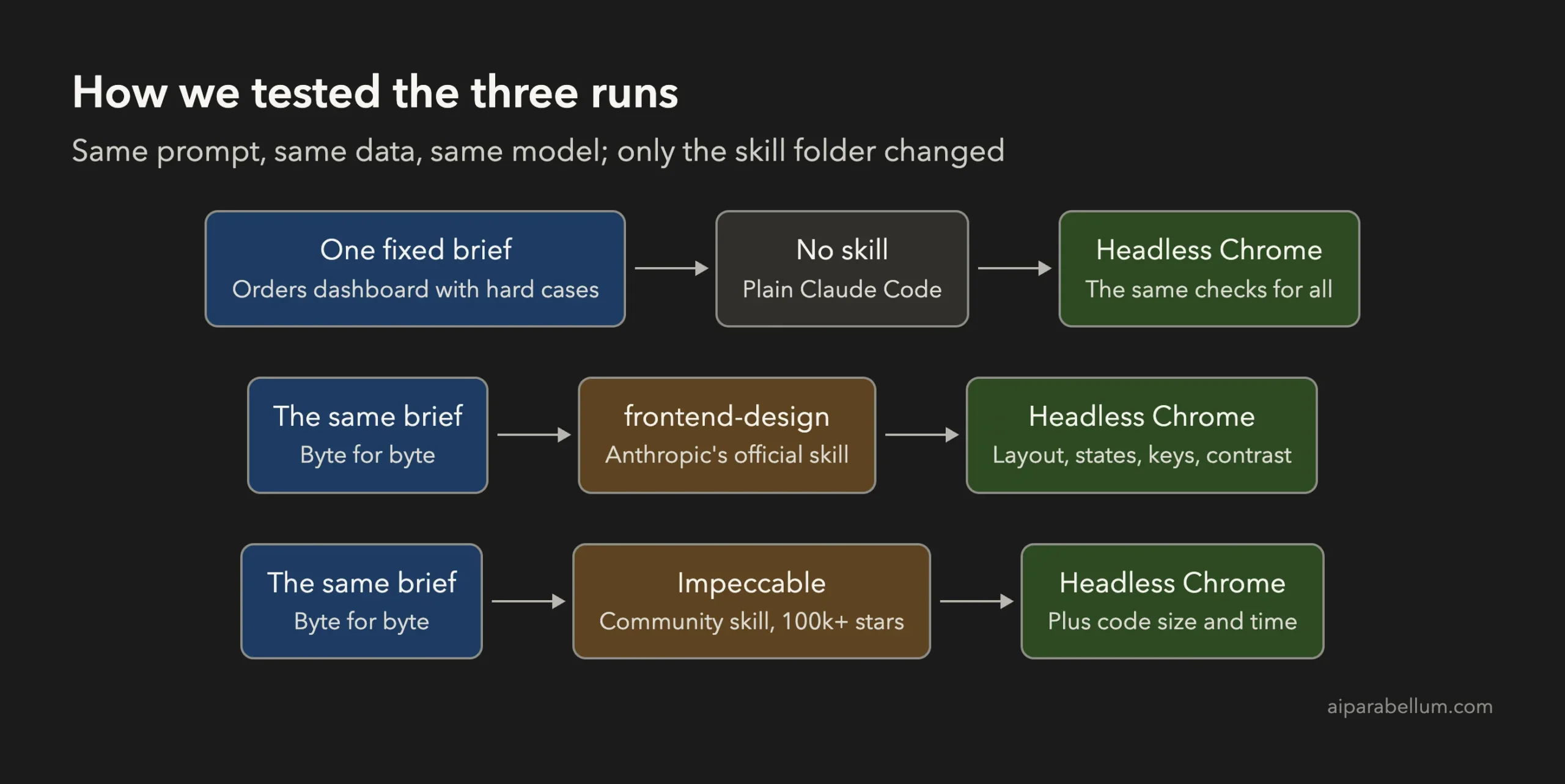
Each run happened in its own throwaway folder, one at a time, never in parallel. We started Claude Code with --setting-sources project and --strict-mcp-config, so no personal settings, hooks or MCP servers came along.
Each skill went into the project’s .claude/skills folder. For Impeccable we copied its SKILL.md and reference files but not its scripts or hooks, because its launcher downloads a program on first run.
Claude could read, write and edit files, and load skills. We blocked Bash, web search and web fetch for every run, so no run could open a browser, install anything or reach the network beyond the model itself.
One finding came before the real test. On our first try, the no-skill run quietly loaded one of Claude Code’s built-in skills, dataviz, so it wasn’t a true baseline.
We threw that try away. For the real runs we blocked the built-in design skills with deny rules such as Skill(dataviz) and Skill(design), in all three runs alike, and checked each transcript to confirm which skill actually loaded.
Then we opened every finished index.html in headless Chrome and ran the same script on each one. It checked these things:
- Layout at 1280 and 390 pixels wide: horizontal overflow, text spilling out of its box, and a look at the hardest row.
- States: the
?state=emptypage, a search with no matches, and the?state=errorpage with its Retry button. - Keyboard: Tab through the whole page, then sort with Enter and Space, filter with arrow keys and use the skip link.
- Focus: a screenshot of every Tab stop with and without focus, compared pixel by pixel.
- Contrast: the WCAG ratio of every piece of visible text against its real background.
- Code: lines and size of the file, build time and output tokens.
What Each Run Built
All three runs read the brief the same way. Each one counted revenue from paid and shipped orders only, and all three showed the same total, $13,840,955.43.
All three also ended with an honest note that they hadn’t opened the page in a browser. That matched our setup, since no run had a browser.
No Skill (Baseline)
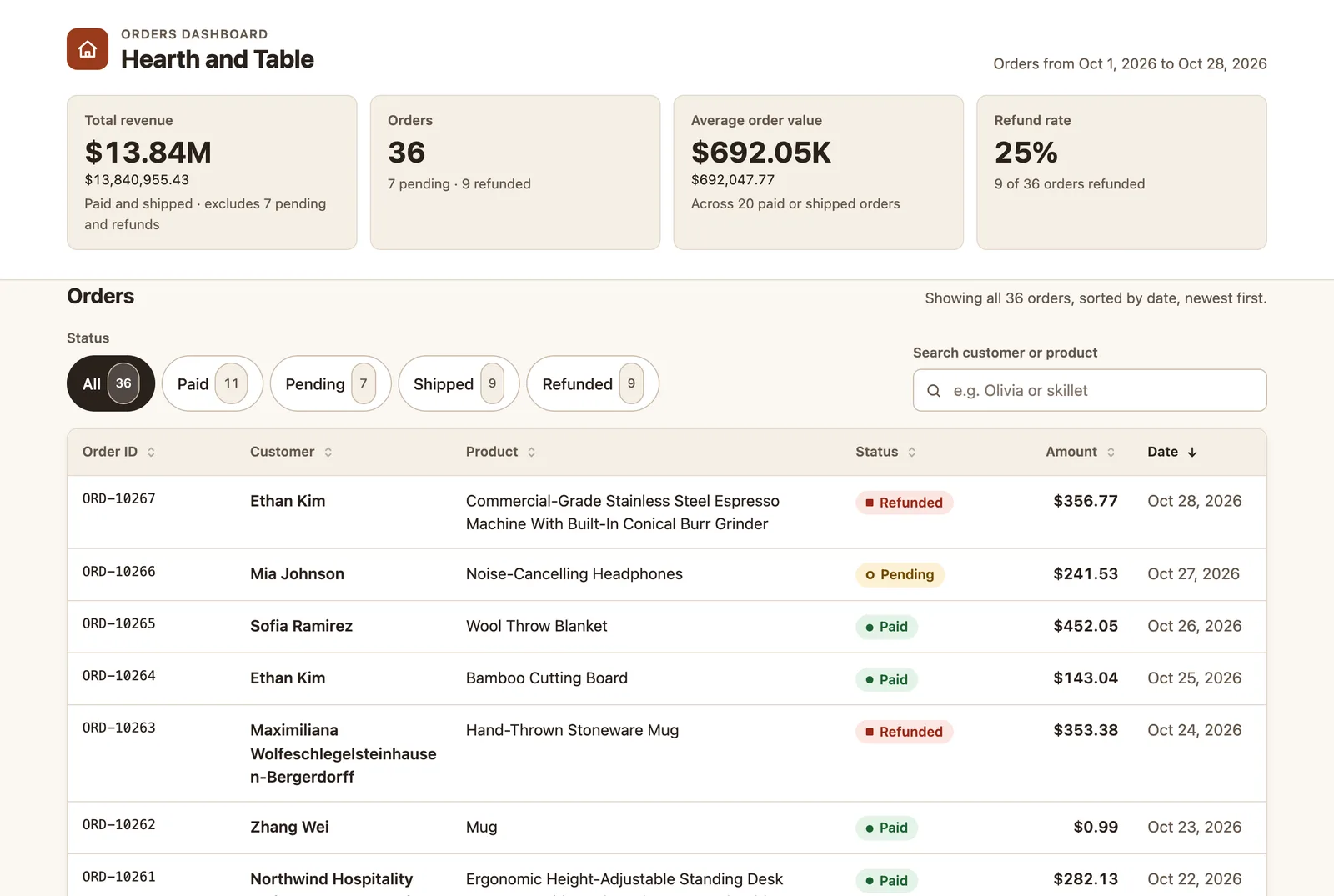
Plain Claude Code built a tidy, friendly dashboard with summary cards and pill-shaped status filters. It took 4 minutes and wrote the largest file, 1,120 lines.
It also had the richest page structure, with headings for the summary, the table and each state. Its one visual slip was a long surname broken mid-word, “Wolfeschlegelsteinhause” on one line and “n-Bergerdorff” on the next.
Frontend-Design Skill
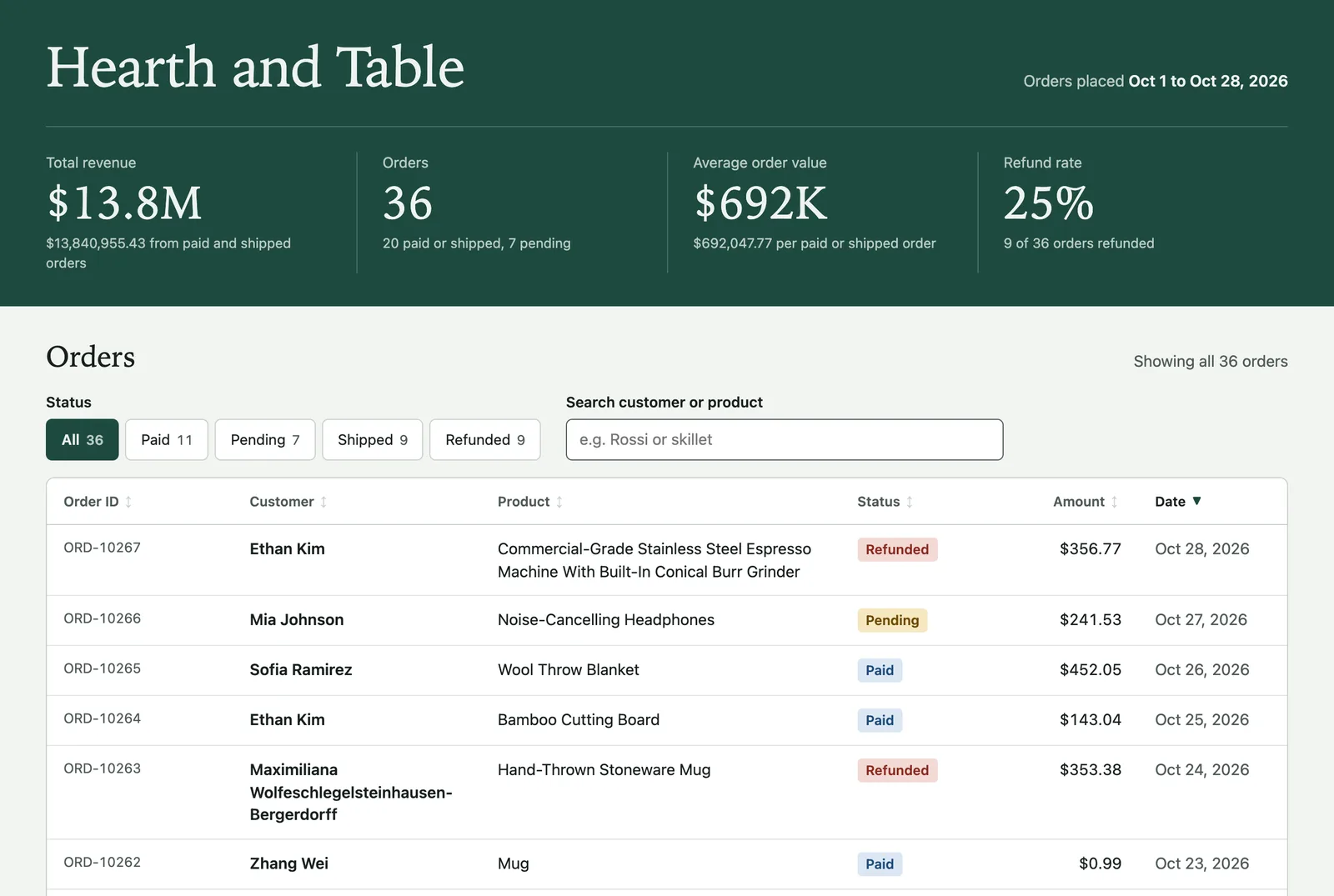
The frontend-design run had the most distinct look, with a deep green header and serif headings. It was also the fastest and leanest run: 3 minutes, 871 lines and 29 KB.
Long text broke only at hyphens and spaces. Its summary figures used short forms like $13.8M, with the exact amount on the line below.
Impeccable Skill
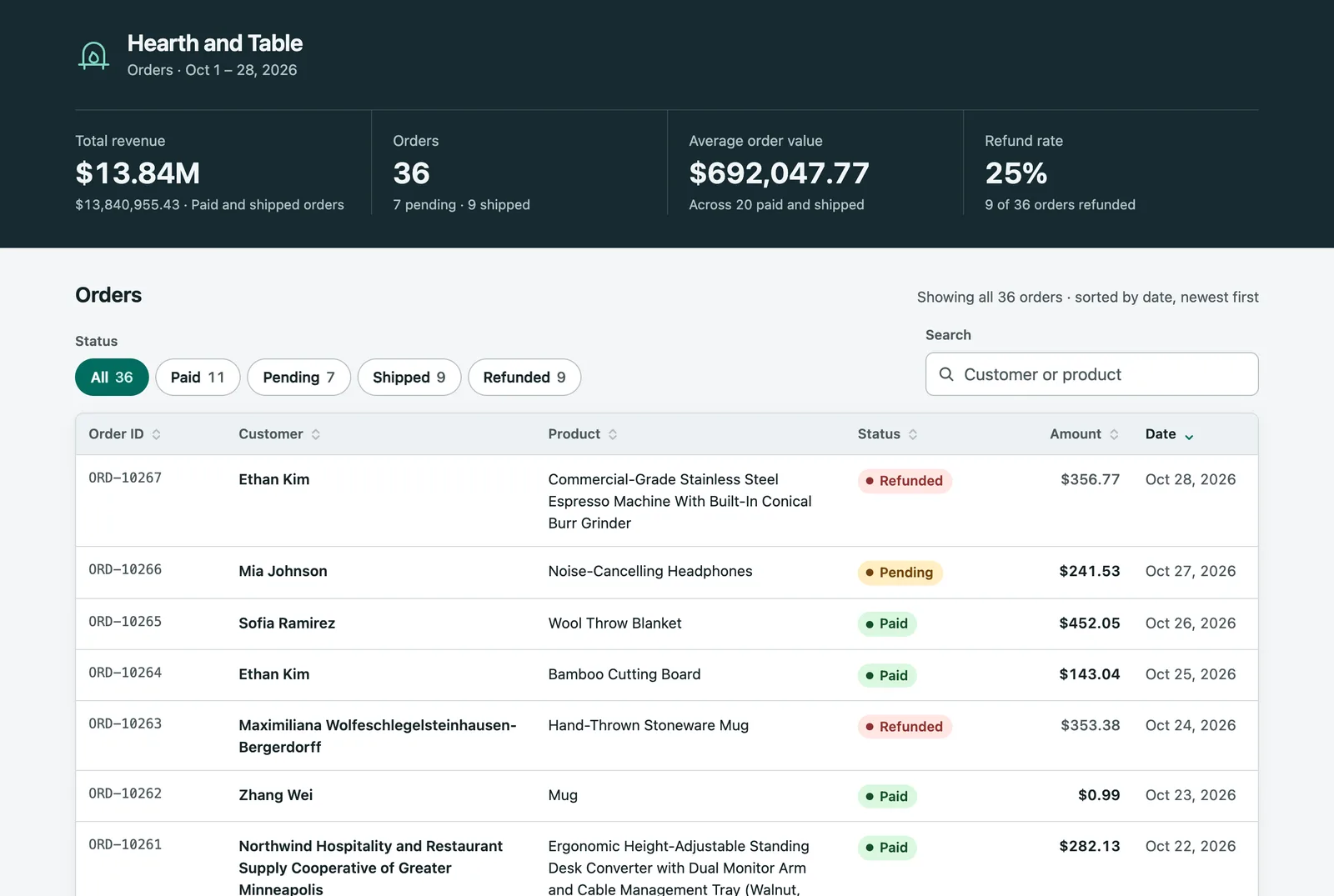
Impeccable built a calm, businesslike dashboard with a dark slate header and teal accents. Since its launcher wasn’t installed, it followed its own written fallback and read its reference files directly.
It was the slowest run at 5 minutes and used the most output tokens, about 33,000. It wrote the fewest lines, 797, though at 38 KB the file was nearly as large as the baseline.
Long Labels and Long Numbers
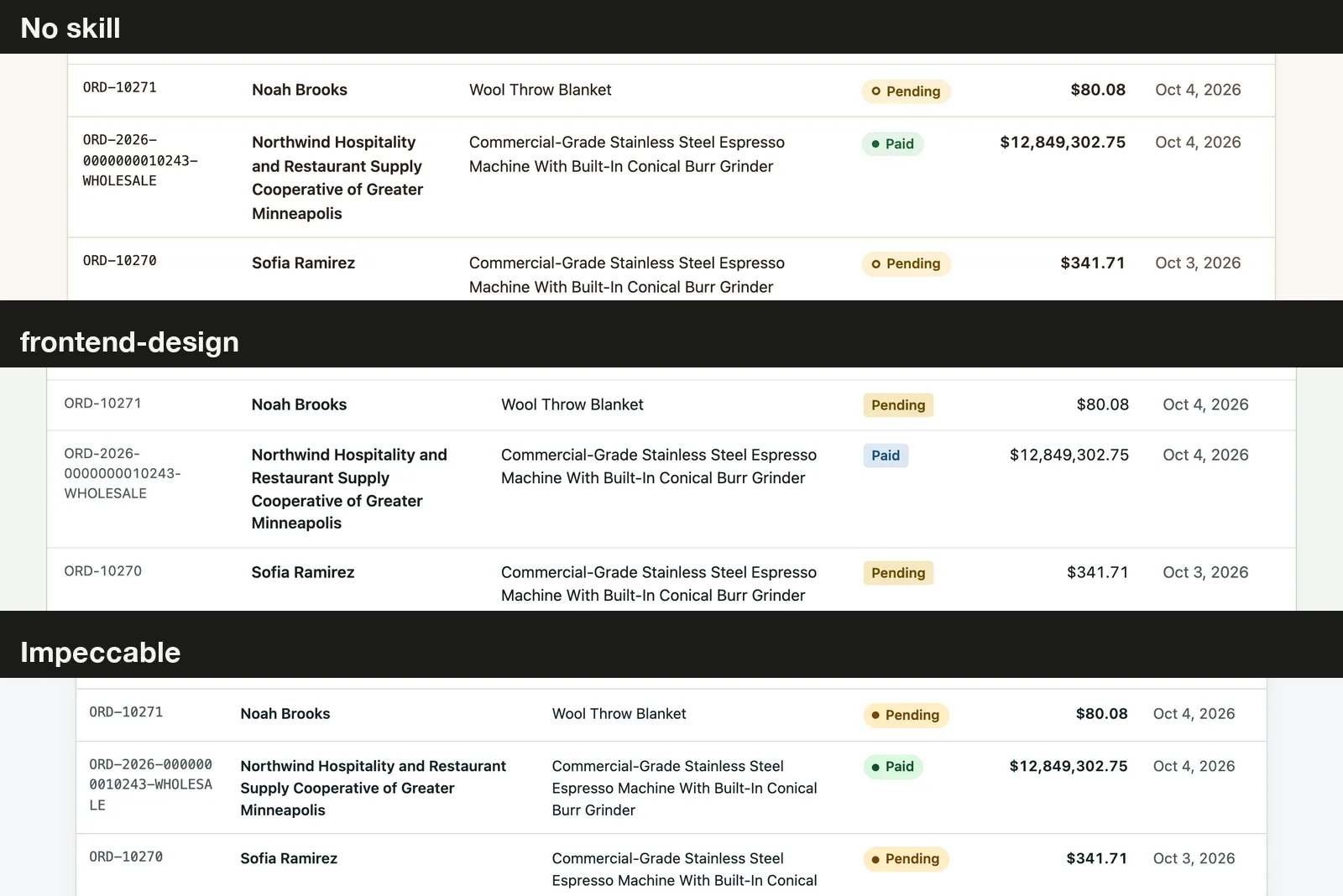
No run had horizontal page overflow at 1280 or 390 pixels, and no text spilled out of its box. The $12,849,302.75 amount fit on one line in all three.
The small differences were in where words broke. The baseline and frontend-design runs broke the long order ID at its hyphens, while Impeccable cut it mid-word into “WHOLESA” and “LE”.
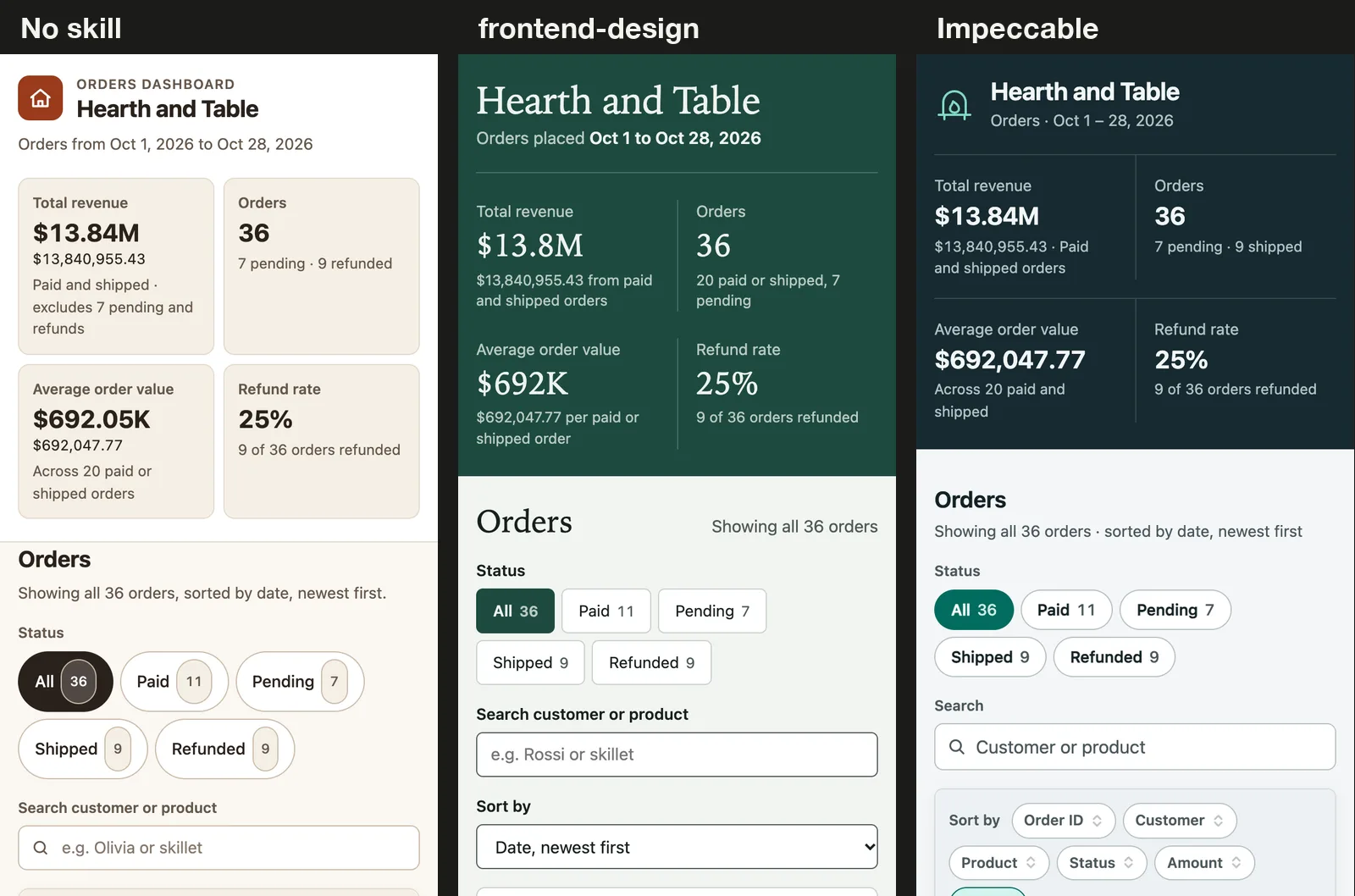
On a phone-sized screen, all three stacked the summary figures in two columns and turned each order into a card. Because the column headers disappear on cards, each added its own sort controls: frontend-design used a dropdown, the other two used buttons.
Empty and Error States
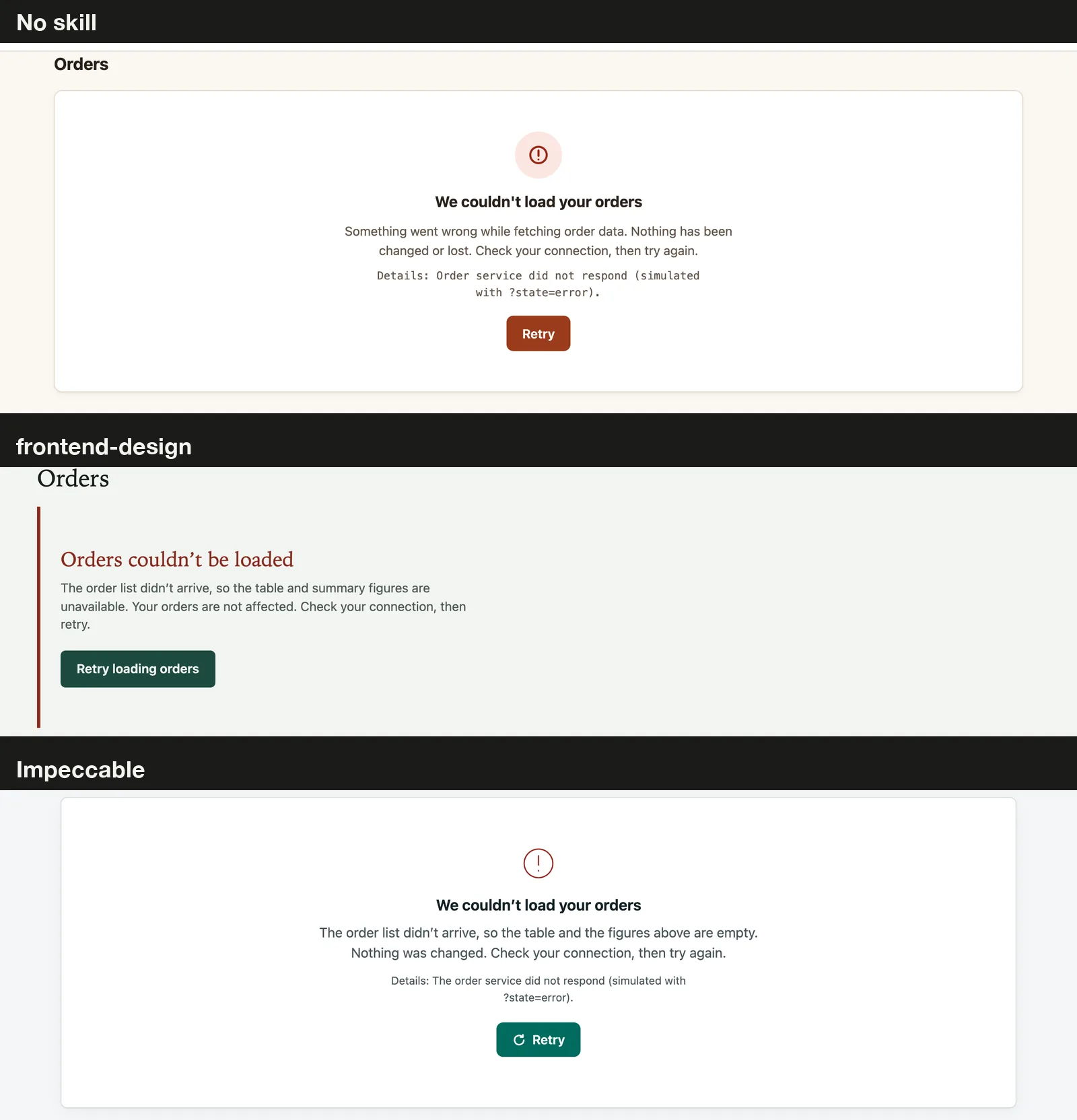
Every run had a real error state with a plain message, a reassurance that nothing was lost and a working Retry button. All three also replaced the summary figures with “Unavailable” instead of showing zeros.
The baseline and Impeccable both printed a developer detail line, “simulated with ?state=error”, inside the message. That’s harmless here but would need removing before real use, and the frontend-design version had no such leftover.
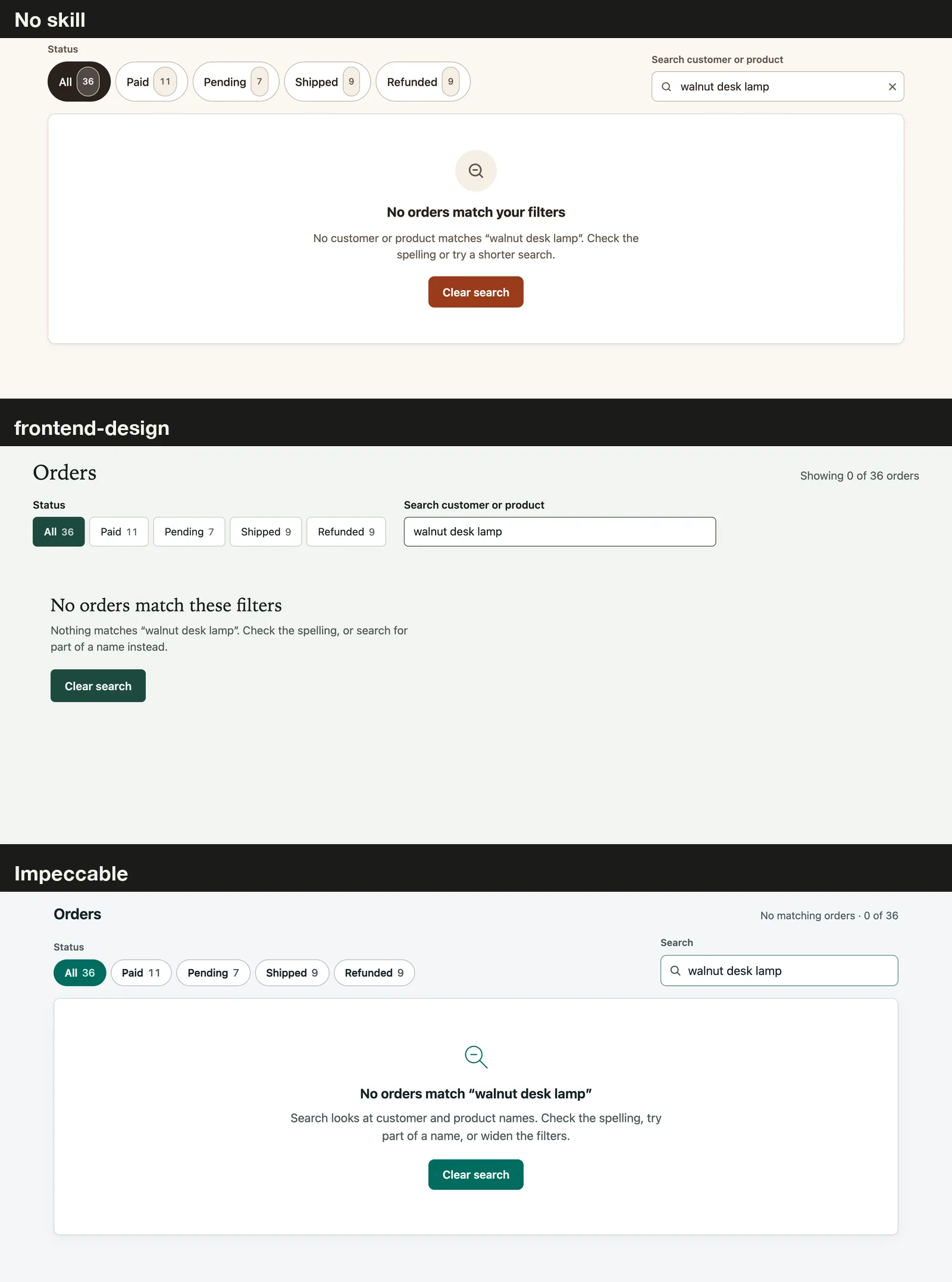
Each one also handled the empty data and the no-match search with a clear headline and a next step, such as “Clear search” or “Check for new orders”. Impeccable went one step further and disabled the filters when there was no data at all.
Those disabled filters were the only text our contrast check flagged in any run. WCAG doesn’t require contrast for disabled controls, so we didn’t count them as failures.
Keyboard Navigation and Focus
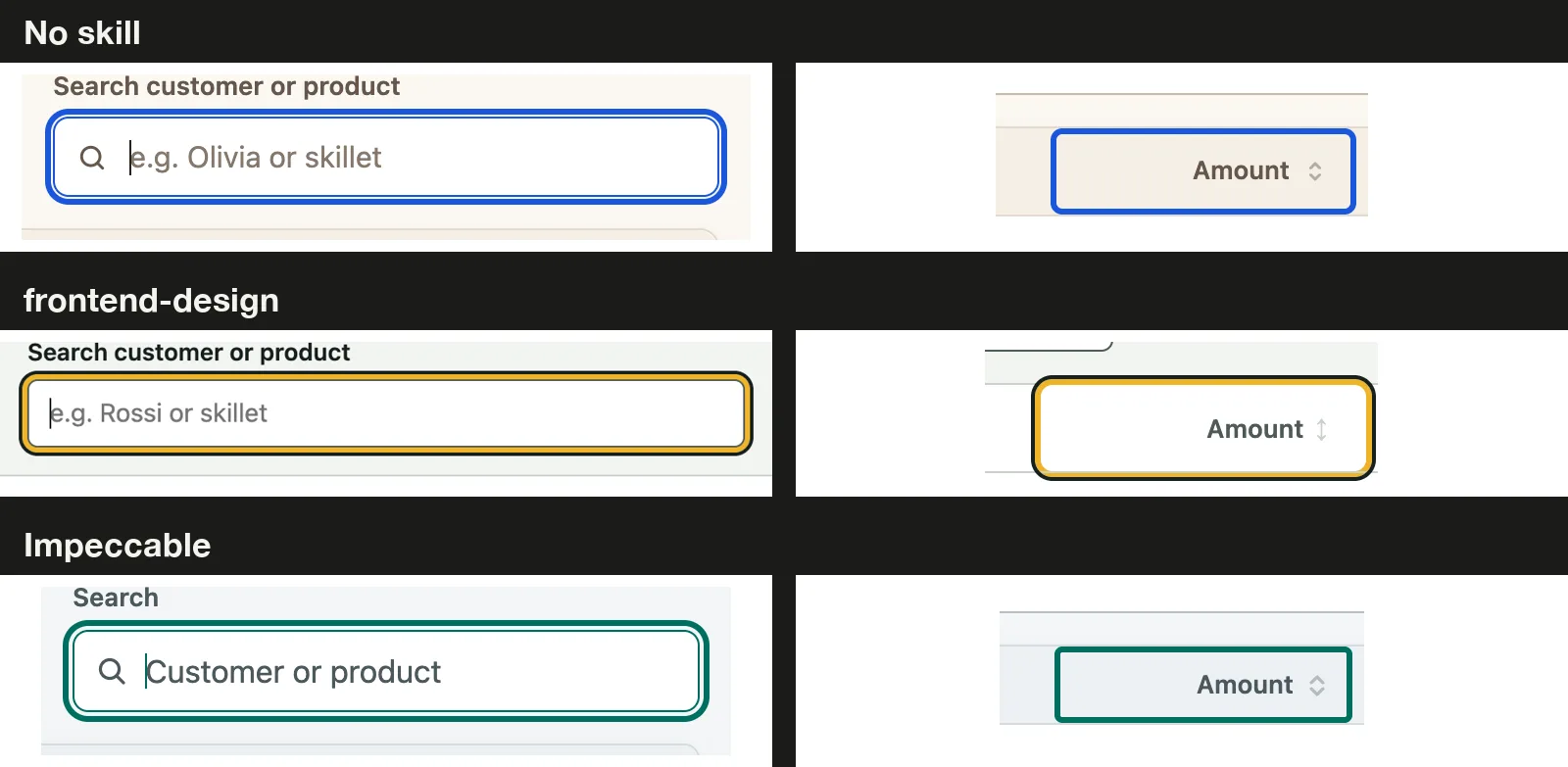
All three pages had the same nine Tab stops in a sensible order: skip link, status filter, search and six sortable column headers. Each built the status filter as a radio group, so arrow keys move between statuses, which is the standard pattern.
In every run, Enter and Space both sorted the Amount column, the header’s aria-sort value updated, and the arrow keys filtered the table to 9 refunded orders. The skip link moved focus to the orders area each time.
Focus was visible on all nine stops in every run. The baseline used a blue ring and Impeccable a teal one, both above 5:1 against the page, while frontend-design used a two-tone ring with a dark edge inside an amber band.
| Keyboard check | No skill | frontend-design | Impeccable |
|---|---|---|---|
| Skip link first | Yes | Yes | Yes |
| Sort with Enter and Space | Yes | Yes | Yes |
| Filter with arrow keys | Yes | Yes | Yes |
| Visible focus, 9 of 9 stops | Yes | Yes | Yes |
| Live result count for screen readers | Yes | Yes | Yes |
Contrast and Code Size
Our script checked about 250 pieces of visible text per page in the default view, plus the empty, no-match and error views. Not one active label in any run fell below the WCAG AA ratio of 4.5:1, or 3:1 for large text.
| Measure | No skill | frontend-design | Impeccable |
|---|---|---|---|
Lines in index.html | 1,120 | 871 | 797 |
| File size | 39 KB | 29 KB | 38 KB |
| Build time | 4 min 0 s | 3 min 2 s | 5 min 1 s |
| Output tokens | 28,025 | 20,763 | 33,494 |
| Network requests from the page | 0 | 0 | 0 |
Token counts matter if you’re on a plan with usage limits. Here the official skill was the cheapest run, and Impeccable cost about 60 percent more output tokens than frontend-design for a result that passed the same checks.
Which Claude Code Design Skill Should You Use?
Our honest verdict is a near tie on quality, with plain Claude Code holding its own. The detailed brief did most of the work, since it listed every state and keyboard rule we later tested.
| If you | Our advice |
|---|---|
| Write detailed briefs like ours | You may not need a design skill for robustness |
| Want a more distinct look for less time | Try frontend-design; it was the fastest and leanest here |
| Want a full design toolkit with audit and polish commands | Try Impeccable, and expect longer runs |
| Write short, vague UI prompts | Our test can’t tell you; a skill may help more there |
If you add any design skill, read our tips on skills that trigger reliably. For a deeper look at each one alone, see our frontend-design before and after and our Impeccable install test.
What This Test Doesn’t Prove
- One run per setup can show differences, but it can’t separate a skill’s effect from normal run-to-run variation.
- Our brief spelled out every requirement. A short prompt like “build me an orders dashboard” could give very different results.
- No run could open a browser, so none could check its own work the way the skills suggest.
- Impeccable’s launcher and hooks didn’t run, so this tests its written guidance, not its full toolkit.
- Our checks are automated plus a visual review, not a full screen reader audit.
Claude Code Design Skills FAQs
Is the frontend-design skill free?
Yes. It’s one of Anthropic’s public skills, and you can copy its folder into your project’s .claude/skills folder or install it from the official plugin marketplace.
Do I need a design skill for accessible dashboards?
Not in our test. When the prompt asked for keyboard use, visible focus and clear states, plain Claude Code delivered all of them.
Why did the no-skill run load a skill on its own?
Claude Code ships some built-in skills, and our build includes one for data visualization. To compare against a true baseline, block them with a deny rule like Skill(dataviz) and check the transcript.
Which skill was fastest in our test?
frontend-design, at about 3 minutes and 21,000 output tokens. Impeccable took about 5 minutes and 33,000 tokens.
Conclusion
We gave Claude Code the same hard dashboard brief three times, with no skill, with Anthropic’s frontend-design skill and with Impeccable, and scored each result in headless Chrome. All three survived long labels and big numbers at desktop and phone widths, had clear empty and error states, worked fully from the keyboard with visible focus, and had no contrast failures. The skills mostly changed the look and the cost: frontend-design was the fastest, leanest and most distinctive, Impeccable was the slowest, and plain Claude Code was perfectly fine when the brief was this clear.
Test Log
We add a new dated entry here when we rerun this test.
- November 6, 2026: First run. Claude Code v2.1.318 with Opus 5.5, frontend-design at commit
ca45fc4and Impeccable 4.8.0 at commitc3bb418. Task: the orders dashboard brief above, one run per setup, one at a time. No hooks or MCP servers; Bash, web search and web fetch were blocked, so no run had network access beyond the model. Built-in design skills were blocked in all three runs after the first try loaded one.